
Android AlertDialog圆角背景不生效的问题
一行解决:
window?.setBackgroundDrawableResource(android.R.color.transparent)原文件:
/*** Created by Xinghai.Zhao* 自定义选择弹框*/
@SuppressLint("InflateParams", "MissingInflatedId")
class CustomDialog(context: Context?) : AlertDialog(context){var mCallBack: ClickCallBack? = nullvar mTextViewTitle: TextView? = nullvar mTextViewContent: TextView? = nullvar mEditText:EditText? = nullvar mEditTextMax:TextView? = nullvar mEditLayout: View? = nullvar mTextViewYes: TextView? = nullvar mTextViewNo: TextView? = nullvar mLine: View? = nullvar isEdit:Boolean = falseconstructor(context: Context?, title: String?, content: String?, callBack: ClickCallBack, isEditType:Boolean) : this(context) {mCallBack = callBackisEdit = isEditTypemTextViewTitle?.text = title?:""mTextViewContent?.text = content?:""if (isEdit){mEditLayout?.visibility = View.VISIBLE}else{mEditLayout?.visibility = View.GONE}}init {val inflate = LayoutInflater.from(context).inflate(R.layout.dialog_custom, null)setView(inflate)window?.setBackgroundDrawableResource(android.R.color.transparent)//设置点击别的区域不关闭页面setCancelable(false)mTextViewTitle = inflate.findViewById(R.id.dialog_custom_title)mTextViewContent = inflate.findViewById(R.id.dialog_custom_content)mEditText = inflate.findViewById(R.id.dialog_custom_edit)mEditTextMax = inflate.findViewById(R.id.dialog_custom_edit_max)mEditLayout = inflate.findViewById(R.id.dialog_custom_edit_layout)mTextViewYes = inflate.findViewById(R.id.dialog_custom_yes)mTextViewYes?.setOnClickListener{mCallBack?.onYesClick(this)}mTextViewNo = inflate.findViewById(R.id.dialog_custom_no)mTextViewNo?.setOnClickListener{dismiss()}mLine = inflate.findViewById(R.id.dialog_custom_line)}interface ClickCallBack {fun onYesClick(dialog: CustomDialog)}
}
layout:
<?xml version="1.0" encoding="utf-8"?>
<LinearLayout xmlns:android="http://schemas.android.com/apk/res/android"android:layout_width="match_parent"android:layout_height="wrap_content"android:background="@drawable/bg_set"android:orientation="vertical"><TextViewandroid:id="@+id/dialog_custom_title"android:layout_width="match_parent"android:layout_height="wrap_content"android:gravity="center"android:padding="20dp"android:textColor="@color/black"android:textSize="18sp"android:textStyle="bold" /><TextViewandroid:id="@+id/dialog_custom_content"android:layout_width="match_parent"android:layout_height="wrap_content"android:gravity="center"android:padding="30dp"android:textColor="@color/black"android:textSize="14sp" /><LinearLayoutandroid:id="@+id/dialog_custom_edit_layout"android:layout_width="match_parent"android:layout_height="wrap_content"android:orientation="horizontal"android:paddingBottom="20dp"android:visibility="gone"><EditTextandroid:id="@+id/dialog_custom_edit"android:layout_width="0dp"android:layout_height="wrap_content"android:layout_marginStart="10dp"android:layout_weight="1"android:maxLength="10"android:maxLines="1"android:padding="10dp"android:textColor="@color/black"android:textSize="14sp" /><TextViewandroid:id="@+id/dialog_custom_edit_max"android:layout_width="wrap_content"android:layout_height="wrap_content"android:layout_marginEnd="10dp"android:padding="10dp"android:textColor="@color/grey"android:textSize="12sp" /></LinearLayout><TextViewandroid:layout_width="match_parent"android:layout_height="1dp"android:background="@color/grey2" /><LinearLayoutandroid:layout_width="match_parent"android:layout_height="wrap_content"android:orientation="horizontal"><TextViewandroid:id="@+id/dialog_custom_no"android:layout_width="0dp"android:layout_height="wrap_content"android:layout_weight="1"android:gravity="center"android:padding="10dp"android:text="取消"android:textColor="@color/black"android:textSize="16sp" /><TextViewandroid:id="@+id/dialog_custom_line"android:layout_width="1dp"android:layout_height="match_parent"android:background="@color/grey2" /><TextViewandroid:id="@+id/dialog_custom_yes"android:layout_width="0dp"android:layout_height="wrap_content"android:layout_weight="1"android:gravity="center"android:padding="10dp"android:text="确定"android:textColor="@color/blue"android:textSize="16sp" /></LinearLayout>
</LinearLayout>
bg_set.xml:
<shape xmlns:android="http://schemas.android.com/apk/res/android"android:shape="rectangle"><corners android:radius="14dp" /> <!-- 圆角半径为10dp --><solid android:color="@color/white" /> <!-- 设置黑色背景并且70%不透明度 -->
</shape>
相关文章:

Android AlertDialog圆角背景不生效的问题
一行解决: window?.setBackgroundDrawableResource(android.R.color.transparent) 原文件: /*** Created by Xinghai.Zhao* 自定义选择弹框*/ SuppressLint("InflateParams", "MissingInflatedId") class CustomDialog(context: Context?) : AlertDia…...

探讨基于AI技术的相亲交友系统设计与实现
摘要 随着人工智能技术的发展,相亲交友领域也开始引入AI技术来改善用户体验,提高匹配成功率。本文探讨了如何利用AI技术设计并实现一个智能化的相亲交友系统,该系统能够根据用户的行为数据和个人偏好,自动推荐合适的潜在伴侣。通…...
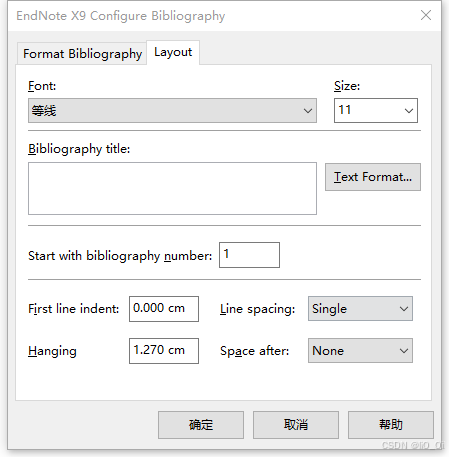
(2024.9.20)Endnote插入的参考文献字号太大怎么办?
1、序言 常常写论文的人都知道,插入参考文献时,格式调整到让人头大。Endnote的使用大大方便了我们的同时,也意味着我们要学习软件的使用方法。最近重新安装了一下Endnote,插入的文献字体大小就像抽风了一样。在还没有写完文章之前…...

DataGrip在Windows和MacOS平台上的快捷键
0. 背景信息 No.说明1测试DataGrip版本号 : 2024.2.2 1. Windows下快捷键 2. MacOS下快捷键...

CSS---序号使用css设置,counter-reset、counter-increment、content配合实现备注文案的序号展示
直接上代码,全代码copy即可使用! <template><div class"reminder"><span class"Bold_12_body" style"line-height: 8vw">温馨提示:</span><br /><div class"rule-container"…...

Liquor 表达式引擎基本使用
引入依赖 <dependency><groupId>org.noear</groupId><artifactId>liquor-eval</artifactId><version>1.2.7</version> </dependency>liquor 表达式引擎(ExpressionEvaluator)支持 java 所有的类型、及…...

AI美女屠版小红书火了,被当真人推流,颜值博主慌了
最近,微信群里有一条炸裂的聊天记录,传得沸沸扬扬。 聊天记录原主声称,自己通过flux文生图模型跑出AI美女照片,发在小红书上不仅没有被平台标为AI,还成功获得流量扶持。 随后,原主就附上了自己养的1327个小…...

本地搭建我的世界服务器(JAVA)简单记录
网上参考教程挺多的,踩了不少坑,简单记录一下,我做的是一个私人服务器,就是和朋友3、4个人玩。 笨蛋 MC 开服教程 先放一个比较系统和完整的教程,萌新可用,这个教程很详细,我只是记录一下自己的…...

哪个快?用300万个图斑测试ArcGIS Pro的成对叠加与经典叠加
点击下方全系列课程学习 点击学习—>ArcGIS全系列实战视频教程——9个单一课程组合系列直播回放 点击学习——>遥感影像综合处理4大遥感软件ArcGISENVIErdaseCognition 在使用ArcGIS Pro的过程中,很多朋友发现,Pro有个成对叠加工具集。很多…...

超详细!百分百安装成功pytorch,建议收藏
文章目录 一、Anaconda安装1.1下载anaconda1.2配置Anaconda环境1.3验证anaconda是否安装成功 二、查看电脑显卡三、更新显卡驱动3.1下载驱动3.2、查看显卡驱动版本 四、cuda安装4.1CUDA下载4.2CUDA环境配置4.3验证CUDA是否安装成功 五、安装pytorch4.1下载pytorch5.2验证pytorc…...
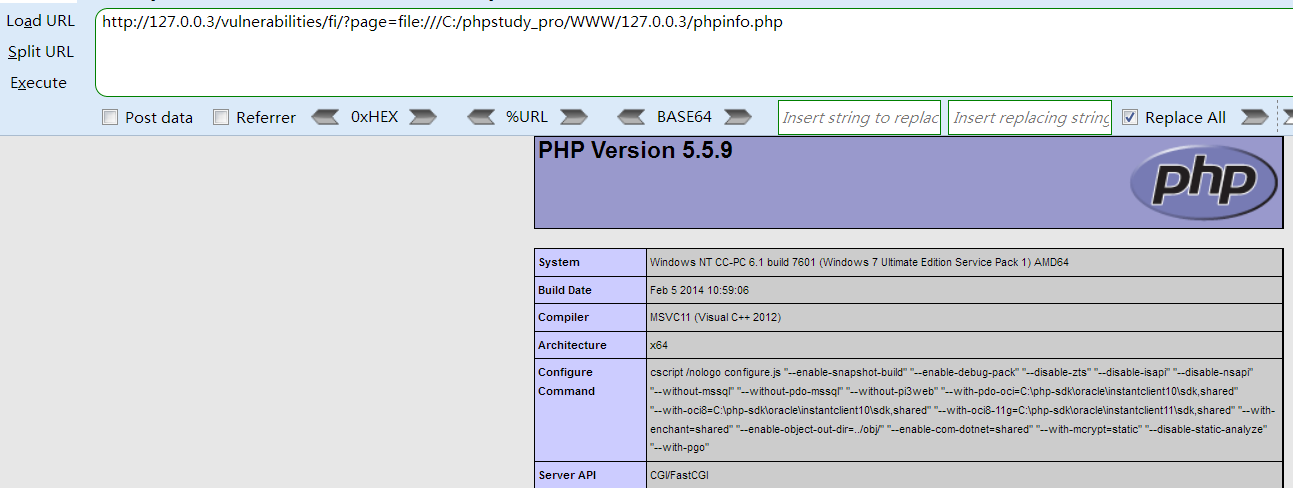
web基础—dvwa靶场(四)File Inclusion
File Inclusion(文件包含) 有些 web 应用程序允许用户指定直接文件流的输入,或允许用户将文件上载到服务器。稍后 web 应用程序访问 web 应用程序上下文中用户提供的输入。通过这样种操作,web 应用程序允许恶意文件执行。 如果选择要包含的文件是目标计…...

【Python】练习:控制语句(二)第1关
第1关:分支结构基础实训 第一题第二题第三题第四题(※)第五题(※)第六题第七题 第一题 #第一题 for temp in [-280, -100, 0, 20, 120, 200]:#请在下面编写代码# ********** Begin ********** #if temp>-273.15:F9/…...

Vue3 : Pinia的性质与作用
目录 一.性质 二.作用 三.Pinia 的核心概念 四.使用 1.count.ts 2.count.vue Vue 3 中 Pinia 是一个专为 Vue 3 设计的状态管理库,它旨在提供一种简单、直观的方式来管理应用的状态。 一.性质 1.集成性:Pinia 是 Vue 3 官方推荐的状态管理库&…...

对接金蝶云星空调用即时库存信息查询API
文章目录 前言准备工作获取第三方授权权限与授权配置信息集成金蝶云SDK调用实现备注前言 对于有自己商品信息管理后台并且使用金蝶ERP系统管理物料的商家来说,将金蝶上物料的库存信息同步到管理后台就可以不用去金蝶上确认库存了,可以大大简化管理后台的库存变更工作,这篇文…...

pretrain Llama3
导入模块:导入了一些必要的模块,包括数学计算、时间处理、文件操作、深度学习框架(如torch)、以及自定义的LLama Transformer模型相关内容。 I/O配置:定义了模型输出路径、评估与日志记录的间隔步数、批次大小、最大序…...

[附源码]SpringBoot+VUE+Java实现人脸识别系统
今天带来一款优秀的项目:java人脸识别系统源码 。 系统采用的流行的前后端分离结构,内含功能包括 “人脸数数据录入”,“人脸管理”,“摄像头识别” 如果您有任何问题,也请联系小编,小编是经验丰富的程序员…...

数据库_解决SQL Server数据库log日志过大,清理日志文件方法
SQL Server数据库日志文件过大的原因主要有几个方面: 事务日志记录了所有对数据库进行修改的操作,如插入、更新和删除,这些操作会不断增加日志文件的大小。 长时间运行且未正确结束的事务会持续占用事务日志中的空间,导致日志文…...

引领长期投资新篇章:价值增长与财务安全的双重保障
随着全球金融市场的不断演变,长期投资策略因其稳健性和对价值增长的显著推动作用而日益受到投资者的重视。在这一背景下,Zeal Digital Shares(ZDS)项目以其创新的数字股票产品,为全球投资者提供了一个全新的长期投资平…...

灾备技术演进之路 | 虚拟化无代理备份只能挂载验证和容灾吗?只能无代理恢复吗?且看科力锐升级方案
灾备技术演进之路系列 虚拟化备份技术演进 摆脱束缚,加速前行 无代理备份仅能挂载/恢复验证吗? ——科力锐极简验证演练无代理备份来了 无代理备份无法应对平台级故障吗? ——科力锐应急接管无代理备份来了 无代理备份仅能同平台挂载吗&a…...

PowerShell install 一键部署Oracle23ai
Oracle23ai前言 Oracle Database 23ai Free 让您可以充分体验 Oracle Database 的能力,世界各地的企业都依赖它来处理关键任务工作负载。 Oracle Database Free 的资源限制为 2 个 CPU(前台进程)、2 GB 的 RAM 和 12 GB 的磁盘用户数据。该软件包不仅易于使用,还可轻松下载…...

对称与负电源测试:动态直流电子负载的设计、原理与应用
1. 项目概述:对称与负电源的静态与动态直流负载在电子实验室里,测试一个电源的性能,尤其是它的动态响应能力,是件既基础又关键的事。我们常说的“直流电子负载”就是这个领域的核心工具。我之前设计并分享过一个用于正电源测试的静…...

Office RibbonX Editor:简单三步打造你的专属Office界面
Office RibbonX Editor:简单三步打造你的专属Office界面 【免费下载链接】office-ribbonx-editor An overhauled fork of the original Custom UI Editor for Microsoft Office, built with WPF 项目地址: https://gitcode.com/gh_mirrors/of/office-ribbonx-edit…...

艾尔登法环存档迁移终极指南:3分钟解决角色转移难题
艾尔登法环存档迁移终极指南:3分钟解决角色转移难题 【免费下载链接】EldenRingSaveCopier 项目地址: https://gitcode.com/gh_mirrors/el/EldenRingSaveCopier 还在为《艾尔登法环》存档版本不兼容而烦恼吗?EldenRingSaveCopier 是你的终极解决…...

特定任务需求场景下的过约束并联机构构型设计与控制方法【附代码】
✨ 长期致力于曲面加工、构型综合、运动学和动力学建模、性能评价、多目标优化、滑模控制、鲁棒控制、视觉传感技术研究工作,擅长数据搜集与处理、建模仿真、程序编写、仿真设计。 ✅ 专业定制毕设、代码 ✅ 如需沟通交流,点击《获取方式》 (…...

什么情况下会核销贷款
贷款核销的核心前提是:贷款被认定为 “损失类” 且经 “穷尽追偿” 仍无法收回,银行按监管与会计规则从账面冲销,但债权不消灭、仍可追偿。一、核心认定条件(满足其一即可)破产 / 注销 / 吊销:借款人和担保…...
)
别再只用鼠标了!用Leap Motion手势控制Unity游戏,保姆级配置避坑指南(2024版)
2024年Unity手势交互开发实战:Leap Motion从配置到游戏逻辑全解析在游戏开发领域,交互方式的创新往往能带来全新的体验。想象一下,玩家不再需要键盘鼠标,仅凭自然的手部动作就能操控游戏角色——这正是Leap Motion手势识别技术为U…...

如何通过Joy-Con Toolkit实现专业级Switch手柄控制与硬件逆向工程
如何通过Joy-Con Toolkit实现专业级Switch手柄控制与硬件逆向工程 【免费下载链接】jc_toolkit Joy-Con Toolkit 项目地址: https://gitcode.com/gh_mirrors/jc/jc_toolkit 在游戏开发、硬件调试和嵌入式系统研究中,与游戏手柄等专业输入设备进行深度交互一直…...

Cesium动态数据可视化实战:CallbackProperty结合setInterval打造实时运动轨迹
Cesium动态数据可视化实战:CallbackProperty结合setInterval打造实时运动轨迹 在三维地理信息系统中,实时数据可视化一直是开发者面临的挑战之一。想象一下,当我们需要在地球表面追踪一架正在飞行的无人机,或者监控城市中数百辆出…...

基于Meshtastic构建LoRa Mesh网络:从硬件自制到传感器集成实战
1. 项目概述:构建一个灵活且易用的LoRa Mesh网络 如果你对物联网、远程传感或者去中心化通信网络感兴趣,那么LoRa技术一定不会陌生。它以其超低功耗、超远距离和强大的抗干扰能力,成为了构建广域传感网络的理想选择。然而,传统的…...

3步搞定B站缓存视频转换:m4s转MP4的终极解决方案
3步搞定B站缓存视频转换:m4s转MP4的终极解决方案 【免费下载链接】m4s-converter 一个跨平台小工具,将bilibili缓存的m4s格式音视频文件合并成mp4 项目地址: https://gitcode.com/gh_mirrors/m4/m4s-converter 你是否曾经在B站缓存了珍贵的视频&a…...