
Android常用布局
目录
布局文件中常见的属性
1. 基本布局属性
1)android:layout_width
2)android:layout_height
3)android:layout_margin
4)android:padding
2. 线性布局 (LinearLayout) 属性
1)android:orientation
2)android:gravity
3)android:layout_weight
4)案例LinearLayout水平布局
1.代码
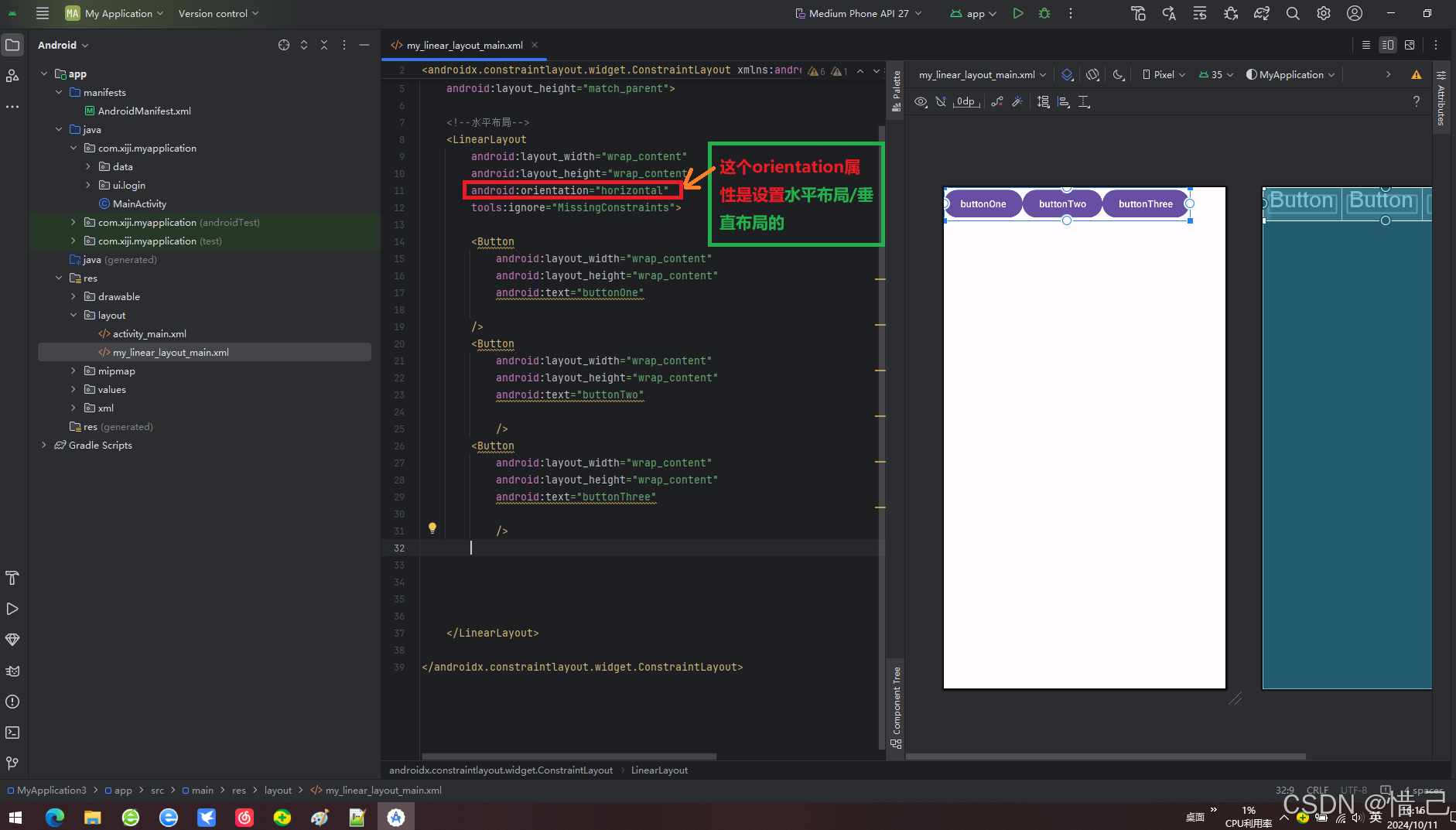
2.效果
案例:LinearLayout垂直布局
1.代码
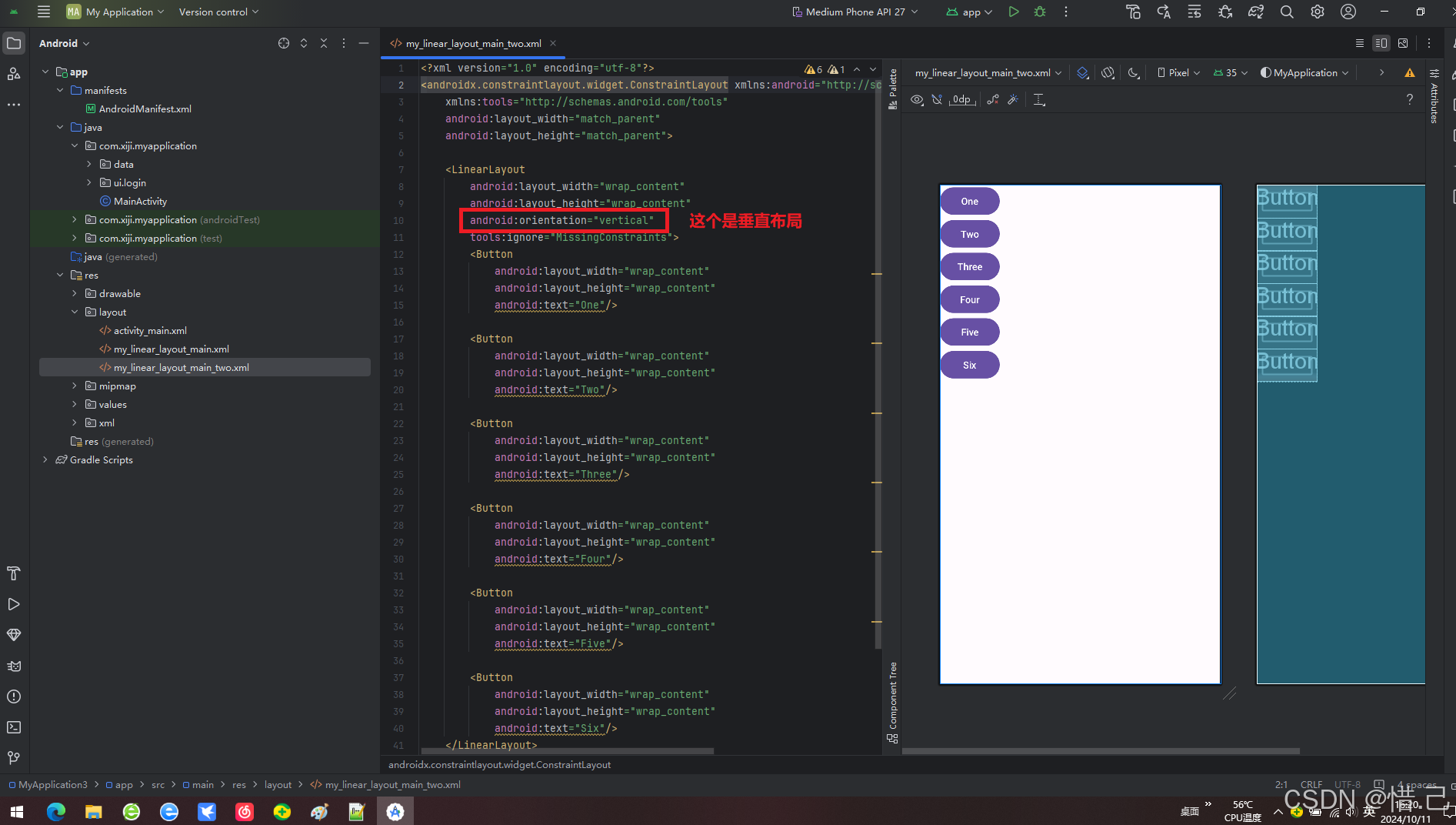
2.效果
3. 相对布局 (RelativeLayout) 属性
1)android:layout_alignParentTop/...Bottom/...Left/...Right
2)android:layout_centerInParent
3)android:layout_above/...below/...toLeftOf/...toRightOf
4)android:layout_alignWithParentIfMissing
案例:RelativeLayout相对布局的简单使用
1.代码
2.效果
4. 帧布局 (FrameLayout) 属性
1)android:foreground
2)android:layout_gravity
案例:帧布局的简单使用
1.代码
2.效果
5. 表格布局 (TableLayout) 和表格行 (TableRow) 属性
1)android:collapseColumns
2)android:stretchColumns
案例:表格布局的简单使用
1.代码
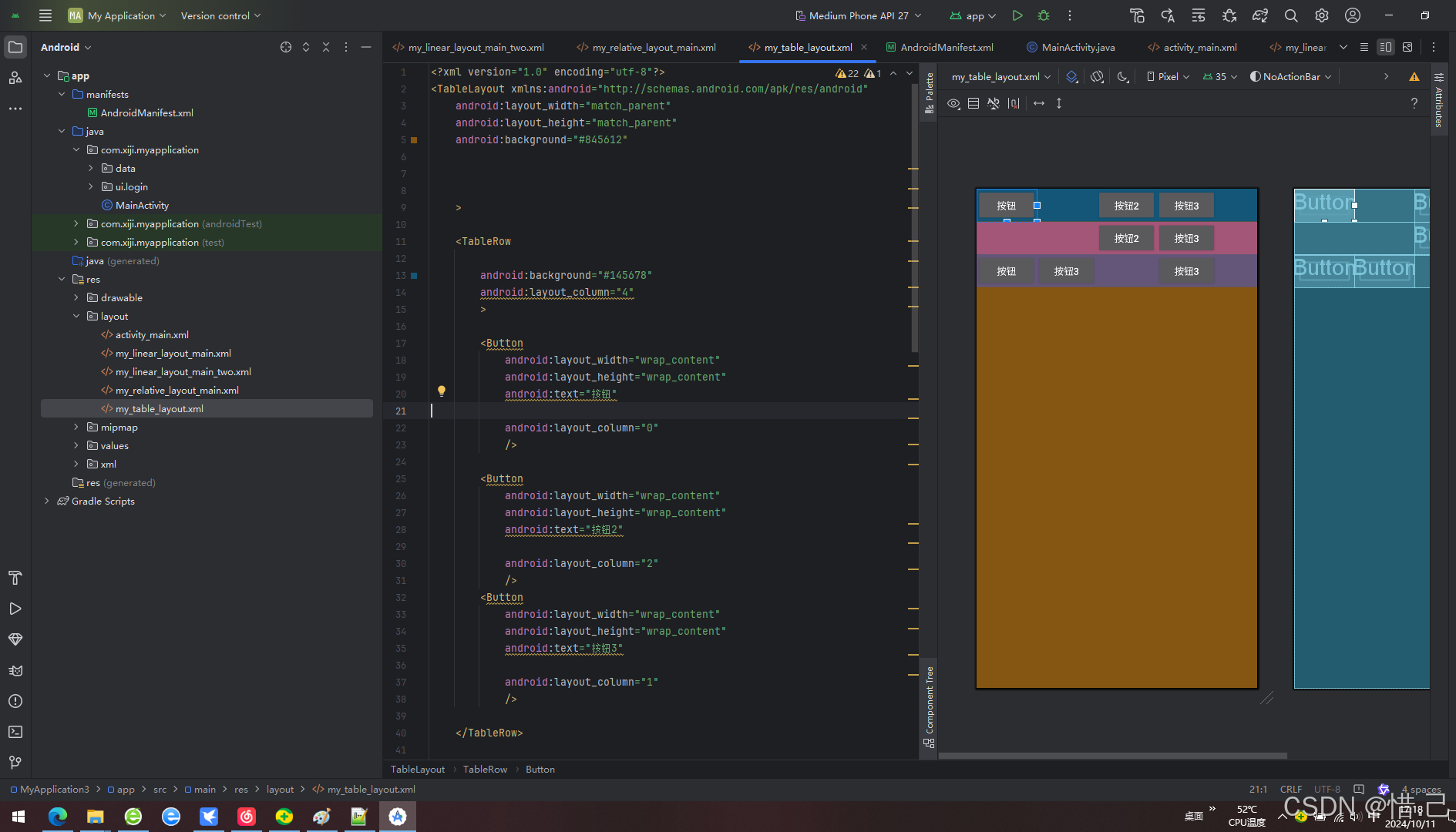
2.效果
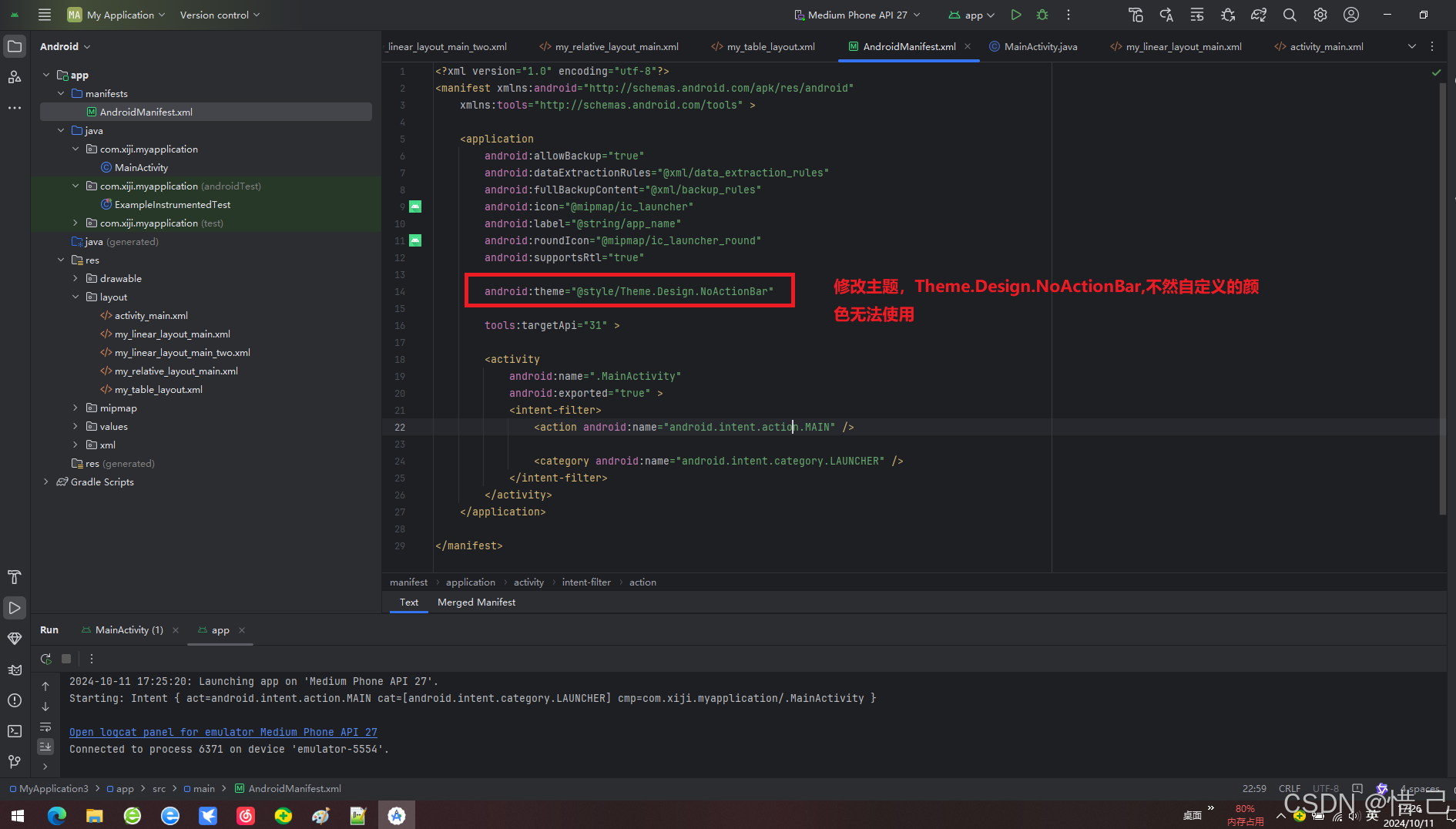
3.注意
6. 网格布局 (GridLayout) 属性
1)android:rowCount/columnCount
2)android:alignmentMode
3)android:useDefaultMargins
案例:网格布局的简单使用
1.代码
2.效果
7. 其他常用属性
1)android:background
2)android:visibility
3)android:clickable
4)android:focusable
5)android:enabled
6)android:alpha
7)android:id
布局文件中常见的属性
1. 基本布局属性
1)android:layout_width
设置视图的宽度,可以是具体数值(如 100dp)、match_parent(与父元素一样宽)或 wrap_content(根据内容自动调整宽度)。
2)android:layout_height
设置视图的高度,选项同上。
3)android:layout_margin
设置视图外边距,也可以分别设置四个方向的外边距
(android:layout_marginLeft, android:layout_marginTop, android:layout_marginRight, android:layout_marginBottom)。
4)android:padding
设置视图内边距,同样可以分别设置四个方向的内边距(android:paddingLeft, android:paddingTop, android:paddingRight, android:paddingBottom)。
2. 线性布局 (LinearLayout) 属性
1)android:orientation
设置子元素的排列方向,值为 vertical 或 horizontal。
2)android:gravity
设置内容相对于视图的对齐方式。
3)android:layout_weight
分配剩余空间给子视图的比例权重。
4)案例LinearLayout水平布局
1.代码
<?xml version="1.0" encoding="utf-8"?>
<androidx.constraintlayout.widget.ConstraintLayout xmlns:android="http://schemas.android.com/apk/res/android"xmlns:tools="http://schemas.android.com/tools"android:layout_width="match_parent"android:layout_height="match_parent"><!--水平布局--><LinearLayoutandroid:layout_width="wrap_content"android:layout_height="wrap_content"tools:ignore="MissingConstraints"><Buttonandroid:layout_width="wrap_content"android:layout_height="wrap_content"android:text="buttonOne"/><Buttonandroid:layout_width="wrap_content"android:layout_height="wrap_content"android:text="buttonTwo"/><Buttonandroid:layout_width="wrap_content"android:layout_height="wrap_content"android:text="buttonThree"/></LinearLayout></androidx.constraintlayout.widget.ConstraintLayout>
2.效果
案例:LinearLayout垂直布局
1.代码
<?xml version="1.0" encoding="utf-8"?>
<androidx.constraintlayout.widget.ConstraintLayout xmlns:android="http://schemas.android.com/apk/res/android"xmlns:tools="http://schemas.android.com/tools"android:layout_width="match_parent"android:layout_height="match_parent"><LinearLayoutandroid:layout_width="wrap_content"android:layout_height="wrap_content"android:orientation="vertical"tools:ignore="MissingConstraints"><Buttonandroid:layout_width="wrap_content"android:layout_height="wrap_content"android:text="One"/><Buttonandroid:layout_width="wrap_content"android:layout_height="wrap_content"android:text="Two"/><Buttonandroid:layout_width="wrap_content"android:layout_height="wrap_content"android:text="Three"/><Buttonandroid:layout_width="wrap_content"android:layout_height="wrap_content"android:text="Four"/><Buttonandroid:layout_width="wrap_content"android:layout_height="wrap_content"android:text="Five"/><Buttonandroid:layout_width="wrap_content"android:layout_height="wrap_content"android:text="Six"/></LinearLayout></androidx.constraintlayout.widget.ConstraintLayout>
2.效果
3. 相对布局 (RelativeLayout) 属性
1)android:layout_alignParentTop/...Bottom/...Left/...Right
将视图对齐到父容器的顶部/底部/左边/右边。
2)android:layout_centerInParent
将视图居中于父容器。
3)android:layout_above/...below/...toLeftOf/...toRightOf
相对于另一个视图定位。
4)android:layout_alignWithParentIfMissing
如果指定的兄弟视图不存在,则与父视图对齐。
案例:RelativeLayout相对布局的简单使用
1.代码
<?xml version="1.0" encoding="utf-8"?>
<RelativeLayout xmlns:android="http://schemas.android.com/apk/res/android"android:layout_width="match_parent"android:layout_height="match_parent"><!--相对布局--><!--按钮位于左上角--><Buttonandroid:layout_width="wrap_content"android:layout_height="wrap_content"android:text="lefTop" android:layout_alignParentLeft="true"/><!--按钮位于右上角--><Buttonandroid:layout_width="wrap_content"android:layout_height="wrap_content"android:text="rightTOp"android:layout_alignParentRight="true"/><!--按钮上中--><Buttonandroid:layout_width="wrap_content"android:layout_height="wrap_content"android:text="topCenter"android:layout_centerHorizontal="true"/><!--按钮左中--><Buttonandroid:layout_width="wrap_content"android:layout_height="wrap_content"android:text="leftCenter"android:layout_alignParentLeft="true"android:layout_centerVertical="true"/><!--myCenter上方--><Buttonandroid:layout_width="wrap_content"android:layout_height="wrap_content"android:layout_above="@+id/myCenter"android:layout_centerHorizontal="true"android:text="top"/><!--按钮居中--><Buttonandroid:id="@+id/myCenter"android:layout_width="wrap_content"android:layout_height="wrap_content"android:text="center"android:layout_centerInParent="true"/><!--myCenter下方--><Buttonandroid:layout_width="wrap_content"android:layout_height="wrap_content"android:layout_below="@+id/myCenter"android:layout_centerHorizontal="true"android:text="below"/><!--按钮右中--><Buttonandroid:layout_width="wrap_content"android:layout_height="wrap_content"android:text="rightCenter"android:layout_alignParentRight="true"android:layout_centerVertical="true"/><!--按钮在左下脚--><Buttonandroid:layout_width="wrap_content"android:layout_height="wrap_content"android:text="leftButtom"android:layout_alignParentBottom="true"/><!--按钮在有下角--><Buttonandroid:layout_width="wrap_content"android:layout_height="wrap_content"android:text="rightButtom"android:layout_alignParentBottom="true"android:layout_alignParentRight="true"/><!--按钮下中--><!--按钮左中--><Buttonandroid:layout_width="wrap_content"android:layout_height="wrap_content"android:text="buttomCenter"android:layout_alignParentBottom="true"android:layout_centerHorizontal="true"/>
</RelativeLayout>
2.效果

4. 帧布局 (FrameLayout) 属性
1)android:foreground
设置前景图像。
2)android:layout_gravity
设置视图在其父容器中的位置。
案例:帧布局的简单使用
1.代码
<?xml version="1.0" encoding="utf-8"?>
<LinearLayout xmlns:android="http://schemas.android.com/apk/res/android"android:layout_width="match_parent"android:layout_height="match_parent"android:gravity="center"><FrameLayoutandroid:layout_width="wrap_content"android:layout_height="wrap_content"android:layout_gravity="center"><Buttonandroid:layout_width="400dp"android:layout_height="400dp"android:background="#746232"android:layout_gravity="center"android:text="20" /><Buttonandroid:layout_width="350dp"android:layout_height="350dp"android:background="#F6EAF3"android:layout_gravity="center"android:text="20" /><Buttonandroid:layout_width="300dp"android:layout_height="300dp"android:background="#F807C4"android:layout_gravity="center"android:text="20" /><Buttonandroid:layout_width="250dp"android:layout_height="250dp"android:background="#8BB3F0"android:layout_gravity="center"android:text="20" /><Buttonandroid:layout_width="200dp"android:layout_height="200dp"android:background="#0AE649"android:layout_gravity="center"android:text="20" /><Buttonandroid:layout_width="150dp"android:layout_height="150dp"android:background="#FF9800"android:layout_gravity="center"android:text="20" /><Buttonandroid:layout_width="100dp"android:layout_height="100dp"android:background="#080CE2"android:layout_gravity="center"android:text="20" /><Buttonandroid:layout_width="50dp"android:layout_height="50dp"android:background="#E96FC6"android:layout_gravity="center"android:text="20" /><Buttonandroid:layout_width="20dp"android:layout_height="20dp"android:background="#0DD8F4"android:layout_gravity="center"android:text="20" /></FrameLayout></LinearLayout>
2.效果

5. 表格布局 (TableLayout) 和表格行 (TableRow) 属性
1)android:collapseColumns
指定要折叠的列索引。
2)android:stretchColumns
指定应伸展以填充可用空间的列索引。
案例:表格布局的简单使用
1.代码
<?xml version="1.0" encoding="utf-8"?>
<TableLayout xmlns:android="http://schemas.android.com/apk/res/android"android:layout_width="match_parent"android:layout_height="match_parent"android:background="#845612"><TableRowandroid:background="#145678"android:layout_column="4"><Buttonandroid:layout_width="wrap_content"android:layout_height="wrap_content"android:text="按钮"android:layout_column="0"/><Buttonandroid:layout_width="wrap_content"android:layout_height="wrap_content"android:text="按钮2"android:layout_column="2"/><Buttonandroid:layout_width="wrap_content"android:layout_height="wrap_content"android:text="按钮3"android:layout_column="1"/></TableRow><TableRowandroid:background="#a45678"android:layout_column="3"><Buttonandroid:layout_width="wrap_content"android:layout_height="wrap_content"android:text="按钮2"android:layout_column="2"/><Buttonandroid:layout_width="wrap_content"android:layout_height="wrap_content"android:text="按钮3"android:layout_column="1"/></TableRow><TableRowandroid:background="#645678"android:layout_column="3"><Buttonandroid:layout_width="wrap_content"android:layout_height="wrap_content"android:text="按钮"android:layout_column="0"/><Buttonandroid:layout_width="wrap_content"android:layout_height="wrap_content"android:text="按钮3"android:layout_column="1"/><Buttonandroid:layout_width="wrap_content"android:layout_height="wrap_content"android:text="按钮3"android:layout_column="3"/></TableRow></TableLayout>
2.效果
3.注意
修改主题,Theme.Design.NoActionBar,不然自定义的颜色无法使用
<?xml version="1.0" encoding="utf-8"?>
<manifest xmlns:android="http://schemas.android.com/apk/res/android"xmlns:tools="http://schemas.android.com/tools" ><applicationandroid:allowBackup="true"android:dataExtractionRules="@xml/data_extraction_rules"android:fullBackupContent="@xml/backup_rules"android:icon="@mipmap/ic_launcher"android:label="@string/app_name"android:roundIcon="@mipmap/ic_launcher_round"android:supportsRtl="true"android:theme="@style/Theme.Design.NoActionBar"tools:targetApi="31" ><activityandroid:name=".MainActivity"android:exported="true" ><intent-filter><action android:name="android.intent.action.MAIN" /><category android:name="android.intent.category.LAUNCHER" /></intent-filter></activity></application></manifest>
6. 网格布局 (GridLayout) 属性
1)android:rowCount/columnCount
定义网格的行数和列数。
2)android:alignmentMode
设置如何对齐单元格内的内容。
3)android:useDefaultMargins
是否使用默认的边距。
案例:网格布局的简单使用
1.代码
<?xml version="1.0" encoding="utf-8"?>
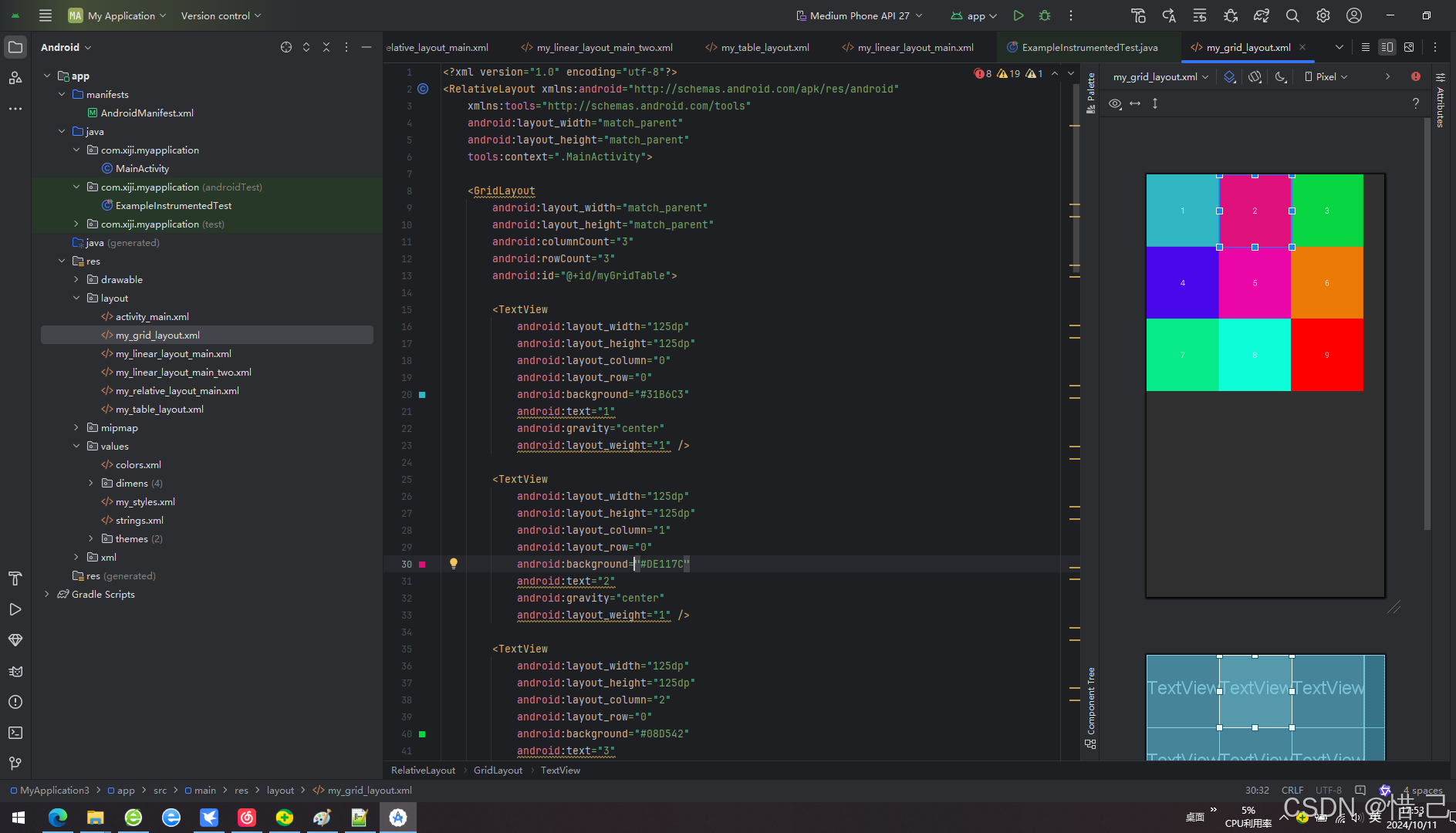
<RelativeLayout xmlns:android="http://schemas.android.com/apk/res/android"xmlns:tools="http://schemas.android.com/tools"android:layout_width="match_parent"android:layout_height="match_parent"tools:context=".MainActivity"><GridLayoutandroid:layout_width="match_parent"android:layout_height="match_parent"android:columnCount="3"android:rowCount="3"android:id="@+id/myGridTable"><TextViewandroid:layout_width="125dp"android:layout_height="125dp"android:layout_column="0"android:layout_row="0"android:background="#31B6C3"android:text="1"android:gravity="center"android:layout_weight="1" /><TextViewandroid:layout_width="125dp"android:layout_height="125dp"android:layout_column="1"android:layout_row="0"android:background="#DE117C"android:text="2"android:gravity="center"android:layout_weight="1" /><TextViewandroid:layout_width="125dp"android:layout_height="125dp"android:layout_column="2"android:layout_row="0"android:background="#08D542"android:text="3"android:gravity="center"android:layout_weight="1" /><TextViewandroid:layout_width="125dp"android:layout_height="125dp"android:layout_column="0"android:layout_row="1"android:background="#4B07EB"android:text="4"android:gravity="center"android:layout_weight="1" /><TextViewandroid:layout_width="125dp"android:layout_height="125dp"android:layout_column="1"android:layout_row="1"android:background="#EB07A7"android:text="5"android:gravity="center"android:layout_weight="1" /><TextViewandroid:layout_width="125dp"android:layout_height="125dp"android:layout_column="2"android:layout_row="1"android:background="#EB7A07"android:text="6"android:gravity="center"android:layout_weight="1" /><TextViewandroid:layout_width="125dp"android:layout_height="125dp"android:layout_column="0"android:layout_row="2"android:background="#07EB8A"android:text="7"android:gravity="center"android:layout_weight="1" /><TextViewandroid:layout_width="125dp"android:layout_height="125dp"android:layout_column="1"android:layout_row="2"android:background="#0EFDD9"android:text="8"android:gravity="center"android:layout_weight="1" /><TextViewandroid:layout_width="125dp"android:layout_height="125dp"android:layout_column="2"android:layout_row="2"android:background="#FF0000"android:text="9"android:gravity="center"android:layout_weight="1" /></GridLayout>
</RelativeLayout>
2.效果
7. 其他常用属性
1)android:background
设置背景颜色或图片。
2)android:visibility
设置视图的可见性,值可以是 visible, invisible 或 gone。
3)android:clickable
设置视图是否可点击。
4)android:focusable
设置视图是否可以获得焦点。
5)android:enabled
设置视图是否启用。
6)android:alpha
设置视图透明度(0.0完全透明,1.0完全不透明)。
7)android:id
为视图提供一个唯一的标识符。
相关文章:
Android常用布局
目录 布局文件中常见的属性 1. 基本布局属性 1)android:layout_width 2)android:layout_height 3)android:layout_margin 4)android:padding 2. 线性布局 (LinearLayout) 属性 1)android:orientation 2)and…...

初级网络工程师之从入门到入狱(五)
本文是我在学习过程中记录学习的点点滴滴,目的是为了学完之后巩固一下顺便也和大家分享一下,日后忘记了也可以方便快速的复习。 网络工程师从入门到入狱 前言一、链路聚合1.1、手动进行链路聚合1.1.1、 拓扑图:1.1.2、 LSW11.1.3、 LSW2 1.2、…...

JavaScript轮播图实现
这个代码创建了一个简单的轮播图,可以通过点击左右箭头或自动播放来切换图片。 <!DOCTYPE html> <html><head><meta charset"utf-8" /><title>js轮播图练习</title><style>.box {width: 60vw;height: 500px;m…...

【LLM开源项目】LLMs-开发框架-Langchain-Tutorials-Basics-v2.0
【1】使用LCEL构建简单的LLM应用程序(Build a Simple LLM Application with LCEL) https://python.langchain.com/docs/tutorials/llm_chain/ 如何使用LangChain构建简单的LLM应用程序。功能:将把文本从英语翻译成另一种语言。 实现:LLM调用加上一些提…...

Python 爬取天气预报并进行可视化分析
今天,我们就来学习如何使用 Python 爬取天气预报数据,并用数据可视化的方式将未来几天的天气信息一目了然地展示出来。 在本文中,我们将分三步完成这一任务: 使用 Python 爬取天气数据数据解析与处理用可视化展示天气趋势 让我…...

最左侧冗余覆盖子串
题目描述 给定两个字符串 s1 和 s2 和正整数 k,其中 s1 长度为 n1,s2 长度为 n2。 在 s2 中选一个子串,若满足下面条件,则称 s2 以长度 k 冗余覆盖 s1 该子串长度为 n1 k 该子串中包含 s1 中全部字母 该子串每个字母出现次数…...

性能测试-JMeter(2)
JMeter JMeter断言响应断言JSON断言断言持续时间 JMeter关联正则表达式提取器正则表达式正则表达式提取器 XPath提取器JSON提取器 JMeter属性JMeter录制脚本 JMeter断言 断言:让程序自动判断预期结果和实际结果是否一致 提示: -Jmeter在请求的返回层面有…...

芯课堂 | Synwit_UI_Creator(μgui)平台之图像处理篇
今天小编给大家介绍的是UI_Creator(μgui)平台下关于图像处理的选项。 UI_Creator(μgui)平台图片类控件有图像控件和分级图像控件,均包含以下选项: 1、消除水波纹: 由于16位真彩色(…...

QT C++ 软键盘/悬浮键盘/触摸屏键盘的制作
目录 1、前言 2、界面设计 3、英文、数字的输入 4、符号的输入 5、中文的输入 6、中文拼音库的选择 7、其他 8、结语 1、前言 使用QT C在带显示器的Linux系统 开发板上(树莓派等)编写操作UI界面时,很多时候都需要一个软键盘来输入文字…...

element-ui点击文字查看图片预览功能
今天做一个点击文字查看图片的功能,大体页面长这样子,点击查看显示对应的图片 引入el-image-viewer,点击的文字时候设置图片预览组件显示并传入图片的地址 关键代码 <el-link v-if"scope.row.fileList.length > 0" type&…...

SpringBoot集成Redis使用Cache缓存
使用SpringBoot集成Redis使用Cache缓存只要配置相应的配置类,然后使用Cache注解就能实现 RedisConfig配置 新建RedisConfig配置类 package com.bdqn.redis.config;import com.fasterxml.jackson.annotation.JsonAutoDetect; import com.fasterxml.jackson.annota…...

【瑞萨RA8D1 CPK开发板】lcd显示
1.8寸lcd使用gpio模拟spi驱动 由于板子引出的接口限制,故使用gpio模拟spi驱动中景园的1.8寸lcd 1.77寸液晶屏 1.8寸TFT LCD SPI TFT彩屏st7735驱动128x160高清屏-淘宝网 (taobao.com) 使用RASC 的gpio配置 根据厂家提供的驱动文件移植 #define LCD_SCLK_Clr() g…...

算法收敛的一些证明方法与案例
证明一个算法收敛通常涉及多个角度,以下是一些常用的方法和示例: 一、方法 1. 数学归纳法 通过数学归纳法证明算法在每一步的输出结果都在收敛范围内。 示例:考虑一个递归算法,假设我们要证明它在每一步中输出的值逐渐接近目标…...

基于vue框架的蛋糕店网上商城740g7(程序+源码+数据库+调试部署+开发环境)系统界面在最后面。
系统程序文件列表 项目功能:用户,店长,商品分类,商品信息,订单投诉,反馈信息 开题报告内容 基于Vue框架的蛋糕店网上商城开题报告 一、项目背景与意义 随着互联网技术的快速发展和普及,电子商务已成为现代商业的重要组成部分。蛋糕作为一种受欢迎的美…...
你真的了解Canvas吗--解密六【ZRender篇】
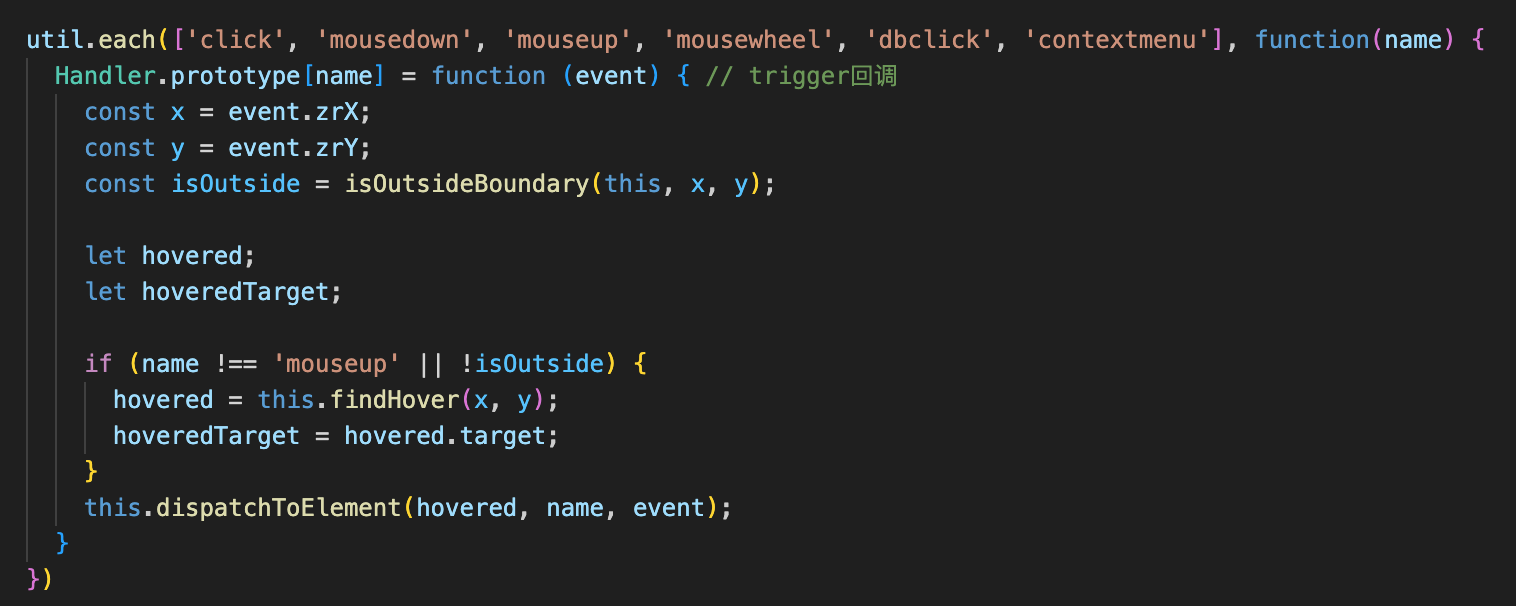
目录 📚入口 Circle - 图形 Group - 组 事件捕获 - 流程 step - 1 step - 2 总结 这篇文章我们讲讲Circle圆形,Group组的使用以及大家最熟悉又陌生的事件捕获和冒泡在ZRender中的实现,篇幅较长,且听我慢慢分析。 &#x…...

孤独相伴 - 结婚十七年
07年的今天,我和老公请假,去了新加坡的大使馆领证。 17年后的今天,此刻凌晨16分, 这是17年来我第一次这么早写结婚纪念,只是凑巧。 今天的心情莫名其妙。 此刻,两个词出现在我的脑海:孤独 &am…...

json-server,跨域
启动json-serer json-server --watch db.json 注意: db.json为json文件的名称,你自己的文件名叫什么,就启动对应的文件就可以了 启动json-server的时候,必须在你db.json所在的文件夹下进行启动 这样服务器就可以启动成功了&…...

【Conda】修复 Anaconda 安装并保留虚拟环境的详细指南
目录 流程图示1. 下载 Anaconda 安装程序2. 重命名现有的 Anaconda 安装目录Windows 操作系统Linux 操作系统 3. 运行新的 Anaconda 安装程序Windows 操作系统Linux 操作系统 4. 同步原环境使用 robocopy 命令(Windows)使用 rsync 命令(Linux…...

转行高薪 AI 产品经理,快速入门方法在此处
根据《2024年中国AI大模型场景探索及产业应用调研报告》,当前整体AI大模型行业仍然处于萌芽期,但市场规模增速较快。2023年我国AI大模型行业规模达到了147亿元,近三年复合增速高达114%。预计2024年,该市场规模将进一步增长至216亿…...

初识环境变量
初识环境变量 目录: 什么是环境变量常见的环境变量Linux中与环境变量的有关的命令如何获取环境变量环境变量的特点环境变量的作用 1.什么是环境变量 我们在Linux操作系统下,使用指令,比如ls,pwd,cd等等,可以直接使用,…...

电源BOM砍掉30%!这颗SiC PSR芯片让12W-200W设计更简单
摘要:传统反激电源设计中,光耦反馈网络、TL431基准源、补偿电路占据了大量BOM成本与PCB面积。芯茂微LP3798系列采用原边PSR架构内置/外推SiC功率管方案,无需光耦即可实现恒压恒流控制,全系满足7级能效,待机功耗<75m…...

Geothermal Power Generation Global Market Trends 2026:地热发电为何正在成为新一轮能源工程竞争核心
观点|地热发电的竞争逻辑已经发生变化过去很多人认为地热发电属于区域性能源项目。但现在,行业真正变化的是:地热正在从“资源开发工程”,转向“稳定电力基础设施工程”。相比波动性较强的风电与光伏,地热发电最大的优…...

告别NeRF的漫长等待:用3D Gaussian Splatting在Colab上5分钟跑通你的第一个3D场景
5分钟在Colab玩转3D高斯泼溅:零基础极速生成你的3D场景 当你想把几张随手拍的照片变成可自由旋转的3D场景时,传统方法可能需要数小时甚至更久的等待。现在,3D高斯泼溅(3D Gaussian Splatting)技术让这一切变得触手可及…...

基于MYC-Y6ULX-V2核心板的工业运动控制系统实践
1. 项目概述:当工业运动控制遇上嵌入式核心板在工业自动化领域,运动控制系统是驱动设备精确执行动作的“大脑”和“神经中枢”。从数控机床的精密加工,到机器人的流畅轨迹,再到包装产线的快速分拣,其核心都依赖于一个稳…...
)
告别文献混乱!用Zotero+OneDrive打造你的跨设备论文库(附ZotFile插件配置)
告别文献混乱!用ZoteroOneDrive打造你的跨设备论文库 实验室电脑里躺着三百篇未分类的PDF,笔记本桌面堆满"新建文件夹(1)",平板上还存着上周下载但找不到的会议论文——这可能是每个科研人的数字噩梦。当文献管理变成一场与自己的捉…...

Python/Numpy线性代数编程:DeepLearningBook-Notes代码实现完整手册
Python/Numpy线性代数编程:DeepLearningBook-Notes代码实现完整手册 【免费下载链接】deepLearningBook-Notes Notes on the Deep Learning book from Ian Goodfellow, Yoshua Bengio and Aaron Courville (2016) 项目地址: https://gitcode.com/gh_mirrors/de/de…...

AI数据标注实战:如何高效、准确地标注训练数据
在AI模型的开发与迭代过程中,数据标注是连接原始数据与智能算法的关键桥梁,其质量与效率直接决定了模型的性能上限。对于软件测试从业者而言,掌握高效、准确的数据标注方法,不仅能为AI模型提供可靠的训练“食粮”,更能…...

告别信号失真!手把手教你理解PCIe均衡中的预加重与去加重
PCIe信号均衡技术:预加重与去加重的实战解析 在高速串行通信领域,信号完整性始终是工程师面临的核心挑战。当PCIe总线速率从2.5GT/s演进到32GT/s甚至更高时,信号在传输过程中遭遇的高频衰减和码间干扰(ISI)问题变得尤为突出。预加重(Pre-emph…...

3分钟掌握视频下载:VideoDownloadHelper免费插件完全指南
3分钟掌握视频下载:VideoDownloadHelper免费插件完全指南 【免费下载链接】VideoDownloadHelper Chrome Extension to Help Download Video for Some Video Sites. 项目地址: https://gitcode.com/gh_mirrors/vi/VideoDownloadHelper 你是否曾经遇到过这样的…...

免费开源AMD Ryzen调试工具:SMUDebugTool完整使用指南与性能调优实战
免费开源AMD Ryzen调试工具:SMUDebugTool完整使用指南与性能调优实战 【免费下载链接】SMUDebugTool A dedicated tool to help write/read various parameters of Ryzen-based systems, such as manual overclock, SMU, PCI, CPUID, MSR and Power Table. 项目地…...