
【CSS】纯CSS Loading动画组件

<template><div class="ai-loader-box"><!-- AI loader --><div class="ai-loader"><div class="text"><p>AI智能分析中....</p></div><div class="horizontal"><div class="circlesup"><div class="circle"></div><div class="circle"></div><div class="circle"></div><div class="circle"></div><div class="circle"></div></div><div class="circlesdwn"><div class="circle"></div><div class="circle"></div><div class="circle"></div><div class="circle"></div><div class="circle"></div></div></div><div class="vertical"><div class="circlesup"><div class="circle"></div><div class="circle"></div><div class="circle"></div><div class="circle"></div><div class="circle"></div></div><div class="circlesdwn"><div class="circle"></div><div class="circle"></div><div class="circle"></div><div class="circle"></div><div class="circle"></div></div></div></div></div>
</template><style scoped>
.ai-loader-box{position: relative;width: 600px;height: 600px;margin: 20px auto;
}
/* Start the loader code, first, let's align it the center of screen */
.ai-loader {position: absolute;top: 50%;left: 50%;-webkit-transform: translate(-50%, -50%);-moz-transform: translate(-50%, -50%);-mos-transform: translate(-50%, -50%);-o-transform: translate(-50%, -50%);transform: translate(-50%, -50%);text-align: center;/* disable selection and cursor changes */-webkit-touch-callout: none;-webkit-user-select: none;-khtml-user-select: none;-moz-user-select: none;-ms-user-select: none;user-select: none;cursor: default;
}/* Text align it the center of screen and connect the looped animation for 2 seconds */
.text {position: absolute;left: -110px;top: -1.7em;/* -webkit-animation: text 2s infinite;-moz-animation: text 2s infinite;-moz-animation: text 2s infinite;-ms-animation: text 2s infinite;-o-animation: text 2s infinite;animation: text 2s infinite; */width: 280px;z-index: 10;color: #f00;background: #fff1f1db;border-radius: 4px;font-size: 40px;
}/* Set for the first layer vertical position */
.vertical {position: absolute;top: -1.84em;left: -0.4em;-webkit-transform: rotate(90deg);-moz-transform: rotate(90deg);-ms-transform: rotate(90deg);-o-transform: rotate(90deg);transform: rotate(90deg);
}/* Set for the second layer horizontal position */
.horizontal {position: absolute;top: 0em;left: 0em;-webkit-transform: rotate(0deg);-moz-transform: rotate(0deg);-ms-transform: rotate(0deg);-o-transform: rotate(0deg);transform: rotate(0deg);
}/* The next two classes do mirror for animation */
.circlesup {position: absolute;top: -4.7em;right: 12.1em;
}.circlesdwn {position: absolute;top: 2.5em;right: -13.5em;-webkit-transform: rotate(180deg);-moz-transform: rotate(180deg);-ms-transform: rotate(180deg);-o-transform: rotate(180deg);transform: rotate(180deg);
}/* Create a container for our circles, rotate it 45 degrees and set animation*/
.circle {position: absolute;width: 15em;height: 15em;-webkit-transform: rotate(45deg);-moz-transform: rotate(45deg);-ms-transform: rotate(45deg);-o-transform: rotate(45deg);transform: rotate(45deg);-webkit-animation: orbit 2s infinite;-moz-animation: orbit 2s infinite;-moz-animation: orbit 2s infinite;-ms-animation: orbit 2s infinite;-o-animation: orbit 2s infinite;animation: orbit 2s infinite;z-index: 5;
}/* Style's of our circles */
.circle:after {content: '';position: absolute;width: 2em;height: 2em;-webkit-border-radius: 100%;-moz-border-radius: 100%;-ms-border-radius: 100%;-o-border-radius: 100%;border-radius: 100%;background: rgb(255, 20, 20);/* Pick a color 1*/
}.circle:nth-child(2) {-webkit-animation-delay: 100ms;-moz-animation-delay: 100ms;-ms-animation-delay: 100ms;-o-animation-delay: 100ms;animation-delay: 100ms;z-index: 4;
}.circle:nth-child(2):after {background: var(--el-color-primary);/* Pick a color 2*/-webkit-transform: scale(0.8,0.8);-moz-transform: scale(0.8,0.8);-ms-transform: scale(0.8,0.8);-o-transform: scale(0.8,0.8);transform: scale(0.8,0.8);
}.circle:nth-child(3) {-webkit-animation-delay: 225ms;-moz-animation-delay: 225ms;-ms-animation-delay: 225ms;-o-animation-delay: 225ms;animation-delay: 225ms;z-index: 3;
}.circle:nth-child(3):after {background: var(--el-color-primary-light-3);/* Pick a color 3*/-webkit-transform: scale(0.6,0.6);-moz-transform: scale(0.6,0.6);-ms-transform: scale(0.6,0.6);-o-transform: scale(0.6,0.6);transform: scale(0.6,0.6);
}.circle:nth-child(4) {-webkit-animation-delay: 350ms;-moz-animation-delay: 350ms;-ms-animation-delay: 350ms;-o-animation-delay: 350ms;animation-delay: 350ms;z-index: 2;
}.circle:nth-child(4):after {background: var(--el-color-primary-light-5);/* Pick a color 4*/-webkit-transform: scale(0.4,0.4);-moz-transform: scale(0.4,0.4);-ms-transform: scale(0.4,0.4);-o-transform: scale(0.4,0.4);transform: scale(0.4,0.4);
}.circle:nth-child(5) {-webkit-animation-delay: 475ms;-moz-animation-delay: 475ms;-ms-animation-delay: 475ms;-o-animation-delay: 475ms;animation-delay: 475ms;z-index: 1;
}.circle:nth-child(5):after {background: var(--el-color-primary);/* Pick a color 5*/-webkit-transform: scale(0.2,0.2);-moz-transform: scale(0.2,0.2);-ms-transform: scale(0.2,0.2);-o-transform: scale(0.2,0.2);transform: scale(0.2,0.2);
}/* Animation keys */
@-webkit-keyframes orbit {0% {-webkit-transform: rotate(45deg);}5% {-webkit-transform: rotate(45deg);-webkit-animation-timing-function: ease-out;}70% {-webkit-transform: rotate(405deg);-webkit-animation-timing-function: ease-in;}100% {-webkit-transform: rotate(405deg);}
}@-moz-keyframes orbit {0% {-moz-transform: rotate(45deg);}5% {-moz-transform: rotate(45deg);-moz-animation-timing-function: ease-out;}70% {-moz-transform: rotate(405deg);-moz-animation-timing-function: ease-in;}100% {-moz-transform: rotate(405deg);}
}@-ms-keyframes orbit {0% {-ms-transform: rotate(45deg);}5% {-ms-transform: rotate(45deg);-ms-animation-timing-function: ease-out;}70% {-ms-transform: rotate(405deg);-ms-animation-timing-function: ease-in;}100% {-ms-transform: rotate(405deg);}
}@-o-keyframes orbit {0% {-o-transform: rotate(45deg);}5% {-o-transform: rotate(45deg);-o-animation-timing-function: ease-out;}70% {-o-transform: rotate(405deg);-o-animation-timing-function: ease-in;}100% {-o-transform: rotate(405deg);}
}@keyframes orbit {0% {transform: rotate(45deg);}5% {transform: rotate(45deg);animation-timing-function: ease-out;}70% {transform: rotate(405deg);animation-timing-function: ease-in;}100% {transform: rotate(405deg);}
}@-webkit-keyframes text {0% {-webkit-transform: scale(0.2,0.2);-webkit-animation-timing-function: ease-out;}40%,60% {-webkit-transform: scale(1,1);-webkit-animation-timing-function: ease-out;}70%,100% {-webkit-transform: scale(0.2,0.2);}
}@-moz-keyframes text {0% {-moz-transform: scale(0.2,0.2);-moz-animation-timing-function: ease-out;}50% {-moz-transform: scale(1,1);-moz-animation-timing-function: ease-out;}60% {-moz-transform: scale(1,1);-moz-animation-timing-function: ease-out;}100% {-moz-transform: scale(0.2,0.2);}
}@-mos-keyframes text {0% {-mos-transform: scale(0.2,0.2);-mos-animation-timing-function: ease-out;}50% {-mos-transform: scale(1,1);-mos-animation-timing-function: ease-out;}60% {-mos-transform: scale(1,1);-mos-animation-timing-function: ease-out;}100% {-mos-transform: scale(0.2,0.2);}
}@-o-keyframes text {0% {-o-transform: scale(1,1);-o-animation-timing-function: ease-out;}50% {-o-transform: scale(2,2);-o-animation-timing-function: ease-out;}100% {-o-transform: scale(1,1);-o-animation-timing-function: ease-out;}
}@keyframes text {0% {transform: scale(1,1);animation-timing-function: ease-out;}50% {transform: scale(2,2);animation-timing-function: ease-out;}100% {transform: scale(1,1);animation-timing-function: ease-out;}
}
</style>
相关文章:
【CSS】纯CSS Loading动画组件
<template><div class"ai-loader-box"><!-- AI loader --><div class"ai-loader"><div class"text"><p>AI智能分析中....</p></div><div class"horizontal"><div class&quo…...

rootless模式下istio ambient鉴权策略
环境说明 rootless模式下测试istio Ambient功能 四层鉴权策略 这里四层指的是网络通信模型的第四层,主要的传输协议为TCP和UDP。 用于限制服务间的通信,比如下面的策略应用于带有 app: productpage 标签的 Pod, 并且仅允许来自服务帐户 clus…...

超详细的总结!最新大模型算法岗面试题(含答案)来了!
大模型应该是目前当之无愧的最有影响力的AI技术,它正在革新各个行业,包括自然语言处理、机器翻译、内容创作和客户服务等,正成为未来商业环境的重要组成部分。 截至目前大模型已超过200个,在大模型纵横的时代,不仅大模…...
vmware-17pro全网最细安装教程(图文讲解,不需注册账户)
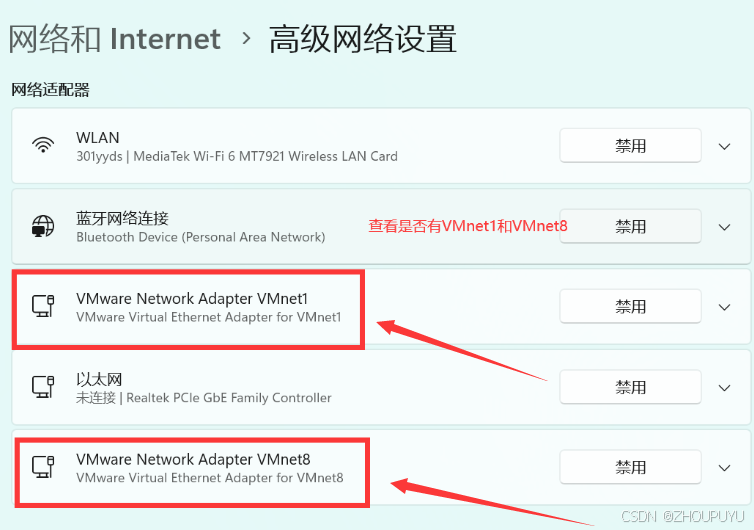
文章目录 一、下载安装包: 二、安装教程: 三、检查是否安装成功 四、许可证密匙 vmware安装教程 一、下载安装包: 链接:https://pan.baidu.com/s/1yC610SU1-O9Jtk7nUrZuSA?pwdsKBy 提取码:sKBy 二、安装教程&…...
C/C++(二)C++入门基础
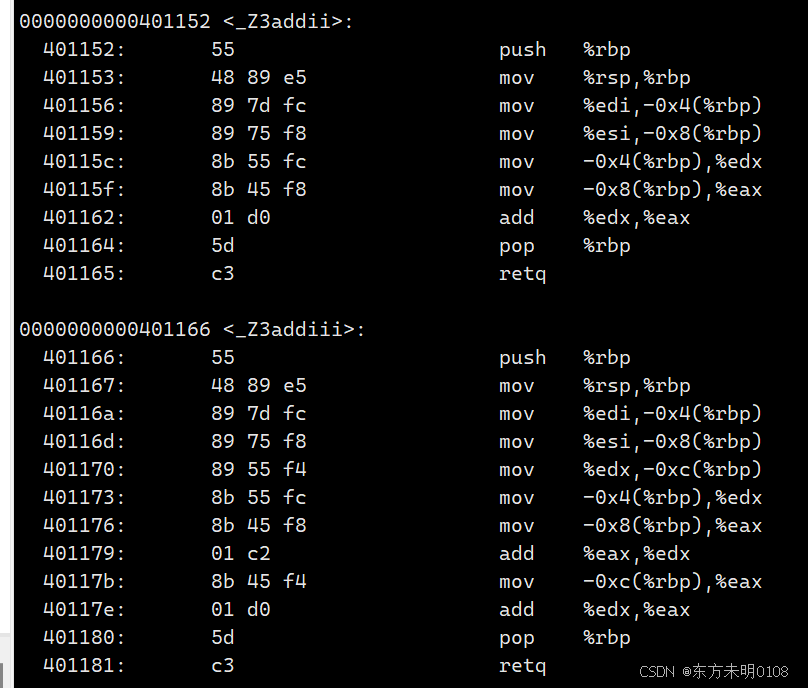
这一章会介绍C入门必须掌握的一些基础概念。 一、函数重载 1、什么是函数重载? 函数重载是C相比于C语言的一个重大改进。 即C允许在同一作用域内声明多个功能类似的同名函数,这些函数的参数类型 / 个数 / 类型顺序不同。(注:返回…...

人工智能发展:一场从“被教导”到“自我成长”的奇妙冒险
说到人工智能(AI),大家的第一反应往往是机器人、无人驾驶、或者那个让人害怕的AI会不会取代人类。其实,AI的进化过程简直像一部精彩的电影,有起伏、有高潮、有让人摸不着头脑的时刻。今天,我们就一起来“吃…...
企业级 RAG 全链路优化关键技术
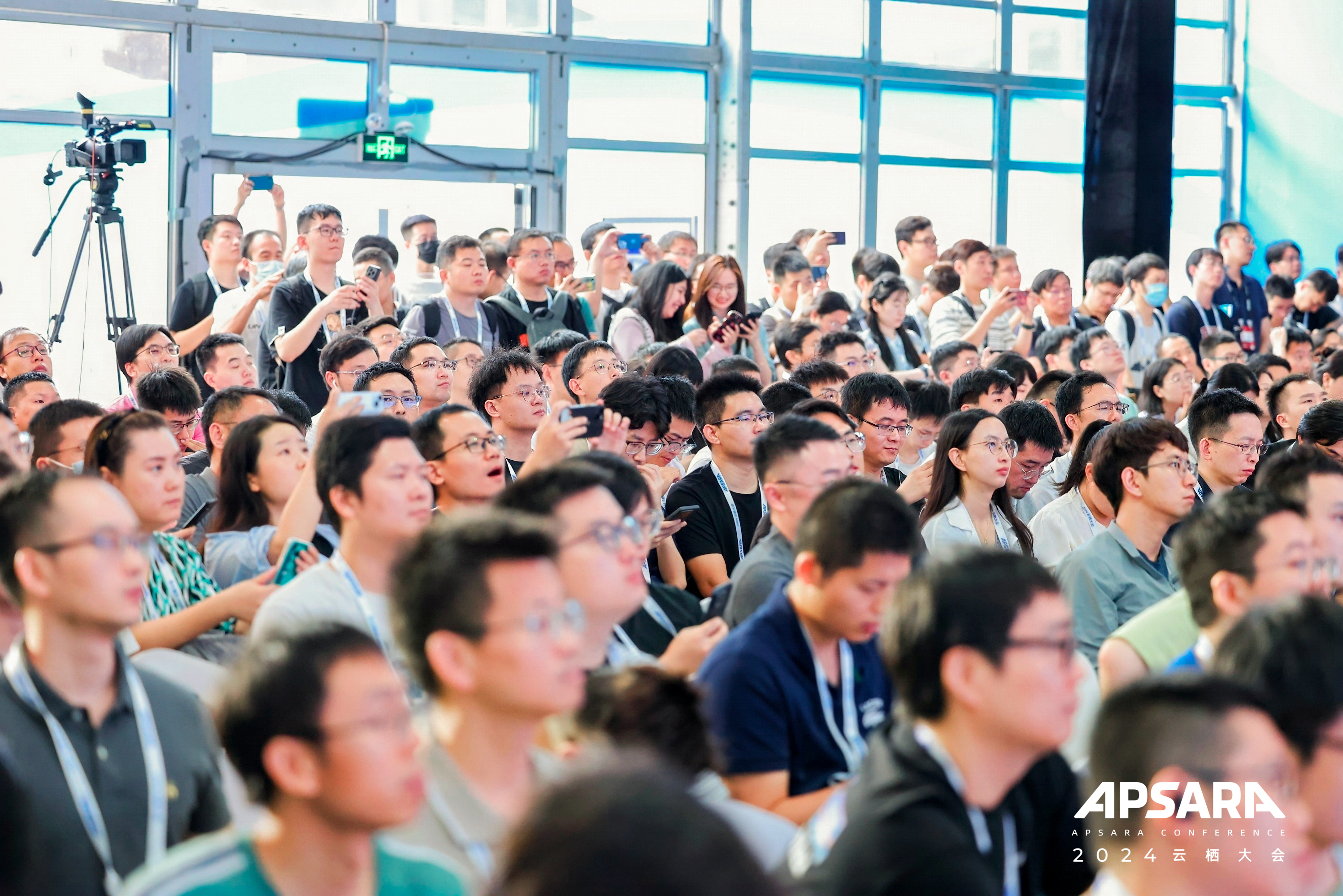
本文根据2024云栖大会实录整理而成,演讲信息如下: 演讲人: 邢少敏 | 阿里云智能集团高级技术专家 活动: 2024 云栖大会 - AI 搜索企业级 RAG 全链路优化关键技术 在2024云栖大会上,阿里云 AI 搜索研发负责人之一的…...
学习文档(5)
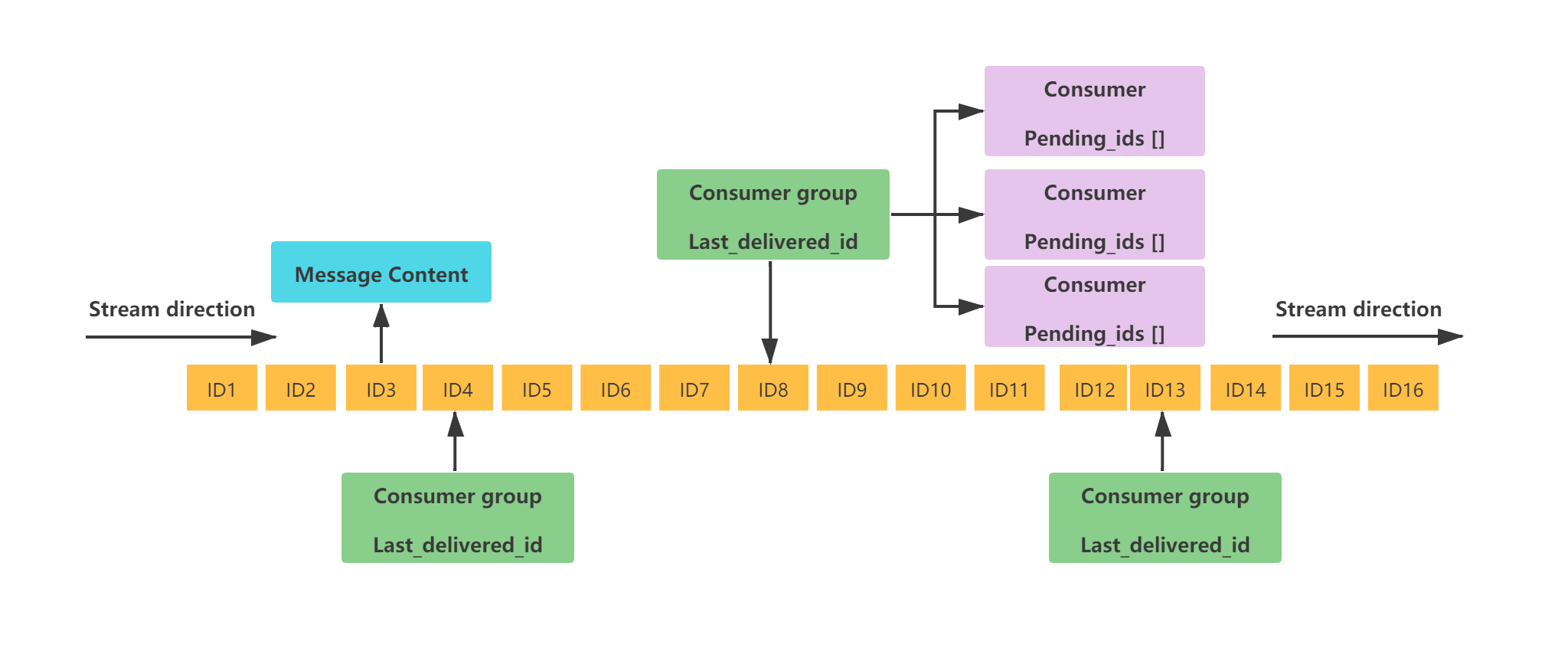
Redis应用 目录 Redis应用 Redis 除了做缓存,还能做什么? Redis 可以做消息队列么? Redis 可以做搜索引擎么? 如何基于 Redis 实现延时任务? Redis 除了做缓存,还能做什么? 分布式锁&…...

node.js下载安装以及环境配置超详细教程【Windows版本】
node安装以及环境变量配置 Step1:选择版本进行安装Step2:安装Node.jsStep3:环境配置Step4:检查node.js是否成功安装Step5:npm修改下载镜像 Step1:选择版本进行安装 Node.js 安装包及源码下载地址为 Node.…...

08_实现 reactive
目录 编写 reactive 的函数签名处理对象的其他行为拦截 in 操作符拦截 for...in 循环delete 操作符 处理边界新旧值发生变化时才触发依赖的情况处理从原型上继承属性的情况处理一个对象已经是代理对象的情况处理一个原始对象已经被代理过一次之后的情况 浅响应与深响应代理数组…...

finereport 中台 帆软 编码解码
帆软用的 post 方式编码不是用的 dict,而是二次 url 编码,需要二次解析 import time import urllib.parse import json# 原始字符串 encoded_string data "__parameters__%7B%22MANUFACTURER%22%3A%22%22%2C%22CATEGORY%22%3A%22%22%2C%22HHPN_L…...

Day15-数据库服务全面优化与PT工具应用
Day15-数据库服务全面优化与PT工具应用 1、数据库服务优化讲解1.2 数据库服务系统层面的优化1.3 数据库服务软件版本选择1.4 数据库服务结构参数优化1.4.1 数据库连接层优化1.4.2 数据库服务层优化1.4.3 数据库引擎层优化1.4.4 数据库复制相关优化1.4.5 数据库其他相关优化 1.5…...

开源限流组件分析(二):uber-go/ratelimit
文章目录 本系列漏桶限流算法uber的漏桶算法使用mutex版本数据结构获取令牌松弛量 atomic版本数据结构获取令牌测试漏桶的松弛量 总结 本系列 开源限流组件分析(一):juju/ratelimit开源限流组件分析(二):u…...

探索 SVG 创作新维度:svgwrite 库揭秘
文章目录 **探索 SVG 创作新维度:svgwrite 库揭秘**背景介绍库简介安装指南基础函数使用实战场景常见问题与解决方案总结 探索 SVG 创作新维度:svgwrite 库揭秘 背景介绍 在数字艺术和网页设计领域,SVG(Scalable Vector Graphic…...

为什么要做PFAS测试?PFAS检测项目详细介绍
PFAS测试之所以重要,主要归因于PFAS(全氟和多氟化合物)的广泛存在、持久性、生物累积性和潜在的毒性。这些特性使得PFAS在环境和人体中可能长期存在,并对生态系统和人类健康构成威胁。以下是对PFAS检测项目的详细介绍以及进行PFAS…...

稀土阻燃协效剂的应用
稀土阻燃协效剂是一类利用稀土元素(如铈、镧、钕、铕等)具有的独特性质,来增强材料阻燃性能的化学物质。在聚合物材料燃烧时可催化酯花成碳,迅速在高分子表面形成致密连续的碳层,隔绝聚合物材料内部的可燃性气体与氮气…...

Java的异常处理
常见异常 ① 运行时异常 a、ClassNotFoundException b、FileNotFoundException c、IOException ② 编译时异常 a、ArrayIndexOutOfBoundsException b、NullPointerException c、ClassCastException d、InputFormatException e、InputMismatchException f、ArithmeticException …...

免费域名邮箱申请和使用教程:有哪些步骤?
免费域名邮箱设置指南?如何免费注册烽火域名邮箱? 对于个人和企业而言,拥有一个专属的域名邮箱不仅能提升专业形象,还能增强品牌识别度。烽火将详细介绍如何申请和使用免费域名邮箱,帮助您轻松拥有一个专属的电子邮件…...

Linux之实战命令45:swapon应用实例(七十九)
简介: CSDN博客专家、《Android系统多媒体进阶实战》一书作者 新书发布:《Android系统多媒体进阶实战》🚀 优质专栏: Audio工程师进阶系列【原创干货持续更新中……】🚀 优质专栏: 多媒体系统工程师系列【…...

提升数据处理效率:TDengine S3 的最佳实践与应用
在当今数据驱动的时代,如何高效地存储与处理海量数据成为了企业面临的一大挑战。为了解决这一问题,我们在 TDengine 3.2.2.0 首次发布了企业级功能 S3 存储。这一功能经历多个版本的迭代与完善后,逐渐发展成为一个全面和高效的解决方案。 S3…...

通过curl命令快速测试Taotoken的API兼容性与连通性
🚀 告别海外账号与网络限制!稳定直连全球优质大模型,限时半价接入中。 👉 点击领取海量免费额度 通过curl命令快速测试Taotoken的API兼容性与连通性 在接入大模型服务时,开发者常常需要一个快速、轻量的方法来验证API…...

终极免费桌面分区工具:NoFences让你的Windows桌面告别杂乱
终极免费桌面分区工具:NoFences让你的Windows桌面告别杂乱 【免费下载链接】NoFences 🚧 Open Source Stardock Fences alternative 项目地址: https://gitcode.com/gh_mirrors/no/NoFences 还在为Windows桌面上杂乱无章的图标而烦恼吗࿱…...

YOLO算法集成 车道线识别 + 目标检测 +图像分割识别
YOLO车道线识别 目标检测 可行驶区域(Freespace)的综合应用引言 随着自动驾驶技术和智能交通系统的迅速发展,车辆环境感知技术变得愈加重要。准确地理解周围环境对于确保自动驾驶的安全性和可靠性至关重要。在众多的环境感知任务中…...

Playwright自动化进阶:手把手教你用Yaml实现数据驱动,让测试用例管理效率翻倍
Playwright自动化进阶:手把手教你用Yaml实现数据驱动,让测试用例管理效率翻倍 当UI自动化测试用例数量达到三位数时,每次修改测试数据都像在代码海洋中捞针。我曾经历过这样的痛苦:某次产品迭代导致200多个测试用例中的URL全部需要…...

高效跨平台网盘直链解析工具:LinkSwift技术实现与部署指南
高效跨平台网盘直链解析工具:LinkSwift技术实现与部署指南 【免费下载链接】Online-disk-direct-link-download-assistant 一个基于 JavaScript 的网盘文件下载地址获取工具。基于【网盘直链下载助手】修改 ,支持 百度网盘 / 阿里云盘 / 中国移动云盘 / …...

开源监控面板OpenClaw:从架构设计到生产部署实战指南
1. 项目概述:一个开源监控面板的诞生 在运维和开发的世界里,监控面板就像是驾驶舱里的仪表盘。没有它,你就是在盲飞。今天要聊的这个项目 xingrz/openclaw-dashboard ,就是一个由社区驱动的开源监控面板解决方案。它的名字很有意…...

Java并发编程:CompletableFuture实战
Java并发编程:CompletableFuture实战 引言 Java 8引入的CompletableFuture是现代异步编程的重要工具,它不仅解决了Future的局限性,还提供了丰富的API用于组合、转换和处理异步结果。相比传统的Future,CompletableFuture支持流式调…...

Translumo:5分钟掌握Windows实时屏幕翻译终极指南
Translumo:5分钟掌握Windows实时屏幕翻译终极指南 【免费下载链接】Translumo Advanced real-time screen translator for games, hardcoded subtitles in videos, static text and etc. 项目地址: https://gitcode.com/gh_mirrors/tr/Translumo 你是否在玩外…...

荣品RV1126 SDK编译避坑指南:从环境配置到分区调整,手把手解决常见编译错误
RV1126 SDK编译实战:从环境搭建到分区优化的全流程解决方案 1. 开发环境配置与初始化 RV1126开发环境的搭建是整个开发流程的第一步,也是后续所有工作的基础。一个稳定、高效的开发环境能够显著提升开发效率,减少不必要的错误。 首先需要确保…...

低温预警!固化慢、易开裂……密封胶冬季施工手册
低温预警!固化慢、易开裂……密封胶冬季施工手册 硅酮耐候密封胶主要作用是保障幕墙的气密性、水密性。其出现问题,可能会导致耐候密封失效,从而造成幕墙漏水漏气,影响幕墙的正常使用。耐候密封胶由于考虑到现场施工,几乎都是单组分硅酮密封胶产品。进入冬季,气候变化明…...