
QT 多语言转换 ts、qm
QT开发之路 企业级开发系列文章,主要目标快速学习、完善、提升 相关技能 高效完成企业级项目开发 分享在企业中积累的实用技能和经验。
通过具体的编码过程、代码示例、步骤详解、核心内容和展示的方法解决遇到的实际问题。

阅读前声明 本系列文章属于付费内容 禁止转载、复制、抄袭 仅限付费读者阅读参考。
QT 多语言转换 ts、qm
1 运行环境
2 命令用法
3 软件界面
4 vs配置
5 .h代码
6 .cpp代码
7 其它
8 en.ts
9 xf.ts
10 zh.ts
11 其它文章
1 运行环境
VS2017+QT
2 命令用法
lupdate 更新翻译文件 生成 .ts 文件
用法:
lupdate ./ -ts language/QLinguist_en.ts language/QLinguist_zh.ts language/QLinguist_xf.tslanguage/QLinguist_en.ts //language/目录 按照实际需求更改lrelease 发布更新文件 生成 .qm 文件
用法:
lrelease language/QLinguist_en.ts language/QLinguist_zh.ts language/QLinguist_xf.tslanguage/QLinguist_en.ts // language/ 目录 按照实际需求更改3 软件界面
4 vs配置
项目-> 属性->生成事件->生成后事件->输入
lupdate ./ -ts language/QLinguist_en.ts language/QLinguist_zh.ts language/QLinguist_xf.ts
lrelease language/QLinguist_en.ts language/QLinguist_zh.ts language/QLinguist_xf.ts
5 .h代码
#pragma once#include <QtWidgets/QMainWindow>
#include "ui_QLinguist.h"
#include <QTranslator>
#include <QDebug>#pragma execution_character_set("utf-8")
class QLinguist : public QMainWindow
{Q_OBJECTpublic:QLinguist(QWidget *parent = nullptr);~QLinguist();private slots:void on_ActionTriggered();void on_ActionXf_Triggered();void on_ActionEn_Triggered();private:Ui::QLinguistClass ui;QString strFilePath = "";QTranslator zh;QTranslator xf;QTranslator en;
};
6 .cpp代码
#include "QLinguist.h"QLinguist::QLinguist(QWidget *parent): QMainWindow(parent)
{ui.setupUi(this);setWindowTitle("多语言切换Demo CSDN 双子座断点 V1.0 https://blog.csdn.net/qq_37529913?type=blog");strFilePath = "C:/Users/dream/source/repos/QLinguist/QLinguist/language/";zh.load(strFilePath + "QLinguist_zh.qm");xf.load(strFilePath + "QLinguist_xf.qm");en.load(strFilePath + "QLinguist_en.qm");connect(ui.action, SIGNAL(triggered()), SLOT(on_ActionTriggered()));connect(ui.action_2, SIGNAL(triggered()), SLOT(on_ActionXf_Triggered()));connect(ui.action_3, SIGNAL(triggered()), SLOT(on_ActionEn_Triggered()));}QLinguist::~QLinguist()
{}void QLinguist::on_ActionTriggered()
{qDebug() << ".....";qApp->installTranslator(&zh);ui.retranslateUi(this);
}void QLinguist::on_ActionXf_Triggered()
{qDebug() << ".....";qApp->installTranslator(&xf);ui.retranslateUi(this);
}void QLinguist::on_ActionEn_Triggered()
{qDebug() << ".....";qApp->installTranslator(&en);ui.retranslateUi(this);
}
7 其它
void QLinguist::on_ActionEn_Triggered()
{qDebug() << ".....";//qApp->installTranslator(&en);//ui.retranslateUi(this);//ui.lineEdit->setText(tr("图像路径为空!"));
}
8 en.ts
<?xml version="1.0" encoding="utf-8"?>
<!DOCTYPE TS>
<TS version="2.1" language="en_US">
<context><name>QLinguist</name><message><location filename="../QLinguist.cpp" line="51"/><source>图像路径为空!</source><translation type="unfinished">The image path is empty!</translation></message>
</context>
<context><name>QLinguistClass</name><message><location filename="../QLinguist.ui" line="14"/><location filename="../x64/Release/uic/ui_QLinguist.h" line="227"/><source>多语言切换Demo CSDN 双子座断点 V1.0 https://blog.csdn.net/qq_37529913?type=blog</source><translation type="unfinished"></translation></message><message><location filename="../QLinguist.ui" line="29"/><location filename="../x64/Debug/uic/ui_QLinguist.h" line="204"/><location filename="../x64/Release/uic/ui_QLinguist.h" line="231"/><source>图像路径:</source><translation type="unfinished">image path:</translation></message><message><location filename="../QLinguist.ui" line="62"/><location filename="../x64/Debug/uic/ui_QLinguist.h" line="205"/><location filename="../x64/Release/uic/ui_QLinguist.h" line="232"/><source>曝光:</source><translation type="unfinished">Exposure:</translation></message><message><location filename="../QLinguist.ui" line="95"/><location filename="../x64/Debug/uic/ui_QLinguist.h" line="206"/><location filename="../x64/Release/uic/ui_QLinguist.h" line="233"/><source>增益:</source><translation type="unfinished">gain:</translation></message><message><location filename="../QLinguist.ui" line="128"/><location filename="../x64/Debug/uic/ui_QLinguist.h" line="207"/><location filename="../x64/Release/uic/ui_QLinguist.h" line="234"/><source>区域:</source><translation type="unfinished">roi:</translation></message><message><location filename="../QLinguist.ui" line="161"/><location filename="../x64/Debug/uic/ui_QLinguist.h" line="208"/><location filename="../x64/Release/uic/ui_QLinguist.h" line="235"/><source>串口:</source><translation type="unfinished">com:</translation></message><message><location filename="../QLinguist.ui" line="236"/><location filename="../x64/Debug/uic/ui_QLinguist.h" line="209"/><location filename="../x64/Release/uic/ui_QLinguist.h" line="237"/><source>语言选择</source><translation type="unfinished"></translation></message><message><location filename="../QLinguist.ui" line="246"/><location filename="../x64/Debug/uic/ui_QLinguist.h" line="201"/><location filename="../x64/Release/uic/ui_QLinguist.h" line="228"/><source>简体中文</source><translation type="unfinished"></translation></message><message><location filename="../QLinguist.ui" line="251"/><location filename="../x64/Debug/uic/ui_QLinguist.h" line="202"/><location filename="../x64/Release/uic/ui_QLinguist.h" line="229"/><source>繁体中文</source><translation type="unfinished"></translation></message><message><location filename="../QLinguist.ui" line="256"/><location filename="../x64/Debug/uic/ui_QLinguist.h" line="203"/><location filename="../x64/Release/uic/ui_QLinguist.h" line="230"/><source>English</source><translation type="unfinished"></translation></message><message><location filename="../x64/Debug/uic/ui_QLinguist.h" line="200"/><source>QLinguist</source><translation type="unfinished"></translation></message>
</context>
</TS>
9 xf.ts
<?xml version="1.0" encoding="utf-8"?>
<!DOCTYPE TS>
<TS version="2.1">
<context><name>QLinguist</name><message><location filename="../QLinguist.cpp" line="51"/><source>图像路径为空!</source><translation type="unfinished">圖像路徑為空!</translation></message>
</context>
<context><name>QLinguistClass</name><message><location filename="../QLinguist.ui" line="14"/><location filename="../x64/Release/uic/ui_QLinguist.h" line="227"/><source>多语言切换Demo CSDN 双子座断点 V1.0 https://blog.csdn.net/qq_37529913?type=blog</source><translation type="unfinished"></translation></message><message><location filename="../QLinguist.ui" line="29"/><location filename="../x64/Debug/uic/ui_QLinguist.h" line="204"/><location filename="../x64/Release/uic/ui_QLinguist.h" line="231"/><source>图像路径:</source><translation type="unfinished">圖像路徑:</translation></message><message><location filename="../QLinguist.ui" line="62"/><location filename="../x64/Debug/uic/ui_QLinguist.h" line="205"/><location filename="../x64/Release/uic/ui_QLinguist.h" line="232"/><source>曝光:</source><translation type="unfinished">曝光:</translation></message><message><location filename="../QLinguist.ui" line="95"/><location filename="../x64/Debug/uic/ui_QLinguist.h" line="206"/><location filename="../x64/Release/uic/ui_QLinguist.h" line="233"/><source>增益:</source><translation type="unfinished">增益:</translation></message><message><location filename="../QLinguist.ui" line="128"/><location filename="../x64/Debug/uic/ui_QLinguist.h" line="207"/><location filename="../x64/Release/uic/ui_QLinguist.h" line="234"/><source>区域:</source><translation type="unfinished">區域:</translation></message><message><location filename="../QLinguist.ui" line="161"/><location filename="../x64/Debug/uic/ui_QLinguist.h" line="208"/><location filename="../x64/Release/uic/ui_QLinguist.h" line="235"/><source>串口:</source><translation type="unfinished">串口:</translation></message><message><location filename="../QLinguist.ui" line="236"/><location filename="../x64/Debug/uic/ui_QLinguist.h" line="209"/><location filename="../x64/Release/uic/ui_QLinguist.h" line="237"/><source>语言选择</source><translation type="unfinished"></translation></message><message><location filename="../QLinguist.ui" line="246"/><location filename="../x64/Debug/uic/ui_QLinguist.h" line="201"/><location filename="../x64/Release/uic/ui_QLinguist.h" line="228"/><source>简体中文</source><translation type="unfinished"></translation></message><message><location filename="../QLinguist.ui" line="251"/><location filename="../x64/Debug/uic/ui_QLinguist.h" line="202"/><location filename="../x64/Release/uic/ui_QLinguist.h" line="229"/><source>繁体中文</source><translation type="unfinished"></translation></message><message><location filename="../QLinguist.ui" line="256"/><location filename="../x64/Debug/uic/ui_QLinguist.h" line="203"/><location filename="../x64/Release/uic/ui_QLinguist.h" line="230"/><source>English</source><translation type="unfinished"></translation></message><message><location filename="../x64/Debug/uic/ui_QLinguist.h" line="200"/><source>QLinguist</source><translation type="unfinished"></translation></message>
</context>
</TS>
10 zh.ts
<?xml version="1.0" encoding="utf-8"?>
<!DOCTYPE TS>
<TS version="2.1" language="zh_CN">
<context><name>QLinguist</name><message><location filename="../QLinguist.cpp" line="49"/><source>图像路径为空!</source><translation type="unfinished">图像路径为空!</translation></message>
</context>
<context><name>QLinguistClass</name><message><location filename="../QLinguist.ui" line="14"/><source>多语言切换Demo CSDN 双子座断点 V1.0 https://blog.csdn.net/qq_37529913?type=blog</source><translation type="unfinished"></translation></message><message><location filename="../QLinguist.ui" line="29"/><source>图像路径:</source><translation type="unfinished">图像路径:</translation></message><message><location filename="../QLinguist.ui" line="62"/><source>曝光:</source><translation type="unfinished">曝光:</translation></message><message><location filename="../QLinguist.ui" line="95"/><source>增益:</source><translation type="unfinished">增益:</translation></message><message><location filename="../QLinguist.ui" line="128"/><source>区域:</source><translation type="unfinished">区域:</translation></message><message><location filename="../QLinguist.ui" line="161"/><source>串口:</source><translation type="unfinished">串口:</translation></message><message><location filename="../QLinguist.ui" line="236"/><source>语言选择</source><translation type="unfinished"></translation></message><message><location filename="../QLinguist.ui" line="246"/><source>简体中文</source><translation type="unfinished"></translation></message><message><location filename="../QLinguist.ui" line="251"/><source>繁体中文</source><translation type="unfinished"></translation></message><message><location filename="../QLinguist.ui" line="256"/><source>English</source><translation type="unfinished"></translation></message>
</context>
</TS>
11 其它文章
相关文章:
QT 多语言转换 ts、qm
QT开发之路 企业级开发系列文章,主要目标快速学习、完善、提升 相关技能 高效完成企业级项目开发 分享在企业中积累的实用技能和经验。 通过具体的编码过程、代码示例、步骤详解、核心内容和展示的方法解决遇到的实际问题。 阅读前声明 本系列文章属于付费内容 禁止…...
)
C++学习:类和对象(二)
一、默认成员函数 1. 什么是默认成员函数? 在C中,每个类都有一些特殊的成员函数,如果程序员没有显式地声明,编译器会自动为类生成这些函数,这些函数称为默认成员函数 2. 默认成员函数列表 默认构造函数(…...

深度学习(五):语音处理领域的创新引擎(5/10)
一、深度学习在语音处理中的崛起 在语音处理领域,传统方法如谱减法、维纳滤波等在处理复杂语音信号时存在诸多局限性。这些方法通常假设噪声是平稳的,但实际噪声往往是非平稳的,导致噪声估计不准确。同时,为了去除噪声࿰…...
公式)
双曲函数(Hyperbolic functuons)公式
在python等语言里有双曲函数库和反双曲函数库,但是并没有包含所有的双曲函数。以numpy为例子,numpy只提供了sinh、cosh、tanh、arcsinh、arccosh、arctanh六种函数,那么其余的就需要用公式计算了。 转换公式 对于函数库不能直接计算的&#…...

【CSS/SCSS】@layer的介绍及使用方法
目录 基本用法layer 的作用与优点分离样式职责,增强代码可读性和可维护性防止无意的样式冲突精确控制样式的逐层覆盖提高复用性 兼容性实际示例:使用 import 管理加载顺序实际示例:混入与 layer 结合使用 layer 是 CSS 中用于组织和管理样式优…...

我为什么投身于青少年AI编程?——打造生态圈(三)
第五部分 青少年AI编程生态圈 一、生态圈 主要涵盖家庭、社区/中小学、高校高职、主管部门。 1、家庭 我们与社区/中小学一道打造让家长满意的模式。 教得好: 费用少: 家门口: 2、社区/中小学 社区党群服务中心和中小学都有大面积科普…...

出海要深潜,中国手机闯关全球化有了新标杆
经济全球化的大势之下,中国科技企业开拓海外市场已成为一种必然选择。 对于国内手机企业来说,推进全球商业版图扩张,业务潜力巨大,海外市场是今后的关键增长引擎。 当前中国手机厂商在海外市场的发展,有收获也有坎坷…...

百度SEO中的关键词密度与内容优化研究【百度SEO专家】
大家好,我是百度SEO专家(林汉文),在百度SEO优化中,关键词密度和关键词内容的优化对提升页面排名至关重要。关键词的合理布局与内容的质量是确保网页在百度搜索结果中脱颖而出的关键因素。下面我们将从关键词密度和关键…...

如何用fastapi集成pdf.js 的viewer.html ,并支持 mjs
fastapi 框架 集成pdf.js 的 viewer.html?file=***,支持跨域,支持.mjs .wasm .pdf 给出完整示例代码 要在 FastAPI 框架中集成 pdf.js 的 viewer.html,并支持跨域访问以及 .mjs、.wasm、.pdf 文件的正确加载,可以按照以下步骤进行。下面提供一个完整的示例,包括项目结构…...

文件相对路径与绝对路径
前言: 在写代码绘制图像的过程中,发现出现cant read input file的异常,而且输出框没有绘制图片,所以寻找解决方案。先贴上之前写的简洁版绘制图像代码 1.BackGround类 import java.awt.image.BufferedImage;public class BackG…...

Linux 重启命令全解析:深入理解与应用指南
Linux 重启命令全解析:深入理解与应用指南 在 Linux 系统中,掌握正确的重启命令是确保系统稳定运行和进行必要维护的关键技能。本文将深入解析 Linux 中常见的重启命令,包括功能、用法、适用场景及注意事项。 一、reboot 命令 功能简介 re…...

【北京迅为】《STM32MP157开发板嵌入式开发指南》-第六十七章 Trusted Firmware-A 移植
iTOP-STM32MP157开发板采用ST推出的双核cortex-A7单核cortex-M4异构处理器,既可用Linux、又可以用于STM32单片机开发。开发板采用核心板底板结构,主频650M、1G内存、8G存储,核心板采用工业级板对板连接器,高可靠,牢固耐…...

`a = a + b` 与 `a += b` 的区别
在 Java 中,a a b 和 a b 都用于将 b 的值加到 a 上,但它们之间存在一些重要的区别,尤其是在类型转换和操作行为方面。 使用 操作符时,Java 会自动进行隐式类型转换,而使用 则不会。这意味着在 a b 的情况下&am…...

mysqld.log文件过大,清理后不改变所属用户
#1024程序员节# 一、背景 突然有一天,我的mysql报磁盘不足了。仔细查看才发现,是磁盘满了。而MySQL的日志文件占用了91个G.如下所示: [roothost-172-16-14-128 mysql]# ls -lrth 总用量 93G -rw-r----- 1 mysql mysql 1.1G 7月 30 2023 m…...
v4.7+版本用户充值在交易统计中计算双倍的问题修复
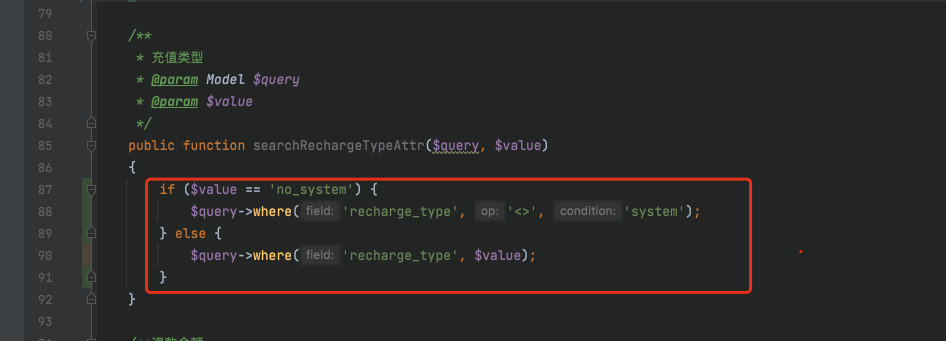
app/services/statistic/TradeStatisticServices.php 文件中 $whereInRecharge[recharge_type] no_system; $whereInRecharge[recharge_type] system; app/model/user/UserRecharge.php 中 修改此搜索器内容 public function searchRechargeTypeAttr($query, $value){ if…...

[GXYCTF 2019]Ping Ping Ping 题解(多种解题方式)
知识点: 命令执行 linux空格绕过 反引号绕过 变量绕过 base64编码绕过 打开页面提示 "听说php可以执行系统函数?我来康康" 然后输入框内提示输入 bjut.edu.cn 输入之后回显信息,是ping 这个网址的信息 输入127.0.0.1 因为提示是命令…...

MODSI EVI 数据的时间序列拟合一阶谐波模型
目录 简介 函数 ee.Reducer.linearRegression(numX, numY) Arguments: Returns: Reducer ee.Image.cat(var_args) Arguments: Returns: Image hsvToRgb() Arguments: Returns: Image 代码 结果 简介 MODIS/006/MOD13A1数据是由美国国家航空航天局(NASA)的MODIS…...

Java:String类(超详解!)
一.常用方法 🥏1.字符串构造 字符串构造有三种方法: 📌注意: 1. String是引用类型,内部并不存储字符串本身 如果String是一个引用那么s1和s3应该指向同一个内容,s1和s2是相等的,应该输出两…...

【日志】力扣13.罗马数字转整数 || 解决泛型单例热加载失败问题
2024.10.28 【力扣刷题】 13. 罗马数字转整数 - 力扣(LeetCode)https://leetcode.cn/problems/roman-to-integer/description/?envTypestudy-plan-v2&envIdtop-interview-150这题用模拟的思想可以给相应的字母赋值,官方的答案用的是用一…...

Mybatis高级
系列文章目录 高级Mybatis,一些结果映射,引入新的注解 目录 系列文章目录 文章目录 一、结果映射 1.ResultType 2.ResultMap 基础应用: 二、一对一 嵌套结果和嵌套查询 嵌套结果 嵌套查询 区别 三、一对多 四、多对多 五、注解补充 1.一对一…...

《机密计算破局政务金融、截图工具漏洞泄露NTLM哈希、智能体仿冒日增200+:AI安全的三场“攻防战”》
一、全链路机密计算破局:政务/金融敏感数据进入“可信推理”时代当前,大模型落地过程中面临的核心矛盾在于:越是高价值的专业技术领域,其训练数据和实时推理数据的安全级别就越高。在政务场景中,政府规划、财政数据、内…...

HiveWE:现代化魔兽争霸III地图编辑器完全指南
HiveWE:现代化魔兽争霸III地图编辑器完全指南 【免费下载链接】HiveWE A Warcraft III world editor. 项目地址: https://gitcode.com/gh_mirrors/hi/HiveWE 还在为魔兽争霸III原版地图编辑器缓慢的加载速度和复杂的操作而烦恼吗?HiveWE作为一款专…...

如何3分钟掌握Chat2DB:AI智能数据库管理完整指南
如何3分钟掌握Chat2DB:AI智能数据库管理完整指南 【免费下载链接】Chat2DB AI-driven database tool and SQL client, The hottest GUI client, supporting MySQL, Oracle, PostgreSQL, DB2, SQL Server, DB2, SQLite, H2, ClickHouse, and more. 项目地址: https…...

从零掌握生成式AI:开源学习路径与实战项目全解析
1. 项目概述与核心价值最近在GitHub上看到一个名为“panaverse/learn-generative-ai”的项目,作为一个在AI领域摸爬滚打多年的从业者,我立刻被它吸引住了。这个项目直译过来就是“学习生成式AI”,名字非常直接,但它的内容组织和深…...

GeoJSON.io:3分钟创建专业地图,地理数据可视化从未如此简单
GeoJSON.io:3分钟创建专业地图,地理数据可视化从未如此简单 【免费下载链接】geojson.io A quick, simple tool for creating, viewing, and sharing spatial data 项目地址: https://gitcode.com/gh_mirrors/ge/geojson.io 你是否曾经需要在地图…...

基于AutoHotkey v2的Cursor AI编程效率工具:CapsLock快捷键方案详解
1. 项目概述:当CapsLock键成为你的AI编程副驾如果你是一名Windows用户,同时又是Cursor编辑器的深度使用者,那么你很可能和我一样,每天都在重复着一些机械操作:选中代码、复制、切换到AI聊天框、粘贴、再敲入一段提示词…...

光耦LED寿命评估与可靠性设计实践
1. 光耦LED寿命评估的核心价值 在工业自动化控制系统中,我曾亲眼目睹一个价值数百万的生产线因为光耦器件失效导致整个控制系统误动作。故障排查时发现,正是光耦内部的LED光源经过5年连续工作后出现严重光衰,使得信号传输出现错误。这个教训让…...

如何在英雄联盟中节省70%的准备时间?这个本地工具告诉你答案
如何在英雄联盟中节省70%的准备时间?这个本地工具告诉你答案 【免费下载链接】League-Toolkit An all-in-one toolkit for LeagueClient. Gathering power 🚀. 项目地址: https://gitcode.com/gh_mirrors/le/League-Toolkit 想象一下这个场景&…...

Simba MCP Server:用AI助手对话式驱动贝叶斯营销组合模型分析
1. 项目概述:当贝叶斯营销组合模型遇上AI助手如果你是一名市场分析师、营销科学家,或者任何需要回答“我的营销预算到底花得值不值”的人,那么你对营销组合模型(MMM)一定不陌生。这玩意儿是量化不同营销渠道࿰…...

AI智能体开发实战:从AwesomeClaw看开源框架与工具集成
1. 项目概述:从“AwesomeClaw”看开源AI智能体的进化最近在GitHub上看到一个挺有意思的项目,叫“AwesomeClaw”。初看这个名字,你可能会联想到“Awesome”系列——那些汇集了某个领域优质资源的清单。但“Claw”(爪子)…...