
Pytorch从0复现worc2vec skipgram模型及fasttext训练维基百科语料词向量演示
目录
Skipgram架构
代码开源声明
Pytorch复现Skip-gram
导包及随机种子设置
维基百科数据读取
建立词频元组列表并根据词频排序
建立词频字典,word_id字典,id_word字典
二次采样
正采样与负采样
Skipgram模型类
模型训练
词向量输出
近义词寻找
fasttext训练Skip-gram
Skipgram架构

初始论文中理论实现中,训练了两个参数矩阵,Word2vec中可以拆解为为词向量的降维矩阵和升维矩阵,初始使用独热编码对token进行序列标注,有图可以看出,由3*5的参数矩阵左乘5*1的词向量可以得到3*1的降维后的词向量,然后再由5*3的参数矩阵对降维后的词向量进行升维,与要预测的token进行损失计算
在实际实现中会采用隐式独热编码,也就是并不会手动通过独热编码进行词向量索引,比如语料库总共有5个token,对其进行独热编码后,由3维的独热编码来表示5个token,以下演示通过独热编码索引出词向量矩阵中对应token的词向量
import numpy as npnp.random.seed(0)y = np.array([1,0,0,0,0])
x = np.random.randn(5,3)
print(y)
print(x)
print(np.dot(y,x))
# [1 0 0 0 0]
# [[ 1.76405235  0.40015721  0.97873798]
#  [ 2.2408932   1.86755799 -0.97727788]
#  [ 0.95008842 -0.15135721 -0.10321885]
#  [ 0.4105985   0.14404357  1.45427351]
#  [ 0.76103773  0.12167502  0.44386323]]
# [1.76405235 0.40015721 0.97873798]
初始独热编码为1 0 0 0 0,通过左乘词向量矩阵可以索引到词向量矩阵的第一行,也就是一个token的词向量,
Word2vec一般分为Cbow以及Skip-gram,Skip-gram主要通过中间的token预测两侧的token,Skip-gram则是通过两侧的token预测中间的token.在理论实现中,例如Skip-gram就是通过取出中间 token的降维后的词向量再对其通过升维矩阵进行向量升维,与两侧token的原始独热编码进行损失计算
本文将进行Skip-gram的pytorch复现
在实际编码实现与理论实现具有一些区别,首先,实际编码实现中并不会显示创建独热编码进行词向量索引,而是直接通过embedding层来实现词向量矩阵的初始化和训练.
在理论实现上的损失计算是通过升维矩阵来进行与中间token的独热编码的损失计算
在实际实现上则有所不同
1.Skip-gram是通过中间预测两侧的结果,在实际是通过降维后的中间token的词向量,然后使用另一个降维矩阵对两侧token进行降维运算,最后通过降维后的中间token词向量和降维后的两侧token的词向量进行点乘计算用于计算相似度
2.对于token间的相似度,在实际实现中采用滑块的方式,我们会按序在语料中选择中间token(center_token),然后通过设置滑动窗口来进行两侧词的获取,
3.实际实现中还进行了负采样,也就是在中心token与相邻token进行点乘计算时,通常中心词与相邻token具有较高相似度,也就是点乘结果会越大,而与较远的token的相似度较低,点乘的结果也就会越小,在第2点中,提到的滑块就是用于选取相邻token的实现方式
3.在实际实现中可以选择性实现二次采样,用于随机删除高频词,因为高频词可能会对低频词的词向量学习产生影响
代码开源声明
本文包含的所有代码,数据集及训练完成的模型权重都可在下方的github链接中找到,如有需要使用训练好的模型权重及完整代码,可通过下方链接下载:
GitHub - Foxbabe1q/Pytorch_skipgram: Use pytorch to define skipgram model to train with wikipedia corpus. And I also use fasttext's skipgram to train the corpus
Pytorch复现Skip-gram
导包及随机种子设置
import io
import os
import sys
import requests
import math
import random
import numpy as np
import torch
import torch.nn as nn
import torch.nn.functional as F
import torch.optim as optim
import numpy as np
import pandas as pdnp.random.seed(42)
torch.manual_seed(42)
device = torch.device("mps" if torch.backends.mps.is_available() else "cuda" if torch.cuda.is_available() else "cpu")
维基百科数据读取
def load_data():with open('fil9','r') as f:data = f.read()print(data[:100])corpus = data.split()print(corpus[:100])return corpusif __name__ == '__main__':corpus = load_data()#  anarchism originated as a term of abuse first used against early working class radicals including t
# ['anarchism', 'originated', 'as', 'a', 'term', 'of', 'abuse', 'first', 'used', 'against', 'early', 'working', 'class', 'radicals', 'including', 'the', 'diggers', 'of', 'the', 'english', 'revolution', 'and', 'the', 'sans', 'culottes', 'of', 'the', 'french', 'revolution', 'whilst', 'the', 'term', 'is', 'still', 'used', 'in', 'a', 'pejorative', 'way', 'to', 'describe', 'any', 'act', 'that', 'used', 'violent', 'means', 'to', 'destroy', 'the', 'organization', 'of', 'society', 'it', 'has', 'also', 'been', 'taken', 'up', 'as', 'a', 'positive', 'label', 'by', 'self', 'defined', 'anarchists', 'the', 'word', 'anarchism', 'is', 'derived', 'from', 'the', 'greek', 'without', 'archons', 'ruler', 'chief', 'king', 'anarchism', 'as', 'a', 'political', 'philosophy', 'is', 'the', 'belief', 'that', 'rulers', 'are', 'unnecessary', 'and', 'should', 'be', 'abolished', 'although', 'there', 'are', 'differing']
建立词频元组列表并根据词频排序
def build_word_freq_tuple(corpus):word_freq_dict = {}for word in corpus:if word in word_freq_dict:word_freq_dict[word] += 1elif word not in word_freq_dict:word_freq_dict[word] = 1word_freq_tuple = sorted(word_freq_dict.items(), key=lambda x: x[1], reverse=True)print(word_freq_tuple[:10])return word_freq_tupleif __name__ == '__main__':corpus = load_data()word_freq_tuple = build_word_freq_tuple(corpus)# [('the', 7446708), ('of', 4453926), ('one', 3776770), ('zero', 3085174), ('and', 2916968), ('in', 2480552), ('two', 2339802), ('a', 2241744), ('nine', 2063649), ('to', 2028129)]
建立词频字典,word_id字典,id_word字典
def convert_corpus_id(corpus, word_id_dict):id_corpus = []for word in corpus:id_corpus.append(word_id_dict[word])print('corpus_size: ', len(id_corpus))print(id_corpus[:20])return id_corpusif __name__ == '__main__':corpus = load_data()word_freq_dict, word_id_dict, id_word_dict = build_word_id_dict(corpus)id_corpus = convert_corpus_id(corpus, word_id_dict)# vocabulary size:  833184
# corpus_size:  124301826
# [9558, 3423, 19, 7, 277, 1, 3451, 56, 82, 208, 174, 781, 500, 9838, 187, 0, 28373, 1, 0, 179]
这里可以看到语料总长度达到了1亿多词数,但是这个数量级的语料仍然较少,之后介绍的二次采样可以酌情选择是否选择,在语料较为不足的时候,二次采样可能产生相反效果
二次采样
二次采样用于通过删除一定数量的高频词来更好地训练低频词的词向量,公式如下
这里的指的是词频除总词数,t是一个阈值,通常为1e-5,t设置的越大,被删除的概率越小
为被删除的概率
def subsampling(corpus, word_freq_dict):corpus = [word for word in corpus if not np.random.rand() < (1 - (np.sqrt(1e-5 * len(corpus) / word_freq_dict[word])))]print('corpus_size after subsampling: ', len(corpus))return corpusif __name__ == '__main__':corpus = load_data()word_freq_dict, word_id_dict, id_word_dict = build_word_id_dict(corpus)corpus = subsampling(corpus, word_freq_dict)# corpus_size:  124301826
# vocabulary size:  833184
# corpus_size after subsampling:  83240619
正采样与负采样
def build_negative_sampling_dataset(corpus, word_id_dict, id_word_dict, negative_sample_size = 10, max_window_size = 3):dataset = []for center_word_idx, center_word in enumerate(corpus):window_size = np.random.randint(1, max_window_size+1)positive_range = (max(0, center_word_idx - window_size), min(len(corpus) - 1, center_word_idx + window_size))positive_samples = [corpus[word_idx] for word_idx in range(positive_range[0], positive_range[1]+1) if word_idx != center_word_idx]for positive_sample in positive_samples:dataset.append((center_word, positive_sample, 1))sample_idx_list = np.arange(len(word_id_dict))j = corpus[positive_range[0]: positive_range[1]+1]sample_idx_list = np.delete(sample_idx_list, j)negative_samples = np.random.choice(sample_idx_list, size=negative_sample_size, replace=False)for negative_sample in negative_samples:dataset.append((center_word, negative_sample, 0))print('20 samples of the dataset')for i in range(20):print('center_word:', id_word_dict[dataset[i][0]], 'target_word:', id_word_dict[dataset[i][1]], 'label',dataset[i][2])return datasetif __name__ == '__main__':corpus = load_data()word_freq_dict, word_id_dict, id_word_dict = build_word_id_dict(corpus)corpus = subsampling(corpus, word_freq_dict)corpus = convert_corpus_id(corpus, word_id_dict)dataset = build_negative_sampling_dataset(corpus, word_id_dict, id_word_dict, negative_sample_size = 10)# 20 samples of the dataset
# center_word: originated target_word: working label 1
# center_word: originated target_word: class label 1
# center_word: originated target_word: gulfs label 0
# center_word: originated target_word: propenents label 0
# center_word: originated target_word: pelletier label 0
# center_word: originated target_word: exclaiming label 0
# center_word: originated target_word: bod label 0
# center_word: originated target_word: liturgical label 0
# center_word: originated target_word: quattro label 0
# center_word: originated target_word: anatolius label 0
# center_word: originated target_word: interstratified label 0
# center_word: originated target_word: das label 0
# center_word: working target_word: originated label 1
# center_word: working target_word: class label 1
# center_word: working target_word: radicals label 1
# center_word: working target_word: clip label 0
# center_word: working target_word: moulting label 0
# center_word: working target_word: gnomon label 0
# center_word: working target_word: neural label 0
# center_word: working target_word: marsupial label 0
这里正采样选择中心词周围至多6个词作为与中心词语义强相关的词,而在其它词中随机挑选10个词用于负采样,强相关label为1,负相关label为0
Skipgram模型类
class SkipGram(nn.Module):def __init__(self, vocab_size, embedding_size):super(SkipGram, self).__init__()self.vocab_size = vocab_sizeself.embedding_size = embedding_sizeself.embedding = nn.Embedding(self.vocab_size, self.embedding_size)self.out_embedding = nn.Embedding(self.vocab_size, self.embedding_size)init_range = (1 / embedding_size) ** 0.5nn.init.uniform_(self.embedding.weight, -init_range, init_range)nn.init.uniform_(self.out_embedding.weight, -init_range, init_range)def forward(self, center_idx, target_idx, label):center_embedding = self.embedding(center_idx)target_embedding = self.embedding(target_idx)sim = torch.mul(center_embedding, target_embedding)sim = torch.sum(sim, dim=1, keepdim=False)loss = F.binary_cross_entropy_with_logits(sim, label,reduction='sum')return loss这里使用第一个embedding矩阵作为最后的词向量矩阵,并且训练相关性使用词向量点乘值作为指标
模型训练
def train(vocab_size, dataset):my_skipgram = SkipGram(vocab_size = vocab_size, embedding_size=300)my_skipgram.to(device)my_dataset = create_dataset(dataset)my_dataloader = DataLoader(my_dataset, batch_size=64, shuffle=True)optimizer = optim.Adam(my_skipgram.parameters(), lr=0.001)epochs = 10loss_list = []start_time = time.time()for epoch in range(epochs):total_loss = 0total_sample = 0for center_idx, target_idx, label in my_dataloader:loss = my_skipgram(center_idx, target_idx, label)optimizer.zero_grad()loss.backward()optimizer.step()total_loss += loss.item()total_sample += len(center_idx)print(f'epoch: {epoch+1}, loss = {total_loss/total_sample}, time = {time.time() - start_time : .2f}')loss_list.append(total_loss/total_sample)plt.plot(np.arange(1, epochs + 1),loss_list)plt.title('Loss_curve')plt.xlabel('Epoch')plt.ylabel('Loss')plt.xticks(np.arange(1, epochs + 1))plt.savefig('loss_curve.png')plt.show()torch.save(my_skipgram.state_dict(), 'skip_gram.pt')if __name__ == '__main__':corpus = load_data()word_freq_dict, word_id_dict, id_word_dict = build_word_id_dict(corpus)corpus = subsampling(corpus, word_freq_dict)corpus = convert_corpus_id(corpus, word_id_dict)dataset = build_negative_sampling_dataset(corpus, word_id_dict, id_word_dict, negative_sample_size = 10)train(len(word_id_dict), dataset)这里训练只训练了10个epoch,并且为了节约训练资源,由于原语料长度超过一亿,所以这里只选取长度为200万的语料进行训练
词向量输出
def predict(word, vocab_size, word_id_dict):if word not in word_id_dict:print(f"Word '{word}' not found in the vocabulary.")return Nonemy_skipgram = SkipGram(vocab_size = vocab_size, embedding_size=300)my_skipgram.load_state_dict(torch.load('skip_gram.pt'))my_skipgram.to(device)my_skipgram.eval()word_id = torch.tensor(word_id_dict[word], device=device, dtype=torch.int64)print(f"Predicting the embedding vector for word '{word}':\n{my_skipgram.embedding(word_id)}")if __name__ == '__main__':corpus = load_data()word_freq_dict, word_id_dict, id_word_dict = build_word_id_dict(corpus)corpus = subsampling(corpus, word_freq_dict)corpus = convert_corpus_id(corpus, word_id_dict)dataset = build_negative_sampling_dataset(corpus, word_id_dict, id_word_dict, negative_sample_size = 10)train(len(word_id_dict), dataset)predict('sport', len(word_id_dict), word_id_dict)近义词寻找
def similarity(word, vocab_size, word_id_dict, id_word_dict, neighbors = 5):if word not in word_id_dict:print(f"Word '{word}' not found in the vocabulary.")return Nonemy_skipgram = SkipGram(vocab_size=vocab_size, embedding_size=300)my_skipgram.load_state_dict(torch.load('skip_gram.pt', weights_only=True))my_skipgram.to(device)my_skipgram.eval()word_id = torch.tensor(word_id_dict[word], device=device, dtype=torch.int64)word_embedding = my_skipgram.embedding(word_id)similarity_score = {}for idx in word_id_dict.values():other_word_embedding = my_skipgram.embedding(torch.tensor(idx, device=device, dtype=torch.int64))sim = torch.matmul(word_embedding, other_word_embedding)/(torch.norm(word_embedding, dim=0, keepdim=False) * torch.norm(other_word_embedding, dim=0, keepdim=False))similarity_score[id_word_dict[idx]] = sim.item()nearest_neighbors = sorted(similarity_score.items(), key=lambda x: x[1], reverse=True)[:5]print(nearest_neighbors)return nearest_neighborsif __name__ == '__main__':corpus = load_data()word_freq_dict, word_id_dict, id_word_dict = build_word_id_dict(corpus)corpus = subsampling(corpus, word_freq_dict)corpus = convert_corpus_id(corpus, word_id_dict)dataset = build_negative_sampling_dataset(corpus, word_id_dict, id_word_dict, negative_sample_size = 10)train(len(word_id_dict), dataset)predict('sport', len(word_id_dict), word_id_dict)similarity('sport', len(word_id_dict), word_id_dict, id_word_dict, neighbors = 5)这里查找近义词,会从词典中找到点乘值最大的5个词,个数可以通过修改neighbors更改
fasttext训练Skip-gram
fasttext训练的过程较为简单,该模型,包括还有CBOW都被集成在了模块中
import fasttextdef train():skipgram = fasttext.train_unsupervised('fil9', model = 'skipgram')skipgram.save_model('skipgram.bin')def skg_test1():skipgram = fasttext.load_model('skipgram.bin')print(skipgram.get_word_vector('sport'))print(skipgram.get_nearest_neighbors('sport'))if __name__ == '__main__':train()skg_test1()# Read 124M words
# Number of words:  218316
# Number of labels: 0
# Progress: 100.0% words/sec/thread:   38918 lr:  0.000000 avg.loss:  1.071778 ETA:   0h 0m 0s
# Warning : `load_model` does not return WordVectorModel or SupervisedModel any more, but a `FastText` object which is very similar.
# [-1.1217905e-01 -2.1082790e-01 -5.0111616e-05 -7.6881155e-02
#  -2.0150667e-01 -1.8065287e-01  1.3297442e-01  1.3444095e-02
#  -1.5131533e-01 -2.5561339e-01  1.5086566e-01 -8.5557923e-02
#  -2.1246003e-01 -8.0699474e-02 -1.5511900e-01 -2.4630783e-01
#   4.1686368e-01  8.0300289e-01  2.5104052e-01 -7.7809072e-01
#   2.2462079e-01  8.2177565e-02  1.7808667e-01 -3.3937061e-01
#   1.2025767e-01  9.7873092e-02 -3.8934144e-01  1.2671056e-01
#  -2.7373591e-01  4.1039872e-01 -2.9629371e-01  4.4961619e-01
#   5.0581735e-02 -1.9909970e-01  1.0461334e-01 -4.9297757e-02
#  -9.5666438e-02  1.6832566e-01  7.4807540e-02  6.5610033e-01
#  -2.6710102e-01  2.5174522e-01  2.0871958e-01 -2.3539853e-01
#  -1.0441781e-01 -3.5934374e-01 -2.0167212e-01 -6.7970419e-01
#  -4.6956554e-02  9.3441598e-02  3.8153380e-01  2.0482899e-01
#   6.1529225e-01 -9.8463172e-01 -5.7401802e-02 -1.5414989e-01
#   6.7769766e-02  2.2661546e-01 -3.1193841e-02  3.8101819e-01
#  -3.1099179e-01 -2.9264178e-02  2.0313324e-01 -3.6542088e-01
#  -1.2520532e-01  1.8720575e-01 -2.6330149e-01  1.9312735e-01
#  -5.1107663e-01 -2.5122452e-01  2.2448047e-01 -4.7734442e-01
#   2.5731093e-01 -1.4026532e-01  4.3919176e-02 -2.0015708e-01
#  -2.8174376e-01  3.3095101e-01  1.0486527e-01  2.8560793e-01
#  -2.4086323e-01 -9.3831137e-02 -1.9629408e-01  2.4319877e-01
#  -1.8636097e-01 -3.9179447e-01  7.6361425e-02  1.6013722e-01
#  -9.0249017e-02 -5.6596959e-01  4.8584041e-01  3.4663376e-01
#   2.6066643e-01 -7.1866415e-03  1.7896013e-01 -1.2109153e+00
#  -7.9120353e-02  7.6195911e-02  4.5524022e-01 -1.4492531e-01]
# [(0.849130392074585, 'sports'), (0.8167348504066467, 'sporting'), (0.8091928362846375, 'competitions'), (0.7699509859085083, 'racing'), (0.7655908465385437, 'sportsman'), (0.7654882073402405, 'bobsledding'), (0.7621665000915527, 'bobsleigh'), (0.7620510458946228, 'motorsport'), (0.7576955556869507, 'korfball'), (0.7561532258987427, 'competiting')]
相关文章:
Pytorch从0复现worc2vec skipgram模型及fasttext训练维基百科语料词向量演示
目录 Skipgram架构 代码开源声明 Pytorch复现Skip-gram 导包及随机种子设置 维基百科数据读取 建立词频元组列表并根据词频排序 建立词频字典,word_id字典,id_word字典 二次采样 正采样与负采样 Skipgram模型类 模型训练 词向量输出 近义词寻找 fasttext训练Skip-…...

fastapi 查询参数支持 Pydantic Model:参数校验与配置技巧
fastapi 查询参数支持 Pydantic Model:参数校验与配置技巧 本文介绍了 FastAPI 中通过 Pydantic model 声明查询参数的使用方法,提供了更加灵活和强大的参数校验方式。通过将查询参数定义在 Pydantic model 中,开发者可以对参数设置默认值、…...

mysql 大数据查询
基于 mysql 8.0 基础介绍 com.mysql.cj.protocol.ResultsetRows该接口表示的是应用层如何访问 db 返回回来的结果集 它有三个实现类 ResultsetRowsStatic 默认实现。连接 db 的 url 没有增加额外的参数、单纯就是 ip port schema 。 @Test public void generalQuery() t…...

如何在 Spring Boot 中利用 RocketMQ 实现批量消息消费
文章目录 准备工作项目依赖配置 RocketMQ生产批量消息消费批量消息测试批量消息发送和消费总结推荐阅读文章 RocketMQ 是一款分布式消息队列,支持高吞吐、低延迟的消息传递。对于需要一次处理多条消息的场景,RocketMQ 提供了批量消费的机制,这…...
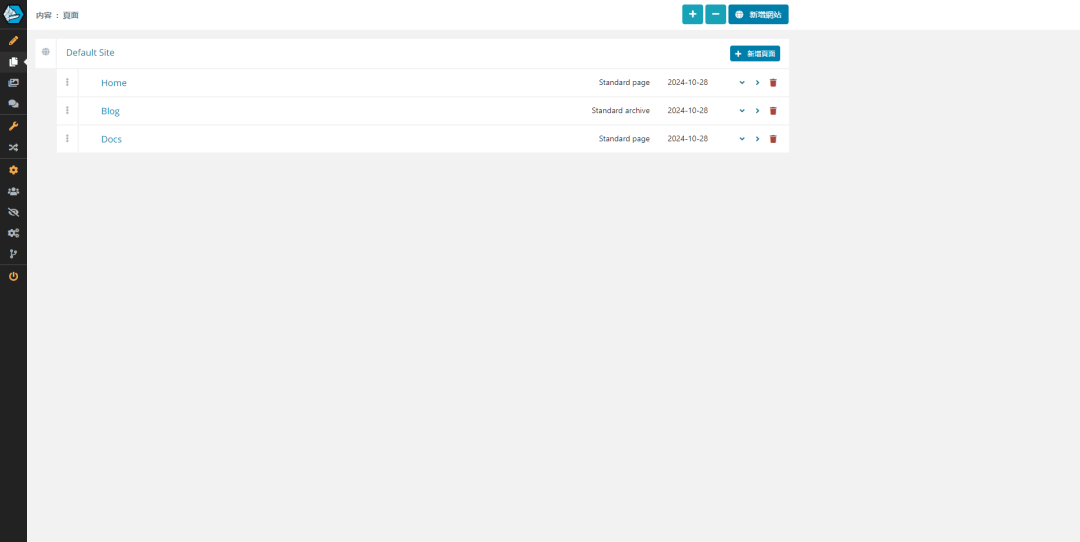
推荐一个Star超过2K的.Net轻量级的CMS开源项目
推荐一个具有模块化和可扩展的架构的CMS开源项目。 01 项目简介 Piranha CMS是一个轻量级且跨平台的CMS库,专为.NET 8设计。 该项目提供多种模板,具备CMS基本功能,也有空模板方便从头开始构建新网站,甚至可以作为移动应用的后端…...
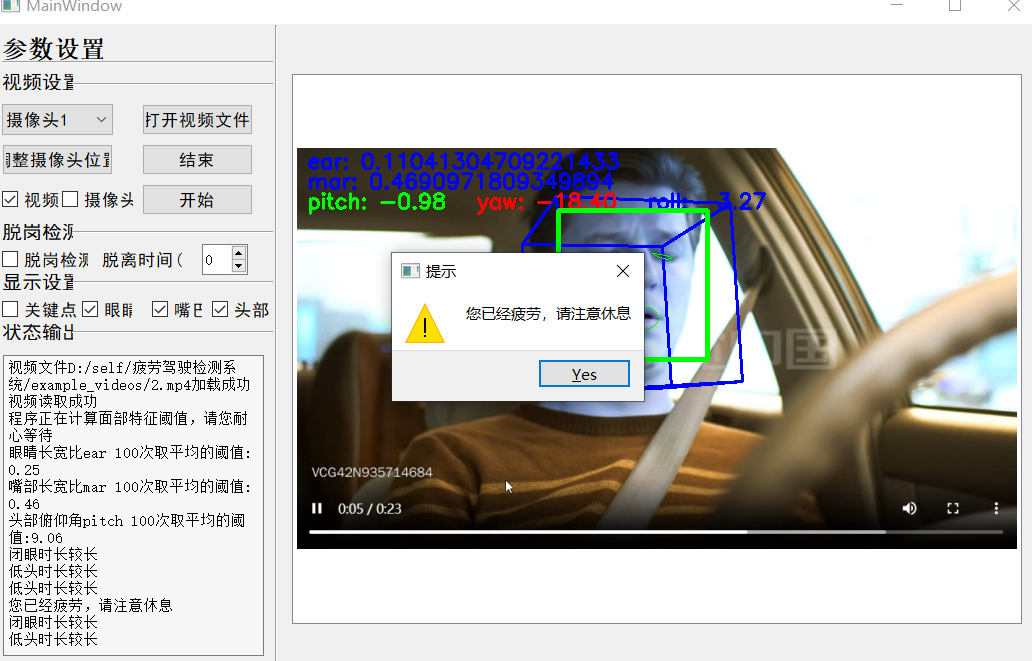
基于驾驶员面部特征的疲劳检测系统
大家好,本文是对基于驾驶员面部特征的疲劳检测系统源码的介绍与说明。 项目下载:基于驾驶员面部特征的疲劳检测系统 1.关于项目 疲劳驾驶检测系统通过监测驾驶人的眼睛状态,头部状态,嘴部状态等指标,识别出疲劳迹象…...
)
前端知识点---字符串的8种拼接方法(Javascript)
文章目录 01使用 运算符(改变了原始字符串)02使用 运算符(改变了原本的字符串)03 使用 concat() 方法(不改变原本的字符串)04使用模板字面量(不改变原本的字符串)05使用 join() 方法(不改变原本的字符串)①指定分隔符 ②没有指定…...

用 Python 从零开始创建神经网络(一):编码我们的第一个神经元
编码我们的第一个神经元 引言1. A Single Neuron:Example 1Example 2 2. A Layer of Neurons:Example 1 引言 本教程专为那些对神经网络已有基础了解、但尚未动手实践过的读者而设计。尽管网上充斥着各种教程,但很多内容要么过于简略&#x…...

低代码开发
低代码(Low Code)是一种软件开发方法,它通过可视化界面和少量的编码来快速构建应用程序。低代码平台的核心理念是通过抽象和最小化手工编码的方式,加速软件开发和部署的过程。 定义 低代码是一种软件开发方法,它允许…...

sql server 文件和文件组介绍
sql server 文件和文件组介绍 数据库文件和文件组 - SQL Server | Microsoft Learn...
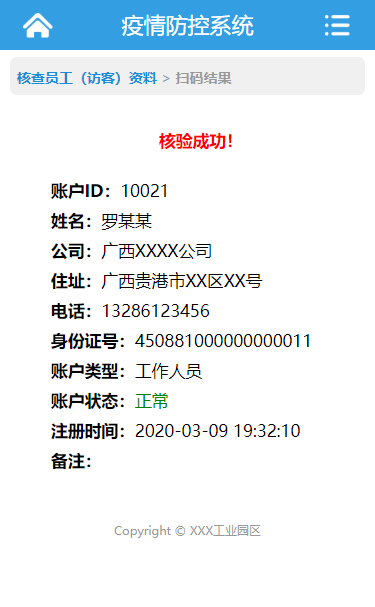
caozha-CEPCS(新冠肺炎疫情防控系统)
caozha-CEPCS,是一个基于PHP开发的新冠肺炎疫情防控系统,CEPCS(全称:COVID-19 Epidemic Prevention and Control System),可以应用于单位、企业、学校、工业园区、村落等等。小小系统,希望能为大…...

1Panel修改PostgreSQL时区
需求 1Panel安装的PostgreSQL默认是UTC时区,需要将它修改为上海时间 步骤 进入PostgreSQL的安装目录 /opt/1panel/apps/postgresql/postgresql/data打开postgresql.conf文件 修改: log_timezone Asia/Shanghai timezone Asia/Shanghai保存后重启…...

开发一个CRM系统难吗?CRM系统的实现步骤
越来越多企业意识到了,客户关系管理(CRM)系统已成为企业提升客户体验、推动销售增长的必备工具。一个高效的CRM系统不仅能够帮助企业优化客户数据管理,还能提升客户满意度,增强客户忠诚度,从而推动业务的持…...

kafka常见面试题总结
Kafka 核心知识解析 一、Kafka 消息发送流程 Kafka 发送消息涉及两个线程:main 线程和 sender 线程。在 main 线程中,会创建一个双端队列 RecordAccumulator,main 线程负责将消息发送给 RecordAccumulator,而 sender 线程则从 R…...

前端知识点---Javascript中检测数据类型函数总结
文章目录 01 typeof 运算符02 instanceof 运算符03 Array.isArray()04 Object.prototype.toString.call()05 constructor 属性06 isNaN() 和 Number.isNaN() (常用)07 isFinite() 和 Number.isFinite()08 typeof null 是 "object" 的问题 01 typeof 运算符 返回值是…...

aspose如何获取PPT放映页“切换”的“持续时间”值
aspose如何获取PPT放映页“切换”的“持续时间”值 项目场景问题描述问题1:从官方文档和资料查阅发现并没有对切换的持续时间进行处理的方法问题2:aspose的依赖包中,所有的关键对象都进行了混淆处理 解决方案1、找到ppt切换的持续时间对应的混…...

【MQTT】代理服务比较RabbitMQ、Mosquitto 和 EMQX
前言 目前要处理大量设备同时频繁发送数据的情况,MQTT协议确实是一个更优的选择,因为它特别适合需要低带宽和高效能的物联网应用,下面是对目前主流协议的对比 数据截止日期:2024年11月10日 基础设施 后端: springclo…...

【C#/C++】C++/CL中String^的含义和举例,C++层需要调用C#层对象时...
示例: String^ IDataServer::GetParam(String^ aParamName){ /// }在 C/CLI 中,String^ 和 IDataServer::GetParam(String^ aParamName) 这种写法是一种混合了 C 和 .NET 的语法,用于在 C 中操作 .NET 对象。C/CLI 是微软扩展的 C 语言&…...

Python学习从0到1 day26 第三阶段 Spark ② 数据计算Ⅰ
人总是会执着于失去的,而又不珍惜现在所拥有的 —— 24.11.9 一、map方法 PySpark的数据计算,都是基于RDD对象来进行的,采用依赖进行,RDD对象内置丰富的成员方法(算子) map算子 功能:map算子…...

【详细】如何优雅地删除 Docker 容器与镜像
内容预览 ≧∀≦ゞ 镜像与容器的区别删除容器和镜像的具体步骤1. 删除容器步骤 1:查看当前运行的容器步骤 2:停止容器步骤 3:删除容器 2. 删除镜像步骤 1:查看镜像列表步骤 2:删除镜像 3. 删除所有容器和镜像 使用 1Pa…...
)
【紧急通知】ChatGPT桌面版v1.5.2已悄然下架旧安装包!仅剩72小时可获取官方签名安装器(附SHA256校验码)
更多请点击: https://intelliparadigm.com 第一章:ChatGPT桌面版下载安装 OpenAI 官方尚未发布官方支持的 ChatGPT 桌面应用程序,但社区提供了多个稳定、安全且功能完善的第三方桌面客户端。目前主流推荐方案为基于 Electron 构建的开源项目…...

物联网DDoS检测:XGBoost、KNN、SGD与朴素贝叶斯性能对比
1. 项目概述:当物联网遇上DDoS,我们如何用机器学习“看门”?在网络安全这个没有硝烟的战场上,DDoS攻击一直是让运维和架构师们头疼的“流量洪水”。传统的防御手段,比如基于固定阈值的流量清洗或者已知攻击特征的签名匹…...

如何快速掌握抖音批量下载工具:面向初学者的完整指南
如何快速掌握抖音批量下载工具:面向初学者的完整指南 【免费下载链接】douyin-downloader A practical Douyin downloader for both single-item and profile batch downloads, with progress display, retries, SQLite deduplication, and browser fallback suppor…...

LLM与ML在NIDS规则映射MITRE ATTCK任务中的性能对比与实战指南
1. 项目概述:当AI遇见网络安全,一场关于“理解”与“分类”的较量在网络安全运营中心(SOC)里,分析师们每天都要面对海量的告警。每一条告警背后,都对应着网络入侵检测系统(NIDS)的一…...

为 OpenClaw 配置 Taotoken 以实现稳定可靠的 Agent 工作流
🚀 告别海外账号与网络限制!稳定直连全球优质大模型,限时半价接入中。 👉 点击领取海量免费额度 为 OpenClaw 配置 Taotoken 以实现稳定可靠的 Agent 工作流 对于使用 OpenClaw 框架构建智能体(Agent)的开…...

如何高效构建金融数据采集与分析工作流:AKShare深度应用指南
如何高效构建金融数据采集与分析工作流:AKShare深度应用指南 【免费下载链接】akshare AKShare is an elegant and simple financial data interface library for Python, built for human beings! 开源财经数据接口库 项目地址: https://gitcode.com/gh_mirrors/…...

RDP Wrapper:免费解锁Windows家庭版多用户远程桌面功能
RDP Wrapper:免费解锁Windows家庭版多用户远程桌面功能 【免费下载链接】rdpwrap RDP Wrapper Library 项目地址: https://gitcode.com/gh_mirrors/rd/rdpwrap RDP Wrapper Library是一个创新的开源项目,专为Windows家庭版和基础版用户提供完整的…...

终极免Root解决方案:Nrfr工具实战指南,轻松修改SIM卡国家码解锁全球应用
终极免Root解决方案:Nrfr工具实战指南,轻松修改SIM卡国家码解锁全球应用 【免费下载链接】Nrfr 🌍 免 Root 的 SIM 卡国家码修改工具 | 解决国际漫游时的兼容性问题,帮助使用海外 SIM 卡获得更好的本地化体验,解锁运营…...

HS2-HF_Patch:终极汉化与优化补丁完全指南
HS2-HF_Patch:终极汉化与优化补丁完全指南 【免费下载链接】HS2-HF_Patch Automatically translate, uncensor and update HoneySelect2! 项目地址: https://gitcode.com/gh_mirrors/hs/HS2-HF_Patch 还在为Honey Select 2的日语界面烦恼吗?HS2-H…...

图像做 DCT:揭秘那个让像素“开口说话“的数学魔法
一、一个让我"开窍"的乐谱解读故事 我有一个学钢琴的表妹,从小就有一种让我惊叹的能力——她听任何一段陌生的旋律,都能立刻在钢琴上准确弹出来。我一直觉得她有"绝对音感"这种天赋。有一次我好奇地问她:“你怎么做到的&…...