
springboot中设计基于Redisson的分布式锁注解
如何使用AOP设计一个分布式锁注解?
1、在pom.xml中配置依赖
<dependency><groupId>org.springframework</groupId><artifactId>spring-aspects</artifactId><version>5.3.26</version></dependency><dependency><groupId>org.springframework</groupId><artifactId>spring-aop</artifactId></dependency>2、逻辑代码
创建一下多个文件夹,并复制粘贴进代码
2.1、RedissonConfig.java
需要配置一下Redisson
import org.redisson.Redisson;
import org.redisson.api.RedissonClient;
import org.redisson.config.Config;
import org.springframework.context.annotation.Bean;
import org.springframework.context.annotation.Configuration;/*** Redisson 配置**/
@Configuration
public class RedissonConfig {@Beanpublic RedissonClient redissonClient() {Config config = new Config();config.useSingleServer().setAddress("redis://192.168.57.111:6379") // Redis地址.setPassword(null) // 如果没有密码,设置为null.setDatabase(0); // 使用的Redis数据库索引RedissonClient redissonClient = Redisson.create(config);// 测试连接try {redissonClient.getKeys().count();System.out.println("Redisson connected to Redis successfully.");} catch (Exception e) {System.err.println("Failed to connect to Redis: " + e.getMessage());}return redissonClient;}
}
需要修改setAddress("redis://192.168.57.111:6379")中的地址为自己的redis地址
2.2、DistributedLock.java
import java.lang.annotation.ElementType;
import java.lang.annotation.Retention;
import java.lang.annotation.RetentionPolicy;
import java.lang.annotation.Target;@Target(ElementType.METHOD) // 作用于方法
@Retention(RetentionPolicy.RUNTIME) // 注解在运行时生效
public @interface DistributedLock {String prefix() default "lock:"; // 锁前缀,默认为 "lock:"String key() default ""; // 锁的Key,支持SpEL表达式long leaseTime() default 30; // 锁的默认持有时间,单位秒long waitTime() default 10; // 获取锁的等待时间,单位秒
}
2.3、DistributedLockAspect.java
import org.aspectj.lang.ProceedingJoinPoint;
import org.aspectj.lang.annotation.Around;
import org.aspectj.lang.annotation.Aspect;
import org.aspectj.lang.annotation.Pointcut;
import org.springframework.beans.factory.annotation.Autowired;
import org.springframework.stereotype.Component;
import org.redisson.api.RLock;
import org.redisson.api.RedissonClient;
import java.security.MessageDigest;
import java.security.NoSuchAlgorithmException;
import java.util.concurrent.TimeUnit;@Aspect
@Component
public class DistributedLockAspect {@Autowiredprivate RedissonClient redissonClient; // 注入 Redisson 客户端/*** 定义切入点,匹配所有使用 @DistributedLock 注解的方法* @param distributedLock 分布式锁注解对象*/@Pointcut("@annotation(distributedLock)")public void distributedLockPointcut(DistributedLock distributedLock) {}/*** 环绕通知:在目标方法执行前后处理分布式锁逻辑** @param joinPoint 切点,表示目标方法的执行点* @param distributedLock 注解,用于获取注解属性值* @return 目标方法的返回值* @throws Throwable 当目标方法抛出异常时向上抛出*/@Around("distributedLockPointcut(distributedLock)")public Object around(ProceedingJoinPoint joinPoint, DistributedLock distributedLock) throws Throwable {String lockKey = buildLockKey(distributedLock.prefix(),distributedLock.key(), joinPoint); // 生成锁KeyRLock lock = redissonClient.getLock(lockKey);boolean isLocked = false;try {while (true) {// 尝试获取锁isLocked = lock.tryLock(distributedLock.waitTime(), distributedLock.leaseTime(), TimeUnit.SECONDS);if (isLocked) {System.out.println(Thread.currentThread().getName() + " 成功获取锁,key: " + lockKey);return joinPoint.proceed(); // 执行目标方法} else {System.out.println(Thread.currentThread().getName() + " 未获取到锁,key: " + lockKey + ",重试中...");// 等待一段时间后再重试Thread.sleep(500);}}} finally {if (isLocked && lock.isHeldByCurrentThread()) {lock.unlock(); // 释放锁System.out.println(Thread.currentThread().getName() + " 已释放锁,key: " + lockKey);}}}private String buildLockKey(String prefix, String key, ProceedingJoinPoint joinPoint) {if (key.isEmpty()) {throw new IllegalArgumentException("Lock key cannot be empty");}// 拼接锁前缀和原始键String rawKey = prefix + key;// 将拼接后的键通过 MD5 生成唯一的锁键return generateMD5(rawKey);}/*** 使用 MD5 生成锁键* @param input 原始键* @return MD5 生成的锁键*/private String generateMD5(String input) {try {MessageDigest md = MessageDigest.getInstance("MD5");byte[] digest = md.digest(input.getBytes());// 转换为 32 位十六进制字符串StringBuilder hexString = new StringBuilder();for (byte b : digest) {String hex = Integer.toHexString(0xff & b);if (hex.length() == 1) {hexString.append('0');}hexString.append(hex);}return hexString.toString();} catch (NoSuchAlgorithmException e) {throw new RuntimeException("Failed to generate MD5 hash", e);}}}
这三步做完之后,该注解就能用了。
3、业务模拟测试
根据以下创建文件,并写入代码
3.1、InventoryService.java
这里测试可以itemId为键加锁
import com.pshao.charplatform.utils.distributedLock.DistributedLock;
import org.springframework.stereotype.Service;@Service
public class InventoryService {@DistributedLock(prefix = "stock",key = "#itemId", leaseTime = 10, waitTime = 1)public void reduceStock(Long itemId, int quantity) {System.out.println(Thread.currentThread().getName() + " 正在处理库存扣减: itemId=" + itemId + ", quantity=" + quantity);try {Thread.sleep(2000); // 模拟耗时操作,修改为两秒} catch (InterruptedException e) {e.printStackTrace();}System.out.println(Thread.currentThread().getName() + " 完成库存扣减: itemId=" + itemId);}}
这里可以输入以下多个参数,key是必须的,其他可以不输入
String prefix() default "lock:"; // 锁前缀,默认为 "lock:"
String key() default ""; // 锁的Key
long leaseTime() default 30; // 锁的默认持有时间,单位秒
long waitTime() default 10; // 获取锁的等待时间,单位秒
3.2、DistributedLockApplication.java
import org.springframework.boot.SpringApplication;
import org.springframework.boot.autoconfigure.SpringBootApplication;
import org.springframework.context.ApplicationContext;
import java.util.concurrent.ExecutorService;
import java.util.concurrent.Executors;@SpringBootApplication(scanBasePackages = "com.pshao.charplatform")
public class DistributedLockApplication {public static void main(String[] args) {ApplicationContext context = SpringApplication.run(DistributedLockApplication.class, args);InventoryService inventoryService = context.getBean(InventoryService.class);ExecutorService executor = Executors.newFixedThreadPool(3); // 创建3个线程// 模拟多个线程竞争同一资源for (int i = 0; i < 3; i++) {executor.submit(() -> inventoryService.reduceStock(123L, 10));}executor.shutdown();}
}
3.3、运行查看测试结果

测试成功!
如果运行后出现,类似以下日志
Action: Correct the classpath of your application so that it contains compatible versions of the classes org.springframework.aop.framework.autoproxy.AbstractAutoProxyCreator and org.springframework.util.ClassUtils
考虑是版本冲突,可以参考Correct the classpath of your application so that it contains compatible versions......版本不兼容解决方法-CSDN博客
相关文章:
springboot中设计基于Redisson的分布式锁注解
如何使用AOP设计一个分布式锁注解? 1、在pom.xml中配置依赖 <dependency><groupId>org.springframework</groupId><artifactId>spring-aspects</artifactId><version>5.3.26</version></dependency><dependenc…...

C++初阶学习第十一弹——list的用法和模拟实现
目录 一、list的使用 二.list的模拟实现 三.总结 一、list的使用 list的底层是双向链表结构,双向链表中每个元素存储在互不相关的独立节点中,在节点中通过指针指向 其前一个元素和后一个元素。 常见的list的函数的使用 std::list<int> It {1,…...

共享单车管理系统项目学习实战
前言 Spring Boot Vue前后端分离 前端:Vue(CDN) Element axios(前后端交互) BaiDuMap ECharts(图表展示) 后端:Spring Boot Spring MVC(Web) MyBatis Plus(数据库) 数据库:MySQL 验证码请求...

详细解读TISAX汽车信息安全评估
TISAX汽车信息安全评估是一个针对汽车行业的信息安全评估和交换机制,以下是对其的详细解读: 一、背景与目的 TISAX是在德国汽车工业协会(VDA)的支持下开发的,旨在确保跨公司边界的汽车行业信息安全评估的认可度&…...
)
gitlab cicd搭建及使用笔记(二)
cicd之gitlab-runner使用要点 官方链接:https://docs.gitlab.com/runner/ 附历史文章链接 https://blog.csdn.net/qq_42936727/article/details/143624523?spm1001.2014.3001.5501 gitlab-runner常用命令及解释 gitlab-runner verify 容器内,检查注…...

鸿蒙实战:页面跳转传参
文章目录 1. 实战概述2. 实现步骤2.1 创建鸿蒙项目2.2 编写首页代码2.3 新建第二个页面 3. 测试效果4. 实战总结 1. 实战概述 本次实战,学习如何在HarmonyOS应用中实现页面间参数传递。首先创建项目,编写首页代码,实现按钮跳转至第二个页面并…...
)
Spring Security SecurityContextHolder(安全上下文信息)
在本篇博客中,我们将讨论 Spring Security 的 SecurityContextHolder 组件,包括其实现方式、关键特性,并通过实际示例进行说明。 理解 SecurityContextHolder SecurityContextHolder 是 Spring Security 存储当前安全上下文详细信息的地方。…...

蓝队技能-应急响应篇日志自动采集日志自动查看日志自动化分析Web安全内网攻防工具项目
知识点: 1、应急响应-系统日志收集-项目工具 2、应急响应-系统日志查看-项目工具 3、应急响应-日志自动分析-项目工具 演示案例-蓝队技能-工具项目-自动日志采集&自动日志查看&自动日志分析 系统日志自动采集-观星应急工具(Windows系统日志) SglabIr_Co…...

Python JSON 数据解析教程:从基础到高级
Python JSON 数据解析教程:从基础到高级 引言 在现代编程中,JSON(JavaScript Object Notation)已成为数据交换的标准格式。它以易于阅读和编写的文本格式存储和传输数据,广泛应用于Web API和配置文件中。Python提供了…...

25.UE5时间膨胀,慢动作,切换地图,刷BOSS
2-27 时间膨胀、慢动作、切换地图、刷BOSS_哔哩哔哩_bilibili 目录 1.刷新BOSS逻辑 2.时间膨胀实现慢动作 3.胜利画面,下一关 3.1胜利画面UI 3.2第一关、第二关游戏模式 3.3下一关按钮事件的绑定 1.刷新BOSS逻辑 实现当场上的怪物都死亡后,进行刷…...

Three.js 相机控制器Controls
在 3D 场景中,摄像机的控制尤为重要,因为它决定了用户如何观察和与场景互动。Three.js 提供了多种相机控制器,最常用的有 OrbitControls、TrackballControls、FlyControls 和 FirstPersonControls。OrbitControls 适合用于查看和检查 3D 模型…...

Android开发实战班 - 现代 UI 开发之自定义 Compose 组件
Jetpack Compose 不仅提供了丰富的内置组件,还允许开发者根据项目需求创建自定义组件。自定义 Compose 组件可以提高代码复用性、简化 UI 逻辑,并使应用界面更加一致和模块化。本章节将介绍如何创建自定义 Compose 组件,包括组件的创建、样式…...

All-in-one Notion 介绍
Notion 是一款集笔记、知识管理、任务规划和协作于一体的工具,它以高度的灵活性和可自定义的工作空间而闻名。它适合个人和团队使用,能够帮助用户高效管理生活、学习和工作。以下是 Notion 的一些主要特点: 1. 多功能工作区 Notion 将笔记、…...

深入理解C++11右值引用与移动语义:高效编程的基石
文章目录 前言📚一、C11的历史发展📖1.1 C11 之前的背景📖1.2 C11 的发展历程📖1.3 C11 的主要设计目标📖1.4 C11 的主要特性📖1.5 C11 的影响 📚二、统一的列表初始化📖2.1 基本列表…...

【WRF-Urban】URBPARM_LCZ.TBL 查找表解释及内容
【WRF-Urban】URBPARM_LCZ.TBL 查找表解释及内容 URBPARM_LCZ.TBL 文件的作用URBPARM_LCZ.TBL 文件中的参数URBPARM_LCZ.TBL 的使用URBPARM_LCZ.TBL 文件内容如何调整或扩展 URBPARM_LCZ.TBL参考URBPARM_LCZ.TBL 文件是 WRF(天气研究与预报模型) 中用于处理 局地气候区(Loca…...

网络是怎么连接的
目录 URL HTTP(超文本传输协议) FTP(文件传输协议) File mailto HTTP的方法 Socket URL URL(Uniform Resource Locator)中文名为统一资源定位符,它是互联网上用来标识某一资源的地址。就…...

Java 实现PDF添加水印
maven依赖: <dependency><groupId>com.itextpdf</groupId><artifactId>itextpdf</artifactId><version>5.4.3</version> </dependency>网络地址添加水印代码: public static boolean waterMarkNet(Stri…...
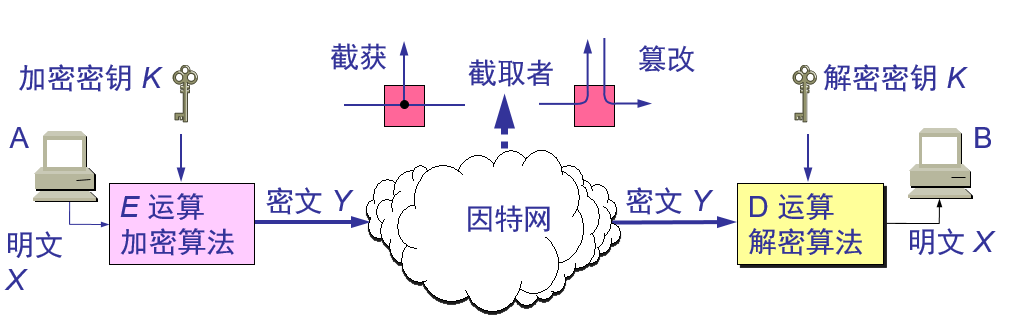
网络安全问题概述
1.1.计算机网络面临的安全性威胁 计算机网络上的通信面临以下的四种威胁: (1) 截获——从网络上窃听他人的通信内容。 (2) 中断——有意中断他人在网络上的通信。 (3) 篡改——故意篡改网络上传送的报文。可应用于域名重定向,即钓鱼网站。 (4) 伪造——伪…...

(udp)网络编程套接字Linux(整理)
源IP地址和目的IP地址 唐僧例子1 在IP数据包头部中, 有两个IP地址, 分别叫做源IP地址, 和目的IP地址.思考: 我们光有IP地址就可以完成通信了嘛? 想象一下发qq消息的例子, 有了IP地址能够把消息发送到对方的机器上,但是还需要有一个其他的标识来区分出, 这个数据要给哪个程序进…...

Web应用安全入门:架构搭建、漏洞分析与HTTP数据包处理
Web应用安全入门:架构搭建、漏洞分析与HTTP数据包处理 引言 在当今数字化时代,Web应用已成为企业和个人在线交互的核心。然而,随着技术的发展,Web应用面临的安全挑战也日益增加。本文旨在为初学者提供一个关于Web应用架构搭建、…...

5分钟掌握ExplorerPatcher:Windows界面定制终极指南
5分钟掌握ExplorerPatcher:Windows界面定制终极指南 【免费下载链接】ExplorerPatcher This project aims to enhance the working environment on Windows 项目地址: https://gitcode.com/GitHub_Trending/ex/ExplorerPatcher 还在为Windows 11的新界面感到…...

降AI提示词大全!10个prompt让AI输出人类味+嘎嘎降AI兜底!
降AI提示词大全!10个prompt让AI输出人类味嘎嘎降AI兜底! 用 ChatGPT、DeepSeek、Kimi、豆包写论文最大的痛是:写得快但被检测判 AI、改起来比自己写还累。其实在写作环节就能预防一部分 AI 痕迹,靠的是会写降 AI 提示词。 这篇先给…...

Dell G15散热终极解决方案:开源温度控制中心完全指南
Dell G15散热终极解决方案:开源温度控制中心完全指南 【免费下载链接】tcc-g15 Thermal Control Center for Dell G15 - open source alternative to AWCC 项目地址: https://gitcode.com/gh_mirrors/tc/tcc-g15 Dell G15笔记本用户是否经常遭遇游戏卡顿、性…...
服务启停、远程连接与基础排查)
国产化服务器运维笔记:手把手搞定MariaDB/PostgreSQL(瀚高)服务启停、远程连接与基础排查
国产化环境数据库运维实战:MariaDB与瀚高数据库深度管理指南 在信息技术应用创新背景下,国产服务器与开源数据库的组合已成为企业基础架构的重要选择。面对复杂的生产环境,掌握数据库服务的精细化管理能力,是每位运维工程师的必备…...

英雄联盟Akari助手:5大核心功能提升你的游戏体验终极指南
英雄联盟Akari助手:5大核心功能提升你的游戏体验终极指南 【免费下载链接】League-Toolkit An all-in-one toolkit for LeagueClient. Gathering power 🚀. 项目地址: https://gitcode.com/gh_mirrors/le/League-Toolkit 你是否厌倦了在英雄联盟对…...

从强化学习视角看HDP:ADP中的Actor-Critic框架到底怎么工作的?
从强化学习视角看HDP:ADP中的Actor-Critic框架到底怎么工作的? 在控制理论与机器学习交叉领域,自适应动态规划(ADP)与强化学习(RL)的融合正催生新一代智能控制范式。当我们以RL从业者熟悉的Act…...

PUBG玩家必看:如何用罗技鼠标宏实现精准无后座力射击
PUBG玩家必看:如何用罗技鼠标宏实现精准无后座力射击 【免费下载链接】logitech-pubg PUBG no recoil script for Logitech gaming mouse / 绝地求生 罗技 鼠标宏 项目地址: https://gitcode.com/gh_mirrors/lo/logitech-pubg 你是否在《绝地求生》中总感觉压…...

厘米级实景复刻 全域化镜像感知:自进化时空标定技术加持,筑牢复杂工况视频孪生运行根基
厘米级实景复刻 全域化镜像感知副标题:自进化时空标定技术加持,筑牢复杂工况视频孪生运行根基前言数字孪生技术规模化落地进程中,实景还原精度不足、全域感知连贯性薄弱、复杂工况适配性差成为制约行业发展的核心瓶颈。传统方案受限于静态标定…...

KEIL MDK5.12/5.13升级后编译报错?手把手教你解决core_cm3.h找不到的问题
KEIL MDK5.12/5.13升级后编译报错?手把手教你解决core_cm3.h找不到的问题 最近不少嵌入式开发者反馈,在将KEIL MDK升级到5.12或5.13版本后,原本运行良好的工程突然开始报错,提示"cannot open source input file core_cm3.h&q…...

到极限了吗?优化算法APP9.0,再加入228个车间调度案例!
我又来更新啦!这次在优化算法APP8.0的基础上再次大更新!加入了4大经典车间调度数据集,共228个实例开箱即用。这个案例的加入非常适合写论文哦!当你以为我黔驴技穷的时候,不好意思,我的表演才刚刚开始~ 哈哈…...