
Easyexcel(6-单元格合并)
相关文章链接
- Easyexcel(1-注解使用)
- Easyexcel(2-文件读取)
- Easyexcel(3-文件导出)
- Easyexcel(4-模板文件)
- Easyexcel(5-自定义列宽)
- Easyexcel(6-单元格合并)
注解
@ContentLoopMerge
用于设置合并单元格的注解,作用于字段上
- eachRow:每隔几行合并
- columnExtend:合并列的下标
@AllArgsConstructor
@NoArgsConstructor
@Data
public class User {@ContentLoopMerge(eachRow = 2, columnExtend = 1)@ExcelProperty(value = "用户Id")private Integer userId;@ExcelProperty(value = "姓名")private String name;@ExcelProperty(value = "手机")private String phone;@ExcelProperty(value = "邮箱")private String email;@ExcelProperty(value = "创建时间")private Date createTime;
}
@OnceAbsoluteMerge
用于指定位置的单元格合并,作用于类上
- firstRowIndex:第一行下标
- lastRowIndex:最后一行下标
- firstColumnIndex:第一列下标
- lastColumnIndex:最后一列下标
@OnceAbsoluteMerge(firstColumnIndex = 0, lastColumnIndex = 0, firstRowIndex = 1, lastRowIndex = 2)
@AllArgsConstructor
@NoArgsConstructor
@Data
public class User {@ExcelProperty(value = "用户Id")private Integer userId;@ExcelProperty(value = "姓名")private String name;@ExcelProperty(value = "手机")private String phone;@ExcelProperty(value = "邮箱")private String email;@ExcelProperty(value = "创建时间")private Date createTime;
}
类方法
LoopMergeStrategy
源码查看
public class LoopMergeStrategy implements RowWriteHandler {// 每隔几行合并private final int eachRow;// 合并几列private final int columnExtend;// 合并列private final int columnIndex;public LoopMergeStrategy(int eachRow, int columnIndex) {this(eachRow, 1, columnIndex);}public LoopMergeStrategy(int eachRow, int columnExtend, int columnIndex) {if (eachRow < 1) {throw new IllegalArgumentException("EachRows must be greater than 1");}if (columnExtend < 1) {throw new IllegalArgumentException("ColumnExtend must be greater than 1");}if (columnExtend == 1 && eachRow == 1) {throw new IllegalArgumentException("ColumnExtend or eachRows must be greater than 1");}if (columnIndex < 0) {throw new IllegalArgumentException("ColumnIndex must be greater than 0");}this.eachRow = eachRow;this.columnExtend = columnExtend;this.columnIndex = columnIndex;}public LoopMergeStrategy(LoopMergeProperty loopMergeProperty, Integer columnIndex) {this(loopMergeProperty.getEachRow(), loopMergeProperty.getColumnExtend(), columnIndex);}@Overridepublic void afterRowDispose(RowWriteHandlerContext context) {// 判断是否为表头if (context.getHead() || context.getRelativeRowIndex() == null) {return;}// 循环进行单元格合并if (context.getRelativeRowIndex() % eachRow == 0) {CellRangeAddress cellRangeAddress = new CellRangeAddress(context.getRowIndex(),context.getRowIndex() + eachRow - 1,columnIndex, columnIndex + columnExtend - 1);context.getWriteSheetHolder().getSheet().addMergedRegionUnsafe(cellRangeAddress);}}
}
基本使用
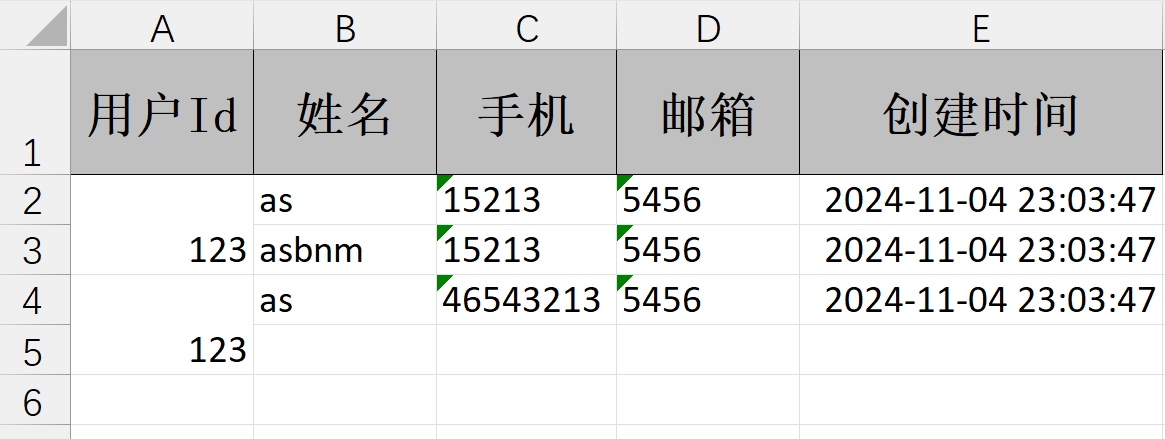
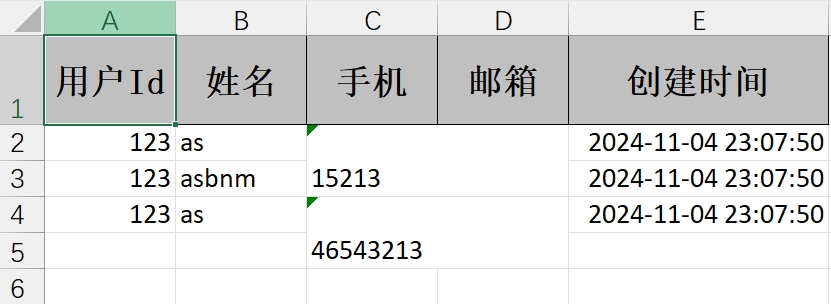
通过 registerWriteHandler 方法设置单元格合并策略,用于指定某几列每相差几行进行单元格合并
- 指定单列合并
@GetMapping("/download1")
public void download1(HttpServletResponse response) {try {response.setContentType("application/vnd.ms-excel");response.setCharacterEncoding("utf-8");// 这里URLEncoder.encode可以防止中文乱码 当然和easyexcel没有关系String fileName = URLEncoder.encode("测试", "UTF-8").replaceAll("\\+", "%20");response.setHeader("Content-disposition", "attachment;filename=" + fileName + ".xls");User user1 = new User();user1.setUserId(123);user1.setName("as");user1.setPhone("15213");user1.setEmail("5456");user1.setCreateTime(new Date());User user2 = new User();user2.setUserId(123);user2.setName("asbnm");user2.setPhone("15213");user2.setEmail("5456");user2.setCreateTime(new Date());User user3 = new User();user3.setUserId(123);user3.setName("as");user3.setPhone("46543213");user3.setEmail("5456");user3.setCreateTime(new Date());// 第1列每隔2行合并一次LoopMergeStrategy loopMergeStrategy = new LoopMergeStrategy(2, 0);EasyExcel.write(response.getOutputStream(), User.class).registerWriteHandler(loopMergeStrategy).sheet("模板").doWrite(Arrays.asList(user1, user2, user3));} catch (Exception e) {e.printStackTrace();}
}
- 指定多列合并
@GetMapping("/download1")
public void download1(HttpServletResponse response) {try {response.setContentType("application/vnd.ms-excel");response.setCharacterEncoding("utf-8");// 这里URLEncoder.encode可以防止中文乱码 当然和easyexcel没有关系String fileName = URLEncoder.encode("测试", "UTF-8").replaceAll("\\+", "%20");response.setHeader("Content-disposition", "attachment;filename=" + fileName + ".xls");User user1 = new User();user1.setUserId(123);user1.setName("as");user1.setPhone("15213");user1.setEmail("5456");user1.setCreateTime(new Date());User user2 = new User();user2.setUserId(123);user2.setName("asbnm");user2.setPhone("15213");user2.setEmail("5456");user2.setCreateTime(new Date());User user3 = new User();user3.setUserId(123);user3.setName("as");user3.setPhone("46543213");user3.setEmail("5456");user3.setCreateTime(new Date());// 第2列开始每隔2行合并一次,从第2列开始的两列进行合并LoopMergeStrategy loopMergeStrategy = new LoopMergeStrategy(2, 2, 2);EasyExcel.write(response.getOutputStream(), User.class).registerWriteHandler(loopMergeStrategy).sheet("模板").doWrite(Arrays.asList(user1, user2, user3));} catch (Exception e) {e.printStackTrace();}
}
OnceAbsoluteMergeStrategy
源码查看
public class OnceAbsoluteMergeStrategy implements SheetWriteHandler {// 第一行private final int firstRowIndex;// 最后一行private final int lastRowIndex;// 第一列private final int firstColumnIndex;// 最后一列private final int lastColumnIndex;public OnceAbsoluteMergeStrategy(int firstRowIndex, int lastRowIndex, int firstColumnIndex, int lastColumnIndex) {if (firstRowIndex < 0 || lastRowIndex < 0 || firstColumnIndex < 0 || lastColumnIndex < 0) {throw new IllegalArgumentException("All parameters must be greater than 0");}this.firstRowIndex = firstRowIndex;this.lastRowIndex = lastRowIndex;this.firstColumnIndex = firstColumnIndex;this.lastColumnIndex = lastColumnIndex;}public OnceAbsoluteMergeStrategy(OnceAbsoluteMergeProperty onceAbsoluteMergeProperty) {this(onceAbsoluteMergeProperty.getFirstRowIndex(), onceAbsoluteMergeProperty.getLastRowIndex(),onceAbsoluteMergeProperty.getFirstColumnIndex(), onceAbsoluteMergeProperty.getLastColumnIndex());}@Overridepublic void afterSheetCreate(WriteWorkbookHolder writeWorkbookHolder, WriteSheetHolder writeSheetHolder) {CellRangeAddress cellRangeAddress =new CellRangeAddress(firstRowIndex, lastRowIndex, firstColumnIndex, lastColumnIndex);writeSheetHolder.getSheet().addMergedRegionUnsafe(cellRangeAddress);}
}
基本使用
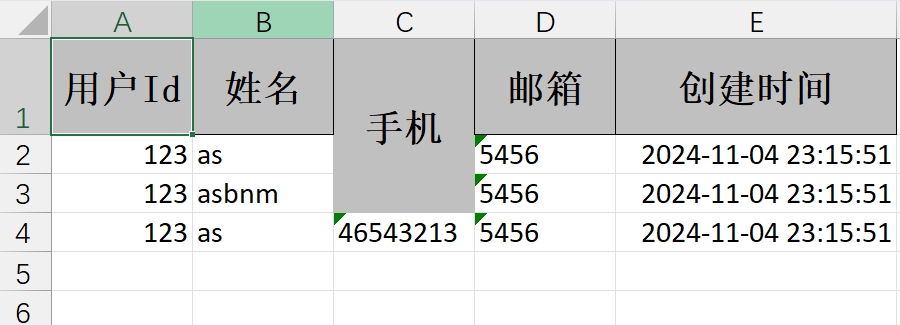
通过 registerWriteHandler 方法设置单元格合并策略,用于指定一个区域内的单元格进行合并
@GetMapping("/download2")
public void download2(HttpServletResponse response) {try {response.setContentType("application/vnd.ms-excel");response.setCharacterEncoding("utf-8");// 这里URLEncoder.encode可以防止中文乱码 当然和easyexcel没有关系String fileName = URLEncoder.encode("测试", "UTF-8").replaceAll("\\+", "%20");response.setHeader("Content-disposition", "attachment;filename=" + fileName + ".xls");User user1 = new User();user1.setUserId(123);user1.setName("as");user1.setPhone("15213");user1.setEmail("5456");user1.setCreateTime(new Date());User user2 = new User();user2.setUserId(123);user2.setName("asbnm");user2.setPhone("15213");user2.setEmail("5456");user2.setCreateTime(new Date());User user3 = new User();user3.setUserId(123);user3.setName("as");user3.setPhone("46543213");user3.setEmail("5456");user3.setCreateTime(new Date());// 从第1行第3列合并到第3行第3列OnceAbsoluteMergeStrategy onceAbsoluteMergeStrategy = new OnceAbsoluteMergeStrategy(0, 2, 2, 2);EasyExcel.write(response.getOutputStream(), User.class).registerWriteHandler(onceAbsoluteMergeStrategy).sheet("模板").doWrite(Arrays.asList(user1, user2, user3));} catch (Exception e) {e.printStackTrace();}
}
合并单元格工具类
AbstractMergeStrategy
基本思路
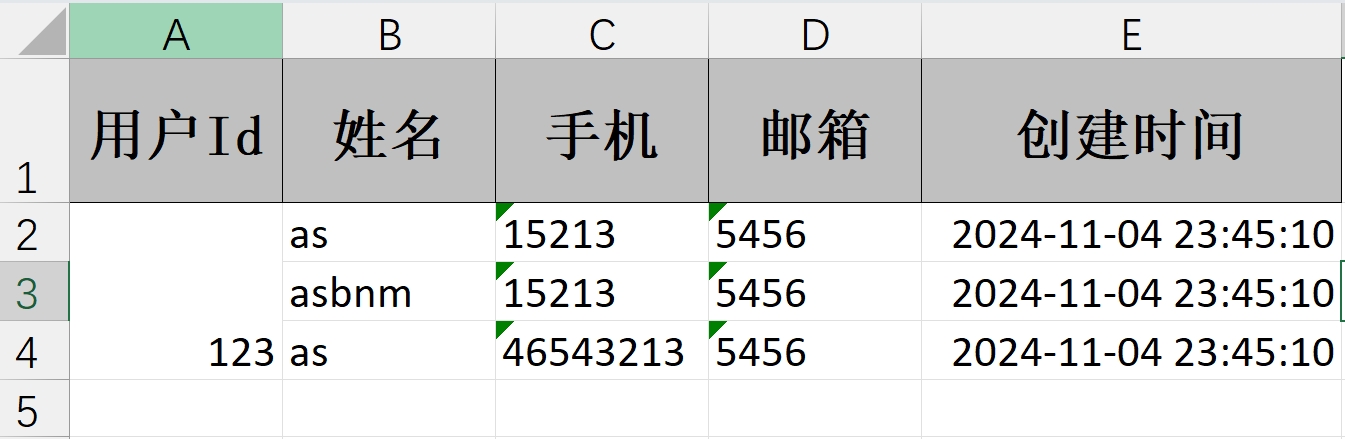
- 继承 AbstractMergeStrategy 抽象合并策略,重写 merge 方法
- 传入要合并的数据列表,循环判断上下行是否是相同的数据,如果是则为同一个组,否则为另一个组,使用 List 保存每个组的数量
- 单元格渲染时,循环遍历每个组的值后,计算要合并的单元格的上下标
使用
/*** 自定义合并策略 该类继承了AbstractMergeStrategy抽象合并策略,需要重写merge()方法*/
public class CustomMergeStrategy extends AbstractMergeStrategy {/*** 分组,每几行合并一次*/private List<Integer> exportFieldGroupCountList;/*** 目标合并列index*/private Integer targetColumnIndex;/*** 需要开始合并单元格的首行index*/private Integer rowIndex;public CustomMergeStrategy(List<String> exportDataList, Integer targetColumnIndex, Integer rowIndex) {this.exportFieldGroupCountList = getGroupCountList(exportDataList, rowIndex);this.targetColumnIndex = targetColumnIndex;this.rowIndex = rowIndex;}// 该方法将目标列根据值是否相同连续可合并,存储可合并的行数private List<Integer> getGroupCountList(List<String> exportDataList, Integer rowIndex) {if (CollectionUtils.isEmpty(exportDataList)) {return new ArrayList<>();}List<Integer> groupCountList = new ArrayList<>();int count = 1;for (int i = rowIndex + 1, len = exportDataList.size(); i < len; i++) {// 判断上一列和当前列的值是否相同if (exportDataList.get(i).equals(exportDataList.get(i - 1))) {count++;} else {groupCountList.add(count);count = 1;}}// 处理完最后一条后groupCountList.add(count);return groupCountList;}@Overrideprotected void merge(Sheet sheet, Cell cell, Head head, Integer relativeRowIndex) {if (null == rowIndex) {rowIndex = cell.getRowIndex();}// 仅从首行以及目标列的单元格开始合并,忽略其他if (cell.getRowIndex() == rowIndex + 1 && cell.getColumnIndex() == targetColumnIndex) {mergeGroupColumn(sheet);}}private void mergeGroupColumn(Sheet sheet) {int rowCount = rowIndex + 1;for (Integer count : exportFieldGroupCountList) {if (count == 1) {rowCount += count;continue;}// 合并单元格CellRangeAddress cellRangeAddress = new CellRangeAddress(rowCount, rowCount + count - 1, targetColumnIndex, targetColumnIndex);sheet.addMergedRegionUnsafe(cellRangeAddress);rowCount += count;}}
}
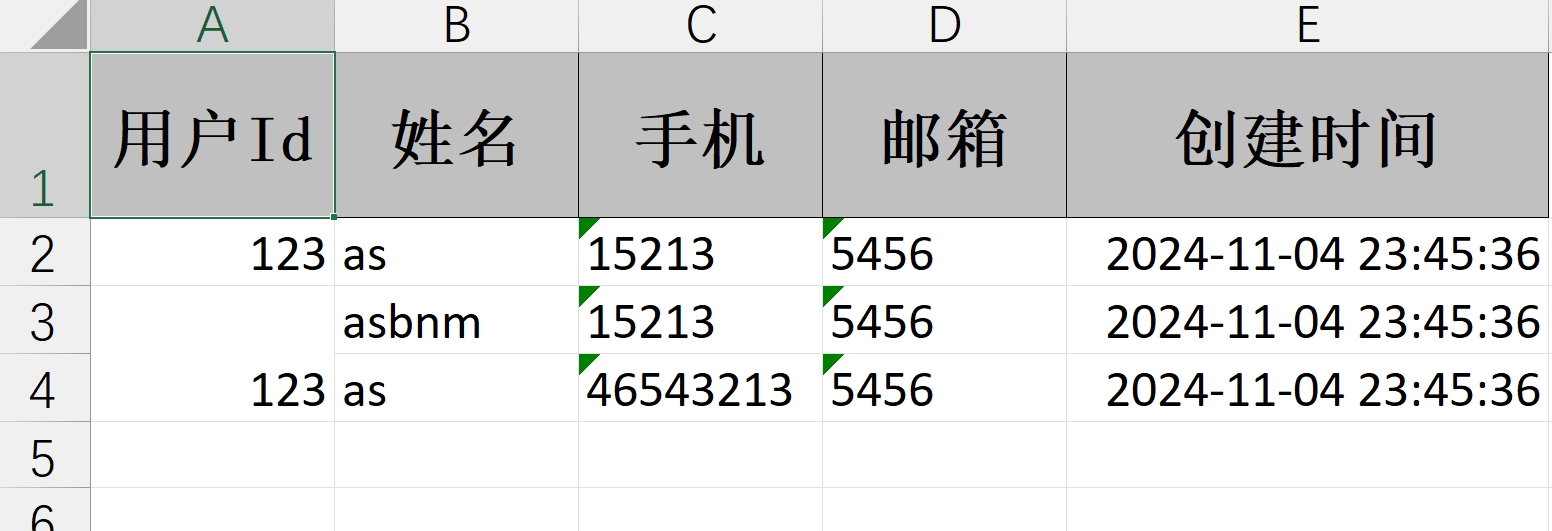
- 从首行开始合并单元格
@GetMapping("/download3")
public void download3(HttpServletResponse response) {try {response.setContentType("application/vnd.ms-excel");response.setCharacterEncoding("utf-8");// 这里URLEncoder.encode可以防止中文乱码 当然和easyexcel没有关系String fileName = URLEncoder.encode("测试", "UTF-8").replaceAll("\\+", "%20");response.setHeader("Content-disposition", "attachment;filename=" + fileName + ".xls");User user1 = new User();user1.setUserId(123);user1.setName("as");user1.setPhone("15213");user1.setEmail("5456");user1.setCreateTime(new Date());User user2 = new User();user2.setUserId(123);user2.setName("asbnm");user2.setPhone("15213");user2.setEmail("5456");user2.setCreateTime(new Date());User user3 = new User();user3.setUserId(123);user3.setName("as");user3.setPhone("46543213");user3.setEmail("5456");user3.setCreateTime(new Date());List<User> userList = Arrays.asList(user1, user2, user3);CustomMergeStrategy customMergeStrategy = new CustomMergeStrategy(userList.stream().map(e ->String.valueOf(e.getUserId())).collect(Collectors.toList()), 0, 0);EasyExcel.write(response.getOutputStream(), User.class).registerWriteHandler(customMergeStrategy).sheet("模板").doWrite(userList);} catch (Exception e) {e.printStackTrace();}
}
- 从指定行开始合并单元格
@GetMapping("/download3")
public void download3(HttpServletResponse response) {try {response.setContentType("application/vnd.ms-excel");response.setCharacterEncoding("utf-8");// 这里URLEncoder.encode可以防止中文乱码 当然和easyexcel没有关系String fileName = URLEncoder.encode("测试", "UTF-8").replaceAll("\\+", "%20");response.setHeader("Content-disposition", "attachment;filename=" + fileName + ".xls");User user1 = new User();user1.setUserId(123);user1.setName("as");user1.setPhone("15213");user1.setEmail("5456");user1.setCreateTime(new Date());User user2 = new User();user2.setUserId(123);user2.setName("asbnm");user2.setPhone("15213");user2.setEmail("5456");user2.setCreateTime(new Date());User user3 = new User();user3.setUserId(123);user3.setName("as");user3.setPhone("46543213");user3.setEmail("5456");user3.setCreateTime(new Date());List<User> userList = Arrays.asList(user1, user2, user3);CustomMergeStrategy customMergeStrategy = new CustomMergeStrategy(userList.stream().map(e ->String.valueOf(e.getUserId())).collect(Collectors.toList()), 0, 1);EasyExcel.write(response.getOutputStream(), User.class).registerWriteHandler(customMergeStrategy).sheet("模板").doWrite(userList);} catch (Exception e) {e.printStackTrace();}
}
CellWriteHandler
基本思路
- 实现 CellWriteHandler 类的 afterCellDispose 方法,在每个单元格完全创建完之后执行合并单元格操作
- 判断当前列是否为要合并的列,且当前行是否已经到达要操作的行数
- 如果是,则判断上一行和当前行的数据是否一致,且序号是否一致
- 如果是,则进行合并单元格操作,如果上一行已经被合并过了,则进行移除,然后再重新合并单元格
使用
/*** excel合并单元格导出工具类*/
public class EasyExcelUtil implements CellWriteHandler {/*** 需要合并的列*/private int[] mergeColumnIndex;/*** 从哪一行开始合并*/private int mergeRowIndex;public EasyExcelUtil() {}public EasyExcelUtil(int mergeRowIndex, int[] mergeColumnIndex) {this.mergeRowIndex = mergeRowIndex;this.mergeColumnIndex = mergeColumnIndex;}/*** 创建每个单元格之前执行** @param writeSheetHolder* @param writeTableHolder* @param row* @param head* @param columnIndex* @param relativeRowIndex* @param isHead*/@Overridepublic void beforeCellCreate(WriteSheetHolder writeSheetHolder, WriteTableHolder writeTableHolder, Row row,Head head, Integer columnIndex, Integer relativeRowIndex, Boolean isHead) {CellWriteHandler.super.beforeCellCreate(writeSheetHolder, writeTableHolder, row, head, columnIndex, relativeRowIndex, isHead);}/*** 每个单元格数据内容渲染之后执行** @param writeSheetHolder* @param writeTableHolder* @param cellData* @param cell* @param head* @param relativeRowIndex* @param isHead*/@Overridepublic void afterCellDataConverted(WriteSheetHolder writeSheetHolder, WriteTableHolder writeTableHolder, WriteCellData<?> cellData,Cell cell, Head head, Integer relativeRowIndex, Boolean isHead) {CellWriteHandler.super.afterCellDataConverted(writeSheetHolder, writeTableHolder, cellData, cell, head, relativeRowIndex, isHead);}/*** 每个单元格完全创建完之后执行** @param writeSheetHolder* @param writeTableHolder* @param cellDataList* @param cell* @param head* @param relativeRowIndex* @param isHead*/@Overridepublic void afterCellDispose(WriteSheetHolder writeSheetHolder, WriteTableHolder writeTableHolder, List<WriteCellData<?>> cellDataList,Cell cell, Head head, Integer relativeRowIndex, Boolean isHead) {//当前行int curRowIndex = cell.getRowIndex();//当前列int curColIndex = cell.getColumnIndex();//判断当前行是否已经到达要合并的行数if (curRowIndex > mergeRowIndex) {//判断是否是合并列for (int columnIndex : mergeColumnIndex) {if (curColIndex == columnIndex) {mergeWithPrevRow(writeSheetHolder, cell, curRowIndex, curColIndex);break;}}}}/*** 当前单元格向上合并** @param writeSheetHolder* @param cell             当前单元格* @param curRowIndex      当前行* @param curColIndex      当前列*/private void mergeWithPrevRow(WriteSheetHolder writeSheetHolder, Cell cell, int curRowIndex, int curColIndex) {Cell cell1 = cell.getSheet().getRow(curRowIndex).getCell(0);Cell cell2 = cell.getSheet().getRow(curRowIndex - 1).getCell(0);if (cell1 == null || cell2 == null) {return;}// 获取当前单元格的数据Object curData = cell.getCellType() == CellType.STRING ? cell.getStringCellValue() : cell.getNumericCellValue();// 获取上一行单元格的数据Cell preCell = cell.getSheet().getRow(curRowIndex - 1).getCell(curColIndex);Object preData = preCell.getCellType() == CellType.STRING ? preCell.getStringCellValue() : preCell.getNumericCellValue();// 将当前单元格数据与上一个单元格数据比较,然后判断其序号是否相同Boolean dataBool = preData.equals(curData);Object val1 = cell1.getCellType() == CellType.STRING ? cell1.getStringCellValue() : cell1.getNumericCellValue();Object val2 = cell2.getCellType() == CellType.STRING ? cell2.getStringCellValue() : cell2.getNumericCellValue();Boolean bool = Objects.equals(val1, val2);if (dataBool && bool) {Sheet sheet = writeSheetHolder.getSheet();List<CellRangeAddress> mergeRegions = sheet.getMergedRegions();boolean isMerged = false;for (int i = 0, len = mergeRegions.size(); i < len && !isMerged; ++i) {CellRangeAddress cellRangeAddr = mergeRegions.get(i);// 若上一个单元格已经被合并,则先移出原有的合并单元,再重新添加合并单元if (cellRangeAddr.isInRange(curRowIndex - 1, curColIndex)) {sheet.removeMergedRegion(i);cellRangeAddr.setLastRow(curRowIndex);sheet.addMergedRegion(cellRangeAddr);isMerged = true;}}// 若上一个单元格未被合并,则新增合并单元if (!isMerged) {CellRangeAddress cellRangeAddress = new CellRangeAddress(curRowIndex - 1, curRowIndex, curColIndex, curColIndex);sheet.addMergedRegion(cellRangeAddress);}}}
}
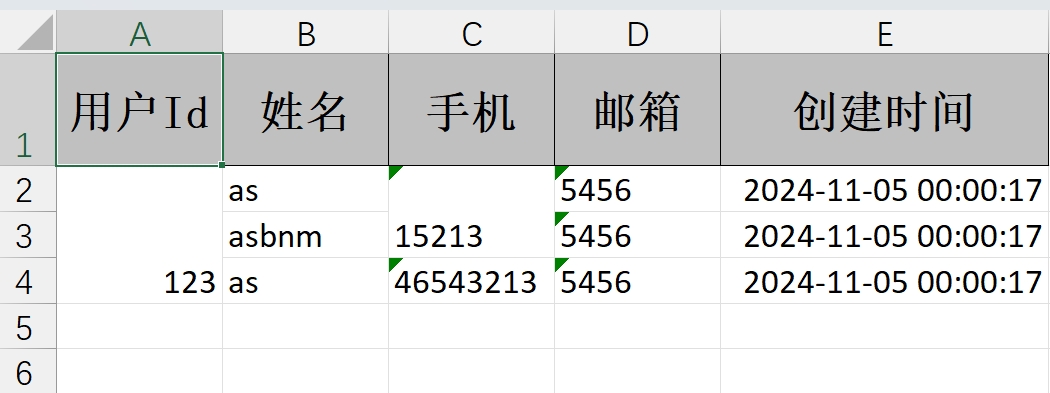
@GetMapping("/download4")
public void download4(HttpServletResponse response) {try {response.setContentType("application/vnd.ms-excel");response.setCharacterEncoding("utf-8");// 这里URLEncoder.encode可以防止中文乱码 当然和easyexcel没有关系String fileName = URLEncoder.encode("测试", "UTF-8").replaceAll("\\+", "%20");response.setHeader("Content-disposition", "attachment;filename=" + fileName + ".xls");User user1 = new User();user1.setUserId(123);user1.setName("as");user1.setPhone("15213");user1.setEmail("5456");user1.setCreateTime(new Date());User user2 = new User();user2.setUserId(123);user2.setName("asbnm");user2.setPhone("15213");user2.setEmail("5456");user2.setCreateTime(new Date());User user3 = new User();user3.setUserId(123);user3.setName("as");user3.setPhone("46543213");user3.setEmail("5456");user3.setCreateTime(new Date());List<User> userList = Arrays.asList(user1, user2, user3);//            EasyExcel.write(response.getOutputStream(), User.class)
//                    .registerWriteHandler(new EasyExcelUtil(0, new int[]{0, 2}))
//                    .sheet("模板")
//                    .doWrite(userList);EasyExcel.write(response.getOutputStream(), User.class).registerWriteHandler(new EasyExcelUtil(0, new int[]{0})).registerWriteHandler(new EasyExcelUtil(0, new int[]{2})).sheet("模板").doWrite(userList);} catch (Exception e) {e.printStackTrace();}
}
相关文章:
Easyexcel(6-单元格合并)
相关文章链接 Easyexcel(1-注解使用)Easyexcel(2-文件读取)Easyexcel(3-文件导出)Easyexcel(4-模板文件)Easyexcel(5-自定义列宽)Easyexcel(6-单…...

解决登录Google账号遇到手机上Google账号无法验证的问题
文章目录 场景小插曲解决方案总结 场景 Google账号在新的设备上登录的时候,会要求在手机的Google上进行确认验证,而如果没有安装Google play就可能出现像我一样没有任何弹框,无法实现验证 小插曲 去年,我在笔记本上登录了Googl…...

【Redis_Day5】String类型
【Redis_Day5】String类型 String操作String的命令set和get:设置、获取键值对mset和mget:批量设置、获取键值对setnx/setex/psetexincr和incrby:对字符串进行加操作decr/decrby:对字符串进行减操作incrbyfloat:浮点数加…...

Python MySQL SQLServer操作
Python MySQL SQLServer操作 Python 可以通过 pymysql 连接 MySQL,通过 pymssql 连接 SQL Server。以下是基础操作和代码实战示例: 一、操作 MySQL:使用 pymysql python 操作数据库流程 1. 安装库 pip install pymysql2. 连接 MySQL 示例 …...

Java技术分享
剖析equals方法 1、对于Object来说,其equals()方法底层实现就是"",都是比较对象的引用是否相等,下为JDK源码。 Object c 1; Object d 1; boolean equals c.equals(d);public boolean equals(Object obj) {return (this obj);…...

CentOS7卸载node
CentOS7卸载node 在 CentOS 7 上卸载 Node.js 可以通过以下步骤进行。具体步骤取决于你是如何安装 Node.js 的。常见的安装方法包括使用包管理器(如 yum 或 nvm)和手动安装。 方法 1:使用 yum 卸载 Node.js 如果你是通过 yum安装的 Node.j…...

LeetCode 2257. Count Unguarded Cells in the Grid
🔗 https://leetcode.com/problems/count-unguarded-cells-in-the-grid 题目 给出一个 m x n 的二维表格,格子上有士兵 guard,有墙 wall士兵可以盯上他上下左右所有的格子,碰到墙的格子就停止返回没有被士兵盯到的格子的数量 思…...

即时通讯服务器被ddos攻击了怎么办?
攻击即时通讯系统的主要手段 击键记录 目前盗取即时通讯工具帐号信息的最主要方法是通过特洛伊木马等恶意软件,例如QQ木马,这类程序能够盗取QQ密码信息,常见的能够盗取最新版本QQ密码的木马程序有十几种之多。几乎所有主要的QQ木马程序都采…...

【大数据学习 | Spark-Core】Spark中的join原理
join是两个结果集之间的链接,需要进行数据的匹配。 演示一下join是否存在shuffle。 1. 如果两个rdd没有分区器,分区个数一致 ,会发生shuffle。但分区数量不变。 scala> val arr Array(("zhangsan",300),("lisi",…...

【代码pycharm】动手学深度学习v2-08 线性回归 + 基础优化算法
课程链接 线性回归的从零开始实现 import random import torch from d2l import torch as d2l# 人造数据集 def synthetic_data(w,b,num_examples):Xtorch.normal(0,1,(num_examples,len(w)))ytorch.matmul(X,w)bytorch.normal(0,0.01,y.shape) # 加入噪声return X,y.reshape…...

李宏毅机器学习课程知识点摘要(1-5集)
前5集 过拟合: 参数太多,导致把数据集刻画的太完整。而一旦测试集和数据集的关联不大,那么预测效果还不如模糊一点的模型 所以找的数据集的量以及准确性也会影响 由于线性函数的拟合一般般,所以用一组函数去分段来拟合 sigmoi…...

React(五)——useContecxt/Reducer/useCallback/useRef/React.memo/useMemo
文章目录 项目地址十六、useContecxt十七、useReducer十八、React.memo以及产生的问题18.1组件嵌套的渲染规律18.2 React.memo18.3 引出问题 十九、useCallback和useMemo19.1 useCallback对函数进行缓存19.2 useMemo19.2.1 基本的使用19.2.2 缓存属性数据 19.2.3 对于更新的理解…...

UE5时间轴节点及其设置
在 Unreal Engine 5 (UE5) 中,时间轴节点 (Timeline) 是一个非常有用的工具,可以在蓝图中实现时间驱动的动画和行为。它允许你在给定的时间范围内执行逐帧的动画或数值变化,广泛应用于动态动画、物体移动、颜色变化、材质变换等场景中。 1. …...

git 命令之只提交文件的部分更改
git 命令之只提交文件的部分更改 有时,我们在一个文件中进行了多个更改,但只想提交其中的一部分更改。这时可以使用 使用 git add -p 命令 Git add -p命令允许我们选择并添加文件中的特定更改。它将会显示一个交互式界面,显示出文件中的每个更…...

算法 差分修改 极简
N个气球排成一排,从左到右依次编号为1,2,3....N.每次给定2个整数a b(a < b),lele便为骑上他的“小飞鸽"牌电动车从气球a开始到气球b依次给每个气球涂一次颜色。但是N次以后lele已经忘记了第I个气球已经涂过几次颜色了,你能帮他算出每个气球被涂过…...

pcb元器件选型与焊接测试时的一些个人经验
元件选型 在嘉立创生成bom表,对照bom表买 1、买电容时有50V或者100V是它的耐压值,注意耐压值 2、在买1117等降压芯片时注意它降压后的固定输出,有那种可调降压比如如下,别买错了 贴片元件焊接 我建议先薄薄的在引脚上涂上锡膏…...

OSG开发笔记(三十三):同时观察物体不同角度的多视图从相机技术
若该文为原创文章,未经允许不得转载 本文章博客地址:https://blog.csdn.net/qq21497936/article/details/143932273 各位读者,知识无穷而人力有穷,要么改需求,要么找专业人士,要么自己研究 长沙红胖子Qt…...

模糊逻辑学习 | 模糊推理 | 模糊逻辑控制
注:本文为几位功夫博主关于 “模糊逻辑学习 / 推理 / 控制” 的相关几篇文章合辑。 初学模糊逻辑控制(Fuzzy Logic Control) ziqian__ 已于 2022-08-19 20:30:25 修改 一、前言 模糊逻辑控制(Fuzzy Logic Control)是…...

【JavaEE】Servlet:表白墙
文章目录 一、前端二、前置知识三、代码1、后端2、前端3、总结 四、存入数据库1、引入 mysql 的依赖,mysql 驱动包2、创建数据库数据表3、调整上述后端代码3.1 封装数据库操作,和数据库建立连接3.2 调整后端代码 一、前端 <!DOCTYPE html> <ht…...
)
C++特殊类设计(不能被拷贝的类、只能在堆上创建对象的类、不能被继承的类、单例模式)
C特殊类设计 在实际应用中,可能需要设计一些特殊的类对象,如不能被拷贝的类、只能在堆上创建对象的类、只能在栈上创建对象的类、不能被继承的类、只能创建一个对象的类(单例模式)。 1. 不能被拷贝的类 拷贝只会发生在两个场景…...
)
别再只用memcpy了!手把手教你用memcpy_s写出更安全的C语言代码(附VS2022实战)
从memcpy到memcpy_s:现代C语言安全编程实战指南 在Visual Studio 2022的编译输出窗口中,那个刺眼的C4996警告已经成为许多C语言开发者的"老朋友"。当看到"error C4996: memcpy: This function or variable may be unsafe"时…...

Linux桌面便签工具终极指南:Sticky如何重新定义你的信息管理方式
Linux桌面便签工具终极指南:Sticky如何重新定义你的信息管理方式 【免费下载链接】sticky A sticky notes app for the linux desktop 项目地址: https://gitcode.com/gh_mirrors/stic/sticky 你是否曾在忙碌的工作中突然闪现一个灵感,却因为切换…...
)
手把手教你用STM32和电位器,临时搭建一个TTL转485调试器(附电路图)
应急调试利器:用STM32和电位器快速搭建TTL转485监听器 在嵌入式开发现场调试时,最让人头疼的莫过于设备串口输出异常却找不到合适的调试工具。上周在客户工厂就遇到了这样的窘境——需要监控设备TTL串口数据,但手边只有RS485转换器和几根杜邦…...

怎样从零构建高性能Voron 2.4 3D打印机:5个专业技巧全解析
怎样从零构建高性能Voron 2.4 3D打印机:5个专业技巧全解析 【免费下载链接】Voron-2 Voron 2 CoreXY 3D Printer design 项目地址: https://gitcode.com/gh_mirrors/vo/Voron-2 Voron 2.4是一款开源的CoreXY高速3D打印机,以其卓越的打印质量和专业…...

TQVaultAE终极指南:解锁泰坦之旅无限仓库与装备管理新境界
TQVaultAE终极指南:解锁泰坦之旅无限仓库与装备管理新境界 【免费下载链接】TQVaultAE Extra bank space for Titan Quest Anniversary Edition 项目地址: https://gitcode.com/gh_mirrors/tq/TQVaultAE 你是否曾在泰坦之旅的冒险中,面对满仓的传…...

何为可编程控制器?可编程控制器4大内容介绍
可编程控制器在控制中常为使用,因此本文将从4大方面对可编程控制器予以介绍,以增进大家对可编程控制器的了解。这4大方面包括:1.何为可编程控制器?2. 可编程控制器的基本组成,3. 可编程控制器发展史,以及4. 可编程控制…...

BurstGPT:大语言模型驱动高性能计算,实现自然语言科学仿真
1. 项目概述:当大语言模型遇上高性能计算最近在AI和HPC(高性能计算)的交叉领域,一个名为BurstGPT的项目引起了我的注意。乍一看这个标题,你可能会觉得有点“缝合怪”的味道——Burst通常指代计算资源的突发式使用或高性…...

智能水表、血糖仪、工业HMI:STM32L152ZET6的超低功耗MCU应用版图
STM32L152ZET6:带LCD驱动的超低功耗Cortex-M3旗舰MCU 在电池供电的工业仪表、医疗设备和消费电子产品中,微控制器的功耗与集成度往往是决定产品可行性的关键因素。STM32L152ZET6是意法半导体STM32 L1系列中的高端型号,采用2020mm的LQFP-144封…...

从PTA到项目实战:用C++实现矩阵乘法的几种姿势与性能小谈
从PTA到项目实战:用C实现矩阵乘法的几种姿势与性能小谈 矩阵乘法作为线性代数中的基础运算,在计算机科学领域有着广泛的应用场景。从学生时代的编程练习题到工业级的高性能计算,矩阵乘法的实现方式直接影响着程序效率。本文将带您从基础的PTA…...

009、NPU、TPU与硬件加速器在TinyML中的作用
009、NPU、TPU与硬件加速器在TinyML中的作用 去年冬天调试一个智能门锁的唤醒词模型,模型在PC上跑得飞起,量化后只有48KB,自信满满地烧进STM32F4。结果呢?唤醒延迟从预期的200ms直接飙到1.2秒,电池续航从三个月缩水到两周。拆开示波器一看,CPU在跑模型的时候几乎被占满,…...