
<OS 有关>Ubuntu 24 安装 openssh-server, tailscale+ssh 慢增加
更新日志:
Created on 14Jan.2025 by Dave , added openssh-server, tailescape
Updated on 15Jan.2025, added "tailescape - tailscape ssh"
前期准备:
1. 更新可用软件包的数据库
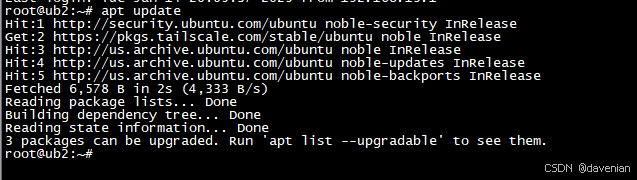
2. 升级系统中所有已安装的软件包到最新版本
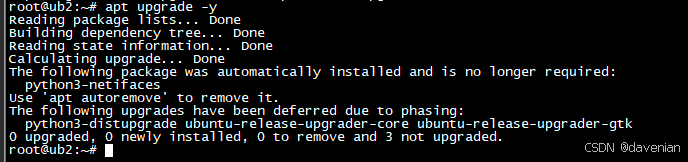
3. 安装 curl 和 git 这两个软件包 (如果已经安装,会进行升级)

一、安装 openssh-server(服务器)
1. 安装软件包
sudo apt update
sudo apt install openssh-server
2. 启动 SSH 服务器
启动服务:
sudo systemctl start ssh查看状态:
root@ub2:~# sudo systemctl status ssh
● ssh.service - OpenBSD Secure Shell serverLoaded: loaded (/usr/lib/systemd/system/ssh.service; enabled; preset: enabled)Active: active (running) since Tue 2025-01-14 20:11:43 CST; 17min ago
TriggeredBy: ● ssh.socketDocs: man:sshd(8)man:sshd_config(5)Process: 954 ExecStartPre=/usr/sbin/sshd -t (code=exited, status=0/SUCCESS)Main PID: 965 (sshd)Tasks: 1 (limit: 4558)Memory: 3.2M (peak: 19.8M)CPU: 191msCGroup: /system.slice/ssh.service└─965 "sshd: /usr/sbin/sshd -D [listener] 0 of 10-100 startups"Jan 14 20:11:43 ub2 systemd[1]: Starting ssh.service - OpenBSD Secure Shell server...
Jan 14 20:11:43 ub2 sshd[965]: Server listening on :: port 22.
Jan 14 20:11:43 ub2 systemd[1]: Started ssh.service - OpenBSD Secure Shell server.
Jan 14 20:13:08 ub2 sshd[1851]: Accepted password for root from 192.168.19.1 port 44083 ssh2
Jan 14 20:13:08 ub2 sshd[1851]: pam_unix(sshd:session): session opened for user root(uid=0) by root(uid=0)
确保 SSH 服务在系统启动时自动启动:
root@ub2:~# sudo systemctl enable ssh
Synchronizing state of ssh.service with SysV service script with /usr/lib/systemd/systemd-sysv-install.
Executing: /usr/lib/systemd/systemd-sysv-install enable ssh
root@ub2:~#
3. 配置防火墙 (UFW)
我用的是 Desktop 版本,ufw 没有启用(安装)。因此,只列出命令。
检查 UFW 的状态:
sudo ufw status允许 SSH 连接 或 22端口:
sudo ufw allow sshsudo ufw allow 22启用 UFW:
sudo vi /etc/ssh/sshd_config4. 配置 SSH
让 root 用户,使用密码登录。配置文件:/etc/ssh/sshd_config
主要是这两个参数:
PermitRootLogin yes
PasswordAuthentication yes
我正在用的文件:/etc/ssh/sshd_config
root@ub2:~# cat /etc/ssh/sshd_config# This is the sshd server system-wide configuration file.  See
# sshd_config(5) for more information.# This sshd was compiled with PATH=/usr/local/sbin:/usr/local/bin:/usr/sbin:/usr/bin:/sbin:/bin:/usr/games# The strategy used for options in the default sshd_config shipped with
# OpenSSH is to specify options with their default value where
# possible, but leave them commented.  Uncommented options override the
# default value.Include /etc/ssh/sshd_config.d/*.conf#Port 22
#AddressFamily any
#ListenAddress 0.0.0.0
#ListenAddress ::#HostKey /etc/ssh/ssh_host_rsa_key
#HostKey /etc/ssh/ssh_host_ecdsa_key
#HostKey /etc/ssh/ssh_host_ed25519_key# Ciphers and keying
#RekeyLimit default none# Logging
#SyslogFacility AUTH
#LogLevel INFO# Authentication:#LoginGraceTime 2m
#PermitRootLogin prohibit-password
PermitRootLogin yes
#StrictModes yes
#MaxAuthTries 6
#MaxSessions 10#PubkeyAuthentication yes# Expect .ssh/authorized_keys2 to be disregarded by default in future.
#AuthorizedKeysFile     .ssh/authorized_keys .ssh/authorized_keys2#AuthorizedPrincipalsFile none#AuthorizedKeysCommand none
#AuthorizedKeysCommandUser nobody# For this to work you will also need host keys in /etc/ssh/ssh_known_hosts
#HostbasedAuthentication no
# Change to yes if you don't trust ~/.ssh/known_hosts for
# HostbasedAuthentication
#IgnoreUserKnownHosts no
# Don't read the user's ~/.rhosts and ~/.shosts files
#IgnoreRhosts yes# To disable tunneled clear text passwords, change to no here!
PasswordAuthentication yes
#PermitEmptyPasswords no# Change to yes to enable challenge-response passwords (beware issues with
# some PAM modules and threads)
KbdInteractiveAuthentication no# Kerberos options
#KerberosAuthentication no
#KerberosOrLocalPasswd yes
#KerberosTicketCleanup yes
#KerberosGetAFSToken no# GSSAPI options
#GSSAPIAuthentication no
#GSSAPICleanupCredentials yes
#GSSAPIStrictAcceptorCheck yes
#GSSAPIKeyExchange no# Set this to 'yes' to enable PAM authentication, account processing,
# and session processing. If this is enabled, PAM authentication will
# be allowed through the KbdInteractiveAuthentication and
# PasswordAuthentication.  Depending on your PAM configuration,
# PAM authentication via KbdInteractiveAuthentication may bypass
# the setting of "PermitRootLogin prohibit-password".
# If you just want the PAM account and session checks to run without
# PAM authentication, then enable this but set PasswordAuthentication
# and KbdInteractiveAuthentication to 'no'.
UsePAM yes#AllowAgentForwarding yes
#AllowTcpForwarding yes
#GatewayPorts no
X11Forwarding yes
#X11DisplayOffset 10
#X11UseLocalhost yes
#PermitTTY yes
PrintMotd no
#PrintLastLog yes
#TCPKeepAlive yes
#PermitUserEnvironment no
#Compression delayed
#ClientAliveInterval 0
#ClientAliveCountMax 3
#UseDNS no
#PidFile /run/sshd.pid
#MaxStartups 10:30:100
#PermitTunnel no
#ChrootDirectory none
#VersionAddendum none# no default banner path
#Banner none# Allow client to pass locale environment variables
AcceptEnv LANG LC_*# override default of no subsystems
Subsystem       sftp    /usr/lib/openssh/sftp-server# Example of overriding settings on a per-user basis
#Match User anoncvs
#       X11Forwarding no
#       AllowTcpForwarding no
#       PermitTTY no
#       ForceCommand cvs server
root@ub2:~#
二、 安装 Tailscale 应用
1. 安装软件包
curl -fsSL https://tailscale.com/install.sh | sh2. 启动 tailscale 应用
tailscale up3. 按照提示激活连接 (略)
4. 在控制台确认连接
控制台: (当前是离线)

5. 配置 Tailscale SSH
参考源链接:Tailscale SSH · Tailscale Docs
a. tailscape ssh 用途
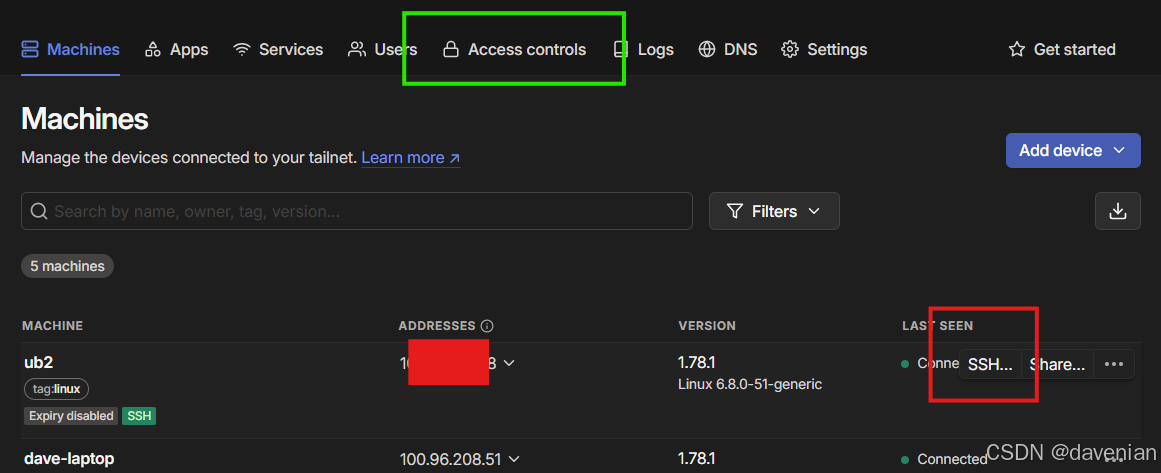
在 tailscale console 上,用 SSH 连接主机,见上图红框。
b. 配置 tailscape ssh
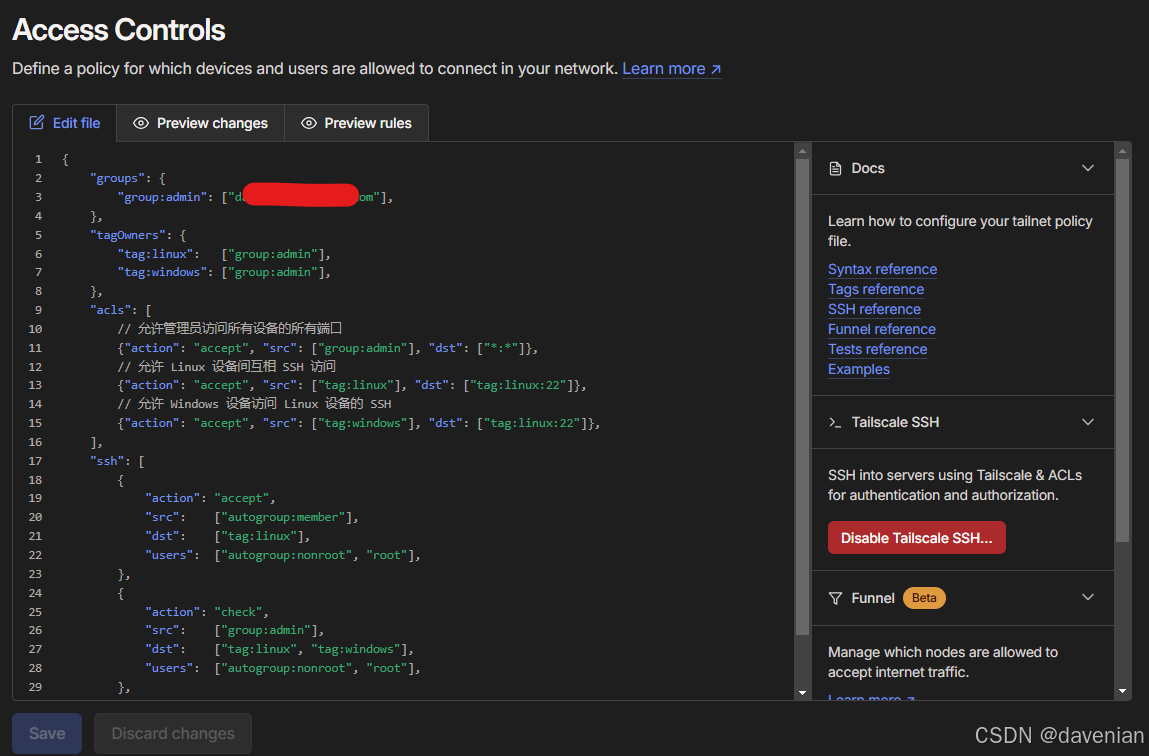
配置主要有两处: tailscale console 上的 access controls (见上图绿框), 还有主机上启用 ssh
1) access controls 配置
下面是我的配置内容,你需要替换 “//使用你的tailscale注册邮箱(https://login.tailscale.com/admin/users 里面的邮箱地址)” 为管理员组的 email ,要保留 双引号。
{"groups": {"group:admin": ["//使用你的tailscale注册邮箱(https://login.tailscale.com/admin/users 里面的邮箱地址)"],},"tagOwners": {"tag:linux":   ["group:admin"],"tag:windows": ["group:admin"],},"acls": [// 允许管理员访问所有设备的所有端口{"action": "accept", "src": ["group:admin"], "dst": ["*:*"]},// 允许 Linux 设备间互相 SSH 访问{"action": "accept", "src": ["tag:linux"], "dst": ["tag:linux:22"]},// 允许 Windows 设备访问 Linux 设备的 SSH{"action": "accept", "src": ["tag:windows"], "dst": ["tag:linux:22"]},],"ssh": [{"action": "accept","src":    ["autogroup:member"],"dst":    ["tag:linux"],"users":  ["autogroup:nonroot", "root"],},{"action": "check","src":    ["group:admin"],"dst":    ["tag:linux", "tag:windows"],"users":  ["autogroup:nonroot", "root"],},],
}
2) 在 ubuntu 24 desktop 上启动 tailscale ssh
这行命令带有能数 --reset 重置,会清除现有主机上的 Tailscale 配置。
sudo tailscale up --accept-routes --advertise-tags=tag:linux --ssh --reset解释:
- 为设备添加 linux 标签(--advertise-tags=tag:linux)
- 启用 SSH 功能(--ssh)
- 重置配置(--reset)
- 接受路由(--accept-routes) ,白话:接受来自其它 Tailscale 网络访问
c. 演示
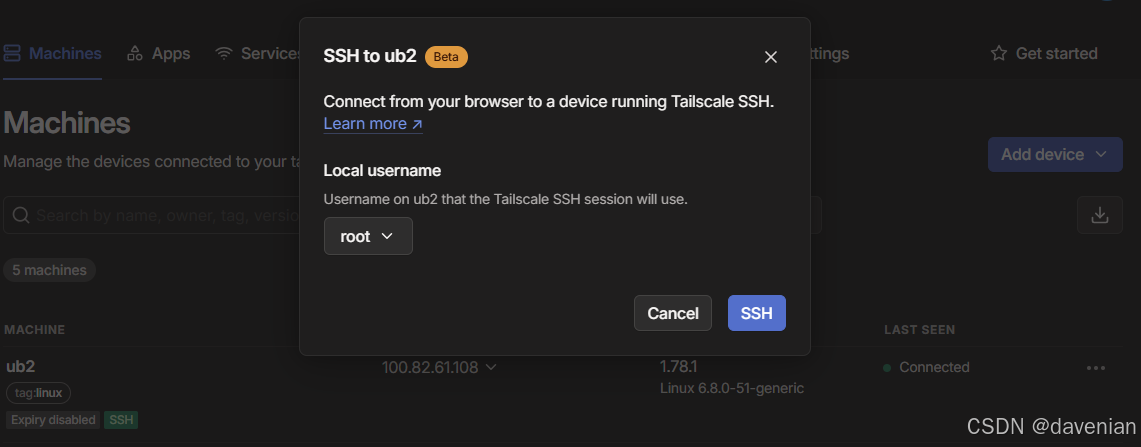
安全审核过程略过...
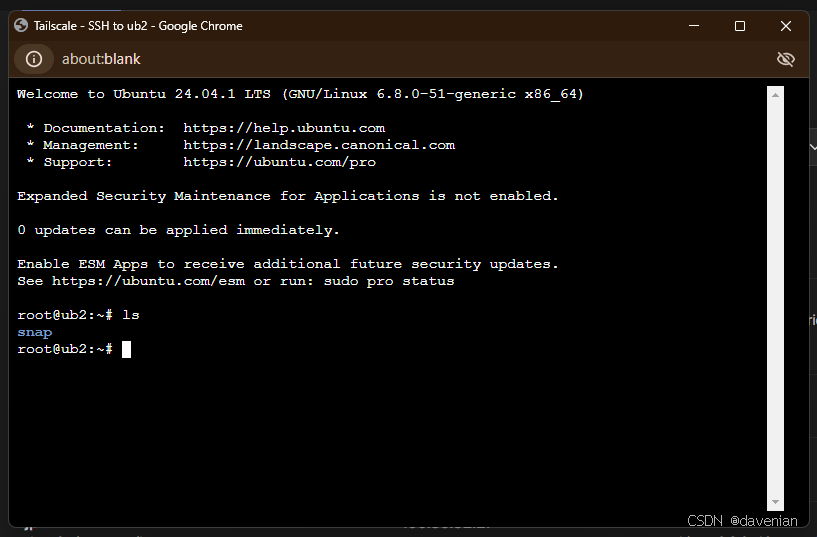
Damm, 竟然用浏览器,连接到我 Laptop 上的 Ubuntu VM.
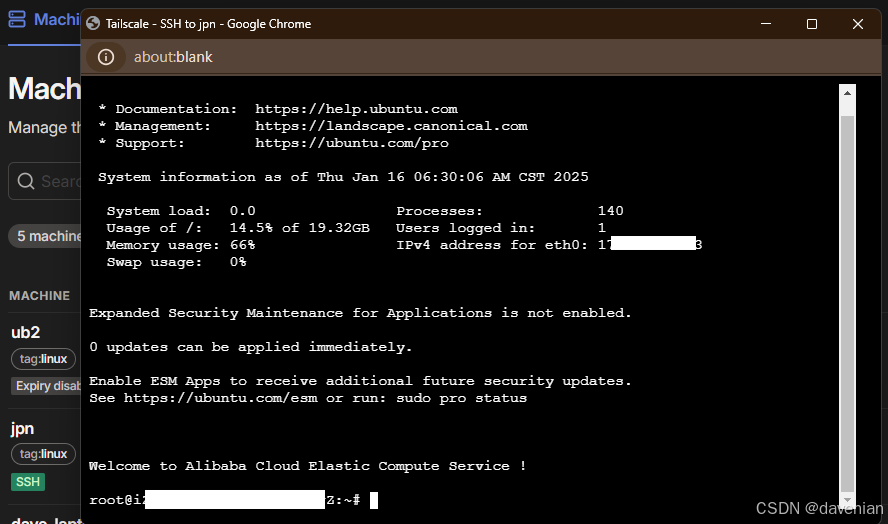
ali 云上的 日本机 也ok

三、
相关文章:
<OS 有关>Ubuntu 24 安装 openssh-server, tailscale+ssh 慢增加
更新日志: Created on 14Jan.2025 by Dave , added openssh-server, tailescape Updated on 15Jan.2025, added "tailescape - tailscape ssh" 前期准备: 1. 更新可用软件包的数据库 2. 升级系统中所有已安装的软件包到最新版本 3. 安装 cur…...
输入输出)
神经网络常见操作(卷积)输入输出
卷积 dimd的tensor可以进行torch.nn.Convnd(in_channels,out_channels),其中nd-1,d-2对于torch.nn.Convnd(in_channels,out_channels),改变的是tensor的倒数n1维的大小 全连接 使用torch.nn.Linear(in_features,out_features,bias)实现YXWT b,其中X 的形状为 (ba…...
25/1/16 嵌入式笔记 STM32F108
输入捕获 TIM_TimeBaseInitTypeDef TIM_TimeBaseStruct; TIM_TimeBaseStruct.TIM_Period 0xFFFF; // 自动重装载值 TIM_TimeBaseStruct.TIM_Prescaler 71; // 预分频值 TIM_TimeBaseStruct.TIM_ClockDivision 0; TIM_TimeBaseStruct.TIM_CounterMode TIM_CounterMode_Up…...

mac 安装 node
brew versions node // 安装 node brew versions node14 // 安装指定版本 卸载node: sudo npm uninstall npm -g sudo rm -rf /usr/local/lib/node /usr/local/lib/node_modules /var/db/receipts/org.nodejs.* sudo rm -rf /usr/local/include/node /Users/$USER/.npm su…...

mysql常用运维命令
mysql常用运维命令 查看当前所有连接 -- 查看当前所有连接 SHOW FULL PROCESSLIST;说明: 关注State状态列,是否有锁。如果大量状态是waiting for handler commit检查磁盘是否占满关注Time耗时列,是否有慢查询关注Command列,如果…...

正则表达式学习网站
网上亲测好用的网站: Regexlearn 这个网站可以从0开始教会正则表达式的使用。 mklab 包含常用表达式,车次,超链接,号码等提取。...

gradle,adb命令行编译备忘
追踪依赖(为了解决duplicateClass…错误) gradlew.bat app:dependencies > dep-tree.txt # 分析dep-tree.txt的依赖结构,找到对应的包,可能需要做exclude控制,或者查看库issueverbose编译(我一直需要verbose) gradlew.bat assembleDebug -Dhttps.pr…...

C++:工具VSCode的编译和调试文件内容:
ubuntu24.04, vscode 配置文件 C 的环境 下载的gcc,使用命令为 sudo aptitude update sudo aptitude install build-essential -f- sudo: 以超级用户权限运行命令。 - aptitude: 包管理工具,用于安装、更新和删除软件包。 - install: 安装指…...
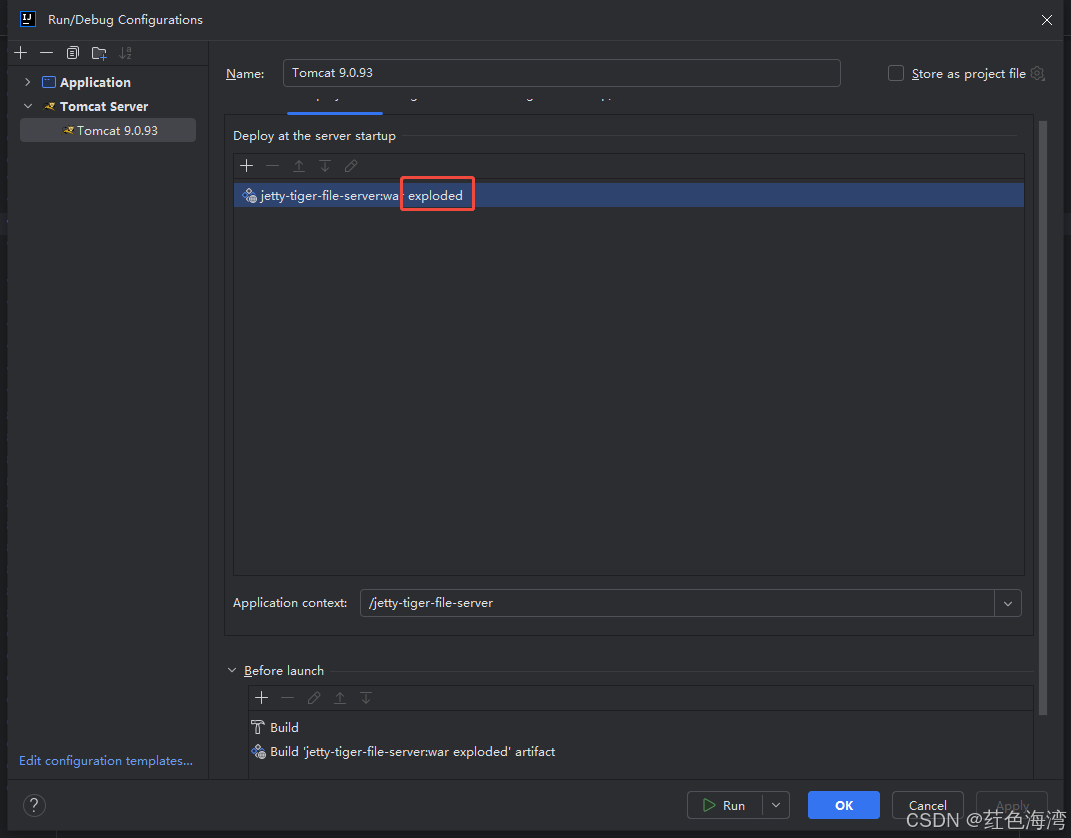
SpringMVC Idea 搭建 部署war
1.创建 Idea项目 使用Maven模板 创建 webApp模板项目 2.导入依赖 <project xmlns"http://maven.apache.org/POM/4.0.0" xmlns:xsi"http://www.w3.org/2001/XMLSchema-instance"xsi:schemaLocation"http://maven.apache.org/POM/4.0.0 http://ma…...

YOLOv10-1.1部分代码阅读笔记-loaders.py
loaders.py ultralytics\data\loaders.py 目录 loaders.py 1.所需的库和模块 2.class SourceTypes: 3.class LoadStreams: 4.class LoadScreenshots: 5.class LoadImagesAndVideos: 6.class LoadPilAndNumpy: 7.class LoadTensor: 8.def autocast_list(source…...

Windows的Redis查看自己设置的密码并更改设置密码
查看密码 由于我的Redis安装很久了,所以忘记是否有设置密码,查看步骤如下: 启动redis,启动流程可以看这篇文章:https://blog.csdn.net/changyana/article/details/127679871 在redis安装目录下打开redis-cli.exe&…...

【Linux】sed编辑器二
一、处理多行命令 sed编辑器有3种可用于处理多行文本的特殊命令。 N:加入数据流中的下一行,创建一个多行组进行处理;D:删除多行组中的一行;P:打印多行组中的一行。 1、next命令:N 单行next命…...

docker 部署 Kafka 单机和集群
一、准备工作 安装 Docker 确保本机已安装 Docker。可以通过以下命令检查 Docker 是否已安装:docker --version如果未安装,可以访问 Docker 官网下载并安装 Docker Desktop(Windows 和 Mac)或使用包管理器安装(Linux&…...

PHP语言的软件开发工具
PHP语言的软件开发工具 在当今数字化的时代,软件开发已经成为一种常见的职业。无论是企业级应用、网站开发还是移动应用,开发者们都需要用到各种各样的工具。PHP作为一种广泛使用的服务器端脚本语言,因其简单、灵活与强大的功能,…...

前端【3】--CSS布局,CSS实现横向布局,盒子模型
盒子分类 1、块级盒子 2、内联级盒子 3、内联块级盒子 4、弹性盒子 5、盒子内部分区 方法一:使用 float 普通盒子实现横向布局 方法二:使用 display: inline-block 内联块级元素实现横向布局 方法三:使用弹性盒子 flexbox࿰…...

SQL语句IN和OR的区别
在SQL中,IN和OR都用于筛选条件,但它们的用途和性能上有一些区别。以下是两者的对比: 1. 语法 IN SELECT * FROM table_name WHERE column_name IN (value1, value2, value3);IN用于检查某列的值是否在一个给定的值列表中。 OR SELECT * FRO…...

OCP使用中的常见问题与解决方法
OCP的常见问题 页面卡顿: 遇到页面卡顿的问题时,首先需要区分是全局性的卡顿,即所有页面都出现延迟或响应缓慢,还是仅限于特定的监控页面。 监控数据看不到: 需要明确是全部数据都无法查看,还是仅限于特定集群的数…...

Git 版本控制:.gitignore 文件完全指南
.gitignore 文件是 Git 版本控制系统中的一个重要配置文件,用于告诉 Git 哪些文件和目录应该被忽略,不需要纳入版本控制。以下是关于 .gitignore 的完整笔记。 基本概念 .gitignore 文件可以放在项目的任何目录下,其作用范围包括所在目录及…...

STM32 FreeRTOS 介绍
目录 什么是裸机开发 什么是操作系统 通用操作系统 实时操作系统 FreeRTOS简介 FreeRTOS发展历史 FreeRTOS优势 FreeRTOS特点 什么是裸机开发 裸机开发指的是在没有操作系统(OS)或者其他高级软件支持的情况下,直接在裸机硬件上进行软…...

在 Azure 100 学生订阅中新建 Ubuntu VPS 并部署 Mastodon 服务器
今天想和大家分享一下如何在 Azure 的 100 学生订阅中,创建一台 Ubuntu VPS,并通过 Docker 部署 Mastodon 服务器。Mastodon 是一个开源的社交网络平台,允许用户创建自己的实例,类似于 Twitter,但更加去中心化。Docker…...

DISMTools企业部署:在组织中大规模应用的最佳实践
DISMTools企业部署:在组织中大规模应用的最佳实践 【免费下载链接】DISMTools The connected place for Windows system administration 项目地址: https://gitcode.com/GitHub_Trending/di/DISMTools DISMTools是一款专为Windows系统管理设计的连接平台&…...

CVPR 2023反无人机数据集实战:用ModelScope上的开源模型快速上手目标检测
CVPR 2023反无人机数据集实战:用ModelScope上的开源模型快速上手目标检测无人机技术的普及带来了新的安全挑战,从隐私侵犯到关键设施威胁,反无人机技术正成为计算机视觉领域的热点。CVPR 2023反无人机竞赛提供的开源数据集和基线模型…...

Taurus多执行器对比实战:JMeter/Gatling/Locust统一压测方案
1. 为什么选Taurus做多执行器对比——不是为了炫技,而是为了少踩坑在性能测试领域,我见过太多团队卡在“选型”这一步:刚招来一个会写JMeter脚本的工程师,项目突然要压测WebSocket接口,发现JMeter原生支持弱、插件维护…...

App Inventor蓝牙调试避坑指南:从连接失败到数据乱码,一次讲清所有常见问题
App Inventor蓝牙调试避坑指南:从连接失败到数据乱码的实战解决方案在移动应用开发领域,蓝牙通信一直是实现设备间短距离数据交换的核心技术之一。对于使用App Inventor的开发者而言,蓝牙模块提供了无需复杂编码即可实现无线通信的便捷途径。…...

学术写作创新突破!2026全流程AI论文工具精选指南
2026 年 AI 论文写作工具已进入全流程闭环 学术合规时代,千笔 AI(综合评分 99 分)中文学术场景标杆;Grammarly Academic与Elicit为英文论文写作首选;按需求匹配度 - 数据可信度 - 成本承受力三维模型选型,…...

Unity发行版DLL调试实战:DnSpy无源码IL级断点指南
1. 这不是“反编译”,而是Unity游戏开发者的日常调试手段你有没有遇到过这样的情况:接手一个Unity发行版游戏,想快速验证某个功能逻辑是否按预期执行,或者排查一个偶发的崩溃,但手头只有打包后的Assembly-CSharp.dll&a…...

styled-theming 性能优化:如何避免主题切换时的性能瓶颈
styled-theming 性能优化:如何避免主题切换时的性能瓶颈 【免费下载链接】styled-theming Create themes for your app using styled-components 项目地址: https://gitcode.com/gh_mirrors/st/styled-theming styled-theming 是一个专为 styled-components …...

Performance-Fish:让你的《环世界》后期游戏帧率提升400%的终极优化方案
Performance-Fish:让你的《环世界》后期游戏帧率提升400%的终极优化方案 【免费下载链接】Performance-Fish Performance Mod for RimWorld 项目地址: https://gitcode.com/gh_mirrors/pe/Performance-Fish 你是否曾在《环世界》游戏后期,面对庞大…...

LVGL多页面开发避坑:用内部Timer替代轮询,解决页面切换时的内存踩踏问题
LVGL多页面开发中的内存安全实践:用Timer机制替代轮询的工程解决方案 在嵌入式UI开发中,LVGL因其轻量级和跨平台特性成为热门选择。但当项目复杂度提升到多页面交互时,开发者往往会遇到一个棘手问题:如何在频繁切换页面的同时保证…...

多模型聚合平台如何助力网站AIB测试与选型
🚀 告别海外账号与网络限制!稳定直连全球优质大模型,限时半价接入中。 👉 点击领取海量免费额度 多模型聚合平台如何助力网站AIB测试与选型 对于网站产品经理而言,首页文案的生成质量直接影响用户的第一印象和转化率。…...