
在nodejs中使用RabbitMQ(三)Routing、Topics、Headers
示例一、Routing
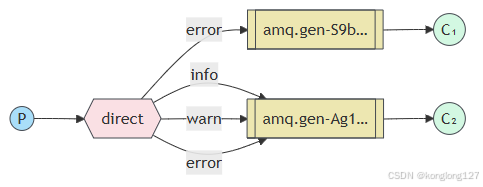
exchange类型direct,根据消息的routekey将消息直接转发到指定队列。producer.ts 生产者主要发送消息,consumer.ts负责接收消息,同时也都可以创建exchange交换机,创建队列,为队列绑定exchange,为避免重复简化代码,提高可维护性,队列相关操作移动到消费者端。队列,exchange交换机推荐在启动程序前手动创建好。
producer.ts
import RabbitMQ from 'amqplib/callback_api';function start() {RabbitMQ.connect("amqp://admin:admin1234@localhost:5672?heartbeat=60", function (err0, conn) {if (err0) {console.error("[AMQP]", err0.message);return setTimeout(start, 1000);}conn.on("error", function (err1) {if (err1.message !== "Connection closing") {console.error("[AMQP] conn error", err1.message);}});conn.on("close", function () {console.error("[AMQP] reconnecting");return setTimeout(start, 1000);});console.log("[AMQP] connected");conn.createChannel(async (err2, channel) => {if (err2) {console.error("[AMQP]", err2.message);return setTimeout(start, 1000);}const exchangeName = 'exchange1';channel.assertExchange(exchangeName,'direct',{durable: true},(err, ok) => {if (err) {console.log('exchange路由转发创建失败', err);} else {let args = ['info', 'warn', 'error'];for (let i = 0; i < 10; ++i) {// console.log('message send!', channel.sendToQueue(//   queueName,//   Buffer.from(`发送消息,${i}${Math.ceil(Math.random() * 100000)}`),//   { persistent: true, correlationId: 'ooooooooooooooo' },// 消息持久化,重启后存在//   // (err: any, ok: Replies.Empty)=>{}// ));const routeKey = args[Math.floor(Math.random() * 3)];console.log('消息发送是否成功', channel.publish(exchangeName,routeKey,Buffer.from(`发送消息,${i}${Math.ceil(Math.random() * 100000)},${routeKey}`),{ persistent: true },));}}});});setTimeout(() => {conn.close();process.exit(0);}, 1000);});
}start();
consumer.ts
import RabbitMQ, { type Replies } from 'amqplib/callback_api';RabbitMQ.connect('amqp://admin:admin1234@localhost:5672', (err0, conn) => {if (err0) {console.error(err0);return;}conn.createChannel(function (err1, channel) {const queueName = 'queue1';channel.assertQueue(queueName, { durable: true }, (err2) => {if (err2) {console.log('队列创建失败', err2);return;}console.log('[*] waiting...');// 一次只有一个未确认消息,防止消费者过载channel.prefetch(1);channel.bindQueue(queueName, 'exchange1', 'info', {}, (err3, ok) => {console.log(queueName, '队列绑定结果', err3, ok);});channel.bindQueue(queueName, 'exchange1', 'warn', {}, (err3, ok) => {console.log(queueName, '队列绑定结果', err3, ok);});channel.bindQueue(queueName, 'exchange1', 'error', {}, (err3, ok) => {console.log(queueName, '队列绑定结果', err3, ok);});channel.consume(queueName,function (msg) {console.log('接收到的消息', msg?.content.toString());/*// 手动确认取消channel.ack(msg); noAck:false,// 自动确认消息// if (msg) {//   channel.ack(msg);// } */},{noAck: true, // 是否自动确认消息// noAck: false},(err3: any, ok: Replies.Empty) => {console.log(err3, ok);},);});});conn.on("error", function (err1) {if (err1.message !== "Connection closing") {console.error("[AMQP] conn error", err1.message);}});conn.on("close", function () {console.error("[AMQP] reconnecting");});
});
consumer2.ts
import RabbitMQ from 'amqplib';const conn = await RabbitMQ.connect('amqp://admin:admin1234@localhost:5672');conn.on("error", function (err1) {if (err1.message !== "Connection closing") {console.error("[AMQP] conn error", err1.message);}
});conn.on("close", function () {console.error("[AMQP] reconnecting");
});const channel = await conn.createChannel();const queueName = 'queue2';await channel.assertQueue(queueName, { durable: true });console.log('[*] waiting...');// 一次只有一个未确认消息,防止消费者过载
await channel.prefetch(1);await channel.bindQueue(queueName, 'exchange1', 'error', {});channel.consume(queueName,function (msg) {console.log('接收到的消息', msg?.content.toString());/*// 手动确认取消channel.ack(msg); noAck:false,// 自动确认消息// if (msg) {//   channel.ack(msg);// } */},{noAck: true, // 是否自动确认消息// noAck: false},
);
示例二、Topic
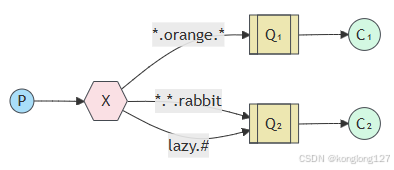
exchange的topic类型和direct类似,使用的仍然是routeKey进行匹配转发,topic支持通过*和#进行模糊查询。*代码一个具体单词,#代码0或多个单词。
producer.ts
import RabbitMQ from 'amqplib';async function start() {const conn = await RabbitMQ.connect("amqp://admin:admin1234@localhost:5672?heartbeat=60");conn.on("error", function (err1) {if (err1.message !== "Connection closing") {console.error("[AMQP] conn error", err1.message);}});conn.on("close", function () {console.error("[AMQP] reconnecting");return setTimeout(start, 1000);});try {const channel = await conn.createChannel();console.log("[AMQP] connected");const exchangeName = 'exchange4';await channel.assertExchange(exchangeName, 'topic', { durable: true });let args = ['123.orange.456', '123.456.rabbit', 'lazy', 'lazy.123', 'lazy.123.456'];for (let i = 0; i < 20; ++i) {// console.log('message send!', channel.sendToQueue(//   queueName,//   Buffer.from(`发送消息,${i}${Math.ceil(Math.random() * 100000)}`),//   { persistent: true, correlationId: 'ooooooooooooooo' },// 消息持久化,重启后存在//   // (err: any, ok: Replies.Empty)=>{}// ));const routeKey = args[Math.floor(Math.random() * args.length)];console.log('消息发送是否成功', channel.publish(exchangeName,routeKey,Buffer.from(`发送消息,${i}${Math.ceil(Math.random() * 100000)},${routeKey}`),{ persistent: true },));}} catch (err) {console.error("[AMQP]", err);return setTimeout(start, 1000);}setTimeout(() => {conn.close();process.exit(0);}, 1000);
}start();
consumer.ts
import RabbitMQ from 'amqplib';const conn = await RabbitMQ.connect('amqp://admin:admin1234@localhost:5672');conn.on("error", function (err1) {if (err1.message !== "Connection closing") {console.error("[AMQP] conn error", err1.message);}
});conn.on("close", function () {console.error("[AMQP] reconnecting");
});const channel = await conn.createChannel();const queueName = 'queue1';channel.assertQueue(queueName, { durable: true });console.log('[*] waiting...');// 一次只有一个未确认消息,防止消费者过载
await channel.prefetch(1);// *代码一个具体单词,#代码0或多个单词
await channel.bindQueue(queueName, 'exchange4', '*.orange.*', {});channel.consume(queueName, function (msg) {console.log('接收到的消息', msg?.content.toString());// 手动确认取消channel.ack(msg);设置noAck:false,// 自动确认消息noAck:true,不需要channel.ack(msg);try {if (msg) {channel.ack(msg);}} catch (err) {if (msg) {// 第二个参数,false拒绝当前消息// 第二个参数,true拒绝小于等于当前消息// 第三个参数,3false从队列中清除// 第三个参数,4true从新在队列中排队channel.nack(msg, false, false);}console.log(err);}
}, {// noAck: true, // 是否自动确认消息,为true不需要调用channel.ack(msg);noAck: false
});
consumer2.ts
import RabbitMQ, { type Replies } from 'amqplib/callback_api';RabbitMQ.connect('amqp://admin:admin1234@localhost:5672', (err0, conn) => {if (err0) {console.error(err0);return;}conn.createChannel(function (err1, channel) {const queueName = 'queue2';channel.assertQueue(queueName, { durable: true });console.log('[*] waiting...');// 一次只有一个未确认消息,防止消费者过载channel.prefetch(1);channel.bindQueue(queueName, 'exchange4', '*.*.rabbit', {}, (err, ok) => {console.log(queueName, '队列绑定结果', err, ok);});channel.bindQueue(queueName, 'exchange4', 'lazy.#', {}, (err, ok) => {console.log(queueName, '队列绑定结果', err, ok);});channel.consume(queueName, function (msg) {console.log('接收到的消息', msg?.content.toString());// 手动确认取消channel.ack(msg);设置noAck:false,// 自动确认消息noAck:true,不需要channel.ack(msg);try {if (msg) {channel.ack(msg);}} catch (err) {if (msg) {// 第二个参数,false拒绝当前消息// 第二个参数,true拒绝小于等于当前消息// 第三个参数,3false从队列中清除// 第三个参数,4true从新在队列中排队channel.nack(msg, false, false);}console.log(err);}}, {// noAck: true, // 是否自动确认消息,为true不需要调用channel.ack(msg);noAck: false});// return,error事件不会把消息重新放回队列channel.on('return', (msg) => {console.error('消息发送失败:', msg);});channel.on('error', (err) => {console.error('通道发生错误:', err);});});conn.on("error", function (err1) {if (err1.message !== "Connection closing") {console.error("[AMQP] conn error", err1.message);}});conn.on("close", function () {console.error("[AMQP] reconnecting");});
});
示例三、Headers
exchange类型headers,根据传递的头部信息进行转发,头部信息类型为object对象。在头部信息中要设置x-match属性,'x-match': 'any', any,下方消息匹配上一个就可以。all,下方消息要全部匹配。
producer.ts
import RabbitMQ from 'amqplib/callback_api';function start() {RabbitMQ.connect("amqp://admin:admin1234@localhost:5672?heartbeat=60", function (err0, conn) {if (err0) {console.error("[AMQP]", err0.message);return setTimeout(start, 1000);}conn.on("error", function (err1) {if (err1.message !== "Connection closing") {console.error("[AMQP] conn error", err1.message);}});conn.on("close", function () {console.error("[AMQP] reconnecting");return setTimeout(start, 1000);});console.log("[AMQP] connected");conn.createChannel(async (err2, channel) => {if (err2) {console.error("[AMQP]", err2.message);return setTimeout(start, 1000);}const exchangeName = 'exchange5';channel.assertExchange(exchangeName,'headers',{durable: true},(err, ok) => {if (err) {console.log('exchange路由转发创建失败', err);} else {let args = [{// 'x-match': 'any', // any,下方消息匹配上一个就可以; all,下方消息要全部匹配'loglevel': 'info',// 'buslevel': 'product',// 'syslevel': 'admin'},{// 'x-match': 'any', // any,下方消息匹配上一个就可以; all,下方消息要全部匹配// 'loglevel': 'info','buslevel': 'product','syslevel': 'admin'},{// 'x-match': 'any', // any,下方消息匹配上一个就可以; all,下方消息要全部匹配// 'loglevel': 'info','buslevel': 'product',// 'syslevel': 'admin'},{// 'x-match': 'all', // any,下方消息匹配上一个就可以; all,下方消息要全部匹配'loglevel': 'info','buslevel': 'product','syslevel': 'admin'},];for (let i = 0; i < 20; ++i) {// console.log('message send!', channel.sendToQueue(//   queueName,//   Buffer.from(`发送消息,${i}${Math.ceil(Math.random() * 100000)}`),//   { persistent: true, correlationId: 'ooooooooooooooo' },// 消息持久化,重启后存在//   // (err: any, ok: Replies.Empty)=>{}// ));const routeKey = args[Math.floor(Math.random() * args.length)];console.log('消息发送是否成功', routeKey, channel.publish(exchangeName,'',Buffer.from(`发送消息,${i}${Math.ceil(Math.random() * 100000)},${JSON.stringify(routeKey)}`),{persistent: true,headers: routeKey},));}}});});setTimeout(() => {conn.close();process.exit(0);}, 1000);});
}start();
consumer.ts
import RabbitMQ, { type Replies } from 'amqplib/callback_api';RabbitMQ.connect('amqp://admin:admin1234@localhost:5672', (err0, conn) => {if (err0) {console.error(err0);return;}conn.createChannel(function (err1, channel) {const queueName = 'queue1';channel.assertQueue(queueName, { durable: true });console.log('[*] waiting...');// 一次只有一个未确认消息,防止消费者过载channel.prefetch(1);// *代码一个具体单词,#代码0或多个单词channel.bindQueue(queueName,'exchange5','',{'x-match': 'any', // any,下方消息匹配上一个就可以; all,下方消息要全部匹配'loglevel': 'info','buslevel': 'product','syslevel': 'admin'},(err, ok) => {console.log(queueName, '队列绑定结果', err, ok);},);channel.consume(queueName, function (msg) {console.log('接收到的消息', msg?.content.toString());// 手动确认取消channel.ack(msg);设置noAck:false,// 自动确认消息noAck:true,不需要channel.ack(msg);try {if (msg) {channel.ack(msg);}} catch (err) {if (msg) {// 第二个参数,false拒绝当前消息// 第二个参数,true拒绝小于等于当前消息// 第三个参数,3false从队列中清除// 第三个参数,4true从新在队列中排队channel.nack(msg, false, false);}console.log(err);}}, {// noAck: true, // 是否自动确认消息,为true不需要调用channel.ack(msg);noAck: false}, (err: any, ok: Replies.Empty) => {console.log(err, ok);});// return,error事件不会把消息重新放回队列channel.on('return', (msg) => {console.error('消息发送失败:', msg);});channel.on('error', (err) => {console.error('通道发生错误:', err);});});conn.on("error", function (err1) {if (err1.message !== "Connection closing") {console.error("[AMQP] conn error", err1.message);}});conn.on("close", function () {console.error("[AMQP] reconnecting");});
});
consumer2.ts
import RabbitMQ, { type Replies } from 'amqplib/callback_api';RabbitMQ.connect('amqp://admin:admin1234@localhost:5672', (err0, conn) => {if (err0) {console.error(err0);return;}conn.createChannel(function (err1, channel) {const queueName = 'queue2';channel.assertQueue(queueName, { durable: true });console.log('[*] waiting...');// 一次只有一个未确认消息,防止消费者过载channel.prefetch(1);channel.bindQueue(queueName,'exchange5','',{'x-match': 'all', // any,下方消息匹配上一个就可以; all,下方消息要全部匹配'loglevel': 'info','buslevel': 'product','syslevel': 'admin'},(err, ok) => {console.log(queueName, '队列绑定结果', err, ok);},);channel.consume(queueName,function (msg) {console.log('接收到的消息', msg?.content.toString());/*// 手动确认取消channel.ack(msg); noAck:false,// 自动确认消息// if (msg) {//   channel.ack(msg);// } */},{noAck: true, // 是否自动确认消息// noAck: false},(err: any, ok: Replies.Empty) => {console.log(err, ok);},);// return,error事件不会把消息重新放回队列channel.on('return', (msg) => {console.error('消息发送失败:', msg);});channel.on('error', (err) => {console.error('通道发生错误:', err);});});conn.on("error", function (err1) {if (err1.message !== "Connection closing") {console.error("[AMQP] conn error", err1.message);}});conn.on("close", function () {console.error("[AMQP] reconnecting");});
});
相关文章:
在nodejs中使用RabbitMQ(三)Routing、Topics、Headers
示例一、Routing exchange类型direct,根据消息的routekey将消息直接转发到指定队列。producer.ts 生产者主要发送消息,consumer.ts负责接收消息,同时也都可以创建exchange交换机,创建队列,为队列绑定exchangeÿ…...

设计模式全解(含代码实例)
目录 设计模式概念耦合与解耦 常见-5种全部-23种创建型模式(Creational Patterns)单例模式(Singleton Pattern)工厂方法模式(Factory Method Pattern):抽象工厂模式(Abstract Factor…...

springboot019-爬虫基于网页开发和数据抓取技术的在线新闻聚合平台的设计与实现
💕💕作者: 小九学姐 💕💕个人简介:十年Java,Python美女程序员一枚,精通计算机专业前后端各类框架。 💕💕各类成品Java毕设 。javaweb,ssm…...

#渗透测试#批量漏洞挖掘#LiveBos UploadFile 任意文件上传漏洞
免责声明 本教程仅为合法的教学目的而准备,严禁用于任何形式的违法犯罪活动及其他商业行为,在使用本教程前,您应确保该行为符合当地的法律法规,继续阅读即表示您需自行承担所有操作的后果,如有异议,请立即停止本文章读。 目录 漏洞背景 漏洞成因 影响评估 检测方案 …...

【分布式架构理论3】分布式调用(1):负载均衡
文章目录 零、三种不同的负载均衡一、常见行业负载均衡方案1. 电商与互联网服务2. 金融与支付系统3. 云计算与分布式存储 二、负载均衡策略概述1. 无状态负载均衡(强调公平性)2. 有状态的负载均衡(强调正确性) 三、 总结 零、三种…...

如何安装和运行Zonos:详细步骤指南
如何安装和运行Zonos:详细步骤指南 1. 安装依赖2. 克隆 Zonos 仓库3. 创建 Python 虚拟环境4. 安装 Zonos5. 运行 Zonos6. 总结 Zonos 是一个基于 Python 的语音合成工具,它结合了先进的深度学习技术和语音生成模型,能够生成高质量的语音输出…...

docker学习---第3步:docker实操大模型
文章目录 1.Images2.Container3.DockerfileENTRYPOINT和CMDCOPY和ADDLABLE、EXPOSE和VOLUME卷中的数据是如何做数据备份的? ARG和ENVHEALTHCHECK 跟着b站 胖虎遛二狗学习 Docker动手入门 | 大模型工程师必备技能 (🎉已完结&…...

记录第一次在windows环境编译libuvc库 踩的坑
最近遇到windows下编译libuvc库,实现经usb连接的摄像头拍摄采集。绕了一大圈,记录一下。 首先,作为新手,肯定需要参考大神资料,但是还是踩了坑。 要在windows 环境下安装libuvc的驱动并确保可用,需要经过一系列流程&a…...

快速集成DeepSeek到项目
DeepSeek API-KEY 获取 登录DeekSeek 官网,进入API 开放平台 2. 创建API-KEY 复制API-KEY进行保存,后期API调用使用 项目中集成DeepSeek 这里只展示部分核心代码,具体请查看源码orange-ai-deepseek-biz-starter Slf4j AllArgsConstructo…...

基础连接已经关闭: 服务器关闭了本应保持活动状态的连接
您在进行 HTTP 请求时遇到“基础连接已经关闭: 服务器关闭了本应保持活动状态的连接”的错误,这通常与连接的保持活动(Keep-Alive)设置有关。以下是可能的原因和解决方法: 可能的原因: Keep-Alive 设置: 默…...

[前端] axios网络请求二次封装
一、场景描述 为什么要对axios网络请求进行二次封装? 解决代码的复用,提高可维护性。 —这个有两个方案:一个是二次封装一个是实例化。(设置一些公共的参数,然后进行请求) 为什么可以解决代码的复用: 这是…...

本地部署DeepSeek Nodejs版
目录 1.下载 Ollama 2.下载DeepSeek模型 3.下载 ollama.js 1.下载 Ollama https://ollama.com/ 下载之后点击安装,等待安装成功后,打开cmd窗口,输入以下指令: ollama -v 如果显示了版本号,则代表已经下载成功了。…...

【PL/SQL】常用操作复习20250212
目录标题 1.基本语法结构二级目录三级目录 1.基本语法结构2。变量声明和使用3. SELECT 查询4.插入 insert5.更新UPDATE6.删除(DELETE) 7游标 cursor例子1:基本游标使用例子2:使用FOR循环的简化写法实际应用例子:给高工资员工增加奖金 8 IF 条…...

vue3-02基础认识vue3中main.js入口文件,app.vue(不存在唯一根节点),扩展程序vue-devtools安装
1.main.js入口文件 main.js入口文件 // 引入的再是vue构造函数 // 引入的是createApp的工厂函数-直接进行引用 import { createApp } from vue import App from ./App.vue// vue3中 // createApp(App).mount(#app) // 创建应用实列对象-类似vue2中的vm,app比vm更轻 const app…...

如何下载Qt和运行第一个程序。
Ubuntu24.04 下载比较容易,基本都是无脑操作。途中汇出现有个别package下载不成功的情况,重新下载即可。 文章目录 下载qt运行qt第一个项目 下载qt 1.先找到官网,点击Download。 2.然后选择,community User 3.然后会跳转到这个…...

【MySQL例题】我在广州学Mysql 系列——有关数据备份与还原的示例
ℹ️大家好,我是练小杰,今天周二,明天就是元宵节了呀!!😆 俗话说“众里寻他千百度。蓦然回首,那人却在,灯火阑珊处。” 本文主要对数据库备份与还原的知识点例题学习~~ 前情回顾&…...

硬件学习笔记--40 电磁兼容试验-4 快速瞬变脉冲群试验介绍
目录 电磁兼容试验-快速瞬变脉冲群试验介绍 1.试验目的 2.试验方法 3.判定依据及意义 电磁兼容试验-快速瞬变脉冲群试验介绍 驻留时间是在规定频率下影响量施加的持续时间。被试设备(EUT)在经受扫频频带的电磁影响量或电磁干扰的情况下,在…...

国密算法SM1、SM2、SM3和SM4 具体的使用和区别
国密算法是中国自主研发的密码算法,包括SM1、SM2、SM3和SM4,分别用于不同场景。以下是它们的具体使用和区别: SM1 对称加密算法 类型: 对称加密 密钥长度: 128位 使用场景: 用于数据加密和解密,适用于金融、政务等领域。 特点: …...

在Ubuntu中安装Docker并配置国内镜像
官方下载安装链接 https://docs.docker.com/engine/install/ubuntu/ 1.查看系统版本,并与之与docker文档对应 OS requirements# 查看系统版本命令 lsb_release -a 2.卸载旧版本 Uninstall old versions 3.安装新版本 Installation methods Install using the…...

【大模型】阿里云百炼平台对接DeepSeek-R1大模型使用详解
目录 一、前言 二、DeepSeek简介 2.1 DeepSeek 是什么 2.2 DeepSeek R1特点 2.2.1 DeepSeek-R1创新点 2.3 DeepSeek R1应用场景 2.4 与其他大模型对比 三、阿里云百炼大平台介绍 3.1 阿里云百炼大平台是什么 3.2 阿里云百炼平台主要功能 3.2.1 应用场景 3.3 为什么选…...

线性调频等离子鞘套目标雷达探测平台【附代码】
✨ 长期致力于等离子鞘套、脉内多普勒频率、干扰目标抑制、FPGA研究工作,擅长数据搜集与处理、建模仿真、程序编写、仿真设计。 ✅ 专业定制毕设、代码 ✅ 如需沟通交流,点击《获取方式》 (1)等离子鞘套回波建模与脉内多普勒参数提…...

D26: 向下负责——保护团队免受 AI 焦虑影响
文章目录 D26: 向下负责——保护团队免受 AI 焦虑影响 🎯 为什么这个话题重要? 现实痛点:团队 AI 焦虑的三种表现 一个真实场景 一、理解 AI 焦虑的本质 1.1 焦虑从何而来? 1.2 焦虑的恶性循环 1.3 一个心理学视角 二、建立团队心理安全网 2.1 心理安全:团队韧性的基石 2…...

LeetCode 岛屿数量题解
LeetCode 岛屿数量题解 题目描述 给定一个二维网格地图 1(陆地)和 0(水),计算岛屿的数量。 示例: 输入:grid [ ["1","1","1","1","0"], …...

工业 AI 赋能采购:智能供应商匹配重构招标流程
Q1:传统企业采购招标,供应商对接与筛选存在哪些固有痛点?传统工业企业采购招标模式高度依赖人工经验,存在三大核心痛点:供应商资源固化:每次招标都需从零手动联络供应商,仅依靠采购人员个人记忆…...

终极免费文档下载指南:如何用kill-doc脚本轻松获取百度文库、豆丁网等30+平台资源
终极免费文档下载指南:如何用kill-doc脚本轻松获取百度文库、豆丁网等30平台资源 【免费下载链接】kill-doc 看到经常有小伙伴们需要下载一些免费文档,但是相关网站浏览体验不好各种广告,各种登录验证,需要很多步骤才能下载文档&a…...

詹姆斯·韦伯望远镜:344个单点故障背后的航天工程极限挑战
1. 韦伯望远镜的“生死十日”:一场价值百亿美元的太空芭蕾作为一名在航天与深空探测领域摸爬滚打了十几年的工程师,我经历过无数次地面测试的紧张,也见证过发射倒计时的屏息瞬间。但像詹姆斯韦伯空间望远镜(JWST)这样&…...
)
Simulink仿真避坑指南:PWM控制48V直流电机时,轻载和重载下的参数设置与波形分析(附2018a源文件)
Simulink仿真避坑指南:PWM控制48V直流电机时,轻载和重载下的参数设置与波形分析 在工程实践中,直流电机的仿真建模是验证控制算法和预测系统性能的关键环节。特别是当面对不同负载条件时,如何准确设置电机参数并解读仿真波形&…...

SatGate-Proxy:开源反向代理与隧道工具部署与实战指南
1. 项目概述与核心价值最近在折腾一些需要跨地域、跨网络环境访问的应用时,遇到了一个老生常谈的痛点:如何稳定、高效地访问那些因为网络策略限制而无法直接触达的服务。这不仅仅是个人用户的需求,很多中小团队在部署混合云、进行远程办公或访…...

对比官方价格体验Taotoken活动价带来的直接成本节省
🚀 告别海外账号与网络限制!稳定直连全球优质大模型,限时半价接入中。 👉 点击领取海量免费额度 对比官方价格体验 Taotoken 活动价带来的直接成本节省 在开发与使用大模型 API 的过程中,成本是每个开发者与团队都需要…...

SLV:用AI对话驱动Solana节点部署与运维的革命性工具
1. 项目概述:SLV,一个为Solana节点管理注入AI灵魂的工具如果你在Solana生态里跑过验证器节点或者搭建过RPC服务,那你一定对下面这套流程不陌生:找一台靠谱的服务器,手动SSH连上去,一行行敲命令安装依赖、编…...