
字玩FontPlayer开发笔记14 Vue3实现多边形工具
目录
- 字玩FontPlayer开发笔记14 Vue3实现多边形工具
- 笔记
- 整体流程
- 临时变量
- 多边形组件数据结构
- 初始化多边形工具
- mousedown事件
- mousemove事件
- 监听mouseup事件
- 渲染控件
- 将多边形转换为平滑的钢笔路径
字玩FontPlayer开发笔记14 Vue3实现多边形工具
字玩FontPlayer是笔者开源的一款字体设计工具,使用Vue3 + ElementUI开发,源代码:github | gitee
笔记
多变形工具允许用户创建自定义多边形形状,实现效果:

整体流程
- 使用points临时变量记录创建时多边形的顶点
- 监听mousedown事件,第一次点击时在points数组中添加首个顶点
- 监听mousemove事件,每次鼠标按下后第一次移动时在points数组中添加顶点,非第一次移动则改变points中最后一个顶点的位置,使其移动到鼠标当前位置
- 监听mouseup事件,如果路径闭合,则创建多边形组件,并重置临时变量
- 使用renderPolygonEditor渲染控件,每次变量更新时重新渲染控件
- 字玩支持将多边形路径转换为平滑的钢笔路径,使用paper.js实现
临时变量
-
points
记录创建时多边形的顶点数组 -
editing
记录当前是否在创建顶点过程中 -
mousedown
记录当前鼠标是否按下 -
mousemove
记录当前鼠标是否移动
多边形组件数据结构
每个组件最外层数据结构如下:
// 字符组件数据结构,包含变换等基础信息,与包含图形信息的IComponentValue不同
// component data struct, contains transform info, etc, different with IComponentValue
export interface IComponent {uuid: string;type: string;name: string;lock: boolean;visible: boolean;value: IComponentValue;x: number;y: number;w: number;h: number;rotation: number;flipX: boolean;flipY: boolean;usedInCharacter: boolean;opacity?: number;
}
对于每个不同的组件,记录相应数据在IComponent的value字段中,IComponentValue枚举定义如下:
// 字符图形组件信息枚举
// enum of basic element info for component
export enum IComponentValue {IPenComponent,IPolygonComponent,IRectangleComponent,IEllipseComponent,IPictureComponent,ICustomGlyph,
}
对于多边形组件,IPolygonComponent数据格式如下:
// 多边形组件
// polygon component
export interface IPolygonComponent {points: any;strokeColor: string;fillColor: string;closePath: boolean;contour?: Array<ILine | IQuadraticBezierCurve | ICubicBezierCurve>;preview?: Array<ILine | IQuadraticBezierCurve | ICubicBezierCurve>;
}
生成多边形组件代码:
// 生成多边形组件
// generate polygon component
const genPolygonComponent = (points: Array<IPoint>, closePath: boolean) => {const { x, y, w, h } = getBound(points.reduce((arr: Array<{x: number, y: number }>, point: IPoint) => {arr.push({x: point.x,y: point.y,})return arr}, []))const rotation = 0const flipX = falseconst flipY = falselet options = {unitsPerEm: 1000,descender: -200,advanceWidth: 1000,}if (editStatus.value === Status.Edit) {options.unitsPerEm = selectedFile.value.fontSettings.unitsPerEmoptions.descender = selectedFile.value.fontSettings.descenderoptions.advanceWidth = selectedFile.value.fontSettings.unitsPerEm}let transformed_points = transformPoints(points, {x, y, w, h, rotation, flipX, flipY,})const contour_points = formatPoints(transformed_points, options, 1)const contour = genPolygonContour(contour_points)const scale = 100 / (options.unitsPerEm as number)const preview_points = transformed_points.map((point) => {return Object.assign({}, point, {x: point.x * scale,y: point.y * scale,})})const preview_contour = genPolygonContour(preview_points)return {uuid: genUUID(),type: 'polygon',name: 'polygon',lock: false,visible: true,value: {points: points,fillColor: '',strokeColor: '#000',closePath,preview: preview_contour,contour: contour,} as unknown as IComponentValue,x,y,w,h,rotation: 0,flipX: false,flipY: false,usedInCharacter: true,}
}
初始化多边形工具
每次切换至多边形工具时,首先进行工具的初始化,包括添加事件监听器,并定义关闭工具回调方法等。
// 多边形工具初始化方法
// initializer for polygon tool
const initPolygon = (canvas: HTMLCanvasElement, glyph: boolean = false) => {mousedown.value = falsemousemove.value = falseconst nearD = 5let closePath = falseconst onMouseDown = (e: MouseEvent) => {//...}const onMouseMove = (e: MouseEvent) => {//...}const onMouseUp = (e: MouseEvent) => {//...}const onEnter = (e: KeyboardEvent) => {//...}const onKeyDown = (e: KeyboardEvent) => {//...}canvas.addEventListener('mousedown', onMouseDown)window.addEventListener('mousemove', onMouseMove)window.addEventListener('mouseup', onMouseUp)window.addEventListener('keydown', onKeyDown)const closePolygon = () => {canvas.removeEventListener('mousedown', onMouseDown)window.removeEventListener('mouseup', onMouseUp)window.removeEventListener('keydown', onKeyDown)window.removeEventListener('mousemove', onMouseMove)setEditing(false)setPoints([])closePath = false}return closePolygon
}
mousedown事件
监听mousedown事件,第一次点击时在points数组中添加首个顶点
const onMouseDown = (e: MouseEvent) => {if (!points.value.length) {// 保存状态saveState('创建多边形组件', [StoreType.Polygon,glyph ? StoreType.EditGlyph : StoreType.EditCharacter],OpType.Undo)}setEditing(true)mousedown.value = trueif (!points.value.length) {const _point: IPoint = {uuid: genUUID(),x: getCoord(e.offsetX),y: getCoord(e.offsetY),}const _points = R.clone(points.value)_points.push(_point)setPoints(_points)}
}
mousemove事件
监听mousemove事件,每次鼠标按下后第一次移动时在points数组中添加顶点,非第一次移动则改变points中最后一个顶点的位置,使其移动到鼠标当前位置
const onMouseMove = (e: MouseEvent) => {if (!points.value.length || !editing) returnconst _points = R.clone(points.value)if (!mousedown.value) {if (!mousemove.value) {// 保存状态saveState('创建多边形组件', [StoreType.Polygon,glyph ? StoreType.EditGlyph : StoreType.EditCharacter],OpType.Undo)// 第一次移动鼠标const _point = {uuid: genUUID(),x: getCoord(e.offsetX),y: getCoord(e.offsetY),}_points.push(_point)setPoints(_points)mousemove.value = true} else {// 移动鼠标const _point = _points[_points.length - 1]_point.x = getCoord(e.offsetX)_point.y = getCoord(e.offsetY)closePath = falseif (isNearPoint(getCoord(e.offsetX), getCoord(e.offsetY), points.value[0].x, points.value[0].y, nearD)) {_point.x = points.value[0].x_point.y = points.value[0].yclosePath = true}setPoints(_points)mousemove.value = true}}
}
监听mouseup事件
监听mouseup事件,如果路径闭合,则创建多边形组件,并重置临时变量
const onMouseUp = (e: MouseEvent) => {if (!points.value.length || !editing) returnmousedown.value = falsemousemove.value = falseif (closePath) {setEditing(false)if (!glyph) {addComponentForCurrentCharacterFile(genPolygonComponent(R.clone(points.value), true))} else {addComponentForCurrentGlyph(genPolygonComponent(R.clone(points.value), true))}setPoints([])closePath = false}
}
渲染控件
// 渲染多边形编辑工具
// render polygon editor
const renderPolygonEditor = (points: IPoints, canvas: HTMLCanvasElement) => {const ctx: CanvasRenderingContext2D = (canvas as HTMLCanvasElement).getContext('2d') as CanvasRenderingContext2Dconst _points = points.value.map((point: IPoint) => {return mapCanvasCoords({x: point.x,y: point.y,})})if (!_points.length) returnconst w = 10ctx.strokeStyle = '#000'ctx.fillStyle = '#000'ctx.beginPath()ctx.moveTo(_points[0].x, _points[0].y)for (let i = 1; i < _points.length; i ++) {ctx.lineTo(_points[i].x, _points[i].y)}ctx.stroke()ctx.closePath()for (let i = 0; i < _points.length; i++) {ctx.fillRect(_points[i].x - w / 2, _points[i].y - w / 2, w, w)}
}
将多边形转换为平滑的钢笔路径
实现效果:

const transformToPath = () => {savePolygonEditState()const polygonComponent = selectedComponent.value.valueconst { x, y, w, h, rotation, flipX, flipY } = selectedComponent.valueconst points: Array<{x: number,y: number,}> = transformPoints(polygonComponent.points.map((point: IPoint) => {return {x: point.x,y: point.y,}}), {x, y, w, h, rotation, flipX, flipY,})let penPoints: Array<IPenPoint> = []// 创建一个闭合多边形const segments = []for(let i = 0; i < points.length - 1; i++) {segments.push([points[i].x, points[i].y])}// 如果收尾节点和起始节点重合,则不添加if (points[points.length - 1].x !== points[0].x || points[points.length - 1].y !== points[0].y) {segments.push([points[points.length - 1].x, points[points.length - 1].y])}let path = new paper.Path({segments,closed: true,})path.smooth()let uuid1 = genUUID()for (let i = 0; i < path.curves.length; i++) {const curve = path.curves[i]const uuid2 = genUUID()const uuid3 = genUUID()penPoints.push({uuid: uuid1,x: curve.points[0].x,y: curve.points[0].y,type: 'anchor',origin: null,isShow: true,})penPoints.push({uuid: uuid2,x: curve.points[1].x,y: curve.points[1].y,type: 'control',origin: uuid1,isShow: false,})uuid1 = genUUID()penPoints.push({uuid: uuid3,x: curve.points[2].x,y: curve.points[2].y,type: 'control',origin: uuid1,isShow: false,})if (i >= path.curves.length - 1) {penPoints.push({uuid: uuid1,x: curve.points[3].x,y: curve.points[3].y,type: 'anchor',origin: null,isShow: true,})}}const { x: penX, y: penY, w: penW, h: penH } = getBound(penPoints)if (editStatus.value === Status.Edit) {modifyComponentForCurrentCharacterFile(selectedComponentUUID.value, {value: {points: penPoints,editMode: false,},type: 'pen',x: penX,y: penY,w: penW,h: penH,rotation: 0,})} else if (editStatus.value === Status.Glyph) {modifyComponentForCurrentGlyph(selectedComponentUUID_Glyph.value, {value: {points: penPoints,editMode: false,},type: 'pen',x: penX,y: penY,w: penW,h: penH,rotation: 0,})}
}
相关文章:
字玩FontPlayer开发笔记14 Vue3实现多边形工具
目录 字玩FontPlayer开发笔记14 Vue3实现多边形工具笔记整体流程临时变量多边形组件数据结构初始化多边形工具mousedown事件mousemove事件监听mouseup事件渲染控件将多边形转换为平滑的钢笔路径 字玩FontPlayer开发笔记14 Vue3实现多边形工具 字玩FontPlayer是笔者开源的一款字…...

低代码与 Vue.js:技术选型与架构设计
在当下数字化转型的浪潮中,企业对应用开发的效率和质量有着极高的追求。低代码开发平台的兴起,为企业提供了一条快速构建应用的捷径,而 Vue.js 作为热门的前端框架,与低代码开发平台的结合备受关注。如何做好两者的技术选型与架构…...

比较循环与迭代器的性能:Rust 零成本抽象的威力
一、引言 在早期的 I/O 项目中,我们通过对 String 切片的索引和 clone 操作来构造配置结构体,这种方法虽然能确保数据所有权的正确传递,但既显得冗长,又引入了不必要的内存分配。随着对 Rust 迭代器特性的深入了解,我…...

一文了解zookeeper
1.ZooKeeper是什么 简单来说,她是一个分布式的,开放源码的分布式应用程序协调服务 具体来说,他可以做如下事情: 分布式配置管理:ZooKeeper可以存储配置信息,应用程序可以动态读取配置信息。分布式同步&a…...

算法题(67):最长连续序列
审题: 需要我们在O(n)的时间复杂度下找到最长的连续序列长度 思路: 我们可以用两层for循环: 第一层是依次对每个数据遍历,让他们当序列的首元素。 第二层是访问除了该元素的其他元素 但是此时时间复杂度来到…...

大中型企业专用数据安全系统 | 天锐蓝盾终端安全 数据安全
天锐蓝盾系列产品是专门为大中型企业量身定制的数据安全防护产品体系,涵盖天锐蓝盾DLP、天锐蓝盾终端安全管理系统、天锐蓝盾NAC以及其他搭配产品,致力于实现卓越的数据安全防护、施行严格的网络准入控制以及构建稳固的终端安全管理体系。通过全方位的防…...
Deepseek解读 | UE像素流送与实时云渲染技术的差别
为了实现UE引擎开发的3D/XR程序推流,绝大多数开发者会研究像素流送(Pixel Streaming)的使用方法,并尝试将插件集成在程序中。对于短时、少并发、演示场景而言,像素流送可以满足基本需求。当3D/XR项目进入落地交付周期后…...

CTFSHOW-WEB入门-PHP特性109-115
题目:web 109 1. 题目: 2. 解题思路:题目要求获得两个参数,v1 v2,if语句中的意思是要求两个参数都包含字母,条件满足的话,执行 echo new 类名(方法()…...

模糊综合评价法:原理、步骤与MATLAB实现
引言 在复杂决策场景中,评价对象往往涉及多个相互关联的模糊因素。模糊综合评价法通过建立模糊关系矩阵,结合权重分配与合成算子,实现对多因素系统的科学评价。本文详细讲解模糊综合评价法的数学原理、操作步骤,并辅以MATLAB代码…...
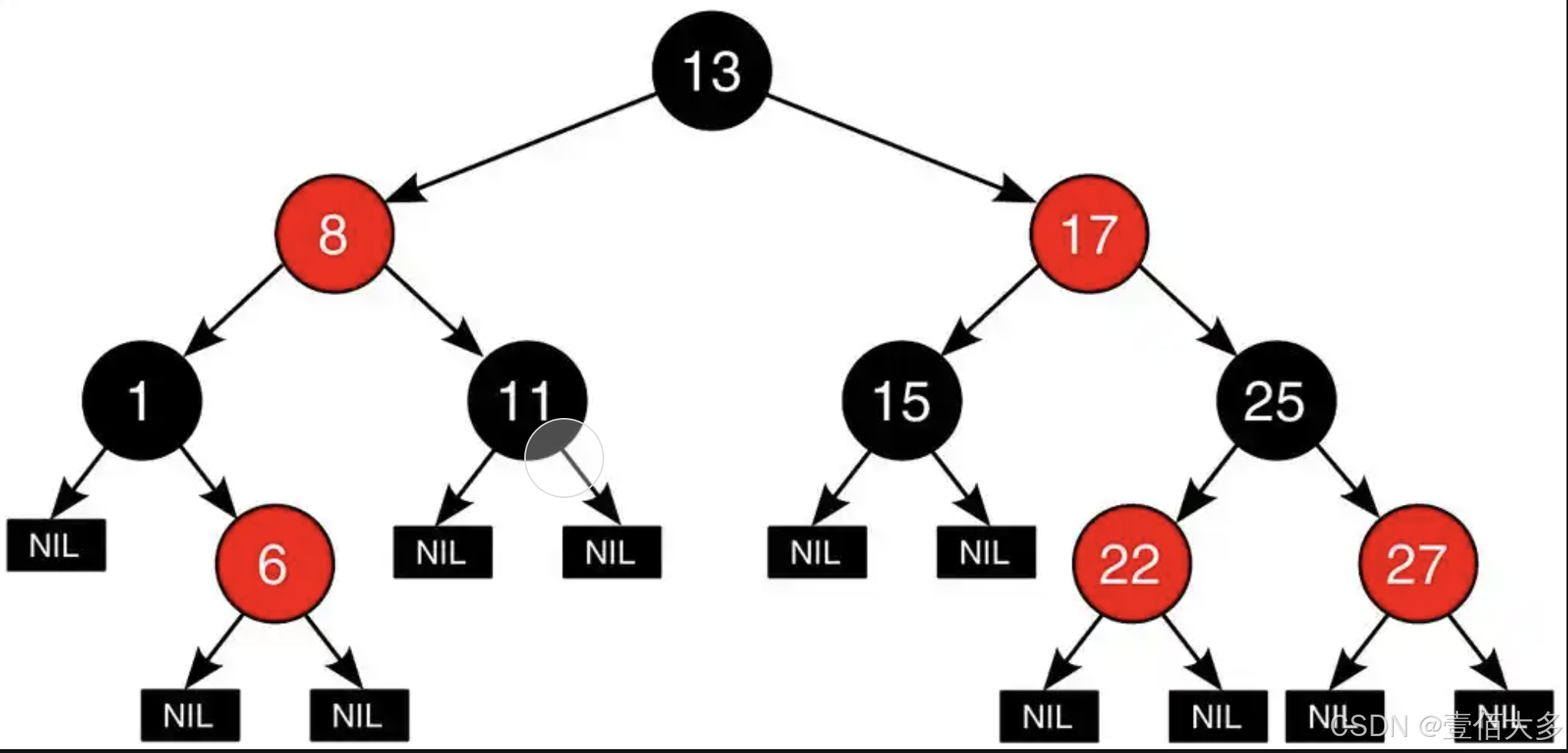
【数据结构-红黑树】
文章目录 红黑树红黑树介绍红黑树的五个基本性质红黑树的平衡原理红黑树的操作红黑树的操作 代码实现节点实现插入和查询操作 红黑树 红黑树介绍 红黑树(Red-Black Tree)是一种自平衡的二叉查找树(Binary Search Tree, BST)&…...

【STM32】舵机SG90
1.舵机原理 舵机内部有一个电位器,当转轴随电机旋转,电位器的电压会发生改变,电压会带动转一定的角度,舵机中的控制板就会电位器输出的电压所代表的角度,与输入的PWM所代表的角度进行比较,从而得出一个旋转…...

【Linux】Socket编程—TCP
🔥 个人主页:大耳朵土土垚 🔥 所属专栏:Linux系统编程 这里将会不定期更新有关Linux的内容,欢迎大家点赞,收藏,评论🥳🥳🎉🎉🎉 文章目…...

c++11 for auto不定参数
数量不定的模板参数。参数分为一个和一包两部分。 冒号的左边声明一个变量。右手边必须是一个容器。从容器(某种数据结构)中找出每一个元素设置到左边这个变量。11之前可以用容器的迭代器去取数据。或者标准库里的foreach...

C#+redis实现消息队列的发布订阅功能
代码 参考c#redis stream实现消息队列以及ack机制文章的思路,实现 SubscribeAttribute.cs using System;namespace DotnetQueue.Attributes {/// <summary>/// 订阅特性/// </summary>[AttributeUsage(AttributeTargets.Method, Inherited false)]pu…...

Docker容器基本操作
容器的基本操作 操作命令(全)命令(简)容器的创建docker container run <image name>docker run <image name>容器的列出(up)docker container lsdocker ps容器的列出(up和exit&…...

从无序到有序:上北智信通过深度数据分析改善会议室资源配置
当前企业普遍面临会议室资源管理难题,预约机制不完善和临时会议多导致资源调度不合理,既有空置又有过度拥挤现象。 针对上述问题,上北智信采用了专业数据分析手段,巧妙融合楼层平面图、环形图、折线图和柱形图等多种可视化工具&a…...

总结:使用JDK原生HttpsURLConnection,封装HttpsUtil工具类,加载自定义证书验证,忽略ssl证书验证
总结:使用JDK原生HttpsURLConnection,封装HttpsUtil工具类,加载自定义证书验证,忽略ssl证书验证 一HttpsUtil工具类二SSLUtil工具类 一HttpsUtil工具类 package com.example.util;import javax.net.ssl.HttpsURLConnection; impo…...

重新定义人机关系边界,Soul以AI社交构建多元社交元宇宙
近年来,AI Native应用的兴起已逐渐成为大众关注的焦点。在此背景下,Soul App的首席技术官陶明在极客公园IF2025创新大会上,发表了一场主题为“人机关系的新边界,Soul如何定义AI社交未来”的演讲。他分享了Soul在人工智能领域内的最新技术进展和战略规划,同时也将Soul社交元宇宙…...
详解)
HTTP 参数污染(HPP)详解
1. 什么是 HTTP 参数污染(HPP)? HTTP 参数污染(HTTP Parameter Pollution,简称 HPP)是一种 Web 应用攻击技术,攻击者通过在 HTTP 请求中注入多个相同的参数来绕过安全控制或篡改应用逻辑&#…...

阿里云轻量服务器docker部署nginx
拉取nginx docker镜像 sudo docker pull nginx创建以下挂载目录及文件 用户目录下:conf html logs conf: conf.d nginx.conf html: index.html conf.d: default.confnginx.conf添加文件内容 events {worker_connections 1024; }http {include /etc/ngi…...

【2026 AI大会餐饮黑幕】:首曝主办方未公开的智能供餐算法、碳足迹约束模型与VIP膳食AI调度协议
更多请点击: https://intelliparadigm.com 第一章:2026年AI技术大会餐饮安排 智能餐券系统接入指南 为提升参会体验,本届大会全面启用基于区块链的电子餐券系统(AI-Catering Chain v3.2),所有注册嘉宾将自…...
)
用DAIN算法修复老视频,实测4K补帧效果与常见问题避坑(附Python代码)
深度解析DAIN算法:4K老视频修复实战指南与调参避坑技巧 你是否曾翻出多年前的家庭录像,却发现画面卡顿模糊?或是想重温经典老电影,却被低帧率影响了观影体验?DAIN(Depth-Aware Video Frame Interpolation&a…...

Ruby on Rails的魔法:理解redirect_to的奥秘
在Ruby on Rails框架中,redirect_to是开发者常用的一个方法,它能够实现页面重定向,帮助用户在操作后导航到新的页面或资源。然而,对于初学者来说,这个方法似乎带着一丝“魔法”,特别是当我们看到如redirect_to @article这样的代码时。这篇博客将详细探讨Rails中redirect_…...

开源家庭医生系统:从健康数据管理到智能提醒的完整实现
1. 项目概述:一个家庭医生的开源实现最近在逛GitHub的时候,发现了一个挺有意思的项目,叫dipo78/family-doctor。光看名字,你可能会觉得这是个医疗健康类的应用,或者是个预约挂号平台。但点进去仔细研究后,我…...

OpenClaw视觉化文档生成器:一键将技术描述转为交互图表
1. 项目概述:为OpenClaw打造的视觉化文档生成器 如果你和我一样,经常需要向团队解释一个复杂的系统架构,或者向客户展示一份代码变更的评审报告,你肯定也厌倦了在聊天窗口里贴大段大段的文字描述,或者用简陋的ASCII字…...

猫抓浏览器扩展:重新定义你的网络资源自由
猫抓浏览器扩展:重新定义你的网络资源自由 【免费下载链接】cat-catch 猫抓 浏览器资源嗅探扩展 / cat-catch Browser Resource Sniffing Extension 项目地址: https://gitcode.com/GitHub_Trending/ca/cat-catch 还在为网页上的精彩视频转瞬即逝而烦恼吗&am…...

CLMS算法在回声消除中的原理与实践
1. 回声消除技术背景与挑战在免提移动通信和远程会议系统中,声学回声一直是影响通话质量的核心问题。当扬声器播放的远端语音经房间反射后被麦克风重新采集,就会形成令人不适的回声效应。自适应滤波器通过建立回声路径的数学模型来预测并消除这种声学反馈…...

从java改C++后速度变化记录
基本已经实现以前java功能,似乎还是存在卡顿。也就是说暂时还没有出现所谓的5-20倍速度提升。AI辩解:主要花费时间的是模型推理,不是语言计算。------所以解决方法已经出来了:降低推理频率。...

AI智能体3D可视化监控:用Phaser构建等距办公室视图
1. 项目概述:为AI智能体打造一个“看得见”的办公室如果你正在开发或管理一个由多个AI智能体组成的复杂系统,你可能会遇到一个共同的痛点:这些智能体到底在干什么?它们的状态如何?任务进展到哪一步了?传统的…...
)
人事管理|基于SprinBoot+vue的企业人事管理系统(源码+数据库+文档)
人事管理系统 目录 基于SprinBootvue的企业人事管理系统 一、前言 二、系统设计 三、系统功能设计 1管理员功能模块 2员工功能模块 四、数据库设计 五、核心代码 六、论文参考 七、最新计算机毕设选题推荐 八、源码获取: 博主介绍:✌️大厂码…...