
火山RTC 5 转推CDN 布局合成规则
实时音视频房间,转推CDN,文档:
转推直播--实时音视频-火山引擎
一、转推CDN
0、前提
* + 在调用该接口前,你需要在[控制台](https://console.volcengine.com/rtc/workplaceRTC)开启转推直播功能。<br>
* + 调用该方法后,关于启动结果和推流过程中的错误,会收到 onMixingEvent{@link #IMixedStreamObserver#onMixingEvent} 回调。<br>
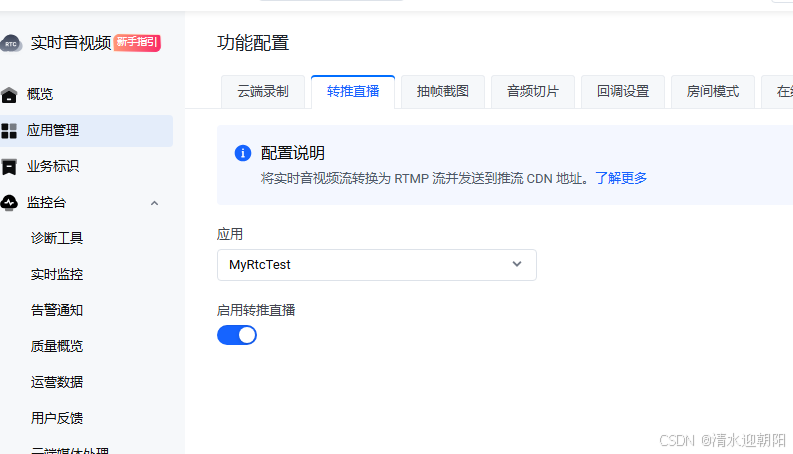
(我测试的时候,使用的别的平台的CDN 地址,好像不开启,也能转推上去 )
最多合并17路流
https://www.volcengine.com/docs/6348/69850

1、startPushMixedStreamToCDN
1)、接口
/*** @locale zh* @valid since 3.52* @hidden(Linux) not available* @type api* @region 多房间* @brief 新增合流转推直播任务,并设置合流的图片、视频视图布局和音频属性。 <br>* 同一个任务中转推多路直播流时,SDK 会先将多路流合成一路流,然后再进行转推。* @param task_id 转推直播任务 ID,长度不超过 126 字节。<br>* 你可以在同一房间内发起多个转推直播任务,并用不同的任务 ID 加以区分。当你需要发起多个转推直播任务时,应使用多个 ID;当你仅需发起一个转推直播任务时,建议使用空字符串。* @param config 转推直播配置参数。参看 IMixedStreamConfig{@link #IMixedStreamConfig}。* @param observer 端云一体转推直播观察者。参看 IMixedStreamObserver{@link #IMixedStreamObserver}。 <br>* 通过注册 observer 接收转推直播相关的回调。* @return * + 0: 成功<br>* + !0: 失败* @note * + 在调用该接口前,你需要在[控制台](https://console.volcengine.com/rtc/workplaceRTC)开启转推直播功能。<br>* + 调用该方法后,关于启动结果和推流过程中的错误,会收到 onMixingEvent{@link #IMixedStreamObserver#onMixingEvent} 回调。<br>* + 如果已在[控制台](https://console.volcengine.com/rtc/cloudRTC?tab=callback)配置了转推直播的服务端回调,调用本接口会收到 [TranscodeStarted](https://www.volcengine.com/docs/6348/75125#transcodestarted)。重复调用该接口时,第二次调用会同时触发 [TranscodeStarted](https://www.volcengine.com/docs/6348/75125#transcodestarted) 和 [TranscodeUpdated](https://www.volcengine.com/docs/6348/75125#transcodeupdated)。<br>* + 调用 stopPushStreamToCDN{@link #IRTCVideo#stopPushStreamToCDN} 停止转推直播。*//*** @locale en* @valid since 3.52* @hidden(Linux) not available* @type api* @region Multi-room* @brief Create a new task of pushing mixed media streams to CDN and sets the relevant configurations. <br>* When pushing more than one live streams in the same task, SDK will first mix those streams into one single stream and then push it to CDN.* @param task_id Task ID. The length should not exceed 126 bytes.<br>* You may want to push more than one mixed stream to CDN from the same room. When you do that, use different ID for corresponding tasks; if you will start only one task, use an empty string.* @param config Configurations to be set when pushing streams to CDN. See IMixedStreamConfig{@link #IMixedStreamConfig}.* @param observer Register this observer to receive callbacks from the SDK. See IMixedStreamObserver{@link #IMixedStreamObserver}.* @return * + 0: Success<br>* + !0: Failure* @note * + Before calling this API,you need to enable Push to CDN on the [console](https://console.byteplus.com/rtc/workplaceRTC). <br>* + After calling this API, you will be informed of the result and errors during the pushing process via the onMixingEvent{@link #IMixedStreamObserver#onMixingEvent} callback.<br>* + If you have subscribed to the push-to-CDN server callback in the [console](https://console.byteplus.com/rtc/cloudRTC?tab=callback), calling this API will receive a [TranscodeStarted](https://docs.byteplus.com/en/byteplus-rtc/docs/75125#transcodestarted) server callback notification. When calling this API repeatedly, subsequent calls to this API will trigger both [TranscodeStarted](https://docs.byteplus.com/en/byteplus-rtc/docs/75125#transcodestarted) and [TranscodeUpdated](https://docs.byteplus.com/en/byteplus-rtc/docs/75125#transcodeupdated) callbacks.<br>* + Call stopPushStreamToCDN{@link #IRTCVideo#stopPushStreamToCDN} to stop pushing streams to CDN.*/virtual int startPushMixedStreamToCDN(const char* task_id, IMixedStreamConfig* config, IMixedStreamObserver* observer) = 0;2)、IMixedStreamConfig 合流布局参数
config 转推直播配置参数。
/*** @locale zh* @type keytype* @brief 转推直播配置参数。(新)*/
/*** @locale en* @type keytype* @brief Configurations to be set while pushing media streams to CDN.(New)*/
class IMixedStreamConfig : public ITranscoderParamBase {
public:/*** @locale zh* @type api* @region 转推直播* @brief 获取合流类型。* @return 合流类型,参看 MixedStreamType{@link #MixedStreamType}*//*** @locale en* @type api* @region Push to CDN* @brief Gets the stream mixing type.* @return Stream mixing type. See MixedStreamType{@link #MixedStreamType}*/virtual MixedStreamType getExpectedMixingType() = 0;/*** @locale zh* @type api* @brief 获取推流用户 ID。* @return 推流用户 ID。*//*** @locale en* @type api* @brief Gets the user ID for mixed stream.* @return The user ID for live mixed stream.*/virtual const char* getUserID() = 0;/*** @locale zh* @type api* @brief 获取推流 CDN 地址。* @return 推流地址。*//*** @locale en* @type api* @brief Gets the URL for live mixed stream.* @return The CDN url.*/virtual const char* getPushURL() = 0;/*** @locale zh* @type api* @region 转推直播* @brief 获取用户配置的额外信息。* @return UserConfigExtraInfo 信息。*//*** @locale en* @type api* @region Forward to live broadcast* @brief Get user config extra information.* @return extraI Information.*/virtual const char* getUserConfigExtraInfo() = 0;/*** @locale zh* @type api* @region 转推直播* @brief 获取合流音频参数。* @return 合流音频参数内容,参看 MixedStreamAudioConfig{@link #MixedStreamAudioConfig}。*//*** @locale en* @type api* @region Push to CDN* @brief Gets the audio configurations.* @return Audio configurations. See MixedStreamAudioConfig{@link #MixedStreamAudioConfig}.*/virtual MixedStreamAudioConfig getAudioConfig() = 0;/*** @locale zh* @type api* @region 转推直播* @brief 获取合流视频转码参数。* @return 合流视频转码参数内容,参看 MixedStreamVideoConfig{@link #MixedStreamVideoConfig}。*//*** @locale en* @type api* @region Push to CDN* @brief Gets the video configurations.* @return Video configurations. See MixedStreamVideoConfig{@link #MixedStreamVideoConfig}.*/virtual MixedStreamVideoConfig getVideoConfig() = 0;/*** @locale zh* @hidden(Windows,macOS,Linux)* @type api* @brief 获取转推 CDN 时的空间音频参数。* @return 参看 MixedStreamSpatialAudioConfig{@link #MixedStreamSpatialAudioConfig}。*//*** @locale en* @hidden(Windows,macOS,Linux)* @type api* @brief Get the spatial audio configurations of pushing to CDN.* @return See MixedStreamSpatialAudioConfig{@link #MixedStreamSpatialAudioConfig}.*/virtual MixedStreamSpatialAudioConfig getSpatialAudioConfig() = 0;/*** @locale zh* @type api* @region 转推直播* @brief 获取合流视窗布局信息。* @param index 视窗对应下标。* @return 合流视窗布局信息,参看 MixedStreamLayoutRegionConfig{@link #MixedStreamLayoutRegionConfig}。*//*** @locale en* @type api* @region Push to CDN* @brief Gets the video layout information of the mixed stream.* @param index The number of the view of which you want to get information.* @return Layout information. See MixedStreamLayoutRegionConfig{@link #MixedStreamLayoutRegionConfig}.*/virtual MixedStreamLayoutRegionConfig getLayoutByIndex(int32_t index) = 0;/*** @locale zh* @hidden for internal use only* @type api* @region 转推直播* @brief 获取动态扩展自定义参数* @return 动态扩展自定义参数*//*** @locale en* @hidden for internal use only* @type api* @region Forward to live broadcast* @brief Get dynamically extend customizable parameters* @return dynamically extend customizable parameters*/virtual const char* getAdvancedConfig() = 0;/*** @locale zh* @hidden for internal use only* @type api* @region 转推直播* @brief 获取业务透传鉴权信息* @return 业务透传鉴权信息*//*** @locale en* @hidden for internal use only* @type api* @region Forward to live broadcast* @brief Get Business Transparent Authentication Information* @return Business Transparent Authentication Information*/virtual const char* getAuthInfo() = 0;/*** @locale zh* @type api* @brief 获取客户端合流信息。* @return 客户端合流信息,参看 MixedStreamClientMixConfig{@link #MixedStreamClientMixConfig}。*//*** @locale en* @type api* @brief Get client mixing parameters.* @return Client mixing parameters. See MixedStreamClientMixConfig{@link #MixedStreamClientMixConfig}.*/virtual MixedStreamClientMixConfig getClientMixConfig()  = 0;/*** @locale zh* @hidden for internal use only* @type api* @brief 获取转推直播同步参数。* @return 转推直播同步参数,参看 MixedStreamSyncControlConfig{@link #MixedStreamSyncControlConfig}。*//*** @locale en* @hidden for internal use only* @type api* @brief Get transcoding sync control parameters.* @return Transcoding sync control parameters. See MixedStreamSyncControlConfig{@link #MixedStreamSyncControlConfig}.*/virtual MixedStreamSyncControlConfig getSyncControlConfig() = 0;/*** @locale zh* @type api* @region 转推直播* @brief 设置合流类型。建议设置。* @param expected_mix_type 合流类型,参看 MixedStreamType{@link #MixedStreamType}*//*** @locale en* @type api* @region Push to CDN* @brief Sets the expected stream mixing type. It's recommended to be set.* @param expected_mix_type Stream mixing type. See MixedStreamType{@link #MixedStreamType}*/virtual void setExpectedMixingType(MixedStreamType expected_mix_type) = 0;/*** @locale zh* @type api* @brief 设置推流用户 ID。`room_id` 和 `user_id` 长度相加不得超过 126 字节。建议设置。<br>*        本参数不支持过程中更新。* @param user_id 推流用户 ID。*//*** @locale en* @type api* @brief Sets the user ID for live transcoding. The sum length of `room_id` and `user_id` should not exceed 126 bytes. It's recommended to be set.<br>*        This parameter cannot be updated while pushing stream to the CDN.* @param user_id The user ID for live transcoding.*/virtual void setUserID(const char* user_id) = 0;/*** @locale zh* @type api* @brief 设置推流 CDN 地址。仅支持 RTMP 协议,Url 必须满足正则 `/^rtmps?:\/\//`。建议设置。<br>*        本参数不支持过程中更新。* @param url 推流地址。*//*** @locale en* @type api* @brief Sets the URL for live transcoding. Only supports live transcoding via RTMP. The URL should match the regular expression `/^rtmps?:\/\//`. It's recommended to be set.<br>*        This parameter cannot be updated while pushing stream to the CDN.* @param url The URL to be set.*/virtual void setPushURL(const char* push_url) = 0;/*** @locale zh* @type api* @region 转推直播* @brief 设置音频参数。参看 MixedStreamAudioConfig{@link #MixedStreamAudioConfig}。建议设置。<br>*        本参数不支持过程中更新。*//*** @locale en* @type api* @region Push to CDN* @brief Sets audio configurations. See MixedStreamAudioConfig{@link #MixedStreamAudioConfig}. It's recommended to be set.<br>*        This parameters cannot be updated while pushing stream to the CDN.*/virtual void setAudioConfig(const MixedStreamAudioConfig&) = 0;/*** @locale zh* @type api* @region 转推直播* @brief 设置视频参数。参看 MixedStreamVideoConfig{@link #MixedStreamVideoConfig}。建议设置。*//*** @locale en* @type api* @region Push to CDN* @brief Sets video configurations. See MixedStreamVideoConfig{@link #MixedStreamVideoConfig}. It's recommended to be set.*/virtual void setVideoConfig(const MixedStreamVideoConfig&) = 0;/*** @locale zh* @hidden(Windows,macOS,Linux)* @type api* @brief 设定转推 CDN 时的空间音频效果。参看 MixedStreamSpatialAudioConfig{@link #MixedStreamSpatialAudioConfig}。*//*** @locale en* @hidden(Windows,macOS,Linux)* @type api* @brief Sets spatial audio configurations. See MixedStreamSpatialAudioConfig{@link #MixedStreamSpatialAudioConfig}.*/virtual void setSpatialAudioConfig(const MixedStreamSpatialAudioConfig&) = 0;/*** @locale zh* @type api* @region 转推直播* @brief 设置视频流合流整体布局信息。* @param regions[] 用户布局信息列表。为 MixedStreamLayoutRegionConfig{@link #MixedStreamLayoutRegionConfig} 数据类型的数组。每一个该类型对象为一路单独的视频流的布局信息。<br>*                       值不合法或未设置时,自动使用默认值。建议设置。* @param regions_size 合流视窗数量。建议设置。* @param background_color 合流背景颜色,用十六进制颜色码(HEX)表示。例如,#FFFFFF 表示纯白,#000000 表示纯黑。默认值为 #000000。建议设置。<br>*                      值不合法或未设置时,自动使用默认值。* @param user_extra_info 透传的 App 数据。*//*** @locale en* @type api* @region Push to CDN* @brief Sets the layout configurations.* @param regions[] User layout information list. It's a list of MixedStreamLayoutRegionConfig{@link #MixedStreamLayoutRegionConfig} that you construct for each stream.<br>*                       With invalid or empty input, the configurations will be set as the default values. It's recommended to be set.* @param regions_size Amount of views. It's recommended to be set.* @param background_color Background-color of the mixed stream in hexadecimal values such as #FFFFFF and #000000. The default value is #000000. It's recommended to be set.<br>*                      With invalid or empty input, the configurations will be set as the default values.* @param user_extra_info Additional data that you want to import.*/virtual void setLayoutConfig(MixedStreamLayoutRegionConfig regions[],int32_t regions_size,const char* background_color,const char* user_extra_info) = 0;/*** @locale zh* @hidden for internal use only* @type api* @region 转推直播* @brief 设置动态扩展自定义参数* @param advanced_config 动态扩展自定义参数*//*** @locale en* @hidden for internal use only* @type api* @region Forward to live broadcast* @brief Sets dynamically extend customizable parameters* @param advanced_config  dynamically extend customizable parameters*/virtual void setAdvancedConfig(const char* advanced_config) = 0;/*** @locale zh* @hidden for internal use only* @type api* @region 转推直播* @brief 设置业务透传鉴权信息* @param auth_info 业务透传鉴权信息*//*** @locale en* @hidden for internal use only* @type api* @region Forward to live broadcast* @brief Sets Business Transparent Authentication Information* @param auth_info  Business Transparent Authentication Information*/virtual void setAuthInfo(const char* auth_info) = 0;/*** @locale zh* @type api* @brief 设置客户端合流信息,参看 MixedStreamClientMixConfig{@link #MixedStreamClientMixConfig}。*//*** @locale en* @type api* @brief Sets client mixing parameters. See MixedStreamClientMixConfig{@link #MixedStreamClientMixConfig}.*/virtual void setClientMixConfig(MixedStreamClientMixConfig&) = 0;/*** @locale zh* @hidden for internal use only* @type api* @brief 设置转推直播同步参数。参看 MixedStreamSyncControlConfig{@link #MixedStreamSyncControlConfig}。*//*** @locale en* @hidden for internal use only* @type api* @brief Sets transcoding sync control parameters. See MixedStreamSyncControlConfig{@link #MixedStreamSyncControlConfig}.*/virtual void setSyncControlConfig(MixedStreamSyncControlConfig&) = 0;/*** @locale zh* @type api* @brief 获取服务端合流控制参数。参看 MixedStreamServerControlConfig{@link #MixedStreamServerControlConfig}。*//*** @locale en* @type api* @brief Gets the configurations while mixing streams on the server side. See MixedStreamServerControlConfig{@link #MixedStreamServerControlConfig}.*/virtual MixedStreamServerControlConfig getServerControlConfig() = 0;/*** @locale zh* @type api* @brief 设置服务端合流控制参数。参看 MixedStreamServerControlConfig{@link #MixedStreamServerControlConfig}。*//*** @locale en* @type api* @brief Sets the configurations while mixing streams on the server side. See MixedStreamServerControlConfig{@link #MixedStreamServerControlConfig}.*/virtual void setServerControlConfig(MixedStreamServerControlConfig& config) = 0;/*** @locale zh* @valid since 3.57* @type api* @brief 设置合流后整体画布的背景图片 URL,长度最大为 1024 bytes。<br>*        支持的图片格式包括:JPG, JPEG, PNG。如果背景图片的宽高和整体屏幕的宽高不一致,背景图片会缩放到铺满屏幕。*//*** @locale en* @valid since 3.57* @type api* @brief Sets the URL of the background image for the canvas that renders the mixed stream, with a maximum length of 1024 bytes.<br>*        You can input images in the following supported formats: JPG, JPEG, PNG.<br>*        If the width and height of the background image are different from the screen dimensions, the background image will be scaled to fill the screen.*/virtual void setBackgroundImageURL(const char* background_image_url) = 0;/*** @locale zh* @valid since 3.57* @type api* @brief 获取背景图片的地址。*//*** @locale en* @type api* @brief Gets the background image URL.*/virtual const char* getBackgroundImageURL() = 0;/*** @locale zh* @hidden for internal use only* @type api* @region 转推直播* @brief 将输入的 json 格式的字符串转成 ITranscoderParam 结构体* @param json_str json 格式字符串* @return 转换后的 ITranscoderParam 结构体*//*** @locale en* @hidden for internal use only* @type api* @region Push to CDN* @brief Convert the json format string into the ITranscoderParam structure* @param json_str Json format string* @return Converted ITranscoderParam structure*/virtual IMixedStreamConfig* inflatten(const char* json_str) = 0;/*** @locale zh* @type api* @region 转推直播* @brief 获取默认的合流转推参数* @return 生成的 IMixedStreamConfig 结构体*//*** @locale en* @type api* @region Push to CDN* @brief Get default transcoding config* @return Default IMixedStreamConfig structure*/virtual IMixedStreamConfig* defaultMixedStreamConfig() = 0;/*** @hidden constructor/destructor*/virtual ~IMixedStreamConfig() = default;/*** @hidden for internal use only* @type api*/virtual void setConvertFromOldTranscodeParam(bool is_from_old_param) = 0;/*** @hidden for internal use only* @type api*/virtual bool getIsConvertFromOldTranscodeParam() = 0;
};
3)、IMixedStreamObserver
* @param observer 端云一体转推直播观察者。参看 IMixedStreamObserver{@link #IMixedStreamObserver}。 <br>
* 通过注册 observer 接收转推直播相关的回调。
3.1)、 事件监听 观察者
/*** @locale zh* @type callback* @region 转推直播* @brief 合流推流 Observer<br>* 注意:回调函数是在 SDK 内部线程(非 UI 线程)同步抛出来的,请不要做耗时操作或直接操作 UI,否则可能导致 app 崩溃。*/
/*** @locale en* @type callback* @region Push to CDN* @brief Register this observer to receive stream mixing related callbacks from the SDK.<br>* Note: Callback functions are thrown synchronously in a non-UI thread within the SDK. Therefore, you must not perform any time-consuming operations or direct UI operations within the callback function, as this may cause the app to crash.*/
class IMixedStreamObserver {
public:/*** @locale zh* @type callback* @region 转推直播* @brief 是否具有推流能力。  <br>*       + false:不具备推流能力(默认值)  <br>*       + true:具备推流能力* @note  *         + 如果需要开启端云一体转推直播功能,你必须确保你的 App 包含 librtmp,具有推流能力。此时,设置该回调为<br>* true。*//*** @locale en* @type callback* @region Push to CDN* @brief Whether your App has the ability to push streams to CDN.   <br>*        + True: Yes <br>*        + False: No (default value)* @note   *       + If you need to use the function of intelligently pushing streams to CDN, you should ensure that your App<br>* contains librtmp and has the ability to push streams out. If so, set the callback to True.*/virtual bool isSupportClientPushStream() = 0;/*** @locale zh* @hidden(Linux) not available* @type callback* @region 转推直播* @brief 转推直播状态回调* @param event 转推直播任务状态,参看 StreamMixingEvent{@link #StreamMixingEvent}* @param task_id 转推直播任务 ID* @param error 转推直播错误码,参看 StreamMixingErrorCode{@link #StreamMixingErrorCode}。* @param mix_type 转推直播类型,参看 MixedStreamType{@link #MixedStreamType}*//*** @locale en* @hidden(Linux) not available* @type callback* @region Push to CDN* @brief Used for reporting events during pushing streams to CDN* @param event Type Stream mixing status, see StreamMixingEvent{@link #StreamMixingEvent}* @param task_id Task ID* @param error Errors occuring during the pushing process. See StreamMixingErrorCode{@link #StreamMixingErrorCode}* @param mix_type Stream mixing and pushing type. See MixedStreamType{@link #MixedStreamType}*/virtual void onMixingEvent(StreamMixingEvent event, const char* task_id, StreamMixingErrorCode error, MixedStreamType mix_type) = 0;/*** @locale zh* @type callback* @region 转推直播* @brief 合流视频回调,运行在视频回调线程* @param task_id 合流任务 ID* @param video_frame 视频帧,参看 IVideoFrame{@link #IVideoFrame}。* @note 收到该回调的周期与视频的帧间隔一致。*//*** @locale en* @type callback* @region Push to CDN* @brief Callback with the video data after stream mixing, running on the video callback thread* @param task_id Task ID* @param video_frame Video Frame, see IVideoFrame{@link #IVideoFrame}.* @note The interval between callbacks is the same with that between video frames.*/virtual void onMixingVideoFrame(const char* task_id, IVideoFrame* video_frame) = 0;/*** @locale zh* @type callback* @region 转推直播* @brief 合流音频回调,运行在音频回调线程* @param task_id 转推直播任务 ID* @param audio_frame 音频帧,参看 IAudioFrame{@link #IAudioFrame}。* @note 收到该回调的周期为每 10 毫秒一次,并且每次的音频数据量为 10 毫秒数据量。*//*** @locale en* @type callback* @region Push to CDN* @brief Callback with the audio data after stream mixing, running on the audio callback thread* @param task_id Task ID.* @param audio_frame Audio Frame, see IAudioFrame{@link #IAudioFrame}.* @note You will receive the callback every 10 milliseconds. Each callback carries data collected in the last 10<br>* milliseconds.*/virtual void onMixingAudioFrame(const char* task_id, IAudioFrame* audio_frame) = 0;/*** @locale zh* @type callback* @region 转推直播* @brief 视频 SEI 帧回调,运行在视频回调线程* @param task_id 转推直播任务 ID* @param data_frame SEI 数据*//*** @locale en* @type callback* @region Push to CDN* @brief This callback carries SEI data, running on the video callback thread* @param task_id Task ID* @param data_frame SEI data*/virtual void onMixingDataFrame(const char* task_id, IDataFrame* data_frame) = 0;/*** @locale zh* @hidden for internal use only* @type callback* @region 转推直播* @brief 同步视频帧回调。* @param task_id 转推直播任务 ID。* @param uids 同步视频帧对应的 uid 数组。* @param video_frames 同步视频帧数组,与 uids 对应。* @param data_frame SEI 数据。* @param count 数组的长度。*//*** @locale en* @hidden for internal use only* @type callback* @region Push to CDN* @brief Synchronized video frame callback.* @param task_id Task ID.* @param uids Array of synchronized video frames corresponding to uids.* @param video_frames Array of synchronized video frames corresponding to uids.* @param data_frame SEI data.* @param count The length of the array.*/virtual void onCacheSyncVideoFrames(const char* task_id, const char* uids[], IVideoFrame* video_frames[],IDataFrame* data_frame[], int count) = 0;/*** @locale zh* @hidden constructor/destructor* @brief 析构函数*//*** @locale en* @hidden constructor/destructor* @brief Destructor*/virtual ~IMixedStreamObserver() = default;
};
3.2)、示例:
class ByteRTCEventHandler : public QObject,public bytertc::IRTCVideoEventHandler,public bytertc::IAudioEffectPlayerEventHandler,public bytertc::IMixedStreamObserver,public bytertc::IMediaPlayerEventHandler{ std::unique_ptr<ByteRTCEventHandler> m_handler;..............................................................................
..............................................................................//isSupportClientPushStream//return false: 告诉SDK,使用服务端合流方式,即由RTCSDK推到CDN//return true: 告诉SDK,使用业务层转推RTMP能力,需要业务层具备转推到CDN的能力// 本功能展示的是 如何使用RTCSDK 服务器合流,业务层不支持转推CDN,因此需要return false;m_handler.reset(new ByteRTCEventHandler());m_handler->setIsSupportClientPushStream(false); //本Demo使用RTC服务器推流,因此isSupportClientPushStream返回false connect(m_handler.get(), &ByteRTCEventHandler::sigMixingEvent, this, &CDNStreamByServer::onSigMixingEvent); m_video = bytertc::createRTCVideo(g_appid.c_str(), m_handler.get(), nullptr); bytertc::IMixedStreamConfig* mixed_stream_param = getMixedStreamConfig();int ret = m_video->startPushMixedStreamToCDN(m_task.c_str(), mixed_stream_param, m_handler.get());4)、调用示例:
m_task = "task1";if (ui->lineEdit_url->text().isEmpty()) {QMessageBox box(QMessageBox::Warning, QStringLiteral("提示"), QString("url is empty"), QMessageBox::Ok);box.exec();return;}std::lock_guard<std::recursive_mutex> locker(m_mutex);if (m_video == nullptr) return;bytertc::IMixedStreamConfig* mixed_stream_param = getMixedStreamConfig();int ret = m_video->startPushMixedStreamToCDN(m_task.c_str(), mixed_stream_param, m_handler.get());if (ret != 0) {QMessageBox box(QMessageBox::Warning, QStringLiteral("提示"), QString("startPushMixedStreamToCDN error,请检查是否已经在控制台开通该功能"), QMessageBox::Ok);box.exec();return;}2、updatePushMixedStreamToCDN
有人员变化时,实时更新合流配置
/*** @locale zh* @valid since 3.52* @hidden(Linux) not available* @type api* @region 多房间* @brief 更新合流转推直播参数,会收到 onMixingEvent{@link #IMixedStreamObserver#onMixingEvent} 回调。 <br>* 使用 startPushMixedStreamToCDN{@link #IRTCVideo#startPushMixedStreamToCDN} 启用转推直播功能后,使用此方法更新功能配置参数。* @param task_id 转推直播任务 ID。指定想要更新参数设置的转推直播任务。* @param config 转推直播配置参数,参看 IMixedStreamConfig{@link #IMixedStreamConfig}。除特殊说明外,均支持过程中更新。<br>* 调用时,结构体中没有传入值的属性,会被更新为默认值。* @return * + 0: 成功<br>* + !0: 失败*//*** @locale en* @valid since 3.52* @hidden(Linux) not available* @type api* @region Multi-room* @brief Update parameters needed when pushing mixed media streams to CDN. You will be informed of the change via the onMixingEvent{@link #IMixedStreamObserver#onMixingEvent} callback. <br>* After calling startPushMixedStreamToCDN{@link #IRTCVideo#startPushMixedStreamToCDN} to enable the function of pushing streams to CDN, you can call this API to update the relevant configurations.* @param task_id Task ID. Specifys of which pushing task you want to update the parameters.* @param config Configurations that you want to update. See IMixedStreamConfig{@link #IMixedStreamConfig} for specific indications. You can update any property for the task unless it is specified as unavailable for updates.<br>* If you left some properties blank, you can expect these properties to be set to their default values.* @return * + 0: Success<br>* + !0: Failure*/virtual int updatePushMixedStreamToCDN(const char* task_id, IMixedStreamConfig* config) = 0; bytertc::IMixedStreamConfig* config = getMixedStreamConfig();int ret = m_video->updatePushMixedStreamToCDN(m_task.c_str(), config);if (ret != 0) {QMessageBox box(QMessageBox::Warning, QStringLiteral("提示"), QString("updatePushMixedStreamToCDN error,请检查参数"), QMessageBox::Ok);box.exec();return;}3、getMixedStreamConfig 具体合流配置
音频总体、视频画布总体、每个人的位置/视频适配方式/混流 音频 视频方式
bytertc::IMixedStreamConfig* CDNStreamByServer::getMixedStreamConfig()
{// audiobytertc::MixedStreamAudioConfig audioParam;audioParam.audio_codec = bytertc::MixedStreamAudioCodecType::kMixedStreamAudioCodecTypeAAC;audioParam.channels = ui->comboBox_channel->currentText().toInt();audioParam.bitrate = ui->spinBox_a_bitrate->value();audioParam.sample_rate = ui->comboBox_samplerate->currentText().toInt();audioParam.audio_profile = bytertc::MixedStreamAudioProfile::kMixedStreamAudioProfileLC;// videobytertc::MixedStreamVideoConfig videoParam;videoParam.bitrate = ui->spinBox_v_bitrate->value();videoParam.fps = ui->spinBox_v_fps->value();videoParam.gop = 2;videoParam.width = 640;videoParam.height = 360;videoParam.enable_bframe = false;if (ui->comboBox_v_code->currentText().contains("264")) {videoParam.video_codec = bytertc::kMixedStreamVideoCodecTypeH264; //本参数不支持过程中更新}else {videoParam.video_codec = bytertc::kMixedStreamVideoCodecTypeByteVC1;}// layoutbytertc::MixedStreamLayoutRegionConfig* layouts = new bytertc::MixedStreamLayoutRegionConfig[m_rendered_users.size()];int i = 0;std::map<std::string, UserWidget*>::iterator ite;for (ite = m_rendered_users.begin(); ite != m_rendered_users.end(); ite++) {bytertc::MixedStreamLayoutRegionConfig lay;lay.region_id = ite->first.c_str();lay.room_id = m_roomid.c_str();lay.location_x = (i % 2) * 0.5 * videoParam.width; lay.location_y = (i / 2) * 0.5 *  videoParam.height;if (m_rendered_users.size() == 1) {lay.width = 0.8 * videoParam.width; lay.height = 0.8 * videoParam.height;}else if (m_rendered_users.size() == 2) {lay.width = 0.4 * videoParam.width; lay.height = 0.8 * videoParam.height;}else {lay.width = 0.4 * videoParam.width;lay.height = 0.4 * videoParam.height;}if (ite->first == m_localid) {lay.is_local_user = true;}else {lay.is_local_user = false;}lay.alpha = 1.0f;lay.z_order = 0;//  视频适配方式/混流 音频 视频方式 lay.render_mode = bytertc::MixedStreamRenderMode::kMixedStreamRenderModeHidden;lay.stream_type = bytertc::MixedStreamVideoType::kMixedStreamVideoTypeMain;lay.media_type = bytertc::MixedStreamMediaType::kMixedStreamMediaTypeAudioAndVideo;lay.apply_spatial_audio = false;layouts[i++] = lay;}bytertc::MixedStreamClientMixConfig client_conf;client_conf.use_audio_mixer = true;client_conf.video_format = bytertc::kMixedStreamClientMixVideoFormatI420;std::string url = ui->lineEdit_url->text().toStdString();bytertc::IMixedStreamConfig* mixed_stream_param = bytertc::createMixedStreamConfig();mixed_stream_param->setAudioConfig(audioParam);mixed_stream_param->setVideoConfig(videoParam);mixed_stream_param->setLayoutConfig(layouts, m_rendered_users.size(), m_str_color.c_str(), nullptr);mixed_stream_param->setExpectedMixingType(bytertc::kMixedStreamTypeByServer); mixed_stream_param->setPushURL(url.c_str());mixed_stream_param->setRoomID(m_roomid.c_str());mixed_stream_param->setUserID(m_localid.c_str());mixed_stream_param->setClientMixConfig(client_conf);delete[]layouts;return mixed_stream_param;QStringList list = {"setAudioConfig", "setVideoConfig", "setLayoutConfig", "setExpectedMixingType", "setPushURL", "setRoomID", "setUserID", "setClientMixConfig"};appendAPI(list);
}
相关文章:
火山RTC 5 转推CDN 布局合成规则
实时音视频房间,转推CDN,文档: 转推直播--实时音视频-火山引擎 一、转推CDN 0、前提 * 在调用该接口前,你需要在[控制台](https://console.volcengine.com/rtc/workplaceRTC)开启转推直播功能。<br> * 调…...
Spark两种运行模式与部署
1. Spark 的运行模式 部署Spark集群就两种方式,单机模式与集群模式 单机模式就是为了方便开发者调试框架的运行环境。但是生产环境中,一般都是集群部署。 现在Spark目前支持的部署模式: (1)Local模式:在本地…...

react 父子组件通信 子 直接到父, 父 forwardref子
React核心概念:单向数据流(Unidirectional Data Flow) React 中数据的流动像瀑布一样,只能从上层组件(父组件)流向下层组件(子组件)。 子组件无法直接反向修改父组件的数据&#x…...
qt画一朵花
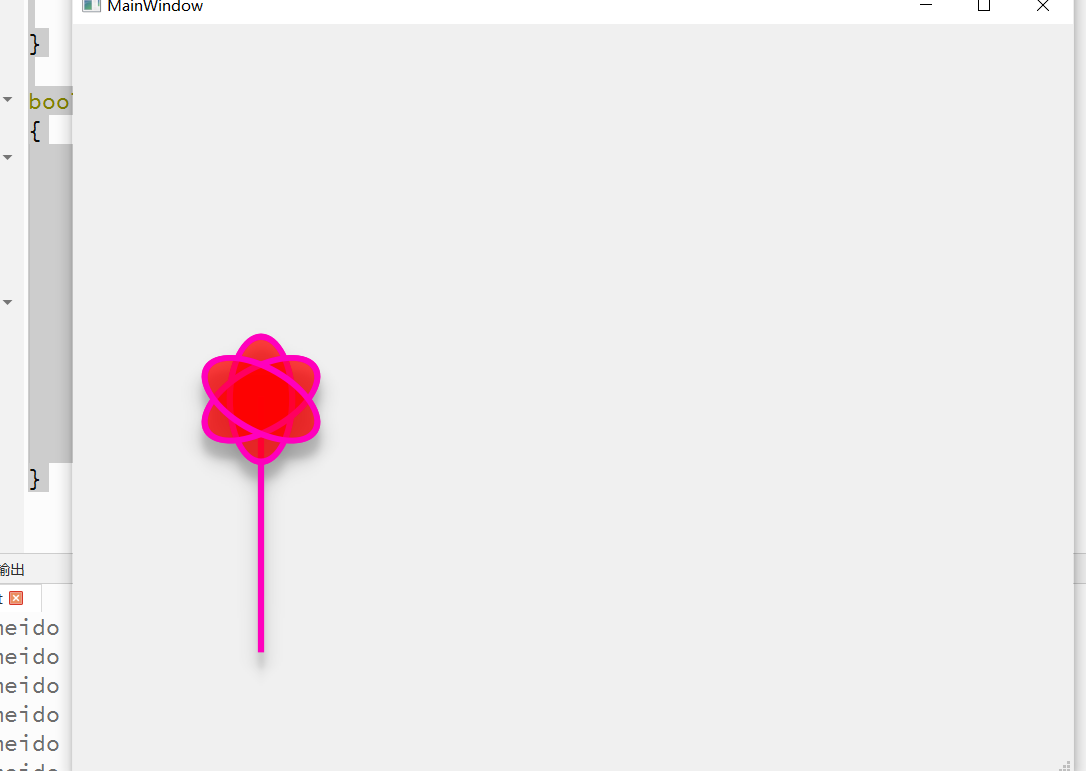
希望大家的生活都更加美好,画一朵花送给大家 效果图 void FloatingArrowPubshButton::paintEvent(QPaintEvent *event) {QPainter painter(this);painter.setRenderHints(QPainter::Antialiasing);QPen pen;pen.setColor("green");pen.setWidth(5);QBrush…...
服务器上安装maven
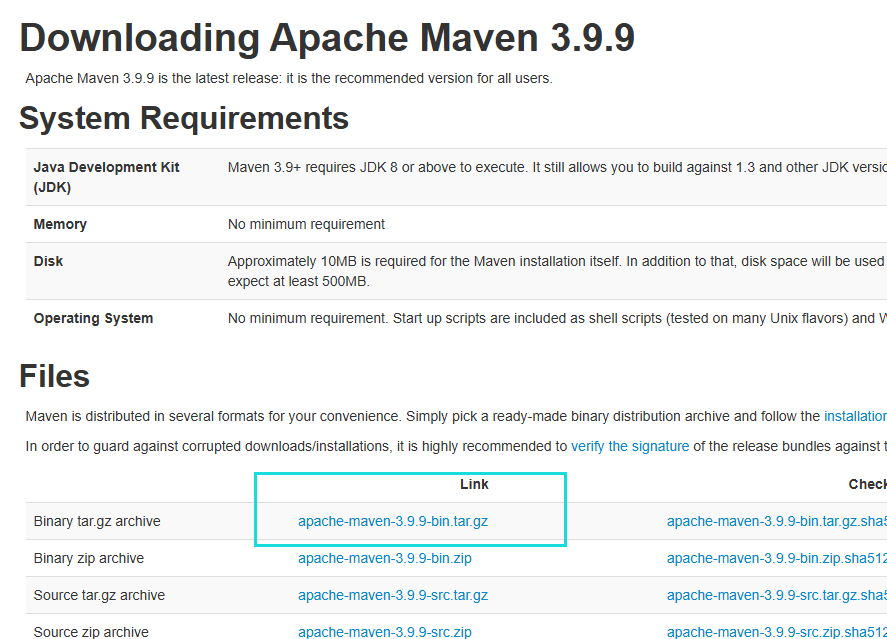
1.安装 下载安装包 https://maven.apache.org/download.cgi 解压安装包 cd /opt/software tar -xzvf apache-maven-3.9.9-bin.tar.gz 安装目录(/opt/maven/) mv /opt/software/apache-maven-3.9.9 /opt/ 3.权限设置 把/opt/software/apache-maven-3.9.9 文件夹重命名为ma…...
UOS+N 卡 + CUDA 环境下 X86 架构 DeepSeek 基于 vLLM 部署与 Dify 平台搭建指南
一、文档说明 本文档是一份关于 DeepSeek 在X86架构下通vLLM工具部署的操作指南,主要面向需要在UOSN卡CUDA环境中部署DeepSeek的技术人员,旨在指导文档使用者完成从 Python 环境升级、vLLM 库安装、模型部署到 Dify 平台搭建的全流程操作。 二、安装Pyt…...

MySQL终章(8)JDBC
目录 1.前言 2.正文 2.1JDBC概念 2.2三种编码方式 2.2.1第一种 2.2.2第二种(优化版) 2.2.3第三种(更优化版) 3.小结 1.前言 哈喽大家好吖,今天来给大家带来Java中的JDBC的讲解,之前学习的都是操作…...

点云数据处理开源C++方案
一、主流开源库对比 库名称特点适用场景开源协议活跃度PCL功能最全,算法丰富科研、工业级应用BSD★★★★★Open3D现代API,支持Python绑定快速开发、深度学习MIT★★★★☆CGAL计算几何算法强大网格处理、高级几何运算GPL/LGPL★★★☆☆PDAL专注于点云…...

Python 爬虫如何伪装 Referer?从随机生成到动态匹配
一、Referer 的作用与重要性 Referer 是 HTTP 请求头中的一个字段,用于标识请求的来源页面。它在网站的正常运行中扮演着重要角色,例如用于统计流量来源、防止恶意链接等。然而,对于爬虫来说,Referer 也可能成为被识别为爬虫的关…...

【MySQL】表的约束(主键、唯一键、外键等约束类型详解)、表的设计
目录 1.数据库约束 1.1 约束类型 1.2 null约束 — not null 1.3 unique — 唯一约束 1.4 default — 设置默认值 1.5 primary key — 主键约束 自增主键 自增主键的局限性:经典面试问题(进阶问题) 1.6 foreign key — 外键约束 1.7…...
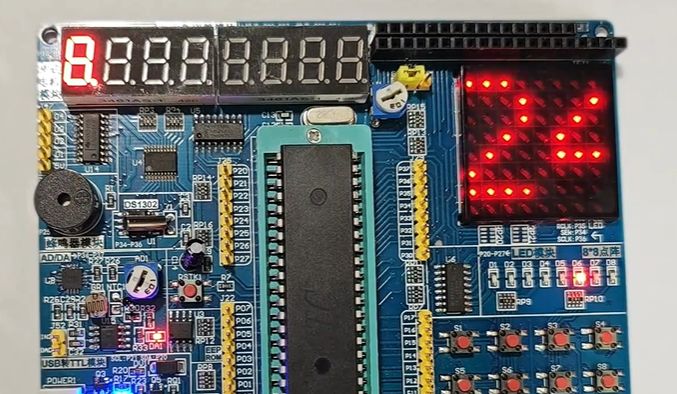
基于STC89C52RC和8X8点阵屏、独立按键的小游戏《打砖块》
目录 系列文章目录前言一、效果展示二、原理分析三、各模块代码1、8X8点阵屏2、独立按键3、定时器04、定时器1 四、主函数总结 系列文章目录 前言 用的是普中A2开发板,外设有:8X8LED点阵屏、独立按键。 【单片机】STC89C52RC 【频率】12T11.0592MHz 效…...
数字电子技术基础(五十)——硬件描述语言简介
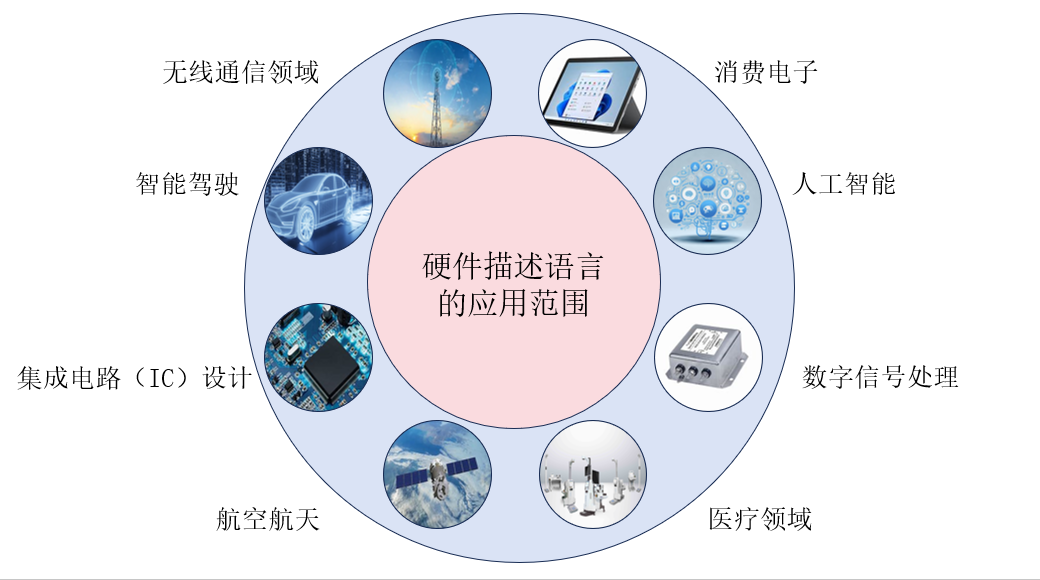
目录 1 硬件描述语言简介 1.1 硬件描述语言简介 1.2 硬件编程语言的发展历史 1.3 两种硬件描述的比较 1.4 硬件描述语言的应用场景 1.5 基本程序结构 1.5.1 基本程序结构 1.5.2 基本语句和描述方法 1.5.3 仿真 1 硬件描述语言简介 1.1 硬件描述语言简介 硬件描述语…...
【深度学习】【目标检测】【Ultralytics-YOLO系列】YOLOV3核心文件common.py解读
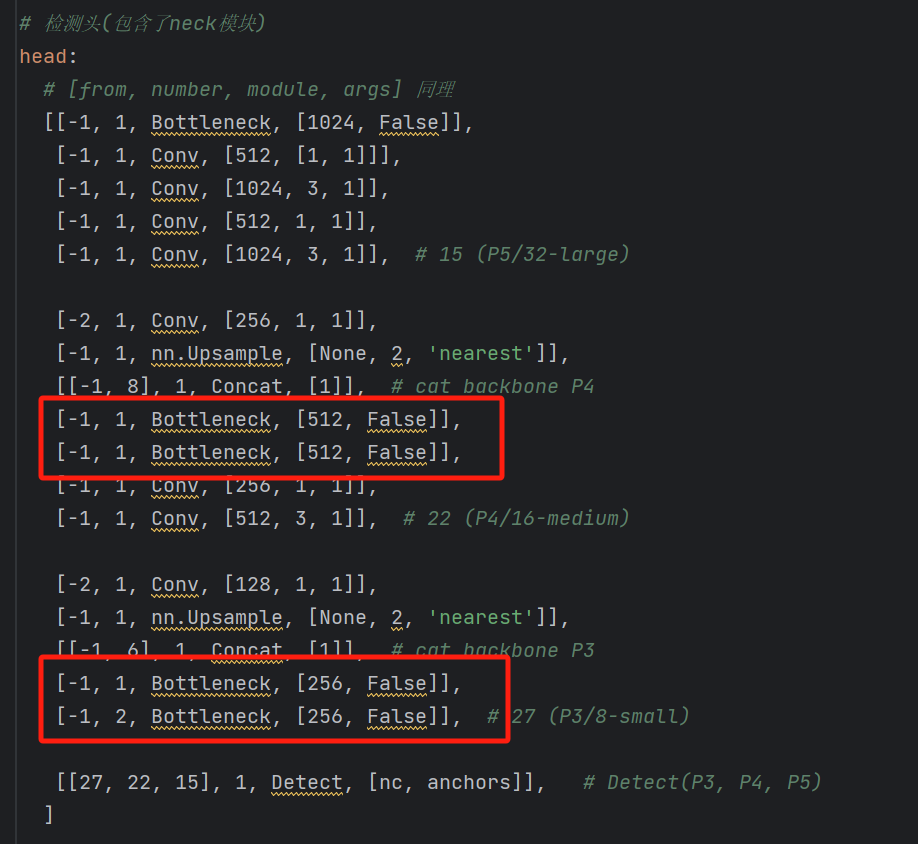
【深度学习】【目标检测】【Ultralytics-YOLO系列】YOLOV3核心文件common.py解读 文章目录 【深度学习】【目标检测】【Ultralytics-YOLO系列】YOLOV3核心文件common.py解读前言autopad函数Conv类__init__成员函数forward成员函数forward_fuse成员函数 Bottleneck类__init__成员…...
16.Chromium指纹浏览器开发教程之WebGPU指纹定制
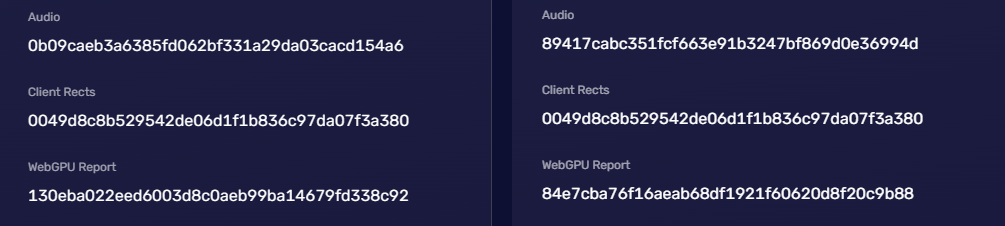
WebGPU指纹概述 WebGPU是下一代的Web图形和计算API,旨在提供高性能的图形渲染和计算能力。它是WebGL的后继者,旨在利用现代GPU的强大功能,使得Web应用能够实现接近原生应用的图形和计算性能。而且它是一个低级别的API,可以直接与…...

示例:spring 纯xml配置
以下是一个完整的 纯 XML 配置开发示例,涵盖 DAO、Service、Controller 层,通过 Spring XML 配置实现依赖注入和事务管理,无需任何注解。 1. 项目结构 src/main/java ├── com.example.dao │ └── UserDao.java # DAO 接口…...
SQL预编译——预编译真的能完美防御SQL注入吗
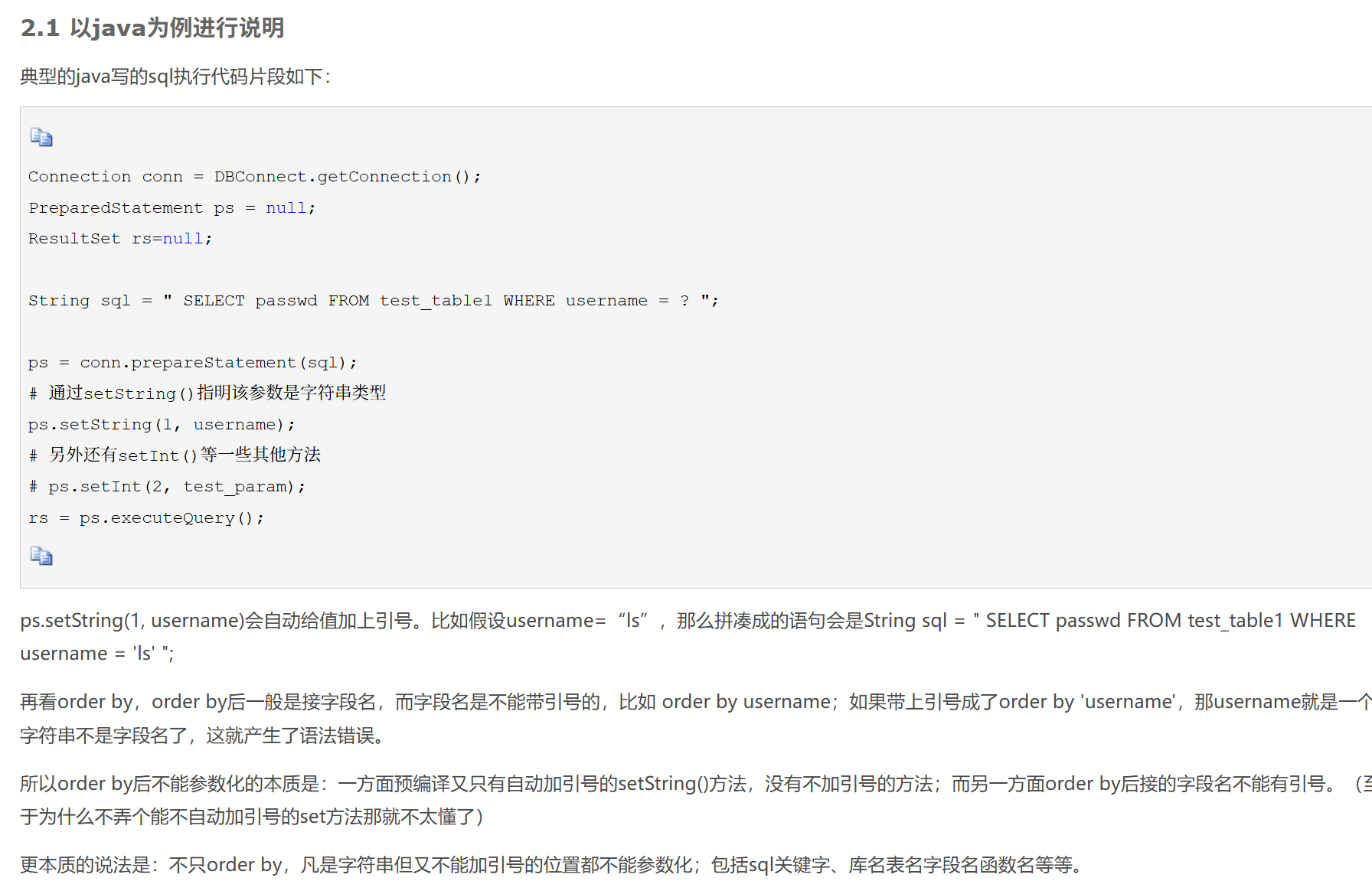
SQL注入原理 sql注入是指攻击者拼接恶意SQL语句到接受外部参数的动态SQL查询中,程序本身 未对插入的SQL语句进行过滤,导致SQL语句直接被服务端执行。 拼接的SQL查询例如,通过在id变量后插入or 11这样的条件,来绕过身份验证&#…...

系统架构师2025年论文《论基于UML的需求分析》
论基于构件的软件开发 摘要: 2011 年 3 月,我有幸参加了某市医院预约挂号系统项目的开发工作,并担任系统架构师一职,负责系统的架构设计及核心构件的开发工作。该项目是某市医院为提升患者就医体验、优化挂号流程而委托开发的,项目于 2011 年底验收,满足了医院及患者提…...
运行neo4j.bat console 报错无法识别为脚本,PowerShell 教程:查看语言模式并通过注册表修改受限模式
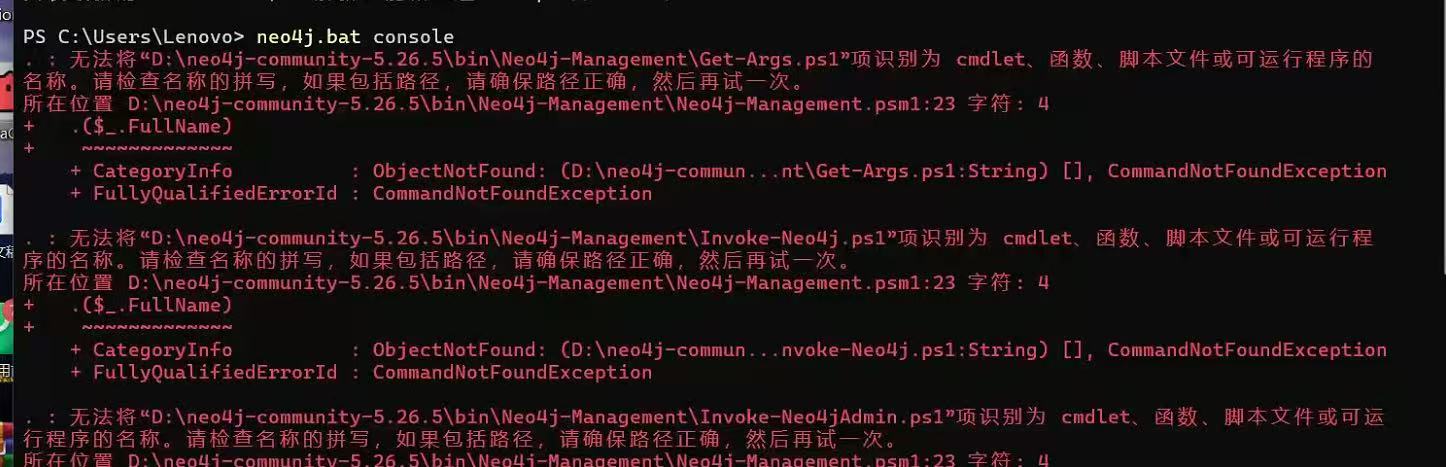
无法将“D:\neo4j-community-4.4.38-windows\bin\Neo4j-Management\Get-Args.ps1”项识别为cmdlet、函数、脚本文件或可运行程序的名称。请检查名称的拼写,如果包括路径,请确保路径正确,然后再试一次。 前提配置好环境变量之后依然报上面的错…...
【EDA软件】【设计约束和分析操作方法】
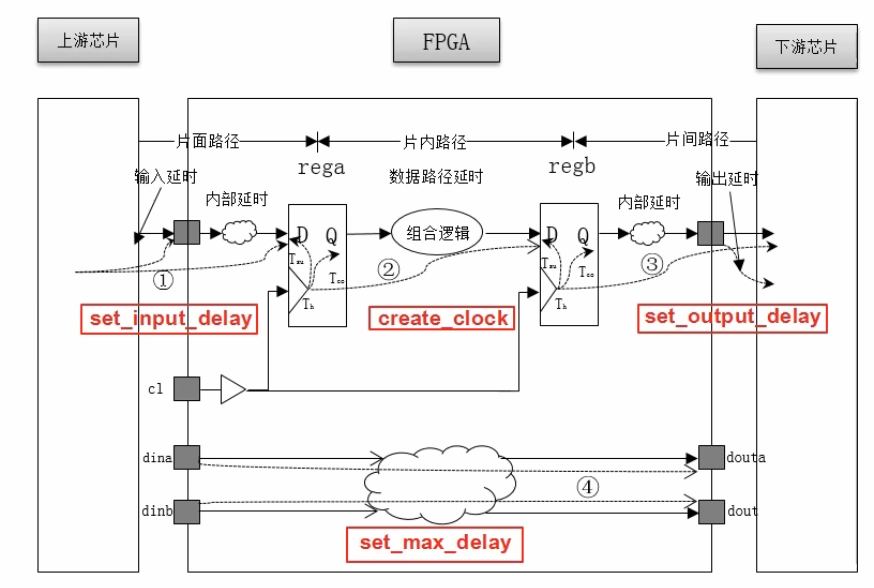
1. 设计约束 设计约束主要分为物理约束和时序约束。 物理约束主要包括I/O接口约束(如引脚分配、电平标准设定等物理属性的约束)、布局约束、布线约束以及配置约束。 时序约束是FPGA内部的各种逻辑或走线的延时,反应系统的频率和速度的约束…...
【Lua】Lua 入门知识点总结
Lua 入门学习笔记 本教程旨在帮助有编程基础的学习者快速入门Lua编程语言。包括Lua中变量的声明与使用,包括全局变量和局部变量的区别,以及nil类型的概念、数值型、字符串和函数的基本操作,包括16进制表示、科学计数法、字符串连接、函数声明…...

Godot学习-关于3D模型选择问题
下面是OBJ、glTF/GLB、BLEND和FBX四种3D模型格式的比较表格,以便更直观地了解它们之间的差异: 特性/格式OBJglTF / GLBBLENDFBX文件类型文本文本/二进制二进制二进制几何数据支持支持支持支持材质支持基础高级(PBR等)完整支持高级…...
光谱相机在肤质检测中的应用
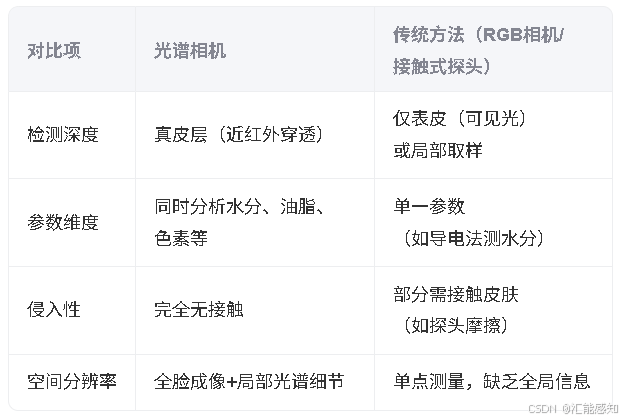
光谱相机在肤质检测中具有独特优势,能够通过多波段光谱分析皮肤深层成分及生理状态,实现非侵入式、高精度、多维度的皮肤健康评估。以下是其核心应用与技术细节: 一、工作原理 光谱反射与吸收特性: 血红蛋白&a…...
)
IDEA 插件推荐清单(2025)
IDEA 插件推荐清单 精选高效开发必备插件,提升 Java 开发体验与效率。 参考来源:十六款好用的 IDEA 插件,强烈推荐!!!不容错过 代码开发助手类 插件名称功能简介推荐指数CodeGeeX智能代码补全、代码生成、…...

机器学习第一篇 线性回归
数据集:公开的World Happiness Report | Kaggle中的happiness dataset2017. 目标:基于GDP值预测幸福指数。(单特征预测) 代码: 文件一:prepare_for_traning.py """用于科学计算的一个库…...
CS144 Lab1实战记录:实现TCP重组器
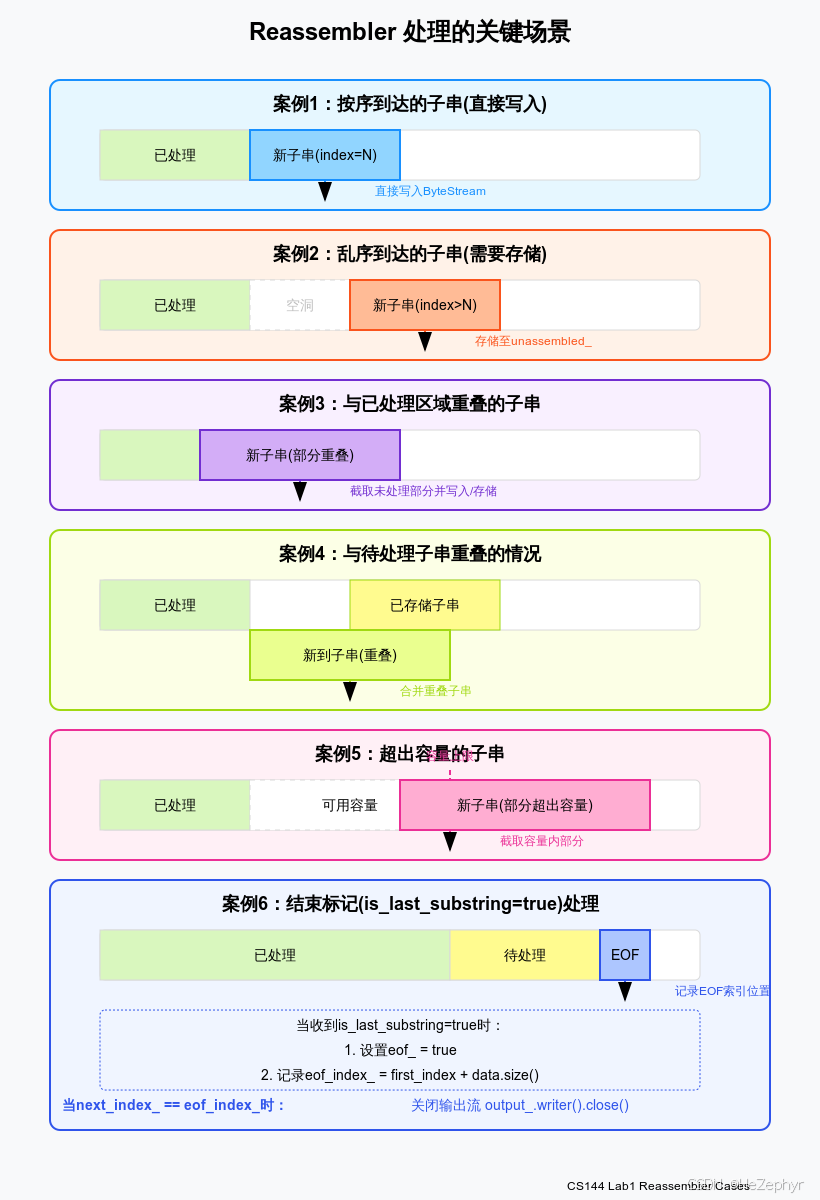
文章目录 1 实验背景与要求1.1 TCP的数据分片与重组问题1.2 实验具体任务 2 重组器的设计架构2.1 整体架构2.2 数据结构设计 3 重组器处理的关键场景分析3.1 按序到达的子串(直接写入)3.2 乱序到达的子串(需要存储)3.3 与已处理区…...
Linux安装mysql_exporter
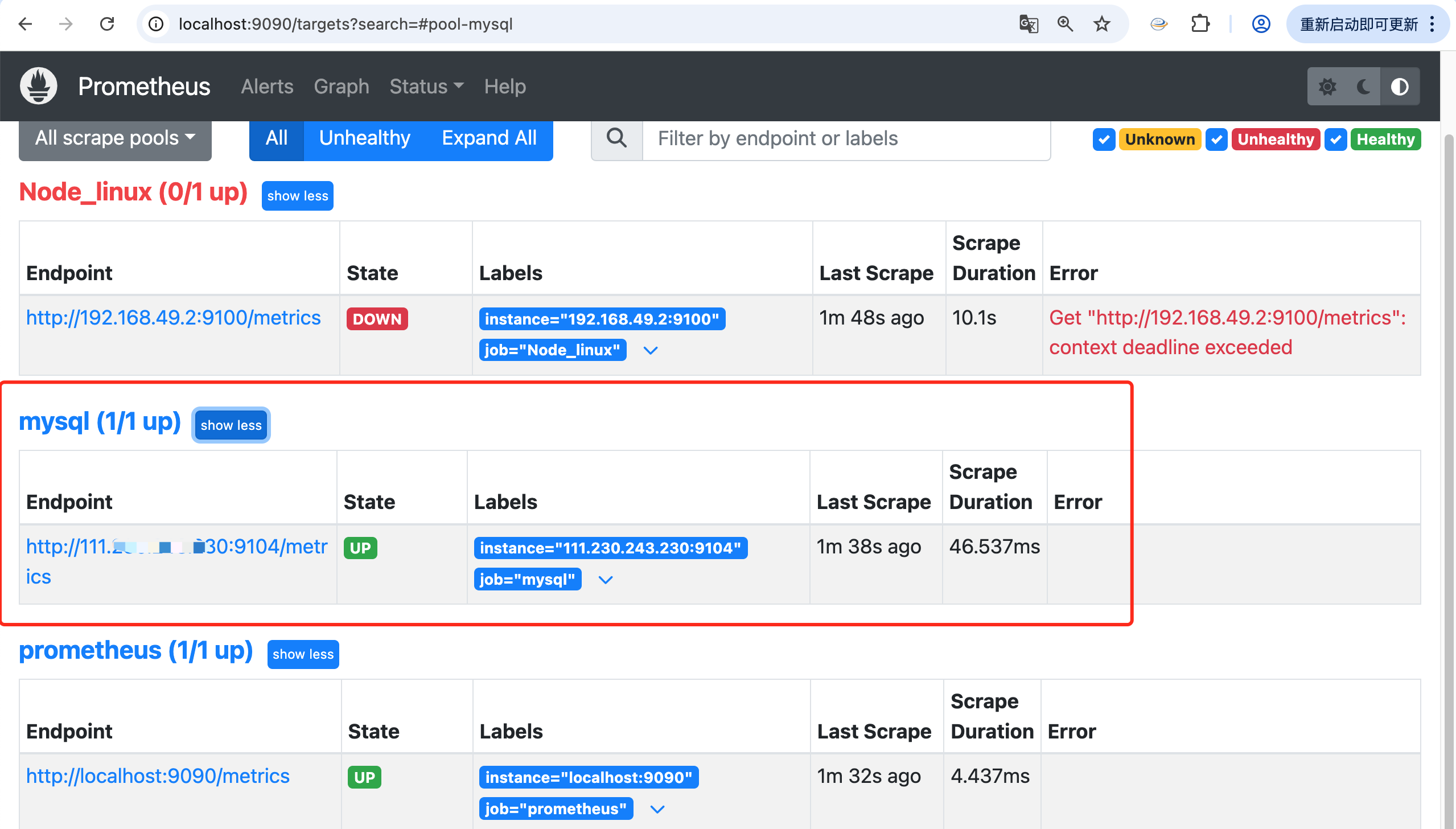
mysqld_exporter 是一个用于监控 MySQL 数据库的 Prometheus exporter。可以从 MySQL 数据库的 metrics_schema 收集指标,相关指标主要包括: MySQL 服务器指标:例如 uptime、version 等数据库指标:例如 schema_name、table_rows 等表指标:例如 table_name、engine、…...

BeautifulSoup 库的使用——python爬虫
文章目录 写在前面python 爬虫BeautifulSoup库是什么BeautifulSoup的安装解析器对比BeautifulSoup的使用BeautifulSoup 库中的4种类获取标签获取指定标签获取标签的的子标签获取标签的的父标签(上行遍历)获取标签的兄弟标签(平行遍历)获取注释根据条件查找标签根据CSS选择器查找…...
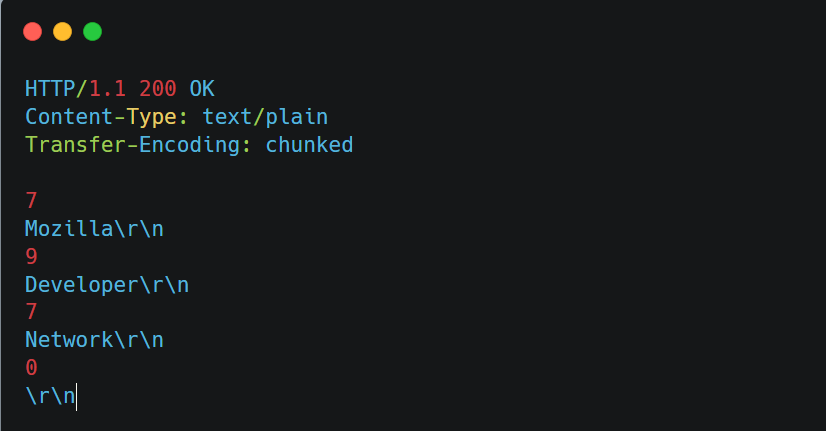
HTTP的Header
一、HTTP Header 是什么? HTTP Header 是 HTTP 协议中的头部信息部分,位于请求或响应的起始行之后,用来在客户端(浏览器等)与服务器之间传递元信息(meta-data)(简单理解为传递信息的…...

linux虚拟机网络问题处理
yum install -y yum-utils \ > device-mapper-persistent-data \ > lvm2 --skip-broken 已加载插件:fastestmirror, langpacks Loading mirror speeds from cached hostfile Could not retrieve mirrorlist http://mirrorlist.centos.org/?release7&arch…...

unet算法发展历程简介
UNet是一种基于深度学习的图像分割架构,自2015年提出以来经历了多次改进和扩展,逐渐成为医学图像分割和其他精细分割任务的标杆。以下是UNet算法的主要发展历程和关键变体: 1. 原始UNet(2015) 论文: U-Net: Convoluti…...