
c#多线程—基础概念到“双色球”项目实现(附知识点目录、代码、视频)
总结:视频中对于多线程讲的非常透彻,从线程基础概念—>.net不同版本出现的线程方法—>多线程常出现问题—>双色球项目实践,每个知识点都有代码实操,受益匪浅。附上学习笔记和实操代码。
视频
目录
- 一、线程、进程概念及优缺点
- 二、四种异步等待方式
- 1.异步控制等待-callback回调
- 2.异步控制等待-asyncResult.IsCompleted
- 3.异步控制等待WaitOne()-信号量
- 4.异步控制等待endinvoke-拿到异步函数的返回值
- 5.视频第1节课代码
- 三、.net1.0基础版的thread对象
- 1.线程启动
- 2.thread.join()\thread.sleep()\thread.IsBackfround
- 四、net 2.0 threadpool
- 1.线程启动、设置线程池最大线程数
- 2.manualResetEvent.WaitOne()异步控制等待
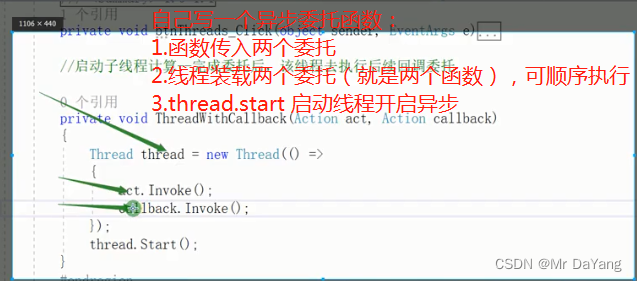
- 3.手写异步回调函数
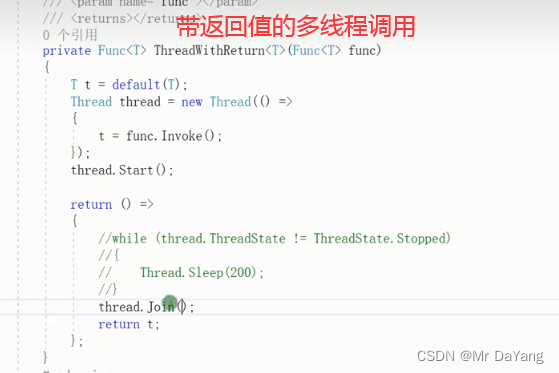
- 4.带返回值的委托异步调用(法语结构待学习)
- 五、.net3.0 task
- 1.task线程启动
- 2.waitall、waitany都会卡主线程卡界面
- 3.task.whenall.continuewith()
- 4.taskfactory.continuewith()
- 5.设计最多只有11个线程在工作
- 6.taskfactory检测到哪个线程结束后,返回线程标识
- 7.task多次嵌套实现不卡主线程
- 8.两个waitall按顺序执行
- 9.thread.sleep()卡线程 task.delay()不卡线程
- 10.task线程完成标识
- 六、.net4.5 parallel
- 1.parallel启动多线程
- 2.parallel线程停止
- 七、threadcore
- 1.异常处理
- 2.线程取消
- 3.多线程临时变量
- 4.线程安全lock(lock锁的是引用)
- 4.1线程安全问题
- 4.2线程共有变量存在线程安全问题
- 4.3lock锁原理
- 八、.net.0 await/async
- 1.await原理
- 1.1小代码测试原理
- 2.带与不带返回值的async方法
- 2.1只有asynic
- 2.2asynic\await成对出现
- 2.3t.Wait()与await t区别
- 2.4await反编译-相当于状态机
- 3.此知识点代码
- 九、双色球项目
- 1.代码
- 十、知识点代码汇总
一、线程、进程概念及优缺点
线程:程序执行的最小单位,任何操作都是由线程完成的,使用同步时,资源一直被此线程占用,所以其他界面干不了,会出现卡界面的现象。
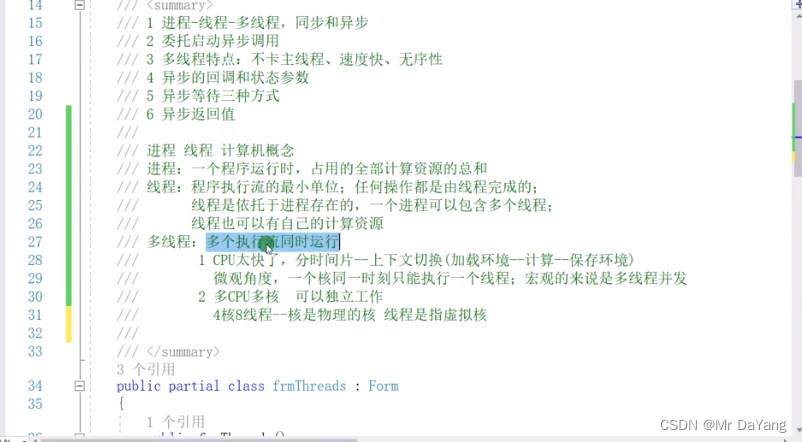
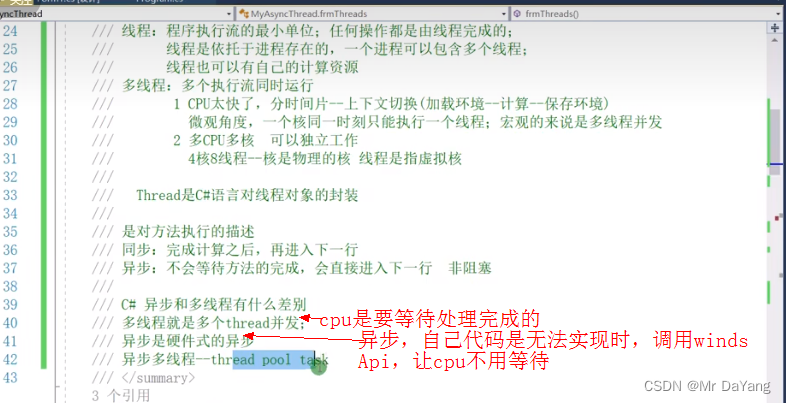
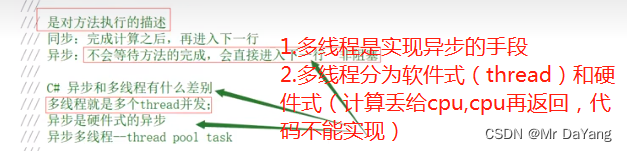
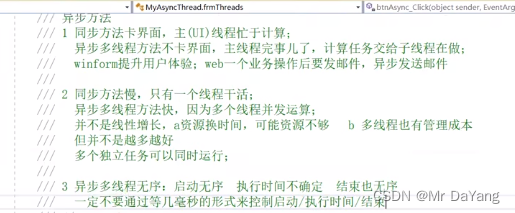
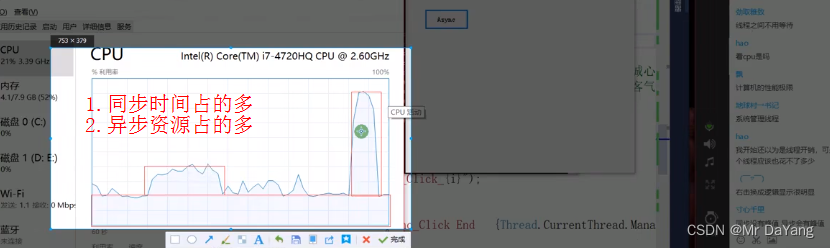
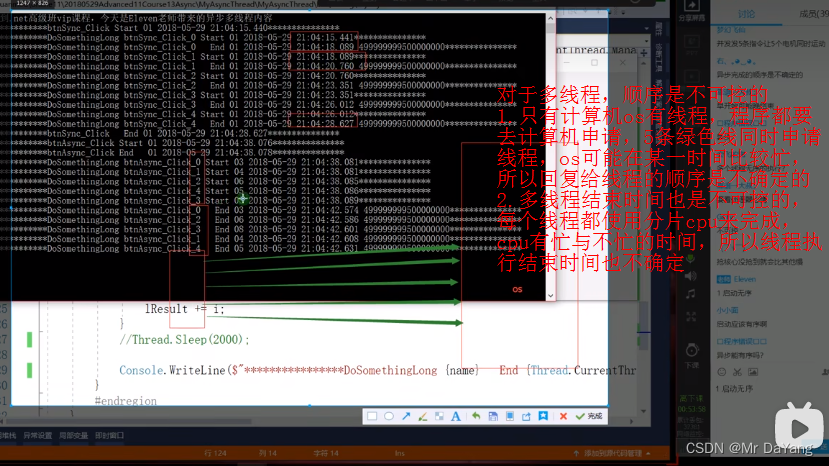
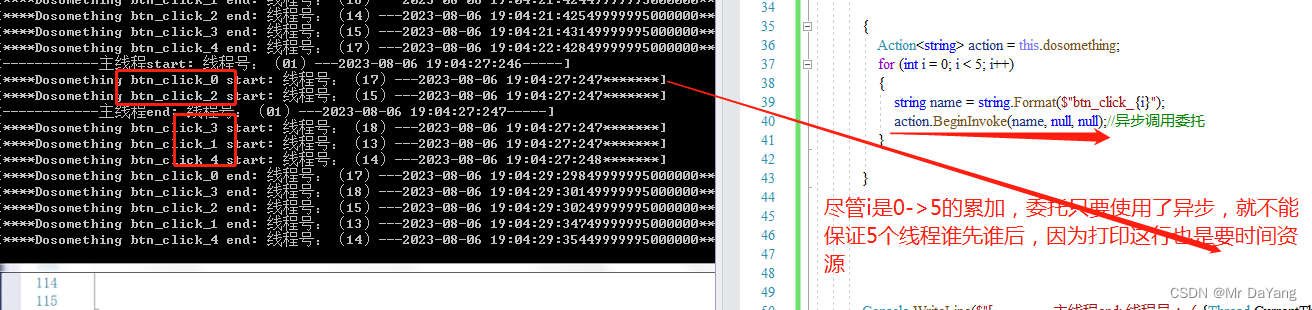
1启动不可控制、2结束不可控
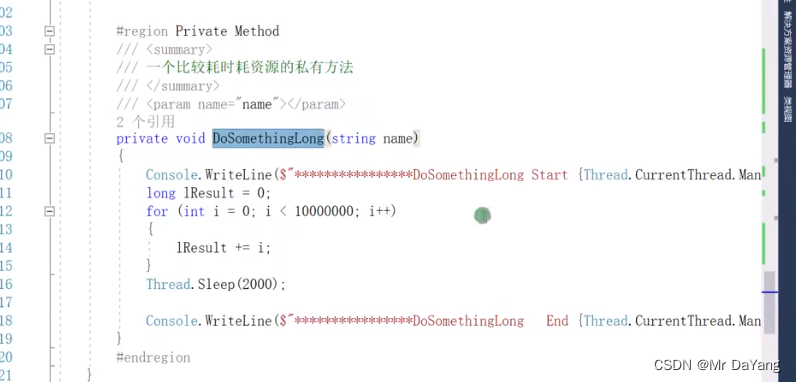
一个耗时(i++)、耗资源(thread.sleep)的方法
二、四种异步等待方式
1.异步控制等待-callback回调
action执行完将asyncResult、"nimen"当成参数传给callback

2.异步控制等待-asyncResult.IsCompleted
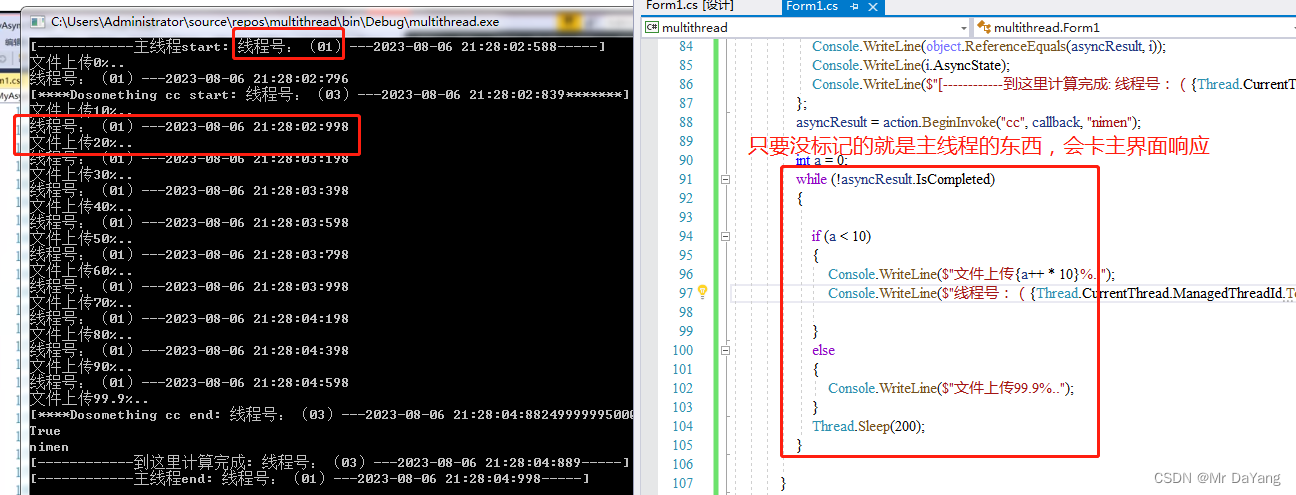
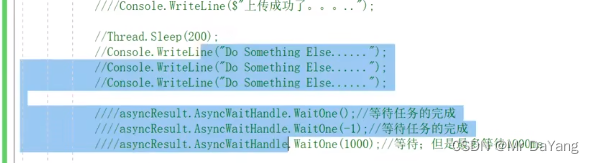
3.异步控制等待WaitOne()-信号量
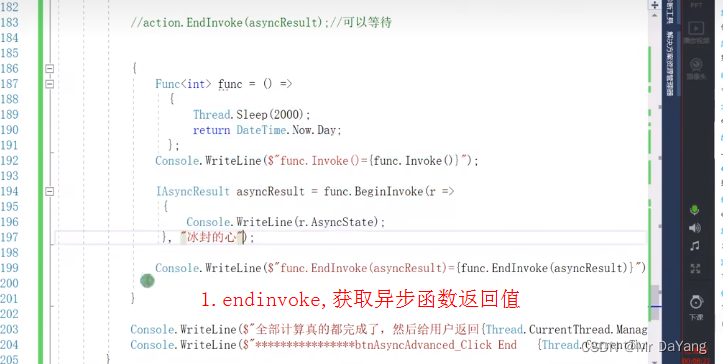
4.异步控制等待endinvoke-拿到异步函数的返回值
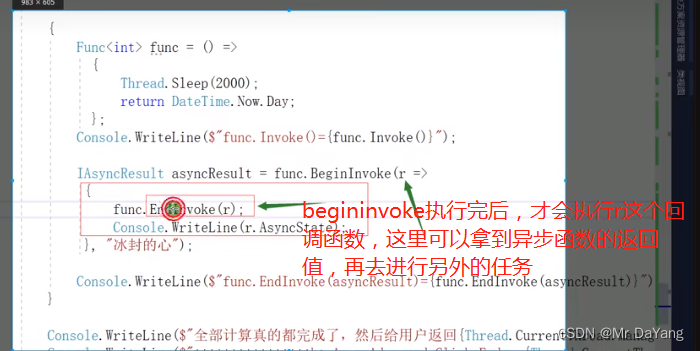
5.视频第1节课代码
using System;
using System.Collections.Generic;
using System.ComponentModel;
using System.Data;
using System.Drawing;
using System.Linq;
using System.Text;
using System.Threading;
using System.Threading.Tasks;
using System.Windows.Forms;namespace multithread
{public partial class Form1 : Form{public Form1(){InitializeComponent();}private void button1_Click(object sender, EventArgs e){Console.WriteLine($"[------------主线程start: 线程号:({Thread.CurrentThread.ManagedThreadId.ToString("00")})---{System.DateTime.Now.ToString("yyyy-MM-dd HH:mm:ss:fff")}-----]");/*1调用委托{Action<string> action = this.dosomething;action.Invoke("AA");//同步调用委托action("BB");//同步调用委托action.BeginInvoke("cc", null, null);//异步调用委托}/*2异步-不可控{Action<string> action = this.dosomething;for (int i = 0; i < 5; i++){string name = string.Format($"btn_click_{i}");action.BeginInvoke(name, null, null);//异步调用委托}}*//*3.异步不可控{ Action<string> action = this.dosomething;action.BeginInvoke("cc", null, null);Console.WriteLine($"[------------到这里计算完成: 线程号:({Thread.CurrentThread.ManagedThreadId.ToString("00")})---{System.DateTime.Now.ToString("yyyy-MM-dd HH:mm:ss:fff")}-----]");}*//*4.异步等待1-回调{Action<string> action = this.dosomething;AsyncCallback callback = new AsyncCallback(i => Console.WriteLine($"[------------到这里计算完成: 线程号:({Thread.CurrentThread.ManagedThreadId.ToString("00")})---{System.DateTime.Now.ToString("yyyy-MM-dd HH:mm:ss:fff")}-----]"));//简单写法AsyncCallback callback1 = i => Console.WriteLine($"[------------到这里计算完成: 线程号:({Thread.CurrentThread.ManagedThreadId.ToString("00")})---{System.DateTime.Now.ToString("yyyy-MM-dd HH:mm:ss:fff")}-----]");action.BeginInvoke("cc", callback, null);}*//*5.异步等待1-回调解析(action执行完将asyncResult、"nimen"当成参数传给callback)-不卡界面{Action<string> action = this.dosomething;IAsyncResult asyncResult = null;AsyncCallback callback = i =>{Console.WriteLine(object.ReferenceEquals(asyncResult , i));Console.WriteLine(i.AsyncState);Console.WriteLine($"[------------到这里计算完成: 线程号:({Thread.CurrentThread.ManagedThreadId.ToString("00")})---{System.DateTime.Now.ToString("yyyy-MM-dd HH:mm:ss:fff")}-----]");};asyncResult = action.BeginInvoke("cc", callback, "nimen");}*//*6.异步等待2 asyncResult.IsCompleted-回调解析-while函数卡界面{Action<string> action = this.dosomething;IAsyncResult asyncResult = null;AsyncCallback callback = i =>{Console.WriteLine(object.ReferenceEquals(asyncResult, i));Console.WriteLine(i.AsyncState);Console.WriteLine($"[------------到这里计算完成: 线程号:({Thread.CurrentThread.ManagedThreadId.ToString("00")})---{System.DateTime.Now.ToString("yyyy-MM-dd HH:mm:ss:fff")}-----]");};asyncResult = action.BeginInvoke("cc", callback, "nimen");int a = 0;while (!asyncResult.IsCompleted){if (a < 10){Console.WriteLine($"文件上传{a++ * 10}%..");Console.WriteLine($"线程号:({Thread.CurrentThread.ManagedThreadId.ToString("00")})---{System.DateTime.Now.ToString("yyyy-MM-dd HH:mm:ss:fff")}");}else{Console.WriteLine($"文件上传99.9%..");}Thread.Sleep(200);}}*//*7.异步等待3-WaitOne()-信号量3{Action<string> action = this.dosomething;IAsyncResult asyncResult = action.BeginInvoke("cc", null, null);Console.WriteLine("dosomething");Console.WriteLine("dosomething");asyncResult.AsyncWaitHandle.WaitOne();//等待异步任务完成后,才打印计算完成asyncResult.AsyncWaitHandle.WaitOne(2000);//限时等待Console.WriteLine($"[------------到这里计算完成: 线程号:({Thread.CurrentThread.ManagedThreadId.ToString("00")})---{System.DateTime.Now.ToString("yyyy-MM-dd HH:mm:ss:fff")}-----]");}*//*.8异步等待4endinvoke-拿到委托函数的返回值{Action<string> action = this.dosomething;Func<int> func = () =>{Thread.Sleep(2000);return DateTime.Now.Day;};Console.WriteLine($"func.Invoke()={ func.Invoke()}");IAsyncResult asyncResult=func.BeginInvoke(r =>{Console.WriteLine(r.AsyncState);}, "nimen");Console.WriteLine($"func.EndInvoke={ func.EndInvoke(asyncResult)}");Console.WriteLine($"[------------到这里计算完成: 线程号:({Thread.CurrentThread.ManagedThreadId.ToString("00")})---{System.DateTime.Now.ToString("yyyy-MM-dd HH:mm:ss:fff")}-----]");}*/Console.WriteLine($"[------------主线程end: 线程号:({Thread.CurrentThread.ManagedThreadId.ToString("00")})---{System.DateTime.Now.ToString("yyyy-MM-dd HH:mm:ss:fff")}-----]");}private void dosomething(string name){Console.WriteLine($"[****Dosomething {name} start: 线程号:({Thread.CurrentThread.ManagedThreadId.ToString("00")})---{System.DateTime.Now.ToString("yyyy-MM-dd HH:mm:ss:fff")}*******]");long result = 0;for(int i =0; i < 10000000; i++){result += i;}Thread.Sleep(2000);Console.WriteLine($"[****Dosomething {name} end: 线程号:({Thread.CurrentThread.ManagedThreadId.ToString("00")})---{System.DateTime.Now.ToString("yyyy-MM-dd HH:mm:ss:fff")}{result}*******]");}}
}
三、.net1.0基础版的thread对象
1.线程启动
{//Action<string> action = this.dosomething;//IAsyncResult asyncResult = action.BeginInvoke("cc", null, null);//Action action1 =()=> this.dosomething("CC");//1.线程启动 thread.Start();ThreadStart threadStart = () => this.dosomething("cc");Thread thread = new Thread(threadStart);thread.Start();//2.线等待程thread.Join();thread.Join(500);//卡主线程Console.WriteLine($"等待500ms");thread.Join();while (thread.ThreadState != ThreadState.Stopped){Thread.Sleep(100);//cpu时间片交出去干其他的事,但是内存还是占用}
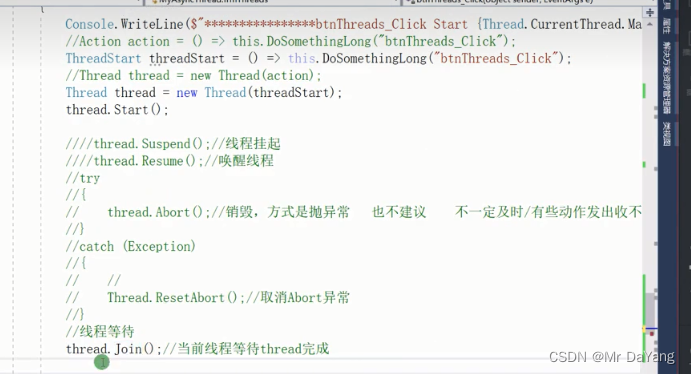
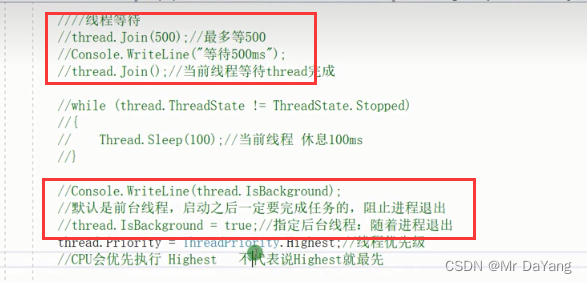
2.thread.join()\thread.sleep()\thread.IsBackfround
thread.join(500),是其他人线程等他500ms,此时有两个线程在工程, 一个在等待500ms,一个是自己在运行
thread.sleep(500),是自己线程自己将cpu时间片交出去干其他的事,但是内存还是占用,休眠500ms
前台线程,当软件闪退时,会吐出日志
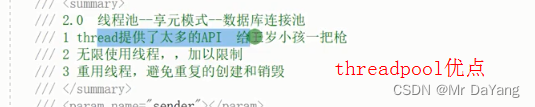
四、net 2.0 threadpool
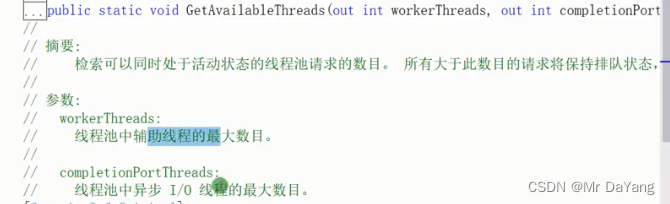
1.线程启动、设置线程池最大线程数

2.manualResetEvent.WaitOne()异步控制等待
{ManualResetEvent manualResetEvent = new ManualResetEvent(false);ThreadPool.QueueUserWorkItem(t => {this.dosomething("cc");manualResetEvent.Set();});//接收一个没有返回值的委托manualResetEvent.WaitOne();Console.WriteLine($"等待ThreadPool.QueueUserWorkItem执行完再执行");}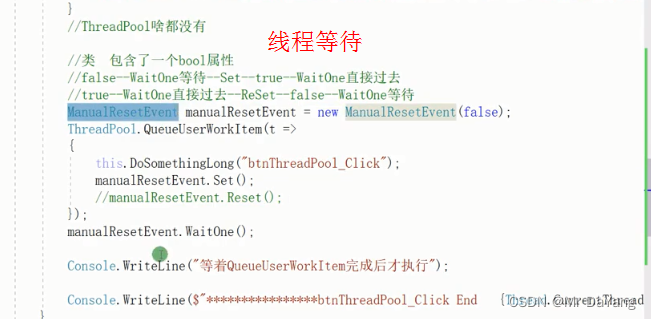
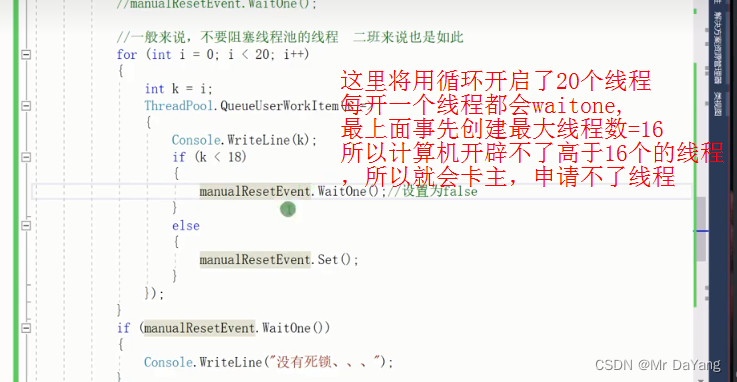
waitone()风险,无线程可用会卡住
3.手写异步回调函数
4.带返回值的委托异步调用(法语结构待学习)
五、.net3.0 task
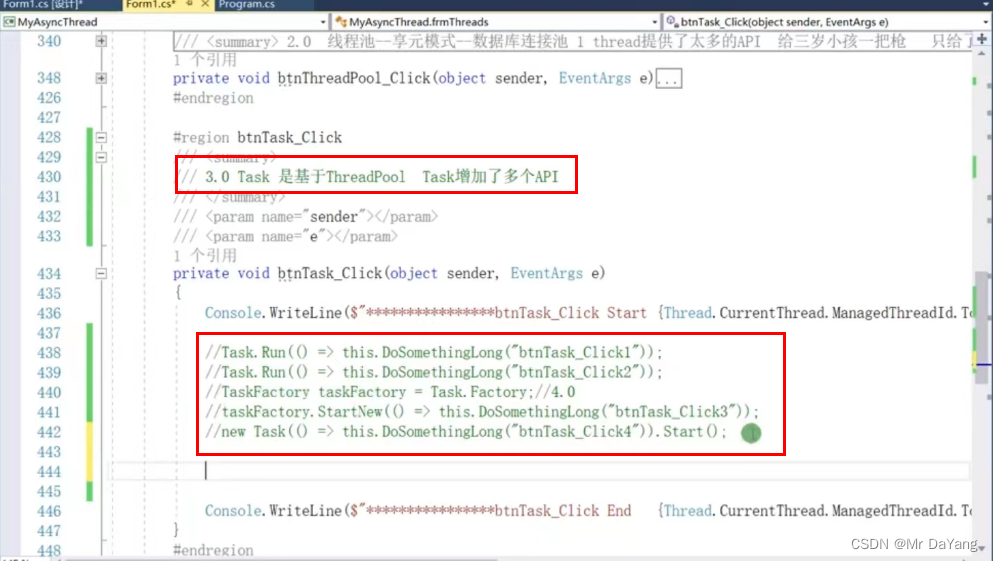
1.task线程启动
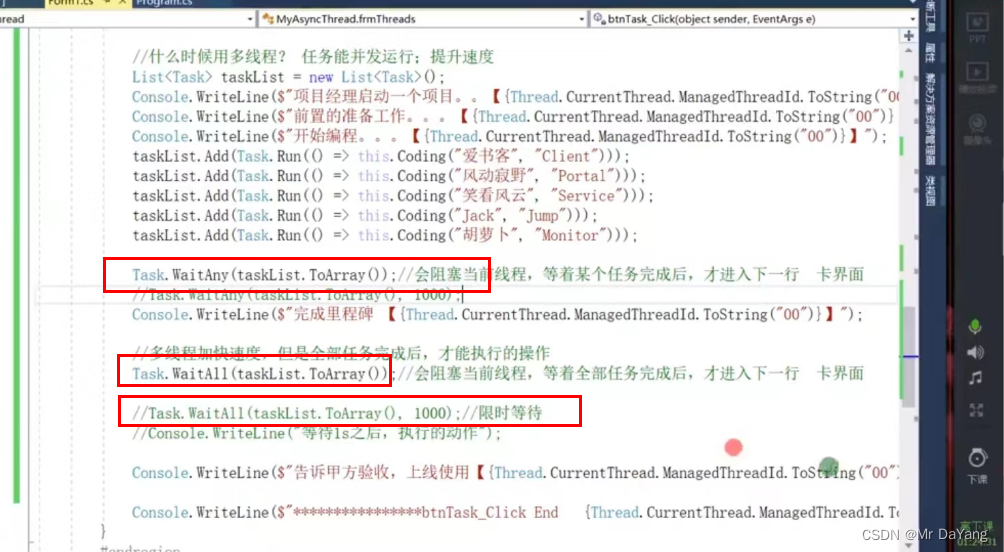
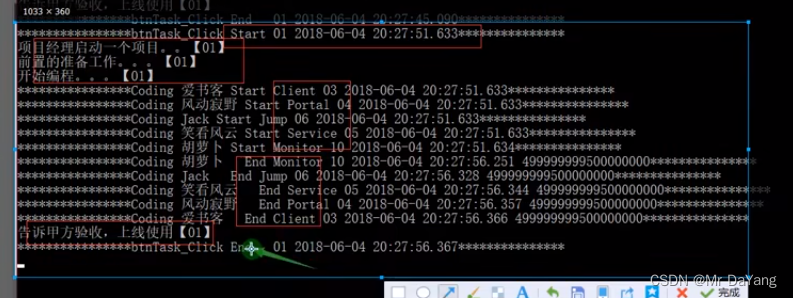
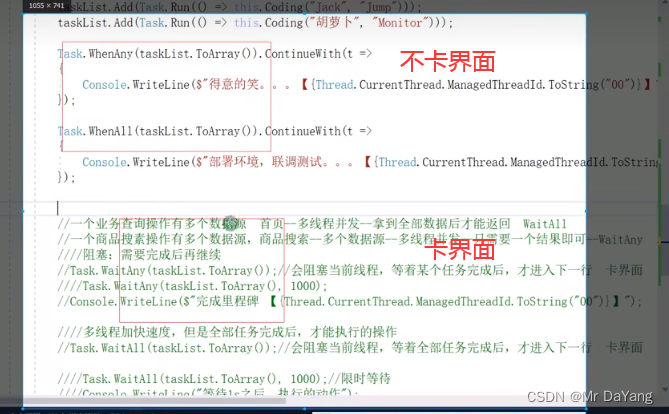
2.waitall、waitany都会卡主线程卡界面
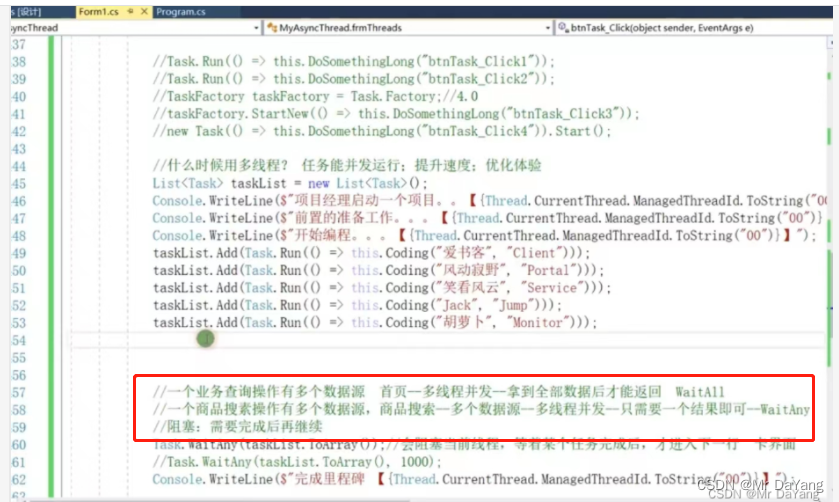
waitall、waitany应用场景
3.task.whenall.continuewith()
首先task.whenall不卡主界面,快快的结束了btn_task_click是主线程任务
其次continuewith() ,当tasklist中线程执行后并满足条件时(all\any),直接顺序执行下面的委托,类似回调如“得意的笑”

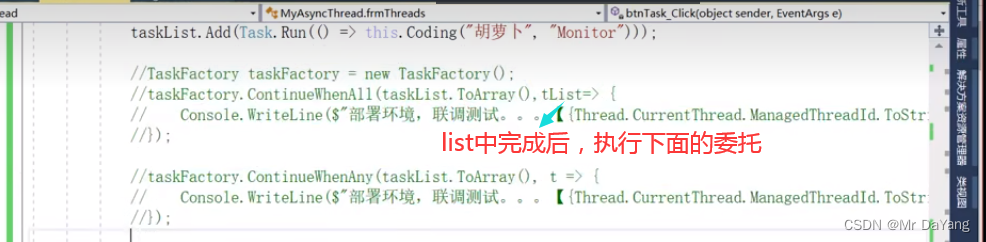
4.taskfactory.continuewith()
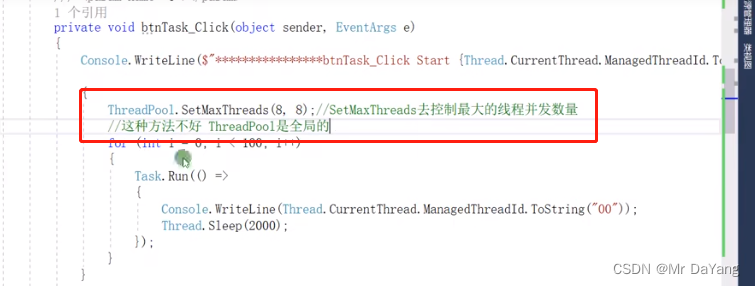
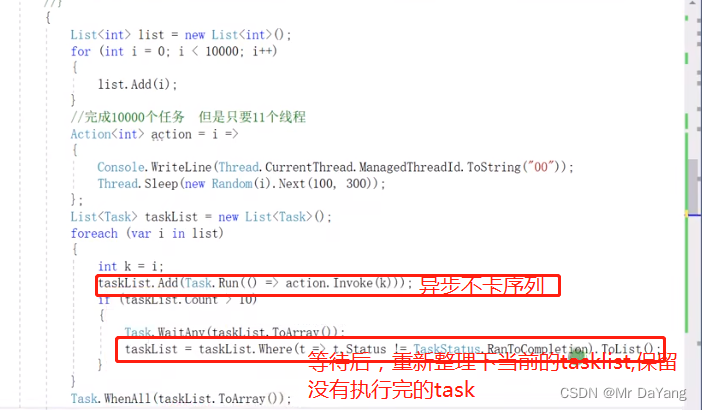
5.设计最多只有11个线程在工作
6.taskfactory检测到哪个线程结束后,返回线程标识
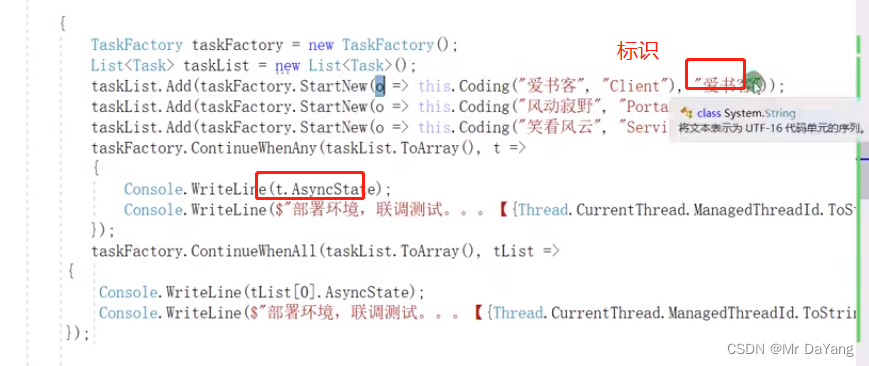
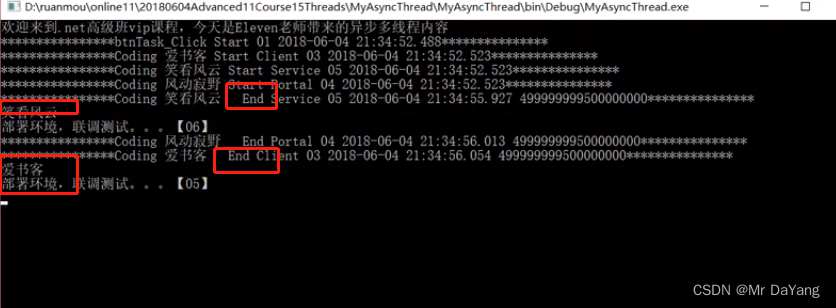
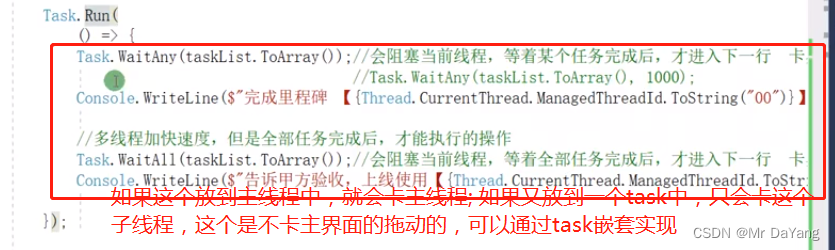
7.task多次嵌套实现不卡主线程

8.两个waitall按顺序执行
如果有两个waitall需要执行但他们在不同线程中,但是又要保证这两次waitall的顺序,解决办法,将第一个waitall加到tasklist中,然后让第二个task的waitall来判断

9.thread.sleep()卡线程 task.delay()不卡线程
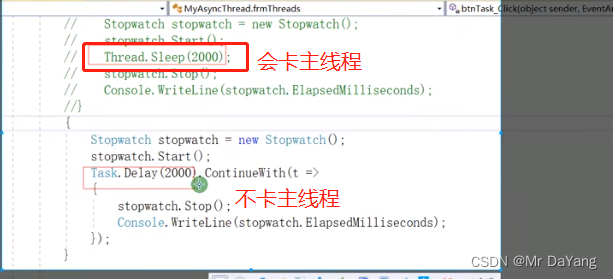
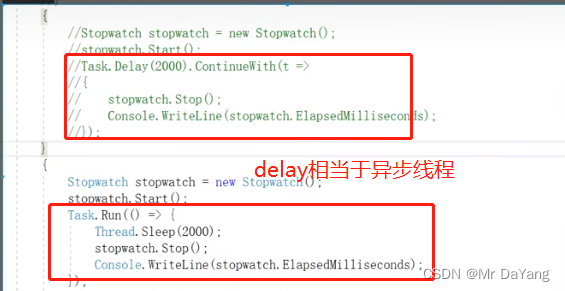
10.task线程完成标识

六、.net4.5 parallel
1.parallel启动多线程

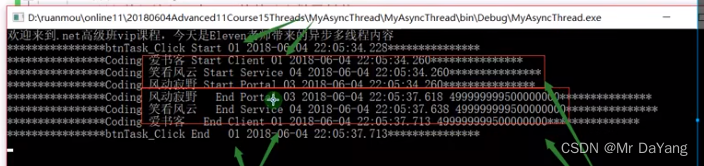
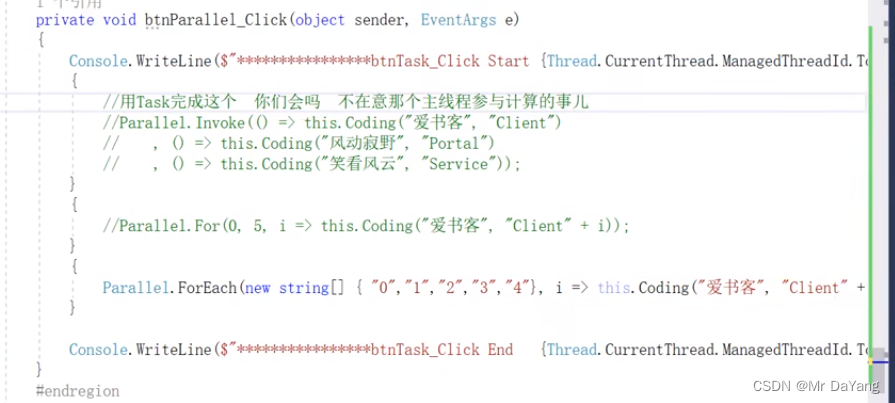
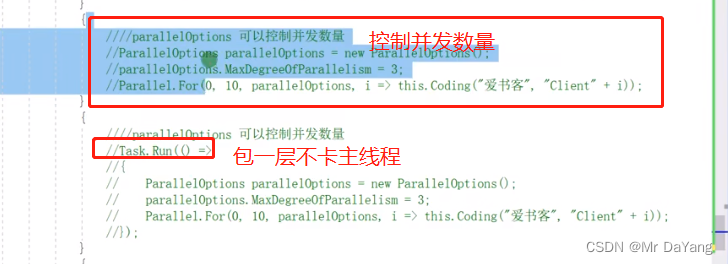
2.parallel线程停止
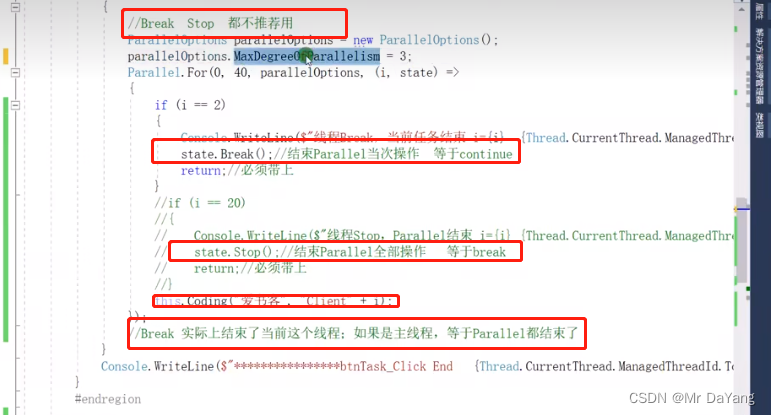
七、threadcore
1.异常处理
主线程出现异常没人管理会导致程序崩溃

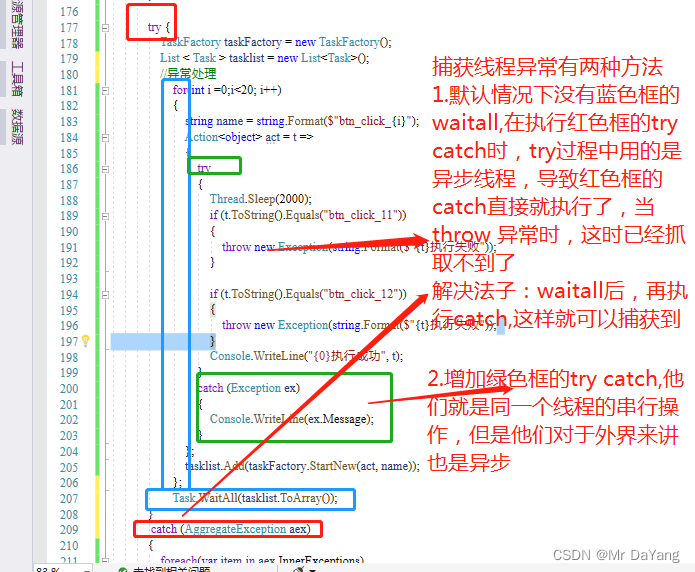
try {TaskFactory taskFactory = new TaskFactory();List < Task > tasklist = new List<Task>();//异常处理for(int i =0;i<20; i++){string name = string.Format($"btn_click_{i}");Action<object> act = t =>{try{Thread.Sleep(2000);if (t.ToString().Equals("btn_click_11")){throw new Exception(string.Format($"{t}执行失败"));}if (t.ToString().Equals("btn_click_12")){throw new Exception(string.Format($"{t}执行失败"));}Console.WriteLine("{0}执行成功", t);}catch (Exception ex){Console.WriteLine(ex.Message);}};tasklist.Add(taskFactory.StartNew(act, name));};Task.WaitAll(tasklist.ToArray());}catch (AggregateException aex){foreach(var item in aex.InnerExceptions){Console.WriteLine(item.Message);}}catch(Exception ex){Console.WriteLine(ex.Message);}2.线程取消

tasklist.Add(taskFactory.StartNew(act, name))时,
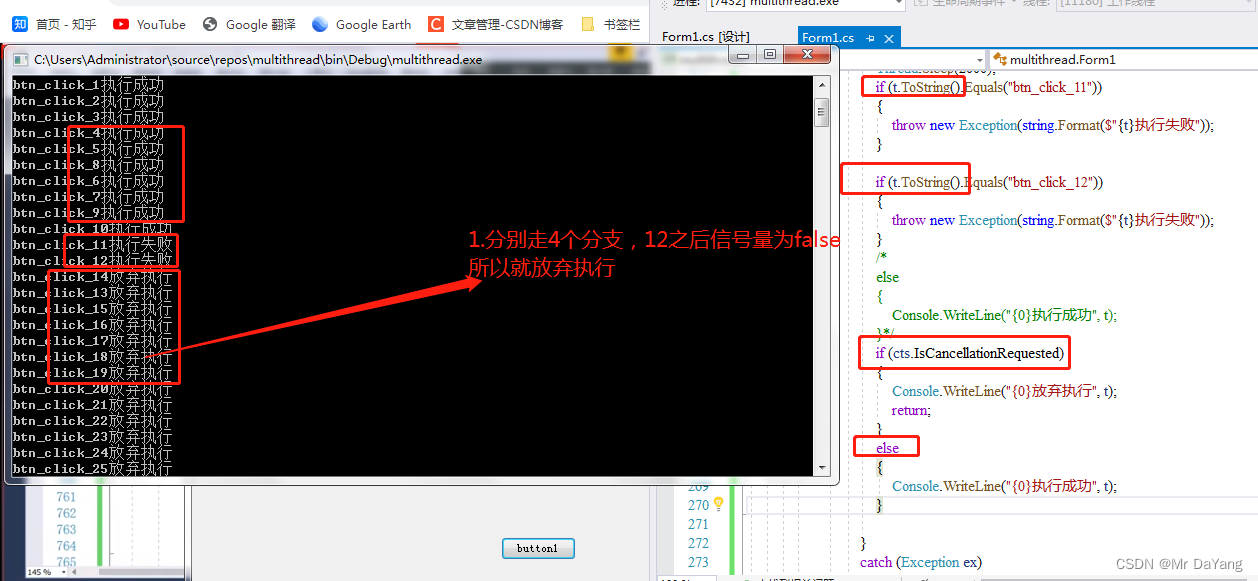
tasklist.Add(taskFactory.StartNew(act, name,cts.Token))时,
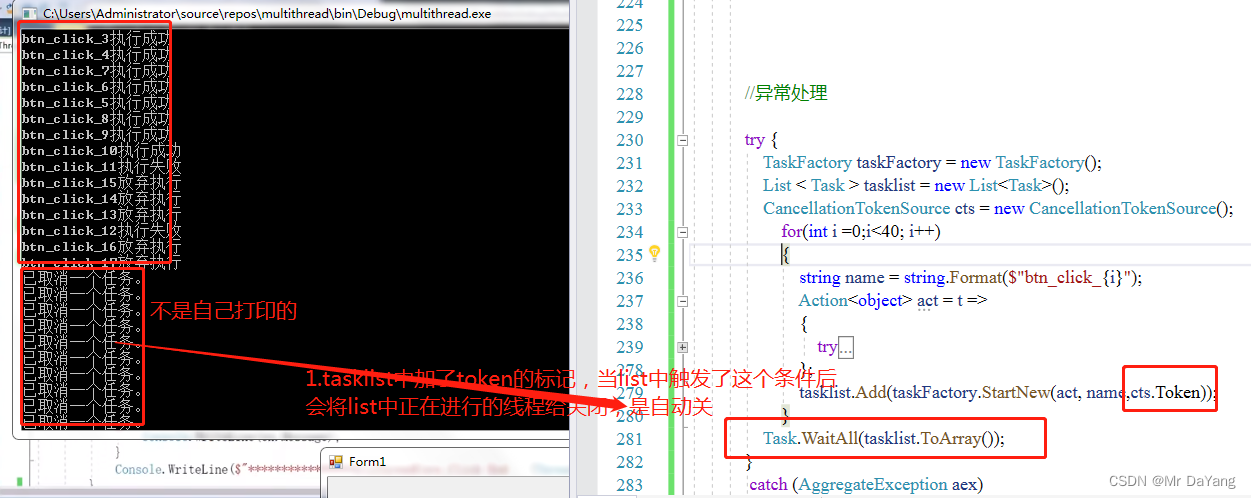
try {TaskFactory taskFactory = new TaskFactory();List < Task > tasklist = new List<Task>();CancellationTokenSource cts = new CancellationTokenSource();for(int i =0;i<40; i++){string name = string.Format($"btn_click_{i}");Action<object> act = t =>{try{/*if (cts.IsCancellationRequested){Console.WriteLine("{0}取消一个任务的执行",t);}*/Thread.Sleep(2000);if (t.ToString().Equals("btn_click_11")){throw new Exception(string.Format($"{t}执行失败"));}if (t.ToString().Equals("btn_click_12")){throw new Exception(string.Format($"{t}执行失败"));}/*else{Console.WriteLine("{0}执行成功", t);}*/if (cts.IsCancellationRequested){Console.WriteLine("{0}放弃执行", t);return;}else{Console.WriteLine("{0}执行成功", t);}}catch (Exception ex){cts.Cancel();Console.WriteLine(ex.Message);}};tasklist.Add(taskFactory.StartNew(act, name,cts.Token));}Task.WaitAll(tasklist.ToArray());}catch (AggregateException aex){foreach(var item in aex.InnerExceptions){Console.WriteLine(item.Message);}}catch(Exception ex){Console.WriteLine(ex.Message);}
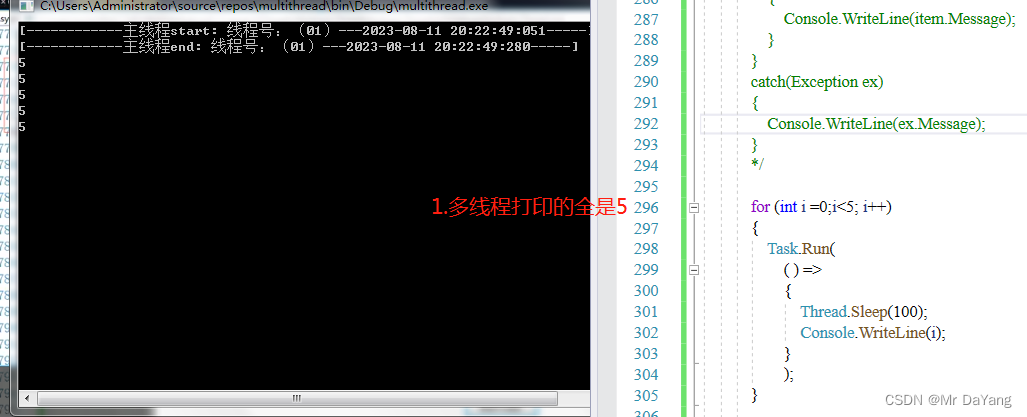
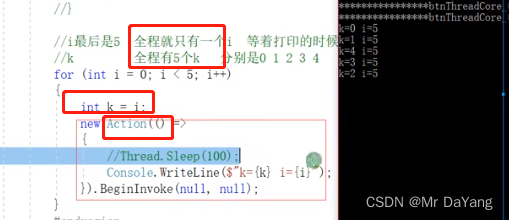
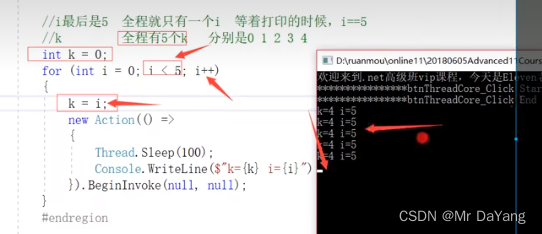
3.多线程临时变量
4.线程安全lock(lock锁的是引用)
4.1线程安全问题
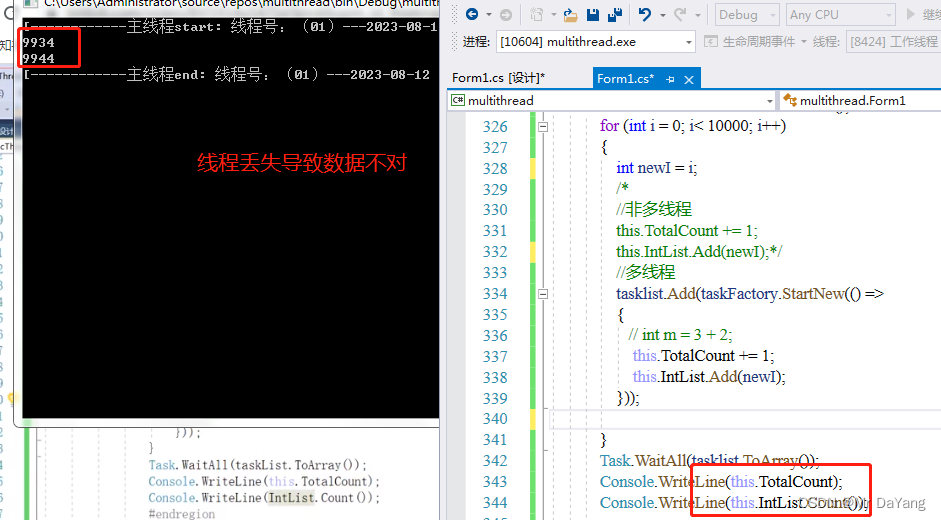
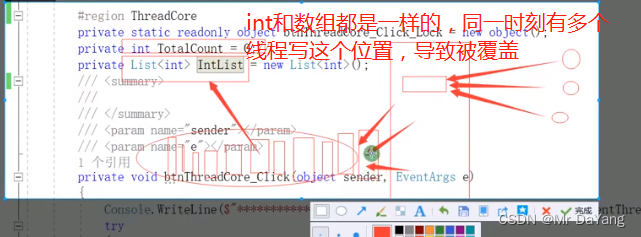
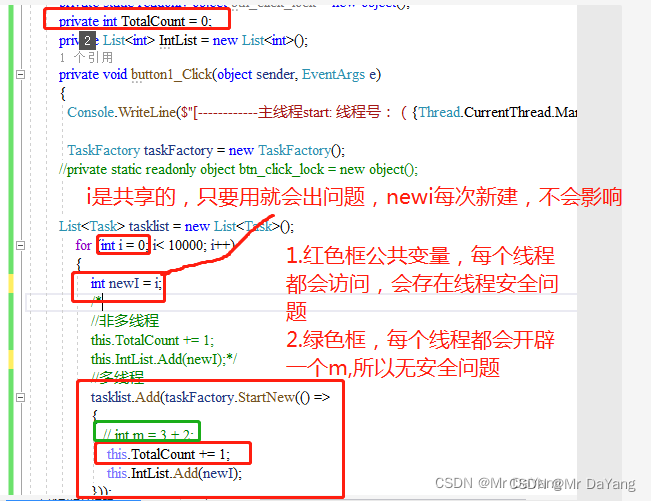
4.2线程共有变量存在线程安全问题
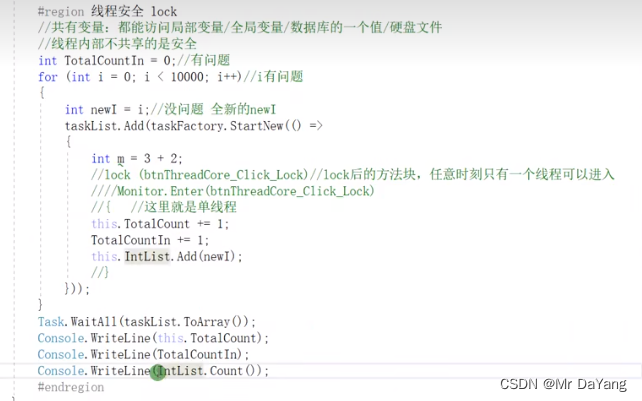
4.3lock锁原理
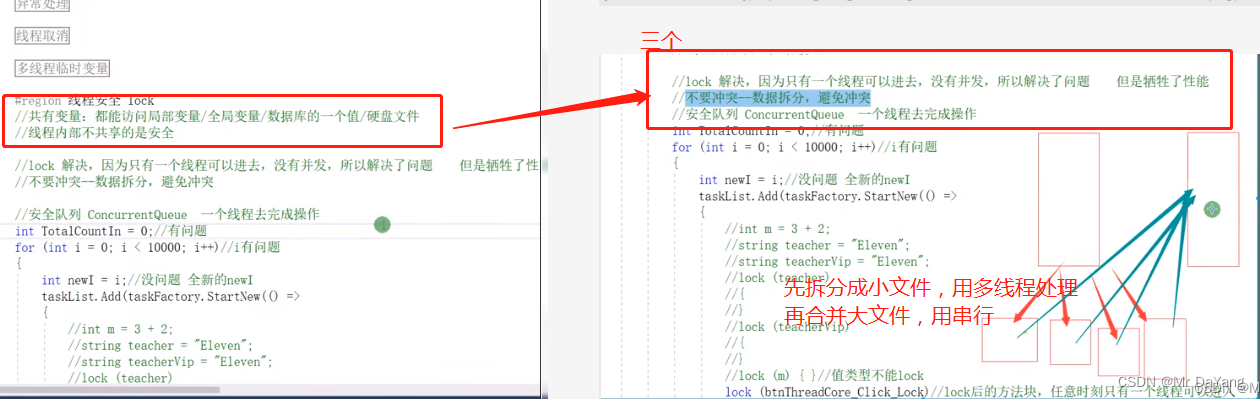
只有一个线程可以进去,没有并发 ,解决问题但牺牲性能
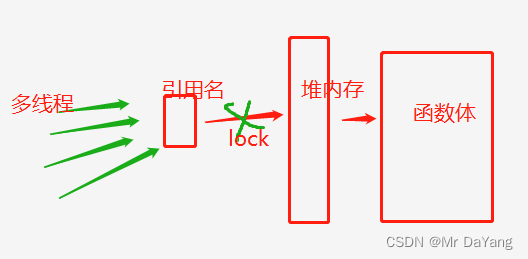
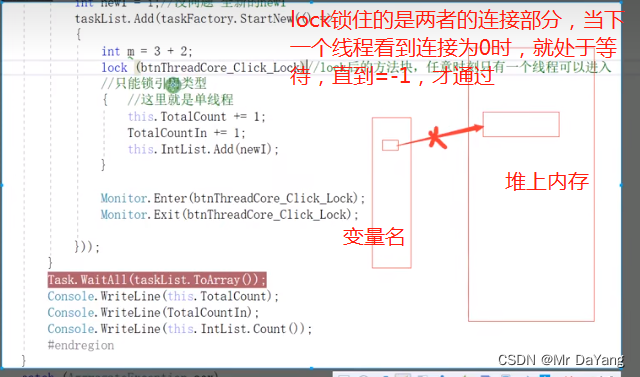
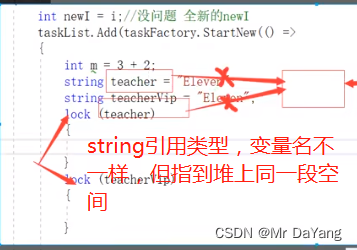
建议使用微软定义的锁
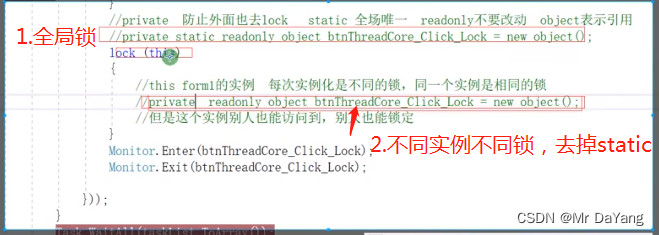
private static readonly object btn_click_lock = new object();//引用型变量private int TotalCount = 0;private List<int> IntList = new List<int>();private void button1_Click(object sender, EventArgs e){Console.WriteLine($"[------------主线程start: 线程号:({Thread.CurrentThread.ManagedThreadId.ToString("00")})---{System.DateTime.Now.ToString("yyyy-MM-dd HH:mm:ss:fff")}-----]");TaskFactory taskFactory = new TaskFactory();//private static readonly object btn_click_lock = new object();List<Task> tasklist = new List<Task>();for (int i = 0; i< 10000; i++){int newI = i;/*//非多线程this.TotalCount += 1;this.IntList.Add(newI);*///多线程tasklist.Add(taskFactory.StartNew(() => {// int m = 3 + 2;lock (btn_click_lock) { this.TotalCount += 1;this.IntList.Add(newI);}}));}Task.WaitAll(tasklist.ToArray());Console.WriteLine(this.TotalCount);Console.WriteLine(this.IntList.Count());Console.WriteLine($"[------------主线程end: 线程号:({Thread.CurrentThread.ManagedThreadId.ToString("00")})---{System.DateTime.Now.ToString("yyyy-MM-dd HH:mm:ss:fff")}-----]");}
八、.net.0 await/async
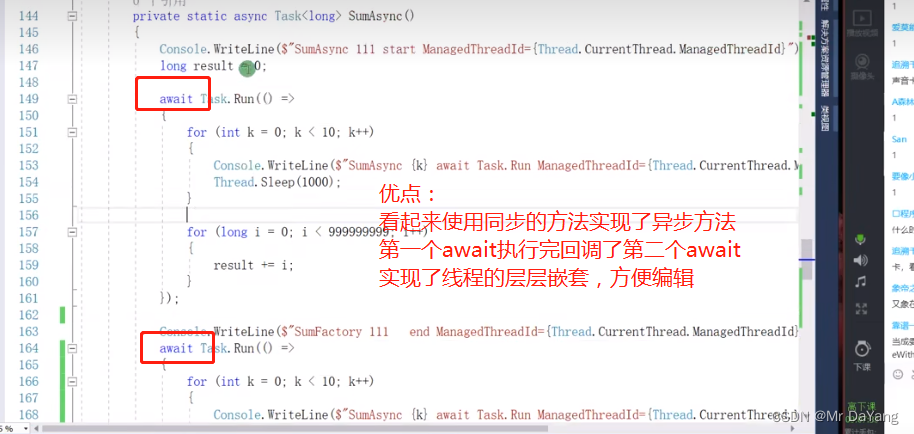
1.await原理
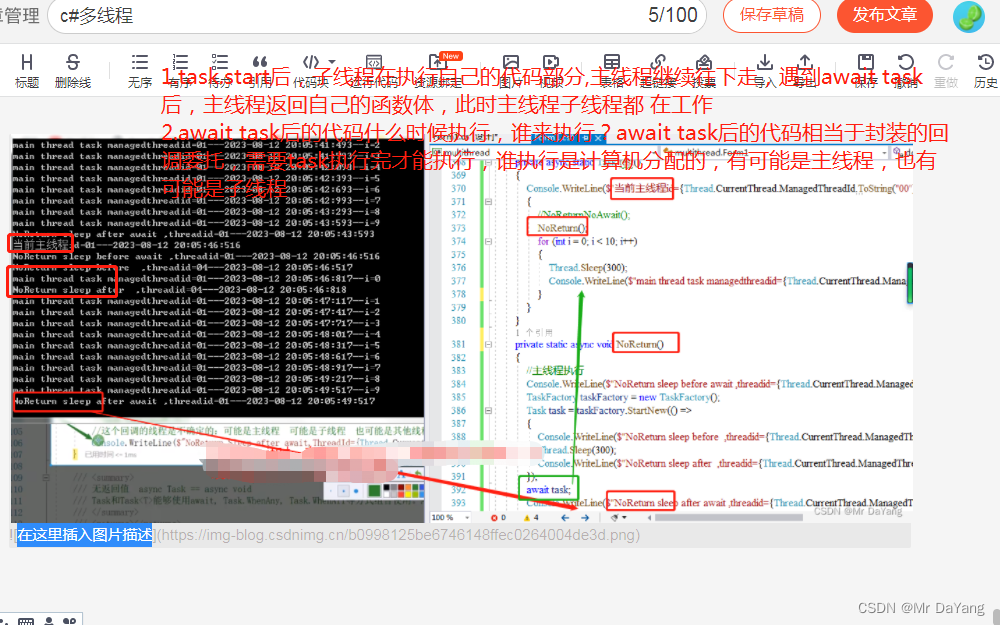
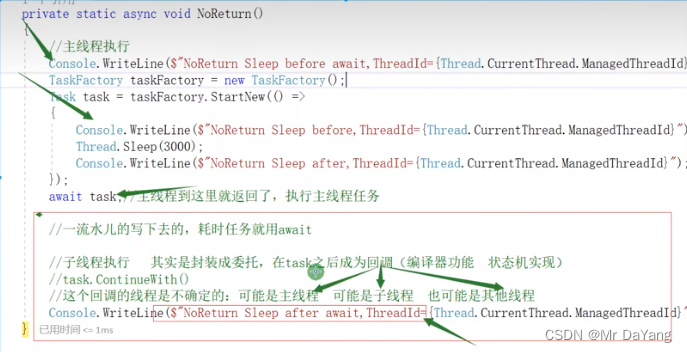
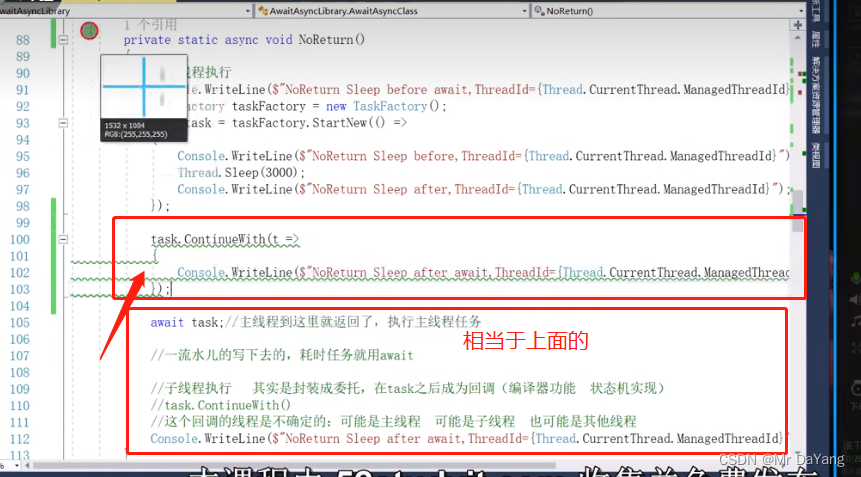
await后的代码相当于回调,只不过不是自己写的,是编译器状态机自带的。
回调方法continuewith是子线程完成的,但await不仅仅是回调(可子线程可主线程,计算机分配),所以他们又有所不同
1.1小代码测试原理

2.带与不带返回值的async方法
2.1只有asynic
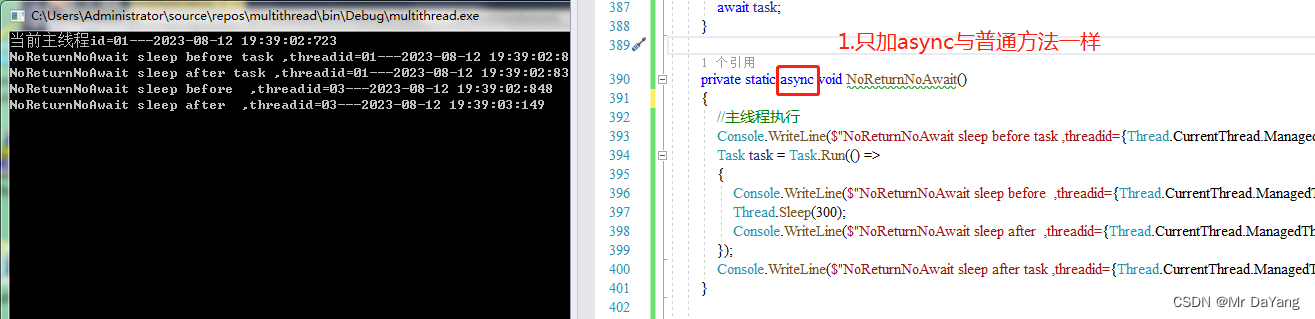
2.2asynic\await成对出现
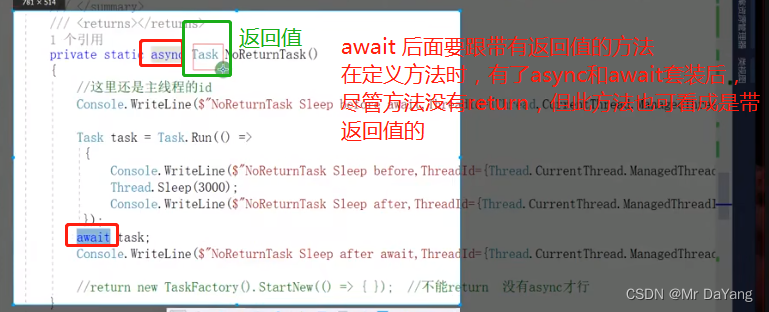
await 后面是要跟带有返回值的方法
在定义方法时,有了async和await套装后,尽管方法没有return,但此方法也可看成是带返回值的
不使用返回值
使用返回值
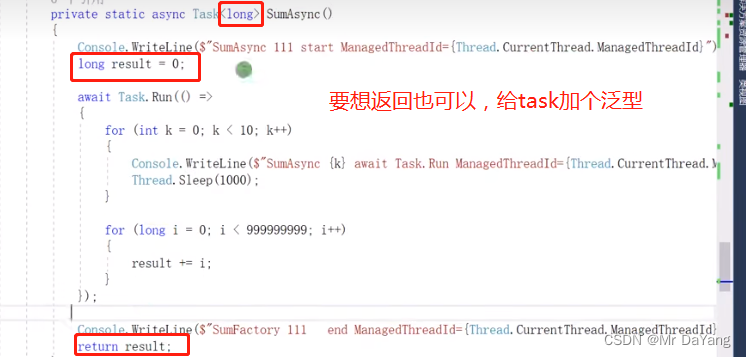
2.3t.Wait()与await t区别

2.4await反编译-相当于状态机
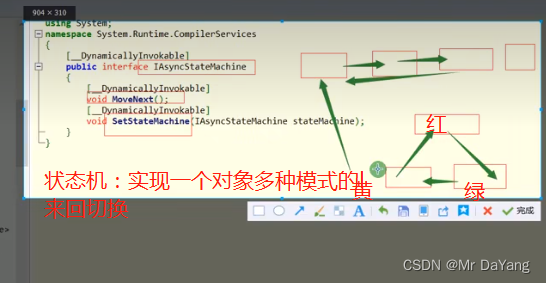
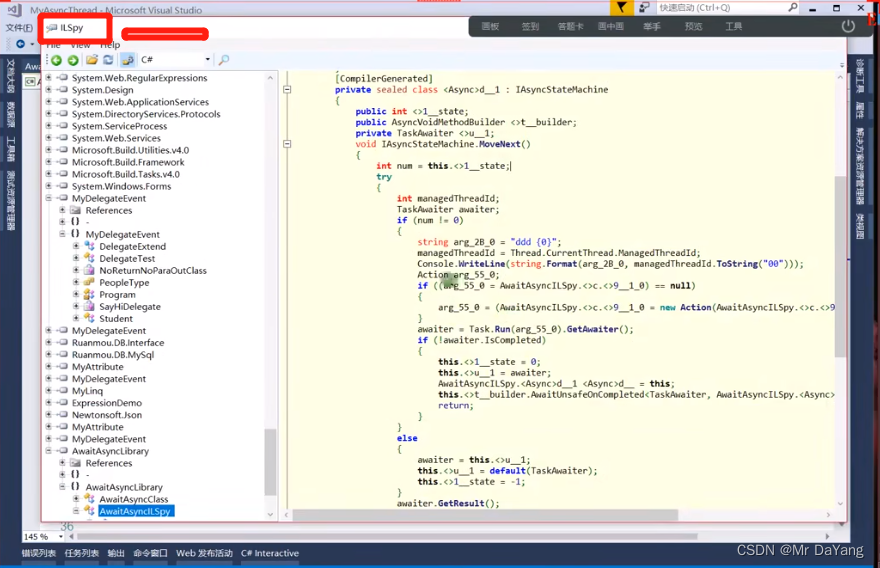
3.此知识点代码
private void button1_Click(object sender, EventArgs e){testshow();}public static void testshow(){test();}private async static Task test(){Console.WriteLine($"当前主线程id={Thread.CurrentThread.ManagedThreadId.ToString("00")}---{System.DateTime.Now.ToString("yyyy-MM-dd HH:mm:ss:fff")}");{//NoReturnNoAwait();NoReturn();for (int i = 0; i < 10; i++){Thread.Sleep(300);Console.WriteLine($"main thread task managedthreadid={Thread.CurrentThread.ManagedThreadId.ToString("00")}---{System.DateTime.Now.ToString("yyyy-MM-dd HH:mm:ss:fff")}--i={i}");}}}private static async void NoReturn(){//主线程执行Console.WriteLine($"NoReturn sleep before await ,threadid={Thread.CurrentThread.ManagedThreadId.ToString("00")}---{System.DateTime.Now.ToString("yyyy-MM-dd HH:mm:ss:fff")}");TaskFactory taskFactory = new TaskFactory();Task task = taskFactory.StartNew(() => {Console.WriteLine($"NoReturn sleep before ,threadid={Thread.CurrentThread.ManagedThreadId.ToString("00")}---{System.DateTime.Now.ToString("yyyy-MM-dd HH:mm:ss:fff")}");Thread.Sleep(300);Console.WriteLine($"NoReturn sleep after ,threadid={Thread.CurrentThread.ManagedThreadId.ToString("00")}---{System.DateTime.Now.ToString("yyyy-MM-dd HH:mm:ss:fff")}");});await task;Console.WriteLine($"NoReturn sleep after await ,threadid={Thread.CurrentThread.ManagedThreadId.ToString("00")}---{System.DateTime.Now.ToString("yyyy-MM-dd HH:mm:ss:fff")}");}private static async void NoReturnNoAwait(){ //主线程执行Console.WriteLine($"NoReturnNoAwait sleep before task ,threadid={Thread.CurrentThread.ManagedThreadId.ToString("00")}---{System.DateTime.Now.ToString("yyyy-MM-dd HH:mm:ss:fff")}");Task task = Task.Run(() =>{Console.WriteLine($"NoReturnNoAwait sleep before ,threadid={Thread.CurrentThread.ManagedThreadId.ToString("00")}---{System.DateTime.Now.ToString("yyyy-MM-dd HH:mm:ss:fff")}");Thread.Sleep(300);Console.WriteLine($"NoReturnNoAwait sleep after ,threadid={Thread.CurrentThread.ManagedThreadId.ToString("00")}---{System.DateTime.Now.ToString("yyyy-MM-dd HH:mm:ss:fff")}");});Console.WriteLine($"NoReturnNoAwait sleep after task ,threadid={Thread.CurrentThread.ManagedThreadId.ToString("00")}---{System.DateTime.Now.ToString("yyyy-MM-dd HH:mm:ss:fff")}");}
九、双色球项目
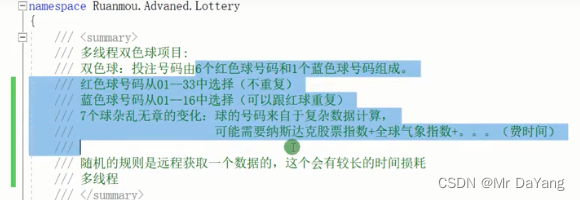
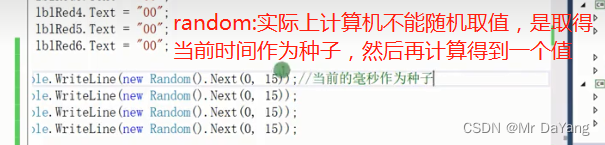
1.代码
知识点
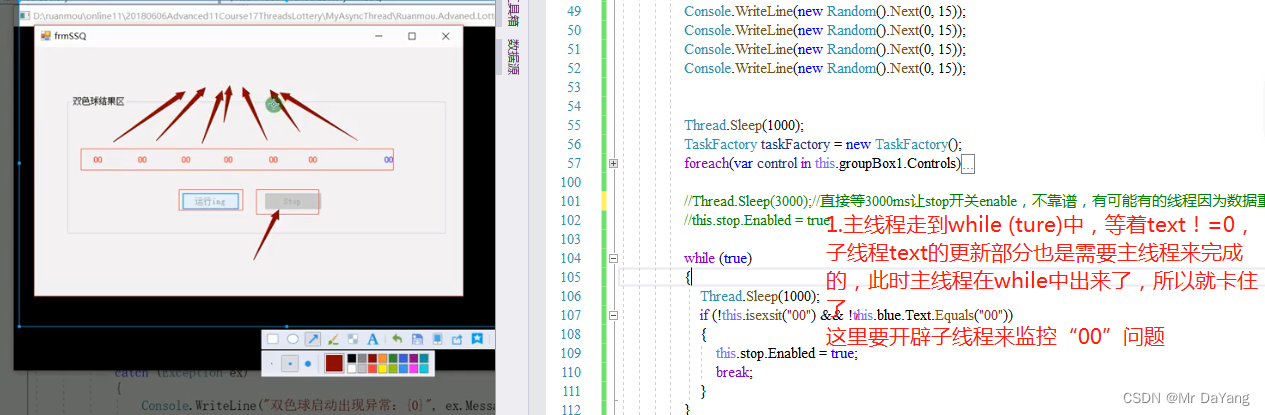
1.7个独立任务,要多线程计算,启动7个线程后,线程内存while一直计算
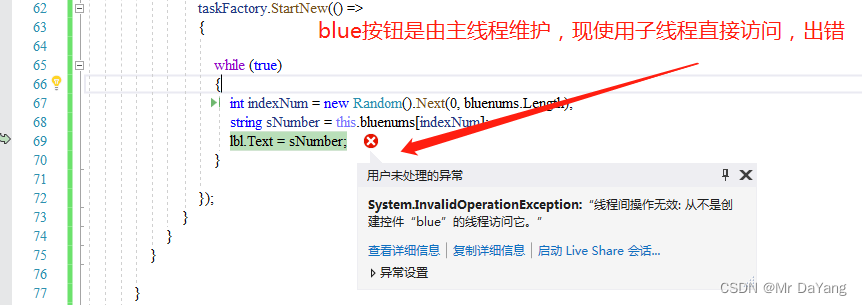
2.子线程不能更新界面,所以要this.Updatelbl(lbl, sNumber)实现
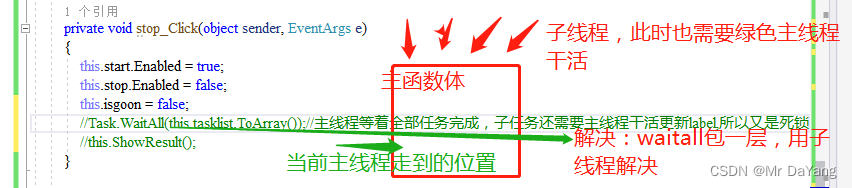
3.通过while (this.isgoon)从外面终止7个线程
4.通过lock (llock)对7个子线程进行加锁,避免7个线程同一时刻的值是一样的
5.子线程等待,更新界面 if (!this.isexsit(“00”) && !this.blue.Text.Equals(“00”))
6.所有子线程都执行完后回调taskFactory.ContinueWhenAll(this.tasklist.ToArray(), t => this.ShowResult() );//
using System;
using System.Collections.Generic;
using System.ComponentModel;
using System.Data;
using System.Drawing;
using System.Linq;
using System.Text;
using System.Threading;
using System.Threading.Tasks;
using System.Windows.Forms;namespace 双色球
{public partial class Form1 : Form{public Form1(){InitializeComponent();this.start.Enabled = true;this.stop.Enabled = false;}private string[] rednums = { "01","02","03","04","05","06","07","08","09","10","11","12","13","14","15","16","17","18","19","20","21","22","23","24","25","26","27","28","29","30","31","32","33"};private string[] bluenums = {"01","02","03","04","05","06","07","08","09","10","11","12","13","14","15","16"};private static readonly object llock =new object();private bool isgoon = true;private List<Task> tasklist = new List<Task>();private void start_Click(object sender, EventArgs e){try{this.start.Text = "运行ing";this.start.Enabled = false;this.isgoon = true;this.tasklist = new List<Task>();this.blue.Text = "00";this.label1.Text = "00";this.label2.Text = "00";this.label3.Text = "00";this.label4.Text = "00";this.label5.Text = "00";this.label6.Text = "00";Console.WriteLine(new Random().Next(0, 15));Console.WriteLine(new Random().Next(0, 15));Console.WriteLine(new Random().Next(0, 15));Console.WriteLine(new Random().Next(0, 15));Thread.Sleep(1000);TaskFactory taskFactory = new TaskFactory(); foreach(var control in this.groupBox1.Controls){if (control is Label)//标签中{Label lbl = (Label)control;if (lbl.Name.Contains("blue")) //blue{tasklist.Add( taskFactory.StartNew(() =>{while (this.isgoon){int indexNum1 = Getrandombnumlong(0, bluenums.Length);string sNumber = this.bluenums[indexNum1];// lbl.Text = sNumber;this.Updatelbl(lbl, sNumber);}}));}else//red{tasklist.Add( taskFactory.StartNew(() =>{while (this.isgoon){int indexNum1 = Getrandombnumlong(0, this.rednums.Length);string sNumber = this.rednums[indexNum1];// lbl.Text = sNumber;lock (llock){if (this.isexsit(sNumber))//加锁防止random出现一样的值{continue;//重复数据时放弃更新}this.Updatelbl(lbl, sNumber);//7个线程访问的是内存中同一个string sNumber,加锁防止取到的值是重复的,}}}));}}}//Thread.Sleep(3000);//直接等3000ms让stop开关enable,不靠谱,有可能有的线程因为数据重复,text没有更新//this.stop.Enabled = true;/*while (true){Thread.Sleep(1000);if (!this.isexsit("00") && !this.blue.Text.Equals("00")){this.stop.Enabled = true;break;}}*/Task.Run(()=> { while (true){Thread.Sleep(1000);if (!this.isexsit("00") && !this.blue.Text.Equals("00")){this.Invoke(new Action(()=>{this.stop.Enabled = true;//子线程操控不了主线程控件,需要主线程来完成}));break;}}});taskFactory.ContinueWhenAll(this.tasklist.ToArray(), t => this.ShowResult() );//所有子线程都执行完}catch(Exception ex){Console.WriteLine("双色球启动出现异常:{0}",ex.Message);}}private void stop_Click(object sender, EventArgs e){this.start.Enabled = true;this.stop.Enabled = false;this.isgoon = false;//Task.WaitAll(this.tasklist.ToArray());//主线程等着全部任务完成,子任务还需要主线程干活更新label,所以又是死锁//this.ShowResult();}private void ShowResult(){MessageBox.Show(string.Format("本期双色球为:{0} {1} {2} {3} {4} {5}   蓝球{6}", this.label1.Text, this.label2.Text, this.label3.Text, this.label4.Text, this.label5.Text, this.label6.Text, this.blue.Text     ));}//更新界面private void Updatelbl(Label lbl ,string text){if (lbl.InvokeRequired){//这里的this指的是winform窗体主UI线程,让UI线程去更新text值this.Invoke(new Action(()=>{//if (this.isgoon) //不延迟,点了就不更新// { lbl.Text = text;Console.WriteLine($"当前update线程id{Thread.CurrentThread.ManagedThreadId}");// }}));}else{lbl.Text = text;}}//验证标签中的text是否有相同的值private bool isexsit(string snumber){foreach (var control in this.groupBox1.Controls){if (control is Label)//标签中的{Label lbl = (Label)control;if (lbl.Name.Contains("label")){if (lbl.Text.Equals(snumber)){return true;}}}}return false;}public int Getrandombnumlong(int min , int max){int indexNum = new Random().Next(min, max);Thread.Sleep(1000);return indexNum;}}
}
十、知识点代码汇总
using System;
using System.Collections.Generic;
using System.Linq;
using System.Text;
using System.Threading;
using System.Threading.Tasks;namespace multithread
{public class Class1{private void dosomething(string name){Console.WriteLine($"[****Dosomething {name} start: 线程号:({Thread.CurrentThread.ManagedThreadId.ToString("00")})---{System.DateTime.Now.ToString("yyyy-MM-dd HH:mm:ss:fff")}*******]");}////Console.WriteLine($"[------------到这里计算完成: 线程号:({Thread.CurrentThread.ManagedThreadId.ToString("00")})---{System.DateTime.Now.ToString("yyyy-MM-dd HH:mm:ss:fff")}-----]");private void mainpoints() {//1委托调用Action<string> action = this.dosomething;//委托带参数Action action1 = () => this.dosomething("CC");//委托不带参数action.Invoke("AA");//同步调用委托action("BB");//同步调用委托action.BeginInvoke("cc", null, null);//异步调用委托for (int i = 0; i < 5; i++){string name = string.Format($"btn_click_{i}");action.BeginInvoke(name, null, null);//异步多线程}List<Task> tasklist = new List<Task>();TaskFactory taskFactory = new TaskFactory();string name1 = string.Format($"btn_click");CancellationTokenSource cts = new CancellationTokenSource();Action<object> act = t =>{if (t.ToString().Equals("btn_click_11")){throw new Exception(string.Format($"{t}执行失败"));}};tasklist.Add(taskFactory.StartNew(act, name1, cts.Token));//2.委托执行完后进行回调//标准写法AsyncCallback callback = new AsyncCallback(i => Console.WriteLine($"[------------到这里计算完成: 线程号:({Thread.CurrentThread.ManagedThreadId.ToString("00")})---{System.DateTime.Now.ToString("yyyy-MM-dd HH:mm:ss:fff")}-----]"));//简单写法AsyncCallback callback1 = i =>{Console.WriteLine($"[------------到这里计算完成: 线程号:({Thread.CurrentThread.ManagedThreadId.ToString("00")})---{System.DateTime.Now.ToString("yyyy-MM-dd HH:mm:ss:fff")}-----]");};action.BeginInvoke("cc", callback, null);//回调1 -异步action执行完才会执行回调-action.BeginInvoke("cc", callback, "nimen")-1IAsyncResult asyncResult = null;asyncResult = action.BeginInvoke("cc", callback, "nimen");//回调1 - 异步action执行完才会执行回调 - action.BeginInvoke("cc", callback, "nimen")-2action.BeginInvoke("cc", r =>{Console.WriteLine("11");}, "nimen");//回调2 -异步action执行完才会执行回调-(!asyncResult.IsCompleted)while (!asyncResult.IsCompleted){Console.WriteLine($"文件上传99.9%..");}//回调3 -异步action执行完才会执行回调--信号量WaitOne()asyncResult.AsyncWaitHandle.WaitOne();//等待异步任务完成后,才打印计算完成asyncResult.AsyncWaitHandle.WaitOne(2000);//限时等待// 回调4 - 异步action执行完才会执行回调 - EndInvoke拿到委托函数的返回值Func<int> func = () =>{return DateTime.Now.Day;};Console.WriteLine($"func.Invoke()={ func.Invoke()}");IAsyncResult asyncResult1 = func.BeginInvoke(r =>{Console.WriteLine(r.AsyncState);}, "nimen");Console.WriteLine($"func.EndInvoke={ func.EndInvoke(asyncResult1)}");//3.thread//3.1.线程启动 thread.Start();ThreadStart threadStart = () => this.dosomething("cc");Thread thread = new Thread(threadStart);thread.Start();//3.2.线等待程thread.Join();thread.Join(500);//卡主线程Console.WriteLine($"等待500ms");thread.Join();//3.3.thread.ThreadState /thread.IsBackfroundwhile (thread.ThreadState != ThreadState.Stopped){Thread.Sleep(100);//cpu时间片交出去干其他的事,但是内存还是占用}thread.IsBackground = true;//前台线程,当软件闪退时,会吐出日志//4.threadPool//4.1ThreadPool.GetMaxThreadsThreadPool.QueueUserWorkItem(t =>{ this.dosomething("cc");this.dosomething("dd");});//接收一个没有返回值的委托ThreadPool.SetMaxThreads(16, 16);ThreadPool.GetMaxThreads(out int Workerthreads, out int completionPortThreads);Console.WriteLine($"Workerthreads:{Workerthreads}+completionPortThreads{completionPortThreads}");//4.2.manualResetEventManualResetEvent manualResetEvent = new ManualResetEvent(false);ThreadPool.QueueUserWorkItem(t =>{this.dosomething("cc");manualResetEvent.Set();});//接收一个没有返回值的委托manualResetEvent.WaitOne();Console.WriteLine($"等待ThreadPool.QueueUserWorkItem执行完再执行");//5.taskTask.Run(() =>{this.dosomething("cc");Console.WriteLine($"等待ThreadPool.QueueUserWorkItem执行完再执行");});new Task(() => this.dosomething("33")).Start();TaskFactory taskFactory1 = Task.Factory;taskFactory.StartNew(() => this.dosomething("44"));//5.1 task.waitall、waitany  .ContinueWith taskFactory.ContinueWhenAnyList<Task> tasklist1 = new List<Task>();tasklist.Add(Task.Run(() => this.dosomething("33")));tasklist.Add(Task.Run(() => this.dosomething("33")));Task.WaitAny(tasklist.ToArray());Task.WaitAll(tasklist.ToArray());Task.WhenAll(tasklist.ToArray()).ContinueWith(t =>{Console.WriteLine($"等待ThreadPool.QueueUserWorkItem执行完再执行");});taskFactory.ContinueWhenAny(tasklist.ToArray(), t => { });//5.2 task线程完成标识Task task = new Task(t => { }, "CC");Console.WriteLine(task.AsyncState);//会打印CC//5.3thread.sleep()卡线程 task.delay()不卡线程//5.4tasklist线程取消CancellationTokenSource cts1 = new CancellationTokenSource();tasklist.Add(taskFactory.StartNew(() => this.dosomething("44"), cts1.Token));//6.parallel启动多线程Parallel.Invoke(() => this.dosomething("11"),() => this.dosomething("22"),() => this.dosomething("33"));//6.1Parallel.ForParallel.For(0, 5, i => this.dosomething(i));Parallel.ForEach(new string[] { "0","1","2","3"},i=>this.dosomething("11"));//6.2控制并发数量ParallelOptions parallelOptions = new ParallelOptions();parallelOptions.MaxDegreeOfParallelism = 3;Parallel.For(0,40,parallelOptions,(i,state)=> { if (i==2){state.Break();state.Stop();}});//7.线程安全lock//private static readonly object btn_click = new object();int c = 0;tasklist.Add(taskFactory.StartNew(() => {int m = 3 + 2;lock (btn_click){c += 1;}}));//8.await/asyncawait 后的代码相当于回调,只不过不是自己写的,是编译器状态机自带的。//回调方法continuewith是子线程完成的,但await不仅仅是回调(可子线程可主线程,计算机分配),所以他们又有所不同private static async void Async(){await Task.Run(() => {Console.WriteLine($"等待ThreadPool.QueueUserWorkItem执行完再执行");});Console.WriteLine($"等待ThreadPool.QueueUserWorkItem执行完再执行");}}}}
相关文章:
c#多线程—基础概念到“双色球”项目实现(附知识点目录、代码、视频)
总结:视频中对于多线程讲的非常透彻,从线程基础概念—>.net不同版本出现的线程方法—>多线程常出现问题—>双色球项目实践,每个知识点都有代码实操,受益匪浅。附上学习笔记和实操代码。 视频 目录 一、线程、进程概念及优…...
【OpenCV入门】第一部分——图像处理基础
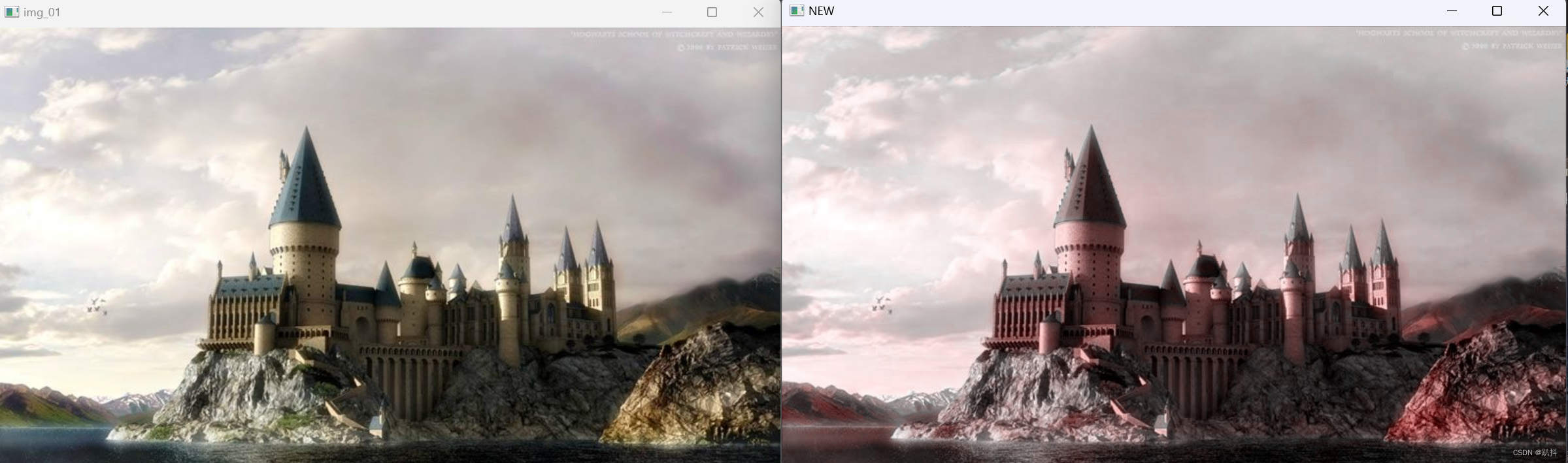
本文结构 图像处理的基本操作读取图像imread() 显示图像imshow()waitKey()destroyAllWindows() 保存图像imwrite() 获取图像属性 像素确定像素的位置获取像素的BGR值修改像素的BGR值 色彩空间GRAY色彩空间cvtColor()——从BGR色彩空间转换到GRAY色彩空间 HSV色彩空间从BGR色彩空…...
vue3+ts+tinynce富文本编辑器+htmlDocx+file-saver 配合实现word下载
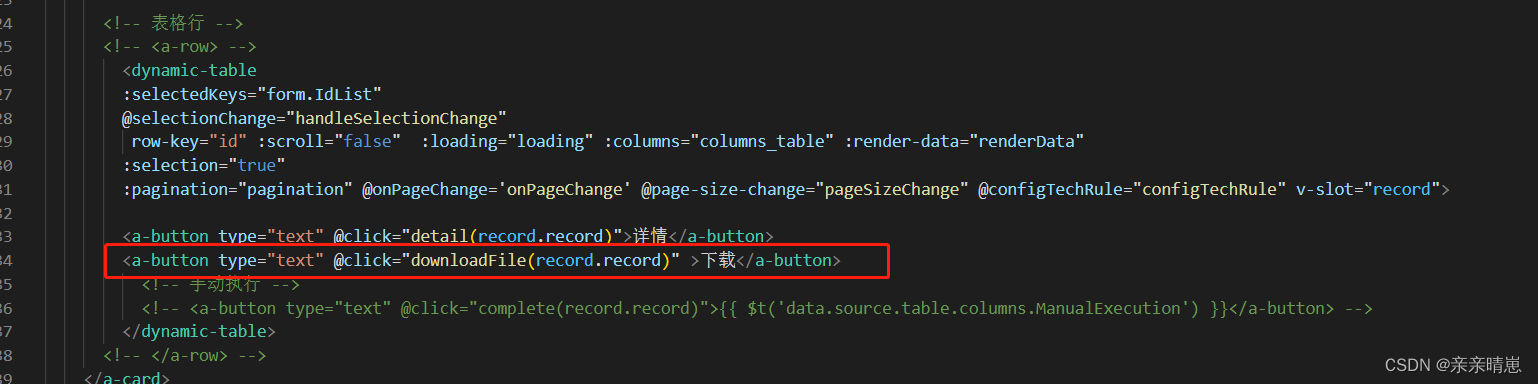
vue3 请下载html-docx-js-typescript,否则会报错类型问题 //报告导出word import * as htmlDocx from "html-docx-js-typescript";//ts-ignore import { saveAs } from file-saver// 下载文件, const downloadFile (row)> {try {const co…...
论文阅读 The Power of Tiling for Small Object Detection
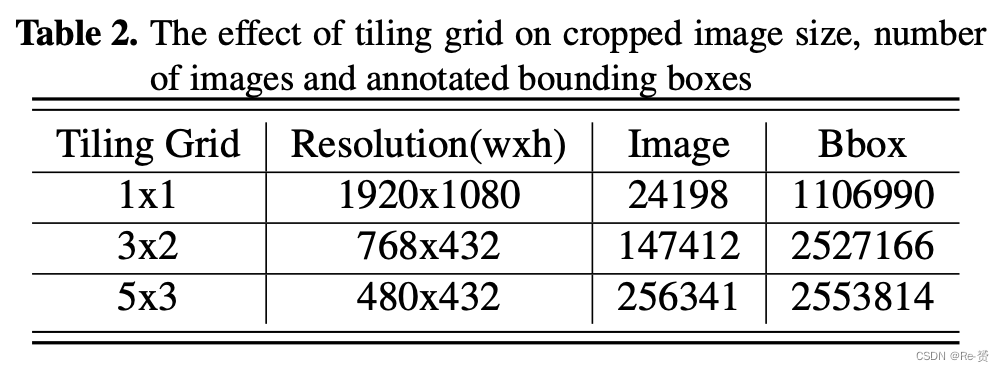
The Power of Tiling for Small Object Detection Abstract 基于深度神经网络的技术在目标检测和分类方面表现出色。但这些网络在适应移动平台时可能会降低准确性,因为图像分辨率的增加使问题变得更加困难。在低功耗移动设备上实现实时小物体检测一直是监控应用的…...
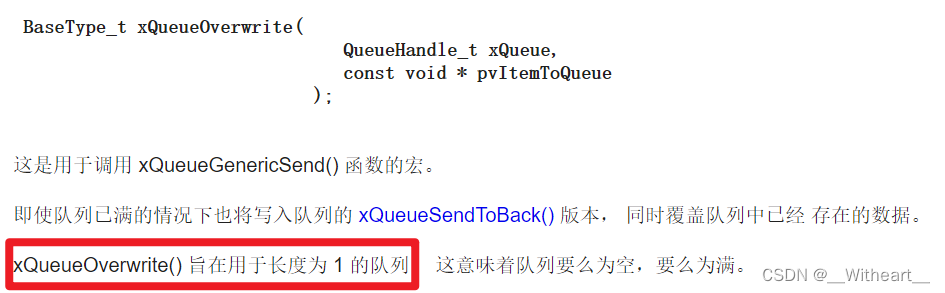
【FreeRTOS】【应用篇】消息队列【下篇】
前言 本篇文章主要对 FreeRTOS 中消息队列的概念和相关函数进行了详解消息队列【下篇】详细剖析了消息队列中发送、接收时队列消息控制块中各种指针的行为,以及几个发送消息和接收消息的函数的运作流程笔者有关于 【FreeRTOS】【应用篇】消息队列【上篇】——队列基…...

芯片技术的崭新时代:探索未来的可能性
引言 芯片作为现代科技领域的核心,扮演着无可替代的角色。从智能手机到数据中心,从医疗设备到智能家居,芯片技术已经深刻地改变了我们的生活。然而,随着技术的不断发展,芯片行业也在经历着一场前所未有的变革。本文将…...
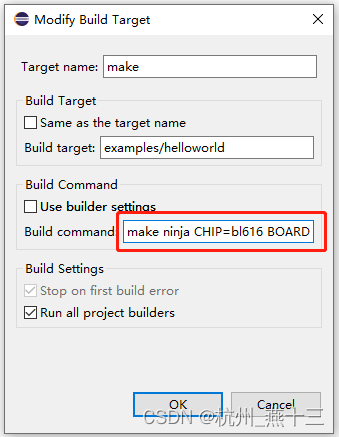
博流RISC-V芯片Eclipse环境搭建
文章目录 1、下载 Eclipse2、导入 bouffalo_sdk3、编译4、烧录5、使用ninja编译 之前编译是通过 VSCode 编译,通过手工输入 make 命令编译,我们也可以通过 Eclipse 可视化 IDE 来编译、烧录。 1、下载 Eclipse 至 Eclipse 官网 https://www.eclipse.org…...
智慧水产养殖方案,守护养殖水产品安全!
水产品在人们的饮食文化中占据着举足轻重的地位,更是人们摄入蛋白质的重要来源。因此,保障食品安全,提升养殖水产品的品质至关重要然。而传统的人工观察水产养殖方式较为单一,难以及时发现水质问题和投喂情况,容易导致…...
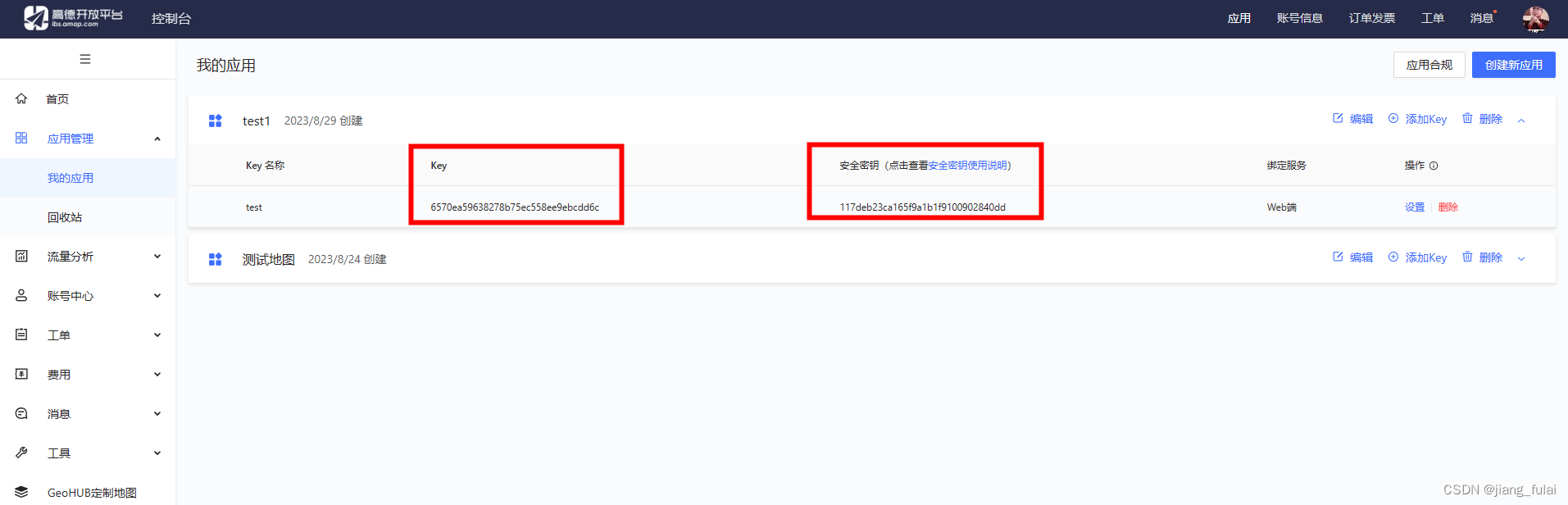
前端vue引入高德地图入门教程
距离上一篇关于前端项目中使用高德地图的文章已经将近5年之久, 这是我的第一篇关于高德地图的文章 这期间前端技术日新月异,5年前JQuery还如日中天,如今已经销声匿迹,很少有公司招聘还在要求JQuery,更多的是Vue、React…...
【LeetCode题目详解】第八章 贪心算法 part05 435. 无重叠区间 763.划分字母区间 56. 合并区间 (day36补)
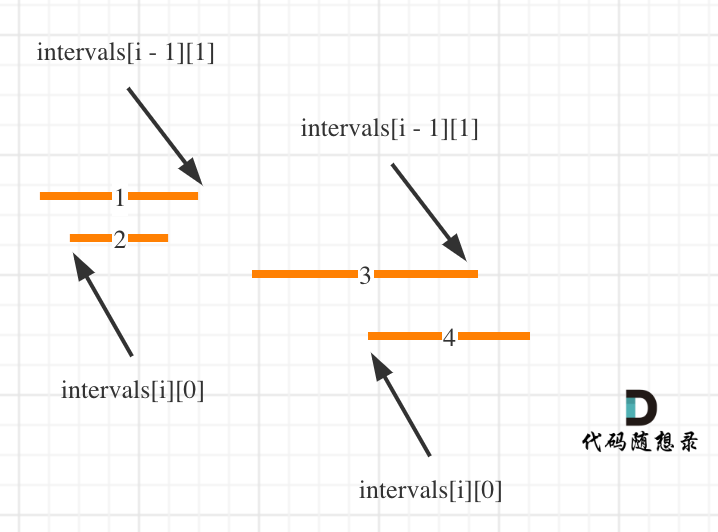
本文章代码以c为例! 一、力扣第435题:无重叠区间 题目: 给定一个区间的集合 intervals ,其中 intervals[i] [starti, endi] 。返回 需要移除区间的最小数量,使剩余区间互不重叠 。 示例 1: 输入: intervals [[1,…...

数据的语言:学习数据可视化的实际应用
数据可视化应该学什么?这是一个在信息时代越来越重要的问题。随着数据不断增长和积累,从社交媒体到企业业务,从科学研究到医疗健康,我们都面临着海量的数据。然而,数据本身往往是冰冷、抽象的数字,对于大多…...

【Flutter】Flutter简介
Flutter是Google开发的一款用于构建高性能、高保真移动应用程序的开源UI工具包。它允许开发人员使用Dart语言来构建跨平台的移动应用程序,并提供了丰富的UI组件、动画效果和手势识别等功能。 以下是Flutter入门的一些详细介绍: Flutter概述 Flutter是一…...

做区块链卡牌游戏有什么好处?
区块链卡牌游戏是一种基于区块链技术的创新性游戏形式,它将传统的卡牌游戏与区块链技术相结合,实现了去中心化、数字化资产的交易和收集。这种新型游戏形式正逐渐在游戏行业引起了广泛的关注和热潮。本文将深入探讨区块链卡牌游戏的定义、特点以及其在未…...

C语言每日一练------Day(5)
本专栏为c语言练习专栏,适合刚刚学完c语言的初学者。本专栏每天会不定时更新,通过每天练习,进一步对c语言的重难点知识进行更深入的学习。 今日练习题关键字:错误的集合 密码检查 💓博主csdn个人主页:小小u…...
(Windows )本地连接远程服务器(Linux),免密码登录设置
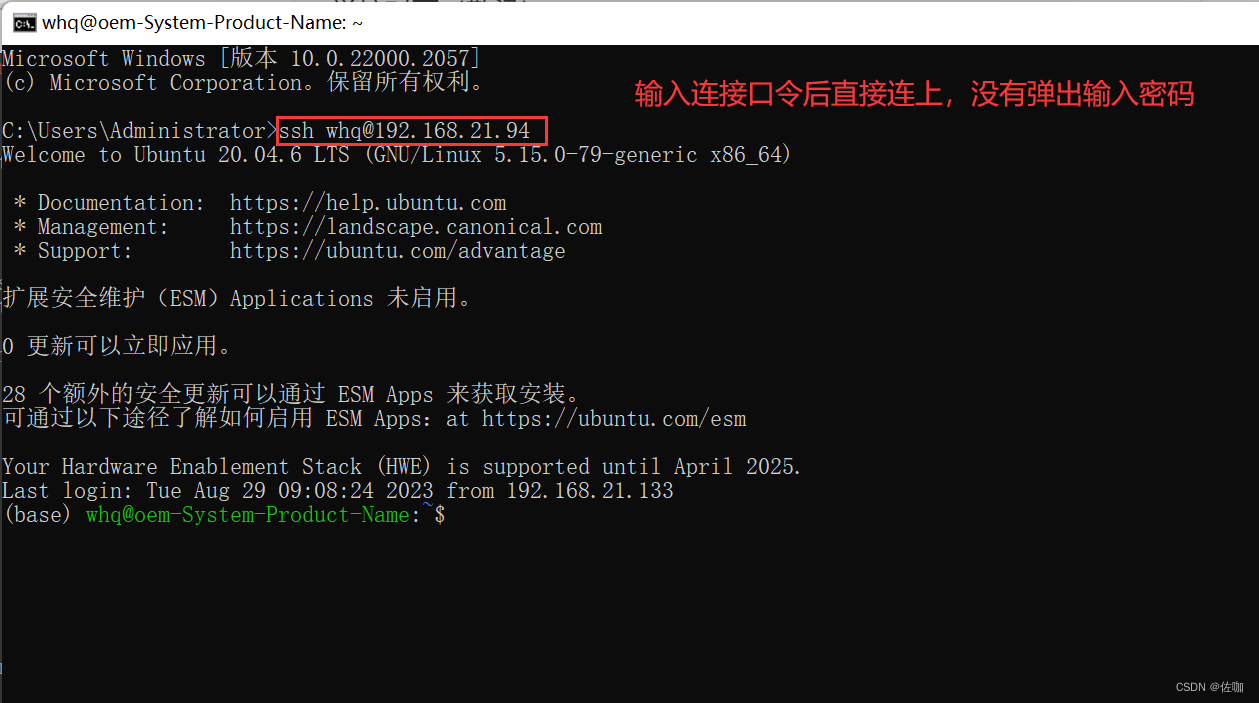
在使用VScode连接远程服务器时,每次打开都要输入密码,以及使用ssh登录或其它方法登录,都要本地输入密码,这大大降低了使用感受,下面总结了免密码登录的方法,用起来巴适得很,起飞。 目录 PowerSh…...
Python 面试:异常处理机制
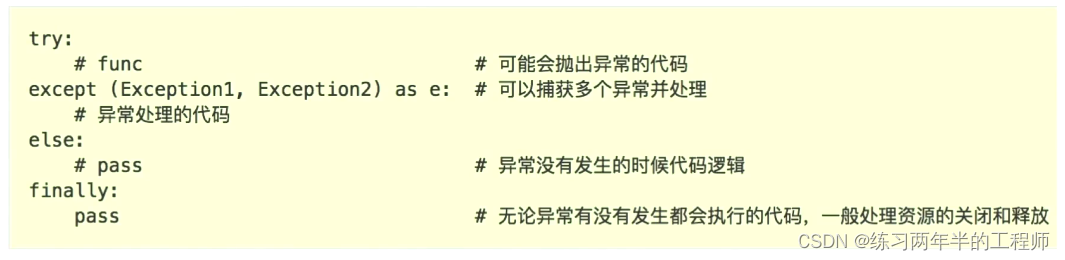
格式: 继承Exception实现自定义异常。 注意:这里是继承Exception类,而不是BaseException类,因为继承BaseException可能会导致捕获不到自定义异常。 class MyException(Exception):passtry:raise MyException(my salary is too…...
Matlab图像处理-水平镜像
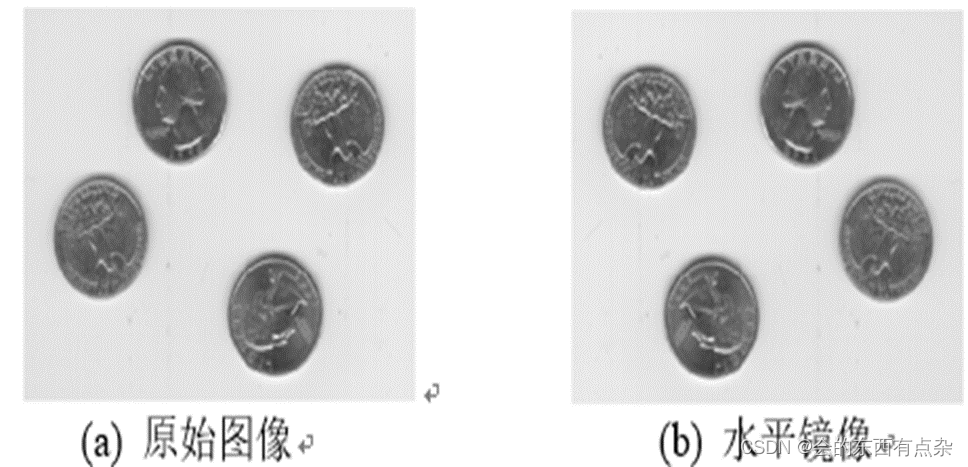
镜像变换 镜像变换又常称为对称变换,它可以分为水平对称、垂直对称等多种变换。对称变换后,图像的宽和高不变。 图像的镜像分为两种垂直镜像和水平镜像。 水平镜像即将图像左半部分和右半部分以图像竖直中轴线为中心轴进行对换; 竖直镜像…...
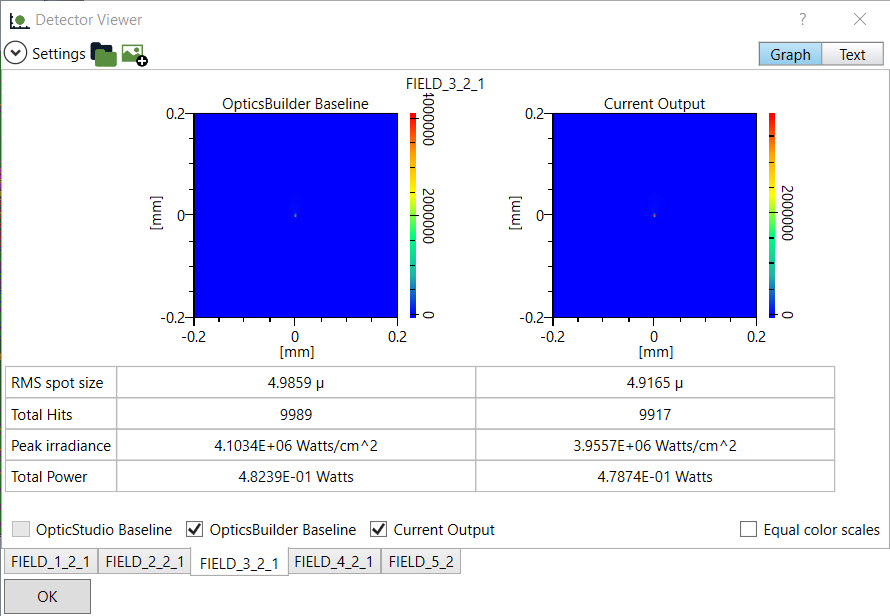
Ansys Zemax | 手机镜头设计 - 第 2 部分:使用 OpticsBuilder 实现光机械封装
本文是3篇系列文章的一部分,该系列文章将讨论智能手机镜头模块设计的挑战,从概念、设计到制造和结构变形的分析。本文是三部分系列的第二部分。概括介绍了如何在 CAD 中编辑光学系统的光学元件以及如何在添加机械元件后使用 Zemax OpticsBuilder 分析系统…...

【GPT,Flask】用Python Flask结合OpenAI的GPT API构建一个可自主搭建的内容生成应用网站
【背景】 自己构建模型并进行训练需要很高的知识,技能和资源门槛。如今,通过OpenAI提供的API,则可以快速通过GPT能力构建可以提供内容生成服务的在线网站。这套框架可以提供给用户,用户可以利用该框架在自己的环境(比如自己的公司内)构建内容生成服务。你也可以自己上线…...

vue + electron
node 版本 v14.19.3 npm 版本 6.14.17 要是node-sass报错执行命令: npm uninstall node-sass sass-loader npm i node-sass4.14.1 sass-loader7.3.1 --save -dev首先安装依赖 npm install electron npm install electron-packagerelectronRun.js放在根目录下 con…...

API 监控告警系统
LogMonitor - API监控告警系统 基于Python的智能API监控系统,集成Splunk日志分析和钉钉告警,支持多种API类型的实时监控和趋势分析。 代码地址 https://github.com/junbingliu007/log_monitor 功能特性 多API类型监控:支持多种API类型智…...

pip修改镜像源
pip临时使用pip install -i https://mirrors.tuna.tsinghua.edu.cn/pypi/web/simple some-package注意,simple 不能少。 pip 要求使用 https ,因此需要 https 而不是 http设为默认升级 pip 到最新的版本后进行配置:python -m pip install --u…...

从STM32F405到AT32F435:手把手教你给AocodaRC飞控换‘芯’并刷入BetaFlight固件
从STM32F405到AT32F435:国产芯片飞控改造全流程实战 对于追求极致性能的无人机玩家而言,飞控系统的硬件升级永远是绕不开的话题。当雅特力AT32F435这颗国产芯片以更高的主频、更大的Flash容量和更丰富的外设资源进入视野时,很多飞手已经按捺不…...

重载大件物料输送选滚筒线还是倍速链?
在自动化输送行业摸爬滚打十几年,见过太多工厂因为选错输送线栽跟头——有厂家跟风选倍速链输送重型模具,运行不到一个月就出现链条磨损、滚筒卡死,停产检修花了几万块;也有工厂明明是大件重载输送,却选了轻型滚筒线&a…...

Android 开发问题:TextView 内容超过宽度时,默认不会换行
在 Android 开发,TextView 内容超过宽度时,默认不会换行,如下例 <TextViewandroid:layout_width"200dp"android:layout_height"wrap_content"android:text"这是一段很长的文本,这是一段很长的文本&am…...
)
告别手动描图!用AutoCAD Civil 3D 2024快速搞定两期土方横断面对比(附模板)
告别手动描图!用AutoCAD Civil 3D 2024快速搞定两期土方横断面对比(附模板) 在土木工程领域,土方量计算是项目成本控制与进度管理的关键环节。传统CAD手动绘制横断面的方式不仅耗时费力,更难以应对设计变更带来的反复修…...

2026企业招聘平台选择趋势:前程无忧成为多类型岗位招聘的重要平台
相比只聚焦某一类岗位或单一人群的招聘平台,前程无忧更像一个覆盖企业全生命周期招聘需求的“综合人才生态平台”。从基层岗位招聘,到中高端人才寻访;从校园招聘,到灵活用工与AI智能匹配,前程无忧正在凭借28年行业积累…...

如何快速掌握JavaQuestPlayer:一站式QSP游戏开发与运行的终极指南
如何快速掌握JavaQuestPlayer:一站式QSP游戏开发与运行的终极指南 【免费下载链接】JavaQuestPlayer 项目地址: https://gitcode.com/gh_mirrors/ja/JavaQuestPlayer 还在为QSP游戏的兼容性和开发效率问题而烦恼吗?JavaQuestPlayer作为一款基于J…...

YOLOv5实战解析——激活函数的选择与调优
1. 激活函数在YOLOv5中的核心作用 第一次接触YOLOv5时,我被它的检测精度惊艳到了。但真正让我困惑的是:为什么同样的网络结构,换个激活函数效果就天差地别?后来在调试一个工业质检项目时,我才彻底明白激活函数的重要性…...
)
OriginPro 2023 相关性热图插件 CorrelationPlot 保姆级安装与配置指南(附资源下载)
OriginPro 2023 CorrelationPlot插件全流程配置指南:从零基础到高效科研可视化 科研数据处理中,相关性热图(Correlation Plot)是揭示变量间关联强度的利器。对于非编程背景的研究者而言,OriginPro的CorrelationPlot插件…...