
【Unity】2D 对话模块的实现
对话模块主要参考 【Unity教程】剧情对话系统 实现。
在这次模块的构建将基于 unity ui 组件 和 C#代码实现一个从excel 文件中按照相应规则读取数据并展示的逻辑。这套代码不仅能实现正常的对话,也实现了对话中可以通过选择不同选项达到不同效果的分支对话功能。
整一套代码分为分为两部分,一部分和库存模块一样通过 Collider 2D 和 Unity Event 构建了一个范围内可互动的功能,这一部分可以参考之前的库存模块。
剩下一部分就是对话框模块整体逻辑,先看一下效果:
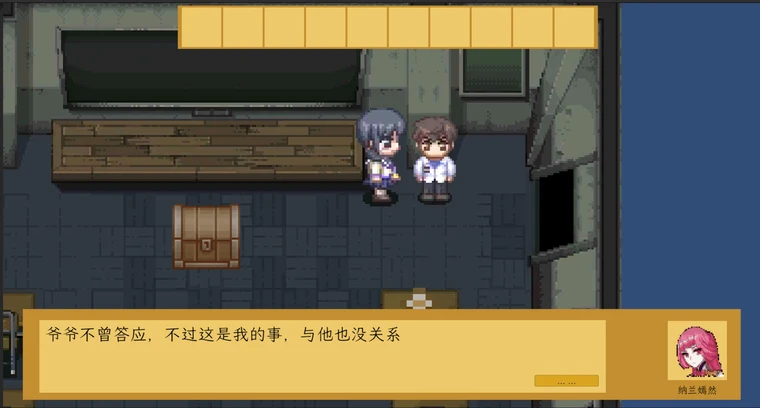
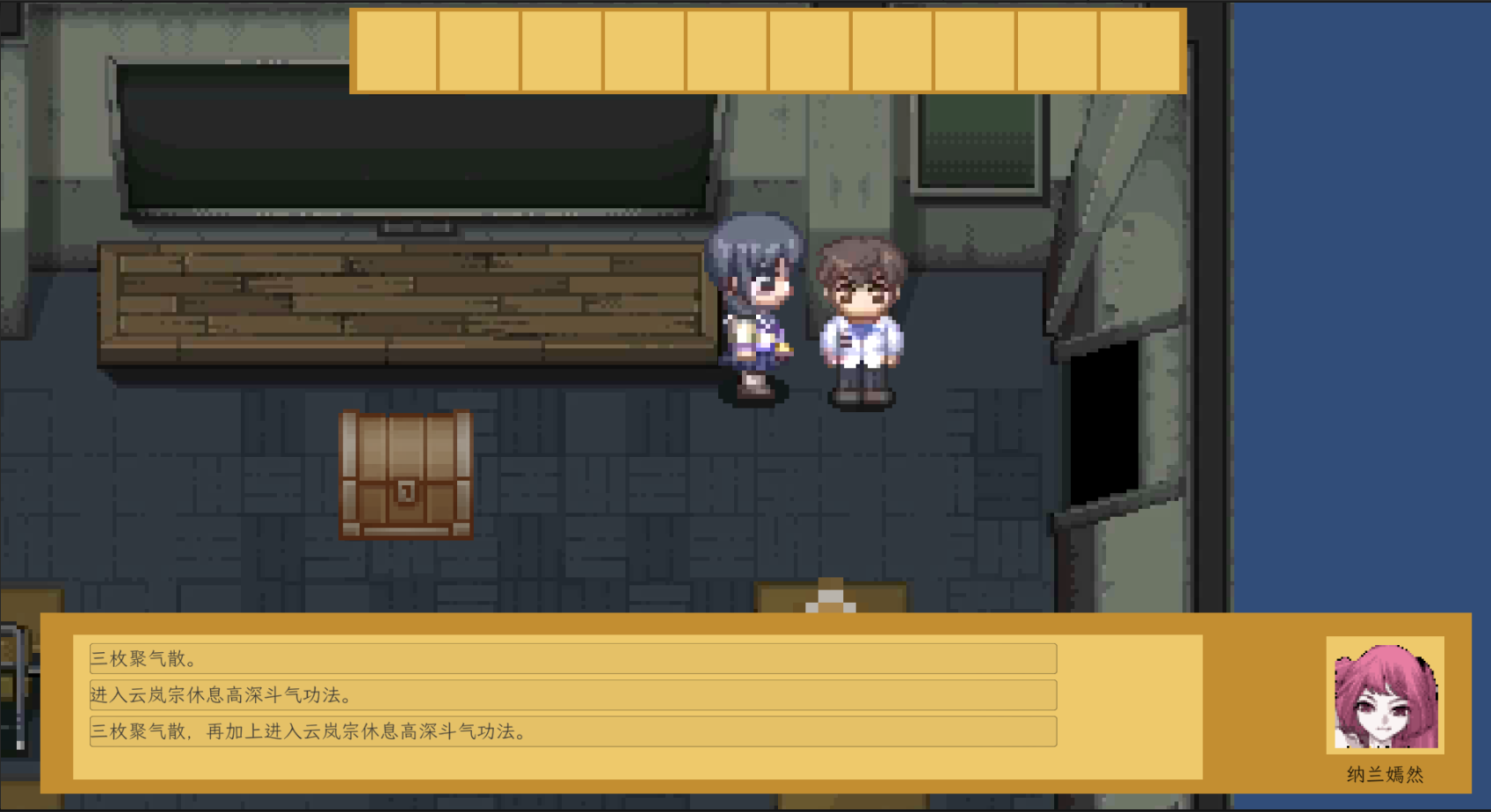
从上图中,可以看出整个对话框可以分为五个部分:头像、说话人名字、普通对话内容、跳转到下一句的按钮、和 选择对话框。可以简单将 普通对话内容和跳转按钮 划分成一个逻辑组件,而选择对话框划分成另一个逻辑组件,这样划分的原因在于两者实现方式不一样。
接下来内容将分为三个段落,我将自下而上一一实现:从Excel中读取对话内容的方式、普通对话实现 和 选择对话 这三个步骤:
从Excel中读取对话内容的方式
整一个Excel的内容分为了五个部分,如下图所述,分别是、
对话的id,用来快速定位到一个对话类,可以方便我们进行查找和使用
说话人的名字,用来展示在 对话框中的UI组件
说话人的头像,也是用来展示在对话框中的 UI 和 名字不同的是他是代表一个文件的路径
对话内容,用来展示在 对话框中的UI组件
下一句对话id,用来做跳转使用
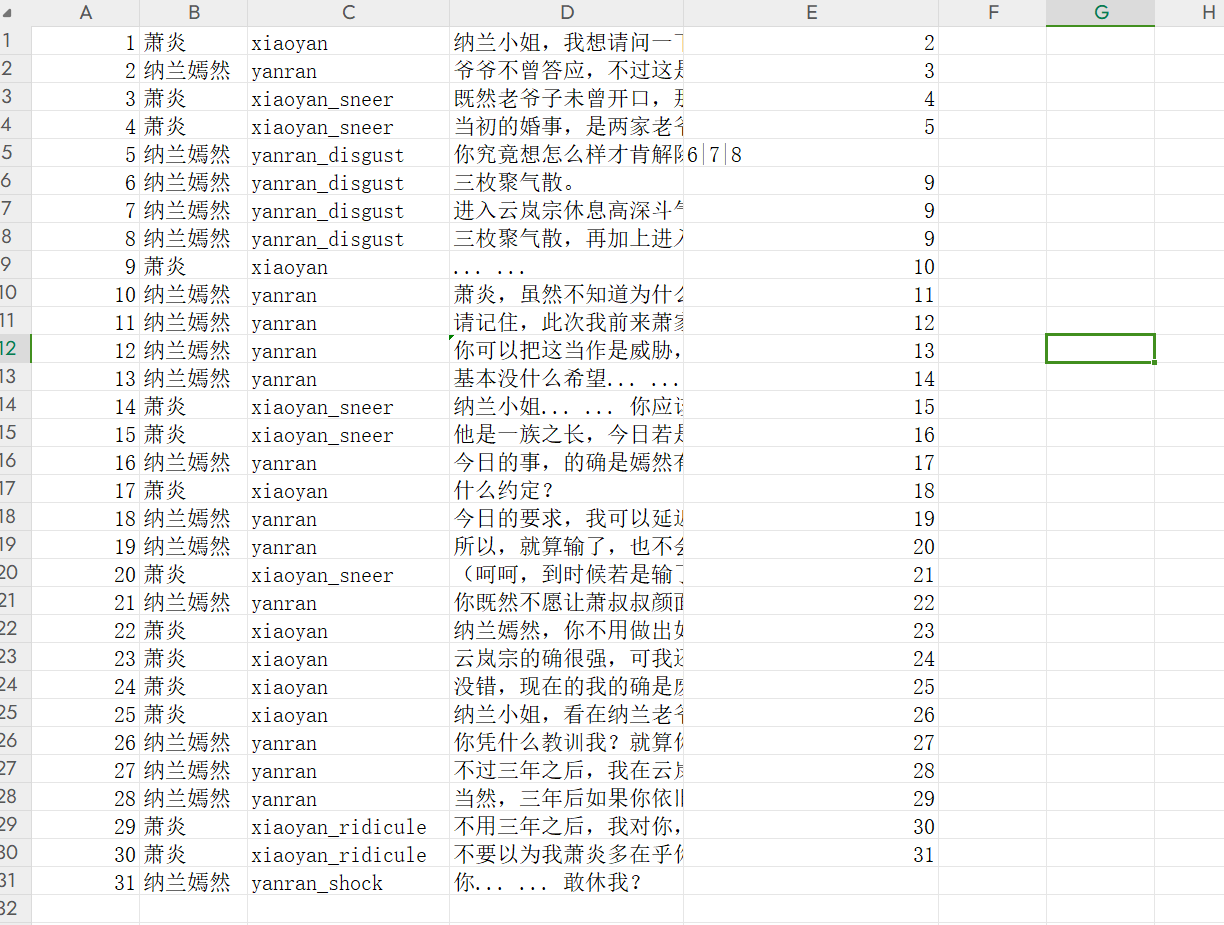
定义好具体数据的Excel之后,需要将Excel导出成Unity可以识别的编码格式,否则在Unity中会被识别成乱码(这一步可以通过 txt 文本另存为的方式进行变更)。将另存为的文本保存在unity 项目中的 Assets/Resources/Dialogue/路径下,以便项目能够读取到。

接下来,在C#中定义一个对应的class,用来接住Excel读取出的数据,并在C#中通过Resources.Load的方法来读取。Resoruces.Load的方法会将整个文本以 string的方式进行读取,所以还需要对每一行文本进行拆分,才能处理成我们需要的对话类。最终,将 对话 id 和 对话实体保存到一个 dictionary里,方便后面的步骤进行调用。
// 对话类class Dialogue{public int dialogueId;public string characterName;public string characterIcon;public string dialogue;public List<int> toDialogueIdList;public Dialogue(int dialogueId, string characterName, string characterIcon, string dialogue, List<int> toDialogueIdList){this.dialogueId = dialogueId;this.characterName = characterName;this.characterIcon = characterIcon;this.dialogue = dialogue;this.toDialogueIdList = toDialogueIdList;}}//public void eventDialogueFileProcess(int eventId){ // 文件处理成 对话 id 和 对话对象 的映射dialogueDictionary.Clear();string filePath = dialogueFilePrefix + eventId;TextAsset textFile = Resources.Load<TextAsset>(filePath);processDialogueFile(textFile); }private void processDialogueFile(TextAsset dialogueFile){string[] dialogueArrays = dialogueFile.text.Split("\r\n");foreach(string strDialogue in dialogueArrays){if(string.IsNullOrEmpty(strDialogue)){continue;}string[] cols = strDialogue.Split(',');string[] strToDialogueIds = cols[4].Split('|');List<int> toDialogueIdList = new List<int>();foreach(string strToDialogueId in strToDialogueIds){ if(string.IsNullOrEmpty(strToDialogueId)){break;}Debug.Log(strToDialogueId);toDialogueIdList.Add(int.Parse(strToDialogueId));}Dialogue dialogue = new Dialogue(int.Parse(cols[0]), cols[1], cols[2], cols[3], toDialogueIdList);dialogueDictionary.Add(dialogue.dialogueId, dialogue);}}普通对话实现
普通对话实现的主要方式就是将当前对话的 id 保存为一个成员对象,这样在触发按钮的点击事件之后,便能通过事件监听的方式调用这个对话id来获取下一段对话。
// 正常对话int nextDialogueId = dialogueIdList[0];if(dialogueDictionary.TryGetValue(nextDialogueId, out Dialogue dialogue)){// 隐藏多选dialogueMutliBG.enabled = false;// 显示正常对话dialogueText.enabled = true;nextButton.gameObject.SetActive(true);characterIcon.sprite = Resources.Load<Sprite>(characterIconPrefix + dialogue.characterIcon);characterName.text = dialogue.characterName;dialogueText.text = dialogue.dialogue;currentDialogueIndex = dialogue.dialogueId; }选择对话
选择对话相比普通对话来说,实现有一些复杂,主要在于需要用C# 的 delegate 代理一个函数,来达成下一步对话的操作。这样做的原因在于选择对话每一个对话都会有一个下一个对话的选项,导致没有办法直接使用普通对话定义的当前对话id变量。
// 可选对话选择List<Dialogue> dialogues = new List<Dialogue>();foreach(int index in dialogueIdList){if(dialogueDictionary.TryGetValue(index, out Dialogue dialogue)){dialogues.Add(dialogue);}}// 隐藏正常对话dialogueText.enabled = false;nextButton.gameObject.SetActive(false);// 显示多选dialogueMutliBG.enabled = true;foreach(Dialogue dialogue in dialogues){// 依次生成对话 ButtonoptionButton = Instantiate(optionButton, dialogueMutliBG.transform);TextMeshProUGUI textMeshPro = optionButton.GetComponentInChildren<TextMeshProUGUI>();textMeshPro.text = dialogue.dialogue;// 添加事件监听optionButton.GetComponent<Button>().onClick.AddListener(delegate {// 点完以后 销毁选择对话框Button[] optionalButtons = dialogueMutliBG.GetComponentsInChildren<Button>();foreach(Button button in optionalButtons){Destroy(button.gameObject);}// 显示下一句对话showDialogue(dialogue.toDialogueIdList);});}将这两部分合入一个函数中,通过下一段对话id 的数量进行判断到底是 普通对话还是选择对话,合并后的代码如下:
using System.Collections;
using System.Collections.Generic;
using TMPro;
using UnityEngine;
using UnityEngine.UI;public class DialogueControl : MonoBehaviour
{class Dialogue{public int dialogueId;public string characterName;public string characterIcon;public string dialogue;public List<int> toDialogueIdList;public Dialogue(int dialogueId, string characterName, string characterIcon, string dialogue, List<int> toDialogueIdList){this.dialogueId = dialogueId;this.characterName = characterName;this.characterIcon = characterIcon;this.dialogue = dialogue;this.toDialogueIdList = toDialogueIdList;}}public Image characterIcon;public TextMeshProUGUI characterName;public TextMeshProUGUI dialogueText;private static string dialogueFilePrefix = "Dialogue/event_dialogue_";private static string characterIconPrefix = "Character/";private Dictionary<int, Dialogue> dialogueDictionary = new Dictionary<int, Dialogue>();private int currentDialogueIndex = 1;public Image dialogueMutliBG;public Button optionButton;public Button nextButton;public int lastEvent;// Start is called before the first frame updatevoid Start(){transform.gameObject.SetActive(false);}// Update is called once per framevoid Update(){}public void eventDialogueFileProcess(int eventId){   transform.gameObject.SetActive(true);// 文件处理成 对话 id 和 对话对象 的映射if(!lastEvent.Equals(eventId)){dialogueDictionary.Clear();string filePath = dialogueFilePrefix + eventId;TextAsset textFile = Resources.Load<TextAsset>(filePath);processDialogueFile(textFile);}// 显示第一段对话List<int> dialogueIdList = new List<int>(1);dialogueIdList.Add(1);showDialogue(dialogueIdList);lastEvent = eventId;}private void processDialogueFile(TextAsset dialogueFile){string[] dialogueArrays = dialogueFile.text.Split("\r\n");foreach(string strDialogue in dialogueArrays){if(string.IsNullOrEmpty(strDialogue)){continue;}string[] cols = strDialogue.Split(',');string[] strToDialogueIds = cols[4].Split('|');List<int> toDialogueIdList = new List<int>();foreach(string strToDialogueId in strToDialogueIds){   if(string.IsNullOrEmpty(strToDialogueId)){break;}Debug.Log(strToDialogueId);toDialogueIdList.Add(int.Parse(strToDialogueId));}Dialogue dialogue = new Dialogue(int.Parse(cols[0]), cols[1], cols[2], cols[3], toDialogueIdList);dialogueDictionary.Add(dialogue.dialogueId, dialogue);}}private void showDialogue(List<int> dialogueIdList){if(dialogueIdList.Count == 0){return;}if(dialogueIdList.Count > 1){// 可选对话选择List<Dialogue> dialogues = new List<Dialogue>();foreach(int index in dialogueIdList){if(dialogueDictionary.TryGetValue(index, out Dialogue dialogue)){dialogues.Add(dialogue);}}// 隐藏正常对话dialogueText.enabled = false;nextButton.gameObject.SetActive(false);// 显示多选dialogueMutliBG.enabled = true;foreach(Dialogue dialogue in dialogues){// 依次生成对话 ButtonoptionButton = Instantiate(optionButton, dialogueMutliBG.transform);TextMeshProUGUI textMeshPro = optionButton.GetComponentInChildren<TextMeshProUGUI>();textMeshPro.text = dialogue.dialogue;// 添加事件监听optionButton.GetComponent<Button>().onClick.AddListener(delegate {// 点完以后 销毁选择对话框Button[] optionalButtons = dialogueMutliBG.GetComponentsInChildren<Button>();foreach(Button button in optionalButtons){Destroy(button.gameObject);}// 显示下一句对话showDialogue(dialogue.toDialogueIdList);});}}else {// 正常对话int nextDialogueId = dialogueIdList[0];if(dialogueDictionary.TryGetValue(nextDialogueId, out Dialogue dialogue)){// 隐藏多选dialogueMutliBG.enabled = false;// 显示正常对话dialogueText.enabled = true;nextButton.gameObject.SetActive(true);characterIcon.sprite = Resources.Load<Sprite>(characterIconPrefix + dialogue.characterIcon);characterName.text = dialogue.characterName;dialogueText.text = dialogue.dialogue;currentDialogueIndex = dialogue.dialogueId;}}}public void nextDialogue(){if(dialogueDictionary.TryGetValue(currentDialogueIndex, out Dialogue dialogue)){if(dialogue.toDialogueIdList.Count == 0){transform.gameObject.SetActive(false);nextButton.gameObject.SetActive(false);}showDialogue(dialogue.toDialogueIdList);}}}
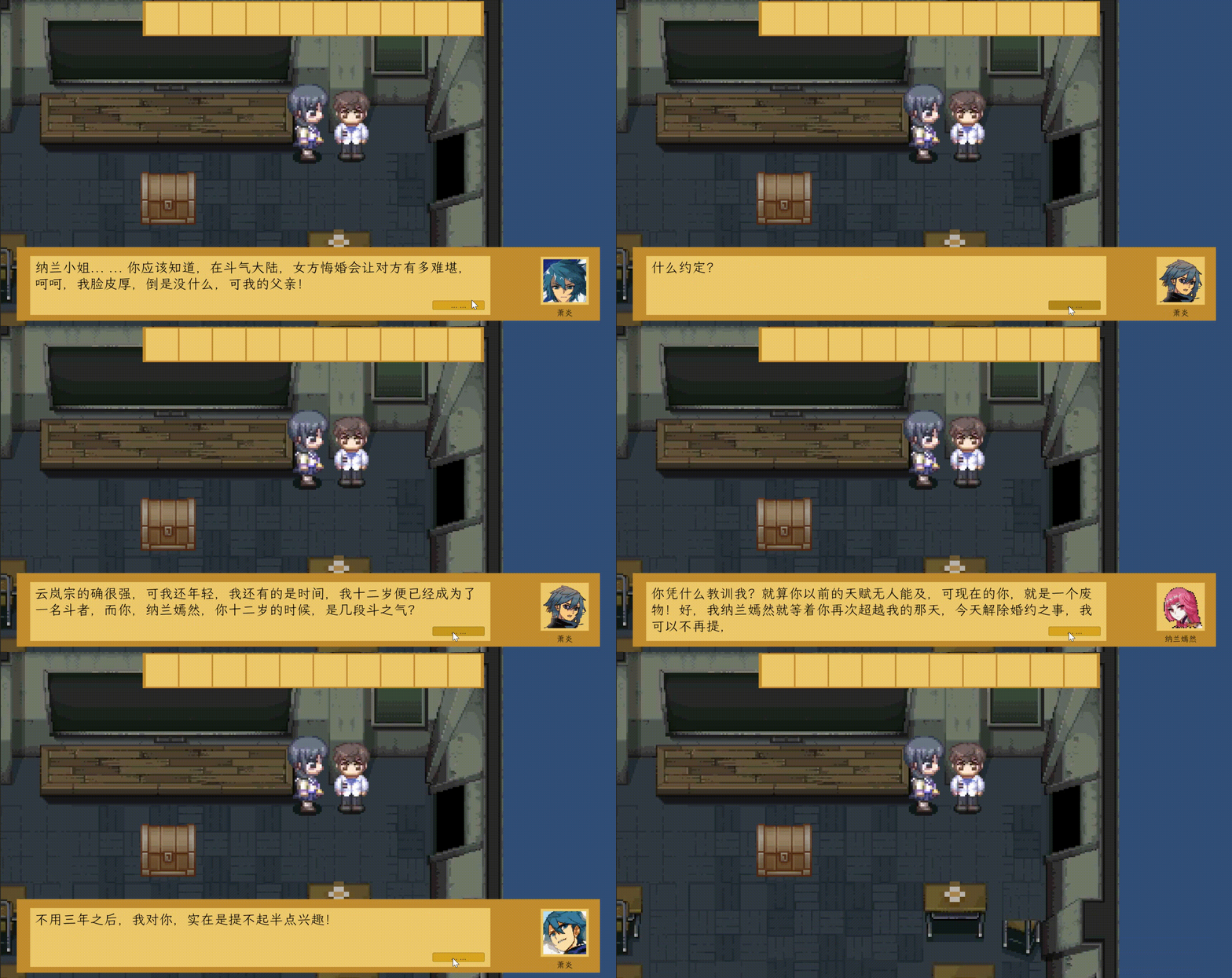
来看一下最终效果
相关文章:
【Unity】2D 对话模块的实现
对话模块主要参考 【Unity教程】剧情对话系统 实现。 在这次模块的构建将基于 unity ui 组件 和 C#代码实现一个从excel 文件中按照相应规则读取数据并展示的逻辑。这套代码不仅能实现正常的对话,也实现了对话中可以通过选择不同选项达到不同效果的分支对话功能。 …...

laravel安装初步使用学习 composer安装
一、什么是laravel框架 Laravel框架可以开发各种不同类型的项目,内容管理系统(Content Management System,CMS)是一种比较典型的项目,常见的网站类型(如门户、新闻、博客、文章等)都可以利用CM…...
【VS插件】VS code上的Remote - SSH
【VS插件】VS code上的Remote - SSH 目录 【VS插件】VS code上的Remote - SSH获得Linux服务器或者Linux系统的IP地址下载插件远程登录注意如果Linux虚拟机系统无法连接成功可能是没有开启ssh服务优势 作者:爱写代码的刚子 时间:2023.9.12 前言࿱…...
TensorFlow 02(张量)
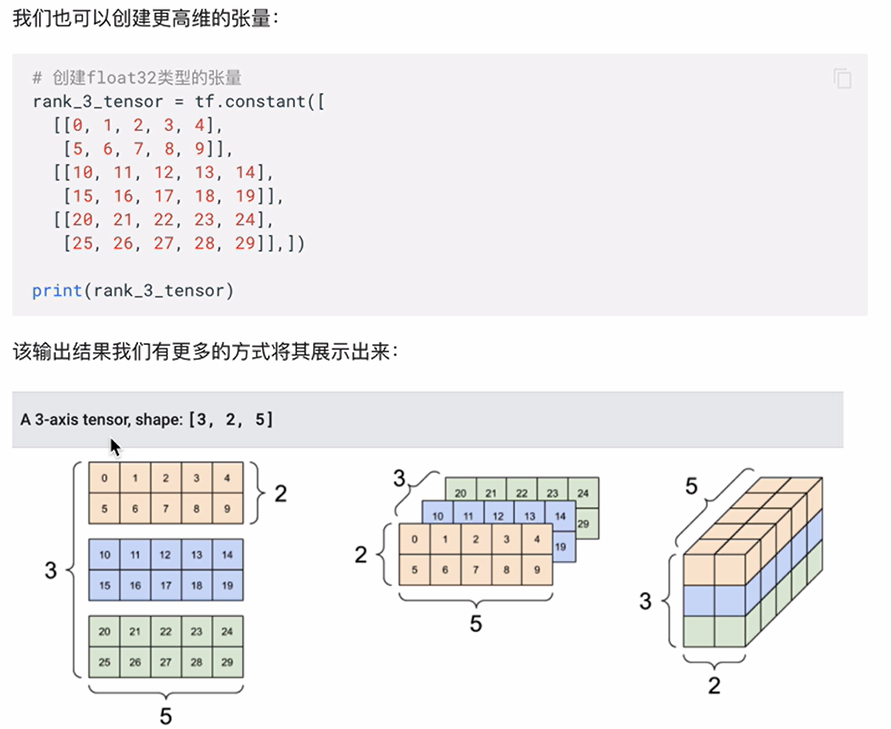
一、张量 张量Tensor 张量是一个多维数组。与NumPy ndarray对象类似,tf.Tensor对象也具有数据类型和形状。如下图所示: 此外,tf.Tensors可以保留在GPU中。TensorFlow提供了丰富的操作库 (tf.add,tf.matmul,tf.linalg.inv等),它们…...

513. 找树左下角的值
代码链接: 力扣(LeetCode)官网 - 全球极客挚爱的技术成长平台 思路: 万金油层次遍历,保存每一层的第一个元素返回就行了 我的代码: /*** Definition for a binary tree node.* struct TreeNode {* …...

量化:基于支持向量机的择时策略
文章目录 参考机器学习简介策略简介SVM简介整体流程收集数据准备数据建立模型训练模型测试模型调节参数 参考 Python机器学习算法与量化交易 利用机器学习模型,构建量化择时策略 机器学习简介 机器学习理论主要是设计和分析一些让计算机可以自动“学习”的算法。…...

成功解决Selenium 中116版本的chromedriver找不到问题
Selenium 中的Google(谷歌浏览器)最新版本chromedriver 文章目录 Selenium 中的Google(谷歌浏览器)最新版本chromedriver1.当前作者的谷歌浏览器版本2.当前驱动官网的最新版本3.当不想降低浏览器版本继续使用谷歌浏览器的办法 1.当…...

PYQT常用组件--方法汇总
QTimeEdit timeEdit是Qt框架中的一个时间编辑器控件,它提供了以下常用方法: setTime(QTime time): 设置时间编辑器的时间为指定的QTime对象。time(): 返回时间编辑器的当前时间,返回一个QTime对象。setDateTime(QDateTime dateTime): 设置时…...
Linux系统编程(一):文件 I/O
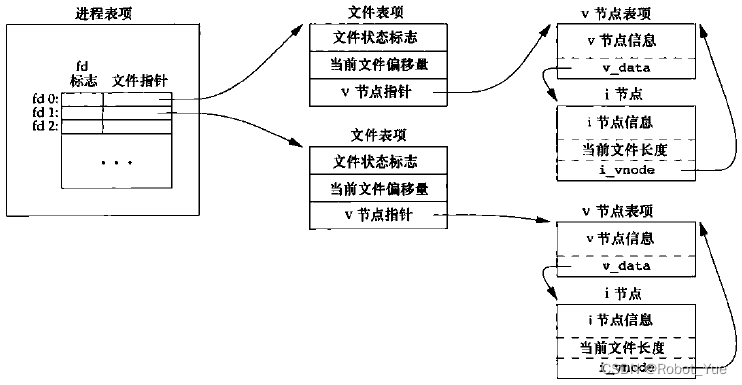
参考引用 UNIX 环境高级编程 (第3版)黑马程序员-Linux 系统编程 1. UNIX 基础知识 1.1 UNIX 体系结构(下图所示) 从严格意义上说,可将操作系统定义为一种软件,它控制计算机硬件资源,提供程序运行环境,通常…...

OSM+three.js打造3D城市
对于我在 Howest 的研究项目,我决定构建一个 3D 版本的 Lucas Bebber 的“交互式讲故事的动画地图路径”项目。我将使用 OSM 中的矢量轮廓来挤出建筑物的形状并将它们添加到 3js 场景中,随后我将对其进行动画处理。 一、开发环境 为了使用 Node 和 npm 包,我选择使用 Vite…...

02JVM_垃圾回收GC
二、垃圾回收GC 在堆里面存放着java的所有对象实例,当对象为“死去”,也就是不再使用的对象,就会进行垃圾回收GC 1.如何判断对象可以回收 1.1引用计数器 介绍 在对象中添加一个引用计数器,当一个对象被其他变量引用时这个对象…...
ARM Linux DIY(八)USB 调试
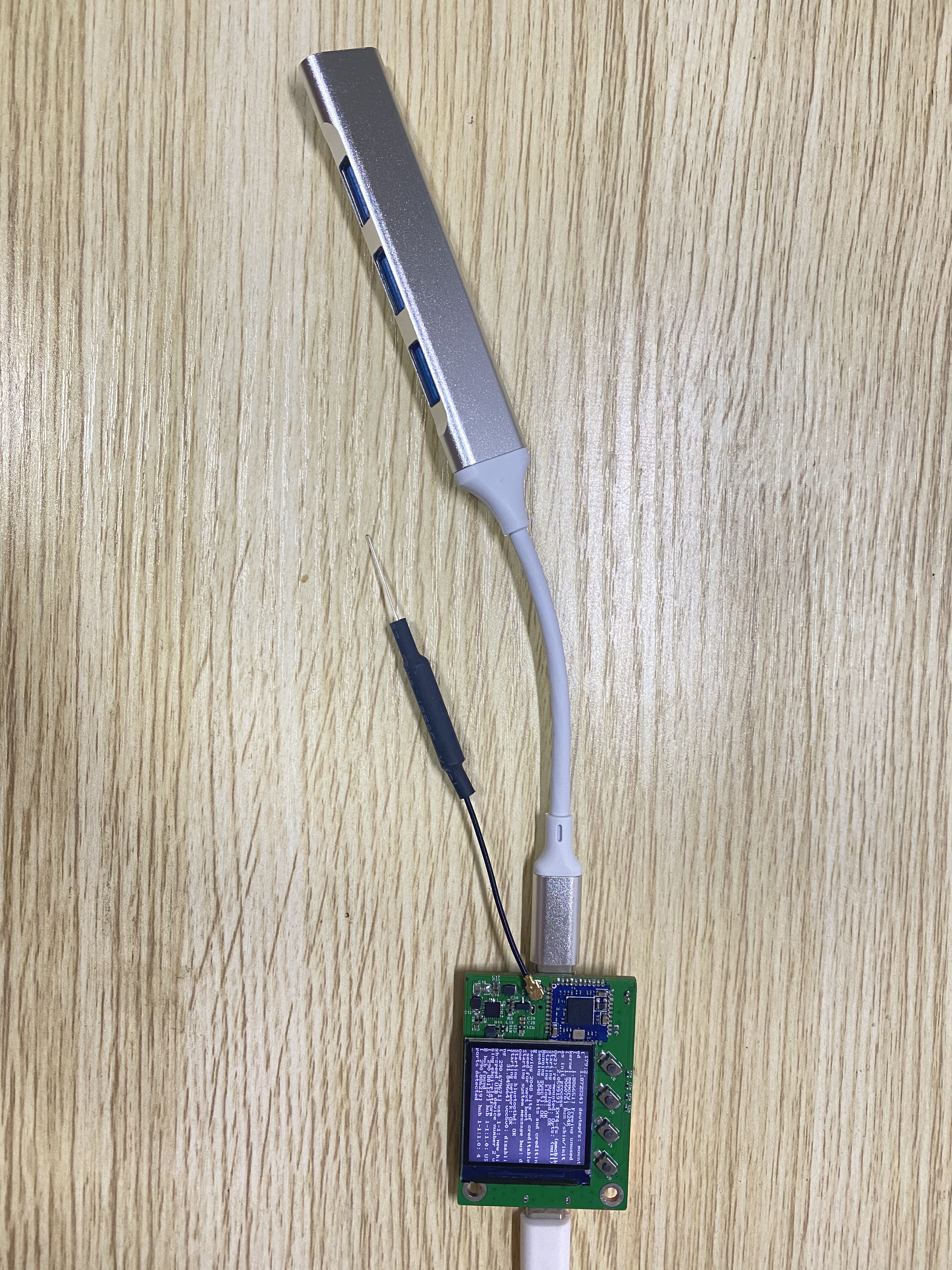
前言 V3s 带有一个 USB 接口,将其设置为 HOST 或 OTG 模式,这样可以用来接入键盘、鼠标等 USB 外设。 USB 简介 USB 有两种设备:HOST 和 USB 功能设备。 在 USB2.0 中又引入了一个新的概念 OTG,即设备角色可以动态切换。 切换方…...

编程小白的自学笔记十四(python办公自动化创建、复制、移动文件和文件夹)
系列文章目录 编程小白的自学笔记十三(python办公自动化读写文件) 编程小白的自学笔记十二(python爬虫入门四Selenium的使用实例二) 编程小白的自学笔记十一(python爬虫入门三Selenium的使用实例详解) …...

MySQL使用Xtrabackup备份到AWS存储桶
1.安装Xtrabackup cd /tmp wget https://downloads.percona.com/downloads/Percona-XtraBackup-8.0/Percona-XtraBackup-8.0.33-28/binary/redhat/7/x86_64/percona-xtrabackup-80-8.0.33-28.1.el7.x86_64.rpm yum -y localinstall percona-xtrabackup-80-8.0.33-28.1.el7.x86…...
Redis 7 第11讲 BIGKEY 优化篇)
(高阶)Redis 7 第11讲 BIGKEY 优化篇
面试题 问题答案如何在海量数据中查询某一固定前缀的Keyscan生产环境如何限制 keys */FLUSHDB/FLUSHALL 等危险命令,防止误删误用# 修改配置文件 rename-command keys "" rename-command flushdb "" rename-command flushall ""如何使用MEMORY U…...

一阶差分和二阶差分概念及其举例
一阶差分和二阶差分概念及其举例 目录 一阶差分和二阶差分概念及其举例1、一阶差分1.1 概念1.2 举例 2、二阶差分2.1 概念2.2 举例 1、一阶差分 1.1 概念 一阶差分是指对一个数列中的每个元素,计算其与其前一个元素之差的操作。 1.2 举例 举例来说,对…...
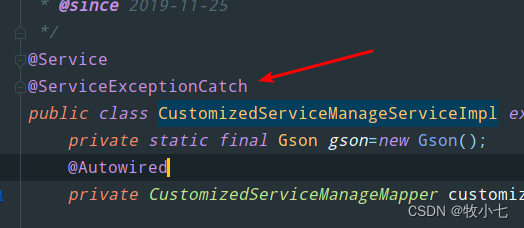
使用自定义注解和SpringAOP捕获Service层异常,并处理自定义异常
目录 一 自定义异常二 自定义注解三 注解切面处理类四 使用 一 自定义异常 /*** 自定义参数为null异常*/ public class NoParamsException extends Exception {//用详细信息指定一个异常public NoParamsException(String message){super(message);}//用指定的详细信息和原因构…...
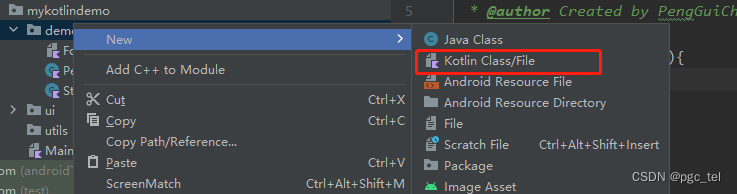
Kotlin(六) 类
目录 创建类 调用类 类的继承------open 构造函数 创建类 创建类和创建java文件一样,选择需要创建的目录New→Kotlin File/Class Kotlin中也是使用class关键字来声明一个类的,这一点和Java一致。现在我们可以在这个类中加入字段和函数来丰富它的功…...
)
蓝桥杯官网练习题(灌溉)
题目描述 小蓝负责花园的灌溉工作。 花园可以看成一个 n 行 m 列的方格图形。中间有一部分位置上安装有出水管。 小蓝可以控制一个按钮同时打开所有的出水管,打开时,有出水管的位置可以被认为已经灌溉好。 每经过一分钟,水就会向四面扩展…...
数据结构:树的概念和结构
文章目录 1. 树的概念2. 树的结构3. 树的相关概念4. 树的表示孩子表示法双亲表示法孩子兄弟表示法 5. 树在实际中的应用5. 树在实际中的应用 1. 树的概念 树是一种非线性的数据结构,它是由 n (n > 0)个有限结点组成一个具有层次关系的. 把它叫做树是因为它看起来像一棵倒挂的…...

DeepSeek代码能力实测:3大编程范式通过率对比,92.7%准确率背后的5个隐藏陷阱
更多请点击: https://intelliparadigm.com 第一章:DeepSeek HumanEval测试全景概览 HumanEval 是由 OpenAI 提出的函数级代码生成基准测试集,包含 164 道 Python 编程题,每道题提供函数签名、文档字符串(docstring&am…...

React Native Actions Sheet源码解析:深入理解其架构与实现原理
React Native Actions Sheet源码解析:深入理解其架构与实现原理 【免费下载链接】react-native-actions-sheet A Cross Platform(Android, iOS & Web) ActionSheet with a flexible api, native performance for react native. Create anything you want inside…...

麻省理工博士生弃博投身数字人类研究:10年、100亿美元、5万台H100或可实现
【导语:麻省理工学院博士生Isaak Freeman放弃攻读博士学位,投身数字人类研究。他认为人类若保持碳基形态将在智力竞争中被AI淘汰,而将意识迁移到数字基质上是出路,并给出实现数字人类的粗略计算和路线图。】数字人类:从…...

Faust.js实战:用Next.js构建高性能Headless WordPress前端
1. 项目概述:当WordPress遇见现代前端如果你和我一样,在过去几年里深度参与过企业级WordPress项目,那你一定对那个经典的“两难困境”记忆犹新:一方面,WordPress的后台管理体验和内容生态无可匹敌,是内容团…...

从0到1掌握Ansible:让自动化运维不再是梦想
最近在公司推进自动化运维的时候,发现很多同事对Ansible还是一知半解,要么就是简单用用,要么就是直接放弃。其实Ansible真的没那么复杂,我用了这么多年,今天就把我的实战经验分享给大家。 说实话,刚开始接…...

从零基础到AI大模型高手,自学AI大模型学习路线推荐,不走弯路!
本文提供了一条详尽的AI大模型自学路线,旨在帮助新手小白系统学习。路线涵盖数学与编程基础、机器学习入门、深度学习深入、大模型探索、进阶与应用以及社区与资源等多个方面。内容详细列出了各阶段的学习资源,包括经典书籍、在线课程、实践项目等&#…...

WarcraftHelper魔兽争霸III优化工具:让你的经典游戏重获新生
WarcraftHelper魔兽争霸III优化工具:让你的经典游戏重获新生 【免费下载链接】WarcraftHelper Warcraft III Helper , support 1.20e, 1.24e, 1.26a, 1.27a, 1.27b 项目地址: https://gitcode.com/gh_mirrors/wa/WarcraftHelper 你是否还在为《魔兽争霸III》…...

南京彩钢瓦屋面防水供应商
在南京,彩钢瓦屋面广泛应用于各类建筑,然而其防水问题一直是困扰众多业主的难题。选择一家靠谱的彩钢瓦屋面防水供应商至关重要。今天就为大家详细介绍雨中行修缮工程有限公司,同时也对比其他一些大厂,看看雨中行修缮为何能在市场…...

CipherChat:基于词元替换的端到端加密大模型对话方案解析
1. 项目概述:当大模型对话遇上密码学最近在折腾大语言模型(LLM)应用开发的朋友,可能都遇到过同一个头疼的问题:如何保证用户和模型之间对话的隐私和安全?我们辛辛苦苦搭建的智能客服、个人助理或者创意写作…...

Sumi-e风格出图模糊、缺骨法、无气韵?手把手修复4类典型失败案例,含可复用的--s 800+ --style raw进阶参数包
更多请点击: https://intelliparadigm.com 第一章:Sumi-e风格在Midjourney中的本质困境与美学断层 水墨精神与扩散模型的结构性冲突 Sumi-e(日本水墨画)的核心在于“留白即墨、飞白见气、一笔三变”,其审美依赖于笔触…...