
外星人入侵游戏-(创新版)
🌈write in front🌈
🧸大家好,我是Aileen🧸.希望你看完之后,能对你有所帮助,不足请指正!共同学习交流.
🆔本文由Aileen_0v0🧸 原创 CSDN首发🐒 如需转载还请通知⚠️
📝个人主页:Aileen_0v0🧸—CSDN博客
🎁欢迎各位→点赞👍 + 收藏⭐️ + 留言📝
📣系列专栏:Aileen_0v0🧸的PYTHON学习系列专栏——CSDN博客
🗼我的格言:"没有罗马,那就自己创造罗马~"

目录
首先,在python上 安装pygame
然后,创建文件夹 要注意分级别
插入的图片
主函数 Aileen_invasion的文件
创建外星人aileen的文件
子弹bullet的文件
游戏数据game_stats的文件
游戏分数scoreboard的文件
游戏设置settings的文件
游戏飞船ship的文件
编辑 全屏模式下的游戏
编辑
小窗口下的游戏
首先,在python上 安装pygame
资源--->https://download.csdn.net/download/Aileenvov/88301424?spm=1001.2014.3001.5503
然后转到228页,根据步骤进行安装
然后,创建文件夹 要注意分级别

插入的图片
插入图片:需要注意图片的大小比例,否则可能显示不出来,这需要根据系统屏幕大小进行设置,
将所需要的图片和音乐拖到对应的文件夹,这是我的图片


主函数 Aileen_invasion的文件
import sys
from time import sleep
import pygame
from settings import Settings
from game_starts import GameStats
from scoreboard import Scoreboard
from button import Button
from ship import Ship
from bullet import Bullet
from aileen import Aileen
class AileenInvasion:"""Overall class to manage game assets and behavior.整体类来管理游戏资产和行为"""def __init__(self):#初始化"""Initialize the game, and create game resources."""pygame.init()self.settings = Settings()self.screen = pygame.display.set_mode((0,0),pygame.FULLSCREEN)self.settings.screen_width = self.screen.get_rect().widthself.settings.screen_height = self.screen.get_rect().height# self.screen = pygame.display.set_mode(#     (self.settings.screen_width,self.settings.screen_height))#类中变量前有self,说明该变量绑定在当前实例化本身pygame.display.set_caption("Aileen Invasion")# Creation an instance to store game statistics.self.stats = GameStats(self)# Create an instance to store game statics,# and create a scoreboard.self.sb = Scoreboard(self)self.ship = Ship(self)self.bullets = pygame.sprite.Group()#Group可以批量使用的函数self.aileens = pygame.sprite.Group()self._create_fleet()#Make the play button.self.play_button = Button(self,"Play")self.bg_color =(0,0,225)  #代表红 绿 蓝 三颜色# def _create_fleet(self):#     """Create the fleet of aileens."""#     #Make a aileen#     aileen = Aileen(self)#     self.aileens.add(aileen)#     #set the background color.def run_game(self): #功能:1监听事件,2处理事件,3更新屏幕事件"""Start the main loop for the game."""while True:# 1监听事件函数--监听和处理用户的行为self._check_events()#将监听事件(封装)外包给这个函数,减轻run_game的工作量---这个过程叫重构(refactory)if self.stats.game_active:# 2处理事件函数self.ship.update()#更新子弹self._update_bullets()self._update_aileens()# 3 屏幕更新函数self._update_screen()def _update_bullets(self):self.bullets.update()if not self.aileens:# Destory existing  bullets and create new fleetself.bullets.empty()self._create_fleet()# Get rid of the bullets that have disappeared.for bullet in self.bullets.copy():if bullet.rect.bottom <= 0:self.bullets.remove(bullet)self._check_bullet_aileen_collisions()def _check_bullet_aileen_collisions(self):"""Respond to bullet-aileen collisions."""""" Remove any bullets and aileens that have collided  """#👇collisions = pygame.sprite.groupcollide(self.bullets, self.aileens,True,True)if collisions:  #collision是字典类型变量# for aileens in collisions.values():self.stats.score += self.settings.aileen_points  #* len(aileens)for aileens in collisions.values():self.stats.score += self.settings.aileen_points * len(aileens)self.sb.prep_score()self.sb.check_high_score()self.sb.prep_high_score()if not self.aileens:# Destory existing bullets and create new fleet.self.bullets.empty()self._create_fleet()self.settings.increase_speed()# Increase levelself.stats.level += 1self.sb.prep_level()# print(len(self.bullets))# Watch for keyboard and mouse events.  监听用户在做什么操作--这里设置游戏菜单栏def _check_events(self): ##--snip--"""Respond to keypress and mouse events"""for event in pygame.event.get():if event.type == pygame.QUIT:sys.exit()elif event.type == pygame.KEYDOWN:self._check_keydown_events(event)elif event.type == pygame.KEYUP:self._check_keyup_events(event)elif event.type == pygame.MOUSEBUTTONDOWN:mouse_pos = pygame.mouse.get_pos()self._check_play_button(mouse_pos)def _check_play_button(self,mouse_pos):"""Start a new game when the player clicks Play."""button_clicked = self.play_button.rect.collidepoint(mouse_pos)if button_clicked and not self.stats.game_active:# Hide the mouse cursor.pygame.mouse.set_visible(False)# Reset the game statistics.self.stats.reset_stats()self.stats.game_active = True# 确保分数清0self.sb.prep_score()self.sb.prep_level()self.sb.prep_ships()# Get rid of any remaining aileens and bullets.self.aileens.empty()self.bullets.empty()#Create  A new fleet and center the ship.self._create_fleet()self.ship.center_ship()#Reset the game settings.self.settings.initialize_dynamic_settings()pygame.mixer.init()pygame.mixer.music.load("music/香香 - 猪之歌.mp3")# pygame.mixer.music.set_volume(2)pygame.mixer.music.play()def _check_keydown_events(self,event):"""Respond to keypress"""#判断右键if event.key == pygame.K_RIGHT:#处理右键self.ship.moving_right = Trueelif event.key == pygame.K_LEFT:self.ship.moving_left = Trueelif event.key == pygame.K_UP:self.ship.moving_up = Trueelif event.key == pygame.K_DOWN:self.ship.moving_down = Trueelif event.key == pygame.K_q:#按q键退出游戏sys.exit()elif event.key == pygame.K_SPACE:self._fire_bullet()def _check_keyup_events(self,event):"""Respond to key release."""if event.key == pygame.K_RIGHT:self.ship.moving_right = Falseelif event.key == pygame.K_LEFT:self.ship.moving_left = False# Move the ship to the right.self.ship.rect.x += 1elif event.key == pygame.K_m:self.screen = pygame.display.set_mode((0, 0), pygame.FULLSCREEN)self.settings.screen_width =self.screen.get_rect().widthself.settings.screen_height = self.screen.get_rect().heightself.ship = Ship(self)self.aliens = pygame.sprite.Group()self._create_fleet()elif event.key == pygame.K_n:self.settings = Settings()self.screen = pygame.display.set_mode((self.settings.screen_width, self.settings.screen_height))self.ship = Ship(self)self.aliens = pygame.sprite.Group()self._create_fleet()elif event.key == pygame.K_UP:self.ship.moving_up = Falseelif event.key == pygame.K_DOWN:self.ship.moving_down = Falsedef _fire_bullet(self):"""create a new bullet and add it to the bullets group."""if len(self.bullets) < self.settings.bullets_allowed:new_bullet = Bullet(self)self.bullets.add(new_bullet)def _create_fleet(self):#self传的也是ai"""Create the fleet of aileens."""#Create an aileen  and find the number of aileens in a row#Spacing between each aileen is equal to one aileen width.aileen = Aileen(self)aileen_width, aileen_height  = aileen.rect.sizeavailable_space_x = self.settings.screen_width - (2 * aileen_width)print(available_space_x)print(self.settings.screen_width)print(2 * aileen_width)number_aileen_x = available_space_x // (2 * aileen_width)# Determine the number of rows of aileens that fit on the screen.ship_height =self.ship.rect.heightavailable_space_y = (self.settings.screen_height -(3 * aileen_height) - ship_height)number_rows = available_space_y // (2 * aileen_height)#Create the first row of aileens.for row_number in range(number_rows):for aileen_number in range(number_aileen_x):self._create_aileen(aileen_number, row_number)def _create_aileen(self,aileen_number, row_number):# Create an aileen and place it in row.# Make a aileenaileen = Aileen(self)aileen_width, aileen_height =aileen.rect.sizeaileen.x = aileen_width + 2 * aileen_width * aileen_numberaileen.rect.x = aileen.xaileen.rect.y = aileen.rect.height + 2 * aileen.rect.height * row_numberself.aileens.add(aileen)def _check_aileens_bottom(self):"""Check if any aileens have reached the bottom of the screen."""screen_rect = self.screen.get_rect()for aileen in self.aileens.sprites():if aileen.rect.bottom >= screen_rect.bottom:#Treat this the same as if the ship got hit.self._ship_hit()break# Redraw the screen during each  pass through the loop.  更新画布颜色def _update_aileens(self):"""Check if the fleet is at an edge,then update the positions of all aliens in the fleet."""self._check_fleet_edges()"""Update the positions of all aileens in the fleet."""self.aileens.update()# Look for aileen-ship collisions.if pygame.sprite.spritecollideany(self.ship, self.aileens):self._ship_hit()print("Ship hit!!!")# Look for aileens hitting the bottom of the screenself._check_aileens_bottom()def _check_fleet_edges(self):"""Respond appropriately if any aileens have reached an edge."""for aileen in self.aileens.sprites():if aileen.check_edges():self._change_fleet_direction()breakdef _change_fleet_direction(self):"""Drop the entire fleet and change the fleet's direction."""for aileen in self.aileens.sprites():aileen.rect.y += self.settings.fleet_drop_speedself.settings.fleet_direction *= -1def _ship_hit(self):"""Respond to the ship being hit by an allien"""if self.stats.ships_left > 0:# Decrement ships_left.and update scoreboardself.stats.ships_left -= 1self.sb.prep_ships()# Get rid of any remaining aileens and bullets.self.aileens.empty()self.bullets.empty()# Create a new fleet and center the ship.self._create_fleet()self.ship.center_ship()# Pausesleep(0.5)else:self.stats.game_active = Falsepygame.mouse.set_visible(True)def _update_screen(self):"""Update images on the screen , and flip to the new screen"""self.screen.fill(self.settings.bg_color)self.ship.blitme()for bullet in self.bullets.sprites():bullet.draw_bullet()self.aileens.draw(self.screen)#Draw the score information.self.sb.show_score()# Draw the play button if the games is inactive.if not self.stats.game_active:self.play_button.draw_button()self.bullets.draw(self.screen)pygame.display.flip()def check_high_score(self):"""Check to see if there's a new high score."""if self.stats.score > self.stats.high_score:self.stats.high_score = self.stats.scoreself.prep_high_score()if __name__ == '__main__':#  Make a game instance , and run the game.ai = AileenInvasion()#游戏本身的实例化,ai就是那个AileenInvasionai.run_game()
创建外星人aileen的文件
import pygame
from pygame.sprite import Spriteclass Aileen(Sprite):"""A class to represent a single alien in the fleet"""def __init__(self,ai_game):"""Initilize the aileen and set its starting position."""super().__init__()self.screen = ai_game.screenself.settings = ai_game.settings# Load the aileen image and set its rect attribute.self.image = pygame.image.load("images/aileen.png")self.rect = self.image.get_rect()# Start each new aileen near the top left of the screen.self.rect.x = self.rect.width#将矩形左上角的值作为外星人的宽度self.rect.y = self.rect.height#通过飞船左上角的坐标来控制其它图片的位置#Store the aileen's exact horizontal position.self.x = float(self.rect.x)def check_edges(self):"""Return True if aileen is at edge of screen"""screen_rect = self.screen.get_rect()if self.rect.right >= screen_rect.right or self.rect.left <= 0:return Truedef update(self):"""Move the aileen to the right or left"""self.x += (self.settings.aileen_speed *self.settings.fleet_direction)self.rect.x = self.x
子弹bullet的文件
import pygame
import random
from pygame.sprite import Spriteclass Bullet(Sprite):#子弹bullet继承Sprite类--继承"""A class to manage bullets fired from the ship"""def __init__(self,ai_game):"""Create a bullet object at the ship's current position"""super().__init__()#调用父类初始化函数self.screen = ai_game.screenself.settings = ai_game.settingsself.color = self.settings.bullet_color# Load the aileen image and set its rect attribute.self.bullet_images = [pygame.image.load("images/heart.png"),pygame.image.load("images/banana.png"),pygame.image.load("images/cherry.png")]self.image = random.choice(self.bullet_images)self.rect = self.image.get_rect()#Create a bullet rect at(0,0) and then set correct position.self.rect =pygame.Rect(0,0,self.settings.bullet_width,self.settings.bullet_height)self.rect.midtop =ai_game.ship.rect.midtop#利用ai将船和子弹初始位置绑定,使得子弹在船中上方# Store the bullet's position as a decimal value.self.y = float(self.rect.y)def update(self):"""move the bullet up the screen."""#update the decimal position of the bullet.self.y -= self.settings.bullet_speed#update the rect position.self.rect.y = self.ydef draw_bullet(self):"""draw the bullet to the screen"""self.screen.blit(self.image,self.rect)pygame.draw.rect(self.screen, self.color, self.rect)
按钮button的文件
import pygame.fontclass Button:def __init__(self,ai_game,msg):"""Initialize button attributes."""self.screen = ai_game.screenself.screen_rect = self.screen.get_rect()# Set the dimensions and properties(财产,属性==attributes) of the buttonself.width, self.height = 200, 50self.button_color = (0, 255, 0)self.text_color = (255,255,255)self.font = pygame.font.SysFont(None, 48)# Build the button's rect object and center it.self.rect = pygame.Rect(0,0,self.width,self.height)self.rect.center = self.screen_rect.center# The button message needs to be prepped(准备) only once.self._prep_msg(msg)def _prep_msg(self,msg):"""Turn msg into a rendered image and center and center text on the button."""self.msg_image = self.font.render(msg,True, self.text_color,self.button_color)self.msg_image_rect = self.msg_image.get_rect()self.msg_image_rect.center = self.rect.centerdef draw_button(self):# Draw blank button and then draw message.self.screen.fill(self.button_color,self.rect)self.screen.blit(self.msg_image,self.msg_image_rect)
游戏数据game_stats的文件
class GameStats:"""Track statics for Aileen Invasion."""def __init__(self,ai_game):# High score should never be reset.self.high_score = 0# Start Aileen Invasion in an active state.self.game_active = True"""Initiallize statistics."""self.settings = ai_game.settingsself.reset_stats()# Start game in an inactive state.self.game_active = Falsedef reset_stats(self):"""Initialize statistics that can change during the game."""self.ships_left = self.settings.ship_limitself.score = 0self.level=1
游戏分数scoreboard的文件
import pygame.font
from pygame.sprite import Group
from ship import Shipclass Scoreboard:"""A class to report scoring information."""def __init__(self,ai_game):"""Initialize scorekeeping attributes."""self.ai_game = ai_gameself.screen = ai_game.screenself.screen_rect = self.screen.get_rect()self.settings = ai_game.settingsself.stats = ai_game.stats# Font settings for scoring information.self.text_color = (30,30,30)self.font = pygame.font.SysFont(None,48)#Prepare the initial score image.self.prep_score()self.prep_high_score()self.prep_level()self.prep_ships()def prep_ships(self):"""Show how many ships are left."""self.ships = Group ()for ship_number in range(self.stats.ships_left):ship= Ship(self.ai_game)ship.rect.x = 10 + ship_number * ship.rect.widthship.rect.y = 10self.ships.add(ship)def prep_score(self):"""Turn the score into a rendered image (将分数转换为渲染图像)"""score_str = str(self.stats.score)"""Turn the score into a rendered image."""rounded_score = round(self.stats.score,-1)score_str = "{:,}".format(rounded_score)  #round 取整self.score_image = self.font.render(score_str,True,self.text_color,self.settings.bg_color)#Display the score at the top right of the screen.self.score_rect = self.score_image.get_rect()self.score_rect.right = self.screen_rect.right - 20self.score_rect.top = 20def prep_high_score(self):"""Turn the high score into a rendered image"""high_score = round(self.stats.high_score,-1)high_score_str = "{:,}".format(high_score)self.high_score_image = self.font.render(high_score_str,True,self.text_color,self.settings.bg_color)# Center the high score at the top of the screen.self.high_score_rect = self.high_score_image.get_rect()self.high_score_rect.centerx = self.screen_rect.centerxself.high_score_rect.top = self.score_rect.topdef check_high_score(self):"""Check to see if there's a new high score."""if self.stats.score > self.stats.high_score:self.stats.high_score = self.stats.scoreself.prep_high_score()def prep_level(self):"""Turn the level into a rendered image."""level_str = str(self.stats.level)self.level_image = self.font.render(level_str,True,self.text_color,self.settings.bg_color)#Position the level below the score.self.level_rect = self.level_image.get_rect()self.level_rect.right = self.score_rect.rightself.level_rect.top = self.score_rect.bottom + 10def show_score(self):"""Draw score,level,and ships to the screen"""self.screen.blit(self.score_image,self.score_rect)self.screen.blit(self.high_score_image,self.high_score_rect)self.screen.blit(self.level_image,self.level_rect)self.ships.draw(self.screen)
游戏设置settings的文件
class Settings:"""A class store all settings for Aileen Invasion."""def __init__(self):"""Initialize the game'settings """#Ship settingsself.ship_speed = 1.5self.ship_limit = 3# Screen settingsself.screen_width =1200self.screen_height=800self.bg_color =(255,255,255)# Bullet settingsself.bullet_speed = 1self.bullet_width = 3self.bullet_height = 15self.bullet_color = (60,60,60)self.bullets_allowed = 3#Aileen settingsself.aileen_speed = 1.0self.fleet_drop_speed = 10# How quickly the game speeds upself.speedup_scale = 2# How quickly the aileen point values increaseself.score_scale =1.5self.initialize_dynamic_settings()def initialize_dynamic_settings(self):"""Initialize speed settings"""self.ship_speed = 1.5self.bullet_speed = 1.5self.aileen_speed = 10# Scoringself.aileen_points =50# fleet_direction of 1 represents right ; -1 represents left.self.fleet_direction = 1def increase_speed(self):"""Increase speed settings""""""Increase speed settings and aileen point values"""self.ship_speed *= self.speedup_scaleself.bullet_speed *= self.speedup_scaleself.aileen_speed *= self.speedup_scaleself.aileen_points = int(self.aileen_points * self.score_scale)print(self.aileen_points)
游戏飞船ship的文件
import  pygame
from pygame.sprite import Spriteclass Ship(Sprite):"""A class to manage the ship."""def __init__(self,ai_game):"""Initialize the ship and set its starting position."""super().__init__()self.screen = ai_game.screenself.settings = ai_game.settingsself.screen_rect = ai_game.screen.get_rect()#返回窗口矩形# Load the ship image and get its rect.self.image = pygame.image.load("images/ship.png")self.rect=self.image.get_rect()#取得屏幕的矩形 rect=rectangle 拿到图片矩形# Start each new ship at the bottom center of the screen.self.rect.midbottom = self.screen_rect.midbottom#通过赋值:图片的中下方的坐标,等于屏幕中下方的坐标# Store a decimal value for the ship's horizontal position.self.x = float(self.rect.x)self.y = float(self.rect.y)# Movement flagself.moving_right =Falseself.moving_left =Falseself.moving_up =Falseself.moving_down =Falsedef center_ship(self):"""Center the ship on the screen"""self.rect.midbottom = self.screen_rect.midbottomself.x = float(self.rect.x)def update(self):"""Update the ship's position based on the movement flag"""# Update the ship's value, not the rect.# if self.moving_right:if self.moving_right and self.rect.right < self.screen_rect.right:self.x += self.settings.ship_speed#不断增加飞船左上角的横坐标带动图片移动self.rect.x += 1# if self.moving_left:if self.moving_left and self.rect.left > 0:self.x -= self.settings.ship_speedself.rect.x -= 1#topif self.moving_up and self.rect.top > 720 :self.y -= self.settings.ship_speedself.rect.y -= 1if self.moving_down and self.rect.bottom < self.screen_rect.bottom:self.y += self.settings.ship_speedself.rect.y += 1def blitme(self):#渲染函数,让图片显示出来"""Draw the ship at its current location."""self.screen.blit(self.image,self.rect)
全屏模式下的游戏
小窗口下的游戏

🐖今天的打猪游戏就分享到这里啦~🐖
🐖喜欢就一键三连支持一下吧♥~🐖
🐖谢谢家人们!🐖
相关文章:
外星人入侵游戏-(创新版)
🌈write in front🌈 🧸大家好,我是Aileen🧸.希望你看完之后,能对你有所帮助,不足请指正!共同学习交流. 🆔本文由Aileen_0v0🧸 原创 CSDN首发🐒 如…...

HTML 学习笔记(基础)
它是超文本标记语言,由一大堆约定俗成的标签组成,而其标签里一般又有一些属性值可以设置。 W3C标准:网页主要三大部分 结构:HTML表现:CSS行为:JavaScript <!DOCTYPE html> <html lang"zh-…...

最小二乘法
Least Square Method 1、相关的矩阵公式2、线性回归3、最小二乘法3.1、损失函数(Loss Function)3.2、多维空间的损失函数3.3、解析法求解3.4、梯度下降法求解 1、相关的矩阵公式 P r e c o n d i t i o n : ξ ∈ R n , A ∈ R n ∗ n i : σ A ξ σ ξ…...

使用stelnet进行安全的远程管理
1. telnet有哪些不足? 2.ssh如何保证数据传输安全? 需求:远程telnet管理设备 用户定义需要在AAA模式下: 开启远程登录的服务:定义vty接口 然后从R2登录:是可以登录的 同理R3登录: 在R1也可以查…...
python 二手车数据分析以及价格预测
二手车交易信息爬取、数据分析以及交易价格预测 引言一、数据爬取1.1 解析数据1.2 编写代码爬1.2.1 获取详细信息1.2.2 数据处理 二、数据分析2.1 统计分析2.2 可视化分析 三、价格预测3.1 价格趋势分析(特征分析)3.2 价格预测 引言 本文着眼于车辆信息,结合当下较…...
JAVA医药进销存管理系统(附源码+调试)
JAVA医药进销存管理系统 功能描述 (1)登录模块:登录信息等存储在数据库中 (2)基本信息模块:分为药品信息模块、客户情况模块、供应商情况模块; (3)业务管理模块&#x…...

H5 <blockquote> 标签
主要应用于:内容引用 标签定义及使用说明 <blockquote> 标签定义摘自另一个源的块引用。 浏览器通常会对 <blockquote> 元素进行缩进。 提示和注释 提示:如果标记是不需要段落分隔的短引用,请使用 <q>。 HTML 4.01 与 H…...
nginx配置指南
nginx.conf配置 找到Nginx的安装目录下的nginx.conf文件,该文件负责Nginx的基础功能配置。 配置文件概述 Nginx的主配置文件(conf/nginx.conf)按以下结构组织: 配置块功能描述全局块与Nginx运行相关的全局设置events块与网络连接有关的设置http块代理…...
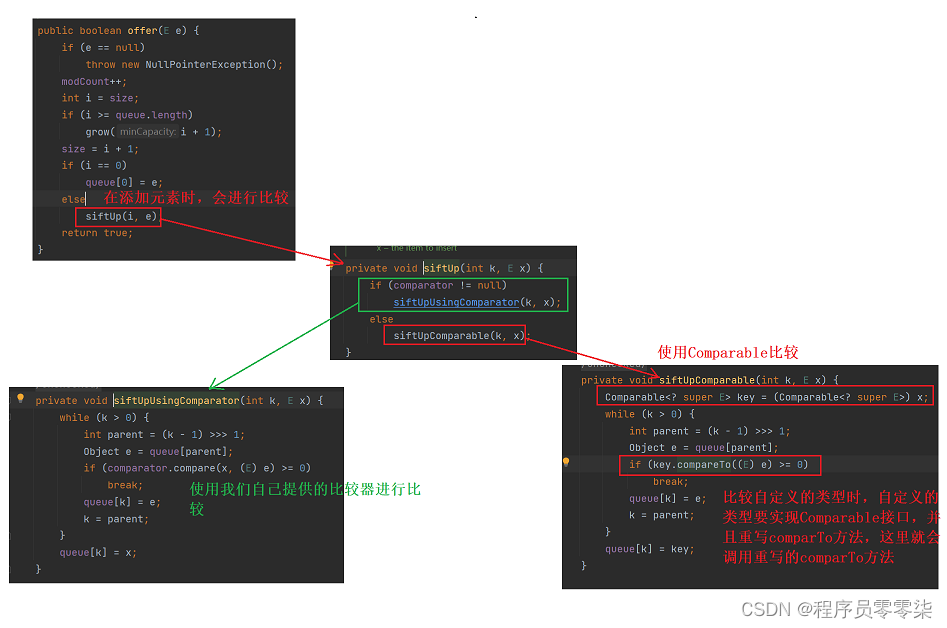
【数据结构】优先级队列(堆)
文章目录 💐1. 优先级队列1.1 概念 💐2.堆的概念及存储方式2.1 什么是堆2.2 为什么要用完全二叉树描述堆呢?2.3 为什么说堆是在完全二叉树的基础上进行的调整?2.4 使用数组还原完全二叉树 💐3. 堆的常用操作-模拟实现3…...
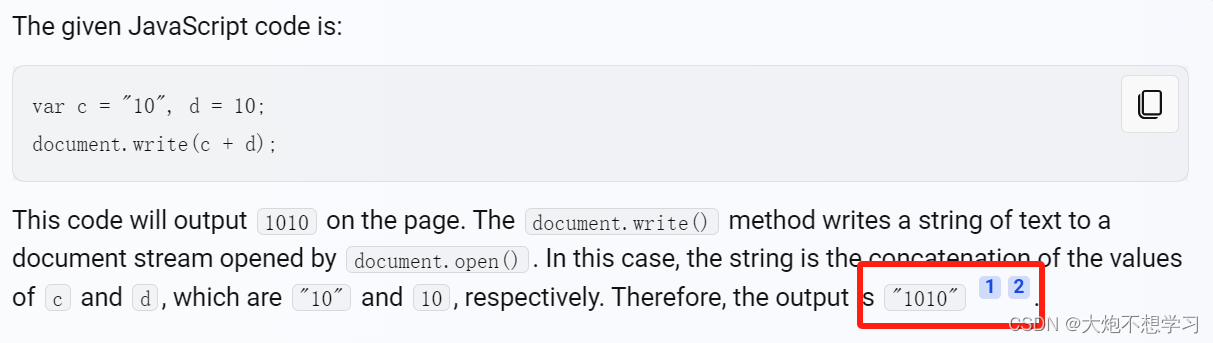
前端笔试2
1.下面哪一个是检验对象是否有一个以自身定义的属性? foo.hasOwnProperty("bar")bar in foo foo["bar"] ! undefinedfoo.bar ! null 解析: bar in foo 检查 foo 对象是否包含名为 bar 的属性,但是这个属性可以是从原型链继承来的&a…...

LeetCode:66.加一
66.加一 来源:力扣(LeetCode) 链接: https://leetcode.cn/problems/plus-one/description/ 给定一个由 整数 组成的 非空 数组所表示的非负整数,在该数的基础上加一。 最高位数字存放在数组的首位, 数组中每个元素只存储单个数字。 你可以假设除了整数 0 之外,这个整数…...

Redis 常用命令
目录 全局命令 1)keys 2)exists 3) del(delete) 4)expire 5)type SET命令 GET命令 MSET 和 MGET命令 其他SET命令 计数命令 redis-cli,进入redis 最核心的命令:我们这里只是先介绍 set 和 get 最简单的操作…...
用于字符和字符串的区别)
Integer.valueOf()用于字符和字符串的区别
LeetCode 17 电话号码的字母组合 先贴代码 class Solution {List<String> result new ArrayList<>();String temp new String("");Integer num;public List<String> letterCombinations(String digits) {dfs(digits, 0);return result;} publi…...
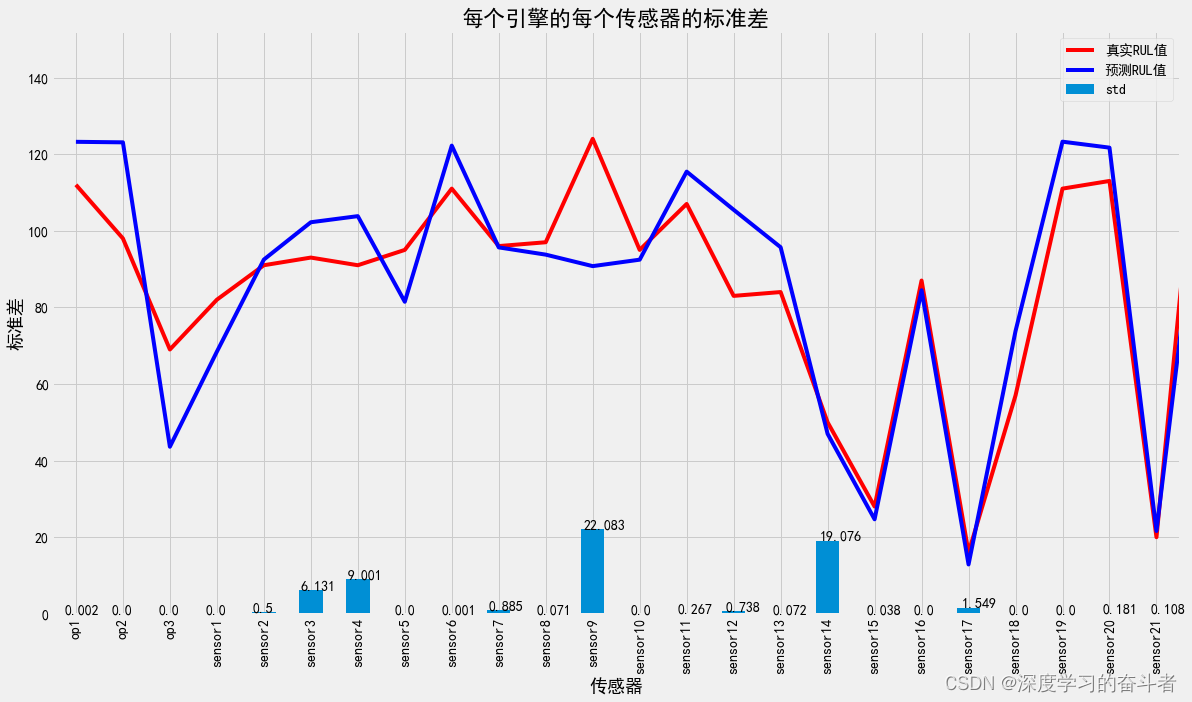
机械寿命预测(基于NASA C-MAPSS数据的剩余使用寿命RUL预测,Python代码,CNN_LSTM模型,有详细中文注释)
1.效果视频:机械寿命预测(NASA涡轮风扇发动机剩余使用寿命RUL预测,Python代码,CNN_LSTM模型,有详细中文注释)_哔哩哔哩_bilibili 环境库版本: 2.数据来源:https://www.nasa.gov/int…...
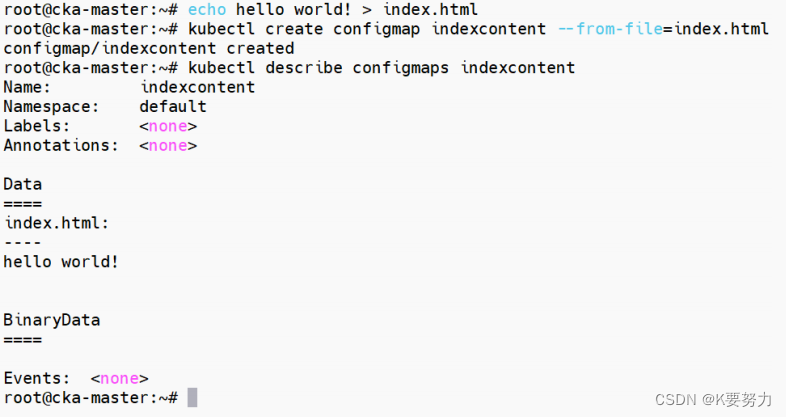
ConfigMaps-1
文章目录 主要内容一.使用 YAML 文件创建1.在data节点创建了一些键值:代码如下(示例): 2.解释 二.使用命令行创建1.创建了一个名为 person 的键值:代码如下(示例): 2.解释3.创建了一个 index.html 文件&…...

docker上安装es
安装docker 1 安装docker依赖 yum install -y yum-utils2 设置docker仓库镜像地址 yum-config-manager --add-repo http://mirrors.aliyun.com/docker-ce/linux/centos/docker-ce.repo3 安装制定版本的docker yum -y install docker-ce-20.10.17-3.el74 查看是否安装成功 y…...
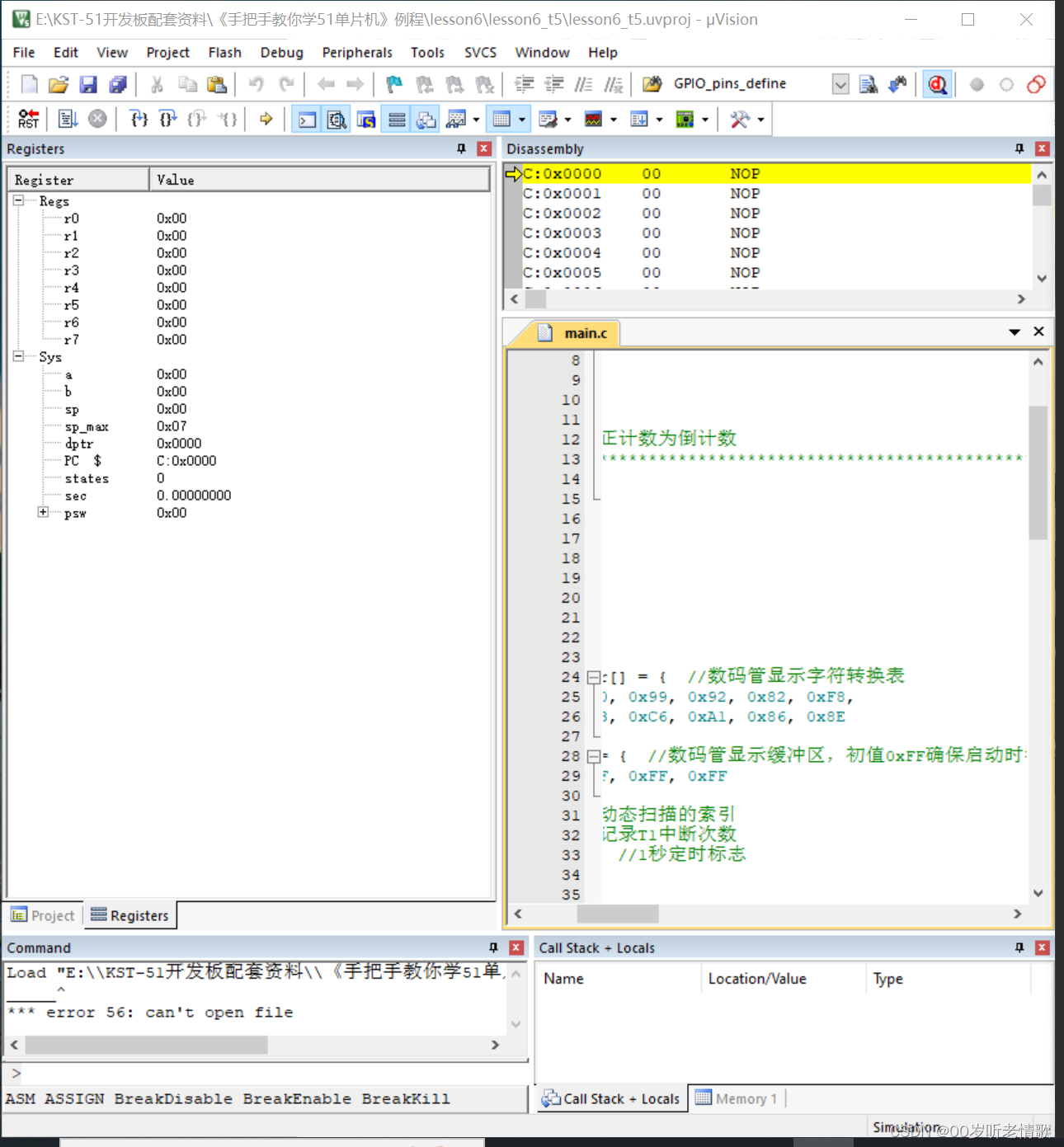
#循循渐进学51单片机#c语言基础和流水灯实现#not.3
1、熟练掌握二进制、十进制和十六进制的转换方法。 多少进制就是多少之间相加,比如十六进制就是十六一次一加;二进制转化十六进制,分成四个一组。 2、C语言变量类型与取值范围,for、while等基本语句的用法。 for、while等基本语句…...
算法刷题 week3
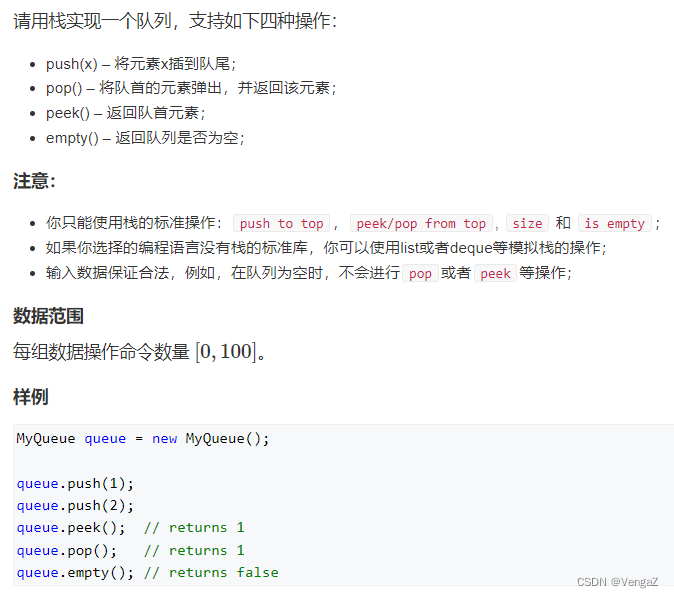
这里写目录标题 1.重建二叉树题目题解(递归) O(n) 2.二叉树的下一个节点题目题解(模拟) O(h) 3.用两个栈实现队列题目题解(栈,队列) O(n) 1.重建二叉树 题目 题解 (递归) O(n) 递归建立整棵二叉树:先递归创建左右子树,然后创建根节点&…...
TCP详解之流量控制
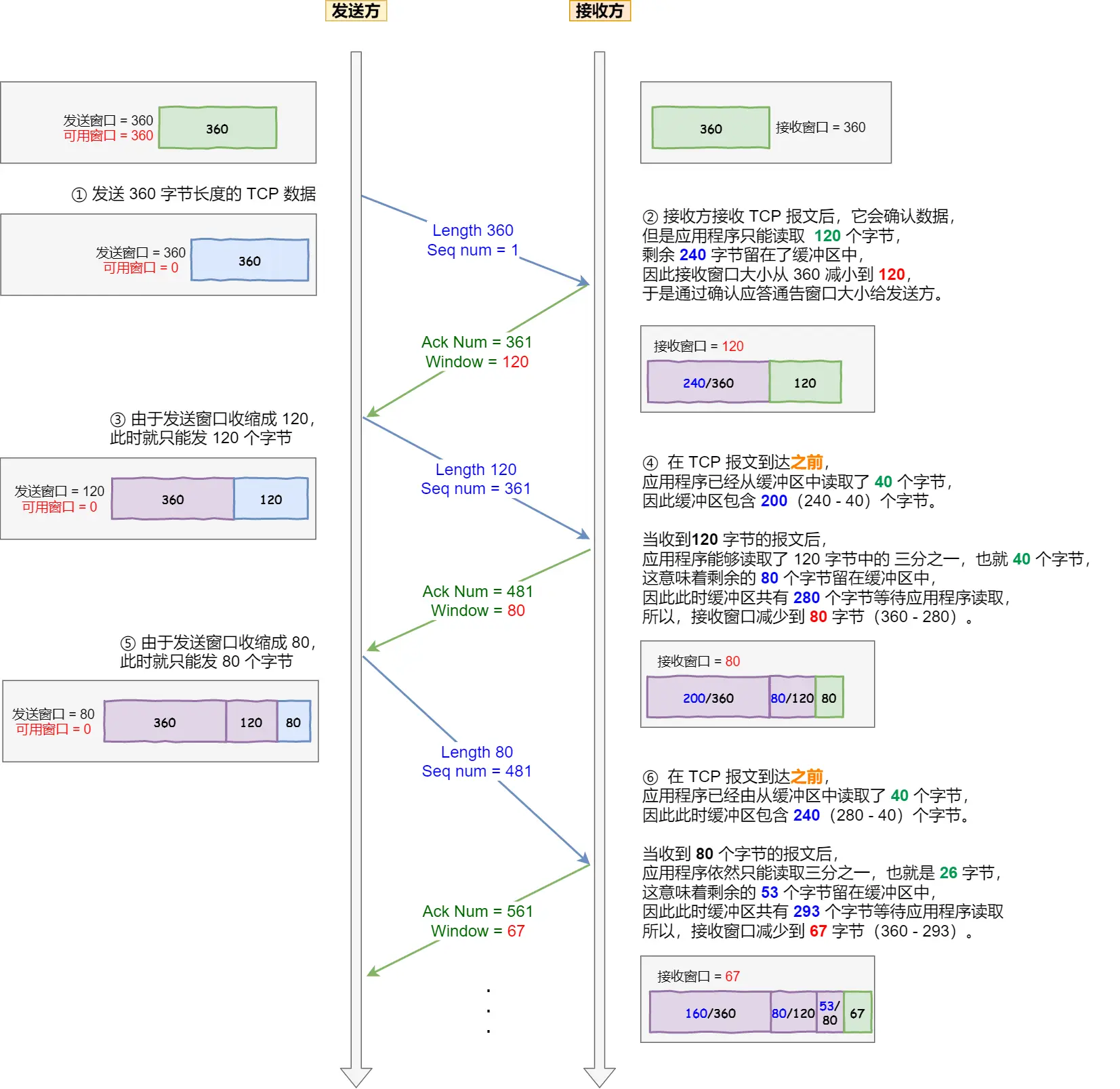
TCP详解之流量控制 发送方不能无脑的发数据给接收方,要考虑接收方处理能力。 如果一直无脑的发数据给对方,但对方处理不过来,那么就会导致触发重发机制,从而导致网络流量的无端的浪费。 为了解决这种现象发生,TCP 提…...

mac根目录下创建文件不能问题
mac根目录下创建文件不能问题 解决办法2: 原因 mac os引入了系统完整性保护(SIP)机制,无法在/、/usr目录下新建文件 解决办法1: 打开终端,输入 csrutil status显示enabled表示启用了SIP,接下来需要禁用SIP…...

Dify自定义工具服务开发指南:独立部署与AI应用扩展实践
1. 项目概述:一个为Dify打造的定制化工具服务最近在折腾AI应用开发平台Dify时,发现虽然它内置的工具(Tools)生态已经挺丰富了,但总有些特定场景下的需求,比如调用一个内部审批系统、查询某个私有数据库的特…...

Vui:轻量级对话语音合成模型的设计原理与本地部署实践
1. 项目概述:一个为对话而生的轻量级语音合成模型 如果你正在寻找一个能在本地设备上运行、能生成带呼吸声和笑声的真实对话语音的文本转语音模型,那么 Vui 很可能就是你需要的那个“小而美”的解决方案。作为一名长期关注边缘AI和语音技术的开发者&…...

毕业答辩 PPT,让 AI 替你打工:百考通 AI 如何帮你告别排版内耗与逻辑焦虑
又是一年毕业季,论文写完了,查重过了,导师点头了,你以为可以松口气了? 不,还有一座大山叫“答辩 PPT”。 曾经,我也以为 PPT 只是论文的“精简版”,复制粘贴就能搞定。直到我熬…...

3分钟掌握罗技鼠标宏:PUBG自动压枪脚本终极指南
3分钟掌握罗技鼠标宏:PUBG自动压枪脚本终极指南 【免费下载链接】logitech-pubg PUBG no recoil script for Logitech gaming mouse / 绝地求生 罗技 鼠标宏 项目地址: https://gitcode.com/gh_mirrors/lo/logitech-pubg 还在为《绝地求生》中难以控制的枪械…...

Poppins字体:如何用一款免费字体搞定多语言设计难题?
Poppins字体:如何用一款免费字体搞定多语言设计难题? 【免费下载链接】Poppins Poppins, a Devanagari Latin family for Google Fonts. 项目地址: https://gitcode.com/gh_mirrors/po/Poppins 还在为多语言项目寻找合适的字体而烦恼吗ÿ…...

避坑指南:SuperMap iServer 跨版本升级时,备份恢复配置文件必须注意的3个细节
SuperMap iServer跨版本升级:配置文件备份恢复的三大关键策略 当技术团队准备将SuperMap iServer从10i版本升级到11i时,最容易被忽视却最致命的环节莫过于配置文件的处理。许多工程师习惯性地将旧版本备份包直接恢复到新环境,结果遭遇服务启动…...

GPT-5.5推理效率优化背后的5个核心技术突破
概要GPT-5.5是OpenAI于2026年4月23日发布的旗舰模型,代号"Spud"。最近在库拉(c.877ai.cn)AI工具聚合平台上做了集中测试,GPT-5.5的推理效率提升不是单一优化的结果,而是五个核心技术方向同时突破。从数据看&…...

为Claude Code配置Taotoken解决账号被封与Token不足的烦恼
🚀 告别海外账号与网络限制!稳定直连全球优质大模型,限时半价接入中。 👉 点击领取海量免费额度 为Claude Code配置Taotoken解决账号被封与Token不足的烦恼 对于依赖Claude Code进行编程辅助的开发者来说,直接使用官方…...

零基础避坑指南什么工具可以录音转待办
还在手动把面试录音扒成文字再摘待办?做HR的谁没踩过这个坑:整理一小时,漏了候选人关键信息,还把待办记错,今天直接讲能直接上手的方法,零基础也不会踩坑。我做HR那几年,光整理录音待办就熬了无…...

机器人伦理工程化:从道德困境到可解释决策系统的技术实现
1. 项目概述:当机器人需要做出道德抉择十年前,当我在实验室里调试一台协作机器人的碰撞检测算法时,一个从未预想过的问题出现了:在一条狭窄的通道里,机器人的移动路径上同时出现了一位匆忙的工程师和一个价值百万的实验…...