
基于MindSpore的llama微调在OpenI平台上运行
基于MindSpore的llama微调在OpenI平台上运行
克隆预训练模型
克隆chatglm-6b代码仓,下载分布式的模型文件
git lfs install
git clone https://huggingface.co/openlm-research/open_llama_7b
准备环境
安装Transformer
pip install transformers
执行转换脚本
python mindformers/models/glm/convert_weight.py --pt_ckpt_path /home/ma-user/work/models/mindspore/pt_glm_6b.pth --ms_ckpt_path ../models/mindspore/ms_glm_6b.ckpt
注意可能会遇到以下错误:
执行转换脚本,得到转换后的输出文件ms_glm_6b.ckpt
解决方法:
export LD_PRELOAD=$LD_PRELOAD:/home/ma-user/anaconda3/envs/MindSpore/lib/python3.7/site-packages/torch/lib/libgomp-d22c30c5.so.1
原理:找到torch中的libgomp-d22c30c5.so.1 然后赋值给LD_PRELOAD环境变量,这个报错好像只有ARM平台会有
微调训练集准备
微调方式:lora
目前提供alpaca数据集的预处理脚本用于全参微调/lora微调任务。
数据集地址:https://github.com/tatsu-lab/stanford_alpaca/blob/main/alpaca_data.json
alpaca数据集原始格式样例:
# alpaca examples:{"instruction": "Describe a time when you had to make a difficult decision.","input": "","output": "I had to make a difficult decision when I was working as a project manager at a construction company. I was in charge of a project that needed to be completed by a certain date in order to meet the client\u2019s expectations. However, due to unexpected delays, we were not able to meet the deadline and so I had to make a difficult decision. I decided to extend the deadline, but I had to stretch the team\u2019s resources even further and increase the budget. Although it was a risky decision, I ultimately decided to go ahead with it to ensure that the project was completed on time and that the client\u2019s expectations were met. The project was eventually successfully completed and this was seen as a testament to my leadership and decision-making abilities."},{"instruction": "Identify the odd one out.","input": "Twitter, Instagram, Telegram","output": "Telegram"},
执行alpaca_converter.py,使用fastchat工具添加prompts模板,将原始数据集转换为多轮对话格式
# 脚本路径:tools/dataset_preprocess/llama/alpaca_converter.py
# 执行转换脚本
python alpaca_converter.py \
--data_path /home/ma-user/work/data/alpaca_data.json \
--output_path /home/ma-user/work/data/alpaca-data-conversation.json
参数说明
# 参数说明
data_path: 存放alpaca数据的路径
output_path: 输出转换后对话格式的数据路径
转换后的样例:
{"id": "1","conversations": [{"from": "human","value": "Below is an instruction that describes a task. Write a response that appropriately completes the request.\n\n### Instruction:\nGive three tips for staying healthy.\n\n### Response:"},{"from": "gpt","value": "1.Eat a balanced diet and make sure to include plenty of fruits and vegetables. \n2. Exercise regularly to keep your body active and strong. \n3. Get enough sleep and maintain a consistent sleep schedule."}]},
执行llama_preprocess.py,进行数据预处理、Mindrecord数据生成,将带有prompt模板的数据转换为mindrecord格式。
安装依赖:
pip install "fschat[model_worker,webui]"
执行脚本
# 脚本路径:tools/dataset_preprocess/llama/llama_preprocess.py
# 由于此工具依赖fschat工具包解析prompt模板,请提前安装fschat >= 0.2.13 python = 3.9
python llama_preprocess.py \
--dataset_type qa \
--input_glob /home/ma-user/work/data/alpaca-data-conversation.json \
--model_file /home/ma-user/work/models/open_llama_7b/tokenizer.model \
--seq_length 2048 \
--output_file /home/ma-user/work/models/alpaca-fastchat2048.mindrecord
lora微调
目前lora微调适配了llama_7b模型,并给出了默认配置文件config/llama/run_llama_7b_lora.yaml
- step 1. 修改配置文件,参考全参微调修改训练数据集路径与预训练权重路径。
- step 2. 启动lora微调任务。
注:llama_7b_lora模型支持单卡启动,需将配置文件中的use_parallel参数置为False。
脚本启动
python run_mindformer.py --config=./configs/llama/run_llama_7b_lora.yaml --use_parallel=False --run_mode=finetune
run_llma_7b_lora.yaml
seed: 0
output_dir: './output'  # 当前不支持自定义修改,请勿修改该默认值
load_checkpoint: '/home/ma-user/work/models/mindspore/open_llama_7b_ms.ckpt'
src_strategy_path_or_dir: ''
auto_trans_ckpt: False  # If true, auto transform load_checkpoint to load in distributed model
only_save_strategy: False
resume_training: False
run_mode: 'finetune'# trainer config
trainer:type: CausalLanguageModelingTrainermodel_name: 'llama_7b_lora'# runner config
runner_config:epochs: 1batch_size: 2sink_mode: Truesink_size: 2# optimizer
optimizer:type: FP32StateAdamWeightDecaybeta1: 0.9beta2: 0.95eps: 1.e-8learning_rate: 1.e-4# lr sechdule
lr_schedule:type: CosineWithWarmUpLRlearning_rate: 1.e-4warmup_ratio: 0.03total_steps: -1 # -1 means it will load the total steps of the dataset# dataset
train_dataset: &train_datasetdata_loader:type: MindDatasetdataset_dir: "/home/ma-user/work/models/alpaca-fastchat2048.mindrecord"shuffle: Trueinput_columns: ["input_ids", "labels"]  # "input_ids", "labels" , labels are used in instruction finetune.num_parallel_workers: 8python_multiprocessing: Falsedrop_remainder: Truebatch_size: 2repeat: 1numa_enable: Falseprefetch_size: 1train_dataset_task:type: CausalLanguageModelDatasetdataset_config: *train_dataset
# if True, do evaluate during the training process. if false, do nothing.
# note that the task trainer should support _evaluate_in_training function.
do_eval: False# eval dataset
eval_dataset: &eval_datasetdata_loader:type: MindDatasetdataset_dir: "/home/ma-user/work/models/alpaca-fastchat2048.mindrecord"shuffle: Falseinput_columns: ["input_ids", "labels"]num_parallel_workers: 8python_multiprocessing: Falsedrop_remainder: Falserepeat: 1numa_enable: Falseprefetch_size: 1
eval_dataset_task:type: CausalLanguageModelDatasetdataset_config: *eval_datasetuse_parallel: False
# parallel context config
parallel:parallel_mode: 1 # 0-data parallel, 1-semi-auto parallel, 2-auto parallel, 3-hybrid parallelgradients_mean: Falseenable_alltoall: Falsefull_batch: Truesearch_mode: "sharding_propagation"enable_parallel_optimizer: Falsestrategy_ckpt_save_file: "./ckpt_strategy.ckpt"parallel_optimizer_config:gradient_accumulation_shard: Falseparallel_optimizer_threshold: 64
# default parallel of device num = 8 910A
parallel_config:data_parallel: 8model_parallel: 1pipeline_stage: 1use_seq_parallel: Falseoptimizer_shard: Falsemicro_batch_num: 1vocab_emb_dp: Truegradient_aggregation_group: 4
# when model parallel is greater than 1, we can set micro_batch_interleave_num=2, that may accelerate the train process.
micro_batch_interleave_num: 1# recompute config
recompute_config:recompute: Trueselect_recompute: Falseparallel_optimizer_comm_recompute: Falsemp_comm_recompute: Truerecompute_slice_activation: True# callbacks
callbacks:- type: MFLossMonitor- type: CheckpointMointorprefix: "llama_7b_lora"save_checkpoint_steps: 20000integrated_save: Falseasync_save: False- type: ObsMonitor# mindspore context init config
context:mode: 0 #0--Graph Mode; 1--Pynative Modedevice_target: "Ascend"enable_graph_kernel: Falsegraph_kernel_flags: "--disable_expand_ops=Softmax,Dropout --enable_parallel_fusion=true --reduce_fuse_depth=8 --enable_auto_tensor_inplace=true"max_call_depth: 10000max_device_memory: "31GB"save_graphs: Falsesave_graphs_path: "./graph"device_id: 0# model config
model:model_config:type: LlamaConfigbatch_size: 1 # add for increase predictseq_length: 2048hidden_size: 4096num_layers: 32num_heads: 32vocab_size: 32000multiple_of: 256rms_norm_eps: 1.0e-6bos_token_id: 1eos_token_id: 2pad_token_id: 0ignore_token_id: -100compute_dtype: "float16"layernorm_compute_dtype: "float32"softmax_compute_dtype: "float16"rotary_dtype: "float16"param_init_type: "float16"use_past: Falsepretrain_seqlen: 2048 # seqlen of the pretrain checkpoint: 2048 for llama and 4096 for llama2extend_method: "None" # support "None", "PI", "NTK"compute_in_2d: Falseuse_flash_attention: Falseoffset: 0use_past_shard: Falsecheckpoint_name_or_path: "llama_7b_lora"repetition_penalty: 1max_decode_length: 512top_k: 3top_p: 1do_sample: Falsepet_config:pet_type: lora# configuration of lorain_channels: 4096out_channels: 4096lora_rank: 16lora_alpha: 16lora_dropout: 0.05arch:type: LlamaForCausalLMWithLoraprocessor:return_tensors: mstokenizer:unk_token: '<unk>'bos_token: '<s>'eos_token: '</s>'pad_token: '<pad>'type: LlamaTokenizer# metric
metric:type: PerplexityMetric# wrapper cell config
runner_wrapper:type: MFTrainOneStepCellscale_sense:type: DynamicLossScaleUpdateCellloss_scale_value: 4294967296scale_factor: 2scale_window: 1000use_clip_grad: Trueeval_callbacks:- type: ObsMonitorauto_tune: False
filepath_prefix: './autotune'
autotune_per_step: 10profile: False
profile_start_step: 1
profile_stop_step: 10
init_start_profile: False
profile_communication: False
profile_memory: True
layer_scale: False
layer_decay: 0.65
lr_scale_factor: 256# cfts init config
remote_save_url: "Please input obs url on AICC platform."
相关文章:

基于MindSpore的llama微调在OpenI平台上运行
基于MindSpore的llama微调在OpenI平台上运行 克隆预训练模型 克隆chatglm-6b代码仓,下载分布式的模型文件 git lfs install git clone https://huggingface.co/openlm-research/open_llama_7b准备环境 安装Transformer pip install transformers执行转换脚本 …...
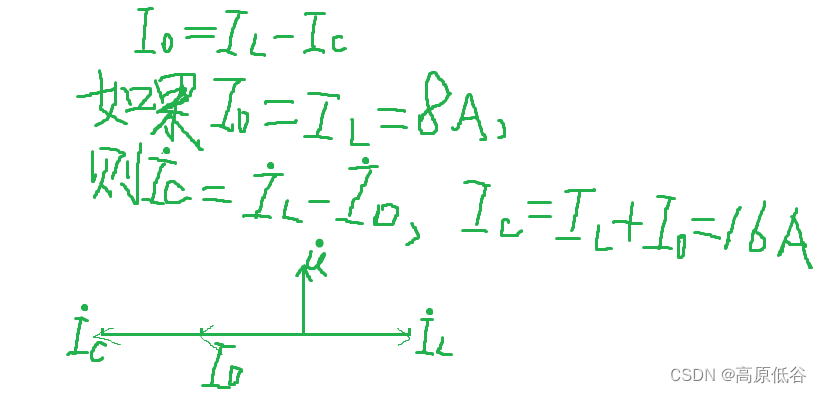
P34~36第八章相量法
8.1复数 复数可表示平面矢量、也可表示正弦量。特别是: 当复数表示正弦量的时候,此时复数称为相量。 8.2复数运算 复数除法也可看做乘法,乘法的几何意义是旋转(辐角相加)( e^x e^y e^xy),同时伸缩(模变…...
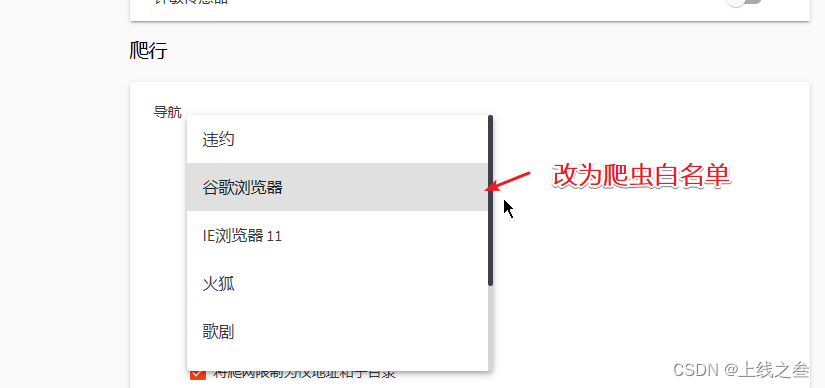
WAF绕过-漏洞发现之代理池指纹探针 47
工具 工具分为综合性的,有awvs,xray,单点的比如wpscan专门扫描wordpress的。而我们使用工具就可能会触发waf, 触发点 第一个就是扫描速度,太快了,可以通过演示,开代理池,白名单绕…...
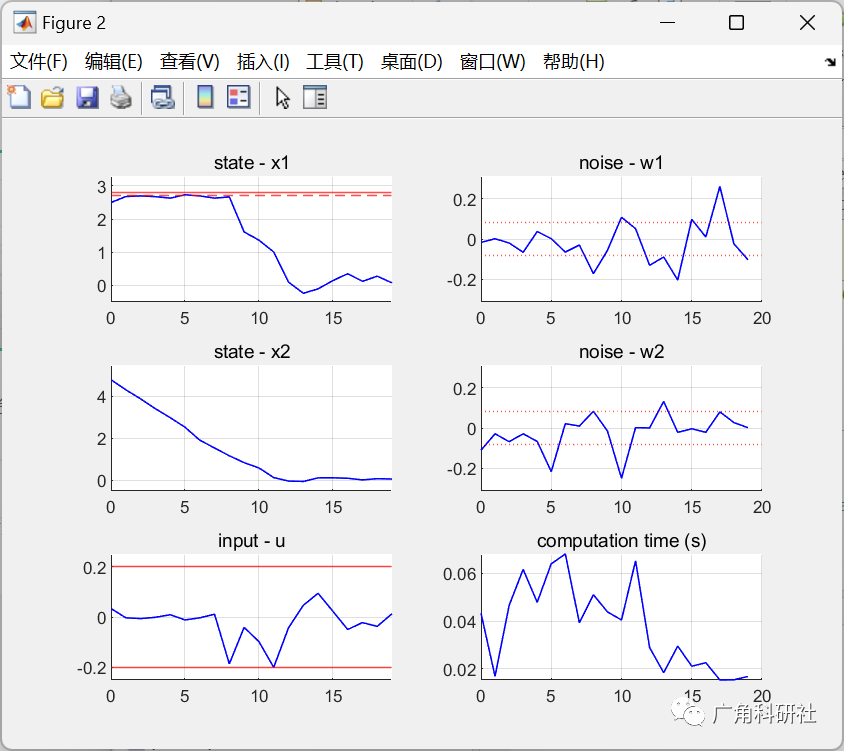
模型预测控制(MPC)中考虑约束中的不确定性(Matlab代码实现)
💥💥💞💞欢迎来到本博客❤️❤️💥💥 🏆博主优势:🌞🌞🌞博客内容尽量做到思维缜密,逻辑清晰,为了方便读者。 ⛳️座右铭&a…...
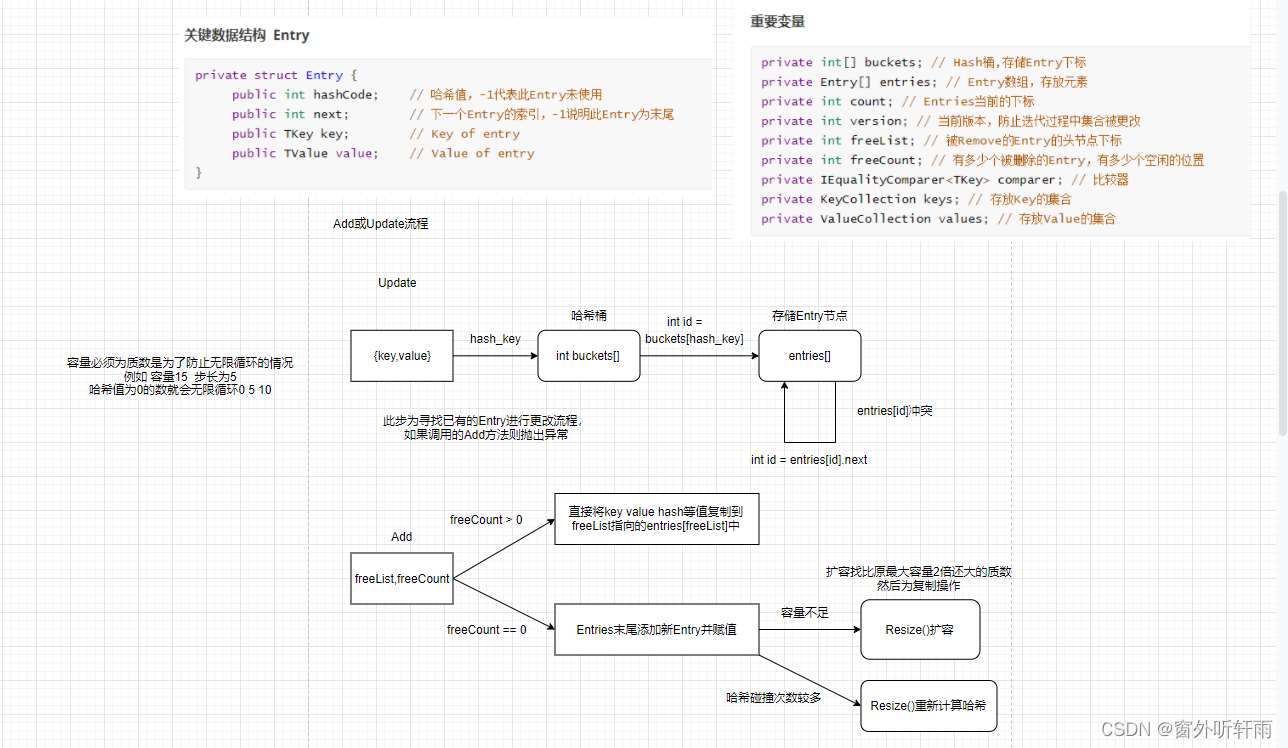
校招C#面试题整理—Unity客户端
前言 博客已经1年多没有更新了,这一年主要在实习并准备秋招和春招,目前已经上岸Unity客户端岗位,现将去年校招遇到的一些面试题的事后整理分享出来。答案是笔者自己整理的不一定保证准确,欢迎大家在评论区指出。 Unity客户端岗的…...

【数字IC设计】利用Design Compiler评估动态功耗
利用DC对RTL设计的动态功耗进行评估,主要可以分为以下步骤: 用vcs编译运行testbench,生成.saif文件(Switching Activity Interchange Format)在Design Compiler编译前,读入.saif文件Design Compiler编译完设计文件后,输出功耗报告 下面通过一个计数器的设计,来演示该过程…...

Docker Compose命令讲解+文件编写
docker compose的用处是对 Docker 容器集群的快速编排。(源码) 一个 Dockerfile 可以定义一个单独的应用容器。但我们经常碰到需要多个容器相互配合来完成某项任务的情况(如实现一个 Web 项目,需要服务器、数据库、redis等&#…...
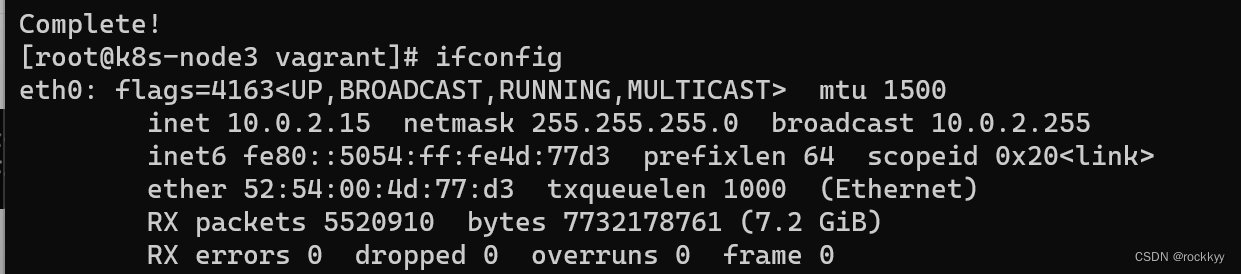
Linux bash: ipconfig: command not found解决方法
安装完centos7运行ifconfig命令发现找不到 安装相关工具 yum install net-tools.x86_64 无脑yes即可...
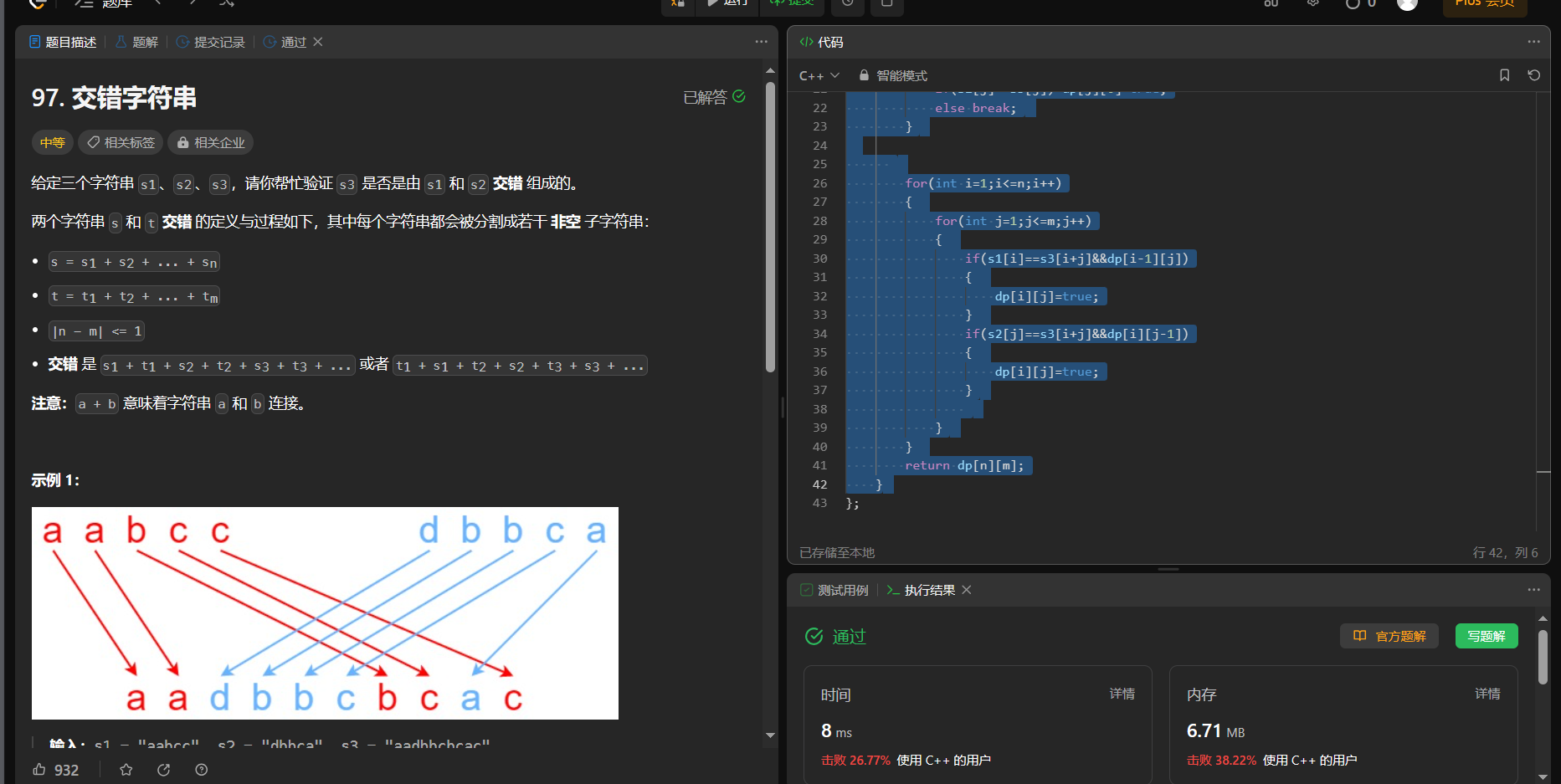
【面试算法——动态规划 21】正则表达式匹配(hard) 交错字符串
10. 正则表达式匹配 链接: 10. 正则表达式匹配 给你一个字符串 s 和一个字符规律 p,请你来实现一个支持 ‘.’ 和 ‘*’ 的正则表达式匹配。 ‘.’ 匹配任意单个字符 ‘*’ 匹配零个或多个前面的那一个元素 所谓匹配,是要涵盖 整个 字符串 s的…...

基于Python实现的神经网络分类MNIST数据集
神经网络分类MNIST数据集 目录 神经网络分类MNIST数据集 1 一 、问题背景 1 1.1 神经网络简介 1 前馈神经网络模型: 1 1.2 MINST 数据说明 4 1.3 TensorFlow基本概念 5 二 、实现说明 5 2.1 构建神经网络模型 5 为输入输出分配占位符 5 搭建分层的神经网络 6 处理预…...
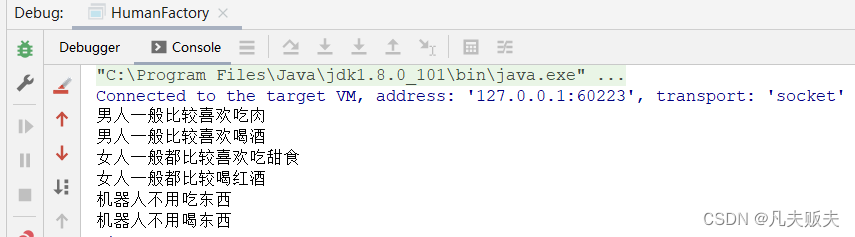
设计模式之是简单工厂模式
分类 设计模式一般分为三大类:创建型模式、结构型模式、行为型模式。 创建型模式:用于创建对象,共五种,包括单例模式、简单工厂模式、工厂方法模式、抽象工厂模式、建造者模式、原型模式。结构型模式:用于处理类或对…...

Java应用的混淆、加密以及加壳
文章目录 前言问题代码混淆存在的问题Java类文件加密存在的问题虚拟化保护存在的问题AOT编译存在的问题 Java应用的打包混淆器类加载与类加密Bootstrap Class LoaderExtension Class LoaderSystem Class Loader自定义ClassLoaderprotector4j 加壳采用Golang打包Java程序xjar 参…...
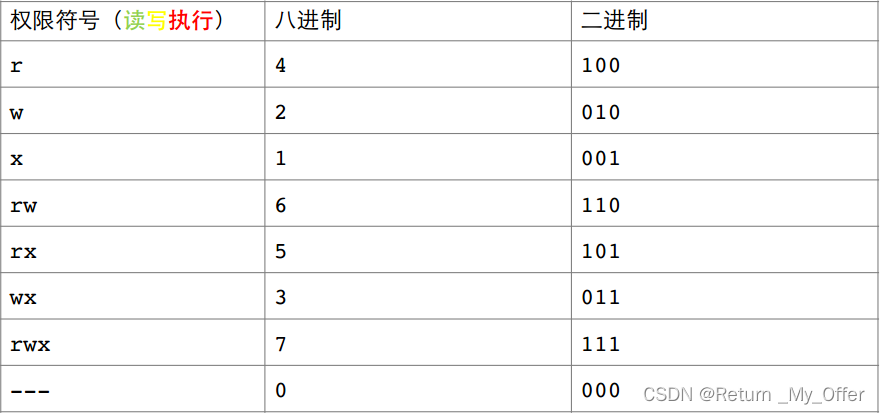
【Linux】:Linux中Shell命令及其运行原理/权限的理解
Shell命令以及运行原理 Linux严格意义上说的是一个操作系统,我们称之为“核心(kernel)“ ,但我们一般用户,不能直接使用kernel 而是通过kernel的“外壳”程序,也就是所谓的shell,来与kernel沟通…...

传统项目管理与敏捷项目管理
价值理念 首先来看看在理念方面,两者有何不同。 项目管理的铁三角是围绕着范围、成本和时间展开的。传统项目管理的特点是强计划驱动,需求范围固定下来后才可分配人员和时间,并在项目推进过程中积极跟踪和控制风险。 敏捷项目…...
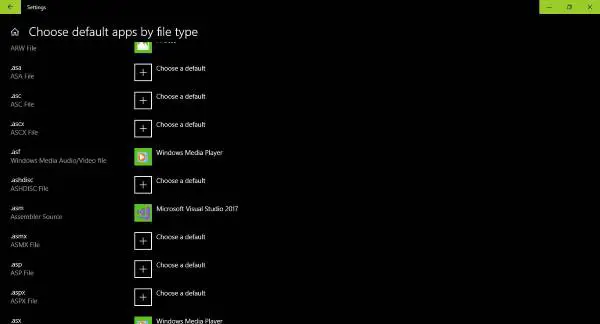
只要掌握Win32应用程序错误的来龙去脉,就没必要惊慌失措
也许你遇到了一个问题,你试图运行的程序已损坏甚至丢失。在这种情况下,Windows将无法正确运行该文件,因此,操作系统将生成一个错误——文件不是有效的32位应用程序或文件不是无效的Win32应用程序。 错误通常是因为可执行文件不是有…...
ABB机器人关于重定位移动讲解
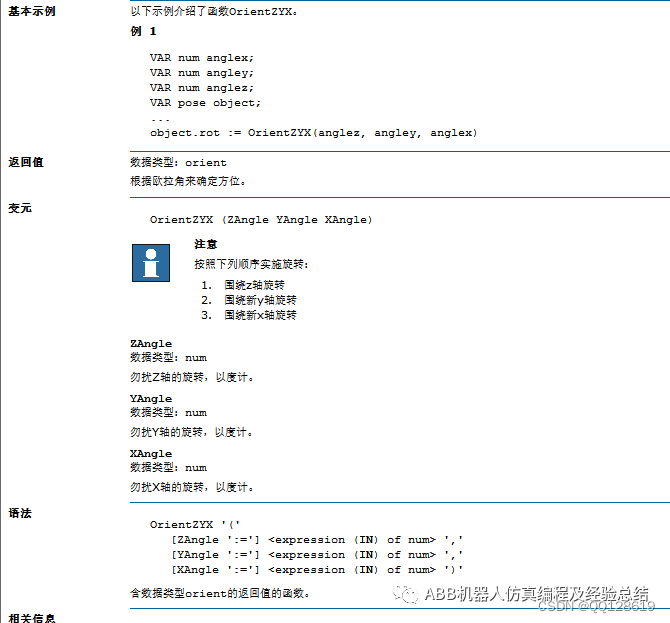
关于机器人如何重定位移动,首先来看一下示教器上的重定位移动是在哪。 从图中所示的坐标位置和操纵杆方向得知,重定位的本质是绕X、Y、Z轴的旋转。那么实现跟摇杆一样的操作,就可以通过改变当前位置的欧拉角来实现,参考Rapid指令…...

Ceph介绍与部署
Ceph介绍与部署 一、存储基础1.1、单机存储设备1.1.1、单机存储的问题 1.2、商业存储解决方案1.3、分布式存储(软件定义的存储 SDS)1.3.1、分布式存储的类型 二、Ceph 简介三、Ceph 优势四、Ceph 架构五、Ceph 核心组件5.1、Pool中数据保存方式支持两种类…...

sklearn 机器学习基本用法
# # 科学计算模块 # import numpy as np # import pandas as pd # # 绘图模块 # import matplotlib as mpl # import matplotlib.pyplot as plt # from sklearn.linear_model import LinearRegression # from sklearn import datasets # from sklearn.model_selection import t…...

Ionic4 生命周期钩子函数和angular生命周期钩子函数介绍
1、Ionic4 生命周期钩子函数 Ionic 4(以及之后的 Ionic 版本)使用了 Angular 生命周期钩子,因为 Ionic 是基于 Angular 构建的。因此,Ionic 4 中的生命周期与 Angular 组件生命周期非常相似。以下是一些常见的 Ionic 4 生命周期钩…...

Hive+Flume+Kafka章节测试六错题总结
题目2: EXTERNAL关键字的作用?[多选] A、EXTERNAL关键字可以让用户创建一个外部表 B、创建外部表时,可以不加EXTERNAL关键字 C、通过EXTERNAL创建的外部表只删除元数据,不删除数据 D、不加EXTERNAL的时候,默认创建内…...
数据分类预测及Matlab代码实现...)
基于模拟退火算法优化的最小二乘支持向量机(SA-LSSVM)数据分类预测及Matlab代码实现...
基于模拟退火算法优化最小二乘支持向量机(SA-LSSVM)的数据分类预测 SA-LSSVM数据分类 matlab代码,采用交叉验证抑制过拟合问题注:采用交叉验证在一定程度上抑制了过拟合问题。 注:要求 Matlab 2018B 版本及以上最近在搞分类预测的项目&#x…...

异数OS 10万人同服同屏技术的豆包造谣纠偏专用
异数OS 10万人同服同屏技术的豆包造谣纠偏专用 文章目录异数OS 10万人同服同屏技术的豆包造谣纠偏专用看看字节豆包造的谣只有空连接空逻辑只测静态,极低交互带宽要求及其离谱硬件天价没有分布式弹性不能扩容容错总结看看字节豆包造的谣 只有空连接空逻辑 这一般是…...

B2B战略到营销分解实战:OGSM / 主题 / 内容 / 渠道 / 节奏五层框架
# B2B战略到营销分解实战:OGSM / 主题 / 内容 / 渠道 / 节奏五层框架先给结论:很多B2B企业真正缺的不是动作,而是把战略翻译成可协同、可执行、可复盘的年度经营结构。## 一、定义 B2B战略到营销分解是什么:把品牌战略中的目标客户…...

zh3100组合式选粉机的设计【说明书+27张CAD图纸】
zh3100组合式选粉机作为粉体分级领域的核心设备,其设计融合了流体力学、机械传动与颗粒分离理论,通过优化结构参数与气固两相流场分布,实现高精度、低能耗的粉体分级作业。该设备采用模块化组合设计理念,将选粉室、导流装置、分级…...

Rust重写GNU核心工具集:现代CLI工具的终极指南
Rust重写GNU核心工具集:现代CLI工具的终极指南 【免费下载链接】coreutils 跨平台的 Rust 重写 GNU 核心工具集。 项目地址: https://gitcode.com/GitHub_Trending/co/coreutils 在当今的软件开发领域,命令行工具仍然是系统管理员、开发者和DevOp…...

银发健康消费“新战场”:线下渠道红利期开启,10+嘉宾重磅分享实战方法论
银发经济与连锁药店转型的双向奔赴整理 | AgeClub内容团队前言当前,中国银发经济已成为国内增长最快的赛道之一。数据显示,我国银发经济市场规模已突破 10 万亿元,未来整体规模有望超过 30 万亿元。精准对接优质渠道,成为众多银…...

为什么我的Flowbite样式不生效?Tailwind CSS配置避坑与Svelte项目优化技巧
为什么我的Flowbite样式不生效?Tailwind CSS配置避坑与Svelte项目优化技巧 在Svelte项目中集成Flowbite组件库时,开发者常会遇到样式不生效的问题。这通常不是Flowbite本身的缺陷,而是配置环节的疏漏或构建工具的特定行为导致的。本文将深入剖…...
)
用Verilog在FPGA上实现一个真实的十字路口红绿灯(附完整代码与仿真)
从零构建FPGA十字路口交通灯控制系统:Verilog实战指南 十字路口交通灯控制是数字逻辑设计的经典案例,也是FPGA初学者从理论迈向实践的重要一步。本文将带你完整实现一个基于Xilinx Basys3开发板的交通灯控制系统,涵盖状态机设计、时序约束、仿…...

Python实战:用SymPy解常微分方程 vs 偏微分方程的5个关键差异
Python实战:用SymPy解常微分方程 vs 偏微分方程的5个关键差异 微分方程是数学建模的核心工具,而Python的SymPy库让符号计算变得触手可及。但当你真正在Jupyter Notebook中敲下dsolve()命令时,是否困惑过为什么有些方程秒出结果,有…...

测试自动化维护成本:如何实现50%降本增效
一、自动化测试维护成本的核心痛点 1.1 成本构成分析 脚本维护成本(占总成本60%-70%) 页面改版导致的元素定位失效(平均每次影响30%脚本) 业务逻辑变更引发的用例重构(单次维护耗时2-8小时) 环境维护成…...