
24、Flink 的table api与sql之Catalogs(java api操作分区与函数、表)-4
Flink 系列文章
1、Flink 部署、概念介绍、source、transformation、sink使用示例、四大基石介绍和示例等系列综合文章链接
13、Flink 的table api与sql的基本概念、通用api介绍及入门示例
14、Flink 的table api与sql之数据类型: 内置数据类型以及它们的属性
15、Flink 的table api与sql之流式概念-详解的介绍了动态表、时间属性配置(如何处理更新结果)、时态表、流上的join、流上的确定性以及查询配置
16、Flink 的table api与sql之连接外部系统: 读写外部系统的连接器和格式以及FileSystem示例(1)
16、Flink 的table api与sql之连接外部系统: 读写外部系统的连接器和格式以及Elasticsearch示例(2)
16、Flink 的table api与sql之连接外部系统: 读写外部系统的连接器和格式以及Apache Kafka示例(3)
16、Flink 的table api与sql之连接外部系统: 读写外部系统的连接器和格式以及JDBC示例(4)
16、Flink 的table api与sql之连接外部系统: 读写外部系统的连接器和格式以及Apache Hive示例(6)
20、Flink SQL之SQL Client: 不用编写代码就可以尝试 Flink SQL,可以直接提交 SQL 任务到集群上
22、Flink 的table api与sql之创建表的DDL
24、Flink 的table api与sql之Catalogs(介绍、类型、java api和sql实现ddl、java api和sql操作catalog)-1
24、Flink 的table api与sql之Catalogs(java api操作数据库、表)-2
24、Flink 的table api与sql之Catalogs(java api操作视图)-3
24、Flink 的table api与sql之Catalogs(java api操作分区与函数)-4
26、Flink 的SQL之概览与入门示例
27、Flink 的SQL之SELECT (select、where、distinct、order by、limit、集合操作和去重)介绍及详细示例(1)
27、Flink 的SQL之SELECT (SQL Hints 和 Joins)介绍及详细示例(2)
27、Flink 的SQL之SELECT (窗口函数)介绍及详细示例(3)
27、Flink 的SQL之SELECT (窗口聚合)介绍及详细示例(4)
27、Flink 的SQL之SELECT (Group Aggregation分组聚合、Over Aggregation Over聚合 和 Window Join 窗口关联)介绍及详细示例(5)
27、Flink 的SQL之SELECT (Top-N、Window Top-N 窗口 Top-N 和 Window Deduplication 窗口去重)介绍及详细示例(6)
27、Flink 的SQL之SELECT (Pattern Recognition 模式检测)介绍及详细示例(7)
29、Flink SQL之DESCRIBE、EXPLAIN、USE、SHOW、LOAD、UNLOAD、SET、RESET、JAR、JOB Statements、UPDATE、DELETE(1)
29、Flink SQL之DESCRIBE、EXPLAIN、USE、SHOW、LOAD、UNLOAD、SET、RESET、JAR、JOB Statements、UPDATE、DELETE(2)
30、Flink SQL之SQL 客户端(通过kafka和filesystem的例子介绍了配置文件使用-表、视图等)
32、Flink table api和SQL 之用户自定义 Sources & Sinks实现及详细示例
41、Flink之Hive 方言介绍及详细示例
42、Flink 的table api与sql之Hive Catalog
43、Flink之Hive 读写及详细验证示例
44、Flink之module模块介绍及使用示例和Flink SQL使用hive内置函数及自定义函数详细示例–网上有些说法好像是错误的
文章目录
- Flink 系列文章
- 五、Catalog API
- 4、分区操作
- 1)、官方示例
- 2)、API创建hive分区示例
- 1、maven依赖
- 2、代码
- 3、运行结果
- 5、函数操作
- 1)、官方示例
- 2)、API操作Function
- 1、maven依赖
- 2、代码
- 3、运行结果
- 6、表操作(补充)
- 1)、官方示例
- 2)、SQL创建hive表示例
- 1、maven依赖
- 2、代码
- 3、运行结果
- 3)、API创建hive表-普通表
- 1、maven依赖
- 2、代码
- 3、运行结果
- 4)、API创建hive表-流式表
- 1、maven依赖
- 2、代码
- 3、运行结果
- 5)、API创建hive表-分区表
- 1、maven依赖
- 2、代码
- 3、运行结果
- 6)、SQL创建hive表-带hive属性的表(分隔符、分区以及ORC存储)
- 1、maven依赖
- 2、代码
- 3、运行结果
本文简单介绍了通过java api或者SQL操作分区、函数以及表,特别是创建hive的表,通过6个示例进行说明 。
本文依赖flink和hive、hadoop集群能正常使用。
本文示例java api的实现是通过Flink 1.13.5版本做的示例,hive的版本是3.1.2,hadoop的版本是3.1.4。
五、Catalog API
4、分区操作
1)、官方示例
// create view
catalog.createPartition(new ObjectPath("mydb", "mytable"),new CatalogPartitionSpec(...),new CatalogPartitionImpl(...),false);// drop partition
catalog.dropPartition(new ObjectPath("mydb", "mytable"), new CatalogPartitionSpec(...), false);// alter partition
catalog.alterPartition(new ObjectPath("mydb", "mytable"),new CatalogPartitionSpec(...),new CatalogPartitionImpl(...),false);// get partition
catalog.getPartition(new ObjectPath("mydb", "mytable"), new CatalogPartitionSpec(...));// check if a partition exist or not
catalog.partitionExists(new ObjectPath("mydb", "mytable"), new CatalogPartitionSpec(...));// list partitions of a table
catalog.listPartitions(new ObjectPath("mydb", "mytable"));// list partitions of a table under a give partition spec
catalog.listPartitions(new ObjectPath("mydb", "mytable"), new CatalogPartitionSpec(...));// list partitions of a table by expression filter
catalog.listPartitions(new ObjectPath("mydb", "mytable"), Arrays.asList(epr1, ...));
2)、API创建hive分区示例
本示例旨在演示如何使用flink api创建hive的分区表,至于hive的分区表如何使用,请参考hive的相关专题。同时,修改分区、删除分区都比较简单不再赘述。
16、Flink 的table api与sql之连接外部系统: 读写外部系统的连接器和格式以及Apache Hive示例(6)
3、hive的使用示例详解-建表、数据类型详解、内部外部表、分区表、分桶表
1、maven依赖
此处使用的依赖与上示例一致,mainclass变成本示例的类,不再赘述。
具体打包的时候运行主类则需要视自己的运行情况决定是否修改。
2、代码
import java.util.Arrays;
import java.util.Collections;
import java.util.HashMap;
import java.util.List;
import java.util.Map;import org.apache.flink.streaming.api.environment.StreamExecutionEnvironment;
import org.apache.flink.table.api.DataTypes;
import org.apache.flink.table.api.Schema;
import org.apache.flink.table.api.bridge.java.StreamTableEnvironment;
import org.apache.flink.table.catalog.CatalogDatabase;
import org.apache.flink.table.catalog.CatalogDatabaseImpl;
import org.apache.flink.table.catalog.CatalogPartition;
import org.apache.flink.table.catalog.CatalogPartitionImpl;
import org.apache.flink.table.catalog.CatalogPartitionSpec;
import org.apache.flink.table.catalog.CatalogTable;
import org.apache.flink.table.catalog.Column;
import org.apache.flink.table.catalog.ObjectPath;
import org.apache.flink.table.catalog.ResolvedCatalogTable;
import org.apache.flink.table.catalog.ResolvedSchema;
import org.apache.flink.table.catalog.hive.HiveCatalog;
import org.apache.flink.table.factories.FactoryUtil;
import org.apache.flink.table.module.hive.HiveModule;/*** @author alanchan**/
public class TestHivePartitionByAPI {static final String TEST_COMMENT = "test table comment";static String databaseName = "viewtest_db";static String tableName1 = "t1";static String tableName2 = "t2";static boolean isGeneric = false;public static void main(String[] args) throws Exception {// 0、运行环境StreamExecutionEnvironment env = StreamExecutionEnvironment.getExecutionEnvironment();StreamTableEnvironment tenv = StreamTableEnvironment.create(env);// 1、创建数据库
//		catalog.createDatabase(db1, createDb(), false);HiveCatalog hiveCatalog = init(tenv);// 2、创建分区表
//		catalog.createTable(path1, createPartitionedTable(), false);// 2.1 创建分区表 t1ObjectPath path1 = new ObjectPath(databaseName, tableName1);hiveCatalog.createTable(path1, createPartitionedTable(), false);// 2.21 创建分区表 t2,只有表名称不一致,体现不使用方法化的创建方式ObjectPath path2 = new ObjectPath(databaseName, tableName2);ResolvedSchema resolvedSchema = new ResolvedSchema(Arrays.asList(Column.physical("id", DataTypes.INT()), Column.physical("name", DataTypes.STRING()), Column.physical("age", DataTypes.INT())),Collections.emptyList(), null);//		   Schema schema,
//        @Nullable String comment,
//        List<String> partitionKeys,
//        Map<String, String> optionsCatalogTable origin = CatalogTable.of(Schema.newBuilder().fromResolvedSchema(resolvedSchema).build(), TEST_COMMENT, Arrays.asList("name", "age"),new HashMap<String, String>() {{put("streaming", "false");putAll(getGenericFlag(isGeneric));}});CatalogTable catalogTable = new ResolvedCatalogTable(origin, resolvedSchema);hiveCatalog.createTable(path2, catalogTable, false);// 3、断言
//		assertThat(catalog.listPartitions(path1)).isEmpty();// 3、创建分区// 3.1 创建分区方式1
//		catalog.createPartition(path1, createPartitionSpec(), createPartition(), false);
//		   ObjectPath tablePath,
//        CatalogPartitionSpec partitionSpec,
//        CatalogPartition partition,
//        boolean ignoreIfExistshiveCatalog.createPartition(path1, createPartitionSpec(), createPartition(), false);// 3.21 创建分区方式2hiveCatalog.createPartition(path2, new CatalogPartitionSpec(new HashMap<String, String>() {{put("name", "alan");put("age", "20");}}), new CatalogPartitionImpl(new HashMap<String, String>() {{put("streaming", "false");putAll(getGenericFlag(isGeneric));}}, TEST_COMMENT), false);System.out.println("path1 listPartitions:"+hiveCatalog.listPartitions(path1));System.out.println("path2 listPartitions:"+hiveCatalog.listPartitions(path2));System.out.println("path1 listPartitions:"+hiveCatalog.listPartitions(path1, createPartitionSpecSubset()));System.out.println("path2 listPartitions:"+hiveCatalog.listPartitions(path2, createPartitionSpecSubset()));//		assertThat(hiveCatalog.listPartitions(path1)).containsExactly(createPartitionSpec());
//		assertThat(catalog.listPartitions(path1, createPartitionSpecSubset())).containsExactly(createPartitionSpec());// 4、检查分区
//		CatalogTestUtil.checkEquals(createPartition(), catalog.getPartition(path1, createPartitionSpec()));//5、删除测试数据库
//		tenv.executeSql("drop database " + databaseName + " cascade");}private static HiveCatalog init(StreamTableEnvironment tenv) throws Exception {String moduleName = "myhive";String hiveVersion = "3.1.2";tenv.loadModule(moduleName, new HiveModule(hiveVersion));String name = "alan_hive";String defaultDatabase = "default";String hiveConfDir = "/usr/local/bigdata/apache-hive-3.1.2-bin/conf";HiveCatalog hiveCatalog = new HiveCatalog(name, defaultDatabase, hiveConfDir);tenv.registerCatalog(name, hiveCatalog);tenv.useCatalog(name);tenv.listDatabases();hiveCatalog.createDatabase(databaseName, new CatalogDatabaseImpl(new HashMap(), hiveConfDir) {}, true);//	tenv.executeSql("create database "+databaseName);tenv.useDatabase(databaseName);return hiveCatalog;}CatalogDatabase createDb() {return new CatalogDatabaseImpl(new HashMap<String, String>() {{put("k1", "v1");}}, TEST_COMMENT);}static CatalogTable createPartitionedTable() {final ResolvedSchema resolvedSchema = createSchema();final CatalogTable origin = CatalogTable.of(Schema.newBuilder().fromResolvedSchema(resolvedSchema).build(), TEST_COMMENT, createPartitionKeys(), getBatchTableProperties());return new ResolvedCatalogTable(origin, resolvedSchema);}static ResolvedSchema createSchema() {return new ResolvedSchema(Arrays.asList(Column.physical("id", DataTypes.INT()), Column.physical("name", DataTypes.STRING()), Column.physical("age", DataTypes.INT())),Collections.emptyList(), null);}static List<String> createPartitionKeys() {return Arrays.asList("name", "age");}static Map<String, String> getBatchTableProperties() {return new HashMap<String, String>() {{put("streaming", "false");putAll(getGenericFlag(isGeneric));}};}static Map<String, String> getGenericFlag(boolean isGeneric) {return new HashMap<String, String>() {{String connector = isGeneric ? "COLLECTION" : "hive";put(FactoryUtil.CONNECTOR.key(), connector);}};}static CatalogPartitionSpec createPartitionSpec() {return new CatalogPartitionSpec(new HashMap<String, String>() {{put("name", "alan");put("age", "20");}});}static CatalogPartitionSpec createPartitionSpecSubset() {return new CatalogPartitionSpec(new HashMap<String, String>() {{put("name", "alan");}});}static CatalogPartition createPartition() {return new CatalogPartitionImpl(getBatchTableProperties(), TEST_COMMENT);}
}
3、运行结果
- flink 运行结果
[alanchan@server2 bin]$ flink run  /usr/local/bigdata/flink-1.13.5/examples/table/table_sql-0.0.4-SNAPSHOT.jarpath1 listPartitions:[CatalogPartitionSpec{{name=alan, age=20}}]
path2 listPartitions:[CatalogPartitionSpec{{name=alan, age=20}}]
path1 listPartitions:[CatalogPartitionSpec{{name=alan, age=20}}]
path2 listPartitions:[CatalogPartitionSpec{{name=alan, age=20}}]- hive 查看表分区情况
0: jdbc:hive2://server4:10000> desc formatted t1;
+-------------------------------+----------------------------------------------------+-----------------------+
|           col_name            |                     data_type                      |        comment        |
+-------------------------------+----------------------------------------------------+-----------------------+
| # col_name                    | data_type                                          | comment               |
| id                            | int                                                |                       |
|                               | NULL                                               | NULL                  |
| # Partition Information       | NULL                                               | NULL                  |
| # col_name                    | data_type                                          | comment               |
| name                          | string                                             |                       |
| age                           | int                                                |                       |
|                               | NULL                                               | NULL                  |
| # Detailed Table Information  | NULL                                               | NULL                  |
| Database:                     | viewtest_db                                        | NULL                  |
| OwnerType:                    | USER                                               | NULL                  |
| Owner:                        | null                                               | NULL                  |
| CreateTime:                   | Tue Oct 17 10:43:55 CST 2023                       | NULL                  |
| LastAccessTime:               | UNKNOWN                                            | NULL                  |
| Retention:                    | 0                                                  | NULL                  |
| Location:                     | hdfs://HadoopHAcluster/user/hive/warehouse/viewtest_db.db/t1 | NULL                  |
| Table Type:                   | MANAGED_TABLE                                      | NULL                  |
| Table Parameters:             | NULL                                               | NULL                  |
|                               | bucketing_version                                  | 2                     |
|                               | comment                                            | test table comment    |
|                               | numFiles                                           | 0                     |
|                               | numPartitions                                      | 1                     |
|                               | numRows                                            | 0                     |
|                               | rawDataSize                                        | 0                     |
|                               | streaming                                          | false                 |
|                               | totalSize                                          | 0                     |
|                               | transient_lastDdlTime                              | 1697510635            |
|                               | NULL                                               | NULL                  |
| # Storage Information         | NULL                                               | NULL                  |
| SerDe Library:                | org.apache.hadoop.hive.serde2.lazy.LazySimpleSerDe | NULL                  |
| InputFormat:                  | org.apache.hadoop.mapred.TextInputFormat           | NULL                  |
| OutputFormat:                 | org.apache.hadoop.hive.ql.io.IgnoreKeyTextOutputFormat | NULL                  |
| Compressed:                   | No                                                 | NULL                  |
| Num Buckets:                  | -1                                                 | NULL                  |
| Bucket Columns:               | []                                                 | NULL                  |
| Sort Columns:                 | []                                                 | NULL                  |
| Storage Desc Params:          | NULL                                               | NULL                  |
|                               | serialization.format                               | 1                     |
+-------------------------------+----------------------------------------------------+-----------------------+
5、函数操作
1)、官方示例
// create function
catalog.createFunction(new ObjectPath("mydb", "myfunc"), new CatalogFunctionImpl(...), false);// drop function
catalog.dropFunction(new ObjectPath("mydb", "myfunc"), false);// alter function
catalog.alterFunction(new ObjectPath("mydb", "myfunc"), new CatalogFunctionImpl(...), false);// get function
catalog.getFunction("myfunc");// check if a function exist or not
catalog.functionExists("myfunc");// list functions in a database
catalog.listFunctions("mydb");
2)、API操作Function
通过api来操作函数,比如创建、修改删除以及查询等。
1、maven依赖
此处使用的依赖与上示例一致,mainclass变成本示例的类,不再赘述。
具体打包的时候运行主类则需要视自己的运行情况决定是否修改。
2、代码
import java.util.HashMap;import org.apache.flink.streaming.api.environment.StreamExecutionEnvironment;
import org.apache.flink.table.api.bridge.java.StreamTableEnvironment;
import org.apache.flink.table.catalog.CatalogDatabaseImpl;
import org.apache.flink.table.catalog.CatalogFunctionImpl;
import org.apache.flink.table.catalog.ObjectPath;
import org.apache.flink.table.catalog.hive.HiveCatalog;
import org.apache.flink.table.module.hive.HiveModule;
import org.apache.hadoop.hive.ql.udf.UDFRand;
import org.apache.hadoop.hive.ql.udf.generic.GenericUDFAbs;/*** @author alanchan**/
public class TestFunctionByAPI {static String databaseName = "viewtest_db";static String tableName1 = "t1";public static void main(String[] args) throws Exception {// 0、环境StreamExecutionEnvironment env = StreamExecutionEnvironment.getExecutionEnvironment();StreamTableEnvironment tenv = StreamTableEnvironment.create(env);// 1、创建数据库// catalog.createDatabase(db1, createDb(), false);HiveCatalog hiveCatalog = init(tenv);// 2、检查function是否存在ObjectPath path1 = new ObjectPath(databaseName, tableName1);System.out.println("function是否存在 :" + hiveCatalog.functionExists(path1));// 3、创建functionhiveCatalog.createFunction(path1, new CatalogFunctionImpl(GenericUDFAbs.class.getName()), false);System.out.println("function是否存在 :" + hiveCatalog.functionExists(path1));// 4、修改functionhiveCatalog.alterFunction(path1, new CatalogFunctionImpl(UDFRand.class.getName()), false);System.out.println("修改后的function是否存在 :" + hiveCatalog.functionExists(path1));System.out.println("查询function :" + hiveCatalog.getFunction(path1));System.out.println("function 列表 :" + hiveCatalog.listFunctions(databaseName));// 5、删除functionhiveCatalog.dropFunction(path1, false);System.out.println("function是否存在 :" + hiveCatalog.functionExists(path1));// 6、删除测试数据库// tenv.executeSql("drop database " + databaseName + " cascade");}private static HiveCatalog init(StreamTableEnvironment tenv) throws Exception {String moduleName = "myhive";String hiveVersion = "3.1.2";tenv.loadModule(moduleName, new HiveModule(hiveVersion));String name = "alan_hive";String defaultDatabase = "default";String hiveConfDir = "/usr/local/bigdata/apache-hive-3.1.2-bin/conf";HiveCatalog hiveCatalog = new HiveCatalog(name, defaultDatabase, hiveConfDir);tenv.registerCatalog(name, hiveCatalog);tenv.useCatalog(name);tenv.listDatabases();hiveCatalog.createDatabase(databaseName, new CatalogDatabaseImpl(new HashMap(), hiveConfDir) {}, true);tenv.useDatabase(databaseName);return hiveCatalog;}}
3、运行结果
[alanchan@server2 bin]$ flink run  /usr/local/bigdata/flink-1.13.5/examples/table/table_sql-0.0.5-SNAPSHOT.jarfunction是否存在 :false
function是否存在 :true
修改后的function是否存在 :true
查询function :CatalogFunctionImpl{className='org.apache.hadoop.hive.ql.udf.UDFRand', functionLanguage='JAVA', isGeneric='false'}
function 列表 :[t1]
function是否存在 :false
6、表操作(补充)
1)、官方示例
// create table
catalog.createTable(new ObjectPath("mydb", "mytable"), new CatalogTableImpl(...), false);// drop table
catalog.dropTable(new ObjectPath("mydb", "mytable"), false);// alter table
catalog.alterTable(new ObjectPath("mydb", "mytable"), new CatalogTableImpl(...), false);// rename table
catalog.renameTable(new ObjectPath("mydb", "mytable"), "my_new_table");// get table
catalog.getTable("mytable");// check if a table exist or not
catalog.tableExists("mytable");// list tables in a database
catalog.listTables("mydb");
2)、SQL创建hive表示例
1、maven依赖
此处使用的依赖与上示例一致,mainclass变成本示例的类,不再赘述。
具体打包的时候运行主类则需要视自己的运行情况决定是否修改。
2、代码
import java.util.HashMap;
import java.util.List;import org.apache.flink.streaming.api.environment.StreamExecutionEnvironment;
import org.apache.flink.table.api.SqlDialect;
import org.apache.flink.table.api.bridge.java.StreamTableEnvironment;
import org.apache.flink.table.catalog.CatalogDatabaseImpl;
import org.apache.flink.table.catalog.hive.HiveCatalog;
import org.apache.flink.table.module.hive.HiveModule;
import org.apache.flink.types.Row;
import org.apache.flink.util.CollectionUtil;/*** @author alanchan**/
public class TestCreateHiveTableBySQLDemo {static String databaseName = "viewtest_db";public static final String tableName = "alan_hivecatalog_hivedb_testTable";public static final String hive_create_table_sql = "CREATE  TABLE  " + tableName +  " (\n" + "  id INT,\n" + "  name STRING,\n" + "  age INT" + ") " + "TBLPROPERTIES (\n" + "  'sink.partition-commit.delay'='5 s',\n" + "  'sink.partition-commit.trigger'='partition-time',\n" + "  'sink.partition-commit.policy.kind'='metastore,success-file'" + ")";/*** @param args* @throws Exception*/public static void main(String[] args) throws Exception {// 0、运行环境StreamExecutionEnvironment env = StreamExecutionEnvironment.getExecutionEnvironment();StreamTableEnvironment tenv = StreamTableEnvironment.create(env);// 1、创建数据库HiveCatalog hiveCatalog = init(tenv);// 2、创建表tenv.getConfig().setSqlDialect(SqlDialect.HIVE);tenv.executeSql(hive_create_table_sql);// 3、插入数据String insertSQL = "insert into " + tableName + " values (1,'alan',18)";tenv.executeSql(insertSQL);// 4、查询数据List<Row> results = CollectionUtil.iteratorToList(tenv.executeSql("select * from " + tableName).collect());for (Row row : results) {System.out.println(tableName + ": " + row.toString());}// 5、删除数据库tenv.executeSql("drop database " + databaseName + " cascade");}private static HiveCatalog init(StreamTableEnvironment tenv) throws Exception {String moduleName = "myhive";String hiveVersion = "3.1.2";tenv.loadModule(moduleName, new HiveModule(hiveVersion));String name = "alan_hive";String defaultDatabase = "default";String hiveConfDir = "/usr/local/bigdata/apache-hive-3.1.2-bin/conf";HiveCatalog hiveCatalog = new HiveCatalog(name, defaultDatabase, hiveConfDir);tenv.registerCatalog(name, hiveCatalog);tenv.useCatalog(name);tenv.listDatabases();hiveCatalog.createDatabase(databaseName, new CatalogDatabaseImpl(new HashMap(), hiveConfDir) {}, true);tenv.useDatabase(databaseName);return hiveCatalog;}
}
3、运行结果
[alanchan@server2 bin]$ flink run  /usr/local/bigdata/flink-1.13.5/examples/table/table_sql-0.0.6-SNAPSHOT.jarHive Session ID = eb6579cd-befc-419b-8f95-8fd1e8e287e0
Hive Session ID = be12e47f-d611-4cc4-9be5-8e7628b7c90a
Job has been submitted with JobID 442b113232b8390394587b66b47aebbc
Hive Session ID = b8d772a8-a89d-4630-bbf1-fe5a3e301344
2023-10-17 07:23:31,244 INFO  org.apache.hadoop.mapred.FileInputFormat                     [] - Total input files to process : 0
Job has been submitted with JobID f24c2cc25fa3aba729fc8b27c3edf243
alan_hivecatalog_hivedb_testTable: +I[1, alan, 18]
Hive Session ID = 69fafc9c-f8c0-4f55-b689-5db196a94689
3)、API创建hive表-普通表
1、maven依赖
此处使用的依赖与上示例一致,mainclass变成本示例的类,不再赘述。
具体打包的时候运行主类则需要视自己的运行情况决定是否修改。
2、代码
import java.util.Arrays;
import java.util.Collections;
import java.util.HashMap;
import java.util.List;
import java.util.Map;import org.apache.flink.streaming.api.environment.StreamExecutionEnvironment;
import org.apache.flink.table.api.DataTypes;
import org.apache.flink.table.api.Schema;
import org.apache.flink.table.api.bridge.java.StreamTableEnvironment;
import org.apache.flink.table.catalog.CatalogBaseTable;
import org.apache.flink.table.catalog.CatalogDatabaseImpl;
import org.apache.flink.table.catalog.CatalogTable;
import org.apache.flink.table.catalog.Column;
import org.apache.flink.table.catalog.ObjectPath;
import org.apache.flink.table.catalog.ResolvedCatalogTable;
import org.apache.flink.table.catalog.ResolvedSchema;
import org.apache.flink.table.catalog.hive.HiveCatalog;
import org.apache.flink.table.factories.FactoryUtil;
import org.apache.flink.table.module.hive.HiveModule;
import org.apache.flink.types.Row;
import org.apache.flink.util.CollectionUtil;/*** @author alanchan**/
public class TestCreateHiveTableByAPIDemo {static String TEST_COMMENT = "test table comment";static String databaseName = "hive_db_test";static String tableName1 = "t1";static String tableName2 = "t2";/*** @param args* @throws Exception*/public static void main(String[] args) throws Exception {// 0、运行环境StreamExecutionEnvironment env = StreamExecutionEnvironment.getExecutionEnvironment();StreamTableEnvironment tenv = StreamTableEnvironment.create(env);// 1、创建数据库HiveCatalog hiveCatalog = init(tenv);// 2、创建表ObjectPath path1 = new ObjectPath(databaseName, tableName1);ResolvedSchema resolvedSchema = new ResolvedSchema(Arrays.asList(Column.physical("id", DataTypes.INT()), Column.physical("name", DataTypes.STRING()), Column.physical("age", DataTypes.INT())),Collections.emptyList(), null);CatalogTable origin = CatalogTable.of(Schema.newBuilder().fromResolvedSchema(resolvedSchema).build(), TEST_COMMENT, Collections.emptyList(), new HashMap<String, String>() {{put("is_streaming", "false");putAll(new HashMap<String, String>() {{put(FactoryUtil.CONNECTOR.key(), "hive");}});}});CatalogTable catalogTable = new ResolvedCatalogTable(origin, resolvedSchema);// 普通表hiveCatalog.createTable(path1, catalogTable, false);CatalogBaseTable tableCreated = hiveCatalog.getTable(path1);List<String> tables = hiveCatalog.listTables(databaseName);for (String table : tables) {System.out.println(" tableNameList : " + table);}// 3、插入数据String insertSQL = "insert into " + tableName1 + " values (1,'alan',18)";tenv.executeSql(insertSQL);// 4、查询数据List<Row> results = CollectionUtil.iteratorToList(tenv.executeSql("select * from " + tableName1).collect());for (Row row : results) {System.out.println(tableName1 + ": " + row.toString());}hiveCatalog.dropTable(path1, false);boolean tableExists = hiveCatalog.tableExists(path1);System.out.println("表是否drop成功:" + tableExists);// 5、删除数据库tenv.executeSql("drop database " + databaseName + " cascade");}private static HiveCatalog init(StreamTableEnvironment tenv) throws Exception {String moduleName = "myhive";String hiveVersion = "3.1.2";tenv.loadModule(moduleName, new HiveModule(hiveVersion));String name = "alan_hive";String defaultDatabase = "default";String hiveConfDir = "/usr/local/bigdata/apache-hive-3.1.2-bin/conf";HiveCatalog hiveCatalog = new HiveCatalog(name, defaultDatabase, hiveConfDir);tenv.registerCatalog(name, hiveCatalog);tenv.useCatalog(name);tenv.listDatabases();hiveCatalog.createDatabase(databaseName, new CatalogDatabaseImpl(new HashMap(), hiveConfDir) {}, true);// tenv.executeSql("create database "+databaseName);tenv.useDatabase(databaseName);return hiveCatalog;}}
3、运行结果
- flink 运行结果
[alanchan@server2 bin]$ flink run  /usr/local/bigdata/flink-1.13.5/examples/table/table_sql-0.0.7-SNAPSHOT.jartableNameList : t1
Job has been submitted with JobID b70b8c76fd3f05b9f949a47583596288
2023-10-17 09:01:19,320 INFO  org.apache.hadoop.mapred.FileInputFormat                     [] - Total input files to process : 0
Job has been submitted with JobID 34650c04d0a6fb32f7336f7ccc8b9090
t1: +I[1, alan, 18]
表是否drop成功:false- hive 表描述
下述结果是表和数据库没有删除的时候查询结果,也就是将上述示例中关于删除表和库的语句注释掉了。
0: jdbc:hive2://server4:10000> desc formatted t1;
+-------------------------------+----------------------------------------------------+-----------------------+
|           col_name            |                     data_type                      |        comment        |
+-------------------------------+----------------------------------------------------+-----------------------+
| # col_name                    | data_type                                          | comment               |
| id                            | int                                                |                       |
| name                          | string                                             |                       |
| age                           | int                                                |                       |
|                               | NULL                                               | NULL                  |
| # Detailed Table Information  | NULL                                               | NULL                  |
| Database:                     | hive_db_test                                       | NULL                  |
| OwnerType:                    | USER                                               | NULL                  |
| Owner:                        | null                                               | NULL                  |
| CreateTime:                   | Tue Oct 17 16:55:02 CST 2023                       | NULL                  |
| LastAccessTime:               | UNKNOWN                                            | NULL                  |
| Retention:                    | 0                                                  | NULL                  |
| Location:                     | hdfs://HadoopHAcluster/user/hive/warehouse/hive_db_test.db/t1 | NULL                  |
| Table Type:                   | MANAGED_TABLE                                      | NULL                  |
| Table Parameters:             | NULL                                               | NULL                  |
|                               | bucketing_version                                  | 2                     |
|                               | comment                                            | test table comment    |
|                               | streaming                                          | false                 |
|                               | transient_lastDdlTime                              | 1697532902            |
|                               | NULL                                               | NULL                  |
| # Storage Information         | NULL                                               | NULL                  |
| SerDe Library:                | org.apache.hadoop.hive.serde2.lazy.LazySimpleSerDe | NULL                  |
| InputFormat:                  | org.apache.hadoop.mapred.TextInputFormat           | NULL                  |
| OutputFormat:                 | org.apache.hadoop.hive.ql.io.IgnoreKeyTextOutputFormat | NULL                  |
| Compressed:                   | No                                                 | NULL                  |
| Num Buckets:                  | -1                                                 | NULL                  |
| Bucket Columns:               | []                                                 | NULL                  |
| Sort Columns:                 | []                                                 | NULL                  |
| Storage Desc Params:          | NULL                                               | NULL                  |
|                               | serialization.format                               | 1                     |
+-------------------------------+----------------------------------------------------+-----------------------+
4)、API创建hive表-流式表
1、maven依赖
此处使用的依赖与上示例一致,mainclass变成本示例的类,不再赘述。
具体打包的时候运行主类则需要视自己的运行情况决定是否修改。
2、代码
该示例与上述使用API创建hive表功能一样,仅仅表示了方法化和流式表的创建方式,运行结果也一样,不再赘述。
import java.util.Arrays;
import java.util.Collections;
import java.util.HashMap;
import java.util.List;
import java.util.Map;import org.apache.flink.streaming.api.environment.StreamExecutionEnvironment;
import org.apache.flink.table.api.DataTypes;
import org.apache.flink.table.api.Schema;
import org.apache.flink.table.api.bridge.java.StreamTableEnvironment;
import org.apache.flink.table.catalog.CatalogDatabaseImpl;
import org.apache.flink.table.catalog.CatalogTable;
import org.apache.flink.table.catalog.Column;
import org.apache.flink.table.catalog.ObjectPath;
import org.apache.flink.table.catalog.ResolvedCatalogTable;
import org.apache.flink.table.catalog.ResolvedSchema;
import org.apache.flink.table.catalog.hive.HiveCatalog;
import org.apache.flink.table.factories.FactoryUtil;
import org.apache.flink.table.module.hive.HiveModule;
import org.apache.flink.types.Row;
import org.apache.flink.util.CollectionUtil;/*** @author alanchan**/
public class TestCreateHiveTableByAPIDemo {static String TEST_COMMENT = "test table comment";static String databaseName = "hive_db_test";static String tableName1 = "t1";static String tableName2 = "t2";static ObjectPath path1 = new ObjectPath(databaseName, tableName1);/*** @param args* @throws Exception*/public static void main(String[] args) throws Exception {// 0、运行环境StreamExecutionEnvironment env = StreamExecutionEnvironment.getExecutionEnvironment();StreamTableEnvironment tenv = StreamTableEnvironment.create(env);// 1、创建数据库HiveCatalog hiveCatalog = init(tenv);// 2、创建表// 2.1、创建批处理表
//		testCreateTable_Batch(hiveCatalog);// 2.2、创建流式表testCreateTable_Streaming(hiveCatalog);// 3、插入数据String insertSQL = "insert into " + tableName1 + " values (1,'alan',18)";tenv.executeSql(insertSQL);// 4、查询数据List<Row> results = CollectionUtil.iteratorToList(tenv.executeSql("select * from " + tableName1).collect());for (Row row : results) {System.out.println(tableName1 + ": " + row.toString());}hiveCatalog.dropTable(path1, false);boolean tableExists = hiveCatalog.tableExists(path1);System.out.println("表是否drop成功:" + tableExists);// 5、删除数据库tenv.executeSql("drop database " + databaseName + " cascade");}/*** 初始化hivecatalog* * @param tenv* @return* @throws Exception*/private static HiveCatalog init(StreamTableEnvironment tenv) throws Exception {String moduleName = "myhive";String hiveVersion = "3.1.2";tenv.loadModule(moduleName, new HiveModule(hiveVersion));String name = "alan_hive";String defaultDatabase = "default";String hiveConfDir = "/usr/local/bigdata/apache-hive-3.1.2-bin/conf";HiveCatalog hiveCatalog = new HiveCatalog(name, defaultDatabase, hiveConfDir);tenv.registerCatalog(name, hiveCatalog);tenv.useCatalog(name);tenv.listDatabases();// tenv.executeSql("create database "+databaseName);hiveCatalog.createDatabase(databaseName, new CatalogDatabaseImpl(new HashMap(), hiveConfDir) {}, true);tenv.useDatabase(databaseName);return hiveCatalog;}/*** 创建流式表* * @param catalog* @throws Exception*/static void testCreateTable_Streaming(HiveCatalog catalog) throws Exception {CatalogTable table = createStreamingTable();catalog.createTable(path1, table, false);//		CatalogTestUtil.checkEquals(table, (CatalogTable) catalog.getTable(path1));}/*** 创建批处理表* * @param catalog* @throws Exception*/static void testCreateTable_Batch(HiveCatalog catalog) throws Exception {// Non-partitioned tableCatalogTable table = createBatchTable();catalog.createTable(path1, table, false);//		CatalogBaseTable tableCreated = catalog.getTable(path1);//		CatalogTestUtil.checkEquals(table, (CatalogTable) tableCreated);
//		assertThat(tableCreated.getDescription().isPresent()).isTrue();
//		assertThat(tableCreated.getDescription().get()).isEqualTo(TEST_COMMENT);//		List<String> tables = catalog.listTables(databaseName);//		assertThat(tables).hasSize(1);
//		assertThat(tables.get(0)).isEqualTo(path1.getObjectName());//		catalog.dropTable(path1, false);}/*** 创建流式表* * @return*/static CatalogTable createStreamingTable() {final ResolvedSchema resolvedSchema = createSchema();final CatalogTable origin = CatalogTable.of(Schema.newBuilder().fromResolvedSchema(resolvedSchema).build(), TEST_COMMENT, Collections.emptyList(),getStreamingTableProperties());return new ResolvedCatalogTable(origin, resolvedSchema);}/*** 创建批处理表* * @return*/static CatalogTable createBatchTable() {final ResolvedSchema resolvedSchema = createSchema();final CatalogTable origin = CatalogTable.of(Schema.newBuilder().fromResolvedSchema(resolvedSchema).build(), TEST_COMMENT, Collections.emptyList(),getBatchTableProperties());return new ResolvedCatalogTable(origin, resolvedSchema);}/*** 设置批处理表的属性* * @return*/static Map<String, String> getBatchTableProperties() {return new HashMap<String, String>() {{put("is_streaming", "false");putAll(new HashMap<String, String>() {{put(FactoryUtil.CONNECTOR.key(), "hive");}});}};}/*** 创建流式表的属性* * @return*/static Map<String, String> getStreamingTableProperties() {return new HashMap<String, String>() {{put("is_streaming", "true");putAll(new HashMap<String, String>() {{put(FactoryUtil.CONNECTOR.key(), "hive");}});}};}static ResolvedSchema createSchema() {return new ResolvedSchema(Arrays.asList(Column.physical("id", DataTypes.INT()), Column.physical("name", DataTypes.STRING()), Column.physical("age", DataTypes.INT())),Collections.emptyList(), null);}
}
3、运行结果
运行结果参考上述示例,运行结果一致。
5)、API创建hive表-分区表
1、maven依赖
此处使用的依赖与上示例一致,mainclass变成本示例的类,不再赘述。
具体打包的时候运行主类则需要视自己的运行情况决定是否修改。
2、代码
本示例没有加载数据,仅示例创建的分区表,并且是2重分区表。关于hive分区表的操作,请参考链接:
3、hive的使用示例详解-建表、数据类型详解、内部外部表、分区表、分桶表
import java.util.Arrays;
import java.util.Collections;
import java.util.HashMap;
import java.util.List;
import java.util.Map;import org.apache.flink.streaming.api.environment.StreamExecutionEnvironment;
import org.apache.flink.table.api.DataTypes;
import org.apache.flink.table.api.Schema;
import org.apache.flink.table.api.bridge.java.StreamTableEnvironment;
import org.apache.flink.table.catalog.CatalogDatabaseImpl;
import org.apache.flink.table.catalog.CatalogPartition;
import org.apache.flink.table.catalog.CatalogPartitionImpl;
import org.apache.flink.table.catalog.CatalogPartitionSpec;
import org.apache.flink.table.catalog.CatalogTable;
import org.apache.flink.table.catalog.Column;
import org.apache.flink.table.catalog.ObjectPath;
import org.apache.flink.table.catalog.ResolvedCatalogTable;
import org.apache.flink.table.catalog.ResolvedSchema;
import org.apache.flink.table.catalog.exceptions.CatalogException;
import org.apache.flink.table.catalog.exceptions.DatabaseNotExistException;
import org.apache.flink.table.catalog.exceptions.TableAlreadyExistException;
import org.apache.flink.table.catalog.hive.HiveCatalog;
import org.apache.flink.table.factories.FactoryUtil;
import org.apache.flink.table.module.hive.HiveModule;
import org.apache.flink.types.Row;
import org.apache.flink.util.CollectionUtil;/*** @author alanchan**/
public class TestCreateHiveTableByAPIDemo {static String TEST_COMMENT = "test table comment";static String databaseName = "hive_db_test";static String tableName1 = "t1";static String tableName2 = "t2";static ObjectPath path1 = new ObjectPath(databaseName, tableName1);/*** @param args* @throws Exception*/public static void main(String[] args) throws Exception {// 0、运行环境StreamExecutionEnvironment env = StreamExecutionEnvironment.getExecutionEnvironment();StreamTableEnvironment tenv = StreamTableEnvironment.create(env);// 1、创建数据库HiveCatalog hiveCatalog = init(tenv);// 2、创建表// 2.1、创建批处理表
//		testCreateTable_Batch(hiveCatalog);// 2.2、创建流式表
//		testCreateTable_Streaming(hiveCatalog);// 2.3、创建分区批处理表testCreatePartitionTable_Batch(hiveCatalog);// 2.4、创建带有hive属性的批处理表// 3、插入数据// 分区表不能如此操作,具体参考相关内容
//		String insertSQL = "insert into " + tableName1 + " values (1,'alan',18)";
//		tenv.executeSql(insertSQL);// 4、查询数据List<Row> results = CollectionUtil.iteratorToList(tenv.executeSql("select * from " + tableName1).collect());for (Row row : results) {System.out.println(tableName1 + ": " + row.toString());}hiveCatalog.dropTable(path1, false);boolean tableExists = hiveCatalog.tableExists(path1);System.out.println("表是否drop成功:" + tableExists);// 5、删除数据库tenv.executeSql("drop database " + databaseName + " cascade");}/*** 初始化hivecatalog* * @param tenv* @return* @throws Exception*/private static HiveCatalog init(StreamTableEnvironment tenv) throws Exception {String moduleName = "myhive";String hiveVersion = "3.1.2";tenv.loadModule(moduleName, new HiveModule(hiveVersion));String name = "alan_hive";String defaultDatabase = "default";String hiveConfDir = "/usr/local/bigdata/apache-hive-3.1.2-bin/conf";HiveCatalog hiveCatalog = new HiveCatalog(name, defaultDatabase, hiveConfDir);tenv.registerCatalog(name, hiveCatalog);tenv.useCatalog(name);tenv.listDatabases();// tenv.executeSql("create database "+databaseName);hiveCatalog.createDatabase(databaseName, new CatalogDatabaseImpl(new HashMap(), hiveConfDir) {}, true);tenv.useDatabase(databaseName);return hiveCatalog;}/*** 创建流式表* * @param catalog* @throws Exception*/static void testCreateTable_Streaming(HiveCatalog catalog) throws Exception {CatalogTable table = createStreamingTable();catalog.createTable(path1, table, false);//		CatalogTestUtil.checkEquals(table, (CatalogTable) catalog.getTable(path1));}/*** 创建批处理表* * @param catalog* @throws Exception*/static void testCreateTable_Batch(HiveCatalog catalog) throws Exception {// Non-partitioned tableCatalogTable table = createBatchTable();catalog.createTable(path1, table, false);//		CatalogBaseTable tableCreated = catalog.getTable(path1);//		CatalogTestUtil.checkEquals(table, (CatalogTable) tableCreated);
//		assertThat(tableCreated.getDescription().isPresent()).isTrue();
//		assertThat(tableCreated.getDescription().get()).isEqualTo(TEST_COMMENT);//		List<String> tables = catalog.listTables(databaseName);//		assertThat(tables).hasSize(1);
//		assertThat(tables.get(0)).isEqualTo(path1.getObjectName());//		catalog.dropTable(path1, false);}/*** * @param catalog* @throws DatabaseNotExistException* @throws TableAlreadyExistException* @throws CatalogException*/static void testCreatePartitionTable_Batch(HiveCatalog catalog) throws Exception {CatalogTable table = createPartitionedTable();catalog.createTable(path1, table, false);// 创建分区catalog.createPartition(path1, createPartitionSpec(), createPartition(), false);}/*** 创建分区表* * @return*/static CatalogTable createPartitionedTable() {final ResolvedSchema resolvedSchema = createSchema();final CatalogTable origin = CatalogTable.of(Schema.newBuilder().fromResolvedSchema(resolvedSchema).build(), TEST_COMMENT, createPartitionKeys(), getBatchTableProperties());return new ResolvedCatalogTable(origin, resolvedSchema);}/*** 创建分区键* * @return*/static List<String> createPartitionKeys() {return Arrays.asList("name", "age");}/*** 创建CatalogPartitionSpec。 Represents a partition spec object in catalog.* Partition columns and values are NOT of strict order, and they need to be* re-arranged to the correct order by comparing with a list of strictly ordered* partition keys.* * @return*/static CatalogPartitionSpec createPartitionSpec() {return new CatalogPartitionSpec(new HashMap<String, String>() {{put("name", "alan");put("age", "20");}});}static CatalogPartition createPartition() {return new CatalogPartitionImpl(getBatchTableProperties(), TEST_COMMENT);}/*** 创建流式表* * @return*/static CatalogTable createStreamingTable() {final ResolvedSchema resolvedSchema = createSchema();final CatalogTable origin = CatalogTable.of(Schema.newBuilder().fromResolvedSchema(resolvedSchema).build(), TEST_COMMENT, Collections.emptyList(),getStreamingTableProperties());return new ResolvedCatalogTable(origin, resolvedSchema);}/*** 创建批处理表* * @return*/static CatalogTable createBatchTable() {final ResolvedSchema resolvedSchema = createSchema();final CatalogTable origin = CatalogTable.of(Schema.newBuilder().fromResolvedSchema(resolvedSchema).build(), TEST_COMMENT, Collections.emptyList(),getBatchTableProperties());return new ResolvedCatalogTable(origin, resolvedSchema);}/*** 设置批处理表的属性* * @return*/static Map<String, String> getBatchTableProperties() {return new HashMap<String, String>() {{put("is_streaming", "false");putAll(new HashMap<String, String>() {{put(FactoryUtil.CONNECTOR.key(), "hive");}});}};}/*** 创建流式表的属性* * @return*/static Map<String, String> getStreamingTableProperties() {return new HashMap<String, String>() {{put("is_streaming", "true");putAll(new HashMap<String, String>() {{put(FactoryUtil.CONNECTOR.key(), "hive");}});}};}static ResolvedSchema createSchema() {return new ResolvedSchema(Arrays.asList(Column.physical("id", DataTypes.INT()), Column.physical("name", DataTypes.STRING()), Column.physical("age", DataTypes.INT())),Collections.emptyList(), null);}
}
3、运行结果
hdfs上创建的t1表结构如下:


6)、SQL创建hive表-带hive属性的表(分隔符、分区以及ORC存储)
本示例是通过SQL创建的分区ORC存储的表,然后通过源数据插入至目标分区表中。
关于hive的分区表使用,请参考:3、hive的使用示例详解-建表、数据类型详解、内部外部表、分区表、分桶表
1、maven依赖
此处使用的依赖与上示例一致,mainclass变成本示例的类,不再赘述。
具体打包的时候运行主类则需要视自己的运行情况决定是否修改。
2、代码
import java.util.Arrays;
import java.util.HashMap;
import java.util.List;import org.apache.flink.streaming.api.environment.StreamExecutionEnvironment;
import org.apache.flink.table.api.SqlDialect;
import org.apache.flink.table.api.bridge.java.StreamTableEnvironment;
import org.apache.flink.table.catalog.CatalogDatabaseImpl;
import org.apache.flink.table.catalog.hive.HiveCatalog;
import org.apache.flink.table.module.hive.HiveModule;
import org.apache.flink.types.Row;
import org.apache.flink.util.CollectionUtil;/*** @author alanchan**/
public class TestCreateHiveTableBySQLDemo2 {static String databaseName = "viewtest_db";public static final String sourceTableName = "sourceTable";public static final String targetPartitionTableName = "targetPartitionTable";public static final String hive_create_source_table_sql = "create table "+sourceTableName +"(id int ,name string, age int,province string) \r\n" + "row format delimited fields terminated by  ','\r\n" + "STORED AS ORC ";public static final String hive_create_target_partition_table_sql = "create table "+targetPartitionTableName+" (id int ,name string, age int) \r\n" + "partitioned by (province string)\r\n" + "row format delimited fields terminated by  ','\r\n" + "STORED AS ORC "+ "TBLPROPERTIES (\n" + "  'sink.partition-commit.delay'='5 s',\n" + "  'sink.partition-commit.trigger'='partition-time',\n" + "  'sink.partition-commit.policy.kind'='metastore,success-file'" + ")";public static void main(String[] args) throws Exception {// 0、运行环境StreamExecutionEnvironment env = StreamExecutionEnvironment.getExecutionEnvironment();StreamTableEnvironment tenv = StreamTableEnvironment.create(env);// 1、创建数据库HiveCatalog hiveCatalog = init(tenv);// 2、创建表tenv.getConfig().setSqlDialect(SqlDialect.HIVE);tenv.executeSql(hive_create_source_table_sql);tenv.executeSql(hive_create_target_partition_table_sql);// 3、插入sourceTableName数据List<String> insertSQL = Arrays.asList("insert into  "+sourceTableName+"  values(1,'alan',18,'SH')", "insert into  "+sourceTableName+"  values(2,'alanchan',18,'SH')","insert into  "+sourceTableName+"  values(3,'alanchanchn',18,'SH')", "insert into  "+sourceTableName+"  values(4,'alan_chan',18,'BJ')","insert into  "+sourceTableName+"  values(5,'alan_chan_chn',18,'BJ')", "insert into  "+sourceTableName+"  values(6,'alan',18,'TJ')","insert into  "+sourceTableName+"  values(7,'alan',18,'NJ')", "insert into  "+sourceTableName+"  values(8,'alan',18,'HZ')");for(String sql :insertSQL) {tenv.executeSql(sql);}// 4、查询sourceTableName数据List<Row> results = CollectionUtil.iteratorToList(tenv.executeSql("select * from " + sourceTableName).collect());for (Row row : results) {System.out.println(sourceTableName + ": " + row.toString());}// 5、执行动态插入数据命令System.out.println("dynamic.partition:["+ hiveCatalog.getHiveConf().get("hive.exec.dynamic.partition")+"]");System.out.println("dynamic.partition.mode:["+hiveCatalog.getHiveConf().get("hive.exec.dynamic.partition.mode")+"]");hiveCatalog.getHiveConf().setBoolean("hive.exec.dynamic.partition", true);hiveCatalog.getHiveConf().set("hive.exec.dynamic.partition.mode", "nonstrict");System.out.println("dynamic.partition:["+ hiveCatalog.getHiveConf().get("hive.exec.dynamic.partition")+"]");System.out.println("dynamic.partition.mode:["+hiveCatalog.getHiveConf().get("hive.exec.dynamic.partition.mode")+"]");//6、插入分区表数据String insertpartitionsql = "insert into table "+targetPartitionTableName+" partition(province)\r\n" + "select id,name,age,province from "+ sourceTableName;tenv.executeSql(insertpartitionsql);//7、查询分区表数据List<Row> partitionResults = CollectionUtil.iteratorToList(tenv.executeSql("select * from " + targetPartitionTableName).collect());for (Row row : partitionResults) {System.out.println(targetPartitionTableName + " : " + row.toString());}List<Row> partitionResults_SH = CollectionUtil.iteratorToList(tenv.executeSql("select * from " + targetPartitionTableName+" where  province = 'SH'").collect());for (Row row : partitionResults_SH) {System.out.println(targetPartitionTableName + " SH: " + row.toString());}// 8、删除数据库
//		tenv.executeSql("drop database " + databaseName + " cascade");}private static HiveCatalog init(StreamTableEnvironment tenv) throws Exception {String moduleName = "myhive";String hiveVersion = "3.1.2";tenv.loadModule(moduleName, new HiveModule(hiveVersion));String name = "alan_hive";String defaultDatabase = "default";String hiveConfDir = "/usr/local/bigdata/apache-hive-3.1.2-bin/conf";HiveCatalog hiveCatalog = new HiveCatalog(name, defaultDatabase, hiveConfDir);tenv.registerCatalog(name, hiveCatalog);tenv.useCatalog(name);tenv.listDatabases();hiveCatalog.createDatabase(databaseName, new CatalogDatabaseImpl(new HashMap(), hiveConfDir) {}, true);tenv.useDatabase(databaseName);return hiveCatalog;}
}
3、运行结果
- flink 任务运行结果
[alanchan@server2 bin]$ flink run  /usr/local/bigdata/flink-1.13.5/examples/table/table_sql-0.0.10-SNAPSHOT.jarHive Session ID = ba971dc3-7fa5-4f2c-a872-9200a0396337
Hive Session ID = a3c01c23-9828-4473-96ad-c9dc40b417c0
Hive Session ID = 547668a9-d603-4c1d-ae29-29c4cccd54f0
Job has been submitted with JobID 881de04ddea94f2c7a9f5fb051e1d4af
Hive Session ID = 676c6dfe-11ae-411e-9be7-ddef386fb2ac
Job has been submitted with JobID 0d76f2446d8cdcfd296d82965f9f759b
Hive Session ID = b18c5e00-7da9-4a43-bf50-d6bcb57d45a3
Job has been submitted with JobID 644f094a3c9fadeb0d81b9bcf339a1e7
Hive Session ID = 76f06744-ec5b-444c-a2d3-e22dfb17d83c
Job has been submitted with JobID 1e8d36f0b0961f81a63de4e9f2ce21af
Hive Session ID = 97f14128-1032-437e-b59f-f89a1e331e34
Job has been submitted with JobID 3bbd81cf693279fd8ebe8a889bdb08e3
Hive Session ID = 1456c502-8c30-44c5-94d1-6b2e4bf71bc3
Job has been submitted with JobID 377101faffcc12d3d4638826e004ddc5
Hive Session ID = ef4f659d-735b-44ca-90c0-4e19ba000e37
Job has been submitted with JobID 33d50d9501a83f28068e52f77d0b0f6d
Hive Session ID = fccefaea-5340-422d-b9ed-dd904857346e
Job has been submitted with JobID 4a53753c008f16573ab7c84e8964bc48
Hive Session ID = 5c066f43-57e8-4aba-9c7b-b75caf4f9fe7
2023-10-19 05:49:12,774 INFO  org.apache.hadoop.conf.Configuration.deprecation             [] - mapred.input.dir is deprecated. Instead, use mapreduce.input.fileinputformat.inputdir
Job has been submitted with JobID b44dd095b7460470c23f8e28243fc895
sourceTable: +I[1, alan, 18, SH]
sourceTable: +I[6, alan, 18, TJ]
sourceTable: +I[4, alan_chan, 18, BJ]
sourceTable: +I[2, alanchan, 18, SH]
sourceTable: +I[3, alanchanchn, 18, SH]
sourceTable: +I[5, alan_chan_chn, 18, BJ]
sourceTable: +I[7, alan, 18, NJ]
sourceTable: +I[8, alan, 18, HZ]
dynamic.partition:[true]
dynamic.partition.mode:[nonstrict]
dynamic.partition:[true]
dynamic.partition.mode:[nonstrict]
Hive Session ID = e63fd003-5d5f-458c-a9bf-e7cbfe51fbf8
Job has been submitted with JobID 59e2558aaf8daced29b7943e12a41164
Hive Session ID = 3111db81-a822-4731-a342-ab32cdc48d86
Job has been submitted with JobID 949435047e324bce96a5aa9e5b6f448d
targetPartitionTable : +I[2, alanchan, 18, SH]
targetPartitionTable : +I[7, alan, 18, NJ]
targetPartitionTable : +I[1, alan, 18, SH]
targetPartitionTable : +I[3, alanchanchn, 18, SH]
targetPartitionTable : +I[5, alan_chan_chn, 18, BJ]
targetPartitionTable : +I[4, alan_chan, 18, BJ]
targetPartitionTable : +I[8, alan, 18, HZ]
targetPartitionTable : +I[6, alan, 18, TJ]
Hive Session ID = 0bfbd60b-da1d-4a44-be23-0bde71e1ad59
Job has been submitted with JobID 49b728c8dc7fdc8037ab72bd6f3c5339
targetPartitionTable SH: +I[1, alan, 18, SH]
targetPartitionTable SH: +I[3, alanchanchn, 18, SH]
targetPartitionTable SH: +I[2, alanchan, 18, SH]
Hive Session ID = 68716de6-fceb-486e-91a8-8e4cf734ecfa- hdfs数据存储情况
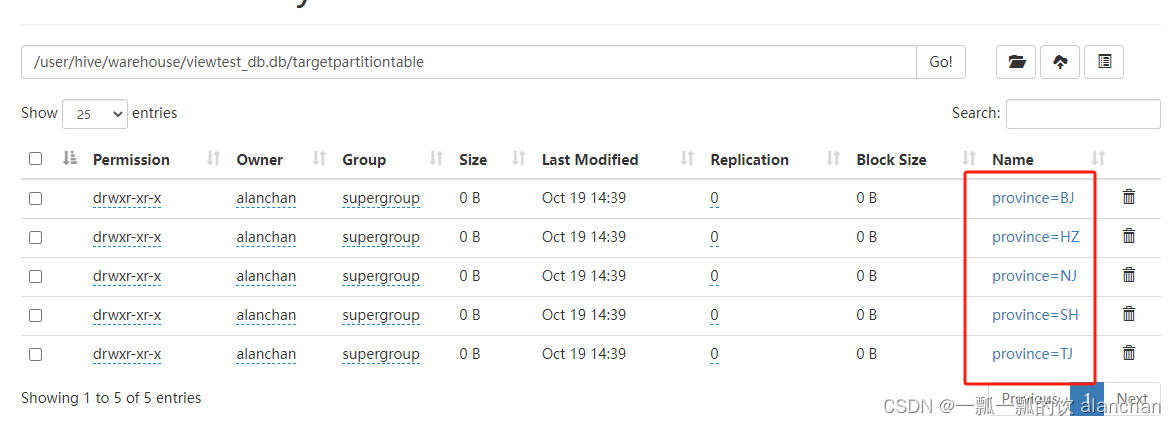
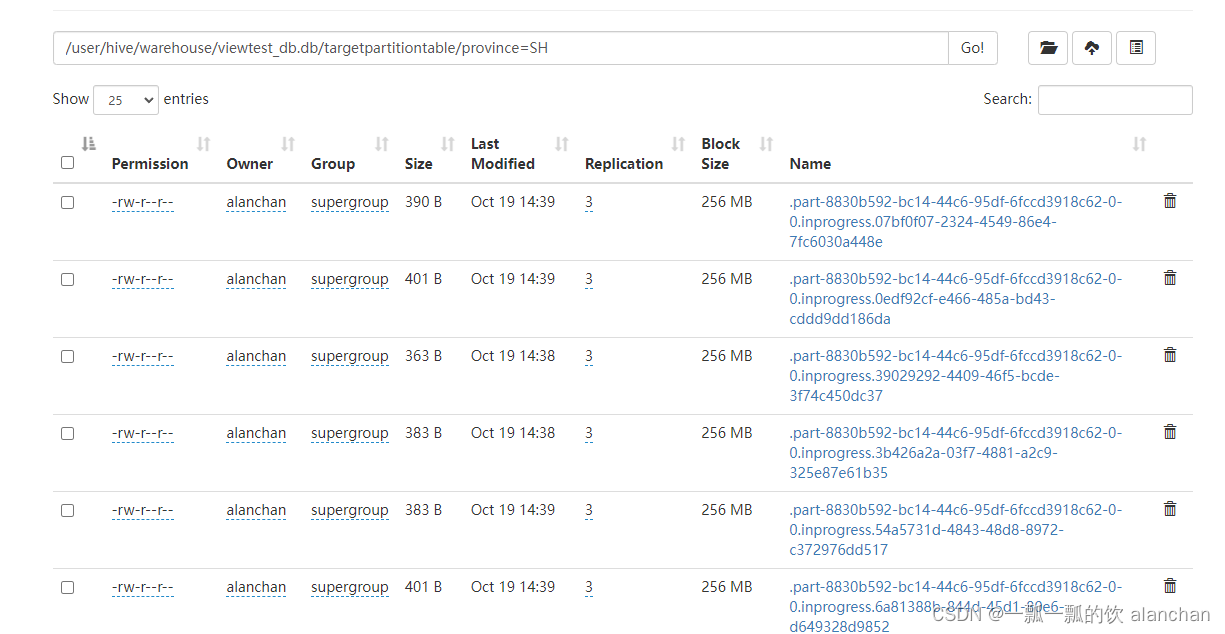
以上,介绍了java api/sql操作分区、函数和表,特别是针对表操作使用了6个示例进行说明。
相关文章:
24、Flink 的table api与sql之Catalogs(java api操作分区与函数、表)-4
Flink 系列文章 1、Flink 部署、概念介绍、source、transformation、sink使用示例、四大基石介绍和示例等系列综合文章链接 13、Flink 的table api与sql的基本概念、通用api介绍及入门示例 14、Flink 的table api与sql之数据类型: 内置数据类型以及它们的属性 15、Flink 的ta…...
React基础: 项目创建 JSX 基础语法 React基础的组件使用 useState状态 基础样式控制
01 React 文章目录 01 React一、React是什么1、React的优势 二、React开发环境搭建1、创建项目2、运行项目3、项目的目录结构 三、JSX基础1、什么是 JSX代码示例: 2、JSX使用场景2.1代码示例: 3、JSX中实现列表渲染4、JSX - 实现基本的条件渲染5、JSX - …...
力扣每日一题49:字母异位词分组
题目描述: 给你一个字符串数组,请你将 字母异位词 组合在一起。可以按任意顺序返回结果列表。 字母异位词 是由重新排列源单词的所有字母得到的一个新单词。 示例 1: 输入: strs ["eat", "tea", "tan", "ate&quo…...

TechSmith Camtasia Studio 23.3.2.49471 Crack
全新的Camtasia 2023.2 Camtasia Studio是专业的屏幕录像和视频编辑的软件套装。软件提供了强大的屏幕录像(Camtasia Recorder)、视频的剪辑和编辑(Camtasia Studio)、视频菜单制作(Camtasia MenuMaker)、视…...
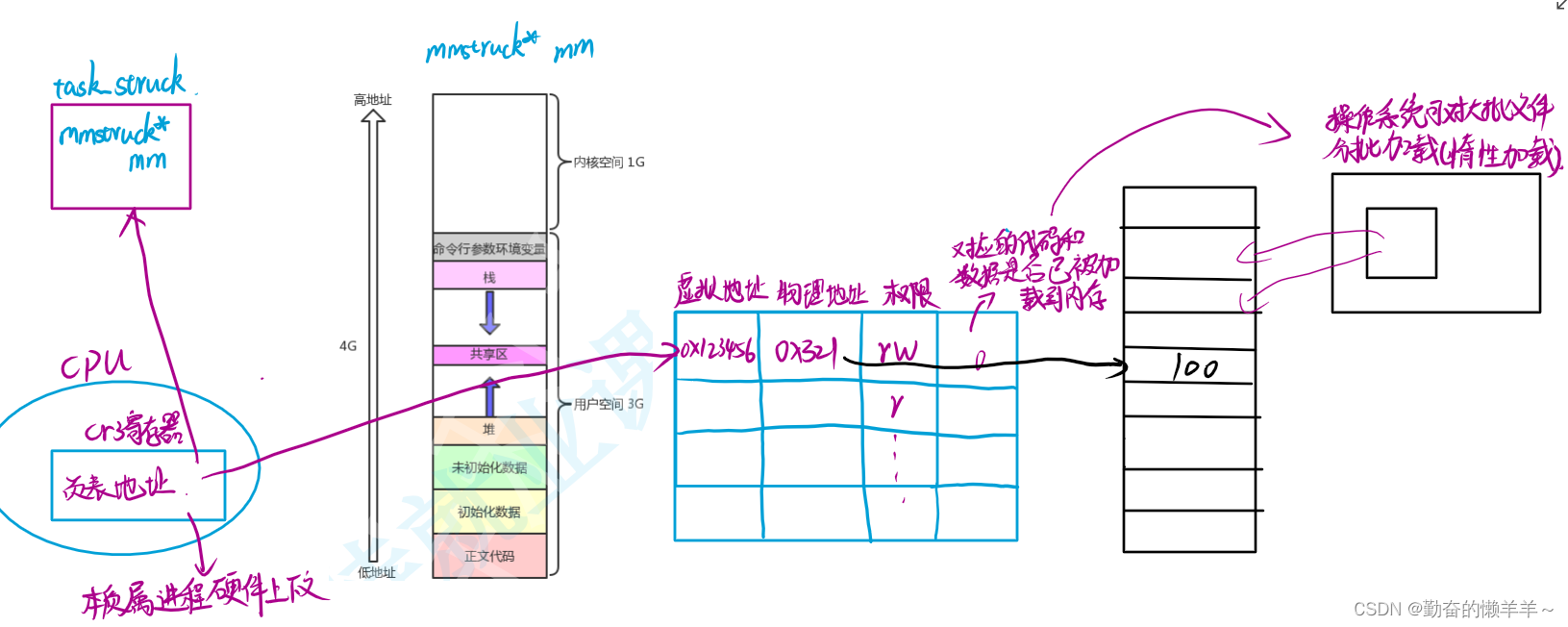
进程【Linux系统编程】
一、先谈硬件——冯诺依曼体系结构 存储器:内存(硬盘是外存) 输入设备:鼠标、键盘、摄像头、话筒、磁盘、网卡…… 输出设备:显示器、播放器硬件、磁盘、网卡…… 输入输出设备是外部设备,简称外设。 中央…...

【Edabit 算法 ★☆☆☆☆☆】【分钟转秒数】Convert Minutes into Seconds
【Edabit 算法 ★☆☆☆☆☆】【分钟转秒数】Convert Minutes into Seconds math numbers Instructions Write a function that takes an integer minutes and converts it to seconds. Examples convert(5) // 300 convert(3) // 180 convert(2) // 120Notes Don’t forge…...

Django实现音乐网站 ⒇
使用Python Django框架做一个音乐网站, 本篇音乐播放器-添加播放音乐功能实现。 目录 创建播放器数据表 设置表结构 执行创建表 命令 执行 数据表结构 添加单个歌曲 创建路由 加入播放器视图 模板处理 基类方法 子页面调用 优化弹窗 加入layui文件 基…...

C++类对象所占内存空间大小分析
前言 类占内存空间是只类实例化后占用内存空间的大小,类本身是不会占内存空间的。用 sizeof 计算类的大小时,实际上是计算该类实例化后对象的大小。空类占用1字节原因:C要求每个实例在内存中都有一个唯一地址,为了达到这个目的&am…...

绿肥红瘦专栏数据的爬取
前言 要想爬专栏,先得爬用户。要想爬用户,三个header参数挡住了去路:x-zst-81,x-zse-93,x-zse-96,经过搜索x-zse-96,定位到设置该字段的位置: 这个t2是固定的值,t0来自于…...

centos或aws linux部署java应用,环境搭建shell
目录 设置root密码开启密码登录安装docker安装nginx设置nginx自启动nginx配置https配置http集群tcp集群 安装docker设置docker自启动修改docker基础配置创建docker网关docker安装mysql单机版本主从版本 docker安装redis设置密码:不要密码: docker安装rab…...
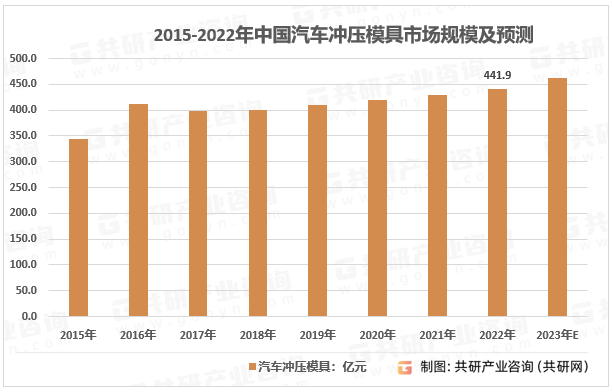
2023年中国车用冲压模具行业特征、竞争现状及行业市场规模分析[图]
汽车冲压件模具具有尺寸大、型面复杂、精度要求高等特点,属于技术密集型产品。汽车冲压模具能快速精密地把材料直接加工成零件或半成品并通过焊接、铆接、拼装等工艺装配成零部件,冲压模具的设计开发和加工能力对汽车冲压零部件产品总制造成本、质量及性…...
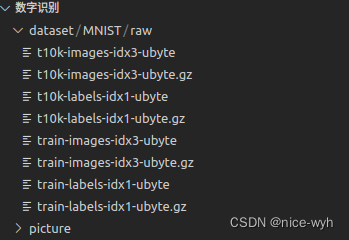
基于Pytorch的CNN手写数字识别
作为深度学习小白,我想把自己学习的过程记录下来,作为实践部分,我会写一个通用框架,并会不断完善这个框架,作为自己的入门学习。因此略过环境搭建和基础知识的步骤,直接从代码实战开始。 一.下载数据集并加…...
)
Java设计模式之观察者模式(Observer Pattern)
观察者模式(Observer Pattern)是一种常用的软件设计模式,它用于在对象之间建立一种一对多的依赖关系,当一个对象的状态发生变化时,它的所有依赖对象都会得到通知并自动更新。观察者模式属于行为型模式。 在观察者模式…...
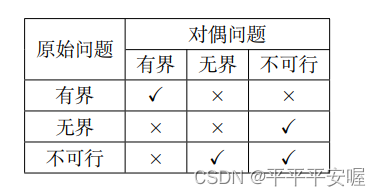
最优化:建模、算法与理论(最优性理论2
5.7 约束优化最优性理论应用实例 5.7.1 仿射空间的投影问题 考虑优化问题 min x ∈ R n 1 2 ∣ ∣ x − y ∣ ∣ 2 2 , s . t . A x b \min_{x{\in}R^n}\frac{1}{2}||x-y||_2^2,\\ s.t.{\quad}Axb x∈Rnmin21∣∣x−y∣∣22,s.t.Axb 其中 A ∈ R m n , b ∈ R m …...

redis一主一从搭建
1.复制一份redis.conf并将6380都改成6379 [redist3-dtpoc-dtpoc-web06 conf]$ cp redis.conf redis_6380.conf [redist3-dtpoc-dtpoc-web06 conf]$ vi redis_6380.conf port 6380 daemonize yes pidfile "/home/redis/redis/logs/redis_6380.pid" logfile "/hom…...
【MySql】8- 实践篇(六)
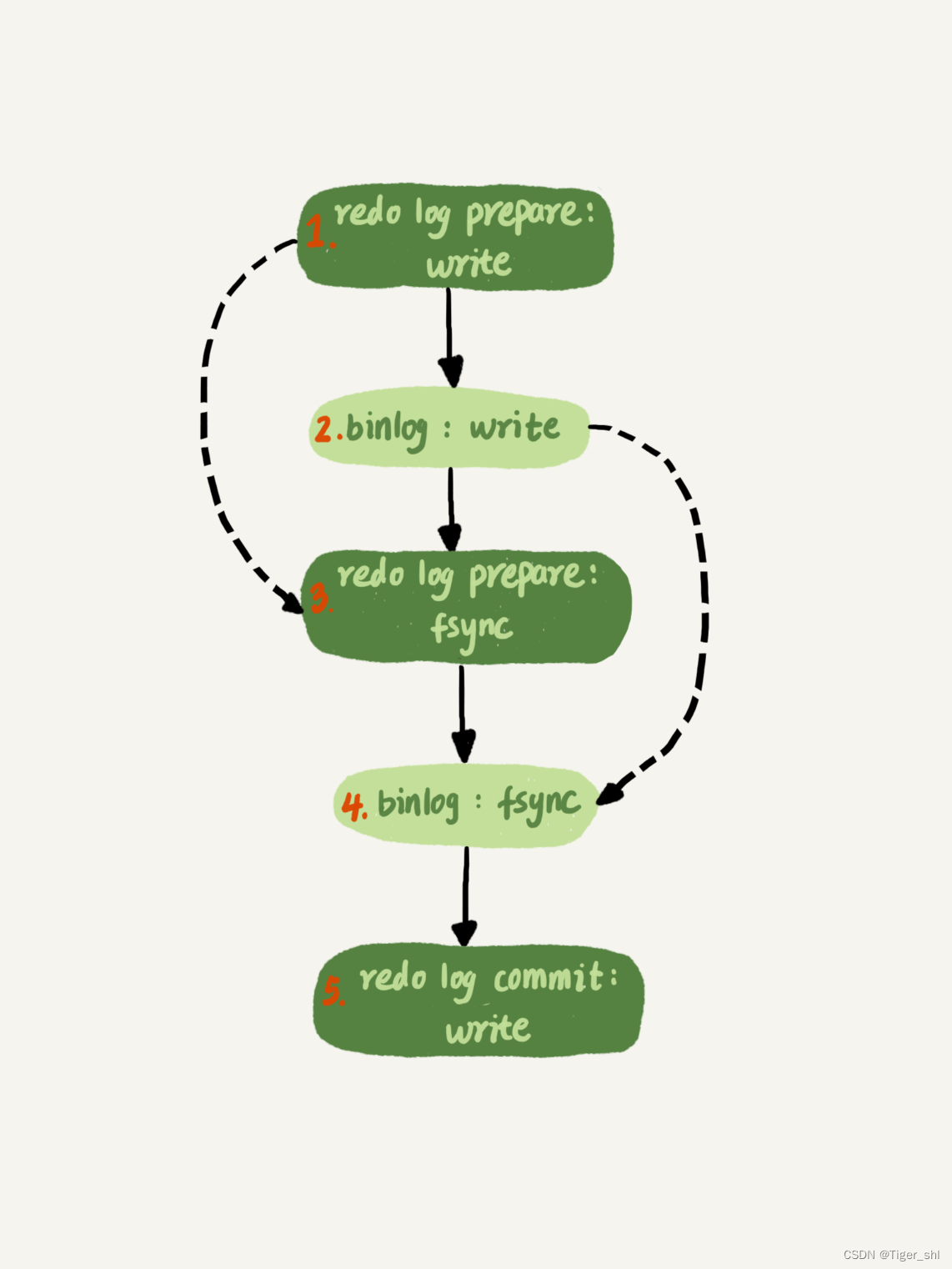
文章目录 1. MySql保证主备一致1.1 MySQL 主备的基本原理1.2 binlog 的三种格式对比1.3 循环复制问题 2. MySql保证高可用2.1 主备延迟2.2 主备延迟的来源2.3 可靠性优先策略2.4 可用性优先策略 3. 备库为何会延迟很久-备库并行复制能力3.1 MySQL 5.6 版本的并行复制策略3.2 Ma…...

Spring篇---第七篇
系列文章目录 文章目录 系列文章目录一、说说事务的传播级别二、Spring 事务实现方式三、Spring框架的事务管理有哪些优点一、说说事务的传播级别 Spring事务定义了7种传播机制: PROPAGATION_REQUIRED:默认的Spring事物传播级别,若当前存在事务,则加入该事务,若 不存在事务…...
2023年中国轮胎模具需求量、竞争格局及行业市场规模分析[图]
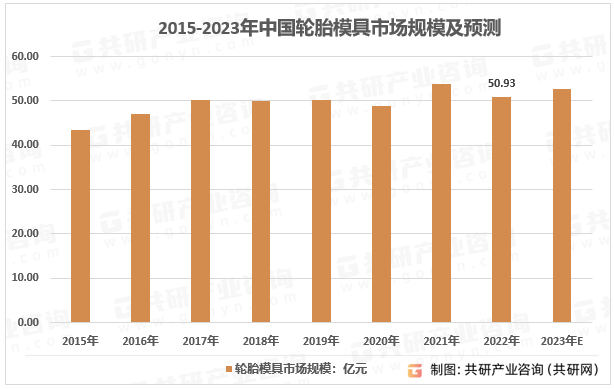
轮胎模具是轮胎生产线中的硫化成形装备,是高技术含量、高精度及高附加值的个性化模具产品,尤其是轮胎的花纹、图案、字体以及其他外观特征的成形都依赖于轮胎模具,因此其制造技术难度较高。其主要功能是通过所成型材料(主要是橡塑…...
集成学习方法(随机森林和AdaBoost)
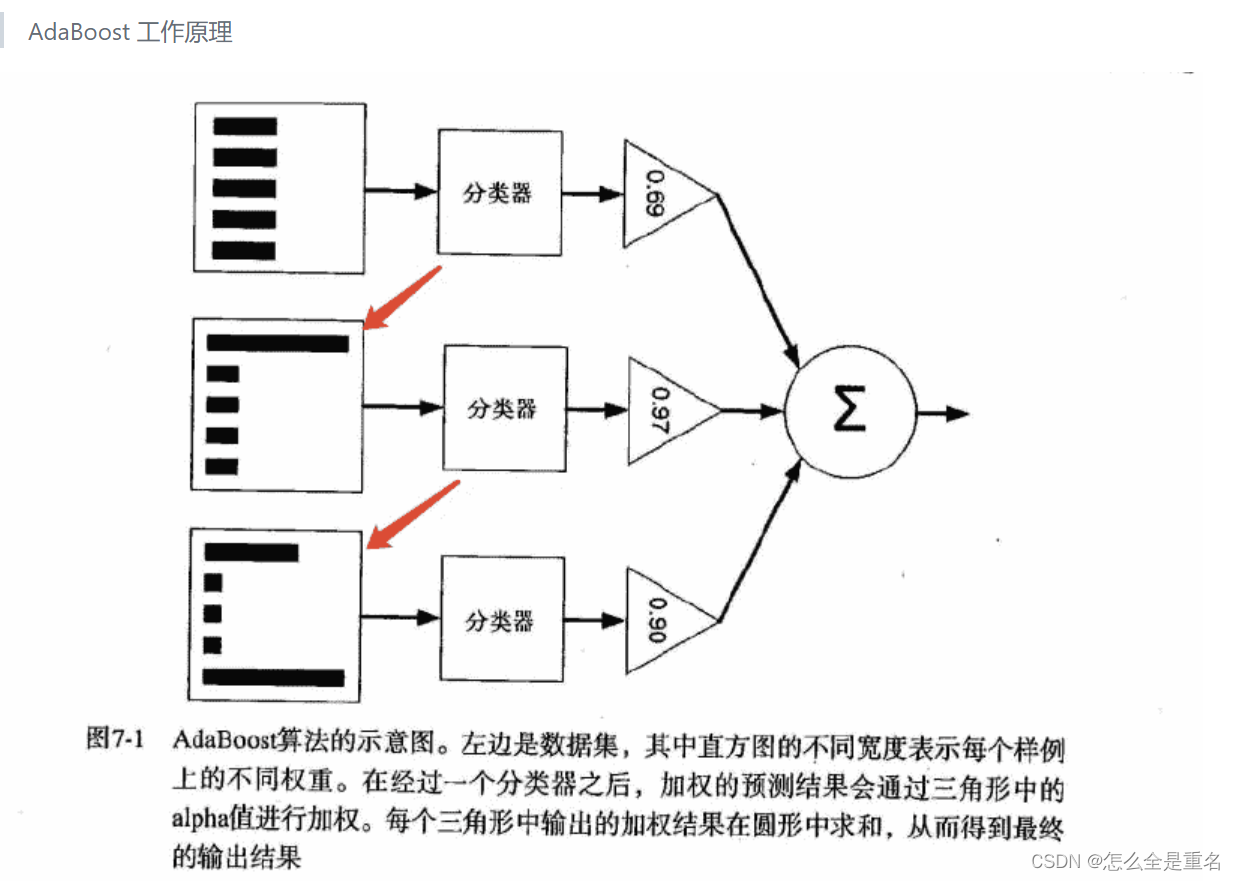
释义 集成学习很好的避免了单一学习模型带来的过拟合问题 根据个体学习器的生成方式,目前的集成学习方法大致可分为两大类: Bagging(个体学习器间不存在强依赖关系、可同时生成的并行化方法) 流行版本:随机森林(random forest)Boosting(个体…...

PeopleCode中Date函数的用法
语法 Date(date_num) 描述 The Date function takes a number in the form YYYYMMDD and returns a corresponding Date value. If the date is invalid, Date displays an error message. Date函数输入是一个形如“YYYYMMDD”的数字,返回一个相应的Date类型的值…...

Halcon 3D视觉标定避坑指南:从点云模型创建到`calibrate_hand_eye`,我踩过的雷你别再踩
Halcon 3D视觉标定避坑指南:从点云模型创建到calibrate_hand_eye实战解析 在工业自动化领域,3D视觉引导的机器人作业已成为智能制造的核心技术之一。Halcon作为机器视觉领域的标杆软件,其3D手眼标定功能(eye-to-hand)被…...

微信小程序二维码生成终极指南:5分钟掌握原生与多框架集成方案
微信小程序二维码生成终极指南:5分钟掌握原生与多框架集成方案 【免费下载链接】weapp-qrcode weapp.qrcode.js 在 微信小程序 中,快速生成二维码 项目地址: https://gitcode.com/gh_mirrors/we/weapp-qrcode 还在为微信小程序中二维码生成功能而…...

暴力枚举就够了?你可能错过了这道题真正的“降维打击”
暴力枚举就够了?你可能错过了这道题真正的“降维打击” 很多人第一次看到这道题——最大单词长度乘积(Maximum Product of Word Lengths),第一反应都是: “不就是两两比较嘛?我会。” 结果代码写完,一跑数据—— 慢得像在拨号上网。 更扎心的是: 你优化了半天,别人一…...

MySQL怎样在触发器中引用新旧数据行_NEW与OLD关键字详解
MySQL触发器中通过NEW和OLD获取字段值:INSERT只有NEW,DELETE只有OLD,UPDATE两者都有;NEW在BEFORE中可修改,OLD始终只读;注意大小写、反引号包裹特殊列名及跨库操作限制。触发器里怎么拿到修改前后的字段值M…...

巴法云图片上传踩坑实录:ESP32的HTTP POST请求,为什么你的图片超过35KB就显示失败?
ESP32图片上传35KB限制全解析:从内存分配到HTTP优化的完整解决方案 在物联网项目中,ESP32因其出色的性价比和丰富的功能库成为硬件开发的热门选择。但当涉及到图片上传这类资源密集型操作时,许多开发者都会遇到一个看似简单却令人困惑的问题—…...

SLA设得很严格,为什么IT服务台满意度还是上不去?
一、SLA看起来很专业,但用户却不买账在很多企业的IT管理体系中,SLA(服务级别协议)已经成为一个“标配”。无论是ITSM系统上线,还是IT服务台规范化建设,都会围绕SLA来设计指标:响应时间 处理时长…...
)
AutoHotKey循环实战:用While和Loop实现一个“按住测量”的屏幕标尺工具(附完整脚本)
AutoHotKey循环实战:用While和Loop实现“按住测量”屏幕标尺工具 在UI设计、网页排版或视频编辑场景中,经常需要快速测量屏幕上两个点之间的距离或某个区域的像素尺寸。专业设计软件通常内置标尺工具,但切换软件往往打断工作流。今天我们将用…...

如何在Windows 11 LTSC 24H2中一键恢复微软商店:完整安装指南
如何在Windows 11 LTSC 24H2中一键恢复微软商店:完整安装指南 【免费下载链接】LTSC-Add-MicrosoftStore Add Windows Store to Windows 11 24H2 LTSC 项目地址: https://gitcode.com/gh_mirrors/ltscad/LTSC-Add-MicrosoftStore 你是否正在使用Windows 11 L…...

Maccy:macOS上终极免费的剪贴板管理神器
Maccy:macOS上终极免费的剪贴板管理神器 【免费下载链接】Maccy Lightweight clipboard manager for macOS 项目地址: https://gitcode.com/gh_mirrors/ma/Maccy 还在为复制的内容被覆盖而烦恼吗?Maccy就是你的救星!这款专为macOS设计…...

从零搭建VSCode下的PyQt5桌面开发工作流:集成Python、Qt Designer与高效调试
1. 为什么选择VSCodePyQt5开发桌面应用? 作为一个长期使用PyQt5开发桌面应用的老手,我尝试过各种开发环境组合,最终发现VSCodePyQt5是最适合个人开发者和小型团队的方案。你可能会有疑问:为什么不用PyCharm这样的专业Python IDE&…...