
粤嵌实训医疗项目--day04(Vue + SpringBoot)

往期回顾
- 粤嵌实训医疗项目--day03(Vue + SpringBoot)-CSDN博客
- 粤嵌实训医疗项目day02(Vue + SpringBoot)-CSDN博客
- 粤嵌实训医疗项目--day01(Vue+SpringBoot)-CSDN博客
目录
一、用户详细信息查询 (查询信息与分页显示)
二、实现信息修改功能(增添、编辑、删除)
一、用户详细信息查询 (查询信息与分页显示)
--前端中创建view包,并在view包下创建对应用户查询信息的页面

UserInfoList页面布局前端代码
<template><div><div style="margin: 20px 0px;"><!-- input --><el-input placeholder="请输入内容" v-model="keyword" clearable style="width: 20%;"> </el-input><!-- 模糊搜索功能 --><el-button type="primary" @click="query">搜索</el-button><!-- 新增功能 --><el-button type="success" @click="dialogVisible = true">新增</el-button><el-dialog title="新增/编辑" :visible.sync="dialogVisible" width="30%" :before-close="handleClose"><el-form ref="form" :model="form" label-width="80px"><el-form-item label="姓名"><el-input v-model="form.name"></el-input></el-form-item><el-form-item label="手机号码"><el-input v-model="form.phone"></el-input></el-form-item><el-form-item label="头像"><!-- action表示为上传文件的url   --><el-upload class="avatar-uploader" action="http://localhost:8085/file/upload/":show-file-list="false" :on-success="handleAvatarSuccess" :before-upload="beforeAvatarUpload"><img v-if="imageUrl" :src="imageUrl" class="avatar" /><i v-else class="el-icon-plus avatar-uploader-icon"></i></el-upload></el-form-item><el-form-item label="密码"><el-input v-model="form.password"></el-input></el-form-item><el-form-item label="角色"><el-select v-model="form.role" placeholder="请选择" style="width: 100%"><el-option v-for="item in options" :key="item.role" :label="item.label" :value="item.role"></el-option></el-select></el-form-item><el-form-item label="身份证号"><el-input v-model="form.code"></el-input></el-form-item><el-form-item label="邮箱"><el-input v-model="form.email"></el-input></el-form-item><el-form-item label="性别" prop="registrsex"><el-radio v-model="form.sex" label="男">男</el-radio><el-radio v-model="form.sex" label="女">女</el-radio></el-form-item><el-form-item label="年龄"><el-input v-model="form.age"></el-input></el-form-item><el-form-item label="职业"><el-input v-model="form.job"></el-input></el-form-item></el-form><div slot="footer" class="dialog-footer"><el-button @click="handleCloseAfter">取 消</el-button><el-button type="primary" @click="save">确 定</el-button></div></el-dialog></div><el-table :data="tableData" border style="width: 100%"><el-table-column prop="userId" label="id"> </el-table-column><el-table-column prop="userName" label="姓名"> </el-table-column><el-table-column prop="code" label="身份证号"> </el-table-column><el-table-column prop="email" label="邮箱"> </el-table-column><el-table-column prop="sex" label="性别"> </el-table-column><el-table-column prop="age" label="年龄"> </el-table-column><el-table-column prop="job" label="职业"> </el-table-column><el-table-column prop="status" label="通行码"><!-- scope表示为作用域  scope.row表示为作用域中这一行的数据 --><template slot-scope="scope"><el-button size="small" @click="showStauts(scope.row.userId)" type="success"v-if="scope.row.status == 0">绿码</el-button><el-button size="small" @click="showStauts(scope.row.userId)" type="warning"v-if="scope.row.status == 1">黄码</el-button><el-button size="small" @click="showStauts(scope.row.userId)" type="danger"v-if="scope.row.status == 2">红码</el-button></template></el-table-column><el-table-column label="操作" width="150"><template slot-scope="scope"><el-button size="mini" native-type @click="handleEdit(scope.row)">编辑</el-button><el-button size="mini" native-type type="danger"@click="handleDelete(scope.$index, scope.row)">删除</el-button></template></el-table-column></el-table><!-- 定义一个分页标签 --><div><el-pagination @size-change="handleSizeChange" @current-change="handleCurrentChange" :current-page="pageNum":page-sizes="[3, 8, 15, 30]" :page-size="3" layout="total, sizes, prev, pager, next, jumper" :total="total"></el-pagination></div><!-- 定义一个对话框 --><div><el-dialog title="用户的通行码" :visible.sync="dialogQrCodeVisible" width="30%" :before-close="handleQrCodeClose"><img :src="QrCode" /></el-dialog></div></div>
</template><script>
//导入request工具
import request from "@/utils/request";export default {//data表示vue对象中存储的数据data() {return {dialogVisible: false,dialogQrCodeVisible: false,QrCode: '',tableData: [],pageNum: 1,pageSize: 3,total: 0,keyword: "",imageUrl: '',form: {userId: '',name: '',phone: '',image: '',password: '',role: '',code: '',email: '',sex: '',age: '',job: '',status: '',},options: [{role: 1,label: '用户'}, {role: 2,label: '医护'},],formLabelWidth: '120px',};},//created页面加载完触发的生命周期created() {this.query();},methods: {//成功后的处理函数handleAvatarSuccess(res, file) {console.log("file===" + file);this.imageUrl = URL.createObjectURL(file.raw);this.form.image = res;},//上传之前的处理函数beforeAvatarUpload(file) {const isJPG = file.type === "image/jpeg";const isPNG = file.type === "image/png";const isLt2M = file.size / 1024 / 1024 < 2;if (!isJPG) {this.$message.error("上传头像图片只能是 JPG 格式!");}if (!isLt2M) {this.$message.error("上传头像图片大小不能超过 2MB!");}console.log("isJPG===" + ((isJPG || isPNG) && isLt2M));return (isJPG || isPNG) && isLt2M;},// 重载方法query() {//发起一个异步请求,查询分类的数据request// get表示指定请求地址 和 请求参数.get("/gec/user-info/list", {params: {pageNum: this.pageNum,pageSize: this.pageSize,keyWord: this.keyword,},})// then表示请求后的回调函数.then((res) => {console.log(res);// 把后台的响应的数据赋值给data中的tableDatathis.tableData = res.list;this.total = res.total;});},//二维码对话框showStauts(id) {//1、发起二维码的请求this.QrCode = "http://localhost:8085/code?id=" + id;//2、显示对话框this.dialogQrCodeVisible = true;},handleQrCodeClose() {this.dialogQrCodeVisible = false;this.QrCode = '';},//修改/新增对话框handleClose() {this.$confirm('是否退出?', '提示', {confirmButtonText: '确定',cancelButtonText: '取消',type: 'warning'}).then(() => {this.dialogVisible = false;this.form = {userId: '',name: '',phone: '',image: '',password: '',role: '',code: '',email: '',sex: '',age: '',job: '',status: '',};this.imageUrl = "";}).catch(() => { });},handleCloseAfter() {this.form = {userId: '',name: '',phone: '',image: '',password: '',role: '',code: '',email: '',sex: '',age: '',job: '',status: '',};this.imageUrl = "";this.dialogVisible = false;},save() {console.log(this.form);if (this.form.userId == "") {request.post("/gec/user-info/insert", this.form).then((res) => {if (res.ok == true) {this.$message({type: 'success',message: '新增成功!'});this.dialogVisible = false;this.form = {userId: '',name: '',name: '',phone: '',image: '',password: '',role: '',code: '',email: '',sex: '',age: '',job: '',status: '',};this.imageUrl = "";this.query();} else {this.$message({type: 'error',message: '新增失败!'});}});} else {request.post("/gec/user-info/update", this.form).then((res) => {console.log(this.form);if (res.ok == true) {this.$message({type: 'success',message: '修改成功!'});this.dialogVisible = false;this.form = {userId: '',name: '',phone: '',image: '',password: '',role: '',code: '',email: '',sex: '',age: '',job: '',status: '',};this.query();} else {this.$message({type: 'error',message: '修改失败!'});}}).catch((res) => {console.log(res.ok);});}},handleEdit(row) {console.log(row);this.dialogVisible = true;this.form.userId = row.userId;this.imageUrl = row.user.image;this.form.id = row.userId;this.form.name = row.userName;this.form.phone = row.user.phone;this.form.image = row.user.image;this.form.password = row.user.password;this.form.role = row.user.role;this.form.email = row.email;this.form.code = row.code;this.form.name = row.user.name;this.form.sex = row.sex;this.form.age = row.age;this.form.job = row.job;this.form.status = row.status;// this.form = row;},//删除方法handleDelete(index, row) {this.$confirm('此操作将永久删除该用户, 是否继续?', '提示', {confirmButtonText: '确定',cancelButtonText: '取消',type: 'warning'}).then(() => {//删除操作request.get("/gec/user-info/delete", {params: {id: row.userId},}).then((res) => {if (res.ok == true) {this.$message({type: 'success',message: '删除成功!'});this.query();} else {this.$message({type: 'error',message: '删除失败!'});}});}).catch(() => {this.$message({type: 'info',message: '已取消删除'});});},//修改单页数据数量handleSizeChange(val) {this.pageNum = 1;this.pageSize = val;this.query();},//跳转页码handleCurrentChange(val) {console.log(val);this.pageNum = val;this.query();}},
};
</script>
<style>
.avatar-uploader .el-upload {border: 1px dashed #d9d9d9;border-radius: 6px;cursor: pointer;position: relative;overflow: hidden;
}.avatar-uploader .el-upload:hover {border-color: #409eff;
}.avatar-uploader-icon {font-size: 28px;color: #8c939d;width: 178px;height: 178px;line-height: 178px;text-align: center;
}.avatar {width: 178px;height: 178px;display: block;
}.el-date-editor.el-input,
.el-date-editor.el-input__inner {width: 335px;
}
</style>
--在前端项目中的Aside.vue进行如下修改
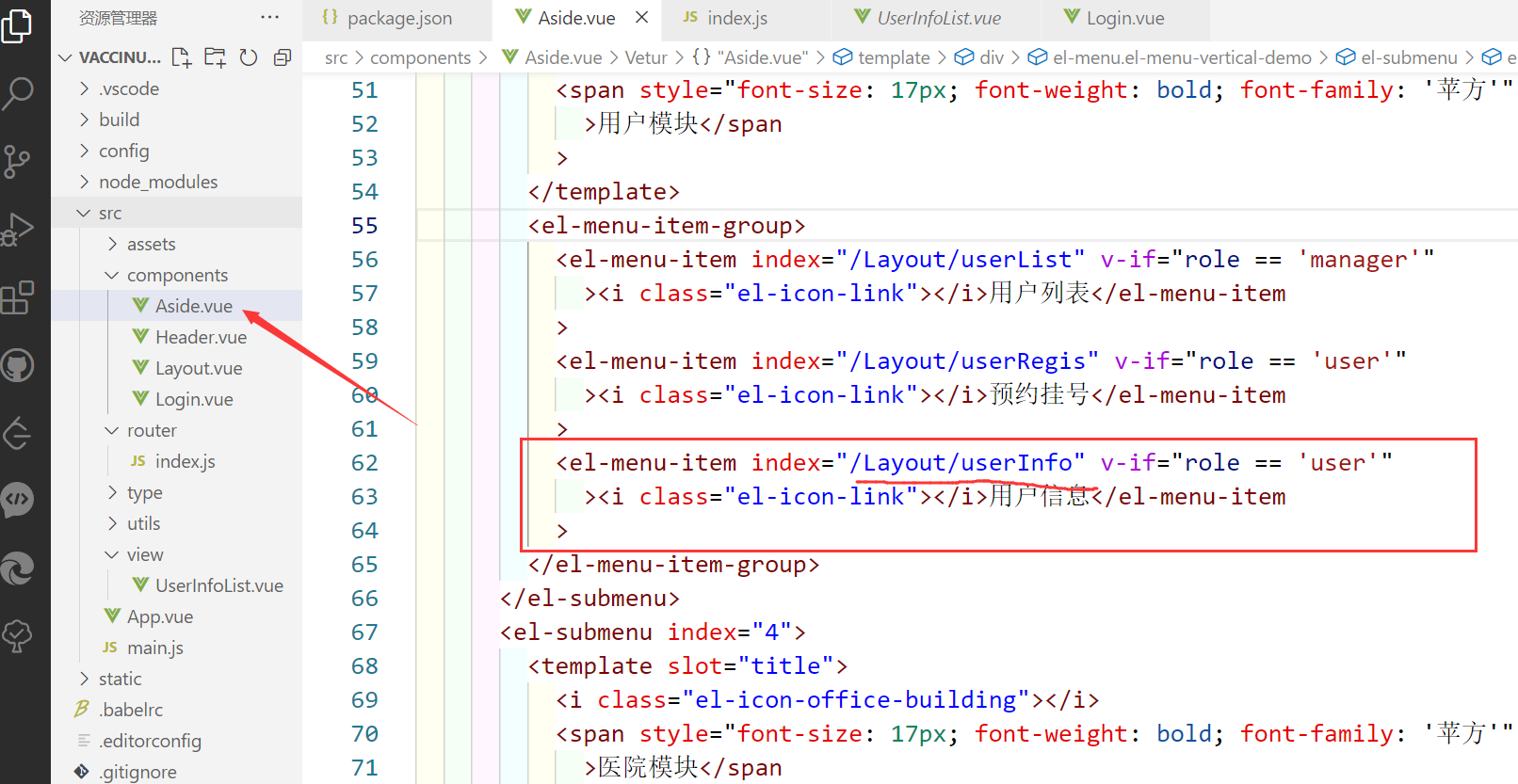
--在路由中添加UserInfoList的访问地址
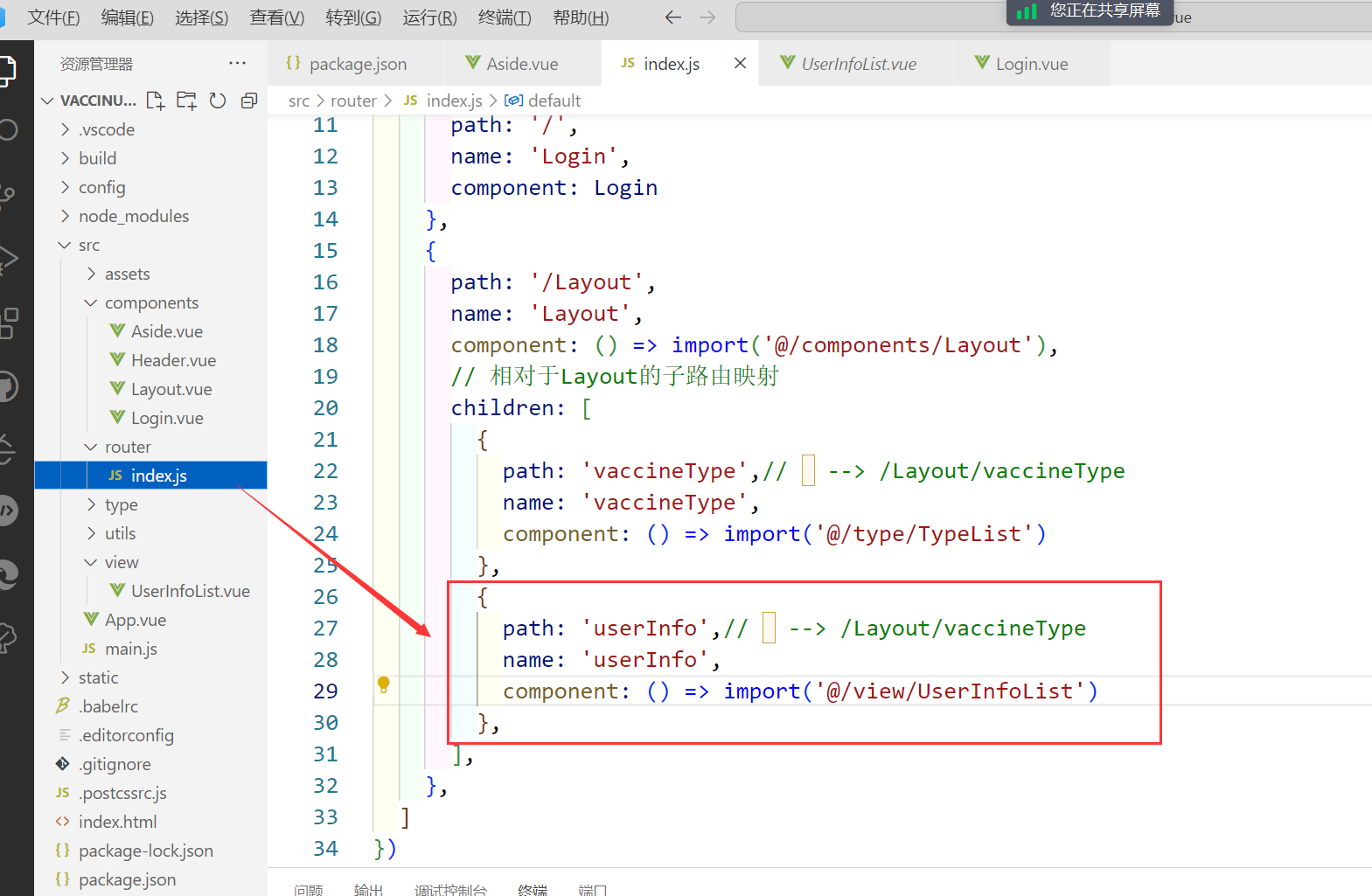 --在userinfo实体类中提供username

--在userinfoController中提供查询接口
@RestController
@RequestMapping("/gec/user-info")
public class UserInfoController {@Autowired   //注入到容器中UserInfoService userInfoService;@AutowiredIUserService userService;//json 的解析工具ObjectMapper jsonTool = new ObjectMapper();@RequestMapping("/list")                                                     //页码public String list(@RequestParam("pageNum") Integer pageNum,@RequestParam("pageSize") Integer pageSize,@RequestParam("keyWord") String keyword) throws JsonProcessingException {//        1.创建json解析工具ObjectMapper json = new ObjectMapper();//       2.返回的结果集HashMap map = new HashMap<>();
//        提供条件构造器QueryWrapper<UserInfo> wrapper = new QueryWrapper<>();
//        用什么可以作为查询条件 使用身份证作为查询条件wrapper.like("code", keyword);
//        分页工具类Page<UserInfo> page = new Page<>(pageNum, pageSize);
//        进行分页后的数据page = userInfoService.page(page,wrapper);
//         从page中获取分页额度数据List<UserInfo> infoList = page.getRecords();
//        遍历数据 类型      引用名称  需要遍历的数据for (UserInfo userInfo : infoList) {
//               根据 userinfo 查询 user的数据User user = userService.getById(userInfo.getUserId());
//               把user对象的name属性 赋值给 userinfo 的userNameuserInfo.setUserName(user.getName());}
//           把数据保存到map 传递给前端map.put("total", page.getTotal());map.put("list", infoList);return jsonTool.writeValueAsString(map);}
}
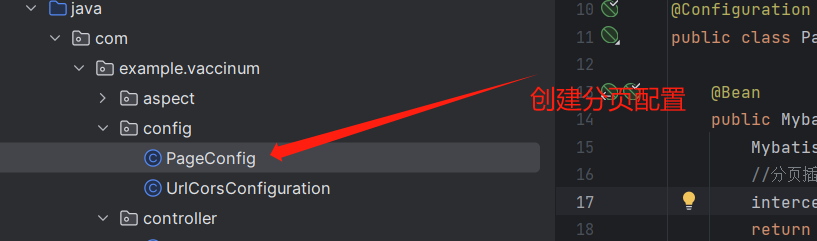
实现分页功能,还需要在后端项目的config包下创建pageConfig类,并添加以下代码
package com.example.vaccinum.config;import com.baomidou.mybatisplus.annotation.DbType;
import com.baomidou.mybatisplus.extension.plugins.MybatisPlusInterceptor;
import com.baomidou.mybatisplus.extension.plugins.inner.PaginationInnerInterceptor;
import org.springframework.context.annotation.Bean;
import org.springframework.context.annotation.Configuration;@Configuration
public class PageConfig {@Beanpublic MybatisPlusInterceptor mybatisPlusInterceptor() {MybatisPlusInterceptor interceptor = new MybatisPlusInterceptor();//分页插件interceptor.addInnerInterceptor(new PaginationInnerInterceptor(DbType.MYSQL));return interceptor;}
}
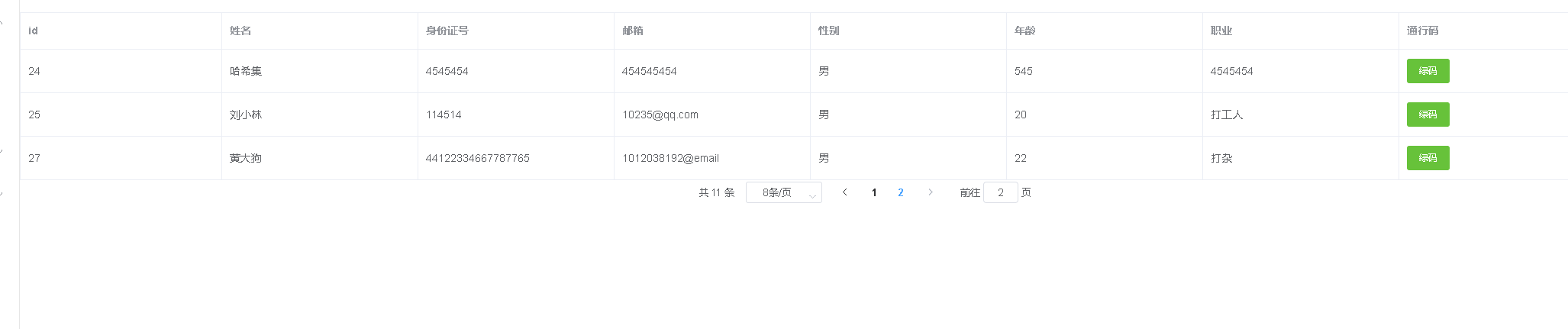
功能展示:
1.用户信息功能展示

2.页码分页功能展示


二、实现信息修改功能(增添、编辑、删除)
添加修改功能一起实现
 @RequestMapping("/update")public String update(User user, UserInfo userInfo) throws JsonProcessingException {//       1.返回的结果集HashMap map = new HashMap<>();
//        isEmpty判断为nullif (ObjectUtils.isEmpty(user.getId())) {//            添加user.setCodeid(userInfo.getCode());boolean save = userService.saveOrUpdate(user);userInfo.setUserId(user.getId());boolean save1 = userInfoService.save(userInfo);map.put("ok", save1 && save);map.put("message","添加成功");} else {
//            修改boolean b = userService.saveOrUpdate(user);boolean b1 = userInfoService.saveOrUpdate(userInfo);map.put("ok", b && b1);map.put("message","修改成功");}return jsonTool.writeValueAsString(map);}
在list方法中添加

新增方法接口名称修改

实现删除功能
前端对应实现方法
//删除方法handleDelete(index, row) {this.$confirm('此操作将永久删除该用户, 是否继续?', '提示', {confirmButtonText: '确定',cancelButtonText: '取消',type: 'warning'}).then(() => {//删除操作request.get("/gec/user-info/delete", {params: {id: row.userId},}).then((res) => {if (res.ok == true) {this.$message({type: 'success',message: '删除成功!'});this.query();} else {this.$message({type: 'error',message: '删除失败!'});}});}).catch(() => {this.$message({type: 'info',message: '已取消删除'});});},
可以看到前端是通过参数id实现删除即根据id删除,所以对应的接口如下
@RequestMapping("/delete")public String delete(Integer id) throws JsonProcessingException {HashMap map = new HashMap<>();boolean save = service.removeById(id);boolean save1 = userInfoService.removeById(id);map.put("ok",save1&&save);return JsonTool.writeValueAsString(map);}功能展示
1.增加用户

添加后效果如下

2.编辑用户

效果如下
3.删除用户

效果如下

相关文章:
粤嵌实训医疗项目--day04(Vue + SpringBoot)
往期回顾 粤嵌实训医疗项目--day03(Vue SpringBoot)-CSDN博客粤嵌实训医疗项目day02(Vue SpringBoot)-CSDN博客粤嵌实训医疗项目--day01(VueSpringBoot)-CSDN博客 目录 一、用户详细信息查询 (查询信息与…...
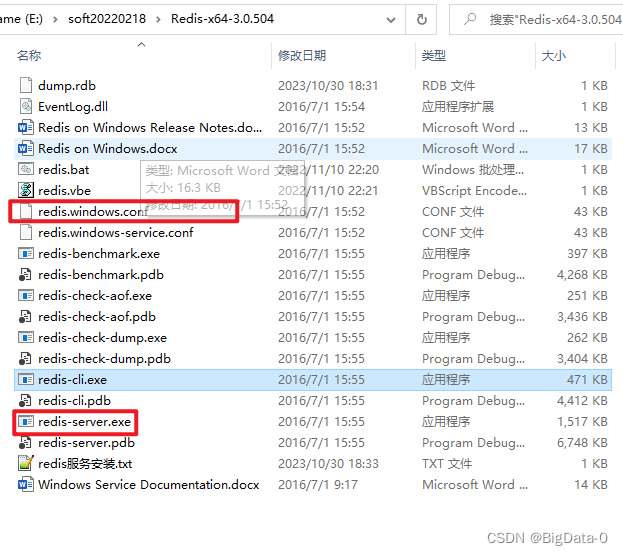
redis加入window服务及删除
1、命令redis-server.exe --service-install redis.windows.conf,在服务中可配置自动启动 删除redis服务,先停止redis服务运行,管理员cmd模式,sc delete "redis" ,...
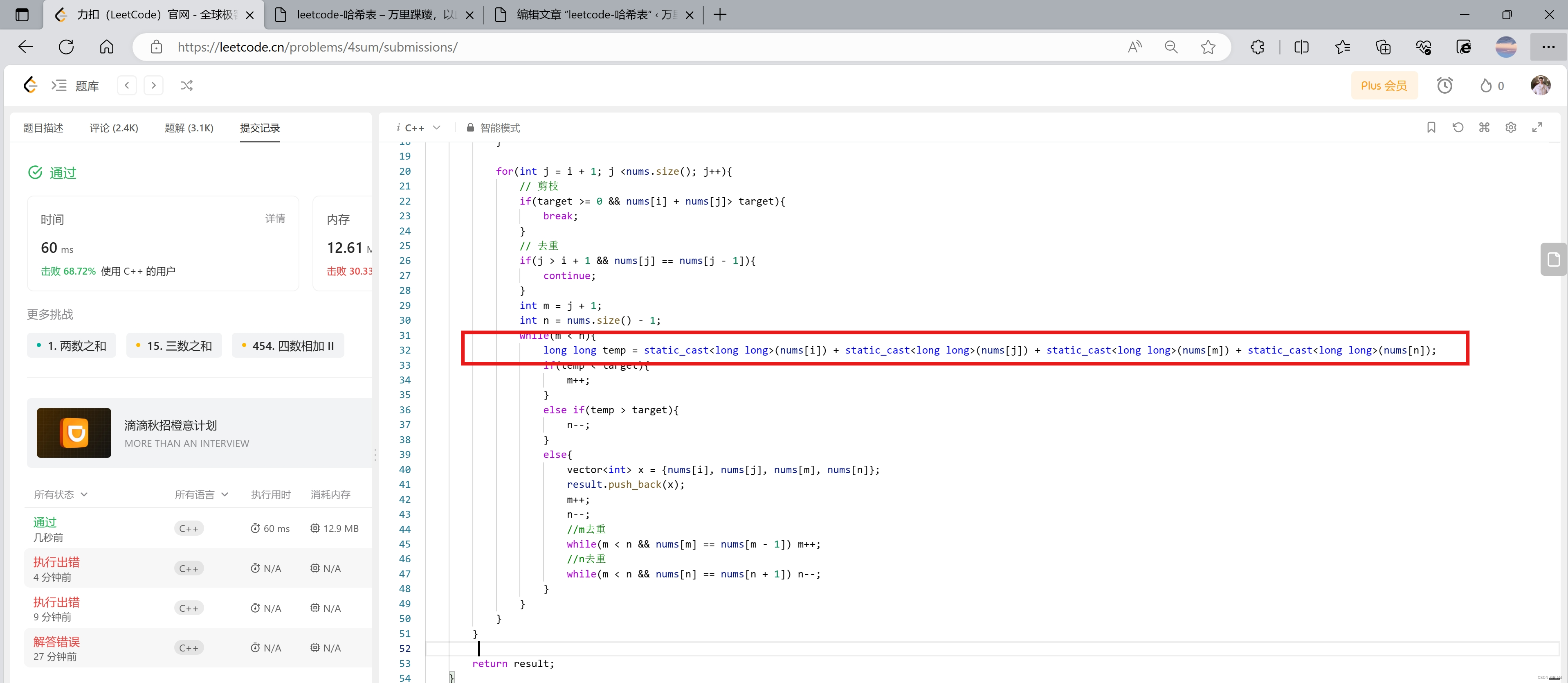
leetcode-哈希表
1. 理论 从哈希表的概念、哈希碰撞、哈希表的三种实现方式进行学习 哈希表:用来快速判断一个元素是否出现集合里。也就是查值就能快速判断,O(1)复杂度; 哈希碰撞:拉链法,线性探测法等。只是一种…...

NOIP2023模拟6联测27 旅行
题目大意 有一个有 n n n个点 n n n条边的无向连通图,一开始每条边都有一个颜色 c c c。 有 m m m次操作,每次操作将一条两个端点为 x , y x,y x,y的边的颜色修改为 c c c。求每次修改之后,图中有多少个颜色相同的连通块。 一个颜色相同的…...
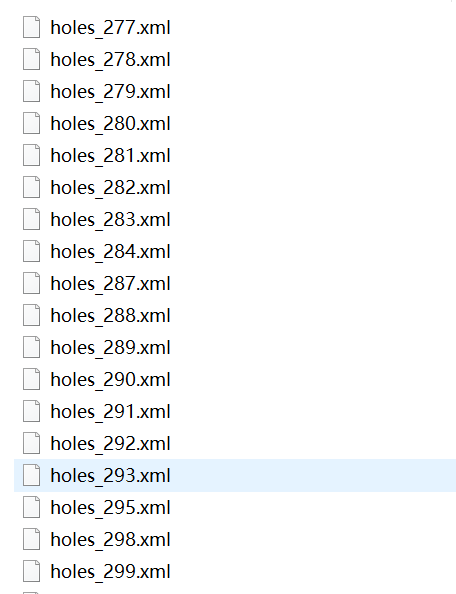
【表面缺陷检测】钢轨表面缺陷检测数据集介绍(2类,含xml标签文件)
一、介绍 钢轨表面缺陷检测是指通过使用各种技术手段和设备,对钢轨表面进行检查和测量,以确定是否存在裂纹、掉块、剥离、锈蚀等缺陷的过程。这些缺陷可能会对铁路运输的安全和稳定性产生影响,因此及时进行检测和修复非常重要。钢轨表面缺陷…...
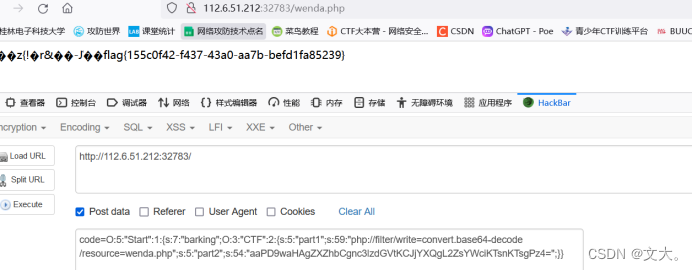
SHCTF 2023 新生赛 Web 题解
Web [WEEK1]babyRCE 源码过滤了cat 空格 我们使用${IFS}替换空格 和转义获得flag [WEEK1]飞机大战 源码js发现unicode编码 \u005a\u006d\u0078\u0068\u005a\u0033\u0074\u006a\u0059\u006a\u0045\u007a\u004d\u007a\u0067\u0030\u005a\u0069\u0030\u0031\u0059\u006d\u0045…...
二叉树题目合集(C++)
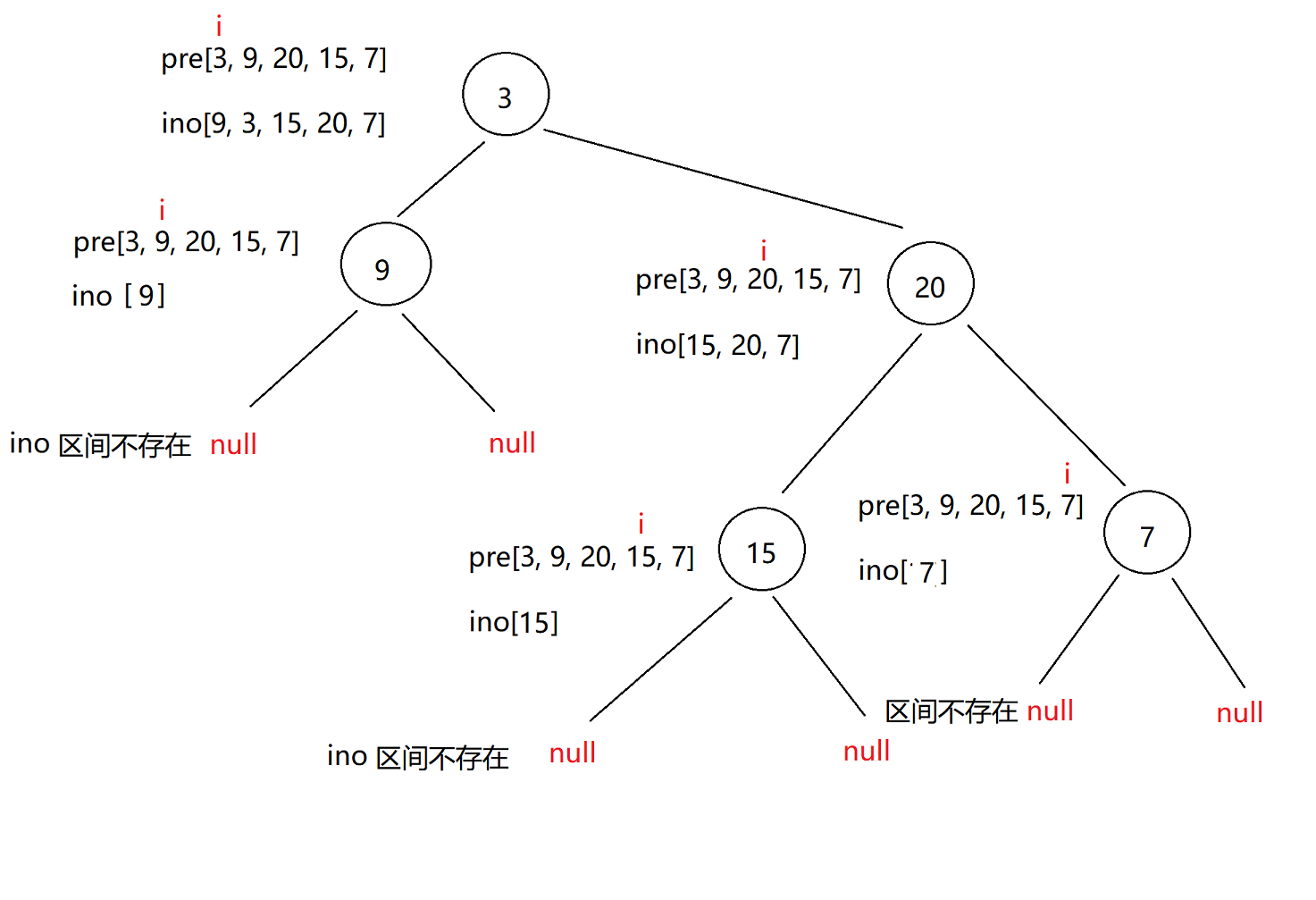
二叉树题目合集 1.二叉树创建字符串(简单)2.二叉树的分层遍历(中等)3.二叉树的最近公共祖先(中等)4.二叉树搜索树转换成排序双向链表(中等)5.根据树的前序遍历与中序遍历构造二叉树&…...
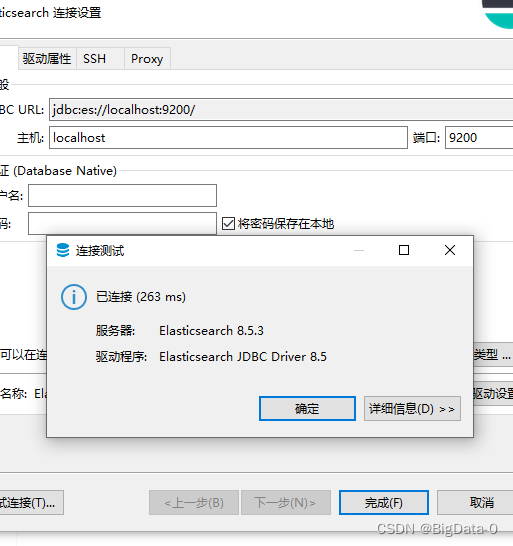
dbeaver配置es连接org.elasticsearch.xpack.sql.jdbc.EsDriver
查看目标es服务版本,下载对应驱动...

有监督学习线性回归
1、目标分析(回归问题还是分类问题?) 2、获取、处理数据 3、创建线性回归模型 4、训练模型 5、模型测试 x_data [[6000, 58], [9000, 77], [11000, 89], [15000, 54]] # 样本特征数据 y_data [30000, 55010, 73542, 63201] # 样本目标数…...
如何在vscode中添加less插件
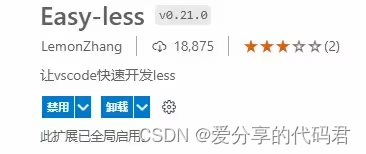
Less (Leaner Style Sheets 的缩写) 是一门向后兼容的 CSS 扩展语言。它对CSS 语言增加了少许方便的扩展,通过less可以编写更少的代码实现更强大的样式。但less不是css,浏览器不能直接识别,即浏览器无法执行less代码&a…...

mediapipe 训练自有图像数据分类
参考: https://developers.google.com/mediapipe/solutions/customization/image_classifier https://colab.research.google.com/github/googlesamples/mediapipe/blob/main/examples/customization/image_classifier.ipynb#scrollToplvO-YmcQn5g 安装:…...
函数)
【pytorch】torch.gather()函数
dim0时 index[ [x1,x2,x2],[y1,y2,y2],[z1,z2,z3] ]如果dim0 填入方式为: index[ [(x1,0),(x2,1),(x3,2)][(y1,0),(y2,1),(y3,2)][(z1,0),(z2,1),(z3,2)] ]input [[1, 2, 3, 4],[5, 6, 7, 8],[9, 10, 11, 12] ] # shape(3,4) input torch.…...

Mac 安装psycopg2,报错Error: pg_config executable not found.
在mac 上安装psycopg2的方法:执行:pip3 install psycopg2-binary。 如果执行pip3 install psycopg2,无法安装psycopg2 报错信息如下: Collecting psycopg2Using cached psycopg2-2.9.9.tar.gz (384 kB)Preparing metadata (set…...

域名系统 DNS
DNS 概述 域名系统 DNS(Domain Name System)是因特网使用的命名系统,用来把便于人们使用的机器名字转换成为 IP 地址。域名系统其实就是名字系统。为什么不叫“名字”而叫“域名”呢?这是因为在这种因特网的命名系统中使用了许多的“域(domain)”&#x…...
Vue $nextTick 模板解析后在执行的函数
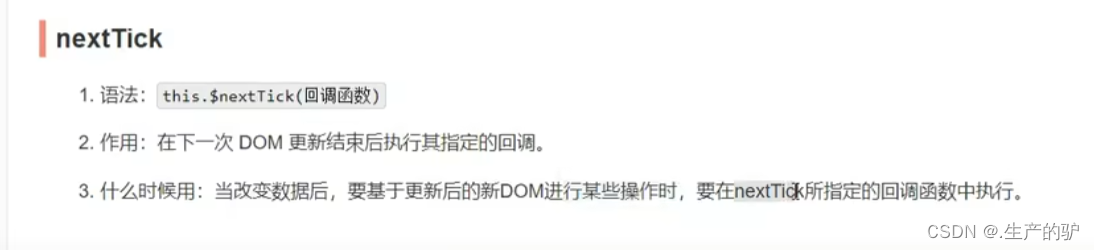
this.$nextTick(()>{ 模板解析后在执行的函数 })...

VBA技术资料MF76:将自定义颜色添加到调色板
我给VBA的定义:VBA是个人小型自动化处理的有效工具。利用好了,可以大大提高自己的工作效率,而且可以提高数据的准确度。我的教程一共九套,分为初级、中级、高级三大部分。是对VBA的系统讲解,从简单的入门,到…...

zilong-20231030
1)k个反转 2)n!转12进制 求末尾多少0 一共有几位 (考虑了溢出问题) 3)大量数据获取前10个 4)reemap地城结构 5)红黑树规则特性 6)热更 7)压测 8)业务 跨服实现 9)有哪些线程以及怎么分配...
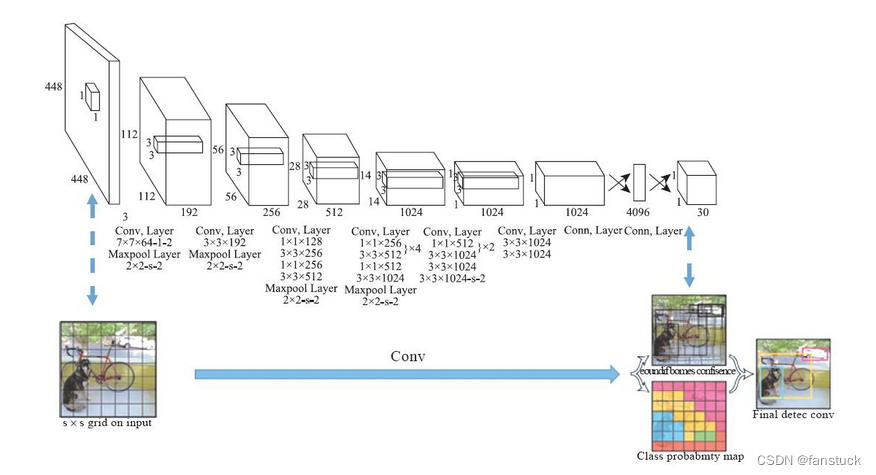
目标检测算法发展史
前言 比起图像识别,现在图片生成技术要更加具有吸引力,但是要步入AIGC技术领域,首先不推荐一上来就接触那些已经成熟闭源的包装好了再提供给你的接口网站,会使用别人的模型生成一些图片就能叫自己会AIGC了吗?那样真正…...
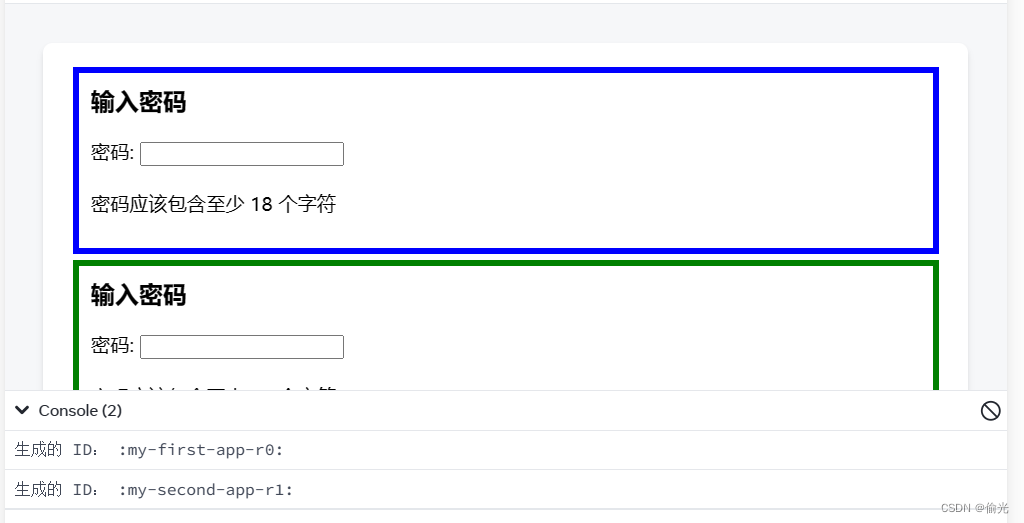
React 生成传递给无障碍属性的唯一 ID
useId() 在组件的顶层调用 useId 生成唯一 ID: import { useId } from react; function PasswordField() { const passwordHintId useId(); // ...参数 useId 不带任何参数。 返回值 useId 返回一个唯一的字符串 ID,与此特定组件中的 useI…...
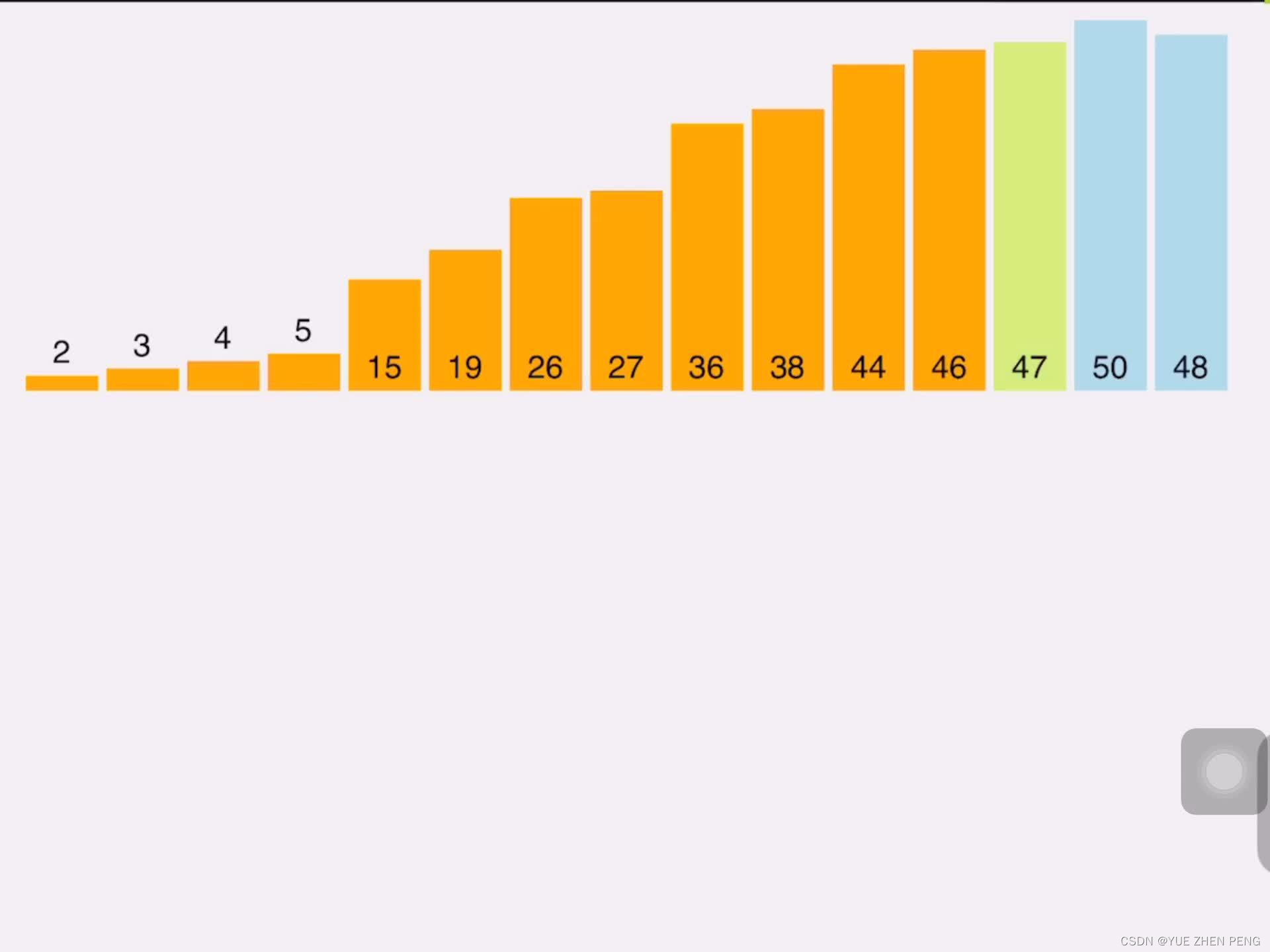
十种排序算法(1) - 准备测试函数和工具
1.准备工作 我们先写一堆工具,后续要用,不然这些写在代码里可读性巨差 #pragma once #include<stdio.h>//为C语言定义bool类型 typedef int bool; #define false 0 #define true 1//用于交互a和b inline void swap(int* a, int* b) {/*int c *a…...
)
野火挑战者开发板实战:用STM32CubeMX从零配置GPIO、UART和ADC(附完整代码)
野火挑战者开发板实战:从零构建环境监测系统 刚拿到野火挑战者开发板时,面对密密麻麻的引脚和复杂的配置选项,很多初学者会感到无从下手。本文将带你用STM32CubeMX图形化工具,快速配置GPIO、UART和ADC这三个最常用的外设ÿ…...

09. CSS生成艺术创作指南:用代码绘制视觉诗篇
09. CSS生成艺术创作指南:用代码绘制视觉诗篇 引言 CSS 不仅仅是样式语言,它也是一种创作艺术的工具。通过 CSS,我们可以创建出令人惊叹的生成艺术作品,这些作品不仅美观,而且具有动态性和交互性。作为一名把代码当散文…...

掌握MEAN.JS模块化开发:5个核心模块实战指南与最佳实践
掌握MEAN.JS模块化开发:5个核心模块实战指南与最佳实践 【免费下载链接】mean MEAN.JS - Full-Stack JavaScript Using MongoDB, Express, AngularJS, and Node.js - 项目地址: https://gitcode.com/gh_mirrors/mea/mean MEAN.JS作为基于MongoDB、Express、…...

AI万能分类器零基础入门:5分钟搭建无需训练的文本分类系统
AI万能分类器零基础入门:5分钟搭建无需训练的文本分类系统 1. 引言:为什么选择零样本分类? 想象一下这样的场景:你刚接手一个新项目,需要快速对大量用户反馈进行分类。传统方法要求你收集数据、标注样本、训练模型&a…...
)
别再只会用Burp改后缀了!5种Web文件上传绕过技巧原理深度拆解(.htaccess/MIME/00截断)
Web文件上传绕过技术:从原理到实战的深度解析 在CTF竞赛和实际渗透测试中,文件上传漏洞一直是高频出现的攻击面。许多开发者仅仅依赖简单的后缀名过滤或前端验证,却忽视了底层解析机制的复杂性。本文将深入剖析五种主流绕过技术的核心原理&am…...
)
Java函数计算部署实战:从本地调试到生产环境上线的7个关键步骤(含阿里云/华为云/AWS对比)
第一章:Java函数计算部署全景概览Java函数计算是云原生场景下轻量级、事件驱动型服务的重要实现方式。它将传统Java应用的部署范式从虚拟机/容器迁移至按需执行、自动扩缩的无服务器架构,显著降低运维复杂度与资源闲置成本。开发者只需聚焦业务逻辑&…...
)
十字头零件的机械加工工艺规程及工装夹具设计 (论文+CAD图纸+任务书+过程卡+工序卡+外文翻译+参考文献……)
十字头零件作为机械传动系统中的关键构件,其加工精度直接影响设备运行的稳定性与寿命。制定科学合理的机械加工工艺规程及配套工装夹具设计方案,是确保零件质量、提升加工效率的核心环节。工艺规程需系统规划从毛坯准备到成品检验的全流程,涵…...
)
别再只调PID了!聊聊机器人控制里‘运动控制’和‘动态控制’到底有啥区别(附结构图解析)
机器人控制进阶:运动控制与动态控制的本质差异与工程选择 刚接触机器人控制的工程师们,常常会被各种控制理论绕得晕头转向。记得我第一次调试机械臂时,导师只丢下一句"先调PID参数试试",结果整整三天都在和震荡、超调搏…...
)
别再被机械按键坑了!FPGA消抖模块Verilog代码保姆级解析(附仿真波形)
FPGA按键消抖实战:从原理到Verilog实现的深度解析 刚接触FPGA开发的朋友们,一定遇到过这样的困扰——明明按下了按键,系统却像没反应一样;或者只按了一次,设备却识别出多次触发。这背后隐藏着一个看似简单却至关重要的…...

5个WebGL流体模拟创新体验让你轻松打造动态视觉艺术
5个WebGL流体模拟创新体验让你轻松打造动态视觉艺术 【免费下载链接】WebGL-Fluid-Simulation Play with fluids in your browser (works even on mobile) 项目地址: https://gitcode.com/gh_mirrors/web/WebGL-Fluid-Simulation 当静态网页设计已无法满足用户对交互体验…...