
gin 快速入门手册
文章目录
- 安装
- URL和路由分组
- 2. 带参数的url
- 3. 获取路由分组的参数
- 获取参数
- 1. 获取get参数
- 2. 获取post参数
- 3. get、post混合
- JSON 、 ProtoBuf渲染
- 1. 输出json和protobuf
- 2. PureJSON
- 表单验证
- 1. 表单的基本验证
- 中间件和next函数
- 1. 无中间件启动
- 2. 使用中间件
- 3. 自定义组件
- 设置静态文件路径和HTML文件
- 1. 设置静态文件路径
- 2. index.html内容
- 3. templates/posts/index.tmpl
- 4. templates/users/index.tmpl
- 优雅重启或停止
- gorm
- 1. 什么是orm
- 2. 常用orm
- 3. orm的优缺点
- 4. 如何正确看待orm和sql之间的关系
官方手册
安装
go get -u github.com/gin-gonic/gin
- 代码
package mainimport "github.com/gin-gonic/gin"
# func main() {r := gin.Default()r.GET("/ping", func(c *gin.Context) {c.JSON(200, gin.H{"message": "pong",})})r.Run() // listen and serve on 0.0.0.0:8080
}
- 使用get、post、put等http方法
func main() {// 使⽤默认中间件创建⼀个gin路由器// logger and recovery (crash-free) 中间件router := gin.Default()router.GET("/someGet", getting)router.POST("/somePost", posting)router.PUT("/somePut", putting)router.DELETE("/someDelete", deleting)router.PATCH("/somePatch", patching)router.HEAD("/someHead", head)router.OPTIONS("/someOptions", options)// 默认启动的是 8080端⼝,也可以⾃⼰定义启动端⼝router.Run()// router.Run(":3000") for a hard coded port
}
URL和路由分组
- 路由分组
func main() {router := gin.Default()// Simple group: v1v1 := router.Group("/v1"){v1.POST("/login", loginEndpoint)v1.POST("/submit", submitEndpoint)v1.POST("/read", readEndpoint)}// Simple group: v2v2 := router.Group("/v2"){v2.POST("/login", loginEndpoint)v2.POST("/submit", submitEndpoint)v2.POST("/read", readEndpoint)}router.Run(":8082")
}
2. 带参数的url
package mainimport ("github.com/gin-gonic/gin""net/http")func main() {r := gin.Default()r.GET("/ping", func(c *gin.Context) {c.JSON(200, gin.H{"message": "pong",})})r.GET("/user/:name/:action/", func(c *gin.Context) {name := c.Param("name")action := c.Param("action")c.String(http.StatusOK, "%s is %s", name, action)})r.GET("/user/:name/*action", func(c *gin.Context) {name := c.Param("name")action := c.Param("action")c.String(http.StatusOK, "%s is %s", name, action)})r.Run(":8082")
}
3. 获取路由分组的参数
package mainimport "github.com/gin-gonic/gin"type Person struct {ID string `uri:"id" binding:"required,uuid"`Name string `uri:"name" binding:"required"`}func main() {route := gin.Default()route.GET("/:name/:id", func(c *gin.Context) {var person Personif err := c.ShouldBindUri(&person); err != nil {c.JSON(400, gin.H{"msg": err})return}c.JSON(200, gin.H{"name": person.Name, "uuid": person.ID})})route.Run(":8088")
}
获取参数
1. 获取get参数
func main() {router := gin.Default()// 匹配的url格式: /welcome?firstname=Jane&lastname=Doerouter.GET("/welcome", func(c *gin.Context) {firstname := c.DefaultQuery("firstname", "Guest")lastname := c.Query("lastname") // 是 c.Request.URL.Query().Get("lastnamec.String(http.StatusOK, "Hello %s %s", firstname, lastname)})router.Run(":8080")
}
2. 获取post参数
func main() {router := gin.Default()router.POST("/form_post", func(c *gin.Context) {message := c.PostForm("message")nick := c.DefaultPostForm("nick", "anonymous") // 此⽅法可以设置默认值c.JSON(200, gin.H{"status": "posted","message": message,"nick": nick,})})router.Run(":8080")
}
3. get、post混合
POST /post?id=1234&page=1 HTTP/1.1
Content-Type: application/x-www-form-urlencoded
name=manu&message=this_is_greatfunc main() {router := gin.Default()router.POST("/post", func(c *gin.Context) {id := c.Query("id")page := c.DefaultQuery("page", "0")name := c.PostForm("name")message := c.PostForm("message")fmt.Printf("id: %s; page: %s; name: %s; message: %s", id, page, name, mes})router.Run(":8080")
}
JSON 、 ProtoBuf渲染
1. 输出json和protobuf
新建user.proto文件
syntax = "proto3";
option go_package = ".;proto";
message Teacher {string name = 1;repeated string course = 2;
}
package main
import (
"github.com/gin-gonic/gin"
"net/http"
"start/gin_t/proto"
)
func main() {r := gin.Default()// gin.H is a shortcut for map[string]interface{}r.GET("/someJSON", func(c *gin.Context) {c.JSON(http.StatusOK, gin.H{"message": "hey", "status": http.StatusOK})})r.GET("/moreJSON", func(c *gin.Context) {// You also can use a structvar msg struct {Name string `json:"user"`Message stringNumber int}msg.Name = "Lena"msg.Message = "hey"msg.Number = 123// Note that msg.Name becomes "user" in the JSON// Will output : {"user": "Lena", "Message": "hey", "Number": 123}c.JSON(http.StatusOK, msg)})r.GET("/someProtoBuf", func(c *gin.Context) {courses := []string{"python", "django", "go"}// The specific definition of protobuf is written in the testdata/protoexName: "bobby",Course: courses,}// Note that data becomes binary data in the response// Will output protoexample.Test protobuf serialized datac.ProtoBuf(http.StatusOK, data)})// Listen and serve on 0.0.0.0:8080r.Run(":8083")
}
2. PureJSON
通常情况下,JSON会将特殊的HTML字符替换为对应的unicode字符,比如 < 替换为 \u003c ,如果想原样输出html,则使用PureJSON
func main() {r := gin.Default()// Serves unicode entitiesr.GET("/json", func(c *gin.Context) {c.JSON(200, gin.H{"html": "<b>Hello, world!</b>",})})// Serves literal charactersr.GET("/purejson", func(c *gin.Context) {c.PureJSON(200, gin.H{"html": "<b>Hello, world!</b>",})})// listen and serve on 0.0.0.0:8080r.Run(":8080")
}
表单验证
1. 表单的基本验证
若要将请求主体绑定到结构体中,请使用模型绑定,目前支持JSON、XML、YAML和标准表单值(foo=bar&boo=baz)的绑定。 Gin使用 go-playground/validator 验证参数
需要在绑定的字段上设置tag,比如,绑定格式为json,需要这样设置 json:“fieldname” 。
此外,Gin还提供了两套绑定方法:
- Must bind
Methods - Bind , BindJSON , BindXML , BindQuery , BindYAML Behavior - 这些方法底层使用 MustBindWith ,如果存在绑定错误,请求将被以下指令中止 c. AbortWithError(400,err).SetType(ErrorTypeBind) ,响应状态代码会被设置为400,请求头 Content-Type 被设置为 text/plain; charset=utf-8 。注意,如果你试图在此之后设置响应代码,将会发出一个警告 [GIN-debug] [WARNING] Headers were already written. Wanted to override status code 400 with 422 ,如果你希望更好地控制行为,请使用 ShouldBind 相关的方法 - Should bind
Methods - ShouldBind , ShouldBindJSON , ShouldBindXML , ShouldBindQuery , ShouldBindYAML
Behavior - 这些方法底层使用 ShouldBindWith ,如果存在绑定错误,则返回错误,开发人员可以正确处理请求和错误。
当我们使用绑定方法时,Gin会根据Content-Type推断出使用哪种绑定器,如果你确定你绑定的是什么,你可以使用 MustBindWith 或者 BindingWith 。你还可以给字段指定特定规则的修饰符,如果一个字段用 binding:“required” 修饰,并且在绑定时该字段的值为空,那么将返回一个错误。
// 绑定为json
type Login struct {User string `form:"user" json:"user" xml:"user" binding:"required"`Password string `form:"password" json:"password" xml:"password" binding:"requ`
}type SignUpParam struct {Age uint8 `json:"age" binding:"gte=1,lte=130"`Name string `json:"name" binding:"required"`Email string `json:"email" binding:"required,email"`Password string `json:"password" binding:"required"`RePassword string `json:"re_password" binding:"required,eqfield=Password"`
}
func main() {router := gin.Default()// Example for binding JSON ({"user": "manu", "password": "123"})router.POST("/loginJSON", func(c *gin.Context) {var json Loginif err := c.ShouldBindJSON(&json); err != nil {c.JSON(http.StatusBadRequest, gin.H{"error": err.Error()})return}if json.User != "manu" || json.Password != "123" {c.JSON(http.StatusUnauthorized, gin.H{"status": "unauthorized"})return}c.JSON(http.StatusOK, gin.H{"status": "you are logged in"})})// Example for binding a HTML form (user=manu&password=123)router.POST("/loginForm", func(c *gin.Context) {var form Login// This will infer what binder to use depending on the content-type headeif err := c.ShouldBind(&form); err != nil {c.JSON(http.StatusBadRequest, gin.H{"error": err.Error()})return}if form.User != "manu" || form.Password != "123" {c.JSON(http.StatusUnauthorized, gin.H{"status": "unauthorized"})return}c.JSON(http.StatusOK, gin.H{"status": "you are logged in"})})r.POST("/signup", func(c *gin.Context) {var u SignUpParamif err := c.ShouldBind(&u); err != nil {c.JSON(http.StatusOK, gin.H{"msg": err.Error(),})return}// 保存⼊库等业务逻辑代码...c.JSON(http.StatusOK, "success")})// Listen and serve on 0.0.0.0:8080router.Run(":8080")
}
中间件和next函数
1. 无中间件启动
#使⽤
r := gin.New()
#替代
// 默认启动⽅式,包含 Logger、Recovery 中间件
r := gin.Default()
2. 使用中间件
func main() {
// 创建⼀个不包含中间件的路由器r := gin.New()// 全局中间件// 使⽤ Logger 中间件r.Use(gin.Logger())// 使⽤ Recovery 中间件r.Use(gin.Recovery())// 路由添加中间件,可以添加任意多个r.GET("/benchmark", MyBenchLogger(), benchEndpoint)// 路由组中添加中间件// authorized := r.Group("/", AuthRequired())// exactly the same as:authorized := r.Group("/")// per group middleware! in this case we use the custom created// AuthRequired() middleware just in the "authorized" group.authorized.Use(AuthRequired()){authorized.POST("/login", loginEndpoint)authorized.POST("/submit", submitEndpoint)authorized.POST("/read", readEndpoint)// nested grouptesting := authorized.Group("testing")testing.GET("/analytics", analyticsEndpoint)}// Listen and serve on 0.0.0.0:8080r.Run(":8080")
}
3. 自定义组件
func Logger() gin.HandlerFunc {return func(c *gin.Context) {t := time.Now()// Set example variablec.Set("example", "12345")// before requestc.Next()// after requestlatency := time.Since(t)log.Print(latency)// access the status we are sendingstatus := c.Writer.Status()log.Println(status)}}func main() {r := gin.New()r.Use(Logger())r.GET("/test", func(c *gin.Context) {example := c.MustGet("example").(string)// it would print: "12345"log.Println(example)})// Listen and serve on 0.0.0.0:8080r.Run(":8080")
}
设置静态文件路径和HTML文件
1. 设置静态文件路径
package main
import (
"net/http"
"github.com/gin-gonic/gin"
)
func main() {// 创建⼀个默认的路由引擎r := gin.Default()// 配置模板r.LoadHTMLGlob("templates/**/*")//router.LoadHTMLFiles("templates/template1.html", "templates/template2.html// 配置静态⽂件夹路径 第⼀个参数是api,第⼆个是⽂件夹路径r.StaticFS("/static", http.Dir("./static"))// GET:请求⽅式;/hello:请求的路径// 当客户端以GET⽅法请求/hello路径时,会执⾏后⾯的匿名函数r.GET("/posts/index", func(c *gin.Context) {// c.JSON:返回JSON格式的数据c.HTML(http.StatusOK, "posts/index.tmpl", gin.H{"title": "posts/index",})})r.GET("gets/login", func(c *gin.Context) {c.HTML(http.StatusOK, "posts/login.tmpl", gin.H{"title": "gets/login",})})// 启动HTTP服务,默认在0.0.0.0:8080启动服务r.Run()
}
2. index.html内容
<html><h1>{{ .title }}</h1>
</html>
3. templates/posts/index.tmpl
{{ define "posts/index.tmpl" }}<html><h1>{{ .title }}</h1><p>Using posts/index.tmpl</p></html>
{{ end }}
4. templates/users/index.tmpl
{{ define "users/index.tmpl" }}
<html><h1>{{ .title }}
</h1><p>Using users/index.tmpl</p>
</html>
{{ end }}
优雅重启或停止
package main
import ("context""log""net/http""os""os/signal""syscall""time""github.com/gin-gonic/gin"
)
func main() {router := gin.Default()router.GET("/", func(c *gin.Context) {time.Sleep(5 * time.Second)c.String(http.StatusOK, "Welcome Gin Server")})
srv := &http.Server{Addr: ":8080",Handler: router,
}
go func() {// service connectionsif err := srv.ListenAndServe(); err != nil && err != http.ErrServerClosedlog.Fatalf("listen: %s\n", err)}
}()// Wait for interrupt signal to gracefully shutdown the server with// a timeout of 5 seconds.quit := make(chan os.Signal)// kill (no param) default send syscanll.SIGTERM// kill -2 is syscall.SIGINT// kill -9 is syscall. SIGKILL but can"t be catch, so don't need add itsignal.Notify(quit, syscall.SIGINT, syscall.SIGTERM)<-quitlog.Println("Shutdown Server ...")ctx, cancel := context.WithTimeout(context.Background(), 5*time.Second)defer cancel()if err := srv.Shutdown(ctx); err != nil {log.Fatal("Server Shutdown:", err)
select {case <-ctx.Done():log.Println("timeout of 5 seconds.")}log.Println("Server exiting")
}
gorm
1. 什么是orm
ORM全称是:Object Relational Mapping(对象关系映射),其主要作用是在编程中,把面向对象的概念跟数据库中表的概念对应起来。举例来说就是,我定义一个对象,那就对应着一张表,这个对象的实例,就对应着表中的一条记录。
对于数据来说,最重要最常用的是表:表中有列, orm就是将一张表映射成一个类,表中的列映射成类中的一个类。java 、python,但是针对go语言而言,struct,就是列如何映射,是因为列可以映射成struct中的类型,int->int,但是有另一个问题? 就是数据库中的列具备很好的描述性,但是struct有tag。执行sql, 需要我们有足够的sql语句基础、需要我们懂得不同的数据的sql
2. 常用orm
个人而言,不用太去纠结应该选择哪一个orm框架,但是实际上你用熟悉了一个,其他的orm迁移成本很低,我们选个一个star数量最高的一定不会有错,这些差异也不会很大
sql语言远比orm重要的多
https://github.com/go-gorm/gorm
https://github.com/facebook/ent
https://github.com/jmoiron/sqlx
https://gitea.com/xorm/xorm/src/branch/master/README_CN.md
https://github.com/didi/gendry/blob/master/translation/zhcn/README.md
3. orm的优缺点
优点:
- 提高了开发效率。
- 屏蔽sql细节。可以自动对实体Entity对象与数据库中的Table进行字段与属性的映射;不用直接SQL编码
- 屏蔽各种数据库之间的差异
缺点: - orm会牺牲程序的执行效率和会固定思维模式
- 太过依赖orm会导致sql理解不够
- 对于固定的orm依赖过重,导致切换到其他的orm代价高
4. 如何正确看待orm和sql之间的关系
- sql为主,orm为辅
- orm主要目的是为了增加代码可维护性和开发效率
一定要学好:
- group by
- 子查询
- having子句
相关文章:

gin 快速入门手册
文章目录 安装URL和路由分组2. 带参数的url3. 获取路由分组的参数 获取参数1. 获取get参数2. 获取post参数3. get、post混合 JSON 、 ProtoBuf渲染1. 输出json和protobuf2. PureJSON 表单验证1. 表单的基本验证 中间件和next函数1. 无中间件启动2. 使用中间件3. 自定义组件 设置…...
Window下安装 Mongodb,并实现单点事务
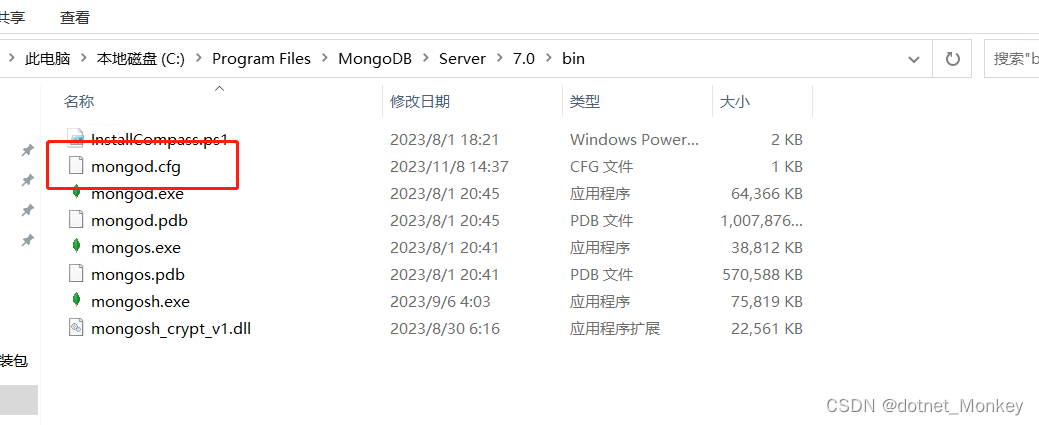
在window操作系统下安装Mongodb,并让单点mongodb支持事务,mongodb5以上时才支持事务,所以必须时mongodb5及以上版本才支持。 1、下载mongodb安装文件 (1) 下载mongodb msi 安装文件 地址:mongocommunity &…...

【通信原理】第三章 随机过程——例题
一、随机过程 1. 数学特征 ① 随机信号(三角函数表达式) ② 随机信号(求和表达式) 2. 功率谱密度 ① 相位确定,求功率谱密度 ② 已知相位分布,求功率谱密度 ③ 信号为两信号之和,求功率谱密度…...
线性【SVM】数学原理和算法实现
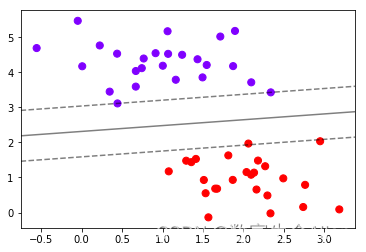
一. 数学原理 SVM是一类有监督的分类算法,它的大致思想是:假设样本空间上有两类点,如下图所示,我们希望找到一个划分超平面,将这两类样本分开,我们希望这个间隔能够最大化来使得模型泛化能力最强。 如上图所…...

R语言中的函数26:polyroot多项式求根函数
目录 介绍函数介绍参数含义 示例 介绍 R语言中的base::polyroot()可以用于对多项式求根,求根的多项式可以是复数域上的。 函数介绍 polyroot(z)该函数利用Jenkins-Traub算法对多项式 p ( x ) p(x) p(x)进行求根,其中 p ( x ) z 1 z 2 x ⋯ z n x…...

2023年辽宁省数学建模竞赛A题铁路车站的安全标线
2023年辽宁省数学建模竞赛 A题 铁路车站的安全标线 原题再现: 在火车站或地铁站台上,离站台边缘 1 米左右的地方都画有一条黄线(或白线),这是为什么呢? 这条线称为安全线(业内称之为安全标线),人们在候车时必须站在安全线以…...

半导体工厂将应用哪些制造创新技术?
半导体工厂是高科技产业的结晶,汇聚了世界上最新的技术。 在半导体的原料硅晶片上绘制设计图纸,不产生误差,准确切割并包装,然后用芯片生产出我们使用的电脑、智能手机、手表等各种电子产品。绝大多数半导体厂都采用一贯的工艺&a…...
[unity]深色模式/浅色模式
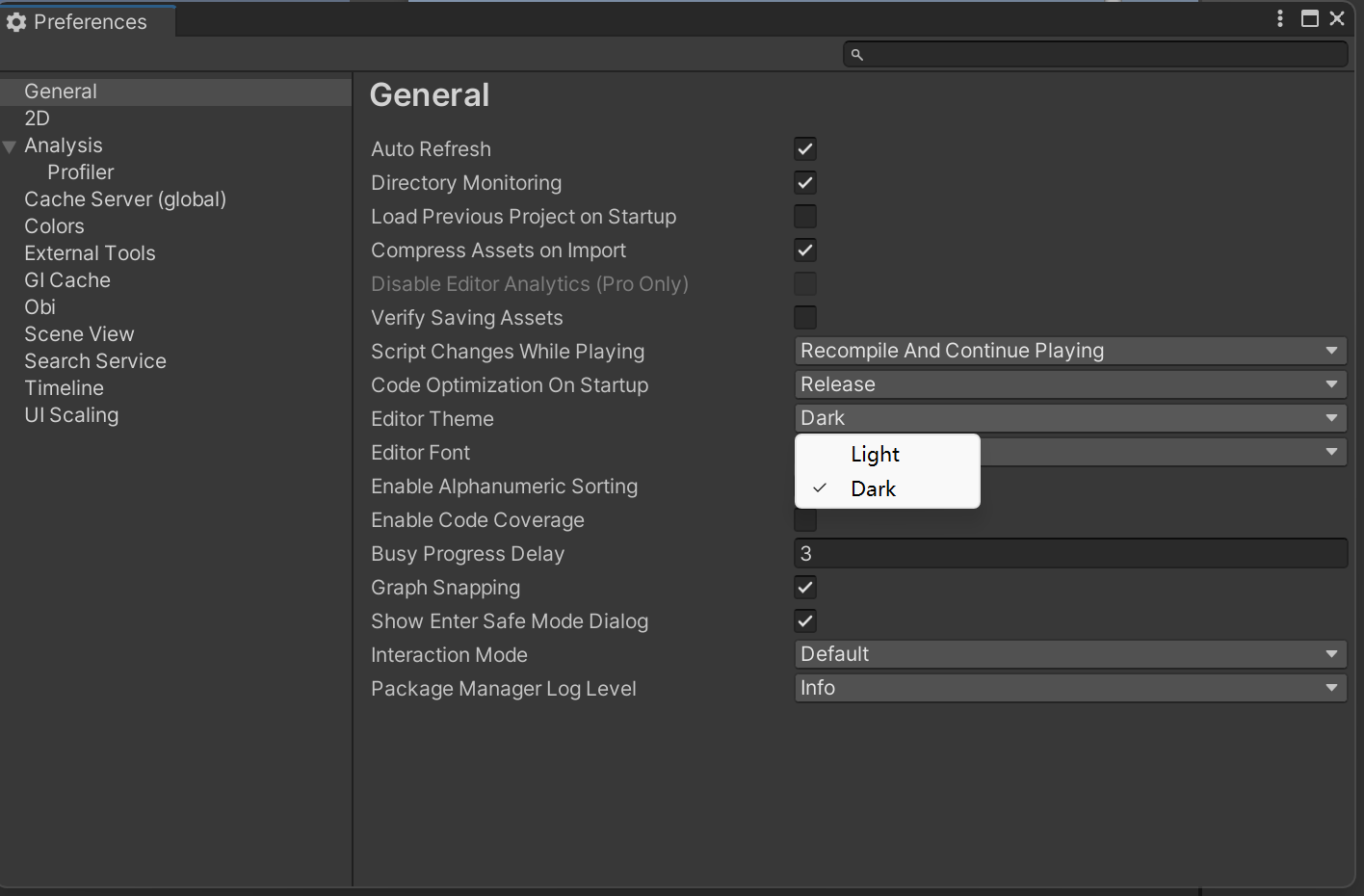
这里用的是Windows版的unity,具体版本号如下: 选项的路径如下:Edit—Preferences—General—Editor Theme 然后就可以选是dark还是light了:...
在react中组件间过渡动画如何实现?
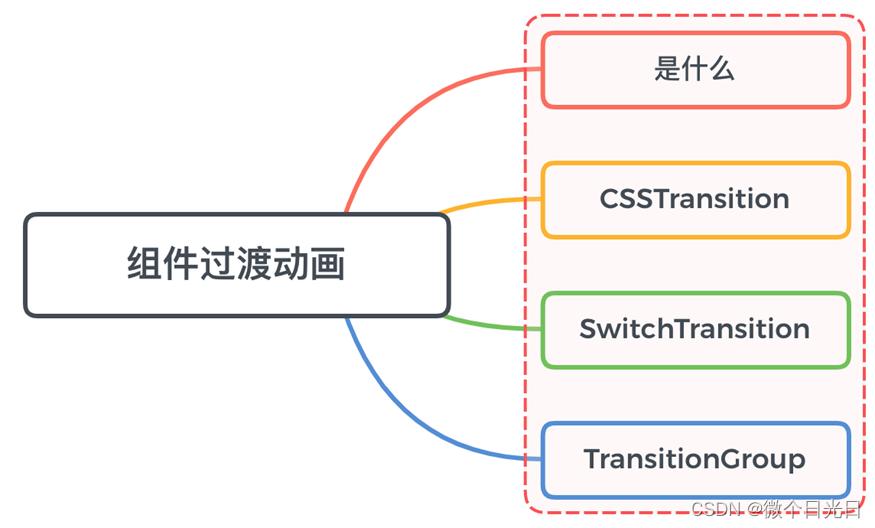
一、是什么 在日常开发中,页面切换时的转场动画是比较基础的一个场景 当一个组件在显示与消失过程中存在过渡动画,可以很好的增加用户的体验 在react中实现过渡动画效果会有很多种选择,如react-transition-group,react-motion&…...
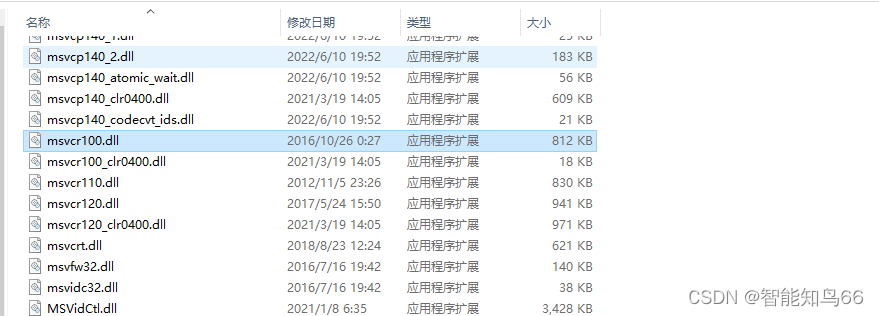
解析找不到msvcr100.dll文件的解决方法,4个方法修复msvcr100.dll
msvcr100.dll是Microsoft Visual C 2010运行库的组成部分,一些基于Visual C开发的软件运行时会依赖这个dll文件。出现“找不到msvcr100.dll”的错误提示,往往意味着这个文件在你的计算机系统中丢失或损坏,导致相关程序无法正常运行。以下是找…...

达梦主备部署
达梦主备部署 一.概括1)环境软件下载2)集群规划 二.安装1)安装前2)安装数据库 三.主备机器部署1)初始化数据库(1)主库配置(2)备库配置 2)脱机备份(1)主服务器…...

后期混音效果全套插件Waves 14 Complete mac中文版新增功能
Waves 14 Complete for Mac是一款后期混音效果全套插件,Waves音频插件,内置混响,压缩,降噪和EQ等要素到建模的模拟硬件,环绕声和后期制作工具,包含全套音频效果器,是可以让你使用所有功能。Waves 14 Comple…...

HTML5笔记
前端学习笔记专栏区别于官网中全面的知识讲解,主要记录学习技术栈时对于重点内容的提炼,便于对技术栈知识的快速回顾以及使用 1.canvas元素 内部坐标:坐标均以左上角为(0, 0),单一坐标均作为起始坐标创建对象: <c…...

前端架构师需要解决那些问题
假设你是一个大型后台管理系统的前端架构师,你需要解决那些问题? 1、Ui设计规范 大型系统UI得统一吧?各个业务模块的UI设计得高效吧?那就得有规范,直观的说就是原子设计那套东西。加一堆推荐设计稿。 2、基础组件库…...

使用python快速搭建接口自动化测试脚本实战总结
导读 本文将介绍如何使用python快速进行http/https接口自动化测试脚本搭建,实现自动请求、获取结果、数据对比分析,导出结果到Excel等功能,包括python的requests、pandas、openpyxl等库的基本使用方法。 测试需求介绍 通常,在我…...
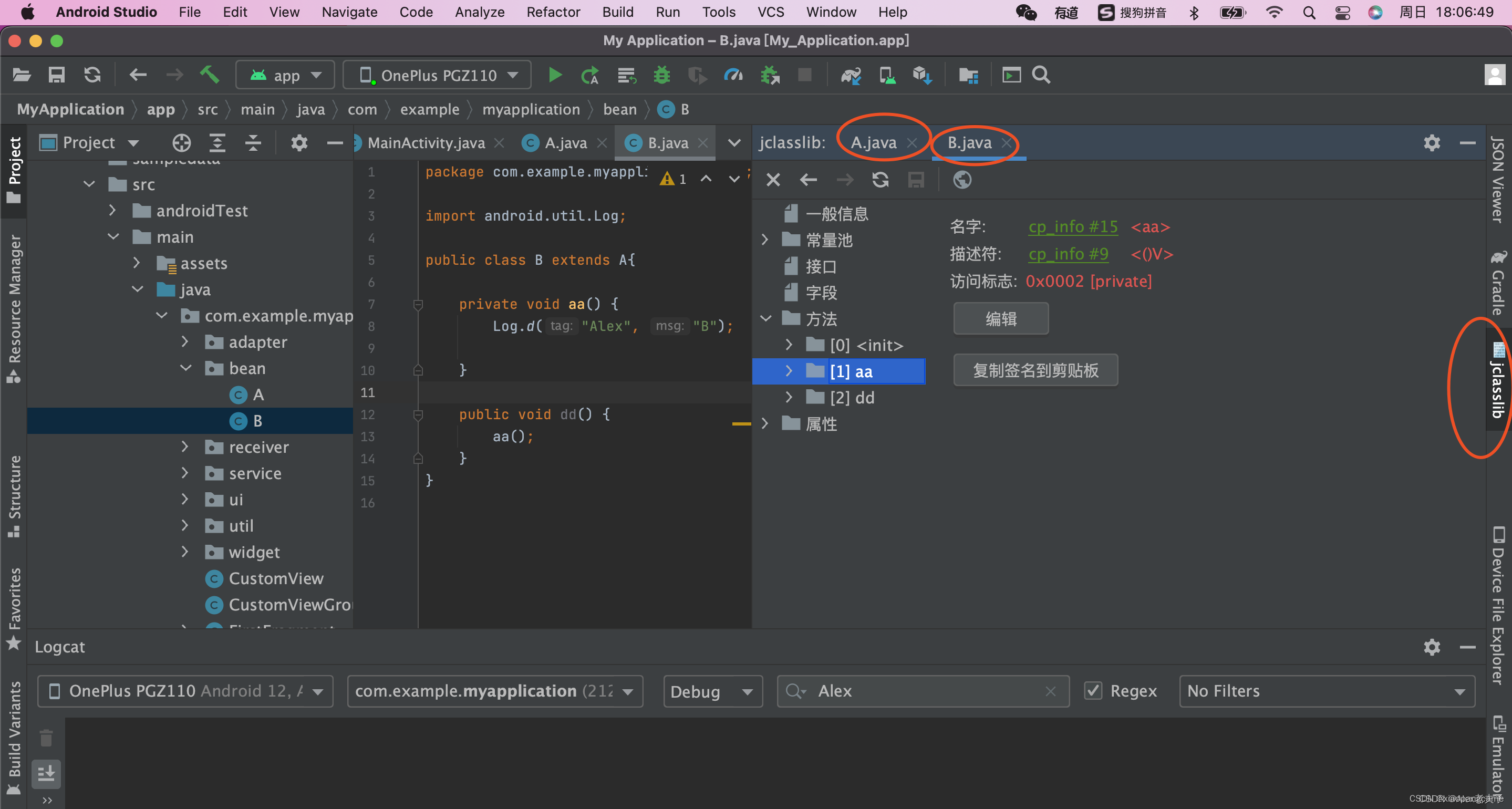
android studio 字节码查看工具jclasslib bytecode viewer
jclasslib bytecode viewer 是一款非常好用的.class文件查看工具; jclasslib bytecode editor is a tool that visualizes all aspects of compiled Java class files and the contained bytecode. Many aspects of class files can be edited in the UI. In addit…...

Ubuntu上搭建FTP服务
要在Ubuntu上搭建FTP服务器,可以使用常见的FTP服务器软件如vsftpd(Very Secure FTP Daemon)或ProFTPD。以下是使用vsftpd在Ubuntu上设置FTP服务器的基本步骤: 步骤 1: 安装 vsftpd 打开终端并运行以下命令安装 vsftpd:…...
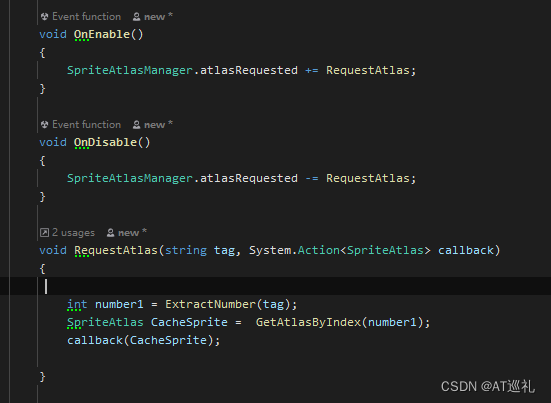
unity打AB包,AssetBundle预制体与图集(三)
警告: spriteatlasmanager.atlasrequested wasn’t listened to while 条件一:图片打图集里面去了 条件二:然后图集打成AB包了 条件三:UI预制体也打到AB包里面去了 步骤一:先加载了图集 步骤二:再加载UI预…...

在Javascript中为什么 0.1+0.2 不等于0.3 ? 源代码详细解析
在JavaScript中,浮点数计算可能会导致精度问题,这就是为什么0.1 0.2不等于0.3的原因。这是因为JavaScript使用IEEE 754标准来表示浮点数,而该标准使用二进制来表示小数。 让我们通过一个实例来详细解释这个问题。考虑以下代码: …...

MATLAB|热力日历图
目录 日历图介绍: 热力日历图的特点: 应用场景: 绘图工具箱 属性 (Properties) 构造函数 (Constructor) 公共方法 (Methods) 私有方法 (Private Methods) 使用方法 日历图介绍: 热力日历图是一种数据可视化形式…...

2026年03月总结及随笔之又双叒叕漏更
1. 回头看日更坚持了1186天。读《人工智能全球格局:未来趋势与中国位势》更新完成读《2025世界前沿技术发展报告》开更并持续更新中2023年至2025年12月底累计码字3054280字,累计日均码字2786字。2023年至2026年03月底累计码字3334223字,累计日…...

使用LaTeX撰写基于Lingbot-Depth-Pretrain-VitL-14的学术论文:图表与算法排版
使用LaTeX撰写基于Lingbot-Depth-Pretrain-VitL-14的学术论文:图表与算法排版 写学术论文,尤其是涉及深度学习和计算机视觉模型的,比如你正在研究的Lingbot-Depth-Pretrain-VitL-14,最头疼的往往不是实验本身,而是如何…...

3个技巧:如何用开源工具彻底解决Beyond Compare授权难题
3个技巧:如何用开源工具彻底解决Beyond Compare授权难题 【免费下载链接】BCompare_Keygen Keygen for BCompare 5 项目地址: https://gitcode.com/gh_mirrors/bc/BCompare_Keygen 当Beyond Compare 5的30天评估期结束后,用户常常会遇到"评估…...

C++ 用户态协议栈:基于 DPDK 的 C++ 网络库开发与内核绕过技术分析
各位技术同仁,下午好!今天,我们将深入探讨一个在高性能网络领域至关重要的话题:C 用户态协议栈的开发,特别是如何基于 DPDK 构建一个高性能网络库,以及其背后的内核绕过技术。在现代数据中心和网络基础设施…...

OpenClaw学习助手方案:Qwen2.5-VL-7B解析教材插图生成记忆卡片
OpenClaw学习助手方案:Qwen2.5-VL-7B解析教材插图生成记忆卡片 1. 为什么需要AI辅助学习工具 去年备考专业认证时,我发现自己总在重复低效的学习循环——花大量时间手动整理教材图表中的关键数据,再誊写到Anki卡片上。这种机械劳动不仅耗时…...
)
Java应用等保三级合规改造:3天完成代码层、配置层、运维层全栈优化(附Checklist)
第一章:Java应用等保三级合规改造全景图等保三级是国家网络安全等级保护制度中面向重要信息系统的核心要求,对Java应用而言,合规改造不是单一技术点的修补,而是一套覆盖开发、运行、运维全生命周期的安全治理工程。其核心目标在于…...

OpCore-Simplify:一键自动化黑苹果配置,让复杂技术变得简单
OpCore-Simplify:一键自动化黑苹果配置,让复杂技术变得简单 【免费下载链接】OpCore-Simplify A tool designed to simplify the creation of OpenCore EFI 项目地址: https://gitcode.com/GitHub_Trending/op/OpCore-Simplify OpCore-Simplify是…...

OpenClaw批量任务队列:百川2-13B-4bits量化版处理百条邮件自动回复
OpenClaw批量任务队列:百川2-13B-4bits量化版处理百条邮件自动回复 1. 为什么需要邮件自动回复系统 上周我收到了一封来自老客户的紧急咨询邮件,当时正在外地参加会议无法及时回复。等三天后回到电脑前,发现邮箱里堆积了127封未读邮件——其…...

OpenClaw性能优化:千问3.5-9B模型加速30%的秘诀
OpenClaw性能优化:千问3.5-9B模型加速30%的秘诀 1. 为什么需要优化OpenClaw性能 第一次用OpenClaw执行自动化任务时,我遇到了一个尴尬的问题——点击"整理桌面文件"指令后,系统整整思考了15秒才开始移动第一个文件。这种延迟在简…...

建筑物缺陷分割图像识别
建筑物缺陷分割图像识别 README 项目概述 建筑物缺陷分割数据集分析数据概览关键信息总数量5213张图像,涵盖类别:裂缝、剥落、锈蚀、污渍数据集数量5200数据集格式YoloVOC;应用价值:支持建筑物缺陷自动分割与识别,用于…...