
uniapp相关记录
一、自定义我的物品组件 my_goods.vue
<template><view class="goods-item"><!-- 左侧 --><view class="goods-item-left"><radio :checked="goods.goods_state" color="#c00000" v-if="showRadio" @click="radioClickhandler"></radio><image :src="goods.goods_small_logo || defaultPic" class="goods-pic"></image></view><!-- 右侧 --><view class="goods-item-right"><!-- 商品名字 --><view class="goods-name">{{goods.goods_name}}</view><view class="goods-info-box"><view class="good-price">¥{{goods.goods_price}}</view><uni-number-box :min="1" :max="9999" :value="goods.goods_count" v-if="showNum"@change="numChangeHandler"></uni-number-box></view></view></view>
</template><script>export default {props: {// 商品的信息对象goods: {type: Object,defaul: {},},showRadio: {type: Boolean,// 默认不展示 radio 组件default: false},showNum: {type: Boolean,default: false}},data() {return {// 默认的图片defaultPic: 'https://img3.doubanio.com/f/movie/8dd0c794499fe925ae2ae89ee30cd225750457b4/pics/movie/celebrity-default-medium.png',};},methods: {// radio 组件的点击事件处理函数radioClickhandler() {this.$emit('radio-change', {goods_id: this.goods.goods_id,goods_state: !this.goods.goods_state})},// 监听购物车商品数量变化的事件numChangeHandler(val) {this.$emit('num-change', {goods_id: this.goods.goods_id,goods_count: +val})}}}
</script><style lang="scss">.goods-item {display: flex;padding: 10px 5px;border-bottom: 1px solid #dedede;background-color: #fff;.goods-item-left {margin-right: 5px;display: flex;justify-content: center;align-items: center;.goods-pic {width: 100px;height: 100px;display: block;}}.goods-item-right {display: flex;flex: 1;flex-direction: column;justify-content: space-between;.goods-name {font-size: 13px;}.goods-info-box {display: flex;justify-content: space-between;align-items: center;.good-price {color: #c00000;font-size: 16px;}}}}
</style>
二、自定义商品列表组件 good_list.vue
<template><view><view class="goods-list"><view v-for="(goods,i) in goodsList" :key="i" @click="gotoDetail(goods)"><my-goods :goods="goods"></my-goods></view></view></view>
</template><script>import {myGoods} from '@/components/my-goods/my-goods.vue'export default {components: {myGoods},  data() {return {// 请求参数对象queryObj: {query: '',cid: '',pagenum: 1,pagesize: 10},goodsList: [],total: 0,isLoading: false}},onLoad(options) {this.queryObj.query = options.query || ''this.queryObj.cid = options.cid || ''this.getGoodsList()},methods: {// 获取商品列表数据async getGoodsList(cb) {// 打开节流阀this.isLoading = trueconst {data: res} = await uni.$http.get('/api/public/v1/goods/search', this.queryObj)// 关闭节流阀this.isLoading = falsecb && cb()if (res.meta.status !== 200) return uni.$showMsg()this.goodsList = [...this.goodsList, ...res.message.goods]this.total = res.message.total},gotoDetail(goods) {uni.navigateTo({url: '/subpkg/goods_detail/goods_detail?goods_id=' + goods.goods_id})}},onReachBottom() {if (this.queryObj.pagenum * this.queryObj.pagesize >= this.total) return uni.$showMsg('数据加载完毕')if (this.isLoading) return// 让页码值自增+1this.queryObj.pagenum++this.getGoodsList()},onPullDownRefresh() {// 重置关键数据this.queryObj.pagenum = 1this.total = 0this.isLoading = falsethis.goodsList = []// 重新发起数据请求this.getGoodsList(() => {uni.stopPullDownRefresh()})}}</script><style lang="scss"></style>
三、自定义商品详情组件 good_detail.vue
<template><view v-if="goods_info.goods_name" class="goods-detail-container"><!-- 轮播图区域 --><swiper :indicator-dots="true" :autoplay="true" :interval="3000" :duration="1000" :circular="true"><swiper-item v-for="(item,i) in goods_info.pics" :key="i"><image :src="item.pics_big" @click="preview(i)"></image></swiper-item></swiper><!-- 商品信息区域 --><view class="goods-info-box"><!-- 商品价格 --><view class="price">¥{{goods_info.goods_price}}</view><!-- 商品信息主体区域 --><view class="goods-info-body"><!-- 商品名字 --><view class="goods-name">{{goods_info.goods_name}}</view><!-- 收藏 --><view class="favi"><uni-icons type="star" size="18" color="gray"></uni-icons><text>收藏</text></view></view><!-- 运费 --><view class="yf">快递:免运费</view></view><rich-text :nodes="goods_info.goods_introduce"></rich-text><!-- 商品导航组件区域 --><view class="goods_nav"><uni-goods-nav :fill="true" :options="options" :buttonGroup="buttonGroup" @click="onClick"@buttonClick="buttonClick" /></view></view>
</template><script>export default {watch: {total: {handler(newVal) {const findResult = this.options.find(x => x.text === '购物车')if (findResult) {findResult.info = newVal}},immediate: true}},data() {return {goods_info: {},options: [{icon: 'shop',text: '店铺',infoBackgroundColor: '#007aff',infoColor: "red"}, {icon: 'cart',text: '购物车',info: 0}],buttonGroup: [{text: '加入购物车',backgroundColor: '#ff0000',color: '#fff'},{text: '立即购买',backgroundColor: '#ffa200',color: '#fff'}],}},onLoad(options) {const goods_id = options.goods_idthis.getGoodsDetail(goods_id)},methods: {async getGoodsDetail(goods_id) {const {data: res} = await uni.$http.get('/api/public/v1/goods/detail', {goods_id})if (res.meta.status !== 200) return uni.$showMsg()res.message.goods_introduce = res.message.goods_introduce.replace(/<img /g,'<img style="display:block;" ').replace(/webp/g, 'jpg')this.goods_info = res.message},preview(i) {uni.previewImage({current: i,urls: this.goods_info.pics.map(x => x.pics_big)})},onClick(e) {if (e.content.text === '购物车') {uni.switchTab({url: '/pages/cart/cart'})}},buttonClick(e) {if (e.content.text === '加入购物车') {// 组织商品的信息对象// 每个商品的信息对象,都包含如下 6 个属性:// { goods_id, goods_name, goods_price, goods_count, goods_small_logo, goods_state }const goods = {goods_id: this.goods_info.goods_id,goods_name: this.goods_info.goods_name,goods_price: this.goods_info.goods_price,goods_count: 1,goods_small_logo: this.goods_info.goods_small_logo,goods_state: true}// 调用 addToCart 方法// this.addToCart(goods)}}}}
</script><style lang="scss">swiper {height: 750rpx;image {width: 100%;height: 100%;}}.goods-info-box {padding: 10px;padding-right: 0;.price {color: #c00000;font-size: 18px;margin: 10px 0;}.goods-info-body {display: flex;justify-content: space-between;.goods-name {font-size: 13px;margin-right: 10px;}.favi {width: 120px;font-size: 12px;display: flex;flex-direction: column;align-items: center;justify-content: center;border-left: 1px solid #eaeaea;color: gray;}}.yf {font-size: 12px;color: gray;margin: 10px 0;}}.goods_nav {position: fixed;bottom: 0;left: 0;width: 100%;}.goods-detail-container {padding-bottom: 50px;}
</style>
四、自定义搜索组件 my_search.vue
<template><view class="my-search-container" :style="{'background-color': bgcolor}" @click="searchBoxHandler"><view class="my-search-box" :style="{'border-radius': radius + 'px'}"><uni-icons type="search" size="17"></uni-icons><text class="placeholder">搜索</text></view></view>
</template><script>export default {name: "my-search",props: {// 背景颜色bgcolor: {type: String,default: '#c00000'},// 圆角尺寸radius: {type: Number,default: 18 //px}},data() {return {};},methods: {searchBoxHandler() {this.$emit('click')}}}
</script><style lang="scss">.my-search-container {height: 50px;// background-color: #c00000;display: flex;align-items: center;padding: 0 10px;.my-search-box {width: 100%;height: 36px;background-color: #fff;// border-radius: 18px;display: flex;justify-content: center;align-items: center;.placeholder {font-size: 15px;margin-left: 5px;}}}
</style>
五、小程序首页 index.vue
<template><view><!-- 搜索组件 --><view class="search-box"><my-search @click="gotoSearch"></my-search><!-- 动态给子组件传颜色和圆角像素值 --><!-- <my-search @click="gotoSearch" :bgcolor="'black'" :radius="18"></my-search> --></view><!-- 轮播图区域 --><swiper :indicator-dots="true" :autoplay="true" :interval="3000" :duration="1000" :circular="true"><swiper-item v-for="(item,i) in swiperList" :key="i"><navigator class="swiper-item" :url="'/subpkg/goods_detail/goods_detail?goods_id=' + item.good_id"><image :src="item.image_src"></image></navigator></swiper-item></swiper><!-- 分类导航区域 --><view class="nav-list"><view class="nav-item" v-for="(item,i) in navList" :key="i" @click="navClickHandler(item)"><image :src="item.image_src" class="nav-img"></image></view></view><!-- 楼层区域 --><view class="floor-list"><!-- 每个楼层的 item 项 --><view class="floor-item" v-for="(item,i) in floorList" :key="i"><!-- 楼层的标题 --><image :src="item.floor_title.image_src" class="floor-title"></image><!-- 楼层的图片区域 --><view class="floor-img-box"><!-- 左侧图片 --><navigator class="left-img-box" :url="item.product_list[0].url"><image :src="item.product_list[0].image_src" :style="{width: item.product_list[0].image_width + 'rpx'}"mode="widthFix"></image></navigator><!-- 右侧图片 --><view class="right-img-box"><navigator class="right-img-item" v-for="(item2,i2) in item.product_list" :key="i2" v-if="i2 !== 0":url="item2.url"><image :src="item2.image_src" :style="{width: item2.image_width + 'rpx'}" mode="widthFix"></image></navigator></view></view></view></view></view>
</template><script>import {mySearch} from '@/components/my-search/my-search.vue'export default {components:{mySearch},data() {return {title: 'Hello',// 轮播图数据列表swiperList: [],// 分类导航的数据列表navList: [],// 楼层的数据floorList: []}},onLoad() {this.getSwiperList()this.getNavList()this.getFloorList()},methods: {gotoSearch() {uni.navigateTo({url: '/subpkg/search/search'})},async getSwiperList() {const {data: res} = await uni.$http.get('/api/public/v1/home/swiperdata')// 请求失败if (res.meta.status !== 200) return uni.$showMsg()// 请求成功this.swiperList = res.message},async getNavList() {const {data: res} = await uni.$http.get('/api/public/v1/home/catitems')// 请求失败if (res.meta.status !== 200) return uni.$showMsg()// 请求成功this.navList = res.message},navClickHandler(item) {if (item.name === '分类') {uni.switchTab({url: '/pages/category/category'})}},async getFloorList() {const {data: res} = await uni.$http.get('/api/public/v1/home/floordata')// 请求失败if (res.meta.status !== 200) return uni.$showMsg()// 请求成功// 对每张图片的 navigator_url 数据进行处理res.message.forEach(floor => {floor.product_list.forEach(prod => {prod.url = '/subpkg/goods_list/goods_list?' + prod.navigator_url.split('?')[1]})})this.floorList = res.message},}}
</script><style>swiper {height: 330rpx;},.swiper-item,image {width: 100%;height: 100%;},.nav-list {display: flex;justify-content: space-around;margin: 15px 0;}.nav-img {width: 128rpx;height: 140rpx;}.floor-title {width: 100%;height: 60rpx;}.floor-img-box {display: flex;padding-left: 10rpx;}.right-img-box {display: flex;flex-wrap: wrap;justify-content: space-around;}.search-box {position: sticky;top: 0;z-index: 999;}
</style>
六、状态管理相关 store(以下文件分别为:store.js cart.js user.js)
import Vue from 'vue'
import Vuex from 'vuex'
import moduleCart from '@/store/cart.js'
import moduleUser from '@/store/user.js'Vue.use(Vuex)const store = new Vuex.Store({modules: {'m_cart': moduleCart,'m_user': moduleUser}
})export default store
export default {namespaced: true,state: () => ({// 购物车的数组,用来存储购物车中每个商品的信息对象// 每个商品的信息对象,都包含如下 6 个属性:// { goodsId, goodsName, goodsPrice, goodsCount, goodsSmallLogo, goodsState }cart: JSON.parse(uni.getStorageSync('cart') || '[]')}),mutations: {addToCart(state, goods) {const findResult = state.cart.find(x => x.goodsId === goods.goodsId)if (!findResult) {state.cart.push(goods)} else {findResult.goods_count++}this.commit('m_cart/saveToStorage')},saveToStorage(state) {uni.setStorageSync('cart', JSON.stringify(state.cart))},// 更新购物车商品的勾选状态updateGoodsState(state, goods) {const findResult = state.cart.find(x => x.goodsId === goods.goodsId)if (findResult) {findResult.goodsState = goods.goodsStatethis.commit('m_cart/saveToStorage')}},updateGoodsCount(state, goods) {const findResult = state.cart.find(x => x.goodsId === goods.goodsId)if (findResult) {findResult.goodsCount = goods.goodsCountthis.commit('m_cart/saveToStorage')}},// 根据 id 删除对应的商品removeGoodsById(state, goods_id) {state.cart = state.cart.filter(x => x.goodsId !== goodsId)this.commit('m_cart/saveToStorage')},// 更新购物车中所有的商品勾选状态updateAllGoodsState(state, newState) {state.cart.forEach(x => x.goodsState = newState)this.commit('m_cart/saveToStorage')}},getters: {// 购物车中所有商品的总数量total(state) {// let c = 0// state.cart.forEach(goods => c += goods.goods_count)// return creturn state.cart.reduce((total, item) => total += item.goodsCount, 0)},// 购物车中已勾选的商品的总数量checkedCount(state) {return state.cart.filter(x => x.goodsState).reduce((total, item) => total += item.goodsCount, 0)},// 已勾选的商品的总价格checkedGoodsAmount(state) {return state.cart.filter(x => x.goodsState).reduce((total, item) => total += item.goodsCount * item.goodsPrice,0).toFixed(2)}}
}
export default {// 开启命名空间namespaced: true,// 数据state: () => ({address: JSON.parse(uni.getStorageSync('address') || '{}'),token: uni.getStorageSync('token') || '',// 用户的信息对象userinfo: JSON.parse(uni.getStorageSync('userinfo') || '{}')}),mutations: {// 更新收货地址updateAddress(state, address) {state.address = addressthis.commit('m_user/saveAddressToStorage')},// 持久化存储 addresssaveAddressToStorage(state) {uni.setStorageSync('address', JSON.stringify(state.address))},updateUserInfo(state, userinfo) {state.userinfo = userinfothis.commit('m_user/saveUserInfoToStorage')},saveUserInfoToStorage(state) {uni.setStorageSync('userinfo', JSON.stringify(state.userinfo))},updateToken(state, token) {state.token = tokenthis.commit('m_user/saveTokenToStorage')},saveTokenToStorage(state) {uni.setStorageSync('token', state.token)}},getters: {// 收货地址addstr(state) {if (!state.address.provinceName) return ''return state.address.provinceName + state.address.cityName + state.address.countyName + state.address.detailInfo}}
}
七、main.js
import App from './App'import store from '@/store/store.js'
// 导入网络请求的包
import { $http } from '@/node_modules/@escook/request-miniprogram'
uni.$http = $http// 请求根路径
$http.baseUrl = 'https://api-hmugo-web.itheima.net'
// 请求拦截器
$http.beforeRequest = function(options) {// 显示loading效果uni.showLoading({title: '数据加载中...',})// 判断当前请求的是否为有权限的接口if (options.url.indexOf('/my/') !== -1) {options.header = {Authorization: "Bearer eyJhbGciOiJIUzI1NiIsInR5cCI6IkpXVCJ9.eyJ1aWQiOjIzLCJpYXQiOjE1NjQ3MzAwNzksImV4cCI6MTAwMTU2NDczMDA3OH0.YPt-XeLnjV-_1ITaXGY2FhxmCe4NvXuRnRB8OMCfnPo"}}
}
// 响应拦截器
$http.afterRequest = function() {// 隐藏loading效果uni.hideLoading()
}
// 封装数据请求失败的弹框方法
uni.$showMsg = function(title = '数据请求失败', duration = 1500) {uni.showToast({title,duration,icon: 'none',})
}
Vue.config.productionTip = falseimport uView from '@/uni_modules/uview-ui'
Vue.use(uView)// #ifndef VUE3
import Vue from 'vue'
Vue.config.productionTip = false
App.mpType = 'app'try {function isPromise(obj) {return (!!obj &&(typeof obj === "object" || typeof obj === "function") &&typeof obj.then === "function");}// 统一 vue2 API Promise 化返回格式与 vue3 保持一致uni.addInterceptor({returnValue(res) {if (!isPromise(res)) {return res;}return new Promise((resolve, reject) => {res.then((res) => {if (res[0]) {reject(res[0]);} else {resolve(res[1]);}});});},});
} catch (error) { }const app = new Vue({...App
})
app.$mount()
// #endif// #ifdef VUE3
import { createSSRApp } from 'vue'
export function createApp() {const app = createSSRApp(App)return {app}
}
// #endif
八、引入/uview组件(分别该四个文件:app.vue man.js page.json uni.scss)
<style lang="scss">/*每个页面公共css */@import "@/uni_modules/uview-ui/index.scss";
</style>
import uView from '@/uni_modules/uview-ui'
Vue.use(uView)
"easycom": {"^u-(.*)": "@/uni_modules/uview-ui/components/u-$1/u-$1.vue"},
@import '@/uni_modules/uview-ui/theme.scss';
九、uniapp小程序分包
①page.json中定义分包文件
②定义分包文件夹并创建分包文件
"subPackages": [{"root": "subpkg","pages": [{"path": "search/search"},{"path" : "goods_list/goods_list"},{"path" : "goods_detail/goods_detail","style" : {"navigationBarTitleText": "","enablePullDownRefresh": false}}]}],
相关文章:

uniapp相关记录
一、自定义我的物品组件 my_goods.vue <template><view class"goods-item"><!-- 左侧 --><view class"goods-item-left"><radio :checked"goods.goods_state" color"#c00000" v-if"showRadio" …...
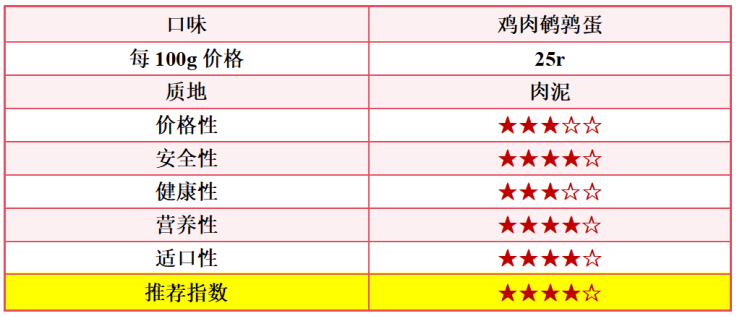
优质猫罐头有哪些品牌?分享5款宠物店自用值得推荐的猫罐头!
不知不觉已经开宠物店7年啦,店里的猫猫大大小小也算是尝试过很多品牌的猫罐头了。优质猫罐头有哪些品牌?在猫罐头的选购上一开始我也是踩了很多坑,各种踩雷。我深知猫罐头的各种门道,新手一不小心就会着道了。 优质猫罐头有哪些品…...

HTML新手入门笔记整理:HTML基本标签
结构标签 <html> </html> 告诉浏览器这个页面是从<html> 开始,到 </html>结束 <head> </head> 网页的头部,用于定义一些特殊内容,如页面标题、定时刷新、外部文件等。 <body> </body> …...
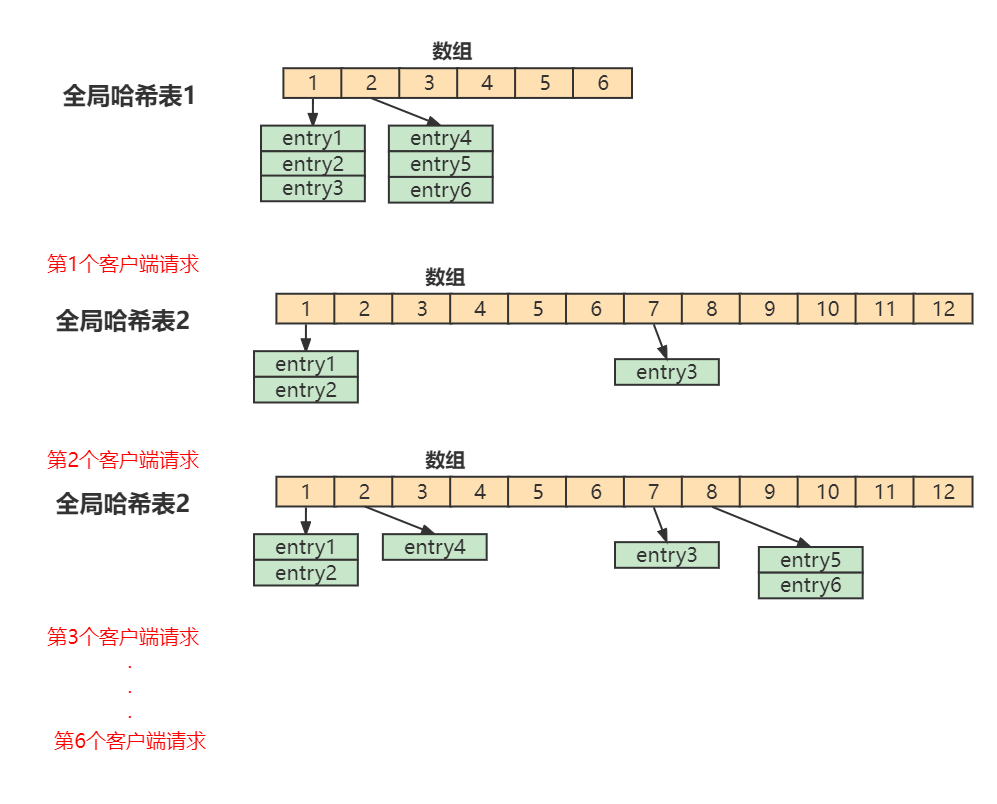
Redis高级特性和应用(发布 订阅、Stream)
目录 发布和订阅 操作命令 发布消息 订阅消息 查询订阅情况 查看活跃的频道 查看频道订阅数 使用场景和缺点 Redis Stream Stream总述 常用操作命令 生产端 消费端 单消费者 消费组 创建消费组 消息消费 在Redis中实现消息队列 基于pub/sub 基于Stream Re…...
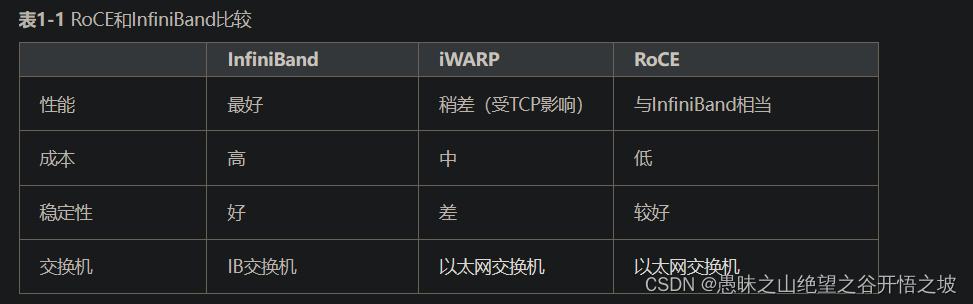
RoCE、IB和TCP等网络的基本知识及差异对比
目前有三种RDMA网络,分别是Infiniband、RoCE(RDMA over Converged Ethernet)、iWARP。 其中,Infiniband是一种专为RDMA设计的网络,从硬件级别保证可靠传输 ,技术先进,但是成本高昂。 而RoCE 和 iWARP都是基于以太网的…...
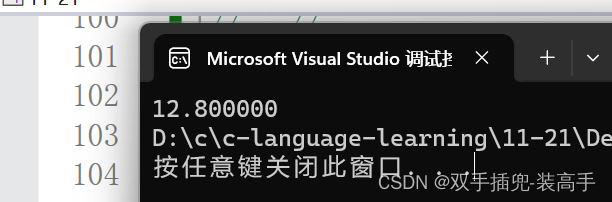
c语言-操作符详解(含优先级与结合性)
文章目录 了解什么是操作数、操作符操作数:操作符 操作符详解:1.算术操作符: 、- 、* 、/ 、%2.移位操作符: << >>3.位操作符: & | ^4. 赋值操作符: 、 、 - 、 * 、 / 、% 、<< 、>> 、& 、| 、^5. 单⽬操…...
ubuntu安装nvm
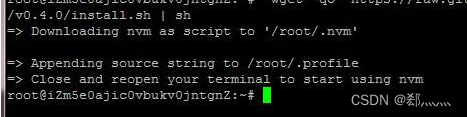
需求 在 virtualbox 虚拟机上运行的 ubuntu (22.04.3)里安装 nvm (Node Version Manager) 简述 官网文档 (github地址)上有提到两种安装方式,一种是直接 curl | wget 命令安装,一…...
opengl制作天空盒
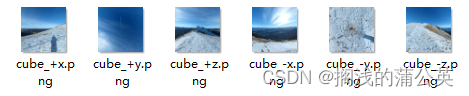
首先创建顶点数组 unsigned int m_uiVaoBufferID; glGenVertexArrays(1, &m_uiVaoBufferID); 然后创建顶点缓冲区 float skyboxVertices[] {// positions-1.0f, 1.0f, -1.0f,-1.0f, -1.0f, -1.0f,1.0f, -1.0f, -1.0f,1.0f, -1.0f, -1.0f,1.0f, 1.0f, -1.0f,-1.0f, 1.…...
单片机和FreeRTOS上跑机器人ROS的应用
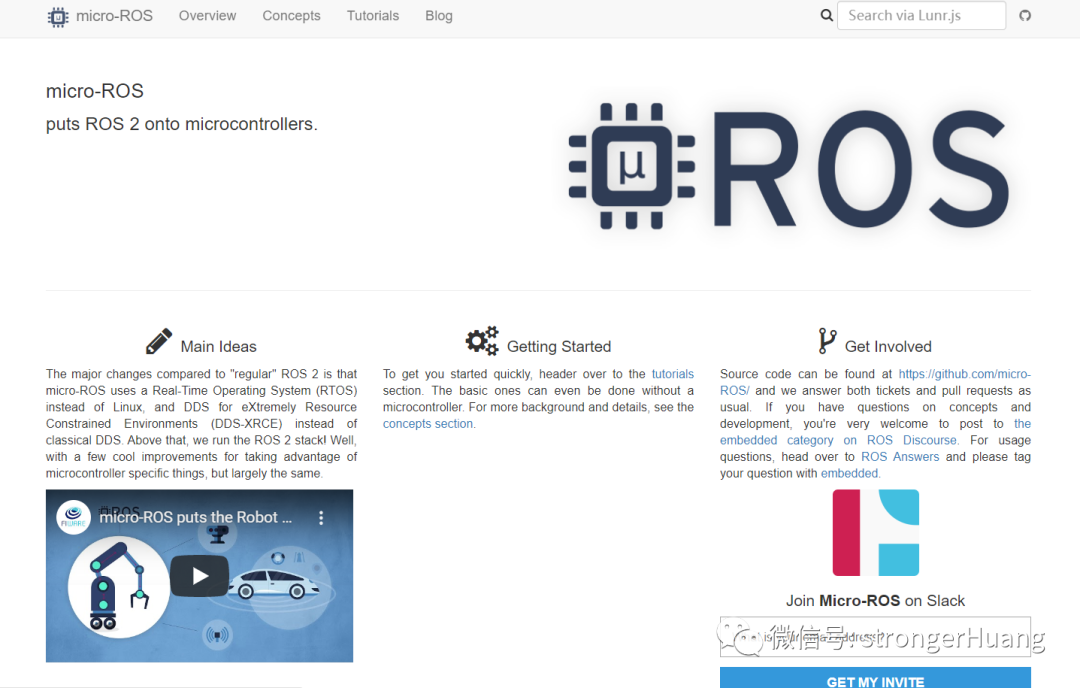
机器人的应用越来越广泛了,大家熟知的稚晖君直接创业搞机器人,可想而至,接下来的十年,机器人绝对是热门的行业。 目前市面上很多机器人都是基于一套叫做ROS的系统开发的,今天就给大家分享一个跑在MCU上,基…...
Spring Cloud学习(十一)【深入Elasticsearch 分布式搜索引擎03】
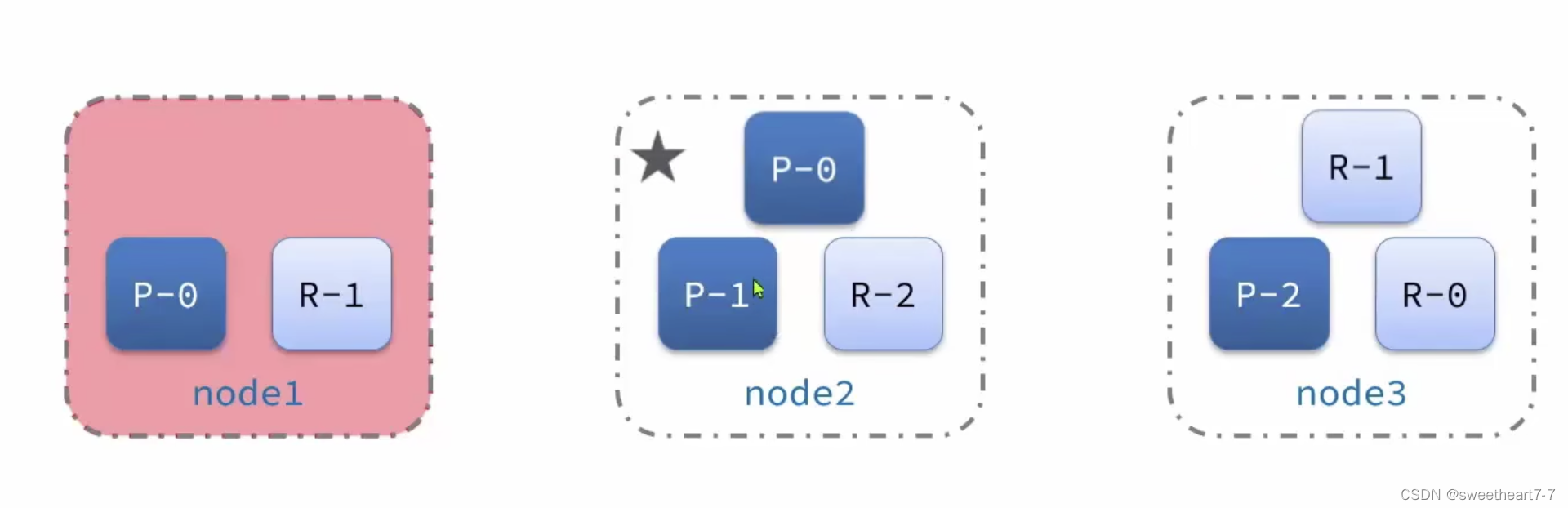
文章目录 数据聚合聚合的种类DSL实现聚合RestAPI实现聚合 自动补全拼音分词器自定义分词器自动补全查询completion suggester查询RestAPI实现自动补全 数据同步数据同步思路分析实现elasticsearch与数据库数据同步 集群搭建ES集群创建es集群集群状态监控创建索引库1)…...

【gitlab初始密码登录失败】
gitlab初始密码登录失败 修改密码 修改密码 [rootlocalhost ~]# gitlab-rake "gitlab:password:reset[root]" Enter password: Confirm password: Password successfully updated for user with username root. # 再重新配置gitlab [rootlocalhost ~]# gitlab-ctl…...

2017年全国硕士研究生入学统一考试管理类专业学位联考数学试题——解析版
文章目录 2017 级考研管理类联考数学真题解析一、问题求解(本大题共 5 小题,每小题 3 分,共 45 分)下列每题给出 5 个选项中,只有一个是符合要求的,请在答题卡上将所选择的字母涂黑。真题(2017-…...

2、基础入门——web应用架构搭建漏洞HTTP数据包代理服务器
Web应用环境架构类 开发语言:php、java、python、ASP、ASPX等程序源码:用的人多了,就成CMS了。中间件容器:IIS、Apache、Nginx、Tomcat、Weblogic、Jboos、glasshfish等数据库类型:Access、Mysql、Mssql、Oracle、Red…...

【精选】OpenCV多视角摄像头融合的目标检测系统:全面部署指南&源代码
1.研究背景与意义 随着计算机视觉和图像处理技术的快速发展,人们对于多摄像头拼接行人检测系统的需求日益增加。这种系统可以利用多个摄像头的视角,实时监测和跟踪行人的活动,为公共安全、交通管理、视频监控等领域提供重要的支持和帮助。 …...

力扣算法练习BM45—滑块窗口的最大值
题目 给定一个长度为 n 的数组 num 和滑动窗口的大小 size ,找出所有滑动窗口里数值的最大值。 例如,如果输入数组{2,3,4,2,6,2,5,1}及滑动窗口的大小3,那么一共存在6个滑动窗口,他们的最大值分别为{4,4,6,6,6,5}; 针…...

最小二乘估计及与极大似然估计的关系
最小二乘估计(Least Squares Estimation)和极大似然估计(Maximum Likelihood Estimation)是统计学中常用的参数估计方法,它们在某些情况下是等价的,但在一般情况下并不总是相同的。 最小二乘估计ÿ…...
02房价预测
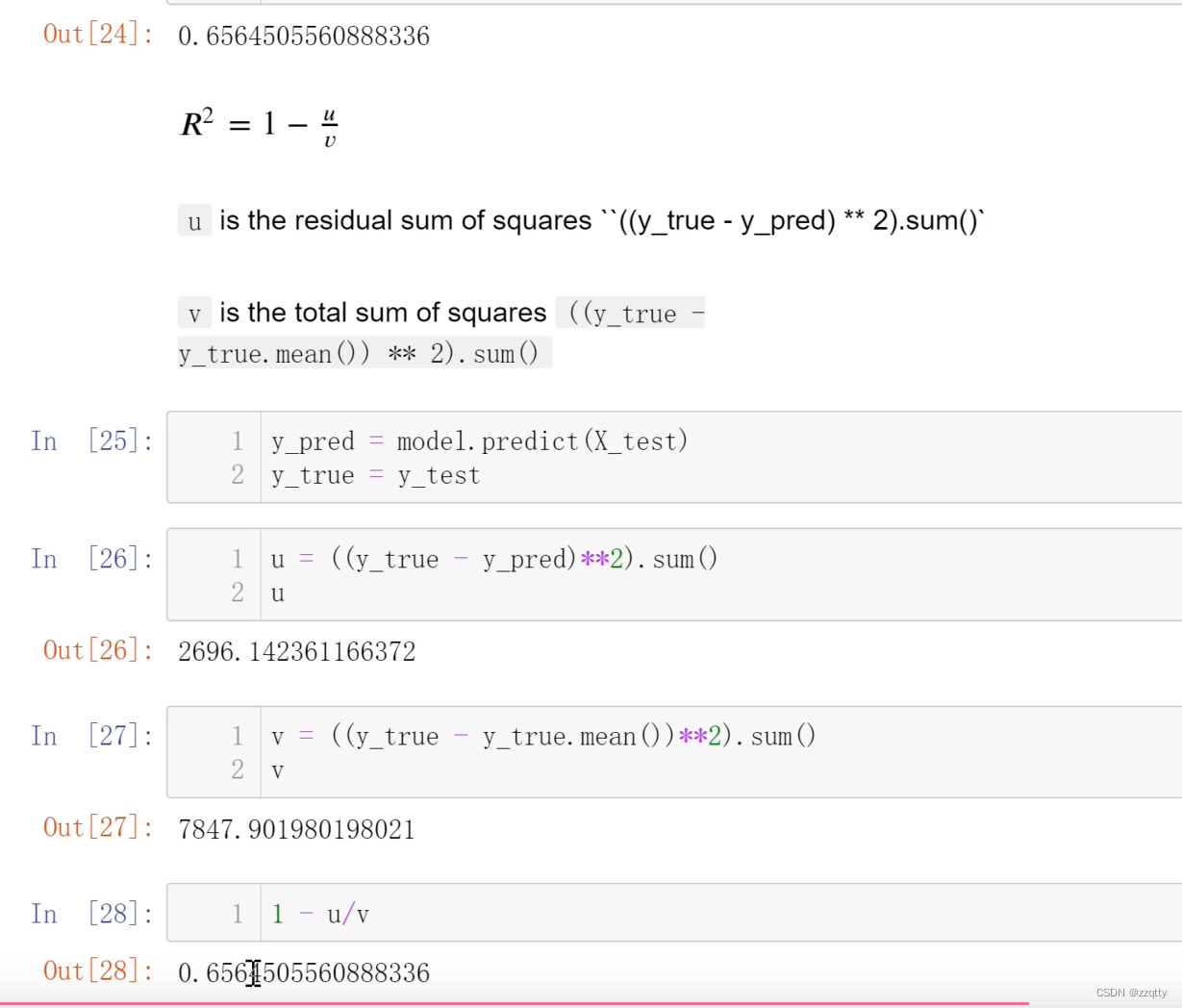
目录 代码 评分算法: 代码 import numpy as np from sklearn import datasets from sklearn.linear_model import LinearRegression# 指定版本才有数据集 # C:\Users\14817\PycharmProjects\pythonProject1\venv\Scripts\activate.bat # pip install scikit-le…...

【Springboot】pom.xml中的<build>标签详解
默认值及其标签解释 <build><!-- 指定最终构建产物的名称, 例如生成的 JAR 文件的名称 --><finalName>${artifactId}-${version}</finalName><!-- 指定源代码文件的目录路径 --><sourceDirectory>src/main/java</sourceDirectory>&l…...
智能驾驶产品开发中如何贯彻“正向开发”理念
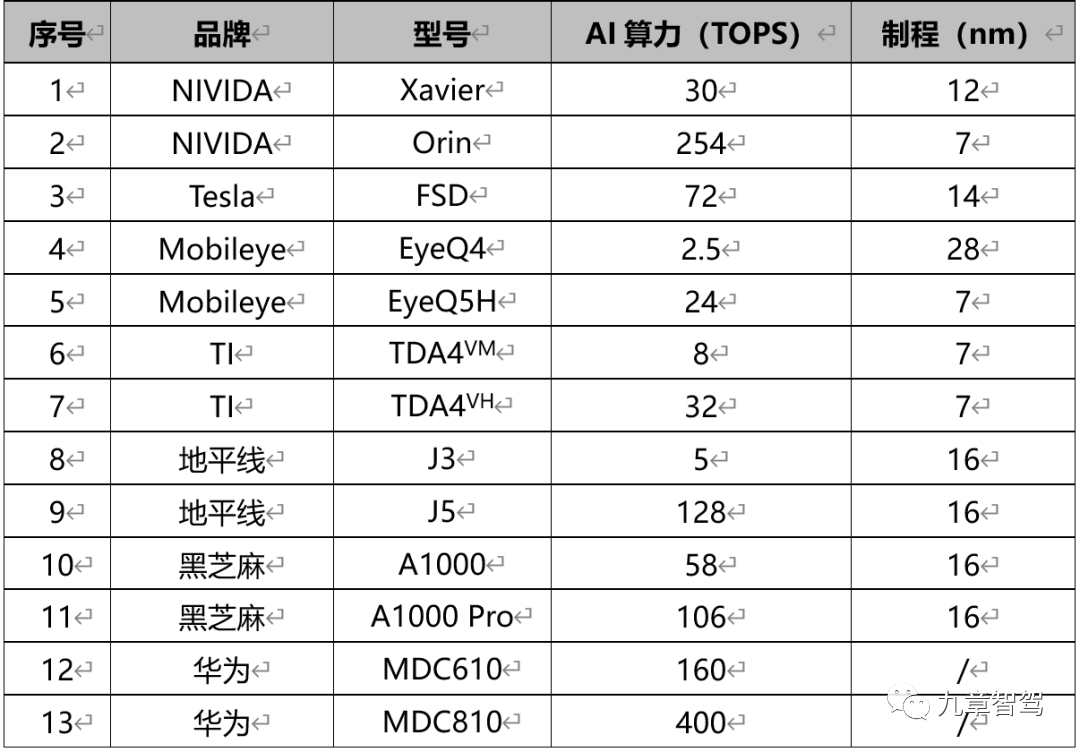
摘要: 基于演绎法的正向开发理念,能够让智能驾驶产品在充分满足用户需求,保证产品质量的同时,确保开发目标合理且得到落实。 前段时间,微博CEO吐槽理想L9智能驾驶“行驶轨迹不居中”,在网上引发了热烈讨论…...
【机器学习】038_梯度消失、梯度爆炸
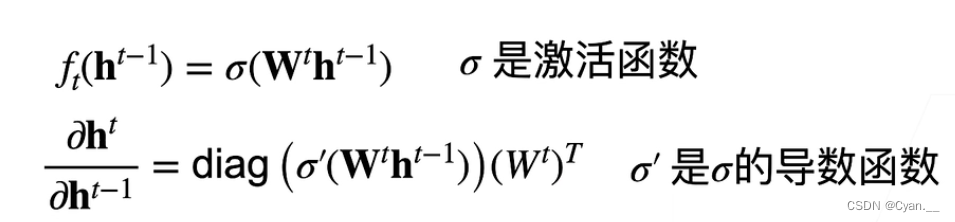
一、原因 神经网络梯度 假设现在有一个 层的神经网络,每层的输出为一个对输入作 变换的函数结果 用 来表示第 层的输出,那么有下列公式: 链式法则计算损失 关于某一层某个参数 的梯度: 注意到, 为向量&am…...

原子级平面限域协同晶核诱导定向生长单层鳞片石墨的研究
原子级平面限域协同晶核诱导定向生长单层鳞片石墨的研究 原子级平面限域协同晶核诱导定向生长单层鳞片石墨的研究 摘要: 针对传统煤基人造石墨存在结晶度不均、片层结构杂乱、缺陷密度高、锂电应用性能受限等问题,本文提出一种原子级平面限域空间协同单晶…...

锅炉辅机铸铜循环螺杆泵SNF5300R46UHJ92NW23
SNF中压螺杆泵 法兰式点火油泵维修附带前端盖SNF中压螺杆泵更是展现出了其不可或缺的重要性。在点火油泵的系统中,它如同一位精准的输送者,将油液准确地输送到燃烧器中。无论是启动时的点火过程还是运行中的持续供油,它都能做到毫厘不差。这种…...

Fomu FPGA开发板入门:从Verilog到RISC-V软核的渐进式学习指南
1. 从零开始:认识你的Fomu硬件开发板如果你对FPGA(现场可编程门阵列)感兴趣,但又觉得它高深莫测、入门门槛太高,那么Fomu这个小玩意儿可能会彻底改变你的看法。它是一块可以塞进USB接口的FPGA开发板,把整个…...
)
告别迷茫!手把手教你用Isolar A/B配置Autosar应用软件层(从新建工程到SWC链接)
告别迷茫!手把手教你用Isolar A/B配置Autosar应用软件层(从新建工程到SWC链接) 第一次打开Isolar A/B时,那个布满专业术语的界面就像面对一堵密不透风的墙。作为过来人,我完全理解这种手足无措的感觉——明明每个单词都…...

Agent 一接无限滚动页就开始漏内容:从 Viewport Checkpoint 到 Stable Item Key 的工程实战
很多团队把浏览器 Agent 接到商品流或监控列表后,第一批线上事故并不是“不会滚动”,而是它滚得很勤,却依旧漏内容。⚠️ 页面每次只暴露一个视口,模型若把“当前看到的列表”直接当成“完整世界”,结果就会一边下滚一…...

别再只调参数了!用UDS 2F服务控制车窗/车灯,手把手教你实战报文分析
实战UDS 2F服务:从报文构造到车窗控制的完整闭环验证 在汽车电子诊断领域,UDS协议中的2F服务(InputOutputControlByIdentifier)就像一把精准的"遥控器",允许工程师直接操控ECU的输入输出信号。但很多开发者仅…...

重塑你的数字工作空间:Farouk‘s Homepage主题深度体验指南
重塑你的数字工作空间:Farouks Homepage主题深度体验指南 【免费下载链接】obsidian-homepage Obsidian homepage - Minimal and aesthetic template (with my unique features) 项目地址: https://gitcode.com/gh_mirrors/obs/obsidian-homepage 还在为Obsi…...

从设计师的PS画布到程序员的SVG:用viewBox和width/height讲清楚‘画布’与‘视口’的区别
从设计师的PS画布到程序员的SVG:用viewBox和width/height讲清楚‘画布’与‘视口’的区别 当你第一次把精心设计的矢量图标从Illustrator导出为SVG格式,却发现它在网页上显示得要么太小、要么太大,甚至只显示了一部分——这不是你的设计有问题…...

3步搞定电脑音频优化:Equalizer APO终极指南,让你的声音焕然一新
3步搞定电脑音频优化:Equalizer APO终极指南,让你的声音焕然一新 【免费下载链接】equalizerapo Equalizer APO mirror 项目地址: https://gitcode.com/gh_mirrors/eq/equalizerapo 你是否总觉得电脑播放的音乐不够震撼?看电影时低音无…...

ductor:基于YAML的AI提示词工作流编排与自动化执行引擎详解
1. 项目概述:一个为AI提示词而生的“指挥家”如果你和我一样,深度使用过各种大语言模型,那你一定有过这样的体验:为了完成一个复杂的任务,比如写一份详细的市场分析报告,你需要反复和AI对话。先让它生成大纲…...