
Linux shell编程学习笔记29:shell自带的 脚本调试 选项
Linux shell脚本的调试方法比较多,上次我们探讨和测试了shell内建命令set所提供的一些调试选项,其实 shell 本身也提供了一些调试选项。我们以bash为例来看看。
1 bash 的命令行帮助信息(bash --help)
purleEndurer @ csdn ~ $ bash --help
GNU bash, version 4.2.46(2)-release-(x86_64-redhat-linux-gnu)
Usage: bash [GNU long option] [option] ...
bash [GNU long option] [option] script-file ...
GNU long options:
--debug
--debugger
--dump-po-strings
--dump-strings
--help
--init-file
--login
--noediting
--noprofile
--norc
--posix
--protected
--rcfile
--rpm-requires
--restricted
--verbose
--version
Shell options:
-irsD or -c command or -O shopt_option (invocation only)
-abefhkmnptuvxBCHP or -o option
Type `bash -c "help set"' for more information about shell options.
Type `bash -c help' for more information about shell builtin commands.
purleEndurer @ csdn ~ $
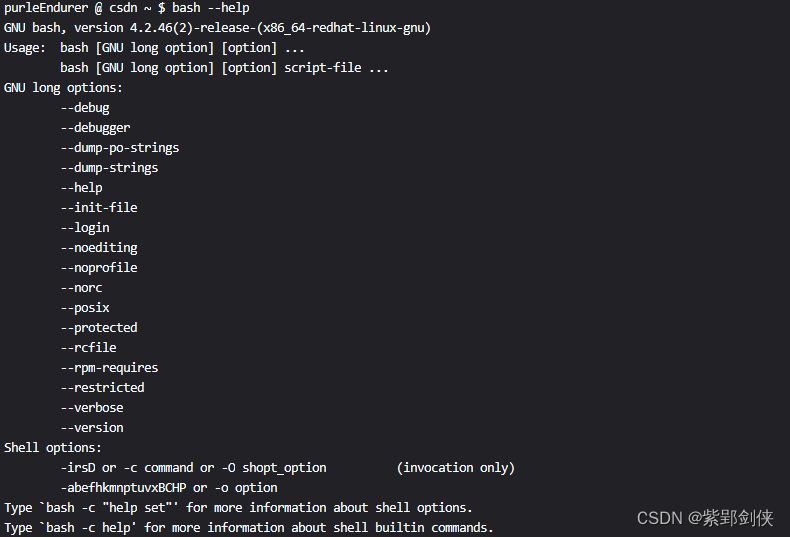
可以看到,bash命令有很多参数和选项。
使用 bash 命令加上特定的选项可以在运行Shell脚本时改变其行为,帮助我们诊断问题。
2 bash 的内置命令set提供的选项(bash -c "help set" )
我们可以使用命令 bash -c "help set" 查看 bash 内置命令set提供的选项。
purpleEndurer @ cdu ~ $ bash -c "help set"
set: set [-abefhkmnptuvxBCHP] [-o option-name] [--] [arg ...]
Set or unset values of shell options and positional parameters.
Change the value of shell attributes and positional parameters, or
display the names and values of shell variables.
Options:
-a Mark variables which are modified or created for export.
-b Notify of job termination immediately.
-e Exit immediately if a command exits with a non-zero status.
-f Disable file name generation (globbing).
-h Remember the location of commands as they are looked up.
-k All assignment arguments are placed in the environment for a
command, not just those that precede the command name.
-m Job control is enabled.
-n Read commands but do not execute them.
-o option-name
Set the variable corresponding to option-name:
allexport same as -a
braceexpand same as -B
emacs use an emacs-style line editing interface
errexit same as -e
errtrace same as -E
functrace same as -T
hashall same as -h
histexpand same as -H
history enable command history
ignoreeof the shell will not exit upon reading EOF
interactive-comments
allow comments to appear in interactive commands
keyword same as -k
monitor same as -m
noclobber same as -C
noexec same as -n
noglob same as -f
nolog currently accepted but ignored
notify same as -b
nounset same as -u
onecmd same as -t
physical same as -P
pipefail the return value of a pipeline is the status of
the last command to exit with a non-zero status,
or zero if no command exited with a non-zero status
posix change the behavior of bash where the default
operation differs from the Posix standard to
match the standard
privileged same as -p
verbose same as -v
vi use a vi-style line editing interface
xtrace same as -x
-p Turned on whenever the real and effective user ids do not match.
Disables processing of the $ENV file and importing of shell
functions. Turning this option off causes the effective uid and
gid to be set to the real uid and gid.
-t Exit after reading and executing one command.
-u Treat unset variables as an error when substituting.
-v Print shell input lines as they are read.
-x Print commands and their arguments as they are executed.
-B the shell will perform brace expansion
-C If set, disallow existing regular files to be overwritten
by redirection of output.
-E If set, the ERR trap is inherited by shell functions.
-H Enable ! style history substitution. This flag is on
by default when the shell is interactive.
-P If set, do not follow symbolic links when executing commands
such as cd which change the current directory.
-T If set, the DEBUG trap is inherited by shell functions.
-- Assign any remaining arguments to the positional parameters.
If there are no remaining arguments, the positional parameters
are unset.
- Assign any remaining arguments to the positional parameters.
The -x and -v options are turned off.
Using + rather than - causes these flags to be turned off. The
flags can also be used upon invocation of the shell. The current
set of flags may be found in $-. The remaining n ARGs are positional
parameters and are assigned, in order, to $1, $2, .. $n. If no
ARGs are given, all shell variables are printed.
Exit Status:
Returns success unless an invalid option is given.
purpleEndurer @ cdu ~ $
这个信息与
Linux shell编程学习笔记28:脚本调试 set命令 https://blog.csdn.net/Purpleendurer/article/details/134506337?spm=1001.2014.3001.5501中set --help命令显示的帮助信息是一致的。
3 查看bash内置的命令:bash -c help
purpleEndurer @ csdn ~ $ bash -c help
GNU bash, version 4.2.46(2)-release (x86_64-redhat-linux-gnu)
These shell commands are defined internally. Type `help' to see this list.
Type `help name' to find out more about the function `name'.
Use `info bash' to find out more about the shell in general.
Use `man -k' or `info' to find out more about commands not in this list.A star (*) next to a name means that the command is disabled.
job_spec [&] history [-c] [-d offset] [n] or hist>
(( expression )) if COMMANDS; then COMMANDS; [ elif C>
. filename [arguments] jobs [-lnprs] [jobspec ...] or jobs >
: kill [-s sigspec | -n signum | -sigs>
[ arg... ] let arg [arg ...]
[[ expression ]] local [option] name[=value] ...
alias [-p] [name[=value] ... ] logout [n]
bg [job_spec ...] mapfile [-n count] [-O origin] [-s c>
bind [-lpvsPVS] [-m keymap] [-f filen> popd [-n] [+N | -N]
break [n] printf [-v var] format [arguments]
builtin [shell-builtin [arg ...]] pushd [-n] [+N | -N | dir]
caller [expr] pwd [-LP]
case WORD in [PATTERN [| PATTERN]...)> read [-ers] [-a array] [-d delim] [->
cd [-L|[-P [-e]]] [dir] readarray [-n count] [-O origin] [-s>
command [-pVv] command [arg ...] readonly [-aAf] [name[=value] ...] o>
compgen [-abcdefgjksuv] [-o option] > return [n]
complete [-abcdefgjksuv] [-pr] [-DE] > select NAME [in WORDS ... ;] do COMM>
compopt [-o|+o option] [-DE] [name ..> set [-abefhkmnptuvxBCHP] [-o option->
continue [n] shift [n]
coproc [NAME] command [redirections] shopt [-pqsu] [-o] [optname ...]
declare [-aAfFgilrtux] [-p] [name[=va> source filename [arguments]
dirs [-clpv] [+N] [-N] suspend [-f]
disown [-h] [-ar] [jobspec ...] test [expr]
echo [-neE] [arg ...] time [-p] pipeline
enable [-a] [-dnps] [-f filename] [na> times
eval [arg ...] trap [-lp] [[arg] signal_spec ...]
exec [-cl] [-a name] [command [argume> true
exit [n] type [-afptP] name [name ...]
export [-fn] [name[=value] ...] or ex> typeset [-aAfFgilrtux] [-p] name[=va>
false ulimit [-SHacdefilmnpqrstuvx] [limit>
fc [-e ename] [-lnr] [first] [last] o> umask [-p] [-S] [mode]
fg [job_spec] unalias [-a] name [name ...]
for NAME [in WORDS ... ] ; do COMMAND> unset [-f] [-v] [name ...]
for (( exp1; exp2; exp3 )); do COMMAN> until COMMANDS; do COMMANDS; done
function name { COMMANDS ; } or name > variables - Names and meanings of so>
getopts optstring name [arg] wait [id]
hash [-lr] [-p pathname] [-dt] [name > while COMMANDS; do COMMANDS; done
help [-dms] [pattern ...] { COMMANDS ; }
purpleEndurer @ csdn ~ $
2 bash 命令行常用调试选项说明和演示
下面我们就bash命令行中的一些常用的调试选项逐一进行说明和演示。
2.1 echo $-:显示当前已启动的选项
purpleEndurer @ cdu ~ $ echo $-
himBHpurpleEndurer @ cdu ~ $

可以看到,当前启用的选项有h、i、m、B和H这几个选项处于启动状态。
2.2 bash -n 脚本文件名说明符:不执行脚本,仅检查错误
-n 选项的功能是:读一遍脚本中的命令但不执行,用于检查脚本中的语法等错误。
2.2.1 创建测试脚本文件a.sh
我们用 cp 命令来创建 ,文件内容是: echo 'Hello world
为了测试,我们故意漏了命令行末尾配对的单引号。
purleEndurer @ csdn ~ $ cp /dev/stdin a.sh
echo 'Hello world

2.2.2 查看测试脚本文件a.sh内容
purleEndurer @ csdn ~ $ cat a.sh
echo 'Hello world

2.2.3 检查脚本语法错误
purleEndurer @ csdn ~ $ bash -n a.sh
a.sh: line 1: unexpected EOF while looking for matching `''
a.sh: line 2: syntax error: unexpected end of file

可以看到,bash检查出a.sh存在两个错误。
第1个错误出现在第1行:寻找匹配的 ''' 时出现意外的 EOF,即单引号未配对。
第2个错误出现在第2行:语法错误:意外的文件结尾。
2.3 bash -x 脚本文件说明符:先显示命令及参数(不显示注释),再显示执行结果
bash命令的-x选项与set 命令中的-x选项功能相同,都是打开echo模式,执行命令后,会先显示该命令及所带的参数,再显示命令执行的结果:
2.3.1 创建测试脚本文件a.sh
我们用 cp 命令来创建 a.sh,文件内容如下:
purleEndurer @ csdn ~ $ cp /dev/stdin a.sh
echo -n Enter your name please:    # 提示用户输入名字
read n                             # 将用户输入的名字保存到变量n
echo Your name is $n # 显示用户输入的名字 
#号后的内容是对命令功能的说明。
2.3.2 执行脚本文件a.sh
purleEndurer @ csdn ~ $ bash -x a.sh
+ echo -n Enter your name please:
Enter your name please:+ read n
purpleEndurer
+ echo Your name is purpleEndurer
Your name is purpleEndurer
purleEndurer @ csdn ~ $

bash会将以+开头,将执行的命令显示出来,然后再显示命令执行的结果。
2.3.3 使用环境变量PS4定制显示格式
其实我们在使用bash的 -x选项来显示命令和参数时前面加的 + 是环境变量PS4 保存的。
purpleEndurer @csdn ~ $ set | grep PS4
PS4='+ '

因此,我们可以通过修改环境变量PS4的值来设置 bash的 -x选项显示命令和参数时的格式。
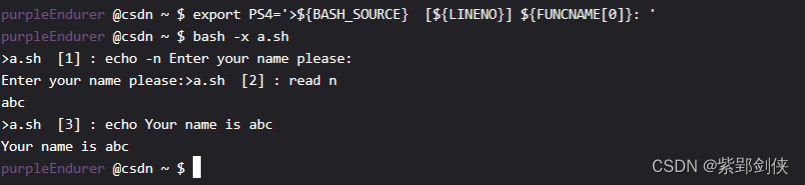
例如:我们对显示的命令和参数以 > 开头,然后引入${BASH_SOURCE} 显示脚本文件名,${LINENO}显示行号,${FUNCNAME[0]}显示正在执行的函数的名字:
purpleEndurer @csdn ~ $ PS1="\e[35mpurpleEndurer\e[0m @csdn \w $ "
purpleEndurer @csdn ~ $ export PS4='>${BASH_SOURCE} [${LINENO}] ${FUNCNAME[0]}: '
purpleEndurer @csdn ~ $ bash -x a.sh
>a.sh [1] : echo -n Enter your name please:
Enter your name please:>a.sh [2] : read n
abc
>a.sh [3] : echo Your name is abc
Your name is abc
purpleEndurer @csdn ~ $
如果觉得字符太多,不容易辨别的话,我们还可以分别给它们加上颜色:
purpleEndurer @csdn ~ $ export PS4='\e[35m>${BASH_SOURCE} \e[0m \e[33m [${LINENO}]\e[0m \e[31m ${FUNCNAME[0]}: \e[0m'
purpleEndurer @csdn ~ $ bash -x a.sh
>a.sh [1] : echo -n Enter your name please:
Enter your name please:>a.sh [2] : read n
abc
>a.sh [3] : echo Your name is abc
Your name is abc

这里我们使用了
Linux shell编程学习笔记4:修改命令行提示符格式(内容和颜色)https://blog.csdn.net/Purpleendurer/article/details/133416124?spm=1001.2014.3001.5501中介绍的知识,让脚本文件名以紫色显示,行号以黄色显示,正在执行的函数的名字以红色显示。
2.4 bash -v 脚本文件说明符:一边执行脚本,一边将执行过的脚本命令打印到标准输出(包括注释)
purpleEndurer @csdn ~ $ export PS4='\e[35m>${BASH_SOURCE} \e[0m \e[33m [${LINENO}]\e[0m \e[31m ${FUNCNAME[0]}: \e[0m'
purpleEndurer @csdn ~ $ bash -v a.sh
echo -n Enter your name please: # 提示用户输入名字
Enter your name please:read n # 将用户输入的名字保存到变量n
abc
echo Your name is $n # 显示用户输入的名字
Your name is abc
purpleEndurer @csdn ~ $
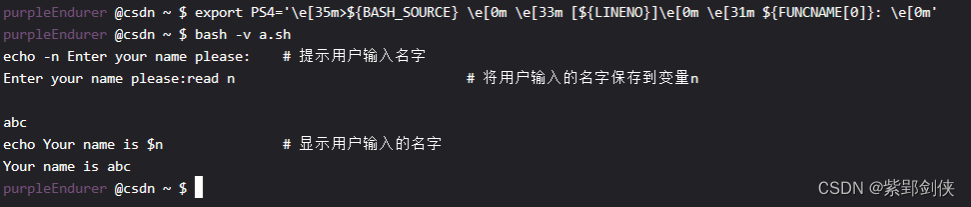
可以看到,-v选项显示所执行的命令不受环境变量PS4的影响,而且会连脚本文件中的注释一并显示。
相关文章:
Linux shell编程学习笔记29:shell自带的 脚本调试 选项
Linux shell脚本的调试方法比较多,上次我们探讨和测试了shell内建命令set所提供的一些调试选项,其实 shell 本身也提供了一些调试选项。我们以bash为例来看看。 1 bash 的命令行帮助信息(bash --help) purleEndurer csdn ~ $ ba…...

分享几个可以免费使用GPT的网站
ChatGPT这个是国产的,里面可以使用3.5和4.0,免费用户每日都有各自的使用次数,反应迅速。文言一心国内百度的chart8新用户200次,但只能用3.5,响应速度有点慢 各有优缺点,大家看个人情况使用,个人…...
一. BEV感知算法介绍
目录 前言1. BEV感知算法的概念2. BEV感知算法数据形式3. BEV开源数据集介绍3.1 KITTI数据集3.2 nuScenes数据集 4. BEV感知方法分类4.1 纯点云方案4.2 纯视觉方案4.3 多模态方案 5. BEV感知算法的优劣6. BEV感知算法的应用介绍7. 课程框架介绍与配置总结下载链接参考 前言 自动…...

Scala如何写一个通用的游戏数据爬虫程序
以前想要获取一些网站数据的时候,都是通过人工手动复制粘贴,这样的效率及其低下。数据少无所谓,如果需要采集大量数据,手动就显得乏力了。半夜睡不着,爬起来写一段有关游戏商品数据的爬虫通用模板,希望能帮…...

前端命名规范总结
布局类:header, footer, container, main, content, aside, page, section 包裹类:wrap, inner 区块类:region, block, box 结构类:hd, bd, ft, top, bottom, left, right, middle, col, row, grid, span 列表类:list,…...

Vue学习笔记-搭建Vuex
1.概念 在Vue实现集中式状态(数据)管理的一个插件,对Vue中多个组件的共享状态进行集中式的管理(读/写),也是一种组件间的通信方式,适用于任意组件间的通信 2.使用场景 多个组件需要共享数据时…...

Ajax技
Ajax的特点 异步提交:Ajax采用异步通信方式,能够在页面无需重新加载的情况下向服务器发送请求并接收响应数据,提升了用户体验。无需插件:Ajax是基于标准浏览器的Javascript和XMLHttpRequest对象实现的,无需安装插件或…...
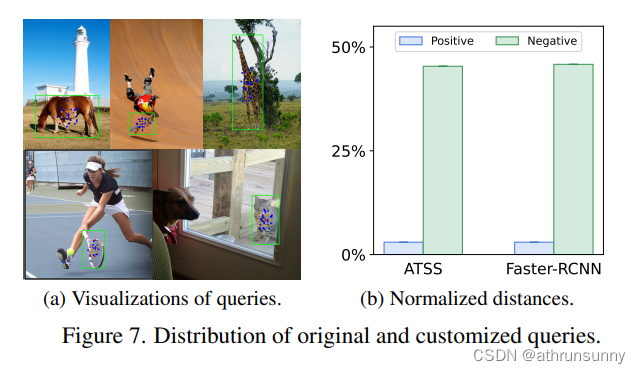
Co-DETR:DETRs与协同混合分配训练论文学习笔记
论文地址:https://arxiv.org/pdf/2211.12860.pdf 代码地址: GitHub - Sense-X/Co-DETR: [ICCV 2023] DETRs with Collaborative Hybrid Assignments Training 摘要 作者提出了一种新的协同混合任务训练方案,即Co-DETR,以从多种标…...
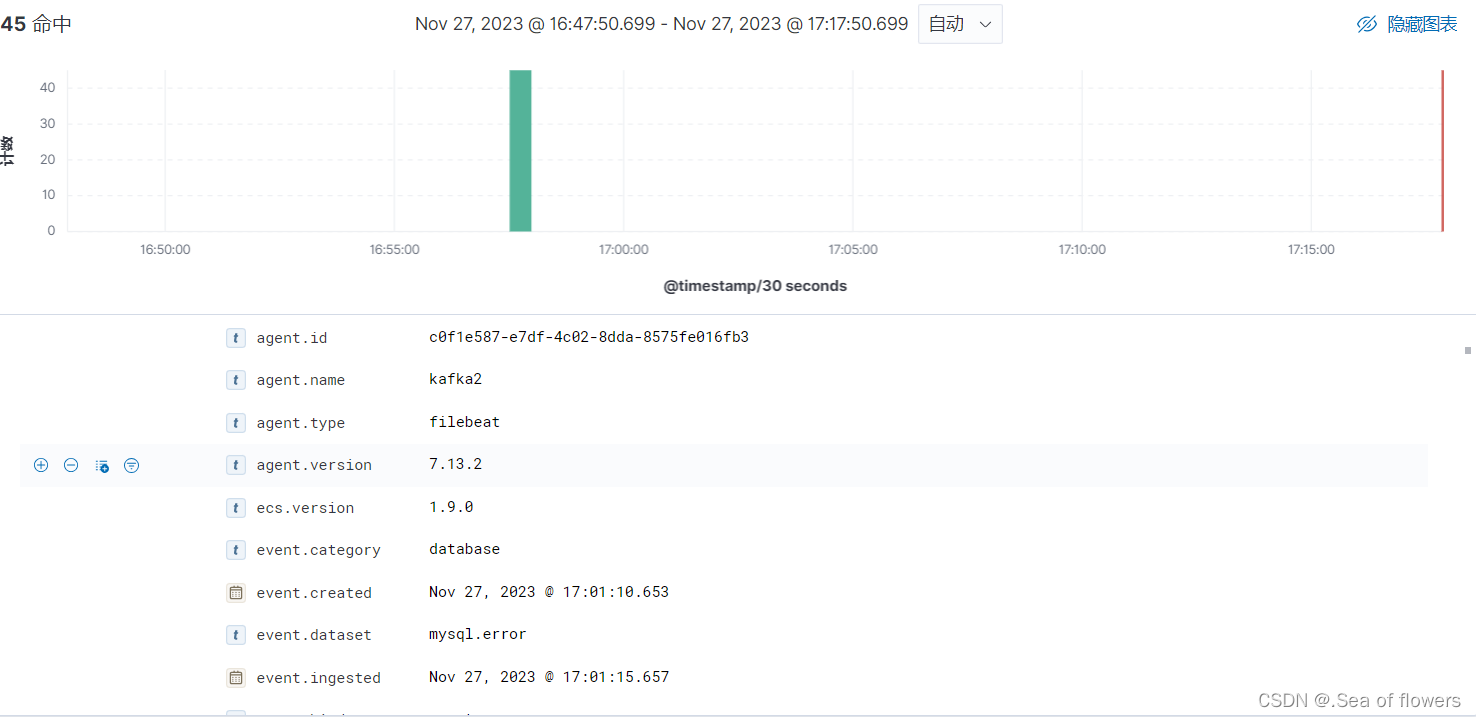
ELk部署,保姆级教学超详细!!!
Elk(Elasticsearch, Logstash, Kibana)是一套日志收集、存储和展示方案,是由Elastic公司开发的开源软件组合。 Elasticsearch:是一个分布式的搜索和分析引擎。它能够处理大量的数据,并提供快速、准确的搜索结果&#x…...
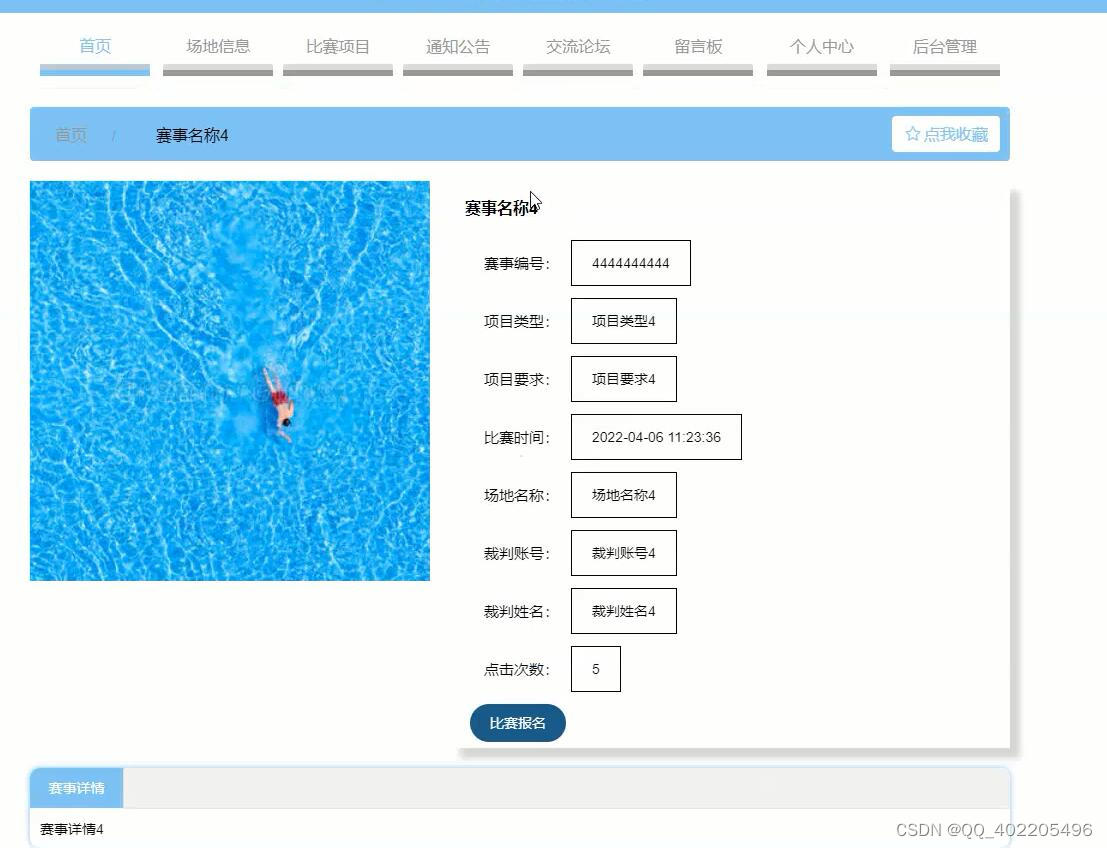
计算机毕业设计springboot+vue高校田径运动会报名管理系统61s38
高校田径运动会管理采用java技术,基于springboot框架,mysql数据库进行开发,实现了首页、个人中心、运动员管理、裁判员管理、场地信息管理、项目类型管理、比赛项目管理、比赛报名管理、比赛成绩管理、通知公告管理、留言板管理、交流论坛、系…...
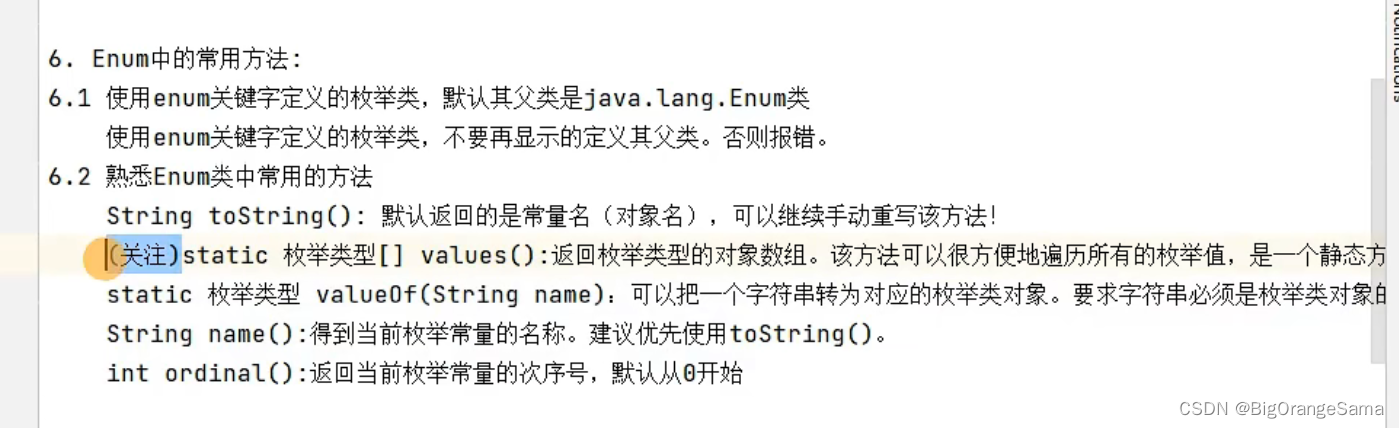
java学习part21枚举
117-面向对象(高级)-枚举类的两种定义方式及练习_哔哩哔哩_bilibili 1.概念 2.enum关键字 枚举早期是用class内放n个public static final类变量供调用。 后来有了enum关键字,enum里的枚举变量都是public static final,但是必须都省略不写 正确方法 &…...

MongoDB的部署
MongoDB部署 基于Linux平台 前置要求 在Centos7 64位系统中安装64位的MongoDB的安装包,通过访问MongoDB官网https://www.mongodb.com/download-center/community进入MongoDB下载页面。Version:指定MongoDB版本,MongoDB的版本分为稳定版和开发…...
解析和存储优化的批量爬虫采集策略
如果你正在进行批量爬虫采集工作,并且想要优化解析和存储过程,提高采集效率和稳定性,那么本文将为你介绍一些实用的策略和技巧。解析和存储是批量爬虫采集中不可忽视的重要环节,其效率和质量对整个采集系统的性能至关重要。在下面…...
【git】使用ssh
前言 git之前一直使用https,因为很方便随时随地都可以用。最近把代码托管到GitHub,使用https就使用不了。后面听同事说GitHub使用ssh是没问题的,就想着尝试一下。 git ssh配置 设置用户名和邮箱 git config --global use.name username g…...

Linux 文件锁
1 为什么用文件锁 文件是一种共享资源,多个进程对同一文件进行操作的时候,必然涉及到竞争状态,因此引入了文件锁实现对共享资源的访问进行保护的机制,通过对文件上锁, 来避免访问共享资源产生竞争状态。 2 文件锁用法 (1)参考文档: man 2 …...
原理Redis-SkipList
SkipList ZipList和QuickList的共同特点是节省内存。在遍历元素时,只能从头到尾或从尾到头,所以在查找头尾元素性能还是不错的,但是中间元素查询的性能就会差。 **SkipList(跳表)**首先是链表,但与传统链表…...

Express内置的中间件
自Express 4.16.0 版本开始,Express 内置了3个常用的中间件,极大的提高了 Express 项目的开发效率和体验: 1.express.static 快速托管静态资源的内置中间件,例如: HTML 文件、图片、CSS 样式等 (无兼容性) 2.express.json 解析JSON 格式的请…...
Webstorm 插件文件目录颜色分析——白蓝绿红黄灰
Webstorm 插件文件目录【白色、蓝色、绿色、红色、黄色、灰色】对应当前文件发生什么了,即文件夹当前状态。 WebStrom配置好git或SVN后文件颜色代表的含义: 白色:本地无修改内容 蓝色:文件内容有修改,暂未提交到git…...

蓝桥杯day01——根据给定数字划分数组
题目描述 给你一个下标从 0 开始的整数数组 nums 和一个整数 pivot 。请你将 nums 重新排列,使得以下条件均成立: 所有小于 pivot 的元素都出现在所有大于 pivot 的元素 之前 。所有等于 pivot 的元素都出现在小于和大于 pivot 的元素 中间 。小于 piv…...
oracle数据库巡检常见脚本-系列二
简介 作为数据库管理员(DBA),定期进行数据库的日常巡检是非常重要的。以下是一些原因: 保证系统的稳定性:通过定期巡检,DBA可以发现并及时解决可能导致系统不稳定的问题,如性能瓶颈、资源利用率…...

【实战】ESP32 + LN298N 驱动编码器推杆:从零搭建行程闭环控制系统
1. 硬件选型与系统架构设计 这个项目最核心的硬件就是ESP32开发板、LN298N电机驱动模块和带编码器的电动推杆。先说ESP32,我强烈推荐使用ESP32-S3系列,相比S2多了几个硬件PWM通道,对于多电机控制特别友好。实测下来,ESP32的硬件PW…...

motionEye 存储管理优化:自动清理与云备份策略终极指南
motionEye 存储管理优化:自动清理与云备份策略终极指南 【免费下载链接】motioneye A web frontend for the motion daemon. 项目地址: https://gitcode.com/gh_mirrors/mo/motioneye motionEye 是一款强大的 motion 守护进程 Web 前端工具,能帮助…...

C语言实现:特定九九乘法表全解析
九九乘法表,输出如下格式的九九乘法表 #include <stdio.h> int main() { printf("九九乘法表:\n"); int i,j; for(i1;i<9;i) { for(j1;j<9;j) { printf("%d*%d%d ",i,j,i…...

Switch_lib:面向继电器控制的轻量级数字引脚时序管理库
1. Switch_lib 库深度解析:面向继电器控制的数字引脚时序管理方案在工业控制、智能家居和嵌入式自动化系统中,对数字输出引脚进行精确、可编程的时序控制是基础而关键的需求。典型场景包括:继电器驱动(如水泵启停、照明定时、加热…...

Vue中手动取消watch监听的最佳实践与实现原理
1. 为什么需要手动取消watch监听 在Vue开发中,watch监听器是我们常用的响应式工具之一。它能够监听数据变化并执行相应的回调函数。但很多开发者可能没有意识到,不当管理watch监听器可能会导致内存泄漏和性能问题。 想象一下这样的场景:你在一…...

SWTP_CodecLib:轻量级NRF24L01无线协议编解码库
1. SWTP_CodecLib 项目概述SWTP_CodecLib 是一个面向 NRF24L01 射频收发芯片的轻量级通信协议编解码库,其核心目标并非驱动硬件本身,而是为基于 NRF24L01 构建的自定义无线通信系统提供一套结构化、可复用的数据封包与解析机制。该库不依赖特定 MCU 平台…...

基于纳米流式检测技术解析灭菌工艺及品种来源对牛乳细胞外囊泡理化性质及生物学功能的影响
基于纳米流式检测技术解析灭菌工艺及品种来源对牛乳细胞外囊泡理化性质及生物学功能的影响 摘要 牛乳细胞外囊泡(milk-derived extracellular vesicles, mEVs)是一类由乳腺上皮细胞分泌的纳米级双层膜囊泡,携带蛋白质、核酸和脂质等生物活性分子,在细胞间信号传递和免疫调…...

大模型强化学习实战指南:从PPO算法调优到Reward Hacking规避的7个关键动作
第一章:大模型强化学习的范式跃迁与工业落地挑战 2026奇点智能技术大会(https://ml-summit.org) 传统监督微调(SFT)正被基于人类反馈的强化学习(RLHF)和更前沿的直接偏好优化(DPO)所重构。这一…...

创业机会:AI Agent Harness Engineering 在垂直专业市场的 7 大爆点
创业机会:AI Agent Harness Engineering 在垂直专业市场的 7 大爆点 1. 引言:AI Agent 时代的到来 在人工智能技术快速发展的今天,我们正站在一个新时代的门槛上。从早期的规则引擎到如今的大语言模型(LLMs),AI技术已经取得了令人瞩目的进步。然而,真正的革命可能在于AI…...
)
光电对抗:多模/复合制导及其集成技术(2)
第二节:复合制导集成技术进展和前沿及攻关方向和趋势多模复合制导的集成、协调、协同技术进展,以及高效、协同、低成本的发展方向,是该领域的核心和前沿。一、集成协同技术前沿进展多模复合制导的“集成、协调、协同”,其核心是让…...