
配置中心--Spring Cloud Config
目录
概述
环境说明
步骤
创建远端git仓库
准备配置文件
配置中心--服务端
配置中心--客户端
配置中心的高可用
配置中心--服务端
配置中心--客户端
消息总线刷新配置
配置中心--服务端
配置中心--客户端
概述
因为微服务架构有很多个服务,手动一个一个管理各个服务配置很麻烦,不同的环境(开发、测试、生产)往往需要不同的配置文件,运行期间也需要动态调整配置,修改配置后微服务需要自动更新配置,所以需要一个统一管理应用配置的组件。
配置中心是一种统一管理各种应用配置的基础服务组件。本文讲解的配置中心组件为Spring Cloud Config。
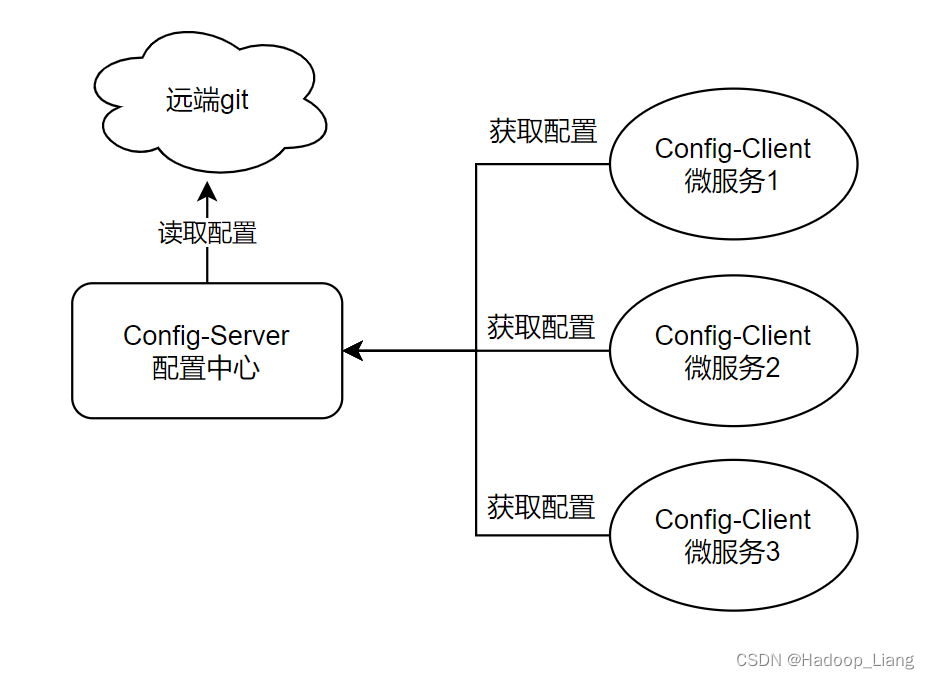
本文的操作可在 微服务调用链路追踪 的基础上进行 或者 在 Spring Cloud Stream实践 的基础上进行。
环境说明
jdk1.8
maven3.6.3
mysql8
spring cloud2021.0.8
spring boot2.7.12
idea2022
rabbitmq3.12.4
步骤
创建远端git仓库
创建远端git仓库,管理配置文件,使用gitee,创建仓库名称为config-repo(创建时点击创建README文件,方便直接用浏览器上传文件)

可使用远端仓库管理微服务公共的配置,而非公共的配置可放在各自微服务的application.yml中。
公共的配置,例如:数据库配置、Eureka配置等
非公共的配置,例如:端口号、应用名称等
准备配置文件
配置中心的配置文件命名规则为:
{application}-{profile}.yml
{application}-{profile}.properties
application为应用名称 profile指的开发环境(用于区分开发环境、测试环境、生产环境等)
复制product-service的application.yml,重命名为application-pro.yml,抽取公共配置,例如:数据库配置、zipkin、sleuth、rabbitmq、eureka等,同时添加一个name属性(用于区别不同的环境配置),公共的配置放在远端git仓库。
application-pro.yml
spring:datasource:driver-class-name: com.mysql.cj.jdbc.Driverurl: jdbc:mysql://localhost:3306/shop1?useUnicode=true&characterEncoding=utf-8&serverTimezone=GMT%2B8username: rootpassword: 123jpa:database: MySQLshow-sql: trueopen-in-view: truegenerate-ddl: true #自动创建表zipkin:sender:type: rabbit #数据的传输方式,以rabbit的方式向server端发送数据sleuth:sampler:probability: 1 #采样比,日志的采样比例,默认0.1,测试环境设置为100%收集日志rabbitmq:host: localhostport: 5672username: guestpassword: guestlistener: #这里配置重试策略direct:retry:enabled: truesimple:retry:enabled: trueeureka:client:service-url:defaultZone: http://localhost:9000/eureka/instance:prefer-ip-address: trueinstance-id: ${spring.cloud.client.ip-address}:${server.port}logging:level:root: infoorg.springframework.web.servlet.DispatcherServlet: DEBUGorg.springframework.cloud.sleuth: DEBUGname: product-pro复制application-pro.yml得到application-dev.yml
application-dev.yml
配置内容如下,区别在于name的值为product-dev
spring:datasource:driver-class-name: com.mysql.cj.jdbc.Driverurl: jdbc:mysql://localhost:3306/shop1?useUnicode=true&characterEncoding=utf-8&serverTimezone=GMT%2B8username: rootpassword: 123jpa:database: MySQLshow-sql: trueopen-in-view: truegenerate-ddl: true #自动创建表zipkin:sender:type: rabbit #数据的传输方式,以rabbit的方式向server端发送数据sleuth:sampler:probability: 1 #采样比,日志的采样比例,默认0.1,测试环境设置为100%收集日志rabbitmq:host: localhostport: 5672username: guestpassword: guestlistener: #这里配置重试策略direct:retry:enabled: truesimple:retry:enabled: trueeureka:client:service-url:defaultZone: http://localhost:9000/eureka/instance:prefer-ip-address: trueinstance-id: ${spring.cloud.client.ip-address}:${server.port}logging:level:root: infoorg.springframework.web.servlet.DispatcherServlet: DEBUGorg.springframework.cloud.sleuth: DEBUGname: product-dev通过浏览器界面,手动上传application-pro.yml和application-dev.yml到git仓库
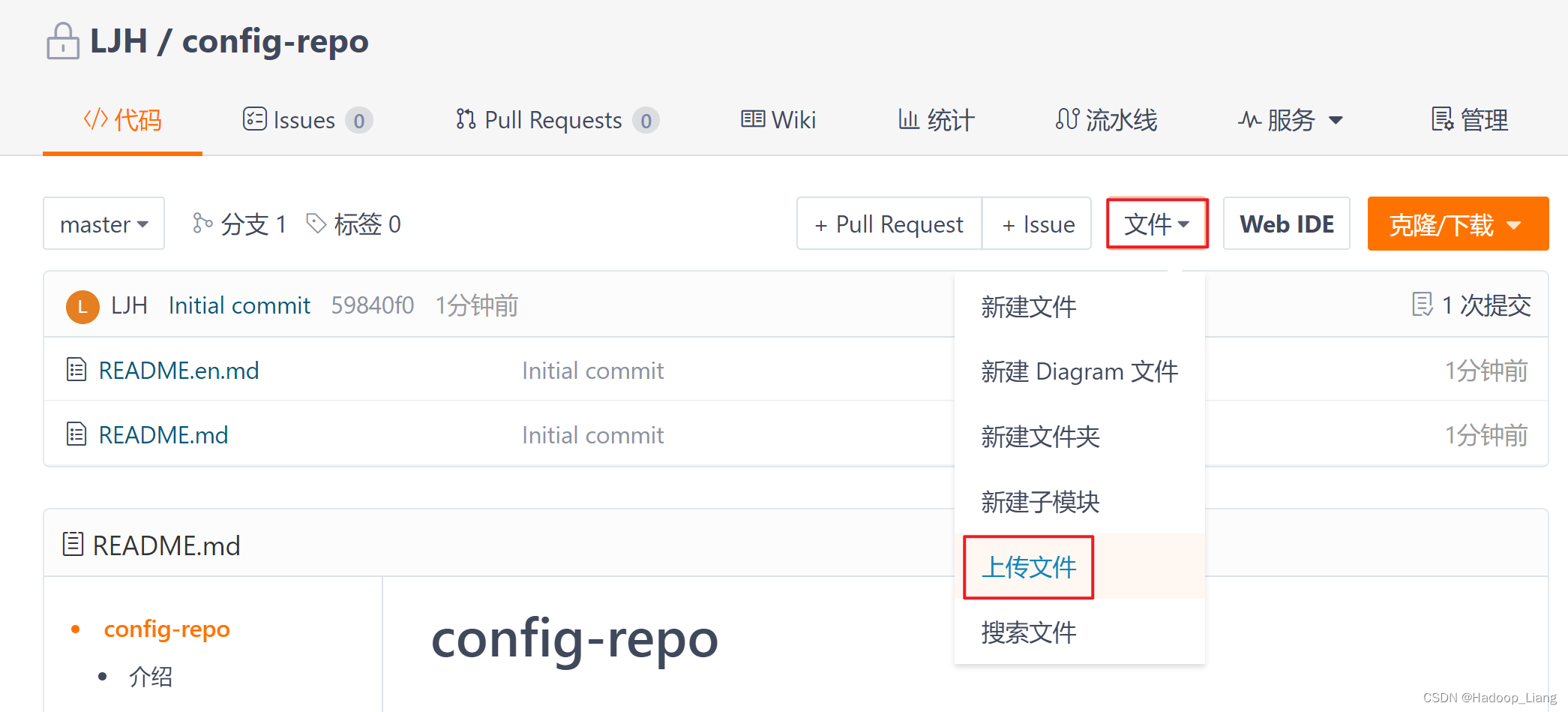
点击上传文件区域,选中需要上传的文件:application-pro.yml和application-dev.yml

填写提交信息,点击提交

上传成功后,如下图
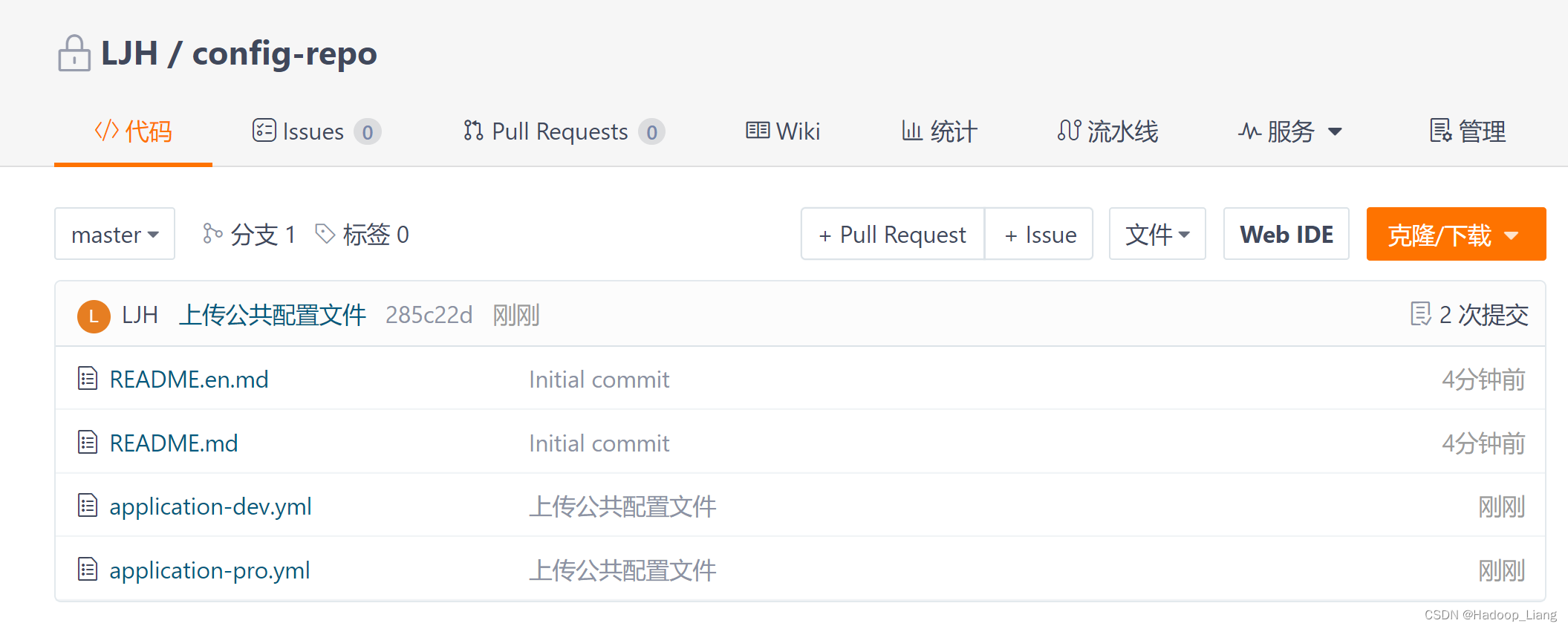
配置中心--服务端
创建子工程config_server
引入依赖
<dependencies><dependency><groupId>org.springframework.cloud</groupId><artifactId>spring-cloud-config-server</artifactId></dependency></dependencies>启动类
package org.example.config;import org.springframework.boot.SpringApplication;
import org.springframework.boot.autoconfigure.SpringBootApplication;
import org.springframework.cloud.config.server.EnableConfigServer;@SpringBootApplication
@EnableConfigServer //开启配置中心服务端功能
public class ConfigServerApplication {public static void main(String[] args) {SpringApplication.run(ConfigServerApplication.class, args);}
}
配置application.yml
server:port: 11111
spring:application:name: config-servercloud:config:server:git:uri: https://gitee.com/xxx/config-repo.git
uri的值是刚才创建的远端git仓库的地址,注意修改为自己的仓库地址。
启动config_server服务
浏览器访问
http://localhost:11111/application-dev.yml
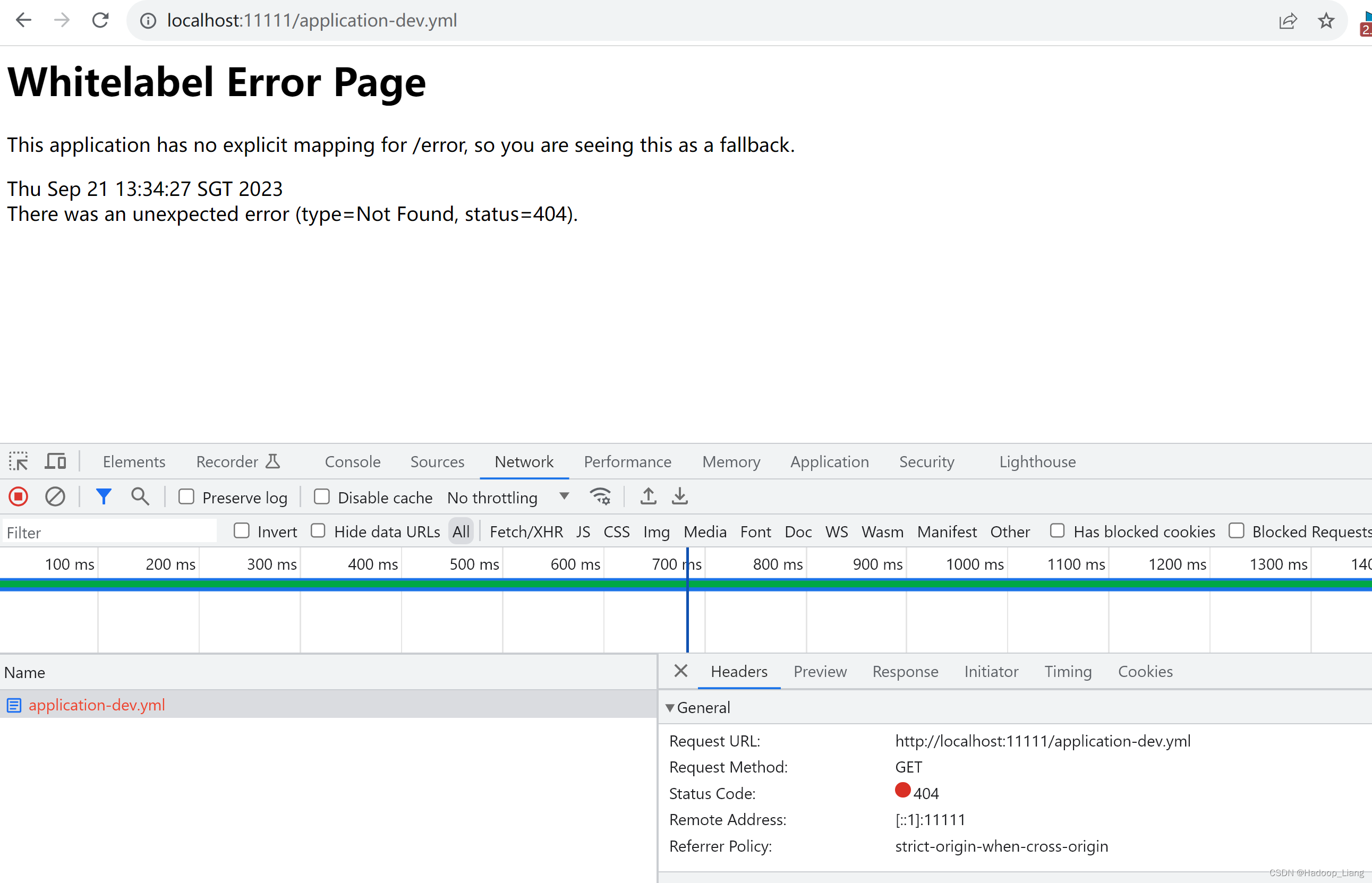
访问不到数据
原因是gitee仓库是私有的,需要把仓库公开或者配置gitee的登录信息。
解决方法1:将git仓库开源

解决方法2:修改配置,加上gitee的用户名和密码
cloud:config:server:git:uri: https://gitee.com/xxx/config-repo.gitusername: xxxpassword: xxx两种方法选择其中一个。
解决后,再次访问
http://localhost:11111/application-dev.yml
成功看到数据如下

配置中心--客户端
配置中心客户端就是各个微服务
这里创建一个微服务:config_client_1
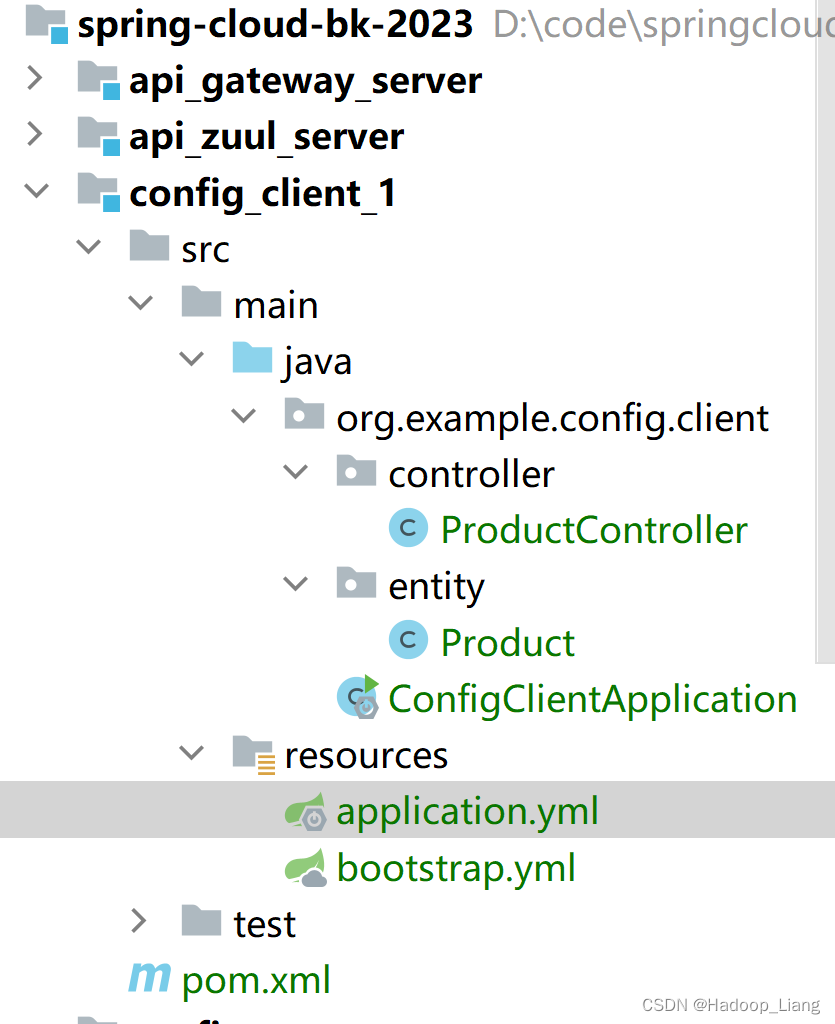
config_client_1项目结构如下
添加依赖
<dependencies><dependency><groupId>org.springframework.boot</groupId><artifactId>spring-boot-starter-web</artifactId></dependency><dependency><groupId>mysql</groupId><artifactId>mysql-connector-java</artifactId><version>8.0.33</version></dependency><dependency><groupId>org.springframework.boot</groupId><artifactId>spring-boot-starter-data-jpa</artifactId></dependency><!--引入EurekaClient--><dependency><groupId>org.springframework.cloud</groupId><artifactId>spring-cloud-starter-netflix-eureka-client</artifactId></dependency><dependency><groupId>org.springframework.cloud</groupId><artifactId>spring-cloud-starter-config</artifactId></dependency><dependency><groupId>org.springframework.boot</groupId><artifactId>spring-boot-starter-actuator</artifactId></dependency><!--消息总线bus--><dependency><groupId>org.springframework.cloud</groupId><artifactId>spring-cloud-bus</artifactId></dependency><dependency><groupId>org.springframework.cloud</groupId><artifactId>spring-cloud-stream-binder-rabbit</artifactId></dependency><dependency><groupId>org.springframework.cloud</groupId><artifactId>spring-cloud-starter-bootstrap</artifactId></dependency></dependencies>刷新依赖
非公共的配置application.yml
server:port: 9101
spring:application:name: config-client1
bootstrap.yml
spring:cloud:config:name: application #应用名称对应git配置文件的前半部分,例如:application-dev.yml,这里就写applicationprofile: dev #开发环境label: master #git中的分支uri: http://localhost:11111 #config_server的请求地址ConfigClientApplication.java
package org.example.config.client;import org.springframework.boot.SpringApplication;
import org.springframework.boot.autoconfigure.SpringBootApplication;
import org.springframework.boot.autoconfigure.domain.EntityScan;@SpringBootApplication
@EntityScan("org.example.config.client.entity.Product")
public class ConfigClientApplication {public static void main(String[] args) {SpringApplication.run(ConfigClientApplication.class, args);}
}
Product.java
package org.example.config.client.entity;import lombok.Data;import javax.persistence.Entity;
import javax.persistence.Id;
import javax.persistence.Table;
import java.math.BigDecimal;/*** 商品实体类*/
@Data
@Entity
@Table(name="tb_product")
public class Product {@Idprivate Long id;private String productName;private Integer status;private BigDecimal price;private String productDesc;private String caption;private Integer inventory;
}
ProductController.java
package org.example.config.client.controller;import org.example.config.client.entity.Product;
import org.springframework.beans.factory.annotation.Value;
import org.springframework.stereotype.Controller;
import org.springframework.web.bind.annotation.RequestMapping;
import org.springframework.web.bind.annotation.RestController;@RestController
@RequestMapping("/config-client/product")
public class ProductController {@Value("${name}")private String name;@RequestMapping("/get")public Product getProduct(){Product product = new Product();product.setProductName(name);return product;}
}
启动eureka、config_server、config_client_1服务

注意:因为远端git仓库的配置文件有eureka配置,所以拉取到配置后,需要启动eureka服务
浏览器访问
http://localhost:9101/config-client/product/get
响应
{"id":null,"productName":"product-dev","status":null,"price":null,"productDesc":null,"caption":null,"inventory":null}
pruductName为product-dev,与git的application-dev.yml的name属性一致

将config_client_1的bootstrap.yml的profile改为pro

重启config_client_1服务
再次访问
http://localhost:9101/config-client/product/get
响应
{"id":null,"productName":"product-pro","status":null,"price":null,"productDesc":null,"caption":null,"inventory":null}
pruductName为product-pro,与git的application-pro.yml的name属性一致
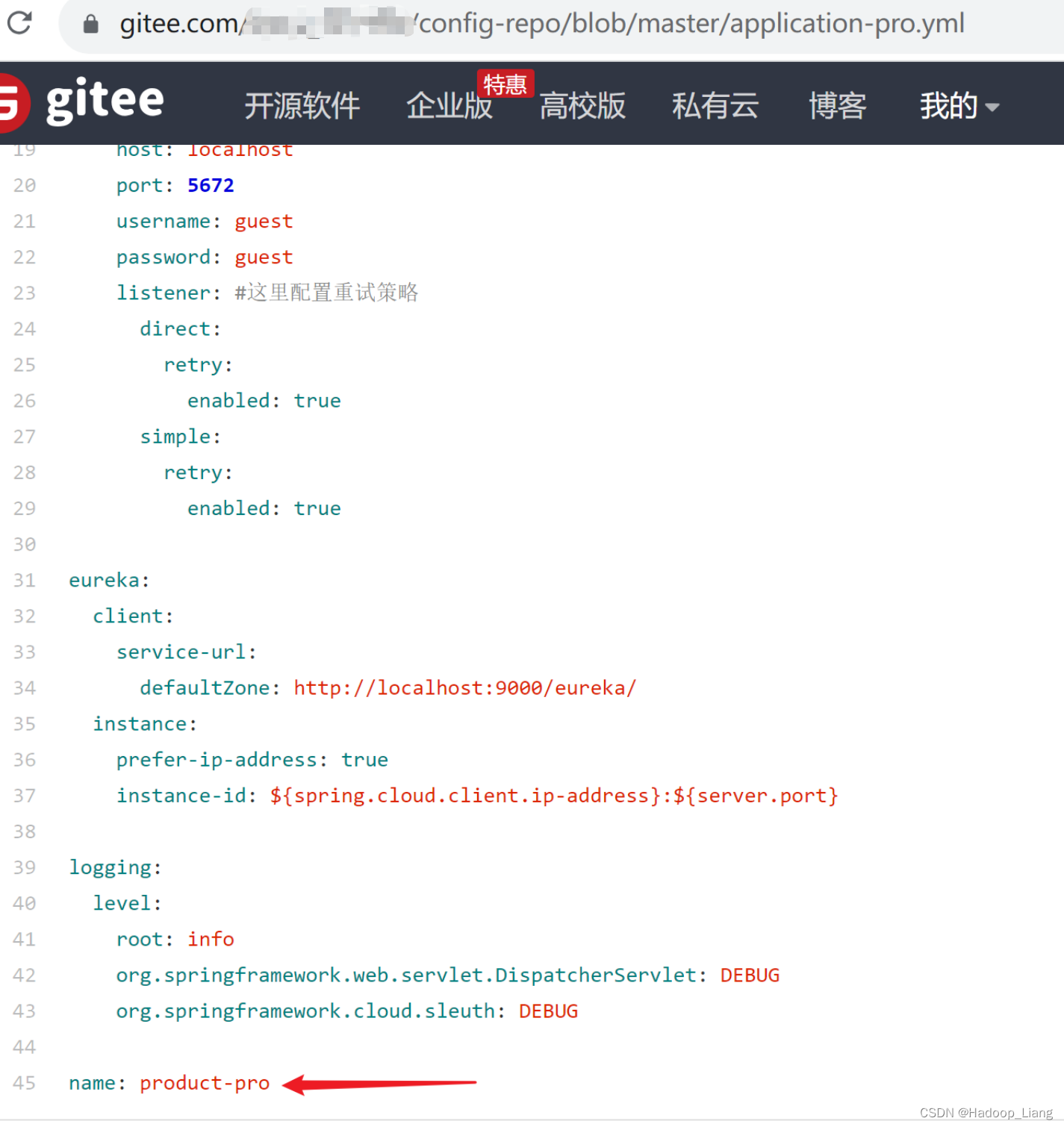
修改git的配置
查看application-pro.yml文件,点击编辑

把product-pro改为product-pro1
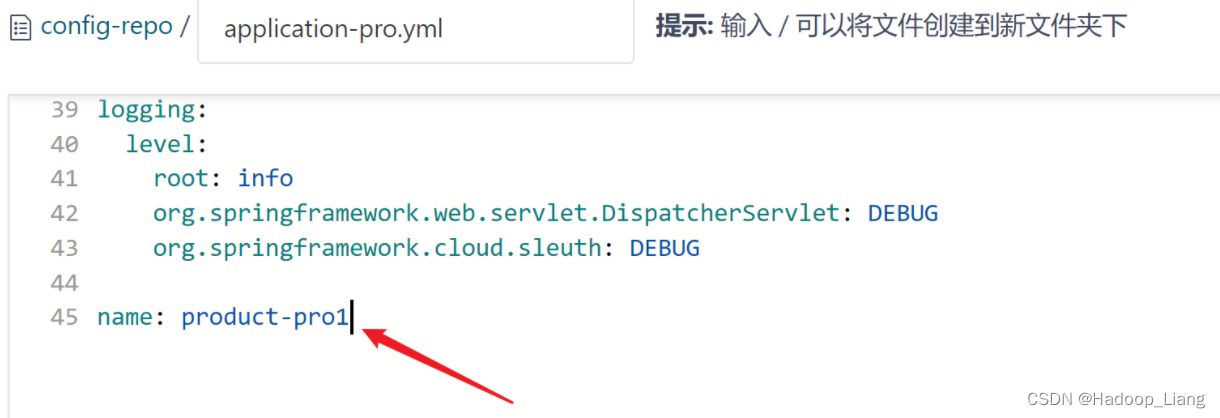
点击提交

浏览器访问
http://localhost:9101/config-client/product/get
发现数据未更新,还是product-pro

解决方式:
方式一:重启config_client_1服务
发现重启可以拿到最新数据,但是,在生产环境中,重启服务有时候不太方便。

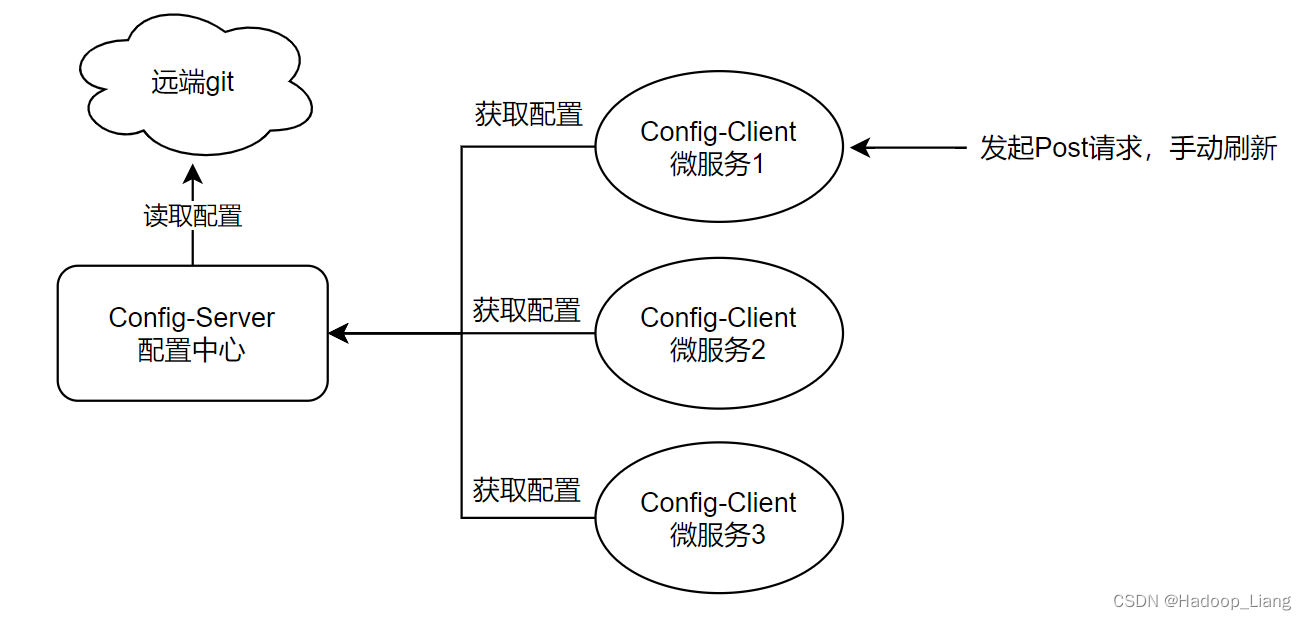
方式二:手动刷新
修改config_client_1服务
pom.xml,引入actuator依赖(之前已引入,跳过)
<dependency><groupId>org.springframework.boot</groupId><artifactId>spring-boot-starter-actuator</artifactId></dependency>在需要的更新数据的类上添加@RefreshScope,开启动态刷新

修改bootstrap.yml
#开启动态刷新的端点
management:endpoints:web:exposure:include: refresh
重启config_client_1服务
访问
http://localhost:9101/config-client/product/get

productName是product-pro1
将git配置文件的name值修改为product-pro2
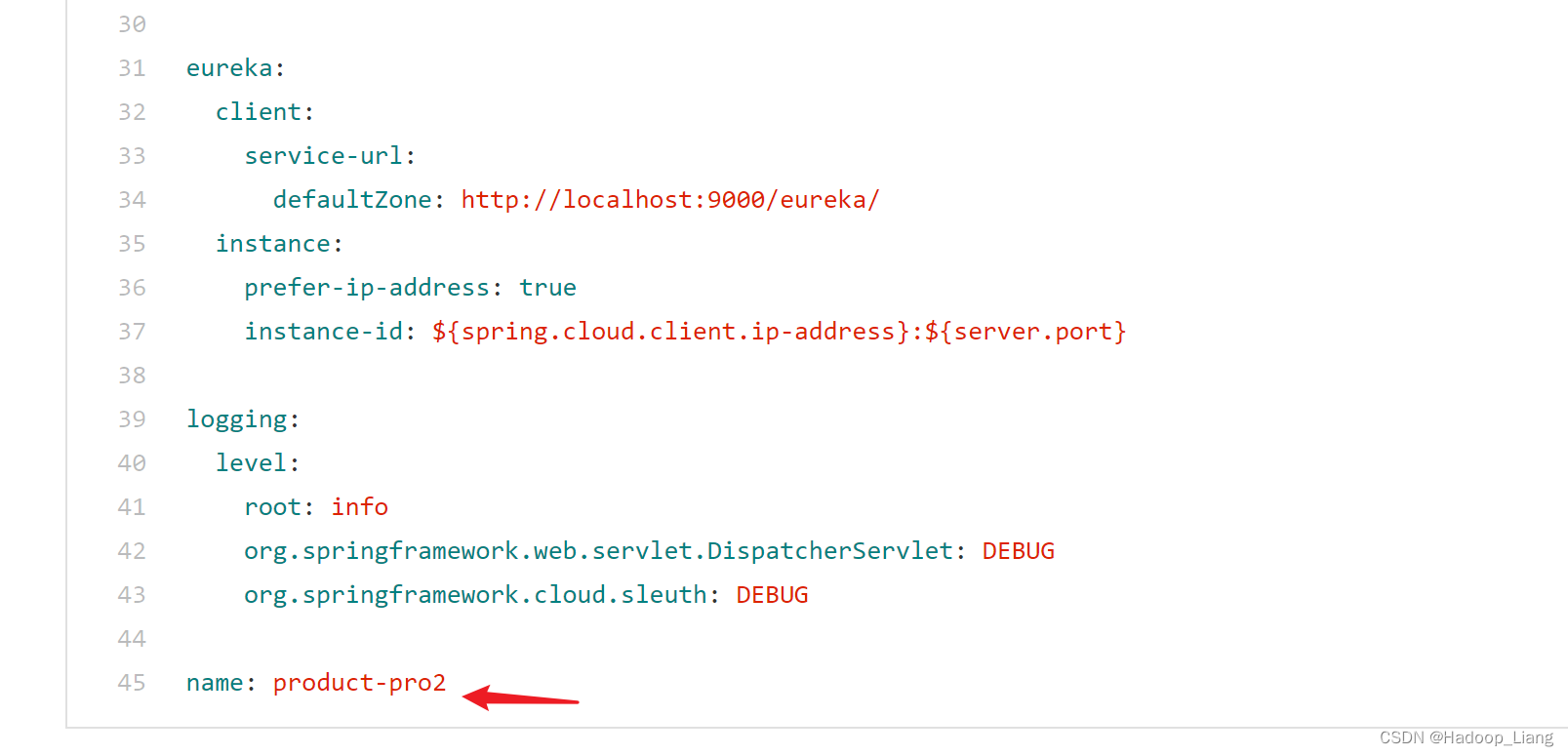
发起post请求刷新数据
curl -X POST "http://localhost:9101/actuator/refresh"可使用postman或cmd命令行发起请求,这里使用cmd命令行发起post请求

再次访问
http://localhost:9101/config-client/product/get

响应最新的数据:product-pro2
手动刷新操作总结:
-
引入actuator依赖
-
需要的更新数据的类上添加
@RefreshScope,开启动态刷新 -
bootstrap.yml开启动态刷新的端点
-
修改git配置
-
发起post请求手动刷新数据
手动刷新能解决在不重启应用情况下,能做到动态刷新配置。但当服务很多时或需要更新的数据接口很多的情况下,就需要发起很多次Post请求,手动刷新显得很麻烦。可以使用消息总线技术解决该问题。
配置中心的高可用
一台配置中心服务容易出现单点故障问题,将配置中心集群化构成高可用的配置中心可以解决配置中心单点故障问题。
将多个配置中心注册到eureka,提供统一的服务名称,客户端通过服务名称调用配置中心。
配置中心--服务端
修改config_server服务
添加依赖
<dependency><groupId>org.springframework.cloud</groupId><artifactId>spring-cloud-starter-netflix-eureka-client</artifactId></dependency><dependency><groupId>org.springframework.boot</groupId><artifactId>spring-boot-starter-actuator</artifactId></dependency>刷新依赖
application.yml添加eureka相关配置
eureka:client:service-url:defaultZone: http://localhost:9000/eurekainstance:prefer-ip-address: trueinstance-id: ${spring.cloud.client.ip-address}:${server.port}修改config_server配置文件,添加default-label: master配置
cloud:config:server:git:uri: https://gitee.com/xxx/config-repo.gitdefault-label: master注意修改uri为自己git远端仓库地址。
启动eureka、config_server服务
查看Eureka Web UI,看到了一台配置中心服务
http://localhost:9000/

通过复制配置方式,得到另外一台配置中心
修改端口号,复制运行配置,再启动一台配置中心服务
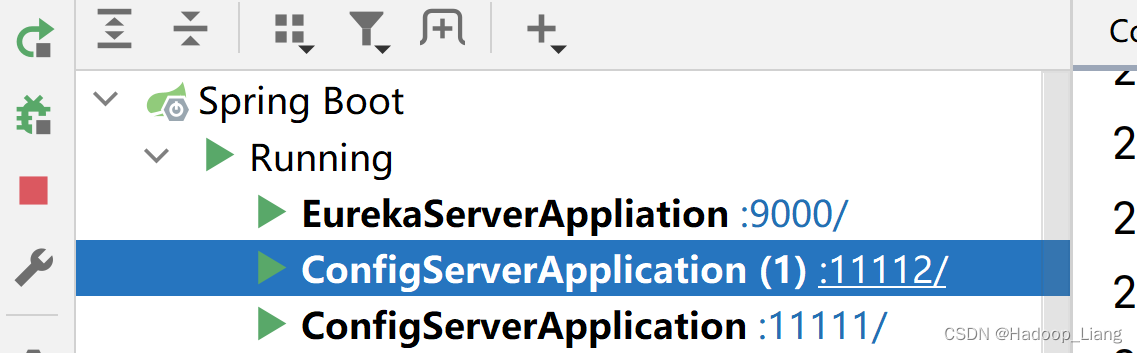
刷新查看Eureka Web UI,看到CONFIG-SERVER配置中心服务有两个实例。

配置中心--客户端
config_client_1服务
修改bootstrap.yml,添加eureka配置,修改通过服务名称(config-server)拿到配置
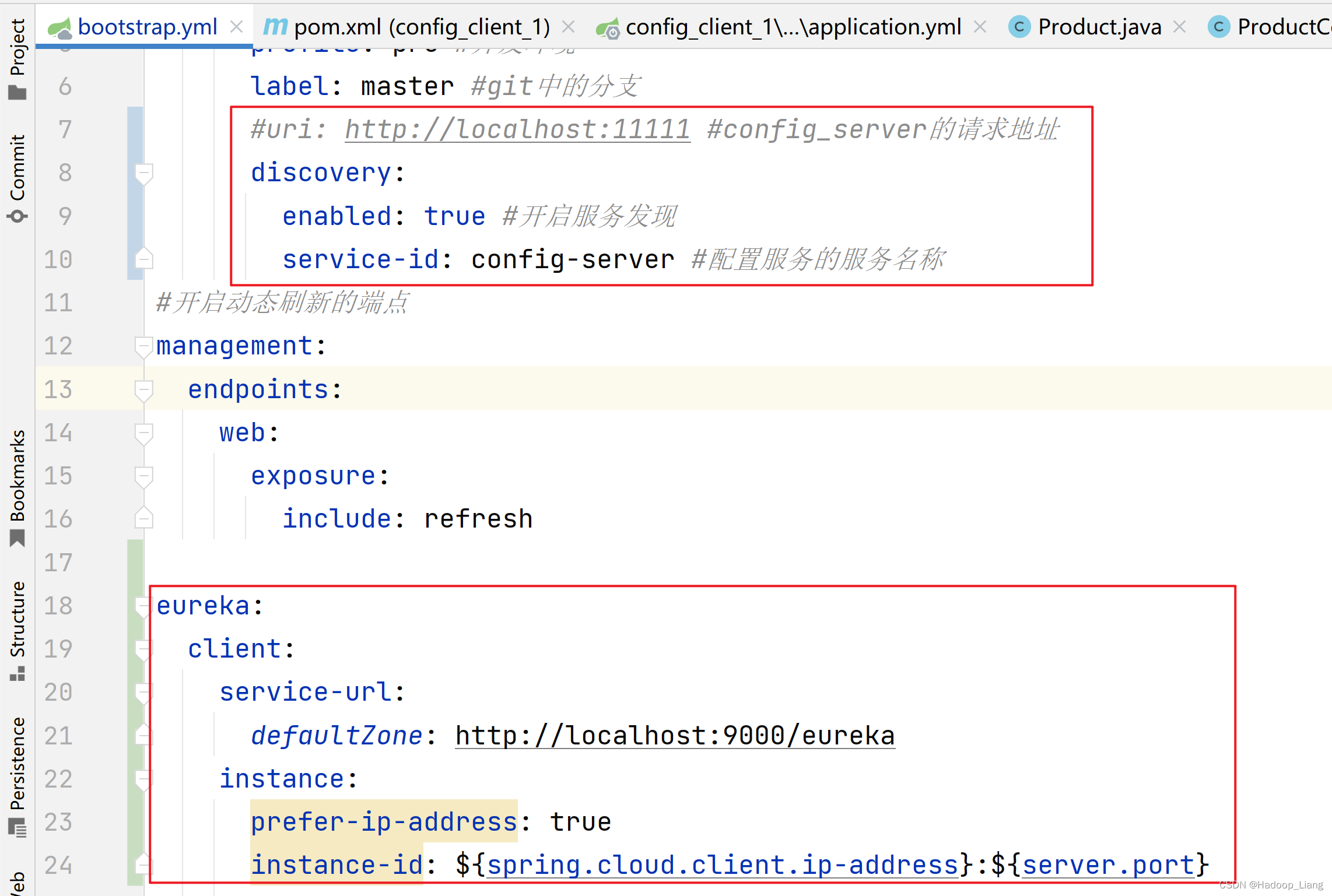
spring:cloud:config:name: application #应用名称对应git配置文件的前半部分,例如:application-dev.yml,这里就写applicationprofile: pro #开发环境label: master #git中的分支#uri: http://localhost:11111 #config_server的请求地址discovery:enabled: true #开启服务发现service-id: config-server #配置服务的服务名称
#开启动态刷新的端点
management:endpoints:web:exposure:include: refresheureka:client:service-url:defaultZone: http://localhost:9000/eurekainstance:prefer-ip-address: trueinstance-id: ${spring.cloud.client.ip-address}:${server.port}重启config_client_1服务
访问
http://localhost:9101/config-client/product/get
响应
{"id":null,"productName":"product-pro2","status":null,"price":null,"productDesc":null,"caption":null,"inventory":null}
能正常拿到数据,说明配置正常
高可用测试
测试关闭其中一个服务,是否还可以正常提供服务

再次访问

访问依然正常,说明实现了配置中心的高可用。
总结:
-
服务端,添加服务注册依赖及配置,注册到eureka中,开启两个服务。
-
客户端,添加eureka配置,使用服务名称获取配置
-
测试:断开一个服务,不影响访问
消息总线刷新配置
此前,通过发起Post请求手动刷新配置,服务接口很多时,就需要发起很多次Post请求,显得很麻烦。
通过消息总线刷新配置流程如下:

配置中心--服务端
config_server服务
添加依赖
<!--消息总线依赖--><dependency><groupId>org.springframework.cloud</groupId><artifactId>spring-cloud-starter-bus-amqp</artifactId></dependency><dependency><groupId>org.springframework.cloud</groupId><artifactId>spring-cloud-starter-stream-rabbit</artifactId></dependency>刷新依赖
配置application.yml
配置Spring Cloud Bus的RabbitMQ连接信息,启用Spring Cloud Bus(spring.cloud.bus.enabled=true默认已启动),同时暴露动态刷新的端点。
server:port: 11112
spring:application:name: config-servercloud:config:server:git:uri: https://gitee.com/liang_123456/config-repo.gitdefault-label: master
#    bus:
#      enabled: truerabbitmq:host: 127.0.0.1port: 5672username: guestpassword: guest#开启动态刷新的端点
management:endpoints:bus-refresh:enabled: trueweb:exposure:include: bus-refresheureka:client:service-url:defaultZone: http://localhost:9000/eurekainstance:prefer-ip-address: trueinstance-id: ${spring.cloud.client.ip-address}:${server.port}
注意:开启动态刷新端点的management要顶格写
配置中心--客户端
spring-client_1服务
和config_server一样,添加依赖,如果已经存在就不用再添加
<!--消息总线依赖--><dependency><groupId>org.springframework.cloud</groupId><artifactId>spring-cloud-starter-bus-amqp</artifactId></dependency><dependency><groupId>org.springframework.cloud</groupId><artifactId>spring-cloud-starter-stream-rabbit</artifactId></dependency>刷新依赖
配置rabbitmq信息,因为是配置中心,所以在git远端仓库的配置文件配置即可,查看远端git配置文件,已经配置,如下

重启eureka、config_server和spring-client_1服务
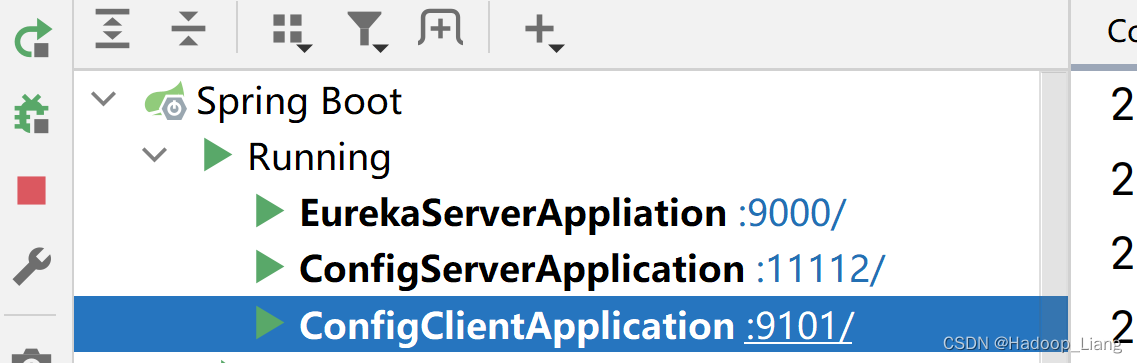
访问
http://localhost:9101/config-client/product/get
响应
{"id":null,"productName":"product-pro2","status":null,"price":null,"productDesc":null,"caption":null,"inventory":null}
修改git远端配置
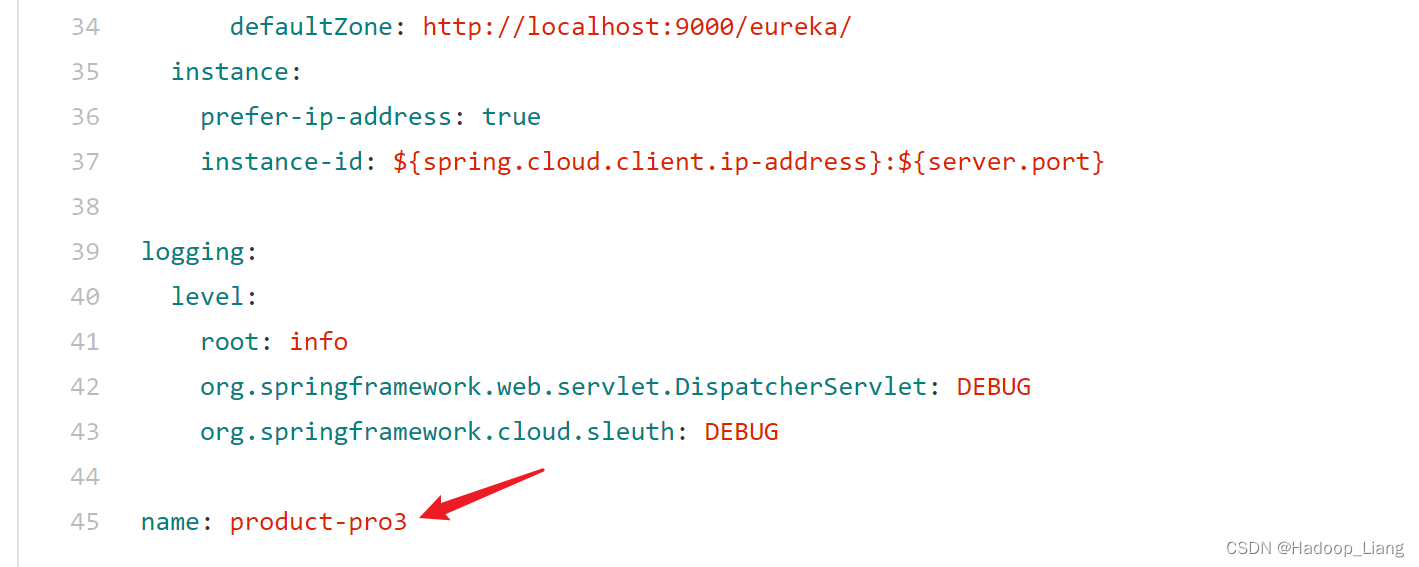
访问
http://localhost:9101/config-client/product/get
响应
{"id":null,"productName":"product-pro2","status":null,"price":null,"productDesc":null,"caption":null,"inventory":null}
响应product-pro2,说明还不是最新配置
发起Post请求, 刷新服务端配置
curl -X POST "http://localhost:11112/actuator/busrefresh"
注意:新版本发起post请求路径要改为busrefresh,而不是bus-refresh

访问
http://localhost:9101/config-client/product/get
响应
{"id":null,"productName":"product-pro3","status":null,"price":null,"productDesc":null,"caption":null,"inventory":null}
响应的数据也是product-pro3,说明使用消息总线方式刷新配置成功。
完成!enjoy it!
相关文章:
配置中心--Spring Cloud Config
目录 概述 环境说明 步骤 创建远端git仓库 准备配置文件 配置中心--服务端 配置中心--客户端 配置中心的高可用 配置中心--服务端 配置中心--客户端 消息总线刷新配置 配置中心--服务端 配置中心--客户端 概述 因为微服务架构有很多个服务,手动一个一…...
笔记-模拟角频率和数字角频率的关系理解
先建议阅读前人此文(点击这里),有助于理解。 模拟频率:f 模拟角频率:Ω 数字角频率:ω 其中:在模拟信号中Ω 2πf 正弦波表示:sin(2πft) sin(Ωt) 数字信号就是离散的ÿ…...

Zookeeper+Kafka集群
注:本章使用的Kafka为2.7.0版本 Zookeeper概述 1.Zookeeper定义 Zookeeper是一个开源的分布式的,为分布式框架提供协调服务的Apache项目。 2.Zookeeper工作机制 Zookeeper从设计模式角度来理解:是一个基于观察者模式设计的分布式服务管理…...

Sunshine+Moonlight+Android手机串流配置(局域网、无手柄)
目录 前言Sunshine(服务端)ApplicationConfigurationGeneralAdvance Moonlight(客户端)配对打开虚拟手柄串流按键调整退出串流 原神,启动! 前言 写这篇文章单纯是因为搜来搜去没有很符合我需求的教程&#…...
 并由函数返回被删元素的值。空出的位 置由最后一个元素填补,若顺序表为空,则显示出错信息并退出运行。)
从顺序表中删除具有最小值的元素(假设唯一) 并由函数返回被删元素的值。空出的位 置由最后一个元素填补,若顺序表为空,则显示出错信息并退出运行。
题目描述:从顺序表中删除具有最小值的元素(假设唯一) 并由函数返回被删元素的值。空出的位置由最后一个元素填补,若顺序表为空,则显示出错信息并退出运行。 bool DeleteMin(SqList &L,int &min){if(L.length 0)return false;min L…...
详解—[C++ 数据结构]—AVL树
目录 一.AVL树的概念 二、AVL树节点的定义 三、AVL树的插入 3.1插入方法 四、AVL树的旋转 1. 新节点插入较高左子树的左侧---左左:右单旋 2. 新节点插入较高右子树的右侧---右右:左单旋 3.新节点插入较高左子树的右侧---左右:先左单旋…...
卷积神经网络(CNN):乳腺癌识别.ipynb
文章目录 一、前言一、设置GPU二、导入数据1. 导入数据2. 检查数据3. 配置数据集4. 数据可视化 三、构建模型四、编译五、训练模型六、评估模型1. Accuracy与Loss图2. 混淆矩阵3. 各项指标评估 一、前言 我的环境: 语言环境:Python3.6.5编译器…...
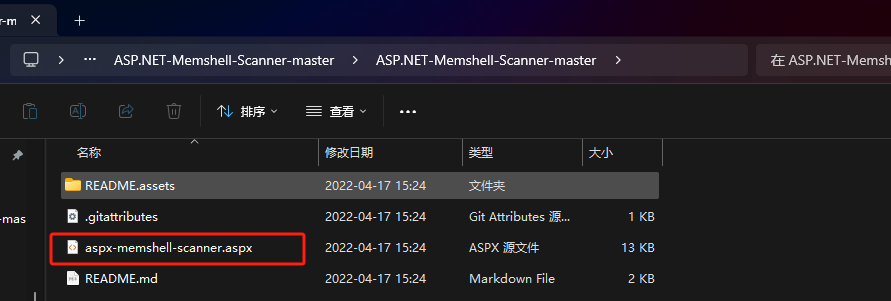
有文件实体的后门无文件实体的后门rootkit后门
有文件实体后门和无文件实体后门&RootKit后门 什么是有文件的实体后门: 在传统的webshell当中,后门代码都是可以精确定位到某一个文件上去的,你可以rm删除它,可以鼠标右键操作它,它是有一个文件实体对象存在的。…...
GPT实战系列-大模型训练和预测,如何加速、降低显存
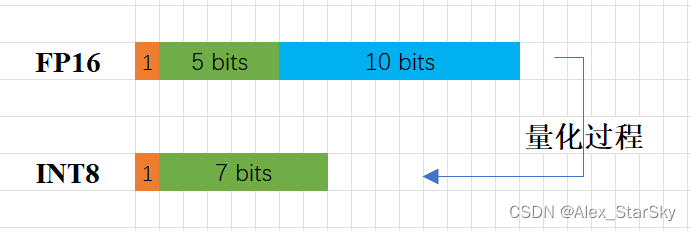
GPT实战系列-大模型训练和预测,如何加速、降低显存 不做特别处理,深度学习默认参数精度为浮点32位精度(FP32)。大模型参数庞大,10-1000B级别,如果不注意优化,既耗费大量的显卡资源,…...
SQL Sever 基础知识 - 数据排序
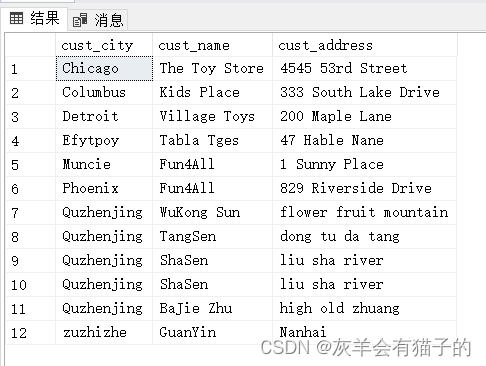
SQL Sever 基础知识 - 二 、数据排序 二 、对数据进行排序第1节 ORDER BY 子句简介第2节 ORDER BY 子句示例2.1 按一列升序对结果集进行排序2.2 按一列降序对结果集进行排序2.3 按多列对结果集排序2.4 按多列对结果集不同排序2.5 按不在选择列表中的列对结果集进行排序2.6 按表…...

vscode配置使用 cpplint
标题安装clang-format和cpplint sudo apt-get install clang-format sudo pip3 install cpplint标题以下settings.json文件放置xxx/Code/User目录 settings.json {"sync.forceDownload": false,"workbench.sideBar.location": "right","…...
C++ 系列 第四篇 C++ 数据类型上篇—基本类型
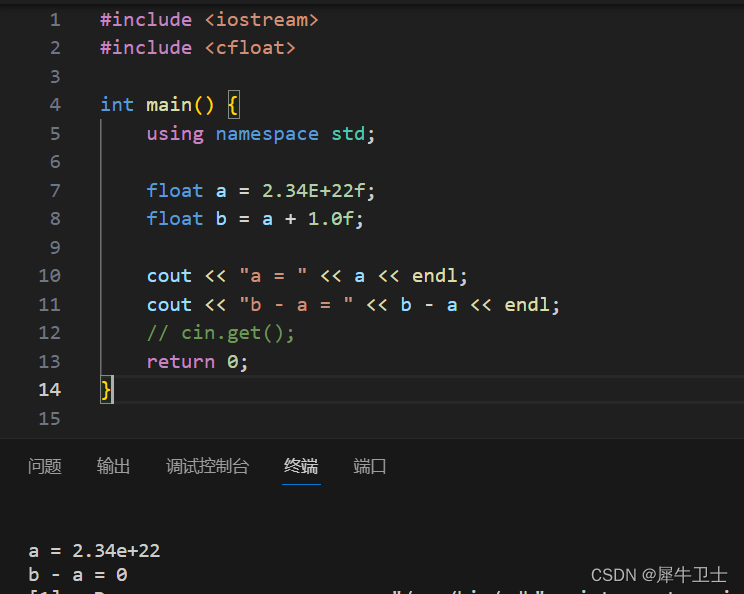
系列文章 C 系列 前篇 为什么学习C 及学习计划-CSDN博客 C 系列 第一篇 开发环境搭建(WSL 方向)-CSDN博客 C 系列 第二篇 你真的了解C吗?本篇带你走进C的世界-CSDN博客 C 系列 第三篇 C程序的基本结构-CSDN博客 前言 面向对象编程(OOP)的…...
C++ 指针详解
目录 一、指针概述 指针的定义 指针的大小 指针的解引用 野指针 指针未初始化 指针越界访问 指针运算 二级指针 指针与数组 二、字符指针 三、指针数组 四、数组指针 函数指针 函数指针数组 指向函数指针数组的指针 回调函数 指针与数组 一维数组 字符数组…...

.locked、locked1勒索病毒的最新威胁:如何恢复您的数据?
导言: 网络安全问题变得愈加严峻。.locked、locked1勒索病毒是近期备受关注的一种恶意软件,给用户的数据带来了巨大威胁。本文将深入探讨.locked、locked1勒索病毒的特征,探讨如何有效恢复被其加密的数据,并提供一些建议…...
Apache Sqoop使用
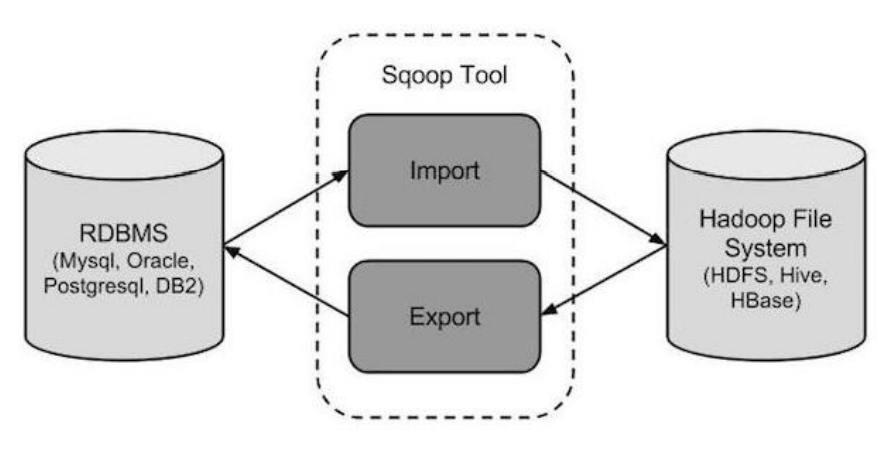
1. Sqoop介绍 Apache Sqoop 是在 Hadoop 生态体系和 RDBMS 体系之间传送数据的一种工具。 Sqoop 工作机制是将导入或导出命令翻译成 mapreduce 程序来实现。在翻译出的 mapreduce 中主要是对 inputformat 和 outputformat 进行定制。 Hadoop 生态系统包括:HDFS、Hi…...

【UGUI】实现UGUI背包系统的六个主要交互功能
在这篇教程中,我们将详细介绍如何在Unity中实现一个背包系统的六个主要功能:添加物品、删除物品、查看物品信息、排序物品、搜索物品和使用物品。让我们开始吧! 一、添加物品 首先,我们需要创建一个方法来添加新的物品到背包中。…...
电压驻波比
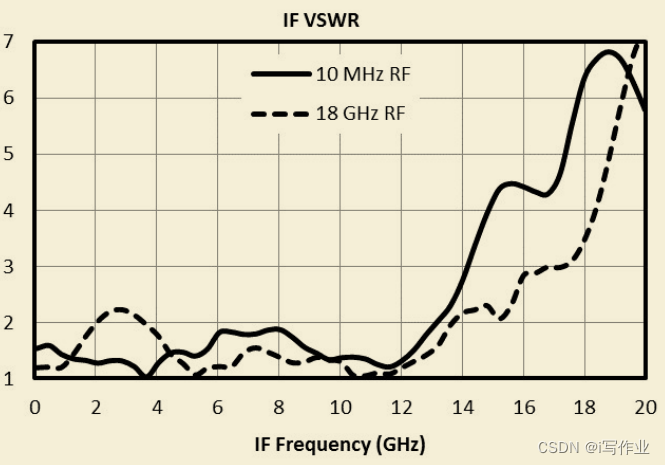
电压驻波比 关于IF端口的电压驻波比 一个信号变频后,从中频端口输出,它的输出跟输入是互异的。这个电压柱波比反映了它输出的能量有多少可以真正的输送到后端连接的器件或者设备。...

Open3D 最小二乘拟合二维直线(直接求解法)
目录 一、算法原理二、代码实现三、结果展示本文由CSDN点云侠原创,原文链接。爬虫网站自重。 一、算法原理 平面直线的表达式为: y = k x + b...
)
面试题目总结(二)
1. IoC 和 AOP 的区别 控制反转(Ioc) 和面向切面编程(AOP) 是两个不同的概念,它们在软件设计中有着不同的应用和目的。 IoC 是一种基于对象组合的编程模式,通过将对象的创建、依赖关系和生命周期等管理权交给外部容器或框架来实现程序间的解耦。IoC 的…...

TrustZone概述
目录 一、概述 1.1 在开始之前 二、什么是TrustZone? 2.1 Armv8-M的TrustZone 2.2 Armv9-A Realm Management Ext...

英特尔转型芯片代工:从IDM巨头到服务商的六大挑战与机遇
1. 英特尔代工之路:从IDM巨头到服务提供商的六大挑战在半导体行业,英特尔这个名字几乎就是高性能微处理器的代名词。这家公司凭借其垂直整合制造模式,在过去几十年里构筑了难以撼动的技术护城河。然而,当行业的目光从单纯的制程竞…...

开源物联网平台SiteWhere:微服务架构下的设备管理与数据流实战
1. 项目概述:一个开源的物联网应用平台如果你正在寻找一个能帮你快速搭建、管理和扩展物联网应用的核心平台,而不是从零开始造轮子,那么SiteWhere这个开源项目绝对值得你花时间深入了解。它不是一个简单的设备连接网关,而是一个功…...

【限时公开】谷歌内部未文档化Gemini JavaScript SDK隐藏能力:流式响应中断控制、上下文压缩率提升63%实测数据
更多请点击: https://intelliparadigm.com 第一章:Gemini JavaScript SDK核心能力概览 Gemini JavaScript SDK 是 Google 官方提供的轻量级客户端库,专为在浏览器和 Node.js 环境中无缝集成 Gemini 模型能力而设计。它抽象了底层 HTTP 请求、…...
:无监督拓扑保持的高维数据可视化与聚类)
自组织映射(SOM):无监督拓扑保持的高维数据可视化与聚类
1. 什么是自组织映射(SOM)?它到底能帮你解决什么实际问题?我第一次在客户现场看到SOM落地,是在一家做工业设备预测性维护的公司。他们有上百台传感器,每台每秒产生十几维的振动、温度、电流数据,…...

从“意大利面”到整洁代码:我是如何用SonarQube重构遗留项目的
从“意大利面”到整洁代码:我是如何用SonarQube重构遗留项目的 接手一个结构混乱的遗留项目,就像面对一盘煮过头的意大利面——各种逻辑纠缠不清,随便动一处就可能引发连锁反应。去年我遇到这样一个Java项目:12万行代码࿰…...

终极指南:MobileAgent如何用AI智能体彻底改变跨平台自动化体验
终极指南:MobileAgent如何用AI智能体彻底改变跨平台自动化体验 【免费下载链接】MobileAgent Mobile-Agent: The Powerful GUI Agent Family 项目地址: https://gitcode.com/GitHub_Trending/mo/mobileagent 你是否曾经想过,如果有一个AI助手能够…...

3步视频PPT智能提取:告别繁琐截图,拥抱自动化高效工作流
3步视频PPT智能提取:告别繁琐截图,拥抱自动化高效工作流 【免费下载链接】extract-video-ppt extract the ppt in the video 项目地址: https://gitcode.com/gh_mirrors/ex/extract-video-ppt 还在为从视频中手动截取PPT幻灯片而烦恼吗࿱…...

VisualCppRedist AIO 深度解析:从MSI自动化处理到系统注册表管理的完整解决方案
VisualCppRedist AIO 深度解析:从MSI自动化处理到系统注册表管理的完整解决方案 【免费下载链接】vcredist AIO Repack for latest Microsoft Visual C Redistributable Runtimes 项目地址: https://gitcode.com/gh_mirrors/vc/vcredist 在Windows系统开发和…...

Keep架构深度解析:企业级AIOps告警管理平台的设计与实践
Keep架构深度解析:企业级AIOps告警管理平台的设计与实践 【免费下载链接】keep The open-source AIOps and alert management platform 项目地址: https://gitcode.com/GitHub_Trending/kee/keep Keep作为开源AIOps告警管理平台,采用现代化的微服…...

信息学奥赛经典回溯:八皇后问题深度解析与OpenJudge实战
1. 八皇后问题:从棋盘游戏到算法经典 第一次接触八皇后问题时,我正在准备信息学奥赛的选拔考试。当时觉得这不过是个棋盘游戏,直到真正动手编码时,才发现其中蕴含的算法智慧远比想象中丰富。这个问题要求在一个8x8的国际象棋棋盘上…...