
Debian 终端Shell命令行长路径改为短路径
需要修改bashrc
~/.bashrc
先备份一份
cp .bashrc bashrc.backup
编辑bashrc
vim ~/.bashrc
可以看到bashrc内容为
# ~/.bashrc: executed by bash(1) for non-login shells.
# see /usr/share/doc/bash/examples/startup-files (in the package bash-doc)
# for examples# If not running interactively, don't do anything
case $- in*i*) ;;*) return;;
esac# don't put duplicate lines or lines starting with space in the history.
# See bash(1) for more options
HISTCONTROL=ignoreboth# append to the history file, don't overwrite it
shopt -s histappend# for setting history length see HISTSIZE and HISTFILESIZE in bash(1)
HISTSIZE=1000
HISTFILESIZE=2000# check the window size after each command and, if necessary,
# update the values of LINES and COLUMNS.
shopt -s checkwinsize# If set, the pattern "**" used in a pathname expansion context will
# match all files and zero or more directories and subdirectories.
#shopt -s globstar# make less more friendly for non-text input files, see lesspipe(1)
#[ -x /usr/bin/lesspipe ] && eval "$(SHELL=/bin/sh lesspipe)"# set variable identifying the chroot you work in (used in the prompt below)
if [ -z "${debian_chroot:-}" ] && [ -r /etc/debian_chroot ]; thendebian_chroot=$(cat /etc/debian_chroot)
fi# set a fancy prompt (non-color, unless we know we "want" color)
case "$TERM" inxterm-color|*-256color) color_prompt=yes;;
esac# uncomment for a colored prompt, if the terminal has the capability; turned
# off by default to not distract the user: the focus in a terminal window
# should be on the output of commands, not on the prompt
#force_color_prompt=yesif [ -n "$force_color_prompt" ]; thenif [ -x /usr/bin/tput ] && tput setaf 1 >&/dev/null; then# We have color support; assume it's compliant with Ecma-48# (ISO/IEC-6429). (Lack of such support is extremely rare, and such# a case would tend to support setf rather than setaf.)color_prompt=yeselsecolor_prompt=fi
fiif [ "$color_prompt" = yes ]; thenPS1='${debian_chroot:+($debian_chroot)}\[\033[01;32m\]\u@\h\[\033[00m\]:\[\033[01;34m\]\w\[\033[00m\]\$ '
elsePS1='${debian_chroot:+($debian_chroot)}\u@\h:\w\$ '
fi
unset color_prompt force_color_prompt# If this is an xterm set the title to user@host:dir
case "$TERM" in
xterm*|rxvt*)PS1="\[\e]0;${debian_chroot:+($debian_chroot)}\u@\h: \w\a\]$PS1";;
*);;
esac# enable color support of ls and also add handy aliases
if [ -x /usr/bin/dircolors ]; thentest -r ~/.dircolors && eval "$(dircolors -b ~/.dircolors)" || eval "$(dircolors -b)"alias ls='ls --color=auto'#alias dir='dir --color=auto'#alias vdir='vdir --color=auto'#alias grep='grep --color=auto'#alias fgrep='fgrep --color=auto'#alias egrep='egrep --color=auto'
fi# colored GCC warnings and errors
#export GCC_COLORS='error=01;31:warning=01;35:note=01;36:caret=01;32:locus=01:quote=01'# some more ls aliases
#alias ll='ls -l'
#alias la='ls -A'
#alias l='ls -CF'# Alias definitions.
# You may want to put all your additions into a separate file like
# ~/.bash_aliases, instead of adding them here directly.
# See /usr/share/doc/bash-doc/examples in the bash-doc package.if [ -f ~/.bash_aliases ]; then. ~/.bash_aliases
fi# enable programmable completion features (you don't need to enable
# this, if it's already enabled in /etc/bash.bashrc and /etc/profile
# sources /etc/bash.bashrc).
if ! shopt -oq posix; thenif [ -f /usr/share/bash-completion/bash_completion ]; then. /usr/share/bash-completion/bash_completionelif [ -f /etc/bash_completion ]; then. /etc/bash_completionfi
fi
别的都不用关心
找到这样一段代码
if [ "$color_prompt" = yes ]; thenPS1='${debian_chroot:+($debian_chroot)}\[\033[01;32m\]\u@\h\[\033[00m\]:\[\033[01;34m\]\w\[\033[00m\]\$ '
elsePS1='${debian_chroot:+($debian_chroot)}\u@\h:\w\$ '
fi
将其中的\w改为\W,也就是把小写w改为大写W
改完后保存退出
执行
source .bashrc
可以看到终端路径不论cd了多少层目录,都只会显示最后的文件夹名称
相关文章:

Debian 终端Shell命令行长路径改为短路径
需要修改bashrc ~/.bashrc先备份一份 cp .bashrc bashrc.backup编辑bashrc vim ~/.bashrc可以看到bashrc内容为 # ~/.bashrc: executed by bash(1) for non-login shells. # see /usr/share/doc/bash/examples/startup-files (in the package bash-doc) # for examples# If…...

Ansible变量是什么?如何实现任务的循环?
Ansible 利用变量存储整个 Ansible 项目文件中可重复使用的值,从而可以简化项目的创建和维护,并减少错误的发生率。在定义Ansible变量时,通常有如下三种范围的变量: global范围:从命令行或Ansible配置中设置的变量&am…...

随机梯度下降的代码实现
在单变量线性回归的机器学习代码中,我们讨论了批量梯度下降代码的实现,本篇将进行随机梯度下降的代码实现,整体和批量梯度下降代码类似,仅梯度下降部分不同: import numpy as np import pandas as pd import matplotl…...
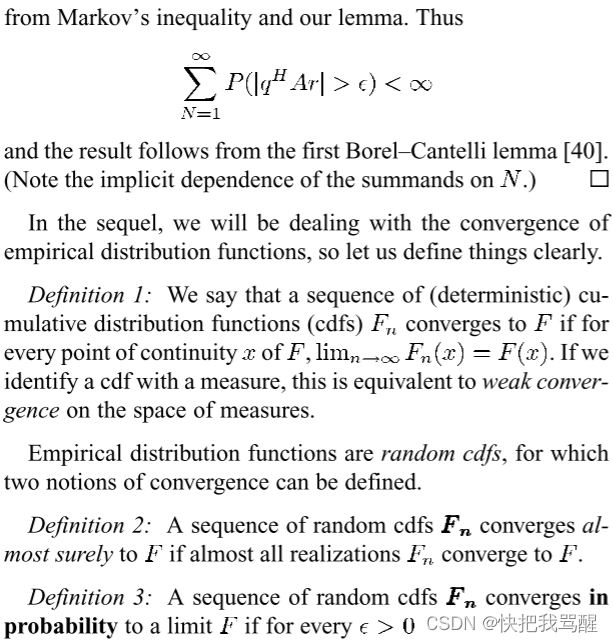
渐进推导中常用的一些结论
标题很帅 STAR-RIS Enhanced Joint Physical Layer Security and Covert Communications for Multi-antenna mmWave Systems文章末尾的一个推导。 lim M → ∞ ∥ Φ ( w k ⊗ Θ r ) Ω r w H g ∗ ∥ 2 2 M lim M → ∞ Tr ( g T Ω r w ( w k ⊗ Θ r ) H Φ H Φ…...
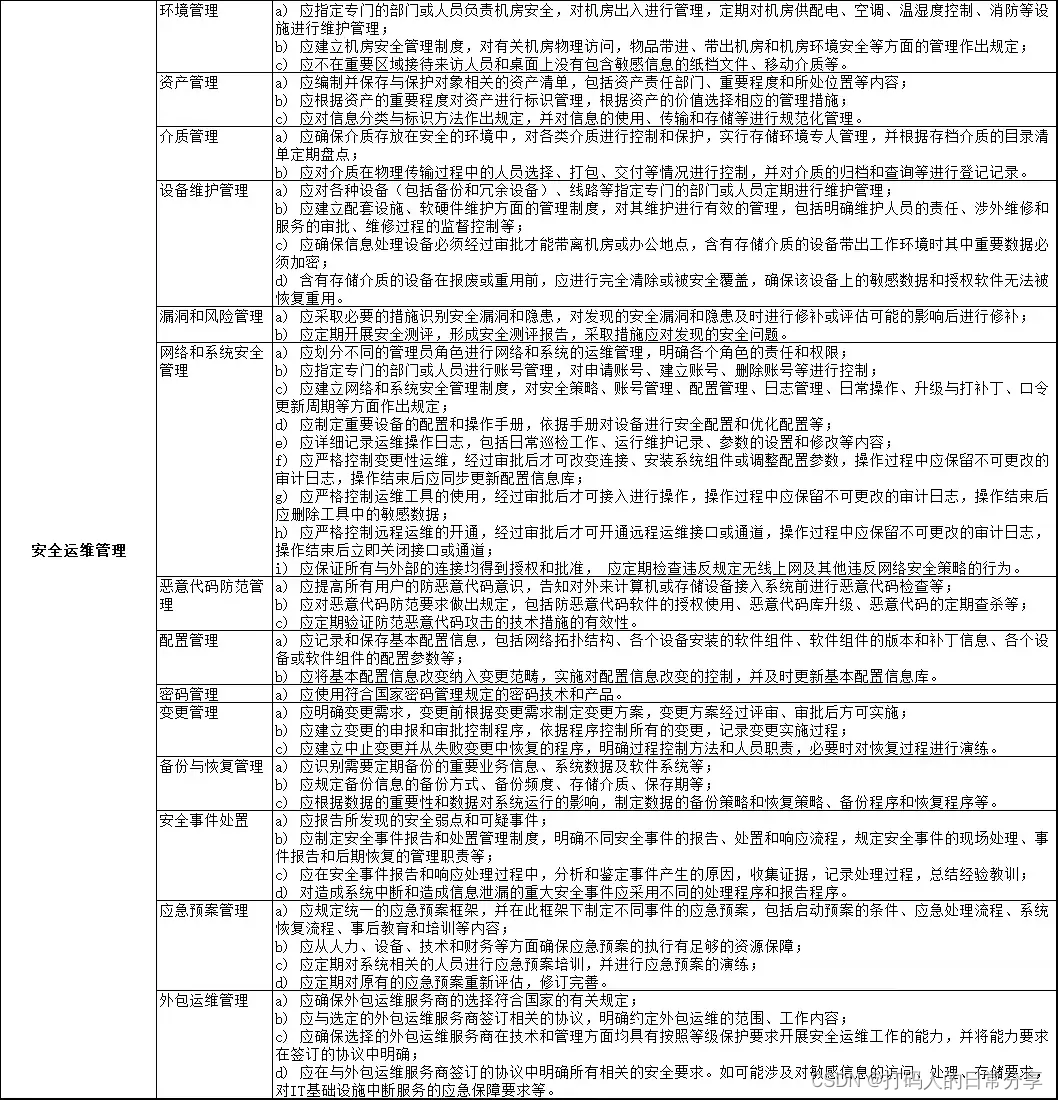
网络安全等级保护V2.0测评指标
网络安全等级保护(等保V2.0)测评指标: 1、物理和环境安全 2、网络和通信安全 3、设备和计算安全 4、应用和数据安全 5、安全策略和管理制度 6、安全管理机构和人员 7、安全建设管理 8、安全运维管理 软件全文档获取:点我获取 1、物…...

java中list的addAll用法详细实例?
List 的 addAll() 方法用于将一个集合中的所有元素添加到另一个 List 中。下面是一个详细的实例,展示了 addAll() 方法的使用: java Copy code import java.util.ArrayList; import java.util.List; public class AddAllExample { public static v…...
关于学习计算机的心得与体会
也是隔了一周没有发文了,最近一直在准备期末考试,后来想了很久,学了这么久的计算机,这当中有些收获和失去想和各位正在和我一样在学习计算机的路上的老铁分享一下,希望可以作为你们碰到困难时的良药。先叠个甲…...
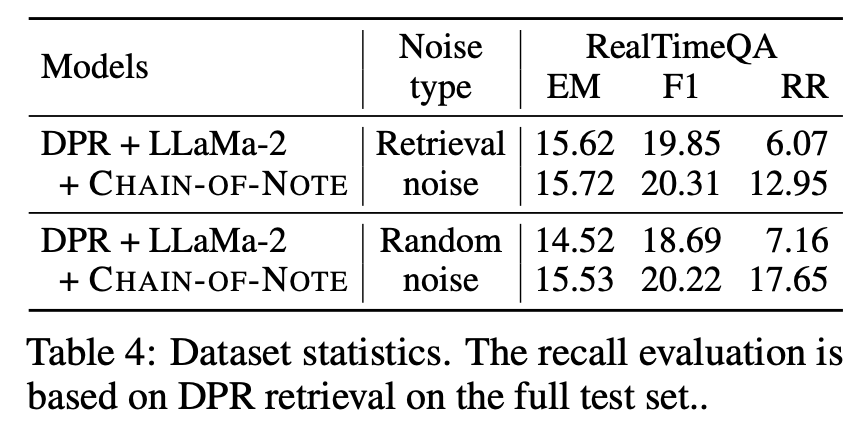
LLM之RAG理论(一)| CoN:腾讯提出笔记链(CHAIN-OF-NOTE)来提高检索增强模型(RAG)的透明度
论文地址:https://arxiv.org/pdf/2311.09210.pdf 检索增强语言模型(RALM)已成为自然语言处理中一种强大的新范式。通过将大型预训练语言模型与外部知识检索相结合,RALM可以减少事实错误和幻觉,同时注入最新知识。然而&…...
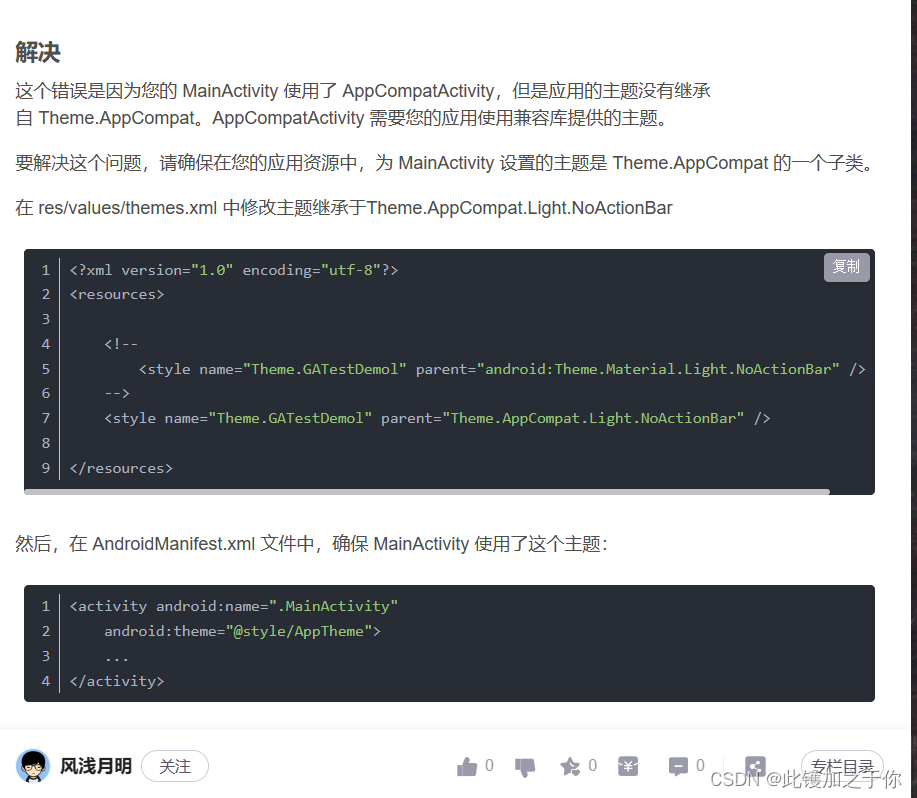
Android studio:打开应用程序闪退的问题2.0
目录 找到问题分析问题解决办法 找到问题 老生常谈,可能这东西真的很常见吧,在之前那篇文章中 linkhttp://t.csdnimg.cn/UJQNb 已经谈到了关于打开Androidstuidio开发的软件后明明没有报错却无法运行(具体表现为应用程序闪退的问题ÿ…...

Spring IoC如何存取Bean对象
小王学习录 IoC(Inversion of Control)1. 什么是IoC2. 什么是Spring IoC3. 什么是DI4. Spring IoC的作用 存储Bean对象1. 创建Bean2. 将Bean注册到Spring中. 取Bean对象.1. 获取Spring上下文信息使用ApplicationContext和BeanFactory的区别 2. 获取指定Bean对象 IoC(Inversion …...

【开源】基于Vue.js的实验室耗材管理系统
文末获取源码,项目编号: S 081 。 \color{red}{文末获取源码,项目编号:S081。} 文末获取源码,项目编号:S081。 目录 一、摘要1.1 项目介绍1.2 项目录屏 二、功能模块2.1 耗材档案模块2.2 耗材入库模块2.3 耗…...
Datawhale聪明办法学Python(task2Getting Started)
一、课程基本结构 课程开源地址:课程简介 - 聪明办法学 Python 第二版 章节结构: Chapter 0 安装 InstallationChapter 1 启航 Getting StartedChapter 2 数据类型和操作 Data Types and OperatorsChapter 3 变量与函数 Variables and FunctionsChapte…...
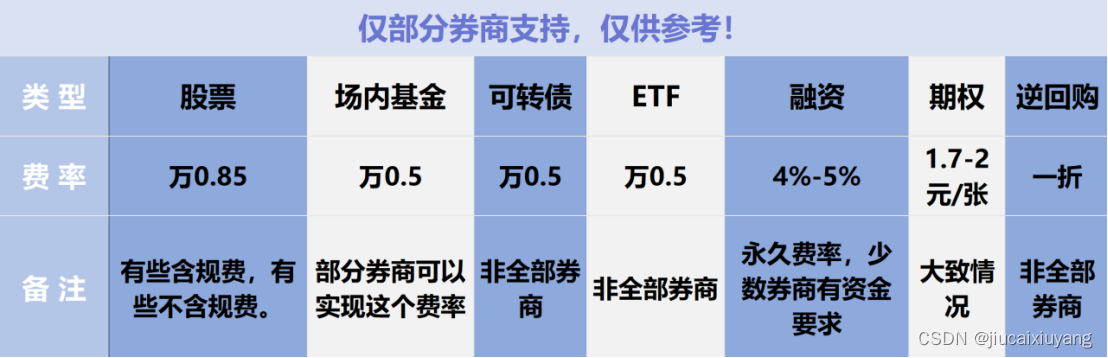
量化交易怎么操作?量化软件怎么选择比较好?(散户福利,建议收藏)
一:量化的具体操作步骤是什么呢?1. 数据获取:索取和收集金融市场数据。 2. 策略制定:制定数量交易策略,这包括制定投资目标、建立交易规则和风险控制机制等,这个过程需要不断优化和更新。 3. 编写算法&am…...
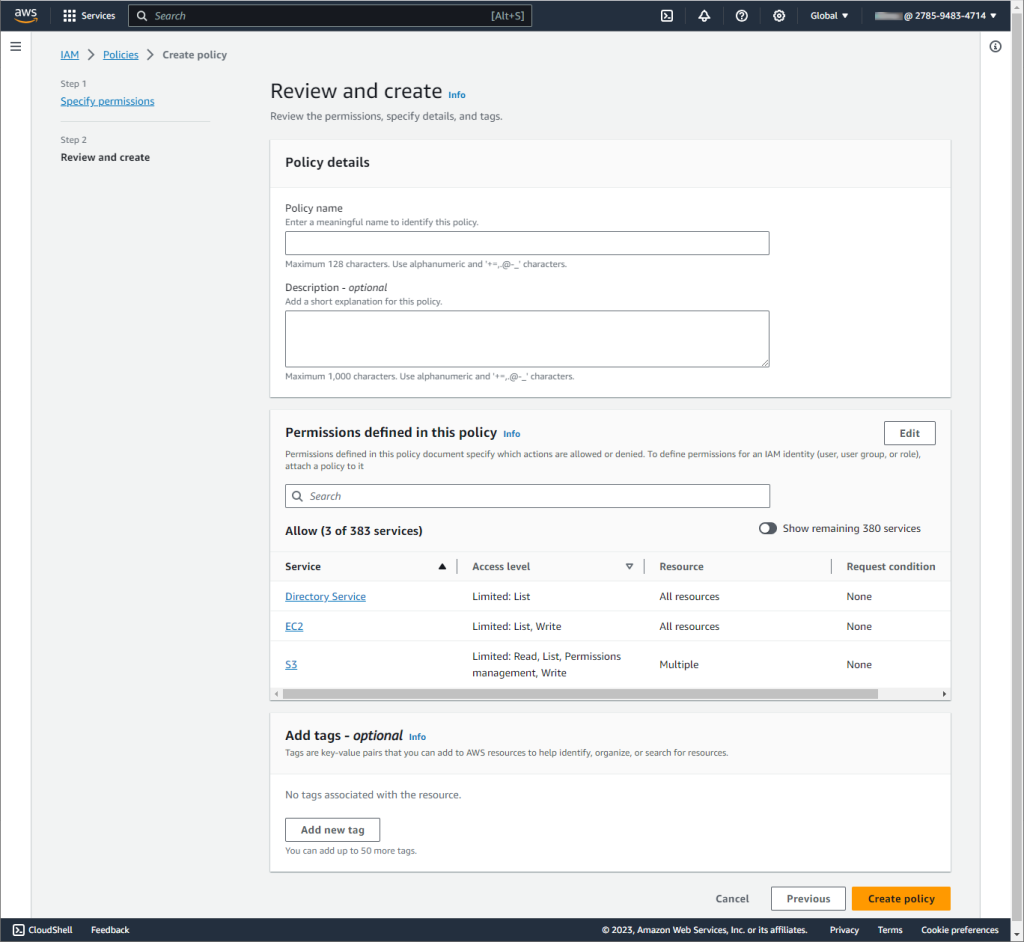
什么是 AWS IAM?如何使用 IAM 数据库身份验证连接到 Amazon RDS(上)
驾驭云服务的安全环境可能很复杂,但 AWS IAM 为安全访问管理提供了强大的框架。在本文中,我们将探讨什么是 AWS Identity and Access Management (IAM) 以及它如何增强安全性。我们还将提供有关使用 IAM 连接到 Amazon Relational Database Service (RDS…...

Python从入门到精通七:Python函数进阶
函数多返回值 学习目标: 知道函数如何返回多个返回值 问: 如果一个函数如些两个return (如下所示),程序如何执行? 答:只执行了第一个return,原因是因为return可以退出当前函数,导致return下方的代码不执…...
uniapp踩坑之项目:使用过滤器将时间格式化为特定格式
利用filters过滤器对数据直接进行格式化,注意:与method、onLoad、data同层级 <template><div><!-- orderInfo.time的数据为:2023-12-12 12:10:23 --><p>{{ orderInfo.time | formatDate }}</p> <!-- 2023-1…...
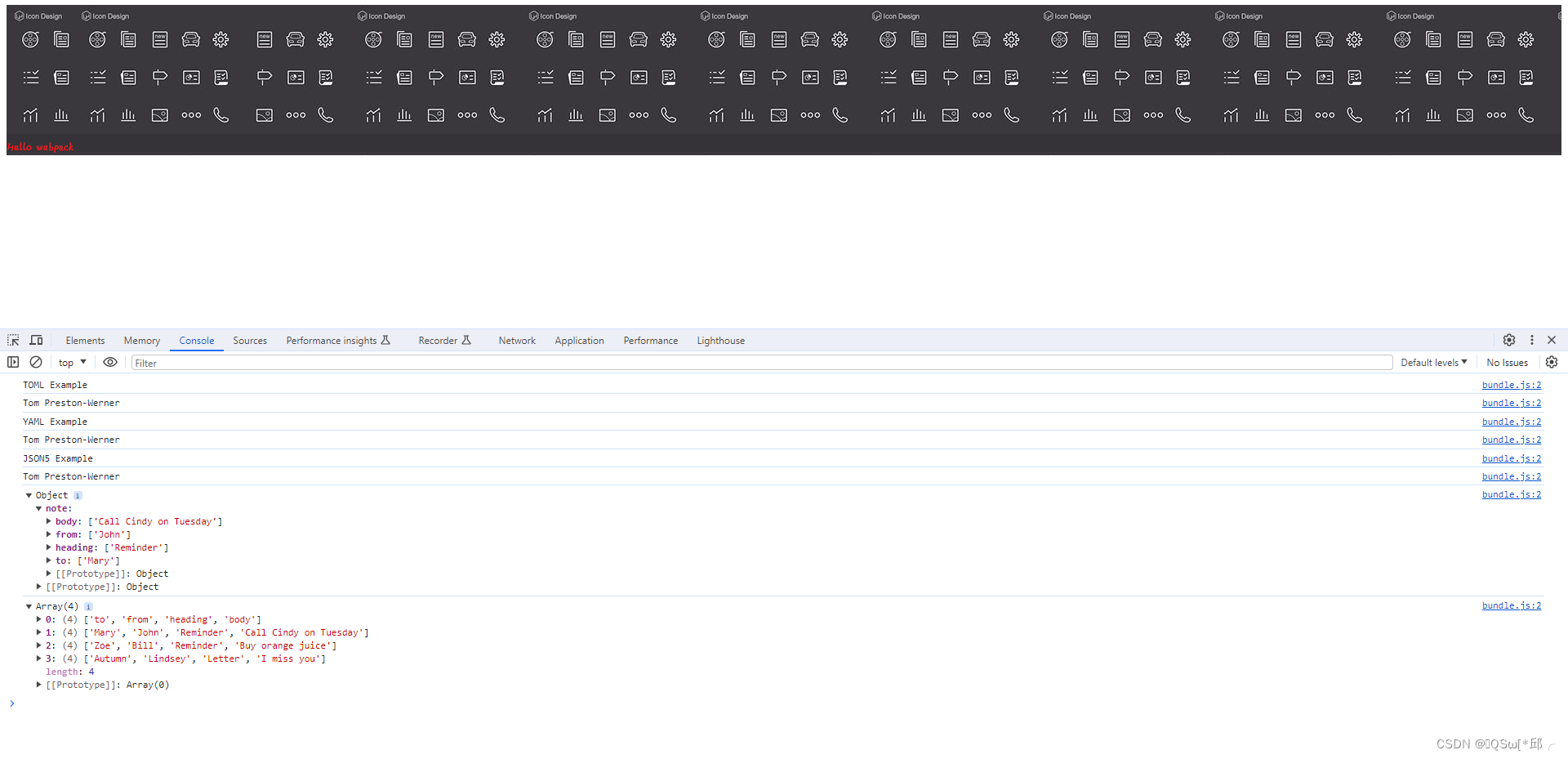
webpack学习-2.管理资源
webpack学习-2.管理资源 1.这章要干嘛2.加载css注意顺序! 3.总结 1.这章要干嘛 管理资源,什么意思呢?管理什么资源?项目中经常会 导入各种各样的css文件,图片文件,字体文件,数据文件等等&#…...
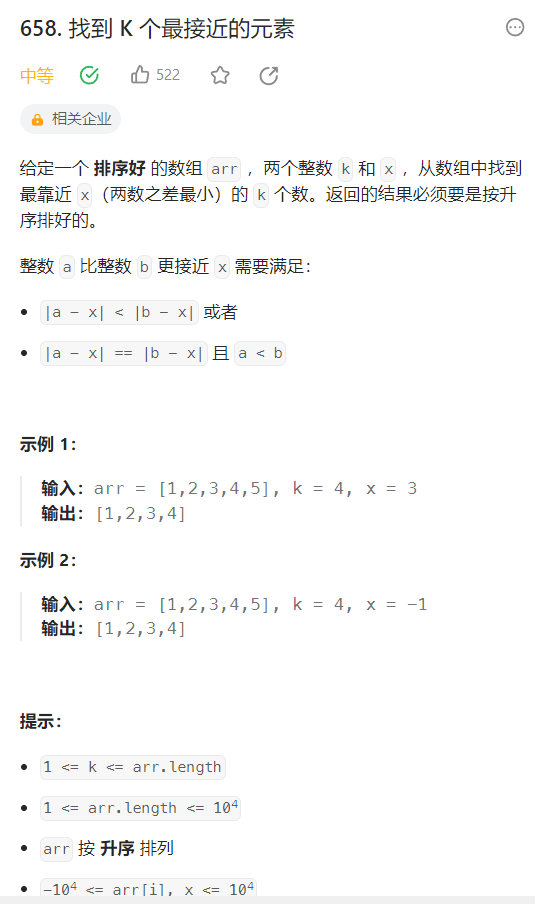
658. 找到 K 个最接近的元素
658. 找到 K 个最接近的元素 Java代码:滑窗 class Solution {public List<Integer> findClosestElements(int[] arr, int k, int x) {List<Integer> list new ArrayList<>();for (int i 0; i < arr.length; i) {arr[i] arr[i] - x;}for(i…...

十二、MapReduce概述
1、MapReduce (1)采用框架 MapReduce是“分散——>汇总”模式的分布式计算框架,可供开发人员进行相应计算 (2)编程接口: ~Map ~Reduce 其中,Map功能接口提供了“分散”的功能ÿ…...

shell条件测试
目录 1.1.用途 1.2.基本语法 1.2.1.格式: 1.2.2.例 1.3 文件测试 1.4.整数测试 1.4.1.作用 1.4.2.操作符 1.4.3.示例: 1.5.逻辑操作符 1.5.1.符号 1.5.2.例: 1.6.命令分隔符 1.1.用途 为了能够正确处理Shell程序运行过程中遇到的各种情况&am…...

Scandit Barcode Scanner:这家瑞士公司的SDK,如何让淘宝、京东的扫码快人一步?
Scandit Barcode Scanner:解码瑞士技术如何重塑全球扫码体验 在移动互联网时代,扫码已成为连接物理世界与数字世界的无形桥梁。从超市收银台到物流仓库,从零售门店到电商平台,条码扫描技术默默支撑着现代商业的高效运转。而在这背…...

MIT Cheetah-Software编译手记:搞定Qt5.10.0路径、LCM依赖与那些诡异的C++报错
MIT Cheetah-Software编译实战:Qt路径配置、LCM依赖与C报错深度解析 1. 环境准备与依赖管理 在Ubuntu 20.04环境下编译MIT Cheetah-Software,首先需要确保系统基础环境配置正确。不同于普通开源项目,这个四足机器狗的控制系统对Qt版本、LCM消…...

CANN/asc-devkit DeepNorm API 文档
DeepNorm 【免费下载链接】asc-devkit 本项目是CANN 推出的昇腾AI处理器专用的算子程序开发语言,原生支持C和C标准规范,主要由类库和语言扩展层构成,提供多层级API,满足多维场景算子开发诉求。 项目地址: https://gitcode.com/c…...
)
告别手动注册!用Inno Setup为你的C# SolidWorks插件制作一键安装包(附VS生成后事件脚本)
从代码到产品:用Inno Setup打造SolidWorks插件的专业安装体验 在SolidWorks二次开发领域,许多开发者投入大量精力完善插件功能,却在最后交付环节草草了事——简单复制DLL文件搭配批处理脚本的方式,不仅显得业余,更给终…...

3步掌握HTTrack:免费网站离线下载工具终极指南
3步掌握HTTrack:免费网站离线下载工具终极指南 【免费下载链接】httrack HTTrack Website Copier, copy websites to your computer (Official repository) 项目地址: https://gitcode.com/gh_mirrors/ht/httrack 你是否经常遇到网络不稳定,却急需…...
理解AMBA AXI总线上的数据流(以Cortex-A53为例))
手把手教你用Wireshark(或类似工具)理解AMBA AXI总线上的数据流(以Cortex-A53为例)
实战解析:用Wireshark透视Cortex-A53的AXI总线数据流 在嵌入式系统开发中,AXI总线如同SoC的神经系统,承载着处理器核心与各功能模块间的关键通信。对于底层驱动工程师和FPGA开发者而言,能够直观观察总线上的数据流动,就…...

百度千帆平台文心4.0 API开通与计费避坑指南:个人开发者如何低成本尝鲜?
百度千帆文心4.0 API低成本接入实战:个人开发者的精打细算指南 当大模型API成为个人开发者的"新基建",如何用最低成本体验最前沿的ERNIE-Bot-4能力?作为经历过完整踩坑流程的实践者,我将分享从申请到调用的全流程避坑策…...

告别COM Server!用Python+UDP给CANoe CAPL脚本开个“外挂”
突破CAPL封闭性:Python与CANoe的轻量级UDP通信实战 在汽车电子测试领域,CANoe作为行业标准工具,其内置的CAPL脚本语言为测试工程师提供了强大的自动化能力。然而,当我们需要将外部复杂算法(如机器学习模型)…...

浏览器Cookie本地导出实战指南:Get-cookies.txt-LOCALLY深度解析
浏览器Cookie本地导出实战指南:Get-cookies.txt-LOCALLY深度解析 【免费下载链接】Get-cookies.txt-LOCALLY Get cookies.txt, NEVER send information outside. 项目地址: https://gitcode.com/gh_mirrors/ge/Get-cookies.txt-LOCALLY 在Web开发和自动化测试…...

从样本到序列:枸杞DNA条形码鉴定的关键步骤与陷阱规避
一、引言:为何需要PCR鉴定枸杞?枸杞(Lyciumspp.)作为药食同源的重要资源,市场长期存在以土库曼枸杞、白刺等近缘种或伪品冒充高价值宁夏枸杞(L. barbarum)的现象。传统鉴别依赖果实形态和显微特…...