
【Python】基于flaskMVT架构与session实现博客前台登录登出功能
目录
一、MVT说明
1.Model层
2.View层
3.Template层
二、功能说明
三、代码框架展示
四、具体代码实现
models.py
登录界面前端代码
博客界面前端代码(profile.html)
main.py
一、MVT说明
MVT架构是Model-View-Template的缩写,是Django框架的架构。Flask框架本身并没有强制使用MVT架构,但是我们可以通过一些方式来实现类似MVT架构的结构。
以下是一个简单的在Flask中实现MVT的示例:
1.Model层
在Flask中,我们可以使用SQLAlchemy作为ORM框架,用于操作数据库。我们可以在app目录下创建一个models.py文件,并定义我们需要的数据模型类。例如:
from flask_sqlalchemy import SQLAlchemydb = SQLAlchemy()class User(db.Model):id = db.Column(db.Integer, primary_key=True)username = db.Column(db.String(20), unique=True, nullable=False)password = db.Column(db.String(128), nullable=False)email = db.Column(db.String(120), unique=True, nullable=False)
2.View层
在Flask中,我们可以使用Blueprints来组织我们的视图函数。我们可以在app目录下创建一个views.py文件,并创建一个蓝图对象,用于定义我们的视图函数。例如:
from flask import Blueprintbp = Blueprint('main', __name__)@bp.route('/')
def index():return 'Hello, World!'
3.Template层
在Flask中,我们可以使用Jinja2作为模板引擎,用于渲染HTML页面。我们可以在app目录下创建一个templates目录,并在其中创建我们的HTML模板文件。例如:
<!doctype html>
<html><head><title>{{ title }}</title></head><body><h1>Hello, {{ username }}!</h1></body>
</html>
然后,在我们的视图函数中使用render_template函数来渲染模板文件。例如:
from flask import render_template@bp.route('/hello/<username>')
def hello(username):return render_template('hello.html', title='Flask MVT Demo', username=username)
以上就是一个简单的在Flask中实现MVT的示例。通过这种方式,我们可以将应用逻辑、数据库操作和HTML页面渲染分别放在不同的层次中,使代码更加清晰和易于维护。
二、功能说明
展示了登录界面和博客界面
实现基于初始界面多路由跳转
通过jinja2模板引擎完成html页面的数据替换
使用SQLAlchemy完成数据操作
使用request获取用户提交的参数
使用session实现权限验证,登录登出
三、代码框架展示
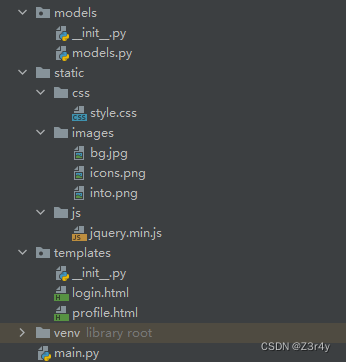

四、具体代码实现
models.py
from sqlalchemy import create_engine
from sqlalchemy import Column,String,Integer
from sqlalchemy.ext.declarative import declarative_base
from sqlalchemy.orm import sessionmaker#链接是需要指定要用到的MySQL数据库
engine=create_engine('mysql+pymysql://root:root@localhost:3306/flask_1?charset=utf8')
Base=declarative_base() #生成SQLORM基类class User(Base):#对应MySQL中数据表的名字__tablename__='user'#创建字段id=Column(Integer,primary_key=True)user_id=Column(String(50),nullable=False)username=Column(String(50),nullable=False)head_img=Column(String(200))short_description=Column(String(300))
登录界面前端代码
简单的Login Form登录页html模板
博客界面前端代码(profile.html)
<!DOCTYPE html>
<!--[if IE 8]> <html lang="en" class="ie8"> <![endif]-->
<!--[if IE 9]> <html lang="en" class="ie9"> <![endif]-->
<!--[if !IE]><!--> <html lang="en"> <!--<![endif]-->
<head>
<title>Home</title>
<!-- Meta -->
<meta charset="utf-8">
<meta http-equiv="X-UA-Compatible" content="IE=edge">
<meta name="viewport" content="width=device-width, initial-scale=1.0">
<meta name="description" content="">
<meta name="author" content="">
<link rel="shortcut icon" href="">
<link href='https://fonts.googleapis.com/css?family=Roboto:400,500,400italic,300italic,300,500italic,700,700italic,900,900italic' rel='stylesheet' type='text/css'>
<!-- Global CSS -->
<link rel="stylesheet" href="assets/plugins/bootstrap/css/bootstrap.min.css">
<!-- Plugins CSS -->
<link rel="stylesheet" href="assets/plugins/font-awesome/css/font-awesome.css"><!-- Theme CSS -->
<link id="theme-style" rel="stylesheet" href="assets/css/styles.css"></head><body><header class="header"><div class="intro"><div class="container text-right"><a href={{url_for('logout')}}>退出登录</a></div><!--//container--><div class="container text-center"><h1 class="name">{{user.username}}</h1><div class="title">Full Stack Developer</div><div class="profile"><p>{{user.short_description}}</p></div><!--//profile--></div><!--//container--></div><!--//intro--><div class="contact-info"><div class="container text-center"><ul class="list-inline"><li class="email"><i class="fa fa-envelope"></i><a href="mailto:someone@example.com">james.doe@website.com</a></li><li><i class="fa fa-phone"></i> <a href="tel: 0123456789">0123 456 7890</a></li><li class="website"><i class="fa fa-globe"></i><a href="#" target="_blank">portfoliosite.com</a></li></ul></div><!--//container--></div><!--//contact-info--></header><!--//header--><div class="wrapper container"><section id="contact-section" class="contact-section section"><h2 class="section-title">Get in Touch</h2><div class="intro"><img class="profile-image" src="assets/images/profile-image.png" alt=""><div class="dialog"><p>I'm currently taking on freelance work. Lorem ipsum dolor sit amet, consectetuer adipiscing elit. Aenean commodo ligula eget dolor. Aenean massa. Cum sociis natoque penatibus et magnis dis parturient montes. Aenean vulputate eleifend tellus. Aenean leo ligula, porttitor eu, consequat vitae, eleifend ac, enim. Aliquam lorem ante, dapibus in, viverra quis, feugiat a, tellus.</p><p><strong>I can help with the following:</strong></p><ul class="list-unstyled service-list"><li><i class="fa fa-check" aria-hidden="true"></i> App development with ReactJS</li><li><i class="fa fa-check" aria-hidden="true"></i> Front-end development with AngularJS</li><li><i class="fa fa-check" aria-hidden="true"></i> Back-end development with Django/Python</li><li><i class="fa fa-check" aria-hidden="true"></i> UI development</li><li><i class="fa fa-check" aria-hidden="true"></i> UX prototyping</li></ul><p>Drop me a line at <a href="mailto:someone@example.com">james.doe@website.com</a> or call me at <a href="tel:01234567890">0123 456 7890</a></p><ul class="social list-inline"><li><a href="#"><i class="fa fa-linkedin" aria-hidden="true"></i></a></li><li><a href="#"><i class="fa fa-twitter" aria-hidden="true"></i></a></li><li><a href="#"><i class="fa fa-google-plus" aria-hidden="true"></i></a></li><li><a href="#"><i class="fa fa-github-alt" aria-hidden="true"></i></a></li><li><a href="#"><i class="fa fa-skype" aria-hidden="true"></i></a></li></ul><!--//social--></div><!--//diaplog--></div><!--//intro--></section><!--//section--></div><!--//wrapper--></body>
</html>
main.py
#1.导入flask
from flask import Flask, redirect, url_for, request, make_response,session
from flask import render_templatefrom models.models import *#2.用flask创建应用对象
app=Flask(__name__)
app.config['SECRET_KEY']='Z3r4y'#3. 用应用对象.route("/index.html")对函数进行装饰,这个函数中写业务逻辑
@app.route("/")
@app.route("/index")
def index():return redirect('profile')@app.route("/profile")    #当调用profile的时候,就相当于profile(user_id=xxx)
#当调用这个函数的时候,意味着用户要访问简历页面,至于是否可以访问,则要检查用户请求中的cookie,如果有,那么就认为可以访问,否则禁止访问
def profile():  #如果想调用profile成功,那么只有user_id这个位置的是纯数字的时候,才可以调用# 如果一个函数它是一个普通的功能的话,它一般包括2个功能:#1.业务方面的数据处理(对变量user_id的使用,例如查询数据库等)#2.模板的替换(对应profile.html的获取以及字符的替换)# with open('profile.html',encoding='utf-8') as f:#     content=f.read().replace("xxxxxxxx",str(user_id))#     return content# conn=pymysql.connect(host='localhost', user='root', password='root', database='flask_1', charset='utf8')# csl=conn.cursor()# params=[user_id]# csl.execute('select * from user where user_id=%s',params)# result=csl.fetchone()# print(result)# csl.close()# conn.close()# login_flag=request.cookies.get('login_flag')# user_id=request.cookies.get('user_id')  #从cookie中提取用户的idlogin_flag=session.get('login_flag')user_id=session.get('user_id')if not (login_flag and login_flag=="success" and user_id):return redirect(url_for('login'))db_session=sessionmaker(bind=engine)() #生成链接数据库的实例user_ret=db_session.query(User).filter(User.user_id==user_id).one()    #将从cookie中查询出来的user_id道数据库中查询这个用户# print(user_ret)db_session.close()# 使用模板(jinja2模板引擎),可以对html的数据处理进行了封装# return render_template("profile.html",user_name="Z3r4y")# return render_template("profile.html",user_name=result[2],short_desc=result[4])  #注意:它会默认到templates文件夹中去找 profile.htmlreturn render_template("profile.html",user=user_ret)@app.route('/login')
def login():#判断用户名以及密码或者还有验证码是否成立,如果成立则告知浏览器用户登录成功,且让浏览器自动跳转主页# print(request.args)if request.args:user_name=request.args.get('Username')password=request.args.get('Password')#1.业务处理print("用户名是",user_name)print("密码是",password)db_session = sessionmaker(bind=engine)()  # 生成链接数据库的实例user_ret = db_session.query(User).filter(User.username == user_name).first()db_session.close()print(user_ret)if user_ret:# response=make_response("<h1>登陆成功</h1>")response=make_response(redirect(url_for('index')))# response.set_cookie("user_id",user_ret.user_id)# response.set_cookie("login_flag","success")session['login_flag']="success"session['user_id']=user_ret.user_idreturn responseelse:return "<h1>登陆失败</h1>"# return redirect('/index')# return redirect(url_for("profile",user_id=2))   #帮助我们动态地生成与路由函数关联的URLelse:return render_template('login.html')@app.route('/logout')
def logout():# #1.清理cookie# response=make_response(redirect(url_for('index')))# response.delete_cookie('login_flag')# response.delete_cookie('user_id')#1.清理sessionsession.clear()# 2.跳转到主页return redirect(url_for('index'))@app.route('/demo')
def demo():return "状态码",404#4.应用程序.run()
app.run(debug=True,port=1337,host="0.0.0.0")     #开启调试模式,意味着如果有代码的改动,flask会自动重启服务器
# app.run()
# print(app.url_map)
相关文章:
【Python】基于flaskMVT架构与session实现博客前台登录登出功能
目录 一、MVT说明 1.Model层 2.View层 3.Template层 二、功能说明 三、代码框架展示 四、具体代码实现 models.py 登录界面前端代码 博客界面前端代码(profile.html) main.py 一、MVT说明 MVT架构是Model-View-Template的缩写,是…...

为什么有的开关电源需要加自举电容?
一、什么是自举电路? 1.1 自举的概念 首先,自举电路也叫升压电路,是利用自举升压二极管,自举升压电容等电子元件,使电容放电电压和电源电压叠加,从而使电压升高。有的电路升高的电压能达到数倍电源电压。…...
【MCAL】TC397+EB-treso之MCU配置实战 - 芯片时钟
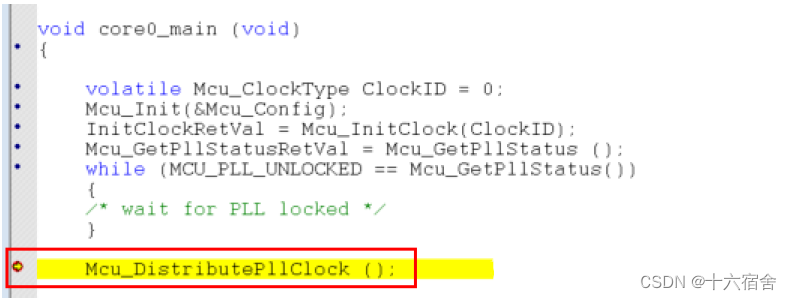
本篇文章介绍了在TC397平台使用EB-treso对MCU驱动模块进行配置的实战过程,主要介绍了后续基本每个外设模块都要涉及的芯片时钟部分,帮助读者了解TC397芯片的时钟树结构,在后续计算配置不同外设模块诸如通信速率,定时器周期等&…...
高级人工智能之群体智能:蚁群算法
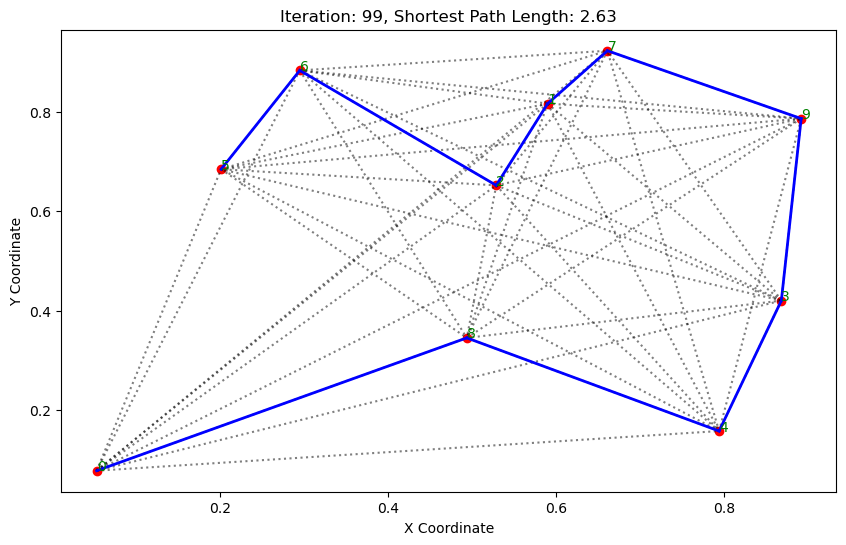
群体智能 鸟群: 鱼群: 1.基本介绍 蚁群算法(Ant Colony Optimization, ACO)是一种模拟自然界蚂蚁觅食行为的优化算法。它通常用于解决路径优化问题,如旅行商问题(TSP)。 蚁群算法的基本步骤…...

【SpringBoot应用篇】【AOP+注解】SpringBoot+SpEL表达式基于注解实现权限控制
【SpringBoot应用篇】【AOP注解】SpringBootSpEL表达式基于注解实现权限控制 Spring SpEL基本表达式类相关表达式表达式模板 SpEL表达式实现权限控制PreAuthAuthFunPreAuthAspectUserControllerSpelParserUtils Spring SpEL Spring 表达式语言 SpEL 是一种非常强大的表达式语言…...
Java研学-HTTP 协议
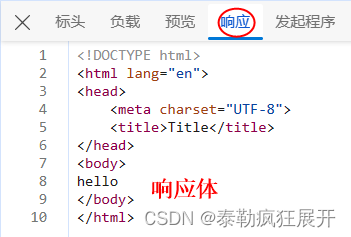
一 概述 1 概念和作用 概念:HTTP 是 HyperText Transfer Protocol (超文本传输协议)的简写,它是 TCP/IP 协议之上的一个应用层协议。简单理解就是 HTTP 协议底层是对 TCP/IP 协议的封装。 作用:用于规定浏览器和服务器之间数据传输的格式…...
差生文具多之(二): perf
栈回溯和符号解析是使用 perf 的两大阻力,本文以应用程序 fio 的观测为例子,提供一些处理它们的经验法则,希望帮助大家无痛使用 perf。 前言 系统级性能优化通常包括两个阶段:性能剖析和代码优化: 性能剖析的目标是寻…...

【SPI和API有什么区别】
✅什么是SPI,和API有什么区别 ✅典型解析🟢拓展知识仓🟢如何定义一个SPI🟢SPI的实现原理 ✅SPI的应用场景SpringDubbo ✅典型解析 Java 中区分 API和 SPI,通俗的进: API和 SPI 都是相对的概念,他们的差别只…...
Day67力扣打卡
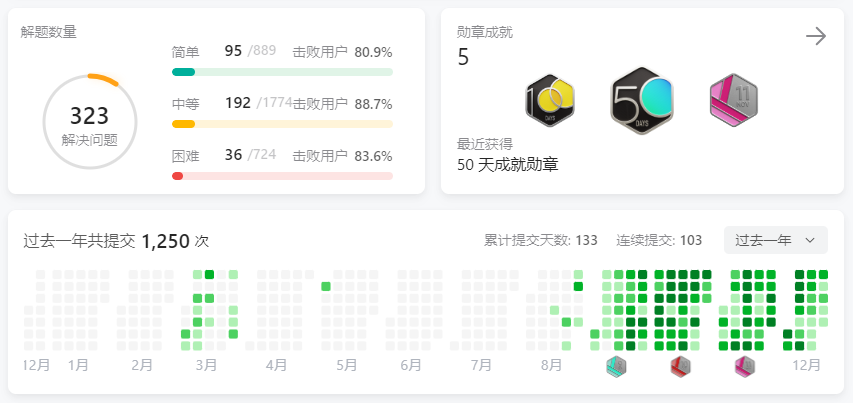
打卡记录 美丽塔 II(前缀和 单调栈) 链接 class Solution:def maximumSumOfHeights(self, maxHeights: List[int]) -> int:n len(maxHeights)stack collections.deque()pre, suf [0] * n, [0] * nfor i in range(n):while stack and maxHeights…...
什么是网站监控?
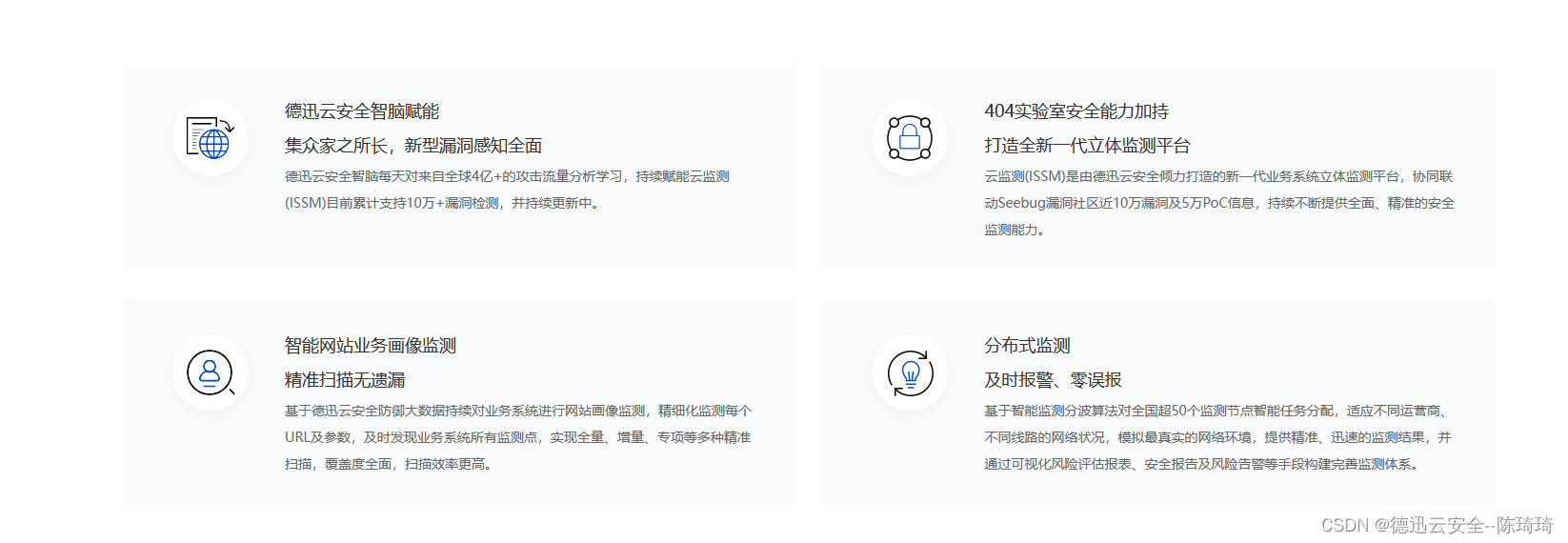
网站监控是跟踪网站的可用性和性能,以最小化宕机时间,优化性能并确保顺畅的用户体验。维护网站正常运行对于任何企业来说都是至关重要的,因而对大多数业务来说,网站应用监控都是一个严峻的挑战。Applications Manager网站应用监控…...
游戏软件提示d3dcompiler_43.dll的五个解决方法,亲测靠谱
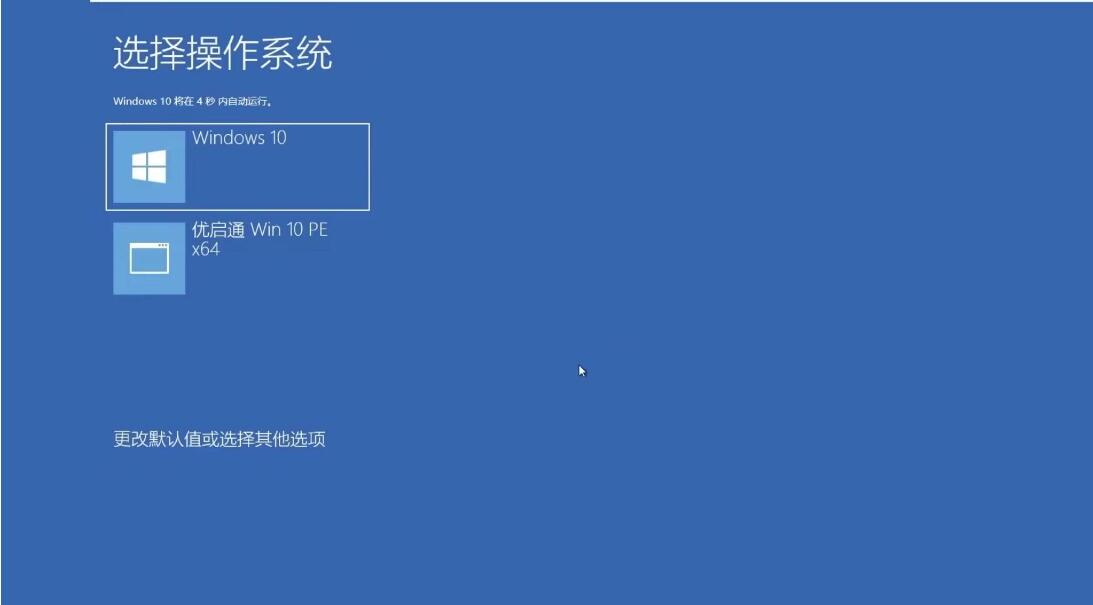
在使用电脑进行工作,玩游戏的时候,我们常常会遇到一些错误提示,其中之一就是“D3DCompiler_43.dll丢失”的提示。D3DCompiler_43.dll是一个非常重要的动态链接库文件。它是由DirectX SDK提供的,用于编译和优化DirectX着色器代码的…...
python使用opencv提取视频中的每一帧、最后一帧,并存储成图片
提取视频每一帧存储图片 最近在搞视频检测问题,在用到将视频分帧保存为图片时,图片可以保存,但是会出现(-215:Assertion failed) !_img.empty() in function cv::imwrite问题而不能正常运行,在检查代码、检查路径等措施均无果后&…...

说说对React refs 的理解?应用场景?
先了解,是什么? React 中的 Refs提供了一种方式,允许我们访问 DOM节点或在 render方法中创建的 React元素。 本质为ReactDOM.render()返回的组件实例,如果是渲染组件则返回的是组件实例,如果渲染dom则返回的是具体的do…...

Pytorch 读取t7文件
Pytorch 1.0以上可以使用: import torchfileth_path r"./path/xx.t7" data torchfile.load(th_path)print(data.shape)若data的尺寸为0,则将torch版本降为0.4.1,并使用以下函数: from torch.utils.serialization im…...
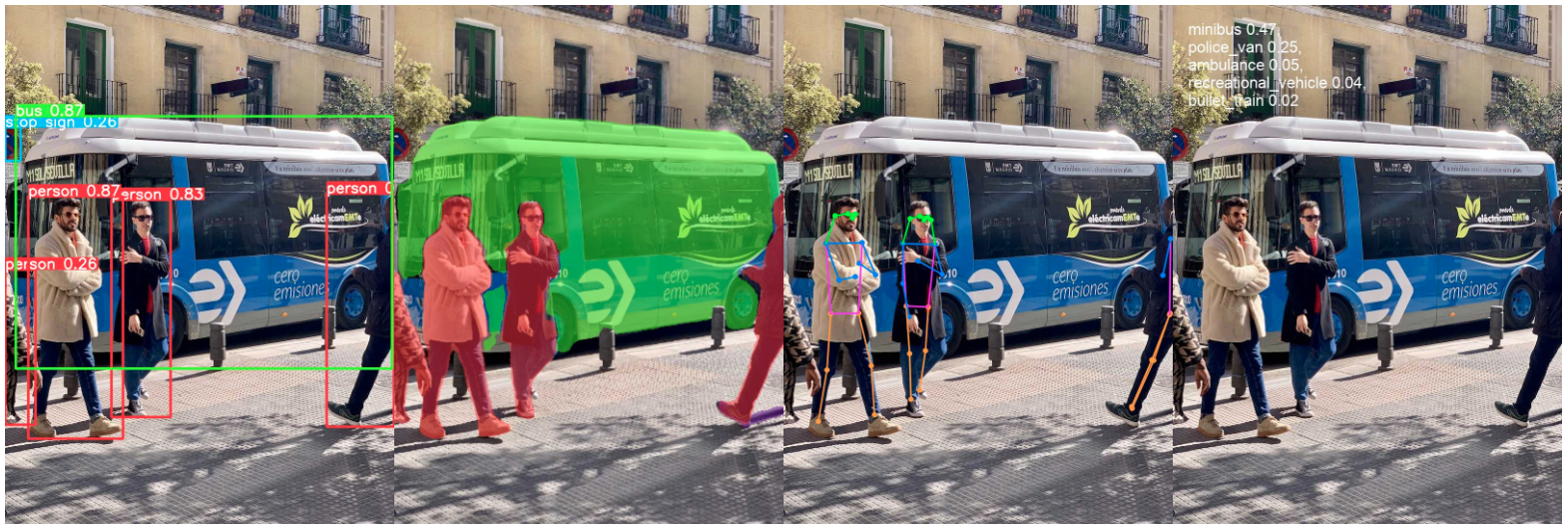
【YOLOV8预测篇】使用Ultralytics YOLO进行检测、分割、姿态估计和分类实践
目录 一 安装Ultralytics 二 使用预训练的YOLOv8n检测模型 三 使用预训练的YOLOv8n-seg分割模型 四 使用预训练的YOLOv8n-pose姿态模型 五 使用预训练的YOLOv8n-cls分类模型 <...

[Linux] MySQL数据库之索引
一、索引的相关知识 1.1 索引的简介 索引是一个排序列表,包含索引值和包含该值的数据行的物理地址(类似于 c 语言链表,通过指针指向数据记录的内存地址)。 使用索引后可以不用扫描全表来定位某行的数据,而是先通过索…...

【期末考试】计算机网络、网络及其计算 考试重点
个人简介:Java领域新星创作者;阿里云技术博主、星级博主、专家博主;正在Java学习的路上摸爬滚打,记录学习的过程~ 个人主页:.29.的博客 学习社区:进去逛一逛~ 计算机网络及其计算 期末考点 🚀数…...

力扣labuladong——一刷day79
提示:文章写完后,目录可以自动生成,如何生成可参考右边的帮助文档 文章目录 前言一、力扣785. 判断二分图二、力扣886. 可能的二分法 前言 给你一幅「图」,请你用两种颜色将图中的所有顶点着色,且使得任意一条边的两个…...

【数据结构入门精讲 | 第十篇】考研408排序算法专项练习(二)
在上文中我们进行了排序算法的判断题、选择题的专项练习,在这一篇中我们将进行排序算法中编程题的练习。 目录 编程题R7-1 字符串的冒泡排序R7-1 抢红包R7-1 PAT排名汇总R7-2 统计工龄R7-1 插入排序还是堆排序R7-2 龙龙送外卖R7-3 家谱处理 编程题 R7-1 字符串的冒…...

【ES实战】Elasticsearch6开始的CCR
【ES实战】学习使用Elasticsearch6开始的CCR 本文涉及官网文章地址 OverviewRequirements for leader indicesAutomatically following indicesGetting started with cross-cluster replicationUpgrading clusters CCR > Cross-cluster replication 文章目录 【ES实战】学…...

ACID [Atomicity, Consistency, Isolation, Durability]
ACID [Atomicity, Consistency, Isolation, Durability] 原子性、一致性、隔离性、持久性package further.zwf.acid;import java.sql.Connection; import java.sql.DriverManager; import java.sql.PreparedStatement; import java.sql.SQLException;/*** MySQL 事务示例&am…...

NoFences:如何用开源方案解决Windows桌面管理难题
NoFences:如何用开源方案解决Windows桌面管理难题 【免费下载链接】NoFences 🚧 Open Source Stardock Fences alternative 项目地址: https://gitcode.com/gh_mirrors/no/NoFences Windows桌面图标管理长期困扰着用户,NoFences作为开…...

从零构建生产级AI助手:OpenClaw配置实战与自动化工作流指南
1. 项目概述:从零到一,构建你的生产级AI助手工作空间如果你和我一样,已经厌倦了每次配置AI助手时,都要从零开始摸索各种配置文件、脚本和最佳实践,那么这个名为openclaw-config的项目,绝对是你梦寐以求的“…...

别再重装系统了!Ubuntu 20.04 下 libsnark 零知识证明环境一次搭建成功的保姆级避坑指南
零知识证明开发实战:Ubuntu 20.04下libsnark环境高效搭建指南 在区块链和密码学领域,零知识证明技术正成为隐私保护的核心解决方案。作为最具代表性的开源库之一,libsnark因其高效的证明系统实现而被众多隐私项目采用。然而,许多开…...

5分钟实现PNG/JPG到SVG的终极转换:vectorizer矢量化工具完全指南
5分钟实现PNG/JPG到SVG的终极转换:vectorizer矢量化工具完全指南 【免费下载链接】vectorizer Potrace based multi-colored raster to vector tracer. Inputs PNG/JPG returns SVG 项目地址: https://gitcode.com/gh_mirrors/ve/vectorizer vectorizer是一个…...

嘎嘎降AI和笔灵AI哪个更适合毕业论文:2026年达标率改写质量售后完整测评对比报告
嘎嘎降AI和笔灵AI哪个更适合毕业论文:2026年达标率改写质量售后完整测评对比报告 帮几个不同专业的同学处理过论文AI率,用过的工具加起来也有六七款了。 综合看,嘎嘎降AI(www.aigcleaner.com)是最稳的选择࿰…...
)
不止于测温:用MAX31855和K型热电偶搭建一个低成本高精度温度监控系统(附STM32源码)
从热电偶到云端:基于MAX31855的高精度温度监测系统全栈开发指南 在工业自动化、实验室监测甚至家庭酿造等场景中,温度数据的精确采集与实时监控往往成为项目成败的关键。传统温度传感器虽然简单易用,但在高温、腐蚀性环境或需要极高精度的场合…...

如何使用Redis优化Trigger.dev任务队列:提升AI工作流性能的完整指南
如何使用Redis优化Trigger.dev任务队列:提升AI工作流性能的完整指南 【免费下载链接】trigger.dev Trigger.dev – build and deploy fully‑managed AI agents and workflows 项目地址: https://gitcode.com/gh_mirrors/tr/trigger.dev Trigger.dev是一个强…...

从零到一搭建 AI Agent 财务分析系统
一、核心目标拆解(先对齐业务) 你的系统要支撑 4 类核心场景: 财务报告自动生成 + 智能解读 智能问答 + 异常预警 财务预测、预算编制、风险识别 对接业务部门,推动需求落地 基于这个目标,我给你定了 **「轻量化 MVP → 企业级生产」两阶段架构 **,兼顾快速出 Demo 和长…...

Silk v3解码器终极指南:高效转换微信QQ语音为MP3格式
Silk v3解码器终极指南:高效转换微信QQ语音为MP3格式 【免费下载链接】silk-v3-decoder [Skype Silk Codec SDK]Decode silk v3 audio files (like wechat amr, aud files, qq slk files) and convert to other format (like mp3). Batch conversion support. 项目…...