
华为ensp网络设计期末测试题-复盘
网络拓扑图

地址分配表

vlan端口分配表

需求

The device is running!<Huawei>sys
Enter system view, return user view with Ctrl+Z.
[Huawei]un in en
Info: Information center is disabled.
[Huawei]sys S1
[S1]vlan 99
[S1-vlan99]vlan 100
[S1-vlan100]des IT
[S1-vlan100]vlan 200
[S1-vlan200]des HR
[S1-vlan200]inte g0/0/21
[S1-GigabitEthernet0/0/21]p l a
[S1-GigabitEthernet0/0/21]p d v 100
[S1-GigabitEthernet0/0/21]inte g0/0/23
[S1-GigabitEthernet0/0/23]p l a
[S1-GigabitEthernet0/0/23]p d v 100
[S1-GigabitEthernet0/0/23]inte g0/0/22
[S1-GigabitEthernet0/0/22]p l a
[S1-GigabitEthernet0/0/22]p d v 200
[S1-GigabitEthernet0/0/22]inte g0/0/24
[S1-GigabitEthernet0/0/24]p l a
[S1-GigabitEthernet0/0/24]p d v 200
[S1-GigabitEthernet0/0/24]inte g0/0/1
[S1-GigabitEthernet0/0/1]p l a
[S1-GigabitEthernet0/0/1]p d v 99
[S1-GigabitEthernet0/0/1]dhcp en
Info: The operation may take a few seconds. Please wait for a moment.done.
[S1]inte vlan 99
[S1-Vlanif99]ip ad 10.10.10.10 24
[S1-Vlanif99]inte vlan 100
[S1-Vlanif100]ip ad 192.168.1.254 24
[S1-Vlanif100]dhcp se re
[S1-Vlanif100]dhcp re se 10.10.10.1
[S1-Vlanif100]inte vlan 200
[S1-Vlanif200]ip ad 192.168.2.254 24
[S1-Vlanif200]dhcp se re
[S1-Vlanif200]dhcp re se 10.10.10.1
[S1-Vlanif200]ospf
[S1-ospf-1]ar 0
[S1-ospf-1-area-0.0.0.0]net 192.168.1.0 0.0.0.255
[S1-ospf-1-area-0.0.0.0]net 192.168.2.0 0.0.0.255
[S1-ospf-1-area-0.0.0.0]net 10.10.10.0 0.0.0.255
[S1-ospf-1-area-0.0.0.0]
<S1>sa
The current configuration will be written to the device.
Are you sure to continue?[Y/N]y
Info: Please input the file name ( *.cfg, *.zip ) [vrpcfg.zip]:
Now saving the current configuration to the slot 0.
Save the configuration successfully.
<S1>
<S1>
The device is running!<Huawei>sys
Enter system view, return user view with Ctrl+Z.
[Huawei]
[Huawei]un in en
Info: Information center is disabled.
[Huawei]
[Huawei]sys route1
[route1]
[route1]dhcp en
Info: The operation may take a few seconds. Please wait for a moment.done.
[route1]
[route1]ip po pc1
Info: It's successful to create an IP address pool.
[route1-ip-pool-pc1]
[route1-ip-pool-pc1]net 192.168.1.0 ma 24
[route1-ip-pool-pc1]
[route1-ip-pool-pc1]ga 192.168.1.254
[route1-ip-pool-pc1]
[route1-ip-pool-pc1]ex 192.168.1.10
[route1-ip-pool-pc1]
[route1-ip-pool-pc1]dns 192.168.3.100
[route1-ip-pool-pc1]
[route1-ip-pool-pc1]ip po pc2
Info: It's successful to create an IP address pool.
[route1-ip-pool-pc2]
[route1-ip-pool-pc2]net 192.168.2.0 ma 24
[route1-ip-pool-pc2]
[route1-ip-pool-pc2]ga 192.168.2.254
[route1-ip-pool-pc2]
[route1-ip-pool-pc2]ex 192.168.2.10
[route1-ip-pool-pc2]
[route1-ip-pool-pc2]dns 192.168.3.100
[route1-ip-pool-pc2]
[route1-ip-pool-pc2]ip po pc3
Info: It's successful to create an IP address pool.
[route1-ip-pool-pc3]
[route1-ip-pool-pc3]net 192.168.3.0 ma 24
[route1-ip-pool-pc3]
[route1-ip-pool-pc3]ga 192.168.3.254
[route1-ip-pool-pc3]
[route1-ip-pool-pc3]ex 192.168.3.100
[route1-ip-pool-pc3]
[route1-ip-pool-pc3]dns 192.168.3.100
[route1-ip-pool-pc3]
[route1-ip-pool-pc3]inte g0/0/1
[route1-GigabitEthernet0/0/1]
[route1-GigabitEthernet0/0/1]ip ad 10.10.10.1 24
[route1-GigabitEthernet0/0/1]
[route1-GigabitEthernet0/0/1]dhcp se gl
[route1-GigabitEthernet0/0/1]
[route1-GigabitEthernet0/0/1]inte g0/0/0
[route1-GigabitEthernet0/0/0]
[route1-GigabitEthernet0/0/0]ip ad 10.0.12.1 24
[route1-GigabitEthernet0/0/0]
[route1-GigabitEthernet0/0/0]dhcp se gl
[route1-GigabitEthernet0/0/0]ospf
[route1-ospf-1]
[route1-ospf-1]ar 0
[route1-ospf-1-area-0.0.0.0]
[route1-ospf-1-area-0.0.0.0]net 10.0.12.0 0.0.0.255
[route1-ospf-1-area-0.0.0.0]
[route1-ospf-1-area-0.0.0.0]net 10.10.10.0 0.0.0.255
[route1-ospf-1-area-0.0.0.0]
<Huawei>.^
Error: Unrecognized command found at '^' position.
<Huawei>
<Huawei>sys
Enter system view, return user view with Ctrl+Z.
[Huawei]
[Huawei]un in en
Info: Information center is disabled.
[Huawei]
[Huawei]sys route2
[route2]
[route2]dhcp en
Info: The operation may take a few seconds. Please wait for a moment.done.
[route2]
[route2]inte g0/0/0
[route2-GigabitEthernet0/0/0]
[route2-GigabitEthernet0/0/0]ip ad 10.0.12.2 24
[route2-GigabitEthernet0/0/0]
[route2-GigabitEthernet0/0/0]inte g0/0/1
[route2-GigabitEthernet0/0/1]
[route2-GigabitEthernet0/0/1]ip ad 192.168.3.254 24
[route2-GigabitEthernet0/0/1]
[route2-GigabitEthernet0/0/1]dhcp select relay
[route2-GigabitEthernet0/0/1]
[route2-GigabitEthernet0/0/1]dhcp re se 10.0.12.1
[route2-GigabitEthernet0/0/1]
[route2-GigabitEthernet0/0/1]inte g0/0/2
[route2-GigabitEthernet0/0/2]
[route2-GigabitEthernet0/0/2]ip ad 200.200.200.2 24
[route2-GigabitEthernet0/0/2]
[route2-GigabitEthernet0/0/2]
[route2-GigabitEthernet0/0/2]
[route2-GigabitEthernet0/0/2]ip route-sta 0.0.0.0 0 200.200.200.3
[route2]
[route2]ospf
[route2-ospf-1]
[route2-ospf-1]default-route-adv
[route2-ospf-1]
[route2-ospf-1]ar 0
[route2-ospf-1-area-0.0.0.0]
[route2-ospf-1-area-0.0.0.0]net 10.0.12.0 0.0.0.255
[route2-ospf-1-area-0.0.0.0]
[route2-ospf-1-area-0.0.0.0]net 192.168.3.0 0.0.0.255
[route2-ospf-1-area-0.0.0.0]
[route2-ospf-1-area-0.0.0.0]
[route2-ospf-1-area-0.0.0.0]
[route2-ospf-1-area-0.0.0.0]acl 2000
[route2-acl-basic-2000]
[route2-acl-basic-2000]ru pe so 192.168.1.0 0.0.0.255
[route2-acl-basic-2000]
[route2-acl-basic-2000]ru pe so 192.168.2.0 0.0.0.255
[route2-acl-basic-2000]
[route2-acl-basic-2000]ru pe so 192.168.3.0 0.0.0.255
[route2-acl-basic-2000]
[route2-acl-basic-2000]inte g0/0/2
[route2-GigabitEthernet0/0/2]
[route2-GigabitEthernet0/0/2]nat ou 2000
[route2-GigabitEthernet0/0/2]
[route2-GigabitEthernet0/0/2]
[route2-GigabitEthernet0/0/2]
[route2-GigabitEthernet0/0/2]acl 3000
[route2-acl-adv-3000]
[route2-acl-adv-3000]ru de ip so 192.168.1.253 0 de 192.168.3.253 0
[route2-acl-adv-3000]
[route2-acl-adv-3000]ru pe ip so a
[route2-acl-adv-3000]
[route2-acl-adv-3000]inte g0/0/0
[route2-GigabitEthernet0/0/0]
[route2-GigabitEthernet0/0/0]traffic-filter in acl 3000
[route2-GigabitEthernet0/0/0]
[route2-GigabitEthernet0/0/0]q
[route2]us vty 0 4
[route2-ui-vty0-4]au pa
Please configure the login password (maximum length 16):123456
[route2-ui-vty0-4]
<Huawei>sys
Enter system view, return user view with Ctrl+Z.
[Huawei]un in en
Info: Information center is disabled.
[Huawei]sys route3
[route3]inte g0/0/2
[route3-GigabitEthernet0/0/2]ip ad 200.200.200.3 24
[route3-GigabitEthernet0/0/2]inte g0/0/0
[route3-GigabitEthernet0/0/0]ip ad 100.100.100.254 24
[route3-GigabitEthernet0/0/0]DHCP地址获取
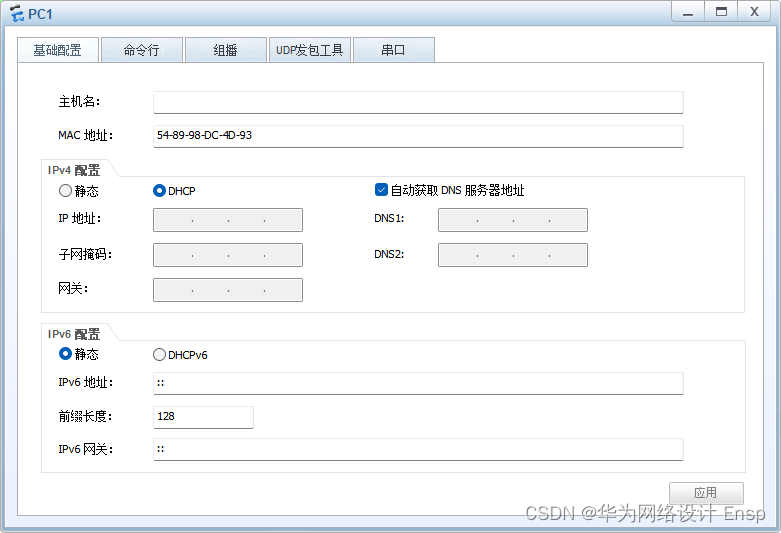
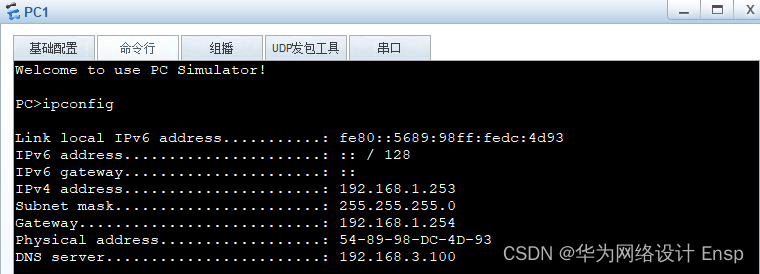


IP地址配置


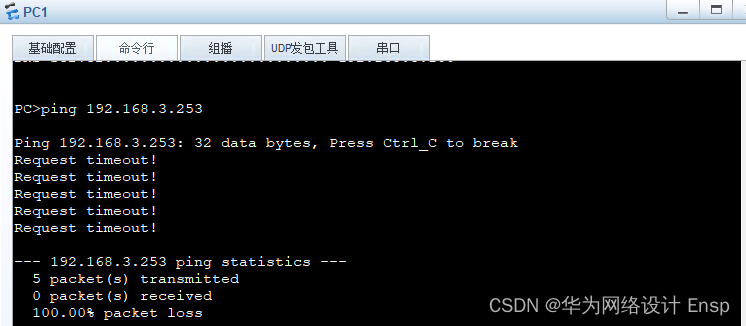
pc1不能访问pc3
pc1可以访问其他

pc1访问外网

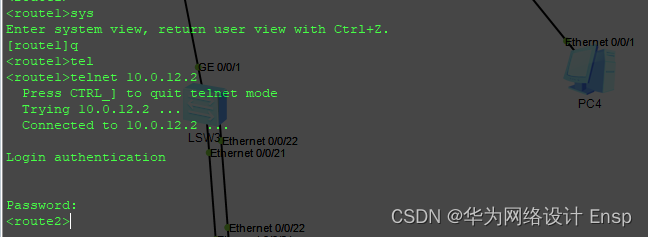
R2登录测试
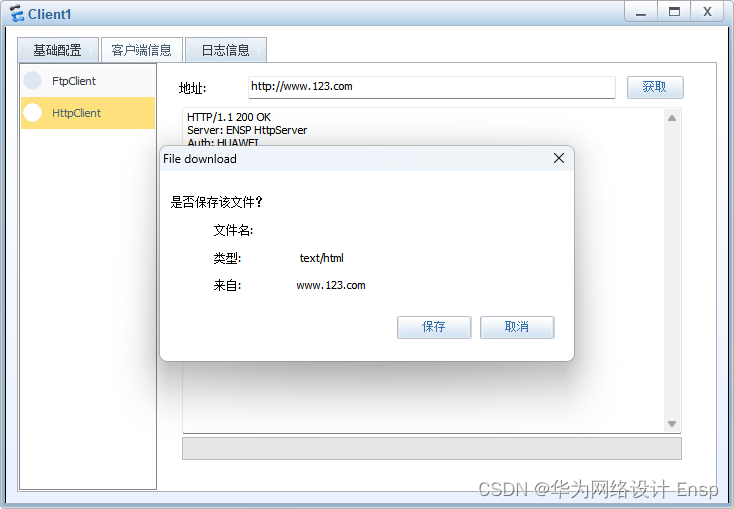
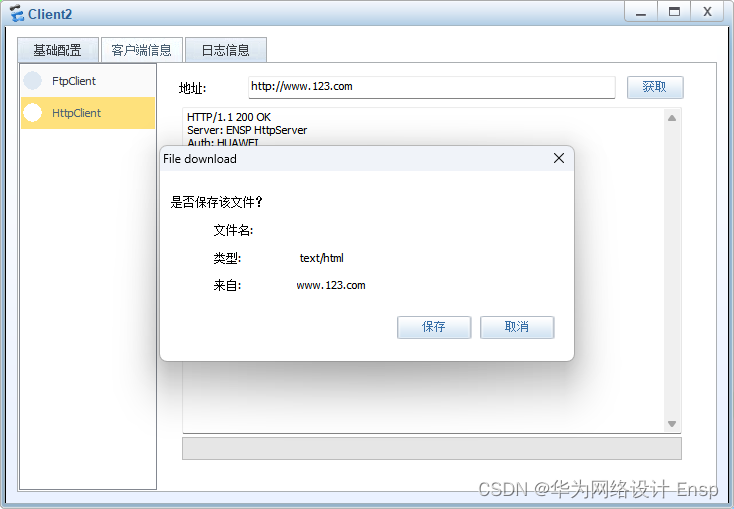
客户端访问www.123.com
相关文章:
华为ensp网络设计期末测试题-复盘
网络拓扑图 地址分配表 vlan端口分配表 需求 The device is running!<Huawei>sys Enter system view, return user view with CtrlZ. [Huawei]un in en Info: Information center is disabled. [Huawei]sys S1 [S1]vlan 99 [S1-vlan99]vlan 100 [S1-vlan100]des IT [S1-…...

Dockerfile: WORKDIR vs VOLUME
WORKDIR WORKDIR指令为Dockerfile中的任何RUN、CMD、ENTRYPOINT、COPY和ADD指令设置工作目录。 如果WORKDIR不存在,它将被创建,即使它没有在任何后续Dockerfile指令中使用。 语法 : WORKDIR dirpath WORKDIR指令可以在Dockerfile中多次使用。如果提供了…...
;)
spring ioc源码-refresh();
主要作用是刷新应用上下文 Override public void refresh() throws BeansException, IllegalStateException {synchronized (this.startupShutdownMonitor) {// 启动刷新的性能跟踪步骤StartupStep contextRefresh this.applicationStartup.start("spring.context.refre…...
使用递归实现深拷贝
文章目录 为什么要使用递归什么深拷贝具体实现基础实现处理 函数处理 Symbol处理 Set处理 Map处理 循环引用 结语-源码 为什么要使用递归什么深拷贝 我们知道在 JavaScript 中可以通过使用JSON序列化来完成深拷贝,但是这种方法存在一些缺陷,比如对于函数…...
工程(十七)——自己数据集跑R2live
博主创建了一个科研互助群Q:772356582,欢迎大家加入讨论。 r2live是比较早的算法,编译过程有很多问题,通过以下两个博客可以解决 编译R2LIVE问题&解决方法-CSDN博客 r2live process has died 问题解决了_required process …...
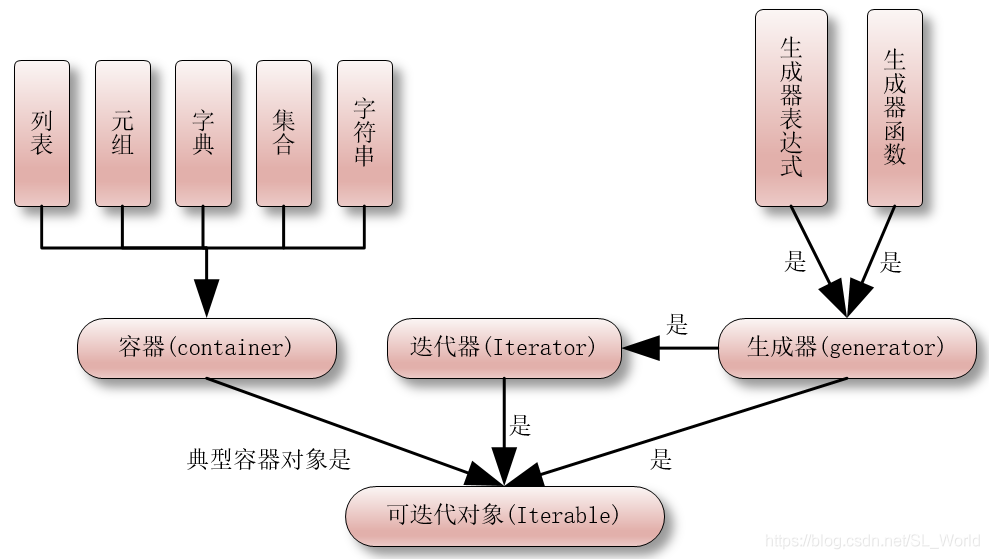
【python高级用法】迭代器、生成器、装饰器、闭包
迭代器 可迭代对象:可以使用for循环来遍历的,可以使用isinstance()来测试。 迭代器:同时实现了__iter__()方法和__next__()方法,可以使用isinstance()方法来测试是否是迭代器对象 from collections.abc import Iterable, Iterat…...

Nx市工业数据洞察:Flask、MySQL、Echarts的可视化之旅
Nx市工业数据洞察:Flask、MySQL、Echarts的可视化之旅 背景数据集来源技术选型功能介绍创新点总结 背景 随着工业化的不断发展,Nx市工业数据的收集和分析变得愈发重要。本博客将介绍如何利用Flask、MySQL和Echarts等技术,从统计局获取的数据…...

关于正态分布
目录 1.正态分布是什么2.正态分布有什么用途3.如何确定数据服从正态分布 本文简单介绍正态分布的基本概念和用途。 1.正态分布是什么 正态分布,也称为高斯分布,是由德国数学家卡尔弗里德里希高斯在研究测量误差时提出的。他发现许多自然现象和统计数据…...

每日一练(编程题-C/C++)
目录 CSDN每日一练1. 2023/2/27- 一维数组的最大子数组和(类型:数组 难度:中等)2. 2023/4/7 - 小艺照镜子(类型:字符串 难度:困难)3. 2023/4/14 - 最近的回文数(难度:中等)4. 2023/2/1-蛇形矩阵(难度:困难)…...

Unity UnityWebRequest 在Mac上使用报CommectionError
今天是想把前两天写的Demo拿到Mac上打个IPA的完事我发现 在运行时释放游戏资源的时候UnityWebRequest返回的结果不是Success 查看Log发现是 req.result 是CommectionError error是 Cannot connect to destination host 代码如下: UnityWebRequest req UnityWebRequ…...

WorkPlus为企业打造私有化部署IM解决方案
在移动数字化时代,企业面临着如何全面掌控业务和生态的挑战。企业微信、钉钉、飞书、Teams等应用虽然提供了部分解决方案,但无法满足企业的私有化部署需求。此时,WorkPlus作为安全专属的移动数字化平台,被誉为移动应用的“航空母舰…...
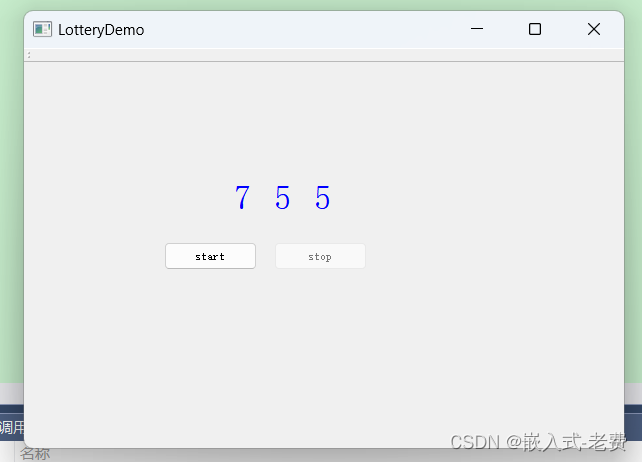
QT上位机开发(抽奖软件)
【 声明:版权所有,欢迎转载,请勿用于商业用途。 联系信箱:feixiaoxing 163.com】 用抽奖软件抽奖,是一种很常见的抽奖方式。特别是写这篇文章的时候,正好处于2023年12月31日,也是一年中最后一天…...
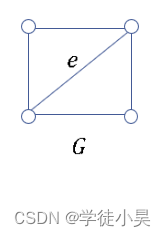
雨课堂作业整理
第一次作业 1.下列序列是图序列的是( ) A.1,2,2,3,4,4,5 B.1,1,2,2,4,6,6 C.0,0,2&am…...

C#/WPF 只允许一个实例程序运行并将已运行程序置顶
使用用互斥量(System.Threading.Mutex): 同步基元,它只向一个线程授予对共享资源的独占访问权。在程序启动时候,请求一个互斥体,如果能获取对指定互斥的访问权,就职运行一个实例。 实例代码: /// <…...
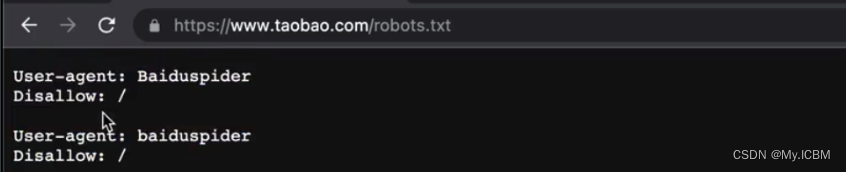
【基础】【Python网络爬虫】【1.认识爬虫】什么是爬虫,爬虫分类,爬虫可以做什么
Python网络爬虫基础 认识爬虫1.什么是爬虫2.爬虫可以做什么3.为什么用 Ptyhon 爬虫4.爬虫的分类通用爬虫聚焦爬虫功能爬虫增量式爬虫分布式爬虫 5.爬虫的矛与盾(重点)6.盗亦有道的君子协议robots7.爬虫合法性探究 认识爬虫 1.什么是爬虫 网络爬虫&…...
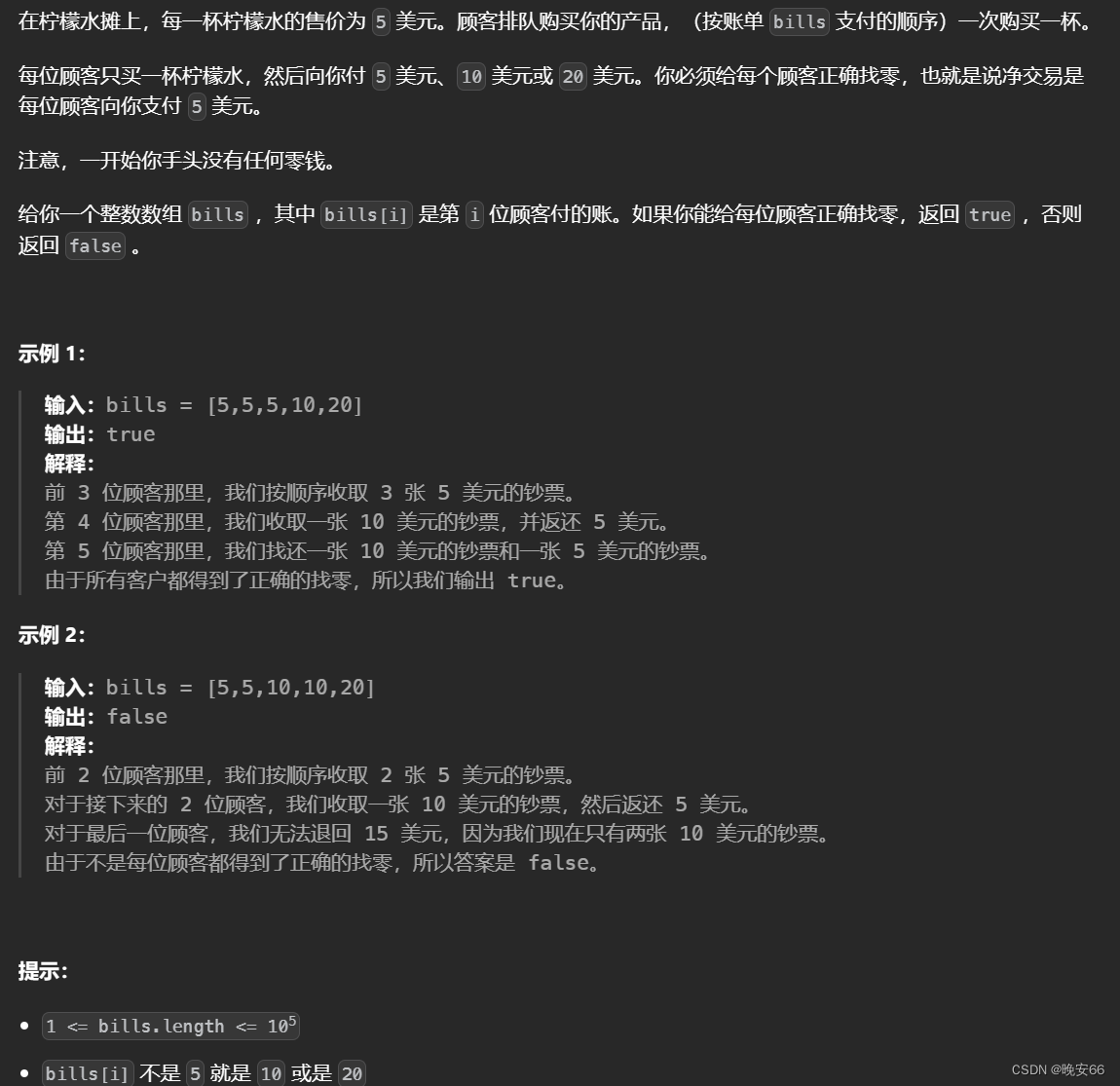
【算法与数据结构】860、LeetCode柠檬水找零
文章目录 一、题目二、解法三、完整代码 所有的LeetCode题解索引,可以看这篇文章——【算法和数据结构】LeetCode题解。 一、题目 二、解法 思路分析:本题的思路比较简单,首先要保存收到的零钱,其次计算找零,最后分解找…...
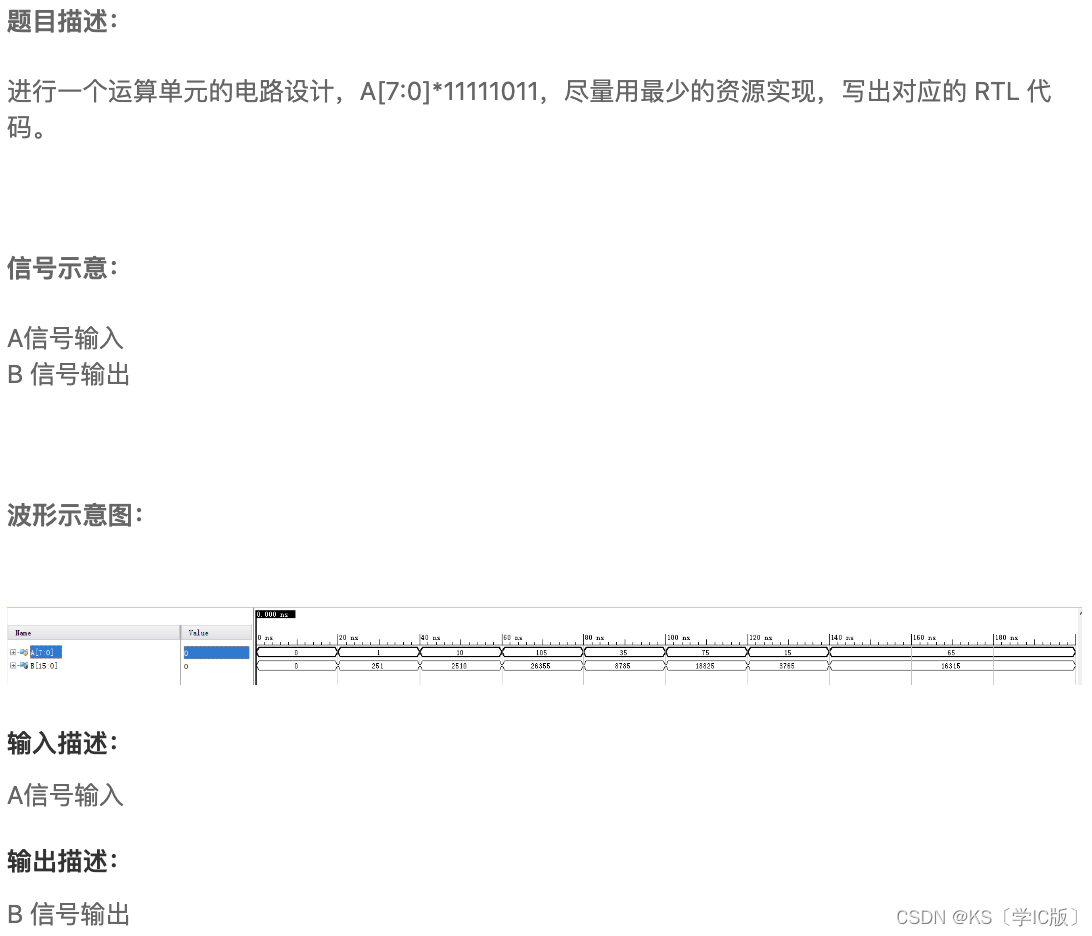
「Verilog学习笔记」乘法与位运算
专栏前言 本专栏的内容主要是记录本人学习Verilog过程中的一些知识点,刷题网站用的是牛客网 观察乘数的特点: 1111_1011 1_0000_0000 - 1 - 100 timescale 1ns/1nsmodule dajiang13(input [7:0] A,output [15:0] B);//*************code*********…...

CSS与JavaScript的简单认识
CSS:是一门语言,用于控制网页表现,让页面更好看的。 CSS(Cascading Style Sheet):层叠样式表 CSS与html结合的三种方式: 1、内部样式:用style标签,在标签内部定义CSS样式…...
MAC 中多显示器的设置(Parallels Desktop)
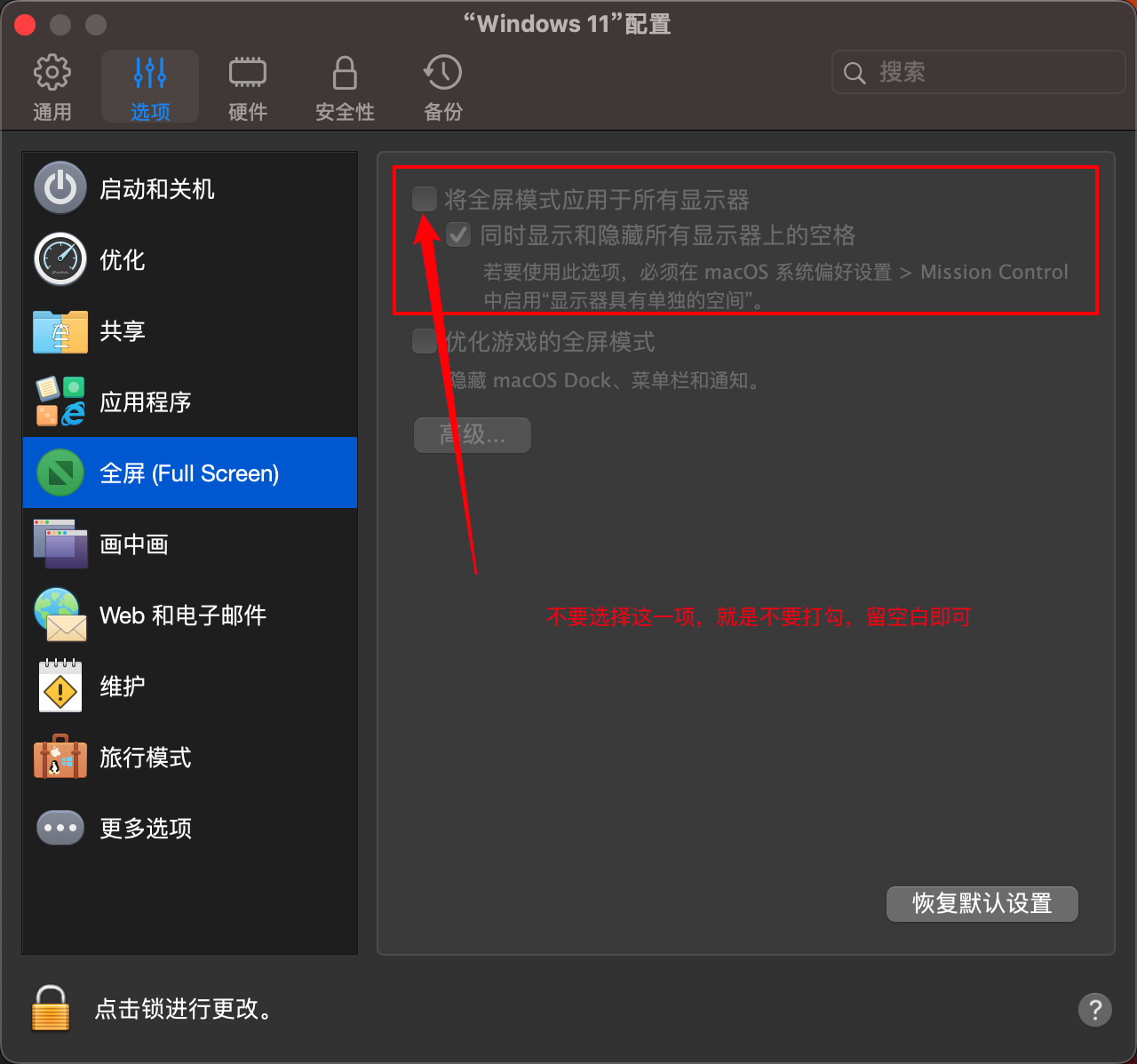
目录 一、硬件列表: 二、线路连接: 三、软件设置: 1. 设置显示器排列位置及显示参数 2. 分别设置外接显示器为:扩展显示器,内建显示器为主显示器 3. 设置Parallels Desktop屏幕参数 四、结果 一、硬件列表&a…...

迁移到云原生:如何使用微服务迁移应用程序
企业遇到大规模部署和监督生产中的应用程序的任务。幸运的是,我们可以使用大量技术和工具。然而,从传统的,整体的结构转变为云态一个人提出了自己的障碍。在这里,您会发现将应用程序从整体设置转移到基于微服务的体系结构时要进行…...

基于Godot引擎的经典游戏重制:OpenClaw项目架构与实现深度解析
1. 项目概述与核心价值最近在独立游戏开发圈里,一个名为“OpenClaw”的开源项目热度不低。它的全称是“GambitGamesLLC/openclaw-godot”,简单说,这是一个基于Godot引擎,对经典DOS平台动作冒险游戏《The Claw》进行的开源重制版。…...

Go语言轻量级Web框架Tapestry:高性能路由与中间件设计实战
1. 项目概述与核心价值最近在开源社区里,一个名为Tapestry的项目引起了我的注意。它来自开发者 NatsuFox,定位是一个“轻量级、高性能的 Web 框架”。说实话,现在各种语言的 Web 框架多如牛毛,从 Python 的 Flask、Django…...

macOS桌面歌词神器LyricsX:免费开源歌词同步工具完整指南
macOS桌面歌词神器LyricsX:免费开源歌词同步工具完整指南 【免费下载链接】Lyrics Swift-based iTunes plug-in to display lyrics on the desktop. 项目地址: https://gitcode.com/gh_mirrors/lyr/Lyrics LyricsX是一款专为macOS设计的开源桌面歌词显示工具…...

统一AI编程助手配置:使用agent-anatomy提升开发效率与一致性
1. 项目概述:一个配置文件夹,统一所有AI编程助手如果你和我一样,日常开发中会同时使用Claude Code、Cursor、GitHub Copilot等多个AI编程助手,那你一定也经历过同样的烦恼:每个助手都需要自己独立的配置文件。今天要介…...

MCP密钥安全管理的无侵入解决方案:mcp-safe-run工具详解
1. 项目概述:告别硬编码,拥抱安全的MCP密钥管理如果你和我一样,日常开发中深度依赖Claude、Cursor、Windsurf这类智能编码助手,那你肯定对Model Context Protocol(MCP)不陌生。MCP作为连接AI模型与外部工具…...
研究(Matlab代码实现))
【CPO三维路径规划】豪猪算法CPO多无人机协同集群避障路径规划(目标函数:最低成本:路径、高度、威胁、转角)研究(Matlab代码实现)
💥💥💞💞欢迎来到本博客❤️❤️💥💥 🏆博主优势:🌞🌞🌞博客内容尽量做到思维缜密,逻辑清晰,为了方便读者。 ⛳️座右铭&a…...

LayerDivider终极指南:5分钟掌握智能插画分层技术
LayerDivider终极指南:5分钟掌握智能插画分层技术 【免费下载链接】layerdivider A tool to divide a single illustration into a layered structure. 项目地址: https://gitcode.com/gh_mirrors/la/layerdivider 你是否曾经面对一张复杂的插画作品…...

Cognize-Agent™空间智能体,98.5%故障预警准确率,终结非计划停机
Cognize-Agent™空间智能体,98.5%故障预警准确率,终结非计划停机工业制造领域,设备非计划停机始终是制约生产效率、拉高运维成本的核心痛点。传统设备运维依赖定期检修、事后抢修,依赖人工巡检与单一数据监测,无法提前…...

一图定胜负|虎贲等考 AI 科研绘图:零代码画出期刊级学术图,让论文颜值与专业度双在线
据 Nature 统计,超 90% 的审稿人先看图表,65% 的初审意见直接来自图表质量,一张规范、清晰、专业的学术图,直接影响论文录用与答辩评分。可现实是:Origin、Visio 难学难精通,PPT 做图粗糙不规范,…...

Avogadro 2:3分钟掌握跨平台分子建模的5大核心价值
Avogadro 2:3分钟掌握跨平台分子建模的5大核心价值 【免费下载链接】avogadroapp Avogadro is an advanced molecular editor designed for cross-platform use in computational chemistry, molecular modeling, bioinformatics, materials science, and related a…...