
SpringBoot Security安全认证框架初始化流程认证流程之源码分析
SpringBoot Security安全认证框架初始化流程&认证流程之源码分析
以RuoYi-Vue前后端分离版本为例分析SpringBoot Security安全认证框架初始化流程&认证流程的源码分析
目录
- SpringBoot Security安全认证框架初始化流程&认证流程之源码分析
- 一、SpringBoot Security安全认证框架初始化流程
- 1、引入springboot-security依赖
- 2、EnableWebSecurity注解
- 3、WebSecurityConfiguration
- 3.1、setFilterChainProxySecurityConfigurer方法
- 3.2、springSecurityFilterChain方法
- 4、自定义安全配置类
- 二、SpringBoot Security认证流程
- 1、在用户登录认证类中自动注入AuthenticationManager对象
- 2、调用Spring Security安全认证方法
- 三、SpringBoot启动源码分析
一、SpringBoot Security安全认证框架初始化流程
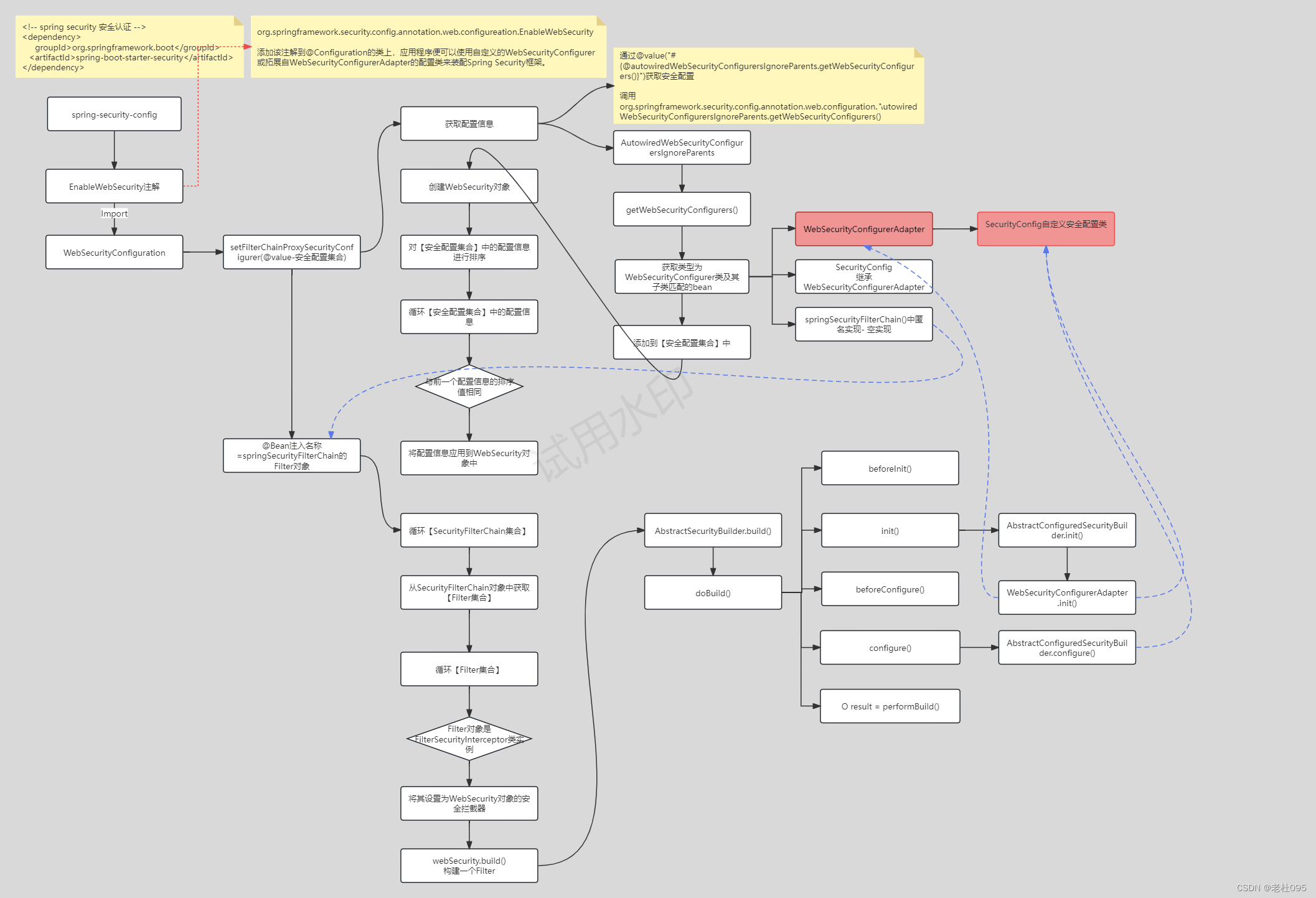
1、引入springboot-security依赖
<!-- spring security 安全认证 -->
<dependency><groupId>org.springframework.boot</groupId><artifactId>spring-boot-starter-security</artifactId>
</dependency>
2、EnableWebSecurity注解
org.springframework.security.config.annotation.web.configureation.EnableWebSecurity
- 添加该注解到@Configuration的类上,应用程序便可以使用自定义的WebSecurityConfigurer或拓展自WebSecurityConfigurerAdapter的配置类来装配Spring Security框架。
EnableWebSecurity.java 源码
package org.springframework.security.config.annotation.web.configuration;import java.lang.annotation.Documented;
import java.lang.annotation.ElementType;
import java.lang.annotation.Retention;
import java.lang.annotation.RetentionPolicy;
import java.lang.annotation.Target;import org.springframework.context.annotation.Configuration;
import org.springframework.context.annotation.Import;
import org.springframework.security.config.annotation.authentication.configuration.EnableGlobalAuthentication;
import org.springframework.security.config.annotation.web.WebSecurityConfigurer;@Retention(RetentionPolicy.RUNTIME)
@Target(ElementType.TYPE)
@Documented
@Import({ WebSecurityConfiguration.class, SpringWebMvcImportSelector.class, OAuth2ImportSelector.class,HttpSecurityConfiguration.class })
@EnableGlobalAuthentication
@Configuration
public @interface EnableWebSecurity {/*** Controls debugging support for Spring Security. Default is false.* @return if true, enables debug support with Spring Security*/boolean debug() default false;}
说明:
在此注解接口定义中引入了 WebSecurityConfiguration
3、WebSecurityConfiguration
3.1、setFilterChainProxySecurityConfigurer方法
重点:
1、将自定义的安全配置类对象注入到Spring容器中;
2、构建WebSecurity对象
说明:
1、获取安全配置,通过@value的方式实现了AutowiredWebSecurityConfigurersIgnoreParents.getWebSecurityConfigurers();
2、获取类型为WebSecurityConfigurer类及其子类匹配的bean,包括WebSecurityConfigurerAdapter、继承WebSecurityConfigurerAdapter的自定义安全配置类
1)、通过@value(“#{@autowiredWebSecurityConfigurersIgnoreParents.getWebSecurityConfigurers()}”)获取安全配置
2)、调用org.springframework.security.config.annotation.web.configuration.AutowiredWebSecurityConfigurersIgnoreParents.getWebSecurityConfigurers()
@Autowired(required = false)public void setFilterChainProxySecurityConfigurer(ObjectPostProcessor<Object> objectPostProcessor,@Value("#{@autowiredWebSecurityConfigurersIgnoreParents.getWebSecurityConfigurers()}") List<SecurityConfigurer<Filter, WebSecurity>> webSecurityConfigurers)throws Exception {this.webSecurity = objectPostProcessor.postProcess(new WebSecurity(objectPostProcessor));if (this.debugEnabled != null) {this.webSecurity.debug(this.debugEnabled);}webSecurityConfigurers.sort(AnnotationAwareOrderComparator.INSTANCE);Integer previousOrder = null;Object previousConfig = null;for (SecurityConfigurer<Filter, WebSecurity> config : webSecurityConfigurers) {Integer order = AnnotationAwareOrderComparator.lookupOrder(config);if (previousOrder != null && previousOrder.equals(order)) {throw new IllegalStateException("@Order on WebSecurityConfigurers must be unique. Order of " + order+ " was already used on " + previousConfig + ", so it cannot be used on " + config + " too.");}previousOrder = order;previousConfig = config;}for (SecurityConfigurer<Filter, WebSecurity> webSecurityConfigurer : webSecurityConfigurers) {this.webSecurity.apply(webSecurityConfigurer);}this.webSecurityConfigurers = webSecurityConfigurers;}
3.2、springSecurityFilterChain方法
说明:
1、通过@Bean将springSecurityFilterChain()方法构建的Filter实例对象按名称为springSecurityFilterChain的Bean注入到Spring容器中
2、WebSecurity.build方法会启动对象的配置,重点是: 【可以调用到自定义安全配置类的配置方法】实现自定义配置认证退出处理类、不用认证url等SpringBoot Security安全配置
@Bean(name = AbstractSecurityWebApplicationInitializer.DEFAULT_FILTER_NAME)
public Filter springSecurityFilterChain() throws Exception {boolean hasConfigurers = this.webSecurityConfigurers != null && !this.webSecurityConfigurers.isEmpty();boolean hasFilterChain = !this.securityFilterChains.isEmpty();Assert.state(!(hasConfigurers && hasFilterChain),"Found WebSecurityConfigurerAdapter as well as SecurityFilterChain. Please select just one.");if (!hasConfigurers && !hasFilterChain) {WebSecurityConfigurerAdapter adapter = this.objectObjectPostProcessor.postProcess(new WebSecurityConfigurerAdapter() {});this.webSecurity.apply(adapter);}for (SecurityFilterChain securityFilterChain : this.securityFilterChains) {this.webSecurity.addSecurityFilterChainBuilder(() -> securityFilterChain);for (Filter filter : securityFilterChain.getFilters()) {if (filter instanceof FilterSecurityInterceptor) {this.webSecurity.securityInterceptor((FilterSecurityInterceptor) filter);break;}}}for (WebSecurityCustomizer customizer : this.webSecurityCustomizers) {customizer.customize(this.webSecurity);}return this.webSecurity.build();
}
4、自定义安全配置类
自定义安全配置类继承WebSecurityConfigurerAdapter,以对象名为authenticationManager的bean将AuthenticationManager对象注入到Spring容器中
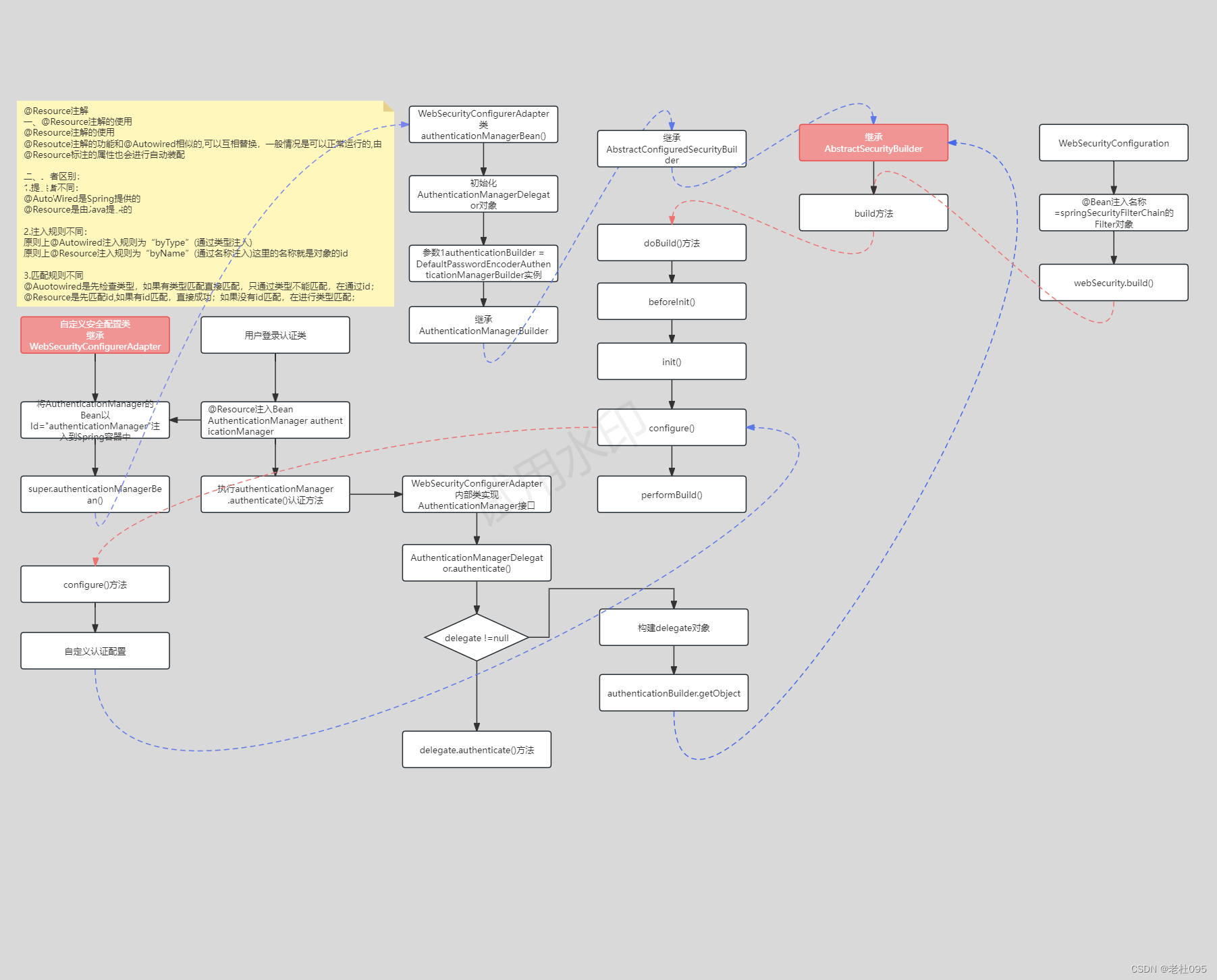
说明:
1、以@Bean的方式将AuthenticationManager的Bean以Id="authenticationManager"注入到Spring容器中;
2、调用父类WebSecurityConfigurerAdapter的authenticationManagerBean()方法
重点: 通过authenticationManagerBean()方法实现了将ProviderManager对象做为AuthenticationManager的实例对象,参照 第二章节->2、调用Spring Security安全认证方法中的《将ProviderManager对象做为authenticationManager的bean对象流程源码分析图》
自定义安全配置类源码
import org.springframework.beans.factory.annotation.Autowired;
import org.springframework.context.annotation.Bean;
import org.springframework.http.HttpMethod;
import org.springframework.security.authentication.AuthenticationManager;
import org.springframework.security.config.annotation.authentication.builders.AuthenticationManagerBuilder;
import org.springframework.security.config.annotation.method.configuration.EnableGlobalMethodSecurity;
import org.springframework.security.config.annotation.web.builders.HttpSecurity;
import org.springframework.security.config.annotation.web.configuration.WebSecurityConfigurerAdapter;
import org.springframework.security.config.annotation.web.configurers.ExpressionUrlAuthorizationConfigurer;
import org.springframework.security.config.http.SessionCreationPolicy;
import org.springframework.security.core.userdetails.UserDetailsService;
import org.springframework.security.crypto.bcrypt.BCryptPasswordEncoder;
import org.springframework.security.web.authentication.UsernamePasswordAuthenticationFilter;
import org.springframework.security.web.authentication.logout.LogoutFilter;
import org.springframework.web.filter.CorsFilter;
import cn.edu.tit.ipaddress.ms.framework.config.properties.PermitAllUrlProperties;
import cn.edu.tit.ipaddress.ms.framework.security.filter.JwtAuthenticationTokenFilter;
import cn.edu.tit.ipaddress.ms.framework.security.handle.AuthenticationEntryPointImpl;
import cn.edu.tit.ipaddress.ms.framework.security.handle.LogoutSuccessHandlerImpl;/*** spring security配置* * @author ruoyi*/
@EnableGlobalMethodSecurity(prePostEnabled = true, securedEnabled = true)
public class SecurityConfig extends WebSecurityConfigurerAdapter
{/*** 自定义用户认证逻辑*/@Autowiredprivate UserDetailsService userDetailsService;/*** 认证失败处理类*/@Autowiredprivate AuthenticationEntryPointImpl unauthorizedHandler;/*** 退出处理类*/@Autowiredprivate LogoutSuccessHandlerImpl logoutSuccessHandler;/*** token认证过滤器*/@Autowiredprivate JwtAuthenticationTokenFilter authenticationTokenFilter;/*** 跨域过滤器*/@Autowiredprivate CorsFilter corsFilter;/*** 允许匿名访问的地址*/@Autowiredprivate PermitAllUrlProperties permitAllUrl;/*** 解决 无法直接注入 AuthenticationManager** @return* @throws Exception*/@Bean@Overridepublic AuthenticationManager authenticationManagerBean() throws Exception{return super.authenticationManagerBean();}/*** anyRequest          |   匹配所有请求路径* access              |   SpringEl表达式结果为true时可以访问* anonymous           |   匿名可以访问* denyAll             |   用户不能访问* fullyAuthenticated  |   用户完全认证可以访问(非remember-me下自动登录)* hasAnyAuthority     |   如果有参数,参数表示权限,则其中任何一个权限可以访问* hasAnyRole          |   如果有参数,参数表示角色,则其中任何一个角色可以访问* hasAuthority        |   如果有参数,参数表示权限,则其权限可以访问* hasIpAddress        |   如果有参数,参数表示IP地址,如果用户IP和参数匹配,则可以访问* hasRole             |   如果有参数,参数表示角色,则其角色可以访问* permitAll           |   用户可以任意访问* rememberMe          |   允许通过remember-me登录的用户访问* authenticated       |   用户登录后可访问*/@Overrideprotected void configure(HttpSecurity httpSecurity) throws Exception{// 注解标记允许匿名访问的urlExpressionUrlAuthorizationConfigurer<HttpSecurity>.ExpressionInterceptUrlRegistry registry = httpSecurity.authorizeRequests();permitAllUrl.getUrls().forEach(url -> registry.antMatchers(url).permitAll());httpSecurity// CSRF禁用,因为不使用session.csrf().disable()// 禁用HTTP响应标头.headers().cacheControl().disable().and()// 认证失败处理类.exceptionHandling().authenticationEntryPoint(unauthorizedHandler).and()// 基于token,所以不需要session.sessionManagement().sessionCreationPolicy(SessionCreationPolicy.STATELESS).and()// 过滤请求.authorizeRequests()// 对于登录login 注册register 验证码captchaImage 允许匿名访问.antMatchers("/login","/loginWeixin","/register", "/captchaImage").permitAll()// 静态资源,可匿名访问.antMatchers(HttpMethod.GET, "/", "/*.html", "/**/*.html", "/**/*.css", "/**/*.js", "/profile/**").permitAll().antMatchers("/swagger-ui.html", "/swagger-resources/**", "/webjars/**", "/*/api-docs", "/druid/**").permitAll()// 除上面外的所有请求全部需要鉴权认证.anyRequest().authenticated().and().headers().frameOptions().disable();// 添加Logout filterhttpSecurity.logout().logoutUrl("/logout").logoutSuccessHandler(logoutSuccessHandler);// 添加JWT filterhttpSecurity.addFilterBefore(authenticationTokenFilter, UsernamePasswordAuthenticationFilter.class);// 添加CORS filterhttpSecurity.addFilterBefore(corsFilter, JwtAuthenticationTokenFilter.class);httpSecurity.addFilterBefore(corsFilter, LogoutFilter.class);}/*** 强散列哈希加密实现*/@Beanpublic BCryptPasswordEncoder bCryptPasswordEncoder(){return new BCryptPasswordEncoder();}/*** 身份认证接口*/@Overrideprotected void configure(AuthenticationManagerBuilder auth) throws Exception{auth.userDetailsService(userDetailsService).passwordEncoder(bCryptPasswordEncoder());}
}
二、SpringBoot Security认证流程
1、在用户登录认证类中自动注入AuthenticationManager对象
自动注入AuthenticationManager对象
@Resource
private AuthenticationManager authenticationManager;
@Resource注解-说明:
一、@Resource和@Autowired异同
@Resoutce注解的功能和@Autowired相似的,可以互相替换,一般情况是可以正常运行的,由> @Resource标注的属性也会进行自动装配
二、二者区别:
1.提供者不同:
@AutoWired是Spring提供的
@Resource是由Java提供的
2.注入规则不同:
原则上@Autowired注入规则为“byType”(通过类型注入)
原则上@Resource注入规则为“byName”(通过名称注入)这里的名称就是对象的id
3.匹配规则不同
@Auotowired是先检查类型,如果有类型匹配直接匹配,只通过类型不能匹配,在通过id;
@Resource是先匹配id,如果有id匹配,直接成功;如果没有id匹配,在进行类型匹配;
2、调用Spring Security安全认证方法
关键代码
// 用户名、密码构建UsernamePasswordAuthenticationToken对象
UsernamePasswordAuthenticationToken authenticationToken = new UsernamePasswordAuthenticationToken(username, password);AuthenticationContextHolder.setContext(authenticationToken);
// 调用认证方法,验证用户名和密码
Authentication authentication = authenticationManager.authenticate(authenticationToken);
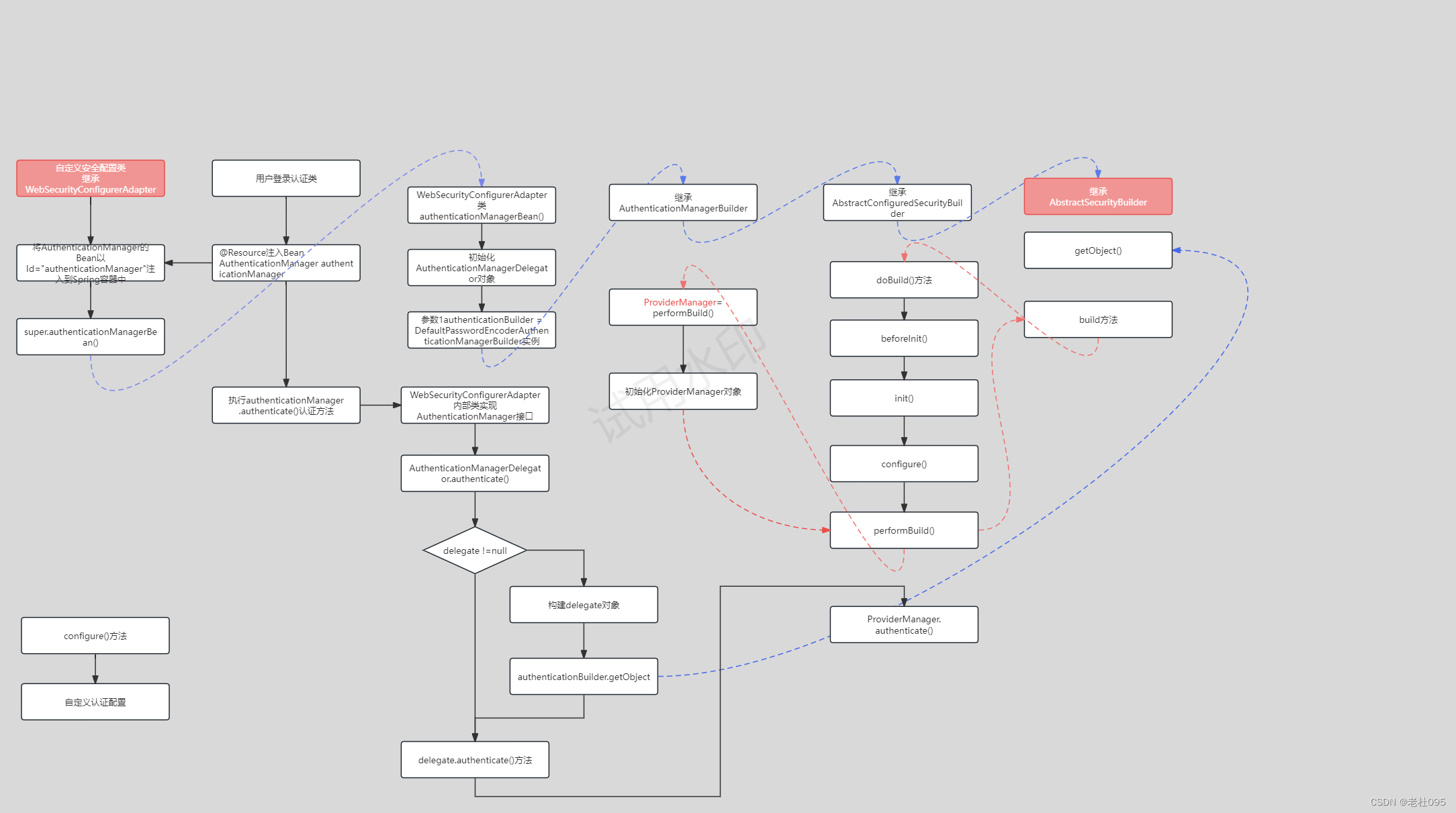
说明
验证用户名和密码,通过调用认证方法后,通过上图所示最终是调用了ProviderManager.authenticate()方法
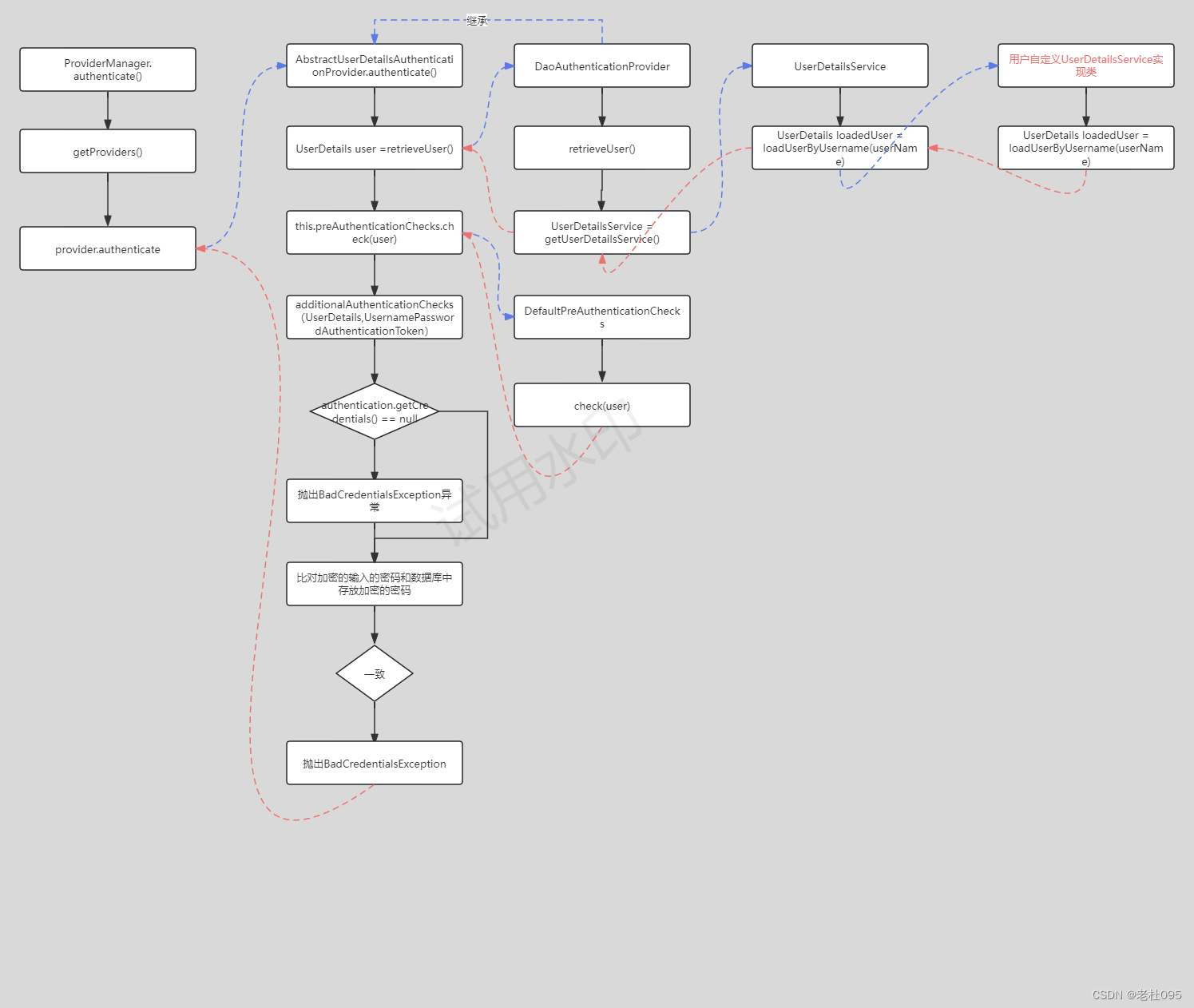
说明
1、ProviderManager.authenticate()方法中通过getProviders()获取认证Provider实现类;
2、Provider实现类 - DaoAuthenticationProvider实现类,并继承AbstractUserDetailsAuthenticationProvider;
三、SpringBoot启动源码分析
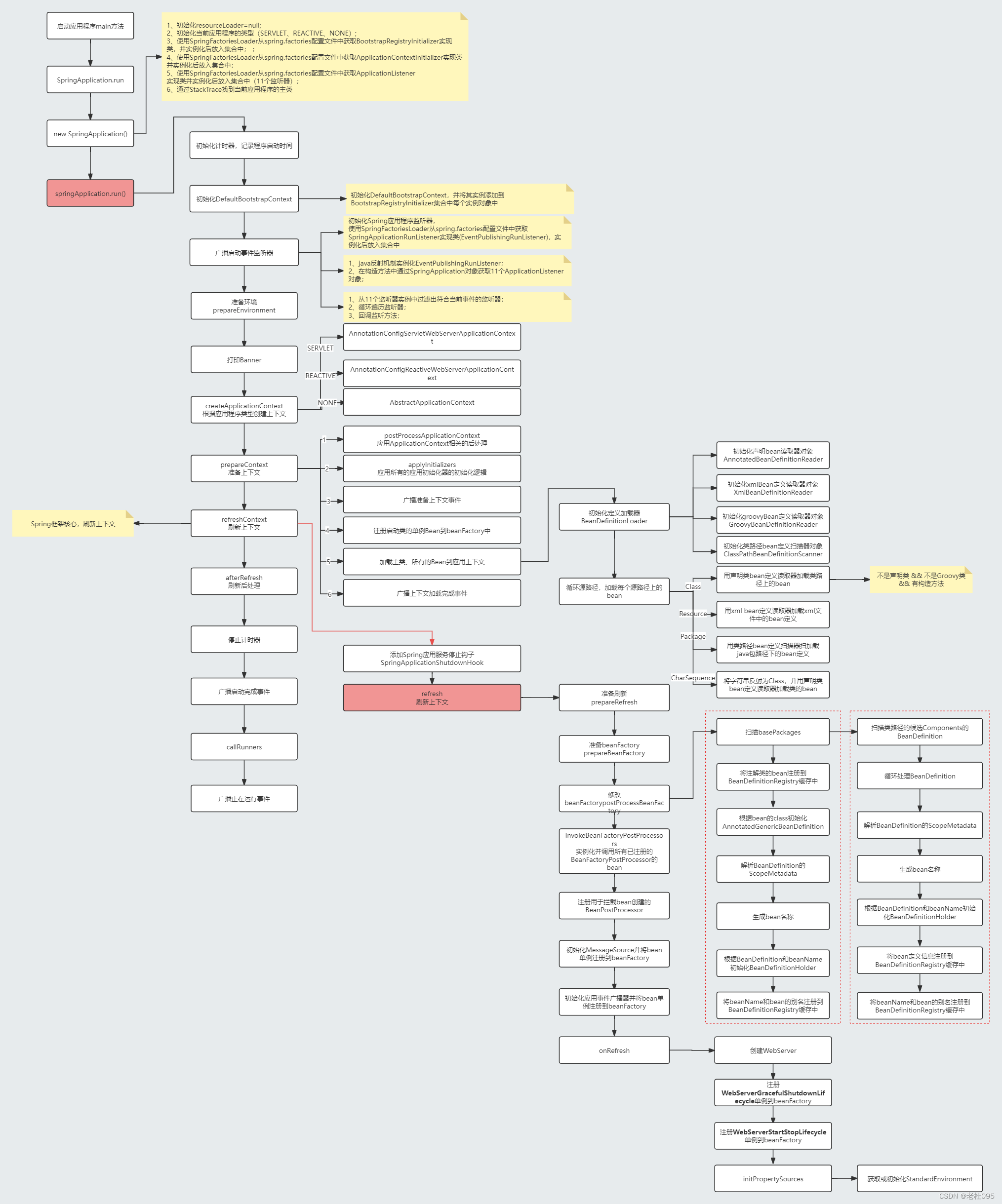
下图为SpringBoot启动源码分析图,与SpringBoot Security没有关系,如果对SpringBoot启动熟悉的话可以跳过此章节内容。
相关文章:
SpringBoot Security安全认证框架初始化流程认证流程之源码分析
SpringBoot Security安全认证框架初始化流程&认证流程之源码分析 以RuoYi-Vue前后端分离版本为例分析SpringBoot Security安全认证框架初始化流程&认证流程的源码分析 目录 SpringBoot Security安全认证框架初始化流程&认证流程之源码分析一、SpringBoot Security安…...

2024美赛预测算法 | 回归预测 | Matlab基于RIME-LSSVM霜冰算法优化最小二乘支持向量机的数据多输入单输出回归预测
2024美赛预测算法 | 回归预测 | Matlab基于RIME-LSSVM霜冰算法优化最小二乘支持向量机的数据多输入单输出回归预测 目录 2024美赛预测算法 | 回归预测 | Matlab基于RIME-LSSVM霜冰算法优化最小二乘支持向量机的数据多输入单输出回归预测预测效果基本介绍程序设计参考资料 预测效…...

test1
1...
远程主机可能不符合 glibc 和 libstdc++ Vs Code 服务器的先决条件
vscode连接远程主机报错,原因官方已经公布过了,需要远程主机 glibc>2.28,所以Ubuntu18及以下版本没法再远程连接了,其他Linux系统执行ldd --version查看glibc版本自行判断。 解决方案建议: 不要再想升级glibc了 问题…...

备战蓝桥杯---数据结构与STL应用(进阶2)
本文将主要围绕有关map的今典应用展开: 下面我用图进行分析: 下面为AC代码: #include<bits/stdc.h> using namespace std; struct Point {int x,y;bool operator < (const Point & r) const {return x < r.x || ( x r.x &a…...
SpringBoot:多环境配置
多环境配置demo代码:点击查看LearnSpringBoot02 点击查看更多的SpringBoot教程 方式一、多个properties文件配置 注意:创建properties文件,命名规则:application-(环境名称) 示例:application-dev.proper…...
)
input框中添加一个 X(关闭/清空按钮)
要在输入框(<input> 元素)中添加一个 X(关闭/清空按钮),可以使用 CSS 和 JavaScript 实现。 HTML: <div class"input-container"><input type"text" id"myInput…...
Unity3d Shader篇(三)— 片元半兰伯特着色器解析
文章目录 前言一、片元半兰伯特着色器是什么?1. 片元漫反射着色器的工作原理2. 片元半兰伯特着色器的优缺点优点:缺点: 3. 公式 二、使用步骤1. Shader 属性定义2. SubShader 设置3. 渲染 Pass4. 定义结构体和顶点着色器函数5. 片元着色器函数…...
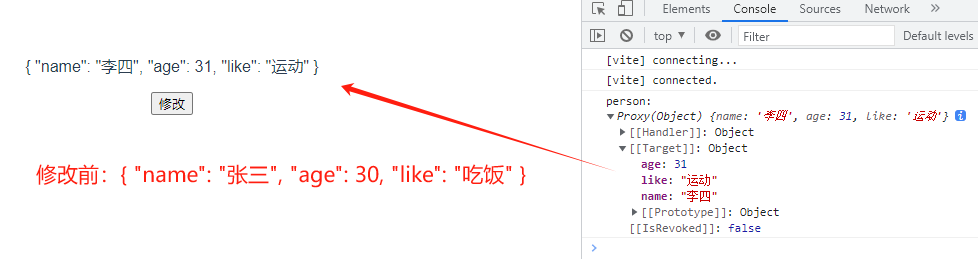
【vue3学习P5-P10】vue3语法;vue响应式实现
0、vue2和vue3对比 框架版本API方式双向绑定原理domFragmentsTree-Shakingvue2选项式API(Options API)基于Object.defineProperty(监听)实现,不能双向绑定对象类型的数据【通过Object.defineProperty里面的set和get做…...
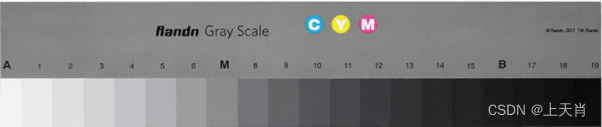
相机图像质量研究(3)图像质量测试介绍
系列文章目录 相机图像质量研究(1)Camera成像流程介绍 相机图像质量研究(2)ISP专用平台调优介绍 相机图像质量研究(3)图像质量测试介绍 相机图像质量研究(4)常见问题总结:光学结构对成像的影响--焦距 相机图像质量研究(5)常见问题总结:光学结构对成…...
)
PaddleDetection学习5——使用Paddle-Lite在 Android 上实现实时的人脸检测(C++)
使用Paddle-Lite在 Android 上实现实时的人脸检测 1 环境准备2. 部署步骤2.1 下载Paddle-Lite-Demo2.2 运行face_detection_demo项目3 使用Opencv对后处理进行优化4 开启手机摄像头进行人脸检测1 环境准备 参考前一篇在 Android 上使用Paddle-Lite实现实时的目标检测功能 2. …...

全套电气自动化样例图纸分享,使用SuperWorks自动化版免费设计软件!
今天给大家分享一套完备的电气自动化样例图纸,结构准确、内容清晰,适合初学者入门操作练习。 整套图纸包含图纸目录、原理图、端子列表、连接列表、元件列表、接线图,具有较高的参考价值,请大家点击自行下载文件! 1e8…...
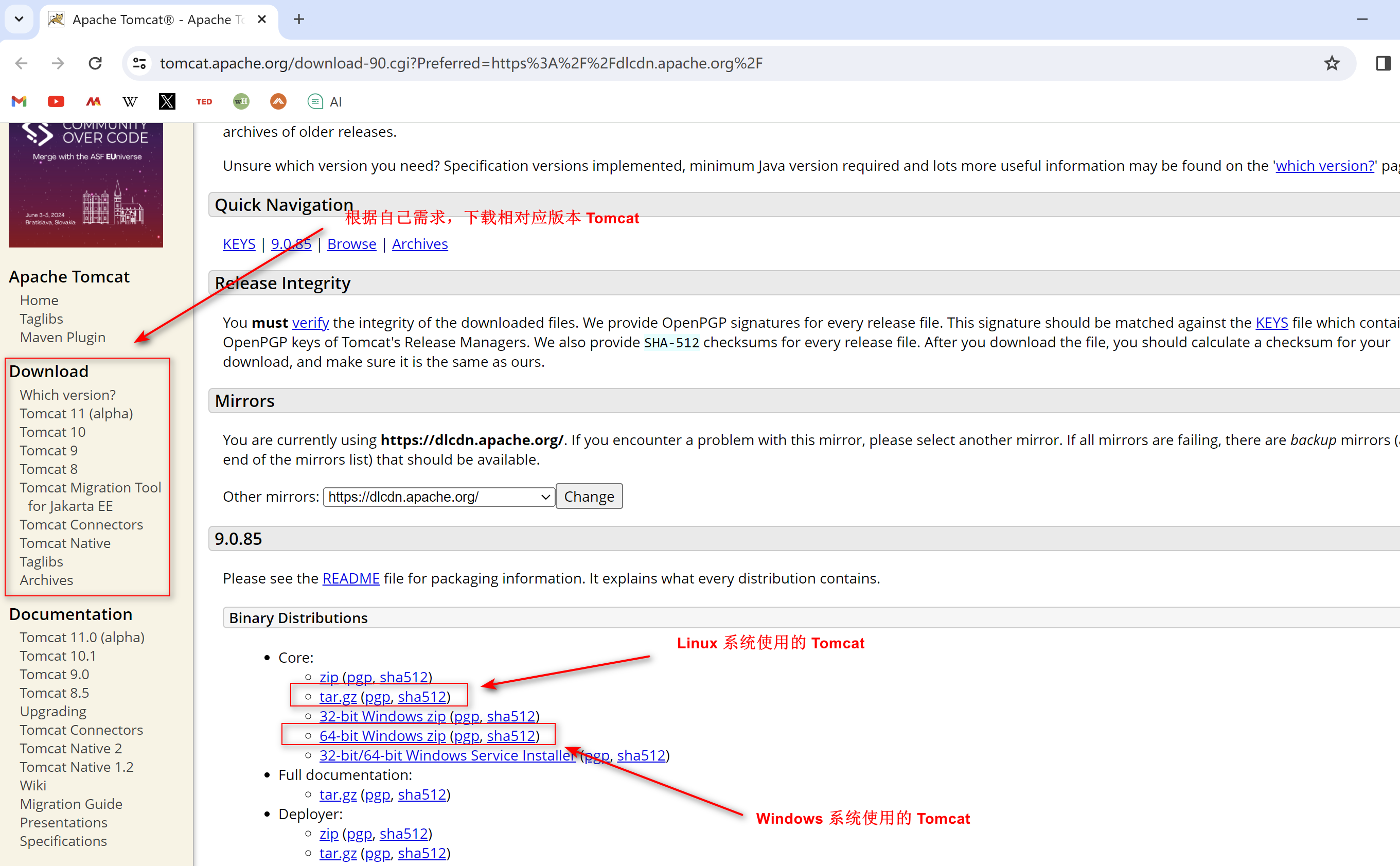
带你实现用自己域名打开Tomcat
文章目录 Tomcat1.1、Tomcat 下载1.2、Tomcat 文件图解1.3、 启动或关闭 Tomcat1.3.1、 启动1.3.2、 关闭程序2.1、 修改端口号2.2、修改主机名称Tomcat 1.1、Tomcat 下载 首先去Tomcat 官网下载找到我们需要下载的版本 1.2、To...
python coding with ChatGPT 打卡第18天| 二叉树:从中序与后序遍历序列构造二叉树、最大二叉树
相关推荐 python coding with ChatGPT 打卡第12天| 二叉树:理论基础 python coding with ChatGPT 打卡第13天| 二叉树的深度优先遍历 python coding with ChatGPT 打卡第14天| 二叉树的广度优先遍历 python coding with ChatGPT 打卡第15天| 二叉树:翻转…...
)
java基础训练题(1)
1.下列代码段中,存在编译错误的语句是(B C D) byte b1 1,b2 2,b3,b6,b8; final byte b4 4,b5 6,b7; b3 (b1 b2);/*语句1*/ b6 b4 b5 ; /*语句2*/ b8 (b1 b4);/*语句3*/ b7 (b2 b5);/*语句4*/ System.out.println(b3 b6);A: 语句2 B: 语句1 C: 语句3…...

【自定义序列化器】⭐️通过继承JsonSerializer和实现WebMvcConfigurer类完成自定义序列化
目录 前言 解决方案 具体实现 一、自定义序列化器 二、两种方式指定作用域 1、注解 JsonSerialize() 2、实现自定义全局配置 WebMvcConfigurer 三、拓展 WebMvcConfigurer接口 章末 前言 小伙伴们大家好,上次做了自定义对象属性拷贝&#x…...
闲聊电脑(5)装个 Windows(一)
夜深人静,万籁俱寂,老郭趴在电脑桌上打盹,桌子上的小黄鸭和桌子旁的冰箱又开始窃窃私语…… 小黄鸭:冰箱大哥,上次说到硬盘分区和格式化,弄完之后,就该装系统了吧? 冰箱&#x…...
第414题第三大的数(Python))
力扣(leetcode)第414题第三大的数(Python)
414.第三大的数 题目链接:414.第三大的数 给你一个非空数组,返回此数组中 第三大的数 。如果不存在,则返回数组中最大的数。 示例 1: 输入:[3, 2, 1] 输出:1 解释:第三大的数是 1 。 示例 2&a…...
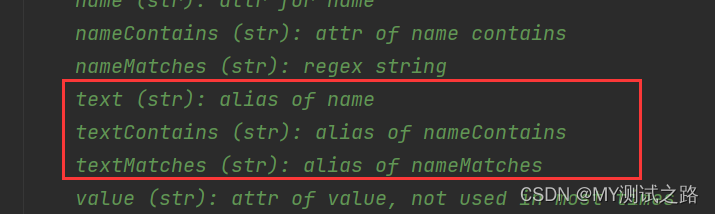
使用wda框架实现IOS自动化测试详解
目录 1、weditor元素定位工具 1.1、weditor的安装和使用 2、wda iOS自动化框架 2.1、wda概述 2.2、wda安装 2.3、wda的使用 2.3.1、全局配置 2.3.2、创建客户端 2.3.3、APP相关操作 1、启动APP 2、关闭APP 3、获取APP状态信息 4、获取当前APP的运行信息 2.3.4、设…...
LeetCode--代码详解 2.两数相加
2.两数相加 题目 难度:中等 给你两个 非空 的链表,表示两个非负的整数。它们每位数字都是按照 逆序 的方式存储的,并且每个节点只能存储 一位 数字。 请你将两个数相加,并以相同形式返回一个表示和的链表。 你可以假设除了数…...

OpenClaw性能调优:ollama-QwQ-32B模型批处理与缓存机制实战
OpenClaw性能调优:ollama-QwQ-32B模型批处理与缓存机制实战 1. 为什么需要性能调优? 上周我遇到了一个棘手的问题:需要让OpenClaw自动处理100份PDF文档的摘要生成任务。本以为只是简单的批量调用模型,结果发现处理速度慢得惊人—…...

SMT贴片机核心构造与PCB组装效率提升全解析
1. SMT贴片机核心构造解析 SMT贴片机作为电子制造产线的"心脏",其构造精密程度直接决定了PCB组装的效率和质量。现代贴片机就像一台高度智能化的机器人,由机械系统、电子控制系统和视觉系统三大部分组成。我拆解过不少机型,发现它们…...

中兴光猫高级管理:5分钟掌握zteOnu命令行工具实用指南
中兴光猫高级管理:5分钟掌握zteOnu命令行工具实用指南 【免费下载链接】zteOnu 项目地址: https://gitcode.com/gh_mirrors/zt/zteOnu 中兴光猫作为家庭和企业网络的核心设备,其隐藏的高级功能往往被普通用户界面所限制。zteOnu是一个专门为中兴…...
)
Debian GNU/Linux12高效运维指南(网络配置、远程管理、软件更新与安全防护)
1. Debian GNU/Linux12网络配置实战 刚接触Debian GNU/Linux12的朋友们,网络配置可能是你们遇到的第一个挑战。别担心,我会用最直白的方式带你们搞定这个环节。网络配置就像给新房子拉网线,得先把基础线路接好,后续的上网、远程控…...
)
告别反复插拔SD卡:迪文DGUS II屏串口下载与仿真调试全攻略(附T5L实战技巧)
告别反复插拔SD卡:迪文DGUS II屏串口下载与仿真调试全攻略(附T5L实战技巧) 在工业控制、智能家居和物联网设备的开发中,迪文DGUS II系列串口屏因其高性价比和强大的组态功能,已成为众多开发者的首选。然而,…...

OpenGL 3D项目避坑指南:从贴图资源获取到交互菜单设计,我的CPT205大作业复盘
OpenGL 3D项目避坑指南:从贴图资源获取到交互菜单设计 当第一次接触OpenGL 3D项目时,许多计算机图形学学习者都会陷入相似的困境——如何在有限时间内完成一个既美观又功能完整的作品?本文将以CPT205课程大作业为例,分享从资源获取…...

AI头像生成器新手教程:5个常用风格关键词+3类背景模板Prompt速查表
AI头像生成器新手教程:5个常用风格关键词3类背景模板Prompt速查表 1. 快速了解AI头像生成器 AI头像生成器是一个帮你设计专属头像创意的智能工具。你只需要简单描述想要的头像风格,它就能生成详细的描述文案,这些文案可以直接用在Midjourne…...

Mirage Flow 硬件开发入门:Keil5 MDK安装与嵌入式AI项目创建
Mirage Flow 硬件开发入门:Keil5 MDK安装与嵌入式AI项目创建 如果你对把AI模型塞进一个小小的单片机里感到好奇,想亲手试试让硬件“聪明”起来,那么你来对地方了。很多朋友在第一步——搭建开发环境上就卡住了,面对一堆安装包和配…...
)
别再只盯着Loss曲线了!TensorBoard的SCALARS面板还有这些隐藏玩法(附GAN训练实战)
解锁TensorBoard SCALARS面板的隐藏战力:从GAN训练曲线中洞察模型灵魂 当你盯着GAN训练中那对纠缠不清的生成器和判别器Loss曲线时,是否感觉像在解读一部悬疑小说?TensorBoard的SCALARS面板远比大多数开发者想象的强大——它不仅是数据的展示…...

OS X Auditor部署最佳实践:从本地运行到分布式取证
OS X Auditor部署最佳实践:从本地运行到分布式取证 【免费下载链接】OSXAuditor OS X Auditor is a free Mac OS X computer forensics tool 项目地址: https://gitcode.com/gh_mirrors/os/OSXAuditor OS X Auditor是一款强大的免费macOS计算机取证工具&…...