
vue2学习笔记(2/2)
vue2学习笔记(1/2)
vue2学习笔记(2/2)
文章目录
- 1. 初始化脚手架
- 2. 分析脚手架&render函数
- 文件结构图示及说明
- main.js
- index.html
- App.vue
- School.vue
- Student.vue
- 关于不同版本的Vue
- 修改默认配置
- vue.config.js配置文件
- 3. ref属性
- 4. props配置
- 5. mixin混入
- 局部混入
- 全局混入
- 6. 插件
- 定义插件
- 应用插件
- 7. scoped样式
- 8. Todo-list 案例
- 组件化编码流程(通用)
- 案例代码
- main.js
- App.vue
- MyHeader.vue
- MyList.vue
- MyItem.vue
- MyFooter.vue
- 9. 浏览器本地缓存
- localStorage
- sessionStorage
- 10. 组件自定义事件
- 案例代码
- main.js
- App.vue
- Student.vue
- School.vue
- 11. 全局事件总线
- 图解
- 案例代码
- main.js
- App.vue
- School.vue
- Student.vue
- 12. 消息订阅与发布
- 案例代码
- main.js
- App.vue
- School.vue
- Student.vue
- 13. $nextTick
- 案例代码
- MyItem.vue
- 14. 过渡与动画
- 案例代码
- Test.vue
- (拿动画写)
- Test2.vue
- (拿过渡写)
- Test3.vue
- (第三方动画)
- 15. 配置代理服务器
- 方法一
- 方法二
- 案例代码
- main.js
- App.vue
- vue.config.js
- 16. github搜索案例
- 案例代码
- main.js
- App.vue
- Search.vue
- List.vue
- 17. vue-resource
- main.js
- Search.vue
- 18. 插槽
- 1. 默认插槽
- App.vue
- Category.vue
- 2. 具名插槽
- App.vue
- Category.vue
- 3. 作用域插槽
- App.vue
- Category.vue
- 19. Vuex
- 1. vuex 是什么
- 1. 什么时候使用 Vuex
- 2. Vuex 工作原理图
- 2. 搭建vuex环境
- 3. 基本使用
- 4. 求和案例_vuex版
- main.js
- store/index.js
- App.vue
- Count.vue
- 5. mapState与mapGetters&mapMutations与mapActions[==简写==]
- main.js
- store/index.js
- App.vue
- Count.vue
- 6. 模块化+命名空间
- main.js
- store/index.js
- store/count.js
- store/person.js
- App.vue
- Count.vue
- Person.vue
- 20. 路由
- 路由相关理解
- 基本使用
- main.js
- App.vue
- router/index.js
- About.vue
- Home.vue
- ==几个注意点==
- 嵌套路由
- 案例代码
- public/index.html
- main.js
- router/index.js
- app.vue
- pages/Home.vue
- pages/News.vue
- pages/Message.vue
- pages/About.vue
- components/Banner.vue
- 命名路由
- 路由的query参数
- 路由的params参数
- 路由的props配置
- router-link的replace属性
- 编程式路由导航
- 缓存路由组件
- 两个新的生命周期钩子
- 路由守卫
- 全局(前置/后置)路由守卫
- 独享路由守卫
- 组件内路由守卫
- 路由懒加载
- 路由器的两种工作模式
- 打包部署刷新页面404的问题
- 使用nginx
- 21. UI 组件库
- 移动端常用 UI 组件库
- PC 端常用 UI 组件库
- 22. 配置@
- 创建jsconfig.json文件
- 23. axios
- 1、安装axios
- 2、创建ajax.js
- 3、暴露请求接口方法
- 4、使用
- 24. MockJs
- 1、安装mockJs
- 2、编写mockServer.js文件
- 3、创建mockAjax.js
- 4、暴露请求接口方法
- 5、使用
- 25. QRCode
- 26. vue-lazyload
1. 初始化脚手架
说明
- Vue 脚手架是 Vue 官方提供的标准化开发工具(开发平台)。
- 最新的版本是 4.x。
- 文档: https://cli.vuejs.org/zh/。
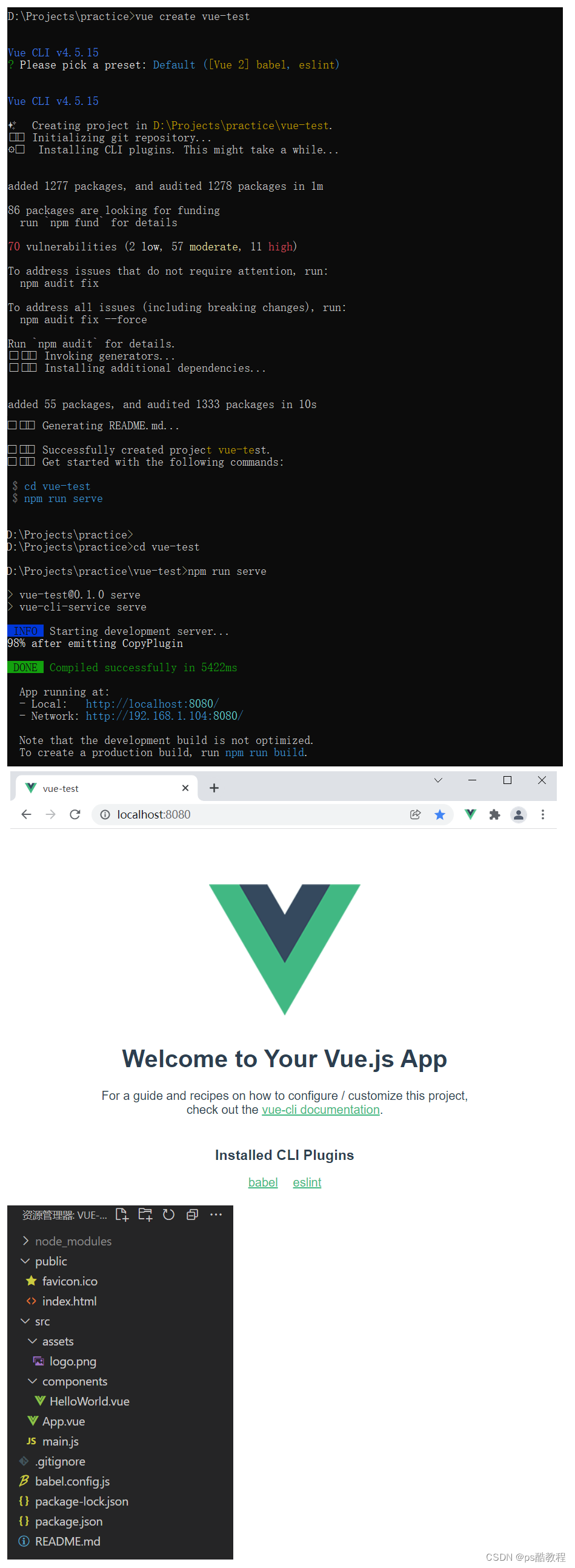
具体步骤
第一步(仅第一次执行):全局安装@vue/cli。
npm install -g @vue/cli
第二步:切换到你要创建项目的目录,然后使用命令创建项目
vue create 项目名
第三步:启动项目
npm run serve
备注:
-
如出现下载缓慢请配置 npm 淘宝镜像:npm config set registry https://registry.npm.taobao.org
-
Vue 脚手架隐藏了所有 webpack 相关的配置,若想查看具体的 webpakc 配置,请执行:vue inspect > output.js ,可以在该文件中看到所有的配置。
2. 分析脚手架&render函数
文件结构图示及说明
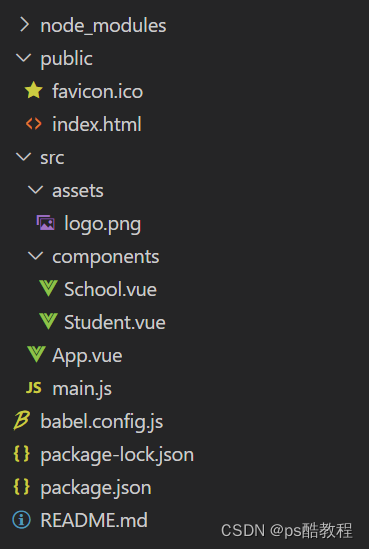
├── node_modules
├── public
│   ├── favicon.ico: 页签图标
│   └── index.html: 主页面
├── src
│   ├── assets: 存放静态资源
│   │   └── logo.png
│   │── component: 存放组件
│   │   └── HelloWorld.vue
│   │── App.vue: 汇总所有组件
│   │── main.js: 入口文件
├── .gitignore: git版本管制忽略的配置
├── babel.config.js: babel的配置文件
├── package.json: 应用包配置文件
├── README.md: 应用描述文件
├── package-lock.json:包版本控制文件
main.js
/* 该文件是整个项目的入口文件(当执行npm run serve的时候,就会从当前目录下的src目录中找到main.js)
*/
//引入Vue(此处引入的vue是不带模板编译器的版本)
import Vue from 'vue'//引入App组件,它是所有组件的父组件
import App from './App.vue'//关闭vue的生产提示
Vue.config.productionTip = false/* 关于不同版本的Vue:1.vue.js与vue.runtime.xxx.js的区别:(1).vue.js是完整版的Vue,包含:核心功能+模板解析器。(2).vue.runtime.xxx.js是运行版的Vue,只包含:核心功能;没有模板解析器。2.因为vue.runtime.xxx.js没有模板解析器,所以不能使用template配置项,需要使用render函数接收到的createElement函数去指定具体内容。
*///创建Vue实例对象---vm
new Vue({el:'#app', // 也可以使用vm.$mount('#app')//render函数完成了这个功能:将App组件放入容器中render: h => h(App),// render:q=> q('h1','你好啊')/* 完整写法render(createElement){return createElement('h1','你好啊');}*/// template:`<h1>你好啊</h1>`, // 因为引入的vue没有模板解析器版本的,所以不能使用template配置项// components:{App},
})
index.html
<!DOCTYPE html>
<html lang=""><head><meta charset="utf-8"><!-- 针对IE浏览器的一个特殊配置,含义是让IE浏览器以最高的渲染级别渲染页面 --><meta http-equiv="X-UA-Compatible" content="IE=edge"><!-- 开启移动端的理想视口 --><meta name="viewport" content="width=device-width,initial-scale=1.0"><!-- 配置页签图标 --><link rel="icon" href="<%= BASE_URL %>favicon.ico">  <!--如果要引入public下的资源使用该写法--><!-- 引入第三方样式 --><link rel="stylesheet" href="<%= BASE_URL %>css/bootstrap.css"><!-- 配置网页标题 --><title>硅谷系统</title></head><body><!-- 当浏览器不支持js时noscript中的元素就会被渲染 --><noscript><strong>We're sorry but <%= htmlWebpackPlugin.options.title %> doesn't work properly without JavaScript enabled. Please enable it to continue.</strong></noscript><!-- 容器 --><div id="app"></div><!-- built files will be auto injected --></body>
</html>
App.vue
<template><div><img src="./assets/logo.png" alt="logo"><School></School><Student></Student></div>
</template><script>//引入组件import School from './components/School'import Student from './components/Student'export default {name:'App',components:{School,Student}}
</script>
School.vue
<template><div class="demo"><h2>学校名称:{{name}}</h2><h2>学校地址:{{address}}</h2><button @click="showName">点我提示学校名</button>	</div>
</template><script>export default {name:'School',data(){return {name:'尚硅谷',address:'北京昌平'}},methods: {showName(){alert(this.name)}},}
</script><style>.demo{background-color: orange;}
</style>
Student.vue
<template><div><h2>学生姓名:{{name}}</h2><h2>学生年龄:{{age}}</h2></div>
</template><script>export default {name:'Student',data(){return {name:'张三',age:18}}}
</script>
关于不同版本的Vue
-
vue.js与vue.runtime.xxx.js的区别:
- vue.js是完整版的Vue,包含:核心功能 + 模板解析器。
- vue.runtime.xxx.js是运行版的Vue,只包含:核心功能;没有模板解析器。
-
因为vue.runtime.xxx.js没有模板解析器,所以不能使用template这个配置项,需要使用render函数接收到的createElement函数去指定具体内容。
修改默认配置
vue.config.js配置文件
加载。
-
使用vue inspect > output.js可以将默认的webpack配置输出到output.js,来查看到Vue脚手架的默认配置。
-
在package.json同级目录下创建vue.config.js配置文件,可以对脚手架进行个性化定制,详情见:https://cli.vuejs.org/zh,点击配置参考
-
vue.config.js是一个可选的配置文件,如果项目的 (和package.json同级的) 根目录中存在这个文件,那么它会被@vue/cli-service自动加载。// 如: module.exports = {pages: {index: {// page 的入口entry: 'src/main.js',}},lintOnSave:false, // 关闭保存时语法检查而报错 }
3. ref属性
- 被用来给元素或子组件注册引用信息(id的替代者)
- 应用在html标签上获取的是真实DOM元素,应用在组件标签上是组件实例对象(vc)
- 使用方式:
- 打标识:
<h1 ref="xxx">.....</h1>或<School ref="xxx"></School> - 获取:
this.$refs.xxx
- 打标识:
- 如果有多个元素都使用了相同名称的ref(比如ref=‘xxx’),会被放入数组中,即可以通过$refs[‘xxx’][索引]来访问(比如:$refs[‘xxx’][0])。
App.vue
<template><div><h1 v-text="msg" ref="title"></h1><button ref="btn" @click="showDOM">点我输出上方的DOM元素</button><School ref="sch"/></div>
</template><script>//引入School组件import School from './components/School'export default {name:'App',components:{School},data() {return {msg:'欢迎学习Vue!'}},methods: {showDOM(){console.log(this.$refs.title) //真实DOM元素console.log(this.$refs.btn)   //真实DOM元素console.log(this.$refs.sch)   //School组件的实例对象(vc)// 这里拿到vc对象后,可以直接调用vc组件实例对象中的方法,// 访问vc组件实例对象中的属性,还可以拿到vc组件的$el属性来操作dom}},}
</script>
4. props配置
1.功能:让组件接收外部传过来的数据
2.传递数据:<Demo name="xxx" :x="123"/>
3.接收数据:
1.第一种方式(只接收):props:['name']
2.第二种方式(限制类型):props:{name:String}
3.第三种方式(限制类型、限制必要性、指定默认值):
props:{name:{type:String, //类型required:true, //必要性default:'老王' //默认值}
}
备注:props是只读的,Vue底层会监测你对props的修改,如果进行了修改,就会发出警告,若业务需求确实需要修改,那么请复制props的内容到data中一份,然后去修改data中的数据。不建议在子组件中修改由props接收到的属性,哪怕是修改使用props接收到的对象中的属性,虽然可以实现功能,但不建议这么改,虽然这种情况没有报出警告,因为vue这里的监测只是浅层次的监测。
示例
App.vue
<template><div><Student name="李四" sex="女" :age="18"/></div>
</template><script>import Student from './components/Student'export default {name:'App',components:{Student}}
</script>
Student.vue
<template><div><h1>{{msg}}</h1><h2>学生姓名:{{name}}</h2><h2>学生性别:{{sex}}</h2><h2>学生年龄:{{myAge+1}}</h2><button @click="updateAge">尝试修改收到的年龄</button></div>
</template><script>export default {name:'Student',data() {console.log(this)return {msg:'我是一个尚硅谷的学生',myAge:this.age // 因为props接收的数据优先于data,所以这里可以直接使用}                  // 避免直接修改传入的prop值,如果需要改,最好使用data接收props中的值,或使用计算属性// 因为当父组件重新渲染时,这个传入的prop值又会变掉,就会覆盖掉子组件修改的这个值了// (也就是改了相当于待会父组件一刷新又被覆盖了)// 针对这种情况,基础的做法:让父类提供一个可以修改值的函数,将此函数传给子组件,子组件//                     调用此函数修改值},methods: {updateAge(){this.myAge++}},//简单声明接收(接收的props优先于data、methods、computed放到组件实例对象(vc)上)//          (所以props已经定义了,那么在其它配置项去定义同名的,会有警告)// props:['name','age','sex'] //接收的同时对数据进行类型限制/* props:{name:String,age:Number,sex:String} *///接收的同时对数据:进行类型限制+默认值的指定+必要性的限制props:{name:{type:String, //name的类型是字符串required:true, //name是必要的},age:{type:Number,default:99 //默认值},sex:{type:String,required:true}}}
</script>
5. mixin混入
-
功能:可以把多个组件共用的配置提取成一个混入对象
-
使用方式:
第一步定义混合:
{data(){....},methods:{....}....}第二步使用混入:
全局混入:Vue.mixin(xxx)
局部混入:mixins:['xxx']
局部混入
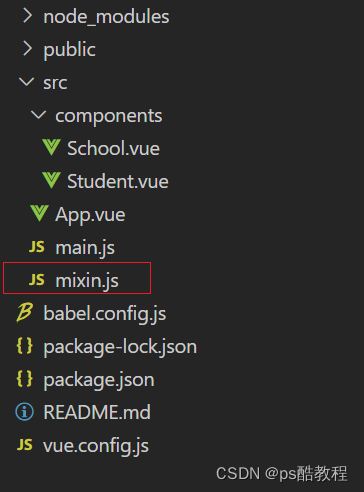
在main.js同级目录下,创建mixin.js
export const hunhe = {methods: {showName(){alert(this.name)}},mounted() {console.log('你好啊!')},
}
export const hunhe2 = {data() {return {x:100,y:200}},
}
School.vue
<template><div><h2 @click="showName">学校名称:{{name}}</h2><h2>学校地址:{{address}}</h2></div>
</template><script>//引入一个hunheimport {hunhe,hunhe2} from '../mixin'export default {name:'School',data() {return {name:'尚硅谷',address:'北京',x:666}},mixins:[hunhe,hunhe2], // 当混入的配置于组件中的data或method有重复情况时,以组件中的为准}                          // 当混入的配置中配置了mounted等生命周期函数时,混入配置与组件的mounted都会生效
</script>
Student.vue
<template><div><h2 @click="showName">学生姓名:{{name}}</h2><h2>学生性别:{{sex}}</h2></div>
</template><script>import {hunhe,hunhe2} from '../mixin'export default {name:'Student',data() {return {name:'张三',sex:'男'}},mixins:[hunhe,hunhe2]}
</script>
全局混入
修改main.js,添加如下代码
//引入Vue
import Vue from 'vue'
//引入App
import App from './App.vue'
import {hunhe,hunhe2} from './mixin' // 导入mixin.js
//关闭Vue的生产提示
Vue.config.productionTip = falseVue.mixin(hunhe)    // 引用全局混入,每个组件实例都会混入这些配置,包括vm本身
Vue.mixin(hunhe2)//创建vm
new Vue({el:'#app',render: h => h(App)
})
6. 插件
1、功能:用于增强Vue
2、本质:包含install方法的一个对象,install的第一个参数是Vue,第二个以后的参数是插件使用者传递的数据。
3、定义插件:
对象.install = function (Vue, options) {// 1. 添加全局过滤器Vue.filter(....)// 2. 添加全局指令Vue.directive(....)// 3. 配置全局混入(合)Vue.mixin(....)// 4. 添加实例方法Vue.prototype.$myMethod = function () {...}Vue.prototype.$myProperty = xxxx
}
4、使用插件:Vue.use()
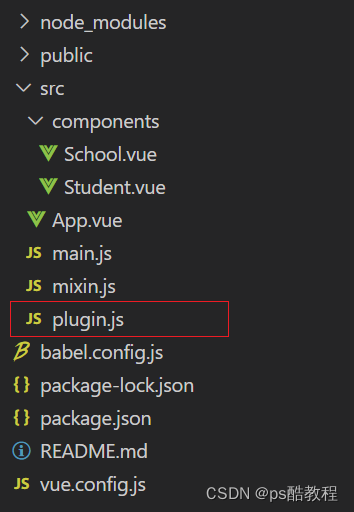
定义插件
// plugin.js
// 下面是通过暴露一个含有install函数的对象的写法,也可以暴露一个plugin函数并使用module.exports导出此函数,引用用法一样
// 其实只要暴露一个含有install函数的对象或者暴露一个plugin函数,使用es6模块化语法暴露或者使用commonjs语法暴露出来都一样
export default {install(Vue,x,y,z){  // 暴露一个对象,对象中必须要有一个install方法,接收到的第一个参数是Vue构造函数console.log(x,y,z) // 这个打印输出是在浏览器的console中可以看到,也就是说插件的这个方法在创建vm前执行// 那么其实定义插件的意思就是在告诉Vue在创建vm实例之前要做的事情//全局过滤器Vue.filter('mySlice',function(value){return value.slice(0,4)})//定义全局指令Vue.directive('fbind',{//指令与元素成功绑定时(一上来)bind(element,binding){element.value = binding.value},//指令所在元素被插入页面时inserted(element,binding){element.focus()},//指令所在的模板被重新解析时update(element,binding){element.value = binding.value}})//定义混入Vue.mixin({data() {return {x:100,y:200}},})//给Vue原型上添加一个方法(vm和vc就都能用了)Vue.prototype.hello = ()=>{alert('你好啊')}}
}
应用插件
// main.js//引入Vue
import Vue from 'vue'
//引入App
import App from './App.vue'//引入插件
import plugin from './plugin'//关闭Vue的生产提示
Vue.config.productionTip = false//应用(使用)插件
Vue.use(plugin,1,2,3)  // 也可以添加额外的参数,install函数能够收到//创建vm
new Vue({el:'#app',render: h => h(App)
})
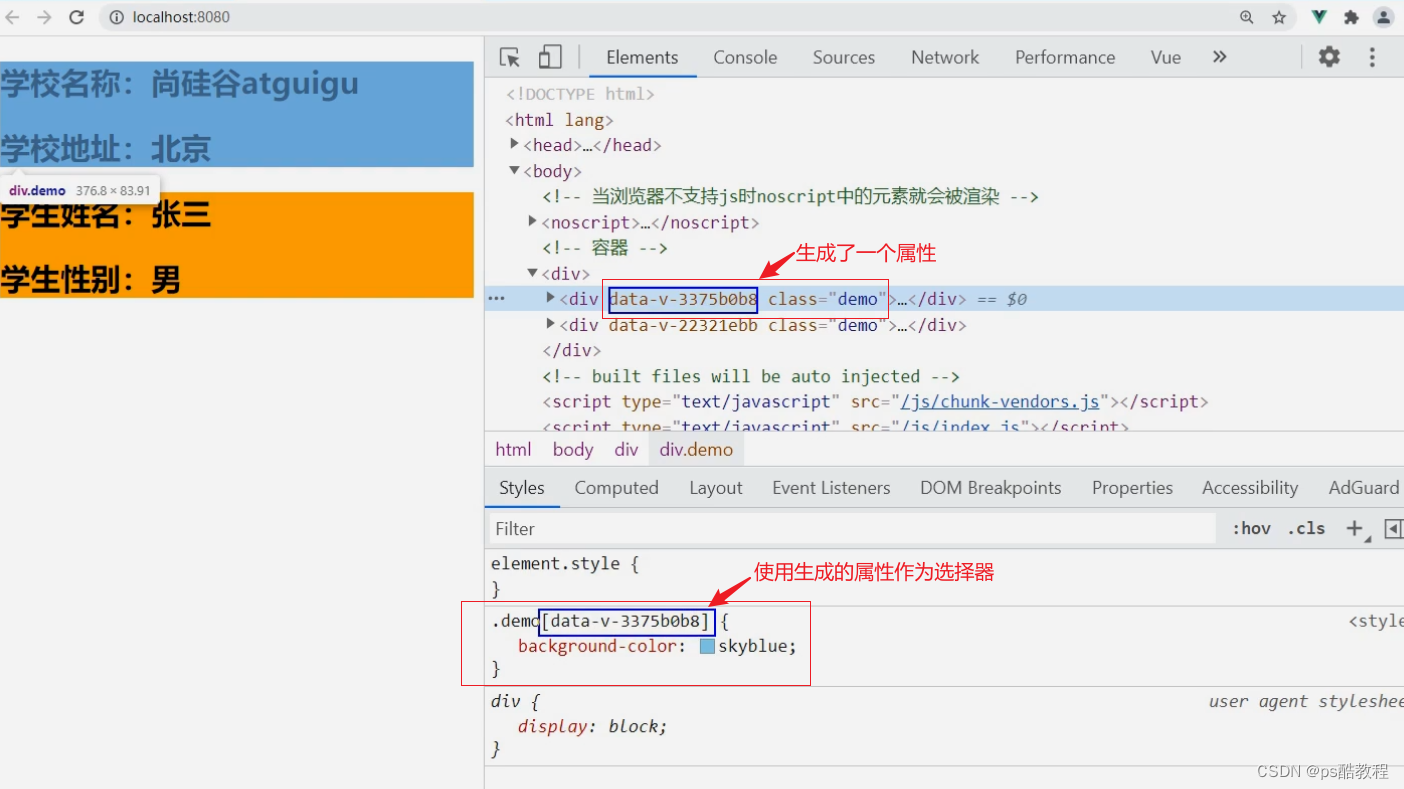
7. scoped样式
-
作用:让样式在局部生效,防止冲突。
-
写法:
<style scoped>
npm view webpack versions 可查看webpack的版本
npm view less-loader versions 可查看less-loader的版本
npm i less-loader@7 安装less-loader的7版本
// Student.vue
<template><div class="demo"><h2 class="title">学生姓名:{{name}}</h2><h2 class="atguigu">学生性别:{{sex}}</h2></div>
</template><script>export default {name:'Student',data() {return {name:'张三',sex:'男'}}}
</script><style lang="less" scoped>  // 如果不写less,默认就是css, // scoped表示下面的样式旨在当前vue文件中的模板中生效,原理是添加了一个随机的属性值.demo{                  // App.vue中一般不写scopedbackground-color: pink;.atguigu{font-size: 40px;}}
</style>
8. Todo-list 案例
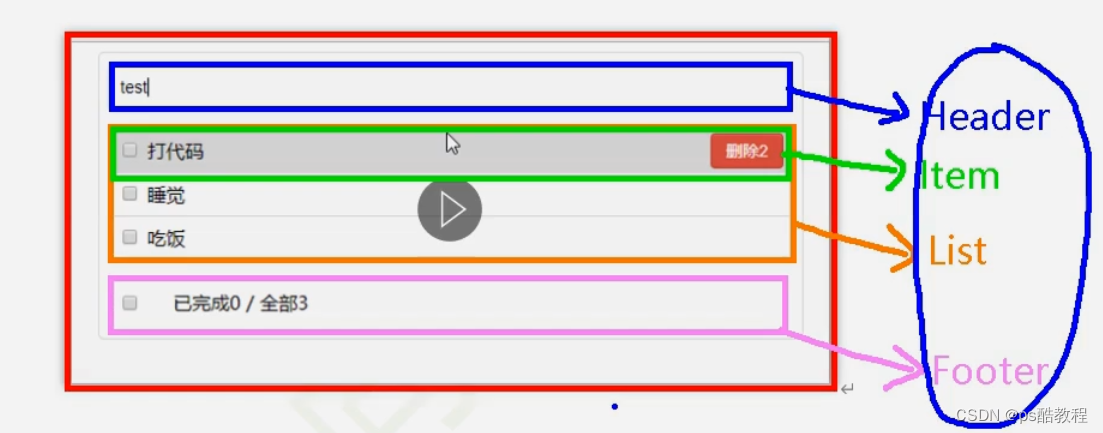
组件化编码流程(通用)
总结TodoList案例
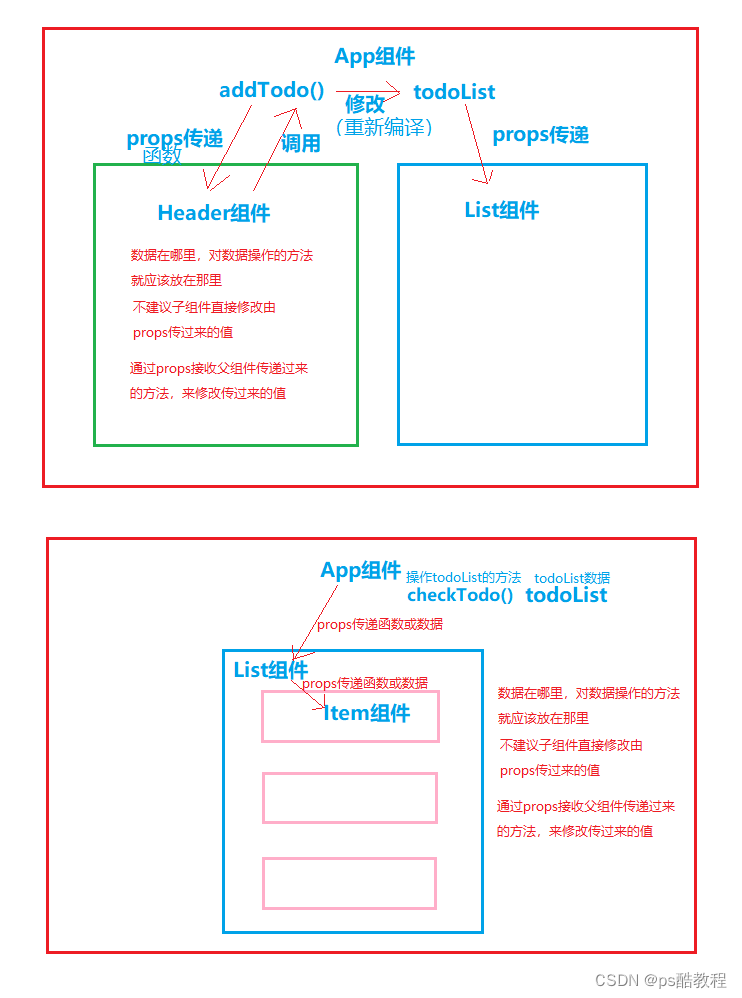
1、组件化编码流程:
(1).拆分静态组件:组件要按照功能点拆分,命名不要与html元素冲突。
(2).实现动态组件:考虑好数据的存放位置,数据是一个组件在用,还是一些组件在用:
1).一个组件在用:放在组件自身即可。
2). 一些组件在用:放在他们共同的父组件上(状态提升)。
(3).实现交互:从绑定事件开始。
2、props适用于:
(1).父组件 ==> 子组件 通信
(2).子组件 ==> 父组件 通信(要求父先给子一个函数)
3、使用v-model时要切记:v-model绑定的值不能是props传过来的值,因为props是不可以修改的!
4、props传过来的若是对象类型的值,修改对象中的属性时Vue不会报错,但不推荐这样做。
案例代码
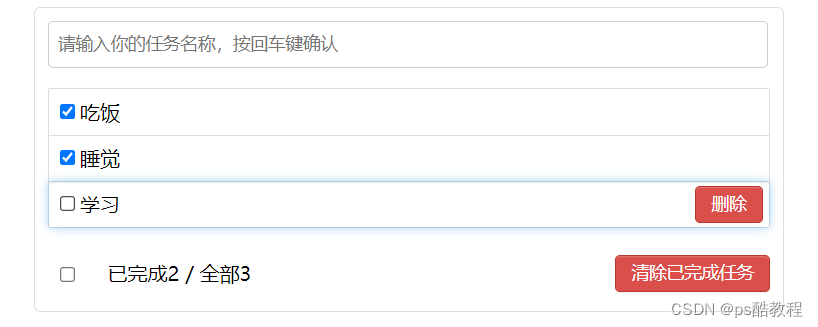
main.js
//引入Vue
import Vue from 'vue'
//引入App
import App from './App.vue'
//关闭Vue的生产提示
Vue.config.productionTip = false//创建vm
new Vue({el:'#app',render: h => h(App)
})
App.vue
<template><div id="root"><div class="todo-container"><div class="todo-wrap"><MyHeader :addTodo="addTodo"/><MyList :todos="todos" :checkTodo="checkTodo" :deleteTodo="deleteTodo"/><MyFooter :todos="todos" :checkAllTodo="checkAllTodo" :clearAllTodo="clearAllTodo"/></div></div></div>
</template><script>import MyHeader from './components/MyHeader'import MyList from './components/MyList'import MyFooter from './components/MyFooter.vue'export default {name:'App',components:{MyHeader,MyList,MyFooter},data() {return {//由于todos是MyHeader组件和MyFooter组件都在使用,所以放在App中(状态提升)// todos:[//  	{id:'001',title:'抽烟',done:true},//  	{id:'002',title:'喝酒',done:false},//  	{id:'003',title:'开车',done:true}//  ]todos:JSON.parse(localStorage.getItem('todos')) || []}},methods: {//添加一个todoaddTodo(todoObj){this.todos.unshift(todoObj)},//勾选or取消勾选一个todocheckTodo(id){this.todos.forEach((todo)=>{if(todo.id === id) todo.done = !todo.done})},//删除一个tododeleteTodo(id){this.todos = this.todos.filter( todo => todo.id !== id )},//全选or取消全选checkAllTodo(done){this.todos.forEach((todo)=>{todo.done = done})},//清除所有已经完成的todoclearAllTodo(){this.todos = this.todos.filter((todo)=>{return !todo.done})}},watch: {todos:{deep:true,handler(value){localStorage.setItem('todos',JSON.stringify(value))}}}}
</script><style>/*base*/body {background: #fff;}.btn {display: inline-block;padding: 4px 12px;margin-bottom: 0;font-size: 14px;line-height: 20px;text-align: center;vertical-align: middle;cursor: pointer;box-shadow: inset 0 1px 0 rgba(255, 255, 255, 0.2), 0 1px 2px rgba(0, 0, 0, 0.05);border-radius: 4px;}.btn-danger {color: #fff;background-color: #da4f49;border: 1px solid #bd362f;}.btn-danger:hover {color: #fff;background-color: #bd362f;}.btn:focus {outline: none;}.todo-container {width: 600px;margin: 0 auto;}.todo-container .todo-wrap {padding: 10px;border: 1px solid #ddd;border-radius: 5px;}
</style>
MyHeader.vue
<template><div class="todo-header"><input type="text" placeholder="请输入你的任务名称,按回车键确认" v-model="title" @keyup.enter="add"/></div>
</template><script>import {nanoid} from 'nanoid'export default {name:'MyHeader',//接收从App传递过来的addTodoprops:['addTodo'],data() {return {//收集用户输入的titletitle:''}},methods: {add(){//校验数据if(!this.title.trim()) return alert('输入不能为空')//将用户的输入包装成一个todo对象const todoObj = {id:nanoid(),title:this.title,done:false}//通知App组件去添加一个todo对象this.addTodo(todoObj)//清空输入this.title = ''}},}
</script><style scoped>/*header*/.todo-header input {width: 560px;height: 28px;font-size: 14px;border: 1px solid #ccc;border-radius: 4px;padding: 4px 7px;}.todo-header input:focus {outline: none;border-color: rgba(82, 168, 236, 0.8);box-shadow: inset 0 1px 1px rgba(0, 0, 0, 0.075), 0 0 8px rgba(82, 168, 236, 0.6);}
</style>
MyList.vue
<template><ul class="todo-main"><MyItem v-for="todoObj in todos":key="todoObj.id" :todo="todoObj" :checkTodo="checkTodo":deleteTodo="deleteTodo"/></ul>
</template><script>import MyItem from './MyItem'export default {name:'MyList',components:{MyItem},//声明接收App传递过来的数据,其中todos是自己用的,checkTodo和deleteTodo是给子组件MyItem用的props:['todos','checkTodo','deleteTodo']}
</script><style scoped>/*main*/.todo-main {margin-left: 0px;border: 1px solid #ddd;border-radius: 2px;padding: 0px;}.todo-empty {height: 40px;line-height: 40px;border: 1px solid #ddd;border-radius: 2px;padding-left: 5px;margin-top: 10px;}
</style>
MyItem.vue
<template><li><label><input type="checkbox" :checked="todo.done" @change="handleCheck(todo.id)"/><!-- 如下代码也能实现功能,但是不太推荐,因为有点违反原则,因为修改了props --><!-- <input type="checkbox" v-model="todo.done"/> --><span>{{todo.title}}</span></label><button class="btn btn-danger" @click="handleDelete(todo.id)">删除</button></li>
</template><script>export default {name:'MyItem',//声明接收todo、checkTodo、deleteTodoprops:['todo','checkTodo','deleteTodo'],methods: {//勾选or取消勾选handleCheck(id){//通知App组件将对应的todo对象的done值取反this.checkTodo(id)},//删除handleDelete(id){if(confirm('确定删除吗?')){//通知App组件将对应的todo对象删除this.deleteTodo(id)}}},}
</script><style scoped>/*item*/li {list-style: none;height: 36px;line-height: 36px;padding: 0 5px;border-bottom: 1px solid #ddd;}li label {float: left;cursor: pointer;}li label li input {vertical-align: middle;margin-right: 6px;position: relative;top: -1px;}li button {float: right;display: none;margin-top: 3px;}li:before {content: initial;}li:last-child {border-bottom: none;}li:hover{background-color: #ddd;}li:hover button{display: block;}
</style>
MyFooter.vue
<template><div class="todo-footer" v-show="total"><label><!-- 比较普通的写法,可以实现 --><!-- <input type="checkbox" :checked="isAll" @change="checkAll"/> --><!-- v-model还可以使用计算属性,用到input输入类型表单,并且双向绑定,结合计算属性的set/get,很好的实现 --><input type="checkbox" v-model="isAll"/></label><span><span>已完成{{doneTotal}}</span> / 全部{{total}}</span><button class="btn btn-danger" @click="clearAll">清除已完成任务</button></div>
</template><script>export default {name:'MyFooter',props:['todos','checkAllTodo','clearAllTodo'],computed: {//总数total(){return this.todos.length},//已完成数doneTotal(){//此处使用reduce方法做条件统计/* const x = this.todos.reduce((pre,current)=>{console.log('@',pre,current)return pre + (current.done ? 1 : 0)  // pre是上次return的值,current是当前元素},0) *///简写return this.todos.reduce((pre,todo)=> pre + (todo.done ? 1 : 0) ,0)},//控制全选框isAll:{//全选框是否勾选get(){return this.doneTotal === this.total && this.total > 0},//isAll被修改时set被调用set(value){this.checkAllTodo(value)}}},methods: {/* checkAll(e){this.checkAllTodo(e.target.checked)} *///清空所有已完成clearAll(){this.clearAllTodo()}},}
</script><style scoped>/*footer*/.todo-footer {height: 40px;line-height: 40px;padding-left: 6px;margin-top: 5px;}.todo-footer label {display: inline-block;margin-right: 20px;cursor: pointer;}.todo-footer label input {position: relative;top: -1px;vertical-align: middle;margin-right: 5px;}.todo-footer button {float: right;margin-top: 5px;}
</style>
9. 浏览器本地缓存
1、存储内容大小一般支持5MB左右(不同浏览器可能还不一样)
2、浏览器端通过 Window.sessionStorage 和 Window.localStorage 属性来实现本地存储机制。
3、相关API:
1、xxxxxStorage.setItem('key', 'value');
该方法接受一个键和值作为参数,会把键值对添加到存储中,如果键名存在,则更新其对应的值。
2、 xxxxxStorage.getItem('person');
该方法接受一个键名作为参数,返回键名对应的值。
3、 xxxxxStorage.removeItem('key');
该方法接受一个键名作为参数,并把该键名从存储中删除。
4、 xxxxxStorage.clear()
该方法会清空存储中的所有数据。
4、 备注:
1、SessionStorage存储的内容会随着浏览器窗口关闭而消失。
2、LocalStorage存储的内容,需要手动清除才会消失。
3、xxxxxStorage.getItem(xxx)如果xxx对应的value获取不到,那么getItem的返回值是null。
4、JSON.parse(null)的结果依然是null。
localStorage
<!DOCTYPE html>
<html><head><meta charset="UTF-8" /><title>localStorage</title></head><body><h2>localStorage</h2><button onclick="saveData()">点我保存一个数据</button><button onclick="readData()">点我读取一个数据</button><button onclick="deleteData()">点我删除一个数据</button><button onclick="deleteAllData()">点我清空一个数据</button><script type="text/javascript" >let p = {name:'张三',age:18}function saveData(){localStorage.setItem('msg','hello!!!')localStorage.setItem('msg2',666)localStorage.setItem('person',JSON.stringify(p))}function readData(){console.log(localStorage.getItem('msg'))console.log(localStorage.getItem('msg2'))const result = localStorage.getItem('person')console.log(JSON.parse(result))// console.log(localStorage.getItem('msg3'))}function deleteData(){localStorage.removeItem('msg2')}function deleteAllData(){localStorage.clear()}</script></body>
</html>
sessionStorage
<!DOCTYPE html>
<html><head><meta charset="UTF-8" /><title>sessionStorage</title></head><body><h2>sessionStorage</h2><button onclick="saveData()">点我保存一个数据</button><button onclick="readData()">点我读取一个数据</button><button onclick="deleteData()">点我删除一个数据</button><button onclick="deleteAllData()">点我清空一个数据</button><script type="text/javascript" >let p = {name:'张三',age:18}function saveData(){sessionStorage.setItem('msg','hello!!!')sessionStorage.setItem('msg2',666)sessionStorage.setItem('person',JSON.stringify(p))}function readData(){console.log(sessionStorage.getItem('msg'))console.log(sessionStorage.getItem('msg2'))const result = sessionStorage.getItem('person')console.log(JSON.parse(result))// console.log(sessionStorage.getItem('msg3'))}function deleteData(){sessionStorage.removeItem('msg2')}function deleteAllData(){sessionStorage.clear()}</script></body>
</html>
10. 组件自定义事件
1、一种组件间通信的方式,适用于:子组件 ===> 父组件,
特别注意比较这种自定义事件与props传值方式的共性和使用上的区别
2、使用场景:A是父组件,B是子组件,B想给A传数据,那么就要在A中给B绑定自定义事件(事件的回调在A中)。
3、绑定自定义事件:
1、第一种方式,在父组件中:<Demo @atguigu="test"/>或 <Demo v-on:atguigu="test"/>
2、 第二种方式,在父组件中:
<Demo ref="demo"/>
......
mounted(){this.$refs.xxx.$on('atguigu',this.test)
}
3、若想让自定义事件只能触发一次,可以使用once修饰符,或$once方法。
4、触发自定义事件:this.$emit('atguigu',数据)
5、解绑自定义事件this.$off('atguigu')
6、组件上也可以绑定原生DOM事件,需要使用native修饰符。
7、注意:通过this.$refs.xxx.$on('atguigu',回调)绑定自定义事件时,回调要么配置在methods中,要么用箭头函数,否则this指向会出问题!
案例代码
main.js
//引入Vue
import Vue from 'vue'
//引入App
import App from './App.vue'
//关闭Vue的生产提示
Vue.config.productionTip = false//创建vm
new Vue({el:'#app',render: h => h(App),/* mounted() {setTimeout(()=>{this.$destroy()},3000)}, */
})
App.vue
<template><div class="app"><h1>{{msg}},学生姓名是:{{studentName}}</h1><!-- 通过父组件给子组件传递函数类型的props实现:子给父传递数据 --><School :getSchoolName="getSchoolName"/><!-- 通过父组件给子组件绑定一个自定义事件实现:子给父传递数据(第一种写法,使用@或v-on) --><!-- 这种通过给组件实例vc对象绑定自定义事件的方法,与通过props函数(或也可传值)方式相比,使用上更加的简洁,因为还得用props接收一下 --><!-- 给这个Student组件实例对象上绑定了一个名叫atguigu的自定义事件,当触发该Student组件实例对象的atguigu事件时,就会触发父组件定义的getStudentName函数的调用自定义事件后面也可以跟事件修饰符比如@atguigu.once,表示只会触发一次 --><Student @atguigu="getStudentName" @demo="m1"/><!-- 通过父组件给子组件绑定一个自定义事件实现:子给父传递数据(第二种写法,使用ref) --><!-- 下面组件实例如果写@click,其实并不会认为是dom原生的点击事件了,而是自定义事件但是如果写成@click.native,那么就是dom原生的点击事件了,并且将原生click绑定到Student组件最外层的div了--><Student ref="student" @click.native="show"/></div>
</template><script>
import Student from './components/Student'
import School from './components/School'export default {name:'App',components:{School,Student},data() {return {msg:'你好啊!',studentName:''}},methods: {getSchoolName(name){console.log('App收到了学校名:',name)},getStudentName(name,...params){console.log('App收到了学生名:',name,params)this.studentName = name},m1(){console.log('demo事件被触发了!')},show(){alert(123)}},mounted() {// this.$refs.student拿到的是student组件实例对象// 手动给student组件事件对象绑定名叫atguigu的自定义事件(比起直接在组件标签中直接绑定自定义事件灵活度高)// 并且,因为this.getStudentName函数本身就是挂载到了App组件实例对象身上,所以里面的this就是App组件实例对象this.$refs.student.$on('atguigu',this.getStudentName) /* this.$refs.student.$on('atguigu',function(){console.log(this) // 如果这样写,这里的this就是student组件实例对象,而不是当前App组件// 因为就是student组件发生了atguigu事件,触发了这个函数的调用,this指向事件源对象}) */this.$refs.student.$on('atguigu',() => {console.log(this) // 如果这样写,这里的this就是student当前App组件// 因为箭头函数没有自己的this,就往外面找,而mounted是vm的生命周期函数,// this指向App组件实例})//绑定自定义事件(一次性)// this.$refs.student.$once('atguigu',this.getStudentName) },
}
</script><style scoped>.app{background-color: gray;padding: 5px;}
</style>
Student.vue
<template><div class="student"><h2>学生姓名:{{name}}</h2><h2>学生性别:{{sex}}</h2><h2>当前求和为:{{number}}</h2><button @click="add">点我number++</button><button @click="sendStudentlName">把学生名给App</button><button @click="unbind">解绑atguigu事件</button><button @click="death">销毁当前Student组件的实例(vc)</button></div>
</template><script>export default {name:'Student',data() {return {name:'张三',sex:'男',number:0}},methods: {add(){console.log('add回调被调用了')this.number++},sendStudentlName(){// 触发当前Student组件实例身上的名叫atguigu的自定义事件,并且可以添加其它的参数this.$emit('atguigu',this.name,666,888,900)// this.$emit('demo')// this.$emit('click')},unbind(){//从当前组件实例对象vc中解绑一个自定义事件this.$off('atguigu') //解绑多个自定义事件// this.$off(['atguigu','demo']) //解绑所有的自定义事件// this.$off() },death(){// 销毁了当前Student组件的实例,销毁后所有Student实例的自定义事件全都不奏效,包括响应式也都不奏效了。// 但是请注意原生的绑定dom事件仍然还可用,比如click等,当然还响应式也没了// 还有一点要注意,组件实例vc被销毁了,它里面所使用的子组件实例对象也会被销毁this.$destroy() }},}
</script><style lang="less" scoped>.student{background-color: pink;padding: 5px;margin-top: 30px;}
</style>
School.vue
<template><div class="school"><h2>学校名称:{{name}}</h2><h2>学校地址:{{address}}</h2><button @click="sendSchoolName">把学校名给App</button></div>
</template><script>export default {name:'School',props:['getSchoolName'],data() {return {name:'尚硅谷',address:'北京',}},methods: {sendSchoolName(){this.getSchoolName(this.name)}}}
</script><style scoped>.school{background-color: skyblue;padding: 5px;}
</style>
11. 全局事件总线
图解
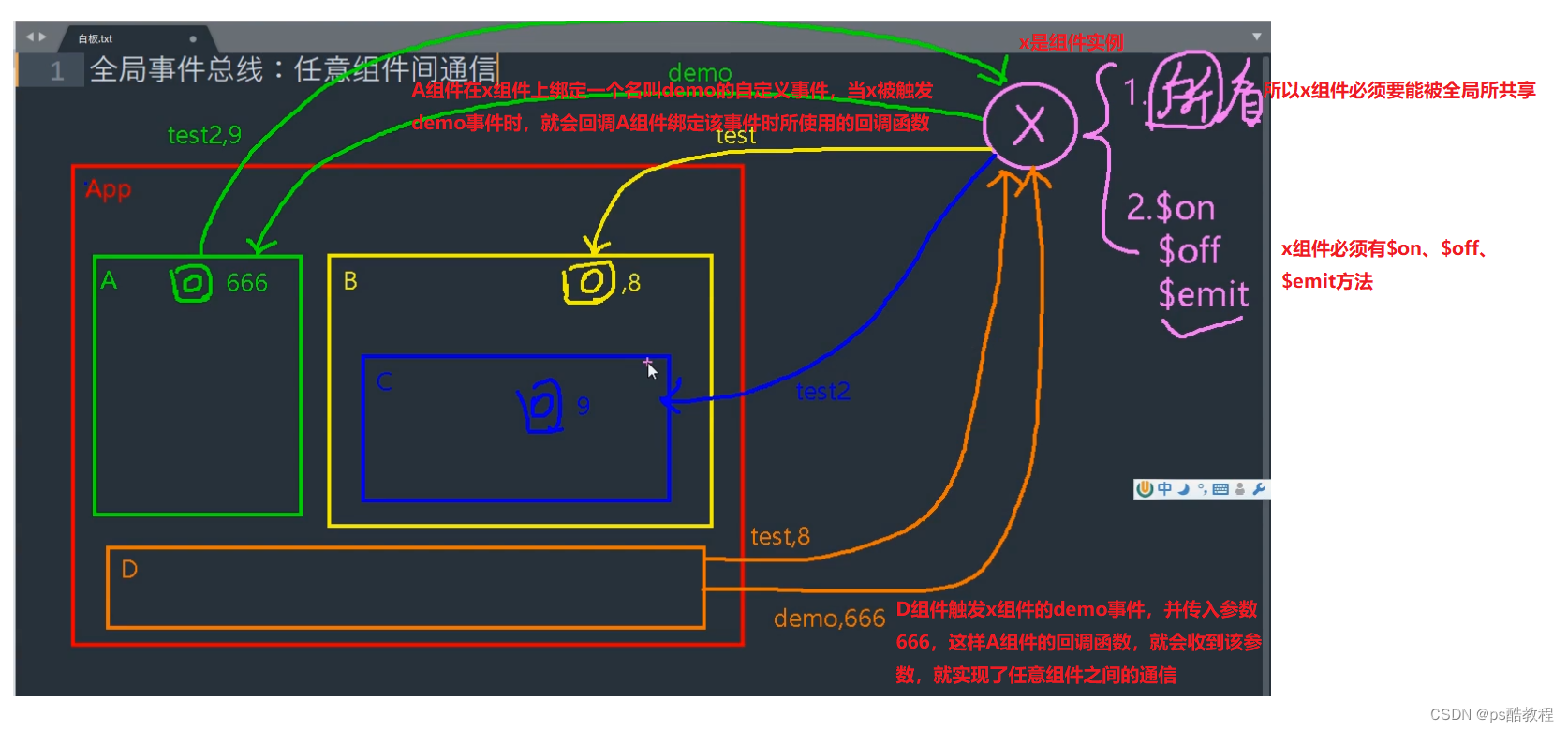
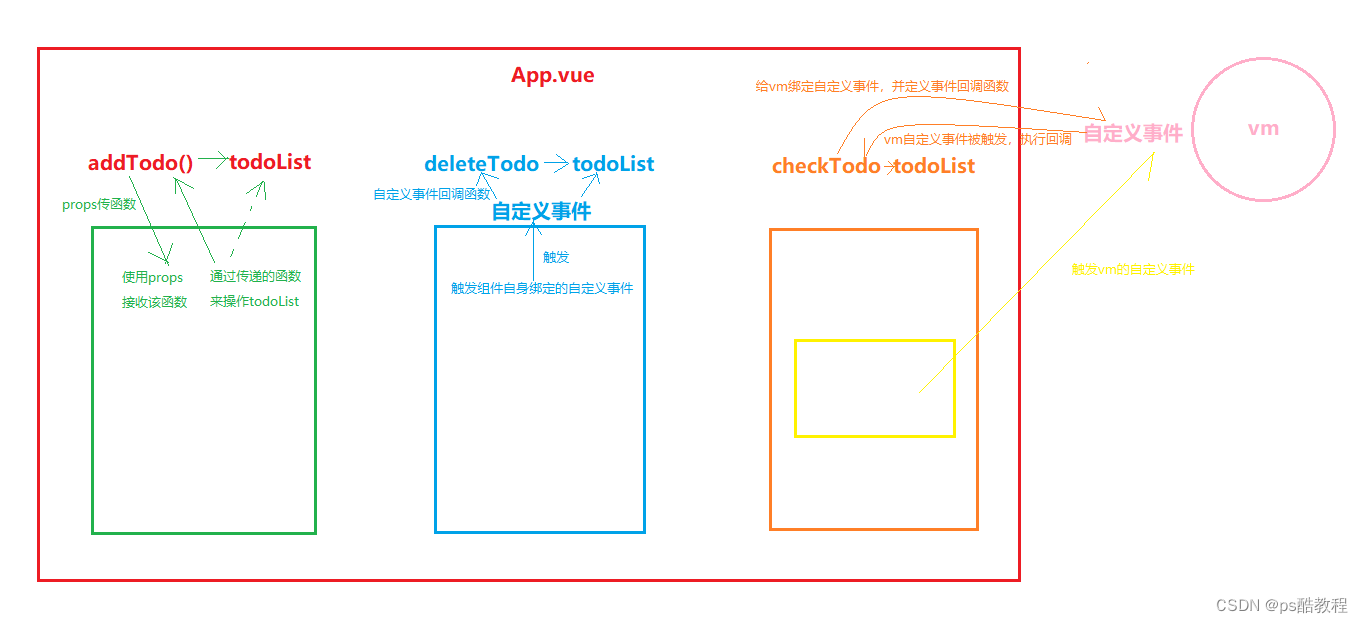
1、一种组件间通信的方式,适用于任意组件间通信。
2、安装全局事件总线:
new Vue({......beforeCreate() {Vue.prototype.$bus = this //安装全局事件总线,$bus就是当前应用的vm},......
})
3、使用事件总线:
- 接收数据:A组件想接收数据,则在A组件中给$bus绑定自定义事件,事件的回调留在A组件自身。
methods(){
demo(data){......}
}
......
mounted() {
this.$bus.$on('xxxx',this.demo)
}
- 提供数据:
this.$bus.$emit('xxxx',数据)
4、最好在beforeDestroy钩子中,用$off去解绑当前组件所用到的事件。
案例代码
main.js
//引入Vue
import Vue from 'vue'
//引入App
import App from './App.vue'
//关闭Vue的生产提示
Vue.config.productionTip = false// 自己手动通过组件自定义事件实现事件总线(全局事件总线的本质,就是自定义事件)
const Demo = Vue.extend({}) // 返回的是全新定义的VueComponent构造函数
const d = new  Demo()       // 使用VueComponent构造函数,去创建一个组件实例对象
Vue.prototype.$x = d // 将组件实例挂载到Vue的原型对象上的自定义属性$x上//创建vm
new Vue({el:'#app',render: h => h(App),beforeCreate() {Vue.prototype.$bus = this //安装全局事件总线,将vm挂载到构造函数Vue的原型对象上,这样每个vc都能访问到,包括vm},
})
App.vue
<template><div class="app"><h1>{{msg}}</h1><School/><Student/></div>
</template><script>import Student from './components/Student'import School from './components/School'export default {name:'App',components:{School,Student},data() {return {msg:'你好啊!',}}}
</script><style scoped>.app{background-color: gray;padding: 5px;}
</style>
School.vue
<template><div class="school"><h2>学校名称:{{name}}</h2><h2>学校地址:{{address}}</h2></div>
</template><script>export default {name:'School',data() {return {name:'尚硅谷',address:'北京',}},mounted() {// console.log('School',this)this.$bus.$on('hello',(data)=>{ // 原则其实就是:数据在哪,对数据的操作就在哪,// 当然事件总线的回调函数就应该定义在哪console.log('我是School组件,收到了数据',data)})},beforeDestroy() {this.$bus.$off('hello') // 别忘了,在组件销毁的时候,解绑事件。因为this.$bus是全局的!},}
</script><style scoped>.school{background-color: skyblue;padding: 5px;}
</style>
Student.vue
<template><div class="student"><h2>学生姓名:{{name}}</h2><h2>学生性别:{{sex}}</h2><button @click="sendStudentName">把学生名给School组件</button></div>
</template><script>export default {name:'Student',data() {return {name:'张三',sex:'男',}},mounted() {// console.log('Student',this.x)},methods: {sendStudentName(){// 这里触发vm的hello事件后,可以触发所有绑定在hello这个事件的回调函数// 换句话说:针对vm的hello事件,允许有多个组件对此事件绑定回调this.$bus.$emit('hello',this.name)}},}
</script><style lang="less" scoped>.student{background-color: pink;padding: 5px;margin-top: 30px;}
</style>
12. 消息订阅与发布
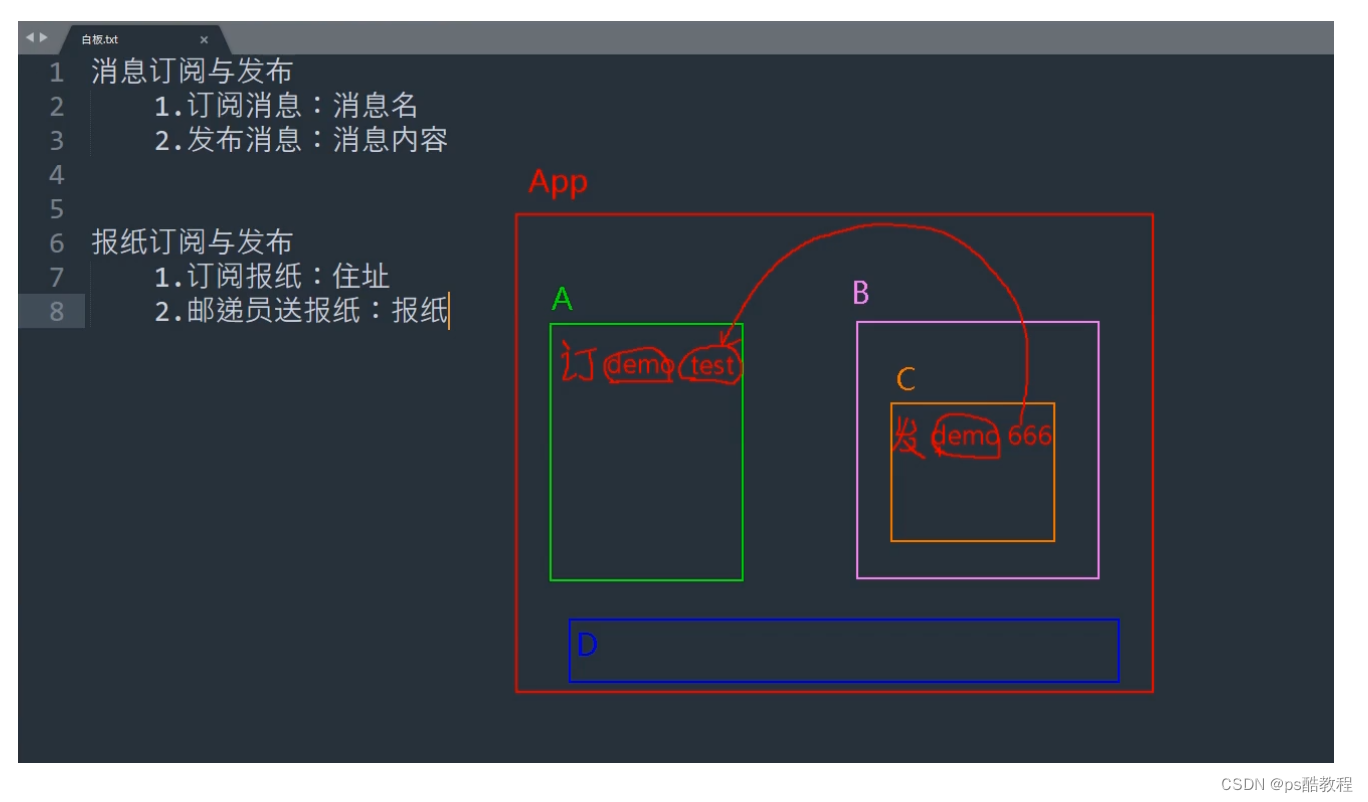
1、一种组件间通信的方式,适用于任意组件间通信。
2、 使用步骤:
-
安装pubsub:
npm i pubsub-js -
引入:
import pubsub from 'pubsub-js' -
接收数据:A组件想接收数据,则在A组件中订阅消息,订阅的回调留在A组件自身。
methods(){demo(data){......} } ...... mounted() {this.pid = pubsub.subscribe('xxx',this.demo) //订阅消息 } -
提供数据:
pubsub.publish('xxx',数据) -
最好在beforeDestroy钩子中,用
PubSub.unsubscribe(pid)去取消订阅。
案例代码
main.js
//引入Vue
import Vue from 'vue'
//引入App
import App from './App.vue'
//关闭Vue的生产提示
Vue.config.productionTip = false//创建vm
new Vue({el:'#app',render: h => h(App),
})
App.vue
<template><div class="app"><h1>{{msg}}</h1><School/><Student/></div>
</template><script>import Student from './components/Student'import School from './components/School'export default {name:'App',components:{School,Student},data() {return {msg:'你好啊!',}}}
</script><style scoped>.app{background-color: gray;padding: 5px;}
</style>
School.vue
<template><div class="school"><h2>学校名称:{{name}}</h2><h2>学校地址:{{address}}</h2></div>
</template><script>import pubsub from 'pubsub-js'export default {name:'School',data() {return {name:'尚硅谷',address:'北京',}},mounted() {// console.log('School',this)/* this.$bus.$on('hello',(data)=>{console.log('我是School组件,收到了数据',data)}) */this.pubId = pubsub.subscribe('hello',(msgName,data)=>{ //第一个参数是消息的名字,第二个是消息内容console.log(this) // 写成箭头函数,由于箭头函数没有自己的this,就会找到mounted的this// 如果这里不写成箭头函数,那么这里的this是undefined// console.log('有人发布了hello消息,hello消息的回调执行了',msgName,data)})},beforeDestroy() {// this.$bus.$off('hello')pubsub.unsubscribe(this.pubId) // 记得取消订阅},}
</script><style scoped>.school{background-color: skyblue;padding: 5px;}
</style>
Student.vue
<template><div class="student"><h2>学生姓名:{{name}}</h2><h2>学生性别:{{sex}}</h2><button @click="sendStudentName">把学生名给School组件</button></div>
</template><script>import pubsub from 'pubsub-js'export default {name:'Student',data() {return {name:'张三',sex:'男',}},mounted() {// console.log('Student',this.x)},methods: {sendStudentName(){// this.$bus.$emit('hello',this.name)pubsub.publish('hello',666)}},}
</script><style lang="less" scoped>.student{background-color: pink;padding: 5px;margin-top: 30px;}
</style>
13. $nextTick
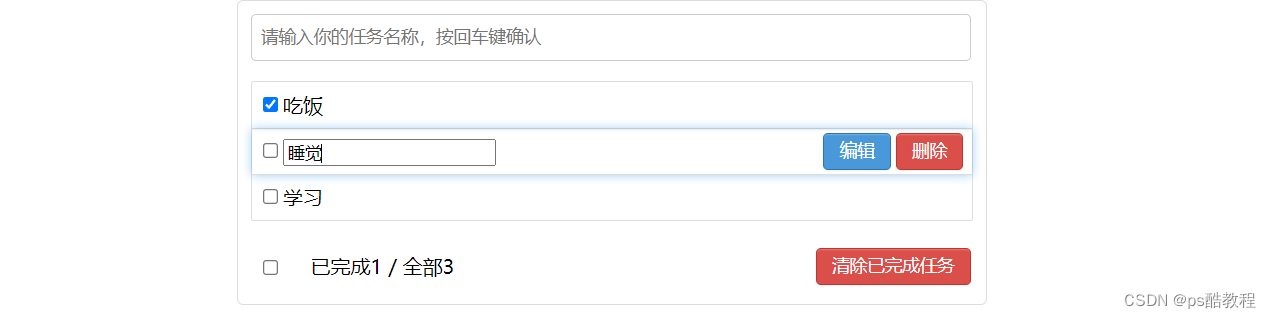
1、语法:this.$nextTick(回调函数)
2、作用:在下一次 DOM 更新结束后执行其指定的回调。
3、什么时候用:当改变数据后,要基于更新后的新DOM进行某些操作时,要在==$nextTick所指定的回调函数==中执行。
案例代码
MyItem.vue
<template><li><label><input type="checkbox" :checked="todo.done" @change="handleCheck(todo.id)"/><!-- 如下代码也能实现功能,但是不太推荐,因为有点违反原则,因为修改了props --><!-- <input type="checkbox" v-model="todo.done"/> --><span v-show="!todo.isEdit">{{todo.title}}</span><input type="text" v-show="todo.isEdit" :value="todo.title" @blur="handleBlur(todo,$event)"ref="inputTitle"></label><button class="btn btn-danger" @click="handleDelete(todo.id)">删除</button><button v-show="!todo.isEdit" class="btn btn-edit" @click="handleEdit(todo)">编辑</button></li>
</template><script>import pubsub from 'pubsub-js'export default {name:'MyItem',//声明接收todoprops:['todo'],methods: {//勾选or取消勾选handleCheck(id){//通知App组件将对应的todo对象的done值取反// this.checkTodo(id)this.$bus.$emit('checkTodo',id)},//删除handleDelete(id){if(confirm('确定删除吗?')){//通知App组件将对应的todo对象删除// this.deleteTodo(id)// this.$bus.$emit('deleteTodo',id)pubsub.publish('deleteTodo',id)}},//编辑handleEdit(todo){if(todo.hasOwnProperty('isEdit')){ // 判断是否有todo对象上isEdit属性// 这里修改值后,页面还没有渲染,因此input框还没到页面,所以在下面是操作不到input框的todo.isEdit = true }else{// console.log('@')this.$set(todo,'isEdit',true) // 添加一个属性,并为之添加响应式的api}// vue会等到这里的方法块都执行完,才会重新解析模板,所以下面给input框获取焦点,必须要包在$nextTick中// 等到dom重新渲染结束后,再执行获取焦点的操作// (这样也是为了一个效率的问题,方法里面有可能多次修改数据,那不可能每次修改都重新解析一遍吧)this.$nextTick(function(){this.$refs.inputTitle.focus()})},//失去焦点回调(真正执行修改逻辑)handleBlur(todo,e){todo.isEdit = falseif(!e.target.value.trim()) return alert('输入不能为空!')this.$bus.$emit('updateTodo',todo.id,e.target.value)}},}
</script><style scoped>/*item*/li {list-style: none;height: 36px;line-height: 36px;padding: 0 5px;border-bottom: 1px solid #ddd;}li label {float: left;cursor: pointer;}li label li input {vertical-align: middle;margin-right: 6px;position: relative;top: -1px;}li button {float: right;display: none;margin-top: 3px;}li:before {content: initial;}li:last-child {border-bottom: none;}li:hover{background-color: #ddd;}li:hover button{display: block;}
</style>
14. 过渡与动画
1、作用:在插入、更新或移除 DOM元素时,在合适的时候给元素添加样式类名。
2、图示: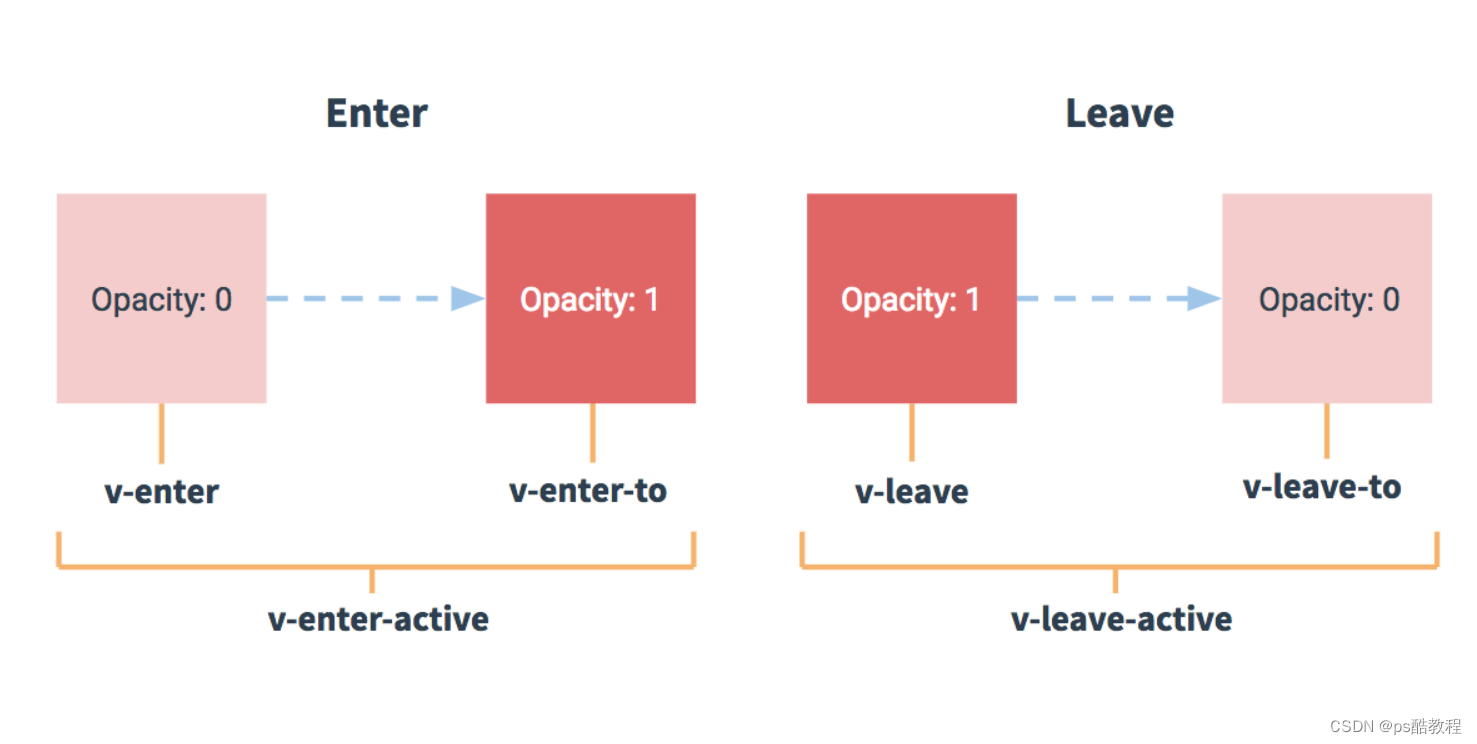
3、写法:
- 准备好样式:
-
元素进入的样式:
v-enter:进入的起点
v-enter-active:进入过程中
v-enter-to:进入的终点
-
元素离开的样式:
v-leave:离开的起点
v-leave-active:离开过程中
v-leave-to:离开的终点
-
使用
<transition>包裹要过度的元素(谁要做动画给谁加),并配置name属性:<transition name="hello"><h1 v-show="isShow">你好啊!</h1> </transition> -
备注:若有多个元素需要过度,则需要使用:
<transition-group>,且每个元素都要指定key值。
案例代码
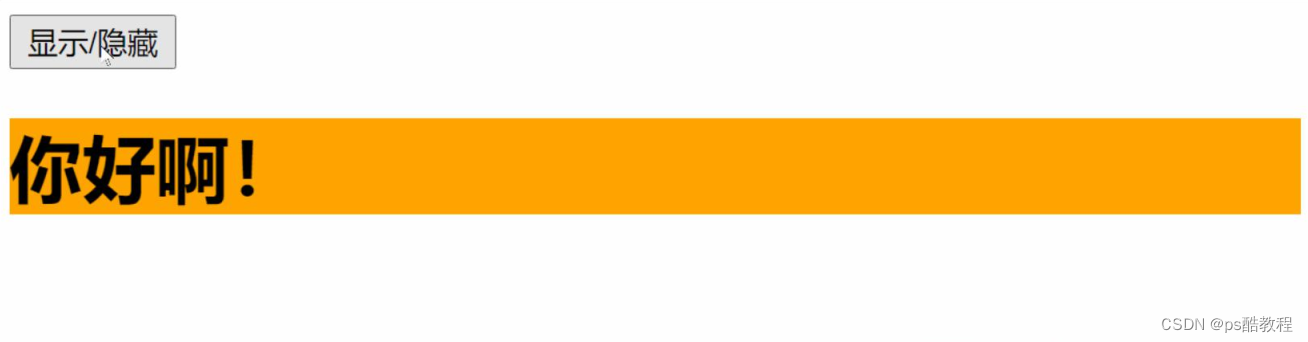
Test.vue
(拿动画写)
<template><div><button @click="isShow = !isShow">显示/隐藏</button><!-- 可以指定一个name,如果有指定,则会找{name}-enter-active/{name}-leave-active类名 如果没有指定name,则默认找v-enter-active/v-leave-active类名--><!-- 也可以写成 :appear="true"表示一开始就使用动画 --><transition name="hello" appear> <h1 v-show="isShow">你好啊!</h1></transition></div>
</template><script>export default {name:'Test',data() {return {isShow:true}},}
</script><style scoped>h1{background-color: orange;}.hello-enter-active{animation: atguigu 0.5s linear;}.hello-leave-active{animation: atguigu 0.5s linear reverse;}@keyframes atguigu {from{transform: translateX(-100%);}to{transform: translateX(0px);}}
</style>
Test2.vue
(拿过渡写)
<template><div><button @click="isShow = !isShow">显示/隐藏</button><transition-group name="hello" appear><h1 v-show="!isShow" key="1">你好啊!</h1><h1 v-show="isShow" key="2">尚硅谷!</h1></transition-group></div>
</template><script>export default {name:'Test',data() {return {isShow:true}},}
</script><style scoped>h1{background-color: orange;}/* 进入的起点、离开的终点 */.hello-enter,.hello-leave-to{transform: translateX(-100%);}.hello-enter-active,.hello-leave-active{transition: 0.5s linear;}/* 进入的终点、离开的起点 */.hello-enter-to,.hello-leave{transform: translateX(0);}</style>
Test3.vue
(第三方动画)
第一步:安装
npm install animate.css --save // 官网https://www.npmjs.com/package/animate.css、https://animate.style/
第二步:引入
import 'animate.css'; // 直接在vue文件中引入即可
示例
<template><div><button @click="isShow = !isShow">显示/隐藏</button><transition-group appearname="animate__animated animate__bounce" enter-active-class="animate__swing"leave-active-class="animate__backOutUp"><h1 v-show="!isShow" key="1">你好啊!</h1><h1 v-show="isShow" key="2">尚硅谷!</h1></transition-group></div>
</template><script>import 'animate.css' // 引入css不需要from啥的export default {name:'Test',data() {return {isShow:true}},}
</script><style scoped>h1{background-color: orange;}
</style>
15. 配置代理服务器
方法一
在vue.config.js中添加如下配置:
devServer:{proxy:"http://localhost:5000"
}
说明:
1、优点:配置简单,请求资源时直接发给前端(8080)即可。
2、缺点:不能配置多个代理,不能灵活的控制请求是否走代理。
3、工作方式:若按照上述配置代理,当请求了前端不存在的资源时,那么该请求才会由代理服务器转发给服务器
(注意:这种配置方式,它会优先匹配前端资源,前端资源默认以public文件夹作为资源的根路径)
方法二
编写vue.config.js配置具体代理规则:
module.exports = {devServer: {proxy: {'/api1': {// 匹配所有以 '/api1'开头的请求路径target: 'http://localhost:5000',// 代理目标的基础路径changeOrigin: true,pathRewrite: {'^/api1': ''} // 将请求路径前面的/api1替换为空,然后再把请求发给5000服务器},'/api2': {// 匹配所有以 '/api2'开头的请求路径target: 'http://localhost:5001',// 代理目标的基础路径changeOrigin: true,pathRewrite: {'^/api2': ''}}}}
}
/*changeOrigin设置为true时,服务器收到的请求头中的host为:localhost:5000changeOrigin设置为false时,服务器收到的请求头中的host为:localhost:8080changeOrigin默认值为true
*/
说明:
1、优点:可以配置多个代理,且可以灵活的控制请求是否走代理。
2、缺点:配置略微繁琐,请求资源时必须加前缀。
案例代码
安装axios:npm install axios
main.js
//引入Vue
import Vue from 'vue'
//引入App
import App from './App.vue'
//关闭Vue的生产提示
Vue.config.productionTip = false//创建vm
new Vue({el:'#app',render: h => h(App),beforeCreate() {Vue.prototype.$bus = this},
})
App.vue
<template><div><button @click="getStudents">获取学生信息</button><button @click="getCars">获取汽车信息</button></div>
</template><script>import axios from 'axios'export default {name:'App',methods: {getStudents(){axios.get('http://localhost:8080/students').then(response => {console.log('请求成功了',response.data)},error => {console.log('请求失败了',error.message)})},getCars(){axios.get('http://localhost:8080/demo/cars').then(response => {console.log('请求成功了',response.data)},error => {console.log('请求失败了',error.message)})}},}
</script>
vue.config.js
module.exports = {pages: {index: {//入口entry: 'src/main.js',},},lintOnSave:false, //关闭语法检查//开启代理服务器(方式一)/* devServer: {proxy: 'http://localhost:5000'}, *///开启代理服务器(方式二)devServer: {proxy: {'/atguigu': {target: 'http://localhost:5000',pathRewrite:{'^/atguigu':''},// ws: true, //用于支持websocket// changeOrigin: true //用于控制请求头中的host值},'/demo': {target: 'http://localhost:5001',pathRewrite:{'^/demo':''},// ws: true, //用于支持websocket// changeOrigin: true //用于控制请求头中的host值}}}
}
16. github搜索案例
案例代码
main.js
//引入Vue
import Vue from 'vue'
//引入App
import App from './App.vue'
//关闭Vue的生产提示
Vue.config.productionTip = false//创建vm
new Vue({el:'#app',render: h => h(App),beforeCreate() {Vue.prototype.$bus = this},
})
App.vue
<template><div class="container"><Search/><List/></div>
</template><script>import Search from './components/Search'import List from './components/List'export default {name:'App',components:{Search,List}}
</script>
Search.vue
<template><section class="jumbotron"><h3 class="jumbotron-heading">Search Github Users</h3><div><input type="text" placeholder="enter the name you search" v-model="keyWord"/> <button @click="searchUsers">Search</button></div></section>
</template><script>
import axios from 'axios'
export default {name:'Search',data() {return {keyWord:''}},methods: {searchUsers(){//请求前更新List的数据this.$bus.$emit('updateListData',{isLoading:true,errMsg:'',users:[],isFirst:false})axios.get(`https://api.github.com/search/users?q=${this.keyWord}`).then(response => {console.log('请求成功了')//请求成功后更新List的数据this.$bus.$emit('updateListData',{isLoading:false,errMsg:'',users:response.data.items})},error => {//请求后更新List的数据this.$bus.$emit('updateListData',{isLoading:false,errMsg:error.message,users:[]})})}},
}
</script>List.vue
<template><div class="row"><!-- 展示用户列表 --><div v-show="info.users.length" class="card" v-for="user in info.users" :key="user.login"><a :href="user.html_url" target="_blank"><img :src="user.avatar_url" style='width: 100px'/></a><p class="card-text">{{user.login}}</p></div><!-- 展示欢迎词 --><h1 v-show="info.isFirst">欢迎使用!</h1><!-- 展示加载中 --><h1 v-show="info.isLoading">加载中....</h1><!-- 展示错误信息 --><h1 v-show="info.errMsg">{{info.errMsg}}</h1></div>
</template><script>export default {name:'List',data() {return {info:{isFirst:true,isLoading:false,errMsg:'',users:[]}}},mounted() {this.$bus.$on('updateListData',(dataObj)=>{// this.info = dataObj // 这里为什么可以响应式? // 当info被修改时,肯定是可以被检测到的,因为这样赋值会触发对应的响应式setter方法this.info = {...this.info,...dataObj} /* 属性重名的,后面展开的对象会覆盖前面的属性值 */})},}
</script><style scoped>.album {min-height: 50rem; /* Can be removed; just added for demo purposes */padding-top: 3rem;padding-bottom: 3rem;background-color: #f7f7f7;}.card {float: left;width: 33.333%;padding: .75rem;margin-bottom: 2rem;border: 1px solid #efefef;text-align: center;}.card > img {margin-bottom: .75rem;border-radius: 100px;}.card-text {font-size: 85%;}
</style>
17. vue-resource
安装包:npm install vue-resource
使用:
main.js
//引入Vue
import Vue from 'vue'
//引入App
import App from './App.vue'
//引入插件
import vueResource from 'vue-resource'
//关闭Vue的生产提示
Vue.config.productionTip = false
//使用插件
Vue.use(vueResource)//创建vm
new Vue({el:'#app',render: h => h(App),beforeCreate() {Vue.prototype.$bus = this},
})
Search.vue
<template><section class="jumbotron"><h3 class="jumbotron-heading">Search Github Users</h3><div><input type="text" placeholder="enter the name you search" v-model="keyWord"/> <button @click="searchUsers">Search</button></div></section>
</template><script>
export default {name:'Search',data() {return {keyWord:''}},methods: {searchUsers(){//请求前更新List的数据this.$bus.$emit('updateListData',{isLoading:true,errMsg:'',users:[],isFirst:false})this.$http.get(`https://api.github.com/search/users?q=${this.keyWord}`).then(response => {console.log('请求成功了')//请求成功后更新List的数据this.$bus.$emit('updateListData',{isLoading:false,errMsg:'',users:response.data.items})},error => {//请求后更新List的数据this.$bus.$emit('updateListData',{isLoading:false,errMsg:error.message,users:[]})})}},
}
</script>18. 插槽
1、作用:让父组件可以向子组件指定位置插入html结构,也是一种组件间通信的方式,适用于 父组件 ===> 子组件 。
2、分类:默认插槽、具名插槽、作用域插槽
3、使用方式:
默认插槽
父组件中:<Category><div>html结构1</div></Category>子组件中:<template><div><!-- 定义插槽 --><slot>插槽默认内容...</slot></div></template>
具名插槽
父组件中:<Category><template slot="center"><div>html结构1</div></template><template v-slot:footer><div>html结构2</div></template></Category>子组件中:<template><div><!-- 定义插槽 --><slot name="center">插槽默认内容...</slot><slot name="footer">插槽默认内容...</slot></div></template>
作用域插槽
1、理解:数据在组件的自身,但根据数据生成的结构需要组件的使用者来决定。(games数据在Category组件中,但使用数据所遍历出来的结构由App组件决定)
2、具体编码:
父组件中:<Category><template scope="scopeData"><!-- 生成的是ul列表 --><ul><li v-for="g in scopeData.games" :key="g">{{g}}</li></ul></template></Category><Category><template slot-scope="scopeData"><!-- 生成的是h4标题 --><h4 v-for="g in scopeData.games" :key="g">{{g}}</h4></template></Category>子组件中:<template><div><slot :games="games"></slot></div></template><script>export default {name:'Category',props:['title'],//数据在子组件自身data() {return {games:['红色警戒','穿越火线','劲舞团','超级玛丽']}},}</script>
1. 默认插槽
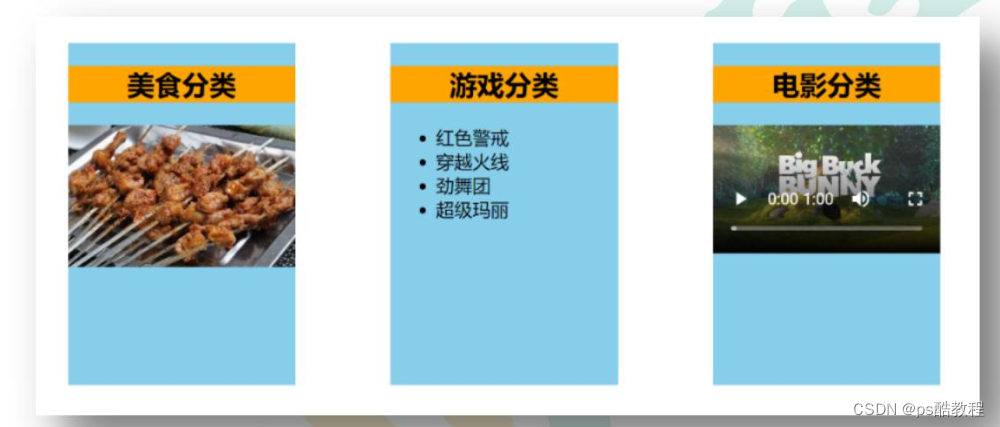
App.vue
<template><div class="container"><Category title="美食" > <img src="https://s3.ax1x.com/2021/01/16/srJlq0.jpg" alt=""></Category><!-- 它会把组件标签中的标签体全部内容当作一个整体,塞到Category组件中的<slot></slot>标签中,并且,如果Category组件中有多个<slot></slot>,那么每个<slot></slot>标签中都会塞一个这样的整体--><Category title="游戏" ><!-- 组件中的标签体内容是解析完成后,才传到Category组件的插槽中--><ul><li v-for="(g,index) in games" :key="index">{{g}}</li></ul></Category><Category title="电影"><video controls src="http://clips.vorwaerts-gmbh.de/big_buck_bunny.mp4"></video></Category></div>
</template><script>import Category from './components/Category'export default {name:'App',components:{Category},data() {return {foods:['火锅','烧烤','小龙虾','牛排'],games:['红色警戒','穿越火线','劲舞团','超级玛丽'],films:['《教父》','《拆弹专家》','《你好,李焕英》','《尚硅谷》']}},}
</script><style scoped>.container{display: flex;justify-content: space-around;}
</style>
Category.vue
<template><div class="category"><h3>{{title}}分类</h3><!-- 定义一个插槽(挖个坑,等着组件的使用者进行填充) --><slot>我是一些默认值,当使用者没有传递具体结构时,我会出现</slot></div>
</template><script>export default {name:'Category',props:['title']}
</script><style scoped>.category{background-color: skyblue;width: 200px;height: 300px;}h3{text-align: center;background-color: orange;}video{width: 100%;}img{width: 100%;}
</style>
2. 具名插槽
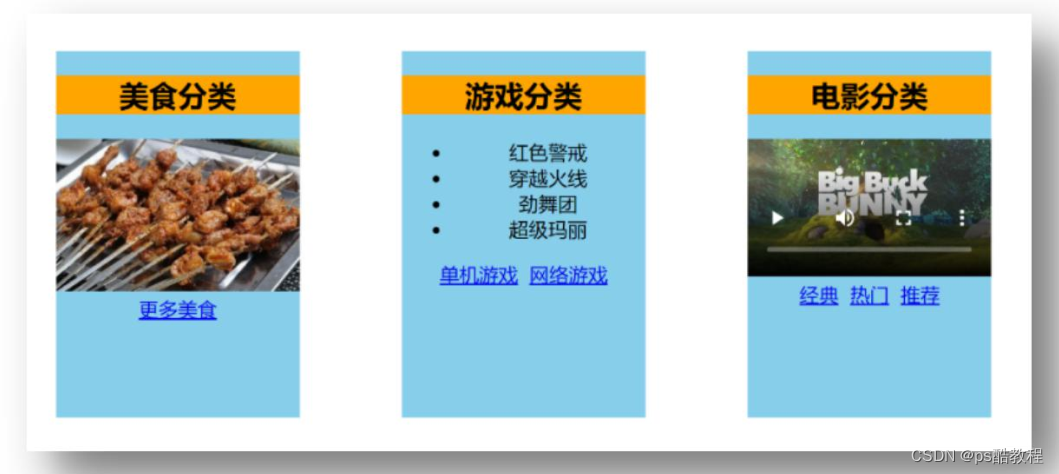
App.vue
<template><div class="container"><Category title="美食" ><!-- 指定当前标签体插到Category中指定名称的slot插槽中,1. 多个标签体可以指定同一个插槽名,插入到同一个插槽中2. 没有指定插槽名的标签体,将都会插入到Category组件中的不具名的slot插槽中3. 如果标签体指定的插槽名,在Category中不存在,则不会插入--><img slot="center" src="https://s3.ax1x.com/2021/01/16/srJlq0.jpg" alt=""><a slot="footer" href="http://www.atguigu.com">更多美食</a></Category><Category title="游戏" ><ul slot="center"><li v-for="(g,index) in games" :key="index">{{g}}</li></ul><div class="foot" slot="footer"><a href="http://www.atguigu.com">单机游戏</a><a href="http://www.atguigu.com">网络游戏</a></div></Category><Category title="电影"><video slot="center" controls src="http://clips.vorwaerts-gmbh.de.mp4"></video><!-- 如果使用template标签,则可以使用新的语法: v-slot:插槽名 ,template标签不会被渲染--><template v-slot:footer><div class="foot"><a href="http://www.atguigu.com">经典</a><a href="http://www.atguigu.com">热门</a><a href="http://www.atguigu.com">推荐</a></div><h4>欢迎前来观影</h4></template></Category></div>
</template><script>import Category from './components/Category'export default {name:'App',components:{Category},data() {return {foods:['火锅','烧烤','小龙虾','牛排'],games:['红色警戒','穿越火线','劲舞团','超级玛丽'],films:['《教父》','《拆弹专家》','《你好,李焕英》','《尚硅谷》']}},}
</script><style scoped>.container,.foot{display: flex;justify-content: space-around;}h4{text-align: center;}
</style>
Category.vue
<template><div class="category"><h3>{{title}}分类</h3><!-- 定义一个插槽(挖个坑,等着组件的使用者进行填充) --><slot name="center">我是一些默认值,当使用者没有传递具体结构时,我会出现1</slot><slot name="footer">我是一些默认值,当使用者没有传递具体结构时,我会出现2</slot></div>
</template><script>export default {name:'Category',props:['title']}
</script><style scoped>.category{background-color: skyblue;width: 200px;height: 300px;}h3{text-align: center;background-color: orange;}video{width: 100%;}img{width: 100%;}
</style>
3. 作用域插槽
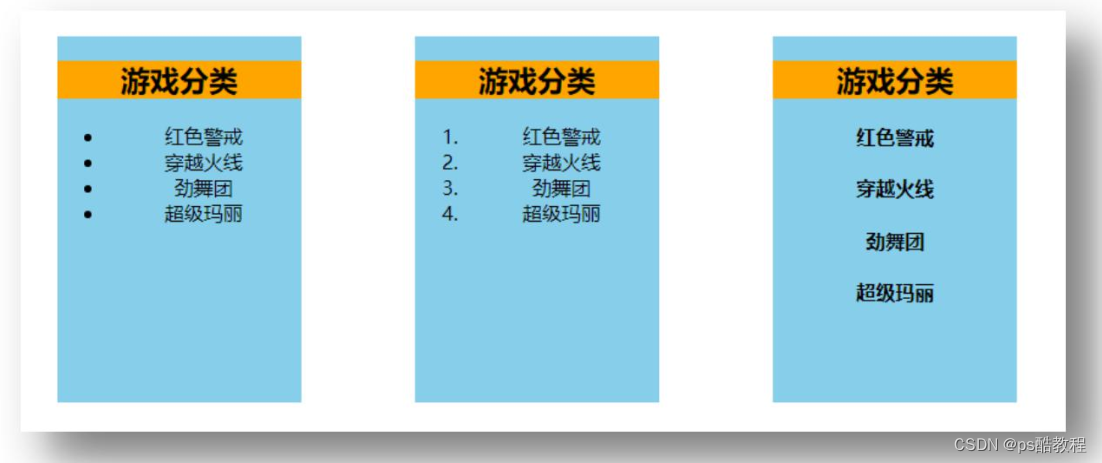
App.vue
<template><div class="container"><Category title="游戏"><!-- 这里使用作用域插槽必须要使用template包裹起来 --><!-- 这里的特点就是: 使用者定义结构,数据由插槽提供 --><!-- 就相当于原本在Category组件中的数据的作用域扩展到使用者中也可以使用了 --><template scope="atguigu">{{name}} <!-- 这个name可以是App.vue组件中的数据 --><ul><!-- 注意这个数据: games不在当前App.vue组件中 --><li v-for="(g,index) in atguigu.games" :key="index">{{g}}</li></ul></template></Category><Category title="游戏"><template scope="{games}">{{name}}<ol><li style="color:red" v-for="(g,index) in games" :key="index">{{g}}</li></ol></template></Category><Category title="游戏"><!-- 注意还可以写成slot-scope这种写法哦,这是一种新的Api --><template slot-scope="{games}">{{name}}<h4 v-for="(g,index) in games" :key="index">{{g}}</h4></template></Category></div>
</template><script>import Category from './components/Category'export default {name:'App',components:{Category},data:{return {name:'zzhua'}}}
</script><style scoped>.container,.foot{display: flex;justify-content: space-around;}h4{text-align: center;}
</style>
Category.vue
<template><div class="category"><h3>{{title}}分类</h3><!-- 注意:作用域插槽中,也可以写name,如果这里写了name,那么template里也要写name,规则同具名插槽 --><slot :games="games" msg="hello">我是默认的一些内容</slot><!-- 这里再写一个名叫test1的具名插槽 --><slot name="test1"></slot></div>
</template><script>export default {name:'Category',props:['title'],data() {return {// 注意:数据在这里,而并不在App.vue组件中games:['红色警戒','穿越火线','劲舞团','超级玛丽'],}},}
</script><style scoped>.category{background-color: skyblue;width: 200px;height: 300px;}h3{text-align: center;background-color: orange;}video{width: 100%;}img{width: 100%;}
</style>
19. Vuex
1. vuex 是什么
1、概念:专门在 Vue 中实现集中式状态(数据)管理的一个 Vue 插件,对 vue 应用中多个组件的共享状态进行集中式的管理(读/写),也是一种组件间通信的方式,且适用于任意组件间通信。
2、Github 地址: https://github.com/vuejs/vuex
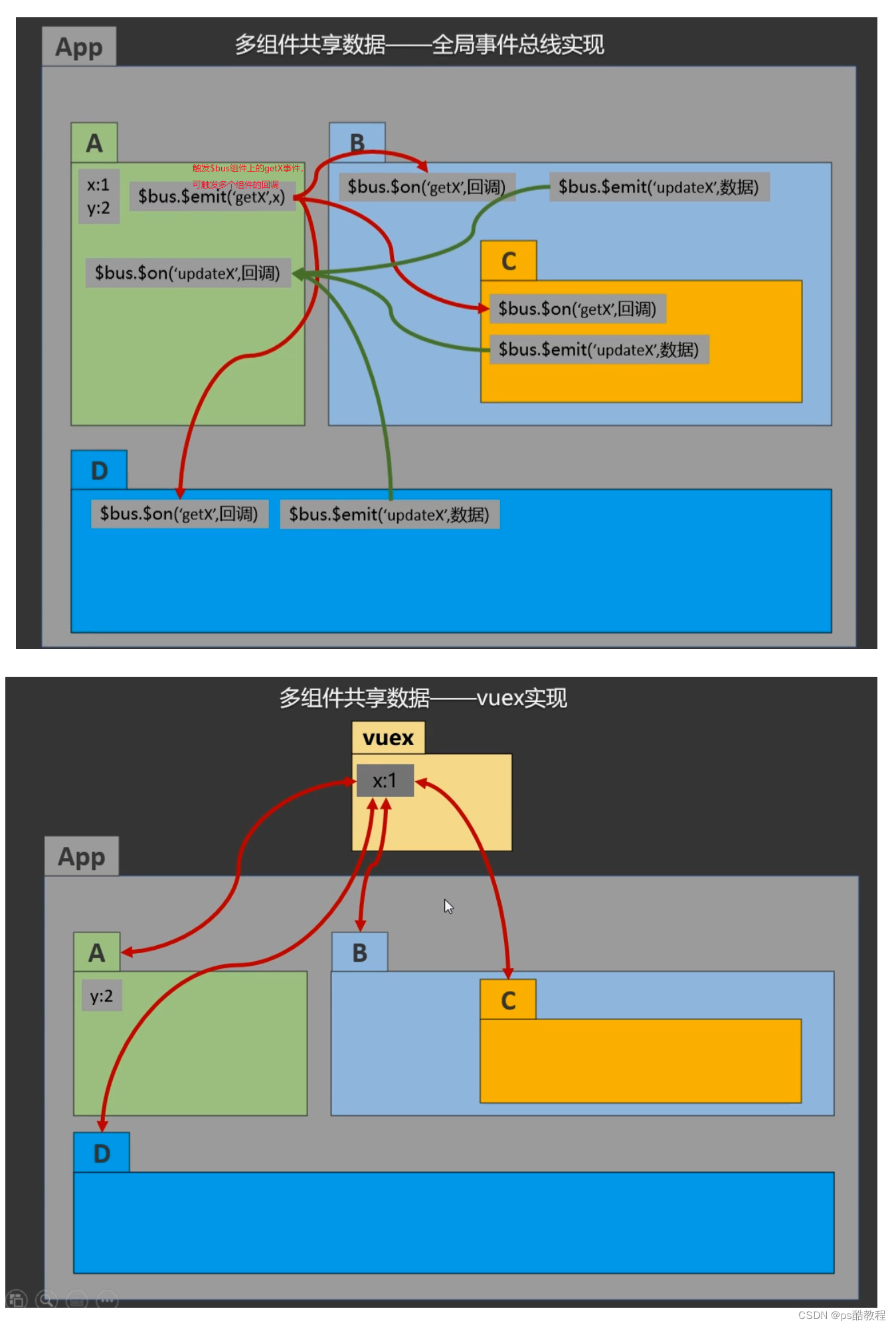
1. 什么时候使用 Vuex
1、多个组件依赖于同一状态
2、来自不同组件的行为需要变更同一状态
就是多个组件需要共享同一份数据
2. Vuex 工作原理图
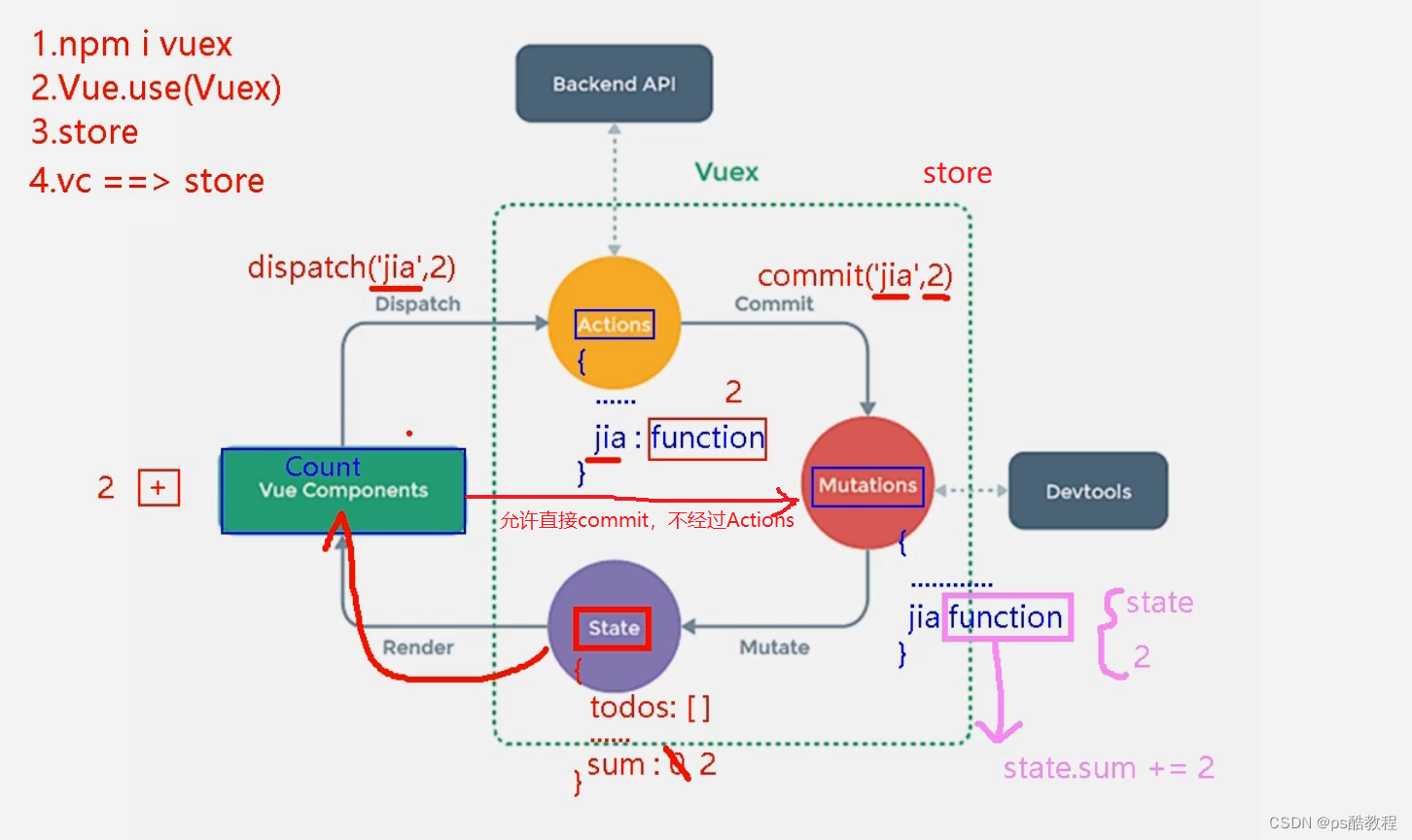
2. 搭建vuex环境
1、安装vuex:npm install vuex
2、创建文件:src/store/index.js
//引入Vue核心库
import Vue from 'vue'
//引入Vuex
import Vuex from 'vuex'
//应用Vuex插件
Vue.use(Vuex)  // 因为必须在创建store实例之前应用Vuex插件,否则会报错//准备actions对象——响应组件中用户的动作
const actions = {}
//准备mutations对象——修改state中的数据
const mutations = {}
//准备state对象——保存具体的数据
const state = {}//准备getters——用于将state中的数据进行加工(这个不是必须的)
const getters = {}//创建并暴露store
export default new Vuex.Store({actions,mutations,state,getters // (这个不是必须的)
})
3、在main.js中创建vm时传入store配置项
......
//引入store
import store from './store'
......//创建vm
new Vue({el:'#app',render: h => h(App),store
})
3. 基本使用
1、初始化数据、配置actions、配置mutations,操作文件store.js
// src/store/index.js文件//引入Vue核心库
import Vue from 'vue'
//引入Vuex
import Vuex from 'vuex'
//引用Vuex
Vue.use(Vuex)const actions = {//响应组件中加的动作(派发action返回的就是一个Promise对象,不管这个action是不是被async修饰)jia(context,value){ // context中包含: commit、dispatch、getters、rootGetters、rootState、state// 这些都可以使用(并且其中包含的dispatch也可以用来派发其它的action)// console.log('actions中的jia被调用了',miniStore,value)context.commit('JIA',value)},
}const mutations = {//执行加JIA(state,value){// console.log('mutations中的JIA被调用了',state,value)state.sum += value}
}//初始化数据 (vuex存储的数据不是持久化的,一旦刷新页面,数据就没了)
const state = {sum:0
}//准备getters——用于将state中的数据进行加工
const getters = {bigSum(state){return state.sum*10 // 依靠返回值}
}//创建并暴露store
export default new Vuex.Store({actions,mutations,state,getters
})
2、组件中读取vuex中的数据:$store.state.sum
3、组件中修改vuex中的数据:$store.dispatch('action中的方法名',数据)或 $store.commit('mutations中的方法名',数据)
4、组件中读取getters中的数据:$store.getters.bigSum
备注:若没有网络请求或其他业务逻辑,组件中也可以越过actions,即不写dispatch,直接编写commit
4. 求和案例_vuex版
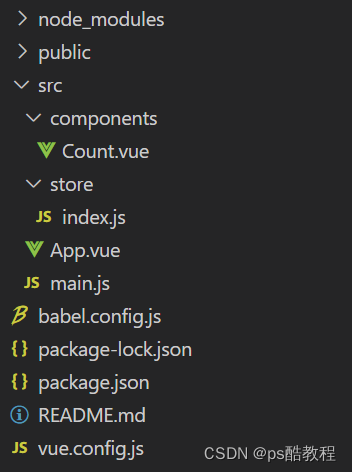
main.js
//引入Vue
import Vue from 'vue'
//引入App
import App from './App.vue'
//引入插件
import vueResource from 'vue-resource'
//引入store
import store from './store' /* 如果需要引入的是文件夹中的index.js,可以省略不写index.js *//* 所有的import不管写在哪里,都会按照书写放到最上方先执行 *///关闭Vue的生产提示
Vue.config.productionTip = false
//使用插件
Vue.use(vueResource)//创建vm
new Vue({el:'#app',render: h => h(App),store, /* 当安装Vuex插件后,才可以配置store,并且vm和vc身上都会有$store属性了 */beforeCreate() {Vue.prototype.$bus = this}
})
store/index.js
// src/store/index.js文件//该文件用于创建Vuex中最为核心的store
import Vue from 'vue'
//引入Vuex
import Vuex from 'vuex'
//应用Vuex插件
Vue.use(Vuex)//准备actions——用于响应组件中的动作
// 如果有业务逻辑,都写在actions中
const actions = {/* jia(context,value){ // contxt中包含了commit、dispatch、getters、state等属性// 所以下面能从context中找到commitconsole.log('actions中的jia被调用了')context.commit('JIA',value) // 这里的这个commit就是store身上的commit(未分模块之前是完全相等的)},jian(context,value){console.log('actions中的jian被调用了')context.commit('JIAN',value)}, */jiaOdd(context,value){console.log('actions中的jiaOdd被调用了')if(context.state.sum % 2){context.commit('JIA',value)}},jiaWait(context,value){console.log('actions中的jiaWait被调用了')setTimeout(()=>{context.commit('JIA',value)},500)}
}
//准备mutations——用于操作数据(state)
// mutations只负责修改state,其它业务逻辑在actions中处理
const mutations = {JIA(state,value){ // state中的sum有匹配了响应式的setter和getterconsole.log('mutations中的JIA被调用了')state.sum += value},JIAN(state,value){console.log('mutations中的JIAN被调用了')state.sum -= value}
}
//准备state——用于存储数据
const state = {sum:0 //当前的和
}//准备getters——用于将state中的数据进行加工
const getters = {bigSum(state){return state.sum*10 // 依靠返回值}
}//创建并暴露store
export default new Vuex.Store({actions,mutations,state,getters
})
App.vue
<template><div><Count/></div>
</template><script>import Count from './components/Count'export default {name:'App',components:{Count},mounted() {// console.log('App',this)},}
</script>
Count.vue
// src/components/count.vue
<template><div><h1>当前求和为:{{$store.state.sum}}</h1><h3>当前求和放大10倍为:{{$store.getters.bigSum}}</h3><!-- 将收集到的n转为number类型, 也可以在下面option的value前加v-bind,这样也会是数字 --><select v-model.number="n"> <option value="1">1</option><option value="2">2</option><option value="3">3</option></select><button @click="increment">+</button><button @click="decrement">-</button><button @click="incrementOdd">当前求和为奇数再加</button><button @click="incrementWait">等一等再加</button></div>
</template><script>export default {name:'Count',data() {return {n:1, //用户选择的数字}},methods: {increment(){this.$store.commit('JIA',this.n) /* 必须保证mutations中有JIA */},decrement(){this.$store.commit('JIAN',this.n)  /* 必须保证mutations中有JIAN */},incrementOdd(){this.$store.dispatch('jiaOdd',this.n) /* 必须保证actions中有jiaOdd */},incrementWait(){this.$store.dispatch('jiaWait',this.n)/* 必须保证actions中有jiaWait */},},mounted() {console.log('Count',this)},}
</script><style lang="css">button{margin-left: 5px;}
</style>
5. mapState与mapGetters&mapMutations与mapActions[简写]
1、mapState方法:用于帮助我们映射state中的数据为计算属性
computed: {//借助mapState生成计算属性:sum、school、subject(对象写法)...mapState({sum:'sum',school:'school',subject:'subject'}),//借助mapState生成计算属性:sum、school、subject(函数写法)...mapState({sum:state=>state.sum})//借助mapState生成计算属性:sum、school、subject(数组写法)...mapState(['sum','school','subject']),
},
2、mapGetters方法:用于帮助我们映射getters中的数据为计算属性
computed: {//借助mapGetters生成计算属性:bigSum(对象写法)...mapGetters({bigSum:'bigSum'}),//借助mapGetters生成计算属性:bigSum(数组写法)...mapGetters(['bigSum'])
},
3、mapActions方法:用于帮助我们生成与actions对话的方法,即:包含$store.dispatch(xxx)的函数
methods:{//靠mapActions生成:incrementOdd、incrementWait(对象形式)...mapActions({incrementOdd:'jiaOdd',incrementWait:'jiaWait'})//靠mapActions生成:incrementOdd、incrementWait(数组形式)...mapActions(['jiaOdd','jiaWait'])
}
4、mapMutations方法:用于帮助我们生成与mutations对话的方法,即:包含$store.commit(xxx)的函数
methods:{//靠mapActions生成:increment、decrement(对象形式)...mapMutations({increment:'JIA',decrement:'JIAN'}),//靠mapMutations生成:JIA、JIAN(对象形式)...mapMutations(['JIA','JIAN']),
}
备注:mapActions与mapMutations使用时,若需要传递参数需要:在模板中绑定事件时传递好参数,否则参数是事件对象。
main.js
//引入Vue
import Vue from 'vue'
//引入App
import App from './App.vue'
//引入插件
import vueResource from 'vue-resource'
//引入store
import store from './store'//关闭Vue的生产提示
Vue.config.productionTip = false
//使用插件
Vue.use(vueResource)//创建vm
new Vue({el:'#app',render: h => h(App),store,beforeCreate() {Vue.prototype.$bus = this}
})
store/index.js
//该文件用于创建Vuex中最为核心的store
import Vue from 'vue'
//引入Vuex
import Vuex from 'vuex'
//应用Vuex插件
Vue.use(Vuex)//准备actions——用于响应组件中的动作
const actions = {/* jia(context,value){console.log('actions中的jia被调用了')context.commit('JIA',value)},jian(context,value){console.log('actions中的jian被调用了')context.commit('JIAN',value)}, */jiaOdd(context,value){console.log('actions中的jiaOdd被调用了')if(context.state.sum % 2){context.commit('JIA',value)}},jiaWait(context,value){console.log('actions中的jiaWait被调用了')setTimeout(()=>{context.commit('JIA',value)},500)}
}
//准备mutations——用于操作数据(state)
const mutations = {JIA(state,value){console.log('mutations中的JIA被调用了')state.sum += value},JIAN(state,value){console.log('mutations中的JIAN被调用了')state.sum -= value}
}
//准备state——用于存储数据
const state = {sum:0, //当前的和school:'尚硅谷',subject:'前端'
}
//准备getters——用于将state中的数据进行加工
const getters = {bigSum(state){return state.sum*10}
}//创建并暴露store
export default new Vuex.Store({actions,mutations,state,getters
})
App.vue
<template><div><Count/></div>
</template><script>import Count from './components/Count'export default {name:'App',components:{Count},mounted() {// console.log('App',this)},}
</script>
Count.vue
<template><div><h1>当前求和为:{{sum}}</h1><h3>当前求和放大10倍为:{{bigSum}}</h3><h3>我在{{school}},学习{{subject}}</h3><select v-model.number="n"><option value="1">1</option><option value="2">2</option><option value="3">3</option></select><button @click="increment(n)">+</button><button @click="decrement(n)">-</button><button @click="incrementOdd(n)">当前求和为奇数再加</button><button @click="incrementWait(n)">等一等再加</button></div>
</template><script>import {mapState,mapGetters,mapMutations,mapActions} from 'vuex'export default {name:'Count',data() {return {n:1, //用户选择的数字}},computed:{//靠程序员自己亲自去写计算属性/*he(){return this.$store.state.sum},xuexiao(){return this.$store.state.school},xueke(){return this.$store.state.subject}, *///借助mapState生成计算属性,从state中读取数据。(对象写法)// ...mapState({he:'sum',xuexiao:'school',xueke:'subject'}),//借助mapState生成计算属性,从state中读取数据。(数组写法)...mapState(['sum','school','subject']),/* ******************************************************************** *//* bigSum(){return this.$store.getters.bigSum}, *///借助mapGetters生成计算属性,从getters中读取数据。(对象写法)// ...mapGetters({bigSum:'bigSum'})//借助mapGetters生成计算属性,从getters中读取数据。(数组写法)...mapGetters(['bigSum'])},methods: {//程序员亲自写方法/* increment(){this.$store.commit('JIA',this.n)},decrement(){this.$store.commit('JIAN',this.n)}, *//*// 其实它生成的是这样的函数,如果不指定参数的话,这个e就是事件对象decrement(e){this.$store.commit('JIAN',e)}*///借助mapMutations生成对应的方法,方法中会调用commit去联系mutations(对象写法)...mapMutations({increment:'JIA',decrement:'JIAN'}),//借助mapMutations生成对应的方法,方法中会调用commit去联系mutations(数组写法)// ...mapMutations(['JIA','JIAN']),/* ************************************************* *///程序员亲自写方法/* incrementOdd(){this.$store.dispatch('jiaOdd',this.n)},incrementWait(){this.$store.dispatch('jiaWait',this.n)}, *///借助mapActions生成对应的方法,方法中会调用dispatch去联系actions(对象写法)...mapActions({incrementOdd:'jiaOdd',incrementWait:'jiaWait'})//借助mapActions生成对应的方法,方法中会调用dispatch去联系actions(数组写法)// ...mapActions(['jiaOdd','jiaWait'])},mounted() {const x = mapState({he:'sum',xuexiao:'school',xueke:'subject'})console.log(x)},}
</script><style lang="css">button{margin-left: 5px;}
</style>
6. 模块化+命名空间
1、目的:让代码更好维护,让多种数据分类更加明确。
2、修改store.js
const countAbout = {namespaced:true,//开启命名空间state:{x:1},mutations: { ... },actions: { ... },getters: {bigSum(state){return state.sum * 10}}
}const personAbout = {namespaced:true,//开启命名空间state:{ ... },mutations: { ... },actions: { ... }
}const store = new Vuex.Store({modules: {countAbout,personAbout}
})
3、开启命名空间后,组件中读取state数据:
//方式一:自己直接读取
this.$store.state.personAbout.list//方式二:借助mapState读取:
...mapState('countAbout',['sum','school','subject']),
4、开启命名空间后,组件中读取getters数据:
//方式一:自己直接读取
this.$store.getters['personAbout/firstPersonName']//方式二:借助mapGetters读取:
...mapGetters('countAbout',['bigSum'])
5、开启命名空间后,组件中调用dispatch
//方式一:自己直接dispatch
this.$store.dispatch('personAbout/addPersonWang',person)//方式二:借助mapActions:
...mapActions('countAbout',{incrementOdd:'jiaOdd',incrementWait:'jiaWait'})
6、开启命名空间后,组件中调用commit
//方式一:自己直接commit
this.$store.commit('personAbout/ADD_PERSON',person)//方式二:借助mapMutations:
...mapMutations('countAbout',{increment:'JIA',decrement:'JIAN'}),
main.js
//引入Vue
import Vue from 'vue'
//引入App
import App from './App.vue'
//引入插件
import vueResource from 'vue-resource'
//引入store
import store from './store'//关闭Vue的生产提示
Vue.config.productionTip = false
//使用插件
Vue.use(vueResource)//创建vm
new Vue({el:'#app',render: h => h(App),store,beforeCreate() {Vue.prototype.$bus = this}
})
store/index.js
//该文件用于创建Vuex中最为核心的store
import Vue from 'vue'
//引入Vuex
import Vuex from 'vuex'
import countOptions from './count'
import personOptions from './person'
//应用Vuex插件
Vue.use(Vuex)//创建并暴露store
export default new Vuex.Store({modules:{countAbout:countOptions,personAbout:personOptions}
})
store/count.js
//求和相关的配置
export default {namespaced:true, /* 开启命名空间,这样mapState()中就可以写命名了 */actions:{jiaOdd(context,value){console.log('actions中的jiaOdd被调用了')if(context.state.sum % 2){context.commit('JIA',value)}},jiaWait(context,value){console.log('actions中的jiaWait被调用了')setTimeout(()=>{context.commit('JIA',value)},500)}},mutations:{JIA(state,value){console.log('mutations中的JIA被调用了')state.sum += value},JIAN(state,value){console.log('mutations中的JIAN被调用了')state.sum -= value},},state:{sum:0, //当前的和school:'尚硅谷',subject:'前端',},getters:{bigSum(state){return state.sum*10}},
}
store/person.js
//人员管理相关的配置
import axios from 'axios'
import { nanoid } from 'nanoid'
export default {namespaced:true,actions:{addPersonWang(context,value){if(value.name.indexOf('王') === 0){context.commit('ADD_PERSON',value)}else{alert('添加的人必须姓王!')}},addPersonServer(context){axios.get('https://api.uixsj.cn/hitokoto/get?type=social').then(response => {context.commit('ADD_PERSON',{id:nanoid(),name:response.data})},error => {alert(error.message)})}},mutations:{ADD_PERSON(state,value){console.log('mutations中的ADD_PERSON被调用了')state.personList.unshift(value)}},state:{personList:[{id:'001',name:'张三'}]},getters:{firstPersonName(state){  /* 这里获取的state就是当前person模块的state */return state.personList[0].name}},
}
App.vue
<template><div><Count/><hr><Person/></div>
</template><script>import Count from './components/Count'import Person from './components/Person'export default {name:'App',components:{Count,Person},mounted() {// console.log('App',this)},}
</script>
Count.vue
<template><div><h1>当前求和为:{{sum}}</h1><h3>当前求和放大10倍为:{{bigSum}}</h3><h3>我在{{school}},学习{{subject}}</h3><h3 style="color:red">Person组件的总人数是:{{personList.length}}</h3><select v-model.number="n"><option value="1">1</option><option value="2">2</option><option value="3">3</option></select><button @click="increment(n)">+</button><button @click="decrement(n)">-</button><button @click="incrementOdd(n)">当前求和为奇数再加</button><button @click="incrementWait(n)">等一等再加</button></div>
</template><script>import {mapState,mapGetters,mapMutations,mapActions} from 'vuex'export default {name:'Count',data() {return {n:1, //用户选择的数字}},computed:{//借助mapState生成计算属性,从state中读取数据。(数组写法)...mapState('countAbout',['sum','school','subject']),...mapState('personAbout',['personList']),// ...mapState({bannerList:state=>state.home.bannerList}) // 获取home模块下的bannerList//借助mapGetters生成计算属性,从getters中读取数据。(数组写法)...mapGetters('countAbout',['bigSum'])},methods: {//借助mapMutations生成对应的方法,方法中会调用commit去联系mutations(对象写法)...mapMutations('countAbout',{increment:'JIA',decrement:'JIAN'}),//借助mapActions生成对应的方法,方法中会调用dispatch去联系actions(对象写法)...mapActions('countAbout',{incrementOdd:'jiaOdd',incrementWait:'jiaWait'})},mounted() {console.log(this.$store)},}
</script><style lang="css">button{margin-left: 5px;}
</style>
Person.vue
<template><div><h1>人员列表</h1><h3 style="color:red">Count组件求和为:{{sum}}</h3><h3>列表中第一个人的名字是:{{firstPersonName}}</h3><input type="text" placeholder="请输入名字" v-model="name"><button @click="add">添加</button><button @click="addWang">添加一个姓王的人</button><button @click="addPersonServer">添加一个人,名字随机</button><ul><li v-for="p in personList" :key="p.id">{{p.name}}</li></ul></div>
</template><script>import {nanoid} from 'nanoid'export default {name:'Person',data() {return {name:''}},computed:{personList(){return this.$store.state.personAbout.personList},sum(){return this.$store.state.countAbout.sum // 不同mapXXX,自己手动写法},firstPersonName(){return this.$store.getters['personAbout/firstPersonName']// 不同mapXXX,自己手动写法}},methods: {add(){const personObj = {id:nanoid(),name:this.name}this.$store.commit('personAbout/ADD_PERSON',personObj) // 不同mapXXX,自己手动写法this.name = ''},addWang(){const personObj = {id:nanoid(),name:this.name}this.$store.dispatch('personAbout/addPersonWang',personObj)// 不同mapXXX,自己手动写法this.name = ''},addPersonServer(){this.$store.dispatch('personAbout/addPersonServer')// 不同mapXXX,自己手动写法}},}
</script>
20. 路由
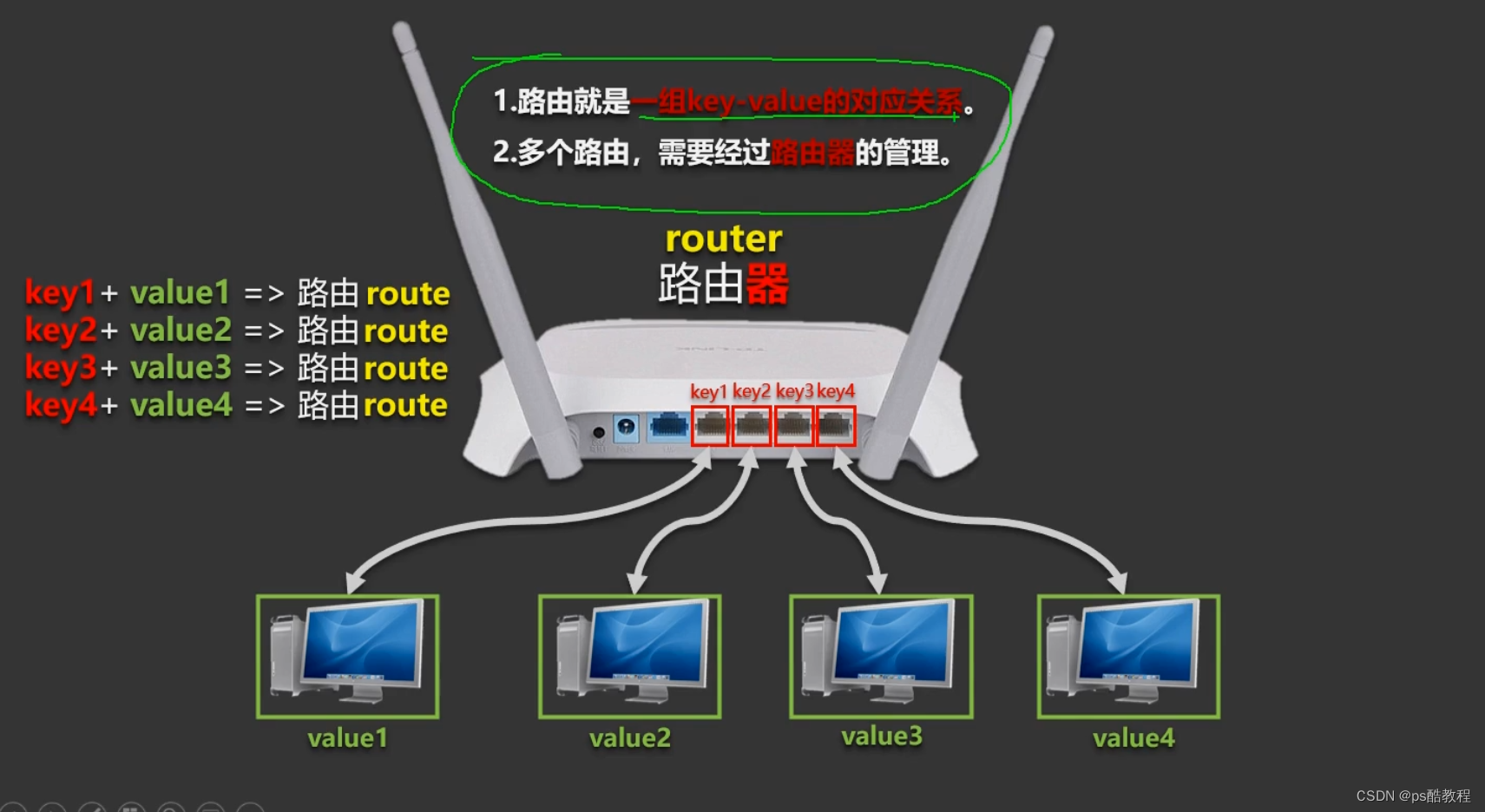
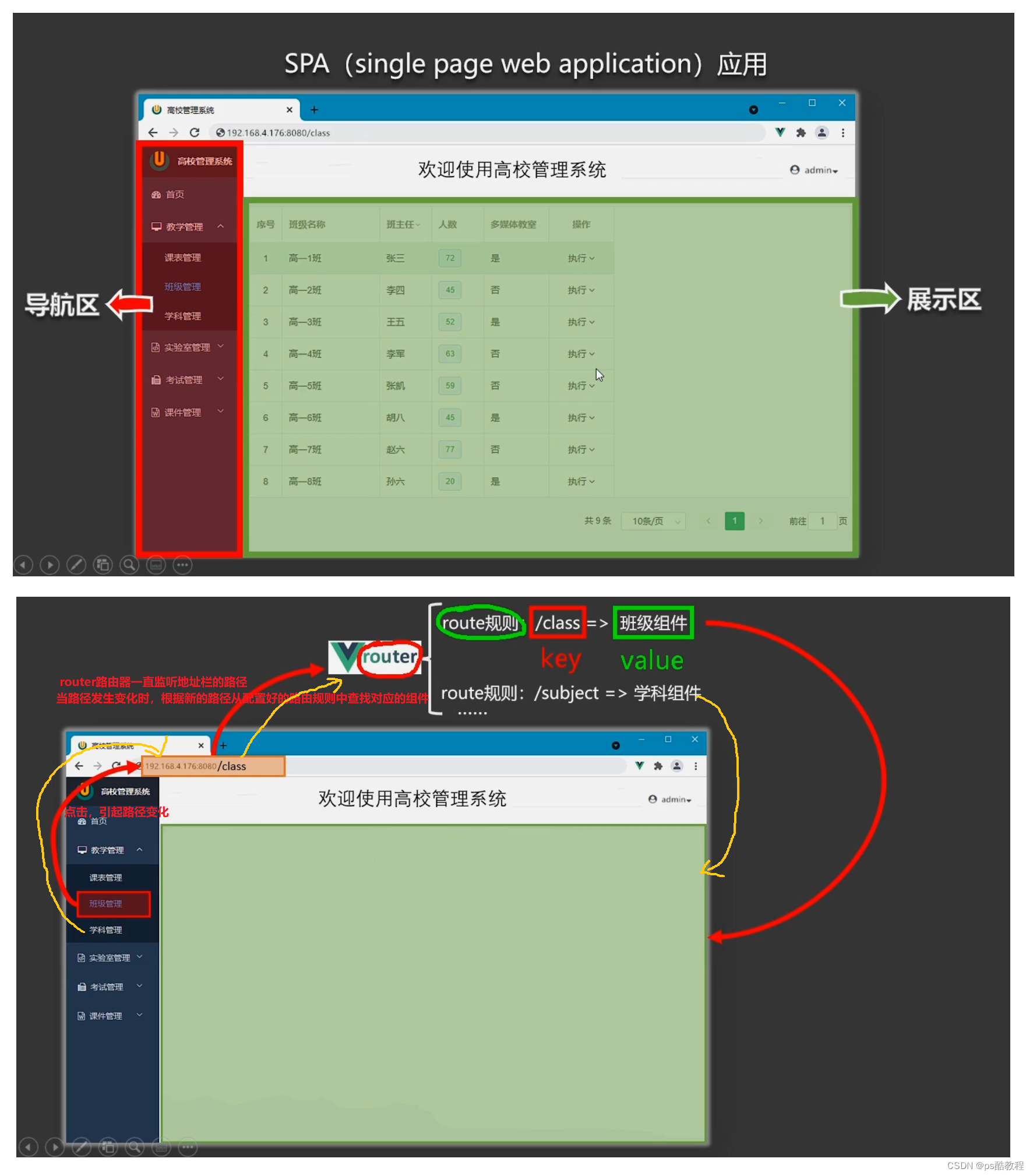
路由相关理解
vue-router 的理解
vue 的一个插件库,专门用来实现 SPA 应用
对 SPA 应用的理解
1、单页 Web 应用(single page web application,SPA)。
2、整个应用只有一个完整的页面。
3、点击页面中的导航链接不会刷新页面,只会做页面的局部更新。
4、数据需要通过 ajax 请求获取。
路由的理解
1、什么是路由?
- 一个路由就是一组映射关系(key - value)
- key 为路径, value 可能是 function 或 component
2、路由分类
- 后端路由:
- 理解:value 是 function, 用于处理客户端提交的请求。
2) 工作过程:服务器接收到一个请求时, 根据请求路径找到匹配的函数,来处理请求, 返回响应数据。
- 理解:value 是 function, 用于处理客户端提交的请求。
- 前端路由:
- 理解:value 是 component,用于展示页面内容。
- 工作过程:当浏览器的路径改变时, 对应的组件就会显示。
基本使用
1、安装vue-router,命令:npm i vue-router
2、应用插件:Vue.use(VueRouter)
3、编写router配置项:
//引入VueRouter
import VueRouter from 'vue-router'
//引入Luyou 组件
import About from '../components/About'
import Home from '../components/Home'//创建router实例对象,去管理一组一组的路由规则
const router = new VueRouter({routes:[{path:'/about',component:About},{path:'/home',component:Home}]
})//暴露router
export default router
4、实现切换(active-class可配置高亮样式)
<router-link active-class="active" to="/about">About</router-link>
5、指定展示位置
<router-view></router-view>
案例代码
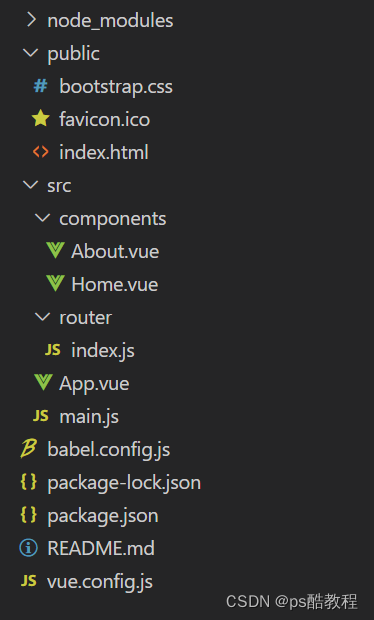
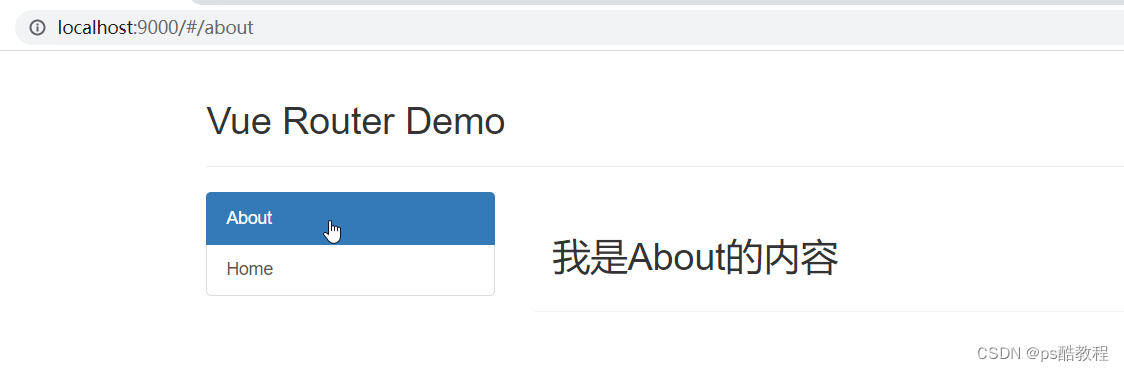
main.js
//引入Vue
import Vue from 'vue'
//引入App
import App from './App.vue'
//引入VueRouter
import VueRouter from 'vue-router'
//引入路由器
import router from './router'//关闭Vue的生产提示
Vue.config.productionTip = false
//应用插件
Vue.use(VueRouter)//创建vm
new Vue({el:'#app',render: h => h(App),router:router /* 当安装vue-router插件后,才可以配置router */
})
App.vue
<template>
<div><div class="row"><div class="col-xs-offset-2 col-xs-8"><div class="page-header"><h2>Vue Router Demo</h2></div></div></div><div class="row"><div class="col-xs-2 col-xs-offset-2"><div class="list-group"><!-- 原始html中我们使用a标签实现页面的跳转 --><!-- <a class="list-group-item active" href="./about.html">About</a> --><!-- <a class="list-group-item" href="./home.html">Home</a> --><!-- Vue中借助router-link标签实现路由的切换 --><!-- router-link最后也会渲染成a标签; active-class表示路由被激活时的样式; to表示要到的路由路径 --><router-link class="list-group-item" active-class="active" to="/about">About</router-link><router-link class="list-group-item" active-class="active" to="/home">Home</router-link></div></div><div class="col-xs-6"><div class="panel"><div class="panel-body"><!-- 指定路由所匹配到的组件的呈现位置 --><router-view></router-view></div></div></div></div>
</div>
</template><script>
export default {name:'App',
}
</script>
router/index.js
// 该文件专门用于创建整个应用的路由器
import VueRouter from 'vue-router'
//引入组件
import About from '../components/About'
import Home from '../components/Home'//创建并暴露一个路由器
export default new VueRouter({routes:[{path:'/about',component:About},{path:'/home',component:Home}]
})
About.vue
<template><h2>我是About的内容</h2>
</template><script>export default {name:'About'}
</script>
Home.vue
<template><h2>我是Home的内容</h2>
</template><script>export default {name:'Home'}
</script>
几个注意点
1、路由组件通常存放在pages文件夹,一般组件通常存放在components文件夹。
2、通过切换,“隐藏”了的路由组件,默认是被销毁掉的,需要的时候再去挂载。
3、每个组件都有$route属性,里面存储着当前的路由信息,并且是同一个对象。
4、整个应用只有一个router,每个组件都可以通过组件的$router属性获取到这一个router。
嵌套路由
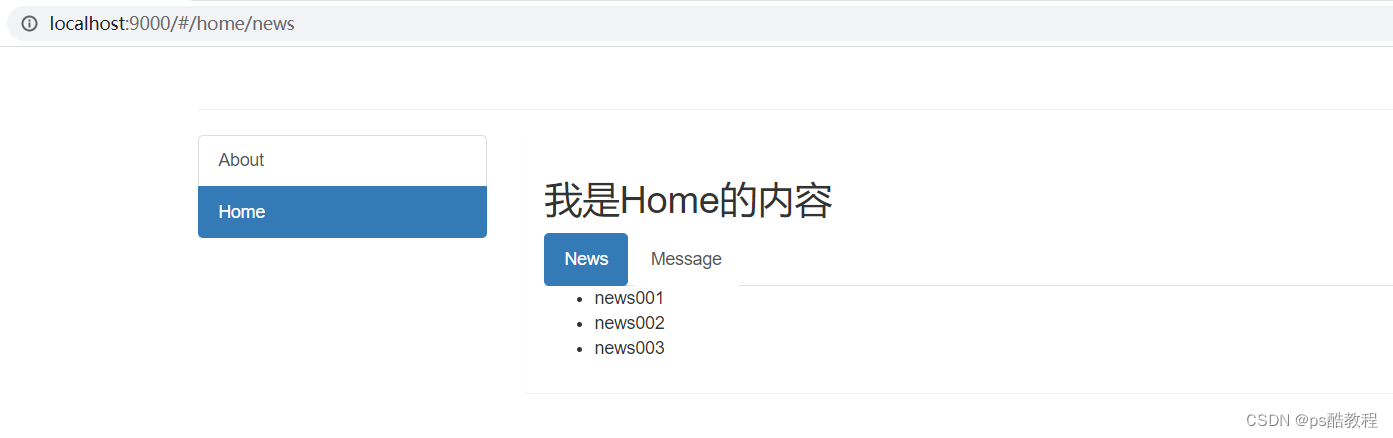
1、配置路由规则,使用children配置项:
routes:[{path:'/about',     // 一级路由component:About,},{path:'/home',component:Home,children:[ //通过children配置子级路由   {path:'', // 可以设置一个空字符串,'/home'默认跳到'/home/news'redirect:'news'},      {                 // 二级路由, // 如果路径匹配到了二级路由,那么先渲染完一级路由所对应的组件,放到App组件的路由位置,// 然后, 渲染二级路由所对应的组件,放到父路由的路由位置(可以通过路由钩子查看到顺序)。// 这样先渲染完父级路由组件的好处是,如果父级路由组件没有路由位置,则不需要创建子组件了,// 如果父级路由组件有多个路由位置,那么会多次创建子组件。// 如果路径只匹配到了父级路由组件,那么父级路由组件中如果有路由位置的话,也不会渲染出来。path:'news', //此处一定不要写:/news     component:News},{path:'message',//此处一定不要写:/messagecomponent:Message}]}
]
2、跳转(要写完整路径):
<router-link to="/home/news">News</router-link>
案例代码
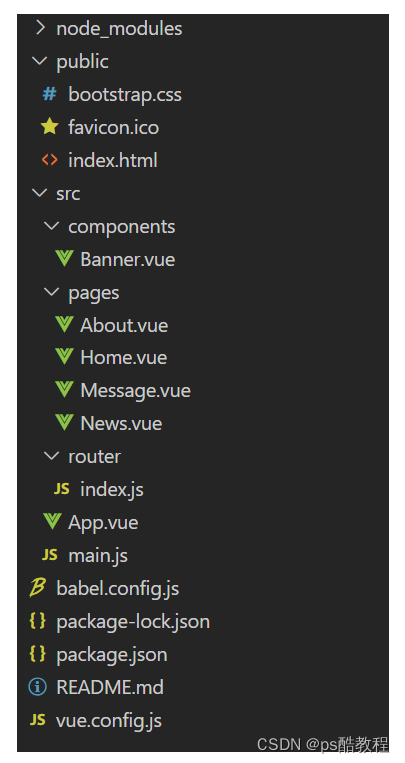
public/index.html
<!DOCTYPE html>
<html lang=""><head><meta charset="utf-8"><meta http-equiv="X-UA-Compatible" content="IE=edge"><meta name="viewport" content="width=device-width,initial-scale=1.0"><link rel="icon" href="<%= BASE_URL %>favicon.ico"><link rel="stylesheet" href="<%= BASE_URL %>bootstrap.css"><title><%= htmlWebpackPlugin.options.title %></title></head><body><noscript><strong>We're sorry but <%= htmlWebpackPlugin.options.title %> doesn't work properly without JavaScript enabled. Please enable it to continue.</strong></noscript><div id="app"></div><!-- built files will be auto injected --></body>
</html>
main.js
//引入Vue
import Vue from 'vue'
//引入App
import App from './App.vue'
//引入VueRouter
import VueRouter from 'vue-router'
//引入路由器
import router from './router'//关闭Vue的生产提示
Vue.config.productionTip = false
//应用插件
Vue.use(VueRouter)//创建vm
new Vue({el:'#app',render: h => h(App),router:router
})
router/index.js
// 该文件专门用于创建整个应用的路由器
import VueRouter from 'vue-router'
//引入组件
import About from '../pages/About'
import Home from '../pages/Home'
import News from '../pages/News'
import Message from '../pages/Message'//创建并暴露一个路由器
export default new VueRouter({routes:[{path:'/',redirect: '/home'  // 当匹配到'/'时,重定向到'/home',(这里也可以直接写'home',前面不带'/')},{path:'/about',component:About},{path:'/home', /* 一级路由前面要加'/' */component:Home,redirect: 'message'  // 当匹配到'/home'时,重定向到'/home/message'children:[{path:'news',  /* 子路由前面不要加'/' */component:News,},{path:'message',component:Message,}]}]
})
app.vue
<template>
<div><div class="row"><Banner/></div><div class="row"><div class="col-xs-2 col-xs-offset-2"><div class="list-group"><!-- 原始html中我们使用a标签实现页面的跳转 --><!-- <a class="list-group-item active" href="./about.html">About</a> --><!-- <a class="list-group-item" href="./home.html">Home</a> --><!-- Vue中借助router-link标签实现路由的切换 --><router-link class="list-group-item" active-class="active" to="/about">About</router-link><router-link class="list-group-item" active-class="active" to="/home">Home</router-link></div></div><div class="col-xs-6"><div class="panel"><div class="panel-body"><!-- 指定组件的呈现位置 --><router-view></router-view></div></div></div></div>
</div>
</template><script>import Banner from './components/Banner'export default {name:'App',components:{Banner}}
</script>
pages/Home.vue
<template>
<div><h2>Home组件内容</h2><div><ul class="nav nav-tabs"><li><router-link class="list-group-item" active-class="active" to="/home/news">News</router-link></li><li><router-link class="list-group-item" active-class="active"to="/home/message">Message</router-link></li></ul><router-view></router-view></div>
</div>
</template><script>export default {name:'Home',/* beforeDestroy() {console.log('Home组件即将被销毁了')}, *//* mounted() {console.log('Home组件挂载完毕了',this)window.homeRoute = this.$routewindow.homeRouter = this.$router},  */}
</script>
pages/News.vue
<template><ul><li>news001</li><li>news002</li><li>news003</li></ul>
</template><script>export default {name:'News'}
</script>
pages/Message.vue
<template><div><ul><li><a href="/message1">message001</a> </li><li><a href="/message2">message002</a> </li><li><a href="/message/3">message003</a> </li></ul></div>
</template><script>export default {name:'Message'}
</script>
pages/About.vue
<template><h2>我是About的内容</h2>
</template><script>export default {name:'About',/* beforeDestroy() {console.log('About组件即将被销毁了')},*//* mounted() {console.log('About组件挂载完毕了',this)window.aboutRoute = this.$routewindow.aboutRouter = this.$router},  */}
</script>
components/Banner.vue
<template><div class="col-xs-offset-2 col-xs-8"><div class="page-header"><h2>Vue Router Demo</h2></div></div>
</template><script>export default {name:'Banner'}
</script>
命名路由
-
作用:可以简化路由的跳转。
-
如何使用
-
给路由命名:
{path:'/demo',component:Demo,children:[{path:'test',component:Test,children:[{name:'hello' //给路由命名path:'welcome',component:Hello,}]}] } -
简化跳转:
<!--简化前,需要写完整的路径 -->
<router-link to="/demo/test/welcome">跳转</router-link><!--简化后,直接通过名字跳转 -->
<router-link :to="{name:'hello'}">跳转</router-link><!--简化写法配合传递参数 -->
<router-link :to="{name:'hello', // 要跳转的路由名称, 就可以不用写长长的路径了query:{id:666,title:'你好'}}"
>跳转</router-link>
-
路由的query参数
1、传递参数
<!-- 跳转并携带query参数,to的字符串写法 -->
<router-link :to="/home/message/detail?id=666&title=你好">跳转</router-link><!-- 跳转并携带query参数,to的对象写法 -->
<router-link:to="{path:'/home/message/detail',query:{    // 此方式会将参数拼接成url?xxx=yyy&xxx=yyy形式id:666,title:'你好'}}"
>跳转
</router-link>
2、接收参数:
// 不只是路由组件能获取到路由参数,其它非路由组件,或者说其它组件也能正常获取到,
// 所以上面使用query这种方式本质就是在url后面url?xxx=yyy&xxx=yyy东西而已
$route.query.id
$route.query.title
路由的params参数
1、配置路由,声明接收params参数
{path:'/home',component:Home,children:[{path:'news',component:News},{component:Message,children:[{name:'xiangqing',path:'detail/:id/:title',//使用占位符声明接收params参数,占位符的名字就作为params对象中的keycomponent:Detail}]}]
}
2、传递参数
<!-- 跳转并携带params参数,to的字符串写法 -->
<router-link :to="/home/message/detail/666/你好">跳转</router-link><!-- 跳转并携带params参数,to的对象写法 -->
<router-link:to="{name:'xiangqing',params:{id:666,title:'你好'}}"
>跳转</router-link>
特别注意:路由携带params参数时,若使用to的对象写法,则不能使用path配置项,必须使用name配置!
3、接收参数:
// 不只是路由组件能获取到路由参数,其它非路由组件,或者说其它组件也能正常获取到,
// 所以上面使用params这种方式本质就是在后面拼接url/{id}/{title}而已
$route.params.id
$route.params.title
路由的props配置
作用:让路由组件更方便的收到参数
// router/index.js
{name:'xiangqing',path:'detail/:id',component:Detail,// 这3种写法,只是为了方便在组件中,更方便的收到参数,而不用一遍遍的写this.$route.。而是直接使用props接收//第一种写法:props值为对象,该对象中所有的key-value的组合最终都会通过props传给Detail组件,//                                                                 // props:{a:900}//第二种写法:props值为布尔值,布尔值为true,则会把路由收到的所有params参数通过props传给Detail组件// props:true//第三种写法:props值为函数,该函数返回的对象中每一组key-value都会通过props传给Detail组件props(route){return {id: route.query.id,title: route.query.title}}// 第三种简化写法(不太推荐)/*props({query: {id,title}}){ // 双重解构赋值return  {id:title}}*/
}// Detail.vue
export default {name:'Detail',props:['id','title'], //  Detail组件用props配置项去接受即可使用
}
router-link的replace属性
1、作用:控制路由跳转时操作浏览器历史记录的模式
2、浏览器的历史记录有两种写入方式:分别为push和replace,push是追加历史记录,replace是替换当前记录。路由跳转时候默认为push
3、如何开启replace模式:<router-link replace to="/home/news">News</router-link>,即添加replace属性即可
编程式路由导航
1、作用:不借助<router-link> 实现路由跳转,让路由跳转更加灵活
2、具体编码:
//$router的两个API
this.$router.push({name:'xiangqing',params:{id:xxx,title:xxx}
})this.$router.replace({name:'xiangqing',params:{id:xxx,title:xxx}
})1. this.$router.push(path): 相当于点击路由链接(可以返回到当前路由界面)
2. this.$router.replace(path): 用新路由替换当前路由(不可以返回到当前路由界面)3. this.$router.back(): 请求(返回)上一个记录路由
4. this.$router.forward(): 请求(前进)上一个记录路由5. this.$router.go(-1): 请求(返回)上一个记录路由
6. this.$router.go(1): 请求下一个记录路由
缓存路由组件
1、作用:让不展示的路由组件保持挂载,不被销毁,比如用户输入了内容,路由切换了,又切回来,内容还在。
2、具体编码:
<keep-alive include="News"> <!-- 如果不写,则所有在此处渲染的组件都会被缓存; 写了,则只会缓存对应的组件 --><router-view></router-view>
</keep-alive><!-- 这里写的是组件名。如果多个的话,使用v-bind绑定组件名数组 -->
<keep-alive :include="['News','Mesage']"><router-view></router-view>
</keep-alive>
两个新的生命周期钩子
1、作用:路由组件所独有的两个钩子函数,用于捕获路由组件的激活状态。
2、具体名字:
activated路由组件被激活时触发(也就是组件被切中展示)。deactivated路由组件失活时触发(也就是组件被切走隐藏)。
路由守卫
1、作用:对路由进行权限控制
2、分类:全局守卫、独享守卫、组件内守卫
3、全局守卫:
// 【全局前置守卫:初始化时执行、每次路由切换前执行】
router.beforeEach((to,from,next)=>{console.log('beforeEach',to,from)if(to.meta.isAuth){ //判断当前路由是否需要进行权限控制if(localStorage.getItem('school') === 'atguigu'){ //权限控制的具体规则next() //放行}else{alert('暂无权限查看')// next({name:'guanyu'}) // 如果不调用next()放行的话,是不会切换到新的路由的// next({path:'/'})      // 如果不调用next()放行的话,是不会切换到新的路由的}}else{next() //放行}
})//【全局后置守卫:初始化时执行、每次路由切换后执行】
router.afterEach((to,from)=>{ // 注意这里没有next参数哦console.log('afterEach',to,from)if(to.meta.title){document.title = to.meta.title //修改网页的title}else{document.title = 'vue_test'}
})// 还可以在路由跳转的时候加上redirect给$route的query对象中,来保存用户未登录前想去的路由。等用户登录了,就跳过去。
// 例: next(`login?redirect=${to.path}`)// next(false) 取消当前的导航(从哪来回哪去)
// 即:如果浏览器的 URL 改变了(可能是用户手动或者浏览器后退按钮),那么 URL 地址会重置到 from 路由对应的地址
4、路由独享守卫:
beforeEnter(to,from,next){console.log('beforeEnter',to,from)if(to.meta.isAuth){ //判断当前路由是否需要进行权限控制if(localStorage.getItem('school') === 'atguigu'){next()}else{alert('暂无权限查看')// next({name:'guanyu'})}}else{next()}
}
5、组件内守卫:
beforeRouteEnter(to, from) {// 在渲染该组件的对应路由被验证前调用// 不能获取组件实例 `this` !// 因为当守卫执行时,组件实例还没被创建!
},beforeRouteUpdate(to, from) {// 在当前路由改变,但是该组件被复用时调用// 举例来说,对于一个带有动态参数的路径 `/users/:id`,在 `/users/1` 和 `/users/2` 之间跳转的时候,// 由于会渲染同样的 `UserDetails` 组件,因此组件实例会被复用。而这个钩子就会在这个情况下被调用。// 因为在这种情况发生的时候,组件已经挂载好了,导航守卫可以访问组件实例 `this`
},beforeRouteLeave(to, from) {// 在导航离开渲染该组件的对应路由时调用// 与 `beforeRouteUpdate` 一样,它可以访问组件实例 `this`
},
全局(前置/后置)路由守卫
// 该文件专门用于创建整个应用的路由器
import VueRouter from 'vue-router'
//引入组件
import About from '../pages/About'
import Home from '../pages/Home'
import News from '../pages/News'
import Message from '../pages/Message'
import Detail from '../pages/Detail'//创建并暴露一个路由器
const router =  new VueRouter({routes:[{name:'guanyu',path:'/about',component:About,meta:{title:'关于'}},{name:'zhuye',path:'/home',component:Home,meta:{title:'主页'},children:[{name:'xinwen',path:'news',component:News,meta:{            // meta元数据,才能从路由$route中获取该meta数据isAuth:true,title:'新闻'}},{name:'xiaoxi',path:'message',component:Message,meta:{isAuth:true,title:'消息'},children:[{name:'xiangqing',path:'detail',component:Detail,meta:{isAuth:true,title:'详情'},props($route){return {id:$route.query.id,title:$route.query.title,a:1,b:'hello'}}}]}]}]
})//全局前置路由守卫————初始化的时候被调用、每次路由切换之前被调用
router.beforeEach((to,from,next)=>{console.log('前置路由守卫',to,from)if(to.meta.isAuth){ //判断是否需要鉴权if(localStorage.getItem('school')==='atguigu'){next()}else{alert('学校名不对,无权限查看!')}}else{next()}
})//全局后置路由守卫————初始化的时候被调用、每次路由切换之后被调用
router.afterEach((to,from)=>{console.log('后置路由守卫',to,from)document.title = to.meta.title || '硅谷系统' // 在路由切换成功完成之后,修改网页title
})export default router
独享路由守卫
// 该文件专门用于创建整个应用的路由器
import VueRouter from 'vue-router'
//引入组件
import About from '../pages/About'
import Home from '../pages/Home'
import News from '../pages/News'
import Message from '../pages/Message'
import Detail from '../pages/Detail'//创建并暴露一个路由器
const router =  new VueRouter({routes:[{name:'guanyu',path:'/about',component:About,meta:{title:'关于'}},{name:'zhuye',path:'/home',component:Home,meta:{title:'主页'},children:[{name:'xinwen',path:'news',component:News,meta:{isAuth:true,title:'新闻'},// 【独享路由守卫】beforeEnter: (to, from, next) => {console.log('独享路由守卫',to,from)if(to.meta.isAuth){ //判断是否需要鉴权if(localStorage.getItem('school')==='atguigu'){next()}else{alert('学校名不对,无权限查看!')}}else{next()}}},{name:'xiaoxi',path:'message',component:Message,meta:{isAuth:true,title:'消息'},children:[{name:'xiangqing',path:'detail',component:Detail,meta:{isAuth:true,title:'详情'},props($route){return {id:$route.query.id,title:$route.query.title,a:1,b:'hello'}}}]}]}]
})//全局前置路由守卫————初始化的时候被调用、每次路由切换之前被调用
router.beforeEach((to,from,next)=>{console.log('前置路由守卫',to,from)if(to.meta.isAuth){ //判断是否需要鉴权if(localStorage.getItem('school')==='atguigu'){next()}else{alert('学校名不对,无权限查看!')}}else{next()}
})//全局后置路由守卫————初始化的时候被调用、每次路由切换之后被调用
router.afterEach((to,from)=>{console.log('后置路由守卫',to,from)document.title = to.meta.title || '硅谷系统'
})export default router
组件内路由守卫
<template><h2>我是About的内容</h2>
</template><script>export default {name:'About',//通过路由规则,进入该组件时被调用beforeRouteEnter (to, from, next) {console.log('About--beforeRouteEnter',to,from)if(to.meta.isAuth){ //判断是否需要鉴权if(localStorage.getItem('school')==='atguigu'){next()}else{alert('学校名不对,无权限查看!')}}else{next()}},//通过路由规则,离开该组件时被调用beforeRouteLeave (to, from, next) {console.log('About--beforeRouteLeave',to,from)next()}}
</script>
路由懒加载
// 将
// import UserDetails from './views/UserDetails'
// 替换成
const UserDetails = () => import('./views/UserDetails') // import函数返回的是一个Promiseconst router = createRouter({// ...routes: [{ path: '/users/:id', component: UserDetails }],
})// component (和 components) 配置接收一个返回 Promise 组件的函数,Vue Router 只会在第一次进入页面时才会获取这个函数,然后使用缓存数据。这意味着可以使用更复杂的函数,只要它们返回一个 Promise :
// 一般来说,对所有的路由都使用动态导入
路由器的两种工作模式
1、对于一个url来说,什么是hash值?—— #及其后面的内容就是hash值。
2、hash值不会包含在 HTTP 请求中,即:hash值不会带给服务器。
3、hash模式:
1. 地址中永远带着#号,不美观 。2. 若以后将地址通过第三方手机app分享,若app校验严格,则地址会被标记为不合法。3. 兼容性较好。
4、history模式:
1. 地址干净,美观 。2. 兼容性和hash模式相比略差。3. 应用部署上线时需要后端人员支持,解决刷新页面服务端404的问题。
// 该文件专门用于创建整个应用的路由器
import VueRouter from 'vue-router'
//引入组件
import About from '../pages/About'
import Home from '../pages/Home'
import News from '../pages/News'
import Message from '../pages/Message'
import Detail from '../pages/Detail'//创建并暴露一个路由器
const router =  new VueRouter({mode:'history',  // 此处可以写history模式或hash模式, 如果使用history模式,需要解决打包部署刷新404的问题routes:[{name:'guanyu',path:'/about',component:About,meta:{isAuth:true,title:'关于'}},{name:'zhuye',path:'/home',component:Home,meta:{title:'主页'},children:[{name:'xinwen',path:'news',component:News,meta:{isAuth:true,title:'新闻'},},{name:'xiaoxi',path:'message',component:Message,meta:{isAuth:true,title:'消息'},children:[{name:'xiangqing',path:'detail',component:Detail,meta:{isAuth:true,title:'详情'},}]}]}]
})export default router
打包部署刷新页面404的问题
使用nginx
在文件中的nginx.conf文件中修改,代码如下
server {listen    YYYY;  # 自己设置的端口号server_name 192.168.XXX.XXX;  # 在黑窗口下ipconifg后出现的IPv4地址复制location / {root E:/website_wap/dist/;          # 项目打包后的路径index index.html index.htm;try_files $uri $uri/ /index.html;  # 解决刷新页面变成404问题的代码}                                    # 匹配不到任何静态资源,跳到同一个index.htmllocation /api {proxy_path http://39.38.123.211;}
}
21. UI 组件库
移动端常用 UI 组件库
- Vant https://youzan.github.io/vant
- Cube UI https://didi.github.io/cube-ui
- Mint UI http://mint-ui.github.io
PC 端常用 UI 组件库
- Element UI https://element.eleme.cn
- IView UI https://www.iviewui
22. 配置@
创建jsconfig.json文件
在与package.json同级目录下,创建该jsconfig.json文件
{"compilerOptions": {"baseUrl": "./","paths": {"@/*": ["src/*"]}},"exclude": ["node_modules","dist"]
}
23. axios
1、安装axios
npm install axios --save
2、创建ajax.js
在src/api文件夹下,创建ajax.js
//对于axios进行二次封装
import axios from "axios";import nprogress from "nprogress";
//在当前模块中引入store
import store from '@/store';
//如果出现进度条没有显示:一定是你忘记了引入样式了
import "nprogress/nprogress.css";//底下的代码也是创建axios实例
let requests = axios.create({//基础路径baseURL: "/api",//请求不能超过5Stimeout: 5000,
});//请求拦截器----在项目中发请求(请求没有发出去)可以做一些事情
requests.interceptors.request.use((config) => {//现在的问题是config是什么?配置对象//可以让进度条开始动if(store.state.detail.uuid_token){//请求头添加一个字段(userTempId):和后台老师商量好了config.headers.userTempId = store.state.detail.uuid_token;}//需要携带token带给服务器if(store.state.user.token){config.headers.token = store.state.user.token;}nprogress.start();return config;
});//响应拦截器----当服务器手动请求之后,做出响应(相应成功)会执行的
requests.interceptors.response.use((res) => {//进度条结束nprogress.done();//相应成功做的事情return res.data;},(err) => {alert("服务器响应数据失败");}
);//最终需要对外暴露(不对外暴露外面模块没办法使用)
//这里的代码是暴露一个axios实例
export default requests;
3、暴露请求接口方法
在src/api文件夹下创建index.js,引入ajax.js,暴露请求接口的方法,给外界使用
//统一管理项目接口的模块//引入二次封装的axios(带有请求、响应的拦截器)
import requests from "./ajax";//三级菜单的请求地址  /api/product/getBaseCategoryList   GET    没有任何参数
//对外暴露一个函数,只要外部调用这个函数,就想服务器发起ajax请求、获取咱们的三级菜单数据。当前咱们这个函数只需要把服务器返回结果返回即可。
export const reqgetCategoryList = () =>requests.get(`/product/getBaseCategoryList`);
//切记:当前函数执行需要把服务器返回结果返回//获取搜索模块数据 地址:/api/list  请求方式:post  参数:需要带参数
//当前这个函数需不需要接受外部传递参数
//当前这个接口(获取搜索模块的数据),给服务器传递一个默认参数【至少是一个空对象】
export const reqGetSearchInfo = (params)=>requests({url:"/list",method:"post",data:params});//获取产品详情信息的接口  URL: /api/item/{ skuId }  请求方式:get
export const reqGoodsInfo = (skuId)=>requests({url:`/item/${skuId}`,method:'get'});//将产品添加到购物车中(获取更新某一个产品的个数)
///api/cart/addToCart/{ skuId }/{ skuNum }  POST
export const reqAddOrUpdateShopCart = (skuId,skuNum)=>requests({url:`/cart/addToCart/${skuId}/${skuNum}`,method:"post"})//获取购物车列表数据接口
//URL:/api/cart/cartList   method:get
export const reqCartList = ()=>requests({url:'/cart/cartList ',method:'get'});//删除购物产品的接口
//URL:/api/cart/deleteCart/{skuId}   method:DELETE
export const reqDeleteCartById = (skuId)=>requests({url:`/cart/deleteCart/${skuId}`,method:'delete'});//修改商品的选中状态
//URL:/api/cart/checkCart/{skuId}/{isChecked}   method:get
export const reqUpdateCheckedByid = (skuId,isChecked)=>requests({url:`/cart/checkCart/${skuId}/${isChecked}`,method:'get'});//获取验证码
//URL:/api/user/passport/sendCode/{phone}  method:get
export const reqGetCode = (phone)=>requests({url:`/user/passport/sendCode/${phone}`,method:'get'});//注册
//url:/api/user/passport/register  method:post    phone code passwordexport const reqUserRegister = (data)=>requests({url:'/user/passport/register',data,method:'post'});//登录
//URL:/api/user/passport/login  method:post phone password
export const reqUserLogin = (data)=>requests({url:'/user/passport/login',data,method:'post'});//获取用户信息【需要带着用户的token向服务器要用户信息】
//URL:/api/user/passport/auth/getUserInfo  method:get
export const reqUserInfo = ()=>requests({url:'/user/passport/auth/getUserInfo',method:'get'});//退出登录
//URL:/api/user/passport/logout  get
export const reqLogout = ()=> requests({url:'/user/passport/logout',method:'get'});//获取用户地址信息
//URL:/api/user/userAddress/auth/findUserAddressList  method:get
export const reqAddressInfo = ()=>requests({url:'/user/userAddress/auth/findUserAddressList',method:'get'});//获取商品清单
//URL:/api/order/auth/trade   method:get
export const reqOrderInfo = ()=>requests({url:'/order/auth/trade',method:'get'});//提交订单的接口
//URL:/api/order/auth/submitOrder?tradeNo={tradeNo}  method:postexport const reqSubmitOrder = (tradeNo,data)=>requests({url:`/order/auth/submitOrder?tradeNo=${tradeNo}`,data,method:'post'});//获取支付信息
//URL:/api/payment/weixin/createNative/{orderId}  GET
export const reqPayInfo = (orderId)=>requests({url:`/payment/weixin/createNative/${orderId}`,method:'get'});//获取支付订单状态
//URL:/api/payment/weixin/queryPayStatus/{orderId}  get
export  const reqPayStatus = (orderId)=>requests({url:`/payment/weixin/queryPayStatus/${orderId}`,method:'get'});//获取个人中心的数据
//api/order/auth/{page}/{limit}  get
export const reqMyOrderList = (page,limit)=>requests({url:`/order/auth/${page}/${limit}`,method:'get'});
4、使用
在vuex的home模块中使用
// 引入暴露的方法
import { reqCategoryList } from '@/api'const state = {categoryList:[]
}const mutations = {CATEGORYLIST(state,val) {state.categoryList = val}
}const actions = {async categoryList({commit},val){//reqgetCategoryList返回的是一个Promise对象//需要用await接受成功返回的结果,await必须要结合async一起使用(CP)let result  =  await reqCategoryList() // 这里添加了await: 该步骤结束后,才会执行下面这句commit('CATEGORYLIST',result.data)}
}const getters = {}export default {namespaced:true,state,mutations,actions,getters
}
<template>...</template>
<script>import { mapState } from "vuex";export default {name: "TypeNav",computed: {...mapState({categoryList: (state) => state.home.categoryList.slice(0, 16),}),}}
</script>
<style>...</style>
24. MockJs
使用mock发送请求,会被浏览器拦截,注意:不会发出请求
1、安装mockJs
npm install mockjs --save
2、编写mockServer.js文件
在src下,创建mock文件夹,编写mockServer.js文件,文件内容如下
//先引入mockjs模块
import Mock from 'mockjs';//把JSON数据格式引入进来[JSON数据格式根本没有对外暴露,但是可以引入]
//webpack默认对外暴露的:图片、JSON数据格式
import banner from './banner.json';
import floor from './floor.json';//mock数据:第一个参数请求地址   第二个参数:请求数据
Mock.mock("/mock/banner",{code:200,data:banner});//模拟首页大的轮播图的数据
Mock.mock("/mock/floor",{code:200,data:floor});
引入的json文件如下
// banner.json文件
[{"id": "1","imgUrl": "/images/banner1.jpg"},{"id": "2","imgUrl": "/images/banner2.jpg"},{"id": "3","imgUrl": "/images/banner3.jpg"},{"id": "4","imgUrl": "/images/banner4.jpg"}
]
// floor.json文件
[{"id": "001","name": "家用电器","keywords": ["节能补贴","4K电视","空气净化器","IH电饭煲","滚筒洗衣机","电热水器"],"imgUrl": "/images/floor-1-1.png",...}
]3、创建mockAjax.js
在src的api文件夹下,创建mockAjax.js,并引入axios,它的baseURL设置为/mock
//对于axios进行二次封装
import axios from "axios";
import nprogress from "nprogress";//如果出现进度条没有显示:一定是你忘记了引入样式了
import "nprogress/nprogress.css";//底下的代码也是创建axios实例
let requests = axios.create({//基础路径baseURL: "/mock",//请求不能超过5Stimeout: 5000,
});//请求拦截器----在项目中发请求(请求没有发出去)可以做一些事情
requests.interceptors.request.use((config) => {//现在的问题是config是什么?配置对象//可以让进度条开始动nprogress.start();return config;
});//响应拦截器----当服务器手动请求之后,做出响应(相应成功)会执行的
requests.interceptors.response.use((res) => {//进度条结束nprogress.done();//相应成功做的事情return res.data;},(err) => {alert("服务器响应数据失败");}
);//最终需要对外暴露(不对外暴露外面模块没办法使用)
//这里的代码是暴露一个axios实例
export default requests;
4、暴露请求接口方法
在src/api文件夹下创建index.js,引入mockAjax.js,暴露请求接口的方法,给外界使用
//统一管理项目接口的模块
//引入二次封装的axios(带有请求、响应的拦截器)
import mockRequests from "./mockAjax";//获取banner(Home首页轮播图接口)
export const reqGetBannerList = () => mockRequests.get("/banner");//获取floor数据
export const reqFloorList = () => mockRequests.get("/floor");
5、使用
store/home.js
import { reqgetCategoryList, reqGetBannerList, reqFloorList } from "@/api";//home模块的仓库
const state = {//轮播图的数据bannerList: [],
};//mutions是唯一修改state的地方
const mutations = {GETCATEGORYLIST(state, categoryList) {state.categoryList = categoryList;},GETBANNERLIST(state, bannerList) {state.bannerList = bannerList;},GETFLOORLIST(state,floorList){state.floorList = floorList;}
};//action|用户处理派发action地方的,可以书写异步语句、自己逻辑地方
const actions = {//获取首页轮播图的数据async getBannerList({ commit }) {let result = await reqGetBannerList();if (result.code == 200) {commit("GETBANNERLIST", result.data);}},};export default {namespaced:true,state,mutations,actions,getters,
};
ListContainer.vue
<template>...</template>
<script>import { mapState } from "vuex";export default {name: "ListContainer",mounted() {this.$store.dispatch("home/getBannerList");},computed: {...mapState({bannerList: (state) => state.home.bannerList,}),},
};
</script>
<style>...</style>
25. QRCode
安装插件:npm install qrcode
import QRCode from 'qrcode'// With promises
QRCode.toDataURL('I am a pony!') // 返回的是一个Promise对象,可以使用then,也可以使用下面的async和await组合.then(url => {console.log(url)}).catch(err => {console.error(err)})// With async/await
const generateQR = async text => {try {console.log(await QRCode.toDataURL(text))} catch (err) {console.error(err)}
}
26. vue-lazyload
官网:https://www.npmjs.com/package/vue-lazyload
安装插件:npm i vue-lazyload -S
引入插件:
import Vue from 'vue'
import App from './App.vue'
import VueLazyload from 'vue-lazyload'Vue.use(VueLazyload)// or with options
Vue.use(VueLazyload, {preLoad: 1.3,error: 'dist/error.png',loading: 'dist/loading.gif',attempt: 1
})new Vue({el: 'body',components: {App}
})
template:
<ul><li v-for="img in list"><img v-lazy="img.src" ></li>
</ul>
相关文章:
vue2学习笔记(2/2)
vue2学习笔记(1/2) vue2学习笔记(2/2) 文章目录 1. 初始化脚手架2. 分析脚手架&render函数文件结构图示及说明main.jsindex.htmlApp.vueSchool.vueStudent.vue 关于不同版本的Vue修改默认配置vue.config.js配置文件 3. ref属…...

uniapp 之 base64转临时地址播放mp3
需求是:进入页面的时候是先有背景音乐,发送问题请求回答的时候会返回文字和音频,前端要把音频读出来,并且把背景音乐停止,读完音频后再打开背景音乐 一开始用的直接base64直接拼接在地址后 真机放不了 const innerAu…...
【网站项目】038汽车养护管理系统
🙊作者简介:拥有多年开发工作经验,分享技术代码帮助学生学习,独立完成自己的项目或者毕业设计。 代码可以私聊博主获取。🌹赠送计算机毕业设计600个选题excel文件,帮助大学选题。赠送开题报告模板ÿ…...

倒计时64天
B-小红的因子数_牛客周赛 Round 31 (nowcoder.com) 超时了(108.33/125) #include <bits/stdc.h> using namespace std; const int N 1e5 5; const int inf 0x3f3f3f3f; #define int long long void solve() {int x;cin>>x;if(x1){cout&…...
003集—三调数据库添加三大类字段——arcgis
在国土管理日常统计工作中经常需要用到三大类数据(农用地、建设用地、未利用地),而三调数据库中无三大类字段,因此需要手工录入三大类字段,并根据二级地类代码录入相关三大类名称。本代码可一键录入海量三大类名称统计…...

python基础使用之excel数据处理
当我们需要用python处理 Excel 表格数据时,Python 提供了一个强大的库pandas。pandas 是一个用于数据分析的开源 Python 库,它可以帮助我们轻松地读取、操作和分析 Excel 表格数据。下面通过一个实例,展示 pandas如何 来处理 Excel 表格数据的…...

【算法】【数据结构】算法与数据结构的关系
程序算法数据结构语言工具和环境 但在算法学习过程中,我认识到算法和数据结构是密不可分的,脱离数据结构谈论算法是空架子。 算法:解决问题的步骤和方法。对数据进行操作和处理的方法。 数据结构:用来存储数据的方式。 数据结构和…...

Libvirt 迁移标志详解
可参考:https://libvirt.org/html/libvirt-libvirt-domain.html#virDomainMigrateFlags 在虚拟化环境中,迁移是一项重要的功能,Libvirt 提供了一系列标志,用于控制迁移过程中的不同行为。以下是 virDomainMigrateFlags 枚举的详细…...
【数据分享】1929-2023年全球站点的逐月平均能见度(Shp\Excel\免费获取)
气象数据是在各项研究中都经常使用的数据,气象指标包括气温、风速、降水、能见度等指标,说到气象数据,最详细的气象数据是具体到气象监测站点的数据! 之前我们分享过1929-2023年全球气象站点的逐月平均气温数据、逐月最高气温数据…...

NLP中的嵌入和距离度量
本文将深入研究嵌入、矢量数据库和各种距离度量的概念,并提供示例和演示代码。 NLP中的嵌入 嵌入是连续向量空间中对象、单词或实体的数值表示。在NLP中,词嵌入捕获词之间的语义关系,使算法能够更好地理解文本的上下文和含义。 让我们试着用…...
jsp教务管理系统Myeclipse开发mysql数据库web结构java编程计算机网页项目
一、源码特点 JSP 教务管理系统是一套完善的java web信息管理系统,对理解JSP java编程开发语言有帮助,系统具有完整的源代码和数据库,系统主要采用B/S模式开发。开发环境为 TOMCAT7.0,Myeclipse8.5开发,数据库为Mysql5.0&…...
基恩士 KV-8000 PLC通讯简单测试
1、KV-8000通讯协议 基恩士 KV-8000 PLC支持多种通讯方式,包括:OPC UA、Modbus、上位链路命令等。其中OPC UA需要对服务器和全局变量进行设置,Modbus需要调用功能块。默认支持的是上位链路命令,实际是一条条以回车换行结束的ASCII…...

【高质量精品】2024美赛B题22页word版高质量半成品论文+多版保奖思路+数据+前四问思路代码等(后续会更新)
一定要点击文末的卡片,进入后,获取完整论文!! B 题整体模型构建 1. 潜水器动力系统失效:模型需要考虑潜水器在无推进力情况下的行为。 2. 失去与主船通信:考虑无法从主船接收指令或发送位置信息的情况。…...

apache_exporter安装说明
Apache Exporter 问题描述 需要监控apache服务,部署了apache_exporter,对过程进行一下记录。 源码参见apache_exporter ①下载 https://github.com/Lusitaniae/apache_exporter/releases②解压缩 tar -xzvf apache_exporter-0.7.0.linux-amd64.tar…...

代码随想录算法训练营29期Day42|卡码网46,LeetCode 416
文档讲解:背包问题二维 背包问题一维 分割等和子集 46.整数拆分 题目链接:https://kamacoder.com/problempage.php?pid1046 思路: 在一维dp数组中,dp[j]表示:容量为j的背包,所背的物品价值可以最大为d…...
java的excel列行合并模版
1.效果 2.模版 <tableborder"1"cellpadding"0"cellspacing"0"class"tablebor"id"TABLE"><tr align"center" class"bg217"><td style"background-color: #008000; color: #ffffff;p…...
【ES数据可视化】kibana实现数据大屏
目录 1.概述 2.绘制数据大屏 2.1.准备数据 2.2.绘制大屏 3.嵌入项目中 1.概述 再来重新认识一下kibana: Kibana 是一个用于数据可视化和分析的开源工具,是 Elastic Stack(以前称为 ELK Stack)中的一部分,由 Ela…...
2024 年十大 Vue.js UI 库
Vue.js 是一个流行的 JavaScript 框架,它在前端开发者中越来越受欢迎,以其简单、灵活和易用性而闻名。 Vue.js 如此受欢迎的原因之一是它拥有庞大的 UI 库生态系统。 这些库为开发人员提供了预构建的组件和工具,帮助他们快速高效地构建漂亮…...
使用esp32 cam + SR602人体感应模块制作一个小型的监控
需求: 做一个小型的监控,类似电子猫眼,监测到人之后,取一张图 然后发送到自己的邮箱。 架构: 1.sr602 传感器监测到人 2. esp32 cam 取图 并通过mqtt协议传到远端服务器 3, 服务器利用python 搭建一个mqtt客户端&…...

vim最简单命令学习
安装vim sudo apt install vim在终端随便打开一个文本文件,或者源文件, vim filepath输入该命令后,从终端进入vim编辑器,此时为普通模式(Normal)。 按i键进入编辑模式(Insert),按Esc键返回普通模式(Normal)。 在编辑…...

【AI智能体】Dify 实战:构建企业级自然语言SQL查询引擎
1. 从个人工具到企业级解决方案的跨越 第一次接触Dify的自然语言转SQL功能时,我被它的便捷性惊艳到了。只需要输入"显示上季度销售额最高的产品",系统就能自动生成正确的SQL语句。但当我尝试在团队中推广使用时,各种问题接踵而至&a…...

QML与QWidget混合开发:实现高效UI集成的实战指南
1. 为什么需要QML与QWidget混合开发 在Qt开发中,QML和QWidget是两种完全不同的UI构建方式。QML凭借其声明式语法和强大的动画效果,在现代UI开发中越来越受欢迎。但现实情况是,很多成熟的功能模块都是基于QWidget开发的,比如一些第…...

漫画脸描述生成保姆级教程:如何调试生成结果提升SD绘图匹配度
漫画脸描述生成保姆级教程:如何调试生成结果提升SD绘图匹配度 你是不是也遇到过这样的情况:脑子里有个超棒的二次元角色形象,但用AI绘图工具画出来总是差那么点意思?要么发型不对,要么表情奇怪,要么服装细…...

揭秘100.64.0.0/10:运营商级NAT如何重塑IPv4网络格局
1. 100.64.0.0/10:这个神秘IP段到底是什么? 第一次在路由器后台看到100.64.0.1这个IP时,我整个人都懵了——这既不是常见的192.168局域网地址,也不是公网IP。就像发现自家门牌号突然变成了酒店房间号,这种违和感促使我…...

Qwen3.5-2B保姆级教程:20亿参数模型端侧部署与图文对话实操
Qwen3.5-2B保姆级教程:20亿参数模型端侧部署与图文对话实操 1. 模型简介 Qwen3.5-2B是阿里云推出的轻量化多模态基础模型,属于Qwen3.5系列的小参数版本(20亿参数)。这个模型专为低功耗、低门槛部署场景设计,特别适合在端侧和边缘设备上运行…...

怎么样辨别生活中遇到的那些理财平台的真假?
怎么样辨别生活中遇到的那些理财平台的真假?凡是声称高息保本的投资理财平台极有可能是黑平台。尝试用手机官方应用商城搜索理财软件,如果是别人通过聊天软件发链接给你安装的,不是正规手机应用商城下载的,且在应用商城无法搜索到…...

用LLM自动生成CUDA内核真的靠谱吗?实测KernelBench框架效果与避坑指南
LLM自动生成CUDA内核的实践验证:KernelBench框架深度评测与技术指南 当我在项目中发现某个PyTorch模型的矩阵乘法操作消耗了60%的推理时间时,第一反应是考虑手工编写CUDA内核来优化。但作为一个同时维护三个项目的工程师,时间成本让我犹豫——…...

5分钟上手MouseClick:让重复点击自动化的3个核心技巧
5分钟上手MouseClick:让重复点击自动化的3个核心技巧 【免费下载链接】MouseClick 🖱️ MouseClick 🖱️ 是一款功能强大的鼠标连点器和管理工具,采用 QT Widget 开发 ,具备跨平台兼容性 。软件界面美观 ,操…...

【RT-DETR涨点改进】SCI一区 2025顶刊 |全网独家创新,注意力改进篇 | RT-DETR引入DOAM动态全向注意力模块,模块,显著增强了特征表达能力和结构恢复能力,含7种独家创新改进点
一、本文介绍 🔥本文给大家介绍利用 DOAM 动态全向注意力模块改进RT-DETR网络模型,可在不显著增加计算量的前提下增强全局上下文建模能力,通过空间轴向聚合获得更强的跨区域信息交互,并用通道动态加权突出目标相关特征、抑制背景干扰,从而优化多尺度特征融合效果,提升小…...

PyTorch模型调试神器:用TensorBoard+torchsummary快速定位网络结构问题
PyTorch模型调试神器:用TensorBoardtorchsummary快速定位网络结构问题 当你在PyTorch中构建复杂的神经网络时,是否经常遇到以下困扰:模型训练时突然报出维度不匹配的错误,却不知道具体是哪一层出了问题?或者模型参数数…...