
跟着cherno手搓游戏引擎【27】升级2DRenderer(添加旋转)
水节,添加了旋转的DrawQuad:
Renderer2D.h:
#pragma once
#include "OrthographicCamera.h"
#include"Texture.h"
namespace YOTO {class Renderer2D{public://为什么渲染器是静态的:static void Init();static void ShutDown();static void BeginScene(const OrthographicCamera& camera);static void EndScene();static void DrawQuad(const glm::vec2& position, const glm::vec2& size ,const glm::vec4& color);static void DrawQuad(const glm::vec3& position, const glm::vec2& size ,const glm::vec4& color);static void DrawQuad(const glm::vec2& position, const glm::vec2& size ,const Ref<Texture2D> texture,float tilingFactor=1.0f,const glm::vec4& tintColor=glm::vec4(1.0f));static void DrawQuad(const glm::vec3& position, const glm::vec2& size ,const Ref<Texture2D> texture,float tilingFactor=1.0f,const glm::vec4& tintColor=glm::vec4(1.0f));static void DrawRotatedQuad(const glm::vec2& position, const glm::vec2& size, float rotation,const glm::vec4& color);static void DrawRotatedQuad(const glm::vec3& position, const glm::vec2& size, float rotation,const glm::vec4& color);static void DrawRotatedQuad(const glm::vec2& position, const glm::vec2& size, float rotation,const Ref<Texture2D> texture, float tilingFactor = 1.0f,  const glm::vec4& tintColor = glm::vec4(1.0f));static void DrawRotatedQuad(const glm::vec3& position, const glm::vec2& size, float rotation,const Ref<Texture2D> texture, float tilingFactor = 1.0f, const glm::vec4& tintColor = glm::vec4(1.0f));};
}
Renderer2D.cpp:
#include "ytpch.h"
#include "Renderer2D.h"
#include"VertexArray.h"
#include"Shader.h"
//#include "Platform/OpenGL/OpenGLShader.h"
#include <glm/gtc/matrix_transform.hpp>
#include "RenderCommand.h"
namespace YOTO {struct  Renderer2DStorage {Ref<VertexArray> QuadVertexArray;//Ref<Shader> FlatColorShader;Ref<Shader> TextureShader;Ref<Texture2D> WhiteTexture;};static Renderer2DStorage* s_Data;void Renderer2D::Init(){YT_PROFILE_FUNCTION();s_Data = new  Renderer2DStorage();s_Data->QuadVertexArray = VertexArray::Create();float squareVertices[5 * 4] = {-0.5f,-0.5f,0.0f,0.0f,0.0f,0.5f,-0.5f,0.0f,1.0f,0.0f,0.5f,0.5f,0.0f,1.0f,1.0f,-0.5f,0.5f,0.0f,0.0f,1.0f,};Ref<VertexBuffer> squareVB;squareVB.reset(VertexBuffer::Create(squareVertices, sizeof(squareVertices)));squareVB->SetLayout({{ShaderDataType::Float3,"a_Position"},{ShaderDataType::Float2,"a_TexCoord"}});s_Data->QuadVertexArray->AddVertexBuffer(squareVB);uint32_t squareIndices[6] = { 0,1,2,2,3,0 };Ref<IndexBuffer> squareIB;squareIB.reset((IndexBuffer::Create(squareIndices, sizeof(squareIndices) / sizeof(uint32_t))));s_Data->QuadVertexArray->AddIndexBuffer(squareIB);s_Data->WhiteTexture = Texture2D::Create(1, 1);uint32_t whiteTextureData = 0xffffffff;s_Data->WhiteTexture->SetData(&whiteTextureData,sizeof(uint32_t));//s_Data->FlatColorShader =Shader::Create("assets/shaders/FlatColor.glsl");s_Data->TextureShader= Shader::Create("assets/shaders/Texture.glsl");s_Data->TextureShader->Bind();s_Data->TextureShader->SetInt("u_Texture", 0);}void Renderer2D::ShutDown(){YT_PROFILE_FUNCTION();delete s_Data;}void Renderer2D::BeginScene(const OrthographicCamera& camera){YT_PROFILE_FUNCTION();/*s_Data->FlatColorShader->Bind();s_Data->FlatColorShader->SetMat4("u_ViewProjection",camera.GetViewProjectionMatrix());*/s_Data->TextureShader->Bind();s_Data->TextureShader->SetMat4("u_ViewProjection", camera.GetViewProjectionMatrix());}void Renderer2D::EndScene(){YT_PROFILE_FUNCTION();}void Renderer2D::DrawQuad(const glm::vec2& position, const glm::vec2& size, const glm::vec4& color){DrawQuad({ position.x,position.y,0.0f }, size, color);}void Renderer2D::DrawQuad(const glm::vec3& position, const glm::vec2& size, const glm::vec4& color){YT_PROFILE_FUNCTION();//s_Data->FlatColorShader->Bind();//s_Data->FlatColorShader->SetFloat4("u_Color", color);//s_Data->TextureShader->Bind();s_Data->TextureShader->SetFloat4("u_Color", color);s_Data->TextureShader->SetFloat("m_TilingFactor", 1.0f);s_Data->WhiteTexture->Bind();glm::mat4 transform = glm::translate(glm::mat4(1.0f), position) /**rotation*/ * glm::scale(glm::mat4(1.0f), {size.x,size.y,1.0f});s_Data->TextureShader->SetMat4("u_Transform", transform);s_Data->QuadVertexArray->Bind();RenderCommand::DrawIndexed(s_Data->QuadVertexArray);}void Renderer2D::DrawQuad(const glm::vec2& position, const glm::vec2& size, const Ref<Texture2D> texture,  float tilingFactor, const glm::vec4& tintColor){DrawQuad({ position.x,position.y,0.0f }, size, texture, tilingFactor, tintColor);}void Renderer2D::DrawQuad(const glm::vec3& position, const glm::vec2& size, const Ref<Texture2D> texture, float tilingFactor, const glm::vec4& tintColor){YT_PROFILE_FUNCTION();//s_Data->TextureShader->Bind();s_Data->TextureShader->SetFloat4("u_Color", tintColor);s_Data->TextureShader->SetFloat("m_TilingFactor",tilingFactor);texture->Bind();glm::mat4 transform = glm::translate(glm::mat4(1.0f), position) /**rotation*/ * glm::scale(glm::mat4(1.0f), { size.x,size.y,1.0f });s_Data->TextureShader->SetMat4("u_Transform", transform);s_Data->QuadVertexArray->Bind();RenderCommand::DrawIndexed(s_Data->QuadVertexArray);}void Renderer2D::DrawRotatedQuad(const glm::vec2& position, const glm::vec2& size, float rotation, const glm::vec4& color){DrawRotatedQuad({ position.x,position.y,0.0f }, size, rotation,color);}void Renderer2D::DrawRotatedQuad(const glm::vec3& position, const glm::vec2& size, float rotation, const glm::vec4& color){YT_PROFILE_FUNCTION();s_Data->TextureShader->SetFloat4("u_Color", color);s_Data->TextureShader->SetFloat("m_TilingFactor", 1.0f);s_Data->WhiteTexture->Bind();glm::mat4 transform = glm::translate(glm::mat4(1.0f), position) * glm::rotate(glm::mat4(1.0f), rotation, {0.0f,0.0f,1.0f}) * glm::scale(glm::mat4(1.0f), { size.x,size.y,1.0f });s_Data->TextureShader->SetMat4("u_Transform", transform);s_Data->QuadVertexArray->Bind();RenderCommand::DrawIndexed(s_Data->QuadVertexArray);}void Renderer2D::DrawRotatedQuad(const glm::vec2& position, const glm::vec2& size, float rotation, const Ref<Texture2D> texture, float tilingFactor, const glm::vec4& tintColor){DrawRotatedQuad({ position.x,position.y,0.0f }, size, rotation, texture, tilingFactor, tintColor);}void Renderer2D::DrawRotatedQuad(const glm::vec3& position, const glm::vec2& size, float rotation, const Ref<Texture2D> texture, float tilingFactor, const glm::vec4& tintColor){YT_PROFILE_FUNCTION();//s_Data->TextureShader->Bind();s_Data->TextureShader->SetFloat4("u_Color", tintColor);s_Data->TextureShader->SetFloat("m_TilingFactor", tilingFactor);texture->Bind();glm::mat4 transform = glm::translate(glm::mat4(1.0f), position) * glm::rotate(glm::mat4(1.0f), rotation, { 0.0f,0.0f,1.0f }) * glm::scale(glm::mat4(1.0f), { size.x,size.y,1.0f });s_Data->TextureShader->SetMat4("u_Transform", transform);s_Data->QuadVertexArray->Bind();RenderCommand::DrawIndexed(s_Data->QuadVertexArray);}
}
OpenGLShader.h:添加SetFloat(父类Shader.h也要添加):
void OpenGLShader::SetFloat(const std::string& name, float value){YT_PROFILE_FUNCTION();UploadUniformFloat(name, value);}修改测试:
Texture.glsl:
#type vertex#version 330 corelayout(location = 0) in vec3 a_Position;layout(location = 1) in vec2 a_TexCoord;uniform mat4 u_ViewProjection;uniform mat4 u_Transform;out vec2 v_TexCoord;out vec3 v_Position;void main(){v_TexCoord=a_TexCoord;v_Position=a_Position;gl_Position =u_ViewProjection*u_Transform*vec4( a_Position,1.0);}#type fragment#version 330 corelayout(location = 0) out vec4 color;in vec3 v_Position;in vec2 v_TexCoord;uniform vec4 u_Color ;uniform float m_TilingFactor;uniform sampler2D u_Texture ;void main(){color = texture(u_Texture, v_TexCoord*m_TilingFactor)*u_Color; }Sandbox2D.cpp:
#include "Sandbox2D.h"
#include <imgui/imgui.h>
#include <glm/gtc/matrix_transform.hpp>
//#include <Platform/OpenGL/OpenGLShader.h>
#include <glm/gtc/type_ptr.hpp>
#include<vector>
#include<chrono>
template<typename Fn>
class Timer {
public:Timer(const char* name, Fn&&func):m_Name(name),m_Func(func),m_Stopped(false){m_StartTimepoint = std::chrono::high_resolution_clock::now();}~Timer() {if (!m_Stopped) {Stop();}}void Stop() {auto endTimepoint= std::chrono::high_resolution_clock::now();long long start = std::chrono::time_point_cast<std::chrono::microseconds>(m_StartTimepoint).time_since_epoch().count();long long end = std::chrono::time_point_cast<std::chrono::microseconds>(endTimepoint).time_since_epoch().count();m_Stopped = true;float duration = (end - start)*0.001f;m_Func({m_Name,duration});//std::cout << "Timer:"<< m_Name << "时差:" << duration << "ms" << std::endl;}
private:const char* m_Name;std::chrono::time_point<std::chrono::steady_clock>m_StartTimepoint;bool m_Stopped;Fn m_Func;
};
//未找到匹配的重载:auto的问题,改回原来的类型就好了
#define PROFILE_SCOPE(name) Timer timer##__LINE__(name,[&](ProfileResult profileResult) {m_ProfileResults.push_back(profileResult);})
Sandbox2D::Sandbox2D()
:Layer("Sandbox2D"), m_CameraController(1280.0f / 720.0f, true)
{
}
void Sandbox2D::OnAttach()
{YT_PROFILE_FUNCTION();m_CheckerboardTexture = YOTO::Texture2D::Create("assets/textures/Checkerboard.png");}
void Sandbox2D::OnDetach()
{YT_PROFILE_FUNCTION();
}void Sandbox2D::OnUpdate(YOTO::Timestep ts)
{YT_PROFILE_FUNCTION();//updatem_CameraController.OnUpdate(ts);{YT_PROFILE_SCOPE("Sandbox2D::Renderer Prep");//RenderYOTO::RenderCommand::SetClearColor({ 0.2f, 0.2f, 0.2f, 1.0f });YOTO::RenderCommand::Clear();}{YT_PROFILE_SCOPE("Sandbox2D::Renderer Draw");YOTO::Renderer2D::BeginScene(m_CameraController.GetCamera());{static glm::mat4 scale = glm::scale(glm::mat4(1.0f), glm::vec3(0.1f));glm::vec4  redColor(0.8f, 0.3f, 0.3f, 1.0f);glm::vec4  blueColor(0.2f, 0.3f, 0.8f, 1.0f);/*std::dynamic_pointer_cast<YOTO::OpenGLShader>(m_FlatColorShader)->Bind();std::dynamic_pointer_cast<YOTO::OpenGLShader>(m_FlatColorShader)->UploadUniformFloat4("u_Color", m_SquareColor);YOTO::Renderer::Submit(m_FlatColorShader, m_SquareVA, glm::scale(glm::mat4(1.0f), glm::vec3(1.5f)));*/YOTO::Renderer2D::DrawRotatedQuad({ -1.0f,0.0f }, { 0.8f,0.8f }, glm::radians(45.0f),{ 0.8f,0.2f,0.3f,1.0f });YOTO::Renderer2D::DrawQuad({ 0.5f,-0.5f }, { 0.5f,0.75f }, { 0.2f,0.3f,0.8f,1.0f });YOTO::Renderer2D::DrawQuad({ 0.0f,0.0f,-0.1f }, { 10.0f,10.0f }, m_CheckerboardTexture,10.0f,glm::vec4(1.0f,0.9f,0.9f,1.0f));YOTO::Renderer2D::EndScene();}}}
void Sandbox2D::OnImGuiRender()
{YT_PROFILE_FUNCTION();ImGui::Begin("Setting");ImGui::ColorEdit4("Color", glm::value_ptr(m_SquareColor));for (auto& res : m_ProfileResults) {char lable[50];strcpy(lable, "%.3fms  ");strcat(lable, res.Name);ImGui::Text(lable, res.Time);}m_ProfileResults.clear();ImGui::End();
}void Sandbox2D::OnEvent(YOTO::Event& e)
{YT_PROFILE_FUNCTION();m_CameraController.OnEvent(e);
}
相关文章:
)
跟着cherno手搓游戏引擎【27】升级2DRenderer(添加旋转)
水节,添加了旋转的DrawQuad: Renderer2D.h: #pragma once #include "OrthographicCamera.h" #include"Texture.h" namespace YOTO {class Renderer2D{public://为什么渲染器是静态的:static void Init();static void …...
中医舌苔笔记
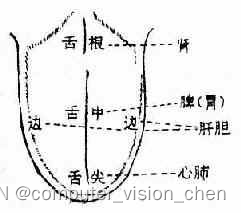
舌诊时按照舌尖-舌中-舌根-舌侧的顺序进行观察。 先看舌体再看舌苔,30秒左右。 如果一次望舌判断不清,可令病人休息3~5分钟后,重新观察一次 舌诊脏腑部位分属图 舌体 胖嫩而边有齿痕为气虚、阳虚。 薄白而润为风寒; 薄白而燥…...

Facebook的社交未来:元宇宙时代的数字共融
引言: 随着科技的不断进步和社会的快速发展,人们对于社交网络的需求和期待也在不断演变。在这个数字化时代,元宇宙的概念逐渐引发了人们对社交体验的重新思考。作为全球最大的社交网络之一,Facebook正在积极探索元宇宙时代的社交…...
2024护网面试题精选(一)
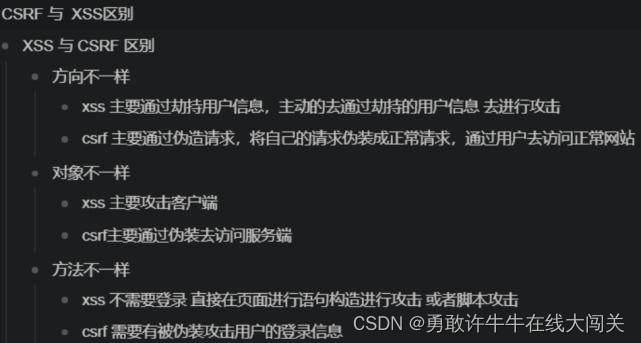
0x00.基础漏洞篇 00-TOP10漏洞 1.SQL注入 2.失效的身份认证和会话管理 3.跨站脚本攻击XSS 4.直接引用不安全的对象 5.安全配置错误 6.敏感信息泄露 7.缺少功能级的访问控制 8.跨站请求伪造CSRF 9.实验含有已知漏洞的组件 10.未验证的重定向和转发 01-SQL注入漏洞 …...

如何制作一个简单html网页
要制作一个简单的HTML网页,可以按照以下步骤进行: 创建一个新的文本文件并将其保存为.html文件(例如,index.html)。 打开文本文件,并使用以下基本的HTML结构开始编写代码: <!DOCTYPE html…...
接口与辅助函数)
React富文本编辑器开发(七)接口与辅助函数
接口 我们知道Slate使用纯 JSON 数据对象,只要这些数据符合接口标准就行。也就是说每一个节点都有一个接口标准与之对应。比如文本节点: interface Text {text: string }在实例这些接口数据的同时我们也可以增加额外的属性,这根据我们的实际…...

【conda】conda卸载并重新安装指定版本软件package
1. conda卸载软件包 可先通过 conda list 查看已当前环境已安装的软件包 conda uninstall your_package如果卸载失败, 可通过pip卸载 pip uninstall your_package2. 安装指定版本的软件包 先搜索可安装的软件包版本, 如 conda search --full-name protobuf再安装对应的软件版本…...

项目设计方案规范参考
在软件架构设计中,以下是一个常见的软件架构设计模版,供参考: 1. 业务需求分析 确定系统的业务需求和功能需求。 分析用户需求,确定系统的核心功能和非功能需求。 2. 架构设计原则 SOLID 原则(单一职责、开放封闭、里…...
LVS----DR模式
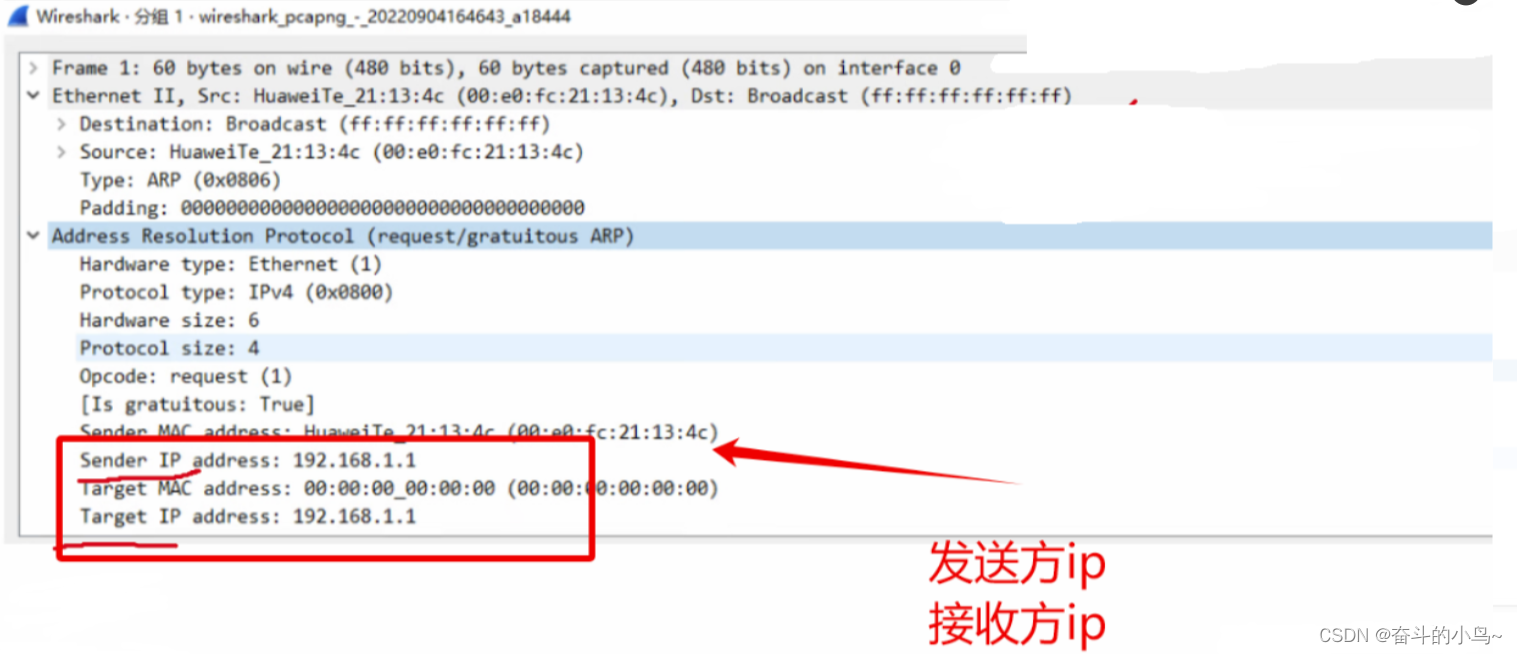
一、LVS-DR工作原理 1、LVS-DR数据包流向分析 客户端发送请求到Director Server (负载均衡器),请求的数据报文(源IP是CIP,目标IP是VIP)到达内核空间。Director Server 和Real Server 在同一个网络中,数据通过二层数据…...

操作系统(笔记)(一)
1、操作系统的功能和目标 1.1功能 存储管理文件管理设备管理处理机管理进程管理 1.2目标 方便性:操作系统作为用户与计算机硬件系统之间的接口,提供了直观的命令和界面,使得用户能够更容易地操作计算机。有效性:操作系统旨在提…...
Redis线程模型解析
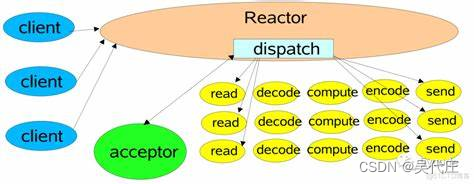
引言 Redis是一个高性能的键值对(key-value)内存数据库,以其卓越的读写速度和灵活的数据类型而广受欢迎。在Redis 6.0之前的版本中,它采用的是一种独特的单线程模型来处理客户端的请求。尽管单线程在概念上似乎限制了其扩展性和并…...

ros2 launch如何控制node的启动顺序
ros2 launch如何控制node的启动顺序 文章目录 引言如何写launch文件启动流程图具体launch代码总结引言 本文用来说明如何控制ros2 launch 节点的先后顺序,我们有时候需要一个节点启动完成后再启动其它节点,实现这个功能有两种方式: 在launch.py时写event根据事件触发使用li…...

Android13 framework层添加关机接口
framework层修改: t0_sys/frameworks/base/core/api/current.txt method RequiresPermission(android.Manifest.permission.REBOOT) public void reboot(Nullable String);method public void rebootp();t0_sys/frameworks/base/core/java/android/os/IPowerManager…...

GDB调试入门笔记
文章目录 What?WhyHow安装GDB安装命令查看是否安装成功调试简单的程序预备一个程序调试 使用breakinfolistnextprintstep一些小技巧在gdb前shell日志功能watch point| catch point 调试core调试一个运行的程序 What? GDB是什么? 全称GNU sym…...

JavaScript的`call`方法:实现函数间的调用!
🤍 前端开发工程师、技术日更博主、已过CET6 🍨 阿珊和她的猫_CSDN博客专家、23年度博客之星前端领域TOP1 🕠 牛客高级专题作者、打造专栏《前端面试必备》 、《2024面试高频手撕题》 🍚 蓝桥云课签约作者、上架课程《Vue.js 和 E…...
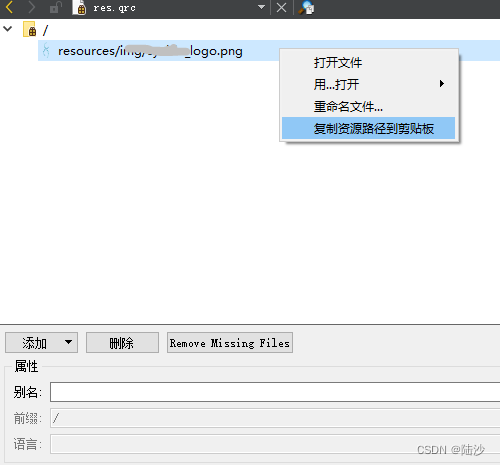
qt5-入门-使用拖动方式创建Dialog
参考: C GUI Programming with Qt 4, Second Edition 本地环境: win10专业版,64位,Qt5.12 目录 实现效果基本流程逐步实操1)创建和初始化子部件2)把子部件放进布局中3)设置tab顺序4)…...
【Redis】RedisTemplate和StringRedisTemplate的区别
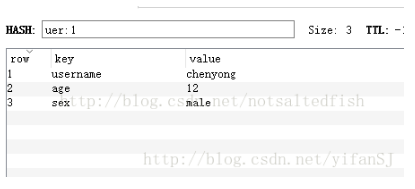
两者的关系是 StringRedisTemplate 继承 RedisTemplate 。 两者的数据是不共通的:也就是说 StringRedisTemplate 只能管理 StringRedisTemplate 里面的数据,RedisTemplate 只能管理 RedisTemplate 中的数据。 RedisTemplate 看这个类的名字后缀是 Temp…...
)
面试经典150题(101-104)
leetcode 150道题 计划花两个月时候刷完之未完成后转,今天(第1天)完成了4道(101-104)150: 101.(215. 数组中的第K个最大元素) 题目描述: 给定整数数组 nums 和整数 k,请返回数组中第 k 个最大的元素。 请…...
Java实现读取转码写入ES构建检索PDF等文档全栈流程
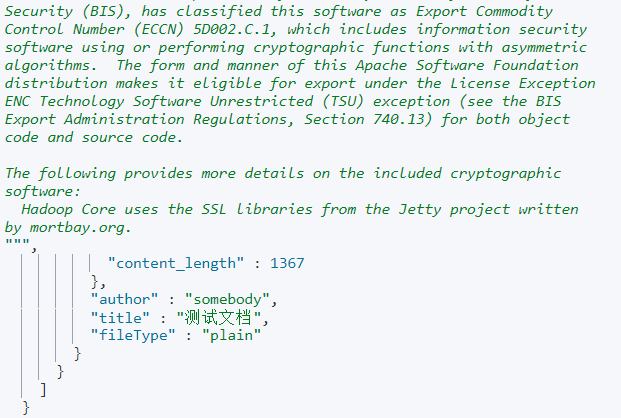
背景 之前已简单使用ES及Kibana和在线转Base64工具实现了检索文档的demo,并已实现WebHook的搭建和触发流程接口。 传送门: 基于GitBucket的Hook构建ES检索PDF等文档全栈方案 使用ES检索PDF、word等文档快速开始 实现读取本地文件入库ES 总体思路&…...

主流开发环境和开发语言介绍
主流开发环境和开发语言介绍 一、主流开发环境介绍 主流开发环境是指广泛应用于软件开发的集成开发环境(Integrated Development Environment,简称IDE)。IDE是一种集成了编辑器、编译器、调试器等工具的软件,提供了一站式的开发环…...

香橙派Zero3部署Homeassistant:从零到一打造智能家居中枢
1. 香橙派Zero3开箱与硬件准备 第一次拿到香橙派Zero3时,确实被它的小巧惊艳到了。整块开发板只有信用卡大小,却集成了四核ARM Cortex-A53处理器和2GB/4GB内存选项。我选择的是2GB版本,对于运行Homeassistant来说完全够用。包装内除了主板外&…...

GLAD:热晕效应
概述激光在大气中传输时部分能量被空气中的分子和气溶胶吸收。被吸收的热量将空气加热,导致气压上升,空气膨胀,空气密度降低,折射率下降,形成一个负透镜,使激光束发散。当存在侧向风时,下风区空…...

树莓派Web IDE:零配置云端编程环境与Python硬件模拟实践
1. 项目概述:一个“开箱即用”的编程环境革命最近,树莓派基金会悄无声息地扔下了一颗“重磅炸弹”——他们正式推出了一个网页端的代码编辑器。这个消息在创客圈和教育圈里,可能比发布一款新硬件还要让人兴奋。为什么?因为它直接戳…...
)
CodeWave项目导出实战:从云端到本地的完整避坑指南(含数据库配置与端口冲突解决)
CodeWave项目导出实战:从云端到本地的完整避坑指南(含数据库配置与端口冲突解决) 当开发者完成CodeWave平台上的应用构建后,如何将项目顺利迁移至本地环境往往成为新的挑战。不同于云端的一键部署,本地化过程涉及环境差…...

终极游戏加速指南:如何使用OpenSpeedy免费提升游戏体验
终极游戏加速指南:如何使用OpenSpeedy免费提升游戏体验 【免费下载链接】OpenSpeedy 🎮 An open-source game speed modifier. 项目地址: https://gitcode.com/gh_mirrors/op/OpenSpeedy 你是否厌倦了游戏中漫长的等待时间?是否想在单…...

RTOS任务通知:轻量级通信机制的原理、应用与性能优化
1. 项目概述:为什么RTOS应用需要“任务通知”在嵌入式实时操作系统(RTOS)的世界里,任务间的通信与同步是决定系统效率、响应速度和稳定性的基石。传统的通信机制,如信号量、消息队列、事件标志组,我们早已驾…...

VScode搭建一体化ROS开发环境:从配置到调试的完整实践指南
1. 项目概述与核心价值最近在带几个新同事上手机器人项目,发现他们配置ROS开发环境时,总会在各种依赖、路径和编译问题上卡壳,一折腾就是大半天。这让我想起自己刚接触ROS那会儿,也是被环境配置搞得焦头烂额,明明照着官…...

3个高效方法解决抖音素材管理难题:从零散文件到有序素材库
3个高效方法解决抖音素材管理难题:从零散文件到有序素材库 【免费下载链接】douyin-downloader A practical Douyin downloader for both single-item and profile batch downloads, with progress display, retries, SQLite deduplication, and browser fallback s…...

避坑指南:STM32F4 HAL库驱动MPU6050,从GitHub标准库移植到DMA模式的完整记录
STM32F4 HAL库下MPU6050 DMA模式移植实战:从标准库到高效姿态采集 移植第三方传感器驱动是嵌入式开发中的高频操作。最近在平衡车项目中,需要将GitHub上一个基于标准库的MPU6050驱动移植到STM32CubeMX生成的HAL库环境,并升级为DMA传输模式。这…...

FactoryIO虚拟仓储避坑指南:从入仓出仓到急停处理的完整调试流程
FactoryIO虚拟仓储避坑实战:从坐标校准到多任务管理的深度调试手册 当第一次在FactoryIO中搭建虚拟仓储系统时,我盯着屏幕上那个69的货架模型,满心以为两小时就能搞定入仓出仓逻辑。直到凌晨三点,我还在和那个永远差0.006的坐标值…...