
【vue baidu-map】实现百度地图展示基地,鼠标悬浮标注点展示详细信息
实现效果如下:
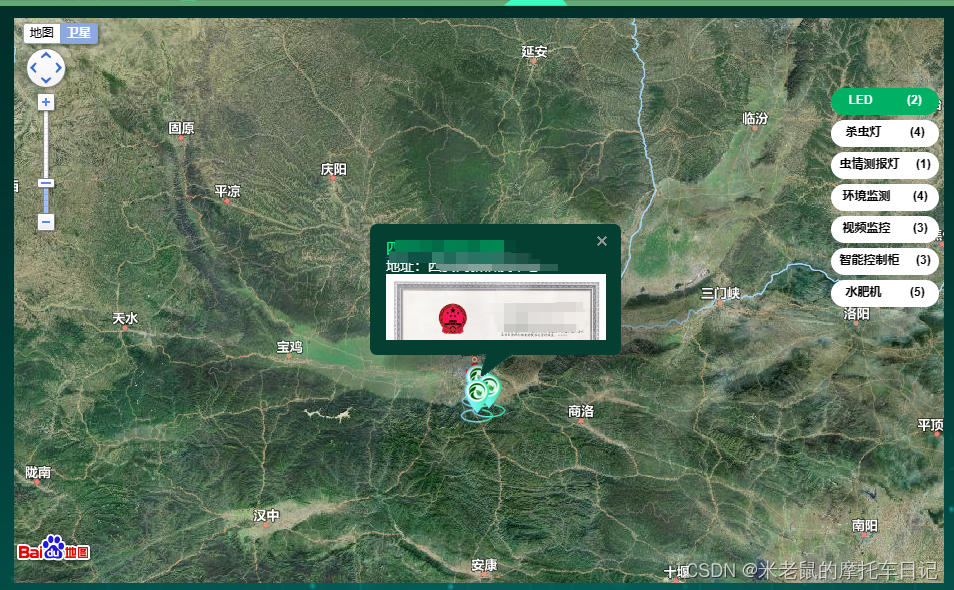
自用代码记录
<template><div class="map" style="position: relative;"><baidu-mapid="bjmap":scroll-wheel-zoom="true":auto-resize="true"@ready="handler"><bm-markerv-for="(item, index) in markerList":key="index":position="item.position":icon="item.icon"@click="handlerinfoWindowOpen(index)"><bm-info-window:position="item":show="item.show"@close="infoWindowClose(index)"@open="infoWindowOpen(index, item)":auto-pan="true":close-on-click="false"><div>视频箭头</div><!-- <div><ahref="#/internet"style="font-size: 15px;border-bottom: 1px #0464a4 solid;color: #0464a4;">视频监控名称:{{ item.name }}</a> --><!-- <video-playerstyle="width: 200px; height: 100px":ref="videoId"class="myPlayer"muted="true":options="videoOptions"/> --><!-- <span>企业名称:</span><span>{{current }}testt</span> --><!-- </div> --></bm-info-window></bm-marker><bm-polygon v-for="(markers, index) in planBaseMassifs" :key="index" :path="markers" :stroke-color="drawColor" :stroke-opacity="1" :stroke-weight="4" :fillColor="drawColors" :fillOpacity="1" /><div class="equipmentBox" v-if="equipmentType"><div:class="current == key ? 'item current' : 'item'"v-for="(value, key) in equipmentType":key="key"@click="changeType(key)"><div>{{ key }}</div><div>({{ value }})</div></div></div><div v-show="current == '视频监控'" class="equipmentBox1"><video-playerstyle="width: 100%; height: 100%;position:absolute;":ref="videoId"class="myPlayer"muted="true":options="videoOptions"/></div></baidu-map></div>
</template><script>
// var echarts = require('echarts')
import { getPlantBases } from '@/api/table'
import { getUserEquipments ,getPageList} from '@/api/equipment'
// import { setServers } from 'dns';
// import { sumRpt } from '@/api/equipment'
import { staticResourceLocation } from '@/settings'
import defaultSettings from '@/settings'
import initData from '../../../mixins/initData'
import VideoPlayer from '@/views/components/videoPlayer.vue'
import { log } from 'video.js'export default {props: {childrenData: {type: Object,default: function () {return {}},},},data() {return {staticResourceLocation,plantBaseList: [],screenHeight: window.innerHeight - 84, // 屏幕高度screenWidth: window.innerWidth,systitle: '',map: null,BMap: null,NavigationControl: null,MapTypeControl: null,// 设备列表equipmentList: [],planBaseMassifs:[],equipmentType: [],current: 'LED',markerList: [],videoOptions: {autoplay: false,controls: true,},videoId: '',drawColors: '#e9d99b',videoList: [],markers:[],drawColor: "#ff0000",}},components: { VideoPlayer },mounted() {var _this = thiswindow.onresize = function () {// 定义窗口大小变更通知事件_this.screenHeight = document.documentElement.clientHeight - 84 // 窗口高度_this.screenWidth = document.documentElement.clientWidth // 窗口宽度//map.removeControl(NavigationControl)   //删除比例尺控件_this.map.removeControl(_this.NavigationControl)_this.map.removeControl(_this.MapTypeControl)_this.NavigationControl = new BMap.NavigationControl({// 地图平移缩放控件anchor: BMAP_ANCHOR_TOP_LEFT,type: BMAP_NAVIGATION_CONTROL_LARGE,offset: new BMap.Size(_this.screenWidth / 4 + 5, 10),})_this.MapTypeControl = new BMap.MapTypeControl({mapTypes: [BMAP_NORMAL_MAP, BMAP_SATELLITE_MAP, BMAP_HYBRID_MAP],offset: new BMap.Size(_this.screenWidth / 4 + 5, 10),})_this.map.addControl(_this.NavigationControl)_this.map.addControl(_this.MapTypeControl)}console.log(this.childrenData, 'childrenData--->statistics')this.equipmentType = this.childrenData.withCategory// sumRpt().then((res) => {//   if (res.body) {//     let { withCategory } = res.body//     this.equipmentType = withCategory//   }// })getUserEquipments().then((res) => {console.log('百度地图传的接口',res)this.equipmentList = res.bodythis.equipmentList.forEach((item) => {if (item.category === 1 && item.point) {var obj = {position: {lng: item.point.split(',')[0],lat: item.point.split(',')[1],},icon: {url: this.staticResourceLocation + 'static/LED.png',size: { width: 33, height: 33 },opts: {imageSize: { width: 33, height: 33 },},},}this.markerList.push(obj)} else if (item.category === 2) {var obj1 = {hdAddress: item.videoUrl,id: item.videoId,}this.videoList.push(obj1)let indexId = 0this.videoId = this.videoList[indexId].idthis.$nextTick(function () {var _thisVideoRefs = this.$refs[this.videoList[indexId].id]if (_thisVideoRefs) {var player = _thisVideoRefs.playerplayer.src(this.videoList[indexId].hdAddress)//player.play();}})}})})},beforeDestroy() {if (this.timer) {clearInterval(this.timer) // 在Vue实例销毁前,清除我们的定时器}},created() {},mixins: [initData],methods: {changeType(key) {this.markerList = []this.current = keyvar index =key == 'LED'? 1: key == '视频监控'? 2: key == '环境监测'? 3: key == '水肥机'? 4: key == '虫情测报灯'? 5: key == '杀虫灯'? 6: key == '智能控制柜'? 7: 0// console.log(index)var iconPath = ''if (index == 1) {iconPath = this.staticResourceLocation + 'static/led.png'} else if (index == 2) {iconPath = this.staticResourceLocation + 'static/video.png'} else if (index == 3) {iconPath = this.staticResourceLocation + 'static/qxjc.png'} else if (index == 4) {iconPath = this.staticResourceLocation + 'static/jsgg.png'} else if (index == 5) {iconPath = this.staticResourceLocation + 'static/Insecticidal.png'} else if (index == 6) {iconPath = this.staticResourceLocation + 'static/scd.png'} else if (index == 7) {iconPath = this.staticResourceLocation + 'static/znkzk.png'}this.equipmentList.forEach((item) => {if (item.category === index && item.point) {var obj = {position: {lng: item.point.split(',')[0],lat: item.point.split(',')[1],},show: false,name: item.name,icon: {url: iconPath,size: { width: 33, height: 33 },opts: {imageSize: { width: 33, height: 33 },},},}this.markerList.push(obj)}})// console.log(this.markerList, 'kkkkkkkkkkkkkkkkkkkkkkkkkkkkkkkkkkk')},// gohome() {//   console.log('666')//   var user = this.$store.state.user.user//   if (user.homeUrl && user.homeUrl != '') {//     this.$router.push(user.homeUrl)//   } else {//     this.$router.push('/')//   }// },// redirectMonitor: function () {//   this.$router.push('/monitor/tine')// },handler({ BMap, map }) {this.map = mapthis.BMap = BMapgetPlantBases().then((res) => {console.log(res.body, '百度地图')this.plantBaseList = res.bodyvar point = ''this.plantBaseList.forEach((item) => {if (item.position) {point = new BMap.Point(item.position.split(',')[0],item.position.split(',')[1])}})if (point === '') {point = new BMap.Point(107.034026, 33.073558)}map.centerAndZoom(point, 8) // 初始化地图,设置中心点坐标和地图级别map.enableScrollWheelZoom(true) // 启用滚轮放大缩小var myIcon = new BMap.Icon('http://lyds.fengyuniot.com/content/upload/mappoint.png',new BMap.Size(40, 52),{anchor: new BMap.Size(10, 10),})// var marker = new BMap.Marker(point) // 创建标注// map.addOverlay(marker) // 将标注添加到地图中var NavigationControl = new BMap.NavigationControl({// 地图平移缩放控件anchor: BMAP_ANCHOR_TOP_LEFT,type: BMAP_NAVIGATION_CONTROL_LARGE,offset: new BMap.Size(this.screenWidth / 4 + 5, 10),})this.NavigationControl = NavigationControl// 添加地图类型控件var MapTypeControl = new BMap.MapTypeControl({mapTypes: [BMAP_NORMAL_MAP, BMAP_SATELLITE_MAP, BMAP_HYBRID_MAP],offset: new BMap.Size(this.screenWidth / 4 + 5, 10),})this.MapTypeControl = MapTypeControlmap.addControl(NavigationControl)map.setMapType(BMAP_HYBRID_MAP) // 调取地图类型混合型map.addControl(MapTypeControl)var markerArr = this.plantBaseList// console.log(this.plantBaseList, 'this.plantBaseList11111')markerArr.forEach((e, i) => {var positionArr = e.position.split(',')// console.log(e, 'errrrr')// console.log(e.plantBasePictures[0].pictureUrl, 'rrrrr')var background = ''if (e.plantBasePictures != null && e.plantBasePictures.length > 0) {background =defaultSettings.staticResourceLocation +e.plantBasePictures[0].pictureUrl}// console.log(background, 'background')let opts = {width: 200,height: 100,}// 创建point, 将x,y值传入const pointNumber = new BMap.Point(positionArr[0], positionArr[1])const infoWindow = new window.BMap.InfoWindow("<div class='maptipsinfo'style='color:white;' ><a href='#/nutrientManagement'  style='font-size:15px;border-bottom:1px #0464A4 solid;color:#00fe8f;'><span>" +e.baseName +'</span></a>' +"<p style='font-size:14px;'><span>地址:</span>" +e.address +'</p>' +'<img  style="width:100%;height:80%;" src="' +background +'"/>' +'</div>',opts)// infoWindow.setStyle({// color: '#fff', // 字体颜色为白色// background: '#000', // 背景颜色为黑色// border: 'none', // 去掉边框// borderRadius: '5px', // 圆角半径// padding: '10px', // 内边距// fontSize: '14px', // 字体大小// lineHeight: '20px', // 行高// })var label = new BMap.Label(e.baseName, {offset: new BMap.Size(25, 5),})this.markerFun(map, pointNumber, infoWindow, label, myIcon)})})const params = {pageIndex: this.pageIndex,pageSize: this.pageSize,enterPriseId: this.enterPriseId,}getPageList(params).then((res)=>{console.log(res,'你好555555555555');// planBaseMassifsif(res.errorCode == 20000){const  array  = res.body.listconst innerObjects = [];for (let i = 0; i < array .length; i++) {const innerObject  = array [i].planBaseMassifs;innerObjects.push(innerObject)}this.planBaseMassifs = innerObjectsconsole.log(this.planBaseMassifs,'this.planBaseMassifs');// 使用map()方法遍历嵌套数组let modifiedArray = innerObjects.map((subArray) => {// 检查子数组是否为nullif (subArray === null) {return [];}// 使用map()方法遍历子数组中的每个对象return subArray.map((obj) => {// 替换属性名obj.lat = obj.latitude;obj.lng = obj.longitude;delete obj.latitude;delete obj.longitude;// 处理null值if (obj === null) {return {};} else {return obj;}});}).filter((subArray) => subArray.length > 0);for (let i = 0; i < modifiedArray.length; i++) {// 获取每个子数组的第一行内容let firstRow = modifiedArray[i][0];// modifiedArraymodifiedArray[i].push(firstRow);}this.planBaseMassifs = modifiedArray}})},markerFun: function (map, points, infoWindows, label, myIcon) {console.log('1111a',map,points, infoWindows, label, myIcon,)const markers = new BMap.Marker(points, { icon: myIcon })map.addOverlay(markers) // 将标注添加到地图中// markers.setLabel(label);  // 将data中的name添加到地图中// 标注的点击事件markers.addEventListener('mouseover', function (event) {map.openInfoWindow(infoWindows, points) // 参数:窗口、点  根据点击的点出现对应的窗口})// console.log('1a')},infoWindowOpen(index, item) {if (this.current == '视频监控') {this.markerList[index].show = truelet indexId = indexthis.videoId = this.videoList[indexId].idthis.$nextTick(function () {var _thisVideoRefs = this.$refs[this.videoList[indexId].id]// console.log(this.videos,_thisVideoRefs,'_thisVideoRefs_thisVideoRefs')if (_thisVideoRefs) {var player = _thisVideoRefs.player// console.log(player.src,'_thisVideoRefs11')player.src(this.videoList[indexId].hdAddress)//player.play();}})}},infoWindowClose(index) {this.markerList[index].show = false},handlerinfoWindowOpen(index) {this.markerList[index].show = trueconsole.log('点击标记点',index)this.show = trueif (this.current == '视频监控') {this.markerList[index].show = truelet indexId = indexthis.videoId = this.videoList[indexId].idthis.$nextTick(function () {var _thisVideoRefs = this.$refs[this.videoList[indexId].id]if (_thisVideoRefs) {var player = _thisVideoRefs.playerplayer.src(this.videoList[indexId].hdAddress)//player.play();}})}},// handlerinfoWindowOpen(index) {//   this.markerList[index].show = true//   console.log('点击标记点',this.markerList[index].show)//   this.show = true//   if (this.current == '视频监控') {//     this.markerList[index].show = true//     let indexId = index//     this.videoId = this.videoList[indexId].id//     this.$nextTick(function () {//       var _thisVideoRefs = this.$refs[this.videoList[indexId].id]//       if (_thisVideoRefs) {//         var player = _thisVideoRefs.player//         player.src(this.videoList[indexId].hdAddress)//         //player.play();//       }//     })//   }// },// 异步调用百度jsmap_load() {var load = document.createElement('script')load.src = 'http://api.map.baidu.com/api?v=1.4&callback=map_init'document.body.appendChild(load)},},
}
</script><style scoped lang="scss">
/*地图提示*/.equipmentBox {/* width: 240px; */// position: absolute;// top: 70px;// right: calc(25vw + 5px);position: absolute;top: 70px;right: 5px;
}
.equipmentBox1 {width: 260px;position: absolute;bottom: 35%;right: calc(25vw + 5px);
}.equipmentBox .item {display: flex;justify-content: space-around;align-items: center;width: 108px;height: 27px;border-radius: 14px;background-color: #fff;color: #010101;font-size: 12px;font-weight: bold;cursor: pointer;margin-bottom: 5px;text-align: right;
}.equipmentBox .current {background-color: #00b065;color: #fff;
}
// 地图
.map{width:100%;height: 100%;
}
.map .maptipsinfo p {font-size: 14px;line-height: 14px;height: 14px;color: #777;
}
.maptipsinfo a:hover {color: #0696f9;border-color: #0696f9;
}
.maptipsinfo span {color: #333;
}
.maptipsinfo {background: url();
}
.map #bjmap {width: 100%;height: 100%;display: inline-block;vertical-align: baseline;/* position: fixed; */div:first-of-type{border-radius: 15px !important;
}
}
.map #bjmap>div:first-of-type{border-radius: 15px !important;
}
.map .nowdatatime {border: 1px solid #00c7dd;background: rgba(0, 0, 0, 0.6);box-shadow: 0 0 10px rgba(1, 129, 143, 0.8);position: relative;top: -97%;padding: 10px;width: 240px;margin: 0 auto;text-align: center;border-radius: 5px;font-size: 1.5rem;
}
.imgss {height: 30px;width: 30px;
}
/*.map .el-loading-spinner .circular{width: 80px;height: 80px;animation: loading-rotate 2s linear infinite;} */
/*.map  .el-loading-spinner{background: url(../../assets/img/default_img.gif) no-repeat;background-size: 80px 80px;width: 100%;height: 100%;position: relative;top: 45%;left: calc(50% - 40px);
} */// /deep/.BMap_pop img,
// /deep/.BMap_top,
// /deep/.BMap_center,
// /deep/.BMap_bottom,
// /deep/.BMap_pop > div {
//   &:not(:nth-child(9)) {
//     display: none;
//   }
// }// /deep/.BMap_pop div:nth-child(9) {
//   // top: 30px !important;
// }
// /deep/.BMap_bubble_content {
//   // border-top: 3px solid #377abd;
//   border-top: 3px solid rgba(44, 55, 47, 0.3);
//   // border-bottom: 3px solid #377abd;
//   border-bottom: 3px solid rgba(44, 55, 47, 0.3);
//   border-radius: 8px;
//   // background-color: rgba(36, 105, 137, 0.8);
//   background-color: rgba(44, 55, 47, 0.4);
//   overflow: hidden;
//   color: #ffffff;
//   padding: 8px 5px;
//   font-size: 14;
// }
.baidu-map-con {background-color: #043f31;// width: 100%;// height: 100%;
}
::v-deep #bjmap .BMap_stdMpCtrl{inset: 30px auto auto 10px !important;
}
// ::v-deep #bjmap .BMap_noprint {
//   inset: 10px 90% auto auto !important;
// }
::v-deep #bjmap .anchorTR{inset: 5px 91% auto auto !important;
}
::v-deep #bjmap .BMap_stdMpCtrl{//inset: 40px auto auto 30px !important;
}
// marker颜色
::v-deep .BMap_bubble_title{color:#fff;font-size:18px;/*font-weight: bold;*/text-align:left;background:transparent !important;
}::v-deep .BMap_pop .BMap_top{background:#043f31 !important;border:0 !important;
}
::v-deep .BMap_pop .BMap_center{width:251px !important;// height: 300px !important;border:0 !important;background:#043f31 !important;
}
::v-deep .BMap_pop .BMap_bottom{border:0 !important;background:#043f31 !important;
}::v-deep .BMap_pop div:nth-child(3){background:transparent !important;
}
::v-deep .BMap_pop div:nth-child(3) div{border-radius:7px;background:#043f31 !important;border:0 !important;
}
::v-deep .BMap_pop div:nth-child(1){border-radius:7px 0 0 0;background:transparent !important;border:0 !important;
}
::v-deep .BMap_pop div:nth-child(1) div{background:#043f31 !important;
}
::v-deep .BMap_pop div:nth-child(5){border-radius:0 0 0 7px;background:transparent !important;border:0 !important;
}
::v-deep .BMap_pop div:nth-child(5) div{border-radius:7px;background:#043f31 !important;
}
::v-deep .BMap_pop div:nth-child(7){background:transparent !important;
}
::v-deep .BMap_pop div:nth-child(7) div{border-radius:7px;background:#043f31 !important;
}::v-deep .BMap_pop div:nth-child(8) div{/*border-radius:7px;*/background:#043f31 !important;
}
/*窗体阴影*/
::v-deep .BMap_shadow div:nth-child(5) img{margin-left: -1100px !important;
}::v-deep .BMap_shadow div:nth-child(4){width: 262px !important;
}
::v-deep img[src="http://api0.map.bdimg.com/images/iw3.png"] {content: url('../../../assets/mapMarker.png');
}
::v-deep img[src="https://api.map.baidu.com/images/iw3.png"] {margin-top: -692px !important;filter: alpha(opacity=70);content: url('../../../assets/mapMarker.png');
}</style>
<style>
#bjmap>div:first-of-type{
/* border-radius: 15px; */
}</style>
相关文章:
【vue baidu-map】实现百度地图展示基地,鼠标悬浮标注点展示详细信息
实现效果如下: 自用代码记录 <template><div class"map" style"position: relative;"><baidu-mapid"bjmap":scroll-wheel-zoom"true":auto-resize"true"ready"handler"><bm-mar…...

uniapp canvas文字和元素居中
文字居中:ctx.textAlign "center"; 元素居中:ctx.arc(screenWidth / 2, 122, 40, 0, 2 * Math.PI); ctx.arc()的x轴为当前屏幕的宽度/2; let screenWidth 540; let screenHeight 960; // 头像 if (photoimg) {ctx.setFillSty…...
深度探索:SWAT模型和生物地球化学循环模型实现流域生态系统水-碳-氮耦合过程模拟
目录 专题一 流域水碳氮建模概述 专题二 ArcGIS入门 专题三 SWAT模型建模流程 专题四 DEM数据制备流程 专题五 土地利用数据制备流程 专题六 土壤数据制备流程 专题七 气象数据制备流程 专题八 农业措施数据制备流程 专题九 参数率定与结果验证 专题十 CENTURY模型建…...
C语言经典算法-5
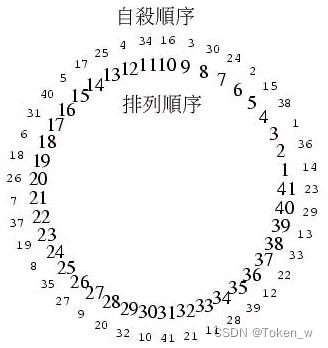
文章目录 其他经典例题跳转链接26.约瑟夫问题(Josephus Problem)27.排列组合28.格雷码(Gray Code)29.产生可能的集合30.m元素集合的n个元素子集 其他经典例题跳转链接 C语言经典算法-1 1.汉若塔 2. 费式数列 3. 巴斯卡三角形 4. …...

python与excel第二节
python与excel第二节 打开一个工作簿 例子: import xlwings as xw app xw.App(visibleTrue,add_bookFalse) workbook app.books.open(rD:\TEST\python与excel\工作簿test0.xlsx) 上面例子打开了工作簿test0.xlsx。 但是,如果该excel文件不存在则报错…...
Google云计算原理与应用(四)
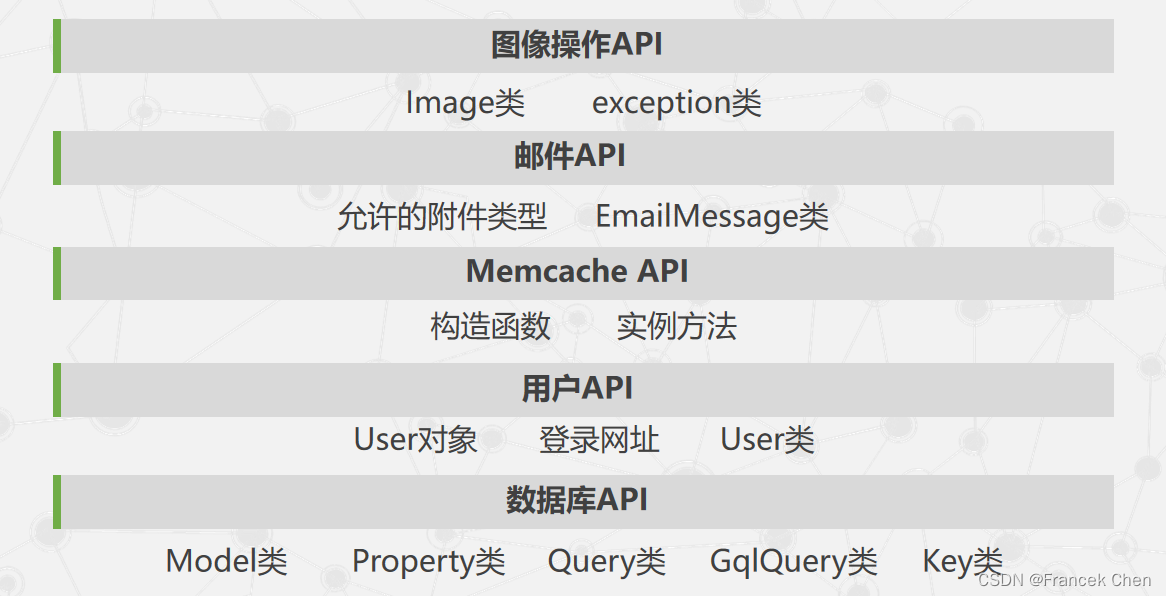
目录 七、海量数据的交互式分析工具Dremel(一)产生背景(二)数据模型(三)嵌套式的列存储(四)查询语言与执行(五)性能分析(六)小结 八、…...
面试常问:为什么 Vite 速度比 Webpack 快
前言 最近作者在学习 webpack 相关的知识,之前一直对这个问题不是特别了解,甚至讲不出个123....,这个问题在面试中也是常见的,作者在学习的过程当中总结了以下几点,在这里分享给大家看一下,当然最重要的是…...
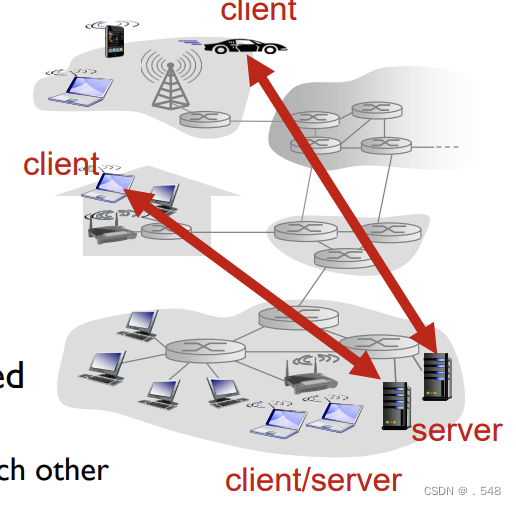
principles of network applications网络应用原理
Creating a network app write programs that: ▪ run on (different) end systems ▪ communicate over network ▪ e.g., web server software communicates with browser software application transport network data link physical application transport network data li…...
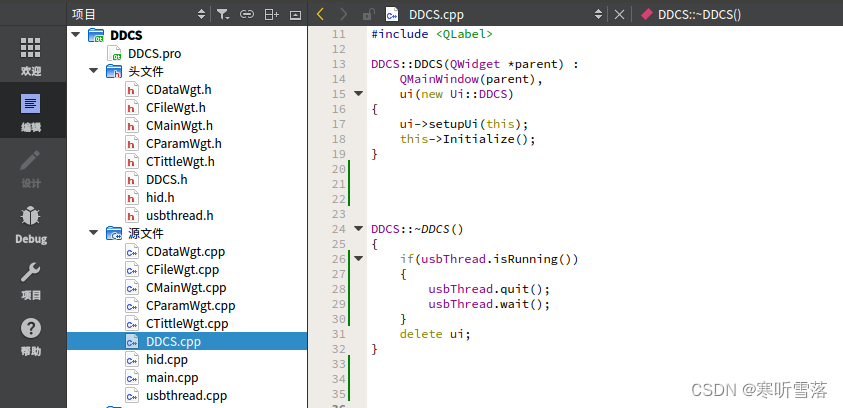
QT增加线程函数步骤流程
在使用线程的时候,不仅要关注线程开启的时机,同时还要关注线程安全退出,这样才能保证程序的健壮性,如果线程开启的较多,且开启关闭比较频繁,建议使用线程池来处理。开启线程有三种方式:第一种C的…...
)
Python基础----字符串(持续更新中)
字符串的介绍 定义:是python中常用的数据类型之一,可以使用单引号、双引号、三引号来进行创建 字符串的标识类型:str 字符串的特性 字符串属于不可变数据类型,不能直接修改字符串的本身 数字、元组也属于不可变数据类型 字符串…...
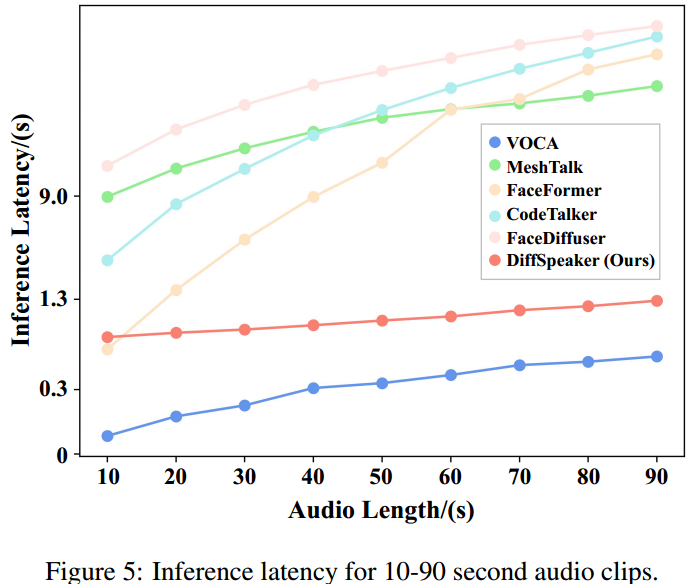
【论文阅读】DiffSpeaker: Speech-Driven 3D Facial Animation with Diffusion Transformer
DiffSpeaker: 使用扩散Transformer进行语音驱动的3D面部动画 code:GitHub - theEricMa/DiffSpeaker: This is the official repository for DiffSpeaker: Speech-Driven 3D Facial Animation with Diffusion Transformer paper:https://arxiv.org/pdf/…...
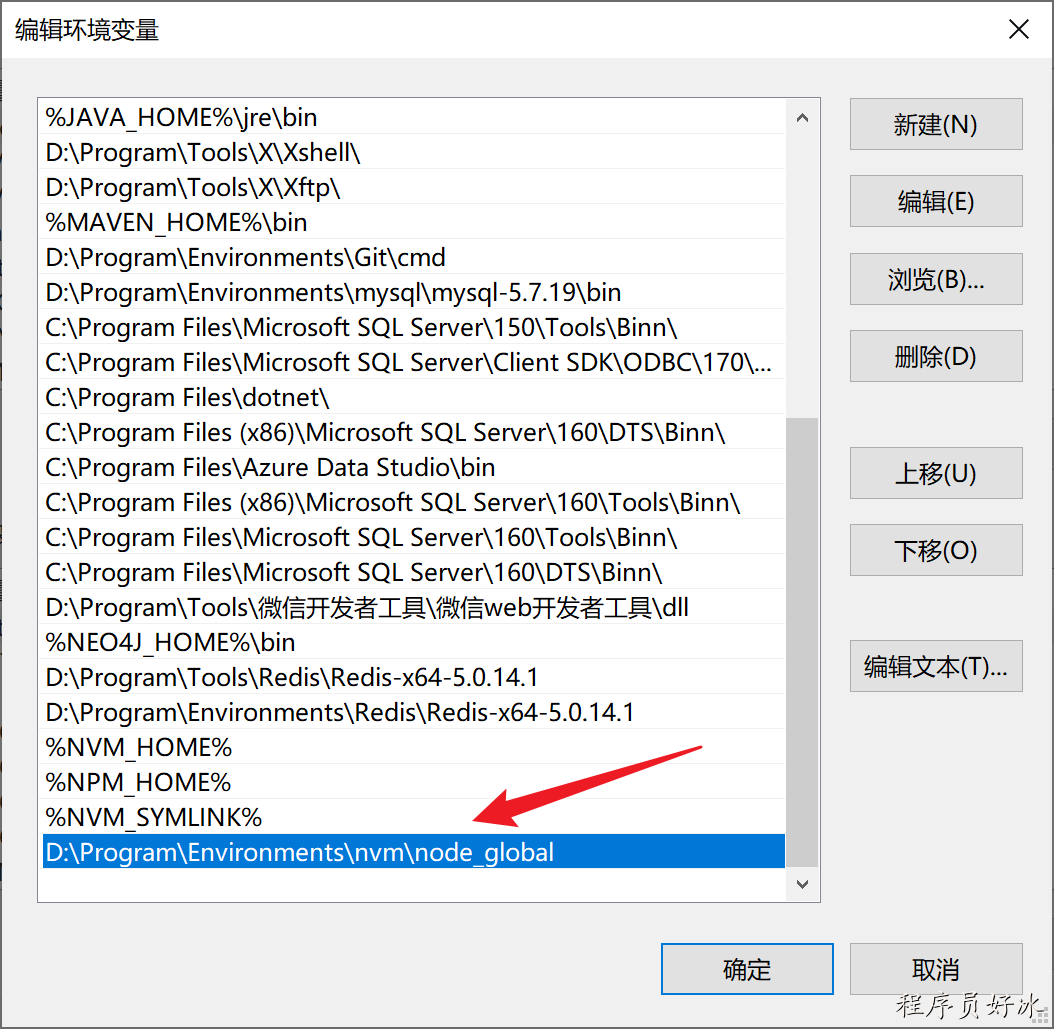
NVM使用教程
文章目录 ⭐️写在前面的话⭐️1、卸载已经安装的node2、卸载nvm3、安装nvm4、配置路径以及下载源5、使用nvm下载node6、nvm常用命令7、全局安装npm、cnpm8、使用淘宝镜像cnpm9、配置全局的node仓库🚀 先看后赞,养成习惯!🚀&#…...

mysql 学习
本文来自于《sql必知必会》 所需要的文件教程连接 本站其他的小伙伴 第一课 了解sql 数据库基础 什么是数据库 数据库(database) 保存有组织的数据的容器(通常是一个文 件或一组文件)。 表 表(table)…...
Jenkins 一个进程存在多个实例问题排查
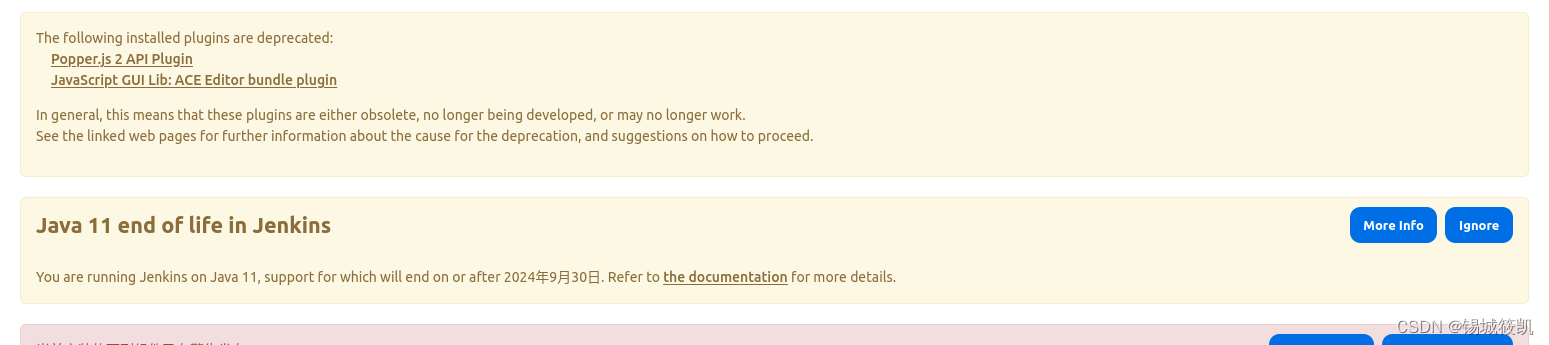
Jenkins 一个进程存在多个实例问题排查 最近Jenkins升级到2.440.1版本后,使用tomcat服务部署,发现每次定时任务总会有3-4个请求到我的机器人上,导致出现奇奇怪怪的问题。 问题发现 机器人运行异常,总有好几个同时请求的服务。…...
mysql数据类型和常用函数
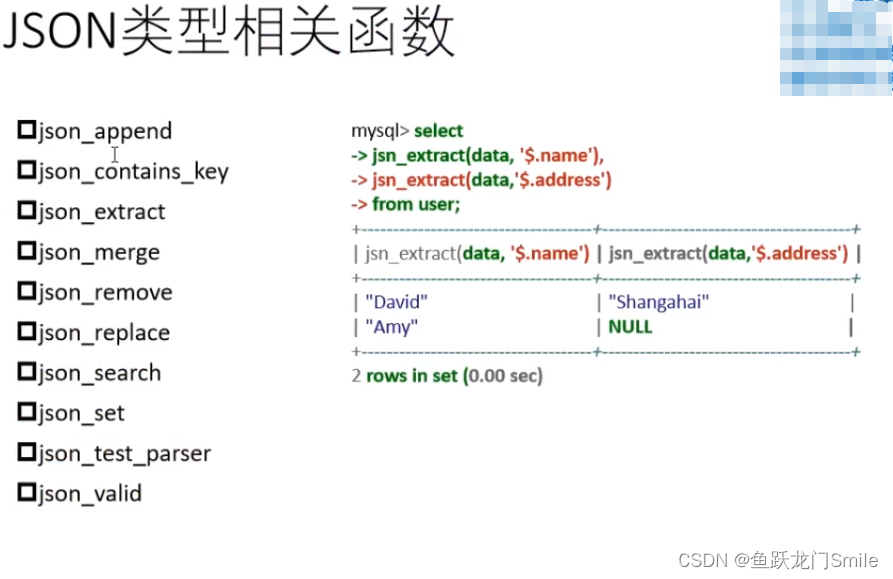
目录 1.整型 1.1参数signed和unsigned 1.2参数zerofill 1.3参数auto_increment 2.数字类型 2.1floor()向下取整 2.2随机函数rand() 2.3重复函数repeat() 3.字符串类型 3.1length()查看字节长度,char_length()查看字符长度 3.2字符集 3.2.1查看默认字符…...
Elastic 线下 Meetup 将于 2024 年 3 月 30 号在武汉举办
2024 Elastic Meetup 武汉站活动,由 Elastic、腾讯、新智锦绣联合举办,现诚邀广大技术爱好者及开发者参加。 活动时间 2024年3月30日 13:30-18:00 活动地点 中国武汉 武汉市江夏区腾讯大道1号腾讯武汉研发中心一楼多功能厅 13:30-14:00 入场 活动流程…...
中的体现)
线性代数在卷积神经网络(CNN)中的体现
案例:深度学习中的卷积神经网络(CNN) 在图像识别领域,卷积神经网络(Convolutional Neural Networks, CNN)是一个广泛应用深度学习模型,它在人脸识别、物体识别、医学图像分析等方面取得…...

服务器根据用途划分有哪几种?
随着企业需求的不同,服务器的类型也变得多种多样了,有根据机箱结构来划分的服务器类型,如机架式服务器、刀片式服务器和塔式服务器等,也有按照应用层次来划分的服务器类型,如入门级服务器和工作组服务器等。 那根据用途…...

linux 命令笔记:gpustat
1 命令介绍 gpustat是一个基于Python的命令行工具,它提供了一种快速、简洁的方式来查看GPU的状态和使用情况它是nvidia-smi工具的一个封装,旨在以更友好和易于阅读的格式显示GPU信息。gpustat不仅显示基本的GPU状态(如温度、GPU利用率和内存…...
【阅读笔记】Adaptive GPS/INS integration for relative navigation
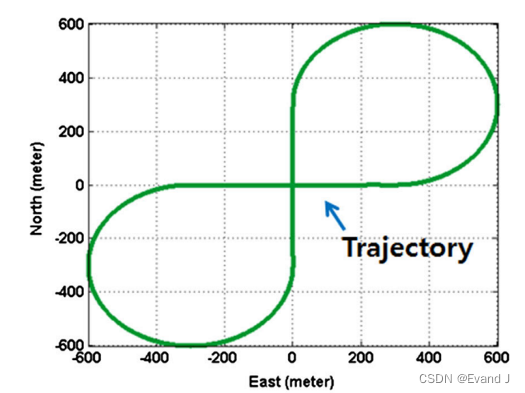
Lee J Y, Kim H S, Choi K H, et al. Adaptive GPS/INS integration for relative navigation[J]. Gps Solutions, 2016, 20: 63-75. 用于相对导航的自适应GPS/INS集成 名词翻译 formation flying:编队飞行 摘要翻译 在编队飞行、防撞、协同定位和事故监测等许多…...

Hitboxer:开源SOCD清理工具,3分钟提升游戏操作精准度
Hitboxer:开源SOCD清理工具,3分钟提升游戏操作精准度 【免费下载链接】socd Key remapper for epic gamers 项目地址: https://gitcode.com/gh_mirrors/so/socd 你是否在激烈的游戏对抗中经历过这样的挫败:同时按下左右方向键时角色卡…...

如何快速掌握开源UE资产编辑器:UAssetGUI完整配置与实战指南
如何快速掌握开源UE资产编辑器:UAssetGUI完整配置与实战指南 【免费下载链接】UAssetGUI A tool designed for low-level examination and modification of Unreal Engine game assets by hand. 项目地址: https://gitcode.com/gh_mirrors/ua/UAssetGUI UAss…...

解决Claude Code Token不足问题并享受Taotoken活动价
🚀 告别海外账号与网络限制!稳定直连全球优质大模型,限时半价接入中。 👉 点击领取海量免费额度 解决Claude Code Token不足问题并享受Taotoken活动价 应用场景类,聚焦于使用Claude Code时遇到Token配额紧张的开发者&…...

Windows Cleaner深度解析:5大核心模块彻底解决系统空间不足问题
Windows Cleaner深度解析:5大核心模块彻底解决系统空间不足问题 【免费下载链接】WindowsCleaner Windows Cleaner——专治C盘爆红及各种不服! 项目地址: https://gitcode.com/gh_mirrors/wi/WindowsCleaner Windows Cleaner是一款完全免费开源的…...

基于雷达与光敏传感器的低功耗智能窗防设备设计与实现
1. 项目概述:一个基于雷达与光敏的智能窗防设备几年前,我因为一次短暂的出差,家里空置了几天,回来后就一直琢磨着怎么给家里的窗户加点“动静”。市面上的智能安防摄像头固然好,但要么需要复杂的布线,要么云…...

ZMJS,把 JavaScript 解释器放进 SAP ABAP 应用服务器之后,很多扩展思路会变得不一样
我今天看这个 oisee/zmjs 仓库时,最吸引人的不是它把 JavaScript 语法做进了 ABAP,而是它选择了一条非常 SAP 的路线,纯 ABAP、无外部依赖、无 Kernel Module、以类和接口的形式运行在 SAP 应用服务器内部。仓库自己的定位很直接,ZMJS 是一个面向 SAP ABAP 的 Mini JavaScr…...

LPCM框架:大模型驱动的计算机架构设计革命
1. LPCM框架:计算机系统架构设计的范式革命计算机系统架构设计正站在历史性的转折点上。过去八十年来,从ENIAC的真空管到现代7纳米制程的异构计算芯片,架构设计始终遵循着"专家经验EDA工具"的传统范式。但随着摩尔定律逼近物理极限…...

深度解析:UI-TARS视觉语言模型驱动的自动化操作框架核心技术架构
深度解析:UI-TARS视觉语言模型驱动的自动化操作框架核心技术架构 【免费下载链接】UI-TARS-desktop The Open-Source Multimodal AI Agent Stack: Connecting Cutting-Edge AI Models and Agent Infra 项目地址: https://gitcode.com/GitHub_Trending/ui/UI-TARS-…...

5分钟免费搞定HS2汉化:Honey Select 2完整中文补丁终极教程
5分钟免费搞定HS2汉化:Honey Select 2完整中文补丁终极教程 【免费下载链接】HS2-HF_Patch Automatically translate, uncensor and update HoneySelect2! 项目地址: https://gitcode.com/gh_mirrors/hs/HS2-HF_Patch 还在为Honey Select 2的日文界面而烦恼吗…...

Diablo Edit2:3步掌握暗黑破坏神2存档修改的终极秘籍
Diablo Edit2:3步掌握暗黑破坏神2存档修改的终极秘籍 【免费下载链接】diablo_edit Diablo II Character editor. 项目地址: https://gitcode.com/gh_mirrors/di/diablo_edit 还在为暗黑破坏神2中刷装备的漫长过程感到疲惫吗?Diablo Edit2这款免费…...