
Cisco Catalyst3850交换机RTU license使用方法
1 情况说明
客户处采购了4台3850-14T交换机,在配置的时候发现OSPF不支持,
查询原因为当前license不支持 (lanbase, 只能支持2层功能)
报错如下:
Access-3850-1(config)#router ospf 100
Protocol not in this image
2 如何处理?
开启RTU license,加载ip service类型的license
开启RTU License后正常。如下图:
Access-3850-1(config)#router ospf 100
Access-3850-1(config-router)#
3 扫盲: 啥是RTU license What is RTU License ?
A Right to Use license scheme is an honor-based model for licensing. Licenses are not tied to an unique device identifier (UDI), product ID, or serial number.
看到上面所说的了吗? honor-based model ,说人话就是你应该购买license,但你可以直接使用。不买就用的就是臭不要脸。
我的理解,实际上就是cisco为了简化license安装和加载,以前的交换机或路由器上要加载license需要几步:
- 购买了license后,登录cisco.com官网
- 输入license信封上的key,并输入交换机的SN进行绑定,—>生成license文件—>下载下来
- 通过install license命令进行安装
现在不需要这么繁琐了,可以直接加载使用。
4 具体操作方法
4.1 无法运行OSPF, 报错
Access-3850-1(config)#router ospf 100
Protocol not in this image
4.2 查看license
Access-3850-1#show license right-to-use usage Slot#  License Name     Type     usage-duration(y:m:d)  In-Use  EULA
-----------------------------------------------------------------------1      ipservices     permanent    0 :0 :0                no    no   1      ipservices     evaluation   0 :0 :0                no    no   1      ipbase         permanent    0 :0 :0                no    no   1      ipbase         evaluation   0 :0 :0                no    no   1      lanbase        permanent    0 :0 :0                yes   yes  //这就是当前的license 类型1      apcount        evaluation   0 :0 :0                no    no   1      apcount        base         0 :0 :0                no    no   1      apcount        adder        0 :0 :0                no    no
4.3 启用ipservices license
3850-1#license right-to-use activate ipservices all  acceptEULA
% switch-1:stack-mgr:Reboot the switch to invoke the highest activated License level
4.4 Reload 重启交换机
3850-1#reload
Reload command is being issued on Active unit, this will reload the whole stack
Proceed with reload? [confirm]
3.5 重启完成,查看license
3850-1#show license right-to-use usage Slot# License Name Type usage-duration(y:m:d) In-Use EULA1 ipservices permanent 0 :0 :0 yes yes //加载了ip service1 ipservices evaluation 0 :0 :0 no no 1 ipbase permanent 0 :0 :0 no no 1 ipbase evaluation 0 :0 :0 no no 1 lanbase permanent 0 :0 :0 no yes 1 apcount evaluation 0 :0 :0 no no 1 apcount base 0 :0 :0 no no 1 apcount adder 0 :0 :0 no no
3.6 再次启用ospf进程
3850-1(config)#router os 100
IP routing not enabled报了个错,但这个和license无关,是因为没有开ip routing***开启ip routing***3850-1(config)#ip routing
3850-1(config)#router ospf 100
3850-1(config-router)#router ospf 100
其他查看命令
3850-1#license right-to-use activate ?apcount     configure the AP-count licenses on the switchipbase      activate ipbase license on the switchipservices  activate Ipservices license on the switchlanbase     activate lanbase license on the switch3850-1#license right-to-use activate ipservices all  acceptEULA
% switch-1:stack-mgr:Reboot the switch to invoke the highest activated License level3850-1#show license right-to-use usage Slot#  License Name     Type     usage-duration(y:m:d)  In-Use  EULA
-----------------------------------------------------------------------1      ipservices     permanent    0 :0 :0                no    yes  1      ipservices     evaluation   0 :0 :0                no    no   1      ipbase         permanent    0 :0 :0                no    no   1      ipbase         evaluation   0 :0 :0                no    no   1      lanbase        permanent    0 :0 :0                yes   yes  1      apcount        evaluation   0 :0 :0                no    no   1      apcount        base         0 :0 :0                no    no   1      apcount        adder        0 :0 :0                no    no  不加eula参数,需要确认agreement.3850-1#license right-to-use activate ipservices all
PLEASE READ THE FOLLOWING TERMS CAREFULLY. INSTALLING THE LICENSE OR LICENSE KEY PROVIDED FOR ANY CISCO PRODUCT FEATURE OR USING SUCH PRODUCT FEATURE CONSTITUTES YOUR FULL ACCEPTANCE OF THE FOLLOWING TERMS. YOU MUST NOT PROCEED FURTHER IF YOU ARE NOT WILLING TO BE BOUND BY ALL THE TERMS SET FORTH HEREIN. Use of this product feature requires an additional license from Cisco, together with an additional payment.  You may use this product feature subject to the Cisco end user license agreement http://www.cisco.com/en/US/docs/general/warranty/English/EU1KEN_.html, together with any supplements relating to such product feature.   It is your responsibility to make payment to Cisco for your use of the product feature if not already licensed to do so. Your acceptance of this agreement for the software features on one product shall be deemed your acceptance with respect to all such software on all Cisco products you purchase which includes the same software.  (The foregoing notwithstanding, you must purchase a license for each software feature you use, so that if you enable a software feature on 1000 devices, you must purchase 1000 licenses for use.)    This license may be transferrable from another Cisco device of the same model for the same functionality if such license already is owned.  Activation of the software command line interface will be evidence of your acceptance of this agreement. By clicking  the "accept" button  or typing "yes" you are  indicating  you have read and agree to be bound by all the terms provided herein.ACCEPT (yes/no) : yes
% switch-1:stack-mgr:Reboot the switch to invoke the highest activated License level3850-1#reload System configuration has been modified. Save? [yes/no]: y
Building configuration...
Compressed configuration from 3001 bytes to 1475 bytes[OK]Reload command is being issued on Active unit, this will reload the whole stack
Proceed with reload? [confirm]3850-1#show license right-to-use  default Slot#    License Name    Type      Count
------------------------------------------1        lanbase        permanent     N/A 1        apcount        base          0   3850-1#show license right-to-use  de
3850-1#show license right-to-use  deta
3850-1#show license right-to-use  detail
Index 1:  License Name: ipservicesPeriod left: LifetimeLicense Type: permanentLicense State: Active, In useLicense Count: Non-CountedLicense Location: Slot 1
Index 2:  License Name: ipservicesPeriod left: 90License Type: evaluationLicense State: Not ActivatedLicense Count: Non-CountedLicense Location: Slot 1
Index 3:  License Name: ipbasePeriod left: LifetimeLicense Type: permanentLicense State: Not ActivatedLicense Count: Non-CountedLicense Location: Slot 1
Index 4:  License Name: ipbasePeriod left: 90License Type: evaluationLicense State: Not ActivatedLicense Count: Non-CountedLicense Location: Slot 1
Index 5:  License Name: lanbasePeriod left: LifetimeLicense Type: permanentLicense State: Active, Not In useLicense Count: Non-CountedLicense Location: Slot 1
Index 6:  License Name: apcountPeriod left: 90License Type: evaluationLicense State: Not ActivatedLicense Count: 50License Location: Slot 1
Index 7:  License Name: apcountPeriod left: LifetimeLicense Type: baseLicense State: Not ActivatedLicense Count: 0License Location: Slot 1
Index 8:  License Name: apcountPeriod left: LifetimeLicense Type: adderLicense State: Not ActivatedLicense Count: 0License Location: Slot 13850-1#show license right-to-use  summary License Name    Type     Count   Period left
-----------------------------------------------ipservices   permanent   N/A      Lifetimeapcount      base        0        Lifetimeapcount      adder       0        Lifetime--------------------------------------------License Level In Use: ipservices
License Level on Reboot: ipservices
Evaluation AP-Count: Disabled
Total AP Count Licenses: 0
AP Count Licenses In-use: 0
AP Count Licenses Remaining: 0
相关文章:

Cisco Catalyst3850交换机RTU license使用方法
1 情况说明 客户处采购了4台3850-14T交换机,在配置的时候发现OSPF不支持, 查询原因为当前license不支持 (lanbase, 只能支持2层功能) 报错如下: Access-3850-1(config)#router ospf 100 Protocol not in this image2 如何处理&a…...
)
简明 Python 教程(第5章 函数)
本章介绍了函数的基本概念和使用方法,包括定义函数、传递参数、局部变量、全局变量、默认参数、关键字参数、返回值和文档字符串。 掌握这些概念对于编写结构化和可维护的Python代码至关重要。 定义函数 使用def关键字 定义函数始于def关键字,它告诉P…...

flutter 保存一堆多语言翻译词条,由key和value组成
原理: 1.从String列表里面获取某个value: List<String> jsonStrings [{"name": "John", "age": 30},{"name": "Jane", "age": 25},{"name": "Bob", "age…...

3月25日,每日信息差
🎖 素材来源官方媒体/网络新闻 🎄 京东汽车将和小米汽车进行深度合作 🌍 百度将为苹果国行iPhone16提供AI功能?百度方面称暂无回应 🌋 国产结核病新型mRNA疫苗即将问世 🎁 美国发布严重地磁暴预警ÿ…...
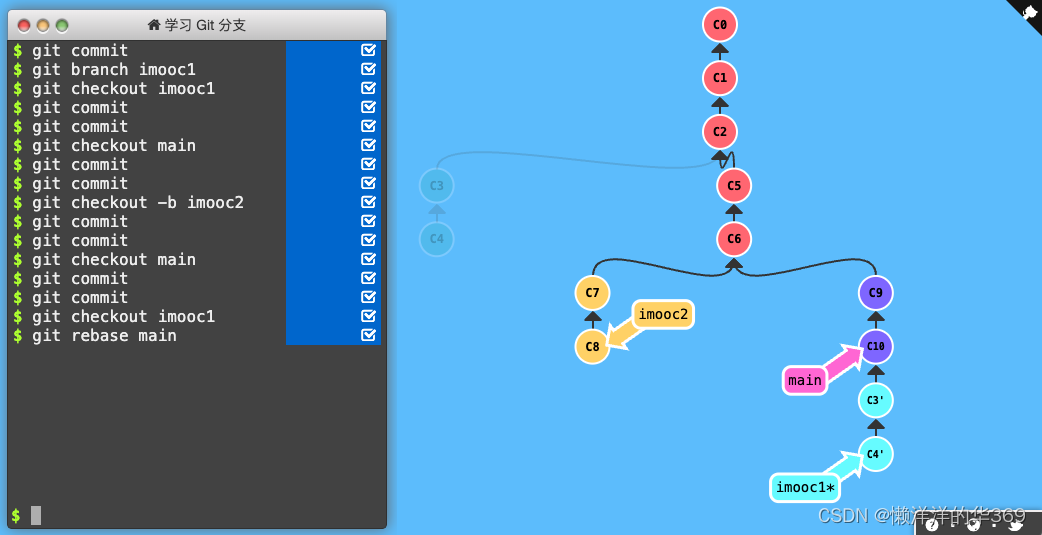
Git常用指令使用
摘要:之前代码管理都是借助于fork、sourceTree等图形工具,最近发现直接用命令也好用,就总结Git常用的指令 1、Git的介绍 1.1 git官网 安装: Git - Downloading Packagehttps://git-scm.com/download/mac Mac上安装,直接使…...

数据结构与算法 顺序表的基本运算
一、实验内容 编写一个程序实现,实现顺序表的各种基本运算(假设顺序表的元素类型为char),并以此为基础设计一个程序完成下列功能: (1)初始化顺序表; (2)采…...
)
docker部署nacos(单机与集群)
拉去nacos镜像 [rootlocalhost keepalived]# docker search nacos NAME DESCRIPTION STARS OFFICIAL nacos/nacos-server This project contains a Docker image meant t… 464 …...
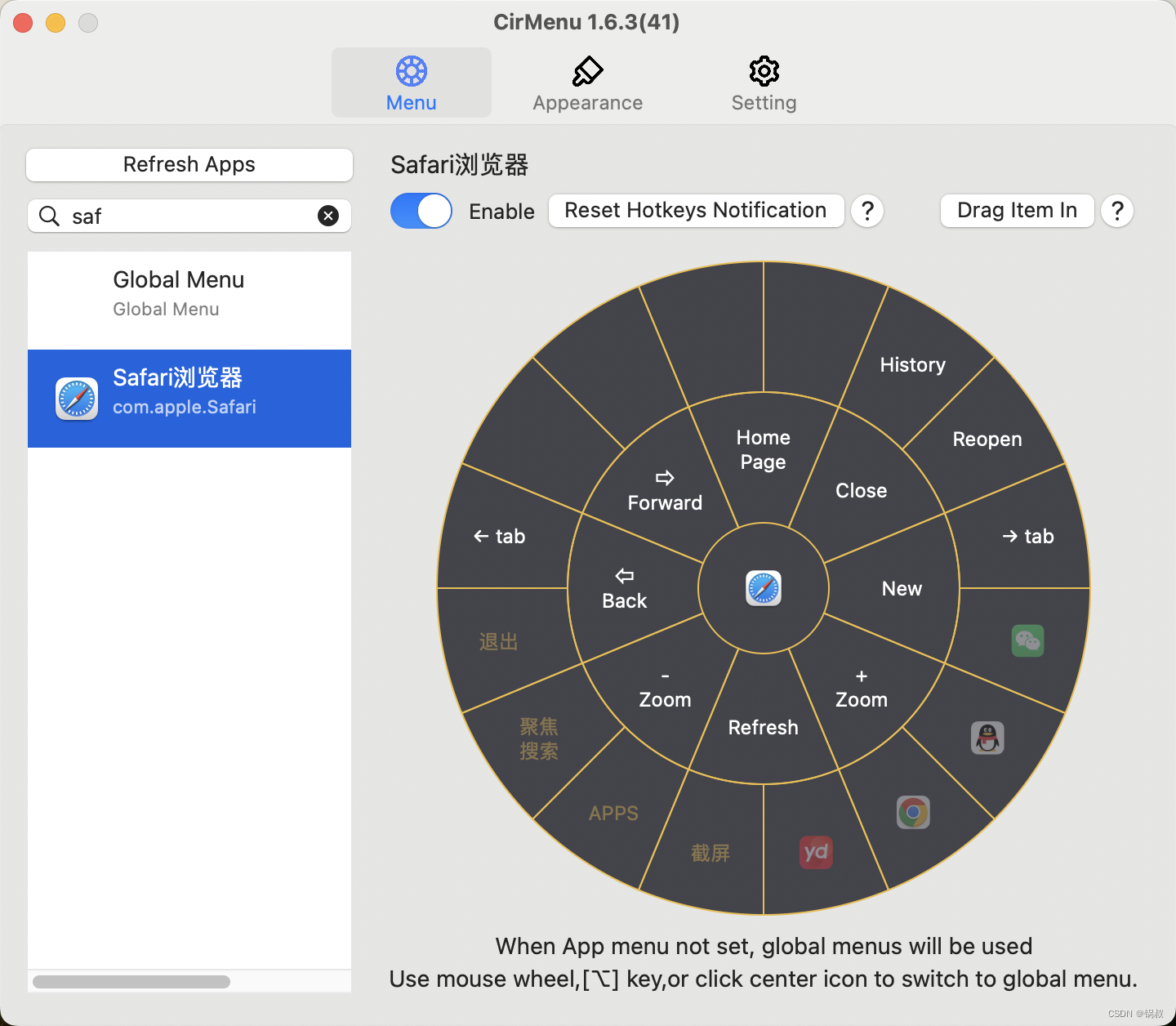
开启Safari手势支持
在使用Safari 的时候,大家有没有觉得不支持手势使用起来不是很方便, 触摸板只支持少量简单的手势,如缩放,滚动等。如果使用鼠标的用户,则完全无法使用手势。经过折腾研究,使用CirMenu应用可以完美解决这个要…...
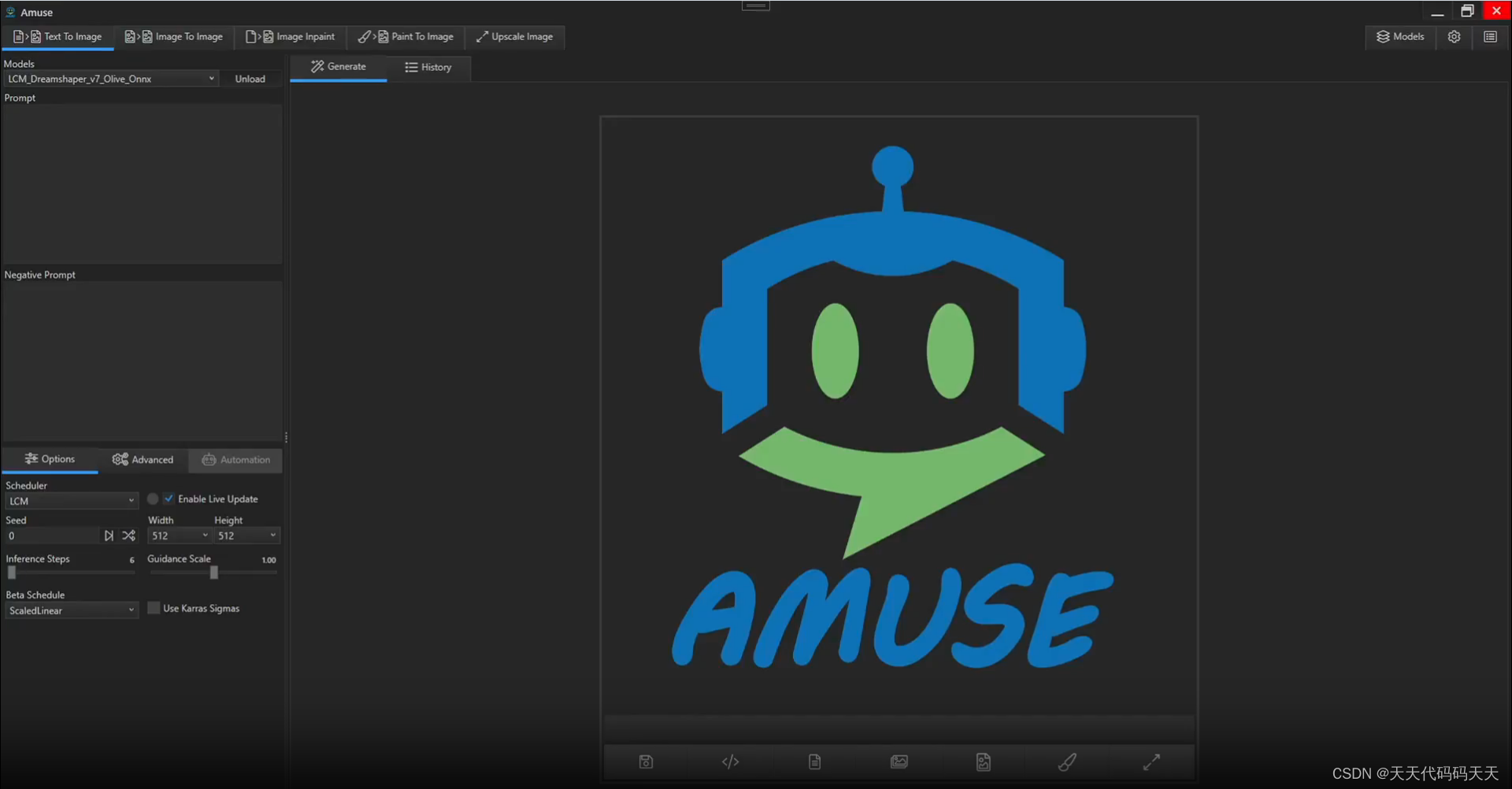
Amuse:.NET application for stable diffusion
目录 Welcome to Amuse! Features Why Choose Amuse? Key Highlights Paint To Image Text To Image Image To Image Image Inpaint Model Manager Hardware Requirements Compute Requirements Memory Requirements System Requirements Realtime Requirements…...

Java冒泡排序详细讲解
冒泡排序是一种简单但效率较低的排序算法,它重复地走访过要排序的数列,一次比较两个元素,如果它们的顺序错误就把它们交换过来。具体实现如下: 算法步骤: 比较相邻的元素:从第一个元素开始,依次…...

python数据解析xpath
前言一、安装?二、使用步骤1.基本使用**【2】谓语(Predicates)**案例 前言 xpath在Python的爬虫学习中,起着举足轻重的地位,对比正则表达式 re两者可以完成同样的工作,实现的功能也差不多,但xp…...
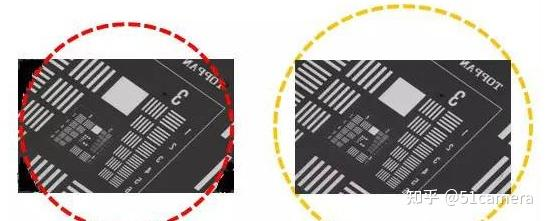
工业镜头常用参数之实效F(Fno.)和像圈
Fno. 工业镜头中常用到的参数F,有时候用F/#,Fno.来表示,指的是镜头通光能力的参数。它可用镜头焦距及入瞳直径来表示,也可通过镜头数值孔径(NA)和光学放大倍率(β)来计算。有效Fno.…...
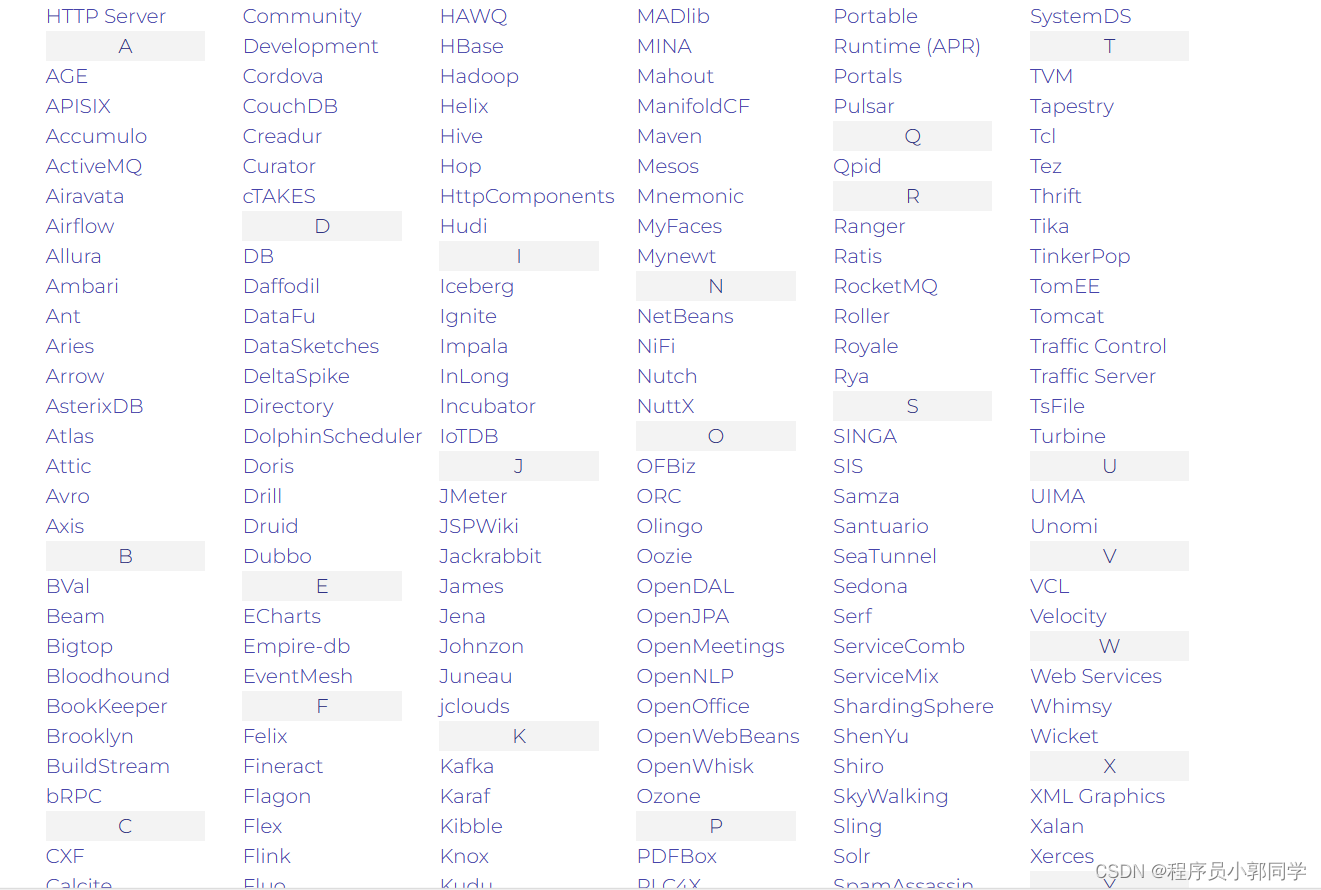
what is apache?
Apache 通常指 Apache Software Foundation (ASF) 或 Apache HTTP Server,两者都是计算机软件领域的重要实体。 Apache 软件基金会 (ASF):Apache 软件基金会是一个开发开源软件项目的非营利组织。它为涵盖软件开发各个方面的广泛项目提供支持,…...
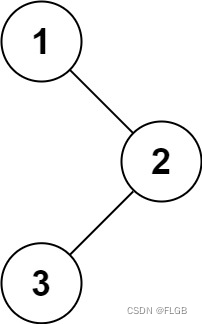
【二叉树】Leetcode 94. 二叉树的中序遍历【简单】
二叉树的中序遍历 给定一个二叉树的根节点 root ,返回 它的 中序 遍历 。 示例 1: 输入:root [1,null,2,3] 输出:[1,3,2] 解题思路 中序遍历是一种二叉树遍历方式,按照“左根右”的顺序遍历二叉树节点。 1、递归…...
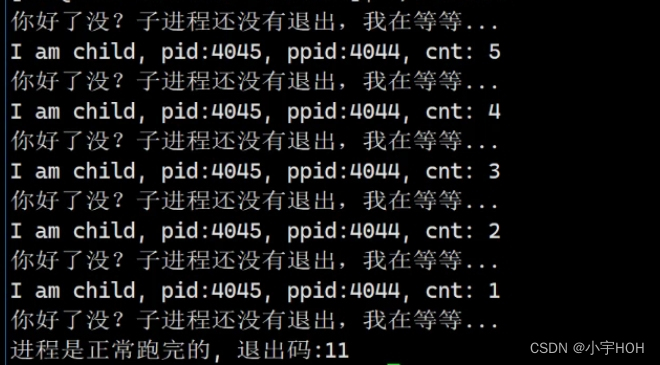
Linux进程控制(等待)
进程等待 为什么要进行进程等待 进程等待是什么? 怎么进行进程等待? 回到我们之前进程状态的代码, 我们知道, 在这段代码中,父进程对子进程没有做任何的操作, 所以当子进程在退出后, 会一直处于…...

结构体-C语言
目录 前言 一、定义结构 结构体变量的创建和初始化 二、结构的特殊声明 特别注意: 结构的⾃引⽤ 三、结构体内存对⻬ 对⻬规则 优化结构体 #pragma 结构体传参 四、结构体实现位段 位段的内存分配 位段的跨平台问题 前言 C 数组允许定义可存储相同类…...
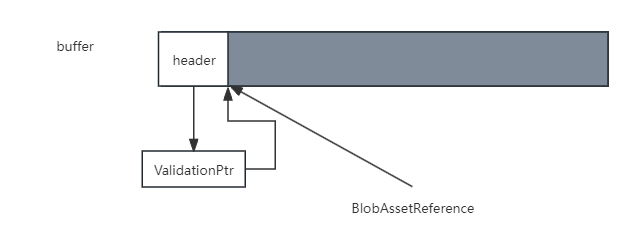
Unity DOTS中的baking(四)blob assets
Unity DOTS中的baking(四)blob assets blob assets表示不可变的二进制数据,在运行时也不会发生更改。由于blob assets是只读的,这意味着可以安全地并行访问它们。此外,blob assets仅限于使用非托管类型,这意…...
第三十天-Flask模板 Jinja2
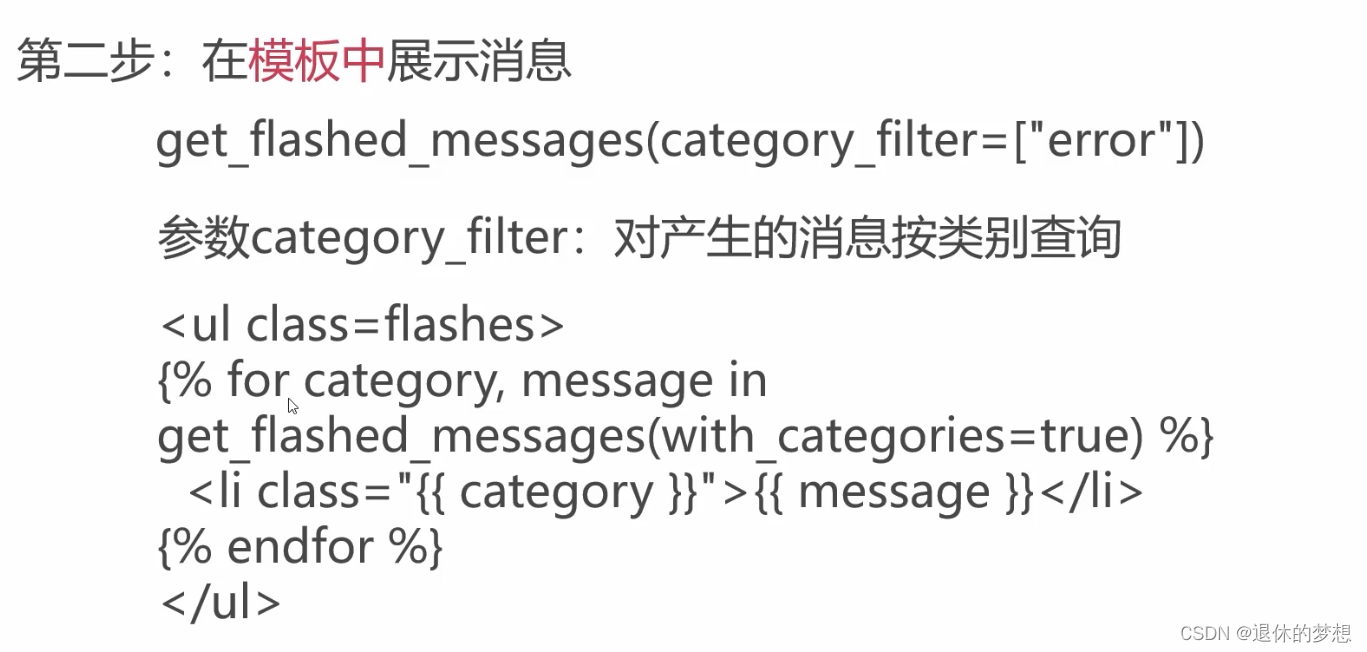
目录 1.什么是模板 2.模板引擎Jinja2 默认配置 全局对象 全局函数 上下文处理器 3.模板中变量的使用 4.模板标签 条件判断if else for循环 添加注释 设置变量 转义显示 5.过滤器 过滤器使用 自定义过滤器 6.全局函数 7.模板中的宏 模板的基础 包含语法 8.…...

在项目中数据库如何优化?【MySQL主从复制(创建一个从节点复制备份数据)】【数据库读写分离ShardingJDBC(主库写,从库读)】
MySQL主从复制 MySQL主从复制介绍MySQL复制过程分成三步:1). MySQL master 将数据变更写入二进制日志( binary log)2). slave将master的binary log拷贝到它的中继日志(relay log)3). slave重做中继日志中的事件,将数据变更反映它自…...
Fragment 与 ViewPager的联合应用(2)
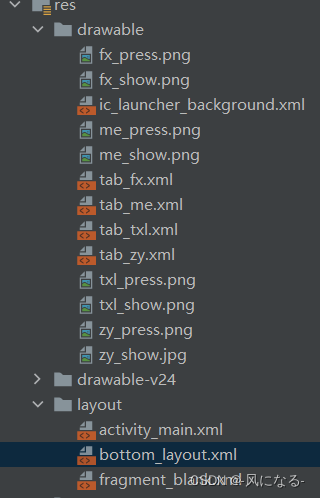
5.创建底部布局bottom_layout <LinearLayout xmlns:android"http://schemas.android.com/apk/res/android"android:orientation"horizontal"android:layout_width"match_parent"android:layout_height"55dp"android:background&qu…...

5分钟终极指南:用obs-multi-rtmp插件实现OBS多平台同步直播
5分钟终极指南:用obs-multi-rtmp插件实现OBS多平台同步直播 【免费下载链接】obs-multi-rtmp OBS複数サイト同時配信プラグイン 项目地址: https://gitcode.com/gh_mirrors/ob/obs-multi-rtmp 还在为每个直播平台单独配置OBS而烦恼吗?obs-multi-r…...

速学linux命令教程
概述:用户使用shell跟内核交互,Linux中有很多命令,不同的命令有不同的功能。多个命令合起来可以完成一个大的功能。命令很多我们不可能记得每条命令的用法。 所以,我们必须有一种方法来快速知道一个命令是如何使用的,…...

GeoSeg:突破性混合Transformer架构实现高效遥感图像语义分割
GeoSeg:突破性混合Transformer架构实现高效遥感图像语义分割 【免费下载链接】GeoSeg UNetFormer: A UNet-like transformer for efficient semantic segmentation of remote sensing urban scene imagery, ISPRS. Also, including other vision transformers and C…...

从零开始掌握ShiroAttack2:5步搞定Shiro反序列化漏洞利用
从零开始掌握ShiroAttack2:5步搞定Shiro反序列化漏洞利用 【免费下载链接】ShiroAttack2 shiro反序列化漏洞综合利用,包含(回显执行命令/注入内存马)修复原版中NoCC的问题 https://github.com/j1anFen/shiro_attack 项目地址: https://gitc…...
)
嵌入式工程师避坑指南:手把手调试OV9281等MIPI摄像头Sensor(从DTS配置到示波器抓波形)
嵌入式工程师实战:OV9281 MIPI摄像头Sensor深度调试手册 当你在全志T507开发板上第一次点亮OV9281摄像头时,示波器上那个200mV的HS模式波形,可能比任何文档都更能让你理解MIPI的工作本质。这不是一篇按部就班的配置教程,而是一位经…...

【AI Agent咨询行业落地白皮书】:2024年已验证的7大垂直场景、3类ROI提升路径与5个避坑红线
更多请点击: https://intelliparadigm.com 第一章:AI Agent咨询行业应用全景图谱 AI Agent正以前所未有的深度与广度重塑管理咨询行业的服务范式。它不再局限于单点任务自动化,而是以目标驱动、多角色协同、动态推理与持续学习为核心能力&am…...

终极指南:SVGnest如何实现材料利用率提升40%
终极指南:SVGnest如何实现材料利用率提升40% 【免费下载链接】SVGnest An open source vector nesting tool 项目地址: https://gitcode.com/gh_mirrors/sv/SVGnest SVGnest是一款完全免费开源的矢量嵌套工具,专为激光切割、CNC加工和工业设计领域…...

line_buffer + window_buffer架构
一、line buffer + win buffer架构说明 1.在图像算法处理中,line buffer + window buffer架构是非常普通使用的架构; 2.本次针对3*3的滤波,给出两种处理架构的设计方案 二、方案一步骤 ap_uint<8> window_buffer[3][3]; ap_uint<8> line_buffer[2][COLS]; …...

ADAS系统设计全解析:从传感器融合到域控制器实战
1. 项目概述与行业背景最近几年,但凡和汽车沾点边的行业,都绕不开“智能化”这三个字。作为一名在汽车电子和嵌入式系统领域摸爬滚打了十多年的工程师,我亲眼见证了从简单的倒车雷达,到如今能自动跟车、紧急刹车的ADAS系统&#x…...

通过taotoken cli工具一键配置多开发环境下的api密钥与端点
🚀 告别海外账号与网络限制!稳定直连全球优质大模型,限时半价接入中。 👉 点击领取海量免费额度 通过taotoken cli工具一键配置多开发环境下的api密钥与端点 在团队协作或个人多项目开发中,管理不同大模型服务的API密…...