
MySQL数据库(数据库连接池)
文章目录
- 1.批处理应用
- 1.基本介绍
- 2.批处理演示
- 1.创建测试表
- 2.修改url
- 3.编写java代码
- 3.批处理源码分析
- 2.数据库连接池
- 1.传统连接弊端分析
- 2.数据库连接池基本介绍
- 1.概念介绍
- 2.数据库连接池示意图
- 3.数据库连接池种类
- 3.C3P0连接池
- 1.环境配置
- 1.导入jar包
- 2.将整个lib添加到项目中
- 3.配置代码提示
- 2.C3P0方式一(java程序)
- 3.C3P0方式二(配置文件)
- 1.环境配置
- 1.将c3p0-config.xml配置文件复制到src目录下
- 2.修改配置文件的参数
- 2.编写java代码
- 4.德鲁伊连接池
- 1.环境配置
- 1.导入jar包
- 2.将配置文件复制到src目录下,名字任意
- 3.修改配置文件的参数
- 2.编写java代码
- 5.德鲁伊工具类
- 1.编写代码
- 2.测试使用
- 6.Apache——DBUtils
- 1.引出
- 2.基本介绍
- 3.Apache——DBUtils查询
- 1.添加依赖
- 2.编写java代码
- 1.Actor.java(封装每一行的bean)
- 2.查询多条记录
- 3.查询单条记录
- 4.查询单行单列记录
- 4.DML操作
- 7.BasicDao
- 1.引出
- 2.BasicDao分析
- 3.代码实现
- 1.文件目录
- 2.BasicDao
- 3.ActorDao
- 4.Actor
- 5.TestDao
- 6.JDBCUtilsByDruid
- 7.druid.properties
1.批处理应用
1.基本介绍

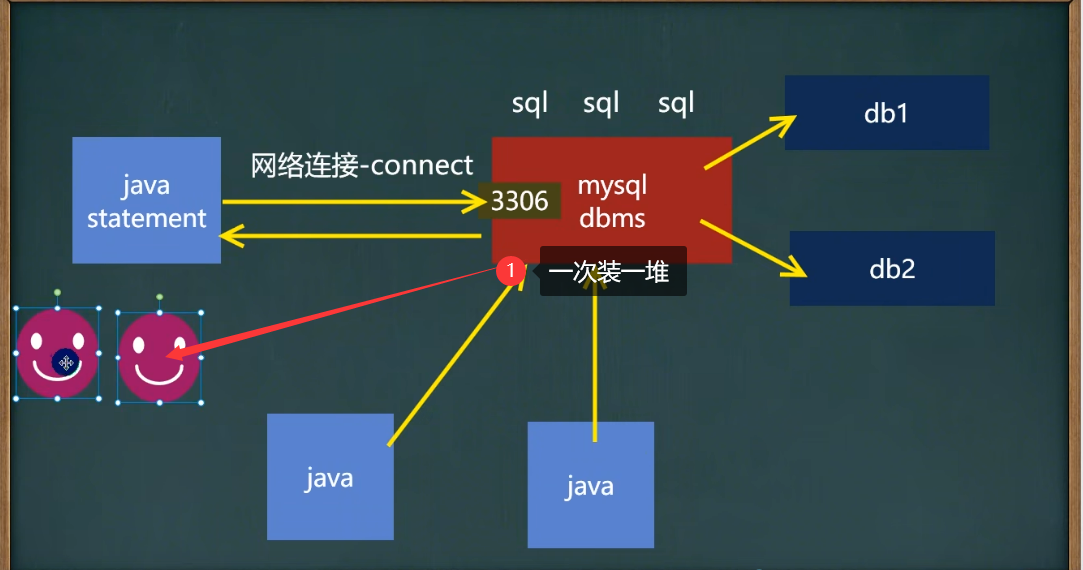
2.批处理演示
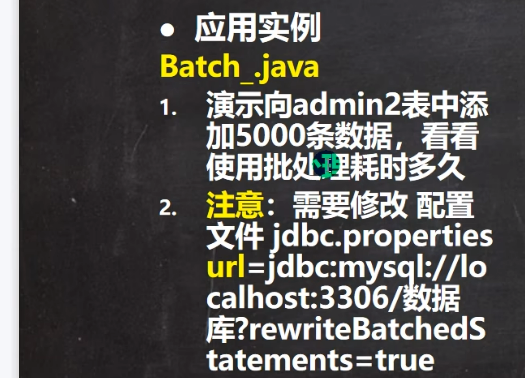
1.创建测试表
-- 创建的测试表
CREATE TABLE admin2(id INT PRIMARY key auto_increment,username VARCHAR(32) NOT NULL,PASSWORD VARCHAR(32) NOT NULL
)
-- 查看表数据
SELECT * FROM admin2
-- 查看行数
SELECT count(*) FROM admin2
2.修改url

?rewriteBatchedStatements=true //添加这行代码
3.编写java代码
package jdbc_;import org.junit.jupiter.api.Test;
import utils.JDBCUtils;import java.sql.Connection;
import java.sql.PreparedStatement;
import java.sql.SQLException;/*** @author 孙显圣* @version 1.0*/
public class Batch_ {@Testpublic void testDML() {//建立连接Connection connection = JDBCUtils.getConnection();//编写sql语句进行插入String sql = "insert into admin2 values (null, ?, ?)";PreparedStatement preparedStatement = null;try {preparedStatement = connection.prepareStatement(sql);//循环进行预处理,并添加到处理包中for (int i = 0; i < 5000; i++) {preparedStatement.setString(1, "Tom");preparedStatement.setString(2, "666666");//1.添加到处理包中,先不执行preparedStatement.addBatch();if ((i + 1) % 1000 == 0) {//2.每执行1000次则执行一次preparedStatement.executeBatch();//3.执行之后清空处理包中的sql语句preparedStatement.clearBatch();}}} catch (SQLException e) {throw new RuntimeException(e);} finally {//关闭资源JDBCUtils.close(null, preparedStatement, connection);}}
}
3.批处理源码分析
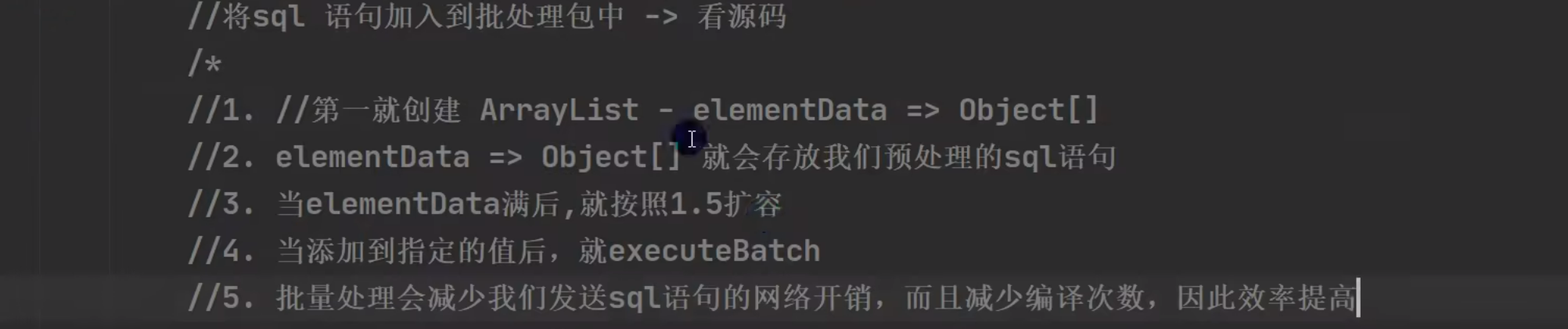
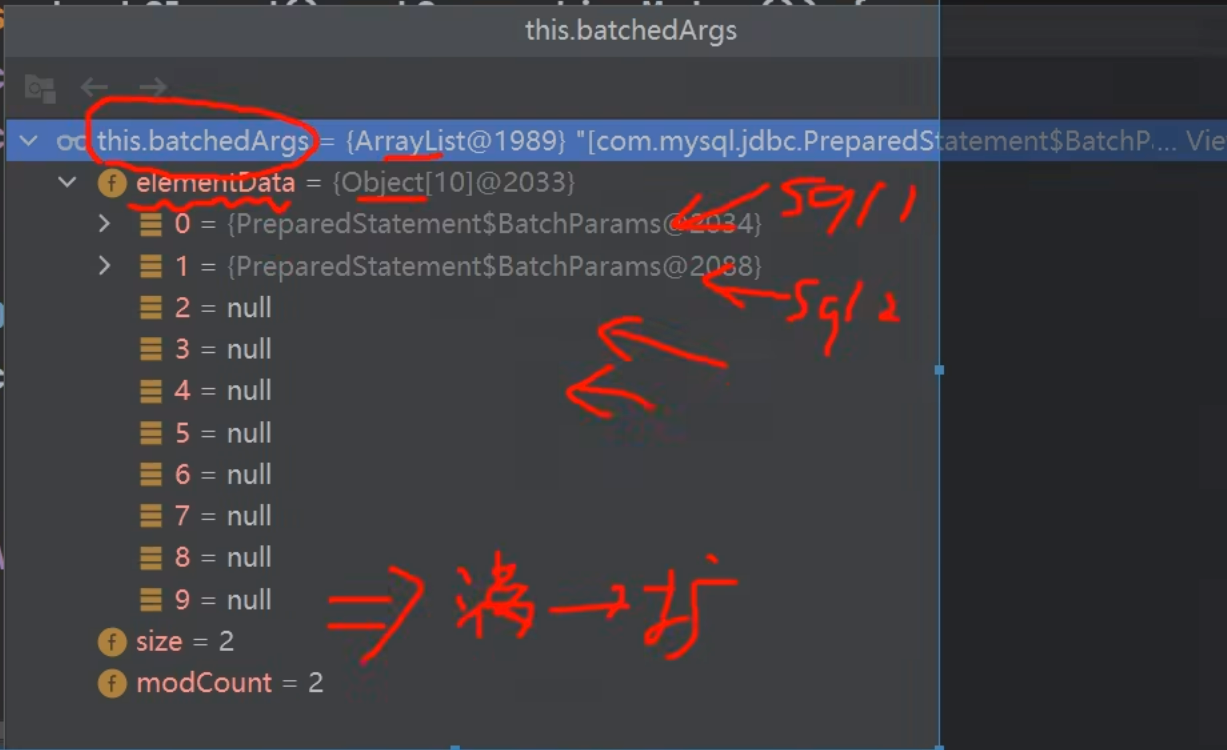
2.数据库连接池
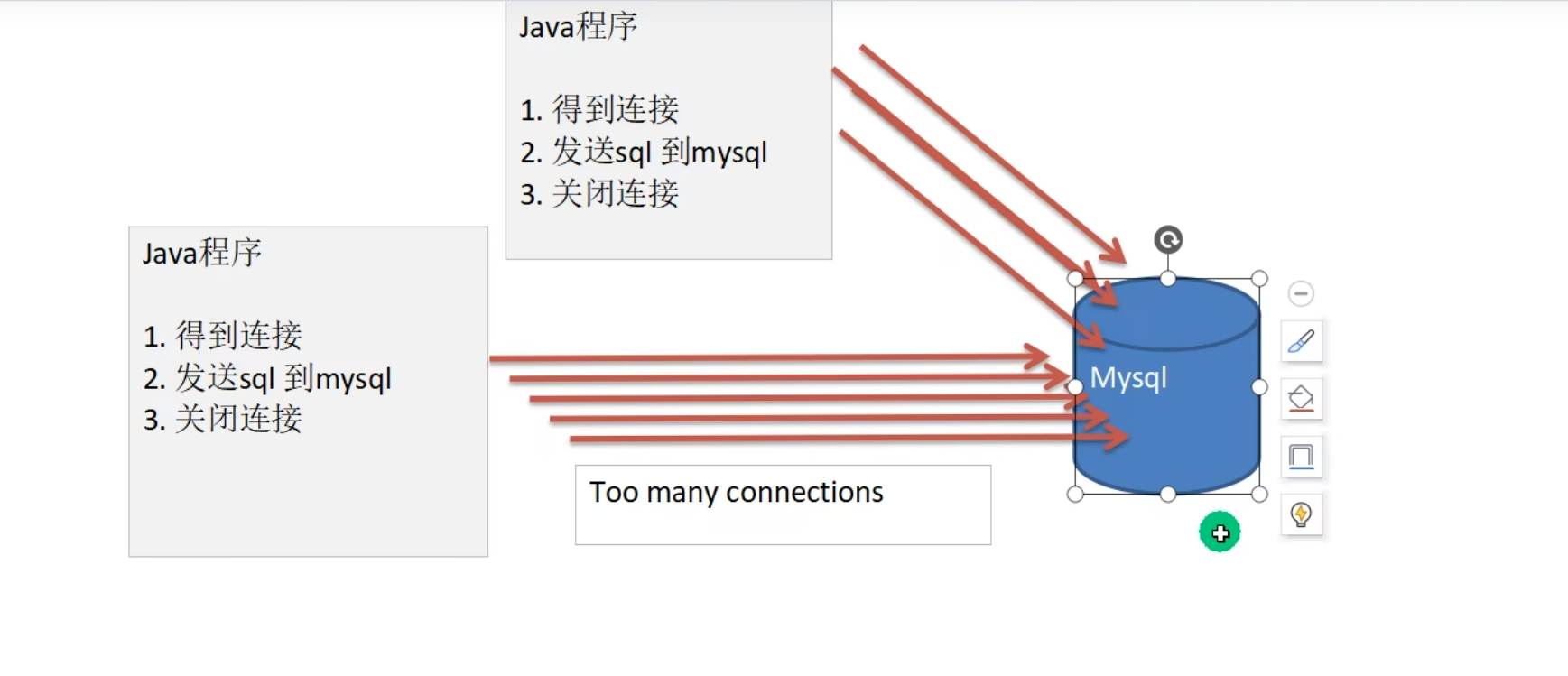
1.传统连接弊端分析

2.数据库连接池基本介绍
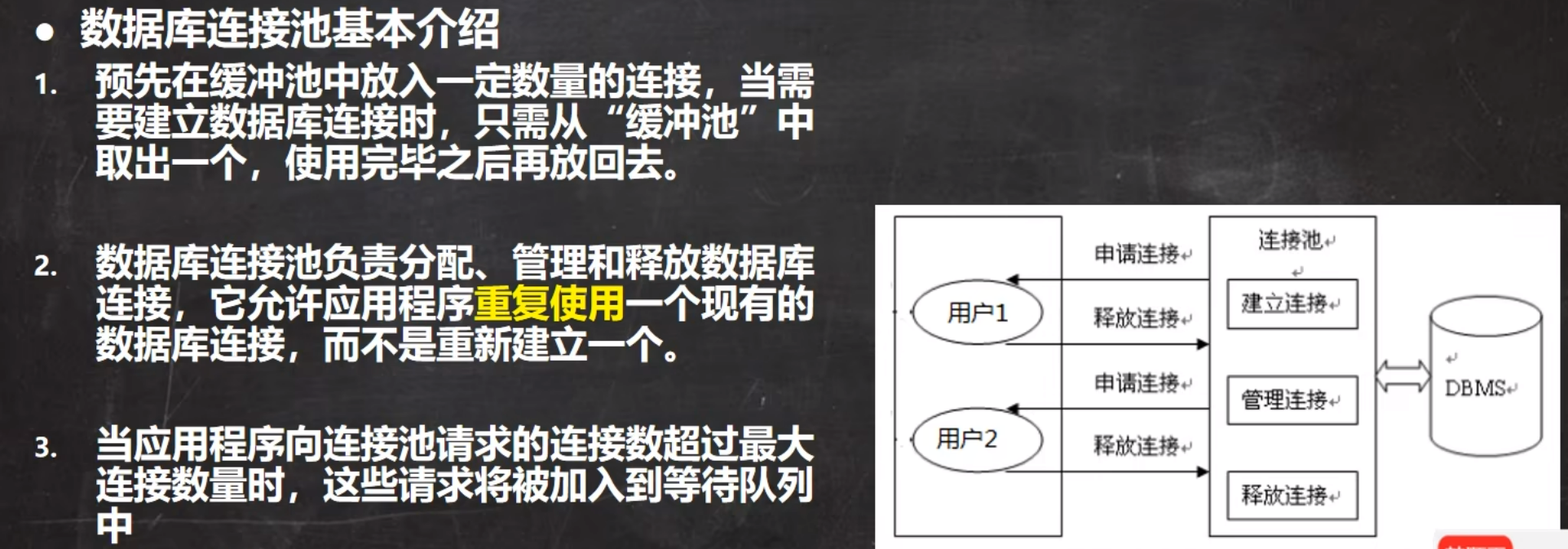
1.概念介绍
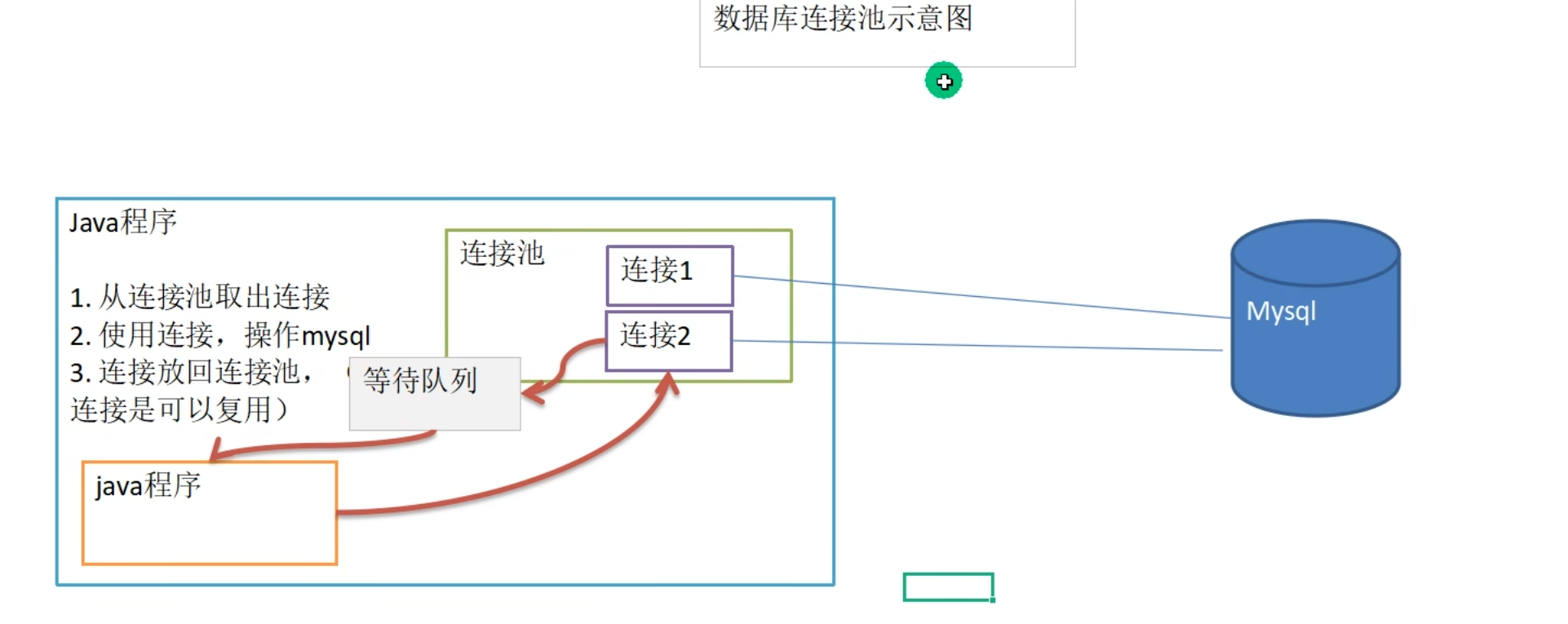
2.数据库连接池示意图
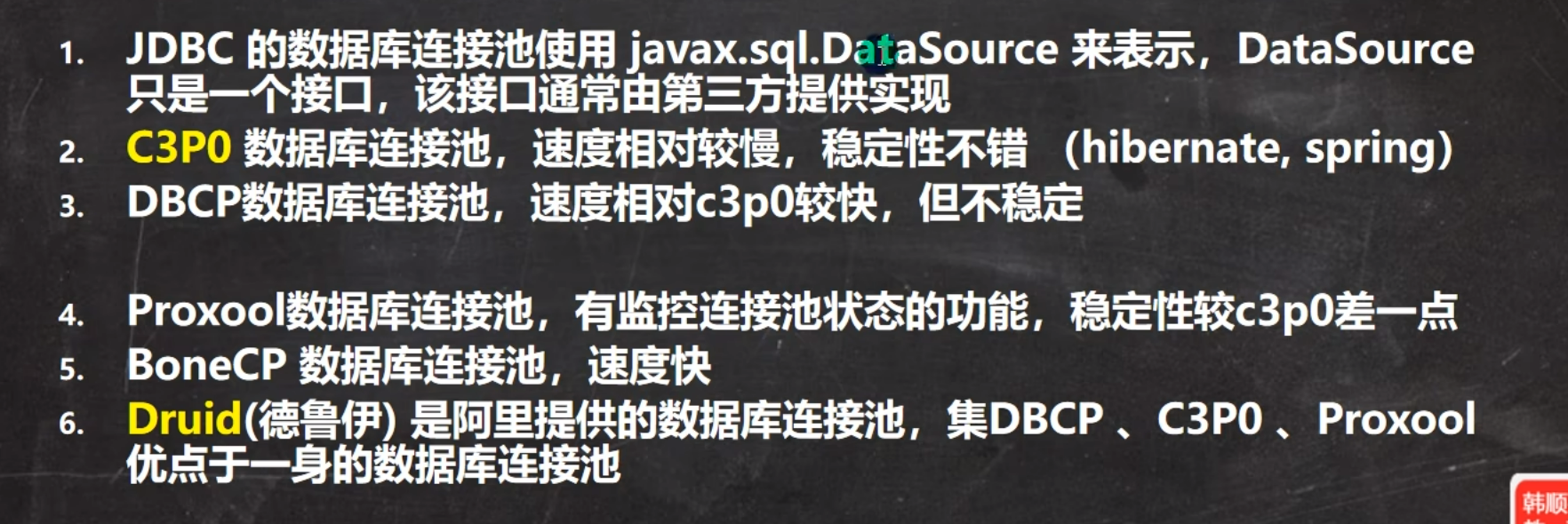
3.数据库连接池种类
3.C3P0连接池
1.环境配置
1.导入jar包

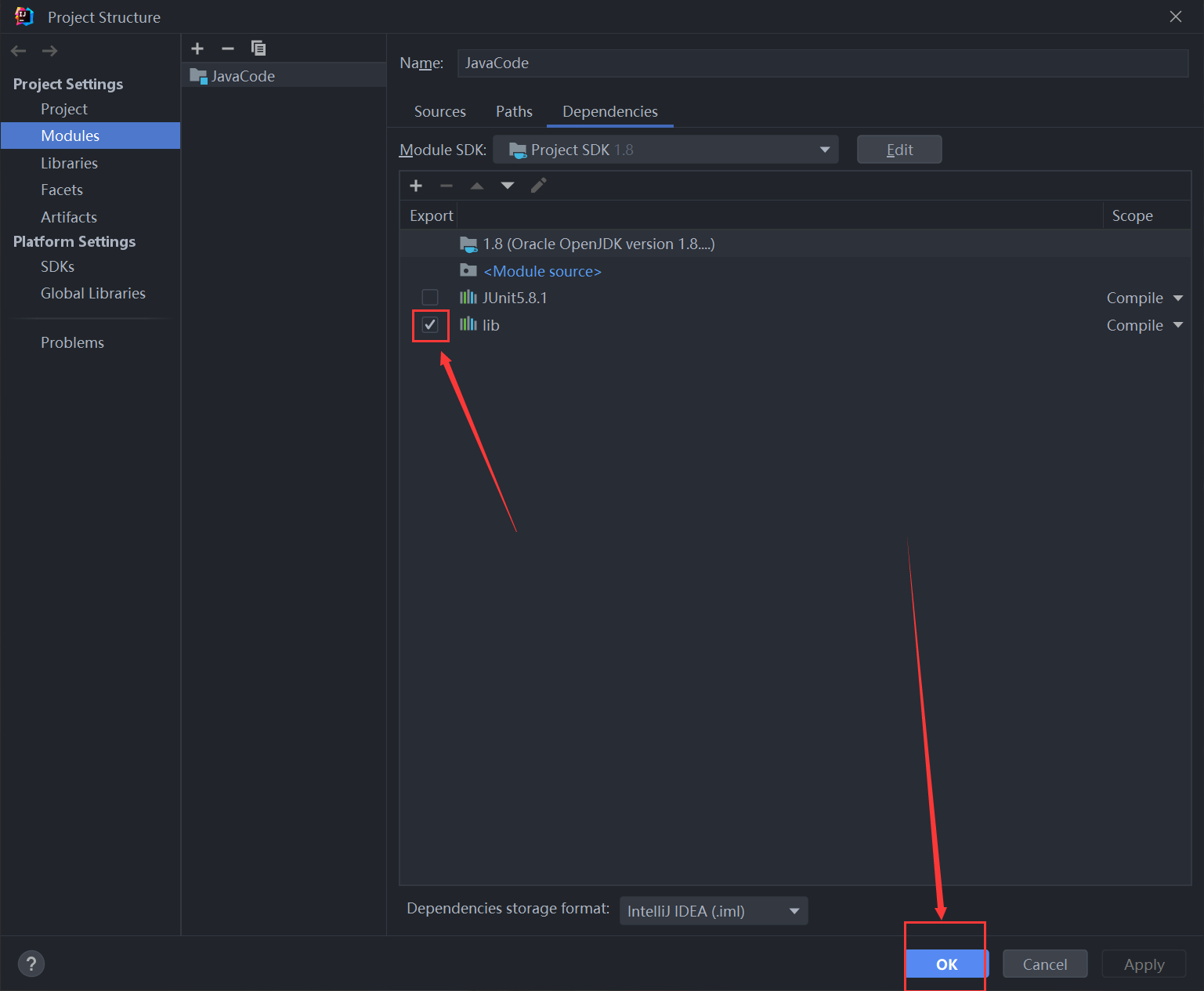
2.将整个lib添加到项目中
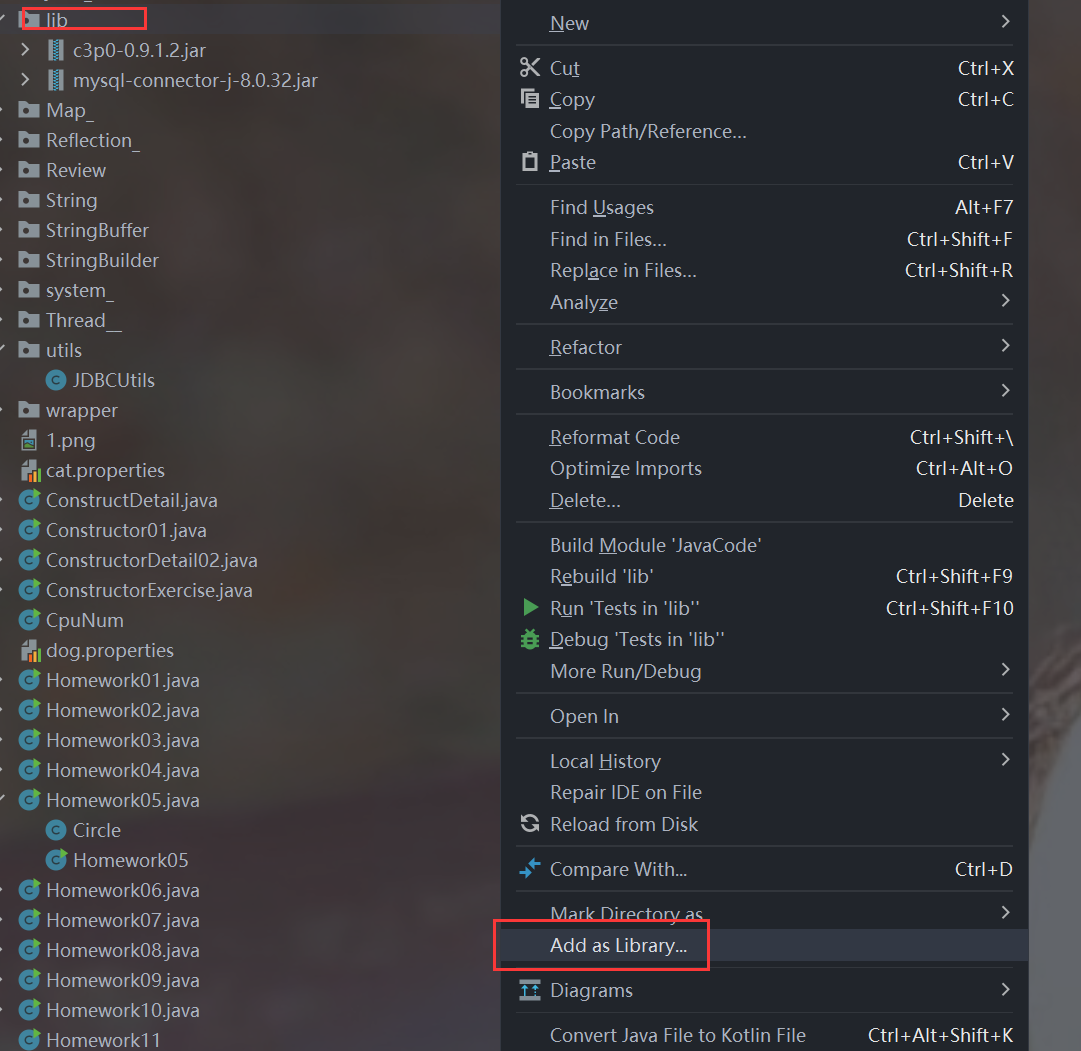
3.配置代码提示
2.C3P0方式一(java程序)
@Testpublic void testC3P01() throws Exception {//1.创建一个数据源对象,可以理解为这个数据源对象就是那个连接池ComboPooledDataSource comboPooledDataSource = new ComboPooledDataSource();//2.读取配置文件,获取url,user,password,driverProperties properties = new Properties();properties.load(new FileInputStream("src\\mysql.properties"));String url = properties.getProperty("url");String user = properties.getProperty("user");String password = properties.getProperty("password");String driver = properties.getProperty("driver");//3.给数据源设置相关参数comboPooledDataSource.setJdbcUrl(url);comboPooledDataSource.setUser(user);comboPooledDataSource.setPassword(password);comboPooledDataSource.setDriverClass(driver);//4.设置初始化参数comboPooledDataSource.setInitialPoolSize(10); //初始化连接数comboPooledDataSource.setMaxPoolSize(50); //最大连接数//5.获取连接Connection connection = comboPooledDataSource.getConnection();System.out.println("连接OK");//6.关闭连接connection.close();}
3.C3P0方式二(配置文件)
1.环境配置
1.将c3p0-config.xml配置文件复制到src目录下
<c3p0-config><!-- 数据源名称,可以随意--><named-config name="hello"><!-- 驱动类 --><property name="driverClass">com.mysql.cj.jdbc.Driver</property><!-- url--><property name="jdbcUrl">jdbc:mysql://localhost:3306/hsp_db02</property><!-- 用户名 --><property name="user">root</property><!-- 密码 --><property name="password">root</property><!-- 每次增长的连接数--><property name="acquireIncrement">5</property><!-- 初始的连接数 --><property name="initialPoolSize">10</property><!-- 最小连接数 --><property name="minPoolSize">5</property><!-- 最大连接数 --><property name="maxPoolSize">50</property><!-- 可连接的最多的命令对象数 --><property name="maxStatements">5</property><!-- 每个连接对象可连接的最多的命令对象数 --><property name="maxStatementsPerConnection">2</property></named-config>
</c3p0-config>
2.修改配置文件的参数
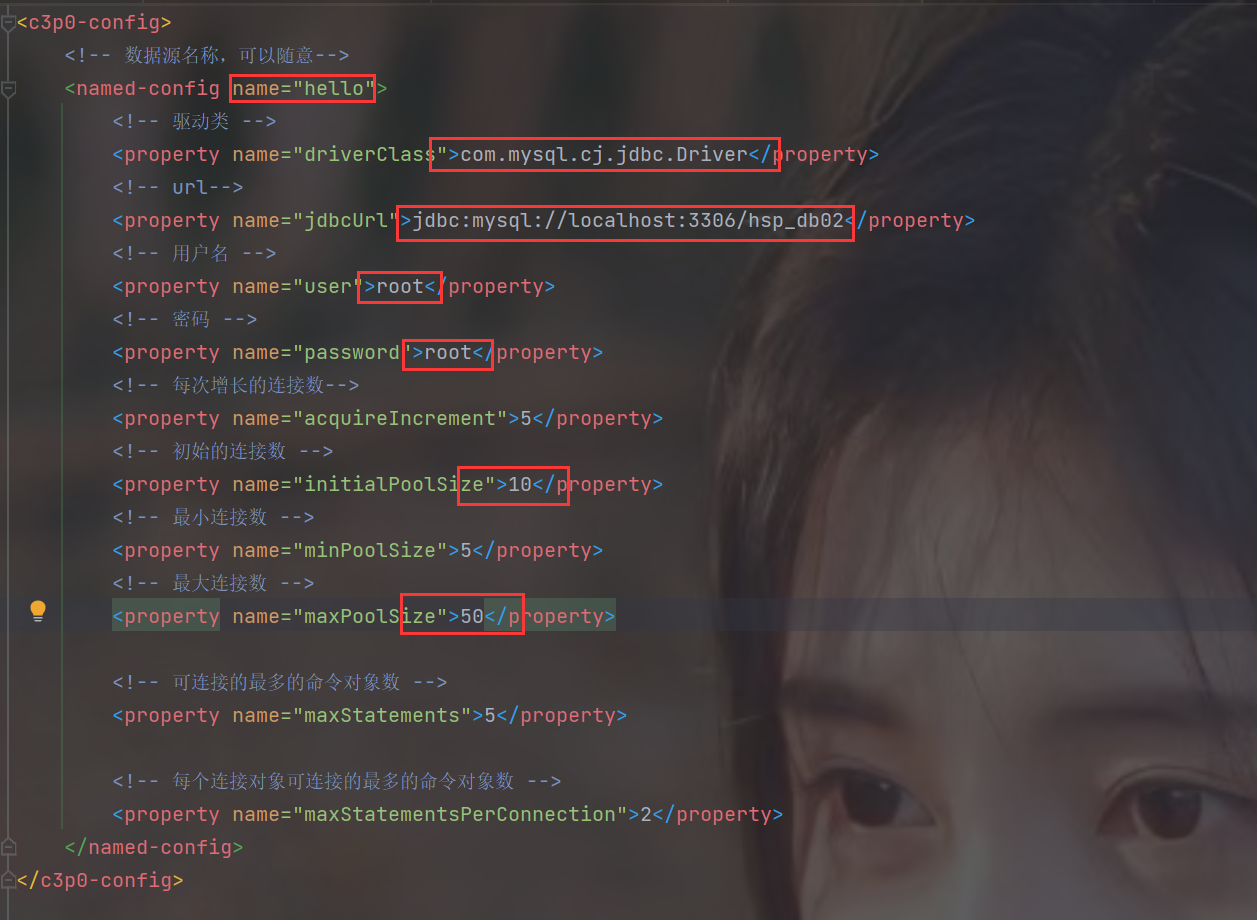
2.编写java代码
@Testpublic void testC3P02() throws Exception {//1.创建与配置文件名称相同的数据源ComboPooledDataSource comboPooledDataSource = new ComboPooledDataSource("hello"); //注意:这里的hello是配置文件中的名字//2.获取连接Connection connection = comboPooledDataSource.getConnection();System.out.println("连接OK");//3.关闭连接connection.close();}
4.德鲁伊连接池
1.环境配置
1.导入jar包

2.将配置文件复制到src目录下,名字任意
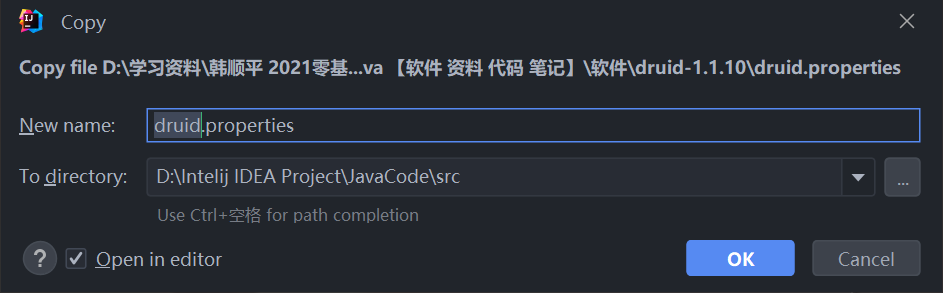
#key=value
driverClassName=com.mysql.jdbc.Driver
url=jdbc:mysql://localhost:3306/girls?rewriteBatchedStatements=true
#url=jdbc:mysql://localhost:3306/girls
username=root
password=root
#initial connection Size
initialSize=10
#min idle connecton size
minIdle=5
#max active connection size
maxActive=50
#max wait time (5000 mil seconds)
maxWait=5000
3.修改配置文件的参数
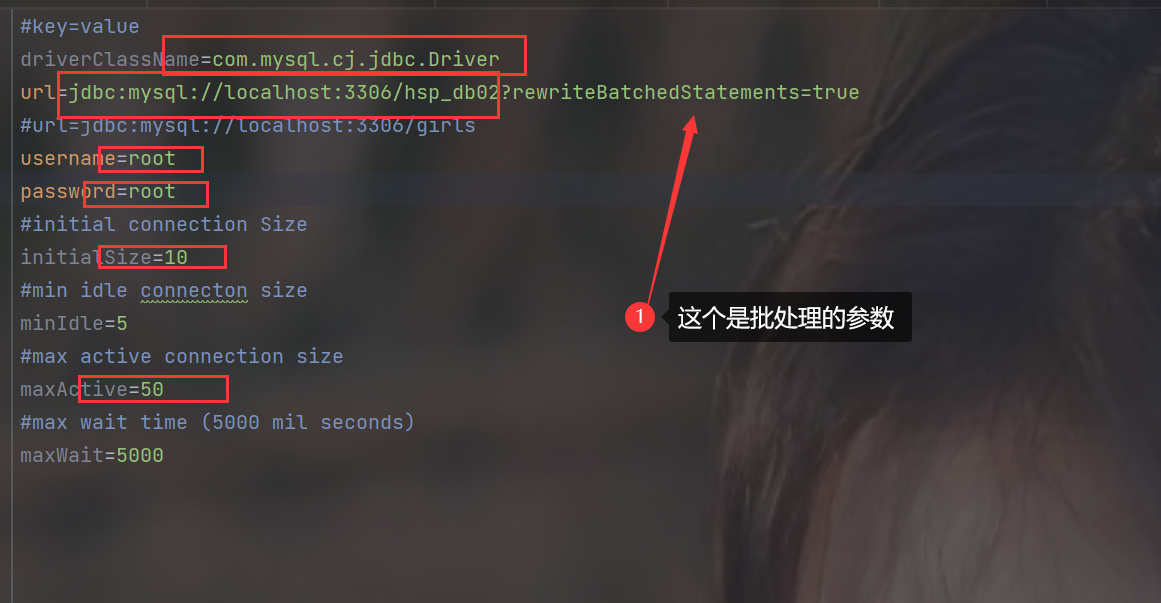
2.编写java代码
package datasource;import com.alibaba.druid.pool.DruidDataSourceFactory;import javax.sql.DataSource;
import java.io.FileInputStream;
import java.sql.Connection;
import java.util.Properties;/*** @author 孙显圣* @version 1.0*/
public class Druid_ {public static void main(String[] args) throws Exception {//1.读取配置文件Properties properties = new Properties();properties.load(new FileInputStream("src\\druid.properties"));//2.创建数据源对象(就是连接池),将配置文件传进去DataSource dataSource = DruidDataSourceFactory.createDataSource(properties);//3.获取连接Connection connection = dataSource.getConnection();System.out.println("连接OK");//4.关闭连接connection.close();}
}
5.德鲁伊工具类
1.编写代码
package utils;import com.alibaba.druid.pool.DruidDataSourceFactory;import javax.sql.DataSource;
import java.io.FileInputStream;
import java.io.IOException;
import java.sql.Connection;
import java.sql.ResultSet;
import java.sql.SQLException;
import java.sql.Statement;
import java.util.Properties;/*** @author 孙显圣* @version 1.0*/
public class JDBCUtilsByDruid {//静态数据源引用(jdbc的接口)private static DataSource dataSource;//静态代码块,在类加载时为数据源引用赋值static {//1.读取配置文件Properties properties = new Properties();try {properties.load(new FileInputStream("src\\druid.properties"));} catch (IOException e) {throw new RuntimeException(e);}//2.使用配置文件,创建德鲁伊数据源对象try {dataSource = DruidDataSourceFactory.createDataSource(properties);} catch (Exception e) {throw new RuntimeException(e);}}//编写getConnection方法public static Connection getConnection() {try {return dataSource.getConnection();} catch (SQLException e) {throw new RuntimeException(e);}}//把Connection对象放回连接池public static void close(ResultSet resultSet, Statement statement, Connection connection) {try {if (resultSet != null) {resultSet.close();}if (statement != null) {statement.close();}if (connection != null) {connection.close();}} catch (SQLException e) {throw new RuntimeException(e);}}}
2.测试使用
package datasource;import org.junit.jupiter.api.Test;
import utils.JDBCUtilsByDruid;import java.sql.Connection;
import java.sql.PreparedStatement;
import java.sql.ResultSet;
import java.sql.SQLException;/*** @author 孙显圣* @version 1.0*/
public class DruidUtils_Use {@Testpublic void testSelect() {//建立连接Connection connection = JDBCUtilsByDruid.getConnection();//编写sql语句进行查询String sql = "select name, phone from actor where id = ?";PreparedStatement preparedStatement = null;ResultSet resultSet = null;try {//进行预处理preparedStatement = connection.prepareStatement(sql);preparedStatement.setInt(1, 8);//执行查询resultSet = preparedStatement.executeQuery();while (resultSet.next()) {String string = resultSet.getString("name");String string1 = resultSet.getString("phone");System.out.println(string + " " + string1);}} catch (SQLException e) {throw new RuntimeException(e);} finally {//关闭资源JDBCUtilsByDruid.close(resultSet, preparedStatement, connection);}}}
6.Apache——DBUtils
1.引出
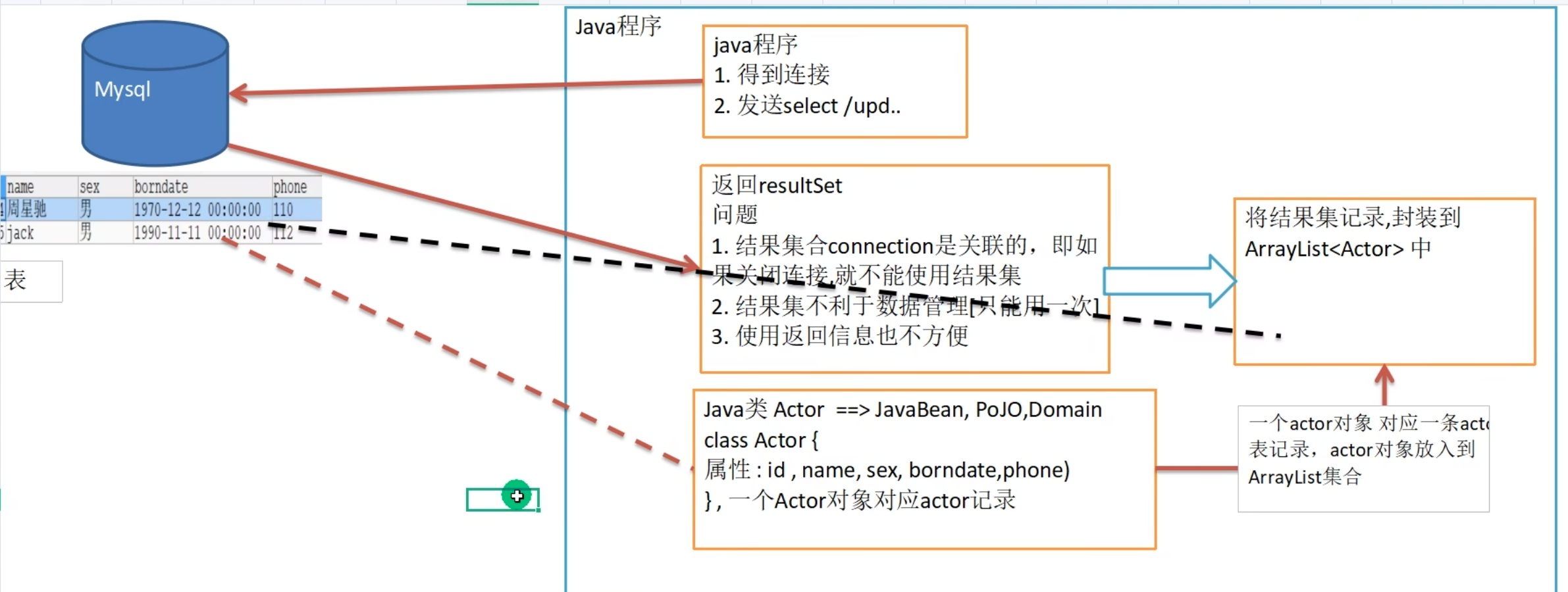
2.基本介绍

3.Apache——DBUtils查询
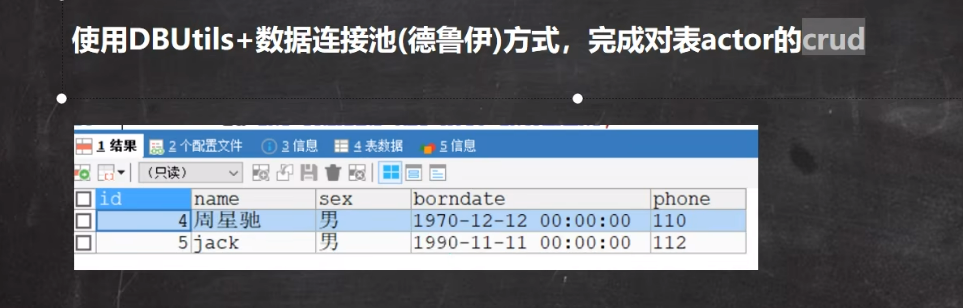
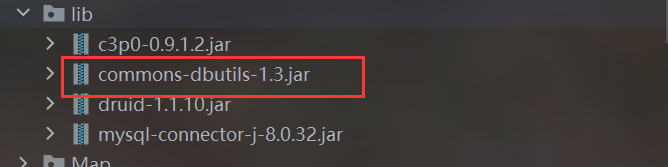
1.添加依赖
2.编写java代码
1.Actor.java(封装每一行的bean)
package datasource;import java.sql.Timestamp;/*** @author 孙显圣* @version 1.0* 这是一个bean,用来封装actor表的每一行数据*/
public class Actor {private Integer id; //注意要使用包装类private String name;private String sex;private Timestamp borndate; //mysql8只能用这个类型来接受datetimeprivate String phone;public Actor() { //一定要给一个无参构造器[反射需要]}public Actor(Integer id, String name, String sex, Timestamp borndate, String phone) {this.id = id;this.name = name;this.sex = sex;this.borndate = borndate;this.phone = phone;}public Integer getId() {return id;}public void setId(Integer id) {this.id = id;}public String getName() {return name;}public void setName(String name) {this.name = name;}public String getSex() {return sex;}public void setSex(String sex) {this.sex = sex;}public Timestamp getBorndate() {return borndate;}public void setBorndate(Timestamp borndate) {this.borndate = borndate;}public String getPhone() {return phone;}public void setPhone(String phone) {this.phone = phone;}@Overridepublic String toString() {return "\nActor{" +"id=" + id +", name='" + name + '\'' +", sex='" + sex + '\'' +", borndate=" + borndate +", phone='" + phone + '\'' +'}';}}
2.查询多条记录
new BeanListHandler<>(Actor.class)
package datasource;import org.apache.commons.dbutils.QueryRunner;
import org.apache.commons.dbutils.handlers.BeanListHandler;
import org.junit.jupiter.api.Test;
import utils.JDBCUtilsByDruid;import java.sql.Connection;
import java.sql.SQLException;
import java.util.List;/*** @author 孙显圣* @version 1.0*/
public class DBUtils_USE {@Testpublic void testQueryMan() throws SQLException {//1.得到连接Connection connection = JDBCUtilsByDruid.getConnection();//2.创建QueryRunnerQueryRunner queryRunner = new QueryRunner();//3.编写sqlString sql = "select borndate from actor where id >= ?";//4.调用方法,返回ArrayList结果集,其中每一个元素都是表的一行,封装到了bean中List<Actor> query = queryRunner.query(connection, sql, new BeanListHandler<>(Actor.class), 1); //1就是给里面的问号赋值//5.获取每一行的beanfor (Actor actor : query) {System.out.println(actor);}//6.关闭连接,他会自动关闭resultset和preparedStatementJDBCUtilsByDruid.close(null, null, connection);}}
3.查询单条记录
new BeanHandler<>(Actor.class)
@Testpublic void testQuerySingle() {//1.获取连接Connection connection = JDBCUtilsByDruid.getConnection();//2.创建queryRunnerQueryRunner queryRunner = new QueryRunner();//3.编写sqlString sql = "select * from actor where id = ?";//4.调用查询方法Actor query = null;try {query = queryRunner.query(connection, sql, new BeanHandler<>(Actor.class), 8);} catch (SQLException e) {throw new RuntimeException(e);}System.out.println(query);//5.关闭资源try {connection.close();} catch (SQLException e) {throw new RuntimeException(e);}}
4.查询单行单列记录
new ScalarHandler()
@Testpublic void testScalar() {//1.获取连接Connection connection = JDBCUtilsByDruid.getConnection();//2.创建queryRunnerQueryRunner queryRunner = new QueryRunner();//3.编写sqlString sql = "select name from actor where id = ?"; //单行单列//4.查询try {Object query = queryRunner.query(connection, sql, new ScalarHandler(), 8);System.out.println(query);} catch (SQLException e) {throw new RuntimeException(e);}//5.关闭资源try {connection.close();} catch (SQLException e) {throw new RuntimeException(e);}}4.DML操作
@Testpublic void testDML() throws SQLException {//1.获取连接Connection connection = JDBCUtilsByDruid.getConnection();//2.创建queryRunnerQueryRunner queryRunner = new QueryRunner();//3.编写sql//增加String sql1 = "insert into actor values(?, ?, ?, ?, ?)";//删除String sql2 = "delete from actor where id = ?";//修改String sql3 = "update actor set phone = ?";//4.执行sqlint update = queryRunner.update(connection, sql1, null, "张三丰", "男", "2005-11-02", "51552");int update1 = queryRunner.update(connection, sql2, 11);int update2 = queryRunner.update(connection, sql3, 123456);//5.关闭资源try {connection.close();} catch (SQLException e) {throw new RuntimeException(e);}}
7.BasicDao
1.引出

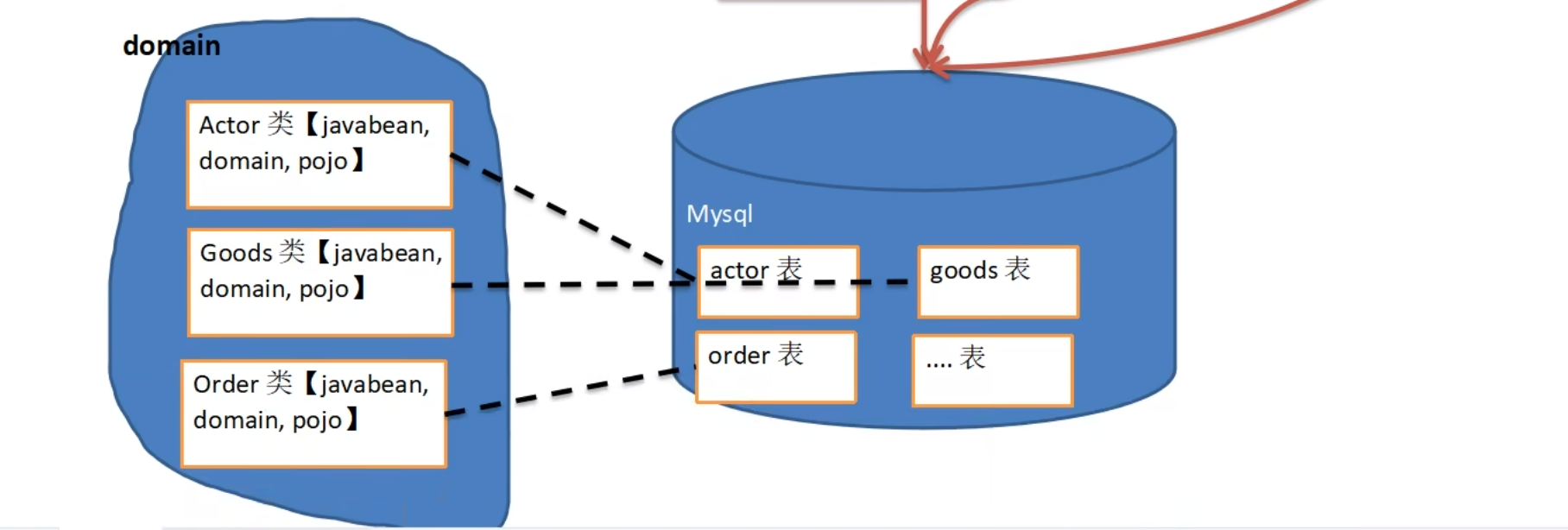
2.BasicDao分析
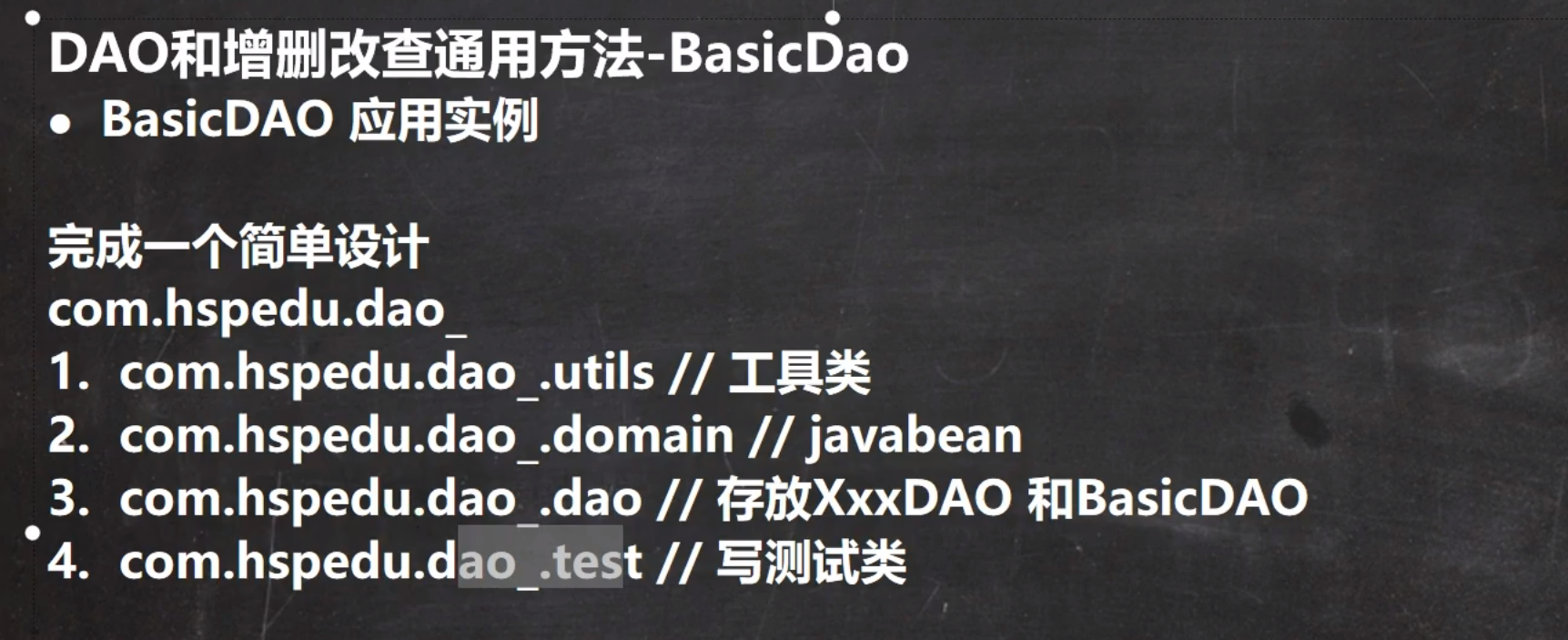
3.代码实现
1.文件目录
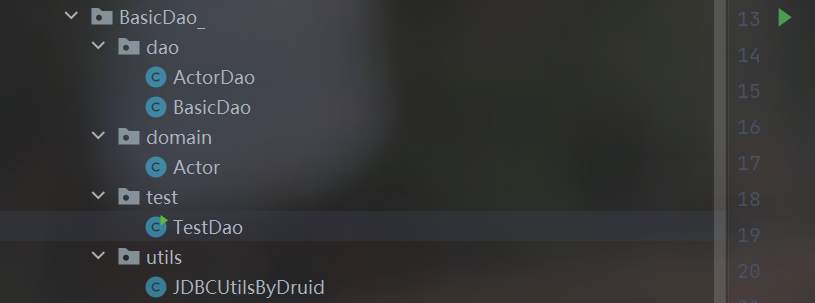
2.BasicDao
package BasicDao_;import org.apache.commons.dbutils.QueryRunner;
import org.apache.commons.dbutils.handlers.BeanHandler;
import org.apache.commons.dbutils.handlers.BeanListHandler;
import org.apache.commons.dbutils.handlers.ScalarHandler;
import utils.JDBCUtilsByDruid;import java.sql.Connection;
import java.sql.SQLException;
import java.util.List;/*** @author 孙显圣* @version 1.0* 开发BasicDAO , 是其他DAO的父类*/
public class BasicDao<T> { //泛型指定具体类型private QueryRunner qr =  new QueryRunner();//开发通用的dml方法, 针对任意的表public int update(String sql, Object... parameters) {Connection connection = null;try {connection = JDBCUtilsByDruid.getConnection();int update = qr.update(connection, sql, parameters);return  update;} catch (SQLException e) {throw  new RuntimeException(e); //将编译异常->运行异常 ,抛出} finally {JDBCUtilsByDruid.close(null, null, connection);}}//返回多个对象(即查询的结果是多行), 针对任意表/**** @param sql sql 语句,可以有 ?* @param clazz 传入一个类的Class对象 比如 Actor.class* @param parameters 传入 ? 的具体的值,可以是多个* @return 根据Actor.class 返回对应的 ArrayList 集合*/public List<T> queryMulti(String sql, Class<T> clazz, Object... parameters) {Connection connection = null;try {connection = JDBCUtilsByDruid.getConnection();return qr.query(connection, sql, new BeanListHandler<T>(clazz), parameters);} catch (SQLException e) {throw  new RuntimeException(e); //将编译异常->运行异常 ,抛出} finally {JDBCUtilsByDruid.close(null, null, connection);}}//查询单行结果 的通用方法public T querySingle(String sql, Class<T> clazz, Object... parameters) {Connection connection = null;try {connection = JDBCUtilsByDruid.getConnection();return  qr.query(connection, sql, new BeanHandler<T>(clazz), parameters);} catch (SQLException e) {throw  new RuntimeException(e); //将编译异常->运行异常 ,抛出} finally {JDBCUtilsByDruid.close(null, null, connection);}}//查询单行单列的方法,即返回单值的方法public Object queryScalar(String sql, Object... parameters) {Connection connection = null;try {connection = JDBCUtilsByDruid.getConnection();return  qr.query(connection, sql, new ScalarHandler(), parameters);} catch (SQLException e) {throw  new RuntimeException(e); //将编译异常->运行异常 ,抛出} finally {JDBCUtilsByDruid.close(null, null, connection);}}}
3.ActorDao
package BasicDao_.dao;import BasicDao_.domain.Actor;/*** @author 孙显圣* @version 1.0*/
public class ActorDao extends BasicDao<Actor>{//拥有BasicDao所有的方法//根据业务需求可以写上特有的方法
}
4.Actor
package BasicDao_.domain;import java.sql.Timestamp;/*** @author 孙显圣* @version 1.0* 这是一个bean,用来封装actor表的每一行数据*/
public class Actor {private Integer id;private String name;private String sex;private Timestamp borndate; //mysql8只能用这个类型来接受datetimeprivate String phone;public Actor() { //一定要给一个无参构造器[反射需要]}public Actor(Integer id, String name, String sex, Timestamp borndate, String phone) {this.id = id;this.name = name;this.sex = sex;this.borndate = borndate;this.phone = phone;}public Integer getId() {return id;}public void setId(Integer id) {this.id = id;}public String getName() {return name;}public void setName(String name) {this.name = name;}public String getSex() {return sex;}public void setSex(String sex) {this.sex = sex;}public Timestamp getBorndate() {return borndate;}public void setBorndate(Timestamp borndate) {this.borndate = borndate;}public String getPhone() {return phone;}public void setPhone(String phone) {this.phone = phone;}@Overridepublic String toString() {return "\nActor{" +"id=" + id +", name='" + name + '\'' +", sex='" + sex + '\'' +", borndate=" + borndate +", phone='" + phone + '\'' +'}';}}
5.TestDao
package BasicDao_.test;import BasicDao_.dao.ActorDao;
import BasicDao_.domain.Actor;import java.util.List;/*** @author 孙显圣* @version 1.0*/
public class TestDao {public static void main(String[] args) {//测试一下ActorDao对actor表的操作ActorDao actorDao = new ActorDao();//1.查询List<Actor> actors = actorDao.queryMulti("select * from actor where id >?", Actor.class, 2);for (Actor actor : actors) {System.out.println(actor);}//2.查询单行记录Actor actor = actorDao.querySingle("select * from actor where id = ?", Actor.class, 4);System.out.println(actor);//3.查询单行单列记录Object o = actorDao.queryScalar("select name from actor where id = ?", 9);System.out.println(o);//4.增加一条记录int update = actorDao.update("insert into actor values(?,?,?,?,?)", null, "王五", "女", "2002-1-9", "5455555");System.out.println(update > 0 ? "成功" : "失败");//5.删除一条记录int update1 = actorDao.update("delete from actor where id > ?", 10);System.out.println(update1 > 0 ? "成功" : "失败");//6.修改一条记录int update2 = actorDao.update("update actor set name = ?", "女");System.out.println(update2 > 0 ? "成功" : "失败");}
}
6.JDBCUtilsByDruid
package BasicDao_.utils;import com.alibaba.druid.pool.DruidDataSourceFactory;import javax.sql.DataSource;
import java.io.FileInputStream;
import java.io.IOException;
import java.sql.Connection;
import java.sql.ResultSet;
import java.sql.SQLException;
import java.sql.Statement;
import java.util.Properties;/*** @author 孙显圣* @version 1.0*/
public class JDBCUtilsByDruid {//静态数据源引用(jdbc的接口)private static DataSource dataSource;//静态代码块,在类加载时为数据源引用赋值static {//1.读取配置文件Properties properties = new Properties();try {properties.load(new FileInputStream("src\\druid.properties"));} catch (IOException e) {throw new RuntimeException(e);}//2.使用配置文件,创建德鲁伊数据源对象try {dataSource = DruidDataSourceFactory.createDataSource(properties);} catch (Exception e) {throw new RuntimeException(e);}}//编写getConnection方法public static Connection getConnection() {try {return dataSource.getConnection();} catch (SQLException e) {throw new RuntimeException(e);}}//把Connection对象放回连接池public static void close(ResultSet resultSet, Statement statement, Connection connection) {try {if (resultSet != null) {resultSet.close();}if (statement != null) {statement.close();}if (connection != null) {connection.close();}} catch (SQLException e) {throw new RuntimeException(e);}}}
7.druid.properties
#key=value
driverClassName=com.mysql.cj.jdbc.Driver
url=jdbc:mysql://localhost:3306/hsp_db02?rewriteBatchedStatements=true
#url=jdbc:mysql://localhost:3306/girls
username=root
password=root
#initial connection Size
initialSize=10
#min idle connecton size
minIdle=5
#max active connection size
maxActive=50
#max wait time (5000 mil seconds)
maxWait=5000
相关文章:
MySQL数据库(数据库连接池)
文章目录 1.批处理应用1.基本介绍2.批处理演示1.创建测试表2.修改url3.编写java代码 3.批处理源码分析 2.数据库连接池1.传统连接弊端分析2.数据库连接池基本介绍1.概念介绍2.数据库连接池示意图3.数据库连接池种类 3.C3P0连接池1.环境配置1.导入jar包2.将整个lib添加到项目中3…...
【C#】知识点速通
前言: 笔者是跟着哔站课程(Trigger)学习unity才去学习的C#,并且C语言功底尚存,所以只是简单地跟着课程将unity所用的C#语言的关键部分进行了了解,然后在后期unity学习过程中加以深度学习。如需完善的C#知识…...
FTP协议
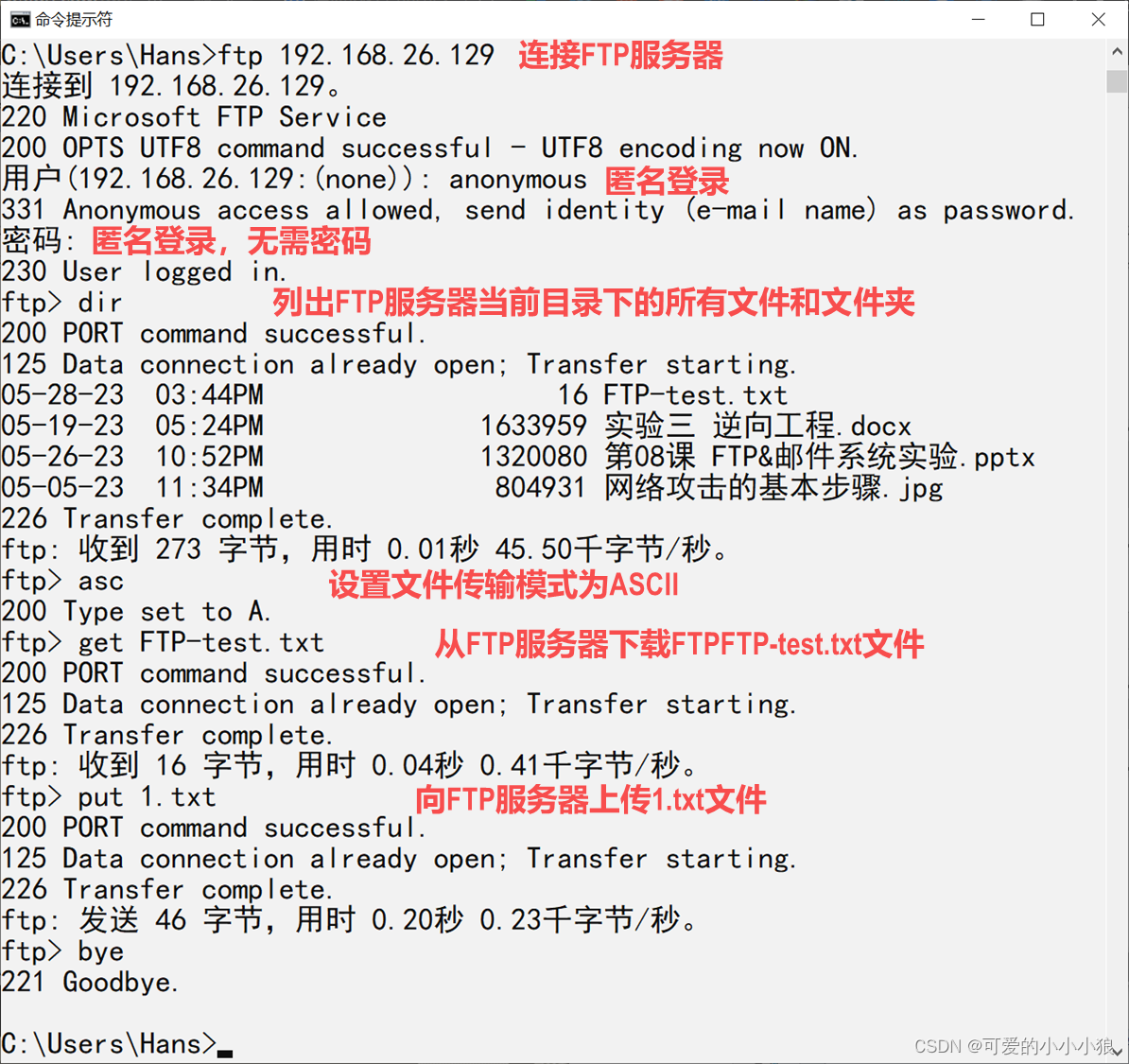
FTP协议 客户端向服务器发送文件。 C/S架构。 运行在TCP/IP协议上面。 FTP客户端要和FTP服务端建立两个TCP连接。 控制连接:运行在整个连接过程,传输控制信息。 数据连接:在每次文件传输时才会建立,文件传输完就关闭。 主动模式…...
前后端分离开发【Yapi平台】【Swagger注解自动生成接口文档平台】
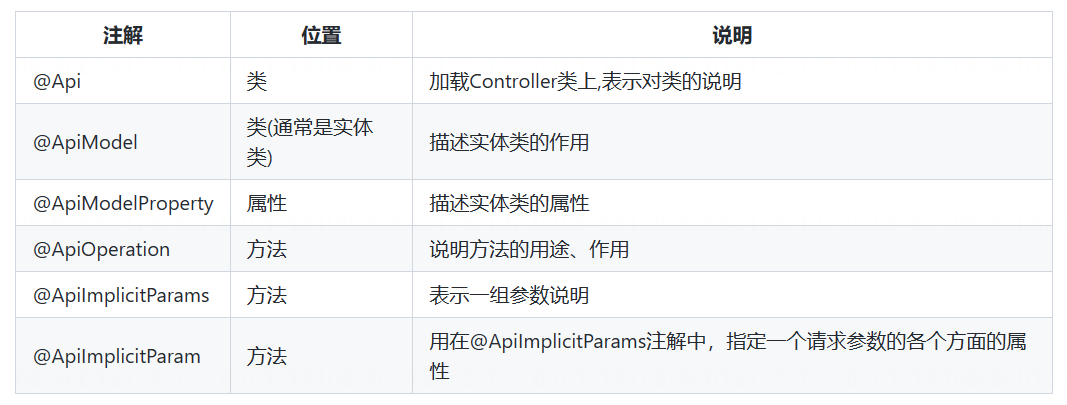
前后端分离开发 介绍开发流程Yapi(api接口文档编写平台)介绍 Swagger使用方式1). 导入knife4j的maven坐标2). 导入knife4j相关配置类3). 设置静态资源映射4). 在LoginCheckFilter中设置不需要处理的请求路径 查看接口文档常用注解注解介绍 当前项目中&am…...

Android的硬件接口HAL-2 HIDL
没写完哈。 不说废话,直接上干活。 1 创建HAL mkdir -p vendor/fanged/hidltest/1.0/defaultvi vendor/fanged/hidltest/1.0/Ilovefanged.hal package vendor.fanged.hardware.hidltest1.0;interface Ilovefanged {add(int32_t a, int32_t b) generates (int32_t…...
)
pygame--坦克大战(二)
加载敌方坦克 敌方坦克的方向是随机的,使用随机数生成。 初始化敌方坦克。 class EnemyTank(Tank):def __init__(self,left,top,speed):self.images = {U: pygame.image.load(img/enemy1U.gif),D: pygame.image.load(img/enemy1D.gif),L: pygame.image.load(img/enemy1L.gi…...
)
【C语言】标准输入/输出(printf, scanf, gets, puts, getchar, putchar)
标准文件文件指针设备标准输入stdin键盘标准输出stdout屏幕标准错误stderr您的屏幕 标准输入/输出的函数在标准库stdio.h。 #include <stdio.h> 1、printf 输出 printf :格式化输出,输出到标准输出stdout中。 printf: int print…...

C、C++、C#中.vscode下json文件记录
C launch.json {// 使用 IntelliSense 了解相关属性。 // 悬停以查看现有属性的描述。// 欲了解更多信息,请访问: https://go.microsoft.com/fwlink/?linkid830387"version": "0.2.0","configurations": [{"name": &quo…...

2013年认证杯SPSSPRO杯数学建模B题(第二阶段)流行音乐发展简史全过程文档及程序
2013年认证杯SPSSPRO杯数学建模 B题 流行音乐发展简史 原题再现: 随着互联网的发展,流行音乐的主要传播媒介从传统的电台和唱片逐渐过渡到网络下载和网络电台等。网络电台需要根据收听者的已知喜好,自动推荐并播放其它音乐。由于每个人喜好…...
使用ARCore深度API实现点云采集
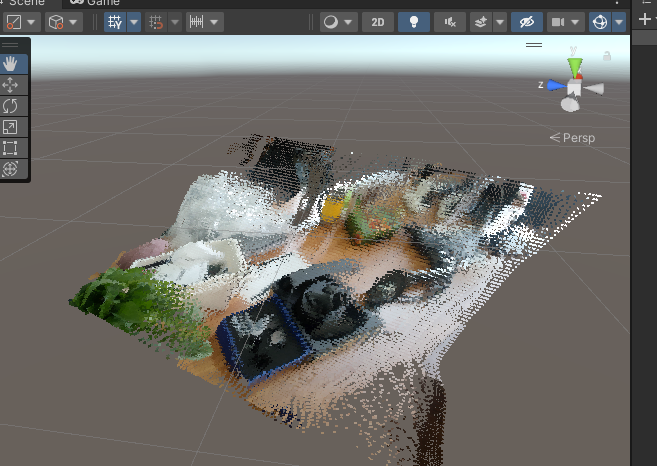
一、深度API 本小节内容摘自ARCore官方文档。 ARCore 深度API Depth API 可助力实现对象遮挡、提升沉浸感和新颖的互动体验,从而增强 AR 体验的真实感。 在下图中,右侧画面是采用深度API进行遮挡后的效果,与左侧图相比更加真实。 深度值 给…...
软考数据库
目录 分值分布1. 事务管理1.1 事物的基本概念1.2 数据库的并发控制1.2.1 事务调度概念1.2.2 并发操作带来的问题1.2.3 并发控制技术1.2.4 隔离级别: 1.3 数据库的备份和恢复1.3.1 故障种类1.3.2 备份方法1.3.3 日志文件1.3.4 恢复 2. SQL语言发权限收权限视图触发器…...
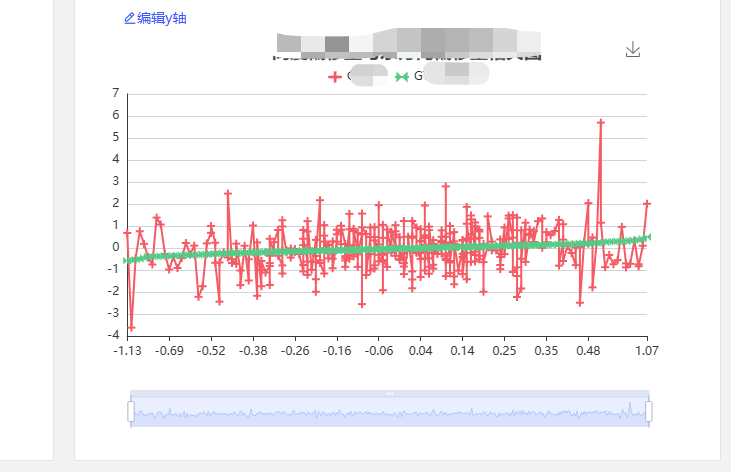
Echarts 自适应宽高,或指定宽高进行自适应
文章目录 需求分析 需求 有一个按钮实现对Echarts的指定缩放与拉长,形成自适应效果 拉长后效果图 该块元素缩短后效果图 分析 因为我习惯使用 ref 来获取组件的 DOM 元素,然后进行挂载 <div ref"echartsRef" id"myDiv" :sty…...

体验报告:为什么Claude-3是码农和学者的新宠?
在这个充斥着海量信息的新时代,人工智能的飞速发展带来了翻天覆地的变化。特别是在编程、学术探索以及专业文案创作等领域,AI的助力显得格外关键。最近,我有机会尝试了一种革命性的人工智能工具——Claude-3,其表现令我震惊&#…...

接口自动化框架搭建(九):接入钉钉消息通知
1,jenkins安装钉钉插件 2,在钉钉群聊设置机器人 3,jenkins配置钉钉 根据情况选择: 除了这些,其他不用配置,配置完成点击确认 4,项目配置 添加后保存 5,测试下效果 构建完成后&a…...
;二、点击下载视频按钮,视频以压缩包形式下载(但未实现压缩视频))
一、点击视频下载(通过视频url实现);二、点击下载视频按钮,视频以压缩包形式下载(但未实现压缩视频)
一、点击视频下载(通过视频url实现) <div class"video-list" v-for"(item,index) in videoList" :key"index"><span class"video-title" >{{item.title}}</span><span class"video-…...
B树、B+树、哈夫曼树
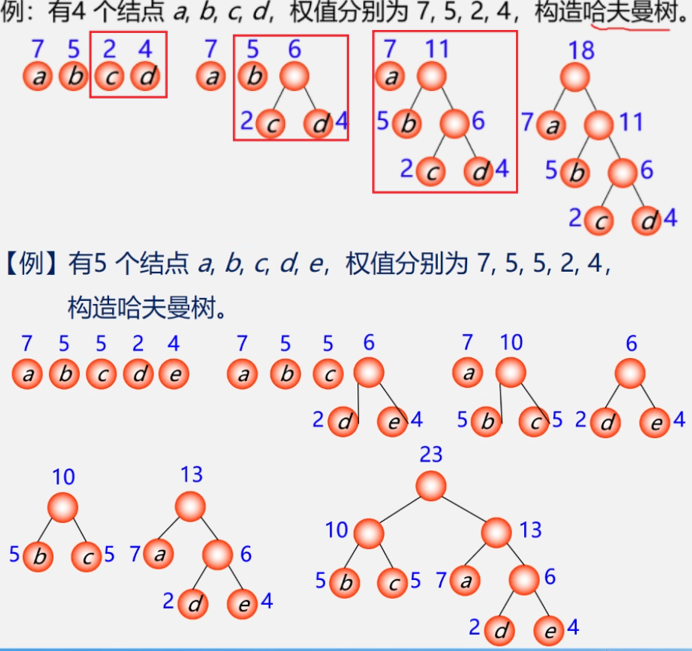
目录 1. B树2. B树3. 哈夫曼树 1. B树 特点:一个节点当中可以有多个值,节点内部key 值是有序的,节点内部存储的是key-value类型的数据 磁盘中文件存储用B树。 4阶B树一个节点最多三个key值 5阶B树一个节点最多四个key值 B树有很多的分支&…...
、Recall(召回率)和Accuracy(准确率)区别和联系)
评价指标_Precision(精确率)、Recall(召回率)和Accuracy(准确率)区别和联系
Precision(精确率)、Recall(召回率)和Accuracy(准确率)是机器学习和信息检索领域常用的评价指标,它们用于评估分类器或检索系统的性能,但各自关注的方面略有不同。 Precision&#x…...

【React】React AJAX
在React中使用AJAX(Asynchronous JavaScript and XML)是一种常见的做法,用于从服务器获取数据并在组件中显示。尽管AJAX的名字中包含了XML,但现在更多地使用JSON(JavaScript Object Notation)作为数据交换格…...
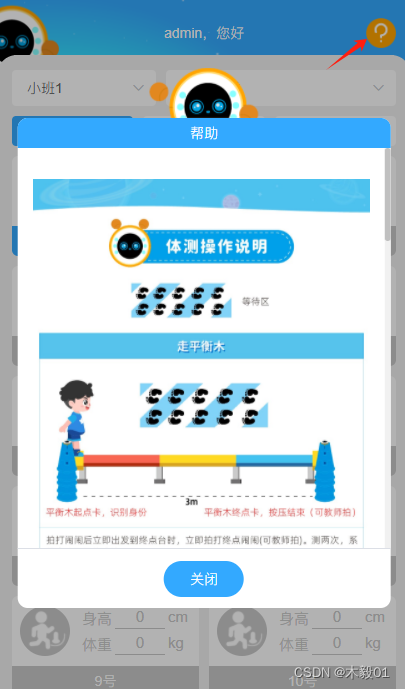
vue 移动端弹窗带滚动效果 滚动到底的时候弹窗下的页面会跟着滑动
<template><div class"wrap" :style"dynamicStyle"><!--dynamicStyle主要是介个 通过computed设置postion的值 弹窗的时候设置为fixed 关闭弹窗的时候设置为unset--><div class"banner-wrap"><img src"/assets/…...

Linux-3 yum和vim
目录 本节目标: Linux 软件包管理器 yum 什么是软件包 1.yum是什么?软件包? 2.Linux(centos)的生态 3.yum的相关操作 我怎么知道我应该安装什么软件? 4.yum的本地配置 关于 rzsz 查看软件包 Linux编辑器-vim使用 1.v…...

DeerFlow惊艳案例:AI深度研究助理生成的报告和播客效果实测
DeerFlow惊艳案例:AI深度研究助理生成的报告和播客效果实测 1. 引言:当AI成为你的研究伙伴 想象一下,你正在为一个复杂的市场分析项目焦头烂额,需要快速整理一份包含最新数据、行业趋势和竞争格局的深度报告。传统方式下&#x…...

HALCON实战:从一维码到复杂OCR,图像增强与运算的工业视觉全流程解析
1. 工业视觉检测的挑战与HALCON解决方案 在自动化产线上,产品表面的一维码、二维码和字符识别是质量控制的关键环节。我曾在某电子元件生产线遇到这样的场景:传送带以每秒3米的速度移动,产品表面既有激光刻印的微小点阵字符,又有喷…...

基于FPGA的伺服驱动系统:电流环控制与多环路反馈、SVPWM及编码器协议实现的研究
伺服驱动FPGA电流环,包含坐标变换,电流环,速度环,位置环,电机反馈接口,SVPWM,编码器协议,电流环和编码器协议都是FPGA里实现的伺服驱动系统里玩FPGA可不是闹着玩的,尤其是…...

GLM-4.1V-9B-Base开发入门:PyCharm专业版连接远程解释器进行模型调试
GLM-4.1V-9B-Base开发入门:PyCharm专业版连接远程解释器进行模型调试 1. 为什么需要远程调试 在AI模型开发过程中,我们经常遇到一个典型问题:本地机器性能不足,无法高效运行大型语言模型。GLM-4.1V-9B-Base这类模型通常需要GPU加…...

HDSceneColor节点]原理解析与实际应用
渲染管线兼容性详解HD Scene Color节点的可用性完全取决于所使用的渲染管线,这是开发者在选择和使用该节点时必须首先考虑的因素。高清渲染管线(HDRP)支持HDRP是Unity针对高端平台和高端硬件设计的高保真渲染解决方案HD Scene Color节点专为H…...

LiuJuan20260223Zimage开箱体验:基于Z-Image LoRA,这个专精模型到底有多好用?
LiuJuan20260223Zimage开箱体验:基于Z-Image LoRA,这个专精模型到底有多好用? 你有没有遇到过这样的情况:想用AI画一个特定的人物,比如你故事里的主角,或者一个IP形象,但生成的图片要么不像&am…...

别再到处找转换工具了!用Audacity把WAV无损转成MP3,保姆级图文教程
音频处理新手指南:Audacity无损转换WAV到MP3的完整方案 你是否曾经下载了一段高质量录音,却发现文件体积大得惊人,根本无法通过邮件发送?或者尝试上传播客内容时,平台总是提示"文件格式不支持"?这…...

SEO 页面优化平台如何分析竞争对手的优化情况
SEO 页面优化平台如何分析竞争对手的优化情况 在当前竞争激烈的互联网环境中,SEO(搜索引擎优化)已经成为每个网站的生存和发展的关键。而在这其中,SEO 页面优化平台的角色尤为重要。通过对竞争对手的优化情况进行深入分析&#x…...

CasRel在智能问答系统中的落地实践:为QA引擎注入结构化事实支撑
CasRel在智能问答系统中的落地实践:为QA引擎注入结构化事实支撑 1. 引言:当问答系统遇到关系抽取 想象一下这样的场景:用户向智能问答系统提问"苹果公司的CEO是谁?",系统需要快速准确地回答"蒂姆库克…...

从特效 SDK 到 AI 动效平台:Neon Vibe Motion 的技术演进之路
多媒体中台在 B 站主要负责剪辑、拍摄、直播等业务场景的动效渲染,开发维护的 SDK 在后文统一称为特效 SDK。 传统的视频特效生产一般分三条链路: 三条链路存在一个困境:效果丰富度、实时可交互、生产效率,三者不可兼得。 那么能…...