
Games101Homework【6】Acceleration structure(Including framework analysis)
Code Analysis:
friend:
C++中友元(友元函数和友元类)的用法和功能_friend class a<b>-CSDN博客
[C++:不如Coding](11):友元函数与友元类_哔哩哔哩_bilibili
Here is a simple explanation:
By using the mechanism of classes, data hiding and encapsulation are achieved. Data members of a class are usually defined as private, while member functions are generally defined as public, thus providing an interface for communication between the class and the outside world. However, sometimes it is necessary to define functions that are not part of the class but need frequent access to the class's data members. In such cases, these functions can be defined as friend functions of the class. In addition to friend functions, there are also friend classes, both of which are collectively referred to as friends. The purpose of friends is to improve the efficiency of the program (by reducing the time overhead of type checking and security checks, etc.). However, they undermine the encapsulation and hiding of the class, allowing non-member functions to access the class's private members.
Why use friends: You don't have to write a public method for a special case separately (for example, for a man and a woman, there is a marry method that is generally called only once during the lifecycle of these two classes. If you give the man or woman class a public method, marry, it is unnecessary and would make the class overly complex).
Operator overloading:
C++运算符重载_哔哩哔哩_bilibili
std::Move:
The functionality of std::move is to convert a left-value into an r-value reference, and return that r-value reference, allowing the value to be used via the r-value reference for move semantics (move constructor or move assignment operator).
std::move()与移动构造函数_std::move的作用-CSDN博客
Architecture:
Let's look at the picture first:
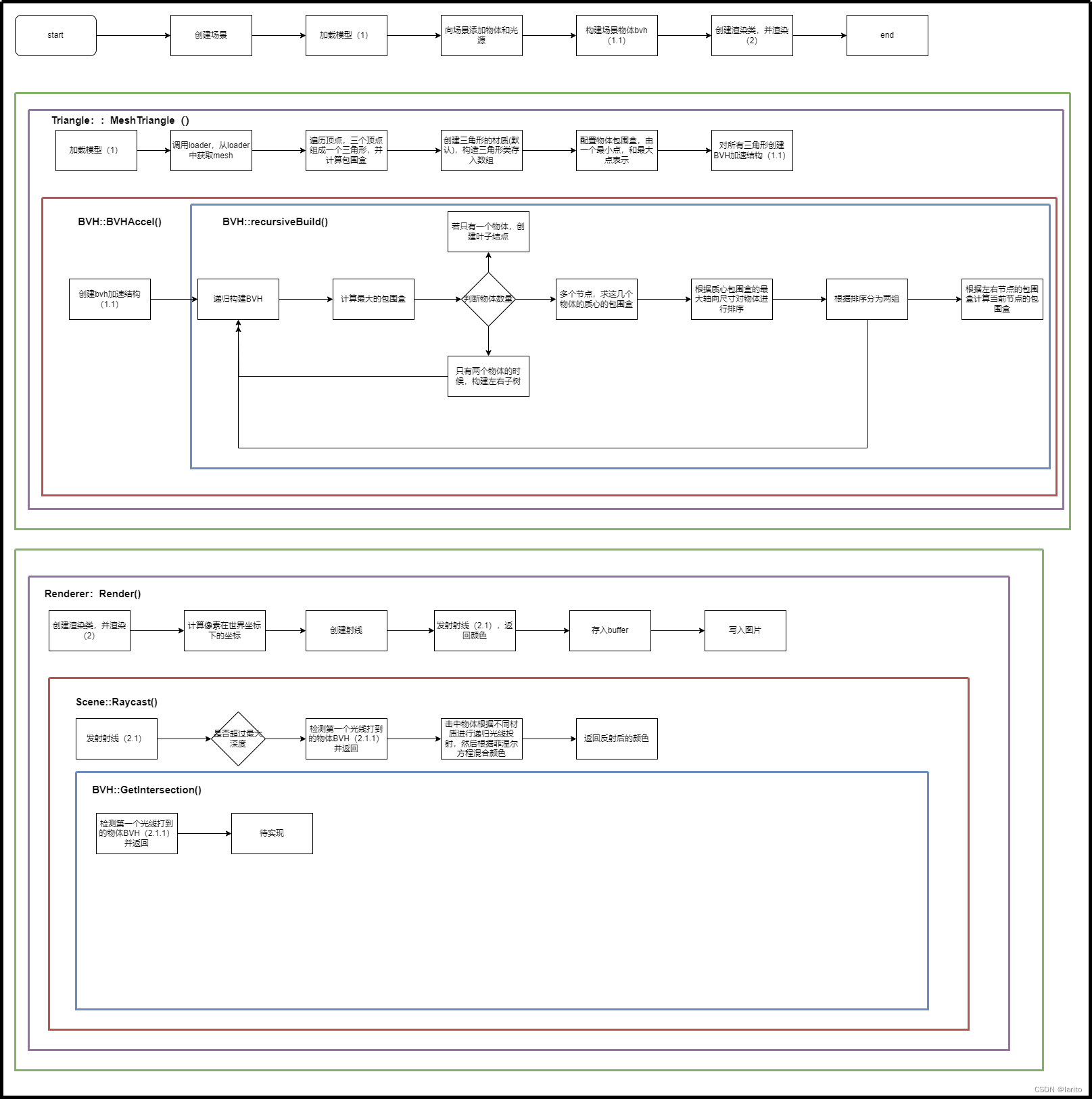
The logical architecture is exceptionally clear now, and I've placed the source code (with comments) in another blog.
Games101Homework【6】Code Part-CSDN博客
Principle:
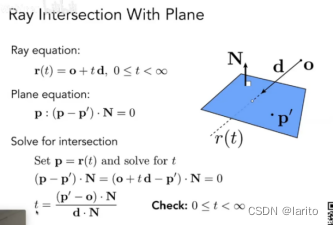
Checking if a ray intersects with a plane.:
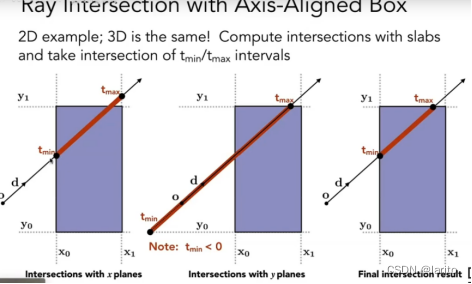
Determine the entry point and exit point:
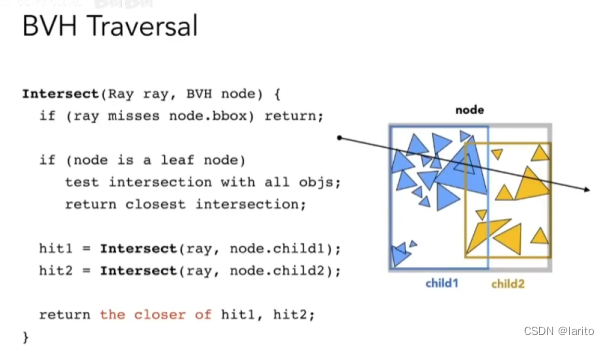
BVH Core Algorithm (Recursive):
Code:
Render():
Transform the manually added vectors into a new Ray object:
void Renderer::Render(const Scene& scene)
{std::vector<Vector3f> framebuffer(scene.width * scene.height);float scale = tan(deg2rad(scene.fov * 0.5));float imageAspectRatio = scene.width / (float)scene.height;Vector3f eye_pos(-1, 5, 10);int m = 0;for (uint32_t j = 0; j < scene.height; ++j) {for (uint32_t i = 0; i < scene.width; ++i) {// generate primary ray directionfloat x = (2 * (i + 0.5) / (float)scene.width - 1) *imageAspectRatio * scale;float y = (1 - 2 * (j + 0.5) / (float)scene.height) * scale;// TODO: Find the x and y positions of the current pixel to get the// direction//  vector that passes through it.// Also, don't forget to multiply both of them with the variable// *scale*, and x (horizontal) variable with the *imageAspectRatio*Ray ray(eye_pos, normalize(Vector3f(x, y, -1)));// Don't forget to normalize this direction!framebuffer[m++] =scene.castRay(ray,scene.maxDepth);}UpdateProgress(j / (float)scene.height);}UpdateProgress(1.f);// save framebuffer to fileFILE* fp = fopen("binary.ppm", "wb");(void)fprintf(fp, "P6\n%d %d\n255\n", scene.width, scene.height);for (auto i = 0; i < scene.height * scene.width; ++i) {static unsigned char color[3];color[0] = (unsigned char)(255 * clamp(0, 1, framebuffer[i].x));color[1] = (unsigned char)(255 * clamp(0, 1, framebuffer[i].y));color[2] = (unsigned char)(255 * clamp(0, 1, framebuffer[i].z));fwrite(color, 1, 3, fp);}fclose(fp);
}
Triangle::getIntersection():
Calculate intersection information:
/*** 获取射线与三角形的交点信息* * @param ray 射线对象,包含射线的起点和方向* @return Intersection 结构体,包含交点是否发生、交点坐标、交点到射线起点的距离、*         对应的物体指针、交点处的法向量和材质信息*/
inline Intersection Triangle::getIntersection(Ray ray)
{Intersection inter; // 初始化交点信息结构体// 如果射线方向与三角形法向量的点积大于0,则射线方向与三角形面向反,不产生交点if (dotProduct(ray.direction, normal) > 0)return inter;double u, v, t_tmp = 0;// 计算pvec,这是进行交点计算的一部分Vector3f pvec = crossProduct(ray.direction, e2);// 计算行列式值det,用于后续交点计算double det = dotProduct(e1, pvec);// 如果行列式的绝对值小于EPSILON,表示方向向量几乎平行,不产生交点if (fabs(det) < EPSILON)return inter;// 计算行列式的倒数,用于简化后续计算double det_inv = 1. / det;// 计算tvec,这是计算u参数的一部分Vector3f tvec = ray.origin - v0;// 计算参数u,如果u不在0到1之间,则交点不在三角形上u = dotProduct(tvec, pvec) * det_inv;if (u < 0 || u > 1)return inter;// 计算qvec,用于计算v参数Vector3f qvec = crossProduct(tvec, e1);// 计算参数v,如果v不在0到1之间,或u+v不在0到1之间,则交点不在三角形上v = dotProduct(ray.direction, qvec) * det_inv;if (v < 0 || u + v > 1)return inter;// 计算临时距离参数t_tmp,用于进一步判断交点是否成立t_tmp = dotProduct(e2, qvec) * det_inv;// 判断t_tmp是否小于0,若小于0,则交点在射线的起点之后,不成立if(t_tmp<0){return inter;}// 如果以上所有条件都满足,则更新交点信息为有效交点inter.happened = true;inter.coords = ray(t_tmp); // 计算交点坐标inter.distance = t_tmp; // 保存交点到射线起点的距离inter.obj = this; // 保存对应的三角形对象指针inter.normal = normal; // 保存交点处的法向量inter.m = m; // 保存材质信息return inter;
}
IntersectP():
"Solve equations to calculate tEnter and tExit. Based on the direction of the ray, if it is emitted in the non-positive direction, then the smaller negative t is the exit point, and the larger one is the entry point (dirIsNeg).
inline bool Bounds3::IntersectP(const Ray& ray, const Vector3f& invDir,const std::array<int, 3>& dirIsNeg) const
{// invDir: ray direction(x,y,z), invDir=(1.0/x,1.0/y,1.0/z), use this because Multiply is faster that Division// dirIsNeg: ray direction(x,y,z), dirIsNeg=[int(x>0),int(y>0),int(z>0)], use this to simplify your logic// TODO test if ray bound intersectsVector3f tEnter,tExit;tEnter=  (pMin-ray.origin)*invDir;tExit =  (pMax-ray.origin)*invDir;if(!dirIsNeg[0]){std::swap(tEnter.x,tExit.x);}if(!dirIsNeg[1]){std::swap(tEnter.y,tExit.y);}if(!dirIsNeg[2]){std::swap(tEnter.z,tExit.z);}float tenter,texit;tenter=std::max(tEnter.x,std::max(tEnter.y,tEnter.z));texit=std::min(tExit.x,std::min(tExit.y,tExit.z));return tenter<=texit&&texit>=0;}
getIntersection():
Implementing the core algorithm:
Intersection BVHAccel::getIntersection(BVHBuildNode* node, const Ray& ray) const
{Intersection isect;// TODO Traverse the BVH to find intersectionif(!node->bounds.IntersectP(ray,ray.direction_inv,std::array<int,3>{ray.direction.x>0,ray.direction.y>0,ray.direction.z>0})) return isect;if((!node->left)&&(!node->right)){return node->object->getIntersection(ray);}auto hit1=getIntersection(node->left,ray);auto hit2=getIntersection(node->right,ray);return hit1.distance<hit2.distance?hit1:hit2;
}
Result:
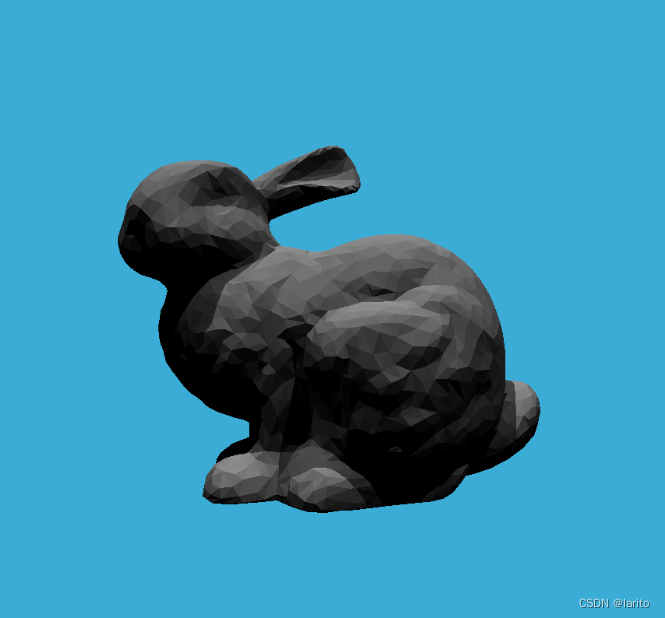
cool!
相关文章:
Games101Homework【6】Acceleration structure(Including framework analysis)
Code Analysis: friend: C中友元(友元函数和友元类)的用法和功能_friend class a<b>-CSDN博客 [C:不如Coding](11):友元函数与友元类_哔哩哔哩_bilibili Here is a simple…...

应用运维文档1
统一nginx接入配置指南 Nginx配置规范 1:不带微服务编码上下文至后端,以metadata-ui为例 location段配置信息,location配置中维护微服务编码上下文信息 # app_code: metadata-ui 流水线名称: metadata-ui location ~ ^/metadata-ui/(?P.*) {set $app_code metadata-ui;p…...
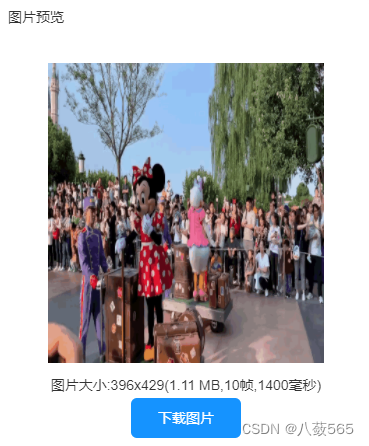
手机如何在线制作gif?轻松一键在线操作
现在大家都喜欢使用手机来拍摄记录有趣的事物,但是时间长了手机里的视频越来越多导致手机存储空间不够了,这些视频又不想删除时应该怎么办呢?这个很简单,下面就给大家分享一款不用下载手机就能操作的视频转gif网站-GIF中文网&…...

ChatGPT 在做什么,为什么有效?
原文:What Is ChatGPT Doing … and Why Does It Work? 译者:飞龙 协议:CC BY-NC-SA 4.0 序言 这本简短的书试图从第一原理解释 ChatGPT 是如何工作的。在某种程度上,这是关于技术的故事。但它也是关于科学的故事。以及关于哲学…...
Linux实验2 初步使用shell
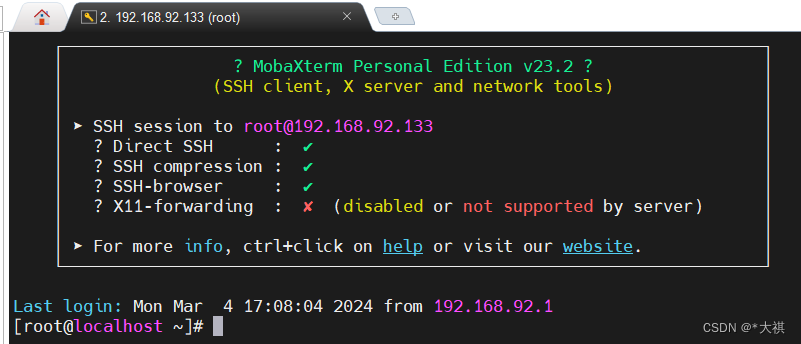
一:实验目的 学习Linux下的文件系统结构,了解最基本的Linux下的shell命令操作,例如ls, cd, cat等各种指令操作。 学习vim编辑器的使用方式,学习如何使用ssh连接远程服务器。 二:实验内容 1.请指出下面每…...
甘特图/横道图制作技巧 - 任务组
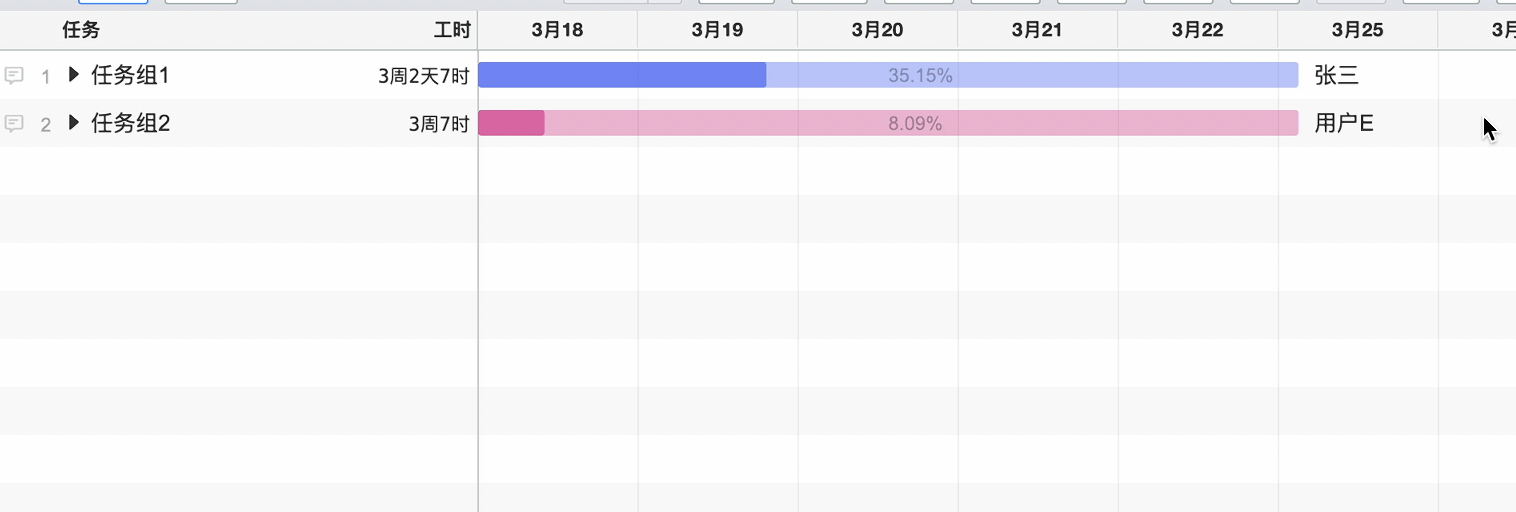
在甘特图中通过合理的任务分组可以让项目更加清晰,修改也更方便。 列如下面的甘特图一眼不太容易看清楚整体的进度。或者需要把所有的任务整体的延迟或者提前只能这样一个一个的任务调整,就比较麻烦。 通过给任务分组,看这上面整体的进度就…...
Web题记
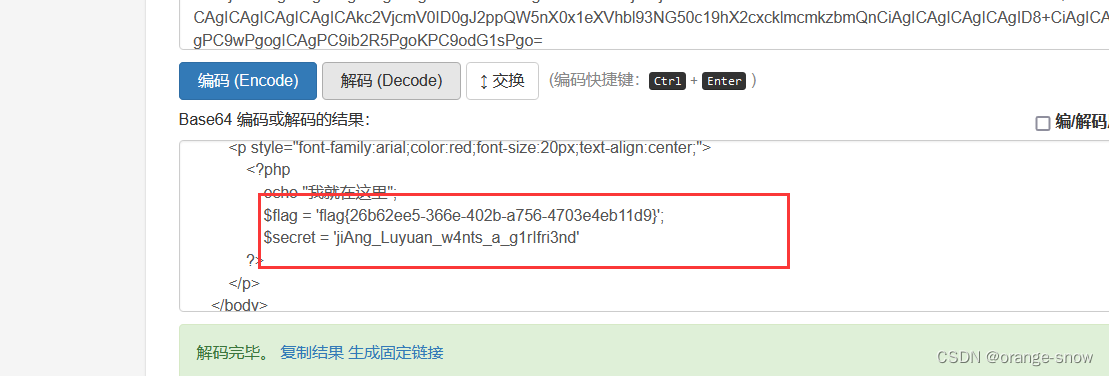
反序列化补充知识: private变量会被序列化为:\x00类名\x00变量名 protected变量会被序列化为: \x00\*\x00变量名 public变量会被序列化为:变量名web254 这个逻辑不难,自己刚看的时候还奇怪是不是自己哪里想错了,因为…...

学习java第三十六天
Spring 官网列出的 Spring 的 6 个特征: 核心技术 :依赖注入(DI),AOP,事件(events),资源,i18n,验证,数据绑定,类型转换,SpEL。 测试 :模拟对象,…...

0205矩阵分块法-矩阵及其运算-线性代数
文章目录 1 分块矩阵的定义2 分块矩阵的运算(性质)3 按列分块与按行分块 结语 1 分块矩阵的定义 将矩阵A用若干条纵线和横线分成许多个小矩阵,每一个小矩阵称为A的子快,以子块为元素的形式上的矩阵称为分块矩阵。 2 分块矩阵的运算…...
1、java语法入门(找工作版)
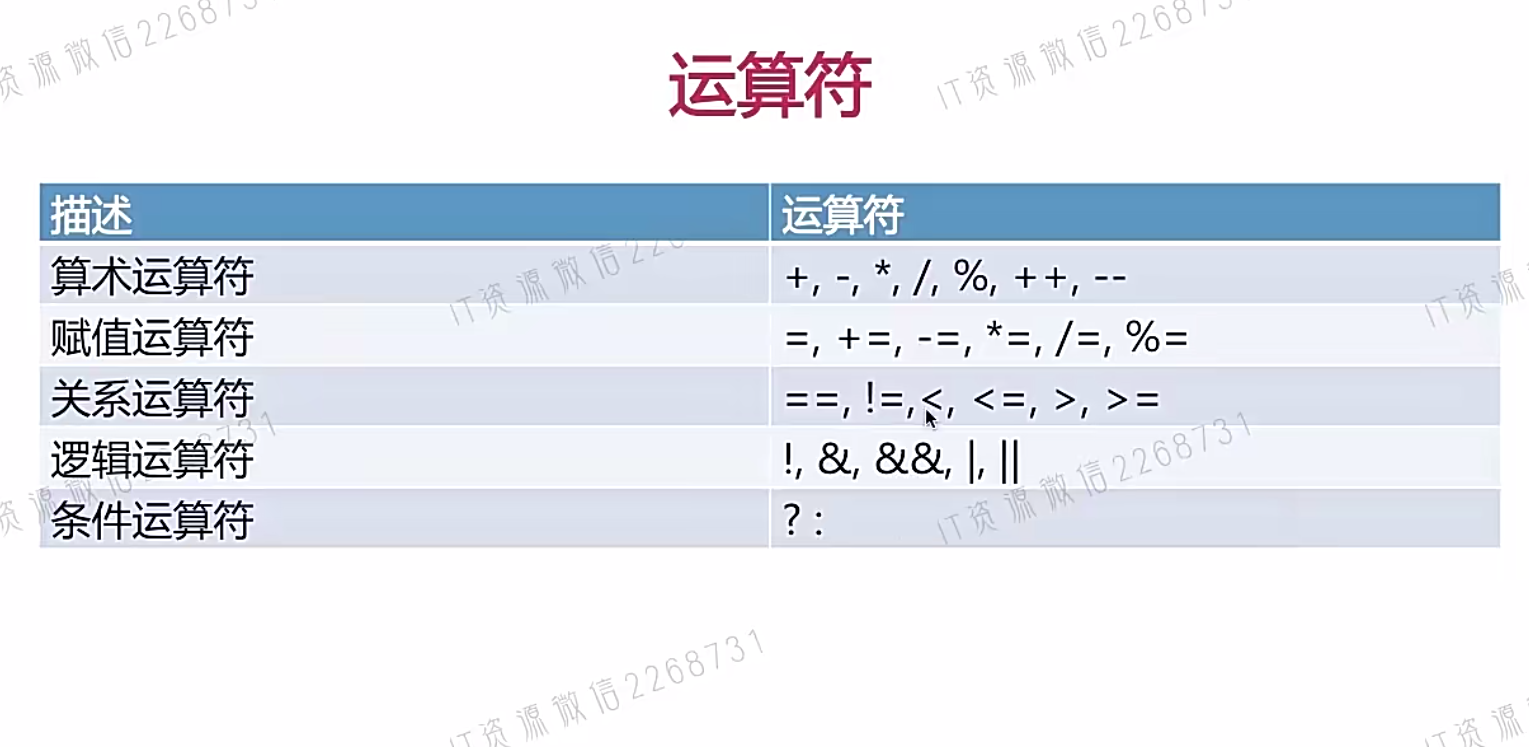
文章目录 一、Java简介二、Java常量与变量1、标识符2、关键字3、变量4、类的命名规则5、数据类型6、基本数据类型字面值7、变量的定义与初始化8、ASCII码和Unicode编码9、转义字符10、类型转换11、常量 三、Java运算符1、算术运算符2、赋值运算符3、关系运算符4、逻辑运算符5、…...

arm的状态寄存器
目录 一、arm 的 PSRs二、CPSR2.1 CPSR_cxsf 三、SPSR四、APSR 一、arm 的 PSRs arm 中有很多程序状态寄存器(Program Status Registers,PSRs)用于存储处理器的状态信息,包括 CPSR\SPSR\FPSR\APSR 等: CPSRÿ…...

2024 蓝桥打卡Day34
20240406蓝桥杯备赛 1、学习蓝桥云课省赛冲刺课 【1-手写与思维】【2-递归与递推】2、学习蓝桥云课Java省赛无忧班 【1-语言基础】3、代码练习字符串排序大小写转换 (ccfcsp之前要是学了我就能上200了 啊啊啊啊 错过啊)斐波那契数列 递归解法纸张尺寸问题…...
华为海思校园招聘-芯片-数字 IC 方向 题目分享——第九套
华为海思校园招聘-芯片-数字 IC 方向 题目分享(有参考答案)——第九套 部分题目分享,完整版获取(WX:didadidadidida313,加我备注:CSDN huawei数字芯片题目,谢绝白嫖哈) 单选 1&…...

如何创建虚拟环境打包py文件
Python 项目通常依赖于特定的库和版本。不同的项目可能依赖于相同库的不同版本,这可能导致冲突。使用虚拟环境,你可以为每个项目创建一个独立的 Python 环境,每个环境都有自己的库和版本,从而避免了依赖冲突。 采用虚拟环境打包P…...

CSS 学习笔记 总结
CSS 布局方式 • 表格布局 • 元素定位 • 浮动布局(注意浮动的负效应) • flex布局 • grid布局(感兴趣的可以看下菜鸟教程) 居中设置 元素水平居中 • 设置宽度后,margin设置为auto • 父容器设置text-alig…...
基于Swin Transformers的乳腺癌组织病理学图像多分类
乳腺癌的非侵入性诊断程序涉及体检和成像技术,如乳房X光检查、超声检查和磁共振成像。成像程序对于更全面地评估癌症区域和识别癌症亚型的敏感性较低。 CNN表现出固有的归纳偏差,并且对于图像中感兴趣对象的平移、旋转和位置有所不同。因此,…...
MySQL主从的介绍与应用
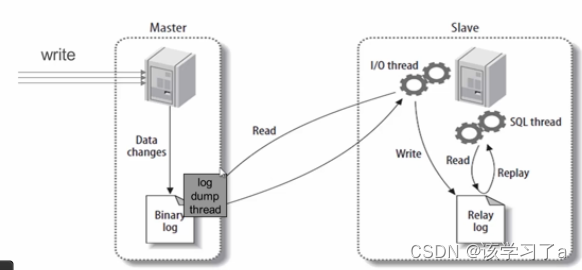
mysql主从 文章目录 mysql主从1. 主从简介1.1 主从作用1.2 主从形式 2. 主从复制原理3. 主从复制配置3.1 mysql安装(两台主机安装一致,下面只演示一台主机操作)3.2 mysql主从配置3.2.1 确保从数据库与主数据库里的数据一样3.2.2 在主数据库里…...

pytest中文使用文档----12缓存:记录执行的状态
1. cacheprovider插件 1.1. --lf, --last-failed:只执行上一轮失败的用例1.2. --ff, --failed-first:先执行上一轮失败的用例,再执行其它的1.3. --nf, --new-first:先执行新加的或修改的用例,再执行其它的1.4. --cache…...
【代码随想录】哈希表
文章目录 242.有效的字母异位词349. 两个数组的交集202. 快乐数1. 两数之和454. 四数相加 II383. 赎金信15. 三数之和18. 四数之和 242.有效的字母异位词 class Solution {public boolean isAnagram(String s, String t) {if(snull || tnull || s.length()!t.length()){return …...

绘图工具 draw.io / diagrams.net 免费在线图表编辑器
拓展阅读 常见免费开源绘图工具 OmniGraffle 创建精确、美观图形的工具 UML-架构图入门介绍 starUML UML 绘制工具 starUML 入门介绍 PlantUML 是绘制 uml 的一个开源项目 UML 等常见图绘制工具 绘图工具 draw.io / diagrams.net 免费在线图表编辑器 绘图工具 excalidr…...

基于Fabric.js与Next.js的浏览器端视频编辑器开发实战
1. 从零到一:在浏览器里造一个视频编辑器几年前,当我第一次尝试在网页上做视频剪辑时,感觉就像在用瑞士军刀盖房子——工具很多,但都不趁手。市面上的在线编辑器要么功能简陋,要么就是“黑盒”操作,你根本不…...

基于SAP CAP与RAG技术构建企业级智能问答系统实战指南
1. 项目概述:当企业级应用遇上生成式AI最近在做一个企业级应用的智能问答功能,客户要求能基于他们内部的海量文档(PDF、Word、Excel)进行精准回答,而不是让大模型“自由发挥”。这让我想起了SAP官方在GitHub上开源的那…...

5分钟快速上手:XUnity.AutoTranslator游戏实时翻译插件终极指南
5分钟快速上手:XUnity.AutoTranslator游戏实时翻译插件终极指南 【免费下载链接】XUnity.AutoTranslator 项目地址: https://gitcode.com/gh_mirrors/xu/XUnity.AutoTranslator 还在为语言障碍而无法畅玩海外Unity游戏吗?XUnity.AutoTranslator正…...

无线充电技术解析:从Qi标准到射频远距充电的现状与未来
1. 无线充电的现状与用户困境作为一名长期关注消费电子与网络通信设备的技术博主,我每天打交道最多的就是各种“电老虎”和“充电宝”。Rebecca Day在文章里描述的那个圣诞场景,我简直不能再熟悉了——在一堆新设备的包装盒里翻找线缆,在抽屉…...

k8s——RBAC认证中心
一、整体流程:认证 → 授权 → 准入控制在 Kubernetes 中,所有操作都要通过 API Server。当你(或某个程序)想对集群做任何事(比如创建一个 Pod),必须经过三步检查:认证:你…...

Universal Data Tool 新功能解析:骨骼姿态标注与数据格式转换实战
1. 项目概述:一个数据标注工具的进化最近在整理一个计算机视觉项目的数据集时,我又一次打开了Universal Data Tool(UDT)。这个工具我用了快两年了,从它早期版本支持基础的图像分类和物体检测框标注开始,就一…...

CSS如何实现一致的圆角半径设计_通过CSS变量存储border-radius
能,但需注意变量作用域、fallback机制及单位完整性;推荐:root定义基础值并用var(--radius-md, 8px),避免嵌套覆盖与无单位变量,旧浏览器需前置静态值。border-radius 用 CSS 变量统一管理,真能省事?能&…...

多模态表征与生成模型:AI驱动材料发现的核心技术与实战指南
1. 多模态材料表征:从单一描述到信息融合的范式演进在材料科学领域,如何让计算机“理解”一种材料,是驱动一切数据驱动研究的前提。传统上,我们习惯于用单一视角来描述材料:化学家用SMILES字符串描述分子,晶…...

不止于导航:用AI Habitat的语义分割数据,教你构建自己的室内物体识别与场景理解Pipeline
不止于导航:用AI Habitat的语义分割数据构建室内物体识别与场景理解Pipeline 在计算机视觉与机器人领域,室内场景理解一直是极具挑战性的研究方向。传统方法依赖于昂贵的传感器设备和人工标注数据,而仿真平台的出现为这一领域带来了革命性变…...
:从黑盒到语义空间的一场解剖之旅)
奇异值分解(SVD):从黑盒到语义空间的一场解剖之旅
转载声明:本文核心思想源自 Jonathon Shlens A Tutorial on Principal Component Analysis、AMS Feature Column on SVD 及 LSA Tutorial 等经典文献,仅对叙述方式与图示进行重构,以适配中文技术社区的阅读语境。0. 开场:如果线性…...