
第Ⅷ章-Ⅱ 组合式API使用
第Ⅷ章-Ⅱ 组合式API使用
- provide与inject的使用
- vue 生命周期的用法
- 编程式路由的使用
- vuex的使用
- 获取DOM的使用
- setup语法糖
- setup语法糖的基本结构
- 响应数据的使用
- 其它语法的使用
- 引入组件的使用
- 父组件传值的使用
- defineProps 父传子
- defineEmits 子传父
provide与inject的使用
provide 与 inject 是 Vue 3 中用于跨组件树传递数据的 API,适合解决深层嵌套组件的通信问题。
- provide:父组件提供数据。
- inject:子组件接收数据。
<!-- src/App.vue -->
<template><div><ProviderComponent /></div>
</template><script setup>
import ProviderComponent from './components/ProviderComponent.vue';
</script>
<!-- src/components/ProviderComponent.vue -->
<template><div><h1>Provider Component</h1><ChildComponent /></div>
</template><script setup>
import { provide } from 'vue';
import ChildComponent from './ChildComponent.vue';const providedData = 'Hello from Provider!';
provide('message', providedData);
</script>
<!-- src/components/ChildComponent.vue -->
<template><div><h2>Child Component</h2><p>{{ message }}</p></div>
</template><script setup>
import { inject } from 'vue';const message = inject<string>('message', 'Default Message');
</script>
vue 生命周期的用法
Vue 3 引入了组合式 API,使得生命周期钩子以函数形式使用,增加了灵活性。
<template><div>{{ message }}</div>
</template><script setup lang="ts">
import { ref, onMounted, onBeforeUnmount } from 'vue';const message = ref('Hello, Vue 3!');onMounted(() => {console.log('Component is mounted');message.value = 'Component Mounted';
});onBeforeUnmount(() => {console.log('Component is about to unmount');
});
</script>
编程式路由的使用
Vue Router 支持编程式路由跳转,可以使用 router.push 和 router.replace。
<!-- src/components/NavigationComponent.vue -->
<template><div><button @click="goToHome">Go to Home</button><button @click="replaceWithAbout">Replace with About</button><button @click="goBack">Go Back</button></div>
</template><script setup>
import { useRouter } from 'vue-router';const router = useRouter();const goToHome = () => {router.push('/home');
};const replaceWithAbout = () => {router.replace('/about');
};const goBack = () => {router.go(-1);
};
</script>
vuex的使用
Vuex 是 Vue 官方的状态管理库,通常使用 createStore 创建全局 store。
// src/store/index.ts
import { createStore } from 'vuex';interface State {count: number;
}const store = createStore<State>({state: {count: 0},mutations: {increment(state) {state.count += 1;},decrement(state) {state.count -= 1;}},actions: {incrementAsync({ commit }) {setTimeout(() => {commit('increment');}, 1000);}},getters: {doubleCount(state) {return state.count * 2;}}
});export default store;
在组件中使用 Vuex 状态和方法
<!-- src/components/CounterComponent.vue -->
<template><div><h2>Counter Example</h2><p>Count: {{ count }}</p><p>Double Count (getter): {{ doubleCount }}</p><button @click="increment">Increment</button><button @click="decrement">Decrement</button><button @click="incrementAsync">Increment Async</button></div>
</template><script setup lang="ts">
import { computed } from 'vue';
import { useStore } from 'vuex';const store = useStore();const count = computed(() => store.state.count);
const doubleCount = computed(() => store.getters.doubleCount);
const increment = () => store.commit('increment');
const decrement = () => store.commit('decrement');
const incrementAsync = () => store.dispatch('incrementAsync');
</script>
获取DOM的使用
在组合式 API 中可以使用 ref 和 onMounted 钩子来访问 DOM 元素。
<template><div><input type="text" ref="inputElement" placeholder="Type something..." /><button @click="focusInput">Focus Input</button></div>
</template><script setup lang="ts">
import { ref, onMounted } from 'vue';const inputElement = ref<HTMLInputElement | null>(null);const focusInput = () => {inputElement.value?.focus();
};onMounted(() => {console.log('Component Mounted and DOM is ready');
});
</script>
setup语法糖
setup 语法糖 在 Vue 3.3 中引入,它简化了 setup 函数的使用,使得代码更加简洁易读。
setup语法糖的基本结构
<template><div>{{ message }}</div><button @click="increment">Increment: {{ count }}</button>
</template><script setup>
import { ref } from 'vue';const message = ref('Hello, Vue 3!');
const count = ref(0);const increment = () => {count.value++;
};
</script>
响应数据的使用
- ref:创建单一响应式值。
- reactive:创建响应式对象。
- toRefs:将 reactive 对象转换为 ref 对象。
<template><div><p>{{ message }}</p><p>Counter: {{ count }}</p></div>
</template><script setup>
import { ref, reactive, toRefs } from 'vue';const message = ref('Hello, Vue 3!');
const state = reactive({ count: 0 });const { count } = toRefs(state);
</script>
其它语法的使用
- computed:创建计算属性。
- watch:观察响应式数据的变化并执行副作用。
<template><div><p>Double Count: {{ doubleCount }}</p><input v-model="name" placeholder="Name" /><p>{{ name }}</p></div>
</template><script setup>
import { ref, computed, watch } from 'vue';const count = ref(2);
const doubleCount = computed(() => count.value * 2);const name = ref('Alice');
watch(name, (newValue, oldValue) => {console.log(`Name changed from ${oldValue} to ${newValue}`);
});
</script>
引入组件的使用
<!-- src/App.vue -->
<template><CounterComponent />
</template><script setup>
import CounterComponent from './components/CounterComponent.vue';
</script>
父组件传值的使用
defineProps 父传子
<!-- src/components/ChildComponent.vue -->
<template><p>{{ message }}</p>
</template><script setup>
import { defineProps } from 'vue';const props = defineProps({message: String
});
</script>
<!-- src/App.vue -->
<template><ChildComponent message="Hello, Child!" />
</template><script setup>
import ChildComponent from './components/ChildComponent.vue';
</script>
defineEmits 子传父
<!-- src/components/ChildComponent.vue -->
<template><button @click="sendMessage">Send Message to Parent</button>
</template><script setup>
import { defineEmits } from 'vue';const emit = defineEmits(['message']);const sendMessage = () => {emit('message', 'Hello from Child Component!');
};
</script>
<!-- src/App.vue -->
<template><ChildComponent @message="handleMessage" /><p>{{ parentMessage }}</p>
</template><script setup>
import { ref } from 'vue';
import ChildComponent from './components/ChildComponent.vue';const parentMessage = ref('');const handleMessage = (msg: string) => {parentMessage.value = msg;
};
</script>
相关文章:

第Ⅷ章-Ⅱ 组合式API使用
第Ⅷ章-Ⅱ 组合式API使用 provide与inject的使用vue 生命周期的用法编程式路由的使用vuex的使用获取DOM的使用setup语法糖setup语法糖的基本结构响应数据的使用其它语法的使用引入组件的使用 父组件传值的使用defineProps 父传子defineEmits 子传父 provide与inject的使用 pro…...
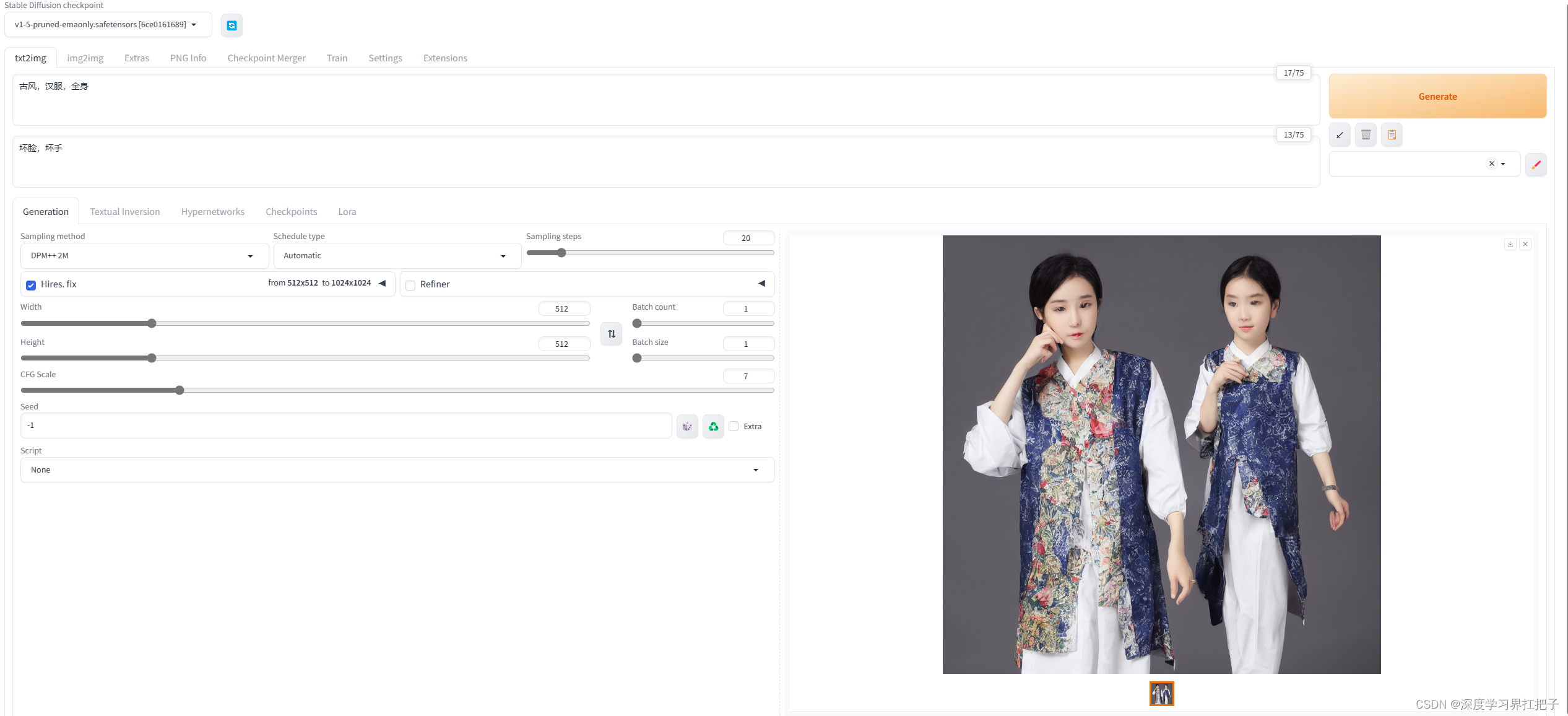
stable-diffusion-webui配置
源码地址 https://github.com/AUTOMATIC1111/stable-diffusion-webui.git报错Fresh install fail to load AttributeError: NoneType object has no attribute _id pydantic降级 pip uninstall pydantic pip install pydantic1.10.11记得要把clip-vit-large-patch14放在opena…...
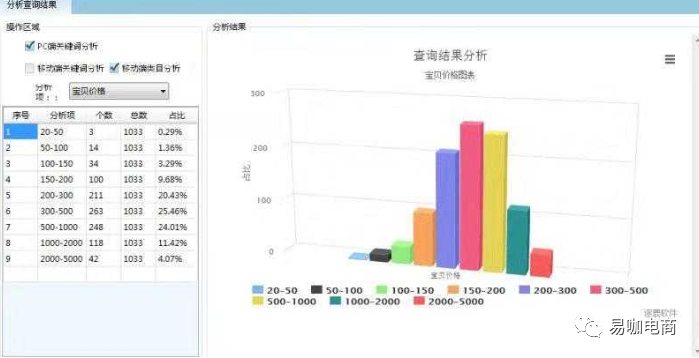
1+X电子商务数据采集渠道及工具选择(二)||电商数据采集API接口
电商数据采集API 接口 ◆适用范围 淘宝:可以采集到所属淘宝、天猫店铺的流量、销售、产品、运营相关数据;需要采集行业市场数据,则需要选择市场行情版。 京东:采集京东等其他平台店铺数据 jd.item_get 公共参数 名称类型必须描述keyString是调用key&…...
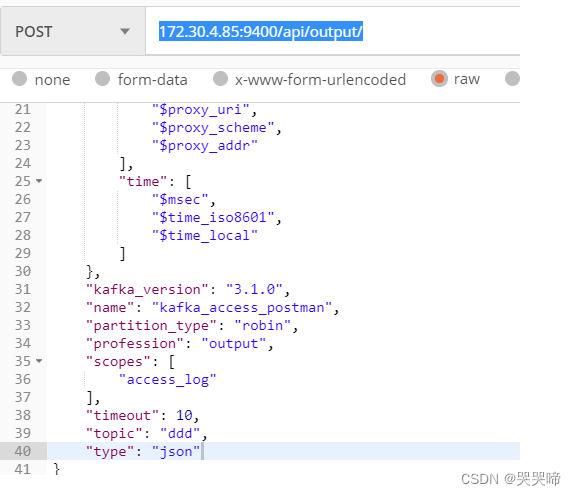
apinto OpenAPI
OpenApi 上游 查询列表 查询详情 新增 { "name": "jg_upstream", "driver": "http", "description": "通过postman添加上游", "scheme": "HTTPS", "retry":"1", "…...
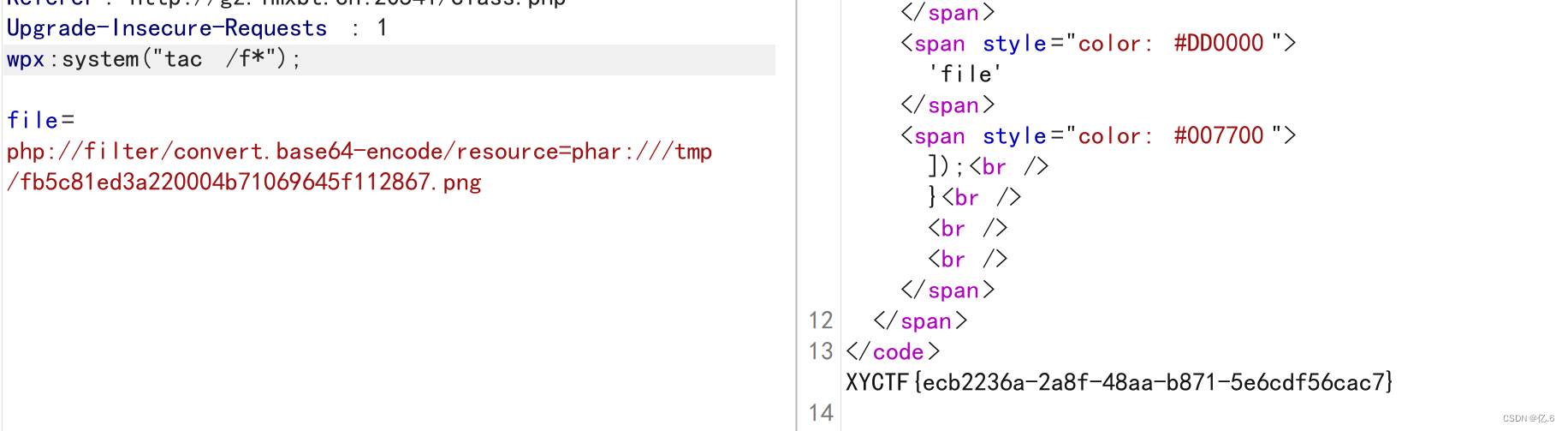
XYCTF - web
目录 warm up ezMake ezhttp ezmd5 牢牢记住,逝者为大 ezPOP 我是一个复读机 ezSerialize 第一关 第二关 第三关 第一种方法: 第二种方法: ez?Make 方法一:利用反弹shell 方法二:通过进制编码绕过 ε…...
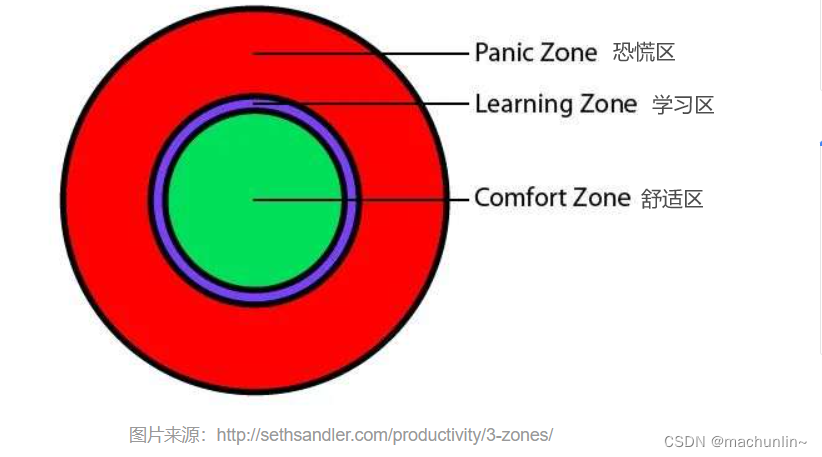
学习方法的重要性
原贴:https://www.cnblogs.com/feily/p/13999204.html 原贴:https://36kr.com/p/1236733055209095 1、 “一万小时定律”的正确和误区 正确: 天才和大师的非凡,不是真的天资超人一等,而是付出了持续不断的努力&…...

把现有的 Jenkins 容器推送到一个新的镜像标签,并且重新启动新的容器
要把现有的 Jenkins 容器推送到一个新的镜像标签,并且重新启动新的容器,你可以按照以下步骤操作: 停止当前正在运行的 Jenkins 容器(如果你不想在操作时中断服务,可以跳过此步骤,直接进行下一步)…...

难以重现的 Bug如何处理
对很多测试人员(尤其是对新手来说)在工作过程中最不愿遇到的一件事情就是:在测试过 程中发现了一个问题,觉得是 bug,再试的时候又正常了。 碰到这样的事情,职业素养和测试人员长期养成的死磕的习性会让她…...

我与足球的故事 | 10年的热爱 | 伤病 | 悔恨 | 放弃 or 继续 | 小学生的碎碎念罢了
今天不分享技术博客,今天不知道为什么就是想写我和足球的故事(手术完两个礼拜,手还是很疼那个,就连打字都费劲),上面两张图是我最喜欢的两个球星,当然因为之前特别喜欢巴萨,也特别喜…...

js图片回显的方法
直接上代码: <!DOCTYPE html> <html><head><meta charset"utf-8"><title></title></head><body>// HTML部分<input type"file" id"fileInput"><button onclick"show…...

Java中的maven的安装和配置
maven的作用 依赖管理 方便快捷的管理项目依赖的资源,避免版本冲突问题 统一项目管理 提供标准,统一的项目结构 项目构建 标准跨平台(Linux、windows、MacOS)的自动化项目构建方式 maven的安装和配置 在maven官网下载maven Ma…...

轴承制造企业“数智化”突破口
轴承是当代机械设备中一种重要零部件。它的主要功能是支撑机械旋转体,降低其运动过程中的摩擦系数,并保证其回转精度。轴承是工业核心基础零部件,对国民经济发展和国防建设起着重要的支撑作用。 轴承企业普遍采用以销定产的经营模式…...

UIButton案例之添加动画
需求 基于上一节代码进行精简,降低了冗余性。添加动画,使得坐标变化自然,同时使用了bounds属性和center属性,使得UIView变化以中心点为基准。 此外,使用两种方式添加动画:1.原始方式。 2.block方式。 代码…...

C#链接数据库、操作sql、选择串口
// 公共增删方法 using MySql.Data.MySqlClient; using System.Data; namespace ****** {public class MySQLHelper{private MySqlConnection conn null;private MySqlCommand comm null;private MySqlDataReader reader null;/// <summary>/// 构造方法里建议连…...
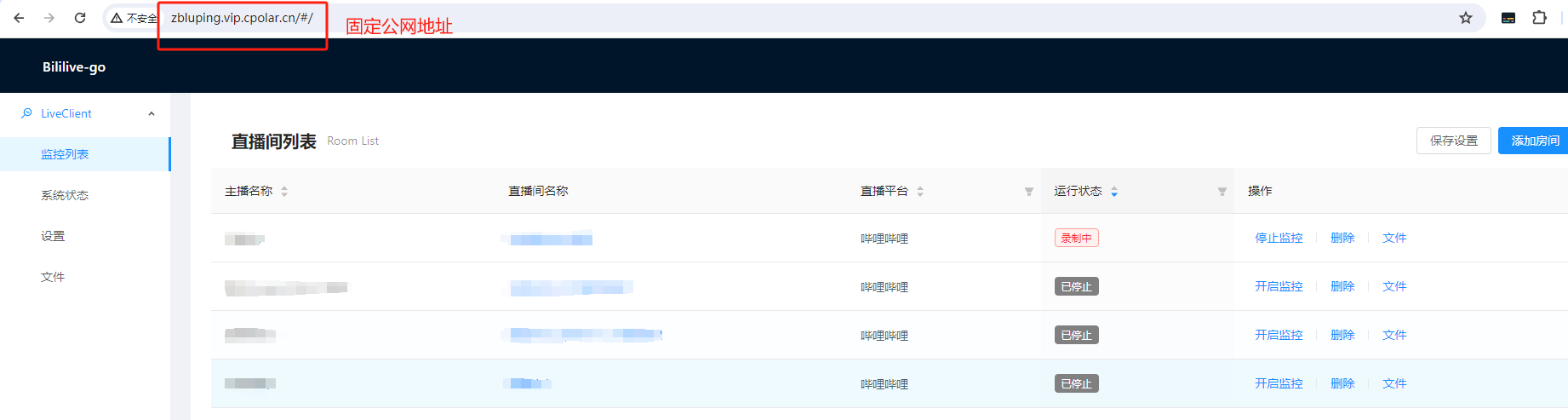
本地搭建各大直播平台录屏服务结合内网穿透工具实现远程管理录屏任务
文章目录 1. Bililive-go与套件下载1.1 获取ffmpeg1.2 获取Bililive-go1.3 配置套件 2. 本地运行测试3. 录屏设置演示4. 内网穿透工具下载安装5. 配置Bililive-go公网地址6. 配置固定公网地址 本文主要介绍如何在Windows系统电脑本地部署直播录屏利器Bililive-go,并…...
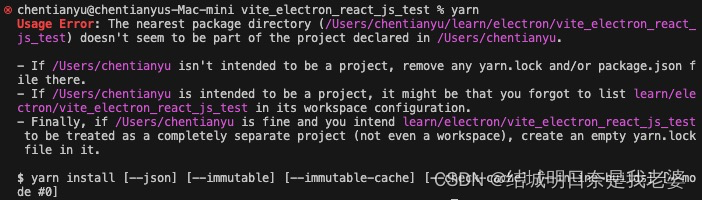
macos使用yarn创建vite时出现Usage Error: The nearest package directory问题
步骤是macos上使用了yarn create vite在window上是直接可以使用了yarn但是在macos上就出现报错 我们仔细看,它说的If /Users/chentianyu isnt intended to be a project, remove any yarn.lock and/or package.json file there.说是要我们清除yarn.lock和package.js…...
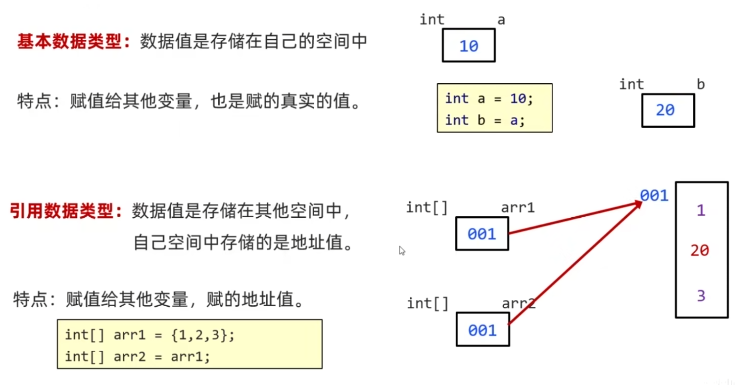
【JAVA入门】Day04 - 方法
【JAVA入门】Day04 - 方法 文章目录 【JAVA入门】Day04 - 方法一、方法的格式1.1 无参无返回值的方法定义和调用1.2 带参数的方法定义和调用1.3 形参和实参1.4 带返回值的方法定义和调用1.5 方法的注意事项 二、方法的重载三、方法的使用四、方法的内存原理4.1 方法调用的基本内…...
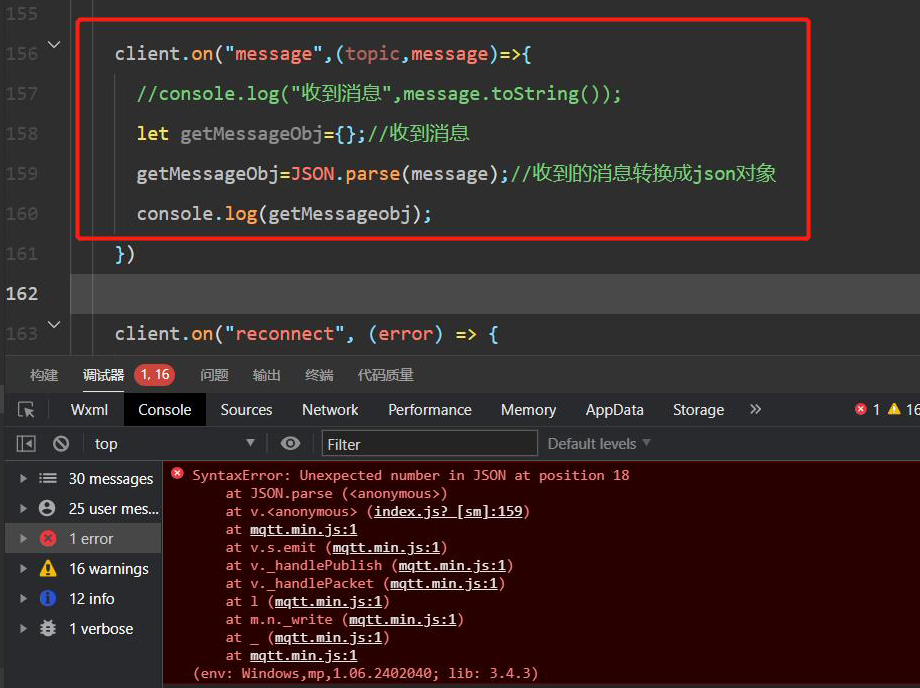
前端报错 SyntaxError: Unexpected number in JSON at position xxxx at JSON.parse
问题描述 控制台提示 SyntaxError: Unexpected number in JSON at position xxxx at JSON.parse 问题原因 原因:JSON 数据格式错误,是否符合 JSON 格式。 解决方法 应为json格式数据 什么是json格式数据 JSON(JavaScript Object …...
Mybatis进阶详细用法
目录 条件构造器 案例 自定义SQL 案例 Service接口 案例 综合案例 条件构造器 案例 Testvoid testQueryMapper() {// 创建 QueryWrapper 实例QueryWrapper<User> queryWrapper new QueryWrapper<>();queryWrapper.select("id," "username,&…...

Android 系统省电软件分析
1、硬件耗电 主要有: 1、屏幕 2、CPU 3、WLAN 4、感应器 5、GPS(目前我们没有) 电量其实是目前手持设备最宝贵的资源之一,大多数设备都需要不断的充电来维持继续使用。不幸的是,对于开发者来说,电量优化是他们最后才会考虑的的事情…...

西安小程序制作优质服务推荐
在西安,小程序制作已成为众多企业实现数字化转型的核心一步。企业在这个领域的选择尤为重要,因为市场上的服务供应商数量庞大、难以判断其服务质量。因此专业背景、以往案例以及客户评价,这些都能够反映出公司的整体实力。还有,成…...

C#上位机与三菱PLC通信实战:从零构建GX Works3仿真平台
1. 为什么需要搭建GX Works3仿真平台 第一次接触三菱PLC开发的朋友们,可能都有这样的困惑:手头没有实体PLC设备,怎么测试自己写的控制程序?买一台FX5U PLC动辄几千元,对个人开发者来说成本太高。这时候仿真平台就成了最…...

H5移动端拍照功能实战:从权限获取到图片上传的完整链路解析
1. 移动端H5拍照功能的核心实现逻辑 在移动端H5页面中实现拍照功能,本质上是通过浏览器API与设备硬件交互的过程。这个功能在在线身份验证、表单提交等场景中非常实用。我做过十几个类似的项目,发现最关键的环节集中在四个步骤:权限获取、视频…...

3个关键指标揭示:你的游戏手柄响应速度是否拖了后腿?
3个关键指标揭示:你的游戏手柄响应速度是否拖了后腿? 【免费下载链接】XInputTest Xbox 360 Controller (XInput) Polling Rate Checker 项目地址: https://gitcode.com/gh_mirrors/xin/XInputTest 在竞技游戏的激烈对决中,每一毫秒的…...

树莓派驱动MAX31855热电偶传感器:从SPI通信到高精度测温实践
1. 项目概述:从热电偶到Python读数在嵌入式开发、工业监控或者任何需要精确测温的项目里,热电偶(Thermocouple)往往是工程师们的首选传感器。它结构简单、皮实耐用,而且测温范围能从零下两百多度一直覆盖到上千度&…...

构建本地化多链资产追踪器:从API聚合到数据可视化实践
1. 项目概述与核心价值最近在折腾一个挺有意思的小工具,起因是发现很多朋友在管理自己的数字资产时,尤其是那些基于区块链的Token,常常会陷入一种“信息孤岛”的状态。钱包地址散落在各处,不同链上的资产变动需要一个个去浏览器查…...

为你的爬虫或数据分析脚本添加Taotoken大模型智能解析功能
🚀 告别海外账号与网络限制!稳定直连全球优质大模型,限时半价接入中。 👉 点击领取海量免费额度 为你的爬虫或数据分析脚本添加Taotoken大模型智能解析功能 在数据工程与分析工作中,我们常常会遇到非结构化或半结构化…...

技术解析【无人机实时建图】 - DenseFusion:如何实现CPU上的大规模密集点云与DSM在线融合
1. DenseFusion框架的核心价值 第一次接触DenseFusion时,最让我惊讶的是它在普通笔记本电脑CPU上就能跑出实时建图效果。要知道传统无人机建图方案要么依赖昂贵GPU,要么需要后期数小时处理。这个框架通过三个关键创新点实现了突破:虚拟立体对…...

Postman导入导出避坑指南:为什么你的环境变量导入后不生效?
Postman环境变量导入失效深度解析与解决方案 当你在团队协作或项目迁移时,精心配置的Postman环境变量导入后却神秘消失——这种挫败感每个开发者都经历过。本文将揭示Postman变量系统的底层机制,通过三个典型故障场景还原真实问题根源,并提供…...

音乐歌词获取终极指南:如何3分钟搞定全网歌曲歌词的完整方案
音乐歌词获取终极指南:如何3分钟搞定全网歌曲歌词的完整方案 【免费下载链接】163MusicLyrics 云音乐歌词获取处理工具【网易云、QQ音乐】 项目地址: https://gitcode.com/GitHub_Trending/16/163MusicLyrics 你是否曾经为了找到一首心爱歌曲的完整歌词而花费…...