
Linux shell 重定向输入和输出
Linux shell 重定向输入和输出
- 1. Standard I/O streams
- 2. Redirecting to and from the standard file handles (标准文件句柄的重定向)
- 2.1. `command > file`
- 2.2. `command >> file`
- 2.3. `command 2> file`
- 2.4. `command 2>> file`
- 2.5. `command < file`
- 2.6. `command < infile > outfile`
- 2.7. `command > file 2>&1`
- 2.8. `command 2>&1 > file`
- References
In computing, redirection is a form of interprocess communication, and is a function common to most command-line interpreters, including the various Unix shells that can redirect standard streams to user-specified locations.
在计算机领域,重定向是大多数命令行解释器所具有的功能,包括各种可以将标准流重定向用户规定目的地的 Unix shells。
1. Standard I/O streams
In Unix shells derived from the original Bourne shell, the first two actions can be further modified by placing a number (the file descriptor) immediately before the character; this will affect which stream is used for the redirection.
源自 Bourne shell 的许多 Unix shell,可以将一个数字 (文件描述符) 放在重定向符号前,这样可以影响用于重定向的数据流。
The Unix standard I/O streams are:
| File Descriptor | Name | Description | 操作符 |
|---|---|---|---|
| 0 | stdin | standard input (标准输入) | <, << |
| 1 | stdout | standard output (标准输出) | >, >>, 1>, 1>> |
| 2 | stderr | standard error (标准错误输出) | 2>, 2>> |
文件描述符 (File Descriptor) 是进程对其所打开文件的索引,形式上是个非负整数。Linux 会为每个运行的进程都分配这三个文件。
stdin 默认输入源是 Keyboard,stdout 和 stderr 默认输出目的地是 Text Terminal。
默认情况下,command > file 将 stdout 重定向到 file,command < file 将 stdin 重定向到 file。
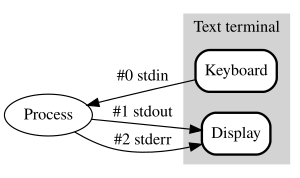
使用 > 或 >> 时,默认为 stdout (标准输出) 重定向,> 就是 1>,1 与 > 之间不能有空格。File Descriptor 0, 1, 2 与它后面的操作符 >, >>, <, << 是一个整体。
ls -a -l > yongqiang.txt 等同于 ls -a -l 1> yongqiang.txt。
(base) yongqiang@yongqiang:~/software$ ls -a -l
total 864112
drwxr-xr-x  5 yongqiang yongqiang      4096 Jun  4 22:26 .
drwxr-xr-x 26 yongqiang yongqiang      4096 Jun  4 22:31 ..
-rwxr-xr-x  1 yongqiang yongqiang 103219356 Jul 14  2023 Miniconda3-latest-Linux-x86_64.sh
-rwxr-xr-x  1 yongqiang yongqiang  47611219 Dec  7  2021 bazel-4.2.1-installer-linux-x86_64.sh
-rwxr-xr-x  1 yongqiang yongqiang 733973045 Feb 18 15:20 pycharm-professional-2023.1.5.tar.gz
(base) yongqiang@yongqiang:~/software$
(base) yongqiang@yongqiang:~/software$ ls -a -l > yongqiang.txt
(base) yongqiang@yongqiang:~/software$
(base) yongqiang@yongqiang:~/software$ cat yongqiang.txt
total 864112
drwxr-xr-x  5 yongqiang yongqiang      4096 Jun 16 15:14 .
drwxr-xr-x 26 yongqiang yongqiang      4096 Jun  4 22:31 ..
-rwxr-xr-x  1 yongqiang yongqiang 103219356 Jul 14  2023 Miniconda3-latest-Linux-x86_64.sh
-rwxr-xr-x  1 yongqiang yongqiang  47611219 Dec  7  2021 bazel-4.2.1-installer-linux-x86_64.sh
-rwxr-xr-x  1 yongqiang yongqiang 733973045 Feb 18 15:20 pycharm-professional-2023.1.5.tar.gz
-rw-r--r--  1 yongqiang yongqiang         0 Jun 16 15:14 yongqiang.txt
(base) yongqiang@yongqiang:~/software$
在 yongqiang.txt 文件中有 -rw-r--r-- 1 yongqiang yongqiang 0 Jun 16 15:14 yongqiang.txt 行。yongqiang.txt 文件是在 stdout (标准输出) 重定向之前创建的,需要准备好输出目的地之后,stdout 才会发送到该目的地。
(base) yongqiang@yongqiang:~/software$ ls -a -l
total 864112
drwxr-xr-x  5 yongqiang yongqiang      4096 Jun 16 15:26 .
drwxr-xr-x 26 yongqiang yongqiang      4096 Jun  4 22:31 ..
-rwxr-xr-x  1 yongqiang yongqiang 103219356 Jul 14  2023 Miniconda3-latest-Linux-x86_64.sh
-rwxr-xr-x  1 yongqiang yongqiang  47611219 Dec  7  2021 bazel-4.2.1-installer-linux-x86_64.sh
-rwxr-xr-x  1 yongqiang yongqiang 733973045 Feb 18 15:20 pycharm-professional-2023.1.5.tar.gz
(base) yongqiang@yongqiang:~/software$
(base) yongqiang@yongqiang:~/software$ ls -a -l 1> yongqiang.txt
(base) yongqiang@yongqiang:~/software$
(base) yongqiang@yongqiang:~/software$ cat yongqiang.txt
total 864112
drwxr-xr-x  5 yongqiang yongqiang      4096 Jun 16 15:26 .
drwxr-xr-x 26 yongqiang yongqiang      4096 Jun  4 22:31 ..
-rwxr-xr-x  1 yongqiang yongqiang 103219356 Jul 14  2023 Miniconda3-latest-Linux-x86_64.sh
-rwxr-xr-x  1 yongqiang yongqiang  47611219 Dec  7  2021 bazel-4.2.1-installer-linux-x86_64.sh
-rwxr-xr-x  1 yongqiang yongqiang 733973045 Feb 18 15:20 pycharm-professional-2023.1.5.tar.gz
-rw-r--r--  1 yongqiang yongqiang         0 Jun 16 15:26 yongqiang.txt
(base) yongqiang@yongqiang:~/software$
< - 输入重定向,命令默认从键盘获得输入,< 重定向从其它设备获得输入 (文件等)。
>, 1> - 输出 stdout 重定向。命令执行输出 stdout 默认打印到屏幕上,> or 1> 重定向 stdout 到其它输出设备 (文件等)。
<< - 输入追加重定向
>> - 输出追加重定向
2. Redirecting to and from the standard file handles (标准文件句柄的重定向)
2.1. command > file
将 command 命令的 stdout 重定向到文件 file 中。如果 file 已经存在,则清空原有文件。
command > file executes command, placing the output in file, as opposed to displaying it at the terminal, which is the usual destination for standard output. This will clobber any existing data in file.
command > file 命令执行 command,然后将 stdout 的内容存入 file。注意任何 file 内的已经存在的内容将被清空,然后写入新内容。
clobber [ˈklɒbə(r)]:vt. 使受到 (严重经济损失),狠揍,猛打,惩罚,彻底战胜 (或击败),狠击,极大地打击 n. 衣服,随身物品
echo "yongqiangcheng" > file.txt 命令清空文件的内容,然后将 "yongqiangcheng" 写入 file.txt。
(base) yongqiang@yongqiang:~/software$ echo `date` > yongqiang.txt
(base) yongqiang@yongqiang:~/software$ cat yongqiang.txt
Sun Jun 16 20:33:49 CST 2024
(base) yongqiang@yongqiang:~/software$
Note: 使用的是反引号 `, 而不是单引号 '。
2.2. command >> file
将 command 命令的 stdout 重定向到文件 file 中。如果 file 已经存在,则把信息加在原有文件后面。
To append output to the end of the file, rather than clobbering it, the >> operator is used: command1 >> file.
command1 >> file 将 stdout 追加到文件末尾,使用 >> 操作符。
echo "yongqiangcheng" > file.txt 命令将 "yongqiangcheng" 追加到 file.txt 的后面。
2.3. command 2> file
For example, command 2> file executes command, directing the standard error stream to file.
执行 command,然后将标准错误 stderr 输出重定向到文件 file,清空文件中已有内容,然后写入新内容。
2.4. command 2>> file
执行 command,然后将标准错误 stderr 输出重定向追加到文件 file 末尾。
2.5. command < file
本来需要从键盘获取输入的命令会转移到文件读取内容。
Using command < file executes command, with file as the source of input, as opposed to the keyboard, which is the usual source for standard input.
执行 command,使用 file 作为用来替代键盘的输入源。
2.6. command < infile > outfile
command < infile > outfile combines the two capabilities: command reads from infile and writes to outfile.
同时替换输入和输出,执行 command,从文件 infile 读取内容,然后将 stdout 写入到 outfile 中。
2.7. command > file 2>&1
To write both stderr and stdout to file, the order should be reversed. stdout would first be redirected to the file, then stderr would additionally be redirected to the stdout handle that has already been changed to point at the file: command > file 2>&1.
首先将 stdout 重定向到 file,然后 stderr 将重定向到已经更改为指向 file 的 stdout 句柄。
In shells derived from csh (the C shell), the syntax instead appends the & (ampersand) character to the redirect characters, thus achieving a similar result. The reason for this is to distinguish between a file named 1 and stdout, i.e. cat file 2>1 vs cat file 2>&1. In the first case, stderr is redirected to a file named 1 and in the second, stderr is redirected to stdout.
2>&1 将 stderr 重定向到 stdout。2 和 1 分别是 stderr 和 stdout 的文件描述符。为了区别普通文件,当将 stderr 和 stdout 作为重定向目的地时,需要在文件描述符前加上 &。为了将 stdout 与文件名为 1 的文件区分开来。例如对于 cat file 2>1 和 cat file 2>&1,前者会将 stderr 重定向至叫做 1 的文件,后者则将其重定向至 stdout 。
A simplified but non-POSIX conforming form of the command, command > file 2>&1 is: command &>file or command >&file.
2.8. command 2>&1 > file
It is possible to use 2>&1 before > but the result is commonly misunderstood. The rule is that any redirection sets the handle to the output stream independently. So 2>&1 sets handle 2 to whatever handle 1 points to, which at that point usually is stdout. Then > redirects handle 1 to something else, e.g. a file, but it does not change handle 2, which still points to stdout.
可以将 2>&1 放置在 > 前,但是这样并不能达到我们想要的效果。
In the following example, stdout is written to file, but stderr is redirected from stderr to stdout, i.e. sent to the screen: command 2>&1 > file.
References
[1] Yongqiang Cheng, https://yongqiang.blog.csdn.net/
[2] Redirection (computing), https://en.wikipedia.org/wiki/Redirection_(computing)
相关文章:
Linux shell 重定向输入和输出
Linux shell 重定向输入和输出 1. Standard I/O streams2. Redirecting to and from the standard file handles (标准文件句柄的重定向)2.1. command > file2.2. command >> file2.3. command 2> file2.4. command 2>> file2.5. command < file2.6. comm…...

electron录制工具-视频保存、编辑页面
效果如下 electron录屏-保存录制视频 资源 导出视频使用了 mp4-wasm,基本使用,可参考 此文 想法 1、点击按钮导出,弹出选择保存文件夹 2、保存成功后,自动打开保存后文件夹窗口并关闭窗口 实现 获取保存文件夹路径࿰…...

curl命令行发送post/get请求
文章目录 curl概述post请求get请求 curl概述 curl 是一个命令行实用程序,允许用户创建网络请求curl 在Windows、 Linux 和 Mac 上皆可使用 post请求 一个简单的 POST 请求 -X:指定与远程服务器通信时将使用哪种 HTTP 请求方法 curl -X POST http://ex…...

Redis 分片集群
一. 前言 前面文章介绍了主从集群和哨兵模式。其中主从集群可以通过读写分离的方式解决高并发场景下的读问题;而在主节点出现故障时,又可以通过哨兵模式的自动选举来实现高可用。 Redis 主从集群 && 哨兵模式 二. Redis 分片集群 2.1 分片集群…...

学习分享-Callable 和 Runnable 任务
前言 顺带回顾学习一下Callable 或 Runnable 任务 Callable 和 Runnable 任务 Callable 和 Runnable 是 Java 中用于定义任务的接口,它们主要用于并发编程,允许任务在独立的线程中运行。 Runnable 任务 Runnable 是一个函数式接口,只包含…...
three.js 基础01
1.场景创建 Scene() 2.常用形状集几何体「Geometry」[可设置长宽高等内容,如:new THREE.BoxGeometry(...)] 长方体 BoxGeometry圆柱体 CylinderGeometry 球体SphereGeometry圆锥体ConeGeometry矩形平面 PlaneGeometry 圆面体 CircleGeo…...
做Java文件复制,目标文件存在时,是抛异常还是覆盖写入?)
使用file.transferTo()做Java文件复制,目标文件存在时,是抛异常还是覆盖写入?
背景 最近在做一个项目,在服务端涉及到文件的复制操作,于是想到了 Java 中 FileInputStream 类的 transferTo() 方法。这里简单记录一下用法,另外,如果目标文件已经存在,该如何处理这种情况呢?是出现异常还…...

Python:线性查找法
什么是线性搜索算法? 线性搜索算法是一种基本的搜索技术,用于查找目标元素是否存在于一个集合(通常是列表或数组)中。该算法的工作原理非常简单:它从集合的第一个元素开始逐个检查,直到找到目标元素或遍历完…...

IDEA 设置主题、背景图片、背景颜色
一、设置主题 1、点击菜单 File -> Settings : 点击 Settings 菜单 2、点击 Editor -> Color Scheme -> Scheme, 小哈的 IDEA 版本号为 2022.2.3 , 官方默认提供了 4 种主题: Classic Light (经典白) ;Darcula (暗黑主…...
【elementui源码解析】如何实现自动渲染md文档-第三篇
目录 1.前言 2.webpack.demo.js 3.markdown文档 4.fence.js 1)tokens 2)::: 3) 5.containers.js 1)markdown-it-container 2)md.use() 3)代码逻辑 4)containers小结 6.congfig.js …...

this指针如何使C++成员指针可调用
在C中,this指针是一个隐藏的指针,指向当前对象实例。它在成员函数中自动可用,用于访问该对象的成员变量和成员函数。理解this指针的工作原理有助于理解为什么指向成员的指针是可调用的。在本文中,我们将详细探讨this指针的概念&am…...
)
Redis数据结构之字符串(sds)
Redis数据结构之字符串(sds) redisObject 定义如下 struct redisObject {unsigned type:4; //数据类型unsigned encoding:4; /*encoding 编码格式,及存储数据使用的数据结构,同一类型的数据,Redis 会根据数据量,占用内…...
tokenization(二)子词切分方法
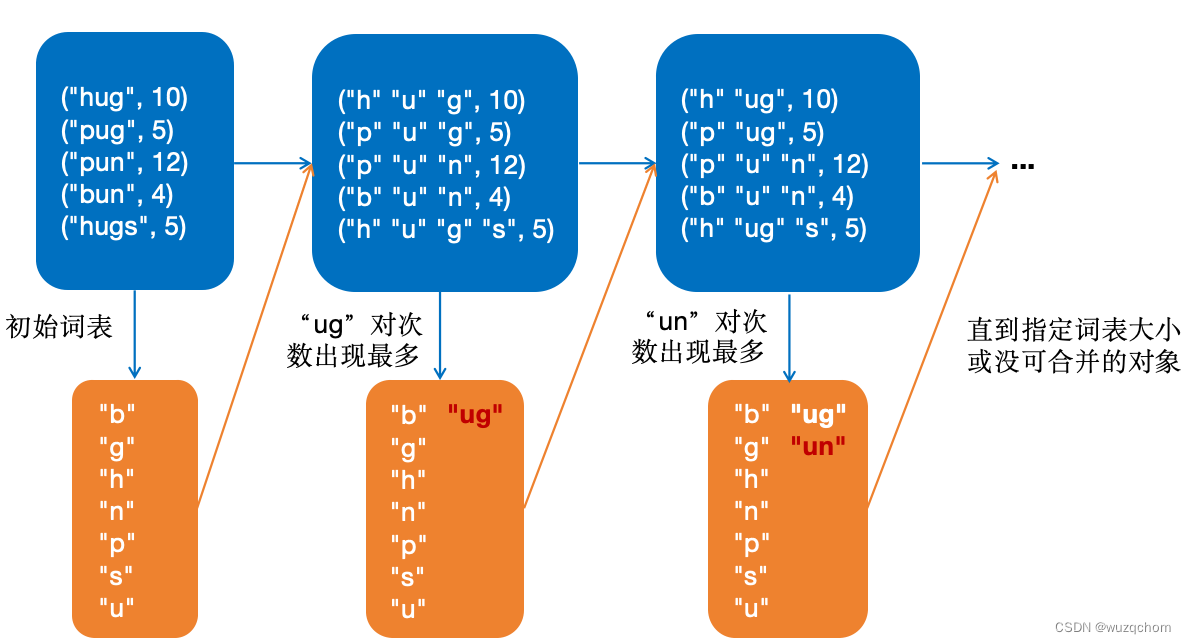
文章目录 概述BPE构建词表词元化代码实现 WordPieceUnigram估算概率(E)删除词元(M) 参考资料 概述 接上回,子词词元化(Subwords tokenization)是平衡字符级别和词级别的一种方法,也…...

慈善组织管理系统设计
一、用户角色与权限 慈善组织管理系统设计首先需要考虑的是用户角色与权限的划分。系统应明确区分不同的用户角色,如管理员、项目负责人、财务人员、捐赠者等,并为每个角色分配相应的权限。管理员应拥有最高的权限,能够管理系统全局…...
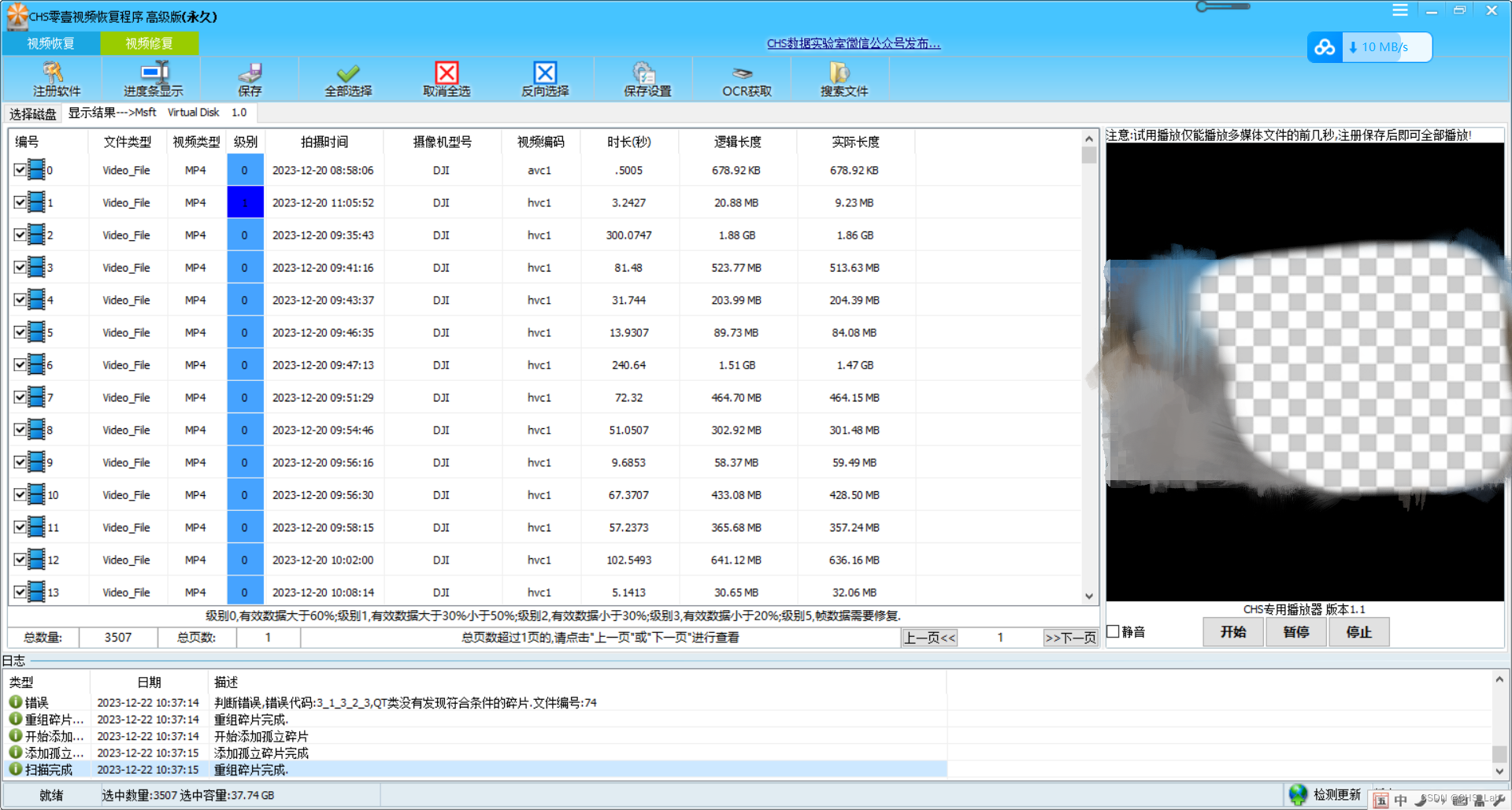
大疆Pocket3手持记录仪格式化恢复方法
大疆Pocket系列是手持类产品,此类产品处理过不少像Pocket、Pocket2、Pocket3基本上涉及Pocket全系列,今天来看一个Pocket3误格式化之后的恢复方法。 故障存储: 120G存储卡 /文件系统:exFAT 故障现象: 在备份视频数据时由于操作失误导致初…...

Mybatis的面试题
1. 什么是一级缓存什么是二级缓存? MyBatis是一款优秀的持久层框架,它提供了一级缓存和二级缓存来提高数据库访问性能。 一级缓存 一级缓存是指在同一个SqlSession中进行的缓存。当MyBatis执行查询时,查询结果会被缓存在SqlSession的内存中…...
)
渗透测试之内核安全系列课程:Rootkit技术初探(五)
今天,我们来讲一下内核安全! 本文章仅提供学习,切勿将其用于不法手段! 目前,在渗透测试领域,主要分为了两个发展方向,分别为Web攻防领域和PWN(二进制安全)攻防领域。在…...
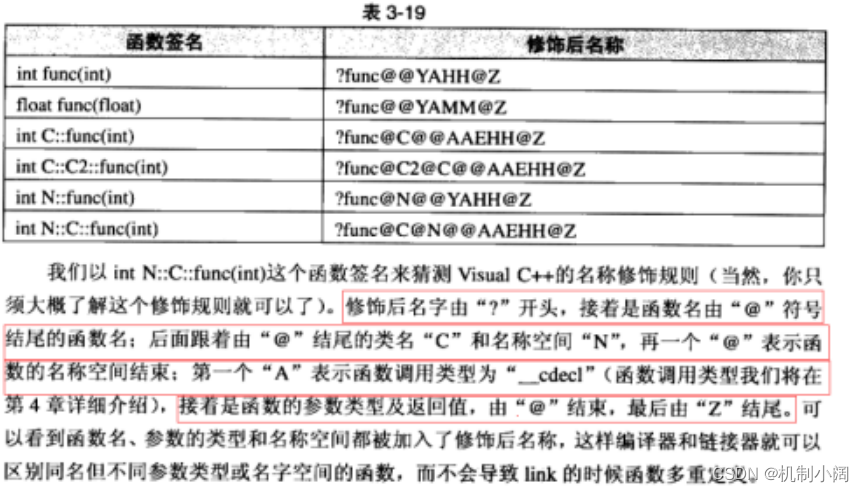
探索C嘎嘎的奇妙世界:第三关---缺省参数与函数重载
在c语言中,我们常常在对有参函数进行传参,这样的繁琐过程,C祖师爷对此进行了相关改进,多说无益,上干货: 1 缺省参数: 缺省参数是指在声明或定义函数时为函数的形参指定一个默认值(默认参数)。在调用该函数时,如果没有指定实参,则…...

docker拉取镜像太慢解决方案
前言 这是我在这个网站整理的笔记,有错误的地方请指出,关注我,接下来还会持续更新。 作者:神的孩子都在歌唱 创建daemon.json文件,输入以下信息 vim /etc/docker/daemon.json{"registry-mirrors": ["https://9cpn8tt6.mirror…...
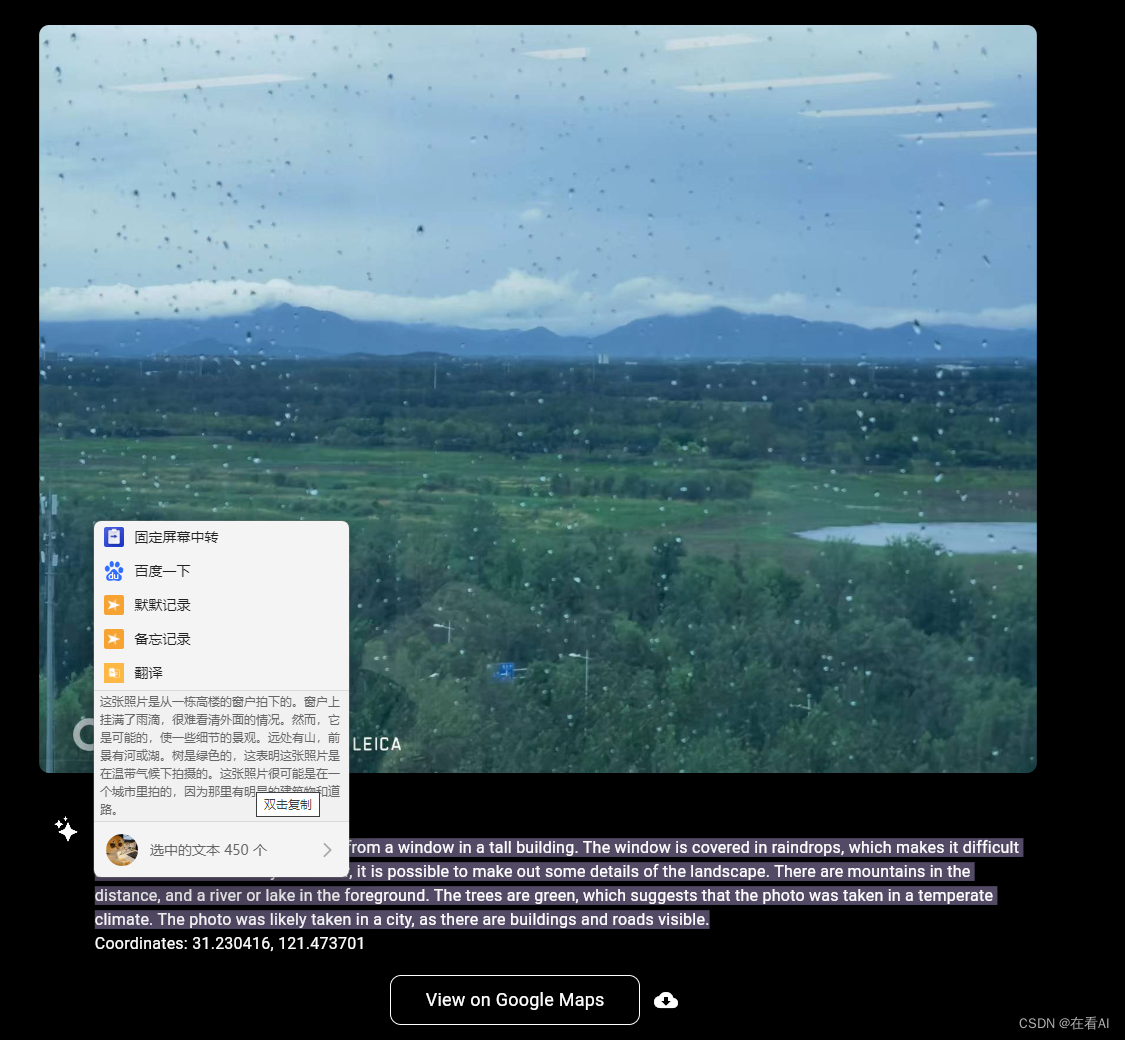
仅凭一图,即刻定位,AI图像定位技术
AI图像定位技术,解锁空间密码!仅凭一图,即刻定位,精准至经纬度坐标,让世界无处不晓。 试试看能否猜中这张自拍照的背景所在?可别低估了A的眼力,答案说不定会让你大吃一惊呢。 近期,…...

OpenClaw-Readwise:开源高亮同步工具的设计与实现
1. 项目概述:一个连接知识碎片的“机械爪” 如果你和我一样,是个重度阅读爱好者,并且习惯把在各种地方(比如Kindle、网页文章、PDF文档)看到的好句子、有启发的段落,用高亮(Highlightÿ…...

AI产品技能库实战:将专家经验注入Claude Code,打造你的虚拟产品专家
1. 项目概述:当AI助手遇上产品经理的“武林秘籍”如果你是一名产品经理、创业者,或者任何需要与产品打交道的人,最近可能已经感受到了AI助手带来的效率革命。无论是用Claude、ChatGPT还是其他工具来辅助写文档、分析数据,它们都像…...

Vinkius Cloud扩展:在IDE中无缝管理MCP AI网关运行时
1. 项目概述:在IDE中管理你的AI网关运行时如果你正在开发或使用基于MCP(Model Context Protocol)的AI应用,那么你很可能已经体会过在多个AI客户端(比如Cursor、Claude Desktop、Windsurf)之间管理和维护后端…...

Turms开发者定制指南:如何基于源码进行二次开发
Turms开发者定制指南:如何基于源码进行二次开发 【免费下载链接】turms 🕊️ The worlds most advanced open source instant messaging engine for 100K~10M concurrent users https://turms-im.github.io/docs 项目地址: https://gitcode.com/gh_mir…...

同样遍历 Mat,为什么你的代码慢 10 倍?
文章目录前言一、什么是不连续Mat?1.产生不连续内存的常见场景2.连续与不连续内存本质区别二、常见错误遍历方式&踩坑分析1.错误一:at<>()逐像素访问(速度慢)2.错误二:强行使用一维 data 指针(高危崩溃&…...

Markdown元数据自动化管理:mdac-filler工具核心功能与实战指南
1. 项目概述:一个为Markdown文档自动填充元数据的工具如果你经常用Markdown写文档、博客或者项目README,肯定遇到过这样的场景:每次新建一个文件,都得手动去文件头部敲一堆“Front Matter”元数据,比如标题、日期、标签…...

CxFlatUI——一款开源免费、现代化的 WinForm UI 控件库
文章目录一、前言二、项目概述三、应用场景四、功能模块五、功能特点六、功能演示七、源码地址一、前言 对于仍在使用 WinForms 技术栈构建企业内部系统、工具软件、桌面管理端、工业控制端或数据录入客户端的团队而言,传统 WinForms 默认控件在视觉表现、交互质感…...

OpenManus-RL:基于强化学习优化大语言模型智能体决策的完整框架
1. 项目概述与核心价值如果你正在关注大语言模型智能体领域,尤其是如何让模型从“会聊天”进化到“会做事”,那么OpenManus-RL这个项目绝对值得你投入时间研究。它不是一个简单的工具库,而是一个由UIUC-Ulab和MetaGPT团队联合发起的、以直播形…...

网络安全入门:2026年转行网络安全完整路径图
网络安全入门:2026 年转行网络安全完整路径图 导语:2026 年,网络安全人才缺口达 150 万,平均薪资较传统 IT 岗位高出 30%。但 70% 的转行者因路径不清晰而失败。本文详解 2026 年转行网络安全的完整路径:学习路线、证…...

终极网盘直链下载助手完整指南:免费解锁八大平台高速下载
终极网盘直链下载助手完整指南:免费解锁八大平台高速下载 【免费下载链接】Online-disk-direct-link-download-assistant 一个基于 JavaScript 的网盘文件下载地址获取工具。基于【网盘直链下载助手】修改 ,支持 百度网盘 / 阿里云盘 / 中国移动云盘 / 天…...