
Linux上搭建Discuz论坛
一.准备工作
1.下载php*,mariadb-server
2.上传Discuz3.5压缩包并解压
二.搭建过程
基于redhat 9 版本和Discuz3.5,php8.0,mariadb10.5演示
一.准备工作
1.下载php*,mariadb-server
[root@redhat9 aaa]# yum install -y php*
[root@redhat9 aaa]# yum install -y mariadb-server
2.上传Discuz3.5压缩包并解压
[root@redhat9 aaa]# unzip Discuz_X3.5_SC_UTF8_20230316.zip
#/aaa目录是我用于存放Discuz的目录
[root@redhat9 aaa]# ll
总用量 11620
#解压后内容
-rw-r--r--.  1 root root 11766137  3月 25 11:40 Discuz_X3.5_SC_UTF8_20230316.zip
-rw-r--r--.  1 root root        4  3月 25 11:42 index.html
-rw-r--r--.  1 root root     8181  3月 17 09:42 LICENSE
-rw-r--r--.  1 root root    33294 12月 21 03:42 qqqun.png
drwxr-xr-x.  2 root root      124  3月 17 09:52 readme
-rw-r--r--.  1 root root    70226  3月 16 19:54 readme.html
drwxrwxrwx. 12 root root     4096  3月 17 09:52 upload
-rw-r--r--.  1 root root      140  2月 12 15:13 utility.html
二.搭建过程
(1)开启数据库服务
[root@redhat9 ~]# systemctl start mariadb
(2)初始化数据库(里面需要选择的内容可以直接回车跳过)
[root@redhat9 ~]# mysql_secure_installation简单参考信息
[root@redhat9 ~]# mysql_secure_installation NOTE: RUNNING ALL PARTS OF THIS SCRIPT IS RECOMMENDED FOR ALL MariaDBSERVERS IN PRODUCTION USE!  PLEASE READ EACH STEP CAREFULLY!In order to log into MariaDB to secure it, we'll need the current
password for the root user. If you've just installed MariaDB, and
haven't set the root password yet, you should just press enter here.Enter current password for root (enter for none):     #输入根的当前密码
OK, successfully used password, moving on...Setting the root password or using the unix_socket ensures that nobody
can log into the MariaDB root user without the proper authorisation.You already have your root account protected, so you can safely answer 'n'.Switch to unix_socket authentication [Y/n]    #切换到unix_socket身份验证
Enabled successfully!
Reloading privilege tables..... Success!You already have your root account protected, so you can safely answer 'n'.Change the root password? [Y/n]    #是否更改根用户密码
New password:
Re-enter new password:
Sorry, you can't use an empty password here.New password:
Re-enter new password:
Password updated successfully!
Reloading privilege tables..... Success!By default, a MariaDB installation has an anonymous user, allowing anyone
to log into MariaDB without having to have a user account created for
them.  This is intended only for testing, and to make the installation
go a bit smoother.  You should remove them before moving into a
production environment.Remove anonymous users? [Y/n]      #是否删除匿名用户... Success!Normally, root should only be allowed to connect from 'localhost'.  This
ensures that someone cannot guess at the root password from the network.Disallow root login remotely? [Y/n]     #是否禁止远程root登录... Success!By default, MariaDB comes with a database named 'test' that anyone can
access.  This is also intended only for testing, and should be removed
before moving into a production environment.Remove test database and access to it? [Y/n]    #是否删除测试数据库并访问它- Dropping test database...... Success!- Removing privileges on test database...... Success!Reloading the privilege tables will ensure that all changes made so far
will take effect immediately.Reload privilege tables now? [Y/n]     #是否立即重新加载权限表... Success!Cleaning up...All done!  If you've completed all of the above steps, your MariaDB
installation should now be secure.Thanks for using MariaDB!
(3)登录数据库,-u指定用户,-p指定密码
[root@redhat9 ~]# mysql -uroot -p123(4)查看当前的数据库信息,并新建启用自己的数据库
MariaDB [(none)]> show databases;
+--------------------+
| Database           |
+--------------------+
| information_schema |
| mysql              |
| performance_schema |
+--------------------+
3 rows in set (0.003 sec)
MariaDB [(none)]> create database luntan;
Query OK, 1 row affected (0.000 sec)MariaDB [(none)]> show databases;
+--------------------+
| Database           |
+--------------------+
| information_schema |
| luntan             |
| mysql              |
| performance_schema |
+--------------------+
4 rows in set (0.000 sec)
MariaDB [(none)]> use luntan;
Database changed
(5)exit退出
MariaDB [(none)]> exit
Bye
[root@redhat9 ~]# systemctl restart mariadb.service
(6)更改httpd相关配置文件
将/etc/httpd/conf.d/下的自己的配置文件改到你解压Discuz压缩包的目录,并在这个目录下新建一个index.html文件并写入内容,更改完成后重启服务
[root@redhat9 ~]# vim /etc/httpd/conf.d/work.conf
<VirtualHost 192.168.2.135>servername www.openlab.comdocumentroot /aaa<Directory /aaa>allowoverride nonerequire all granted</Directory>
</VirtualHost>
[root@redhat9 ~]# cd /aaa
[root@redhat9 aaa]# ll
total 11620
-rw-r--r--  1 root root 11766137 Mar 25 11:40 Discuz_X3.5_SC_UTF8_20230316.zip
-rw-r--r--  1 root root      555 Mar 26 19:52 index.html    #自己新建
-rw-r--r--  1 root root     8181 Mar 17 09:42 LICENSE
-rw-r--r--  1 root root    33294 Dec 21 03:42 qqqun.png
drwxr-xr-x  2 root root      124 Mar 17 09:52 readme
-rw-r--r--  1 root root    70226 Mar 16 19:54 readme.html
drwxrwxrwx 12 root root     4096 Mar 17 09:52 upload    #主要是要访问这个目录
-rw-r--r--  1 root root      140 Feb 12 15:13 utility.html
[root@redhat9 aaa]# vim /aaa/index.html
<!DOCTYPE html>
<html><head><meta charset="utf-8"><title></title><style>.openlab{font-size: 66px;color: red;text-align: center;text-decoration: none;}</style></head><body><div class="openlab"><a href="http://192.168.2.135/upload">点击进入论坛!!!</div></body>
</html>
(7)重启服务完成后到浏览器访问/upload
[root@redhat9 aaa]# systemctl restart httpd

(8)同意安装向导


(9)更改所示文件和目录权限问题
[root@redhat9 aaa]# cd upload/
[root@redhat9 upload]# ll
total 72
-rw-r--r--  1 root root 2869 Mar 17 09:52 admin.php
drwxr-xr-x 10 root root  149 Mar 17 09:52 api
-rw-r--r--  1 root root  727 Mar 17 09:52 api.php
drwxr-xr-x  2 root root   23 Mar 17 09:52 archiver
drwxr-xr-x  2 root root   90 Mar 17 09:52 config
-rw-r--r--  1 root root 1040 Mar 17 09:52 connect.php
-rw-r--r--  1 root root  106 Mar 17 09:52 crossdomain.xml
drwxr-xr-x 12 root root  178 Mar 17 09:52 data
-rw-r--r--  1 root root 5558 Mar 17 09:42 favicon.ico
-rw-r--r--  1 root root 2357 Mar 17 09:52 forum.php
-rw-r--r--  1 root root  906 Mar 17 09:52 group.php
-rw-r--r--  1 root root 1325 Mar 17 09:52 home.php
-rw-r--r--  1 root root 6912 Mar 17 09:52 index.php
drwxr-xr-x  5 root root   64 Mar 17 09:52 install
-rw-r--r--  1 root root  998 Mar 17 09:52 member.php
-rw-r--r--  1 root root 2410 Mar 17 09:52 misc.php
-rw-r--r--  1 root root 1790 Mar 17 09:52 plugin.php
-rw-r--r--  1 root root 1086 Mar 17 09:52 portal.php
-rw-r--r--  1 root root  639 Mar 17 09:52 robots.txt
-rw-r--r--  1 root root 1755 Mar 17 09:52 search.php
drwxr-xr-x 10 root root  168 Mar 17 09:52 source
drwxr-xr-x  7 root root   86 Mar 17 09:52 static
drwxr-xr-x  3 root root   38 Mar 17 09:52 template
drwxr-xr-x  8 root root  146 Mar 17 09:52 uc_client
drwxr-xr-x 13 root root 4096 Mar 17 09:52 uc_server
[root@redhat9 upload]# chmod +777 -R config/ data/ uc*
全新安装
 填写好你自己的信息

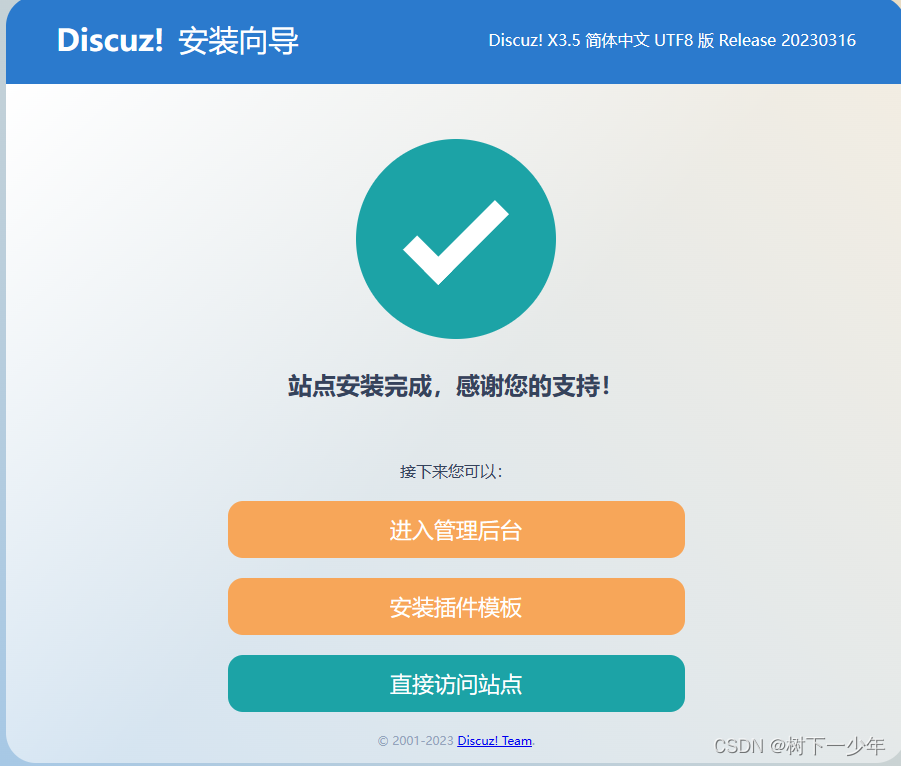
之后就可以以管理员身份登录或者注册新用户了
相关文章:
Linux上搭建Discuz论坛
一.准备工作 1.下载php*,mariadb-server 2.上传Discuz3.5压缩包并解压 二.搭建过程 基于redhat 9 版本和Discuz3.5,php8.0,mariadb10.5演示 一.准备工作 1.下载php*,mariadb-server [rootredhat9 aaa]# yum install -y php*…...

【蓝桥杯专题】 树状数组(C++ | 洛谷 | acwing | 蓝桥)
菜狗现在才开始备战蓝桥杯QAQ 文章目录【蓝桥杯专题】 (C | 洛谷 | acwing | 蓝桥)什么是线段数组??1264. 动态求连续区间和数星星线段树AcWing 1270. 数列区间最大值PPPPPPP【蓝桥杯专题】 (C | 洛谷 | acwing | 蓝桥) 什么是…...
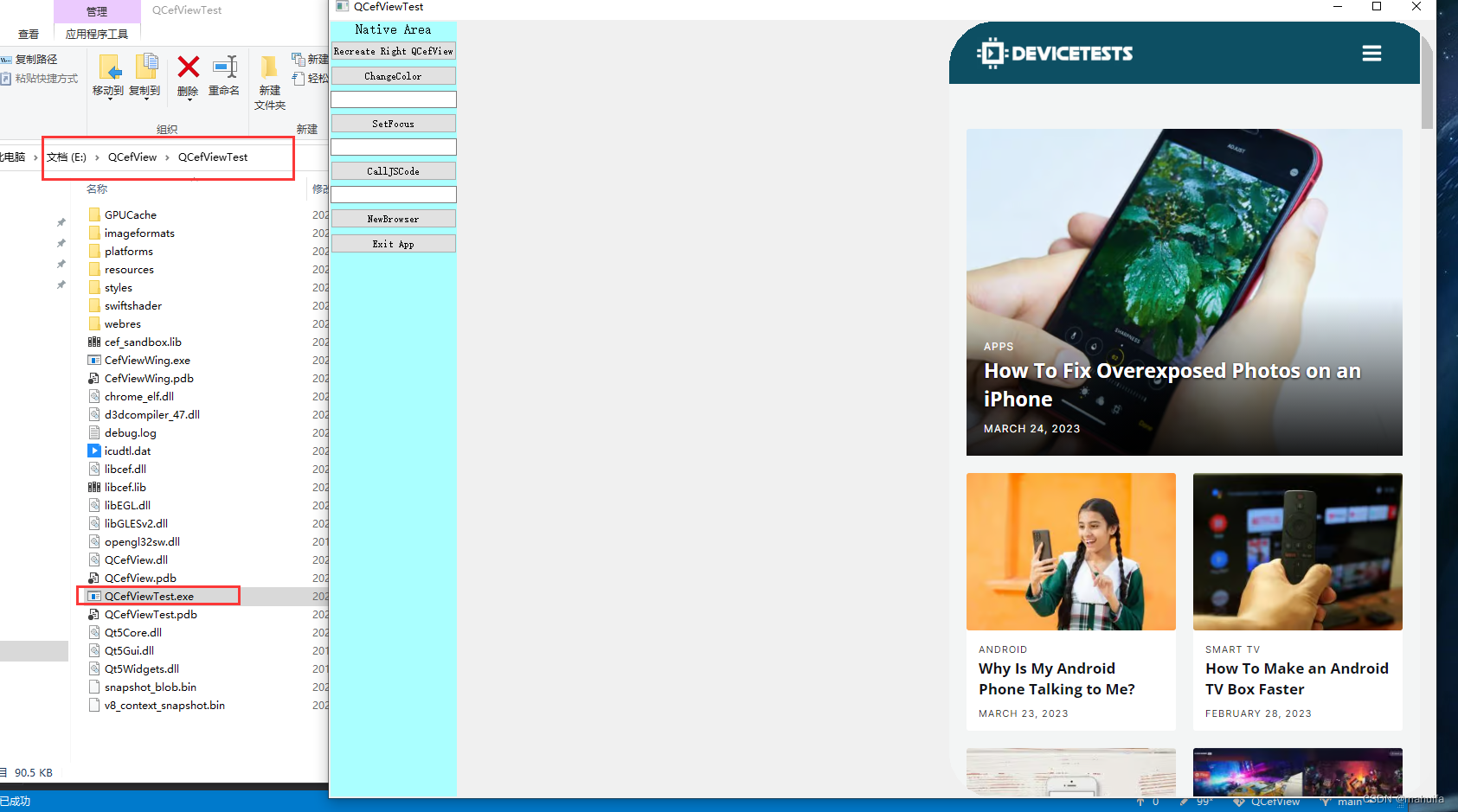
QCefView编译配置(Windows-MSVC)(11)
QCefView编译配置(Windows-MSVC) 文章目录QCefView编译配置(Windows-MSVC)1、概述2、准备工作3、添加环境变量4、更换cef源码版本5、CMake构建6、Visual Studio编译7、安装编译后的文件8、验证编译结果更多精彩内容👉个…...

Token原理
Q:分布式场景下如何生成token以及使用token的流程: 在分布式场景下,可以采用以下方式生成 token 和进行权限认证: 1. 生成 token: 使用JWT(JSON Web Token)生成 token。JWT 是一种基于 JSON …...

③【Java组】蓝桥杯省赛真题 持续更新中...
个人简介:Java领域新星创作者;阿里云技术博主、星级博主、专家博主;正在Java学习的路上摸爬滚打,记录学习的过程~ 个人主页:.29.的博客 学习社区:进去逛一逛~ 蓝桥杯真题--持续更新中...一、错误票据题目描…...

linux实验之shell编程基础
这世间,青山灼灼,星光杳杳,秋风渐渐,晚风慢慢 shell编程基础熟悉shell编程的有关机制,如标准流。学习Linux环境变量设置文件及其内容/etc/profile/etc/bashrc/etc/environment~/.profile~/.bashrc熟悉编程有关基础命令…...

C语言小程序:通讯录(静态版)
哈喽各位老铁们,今天给大家带来一期通讯录的静态版本的实现,何为静态版本后面会做解释,话不多说,直接开始!关于通讯录,其实也就是类似于我们手机上的通讯录一样,有着各种各样的功能,…...

写CSDN博客两年半的收获--总结篇
👨💻作者简介:练习时长两年半的java博主 🎟️个人主页:君临๑ ps:点赞是免费的,却可以让写博客的作者开心好几天😎 不知不觉间,在csdn写博客也有两年半的时间了&#x…...
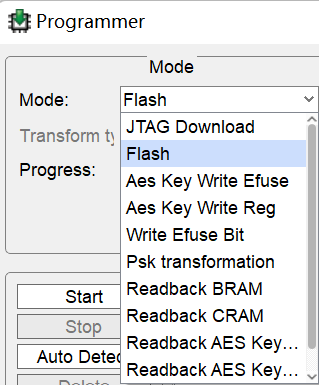
中科亿海微FPGA应用(一、点灯)
1.软件: https://download.csdn.net/download/weixin_41784968/87564071 需要申请license才能使用:软件试用申请_软件试用申请_中科亿海微电子科技(苏州)有限公司 2.开发板: 芯片EQ6HL45,42.5k LUT。 3…...

ElasticSearch - SpringBoot整合ES:实现搜索结果排序 sort
文章目录00. 数据准备01. Elasticsearch 默认的排序方式是什么?02. Elasticsearch 支持哪些排序方式?03. ElasticSearch 如何指定排序方式?04. ElasticSearch 如何按照相关性排序?05. ElasticSearch 查询结果如何不按照相关性排序…...

IDEA的全新UI可以在配置里启用了,快来试试吧!
刚看到IDEA官方昨天发了这样一条推:IDEA的新UI可以在2022.3版本上直接使用了!开启方法如下:打开IDEA的Setting界面,在Appearance & Behavior下有个被标注为Beta标签的New UI菜单,具体如下图:勾选Enable…...

第九章 镜像架构和规划 - 备份处于活动状态时自动进行故障转移
文章目录第九章 镜像架构和规划 - 备份处于活动状态时自动进行故障转移备份处于活动状态时自动进行故障转移备份不活动时的自动故障转移对各种中断场景的镜像响应响应主要中断场景的自动故障转移第九章 镜像架构和规划 - 备份处于活动状态时自动进行故障转移 备份处于活动状态…...
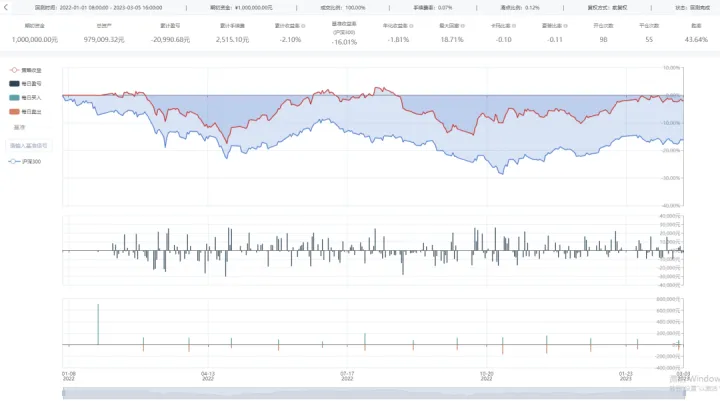
Barra模型因子的构建及应用系列七之Liquidity因子
一、摘要 在前期的Barra模型系列文章中,我们构建了Size因子、Beta因子、Momentum因子、Residual Volatility因子、NonLinear Size因子和Book-to-Price因子,并分别创建了对应的单因子策略,其中Size因子和NonLinear Siz因子具有很强的收益能力…...
走进二叉树的世界 ———性质讲解
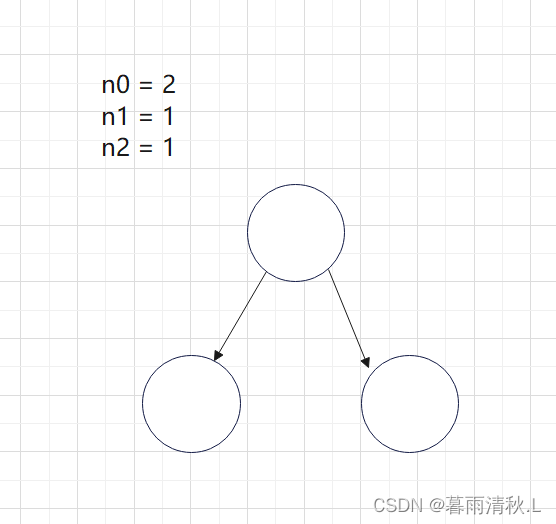
二叉树的性质和证明前言1.二叉树的概念和结构特殊的二叉树:二叉树的性质前言 本篇博客主要讲述的是有关二叉树的一些概念,性质以及部分性质的相关证明,如果大伙发现了啥错误,可以在评论区指出😘😘 1.二叉树…...
【SSM】Spring + SpringMVC +MyBatis 框架整合
个人简介:Java领域新星创作者;阿里云技术博主、星级博主、专家博主;正在Java学习的路上摸爬滚打,记录学习的过程~ 个人主页:.29.的博客 学习社区:进去逛一逛~ SSM框架整合一、导入相关依赖二、配置web.xml文…...

【算法基础】一篇文章彻底弄懂Dijkstra算法|多图解+代码详解
博主简介:努力学习的大一在校计算机专业学生,热爱学习和创作。目前在学习和分享:算法、数据结构、Java等相关知识。博主主页: 是瑶瑶子啦所属专栏: 算法 ;该专栏专注于蓝桥杯和ACM等算法竞赛🔥近期目标&…...

第二十三天01MySQL多表查询与事务
目录 1. 多表查询 1.1 概述 1.1.1 数据准备 1.1.2 介绍 1.1.3 分类 1.2 内连接 1.2.1 语法 1.2.2 案例演示 1.3 外连接 1.3.1 语法 1.3.2 案例演示 1.4 子查询 1.4.1 介绍 1.4.2 标量子查询 1.4.3 列子查询 1.4.4 行子查询 1.4.5 表子查询 1.5 案例 1.5.1 介…...
TCP协议详解
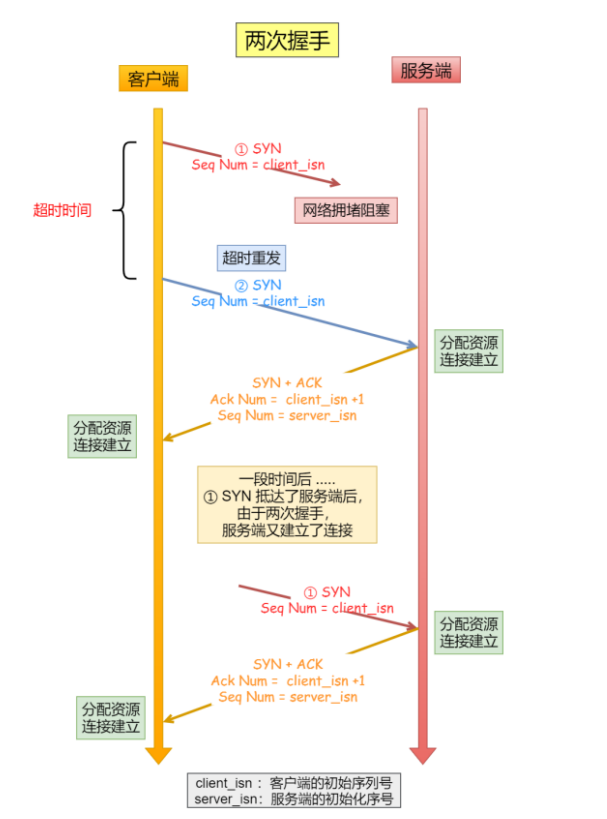
1.TCP的准备条件在古代的时候,古人们经常写书信进行交流,写书信的前提是你要知道这份信是要寄给谁在网络中,我们通过ip端口号找对目标对象,但是现在网站一般会对ip端口注册一个域名,所以我们一般就是对域名进行查找&am…...
Activiti7与Spring、Spring Boot整合开发
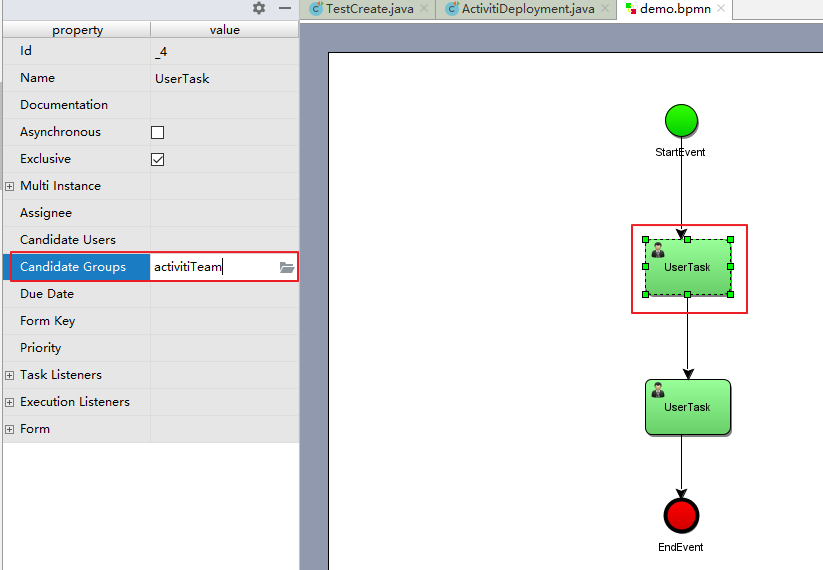
Activiti整合Spring 一、Activiti与Spring整合开发 1.1 Activiti与Spring整合的配置 1)、在pom.xml文件引入坐标 如下 <properties><slf4j.version>1.6.6</slf4j.version><log4j.version>1.2.12</log4j.version> </properties> <d…...
基于SpringBoot实现冬奥会运动会科普平台【源码+论文】
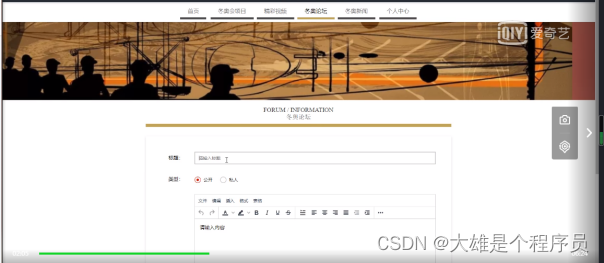
基于SpringBoot实现冬奥会科普平台演示开发语言:Java 框架:springboot JDK版本:JDK1.8 服务器:tomcat7 数据库:mysql 5.7 数据库工具:Navicat11 开发软件:eclipse/myeclipse/idea Maven包&#…...

ESP8266 EEPROM实战:手把手教你存WiFi密码,断电重启也不怕
ESP8266 EEPROM实战:构建可靠的WiFi凭证存储系统 每次重启ESP8266设备都要重新输入WiFi密码?这种重复劳动早就该被技术淘汰了。想象一下,你的智能家居设备在断电恢复后能自动重新连接网络,工业传感器在意外重启后依然保持通信——…...

解决 npm install 安装过慢
解决 npm install 安装过慢npm install --registryhttps://registry.npmmirror.com...

奥尔特云智慧武装系统上线!基层武装管理从此“智”在必得!
随着国防动员与基层武装工作不断升级,传统管理模式存在信息化覆盖不全、数据归集粗放、智能化水平不足等问题,已难以适配高效管理与应急应战需求,数字化转型成为必然趋势。智慧武装系统是奥尔特云(深圳)智慧科技打造的…...

OpenClaw批量处理:千问3.5-9B同时操作百个Excel文件
OpenClaw批量处理:千问3.5-9B同时操作百个Excel文件 1. 为什么需要测试Excel批量处理? 上个月我需要整理一批市场调研数据——237个Excel文件,每个文件包含20-50张工作表。手动操作需要反复执行"打开文件→复制数据→粘贴到汇总表→保…...

让机器人学会思考:利用快马平台AI模型生成openclaw智能抓取决策代码
让机器人学会思考:利用快马平台AI模型生成openclaw智能抓取决策代码 最近在研究机器人抓取技术时,发现传统机械臂编程需要手动设定每个动作参数,效率很低。于是尝试用AI来辅助openclaw实现智能抓取,整个过程在InsCode(快马)平台上…...
)
别再到处找接口了!手把手教你用阿里云盘+Alist搭建自己的TVBox影视仓(附JSON配置模板)
私有影视仓搭建实战:用阿里云盘Alist打造专属TVBox资源库 每次打开TVBox却发现公共接口失效?第三方资源突然无法访问?与其在各大论坛反复搜索不稳定接口,不如用两小时搭建一个完全私有的影视管理系统。本文将彻底改变你获取影音资…...
跳转不触发重定向)
router.push(‘/‘)跳转不触发重定向
我来帮你分析为什么 router.push(/) 没有按照预期跳转到 /fenlei 路径。 首先让我查看相关的代码文件: router/index.js{path: /,component: Layout,redirect: /fenlei},已查看文件 index.vue 225-240 已查看文件 index.js 65-85 现在让我查看更多上下文,…...

3款自动化工具提升文档下载效率:智能识别与批量处理完整指南
3款自动化工具提升文档下载效率:智能识别与批量处理完整指南 【免费下载链接】kill-doc 看到经常有小伙伴们需要下载一些免费文档,但是相关网站浏览体验不好各种广告,各种登录验证,需要很多步骤才能下载文档,该脚本就是…...

终极视频修复指南:如何使用Untrunc轻松恢复损坏的MP4/MOV文件
终极视频修复指南:如何使用Untrunc轻松恢复损坏的MP4/MOV文件 【免费下载链接】untrunc Restore a truncated mp4/mov. Improved version of ponchio/untrunc 项目地址: https://gitcode.com/gh_mirrors/un/untrunc 你是否曾经遇到过珍贵的视频文件突然无法播…...

用噪音打破听觉恐怖谷:RTE 开发者社区发布 RealNoise™ TTS:全球首个原生合成动态声场的语音大模型
在过去的几年里,语音 AI 行业的内卷方向始终如一:更高的采样率、更低的延迟、更纯净的音质。我们不断训练模型去剔除哪怕最微小的背景杂音,追求实验室级别的完美信噪比(SNR)。 然而,当我们在真实的实时互动…...