
[移植] tgi 编译
这里写自定义目录标题
- 报错
报错
Collecting numpy==1.26.4 (from -r requirements_cuda.txt (line 21))Downloading numpy-1.26.4.tar.gz (15.8 MB)━━━━━━━━━━━━━━━━━━━━━━━━━━━━━━━━━━━━━━━━ 15.8/15.8 MB 15.0 MB/s eta 0:00:00Installing build dependencies ... doneGetting requirements to build wheel ... doneInstalling backend dependencies ... errorerror: subprocess-exited-with-error× pip subprocess to install backend dependencies did not run successfully.│ exit code: 1╰─> [63 lines of output]Collecting patchelf>=0.11.0Downloading patchelf-0.17.2.1.tar.gz (167 kB)Installing build dependencies: startedInstalling build dependencies: finished with status 'done'Getting requirements to build wheel: startedGetting requirements to build wheel: finished with status 'done'Preparing metadata (pyproject.toml): startedPreparing metadata (pyproject.toml): finished with status 'done'Collecting ninja>=1.8.2Downloading ninja-1.11.1.1.tar.gz (132 kB)Installing build dependencies: startedInstalling build dependencies: finished with status 'done'Getting requirements to build wheel: startedGetting requirements to build wheel: finished with status 'done'Preparing metadata (pyproject.toml): startedPreparing metadata (pyproject.toml): finished with status 'done'Building wheels for collected packages: patchelf, ninjaBuilding wheel for patchelf (pyproject.toml): startedBuilding wheel for patchelf (pyproject.toml): finished with status 'error'error: subprocess-exited-with-error× Building wheel for patchelf (pyproject.toml) did not run successfully.│ exit code: 1╰─> [9 lines of output]Traceback (most recent call last):File "/tmp/pip-build-env-mtjgz_n7/overlay/lib/python3.10/site-packages/skbuild/setuptools_wrap.py", line 639, in setupcmkr = cmaker.CMaker(cmake_executable)File "/tmp/pip-build-env-mtjgz_n7/overlay/lib/python3.10/site-packages/skbuild/cmaker.py", line 145, in __init__self.cmake_version = get_cmake_version(self.cmake_executable)File "/tmp/pip-build-env-mtjgz_n7/overlay/lib/python3.10/site-packages/skbuild/cmaker.py", line 102, in get_cmake_versionraise SKBuildError(msg) from errProblem with the CMake installation, aborting build. CMake executable is cmake[end of output]note: This error originates from a subprocess, and is likely not a problem with pip.ERROR: Failed building wheel for patchelfBuilding wheel for ninja (pyproject.toml): startedBuilding wheel for ninja (pyproject.toml): finished with status 'error'error: subprocess-exited-with-error× Building wheel for ninja (pyproject.toml) did not run successfully.│ exit code: 1╰─> [13 lines of output]/tmp/pip-build-env-58pxmg2f/overlay/lib/python3.10/site-packages/setuptools_scm/git.py:312: UserWarning: git archive did not support describe outputwarnings.warn("git archive did not support describe output")/tmp/pip-build-env-58pxmg2f/overlay/lib/python3.10/site-packages/setuptools_scm/git.py:331: UserWarning: unprocessed git archival found (no export subst applied)warnings.warn("unprocessed git archival found (no export subst applied)")Traceback (most recent call last):File "/tmp/pip-build-env-58pxmg2f/overlay/lib/python3.10/site-packages/skbuild/setuptools_wrap.py", line 639, in setupcmkr = cmaker.CMaker(cmake_executable)File "/tmp/pip-build-env-58pxmg2f/overlay/lib/python3.10/site-packages/skbuild/cmaker.py", line 145, in __init__self.cmake_version = get_cmake_version(self.cmake_executable)File "/tmp/pip-build-env-58pxmg2f/overlay/lib/python3.10/site-packages/skbuild/cmaker.py", line 102, in get_cmake_versionraise SKBuildError(msg) from errProblem with the CMake installation, aborting build. CMake executable is cmake[end of output]note: This error originates from a subprocess, and is likely not a problem with pip.ERROR: Failed building wheel for ninjaFailed to build patchelf ninjaERROR: ERROR: Failed to build installable wheels for some pyproject.toml based projects (patchelf, ninja)[end of output]note: This error originates from a subprocess, and is likely not a problem with pip.
error: subprocess-exited-with-error× pip subprocess to install backend dependencies did not run successfully.
│ exit code: 1
╰─> See above for output.note: This error originates from a subprocess, and is likely not a problem with pip.
make[1]: *** [Makefile:26: install-server] Error 1
make[1]: Leaving directory '/app/text-generation-inference/server'
make: *** [Makefile:2: install-server] Error 2
bash: text-generation-launcher: command not found
apt install patchelf ninja-build
apt install gfortran
相关文章:

[移植] tgi 编译
这里写自定义目录标题 报错 报错 Collecting numpy1.26.4 (from -r requirements_cuda.txt (line 21))Downloading numpy-1.26.4.tar.gz (15.8 MB)━━━━━━━━━━━━━━━━━━━━━━━━━━━━━━━━━━━━━━━━ 15.8/15.8 MB 15.0 MB/s eta 0:00:00Inst…...

vue-element-admin后台集成方案
文章目录 vue-element-admin后台集成方案介绍使用安装目录介绍 vue-element-admin后台集成方案 介绍 官方网站 https://panjiachen.github.io/vue-element-admin-site/zh/guide/#%E5%8A%9F%E8%83%BD使用 安装 这里有三个模板,我们一般选择基础模板进行开发就好…...

40条经典ChatGPT论文指令,圈定选题和进行论文构思
目录 1、用ChatGPT圈定选题范围2、用ChatGPT生成研究方法和思路3、用ChatGPT扩展论文观点和论证4、用ChatGPT辅助论文结构设计5、如何直接使用ChatGPT4o、o1、OpenAI Canvas6、OpenAI Canvas增强了啥?7、编程功能增强 👇 ChatGPT o1网页入口在文末&#…...

在不支持WSL2的Windows环境下安装Redis并添加环境变量的方法
如果系统版本支持 WSL 2 可跳过本教程。使用官网提供的教程即可 官网教程 查看是否支持 WSL 2 如果不支持或者觉得麻烦可以按照下面的方式安装 下载 点击打开下载地址 下载 zip 文件即可 安装 将下载的 zip 文件解压到自己想要解压的地方即可。(注意&#x…...

《Electron 基础知识》代码打开开发者工具DevTools
初始化 const mainWindow new BrowserWindow({width: 1400,height: 800 );打开 接口 openDevTools mainWindow.webContents.openDevTools();关闭 接口 closeDevTools mainWindow.webContents.closeDevTools();...

小米R3G刷机OP
小米R3G刷机OP 22年购买了一个小米R3G路由器,刷OP系统后可以中继校园网,从而让智能开关、小爱同学可以联网。 当年的价格还是55元,现在只需要30元了,价格越来越便宜,并且OP版本越来越完善了。 之前刷机过breed系统&…...

移动机器人规划控制合集
系列文章目录 提示:这里可以添加系列文章的所有文章的目录,目录需要自己手动添加 TODO:写完再整理 文章目录 系列文章目录前言 前言 认知有限,望大家多多包涵,有什么问题也希望能够与大家多交流,共同成长!…...
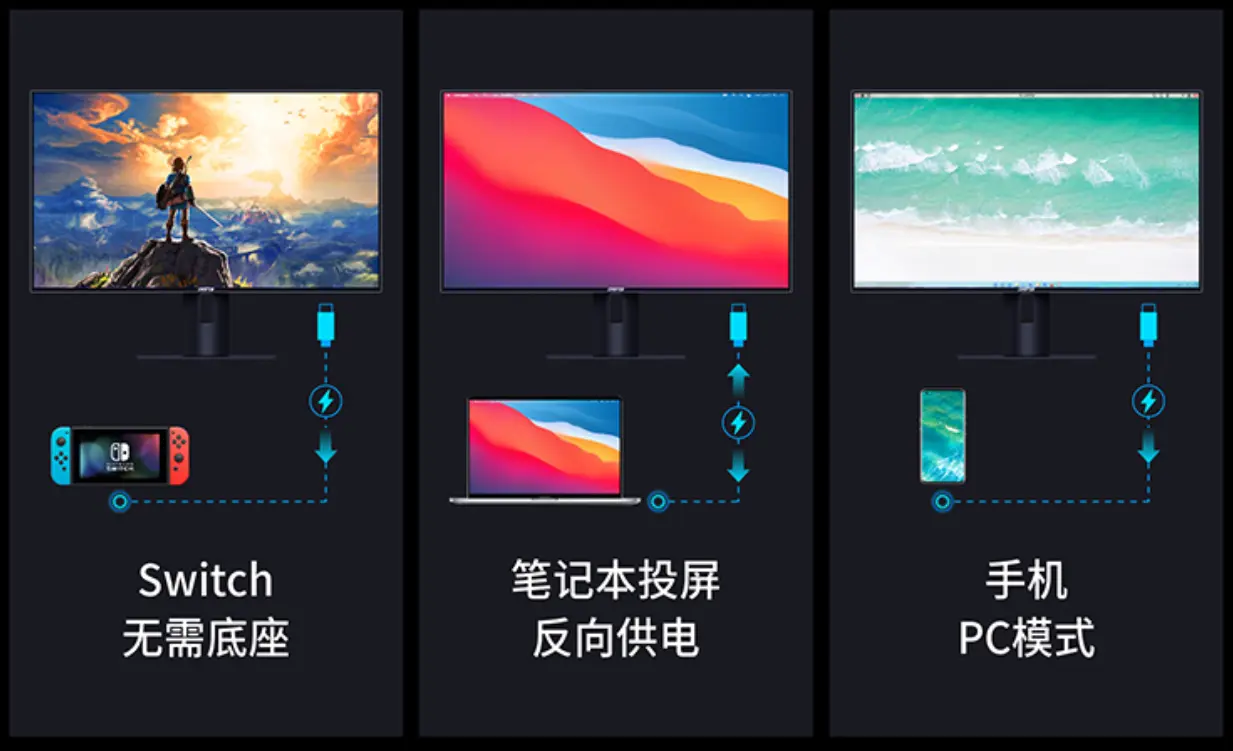
Type-C接口桌面显示器的优势
随着科技的飞速发展,电子设备的连接性、便捷性和高效性成为了消费者关注的重点。在这个背景下,Type-C接口桌面显示器以其卓越的性能和广泛的兼容性,正逐步成为市场上的主流选择。本文将深入探讨Type-C接口桌面显示器的优势、应用场景、市场现…...
是什么?)
机器学习中的熵(Entropy)是什么?
在机器学习和信息理论中,熵(Entropy)是衡量不确定性和信息量的一个重要概念。熵最初由信息论的奠基人克劳德香农(Claude Shannon)在1948年提出,用来衡量信息源的信息不确定性。在机器学习中,熵被…...

JAVA基础:Lock不同的锁形式
1.1 可重入锁 synchronized就是一个可重入锁 使用lock时,常用的ReentryLock就是可重入锁 当一个线程在获得a对象锁之后,可以继续重复获得对象锁 代码形式就是 线程调用同步代码段,在没有执行完毕前,又调用了该对象的另一个同步…...

【LeetCode每日一题】——679.24 点游戏
文章目录 一【题目类别】二【题目难度】三【题目编号】四【题目描述】五【题目示例】六【题目提示】七【解题思路】八【时间频度】九【代码实现】十【提交结果】 一【题目类别】 回溯 二【题目难度】 困难 三【题目编号】 679.24 点游戏 四【题目描述】 给定一个长度为4…...

【Conda】Conda命令详解:高效更新与环境管理指南
目录 1. Conda 更新命令1.1 更新 Conda 核心1.2 更新所有包 2. 严格频道优先级3. 强制安装特定版本4. 创建与管理环境4.1 创建新环境4.2 激活和停用环境4.3 导出和导入环境4.4 删除环境 5. 清理缓存总结 Conda 是一个强大的包管理和环境管理工具,广泛应用于数据科学…...

机器学习:回归模型和分类模型的评估方法介绍
回归模型和分类模型评估方法详解 一、回归模型评估方法 (一)均方误差(MSE) 原理 均方误差是衡量回归模型预测值与真实值之间平均平方差的指标。它通过计算预测值与真实值之差的平方的平均值来评估模型的性能。其数学公式为&…...

担心学术窃取?阿里云加密的AI论文工具帮你锁紧数据!
学术窃取是任何研究人员都需要警惕的问题。随着技术的发展,虽然研究工作变得更加高效,但同时也暴露了更多的安全漏洞,尤其是在数据传输和存储过程中。为了解决这一问题,梅子AI论文工具采用了阿里云加密技术,提供了一个…...

leetcode经典算法题总结
针对leetcode算法题常见的五大经典复杂算法进行如下总结: (1)分治法 把一个复杂的问题分成两个或更多的相同或相似的子问题,再把子问题分成更小的子问题……直到最后子问题可以简单的直接求解,原问题的解即子问题的解…...

运维工具之ansible
Ansible 1.什么是ansible? ansible是基于ssh架构的自动化运维工具,由python语言实现,通过ansible可以远程批量部署等。 2.部署前提 控制端需要安装ansible,被控制端要开启ssh服务,并允许远程登录,被管理主机需要安装py…...

基于 CSS Grid 的简易拖拉拽 Vue3 组件,从代码到NPM发布(1)- 拖拉拽交互
基于特定的应用场景,需要在页面中以网格的方式,实现目标组件在网格中可以进行拖拉拽、修改大小等交互。本章开始分享如何一步步从代码设计,最后到如何在 NPM 上发布。 请大家动动小手,给我一个免费的 Star 吧~ 大家如果发现了 Bug…...

【华为HCIP实战课程六】OSPF邻居关系排错网络子网掩码问题,网络工程师
一、链路上网络和掩码引发的OSPF邻居问题 R3和R4已经建立正常的ospf邻居关系 更改IP地址前R3接口IP地址 interface Serial2/0/0 link-protocol ppp ip address 10.1.34.3 255.255.255.240 [R3-Serial2/0/0]ip address 10.1.88.2 255.255.255.240 更改为10.1.88.2 R3和R4虽…...

基础教程 | 用VuePress搭建一个简单的个人博客(附源码)
先附上自己个人博客页面:https://illusionno.github.io/ 源码也在这里:https://github.com/illusionno/my-blog (如果觉得有帮助,可以点颗star✨) 使用的主题是vuepress-theme-reco2.x,并在上面进行了一些调…...

Ubuntu20.04,编译安装BCC
https://github.com/iovisor/bcc/blob/master/INSTALL.md 一、内核配置 In general, to use these features, a Linux kernel version 4.1 or newer is required. In addition, the kernel should have been compiled with the following flags set: CONFIG_BPFy CONFIG_BP…...

基于大语言模型的学术论文阅读辅助分析系统的研究与应用
基于大语言模型的学术论文阅读辅助分析系统的研究与应用 摘要 随着科研论文数量的指数级增长,科研工作者面临着前所未有的信息过载挑战。传统学术论文阅读方式依赖线性文本呈现,难以快速定位关键信息,跨文献知识整合效率低下。大语言模型的发展为解决这一问题提供了新的技…...
)
STM32驱动段码屏实战:手把手教你用HT1621B做个简易电子钟(附完整代码)
STM32与HT1621B打造高精度电子钟:从硬件连接到动态显示全解析 在嵌入式开发领域,能够将理论知识转化为实际项目的能力至关重要。本文将带您完成一个完整的电子钟项目,使用STM32微控制器和HT1621B驱动器来驱动段码液晶屏。不同于简单的驱动演示…...

工业多串口通信实战:基于EM9170的8串口方案设计与优化
1. 项目概述:为什么8串口在今天依然重要?在物联网、工业自动化、智能楼宇这些领域里摸爬滚打久了,你会发现一个有趣的现象:那些看似“古老”的通信接口,生命力往往比我们想象的要顽强得多。串口,或者说RS-2…...
)
用Arduino Nano和MAX7219模块,5分钟搞定一个8x8 LED点阵显示(附完整代码)
用Arduino Nano和MAX7219模块快速打造8x8 LED点阵显示系统 周末整理零件箱时翻出一片落灰的MAX7219模块和Arduino Nano,突然想起可以给工作室做个实时温度显示器。这个组合堪称电子爱好者的"乐高积木"——不需要复杂的电路设计,短短几行代码就…...

3D打印操作辅助工具:自制安全高效的“过来放大器”
1. 项目概述:当3D打印遇上“过来”放大器在3D打印这个行当里折腾了这么多年,我见过各种稀奇古怪的“魔改”和“土法炼钢”,但最近一个朋友工作室里出现的一个小玩意儿,还是让我眼前一亮。他管它叫“3D打印设备专用过来放大器”。初…...

对比直接使用官方API体验Taotoken在用量透明上的优势
🚀 告别海外账号与网络限制!稳定直连全球优质大模型,限时半价接入中。 👉 点击领取海量免费额度 对比直接使用官方API体验Taotoken在用量透明上的优势 在集成大模型能力到实际项目时,开发者通常会面临一个共同的挑战&…...

FanControl终极指南:告别噪音,掌控你的PC风扇控制
FanControl终极指南:告别噪音,掌控你的PC风扇控制 【免费下载链接】FanControl.Releases This is the release repository for Fan Control, a highly customizable fan controlling software for Windows. 项目地址: https://gitcode.com/GitHub_Tren…...


Visual C++运行库终极指南:如何3分钟解决Windows软件启动失败问题
Visual C运行库终极指南:如何3分钟解决Windows软件启动失败问题 【免费下载链接】vcredist AIO Repack for latest Microsoft Visual C Redistributable Runtimes 项目地址: https://gitcode.com/gh_mirrors/vc/vcredist 你是否曾经遇到过这样的场景…...

告别Spoon客户端!手把手教你用这个Vue+SpringCloud的Kettle Web版开源工具
从桌面到云端:基于VueSpringCloud的Kettle Web化实践指南 对于长期使用Kettle Spoon客户端的ETL工程师而言,反复安装Java环境、处理客户端兼容性问题、在多台机器间同步配置已成为日常痛点。当团队需要协作开发或管理远程服务器上的数据集成任务时&…...