
SpringBoot设计了哪些可拓展的机制?
SpringBoot核心源码
public SpringApplication(ResourceLoader resourceLoader, Class<?>... primarySources) {  ...this.primarySources = new LinkedHashSet(Arrays.asList(primarySources));// Servletthis.webApplicationType = WebApplicationType.deduceFromClasspath();  this.bootstrapRegistryInitializers = new ArrayList(this.getSpringFactoriesInstances(BootstrapRegistryInitializer.class));  // 注意这里,Initializersthis.setInitializers(this.getSpringFactoriesInstances(ApplicationContextInitializer.class));  // 注意这里 Listenersthis.setListeners(this.getSpringFactoriesInstances(ApplicationListener.class));  this.mainApplicationClass = this.deduceMainApplicationClass();
}
复制代码
我们可以看到空的SpringBoot项目有一些initializers以及一些listeners
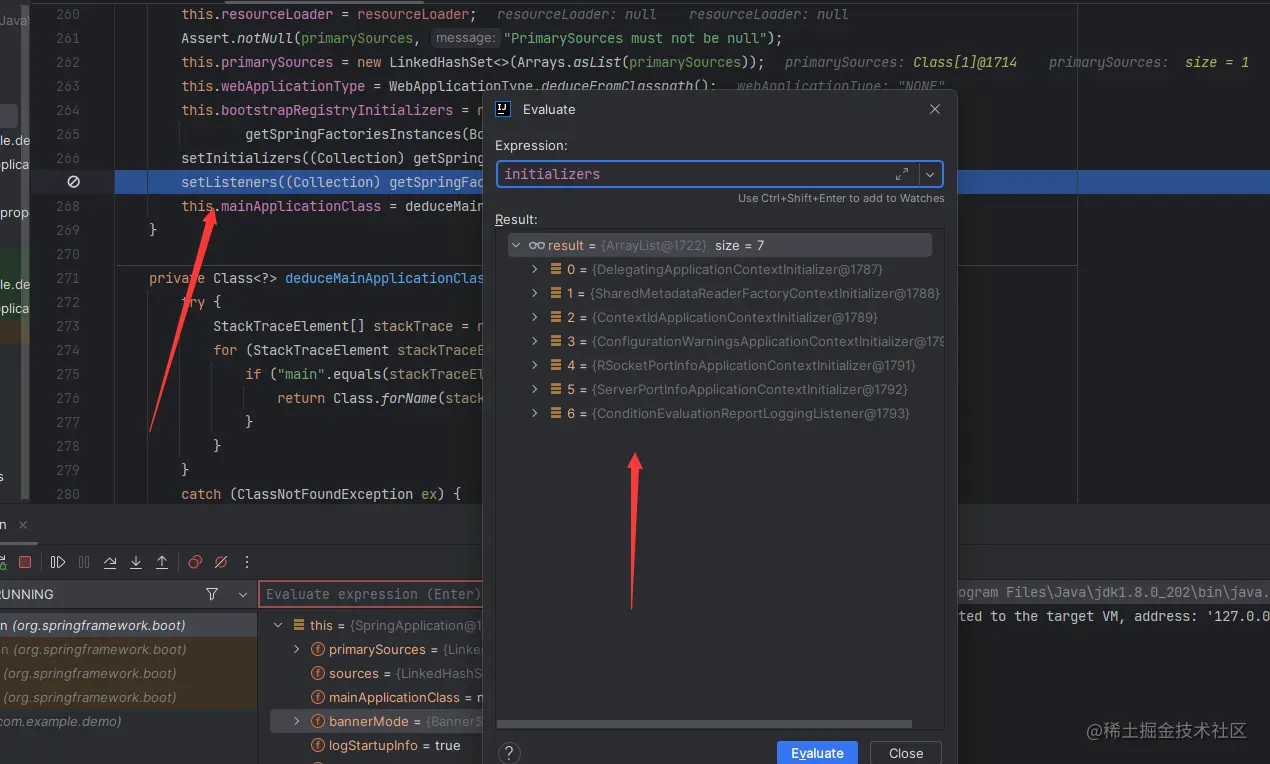
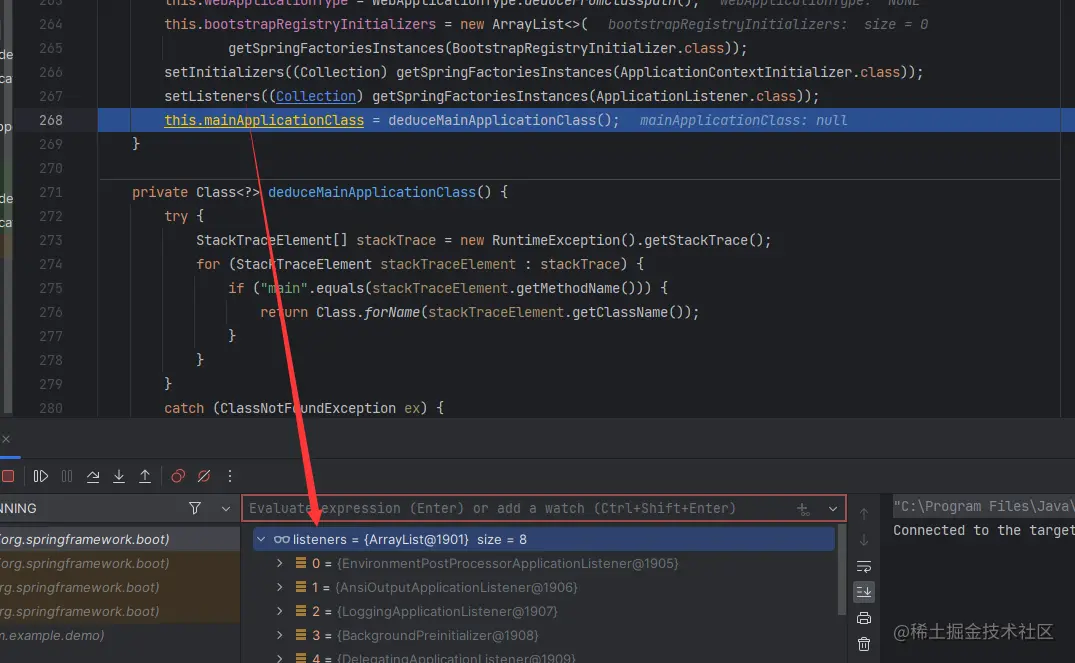
注意这两行,换言之我们只要实现这两个类就可以自定义拓展SpringBoot了!

这里和手写Starter都是对SpringBoot的拓展,有兴趣的小伙伴可以看这篇文章
拓展Initializer
再看这张图

我们需要研究一下ApplicationContextInitializer这个类:
@FunctionalInterface
public interface ApplicationContextInitializer<C extends ConfigurableApplicationContext> {  /**  * Initialize the given application context.  * @param applicationContext the application to configure  */  void initialize(C applicationContext);
}
复制代码
这样就很清晰了,我们尝试手写一个继承类:
public class DemoInitializer implements ApplicationContextInitializer {  @Override  public void initialize(ConfigurableApplicationContext applicationContext) {  System.out.println("自定义初始化器执行...");  ConfigurableEnvironment environment =  applicationContext.getEnvironment();  Map<String, Object> map = new HashMap<>(1);  map.put("name", "sccccc");  environment.getPropertySources().addLast(new  MapPropertySource("DemoInitializer", map));  System.out.println("DemoInitializer execute, and add some property");  }
}
复制代码通过SPI机制将自定义初始化器交给list集合initializers
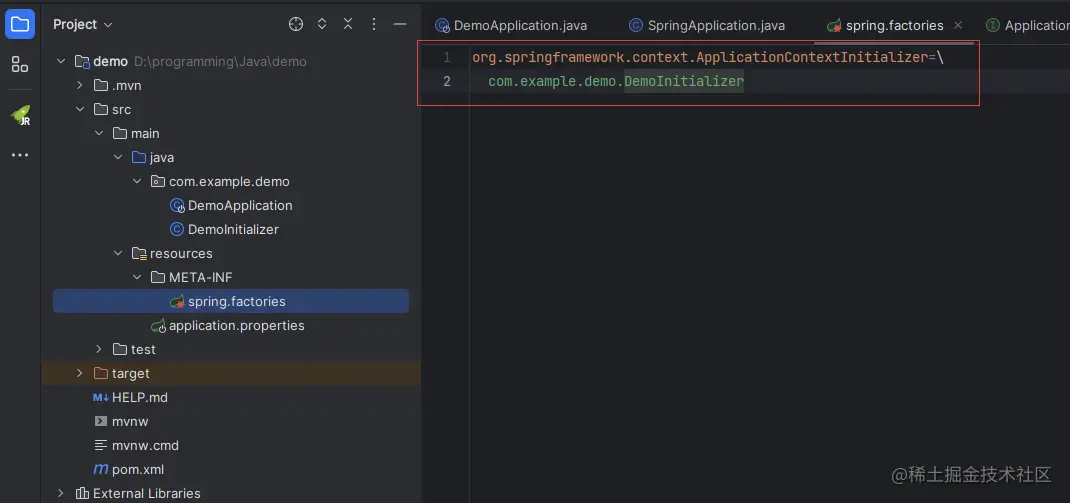
然后再debug,就会发现:
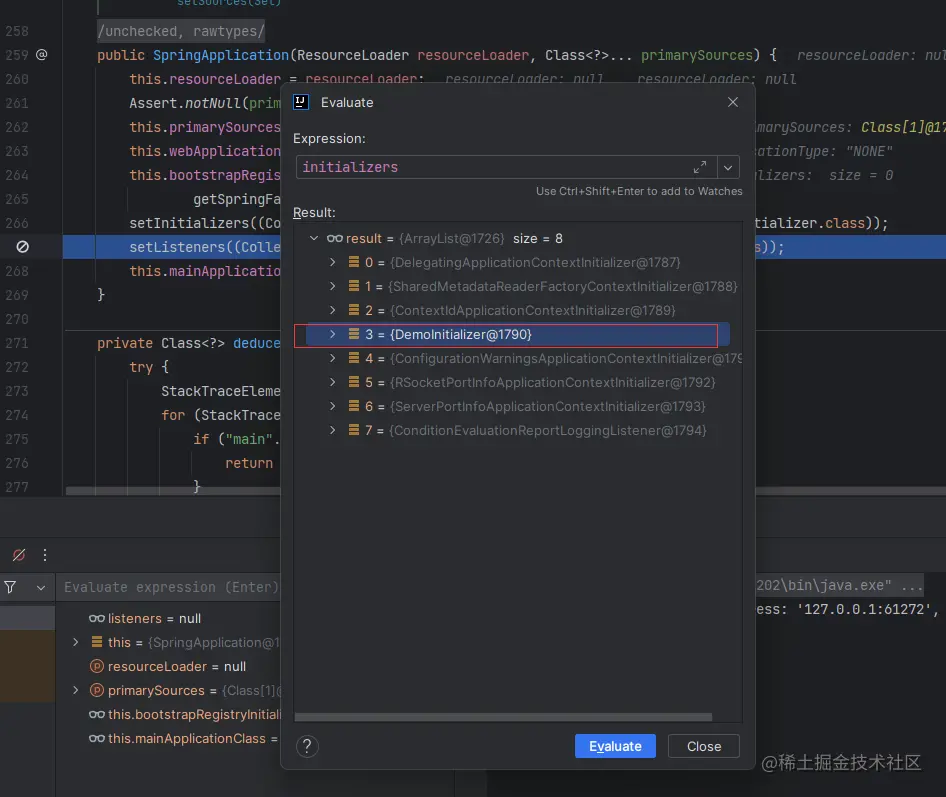
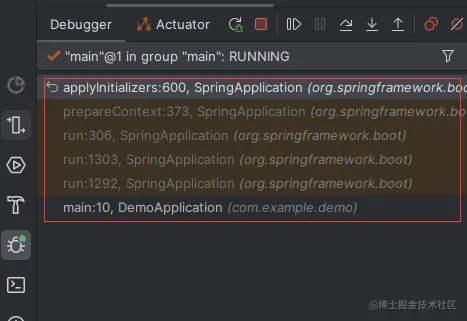
最后经过一次回调:
private void prepareContext(DefaultBootstrapContext bootstrapContext, ConfigurableApplicationContext context,  ...  applyInitializers(context);  ...// Add boot specific singleton beans 下面是beanFactory的操作
复制代码
遍历所有的初始化器,然后
/**
* Apply any {@link ApplicationContextInitializer}s to the context before it is
* refreshed.
* @param context the configured ApplicationContext (not refreshed yet)
* @see ConfigurableApplicationContext#refresh()
*/
@SuppressWarnings({ "rawtypes", "unchecked" })
protected void applyInitializers(ConfigurableApplicationContext context) {  for (ApplicationContextInitializer initializer : getInitializers()) {  Class<?> requiredType = GenericTypeResolver.resolveTypeArgument(initializer.getClass(),  ApplicationContextInitializer.class);  Assert.isInstanceOf(requiredType, context, "Unable to call initializer.");  initializer.initialize(context);  }
}
复制代码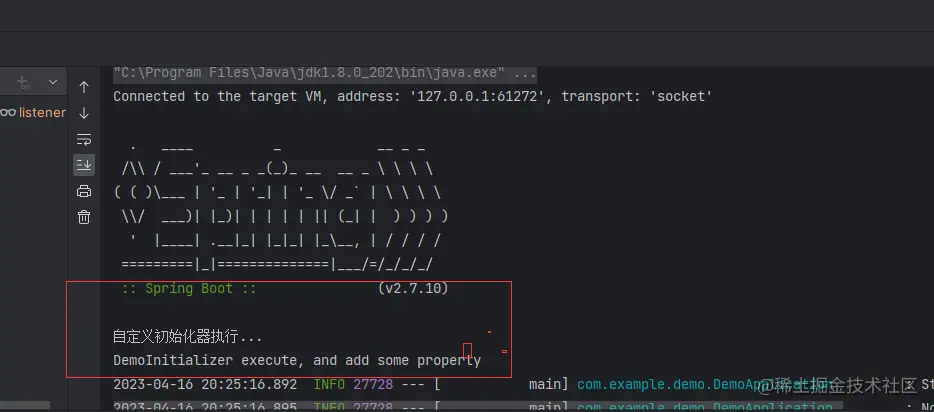
流程:
拓展监听器ApplicationListener
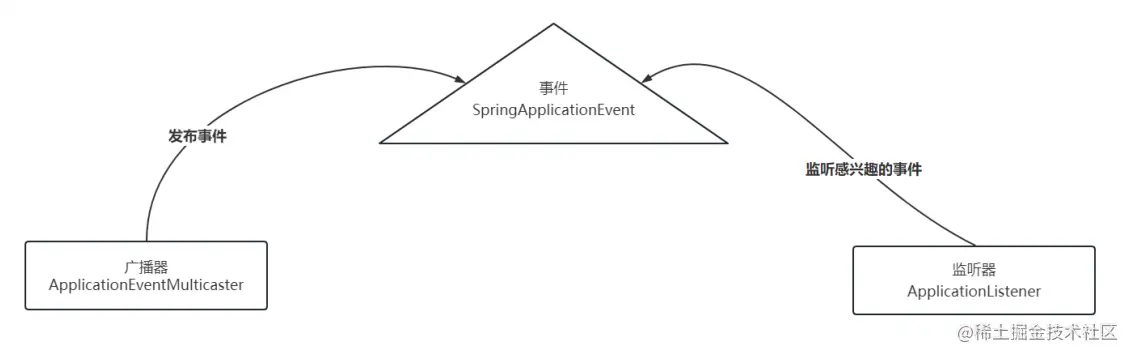
@FunctionalInterface
public interface ApplicationListener<E extends ApplicationEvent> extends EventListener {  /**  * Handle an application event.  */  void onApplicationEvent(E event);  /**  * Create a new {@code ApplicationListener} for the given payload consumer.  */  static <T> ApplicationListener<PayloadApplicationEvent<T>> forPayload(Consumer<T> consumer) {  return event -> consumer.accept(event.getPayload());  }  }
复制代码
这里和上面initializer一样,就不演示了
BeanFactory的后置处理器 & Bean的后置处理器
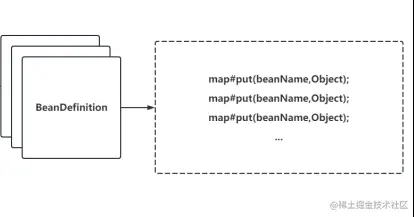
Spring Boot解析配置成BeanDefinition的操作在invokeBeanFactoryPostProcessors方法中 自定义BeanFactory的后置处理器:
@Component
public class MyBeanFactoryPostProcessor implements BeanFactoryPostProcessor {@Overridepublic void postProcessBeanFactory(ConfigurableListableBeanFactorybeanFactory) throws BeansException {Arrays.asList(beanFactory.getBeanDefinitionNames()).forEach(beanDefinitionName ->System.out.println(beanDefinitionName));System.out.println("BeanFactoryPostProcessor...");}
}
复制代码
自定义Bean的后置处理器:
@Component
public class MyBeanPostProcessor implements BeanPostProcessor {@Overridepublic Object postProcessBeforeInitialization(Object bean, String beanName)throws BeansException {if(beanName.equals("userController")){System.out.println("找到了userController: "+bean);}return null;}
}
复制代码
AOP
这个相信大家用的比较多,可以自定义切面:
@Aspect
@Component
public class LogAspect {// 切入点 Pointcut   可以对Service服务做切面
@Pointcut("execution(* com.example.service.*.*(..))")
public void mypointcut(){}// 前置通知
@Before(value = "mypointcut()")
public void before(JoinPoint joinPoint){System.out.println("[前置通知] 准备开始记录日志...");System.out.println("[前置通知] 目标类是: "+joinPoint.getTarget());System.out.println("[前置通知] 目标方法是:"+joinPoint.getSignature().getName());
}// 后置通知
@AfterReturning(value = "mypointcut()")
public void afterReturning(JoinPoint joinPoint){System.out.println("[后置通知] 记录日志完成...");System.out.println("[后置通知] 目标类是: "+joinPoint.getTarget());System.out.println("[后置通知] 目标方法是:"+joinPoint.getSignature().getName());
}/*@Around(value = "mypointcut()")
public void around(ProceedingJoinPoint joinPoint){System.out.println("[环绕通知] 日志记录前的操作...");try {joinPoint.proceed();System.out.println("[环绕通知] 日志记录后的操作...");System.out.println("[环绕通知] "+joinPoint.getTarget());System.out.println("[环绕通知] "+joinPoint.getSignature().getName());} catch (Throwable throwable) {System.out.println("[环绕通知] 发生异常的操作...");throwable.printStackTrace();}finally {...}
}
复制代码
其他的拓展点
- Banner
方法地址: printBanner(env)->bannerPrinter.print->SpringBootBanner#printBanner
可以在resource目录下建立banner.txt文件夹实现自定义Banner
- Runners
流程:

自定义:
@Component
public class JackApplicationRunner implements ApplicationRunner {@Overridepublic void run(ApplicationArguments args) throws Exception {System.out.println("JackApplicationRunner...");}
}
相关文章:
SpringBoot设计了哪些可拓展的机制?
SpringBoot核心源码 public SpringApplication(ResourceLoader resourceLoader, Class<?>... primarySources) { ...this.primarySources new LinkedHashSet(Arrays.asList(primarySources));// Servletthis.webApplicationType WebApplicationType.deduceFromClass…...

Layer组件多个iframe弹出层打开与关闭及参数传递
Layer官网地址:http://layer.layui.com/ 1、多个iframe弹出层(非嵌套) 1.打开iframe弹出层js代码 (1)示例一: content参数可传入要打开的页面,type参数传2,即可打开iframe类型的弹层…...
BearPi环境搭建及基本使用
这是一篇总结,一些坑的记录 具体教程请访问: BearPi-HM_Nano: 小熊派BearPi-HM Nano开发板基于HarmonyOS的源码 - Gitee.com 第一步:安装虚拟机 不做赘述 第二步:下载资源 这里要用到ubuntu的一些基础知识,不会的…...

算法笔记-换根DP
换根DP 一般是给定一棵不定根树,求以每个节点为根的一些信息。可以通过二次扫描: 第一次扫描,任选一点为根,在有根树上,自底向上转移第二次扫描,从上一次扫描的根开始,自顶向下计算 P3478 [P…...
LeetCode 785. Is Graph Bipartite【DFS,二分图】中等
本文属于「征服LeetCode」系列文章之一,这一系列正式开始于2021/08/12。由于LeetCode上部分题目有锁,本系列将至少持续到刷完所有无锁题之日为止;由于LeetCode还在不断地创建新题,本系列的终止日期可能是永远。在这一系列刷题文章…...

【微信小程序】-- 分包 - 独立分包 分包预下载(四十五)
💌 所属专栏:【微信小程序开发教程】 😀 作 者:我是夜阑的狗🐶 🚀 个人简介:一个正在努力学技术的CV工程师,专注基础和实战分享 ,欢迎咨询! &…...

2.3 连续性随机变量
思维导图: 学习目标: 我会按照以下步骤学习连续型随机变量: 复习概率论的基础知识,包括概率、期望、方差等概念和公式,以及离散型随机变量的概率分布函数和概率质量函数的概念和性质。 学习连续型随机变量的概念和性…...
【DES详解】(一)处理input block(64 bits)
一、DES 加密算法总览 0-1、初识置换 IP(Initial Permutation) 输入:明文(64 bits) 过程:初识置换 输出:处理后的明文permuted input(64 bits) 首先,对需要解…...

redis笔记——三种特殊的数据结构
三种特殊数据类型 geospatial(地理位置) 用于定位,附近的人,距离计算 添加元素 geoadd key 经度 纬度 描述名称,可一次添加多个元素 127.0.0.1:6379> geoadd china:city 113.28 23.12 guangzhou (integer) 1 1…...

网络安全之编码加密算法
网络安全之编码加密算法 一、ROT5/13/18/47编码转换二、MD5加密 一、ROT5/13/18/47编码转换 ROT5、ROT13、ROT18、ROT47 编码是一种简单的码元位置顺序替换暗码,属于凯撒密码的一种。此类编码具有可逆性,可以自我解密,主要用于应对快速浏览&…...

mp4视频无法播放的解决方法
mp4视频是我们日常工作生活中经常会遇到的视频格式,但如果遇到重要的mp4视频无法播放了,该怎么办呢?有mp4视频无法播放的解决方法吗?下面小编为大家整理了这个问题产生的原因以及相应的解决方法,让我们看一看。 什么情况下会导致mp4视频无法…...

搭建Mysql
登录root账号 su root #上传 mysql-advanced-5.7.17-linux-glibc2.5-x86_64.tar.gz #创建mysql的用户组/用户, data目录及其用户目录 groupadd mysql useradd -g mysql -d /home/mysql mysql mv mysql-advanced-5.7.17-linux-glibc2.5-x86_64 mysql mkdir /home/mysql/data…...

气传导和骨传导耳机哪个好?简单科普这两种蓝牙耳机
在生活中,我们经常会用到耳机,特别是在日常娱乐听歌、运动休闲、户外通勤的时候,一款舒适的耳机是必不可少的。 而最近几年,随着科技的发展,各大品牌也相继推出了各种类型的耳机,其中比较热门的就有气传导…...
浅尝GoWeb开发之Gin框架
一、框架简介 gin 目前应用最广泛的golang框架,甚至已经变成了golang的官方框架,但它主要是一个RESTFul的框架。封装比较优雅,API友好,源码注释比较明确。个人比较推荐。 beego 国内最早的golang框架,也是最全的MV…...
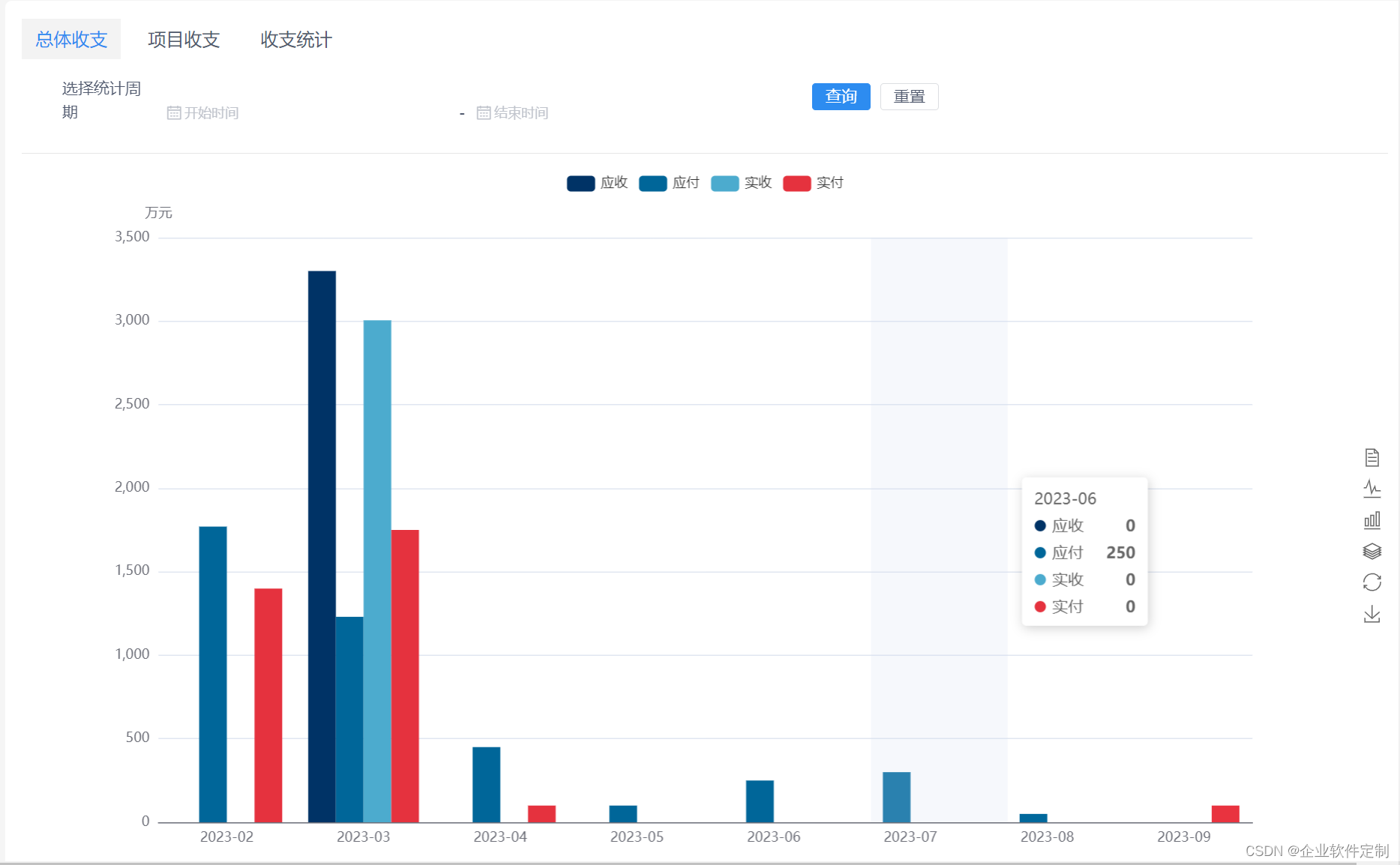
工程行业管理系统-专业的工程管理软件-提供一站式服务
Java版工程项目管理系统 Spring CloudSpring BootMybatisVueElementUI前后端分离 功能清单如下: 首页 工作台:待办工作、消息通知、预警信息,点击可进入相应的列表 项目进度图表:选择(总体或单个)项目显示1…...
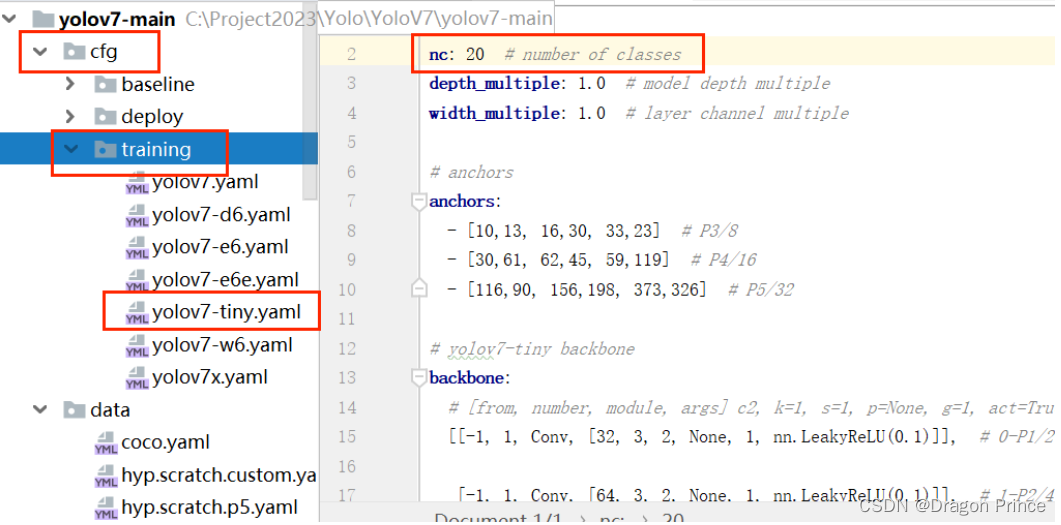
目标检测YOLO系列-YOLOV7运行步骤(推理、训练全过程)
下载源代码:点击下载 进入项目根目录并执行以下命令安装requirements.txt中的相关依赖 pip install -r requirements.txt -i https://pypi.tuna.tsinghua.edu.cn/simple官网下载权重yolov7.pt(测试使用)、yolov7-tiny.pt(训练使用…...
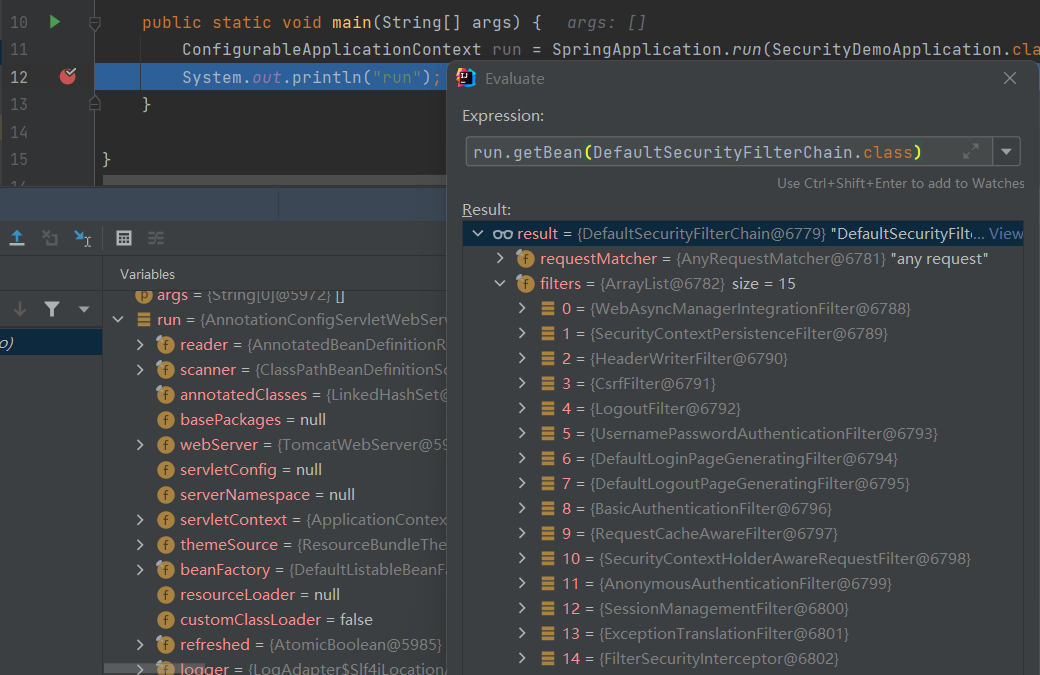
Spring Boot + Spring Security基础入门教程
Spring Security简介 Spring Security 是一个功能强大且高度可定制的身份验证和访问控制框架。Spring Security 致力于为 Java 应用程序提供身份验证和授权的能力。 Spring Security 两大重要核心功能:用户认证(Authentication)和用户授权&am…...

MySQL数据库,表的增删改查详细讲解
目录 1.CRUD 2.增加数据 2.1创建数据 2.2插入数据 2.2.1单行插入 2.2.2多行插入 3.查找数据 3.1全列查询 3.2指定列查询 3.3查询字段为表达式 3.3.1表达式不包含字段 3.3.2表达式包含一个字段 3.3.3表达式包含多个字段 3.4起别名 3.5distinct(去重) 3.6order …...
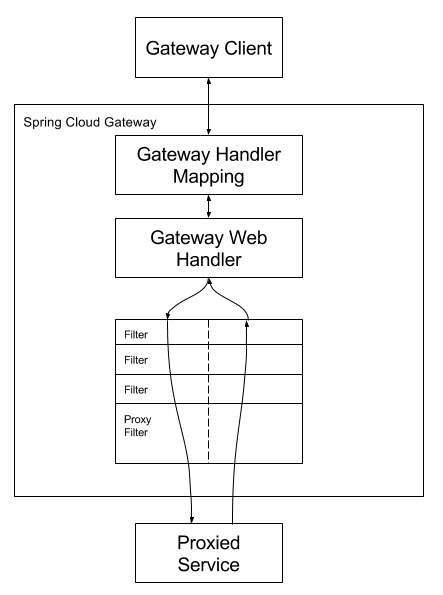
SpringCloud-Gateway实现网关
网关作为流量的入口,常用的功能包括路由转发、权限校验、限流等 Spring Cloud 是Spring官方推出的第二代网关框架,由WebFluxNettyReactor实现的响应式的API网关,它不能在传统的servlet容器工作,也不能构建war包。基于Filter的方式…...
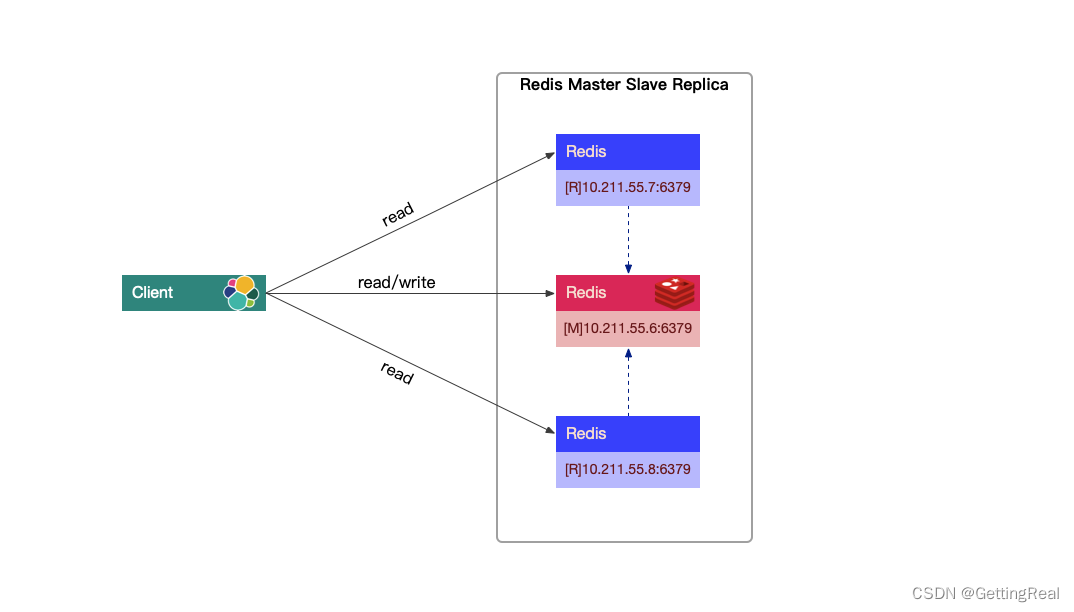
Redis 如何配置读写分离架构(主从复制)?
文章目录 Redis 如何配置读写分离架构(主从复制)?什么是 Redis 主从复制?如何配置主从复制架构?配置环境安装 Redis 步骤 通过命令行配置从节点通过配置文件配置从节点Redis 主从复制优点Redis 主从复制缺点 Redis 如何…...

Arm CADI 2.0调试接口架构与多调试器协同实践
1. CADI接口调试架构深度解析在嵌入式系统开发领域,调试接口的设计质量直接影响着开发效率。CADI(Component Architecture Debug Interface)作为Arm推出的标准化调试接口,其2.0版本通过创新的架构设计解决了传统调试方案中的诸多痛…...

彻底释放Mac磁盘空间:Pearcleaner如何智能清理应用残留文件
彻底释放Mac磁盘空间:Pearcleaner如何智能清理应用残留文件 【免费下载链接】Pearcleaner A free, source-available and fair-code licensed mac app cleaner 项目地址: https://gitcode.com/gh_mirrors/pe/Pearcleaner 你是否曾将应用拖入废纸篓后…...

苹果A17芯片与台积电3nm工艺:技术解析与行业影响
1. 从3nm工艺说起:为什么A17芯片的制造选择如此关键每年秋季的苹果新品发布会,除了新iPhone的设计,最牵动科技圈神经的莫过于那颗全新的A系列仿生芯片。今年,关于iPhone 15系列将搭载A17芯片,并由台积电独家采用其第二…...

AI 术语通俗词典:人工神经元
人工神经元是深度学习、神经网络和人工智能中非常基础的一个术语。它用来描述神经网络中最基本的数学计算单元。换句话说,人工神经元是在回答:模型怎样把多个输入信号加权合并,并转换成一个新的输出信号。如果说神经网络是一套由许多层组成的…...
)
一文读懂大模型Agent工作流:小白也能学会的AI新玩法(收藏版)
本文深入解析了AI Agent和Agent工作流的核心概念,阐述了AI代理如何通过工作流实现复杂任务的自动化。文章详细介绍了AI Agent的组成部分,包括推理、工具和记忆,并解释了Agent工作流的组成要素和不同模式。此外,还探讨了Agent工作流…...

卫星通信安全认证技术解析与应用指南
1. 卫星通信安全认证技术概述 卫星通信作为现代信息基础设施的重要组成部分,其安全性直接关系到国家安全和经济发展。在近地轨道卫星数量激增、天地一体化网络快速发展的背景下,传统地面网络的安全认证方案已无法满足卫星通信的特殊需求。卫星信道具有长…...

从零构建高性能技术博客:SSG选型、自动化部署与SEO优化实战
1. 项目概述:一个技术博客的诞生与演进“wangtunan/blog”,这看起来只是一个简单的GitHub仓库名,背后却是一个技术人持续输出、构建个人知识体系的完整实践。它不仅仅是一个存放Markdown文件的代码库,更是一个集成了现代前端技术栈…...

从纹波和EMI出发:实战分析DC-DC降压电路中PWM与PFM的取舍与优化技巧
从纹波和EMI出发:实战分析DC-DC降压电路中PWM与PFM的取舍与优化技巧 在射频模块或高精度ADC供电设计中,电源的纯净度直接决定系统性能上限。当输出电压纹波超出ADC的LSB范围,或EMI噪声耦合到敏感信号链时,工程师往往需要重新审视D…...

Wand-Enhancer终极指南:免费解锁WeMod专业功能的完整解决方案
Wand-Enhancer终极指南:免费解锁WeMod专业功能的完整解决方案 【免费下载链接】Wand-Enhancer Advanced UX and interoperability extension for Wand (WeMod) app 项目地址: https://gitcode.com/gh_mirrors/we/Wand-Enhancer 还在为WeMod专业版的高昂订阅费…...

NVIDIA Profile Inspector完整指南:200+隐藏设置解锁显卡极致性能
NVIDIA Profile Inspector完整指南:200隐藏设置解锁显卡极致性能 【免费下载链接】nvidiaProfileInspector 项目地址: https://gitcode.com/gh_mirrors/nv/nvidiaProfileInspector 还在为游戏画面撕裂、输入延迟过高而烦恼吗?想要彻底掌控NVIDIA…...