
整合K8s+SpringBoot+gRpc
本文使用K8s当做服务注册与发现、配置管理,使用gRpc用做服务间的远程通讯
一、先准备K8s
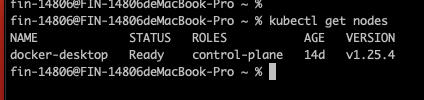
我在本地有个K8s单机
二、准备service-provider
pom
<?xml version="1.0" encoding="UTF-8"?>
<project xmlns="http://maven.apache.org/POM/4.0.0" xmlns:xsi="http://www.w3.org/2001/XMLSchema-instance"xsi:schemaLocation="http://maven.apache.org/POM/4.0.0 https://maven.apache.org/xsd/maven-4.0.0.xsd"><modelVersion>4.0.0</modelVersion><parent><groupId>org.springframework.boot</groupId><artifactId>spring-boot-starter-parent</artifactId><version>2.5.14</version><relativePath/> <!-- lookup parent from repository --></parent><groupId>com.example</groupId><artifactId>service-provider</artifactId><version>0.0.1-SNAPSHOT</version><name>service-provider</name><description>service-provider</description><properties><java.version>11</java.version><!--        <os.detected.classifier>osx-aarch_64</os.detected.classifier>--><os.detected.classifier>osx-x86_64</os.detected.classifier></properties><dependencyManagement><dependencies><dependency><groupId>org.springframework.boot</groupId><artifactId>spring-boot-dependencies</artifactId><type>pom</type><scope>import</scope><version>2.5.14</version></dependency><dependency><groupId>org.springframework.cloud</groupId><artifactId>spring-cloud-dependencies</artifactId><version>2020.0.6</version><type>pom</type><scope>import</scope></dependency><dependency><groupId>org.springframework.cloud</groupId><artifactId>spring-cloud-kubernetes-dependencies</artifactId><version>1.1.10.RELEASE</version><type>pom</type><scope>import</scope></dependency></dependencies></dependencyManagement><dependencies><dependency><groupId>org.springframework.boot</groupId><artifactId>spring-boot-starter-web</artifactId></dependency><dependency><groupId>org.springframework.boot</groupId><artifactId>spring-boot-starter-actuator</artifactId></dependency><dependency><groupId>org.springframework.cloud</groupId><artifactId>spring-cloud-starter-kubernetes-client-all</artifactId></dependency><!-- gRpc --><dependency><groupId>net.devh</groupId><artifactId>grpc-spring-boot-starter</artifactId><version>2.13.1.RELEASE</version></dependency><dependency><groupId>io.grpc</groupId><artifactId>grpc-protobuf</artifactId><version>1.52.1</version></dependency><dependency><groupId>org.projectlombok</groupId><artifactId>lombok</artifactId><optional>true</optional><version>1.18.24</version></dependency></dependencies><build><extensions><extension><groupId>kr.motd.maven</groupId><artifactId>os-maven-plugin</artifactId><version>1.7.1</version></extension></extensions><plugins><plugin><groupId>org.springframework.boot</groupId><artifactId>spring-boot-maven-plugin</artifactId><configuration><classifier>exec</classifier></configuration></plugin><plugin><groupId>org.xolstice.maven.plugins</groupId><artifactId>protobuf-maven-plugin</artifactId><version>0.6.1</version><configuration><protocArtifact>com.google.protobuf:protoc:3.21.7:exe:${os.detected.classifier}</protocArtifact><pluginId>grpc-java</pluginId><pluginArtifact>io.grpc:protoc-gen-grpc-java:1.52.1:exe:${os.detected.classifier}</pluginArtifact></configuration><executions><execution><goals><goal>compile</goal><goal>compile-custom</goal></goals></execution></executions></plugin></plugins></build></project>
配置文件 application.yml
grpc:server:port: 9090
server:port: 30000
spring:application:name: service-providercloud:kubernetes:reload:enabled: truemode: pollingperiod: 5000logging:level:org.springframework.cloud.loadbalancer: debug
主类 ServiceProviderApplication
package com.example.service.provider;import org.springframework.boot.SpringApplication;
import org.springframework.boot.autoconfigure.SpringBootApplication;
import org.springframework.cloud.client.discovery.EnableDiscoveryClient;@SpringBootApplication
@EnableDiscoveryClient
public class ServiceProviderApplication {public static void main(String[] args) {SpringApplication.run(ServiceProviderApplication.class, args);}
}
在 src/main/proto文件夹下新增PB文件 HelloFacade.proto
syntax = "proto3";option java_multiple_files = true;
option java_package = "com.example.service.provider.api";
option java_outer_classname = "HelloServiceProto";service HelloService {rpc SayHello (SayHelloRequest) returns (SayHelloResponse) {}
}message SayHelloRequest {string name = 1;
}message SayHelloResponse {int32 code = 1;string message = 2;bool success = 3;SayHelloData data = 4;
}message SayHelloData {string name = 1;string content = 2;
}
接口实现类
package com.example.service.provider.facade;import com.example.service.provider.api.HelloServiceGrpc;
import com.example.service.provider.api.SayHelloData;
import com.example.service.provider.api.SayHelloRequest;
import com.example.service.provider.api.SayHelloResponse;
import lombok.extern.slf4j.Slf4j;
import net.devh.boot.grpc.server.service.GrpcService;@Slf4j
@GrpcService
public class HelloServiceImpl extends HelloServiceGrpc.HelloServiceImplBase {@Overridepublic void sayHello(SayHelloRequest request, io.grpc.stub.StreamObserver<SayHelloResponse> responseObserver) {log.info("接收consumer的say hello grpc 请求");SayHelloData helloData = SayHelloData.newBuilder().setName("maple").setContent("say hello").build();SayHelloResponse.Builder builder = SayHelloResponse.newBuilder().setCode(0).setMessage("success").setSuccess(true).setData(helloData);responseObserver.onNext(builder.build());responseObserver.onCompleted();}
}
Dockerfile
FROM openjdk:11-jdk-slim
ENV jarName="service-provider.jar"
ADD service-provider-0.0.1-SNAPSHOT-exec.jar $jarName
ENTRYPOINT java -Duser.timezone=GMT+8 -jar  $jarName
K8s声明yaml文件 service-provider-deploy.yaml
apiVersion: v1
kind: Namespace
metadata:name: service-k8s-demolabels:name: service-k8s-demo---apiVersion: v1
kind: ServiceAccount
metadata:name: service-k8s-demonamespace: service-k8s-demo---kind: ClusterRole
apiVersion: rbac.authorization.k8s.io/v1
metadata:namespace: service-k8s-demoname: service-k8s-demo
rules:- apiGroups:- ""resources:- services- configmaps- endpoints- nodes- pods- secrets- namespacesverbs:- get- list- watch---apiVersion: rbac.authorization.k8s.io/v1
kind: ClusterRoleBinding
metadata:name: service-k8s-demonamespace: service-k8s-demo
subjects:
- kind: ServiceAccountname: service-k8s-demonamespace: service-k8s-demo
roleRef:kind: ClusterRolename: service-k8s-demoapiGroup: rbac.authorization.k8s.io---apiVersion: apps/v1
kind: Deployment
metadata:name: service-providernamespace: service-k8s-demolabels:app: service-provider
spec:replicas: 3template:metadata:name: service-providerlabels:app: service-providerspec:containers:- name: service-providerimage: service-provider:1.0ports:- name: httpprotocol: TCPcontainerPort: 30000- name: grpcprotocol: TCPcontainerPort: 9090imagePullPolicy: IfNotPresentserviceAccountName: service-k8s-demorestartPolicy: Alwaysselector:matchLabels:app: service-provider---apiVersion: v1
kind: Service
metadata:name: service-providernamespace: service-k8s-demo
spec:selector:app: service-providerports:- port: 80targetPort: 30000name: http- port: 9090targetPort: 9090name: grpcclusterIP: None
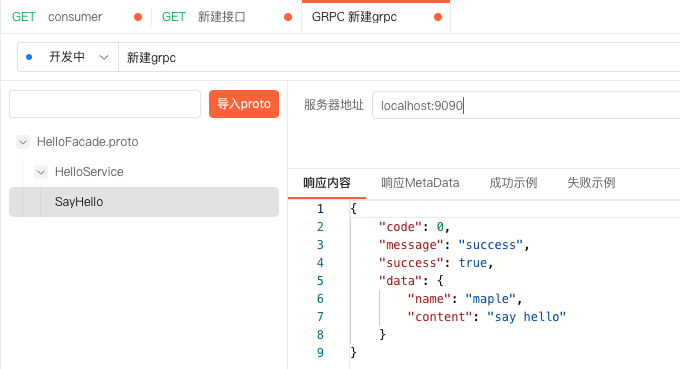
本地启动测试
三、准备service-consumer
pom
<?xml version="1.0" encoding="UTF-8"?>
<project xmlns="http://maven.apache.org/POM/4.0.0" xmlns:xsi="http://www.w3.org/2001/XMLSchema-instance"xsi:schemaLocation="http://maven.apache.org/POM/4.0.0 https://maven.apache.org/xsd/maven-4.0.0.xsd"><modelVersion>4.0.0</modelVersion><parent><groupId>org.springframework.boot</groupId><artifactId>spring-boot-starter-parent</artifactId><version>2.5.14</version><relativePath/> <!-- lookup parent from repository --></parent><groupId>com.example</groupId><artifactId>service-consumer</artifactId><version>0.0.1-SNAPSHOT</version><name>service-consumer</name><description>service-consumer</description><properties><java.version>11</java.version></properties><dependencyManagement><dependencies><dependency><groupId>org.springframework.boot</groupId><artifactId>spring-boot-dependencies</artifactId><type>pom</type><scope>import</scope><version>2.5.14</version></dependency><dependency><groupId>org.springframework.cloud</groupId><artifactId>spring-cloud-dependencies</artifactId><version>2020.0.6</version><type>pom</type><scope>import</scope></dependency><dependency><groupId>org.springframework.cloud</groupId><artifactId>spring-cloud-kubernetes-dependencies</artifactId><version>1.1.10.RELEASE</version><type>pom</type><scope>import</scope></dependency></dependencies></dependencyManagement><dependencies><dependency><groupId>com.example</groupId><artifactId>service-provider</artifactId><version>0.0.1-SNAPSHOT</version></dependency><dependency><groupId>org.springframework.boot</groupId><artifactId>spring-boot-starter-web</artifactId></dependency><dependency><groupId>org.springframework.boot</groupId><artifactId>spring-boot-starter-actuator</artifactId></dependency><dependency><groupId>org.springframework.cloud</groupId><artifactId>spring-cloud-starter-kubernetes-client-all</artifactId></dependency><dependency><groupId>org.projectlombok</groupId><artifactId>lombok</artifactId><optional>true</optional><version>1.18.24</version></dependency><!-- gRpc --><dependency><groupId>net.devh</groupId><artifactId>grpc-spring-boot-starter</artifactId><version>2.13.1.RELEASE</version></dependency><dependency><groupId>io.grpc</groupId><artifactId>grpc-protobuf</artifactId><version>1.52.1</version></dependency></dependencies><build><extensions><extension><groupId>kr.motd.maven</groupId><artifactId>os-maven-plugin</artifactId><version>1.7.1</version></extension></extensions><plugins><plugin><groupId>org.springframework.boot</groupId><artifactId>spring-boot-maven-plugin</artifactId><configuration><classifier>exec</classifier></configuration></plugin><plugin><groupId>org.xolstice.maven.plugins</groupId><artifactId>protobuf-maven-plugin</artifactId><version>0.6.1</version><configuration><protocArtifact>com.google.protobuf:protoc:3.21.7:exe:${os.detected.classifier}</protocArtifact><pluginId>grpc-java</pluginId><pluginArtifact>io.grpc:protoc-gen-grpc-java:1.52.1:exe:${os.detected.classifier}</pluginArtifact></configuration><executions><execution><goals><goal>compile</goal><goal>compile-custom</goal></goals></execution></executions></plugin></plugins></build>
</project>
配置文件 application.yml
grpc:server:port: 9091client:service-provider:negotiation-type: plaintextenable-keep-alive: truekeep-alive-without-calls: trueaddress: 'static://service-provider:9090'server:port: 30001
spring:application:name: service-consumercloud:kubernetes:reload:enabled: truemode: pollingperiod: 5000logging:level:org.springframework.cloud.loadbalancer: debug
主类 ServiceConsumerApplication
package com.example.service.consumer;import lombok.RequiredArgsConstructor;
import lombok.extern.slf4j.Slf4j;
import org.springframework.boot.SpringApplication;
import org.springframework.boot.autoconfigure.SpringBootApplication;
import org.springframework.cloud.client.discovery.DiscoveryClient;
import org.springframework.cloud.client.discovery.EnableDiscoveryClient;
import org.springframework.web.bind.annotation.GetMapping;
import org.springframework.web.bind.annotation.RestController;import java.util.List;@Slf4j
@RestController
@EnableDiscoveryClient
@SpringBootApplication
@RequiredArgsConstructor
public class ServiceConsumerApplication {private final DiscoveryClient discoveryClient;private final ProviderServiceGrpcClient providerServiceGrpcClient;public static void main(String[] args) {SpringApplication.run(ServiceConsumerApplication.class, args);}@GetMapping("/grpc/hello")public String sayHello() {log.info("消费服务:service-consumer grpc 调用 service-provider");return providerServiceGrpcClient.sayHello();}@GetMapping("/consumers/services")public List<String> findServices() {log.info("当前注册中心下所有服务");List<String> services = discoveryClient.getServices();services.stream().map(discoveryClient::getInstances).forEach(v ->v.forEach(s -> System.out.printf("%s:%s  uri:%s%n", s.getHost(), s.getPort(), s.getUri())));return services;}
}
gRpc调用Provider ProviderServiceGrpcClient
package com.example.service.consumer;import com.example.service.provider.api.HelloServiceGrpc;
import com.example.service.provider.api.SayHelloRequest;
import com.example.service.provider.api.SayHelloResponse;
import net.devh.boot.grpc.client.inject.GrpcClient;
import org.springframework.stereotype.Service;@Service
public class ProviderServiceGrpcClient {@GrpcClient("service-provider")private HelloServiceGrpc.HelloServiceBlockingStub helloServiceBlockingStub;public String sayHello() {SayHelloRequest request = SayHelloRequest.newBuilder().setName("maple123").build();SayHelloResponse sayHelloResponse = helloServiceBlockingStub.sayHello(request);return sayHelloResponse.toString();}
}
Dockerfile
FROM openjdk:11-jdk-slim
ENV jarName="service-consumer.jar"
ADD service-consumer-0.0.1-SNAPSHOT-exec.jar $jarName
ENTRYPOINT java -Duser.timezone=GMT+8 -jar  $jarName
K8s声明yaml文件 service-consumer-deploy.yaml
apiVersion: v1
kind: Namespace
metadata:name: service-k8s-demolabels:name: service-k8s-demo---apiVersion: v1
kind: ServiceAccount
metadata:name: service-k8s-demonamespace: service-k8s-demo---kind: ClusterRole
apiVersion: rbac.authorization.k8s.io/v1
metadata:namespace: service-k8s-demoname: service-k8s-demo
rules:- apiGroups:- ""resources:- services- configmaps- endpoints- nodes- pods- secrets- namespacesverbs:- get- list- watch---apiVersion: rbac.authorization.k8s.io/v1
kind: ClusterRoleBinding
metadata:name: service-k8s-demonamespace: service-k8s-demo
subjects:- kind: ServiceAccountname: service-k8s-demonamespace: service-k8s-demo
roleRef:kind: ClusterRolename: service-k8s-demoapiGroup: rbac.authorization.k8s.io---apiVersion: apps/v1
kind: Deployment
metadata:name: service-consumernamespace: service-k8s-demolabels:app: service-consumer
spec:replicas: 1template:metadata:name: service-consumerlabels:app: service-consumerspec:containers:- name: service-consumerimage: service-consumer:1.0ports:- name: httpprotocol: TCPcontainerPort: 30001- name: grpcprotocol: TCPcontainerPort: 9091imagePullPolicy: IfNotPresentserviceAccountName: service-k8s-demorestartPolicy: Alwaysselector:matchLabels:app: service-consumer---apiVersion: v1
kind: Service
metadata:name: service-consumernamespace: service-k8s-demo
spec:selector:app: service-consumerports:- port: 80targetPort: 30001name: http- port: 9091targetPort: 9091name: grpctype: NodePort
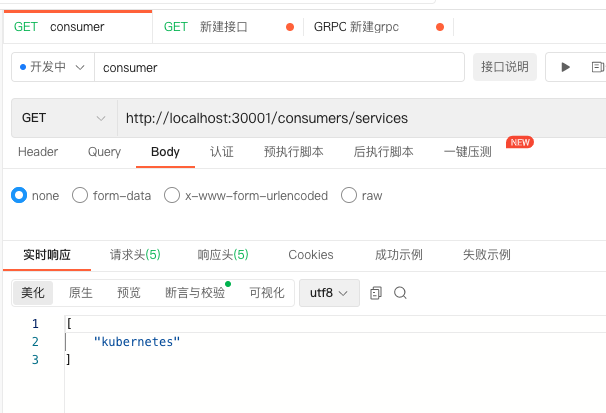
本地启动测试
四、打镜像
docker build -t service-provider:1.0 .
docker build -t service-consumer:1.0 .
五、执行K8s yaml文件 创建命名空间、账号、角色、部署应用、暴露端口等
kubetl apply -f service-provider-deploy.yaml
kubetl apply -f service-consumer-deploy.yaml
六、查看与测试
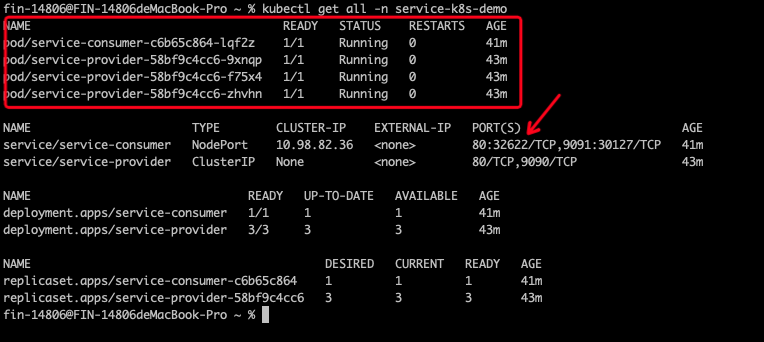
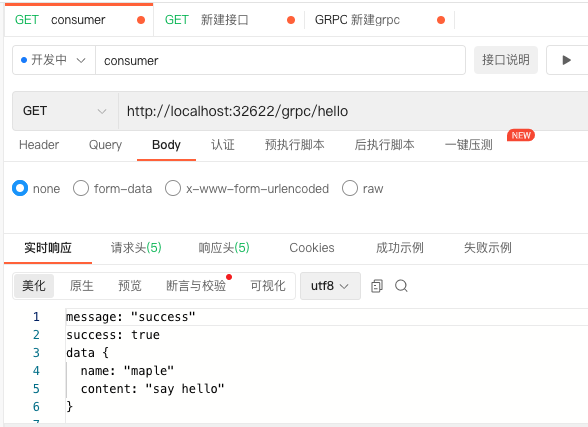
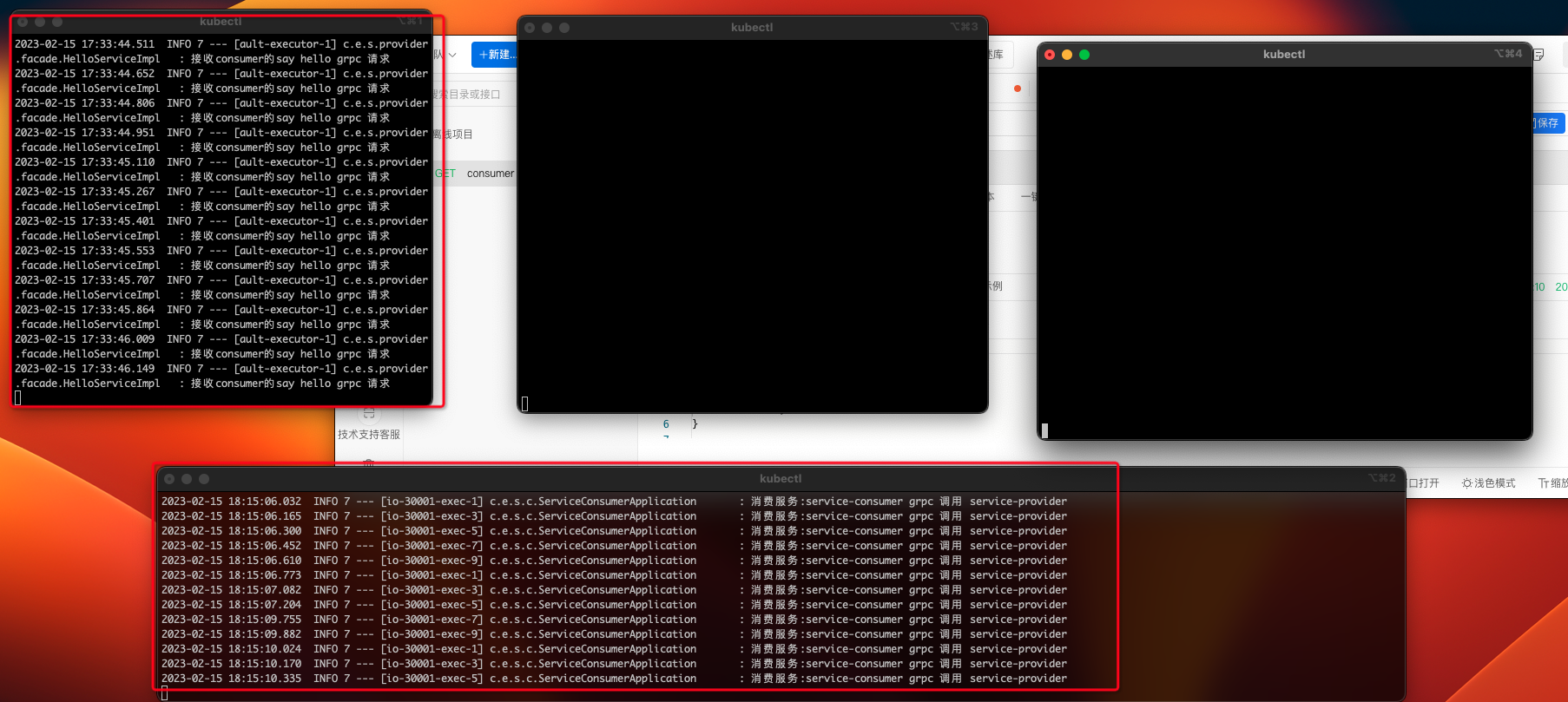
gRpc正常访问,但是发现一个问题,下面的图片,上面三个是Provider,发现负载均衡失效了,请求全都打在了一个Provider里,搜了下发现和 gRpc基于HTTP2.0 多路复用 有关,之后再处理吧。
相关文章:
整合K8s+SpringBoot+gRpc
本文使用K8s当做服务注册与发现、配置管理,使用gRpc用做服务间的远程通讯一、先准备K8s我在本地有个K8s单机二、准备service-providerpom<?xml version"1.0" encoding"UTF-8"?> <project xmlns"http://maven.apache.org/POM/4.…...

ROS 教程:使用 Moveit C++ 接口进行拾取和放置任务
文章目录 简介Moveit C++ 接口Gazebo 取放世界初始化界面拾取流程1.移动到原位2.将TCP放在蓝框上方3.打开夹具4. 将 TCP 移近物体5.关闭夹具6. 将 TCP 移至板上方7./8. 降低 TCP 并打开夹具使用 Moveit 避免碰撞将碰撞对象添加到 Moveit 规划组结论参考简介 本教程展示了如何使…...

seo细分和切入点
seo细分和切入点本文重点介绍做SEO网站细分和切入点的方法:当我们的行业和关键词竞争性比较大的时候,我们可以考虑对行业或者产品做细分,从而找到切入点。可以按照以下三个方面进行细分。1、按城市细分例如:A:餐饮培训…...

PyQt5数据库开发1 4.3 QSqlTableModel 之 Qt项目的创建
目录 一、新建Qt项目 1. 编辑资源文件 2. 添加前缀 3. 新建放资源文件的目录 4. 添加图标文件 二、Action 1. 新建打开数据库Action 2. 添加其他Action 三、工具栏 1. 添加工具栏 2. 拖动actOpenDB到工具栏 3. 设置工具栏属性 4. 添加分隔符 5. 添加其他工具 6.…...
【大数据】第三章:详解HDFS(送尚硅谷笔记和源码)
什么是HDFS HDFS是(Hadoop Distributed File System)的缩写,也即Hadoop分布式文件系统。它通过目录树定位在分布式场景下 在不同服务器主机上的文件。它适用于一次写入,多次读出的场景。 HDFS的优缺点 优点 1,高容…...

27岁想转行IT,还来得及吗?
来不来得及不还是看你自身的意愿和条件,这个问题要问你自己吧! 每个人的能力、看法都不同。面对类似的问题,很多人会把侧重点放在IT上,或者27岁上面。那么我们试着换一个方式来问呢:什么时候适合转行,有哪些…...

Web前端CSS清除浮动的5种方法
在移动端清除浮动布局,常用的5种方法: 使用清除浮动的类;使用overflow属性;使用 flex 布局;使用grid 布局;使用 table 布局。 根据实际情况选择适合的方法,需要注意兼容性和语义性问题。在移动…...

Java:博客系统,实现加盐加密,分页,草稿箱,定时发布
文章目录1. 项目概述2. 准备工作2.1 数据库表格代码2.2 前端代码2.3 配置文件3. 准备项目结构3.1 拷贝前端模板3.2 定义实体类3.3 定义mapper接口和 xml 文件3.4 创建其他包4. 统一数据返回4.1 Result 类4.2 统一数据格式5. 注册5.1 逻辑5.2 验证数据规范性5.3 实现注册5.4 前端…...

JuiceFS 在火山引擎边缘计算的应用实践
火山引擎边缘云是以云计算基础技术和边缘异构算力结合网络为基础,构建在边缘大规模基础设施之上的云计算服务,形成以边缘位置的计算、网络、存储、安全、智能为核心能力的新一代分布式云计算解决方案。边缘存储主要面向适配边缘计算的典型业务场景&#…...

实验06 二叉树遍历及应用2022
A. 【程序填空】二叉树三种遍历题目描述给定一颗二叉树的特定先序遍历结果,空树用字符‘0’表示,例如AB0C00D00表示如下图请完成以下程序填空,建立该二叉树的二叉链式存储结构,并输出该二叉树的先序遍历、中序遍历和后序遍历结果输…...
基于蜣螂算法改进的LSTM分类算法-附代码
基于蜣螂算法改进的LSTM分类算法 文章目录基于蜣螂算法改进的LSTM分类算法1.数据集2.LSTM模型3.基于蜣螂算法优化的RF4.测试结果5.Matlab代码摘要:为了提高LSTM数据的分类预测准确率,对LSTM中的参数利用蜣螂搜索算法进行优化。1.数据集 数据的来源是 UC…...

如何正确应用GNU GPLv3 和 LGPLv3 协议
文章目录前言GNU GPLv3.0Permissions(许可)Conditions(条件)Limitations(限制)GNU LGPLv3.0应用GPLv3.0应用LGPLv3.0建议的内容:添加文件头声明附录GNU GPLv3.0原文GNU LGPLv3.0 原文前言 对于了解开源的朋友们,GNU GPL系列协议可谓是老朋友了。原来我基…...
)
Python局部函数及用法(包含nonlocal关键字)
Python 函数内部可以定义变量,这样就产生了局部变量,可能有人会问,Python 函数内部能定义函数吗?答案是肯定的。Python 支持在函数内部定义函数,此类函数又称为局部函数。 那么,局部函数有哪些特征&#x…...

关于BMS的介绍及应用领域
电池管理系统(Battery Management System,BMS)是一种集成电路系统,它用于监测和控制电池系统状态,以确保电池的正常运行和安全使用。BMS的应用涵盖了电动汽车、储能系统、无人机、电动工具等各个领域,可以提…...

2月datawhale组队学习:大数据
文章目录一、大数据概述二、 Hadoop2.1 Hadoop概述2.2 su:Authentication failure2.3 使用sudo命令报错xxx is not in the sudoers file. This incident will be reported.2.4 创建用户datawhale,安装java8:2.5 安装单机版Hadoop2.5.1 安装Hadoop2.5.2 修…...

在Spring框架中创建Bean实例的几种方法
我们希望Spring框架帮忙管理Bean实例,以便得到框架所带来的种种功能,例如依赖注入等。将一个类纳入Spring容器管理的方式有几种,它们可以解决在不同场景下创建实例的需求。 XML配置文件声明 <?xml version"1.0" encoding"…...
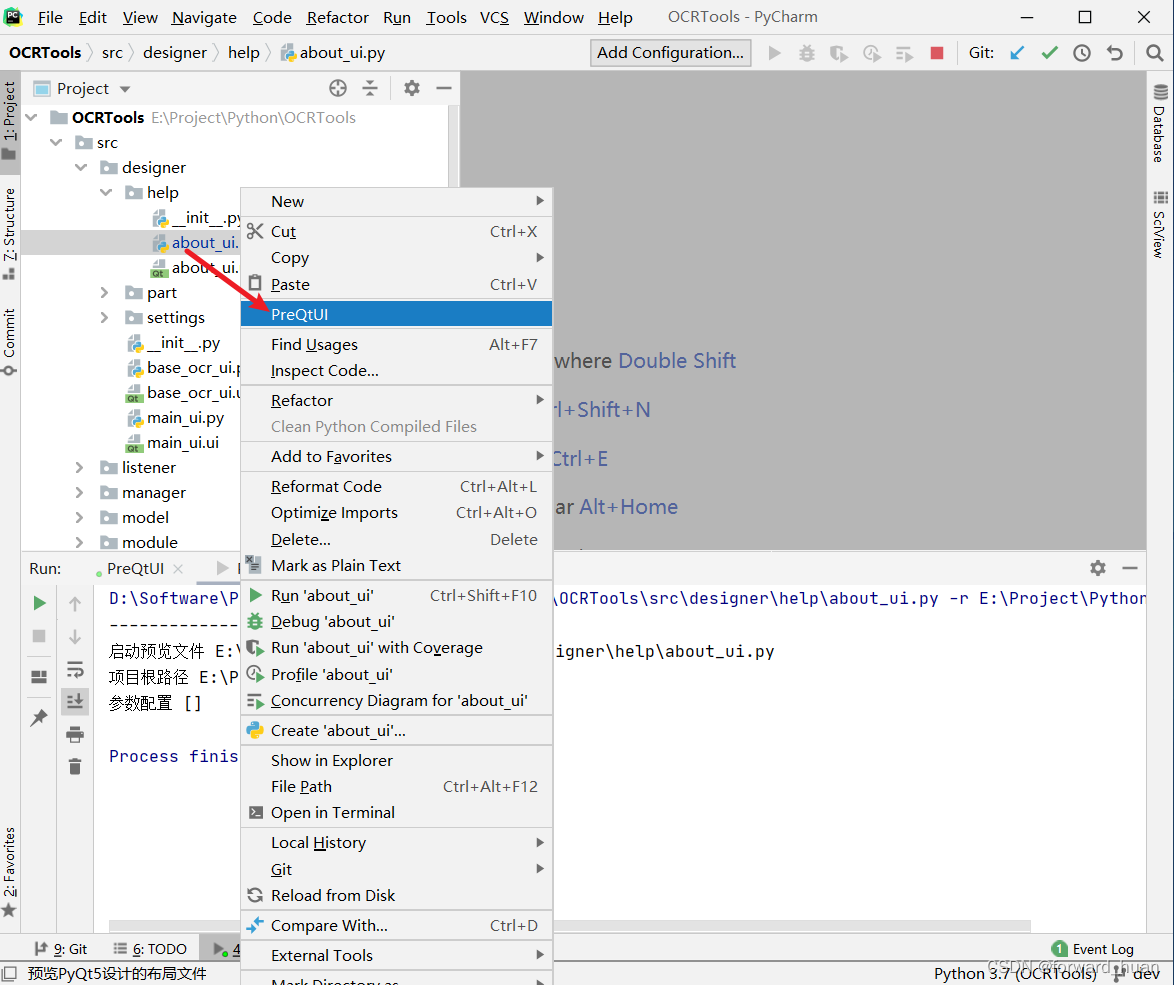
PyQt5 界面预览工具
简介 一款为了预览PyQt5设计的UI界面而开发的工具,使用时需要结合PyCharm同时使用。 下载 PyQt5界面预览工具 参数说明 使用配置 启动PyCharm,找到File -> Settings,打开 找到Tools -> External Tools点击打开,在新界面…...

day44【代码随想录】动态规划之零钱兑换II、组合总和 Ⅳ、零钱兑换
文章目录前言一、零钱兑换II(力扣518)二、组合总和 Ⅳ(力扣377)三、零钱兑换(力扣322)总结前言 1、零钱兑换II 2、组合总和 Ⅳ 3、零钱兑换 一、零钱兑换II(力扣518) 给你一个整数…...
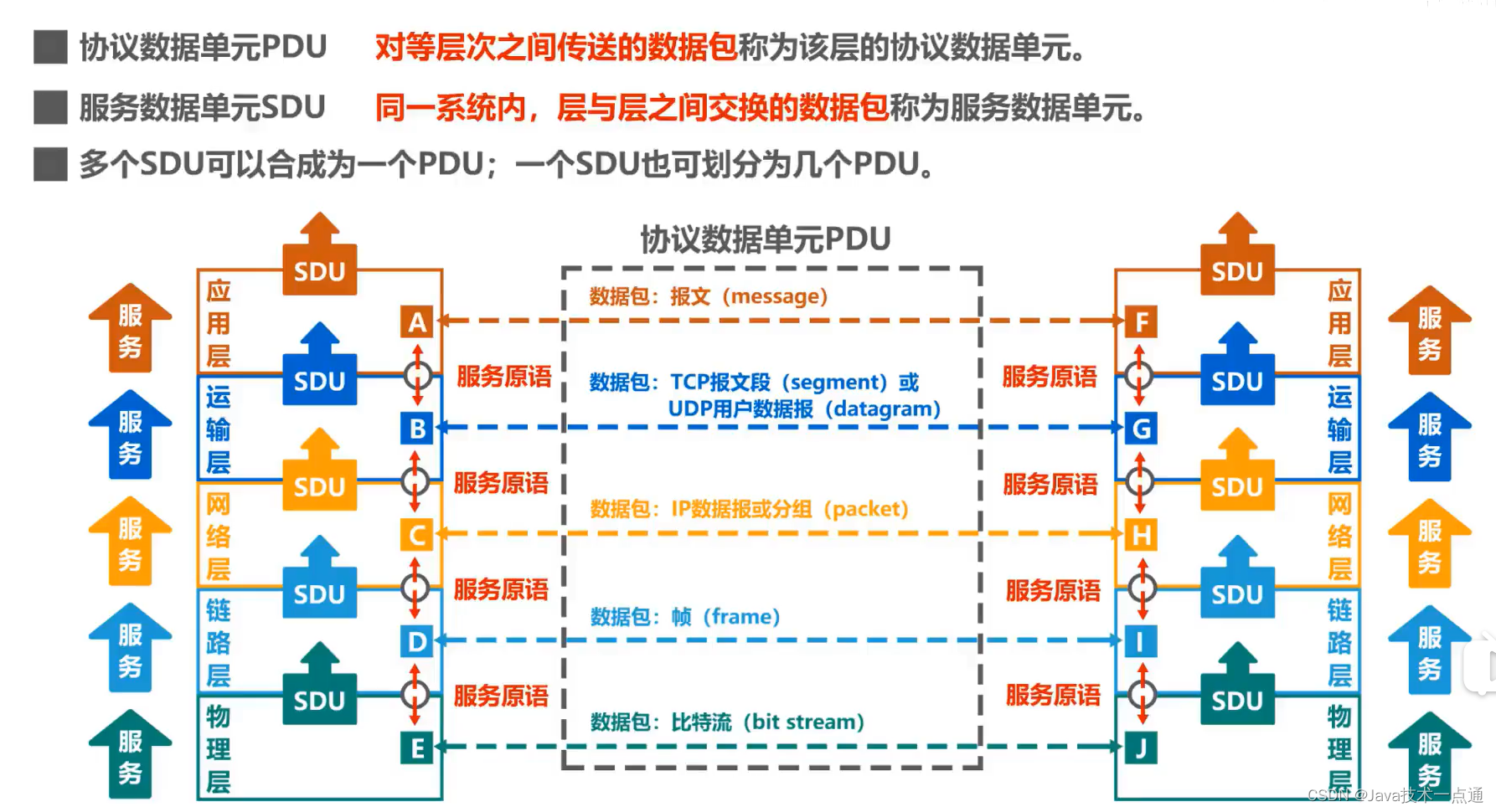
计算机网络第1章(概述)学习笔记
❤ 作者主页:欢迎来到我的技术博客😎 ❀ 个人介绍:大家好,本人热衷于Java后端开发,欢迎来交流学习哦!( ̄▽ ̄)~* 🍊 如果文章对您有帮助,记得关注、点赞、收藏、…...
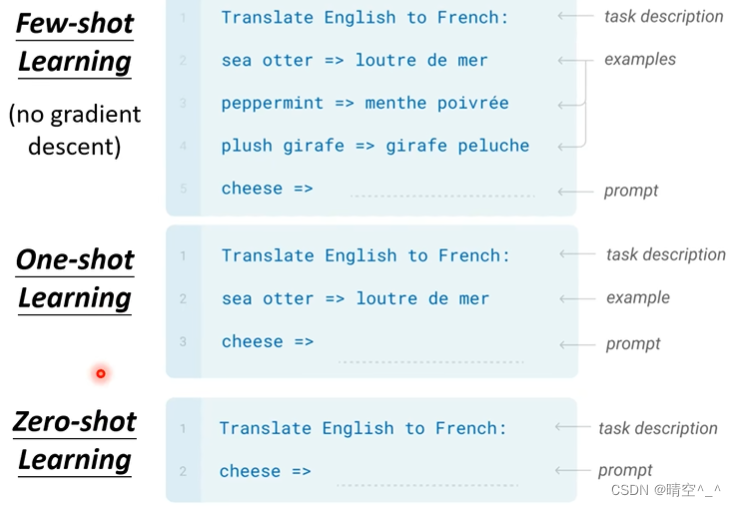
GPT-3(Language Models are Few-shot Learners)简介
GPT-3(Language Models are Few-shot Learners) 一、GPT-2 1. 网络架构: GPT系列的网络架构是Transformer的Decoder,有关Transformer的Decoder的内容可以看我之前的文章。 简单来说,就是利用Masked multi-head attention来提取文本信息&a…...

FreeVA:零训练成本,用图像大模型实现视频理解的新范式
1. 项目概述:一个无需训练的“零成本”视频助手 最近在折腾多模态大模型(MLLM)的时候,我发现了一个挺有意思的现象:大家一提到让模型理解视频,第一反应就是得搞“视频指令微调”。简单说,就是拿…...

利用Taotoken模型广场为不同AI应用场景挑选合适模型
🚀 告别海外账号与网络限制!稳定直连全球优质大模型,限时半价接入中。 👉 点击领取海量免费额度 利用Taotoken模型广场为不同AI应用场景挑选合适模型 面对文本生成、代码审查、智能对话、翻译等多样化的AI应用场景,如…...

AI技能统一管理:用Obsidian插件Agentfiles构建你的智能编码中枢
1. 项目概述:一个为AI编码时代打造的技能中枢 如果你和我一样,日常开发工作流里已经塞满了各种AI编码助手——Claude Code、Cursor、Codex、Windsurf……那么你一定也面临过同样的困境:每个工具都有自己的一套“技能”或“记忆”系统…...

中国半导体产业崛起:资本驱动下的存储器攻坚与全产业链布局
1. 行业格局的十字路口:当西方整合遇上东方崛起最近几年,半导体行业的头条新闻几乎被一系列重磅并购案所占据:恩智浦收购飞思卡尔、安华高并购博通、英特尔鲸吞阿尔特拉。这些动辄数百亿美元的巨无霸交易,背后传递出一个清晰的信号…...

企业内网虚拟机如何通过Taotoken安全接入多模型API
🚀 告别海外账号与网络限制!稳定直连全球优质大模型,限时半价接入中。 👉 点击领取海量免费额度 企业内网虚拟机如何通过Taotoken安全接入多模型API 在许多企业的技术架构中,开发与测试环境常部署于内网虚拟机中。这些…...

独立开发者如何借助taotoken模型广场低成本验证产品创意
🚀 告别海外账号与网络限制!稳定直连全球优质大模型,限时半价接入中。 👉 点击领取海量免费额度 独立开发者如何借助Taotoken模型广场低成本验证产品创意 对于资源有限的独立开发者或小型工作室而言,验证一个需要AI功…...
人工智能的发展历程)
图解人工智能(10)人工智能的发展历程
人工智能自20世纪50年代发展至今,经历了若干次高潮和低谷。每到陷入困境的时候,总有一些科学家勇敢地打破传统思想的束缚,创造出新理论、新方法,使人工智能重现生机。例如,在符号主义陷入危机的时候,费根鲍…...

喜马拉雅音频离线收藏:这款跨平台下载器如何帮你永久保存付费内容?
喜马拉雅音频离线收藏:这款跨平台下载器如何帮你永久保存付费内容? 【免费下载链接】xmly-downloader-qt5 喜马拉雅FM专辑下载器. 支持VIP与付费专辑. 使用GoQt5编写(Not Qt Binding). 项目地址: https://gitcode.com/gh_mirrors/xm/xmly-downloader-q…...

Python 爬虫反爬突破:CDN 防护节点穿透采集
前言 当下大型互联网站点、电商平台资讯门户、行业数据网站均全面接入 CDN 内容分发网络,借助全球节点缓存、流量调度、智能分流、节点 IP 隐身、区域访问限制等机制构建底层防护体系。传统爬虫直接请求源站 IP 的方式会被 CDN 节点拦截、跳转、限速、IP 封禁、节点…...
)
六、Ext系列文件系统(2)
...