
spring — Spring Security 5.7与6.0差异性对比
1. spring security
Spring Security 是一个提供身份验证、授权和针对常见攻击保护的框架。 凭借对保护命令式和反应式应用程序的一流支持,它成为基于Spring的标准安全框架。
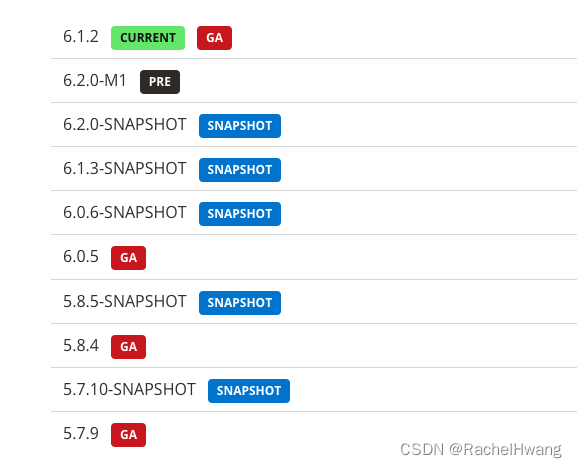
Spring Security 在最近几个版本中配置的写法都有一些变化,很多常见的方法都废弃了,并且将在未来的 Spring Security7 中移除,Spring Security5.7 开始(对应 Spring Boot2.7 开始)将重新梳理一下主要功能变化。以下是spring security的版本列表:
2. spring security 新增功能
2.1 WebSecurityConfigurerAdapter
- gh-11923 - Remove WebSecurityConfigurerAdapter. Instead, create a SecurityFilterChain bean.
这一条更新改变了我们配置SpringSecurity的方式,WebSecurityConfigurerAdapter 过期了,在目前最新的 Spring Security6.1 中,这个类已经完全被移除了,作为替代,我们需要创建类型为SecurityFilterChain的bean。

以前WebSecurityConfigurerAdapter+HttpSecurity 的方式为:
@Configuration
public class SecurityConfiguration extends WebSecurityConfigurerAdapter {@Overrideprotected void configure(HttpSecurity http) throws Exception {http.authorizeHttpRequests((authz) -> authz.anyRequest().authenticated()).httpBasic(withDefaults());}
}
SecurityFilterChain+HttpSecurity 新的写法为:
@Configuration
public class SecurityConfiguration {@Beanpublic SecurityFilterChain filterChain(HttpSecurity http) throws Exception {http.authorizeHttpRequests((authz) -> authz.anyRequest().authenticated()).httpBasic(withDefaults());return http.build();}}
以前WebSecurityConfigurerAdapter+WebSecurity 的方式为:
@Configuration
public class SecurityConfiguration extends WebSecurityConfigurerAdapter {@Overridepublic void configure(WebSecurity web) {web.ignoring().antMatchers("/api1", "/api2");}
}
SecurityFilterChain+WebSecurity 新的写法为:
@Configuration
public class SecurityConfiguration {@Beanpublic WebSecurityCustomizer webSecurityCustomizer() {return (web) -> web.ignoring().antMatchers("/api1", "/api2");}
}
以前WebSecurityConfigurerAdapter配置AuthenticationManager是通过重写父类的方法来获取这个 Bean:
@Configuration
public class SecurityConfig extends WebSecurityConfigurerAdapter {@Override@Beanpublic AuthenticationManager authenticationManagerBean() throws Exception {return super.authenticationManagerBean();}
}
6.0后则需要单独创建AuthenticationManager这个bean:
@Configuration
public class SecurityConfig {@AutowiredUserService userService;@BeanAuthenticationManager authenticationManager() {DaoAuthenticationProvider daoAuthenticationProvider = new DaoAuthenticationProvider();daoAuthenticationProvider.setUserDetailsService(userService);ProviderManager pm = new ProviderManager(daoAuthenticationProvider);return pm;}
}
也可以从 HttpSecurity 中提取出来 AuthenticationManager:
@Configuration
public class SpringSecurityConfiguration {AuthenticationManager authenticationManager;@AutowiredUserDetailsService userDetailsService;@Beanpublic SecurityFilterChain filterChain(HttpSecurity http) throws Exception {AuthenticationManagerBuilder authenticationManagerBuilder = http.getSharedObject(AuthenticationManagerBuilder.class);authenticationManagerBuilder.userDetailsService(userDetailsService);authenticationManager = authenticationManagerBuilder.build();http.csrf().disable().cors().disable().authorizeHttpRequests().antMatchers("/api/v1/account/register", "/api/v1/account/auth").permitAll().anyRequest().authenticated().and().authenticationManager(authenticationManager).sessionManagement().sessionCreationPolicy(SessionCreationPolicy.STATELESS);return http.build();}
}
Spring Security 的底层实际上就是一堆过滤器,所以我们之前在 configure(HttpSecurity) 方法中的配置,实际上就是配置过滤器链。现在过滤器链的配置,我们通过提供一个 SecurityFilterChain Bean 来配置过滤器链,SecurityFilterChain 是一个接口,这个接口只有一个实现类 DefaultSecurityFilterChain,构建 DefaultSecurityFilterChain 的第一个参数是拦截规则,也就是哪些路径需要拦截,第二个参数则是过滤器链,如果给了一个空集合,不设置忽略的路径请求, Spring Security 会拦截下所有的请求,然后在一个空集合中走一圈就结束了,相当于不拦截任何请求。
2.2 使用 Lambda表达式
and() 方法将被移除:
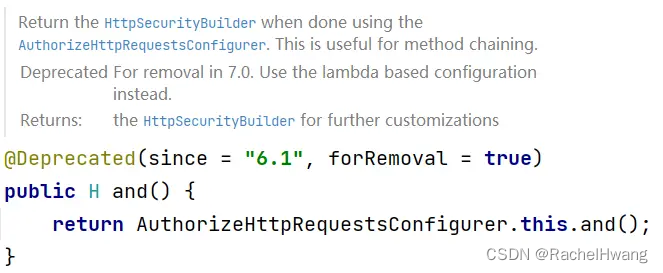
从上面 and 方法的注释中小伙伴们可以看到,官方现在是在推动基于 Lambda 的配置来代替传统的链式配置。
2.3 自定义 JSON 登录
Spring Security 默认处理登录数据的过滤器是 UsernamePasswordAuthenticationFilter,在这个过滤器中,系统会通过 request.getParameter(this.passwordParameter) 的方式将用户名和密码读取出来,很明显这就要求前端传递参数的形式是 key-value。
步骤为:
- 首先我们获取请求头,根据请求头的类型来判断请求参数的格式。
- 如果是 JSON 格式的参数,就在 if 中进行处理,否则说明是 key-value 形式的参数,那么我们就调用父类的方法进行处理即可。JSON 格式的参数的处理逻辑和 key-value 的处理逻辑是一致的,唯一不同的是参数的提取方式不同而已。
- 最后,我们还需要对这个过滤器进行配置:
@Configuration
public class SecurityConfig {@AutowiredUserService userService;@BeanJsonLoginFilter jsonLoginFilter() {JsonLoginFilter filter = new JsonLoginFilter();filter.setAuthenticationSuccessHandler((req,resp,auth)->{resp.setContentType("application/json;charset=utf-8");PrintWriter out = resp.getWriter();//获取当前登录成功的用户对象User user = (User) auth.getPrincipal();user.setPassword(null);RespBean respBean = RespBean.ok("登录成功", user);out.write(new ObjectMapper().writeValueAsString(respBean));});filter.setAuthenticationFailureHandler((req,resp,e)->{resp.setContentType("application/json;charset=utf-8");PrintWriter out = resp.getWriter();RespBean respBean = RespBean.error("登录失败");if (e instanceof BadCredentialsException) {respBean.setMessage("用户名或者密码输入错误,登录失败");} else if (e instanceof DisabledException) {respBean.setMessage("账户被禁用,登录失败");} else if (e instanceof CredentialsExpiredException) {respBean.setMessage("密码过期,登录失败");} else if (e instanceof AccountExpiredException) {respBean.setMessage("账户过期,登录失败");} else if (e instanceof LockedException) {respBean.setMessage("账户被锁定,登录失败");}out.write(new ObjectMapper().writeValueAsString(respBean));});filter.setAuthenticationManager(authenticationManager());filter.setFilterProcessesUrl("/login");return filter;}@BeanAuthenticationManager authenticationManager() {DaoAuthenticationProvider daoAuthenticationProvider = new DaoAuthenticationProvider();daoAuthenticationProvider.setUserDetailsService(userService);ProviderManager pm = new ProviderManager(daoAuthenticationProvider);return pm;}@BeanSecurityFilterChain securityFilterChain(HttpSecurity http) throws Exception {//开启过滤器的配置http.authorizeHttpRequests()//任意请求,都要认证之后才能访问.anyRequest().authenticated().and()//开启表单登录,开启之后,就会自动配置登录页面、登录接口等信息.formLogin()//和登录相关的 URL 地址都放行.permitAll().and()//关闭 csrf 保护机制,本质上就是从 Spring Security 过滤器链中移除了 CsrfFilter.csrf().disable();http.addFilterBefore(jsonLoginFilter(), UsernamePasswordAuthenticationFilter.class);return http.build();}}
这里就是配置一个 JsonLoginFilter 的 Bean,并将之添加到 Spring Security 过滤器链中即可。在 Spring Boot3 之前(Spring Security6 之前),上面这段代码就可以实现 JSON 登录了。
但是从 Spring Boot3 开始,则存在问题,具体表现就是:当你调用登录接口登录成功之后,再去访问系统中的其他页面,又会跳转回登录页面,说明访问登录之外的其他接口时,系统不知道你已经登录过了。
在 Spring Boot3 之前,Spring Security 过滤器链中有一个名为 SecurityContextPersistenceFilter 的过滤器,这个过滤器在 Spring Boot2.7.x 中废弃了,但是还在使用,在 Spring Boot3 中则被从 Spring Security 过滤器链中移除了,取而代之的是一个名为 SecurityContextHolderFilter 的过滤器。
先来看 SecurityContextPersistenceFilter 的核心逻辑:
private void doFilter(HttpServletRequest request, HttpServletResponse response, FilterChain chain)throws IOException, ServletException {HttpRequestResponseHolder holder = new HttpRequestResponseHolder(request, response);SecurityContext contextBeforeChainExecution = this.repo.loadContext(holder);try {SecurityContextHolder.setContext(contextBeforeChainExecution);chain.doFilter(holder.getRequest(), holder.getResponse());}finally {SecurityContext contextAfterChainExecution = SecurityContextHolder.getContext();SecurityContextHolder.clearContext();this.repo.saveContext(contextAfterChainExecution, holder.getRequest(), holder.getResponse());}
}
- 首先,这个过滤器位于整个 Spring Security 过滤器链的第三个,是非常靠前的。
- 当登录请求经过这个过滤器的时候,首先会尝试从 SecurityContextRepository(上文中的 this.repo)中读取到 SecurityContext 对象,这个对象中保存了当前用户的信息,第一次登录的时候,这里实际上读取不到任何用户信息。
- 将读取到的 SecurityContext 存入到 SecurityContextHolder 中,默认情况下,SecurityContextHolder 中通过 ThreadLocal 来保存 SecurityContext 对象,也就是当前请求在后续的处理流程中,只要在同一个线程里,都可以直接从 SecurityContextHolder 中提取到当前登录用户信息。
- 请求继续向后执行。
- 在 finally 代码块中,当前请求已经结束了,此时再次获取到 SecurityContext,并清空 SecurityContextHolder 防止内存泄漏
- 然后调用 this.repo.saveContext 方法保存当前登录用户对象(实际上是保存到 HttpSession 中)
- 以后其他请求到达的时候,执行前面第 2 步的时候,就读取到当前用户的信息了,在请求后续的处理过程中,Spring Security 需要知道当前用户的时候,会自动去 SecurityContextHolder 中读取当前用户信息。
这就是 Spring Security 认证的一个大致流程。
然而,到了 Spring Boot3 之后,这个过滤器被 SecurityContextHolderFilter 取代了,我们来看下 SecurityContextHolderFilter 过滤器的一个关键逻辑:
private void doFilter(HttpServletRequest request, HttpServletResponse response, FilterChain chain)throws ServletException, IOException {Supplier<SecurityContext> deferredContext = this.securityContextRepository.loadDeferredContext(request);try {this.securityContextHolderStrategy.setDeferredContext(deferredContext);chain.doFilter(request, response);}finally {this.securityContextHolderStrategy.clearContext();request.removeAttribute(FILTER_APPLIED);}
}
通过这段逻辑代码我们发现前面的逻辑基本上还是一样的,不一样的是 finally 中的代码,finally 中少了一步向 HttpSession 保存 SecurityContext 的操作。
未处理加入SecurityContextHolderFilter过滤器之前用户登录成功后,用户信息没有保存到 HttpSession,导致下一次请求到达的时候,无法从 HttpSession 中读取到 SecurityContext 存到 SecurityContextHolder 中,在后续的执行过程中,Spring Security 就会认为当前用户没有登录。这就是问题的原因!
问题解决:
Spring Security 提供了一个修改的入口,在 org.springframework.security.web.authentication.AbstractAuthenticationProcessingFilter#successfulAuthentication 方法中,源码如下:
protected void successfulAuthentication(HttpServletRequest request, HttpServletResponse response, FilterChain chain,Authentication authResult) throws IOException, ServletException {SecurityContext context = this.securityContextHolderStrategy.createEmptyContext();context.setAuthentication(authResult);this.securityContextHolderStrategy.setContext(context);this.securityContextRepository.saveContext(context, request, response);this.rememberMeServices.loginSuccess(request, response, authResult);if (this.eventPublisher != null) {this.eventPublisher.publishEvent(new InteractiveAuthenticationSuccessEvent(authResult, this.getClass()));}this.successHandler.onAuthenticationSuccess(request, response, authResult);
}
这个方法是当前用户登录成功之后的回调方法,小伙伴们看到,在这个回调方法中,有一句 this.securityContextRepository.saveContext(context, request, response);,这就表示将当前登录成功的用户信息存入到 HttpSession 中。
在当前过滤器中,securityContextRepository 的类型是 RequestAttributeSecurityContextRepository,这个表示将 SecurityContext 存入到当前请求的属性中,那很明显,在当前请求结束之后,这个数据就没了。在 Spring Security 的自动化配置类中,将 securityContextRepository 属性指向了 DelegatingSecurityContextRepository,这是一个代理的存储器,代理的对象是 RequestAttributeSecurityContextRepository 和 HttpSessionSecurityContextRepository,所以在默认的情况下,用户登录成功之后,在这里就把登录用户数据存入到 HttpSessionSecurityContextRepository 中了。
当我们自定义了登录过滤器之后,就破坏了自动化配置里的方案了,这里使用的 securityContextRepository 对象就真的是 RequestAttributeSecurityContextRepository 了,所以就导致用户后续访问时系统以为用户未登录。
那么解决方案很简单,我们只需要为自定义的过滤器指定 securityContextRepository 属性的值就可以了,如下:
@Bean
JsonLoginFilter jsonLoginFilter() {JsonLoginFilter filter = new JsonLoginFilter();filter.setAuthenticationSuccessHandler((req,resp,auth)->{resp.setContentType("application/json;charset=utf-8");PrintWriter out = resp.getWriter();//获取当前登录成功的用户对象User user = (User) auth.getPrincipal();user.setPassword(null);RespBean respBean = RespBean.ok("登录成功", user);out.write(new ObjectMapper().writeValueAsString(respBean));});filter.setAuthenticationFailureHandler((req,resp,e)->{resp.setContentType("application/json;charset=utf-8");PrintWriter out = resp.getWriter();RespBean respBean = RespBean.error("登录失败");if (e instanceof BadCredentialsException) {respBean.setMessage("用户名或者密码输入错误,登录失败");} else if (e instanceof DisabledException) {respBean.setMessage("账户被禁用,登录失败");} else if (e instanceof CredentialsExpiredException) {respBean.setMessage("密码过期,登录失败");} else if (e instanceof AccountExpiredException) {respBean.setMessage("账户过期,登录失败");} else if (e instanceof LockedException) {respBean.setMessage("账户被锁定,登录失败");}out.write(new ObjectMapper().writeValueAsString(respBean));});filter.setAuthenticationManager(authenticationManager());filter.setFilterProcessesUrl("/login");filter.setSecurityContextRepository(new HttpSessionSecurityContextRepository());return filter;
}
最后调用 setSecurityContextRepository 方法设置一下就行。Spring Boot3.x 之前之所以不用设置这个属性,是因为这里虽然没保存最后还是在 SecurityContextPersistenceFilter 过滤器中保存了。
在登录成功之后,开发者自己手动将数据存入到 HttpSession 中,这样就能确保下个请求到达的时候,能够从 HttpSession 中读取到有效的数据存入到 SecurityContextHolder 中。
相关文章:
spring — Spring Security 5.7与6.0差异性对比
1. spring security Spring Security 是一个提供身份验证、授权和针对常见攻击保护的框架。 凭借对保护命令式和反应式应用程序的一流支持,它成为基于Spring的标准安全框架。 Spring Security 在最近几个版本中配置的写法都有一些变化,很多常见的方法都…...

道本科技受邀参加建筑产业互联网推动建筑产业现代化体系构建座谈会,以数字化产品为建筑行业注入新动能!
2023年7月底,道本科技作为中国建筑业协会合作伙伴,受邀参加了建筑产业互联网推动建筑产业现代化体系构建座谈会。在这次座谈会上,道本科技旗下产品“合规数”“合同智能审查”和“智合同范本库”被中国建筑(中小企业)产…...

数据结构----效率问题
数据结构----效率问题 一.衡量效率 1.衡量效率的两个维度 1.时间维度:时间复杂度:Time Complexity 时间复杂度是代码总的运行次数(粗糙) 2.空间维度:空间复杂度:Space Complexity 空间复杂度是额外申…...
【BASH】回顾与知识点梳理(五)
【BASH】回顾与知识点梳理 五 五. 数据流重导向5.1 什么是数据流重导向standard output 与 standard error output/dev/null 垃圾桶黑洞装置与特殊写法standard input : < 与 << 5.2 命令执行的判断依据: ; , &&, ||cmd ; cmd (不考虑指…...

PCL点云处理之最小二乘空间直线拟合(3D) (二百零二)
PCL点云处理之最小二乘空间直线拟合(3D) (二百零二) 一、算法简介二、实现代码三、效果展示一、算法简介 对于空间中的这样一组点:大致呈直线分布,散乱分布在直线左右, 我们可采用最小二乘方法拟合直线,更进一步地,可以通过点到直线的投影,最终得到一组严格呈直线分布…...

大数据课程G1——Hbase的概述
文章作者邮箱:yugongshiyesina.cn 地址:广东惠州 ▲ 本章节目的 ⚪ 了解HIve的概念; ⚪ 了解HIve与数据库的区别; ⚪ 了解HIve的特点; 一、简介 1. 概述 1. HBase原本是由Yahoo!公司开发后来贡献给了…...
第三章 图论 No.2单源最短路之虚拟源点,状压最短路与最短路次短路条数
文章目录 1137. 选择最佳线路1131. 拯救大兵瑞恩1134. 最短路计数383. 观光 dp是特殊的最短路,是无环图(拓扑图)上的最短路问题 1137. 选择最佳线路 1137. 选择最佳线路 - AcWing题库 // 反向建图就行 #include <iostream> #include…...

汉诺塔问题
一本通1205:汉诺塔问题 【题目描述】 约19世纪末,在欧州的商店中出售一种智力玩具,在一块铜板上有三根杆,最左边的杆上自上而下、由小到大顺序串着由64个圆盘构成的塔。目的是将最左边杆上的盘全部移到中间的杆上,条件…...
Java on Azure Tooling 6月更新|标准消费和专用计划及本地存储账户(Azurite)支持
作者:Jialuo Gan - Program Manager, Developer Division at Microsoft 排版:Alan Wang 大家好,欢迎阅读 Java on Azure 工具的六月更新。在本次更新中,我们将介绍 Azure Spring Apps 标准消费和专用计划支持以及本地存储账户&…...
-网络嗅探-黑盒监控)
Prometheus(八)-网络嗅探-黑盒监控
介绍 Blackbox Exporter是Prometheus社区提供的官方黑盒监控解决方案,其允许用户通过:HTTP、HTTPS、DNS、TCP以及ICMP的方式对网络进行探测。用户可以直接使用go get命令获取Blackbox Exporter源码并生成本地可执行文件: go get prometheus…...

modbus TCP 通信测试
modbus TCP 通信测试 读取单个或多个线圈 发送指令:00 00 00 00 00 06 00 01 03 10 00 08 00 00 00 00 00 06 00 01 03 10 00 08 事务 处理 标识 协议 标识 长度 单元 标识 功能码 起始 线圈 地址 线圈 个数 06:后面的字节长度。 01&am…...

GDB Debug
使用gdb带着参数启动程序 在gdb中启动程序并传递命令行参数: gdb ./my_program (gdb) run arg1 arg2 arg3 这将在gdb中启动程序"my_program",并将参数"arg1"、"arg2"和"arg3"传递给程序。 在启动gdb之前&…...
【项目流程】前端项目的开发流程
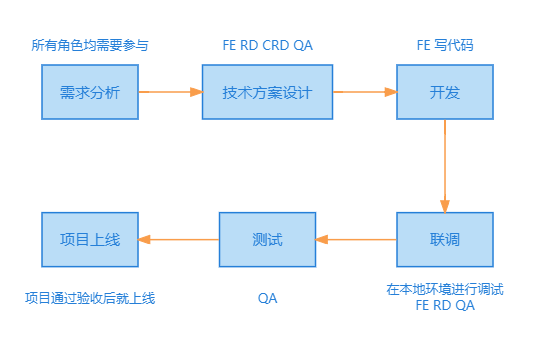
1. 项目中涉及的所有角色及其职责 - PM 产品经理 产品经理(Product Manager,简称PM)负责明确和定义产品的愿景和战略,与客户、用户、业务部门和其他利益相关者进行沟通,收集并分析他们的需求和期望。负责制定产品的详…...

JS监听浏览器关闭、刷新及切换标签页触发事件
蛮简单的东西,知道就会,不知道就不会,没什么逻辑可言。简单记录一下,只为加深点儿印象。 visibilitychange visibilitychange可以监听到浏览器的切换标签页。 直接上代码: <script>document.addEventListe…...

Unity 引擎做残影效果——3、顶点偏移方式
Unity实现残影效果 大家好,我是阿赵。 继续讲Unity引擎的残影做法。这次的残影效果和之前两种不太一样,是通过顶点偏移来实现的。 具体的效果是这样: 与其说是残影,这种效果更像是移动速度很快时造成的速度线,所以在移…...

【Linux】权限
1、shell命令以及运行原理 Linux 严格意义上说的是一个操作系统,我们称之为“核心(kernel)“ ,但我们一般用户,不能直接使用 kernel。而是通过 kernel 的“外壳”程序,也就是所谓的shell,来与 k…...

Excel导入日期格式时自动转为五位数文本
问题描述:Excel导入数据时,当数据是日期可能会存在问题,日期格式转为文本了,例如“2023-07-31”接收时变为“45138”,导致后端解析日期出错,无法导入。 解决方法: 方法一:将Excel日…...

Mac使用brew安装软件报错
在使用brew安装软件时报错Failed to upgrade Homebrew Portable Ruby! brew install --cask --appdir/Applications docker> Downloading https://ghcr.io/v2/homebrew/portable-ruby/portable-ruby/blobs/sha256:0cb1cc7af109437fe0e020c9f3b7b95c3c709b140bde9f991ad2c143…...

Android 实现MQTT客户端,用于门禁消息推送
添加MQTT依赖 implementation ‘org.eclipse.paho:org.eclipse.paho.client.mqttv3:1.2.2’ implementation ‘org.eclipse.paho:org.eclipse.paho.android.service:1.1.1’ 在Manifest清单文件中添加服务 <service android:name"org.eclipse.paho.android.service.Mq…...

跨境电商的广告推广怎么做?7个方法
在跨境电商竞争日趋激烈的市场环境下,跨境电商店铺引流成了制胜关键点。这里给大家分享一套引流推广的方法。 一、搜索引擎营销推广 搜索引擎有两个最大的优点是更灵活、更准确。搜索引擎营销的目标定位更精确,且不受时间和地理位置上的限制࿰…...

VMware 虚拟机中部署 Intv_AI_MK11:隔离测试环境搭建指南
VMware 虚拟机中部署 Intv_AI_MK11:隔离测试环境搭建指南 1. 为什么需要隔离测试环境 在AI模型开发和测试过程中,隔离环境的重要性怎么强调都不为过。想象一下,你正在调试一个全新的AI模型,突然发现它占用了你电脑的所有资源&am…...

Arduino IDE 2.0终极指南:10个现代嵌入式开发的革命性功能
Arduino IDE 2.0终极指南:10个现代嵌入式开发的革命性功能 【免费下载链接】arduino-ide Arduino IDE 2.x 项目地址: https://gitcode.com/gh_mirrors/ar/arduino-ide Arduino IDE 2.0作为一款开源嵌入式开发环境,带来了众多革命性的功能…...

忍者像素绘卷开源可部署实践:私有云部署+API网关安全加固方案
忍者像素绘卷开源可部署实践:私有云部署API网关安全加固方案 1. 项目概述与技术特点 忍者像素绘卷是一款基于Z-Image-Turbo深度优化的图像生成工作站,专为像素艺术创作设计。它融合了16-Bit复古游戏美学与现代AI图像生成技术,为创作者提供了…...

零基础玩转火影AI绘画:忍者绘卷镜像保姆级部署教程
零基础玩转火影AI绘画:忍者绘卷镜像保姆级部署教程 1. 前言:开启你的忍者绘画之旅 你是否曾经幻想过自己也能画出《火影忍者》那样帅气的角色?现在,借助"忍者绘卷"AI绘画镜像,即使没有任何绘画基础&#x…...

MySQL 常用数据类型的系统总结
一、数值型(存储数字,含整数、小数、布尔值)1. 整数类型(INT 系列)数据类型字节数取值范围(有符号)取值范围(无符号)核心特性适用场景TINYINT1-128 ~ 1270 ~ 255占用空间…...

【AI原生研发黄金法则】:腾讯、字节、阿里3大厂实战验证的7大不可绕过的核心实践
第一章:AI原生软件研发最佳实践:大厂案例分享 2026奇点智能技术大会(https://ml-summit.org) 头部科技企业在构建AI原生软件时,已逐步形成以模型即服务(MaaS)、提示工程闭环、可观测性驱动开发(ODD&#…...
)
为什么PyTorch基金会突然终止3个核心子项目?——2026奇点大会技术委员会首次披露AI原生开源治理白皮书(含5项强制合规条款)
第一章:PyTorch基金会治理突变事件全景速览 2026奇点智能技术大会(https://ml-summit.org) 2024年12月,PyTorch基金会宣布启动治理架构重大调整,标志着其从Meta主导的项目向真正中立、多利益相关方共治的开源基金会转型。此次变更并非渐进式…...

2025届学术党必备的六大降重复率工具实测分析
Ai论文网站排名(开题报告、文献综述、降aigc率、降重综合对比) TOP1. 千笔AI TOP2. aipasspaper TOP3. 清北论文 TOP4. 豆包 TOP5. kimi TOP6. deepseek 伴随人工智能生成内容,就是那个AIGC技术的广泛普及,各个大平台以及学…...

Agent Client Protocol 全景解析手
1. 核心概念 在 Antigravity 中,技能系统分为两层: Skills (全局库):实际的代码、脚本和指南,存储在系统级目录(如 ~/.gemini/antigravity/skills)。它们是“能力”的本体。 Workflows (项目级):…...

【技术前沿】大模型驱动的无损数据压缩:突破传统极限的新范式
1. 大模型如何重新定义数据压缩的极限 十年前我第一次接触数据压缩技术时,被那些复杂的数学公式和编码规则搞得晕头转向。当时使用的还是基于香农信息论的传统方法,虽然效果不错,但总觉得遇到了某种看不见的天花板。直到最近看到LMCompress这…...