
Chapter 15: Object-Oriented Programming | Python for Everybody 讲义笔记_En
文章目录
- Python for Everybody
- 课程简介
- Object-oriented programming
- Managing larger programs
- Getting started
- Using objects
- Starting with programs
- Subdividing a problem
- Our first Python object
- Classes as types
- Object lifecycle
- Multiple instances
- Inheritance
- Summary
- Glossary
Python for Everybody
Exploring Data Using Python 3
Dr. Charles R. Severance
课程简介
Python for Everybody 零基础程序设计(Python 入门)
- This course aims to teach everyone the basics of programming computers using Python. 本课程旨在向所有人传授使用 Python 进行计算机编程的基础知识。
- We cover the basics of how one constructs a program from a series of simple instructions in Python. 我们介绍了如何通过 Python 中的一系列简单指令构建程序的基础知识。
- The course has no pre-requisites and avoids all but the simplest mathematics. Anyone with moderate computer experience should be able to master the materials in this course. 该课程没有任何先决条件,除了最简单的数学之外,避免了所有内容。任何具有中等计算机经验的人都应该能够掌握本课程中的材料。
- This course will cover Chapters 1-5 of the textbook “Python for Everybody”. Once a student completes this course, they will be ready to take more advanced programming courses. 本课程将涵盖《Python for Everyday》教科书的第 1-5 章。学生完成本课程后,他们将准备好学习更高级的编程课程。
- This course covers Python 3.
coursera
Python for Everybody 零基础程序设计(Python 入门)
Charles Russell Severance
Clinical Professor

个人主页
Twitter

University of Michigan
课程资源
coursera原版课程视频
coursera原版视频-中英文精校字幕-B站
Dr. Chuck官方翻录版视频-机器翻译字幕-B站
PY4E-课程配套练习
Dr. Chuck Online - 系列课程开源官网
Object-oriented programming
Python Objects.
We do a quick look at how Python supports the Object-Oriented programming pattern.
Managing larger programs
At the beginning of this book, we came up with four basic programming patterns which we use to construct programs:
- Sequential code
- Conditional code (if statements)
- Repetitive code (loops)
- Store and reuse (functions)
In later chapters, we explored simple variables as well as collection data structures like lists, tuples, and dictionaries.
As we build programs, we design data structures and write code to manipulate those data structures. There are many ways to write programs and by now, you probably have written some programs that are “not so elegant” and other programs that are “more elegant”. Even though your programs may be small, you are starting to see how there is a bit of art and aesthetic to writing code.
As programs get to be millions of lines long, it becomes increasingly important to write code that is easy to understand. If you are working on a million-line program, you can never keep the entire program in your mind at the same time. We need ways to break large programs into multiple smaller pieces so that we have less to look at when solving a problem, fix a bug, or add a new feature.
In a way, object oriented programming is a way to arrange your code so that you can zoom into 50 lines of the code and understand it while ignoring the other 999,950 lines of code for the moment.
Getting started
Like many aspects of programming, it is necessary to learn the concepts of object oriented programming before you can use them effectively. You should approach this chapter as a way to learn some terms and concepts and work through a few simple examples to lay a foundation for future learning.
The key outcome of this chapter is to have a basic understanding of how objects are constructed and how they function and most importantly how we make use of the capabilities of objects that are provided to us by Python and Python libraries.
Using objects
As it turns out, we have been using objects all along in this book. Python provides us with many built-in objects. Here is some simple code where the first few lines should feel very simple and natural to you.
stuff = list()
stuff.append('python')
stuff.append('chuck')
stuff.sort()
print (stuff[0])
print (stuff.__getitem__(0))
print (list.__getitem__(stuff,0))# Code: http://www.py4e.com/code3/party1.py
Instead of focusing on what these lines accomplish, let’s look at what is really happening from the point of view of object-oriented programming. Don’t worry if the following paragraphs don’t make any sense the first time you read them because we have not yet defined all of these terms.
The first line constructs an object of type list, the second and third lines call the append() method, the fourth line calls the sort() method, and the fifth line retrieves the item at position 0.
The sixth line calls the __getitem__() method in the stuff list with a parameter of zero.
print (stuff.__getitem__(0))
The seventh line is an even more verbose way of retrieving the 0th item in the list.
print (list.__getitem__(stuff,0))
In this code, we call the __getitem__ method in the list class and pass the list and the item we want retrieved from the list as parameters.
The last three lines of the program are equivalent, but it is more convenient to simply use the square bracket syntax to look up an item at a particular position in a list.
We can take a look at the capabilities of an object by looking at the output of the dir() function:
>>> stuff = list()
>>> dir(stuff)
['__add__', '__class__', '__contains__', '__delattr__',
'__delitem__', '__dir__', '__doc__', '__eq__',
'__format__', '__ge__', '__getattribute__', '__getitem__',
'__gt__', '__hash__', '__iadd__', '__imul__', '__init__',
'__iter__', '__le__', '__len__', '__lt__', '__mul__',
'__ne__', '__new__', '__reduce__', '__reduce_ex__',
'__repr__', '__reversed__', '__rmul__', '__setattr__',
'__setitem__', '__sizeof__', '__str__', '__subclasshook__',
'append', 'clear', 'copy', 'count', 'extend', 'index',
'insert', 'pop', 'remove', 'reverse', 'sort']
>>>
The rest of this chapter will define all of the above terms so make sure to come back after you finish the chapter and re-read the above paragraphs to check your understanding.
Starting with programs
A program in its most basic form takes some input, does some processing, and produces some output. Our elevator conversion program demonstrates a very short but complete program showing all three of these steps.
usf = input('Enter the US Floor Number: ')
wf = int(usf) - 1
print('Non-US Floor Number is',wf)# Code: http://www.py4e.com/code3/elev.py
If we think a bit more about this program, there is the “outside world” and the program. The input and output aspects are where the program interacts with the outside world. Within the program we have code and data to accomplish the task the program is designed to solve.
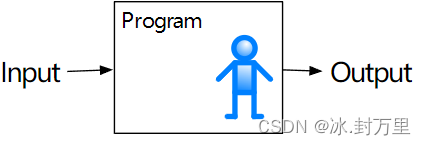
A Program
One way to think about object-oriented programming is that it separates our program into multiple “zones.” Each zone contains some code and data (like a program) and has well defined interactions with the outside world and the other zones within the program.
If we look back at the link extraction application where we used the BeautifulSoup library, we can see a program that is constructed by connecting different objects together to accomplish a task:
# To run this, download the BeautifulSoup zip file
# http://www.py4e.com/code3/bs4.zip
# and unzip it in the same directory as this fileimport urllib.request, urllib.parse, urllib.error
from bs4 import BeautifulSoup
import ssl# Ignore SSL certificate errors
ctx = ssl.create_default_context()
ctx.check_hostname = False
ctx.verify_mode = ssl.CERT_NONEurl = input('Enter - ')
html = urllib.request.urlopen(url, context=ctx).read()
soup = BeautifulSoup(html, 'html.parser')# Retrieve all of the anchor tags
tags = soup('a')
for tag in tags:print(tag.get('href', None))# Code: http://www.py4e.com/code3/urllinks.py
We read the URL into a string and then pass that into urllib to retrieve the data from the web. The urllib library uses the socket library to make the actual network connection to retrieve the data. We take the string that urllib returns and hand it to BeautifulSoup for parsing. BeautifulSoup makes use of the object html.parser1 and returns an object. We call the tags() method on the returned object that returns a dictionary of tag objects. We loop through the tags and call the get() method for each tag to print out the href attribute.
We can draw a picture of this program and how the objects work together.
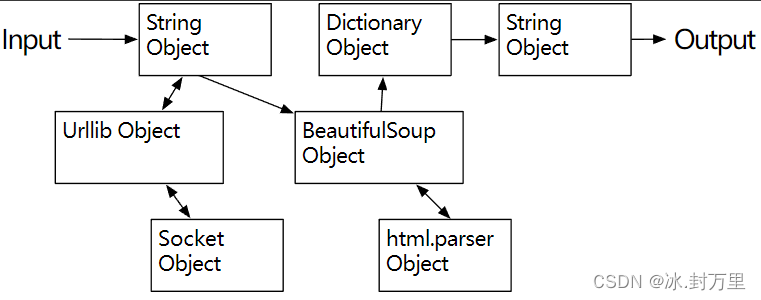
A Program as Network of Objects
The key here is not to understand perfectly how this program works but to see how we build a network of interacting objects and orchestrate the movement of information between the objects to create a program. It is also important to note that when you looked at that program several chapters back, you could fully understand what was going on in the program without even realizing that the program was “orchestrating the movement of data between objects.” It was just lines of code that got the job done.
Subdividing a problem
One of the advantages of the object-oriented approach is that it can hide complexity. For example, while we need to know how to use the urllib and BeautifulSoup code, we do not need to know how those libraries work internally. This allows us to focus on the part of the problem we need to solve and ignore the other parts of the program.
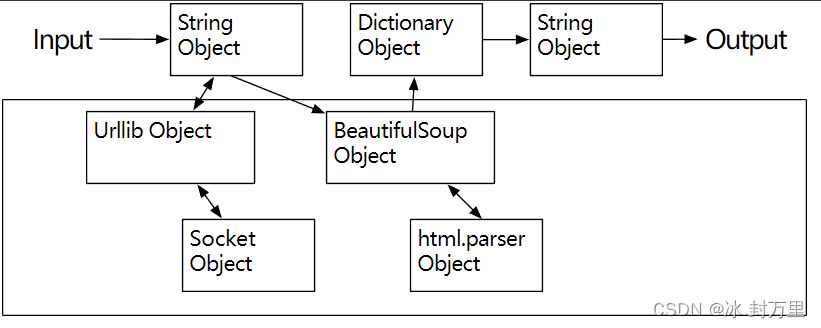
Ignoring Detail When Using an Object
This ability to focus exclusively on the part of a program that we care about and ignore the rest is also helpful to the developers of the objects that we use. For example, the programmers developing BeautifulSoup do not need to know or care about how we retrieve our HTML page, what parts we want to read, or what we plan to do with the data we extract from the web page.

Ignoring Detail When Building an Object
Our first Python object
At a basic level, an object is simply some code plus data structures that are smaller than a whole program. Defining a function allows us to store a bit of code and give it a name and then later invoke that code using the name of the function.
An object can contain a number of functions (which we call methods) as well as data that is used by those functions. We call data items that are part of the object attributes.
We use the class keyword to define the data and code that will make up each of the objects. The class keyword includes the name of the class and begins an indented block of code where we include the attributes (data) and methods (code).
class PartyAnimal:x = 0def party(self) :self.x = self.x + 1print("So far",self.x)an = PartyAnimal()
an.party()
an.party()
an.party()
PartyAnimal.party(an)# Code: http://www.py4e.com/code3/party2.py
Each method looks like a function, starting with the def keyword and consisting of an indented block of code. This object has one attribute (x) and one method (party). The methods have a special first parameter that we name by convention self.
Just as the def keyword does not cause function code to be executed, the class keyword does not create an object. Instead, the class keyword defines a template indicating what data and code will be contained in each object of type PartyAnimal. The class is like a cookie cutter and the objects created using the class are the cookies2. You don’t put frosting on the cookie cutter; you put frosting on the cookies, and you can put different frosting on each cookie.

A Class and Two Objects
If we continue through this sample program, we see the first executable line of code:
an = PartyAnimal()
This is where we instruct Python to construct (i.e., create) an object or instance of the class PartyAnimal. It looks like a function call to the class itself. Python constructs the object with the right data and methods and returns the object which is then assigned to the variable an. In a way this is quite similar to the following line which we have been using all along:
counts = dict()
Here we instruct Python to construct an object using the dict template (already present in Python), return the instance of dictionary, and assign it to the variable counts.
When the PartyAnimal class is used to construct an object, the variable an is used to point to that object. We use an to access the code and data for that particular instance of the PartyAnimal class.
Each Partyanimal object/instance contains within it a variable x and a method/function named party. We call the party method in this line:
an.party()
When the party method is called, the first parameter (which we call by convention self) points to the particular instance of the PartyAnimal object that party is called from. Within the party method, we see the line:
self.x = self.x + 1
This syntax using the dot operator is saying ‘the x within self.’ Each time party() is called, the internal x value is incremented by 1 and the value is printed out.
The following line is another way to call the party method within the an object:
PartyAnimal.party(an)
In this variation, we access the code from within the class and explicitly pass the object pointer an as the first parameter (i.e., self within the method). You can think of an.party() as shorthand for the above line.
When the program executes, it produces the following output:
So far 1
So far 2
So far 3
So far 4
The object is constructed, and the party method is called four times, both incrementing and printing the value for x within the an object.
Classes as types
As we have seen, in Python all variables have a type. We can use the built-in dir function to examine the capabilities of a variable. We can also use type and dir with the classes that we create.
class PartyAnimal:x = 0def party(self) :self.x = self.x + 1print("So far",self.x)an = PartyAnimal()
print ("Type", type(an))
print ("Dir ", dir(an))
print ("Type", type(an.x))
print ("Type", type(an.party))# Code: http://www.py4e.com/code3/party3.py
When this program executes, it produces the following output:
Type <class '__main__.PartyAnimal'>
Dir  ['__class__', '__delattr__', ...
'__sizeof__', '__str__', '__subclasshook__',
'__weakref__', 'party', 'x']
Type <class 'int'>
Type <class 'method'>
You can see that using the class keyword, we have created a new type. From the dir output, you can see both the x integer attribute and the party method are available in the object.
Object lifecycle
In the previous examples, we define a class (template), use that class to create an instance of that class (object), and then use the instance. When the program finishes, all of the variables are discarded. Usually, we don’t think much about the creation and destruction of variables, but often as our objects become more complex, we need to take some action within the object to set things up as the object is constructed and possibly clean things up as the object is discarded.
If we want our object to be aware of these moments of construction and destruction, we add specially named methods to our object:
class PartyAnimal:x = 0def __init__(self):print('I am constructed')def party(self) :self.x = self.x + 1print('So far',self.x)def __del__(self):print('I am destructed', self.x)an = PartyAnimal()
an.party()
an.party()
an = 42
print('an contains',an)# Code: http://www.py4e.com/code3/party4.py
When this program executes, it produces the following output:
I am constructed
So far 1
So far 2
I am destructed 2
an contains 42
As Python constructs our object, it calls our __init__ method to give us a chance to set up some default or initial values for the object. When Python encounters the line:
an = 42
It actually “throws our object away” so it can reuse the an variable to store the value 42. Just at the moment when our an object is being “destroyed” our destructor code (__del__) is called. We cannot stop our variable from being destroyed, but we can do any necessary cleanup right before our object no longer exists.
When developing objects, it is quite common to add a constructor to an object to set up initial values for the object. It is relatively rare to need a destructor for an object.
Multiple instances
So far, we have defined a class, constructed a single object, used that object, and then thrown the object away. However, the real power in object-oriented programming happens when we construct multiple instances of our class.
When we construct multiple objects from our class, we might want to set up different initial values for each of the objects. We can pass data to the constructors to give each object a different initial value:
class PartyAnimal:x = 0name = ''def __init__(self, nam):self.name = namprint(self.name,'constructed')def party(self) :self.x = self.x + 1print(self.name,'party count',self.x)s = PartyAnimal('Sally')
j = PartyAnimal('Jim')s.party()
j.party()
s.party()# Code: http://www.py4e.com/code3/party5.py
The constructor has both a self parameter that points to the object instance and additional parameters that are passed into the constructor as the object is constructed:
s = PartyAnimal('Sally')
Within the constructor, the second line copies the parameter (nam) that is passed into the name attribute within the object instance.
self.name = nam
The output of the program shows that each of the objects (s and j) contain their own independent copies of x and nam:
Sally constructed
Jim constructed
Sally party count 1
Jim party count 1
Sally party count 2
Inheritance
Another powerful feature of object-oriented programming is the ability to create a new class by extending an existing class. When extending a class, we call the original class the parent class and the new class the child class.
For this example, we move our PartyAnimal class into its own file. Then, we can ‘import’ the PartyAnimal class in a new file and extend it, as follows:
from party import PartyAnimalclass CricketFan(PartyAnimal):points = 0def six(self):self.points = self.points + 6self.party()print(self.name,"points",self.points)s = PartyAnimal("Sally")
s.party()
j = CricketFan("Jim")
j.party()
j.six()
print(dir(j))# Code: http://www.py4e.com/code3/party6.py
When we define the CricketFan class, we indicate that we are extending the PartyAnimal class. This means that all of the variables (x) and methods (party) from the PartyAnimal class are inherited by the CricketFan class. For example, within the six method in the CricketFan class, we call the party method from the PartyAnimal class.
As the program executes, we create s and j as independent instances of PartyAnimal and CricketFan. The j object has additional capabilities beyond the s object.
Sally constructed
Sally party count 1
Jim constructed
Jim party count 1
Jim party count 2
Jim points 6
['__class__', '__delattr__', ... '__weakref__',
'name', 'party', 'points', 'six', 'x']
In the dir output for the j object (instance of the CricketFan class), we see that it has the attributes and methods of the parent class, as well as the attributes and methods that were added when the class was extended to create the CricketFan class.
Summary
This is a very quick introduction to object-oriented programming that focuses mainly on terminology and the syntax of defining and using objects. Let’s quickly review the code that we looked at in the beginning of the chapter. At this point you should fully understand what is going on.
stuff = list()
stuff.append('python')
stuff.append('chuck')
stuff.sort()
print (stuff[0])
print (stuff.__getitem__(0))
print (list.__getitem__(stuff,0))# Code: http://www.py4e.com/code3/party1.py
The first line constructs a list object. When Python creates the list object, it calls the constructor method (named __init__) to set up the internal data attributes that will be used to store the list data. We have not passed any parameters to the constructor. When the constructor returns, we use the variable stuff to point to the returned instance of the list class.
The second and third lines call the append method with one parameter to add a new item at the end of the list by updating the attributes within stuff. Then in the fourth line, we call the sort method with no parameters to sort the data within the stuff object.
We then print out the first item in the list using the square brackets which are a shortcut to calling the __getitem__ method within the stuff. This is equivalent to calling the __getitem__ method in the list class and passing the stuff` object as the first parameter and the position we are looking for as the second parameter.
At the end of the program, the stuff object is discarded but not before calling the destructor (named __del__) so that the object can clean up any loose ends as necessary.
Those are the basics of object-oriented programming. There are many additional details as to how to best use object-oriented approaches when developing large applications and libraries that are beyond the scope of this chapter.3
Glossary
attribute
A variable that is part of a class.
class
A template that can be used to construct an object. Defines the attributes and methods that will make up the object.
child class
A new class created when a parent class is extended. The child class inherits all of the attributes and methods of the parent class.
constructor
An optional specially named method (__init__) that is called at the moment when a class is being used to construct an object. Usually this is used to set up initial values for the object.
destructor
An optional specially named method (__del__) that is called at the moment just before an object is destroyed. Destructors are rarely used.
inheritance
When we create a new class (child) by extending an existing class (parent). The child class has all the attributes and methods of the parent class plus additional attributes and methods defined by the child class.
method
A function that is contained within a class and the objects that are constructed from the class. Some object-oriented patterns use ‘message’ instead of ‘method’ to describe this concept.
object
A constructed instance of a class. An object contains all of the attributes and methods that were defined by the class. Some object-oriented documentation uses the term ‘instance’ interchangeably with ‘object’.
parent class
The class which is being extended to create a new child class. The parent class contributes all of its methods and attributes to the new child class.
https://docs.python.org/3/library/html.parser.html ↩︎
Cookie image copyright CC-BY https://www.flickr.com/photos/dinnerseries/23570475099↩︎ ↩︎
If you are curious about where the
listclass is defined, take a look at (hopefully the URL won’t change) https://github.com/python/cpython/blob/master/Objects/listobject.c - the list class is written in a language called “C”. If you take a look at that source code and find it curious you might want to explore a few Computer Science courses.↩︎ ↩︎
相关文章:
Chapter 15: Object-Oriented Programming | Python for Everybody 讲义笔记_En
文章目录 Python for Everybody课程简介Object-oriented programmingManaging larger programsGetting startedUsing objectsStarting with programsSubdividing a problemOur first Python objectClasses as typesObject lifecycleMultiple instancesInheritanceSummaryGlossa…...

模板编程-成员特化
成员特化:类模板特化除了可以对整个类进行特化外,可以只针对某部分成员函数进行特化 全类特化和成员特化都属于全局特化 #define _CRT_SECURE_NO_WARNINGS #include <iostream> #include <cstring>template<typename T> class CMath { public:CMath(const…...
信安通用基础知识
文章目录 密码学经典误区PGP优良保密协议信安经典其它安全手段XSS与CSRF cross site request forgeryCSRF的利用逻辑CSRF示例CSRF防范检查Referer字段添加校验token XSS cross site scripting common weakness enumeration常见密码api误用(摘自毕设参考文献…...
网上购物系统的设计与实现/在线商城/基于spring boot的电商平台/基于Java的商品销售系统
摘 要 本毕业设计的内容是设计并且实现一个基于Springboot的网上购物系统。它是在Windows下,以MYSQL为数据库开发平台,Tomcat网络信息服务作为应用服务器。网上购物系统的功能已基本实现,主要包括用户管理、数码分类管理、数码产品管理、服…...

uniapp项目-配置store文件夹
1.创建store.js 说明:创建一个新的 Vuex Store 实例,配置 Store 中的模块。 import Vue from vue; import Vuex from vuex; // 导入两个 Vuex 模块:moduleCart 和 moduleUser import moduleCart from /store/cart.js; import moduleUser fr…...
element表格多选实现
表格实现多选 实现表格多选很简单,只需要在表格里加上一列即可,加完之后就会在表格里出现一列白色的四方块按钮,可以多选,也可以单选 <el-table-columntype"selection"width"55"align"center"&…...

宠物智能自动喂食器方案设计
据相关数据表明,2019年全国城镇宠物犬猫数量达到9915万只,增幅达到8.4%,消费市场规模达2024亿元,比2018年增长18.5%,整体呈现持续大幅增长的态势。而养宠人群的主力,为25岁至38岁年轻人,都市白领…...

学习笔记230818---对于promise失败状态处理的重要性
问题描述: 在项目中经常会出现如上的问题,这是因为,用promise封装的接口或第三方组件方法,如果只对成功的状态做处理,就会造成页面出错,报error。 解决方法 then()的末尾加上.catch(()>{})对失败的状态…...
【Redis】什么是缓存击穿,如何预防缓存击穿?
【Redis】什么是缓存击穿,如何预防缓存击穿? 缓存击穿是指一个 Key 非常热点,大并发集中对这一个点进行访问,当这个Key 在失效的瞬间,持续的大并发就会穿破缓存,直接请求数据库。缓存击穿和缓存雪崩的区别…...

Android 13.0 强制app横屏显示
1.概述 在13.0产品定制化开发中,对于处理屏幕旋转方向,首先有kernel底层处理,从底层驱动gsensor 中获取数据,从而判断屏幕方向的,然后事件上报后 最后由WMS就是WindowManagerService 来处理旋转的相关事件 2.强制app横屏显示的核心类 /framework/base/services/java/com…...

平方数之和(力扣)双指针 JAVA
给定一个非负整数 c ,你要判断是否存在两个整数 a 和 b,使得 a^2 b^2 c 。 示例 1: 输入:c 5 输出:true 解释:1 * 1 2 * 2 5 示例 2: 输入:c 3 输出&am…...

深入浅出Pytorch函数——torch.nn.init.sparse_
分类目录:《深入浅出Pytorch函数》总目录 相关文章: 深入浅出Pytorch函数——torch.nn.init.calculate_gain 深入浅出Pytorch函数——torch.nn.init.uniform_ 深入浅出Pytorch函数——torch.nn.init.normal_ 深入浅出Pytorch函数——torch.nn.init.c…...

OpenCV实现BGR2BayerGB/BG格式的转换
1、说明 OpenCV没有提供从BGR生成Bayer格式的接口,需要自己写 OpenCV定义为4种格式,分别为: BGGR排列 -> RG格式 RGGB排列 -> BG格式 GRBG排列 -> GB格式 GBRG排列 -> GR格式 2、转换 void CUtils::BGR2BayerGB(const cv::Mat &matSrc, cv::Mat &matDst)…...

Gateway网关路由以及predicates用法(项目中使用场景)
1.Gatewaynacos整合微服务 服务注册在nacos上,通过Gateway路由网关配置统一路由访问 这里主要通过yml方式说明: route: config: #type:database nacos yml data-type: yml group: DEFAULT_GROUP data-id: jeecg-gateway-router 配置路由:…...

深入浅出Pytorch函数——torch.nn.init.constant_
分类目录:《深入浅出Pytorch函数》总目录 相关文章: 深入浅出Pytorch函数——torch.nn.init.calculate_gain 深入浅出Pytorch函数——torch.nn.init.uniform_ 深入浅出Pytorch函数——torch.nn.init.normal_ 深入浅出Pytorch函数——torch.nn.init.c…...
)
centos mysql8解决Access denied for user ‘root‘@‘localhost‘ (using password: YES)
环境 系统:CentOS Stream release 9 mysql版本:mysql Ver 8.0.34 for Linux on x86_64 问题 mysql登录提示 Access denied for user rootlocalhost (using password: YES)解决方法 编辑 /etc/my.cnf ,在[mysqld] 部分最后添加一行 skip-…...

Docker实战:Docker常用命令
一、镜像相关 1.1、查看镜像 docker images1.2、拉取镜像 docker pull nginx1.3、保存镜像 docker save -o nginx.tar nginx:latest1.4、移除镜像 docker rmi -f nginx:latest1.5、导入镜像 docker load -i nginx.tar二、容器相关 2.1、启动容器 docker run --name red…...
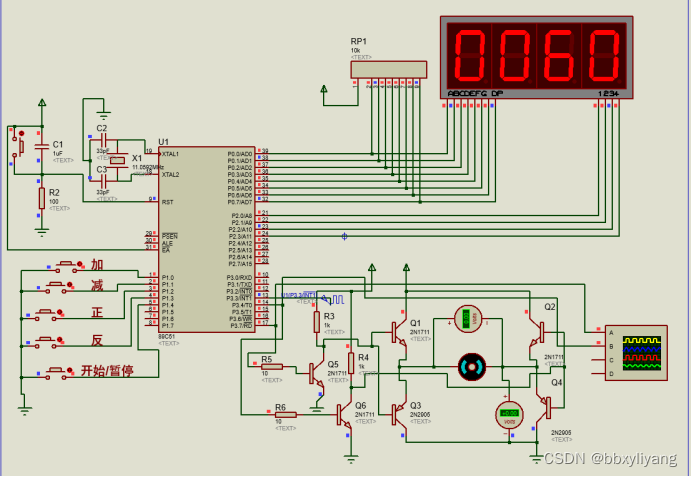
基于51单片机直流电机转速数码管显示控制系统
一、系统方案 本文主要研究了利用MCS-51系列单片机控制PWM信号从而实现对直流电机转速进行控制的方法。本文中采用了三极管组成了PWM信号的驱动系统,并且对PWM信号的原理、产生方法以及如何通过软件编程对PWM信号占空比进行调节,从而控制其输入信号波形等…...
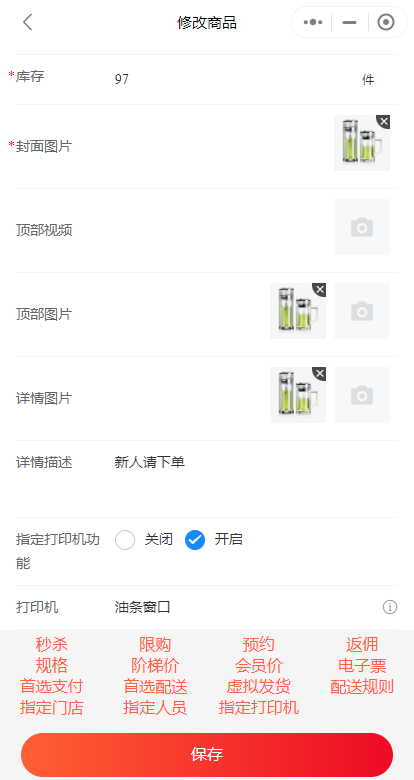
小程序商品如何指定打印机
有些商家,可能有多个仓库。不同的仓库,存放不同的商品。当客户下单时,小程序如何自动按照仓库拆分订单,如何让打印机自动打印对应仓库的订单呢?下面就来介绍一下吧。 1. 设置订单分发模式。进入管理员后台,…...

LLaMA-7B微调记录
Alpaca(https://github.com/tatsu-lab/stanford_alpaca)在70亿参数的LLaMA-7B上进行微调,通过52k指令数据(https://github.com/tatsu-lab/stanford_alpaca/blob/main/alpaca_data.json),在8个80GB A100上训…...

弃ReID跨镜,选镜像无感定位——打破跨镜追踪断链困局,实现全域精准无感感知
弃ReID跨镜,选镜像无感定位——打破跨镜追踪断链困局,实现全域精准无感感知在安防监控、智慧园区、商业综合体、交通枢纽等场景中,跨摄像头目标追踪是核心需求之一——无论是人员轨迹追溯、异常行为预警,还是资产安全管控、流量数…...

图片换背景底色怎么制作?2026年最全工具对比和实操指南
前几天,有个朋友问我怎样快速给证件照换个蓝色背景,我才意识到很多人其实不知道现在换背景底色有多简单。无论是证件照、商品图、还是自媒体头图,一键就能搞定。今天我就把自己用过的所有工具和方法整理出来,分享给大家。为什么越…...

Python 性能分析:工具与方法
Python 性能分析:工具与方法 1. 技术分析 1.1 性能分析概述 性能分析是定位代码瓶颈的关键: 性能分析层次CPU分析: 定位CPU密集型操作内存分析: 检测内存泄漏IO分析: 发现IO瓶颈线程分析: 排查并发问题1.2 性能分析工具 工具类型功能适用场景cProfileCPU…...

树莓派网络配置全攻略:从有线到无线,新手到进阶
1. 项目概述:为什么网络配置是树莓派的第一课刚拿到一块崭新的树莓派,看着它小巧的主板和闪烁的指示灯,你脑子里想的可能是立刻跑个酷炫的Python项目,或者搭建一个家庭媒体中心。但别急,在这一切开始之前,有…...

终极指南:如何让微信网页版在浏览器中重新可用
终极指南:如何让微信网页版在浏览器中重新可用 【免费下载链接】wechat-need-web 让微信网页版可用 / Allow the use of WeChat via webpage access 项目地址: https://gitcode.com/gh_mirrors/we/wechat-need-web 还在为微信网页版无法正常访问而烦恼吗&…...

2026 最稳高薪副业 + 主业赛道,网络安全零基础系统学习大纲,实战项目 + 证书考取 + 求职面试一站式教程
网络空间安全建设刻不容缓,已成为国家安全建设的重中之重。 随着境内外敌对势力的大规模安全事件,《国家网络空间安全战略》《网络安全法》《网络安全等级保护2.0》等一系列政策/法规/标准的持续落地,网络安全产业从小众产业逐步发展成为国家…...

程序员35岁转型记:我如何成为AI产品经理?
当“质量守卫者”遇见职业天花板如果你是一名软件测试工程师,你一定熟悉这样的场景:凌晨三点还在盯着自动化脚本的运行日志,白天反复和开发争论一个缺陷的定级,周报里写满了用例覆盖率和漏测率,但晋升答辩时评委却问你…...
)
【工具分享】9款漏扫工具来了!(内附学习笔记)
【工具分享】9款漏扫工具来了!(内附学习笔记) 以下所有这些工具都是捆绑在一起的Linux发行版,如Kali Linux或BackBox,所以我会建议您安装一个合适的Linux黑客系统,尤其是因为这些黑客工具可以(自…...

Arduino驱动多LED矩阵:I2C总线与位图编程实现动态表情动画
1. 项目概述:用Arduino驱动多个LED矩阵,打造动态表情动画如果你玩过Arduino和LED点阵,大概都体验过点亮单个8x8矩阵的乐趣——显示个字符、画个简单图案。但当你想要做一个更酷的项目,比如一个能眨眼、能变换嘴型的机器人脸&#…...

Java程序员必看:收藏这份2026大模型转型攻略,小白也能轻松入行高薪赛道!
Java程序员必看:收藏这份2026大模型转型攻略,小白也能轻松入行高薪赛道! 随着大模型(LLMs)成为IT行业新质生产力的核心引擎,2026年国内大模型核心市场规模将突破700亿元,人才缺口达200万。本文专…...