
c++多线程中常用的使用方法
1)promise(保证)和future的联合使用,实现两个线程的数据传递
#include <iostream>
#include<thread>
#include<future>using namespace std;//promise用法:可以给线程一个值,而从另一个线程读出该值
// 实现了两个线程的数据传递!
void myPromise(std::promise<int>& tmp,int num)//promise线程
{//在这里假使处理复杂的计算,最后得出一个值,并返回num = num + 20;tmp.set_value(num);
}//另一个线程可以得到promise计算后得到的值
void myFuture(std::future<int>& tmp)
{cout<<"myFuture thread receive value is : "<< tmp.get()<<endl;
}int main()
{std::promise<int> pro;std::thread th1(myPromise,std::ref(pro),10); //创建promise线程时,第二个参数一定要用引用th1.join();std::future<int> result = pro.get_future();std::thread th2(myFuture,std::ref(result));  //std::ref( pro.get_future())用临时对象不可以;th2.join();return 0;
}
//输出结果:myFuture thread receive value is : 30
2) package_task的使用,把任务从新包装起来,案例代码如下:
#include <iostream>
#include<thread>
#include<future>using namespace std;int func(void)
{cout<<"start----- thread_id is : "<<std::this_thread::get_id()<<endl;std::this_thread::sleep_for(std::chrono::milliseconds(2000));cout<<"end-------- thread_id is : "<<std::this_thread::get_id()<<endl;return 5;
}//package_task类模板,可以包装任何可调用对象
int main()
{std::packaged_task<int()> task(func);std::thread th(std::ref(task)); //package_task里面有一个成员函数get_future(),可以返回一个future对象;th.join();std::future<int> result = task.get_future();cout<<result.get()<<endl;return 0;
}
3)//std::async和std::future一起配合使用
#include <iostream>
#include<thread>
#include<mutex>
#include<list>
#include<future>// std::async和std::future的用法:
// async是一个函数模板,启动一个线程;std::future是类模板,当async启动任务后,会返回std::future对象;
// std::future对象里面有需要的返回值;
using namespace std;int func(void)
{cout<<"start----- thread_id is : "<<std::this_thread::get_id()<<endl;std::this_thread::sleep_for(std::chrono::milliseconds(2000));cout<<"end-------- thread_id is : "<<std::this_thread::get_id()<<endl;return 5;
}//std::launch::deferred参数时,等待wait或者get返回,如果没有这两个函数,直接运行接下来代码
//std::launch::deferred参数不会创建新线程!!!
//std::future两个成员函数,get是等待线程处理完返回结果;wait是等待线程处理完,不返回结果
int main()
{cout<<"main thread start----- thread_id is : "<<std::this_thread::get_id()<<endl;std::future<int> result = std::async(func); //程序不会卡到这里!!!这里存在一个绑定关系cout<<"********main run*********"<<endl;cout<<result.get()<<endl; //程序会卡到这里,等待线程返回结果(利用的是std::future的成员函数get)return 0;
}
4)//条件变量与互斥量的配合使用方法:
#include <iostream>
#include<thread>
#include<mutex>
#include<list>
#include<condition_variable>
//条件变量是和互斥量配合使用!using namespace std;class A{
public:void inQueue(void){for(int i = 0; i<10000;i++){cout<<"insert message : "<<i<<endl;{std::unique_lock<std::mutex> uniqueLock(mtx); message.push_back(i);cond.notify_one();}}}void outQueue(void){for(int i = 0 ; i<10000; i++){std::unique_lock<std::mutex> uniqueLock(mtx); //自动加锁//wait跟互斥量的关系:wait阻塞解锁,wait唤醒加锁!!!cond.wait(uniqueLock,[this](){ //如果参数2是false,解锁等待;如果是true,加锁完成后,继续执行下面代码if(!message.empty()) return true;elsereturn false; //可以处理虚假唤醒,就是说容器没有数据,但被唤醒了,执行解锁等待。});       int cmd = message.front();message.pop_front();             cout<<"out cmd---------- is :"<<cmd<<endl;     }//出作用域,uniqueLock锁释放;}
private:std::list<int> message;std::condition_variable cond;std::mutex mtx;};int main()
{A a;std::thread th1(&A::inQueue,&a);std::thread th2(&A::outQueue,&a);th1.join();th2.join();return 0;
}
5)互斥量的使用方法:
#include <iostream>
#include<thread>
#include<mutex>
#include<list>
#include<condition_variable>using namespace std;class A{
public:void inQueue(void){for(int i = 0; i<10000;i++){cout<<"insert message : "<<i<<endl;{std::unique_lock<std::mutex> uniqueLock(mtx); message.push_back(i);}std::this_thread::sleep_for(std::chrono::milliseconds(1));}}void outQueue(void){for(int i = 0; i<10000;i++){if(!message.empty()){int cmd = 0;{std::unique_lock<std::mutex> uniqueLock(mtx); cmd = message.front();message.pop_front();}cout<<"out cmd is :"<<cmd<<endl;}else{cout<<"empty---------------i: "<<i<<endl;}std::this_thread::sleep_for(std::chrono::milliseconds(1));}}
private:std::list<int> message;std::mutex mtx;};int main()
{A a;std::thread th1(&A::inQueue,&a);std::thread th2(&A::outQueue,&a);th1.join();th2.join();return 0;
}
6)单例模式在线程中的使用
#include <iostream>
#include<thread>
#include<mutex>using namespace std;std::mutex mtxRes;
//单例目的:即使多个线程被创建,也要保证只创建一个对象,所以创建多线程创建对象时,要做互斥量条件判断!!!
class A
{
private:A(){cout<<"A conctructor---"<<endl;}
private:static A* m_instance; //声明一个静态私有类指针变量
public:static A* getInstance(){if(m_instance == nullptr) //多个线程,为了提升速度(双重锁定){std::unique_lock<std::mutex> uniquelock(mtxRes);if(m_instance == nullptr){m_instance = new A();static garb cl;//为了程序退出后,能够正常删除m_instance}}return m_instance;}void test(void){cout<<"test------"<<endl;}class garb //为了能正常delete m_instance,而设计的内部类{public:~garb(){if(A::m_instance != nullptr){delete A::m_instance;A::m_instance = nullptr;}}};
};A* A::m_instance = nullptr;void func(void)
{cout<<"-----开始单例模式创建--------"<<endl;A::getInstance()->test();cout<<"-----单例模式创建完成--------"<<endl;
}int main()
{// A::getInstance()->test();std::thread th1(func);std::thread th2(func);        th1.join();th2.join();return 0;
}
相关文章:

c++多线程中常用的使用方法
1)promise(保证)和future的联合使用,实现两个线程的数据传递 #include <iostream> #include<thread> #include<future>using namespace std;//promise用法:可以给线程一个值,而从另一个线程读出该值 // 实现了两个线程的数…...
【dart】dart基础学习使用(一):变量、操作符、注释和库操作
前言 学习dart语言。 注释 Dart 支持单行注释、多行注释和文档注释。 单行注释 单行注释以 // 开头。Dart 编译器将忽略从 // 到行尾之间的所有内容。 void main() {// 这是单行注释print(Welcome to my Llama farm!); }多行注释 多行注释以 /* 开始,以 / 结…...
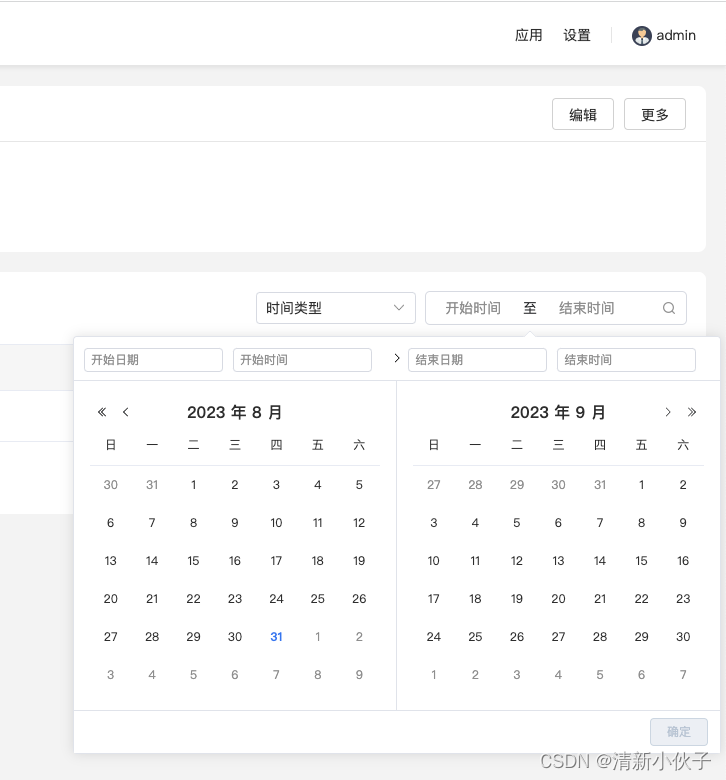
element-plus 设置 el-date-picker 弹出框位置
前言 概述:el-date-picker 组件会自动根据空间范围进行选择比较好的弹出位置,但特定情况下,它自动计算出的弹出位置并不符合我们的实际需求,故需要我们手动设置。 存在的问题:element-plus 中 el-date-picker 文档中并…...
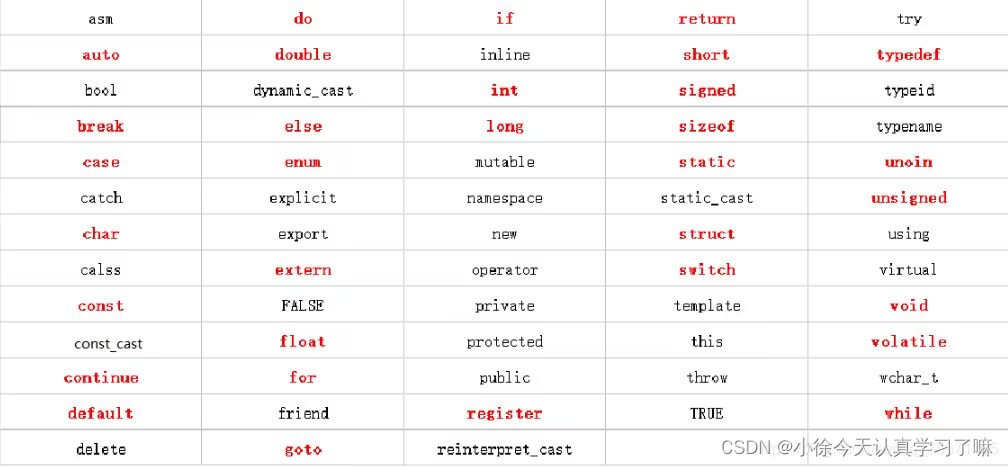
C++day7(auto关键字、lambda表达式、C++中的数据类型转换、C++标准模板库(STL)、list、文件操作)
一、Xmind整理: 关键词总结: 二、上课笔记整理: 1.auto关键字 #include <iostream>using namespace std;int fun(int a, int b, float *c, char d, double *e,int f) {return 12; }int main() {//定义一个函数指针,指向fu…...
纽扣电池/锂电池UN38.3安全检测报告
根据规章要求,航空公司和机场货物收运部门应对锂电池进行运输文件审查,重要的是每种型号的锂电池UN38.3安全检测报告。该报告可由的三方检测机构。如不能提供此项检测报告,将禁止锂电池进行航空运输. UN38.3包含产品:1、 锂电池2…...
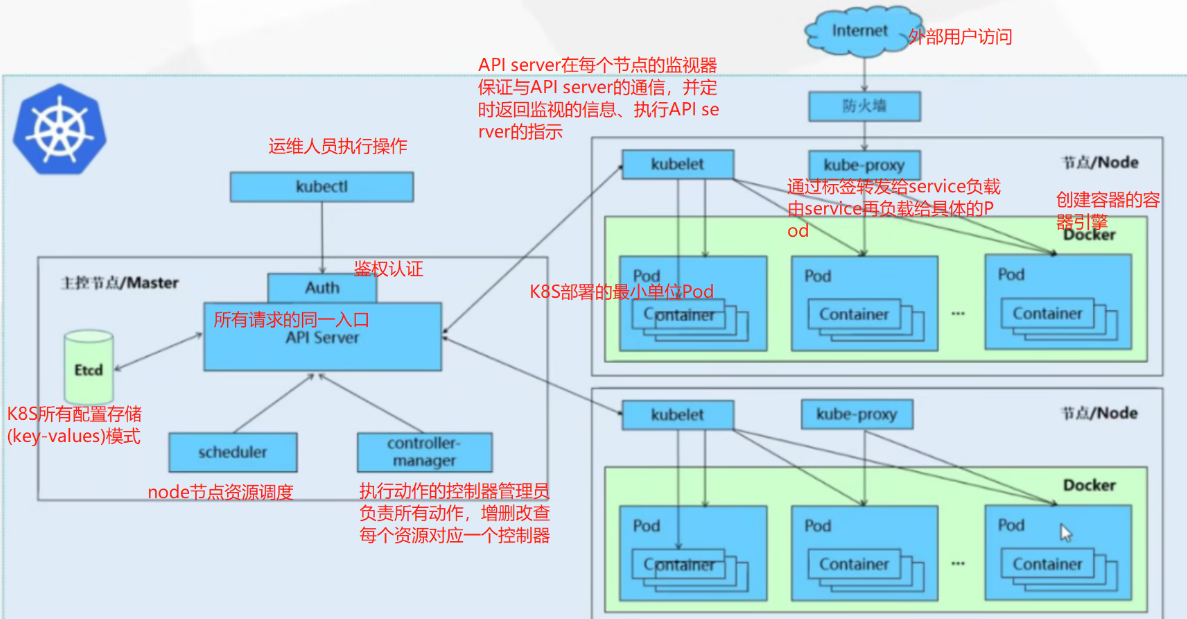
K8S:K8S自动化运维容器Docker集群
文章目录 一.k8s概述1.k8s是什么2.为什么要用K8S3.作用及功能4.k8s容器集群管理系统 二.K8S的特性1.弹性伸缩2.自我修复3.服务发现和复制均衡4.自动发布和回滚5.集中化配置管理和秘钥管理6.存储编排7.任务批量处理运行 三.K8S的集群架构四.K8S的核心组件1.Master组件࿰…...

Java的guava 限流写法
第一步先引入 maven <dependency> <groupId>com.google.guava</groupId> <artifactId>guava</artifactId> <version>32.0.1-jre</version> </dependency> 然后上方法 private final double rateLimiter10 1.0 / 10.0; // 每…...
[uniapp] scroll-view 简单实现 u-tabbar效果
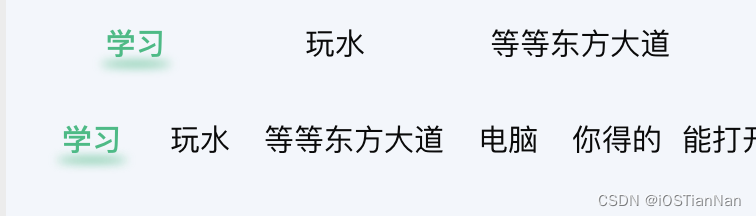
文章目录 方案踩坑1.scroll-view 横向失败2.点击item不滚动?3. scrollLeft从哪里来? 效果图 方案 官方scroll-view 进行封装 配合属性 scroll-left Number/String 设置横向滚动条位置 即可 scroll-into-view 属性尝试过,方案较难实现 踩坑 1.scroll-view 横向失败 安装…...

vue常见问题汇总
来源:https://www.fly63.com/ Q1:安装超时(install timeout) 方案有这么些: cnpm : 国内对npm的镜像版本/*cnpm website: https://npm.taobao.org/*/npm install -g cnpm --registryhttps://registry.npm.taobao.org// cnpm 的大多命令跟 npm 的是一致的…...
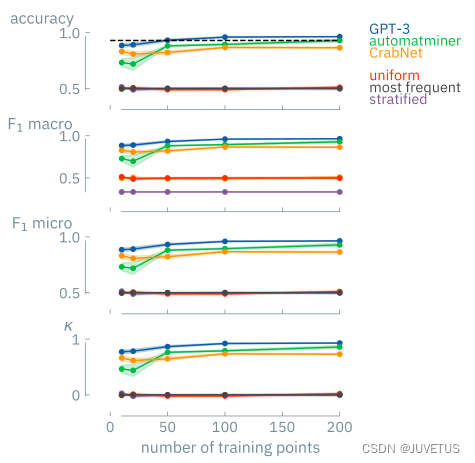
GPT-3在化学中进行低数据发现是否足够?
今天介绍一份洛桑联邦理工学院进行的工作,这份工作被发表在化学期刊预印本网站上。 对于这份工作,有兴趣的朋友可以通过我们的国内ChatGPT镜像站进行测试使用,我们的站点并没有针对特定任务进行建设,是通用性质的。 化学领域进行…...

gitlab升级
1.下载需要的版本 wget -c https://mirrors.tuna.tsinghua.edu.cn/gitlab-ce/yum/el7/gitlab-ce-15.7.6-ce.0.el7.x86_64.rpm --no-check-certificate gitlab-ce-15.4.6-ce.0.el7.x86_64.rpm gitlab-ce-15.7.6-ce.0.el7.x86_64.rpm gitlab-ce-15.9.7-ce.0.el7.x86_64.rpm g…...
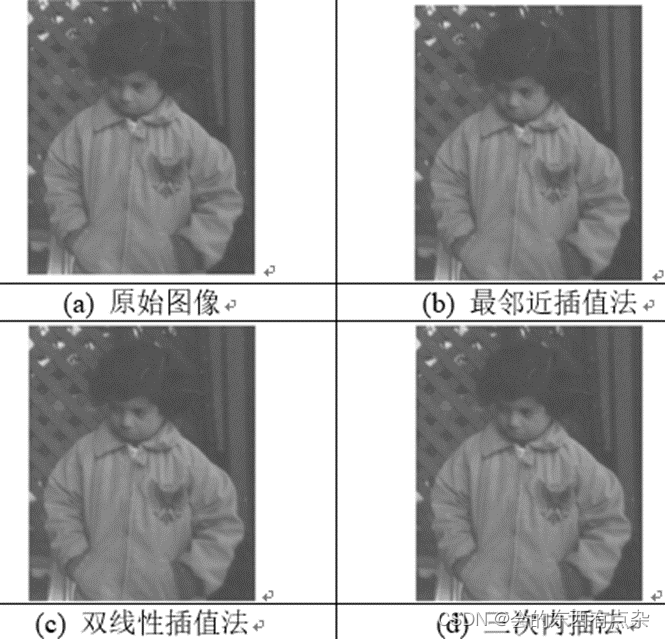
Matlab图像处理-灰度插值法
最近邻法 最近邻法是一种最简单的插值算法,输出像素的值为输入图像中与其最邻近的采样点的像素值。是将(u0,v0)(u_0,v_0)点最近的整数坐标u,v(u,v)点的灰度值取为(u0,v0)(u_0,v_0)点的灰度值。 在(u0,v0)(u_0,v_0)点各相邻像素间灰度变化较小时,这种方…...

axios 或 fetch 如何实现对发出的请求的终止?
终止 HTTP 请求是一个重要的功能,特别是在需要优化性能、避免不必要的请求或在某些事件发生时(例如用户点击取消)中断正在进行的请求时。以下是如何使用 axios 和 fetch 实现请求终止的方法: 1. axios axios 使用了 CancelToken…...
ChatGPT Prompting开发实战(四)
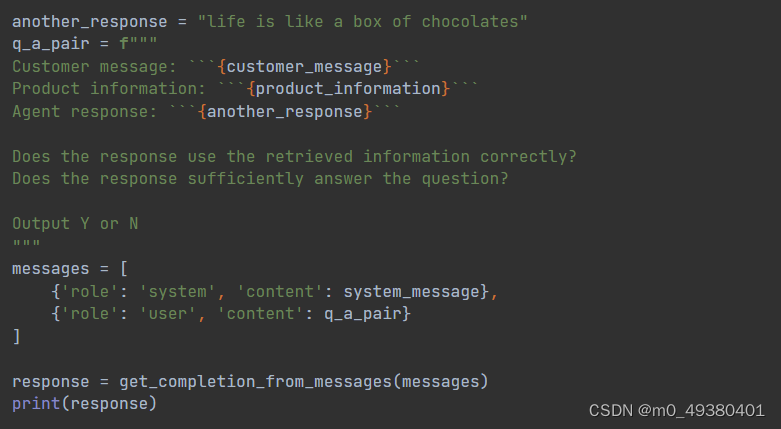
一、chaining prompts应用解析及输出文本的设定 由于输入和输出都是字符串形式的自然语言,为了方便输入和输出信息与系统设定使用的JSON格式之间进行转换,接下来定义从输入字符串转为JSON list的方法: 定义从JSON list转为输出字符串的方法&…...
Windows和Linux环境中安装Zookeeper具体操作
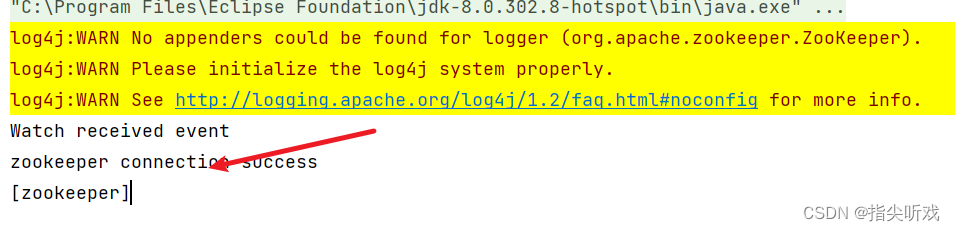
1.Windows环境中安装Zookeeper 1.1 下载Zookeeper安装包 ZooKeeper官网下载地址 建议下载稳定版本的 下载后进行解压后得到如下文件: 1.2 修改本地配置文件 进入解压后的目录,将zoo_example.cfg复制一份并重命名为zoo.cfg,如图所示: 打…...

41、Flink之Hive 方言介绍及详细示例
Flink 系列文章 1、Flink 部署、概念介绍、source、transformation、sink使用示例、四大基石介绍和示例等系列综合文章链接 13、Flink 的table api与sql的基本概念、通用api介绍及入门示例 14、Flink 的table api与sql之数据类型: 内置数据类型以及它们的属性 15、Flink 的ta…...

docker环境安装软件、更换镜像源以及E: Unable to locate package xxx解决
docker环境安装vim、ifconfig、ping、更换镜像源以及E: Unable to locate package vim 一. E: Unable to locate package vim 问题解决一、问题分析二、解决方案三、再次安装四. 此镜像源已失效 二. 解决 “E: 仓库xx没有 Release 文件。N: 无法安全地用该源进行更新࿰…...
夸克扫描王App用上了AI大模型 让扫描更清楚、提取文字更方便
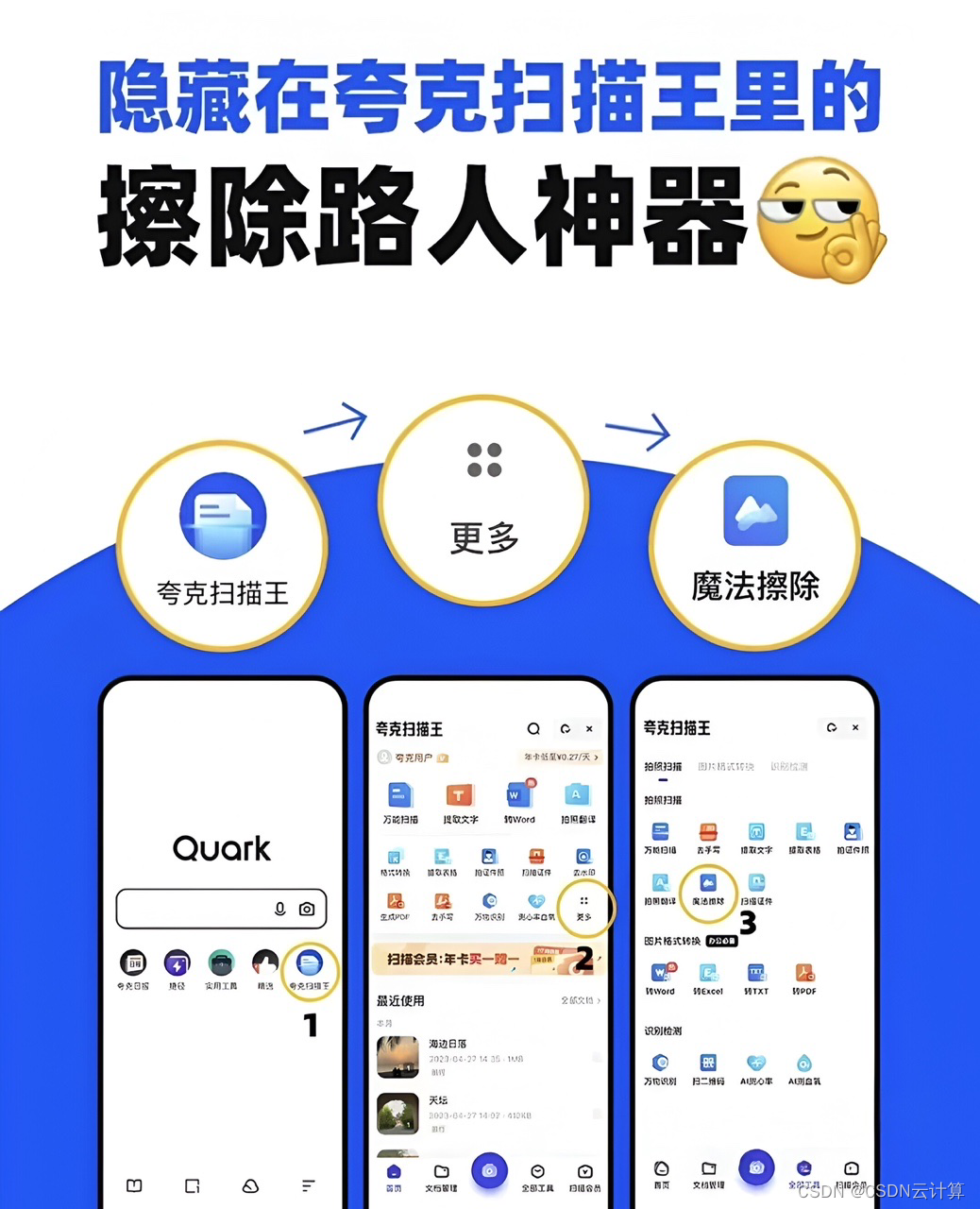
对上班族来说,找到一个好用的工具类APP,绝对可以提升工作效率。比如最常见的扫描文件,公司的扫描仪虽然好用但是很难进行深度编辑且不能外出使用;很多手机App也有扫描功能,但技术能力总是差一点,当面对复杂…...

代价高昂的 IT 错误:识别并避免供应商锁定
陷入不提供所需服务的云服务器合同中可能会非常痛苦、令人沮丧且成本高昂。 供应商锁定是提供商难以切换的地方,这意味着企业迁移到新供应商的成本太高、破坏性太大或耗时。 这使得公司受到供应商的摆布,尽管该服务可能无法提供他们所需的可靠性或可扩…...
HBase集群环境搭建与测试
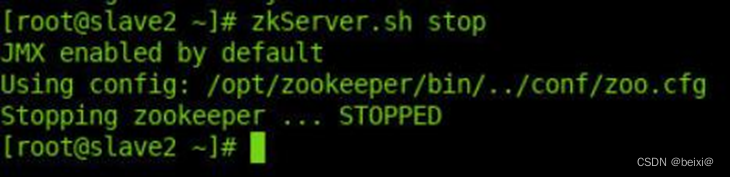
🥇🥇【大数据学习记录篇】-持续更新中~🥇🥇 个人主页:beixi 本文章收录于专栏(点击传送):【大数据学习】 💓💓持续更新中,感谢各位前辈朋友们支持…...

5分钟掌握碧蓝航线自动化脚本:解放双手的智能游戏助手终极指南
5分钟掌握碧蓝航线自动化脚本:解放双手的智能游戏助手终极指南 【免费下载链接】AzurLaneAutoScript Azur Lane bot (CN/EN/JP/TW) 碧蓝航线脚本 | 无缝委托科研,全自动大世界 项目地址: https://gitcode.com/gh_mirrors/az/AzurLaneAutoScript 你…...

从MOT16到YOLOv8+ByteTrack:实战中你的多目标跟踪IDF1为什么上不去?
从MOT16到YOLOv8ByteTrack:实战中多目标跟踪IDF1提升的深度解析 在计算机视觉领域,多目标跟踪(Multi-Object Tracking, MOT)一直是极具挑战性的任务。当我们使用YOLOv8等先进检测器配合ByteTrack等跟踪算法时,IDF1分数往往成为衡量系统性能的…...

39. UE5 GAS RPG:利用Motion Warping实现技能释放时的智能角色转向
1. Motion Warping插件基础与启用 Motion Warping是UE5官方提供的一个实验性插件,专门用于解决角色动画过程中的动态转向问题。这个插件的工作原理是在动画播放过程中插入一个"变形窗口",允许开发者指定某个时间段内角色的朝向或位置变化。我刚…...

CANN/asc-devkit流水线屏障同步API
PipeBarrier(ISASI) 【免费下载链接】asc-devkit 本项目是CANN 推出的昇腾AI处理器专用的算子程序开发语言,原生支持C和C标准规范,主要由类库和语言扩展层构成,提供多层级API,满足多维场景算子开发诉求。 项目地址: https://git…...

NLP-Models-Tensorflow在情感分析中的应用:79种分类器的全面评估
NLP-Models-Tensorflow在情感分析中的应用:79种分类器的全面评估 【免费下载链接】NLP-Models-Tensorflow Gathers machine learning and Tensorflow deep learning models for NLP problems, 1.13 < Tensorflow < 2.0 项目地址: https://gitcode.com/gh_mi…...

从源码到蓝图:使用Visual Paradigm高效逆向工程UML图
1. 逆向工程的价值与Visual Paradigm定位 接手一个遗留项目时,最头疼的往往不是写新代码,而是理解前人留下的"天书"。上周我就遇到个典型场景:客户紧急要求给三年前的老系统加功能,但项目文档只有一张模糊的截图和半页残…...

Vue3 表单深度解析
Vue3 表单深度解析 引言 随着前端技术的发展,Vue.js 已经成为最受欢迎的前端框架之一。Vue3 作为 Vue.js 的最新版本,带来了许多改进和新特性。其中,表单处理是 Vue3 中一个非常重要的部分。本文将深入解析 Vue3 表单的用法、特点以及最佳实践。 Vue3 表单概述 在 Vue3 …...

从黑盒到白盒:Testbench验证机制与FPGA/ASIC开发实践
1. 从“黑盒”到“白盒”:理解Testbench的本质在数字电路设计,尤其是FPGA和ASIC开发领域,我们常常把设计好的硬件描述语言(HDL)模块,比如一个Verilog写的加法器或者一个VHDL写的状态机,称为“待…...

Firefly-RK3399从Ubuntu 16.04到自定义Rootfs:手把手教你编译内核与打包固件
Firefly-RK3399从Ubuntu 16.04到自定义Rootfs:手把手教你编译内核与打包固件 在嵌入式开发领域,能够自主定制系统镜像是一项极具价值的能力。Firefly-RK3399作为一款性能强大的开发板,其开放的架构为开发者提供了深度定制的可能性。本文将带你…...

【MATLAB源码-第439期】基于MATLAB的APSK与QAM高阶调制在Saleh非线性功放下BER和EVM性能对比
操作环境:MATLAB 2024a1、算法描述摘要 高阶数字调制技术是现代无线通信和卫星通信系统提高频谱利用率的重要方法。QAM 调制通过同相分量和正交分量的幅度组合形成二维星座,在较高信噪比条件下能够获得较高的信息承载能力。APSK 调制则采用多环幅相结构&…...