
spring集成mybatis
1、新建一个javaEE web项目


2、加入相关依赖的坐标
<dependencies><!--数据系列:mybatis,mysgl,druid数据源,junit--><!-- https://mvnrepository.com/artifact/mysql/mysql-connector-java --><dependency><groupId>mysql</groupId><artifactId>mysql-connector-java</artifactId><version>8.0.16</version></dependency><dependency><groupId>org.mybatis</groupId><artifactId>mybatis</artifactId><version>3.4.2</version></dependency><!-- 阿里数据源 --><dependency><groupId>com.alibaba</groupId><artifactId>druid</artifactId><version>1.1.10</version></dependency><dependency><groupId>junit</groupId><artifactId>junit</artifactId><version>4.12</version><scope>provided</scope></dependency><!--spring系列:spring-context,aop,jdbc--><!-- spring-context --><dependency><groupId>org.springframework</groupId><artifactId>spring-context</artifactId><version>5.2.2.RELEASE</version></dependency><!-- spring-jdbc --><dependency><groupId>org.springframework</groupId><artifactId>spring-jdbc</artifactId><version>5.2.2.RELEASE</version></dependency><!--aop--><dependency><groupId>org.springframework</groupId><artifactId>spring-aspects</artifactId><version>5.2.2.RELEASE</version></dependency>
</dependencies>
3、创建相应的包和类,以登录为例
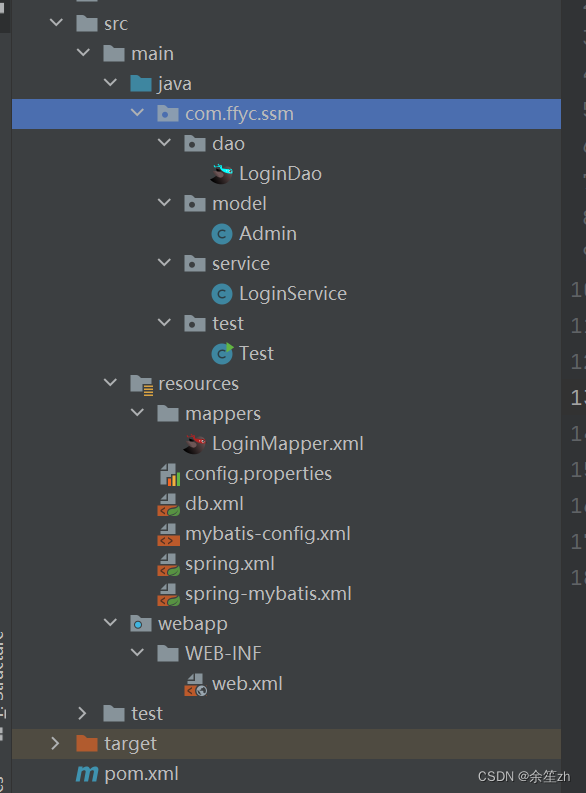
package com.ffyc.ssm.model;import lombok.Data;
import org.springframework.format.annotation.DateTimeFormat;import java.util.Date;
@Data
public class Admin {private Integer id;private String account;private String password;@DateTimeFormat(pattern = "yyyy-MM-dd")private Date birthday;
}
<dependency><groupId>org.projectlombok</groupId><artifactId>lombok</artifactId><version>1.18.4</version><scope>provided</scope>
</dependency>@Data注解在类上,会为类的所有属性自动生成setter/getter、equals、canEqual、hashCode、toString方法,如为final属性,则不会为该属性生成setter方法。
@Service(value = "loginService")
@Transactional
public class LoginService {//注入dao层对象@AutowiredLoginDao loginDao;//注入的直接是接口的代理对象sqlsession.getMapper();public Admin login(Admin admin){Admin a=loginDao.Login(admin);return a;}
}
@Repository
public interface LoginDao {public Admin Login(Admin admin);
}<?xml version="1.0" encoding="UTF-8"?>
<!DOCTYPE mapper PUBLIC "-//mybatis.org//DTD Mapper 3.0//EN""http://mybatis.org/dtd/mybatis-3-mapper.dtd">
<!--映射文件与操作接口绑定的-->
<mapper namespace="com.ffyc.ssm.dao.LoginDao"><select id="Login" resultType="com.ffyc.ssm.model.Admin">select * from admin where account=#{account} and password=#{password}</select>
</mapper>4、创建并配置spring和mybatis配置文件
1.mybatis配置文件(mybatis-config.xml)
<?xml version="1.0" encoding="UTF-8" ?>
<!DOCTYPE configurationPUBLIC "-//mybatis.org//DTD Config 3.0//EN""https://mybatis.org/dtd/mybatis-3-config.dtd">
<configuration><settings> <!--常用设置--><!--启用日志功能,在运行时,可以将实际执行的sgL细节打印到控制台--><setting name="logImpl" value="STDOUT_LOGGING"/><setting name="mapUnderscoreToCamelCase" value="true"/><setting name="cacheEnabled" value="true"/>  <!--全局开启二级缓存--></settings><typeAliases> <!--配置类型简称--><package name="com.ffyc.ssm.model"/></typeAliases>
</configuration>
2.数据库连接配置
mybatis-config.xml
classDriverName=com.mysql.cj.jdbc.Driver
url=jdbc:mysql://127.0.0.1:3306/ssmdb?serverTimezone=Asia/Shanghai
uname=root
pwd=123456
db.xml
<?xml version="1.0" encoding="UTF-8"?>
<beans xmlns="http://www.springframework.org/schema/beans"xmlns:xsi="http://www.w3.org/2001/XMLSchema-instance"xmlns:context="http://www.springframework.org/schema/context"xmlns:tx="http://www.springframework.org/schema/tx"xsi:schemaLocation="http://www.springframework.org/schema/beanshttps://www.springframework.org/schema/beans/spring-beans.xsdhttp://www.springframework.org/schema/contexthttp://www.springframework.org/schema/context/spring-context.xsdhttp://www.springframework.org/schema/txhttp://www.springframework.org/schema/tx/spring-tx.xsd"><!--配置jdbc功能--><!--负责加载config.properties文件--><context:property-placeholder location="classpath:config.properties"></context:property-placeholder><!--spring统一管理数据库链接对象--><bean id="dataSource" class="com.alibaba.druid.pool.DruidDataSource"><property name="driverClassName" value="${classDriverName}"></property><property name="url" value="${url}"></property><property name="username" value="${uname}"></property><property name="password" value="${pwd}"></property><property name="initialSize" value="5"></property><property name="maxActive" value="10"></property></bean><!-- 配置spring事务管理类, 并注入数据源 --><bean id="transactionManager" class="org.springframework.jdbc.datasource.DataSourceTransactionManager"><property name="dataSource" ref="dataSource"></property></bean><!--开启注解事务管理--><tx:annotation-driven transaction-manager="transactionManager"/>
</beans>
3.spring集成mybatis
Spring 集成 Mybatis 其核心是将 SqlSessionFactory 交由 Spring 管理,并由 Spring 管理对 dao 接口的代理实现。
3.1 导入 mybatis jar 包
<!--spring集成mybatis框架-->
<dependency><groupId>org.mybatis</groupId><artifactId>mybatis-spring</artifactId><version>1.3.1</version>
</dependency>
3.2 配置 sqlSessionFactory,spring-mybatis.xml中
<?xml version="1.0" encoding="UTF-8"?>
<beans xmlns="http://www.springframework.org/schema/beans"xmlns:xsi="http://www.w3.org/2001/XMLSchema-instance"xsi:schemaLocation="http://www.springframework.org/schema/beanshttps://www.springframework.org/schema/beans/spring-beans.xsd"><!--导入数据库连接 以及事务管理配置--><import resource="classpath:db.xml"></import> <!--target/classes下的--><!--让spring框架生成sqlSessionFactory--><bean id="sqlSessionFactory" class="org.mybatis.spring.SqlSessionFactoryBean"><!--注入数据源--><property name="dataSource" ref="dataSource"></property><!--配置mybatis配置文件--><property name="configLocation" value="classpath:mybatis-config.xml"></property><!--扫描SQL映射文件--><property name="mapperLocations" value="classpath:mappers/*Mapper.xml"></property></bean><!--让spring框架生成接口代理对象--><bean id="mapperFactory" class="org.mybatis.spring.mapper.MapperScannerConfigurer"><property name="basePackage" value="com.ffyc.ssm.dao"></property><property name="sqlSessionFactoryBeanName" value="sqlSessionFactory"></property></bean>
</beans>
4.spring.xml
spring.xml中需要导入spring-mybatis.xml,spring-mybatis.xml中导入db.xml
<!--spring.xml-->
<?xml version="1.0" encoding="UTF-8"?>
<beans xmlns="http://www.springframework.org/schema/beans"xmlns:xsi="http://www.w3.org/2001/XMLSchema-instance"xmlns:context="http://www.springframework.org/schema/context"xmlns:aop="http://www.springframework.org/schema/aop"xsi:schemaLocation="http://www.springframework.org/schema/beanshttps://www.springframework.org/schema/beans/spring-beans.xsdhttp://www.springframework.org/schema/contexthttp://www.springframework.org/schema/context/spring-context.xsdhttp://www.springframework.org/schema/aophttp://www.springframework.org/schema/aop/spring-aop.xsd"><!--开启注解扫描--><context:component-scan base-package="com.ffyc.ssm"> </context:component-scan><!--开启自动代理--><aop:aspectj-autoproxy /><!--导入mybatis配置文件--><import resource="classpath:spring-mybatis.xml"></import></beans>
5、测试
public class Test {public static void main(String[] args) {ClassPathXmlApplicationContext app=new ClassPathXmlApplicationContext("spring.xml");LoginService loginService=app.getBean("loginService",LoginService.class);Admin admin=new Admin();admin.setAccount("admin");admin.setPassword("admin");Admin a=loginService.login(admin);System.out.println(a);}
}
相关文章:
spring集成mybatis
1、新建一个javaEE web项目 2、加入相关依赖的坐标 <dependencies><!--数据系列:mybatis,mysgl,druid数据源,junit--><!-- https://mvnrepository.com/artifact/mysql/mysql-connector-java --><dependency><groupId>mysql</grou…...

抽象轻松c语言
目 c语言 c程序 c语言的核心在于语言,语言的作用是进行沟通,人与人之间的信息交换 人与人之间的信息交换是会有信息空白(A表达信息,B接受信息,B对信息的处理会与A所以表达的信息具有差距,这段差距称为信…...
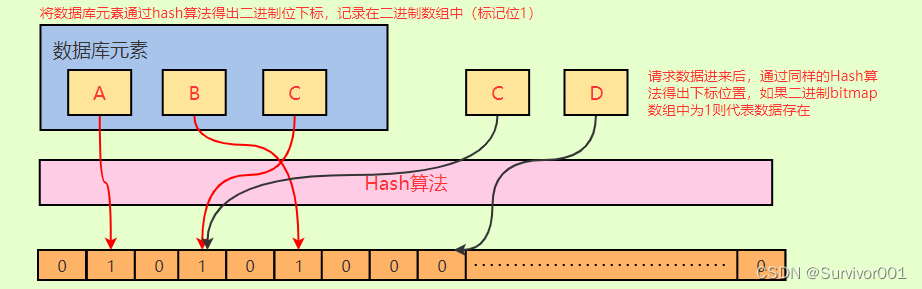
Redis布隆过滤器原理
其实布隆过滤器本质上要解决的问题,就是防止很多没有意义的、恶意的请求穿透Redis(因为Redis中没有数据)直接打入到DB。它是Redis中的一个modules,其实可以理解为一个插件,用来拓展实现额外的功能。 可以简单理解布隆…...

写代码时候的命名规则、命名规范、命名常用词汇
版权声明 这个大部分笔记是观看up主红桃A士的视频记录下来的,因为本人在学习的过程中也经常出现类似的问题,并且觉得Up主的视频讲解很好,做此笔记反复学习,若有侵权请联系删除,此推荐视频地址:【改善丑陋的…...
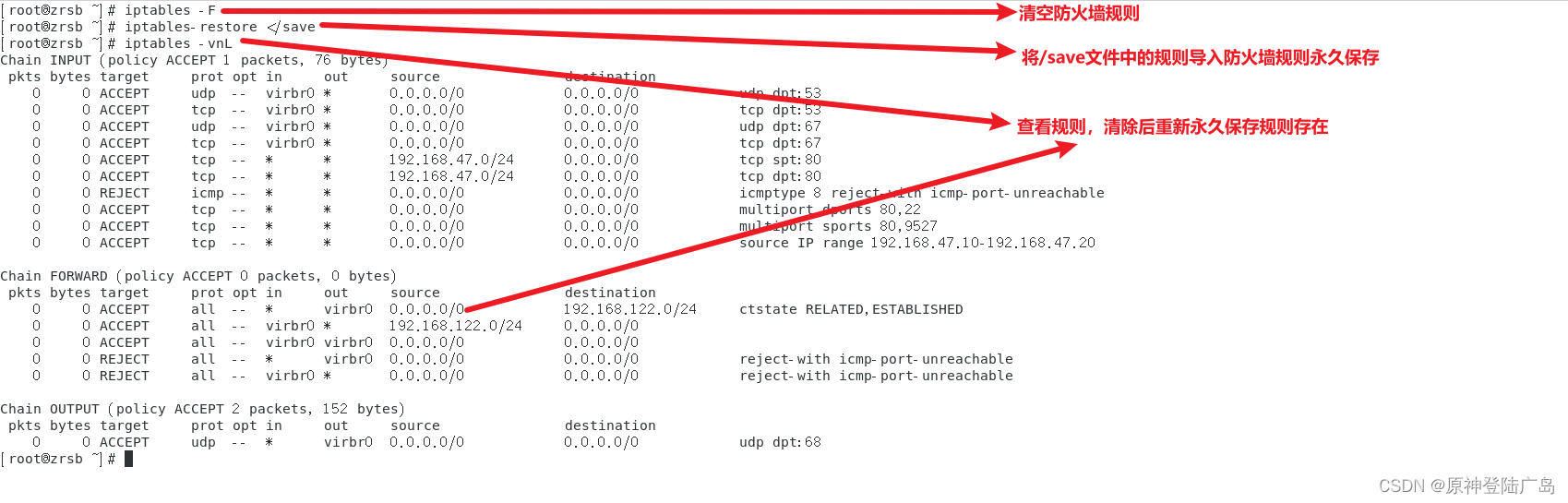
Linux之iptables防火墙
一.网络安全技术 ①入侵检测系统(Intrusion Detection Systems):特点是不阻断任何网络访问,量化、定位来自内外网络的威胁情况,主要以提供报警和事后监督为主,提供有针对性的指导措施和安全决策依据,类 似于…...
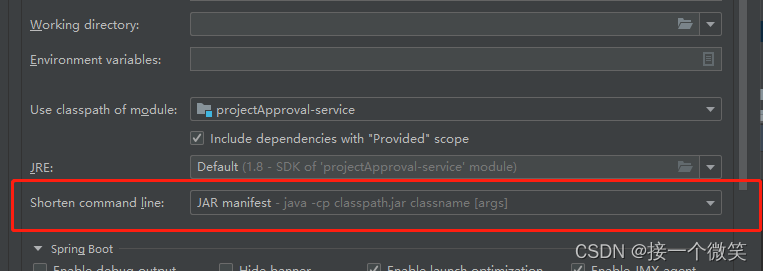
启动服务报错:Command line is too long Shorten command line for xxx or also for Spri
ommand line is too long. Shorten command line for ProjectApprovalApplication or also for Spring Boot default configuration. 启动springboot 项目的时候报错 解决方案: 点击提示中的:default:然后在弹出窗口中选择:JAR xx…...

docker安装elasticsearch、kibana
安装过程中,遇到最大的问题就是在安装kibana的时候发现 一直连接不上 elasticsearch。最后解决的问题就是 我通过 ifconfig en0 | grep inet| awk {print $2} 在mac中找到本机的ip,然后去到kibana容器中 修改 vi config/kibana.yml中的elasticsearch.hos…...

前端 CSS - 如何隐藏右侧的滚动条 -关于出现过多的滚动条导致界面不美观
1、配置 HTML 标签,隐藏右侧的滚动条 CSS 配置:下面两个一起写进进去,适配 IE、火狐、谷歌浏览器 html {/*隐藏滚动条,当IE下溢出,仍然可以滚动*/-ms-overflow-style:none;/*火狐下隐藏滚动条*/overflow:-moz-scroll…...
2.神经网络的实现
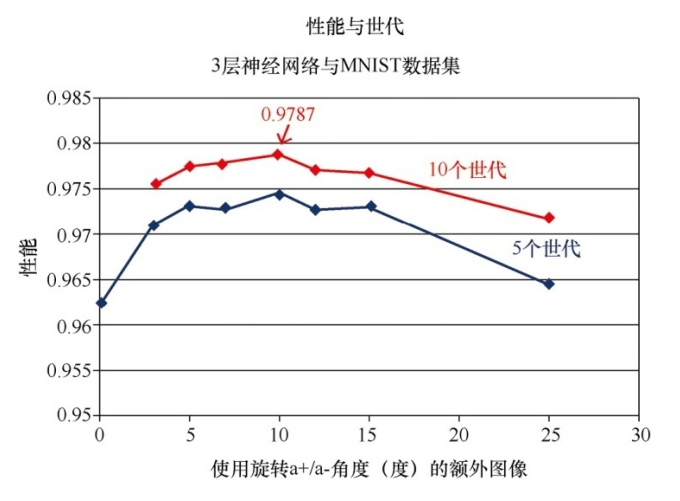
创建神经网络类 import numpy # scipy.special包含S函数expit(x) import scipy.special # 打包模块 import pickle# 激活函数 def activation_func(x):return scipy.special.expit(x)# 用于创建、 训练和查询3层神经网络 class neuralNetwork:# 初始化神经网络def __init__(se…...
合宙Air724UG LuatOS-Air LVGL API控件-键盘 (Keyboard)
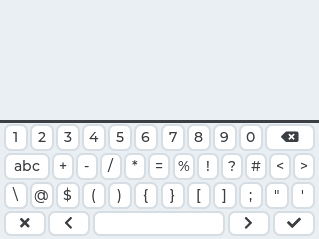
键盘 (Keyboard) LVGL 可以添加触摸键盘,但是很明显,使用触摸键盘的话必须要使用触摸的输入方式,否则无法驱动键盘。 示例代码 function keyCb(obj, e)-- 默认处理事件lvgl.keyboard_def_event_cb(keyBoard, e)if(e lvgl.EVENT_CANCEL)the…...

pytorch深度学习实践
B站-刘二大人 参考-PyTorch 深度学习实践_错错莫的博客-CSDN博客 线性模型 import numpy as np import matplotlib.pyplot as pltx_data [1.0, 2.0, 3.0] y_data [2.0, 4.0, 6.0]def forward(x):return x * wdef loss(x, y):y_pred forward(x)return (y_pred - y) ** 2# …...
)
直方图反向投影(Histogram Backprojection)
直方图反向投影(Histogram Backprojection)是一种在计算机视觉中用于对象检测和图像分割的技术。它的原理基于图像的颜色分布,允许我们在一幅图像中找到与给定对象颜色分布相匹配的区域。这个技术常常用于图像中的目标跟踪、物体识别和图像分…...

day32 泛型 数据结构 List
一、泛型 概述 JDK1.5同时推出了两个和集合相关的特性:增强for循环,泛型 泛型可以修饰泛型类中的属性,方法返回值,方法参数, 构造函数的参数 Java提供的泛型类/接口 Collection, List, Set,Iterator 等 …...

DW-AHB Central DMAC
文章目录 AHB Central DMAC —— Design Ware AHB Central DMAC —— Design Ware AHB(Adavenced High-performace BUS) Central DMAC(Direct Memory Access Controller) : 一个高性能总线系统。 作用:在嵌入式系统种连接高速设备,如处理器内存&#x…...
JavaScript设计模式(四)——策略模式、代理模式、观察者模式
个人简介 👀个人主页: 前端杂货铺 🙋♂️学习方向: 主攻前端方向,正逐渐往全干发展 📃个人状态: 研发工程师,现效力于中国工业软件事业 🚀人生格言: 积跬步…...

JS画布的基本使用
直线 <!DOCTYPE html> <html> <head> <meta charset"utf-8"> <title></title> <style> #myname{ border: 1px solid red; /* background: linear-gradient(to righ…...

c++ set/multiset
set/multiset 集合,一个单个,一个多个(multi)。两个库都是"set"。 https://blog.csdn.net/fckbb/article/details/130917681 对象创建 set(const Pred& compPred(),const A& alA()):创建空集合。set(const set& x):…...
)
多线程与高并发——并发编程(4)
文章目录 四、阻塞队列1 基础概念1.1 生产者消费者概念1.2 JUC阻塞队列的存取方法2 ArrayBlockingQueue2.1 ArrayBlockingQueue的基本使用2.2 生产者方法实现原理2.2.1 ArrayBlockingQueue的常见属性2.2.2 add方法2.2.3 offer方法2.2.4 offer(time,unit)方法2.2.5 put方法2.3 消…...
设计模式之建造者模式
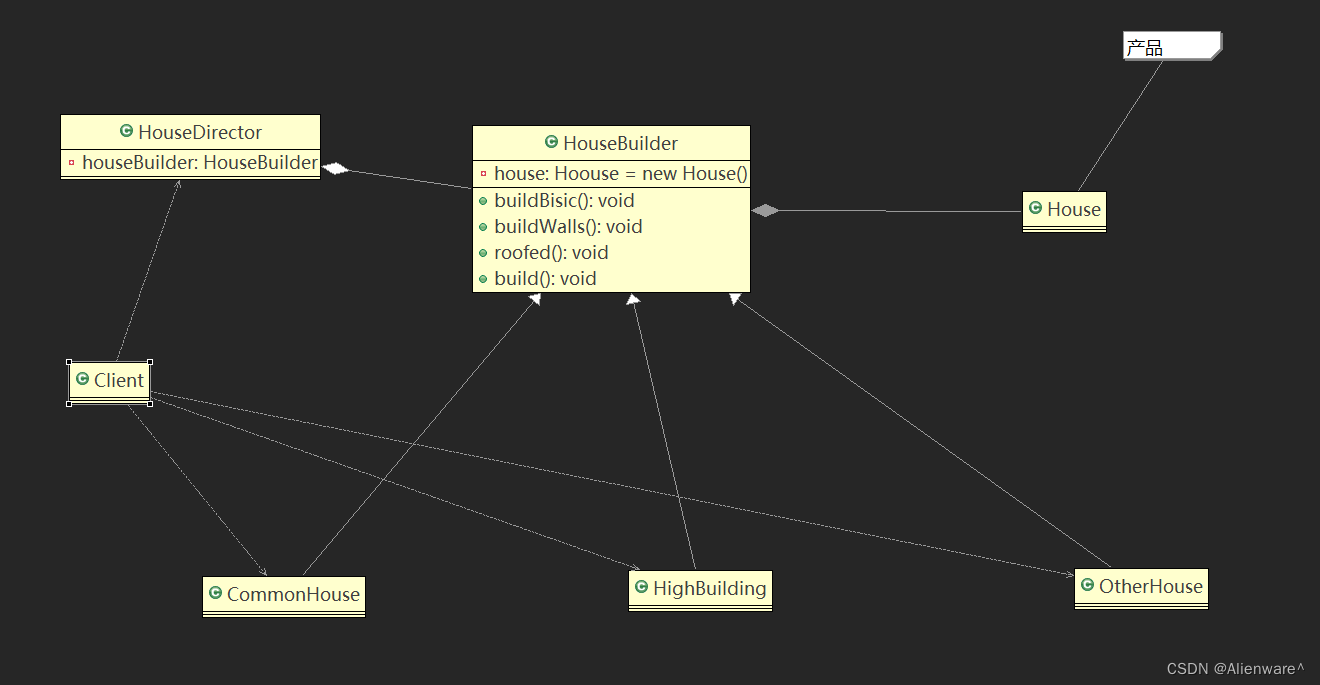
文章目录 盖房项目需求传统方式解决盖房需求传统方式的问题分析建造者模式概述是建造者模式的四个角色建造者模式原理类图建造者模式的注意事项和细节 盖房项目需求 需要建房子:这一过程为打桩、砌墙、封顶房子有各种各样的,比如普通房,高楼…...

源码编译安装opencv4.6.0,别的版本也行
1.下载opencv4.6.0 系统: ubuntu 1804 64位点我下载opencv 4.6.0 https://codeload.github.com/opencv/opencv/zip/refs/tags/4.6.0 指令下载 推荐: wget -O opencv.zip https://github.com/opencv/opencv/archive/4.6.0.zip wget -O opencv_contrib.zip https://github.com/…...

管人对账累垮人?巨有科技智慧市集系统一招减负
从城市商圈到景区古镇,从乡村田园到文创园区,各类市集遍地开花,但管理难题始终是制约行业发展的最大瓶颈。人工登记杂乱、对账结算繁琐、现场管控滞后、数据完全空白,一场中型市集就要耗费大量人力物力,大型市集更是纠…...

5分钟搞定fastANI安装与基因组比对:从conda安装到结果解读全流程
5分钟搞定fastANI安装与基因组比对:从conda安装到结果解读全流程 第一次接触基因组比对时,我被各种复杂的参数和晦涩的结果文件搞得晕头转向。直到发现了fastANI这个神器——它不仅能快速计算基因组间的平均核苷酸相似性(ANI)&am…...

开源风扇控制工具FanControl全攻略:从问题诊断到散热方案优化
开源风扇控制工具FanControl全攻略:从问题诊断到散热方案优化 【免费下载链接】FanControl.Releases This is the release repository for Fan Control, a highly customizable fan controlling software for Windows. 项目地址: https://gitcode.com/GitHub_Tren…...
)
告别单打独斗!Apipost 8协作版数据迁移保姆级教程(含团队项目处理)
Apipost 8协作版数据迁移实战:从个人到团队的无缝衔接 第一次打开Apipost 8协作版时,我盯着那个"迁入项目"按钮犹豫了整整十分钟——作为独立开发者,我的旧版本里积累了237个接口文档和56个测试集合,它们就像我精心搭建…...

5分钟快速上手:Rufus打造专业级USB启动盘的终极指南
5分钟快速上手:Rufus打造专业级USB启动盘的终极指南 【免费下载链接】rufus The Reliable USB Formatting Utility 项目地址: https://gitcode.com/GitHub_Trending/ru/rufus 还在为系统安装、数据恢复或系统维护而烦恼吗?Rufus(可靠U…...

Python气象数据处理实战:用Goff-Gratch公式5分钟搞定露点温度计算
Python气象数据处理实战:用Goff-Gratch公式5分钟搞定露点温度计算 气象数据分析中,露点温度是一个关键指标,它直接反映了空气中的水汽含量。对于天气预报、农业灌溉、工业控制等领域,准确计算露点温度至关重要。本文将带你用Pytho…...

SELF-REFINE in Action: Enhancing LLM Outputs Through Iterative Self-Feedback
1. 什么是SELF-REFINE?为什么LLM需要自我迭代? 想象一下你正在写一封重要邮件。第一稿可能直接了当但缺乏礼貌,经过几次修改后,措辞变得更加得体。这就是人类通过自我反馈不断完善的过程。现在,大型语言模型࿰…...

5分钟打造私人语音助手:开源离线语音键盘Sayboard全解析
5分钟打造私人语音助手:开源离线语音键盘Sayboard全解析 【免费下载链接】Sayboard An open-source on-device voice IME (keyboard) for Android using the Vosk library. 项目地址: https://gitcode.com/gh_mirrors/sa/Sayboard 在智能手机普及的今天&…...

攻克内核加载难题:OpenArk工具驱动加载失败的系统化解决策略
攻克内核加载难题:OpenArk工具驱动加载失败的系统化解决策略 【免费下载链接】OpenArk The Next Generation of Anti-Rookit(ARK) tool for Windows. 项目地址: https://gitcode.com/GitHub_Trending/op/OpenArk OpenArk作为新一代Windows反Rootkit工具&…...
)
1Panel新手必看:5分钟搞定RustDesk远程桌面搭建(含端口配置避坑指南)
1Panel极速部署RustDesk:零基础构建安全远程桌面的完整指南 当我们需要远程管理Linux服务器时,一个轻量级、开源的远程桌面解决方案往往比商业软件更灵活可控。RustDesk作为新兴的远程工具,凭借其跨平台特性和自建服务器的能力,正…...