
leaflet · 关于轨迹移动
1.引入 import MovingMarker from "../src/utils/MovingMarker";
2.MovingMarker.js内容
import L from "leaflet";
import eventBus from '../util/eventBus';
L.interpolatePosition = function(p1, p2, duration, t) {var k = t/duration;k = (k > 0) ? k : 0;k = (k > 1) ? 1 : k;let obj = {lat: p1.lat + k * (p2.lat - p1.lat),lng: p1.lng + k * (p2.lng - p1.lng)}return L.latLng(p1.lat + k * (p2.lat - p1.lat),p1.lng + k * (p2.lng - p1.lng));
};L.Marker.MovingMarker = L.Marker.extend({//state constantsstatics: {notStartedState: 0,endedState: 1,pausedState: 2,runState: 3},options: {autostart: false,loop: false,},initialize: function (latlngs, durations, options) {L.Marker.prototype.initialize.call(this, latlngs[0], options);this._latlngs = latlngs.map(function(e) {return L.latLng(e);});if (durations instanceof Array) {this._durations = durations;} else {this._durations = this._createDurations(this._latlngs, durations);}this._currentDuration = 0;this._currentIndex = 0;this._state = L.Marker.MovingMarker.notStartedState;this._startTime = 0;this._startTimeStamp = 0;  // timestamp given by requestAnimFramethis._pauseStartTime = 0;this._animId = 0;this._animRequested = false;this._currentLine = [];this._stations = {};},isRunning: function() {return this._state === L.Marker.MovingMarker.runState;},isEnded: function() {return this._state === L.Marker.MovingMarker.endedState;},isStarted: function() {return this._state !== L.Marker.MovingMarker.notStartedState;},isPaused: function() {return this._state === L.Marker.MovingMarker.pausedState;},start: function() {if (this.isRunning()) {return;}if (this.isPaused()) {this.resume();} else {this._loadLine(0);this._startAnimation();this.fire('start');}},resume: function() {if (! this.isPaused()) {return;}// update the current linethis._currentLine[0] = this.getLatLng();this._currentDuration -= (this._pauseStartTime - this._startTime);this._startAnimation();},pause: function() {if (! this.isRunning()) {return;}this._pauseStartTime = Date.now();this._state = L.Marker.MovingMarker.pausedState;this._stopAnimation();this._updatePosition();},stop: function(elapsedTime) {if (this.isEnded()) {return;}this._stopAnimation();if (typeof(elapsedTime) === 'undefined') {// user callelapsedTime = 0;this._updatePosition();}this._state = L.Marker.MovingMarker.endedState;this.fire('end', {elapsedTime: elapsedTime});},addLatLng: function(latlng, duration) {this._latlngs.push(L.latLng(latlng));this._durations.push(duration);},moveTo: function(latlng, duration) {this._stopAnimation();this._latlngs = [this.getLatLng(), L.latLng(latlng)];this._durations = [duration];this._state = L.Marker.MovingMarker.notStartedState;this.start();this.options.loop = false;},addStation: function(pointIndex, duration) {if (pointIndex > this._latlngs.length - 2 || pointIndex < 1) {return;}this._stations[pointIndex] = duration;},onAdd: function (map) {L.Marker.prototype.onAdd.call(this, map);if (this.options.autostart && (! this.isStarted())) {this.start();return;}if (this.isRunning()) {this._resumeAnimation();}},onRemove: function(map) {L.Marker.prototype.onRemove.call(this, map);this._stopAnimation();},_createDurations: function (latlngs, duration) {var lastIndex = latlngs.length - 1;var distances = [];var totalDistance = 0;var distance = 0;// compute array of distances between pointsfor (var i = 0; i < lastIndex; i++) {distance = latlngs[i + 1].distanceTo(latlngs[i]);distances.push(distance);totalDistance += distance;}var ratioDuration = duration / totalDistance;var durations = [];for (i = 0; i < distances.length; i++) {durations.push(distances[i] * ratioDuration);}return durations;},_startAnimation: function() {this._state = L.Marker.MovingMarker.runState;this._animId = L.Util.requestAnimFrame(function(timestamp) {this._startTime = Date.now();this._startTimeStamp = timestamp;this._animate(timestamp);}, this, true);this._animRequested = true;},_resumeAnimation: function() {if (! this._animRequested) {this._animRequested = true;this._animId = L.Util.requestAnimFrame(function(timestamp) {this._animate(timestamp);}, this, true);}},_stopAnimation: function() {if (this._animRequested) {L.Util.cancelAnimFrame(this._animId);this._animRequested = false;}},_updatePosition: function() {var elapsedTime = Date.now() - this._startTime;this._animate(this._startTimeStamp + elapsedTime, true);},_loadLine: function(index) {this._currentIndex = index;this._currentDuration = this._durations[index];this._currentLine = this._latlngs.slice(index, index + 2);},/*** Load the line where the marker is* @param  {Number} timestamp* @return {Number} elapsed time on the current line or null if* we reached the end or marker is at a station*/_updateLine: function(timestamp) {// time elapsed since the last latlngvar elapsedTime = timestamp - this._startTimeStamp;// not enough time to update the lineif (elapsedTime <= this._currentDuration) {return elapsedTime;}var lineIndex = this._currentIndex;var lineDuration = this._currentDuration;var stationDuration;while (elapsedTime > lineDuration) {// substract time of the current lineelapsedTime -= lineDuration;stationDuration = this._stations[lineIndex + 1];// test if there is a station at the end of the lineif (stationDuration !== undefined) {if (elapsedTime < stationDuration) {this.setLatLng(this._latlngs[lineIndex + 1]);return null;}elapsedTime -= stationDuration;}lineIndex++;// test if we have reached the end of the polylineif (lineIndex >= this._latlngs.length - 1) {if (this.options.loop) {lineIndex = 0;this.fire('loop', {elapsedTime: elapsedTime});} else {// place the marker at the end, else it would be at// the last positionthis.setLatLng(this._latlngs[this._latlngs.length - 1]);this.stop(elapsedTime);return null;}}lineDuration = this._durations[lineIndex];}this._loadLine(lineIndex);this._startTimeStamp = timestamp - elapsedTime;this._startTime = Date.now() - elapsedTime;return elapsedTime;},_animate: function(timestamp, noRequestAnim) {this._animRequested = false;// find the next line and compute the new elapsedTimevar elapsedTime = this._updateLine(timestamp);if (this.isEnded()) {// no need to animatereturn;}if (elapsedTime != null) {// compute the positionvar p = L.interpolatePosition(this._currentLine[0],this._currentLine[1],this._currentDuration,elapsedTime);this.setLatLng(p);}if (! noRequestAnim) {this._animId = L.Util.requestAnimFrame(this._animate, this, false);this._animRequested = true;}}
});L.Marker.movingMarker = function (latlngs, duration, options) {return new L.Marker.MovingMarker(latlngs, duration, options);
};
3.let marker1 = L.Marker.movingMarker([lat,lon], 3000,
{autostart: true, loop: true})
let iconOut = L.icon({
iconUrl: require("图标位置"),
iconSize: [30, 30]
})// --- // movingMarker的使用会自带图标,通常修改自定义图标
marker1.setIcon(iconOut).addTo(this.map);L.polyline([lat,lon]).addTo(this.map); //轨迹marker1.once('click', function () {marker1.start();marker1.on('click', function () {if (marker1.isRunning()) {marker1.pause();} else {marker1.start();}});});
相关文章:

leaflet · 关于轨迹移动
1.引入 import MovingMarker from "../src/utils/MovingMarker"; 2.MovingMarker.js内容 import L from "leaflet"; import eventBus from ../util/eventBus; L.interpolatePosition function(p1, p2, duration, t) {var k t/duration;k (k > 0) ? …...
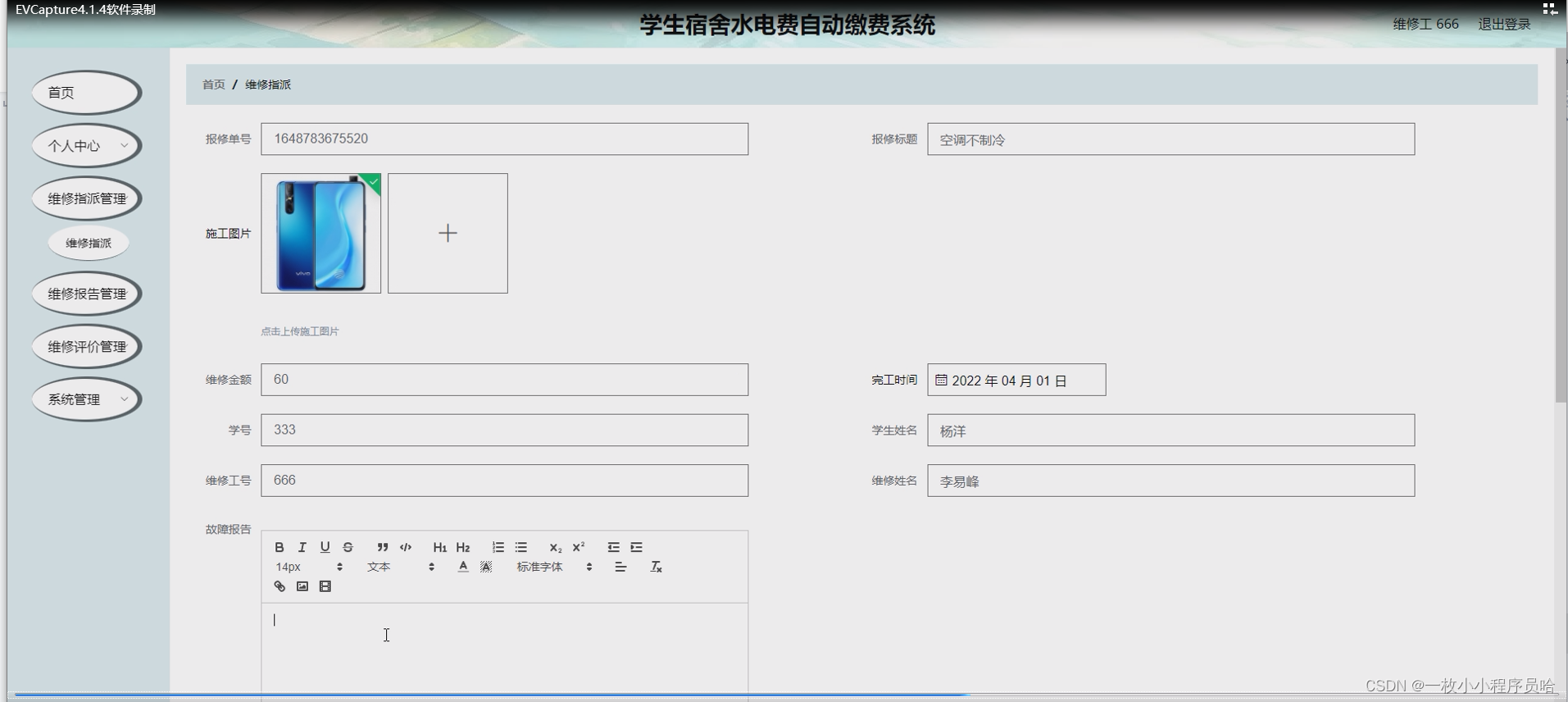
学生宿舍水电费自动缴费系统/基于javaweb的水电缴费系统
摘 要 “互联网”的战略实施后,很多行业的信息化水平都有了很大的提升。但是目前很多学校日常工作仍是通过人工管理的方式进行,需要在各个岗位投入大量的人力进行很多重复性工作,这样就浪费了许多的人力物力,工作效率较低&#x…...
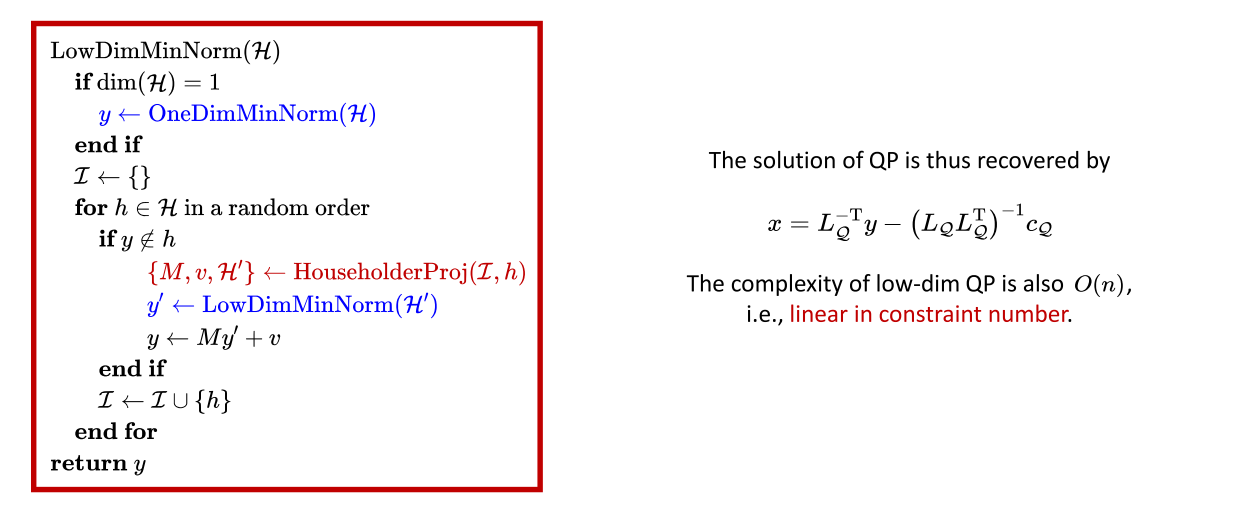
机器人中的数值优化(十三)——QP二次规划
本系列文章主要是我在学习《数值优化》过程中的一些笔记和相关思考,主要的学习资料是深蓝学院的课程《机器人中的数值优化》和高立编著的《数值最优化方法》等,本系列文章篇数较多,不定期更新,上半部分介绍无约束优化,…...
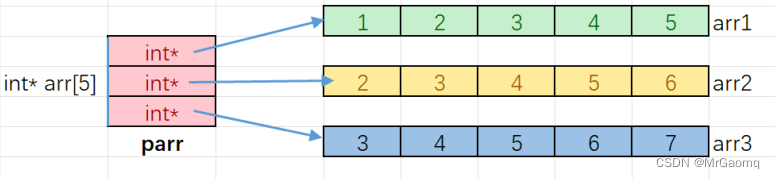
语言深入理解指针(非常详细)(三)
目录 数组名的理解使用指针访问数组 一维数组传参的本质二级指针指针数组指针数组模拟二维数组 数组名的理解 在上⼀个章节我们在使用指针访问数组的内容时,有这样的代码: int arr[10] {1,2,3,4,5,6,7,8,9,10}; int *p &arr[0];这里我们使用 &am…...

实训笔记8.31
实训笔记8.31 8.31笔记一、项目开发流程一共分为七个阶段1.1 数据产生阶段1.2 数据采集存储阶段1.3 数据清洗预处理阶段1.4 数据统计分析阶段1.5 数据迁移导出阶段1.6 数据可视化阶段 二、项目数据清洗预处理的实现2.1 清洗预处理规则2.1.1 数据清洗规则2.1.2 数据预处理规则 2…...

el-table 垂直表头
效果如下: 代码如下: <template><div class"vertical_head"><el-table style"width: 100%" :data"getTblData" :show-header"false"><el-table-columnv-for"(item, index) in getHe…...
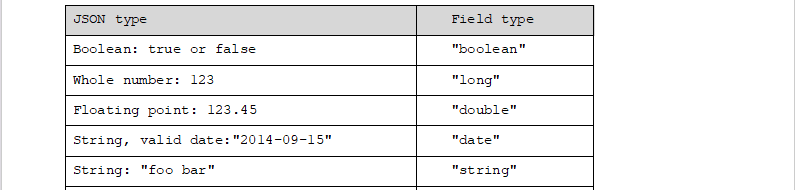
B081-Lucene+ElasticSearch
目录 认识全文检索概念lucene原理全文检索的特点常见的全文检索方案 Lucene创建索引导包分析图代码 搜索索引分析图代码 ElasticSearch认识ElasticSearchES与Kibana的安装及使用说明ES相关概念理解和简单增删改查ES查询DSL查询DSL过滤 分词器IK分词器安装测试分词器 文档映射(字…...

机器学习:塑造未来的核心力量
着科技的飞速发展,机器学习已经成为我们生活中不可或缺的一部分。无论是搜索引擎、推荐系统,还是自动驾驶汽车和机器人,都依赖于机器学习算法。本文将探讨机器学习的基本概念、应用领域以及未来发展趋势。 一、机器学习的基本概念 机器学习…...
RK3568-i2c-适配8010rtc时钟芯片
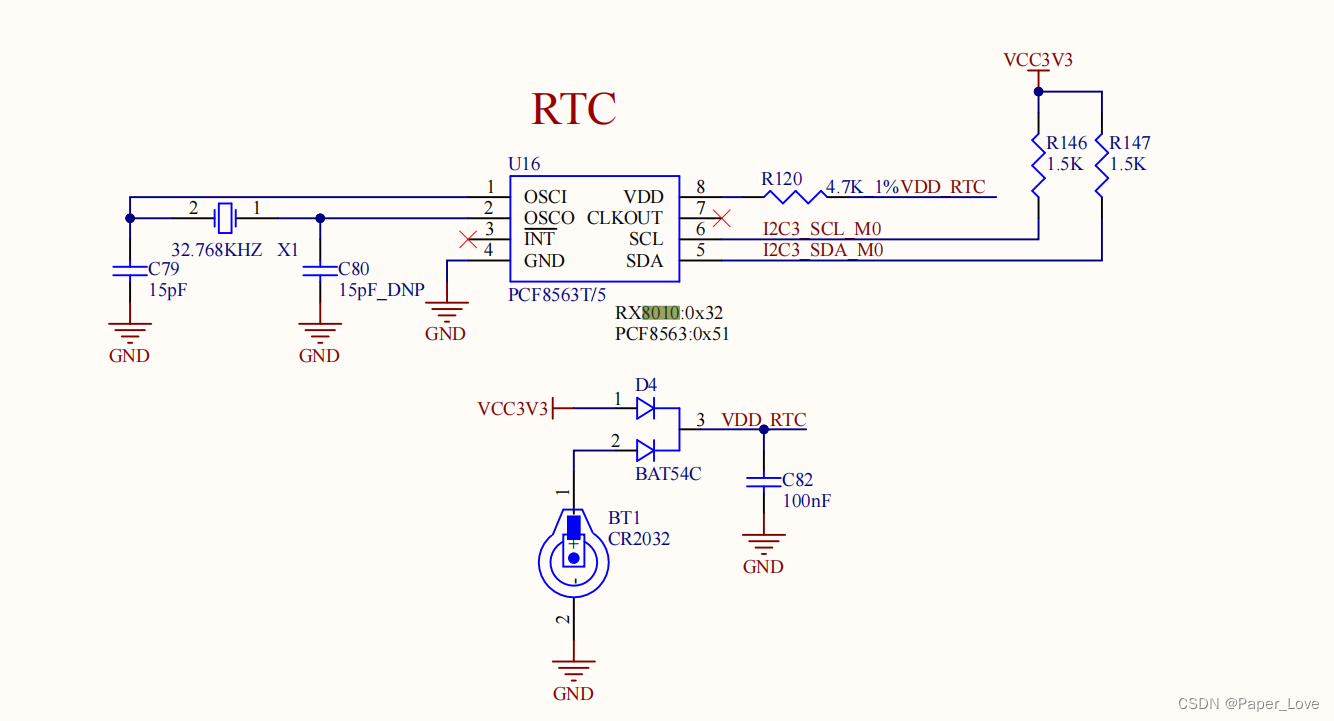
硬件连接 从硬件原理图中可以看出,rtc时钟芯片挂载在i2c3总线上,设备地址需要查看芯片数据手册。编写设备树 &i2c3 {status "okay";rx8010: rx801032 {compatible "epson,rx8010";reg <0x32>;}; };使能驱动 /kernel/…...

Spring Security - 基于内存快速demo
基于内存方式 - 只作学习参考1.引入依赖<dependency><groupId>org.springframework.boot</groupId><artifactId>spring-boot-starter-thymeleaf</artifactId></dependency>2.login.html、index.html、fail.htmllogin.html:<form method…...

6 | 从文本文件中读取单词并输出不重复的单词列表
Transformation 操作 Transformation 操作是用于从一个 RDD(Resilient Distributed Dataset)创建一个新的 RDD,通常是通过对原始 RDD 的元素进行映射、筛选、分组等操作来实现的。Transformation 操作不会立即执行,而是惰性计算,只有在 Action 操作触发时才会真正执行。以…...
配置)
【微信小程序篇】- 多环境(版本)配置
最近自己在尝试使用AIGC写一个小程序,页面、样式、包括交互函数AIGC都能够帮我完成(不过这里有一点问题AIGC的上下文关联性还是有限制,会经常出现对于需求理解跑偏情况,需要不断的重复强调,并纠正错误,才能得到你想要的…...
)
ssh配置(一、GitLabGitHub)
一. 为什么配置ssh 使用 ssh 克隆项目,更加安全方便。 git clone 项目时一般使用两种协议 https 和 ssh 。 二. 原理的通俗解释 ssh 解决的问题是登录时的用户身份验证问题,默认使用 RSA(也支持其他算法: RSA、DSA、ECDSA、EdD…...
开了抖店后就可以直播带货了吗?想在抖音带货的,建议认真看完!
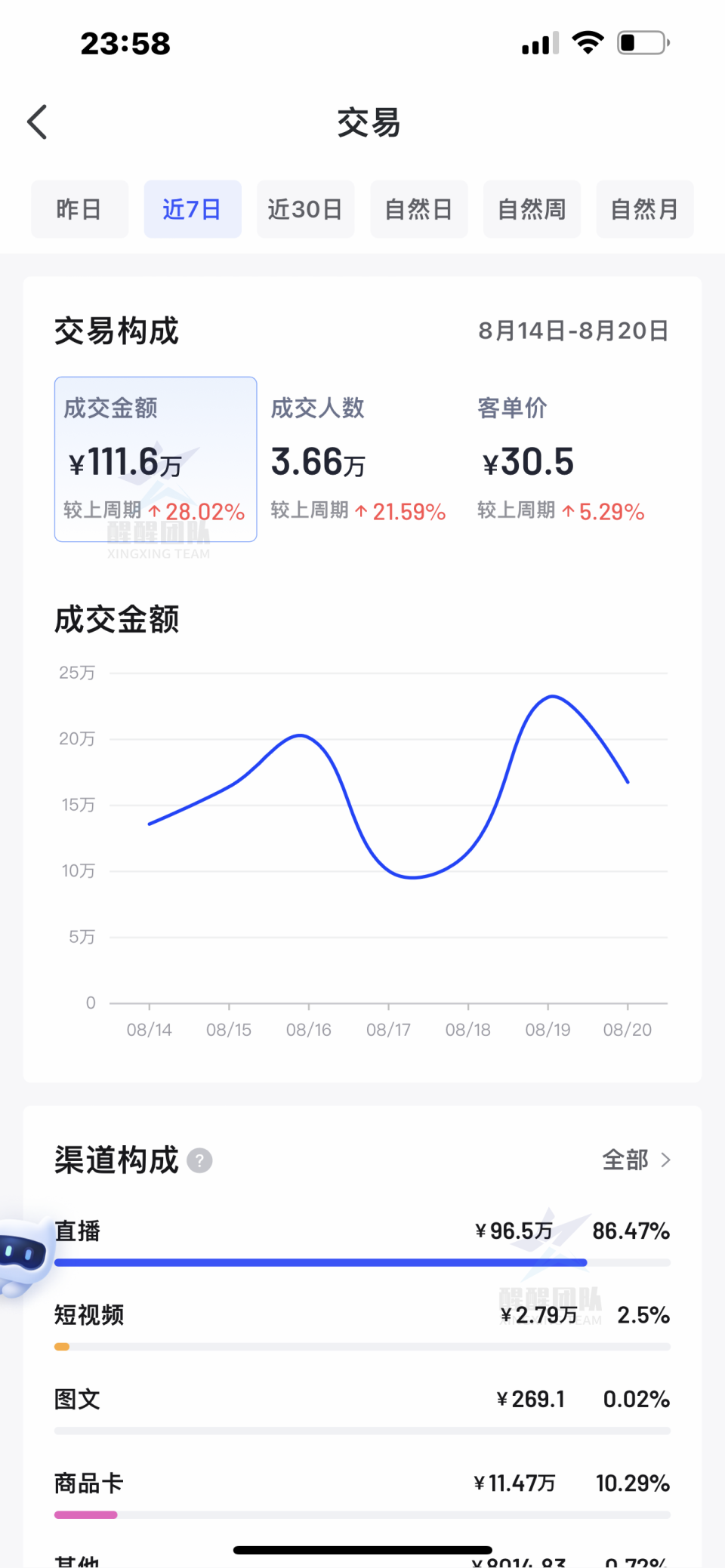
我是王路飞。 关于抖店和直播带货的关系,其实很多人经常搞不清楚。 不然的话,也不会有这个问题的出现了:开了抖店后就可以直播带货了吗? 在我看来,这个问题很简单,但在不了解抖音电商和直播带货其中门道…...
【深度学习实验】数据可视化
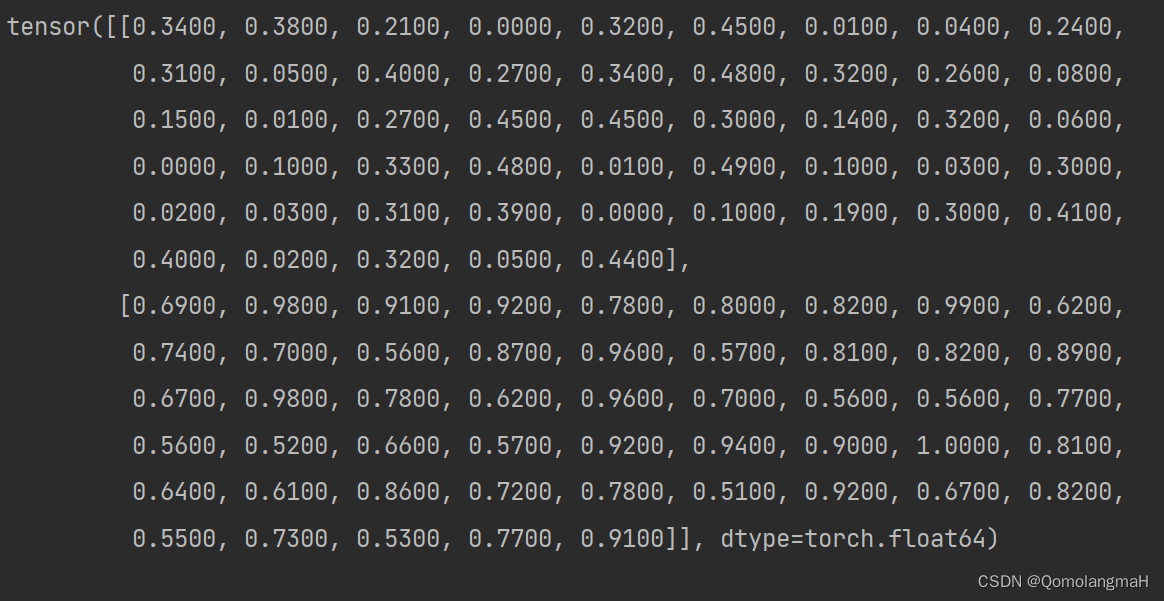
目录 一、实验介绍 二、实验环境 三、实验内容 0. 导入库 1. 归一化处理 归一化 实验内容 2. 绘制归一化数据折线图 报错 解决 3. 计算移动平均值SMA 移动平均值 实验内容 4. 绘制移动平均值折线图 5 .同时绘制两图 6. array转换为tensor张量 7. 打印张量 一、…...

【Golang】函数篇
1、golang函数基本定义与使用 func 函数名 (形参列表) (返回值类型列表) {函数体return 返回值列表 }其中func用于表明这是一个函数,剩下的东西与其他语言的函数基本一致,在定义与使用的时候注意函数名、参数、返回值书写的位置即可。下面使用一个例子…...
在ubuntu上安装ns2和nam(ubuntu16.04)
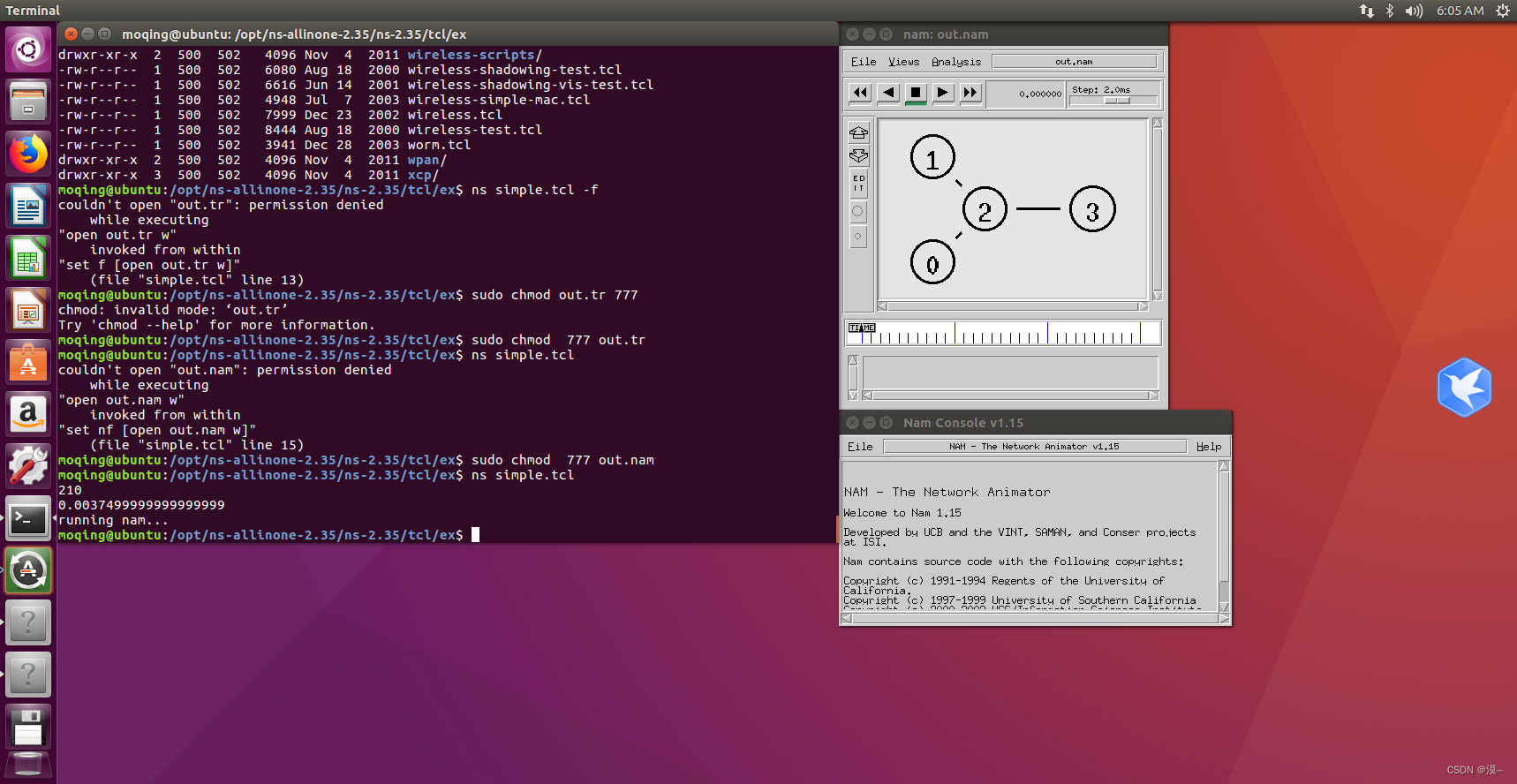
在ubuntu上安装ns2和nam 版本选择安装ns2安装nam 版本选择 首先,版本的合理选择可以让我们避免很多麻烦 经过测试,ubuntu的版本选择为ubuntu16.04,ns2的版本选择为ns-2.35,nam包含于ns2 资源链接(百度网盘) 链接:https://pan.bai…...

SpringCloudAlibaba之Sentinel介绍
文章目录 1 Sentinel1.1 Sentinel简介1.2 核心概念1.2.1 资源1.2.2 规则 1.3 入门Demo1.3.1 引入依赖1.3.2 集成Spring1.3.3 Spring中资源规则 1.4 Sentinel控制台1.5 核心原理1.5.1 NodeSelectorSlot1.5.2 ClusterBuilderSlot1.5.3 LogSlot1.5.4 StatisticSlot1.5.5 Authority…...

苹果微信聊天记录删除了怎么恢复?果粉原来是这样恢复的
粗心大意删除了微信聊天记录?有时候,一些小伙伴可能只是想要删除一部分聊天记录,但是在进行批量删除时,不小心勾选到了很重要的对话,从而导致记录丢失。 如果这时想找回聊天记录该怎么办?微信聊天记录删除…...
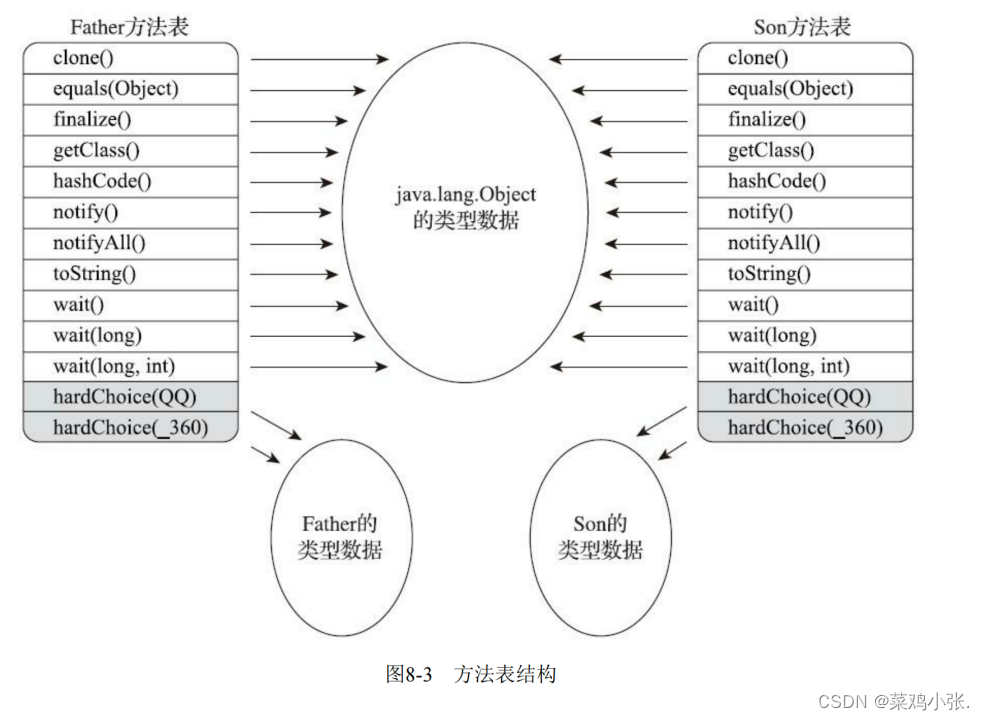
JVM的故事——虚拟机字节码执行引擎
虚拟机字节码执行引擎 文章目录 虚拟机字节码执行引擎一、概述二、运行时栈帧结构三、方法调用 一、概述 执行引擎Java虚拟机的核心组成之一,它是由软件自行实现的,能够执行那些不被硬件直接支持的指令集格式。 对于不同的虚拟机实现,执行引…...

告别WMMA API:用PTX的LDMATRIX和MMA指令在Ampere架构上重构你的FP16矩阵乘法内核
从WMMA到PTX:在Ampere架构上重构FP16矩阵乘法的深度实践 当开发者第一次接触Nvidia的Tensor Core编程时,WMMA(Warp Matrix Multiply Accumulate)API往往是首选方案。这套高层抽象接口屏蔽了硬件细节,让开发者能够快速实…...

盲人出行辅助系统原型
我做了一个很有意义的盲人出行辅助系统原型,主要是结合现有导航OSRM/高德,实时感知前方潜在危险目标,辅助视障人士出行。 持续优化中(20260519),欢迎大家尝试,有一些想法也可以提出来。 开源地址…...
)
STM32F4实战:手把手教你用DCMI接口驱动OV2640摄像头(附完整代码)
STM32F4实战:从零构建OV2640摄像头驱动系统 1. 硬件连接与信号解析 OV2640摄像头模块与STM32F4的硬件连接需要同时处理电源、控制信号和数据传输三个子系统。我们先拆解这个200万像素摄像头的物理接口特性: 电源部分需要特别注意电压匹配: 核…...

LinkSwift:九大网盘直链下载的终极解决方案,快速获取真实下载地址
LinkSwift:九大网盘直链下载的终极解决方案,快速获取真实下载地址 【免费下载链接】Online-disk-direct-link-download-assistant 一个基于 JavaScript 的网盘文件下载地址获取工具。基于【网盘直链下载助手】修改 ,支持 百度网盘 / 阿里云盘…...

【RuoYi】数据分页功能分析 —— 以登录日志页面为例
本文基于 RuoYi-Vue v3.8.2,以"监控 → 登录日志"页面为例,从前端代码、前端开发者工具、后端代码到后端 Log 输出,完整分析 RuoYi 框架中数据分页的实现原理。一、实例简介本次分析选取的含数据分页功能的页面为:系统管…...

《CVPR2025-DEIM创新改进项目实战:从原理到部署的深度学习优化全攻略》005、DEIM模型架构总览——编码器-解码器与动态门控设计
CVPR2025-DEIM创新改进项目实战:DEIM模型架构总览——编码器-解码器与动态门控设计 从一次诡异的梯度爆炸说起 去年冬天调DEIM的早期原型,模型在训练到第47个epoch时突然loss飙到NaN。检查了三天,最后发现是门控模块的sigmoid输出在极端情况下饱和,导致梯度回传时门控信号…...

别再死记硬背Prompt了!用LangChain的ChatPromptTemplate,5分钟搞定角色扮演对话机器人
用LangChain的ChatPromptTemplate快速构建角色扮演对话机器人 你是否曾经为了设计一个能记住对话历史的客服机器人,不得不手动拼接几十行提示词?或者为了让AI扮演特定角色,反复调整系统消息却始终达不到理想效果?LangChain的Chat…...

麦肯锡AI揭秘:AI的真正价值不在算法,而在重构组织与结构竞争力
【摘者按:麦肯锡在《The State of AI 2025》报告中深刻指出,AI的真正价值早已超越了单纯的算法性能,其核心在于通过“重构”来重塑企业的组织与结构竞争力。当企业走出“试点炼狱”,不再将AI视为简单的技术堆砌,而是将…...

数据结构:2.时间复杂的和空间复杂度
【目标】1.如何衡量一个算法的好坏2.复杂度3.算法效率1.如何衡量一个算法的好坏?1.1 两大核心指标(理论层面)指标问的问题表示法例子时间复杂度数据量增大,耗时怎么增长?大O表示法O(n) 比 O(n) 好空间复杂度数据量增大…...

如何用Inkscape实现专业级光学设计?终极免费光线追踪插件完整指南
如何用Inkscape实现专业级光学设计?终极免费光线追踪插件完整指南 【免费下载链接】inkscape-raytracing An extension for Inkscape that makes it easier to draw optical diagrams. 项目地址: https://gitcode.com/gh_mirrors/in/inkscape-raytracing 你…...