
2024年笔记--centos docker离线安装启动失败
Failed to start Docker Application Container Engine
错误如下:
[root@el70 docker]# systemctl start docker.service
Job for docker.service failed because start of the service was attempted too often. See "systemctl status docker.service" and "journalctl -xe" for details.
To force a start use "systemctl reset-failed docker.service" followed by "systemctl start docker.service" again.
[root@el70 docker]# journalctl -xe
Feb 06 16:15:36 el70 dockerd[2524]: time="2024-02-06T16:15:36.044378290+08:00" level=info msg="[core] [Channel #1] Channel deleted" module=grp
Feb 06 16:15:36 el70 dockerd[2524]: time="2024-02-06T16:15:36.044158542+08:00" level=info msg="stopping event stream following graceful shutdo
Feb 06 16:15:36 el70 dockerd[2524]: time="2024-02-06T16:15:36.044822884+08:00" level=info msg="[core] [Channel #7 SubChannel #8] Subchannel Co
Feb 06 16:15:36 el70 dockerd[2524]: time="2024-02-06T16:15:36.044928467+08:00" level=info msg="[core] [Channel #7] Channel Connectivity change
Feb 06 16:15:37 el70 dockerd[2524]: failed to start daemon: Error initializing network controller: Error creating default "bridge" network: Fa
Feb 06 16:15:37 el70 systemd[1]: docker.service: main process exited, code=exited, status=1/FAILURE
Feb 06 16:15:37 el70 systemd[1]: Failed to start Docker Application Container Engine.
-- Subject: Unit docker.service has failed
-- Defined-By: systemd
-- Support: http://lists.freedesktop.org/mailman/listinfo/systemd-devel
--
-- Unit docker.service has failed.
--
-- The result is failed.
Feb 06 16:15:37 el70 systemd[1]: Unit docker.service entered failed state.
Feb 06 16:15:37 el70 systemd[1]: docker.service failed.
Feb 06 16:15:37 el70 systemd[1]: docker.service holdoff time over, scheduling restart.
Feb 06 16:15:37 el70 systemd[1]: Stopped Docker Application Container Engine.
-- Subject: Unit docker.service has finished shutting down
-- Defined-By: systemd
-- Support: http://lists.freedesktop.org/mailman/listinfo/systemd-devel
--
-- Unit docker.service has finished shutting down.
Feb 06 16:15:37 el70 systemd[1]: start request repeated too quickly for docker.service
Feb 06 16:15:37 el70 systemd[1]: Failed to start Docker Application Container Engine.
-- Subject: Unit docker.service has failed
-- Defined-By: systemd
-- Support: http://lists.freedesktop.org/mailman/listinfo/systemd-devel
解决分析过程:
再打开一个ssh连接窗口,执行命令tail -200f /var/log/messages
然后在原窗口中执行 systemctl start docker 观察新窗口中的日志。
我这里看到的有关错误日志内容如下:
Feb 6 16:22:54 el70 firewalld: 2024-02-06 16:22:54 ERROR: INVALID_TYPE: structure size mismatch 16 != 13
Feb 6 16:22:54 el70 firewalld: 2024-02-06 16:22:54 ERROR: COMMAND_FAILED: '/sbin/iptables -t filter -C FORWARD -j DOCKER-ISOLATION' failed: iptables v1.4.21: Couldn't load target `DOCKER-ISOLATION':No such file or directory
Try `iptables -h' or 'iptables --help' for more information.
Feb 6 16:22:54 el70 firewalld: 2024-02-06 16:22:54 ERROR: COMMAND_FAILED: '/sbin/iptables -t nat -D PREROUTING -m addrtype --dst-type LOCAL -j DOCKER' failed: iptables: No chain/target/match by that name.
Feb 6 16:22:54 el70 firewalld: 2024-02-06 16:22:54 ERROR: COMMAND_FAILED: '/sbin/iptables -t nat -D OUTPUT -m addrtype --dst-type LOCAL ! --dst 127.0.0.0/8 -j DOCKER' failed: iptables: No chain/target/match by that name.
然后我尝试:
[root@el70 docker]# service iptables stop
Redirecting to /bin/systemctl stop iptables.service
Failed to stop iptables.service: Unit iptables.service not loaded.
原来这个服务不存在,因为我的环境不需要防火墙,因此,我直接执行service firewalld stop 将防火墙关闭。
再次systemctl start docker 启动正常。
---------------------------------
其他错误,修改/etc/docker/daemon.json后,重启docker失败
启动失败,错误为:Feb 6 16:37:34 el70 systemd: Starting Docker Application Container Engine...
Feb 6 16:37:34 el70 dockerd: unable to configure the Docker daemon with file /etc/docker/daemon.json: the following directives are specified both as a flag and in the configuration file: insecure-registries: (from flag: [127.0.0.1], from file: [xx.xx.xx.xx:8080])
原因:
因为修改了/etc/docker/daemon.json 内容为如下
{
"insecure-registries":["xx.xx.xx.xx:8080"]
}
而/etc/systemd/system/docker.service 中也配置了ExecStart=/usr/bin/dockerd --selinux-enabled=false --insecure-registry=xx.xx.xx.xx:8080
将ExecStart这一行修改为:
ExecStart=/usr/bin/dockerd --selinux-enabled=false
然后systemctl daemon-reload ,再次 systemctl start docker即可启动
----------
其他错误2:
Feb 6 17:12:34 el70 dockerd: time="2024-02-06T17:12:34.353598727+08:00" level=error msg="Download failed after 1 attempts: error parsing HTTP 408 response body: invalid character '<' looking for beginning of value: \"<html><body><h1>408 Request Time-out</h1>\\nYour browser didn't send a complete request in time.\\n</body></html>
解决方法:
修改配置文件 /etc/docker/daemon.json 增加
"registry-mirrors": ["http://hub-mirror.c.163.com"]
修改后的全内容为:
{
"insecure-registries":["xx.xx.xx.xx:8080"],
"registry-mirrors": ["http://hub-mirror.c.163.com"]
}
然后重启docker服务,有时候失败了要先执行一下systemctl reset-failed docker.service 清理掉失败状态。再进行systemctl start docker尝试。
参考文章:
Docker启动失败报错Failed to start Docker Application Container Engine的解决办法_docker_脚本之家
相关文章:

2024年笔记--centos docker离线安装启动失败
Failed to start Docker Application Container Engine 错误如下: [rootel70 docker]# systemctl start docker.service Job for docker.service failed because start of the service was attempted too often. See "systemctl status docker.service" …...
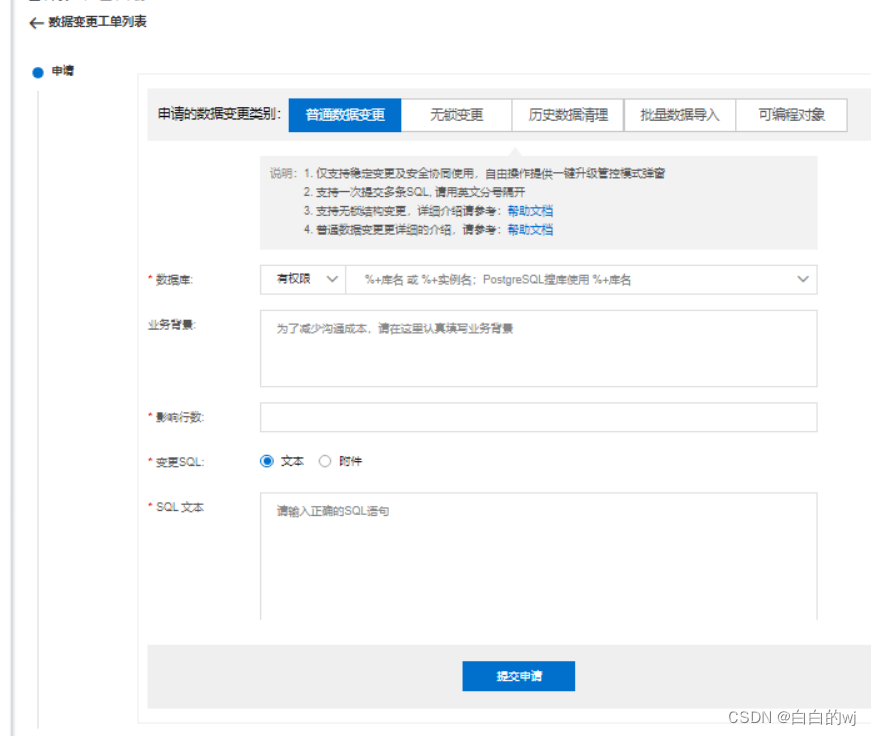
2024.2.10 DMS(数据库管理系统)初体验
数据库管理系统(Database Management System)是一种操纵和管理数据库的大型软件,用于建立、使用和维护数据库,简称DBMS。它对数据库进行统一的管理和控制,以保证数据库的安全性和完整性。用户通过DBMS访问数据库中的数据,数据库管…...

zk集群--集群同步
1.概述 前面一章分析了集群下启动阶段选举过程,一旦完成选举,通过执行QuorumPeer的setPeerState将设置好选举结束后自身的状态。然后,将再次执行QuorumPeer的run的新的一轮循环, QuorumPeer的run的每一轮循环,先判断…...

复习面经哦
1.函数可以变量提升 JavaScript 中的函数存在变量提升的概念,这意味着在执行代码之前,函数声明会被提升到其作用域的顶部。这使得你可以在函数声明之前调用函数。然而,这种行为只适用于函数声明,而不是函数表达式。 下面是一些关…...
vector)
c++ STL系列——(二)vector
引言 在现代C编程中,std::vector是最常用的动态数组实现之一,它是C标准模板库(STL)的一部分。vector提供了一种方式,以单一数据结构来存储元素集合,并且可以动态地调整大小以适应新元素。本文将深入探讨ve…...
STM32能够做到数据采集和发送同时进行吗?
STM32能够做到数据采集和发送同时进行吗? 在开始前我有一些资料,是我根据网友给的问题精心整理了一份「STM32的资料从专业入门到高级教程」, 点个关注在评论区回复“888”之后私信回复“888”,全部无偿共享给大家!&am…...

5.Swift常量
Swift 常量 在 Swift 中,除了可以声明变量(使用 var 关键字),还可以声明常量(使用 let 关键字)。常量在赋值后就不能再修改其值,适合用于存储不会改变的数据。以下是关于 Swift 常量的一些重要…...
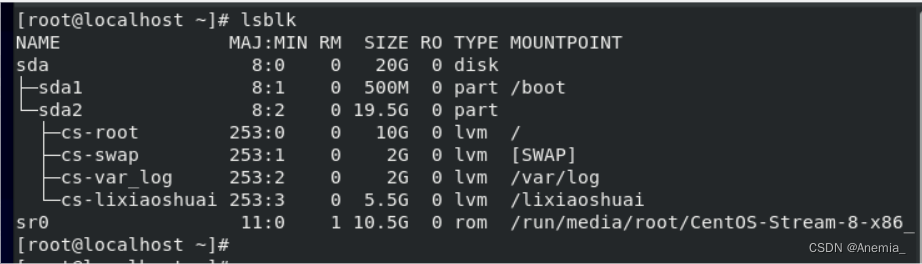
Linux运行级别 | 管理Linux服务
Linux运行级别 级别: 0关机1单用户2多用户但是不运行nfs网路文件系统3默认的运行级别,给一个黑的屏幕,只能敲命令4未使用5默认的运行级别,图形界面6重启切换运行级别: init x管理Linux服务 systemctl命令…...

Nginx 配置 SSL证书
成功配置SSL证书后,您将能够通过HTTPS加密通道安全访问Nginx服务器。 一、准备材料 SSL证书绑定的域名已完成DNS解析,即您的域名与主机IP地址相互映射。您可以通过DNS验证证书工具,检测域名DNS解析是否生效。具体操作: 【1】登录…...

如何正确理解和获取S参数
S参数是网络参数,定义了反射波和入射波之间的关系,给定频率的S参数矩阵指定端口反射波b的矢量相对于端口入射波a的矢量,如下所示: bS∙a 在此基础上,如下图所示,为一个常见的双端口网络拓扑图:…...
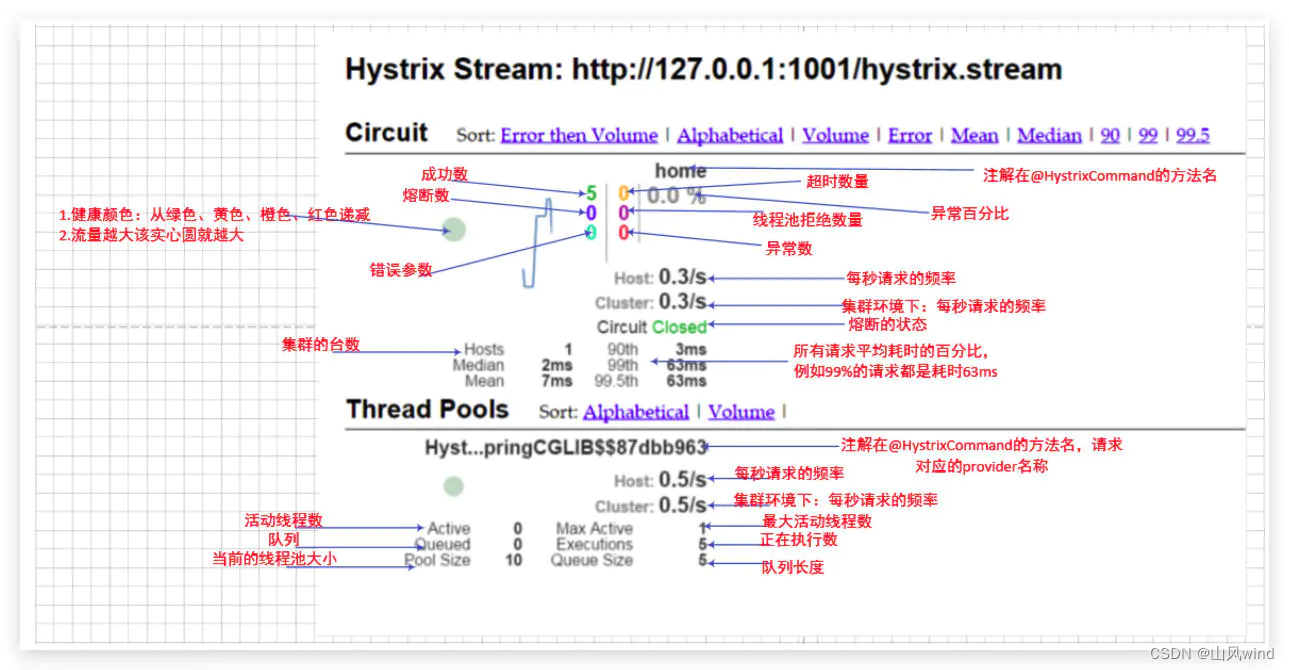
Sping Cloud Hystrix 参数配置、简单使用、DashBoard
Sping Cloud Hystrix 文章目录 Sping Cloud Hystrix一、Hystrix 服务降级二、Hystrix使用示例三、OpenFeign Hystrix四、Hystrix参数HystrixCommand.Setter核心参数Command PropertiesFallback降级配置Circuit Breaker 熔断器配置Metrix 健康统计配置Request Context 相关参数C…...

CSS太极动态图
CSS太极动态图 1. 案例效果 我们今天学习用HTML和CSS实现动态的太极,看一下效果。 2. 分析思路 太极图是由两个旋转的圆组成,一个是黑圆,一个是白圆。实现现原理是使用CSS的动画和渐变背景属性。 首先,为所有元素设置默认值为0…...
TI毫米波雷达开发——High Accuracy Demo 串口数据接收及TLV协议解析 matlab 源码
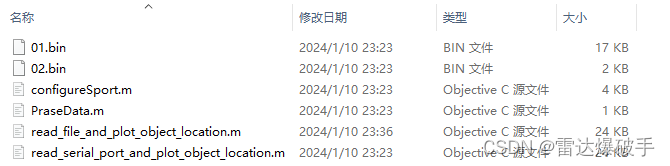
TI毫米波雷达开发——串口数据接收及TLV协议解析 matlab 源码 前置基础源代码功能说明功能演示视频文件结构01.bin / 02.binParseData.mread_file_and_plot_object_location.mread_serial_port_and_plot_object_location.m函数解析configureSport(comportSnum)readUartCallback…...
基于tomcat运行jenkins常见的报错处理
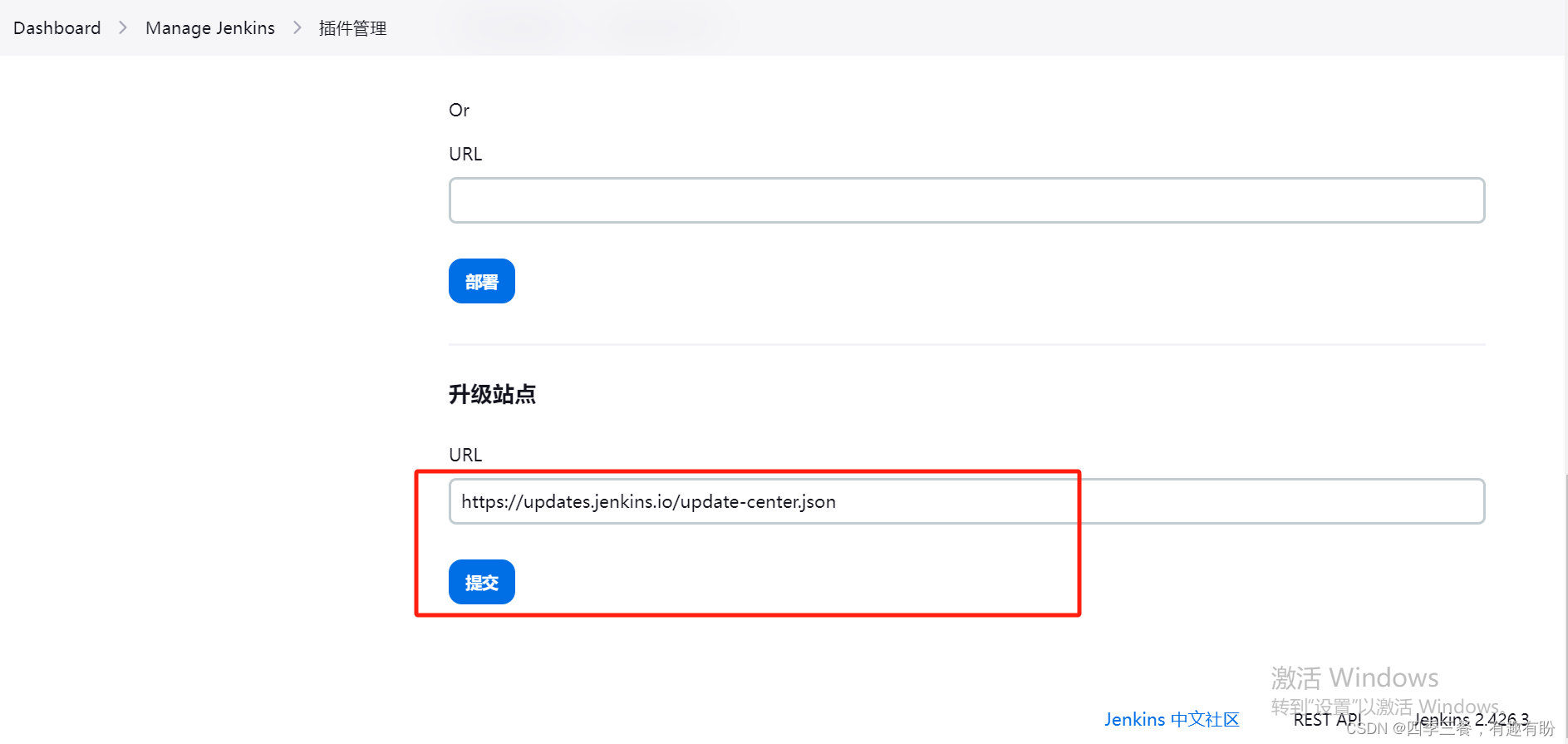
目录 1.jenkins.util.SystemProperties$Listener错误 升级jdk11可能遇到的坑 2.java.lang.RuntimeException: Fontconfig head is null, check your fonts or fonts configuration 3.There were errors checking the update sites: UnknownHostException:updates.jenkins.i…...
算法学习——LeetCode力扣二叉树篇1
算法学习——LeetCode力扣二叉树篇1 144. 二叉树的前序遍历 144. 二叉树的前序遍历 - 力扣(LeetCode) 描述 给你二叉树的根节点 root ,返回它节点值的 前序 遍历。 示例 示例 1: 输入:root [1,null,2,3] 输出&a…...

二叉树的遍历及创建
typedef char T;struct TreeNode {T _data;TreeNode* left;TreeNode* right; }; 1、二叉树的遍历---DFS 3 5 6 …...
 平移,旋转,缩放)
图形学:Transform矩阵(3维 2维) 平移,旋转,缩放
0. 简介 在图形学领域中,Transform矩阵(变换矩阵)是一种表示图形对象在二维或三维空间中的位置、方向和大小变化的数学工具。它们用于执行各种图形变换,如平移、旋转、缩放。Transform矩阵通常表示为一个二维或三维矩阵ÿ…...

Docker学习历程
Docker学习历程 Q1、docker还没启动Q2、Docker容器名称冲突的问题Q3:启动minio时发现,容器已经再重启Q4:容器被占用的情况Q5:查看日志 Q1、docker还没启动 docker run --env MODEstandalone --name nacos --restartalways -d -p …...

Android:Volley框架使用
3.15 Volley框架使用 Volley框架主要作为网络请求,图片加载工具。当应用数据量小、网络请求频繁,可以使用Volley框架。 框架Github地址:https://github.com/google/volley Volley框架的简单使用,创建项目Pro_VolleyDemo。将Github上下载Volley框架源代码,volley-master.zi…...
)
前端修炼手册(uniapp的api篇)
一、页面相关API uni.navigateTo 该API用于跳转到应用内的某个页面,可以传递参数。 uni.navigateTo({url: /pages/detail/detail?id1 })uni.redirectTo 该API用于关闭当前页面并跳转到应用内的某个页面,可以传递参数。 uni.redirectTo({url: /pages/…...

快速 AI 迭代仍然需要操作纪律
前言 配套资源:AI 辅助开发检查清单资源包,适合把本文的流程直接落成开发前检查表和复盘模板。 上一篇文章里,我把 AI 工作流拆成了几类任务模式:开发维护、探索学习、反馈确认。这个分类解决的是一个前置问题:在使用 …...

RedisDesktopManager Windows版:5分钟掌握免费Redis数据库可视化工具
RedisDesktopManager Windows版:5分钟掌握免费Redis数据库可视化工具 【免费下载链接】RedisDesktopManager-Windows RedisDesktopManager Windows版本 项目地址: https://gitcode.com/gh_mirrors/re/RedisDesktopManager-Windows RedisDesktopManager Windo…...

如何永久保存微信聊天记录:WeChatMsg完全免费备份指南
如何永久保存微信聊天记录:WeChatMsg完全免费备份指南 【免费下载链接】WeChatMsg 提取微信聊天记录,将其导出成HTML、Word、CSV文档永久保存,对聊天记录进行分析生成年度聊天报告 项目地址: https://gitcode.com/GitHub_Trending/we/WeCha…...

若依框架菜单管理进阶:从零构建独立详情页面的完整实践
1. 若依框架菜单管理基础与详情页需求分析 第一次接触若依框架的开发者可能会对它的菜单管理系统感到困惑。作为一个基于Spring Boot和Vue.js的前后端分离框架,若依的菜单管理实际上扮演着系统导航和权限控制的双重角色。在标准代码生成器生成的页面中,…...

猫抓插件完全指南:浏览器资源嗅探与下载的终极解决方案
猫抓插件完全指南:浏览器资源嗅探与下载的终极解决方案 【免费下载链接】cat-catch 猫抓 浏览器资源嗅探扩展 / cat-catch Browser Resource Sniffing Extension 项目地址: https://gitcode.com/GitHub_Trending/ca/cat-catch 你是否曾在浏览网页时发现心仪的…...

量子错误校正与离子阱系统的混合编码优化
1. 量子错误校正与离子阱系统的现状与挑战量子计算领域正经历着从NISQ(含噪声中等规模量子)时代向容错量子计算(FTQC)过渡的关键阶段。作为这一过渡的核心技术,量子错误校正(QEC)通过将逻辑量子…...

基于Unsloth与LoRA的高效大语言模型微调工程化实践指南
1. 项目概述:一个为Unsloth优化的AI开发伴侣 如果你最近在折腾大语言模型(LLM)的微调,尤其是想在自己的消费级显卡上跑起来,那你大概率听说过或者正在用Unsloth。这个开源库通过一系列巧妙的优化(比如融合…...
详解:Kupffer Cells、HSCs与LSECs如何重建真实肝脏微环境并提升NASH与ADME-Tox研究准确性)
人肝非实质细胞(NPC)详解:Kupffer Cells、HSCs与LSECs如何重建真实肝脏微环境并提升NASH与ADME-Tox研究准确性
摘要:传统单一肝细胞模型在药物肝毒性评价、NASH机制研究以及肝纤维化研究中,长期存在体外快速去分化、病理表型不完整以及与临床结果偏差较大的问题。近年来,人肝非实质细胞(Hepatic Non-Parenchymal Cells,NPC&#…...

如何用XUnity.AutoTranslator打破游戏语言壁垒:终极实时翻译插件指南
如何用XUnity.AutoTranslator打破游戏语言壁垒:终极实时翻译插件指南 【免费下载链接】XUnity.AutoTranslator 项目地址: https://gitcode.com/gh_mirrors/xu/XUnity.AutoTranslator 还在为看不懂的外语游戏而烦恼吗?XUnity.AutoTranslator正是你…...

C8051Fxx系列MCU的Bootloader与ISP功能开发指南
1. C8051Fxx系列MCU的Bootloader与ISP功能概述在嵌入式系统开发中,C8051Fxx系列微控制器因其高性能和丰富的外设资源被广泛应用于工业控制、消费电子等领域。Bootloader(引导加载程序)和ISP(在系统编程)功能是这类MCU开…...