
Linux之线程控制
目录
一、POSIX线程库
二、线程的创建
三、线程等待
四、线程终止
五、分离线程
六、线程ID:pthread_t
1、获取线程ID
2、pthread_t
七、线程局部存储:__thread
一、POSIX线程库
由于Linux下的线程并没有独立特有的结构,所以Linux并没有提供线程相关的接口。
而我们所说的,pthread线程库是应用层的原生线程库。这个线程库并不是系统接口直接提供的,而是由第三方帮我们提供的。
1、与线程有关的函数构成了一个完整的系列,绝大多数函数的名字都是以“pthread_”打头的
2、要使用这些函数库,要通过引入头文<pthread.h>
3、链接这些线程函数库时要使用编译器命令的“-lpthread”选项
二、线程的创建
pthread_create:其功能就是创建线程。
NAMEpthread_create - create a new threadSYNOPSIS#include <pthread.h>int pthread_create(pthread_t *thread, const pthread_attr_t *attr,void *(*start_routine) (void *), void *arg);Compile and link with -pthread.参数说明:
thread:获取创建成功的线程ID,该参数是一个输出型参数。
attr:用于设置创建线程的属性,传入nullptr表示使用默认属性。(我们一般不关心,直接设为nullptr)
start_routine:该参数是一个函数指针,表示线程启动后要执行的函数。
arg:传给线程执行函数的参数。
返回值:线程创建成功返回0,失败返回错误码。返回值也可以自己设置,返回给主线程。主线程通过pthread_join获取。
主线程:当一个程序启动时,就有一个进程被操作系统创建,与此同时一个线程也立刻运行,这个线程就叫做主线程。
下面我们让主线程调用pthread_create函数创建一个新线程:
#include <iostream>
#include <unistd.h>
#include <pthread.h>using namespace std;void *thread_run(void *argc)
{cout << "new thread pid: " << getpid() << "\n"<< endl;sleep(20);return nullptr;
}int main()
{pthread_t tid;pthread_create(&tid, nullptr, thread_run, (void *)"thread 1");while (true){cout << "main thread pid: " << getpid() << endl;sleep(1);}return 0;
} 
使用ps -aL命令,可以显示当前的轻量级进程。

从上图,我们看到两个线程的PID相同,说明他们属于同一个进程。但是他们的LWP值不同,说明他们是两个不同的线程。LWP就是轻量级进程的ID。
注:在Linux中,线程与内核的LWP是一一对应的,实际上操作系统调度的时候是根据LWP调度的,而不是PID,只不过我们之前接触到的都是单线程进程,其PID和LWP是相等的,所以对于单线程进程来说,调度时采用PID和LWP是一样的。
我们也可以让一个主线程创建多个新线程
#include <iostream>
#include <unistd.h>
#include <string>
#include <pthread.h>using namespace std;void *thread_run(void *argc)
{string name = (char *)argc;while (true){cout << name << "---"<< "pid: " << getpid() << "\n"<< endl;sleep(1);}
}int main()
{pthread_t tid[5];char name[64];for (int i = 0; i < 5; i++){snprintf(name, sizeof(name), "%s-%d", "thread", i);pthread_create(tid + i, nullptr, thread_run, (void *)name);sleep(1);}while (true){cout << "main thread pid: " << getpid() << endl;sleep(3);}return 0;
}
因为主线程和五个新线程都属于同一个进程,所以它们的PID都是一样的。
三、线程等待
一个线程被创建出来,那么这个线程就如同进程一般,也是需要被等待的。如果主线程不对新线程进行等待,那么这个新线程的资源也是不会被回收的。如果不等待会产生类似于“僵尸进程”的问题,也就会造成内存泄漏。所以线程需要被等待。
pthread_join:其功能就是进行线程等待
NAMEpthread_join - join with a terminated threadSYNOPSIS#include <pthread.h>int pthread_join(pthread_t thread, void **retval);Compile and link with -pthread.参数说明:
thread:被等待线程的ID。
retval:线程退出时的退出码信息。
返回值:线程等待成功返回0,失败返回错误码。
#include <iostream>
#include <unistd.h>
#include <string>
#include <pthread.h>using namespace std;void *thread_run(void *argc)
{int count = 10;while (true){sleep(1);if (count++ == 10)break;}cout << "new thread  done ... quit" << endl;return nullptr;
}int main()
{pthread_t tid;pthread_create(&tid, nullptr, thread_run, (void *)"thread1");pthread_join(tid, nullptr);cout << "main thread wait done ... quit" << endl;return 0;
}
第二个参数是用来获取新线程返回值的。主线程可以通过新线程的返回值拿到新线程的计算结果(该结果也可以保存在堆空间上)
include <iostream>
#include <unistd.h>
#include <string>
#include <pthread.h>using namespace std;void *thread_run(void *argc)
{int count = 10;while (true){sleep(1);if (count++ == 10)break;}cout << "new thread  done ... quit" << endl;return (void *)10;
}int main()
{pthread_t tid;pthread_create(&tid, nullptr, thread_run, (void *)"thread1");void *ret = nullptr;pthread_join(tid, &ret);cout << "main thread wait done ... quit"<< " " << (long long)ret << endl;return 0;
}
四、线程终止
return:最简单的终止线程的方式,就是使用return返回一个返回值来终止线程。
pthread_exit:其功能就是终止一个线程。(终止线程不能使用exit,因为它是用来终止进程的)
参数,retval:设置退出结果。
NAMEpthread_exit - terminate calling threadSYNOPSIS#include <pthread.h>void pthread_exit(void *retval);Compile and link with -pthread.#include <iostream>
#include <unistd.h>
#include <string>
#include <pthread.h>using namespace std;void *thread_run(void *argc)
{int count = 10;while (true){sleep(1);if (count++ == 10)break;}cout << "new thread done ... quit" << endl;pthread_exit((void*)17);
}int main()
{pthread_t tid;pthread_create(&tid, nullptr, thread_run, (void *)"thread1");void *ret = nullptr;pthread_join(tid, &ret);cout << "main thread wait done ... quit"<< " " << (long long)ret << endl;return 0;
} 
pthread_cancel:其功能是取消一个线程。
参数,thread:线程ID。
NAMEpthread_cancel - send a cancellation request to a threadSYNOPSIS#include <pthread.h>int pthread_cancel(pthread_t thread);Compile and link with -pthread.#include <iostream>
#include <unistd.h>
#include <string>
#include <pthread.h>using namespace std;void *thread_run(void *argc)
{string name = (char *)argc;int count = 10;while (true){sleep(1);if (count++ == 10)break;}cout << "new thread done ... quit" << endl;
}int main()
{pthread_t tid;pthread_create(&tid, nullptr, thread_run, (void *)"thread1");void *ret = nullptr;pthread_cancel(tid);pthread_join(tid, &ret);cout << "main thread wait done ... quit"<< " " << (long long)ret << endl;return 0;
} 
线程被取消,线程等待时获取的退出码为-1。
五、分离线程
新线程退出后,主线程需要对其进行pthread_join操作,否则无法释放资源,从而造成内存泄漏。
但如果主线程不关心新线程的返回值,此时我们可以将该新线程进行分离,后续当新线程退出时就会自动释放线程资源。
一个线程如果被分离了,这个线程依旧要使用该进程的资源,依旧在该进程内运行,甚至这个线程崩溃了一定会影响其他线程,只不过这个线程退出时不再需要主线程去join了,当这个线程退出时系统会自动回收该线程所对应的资源。
pthread_detach:其功能就是进行分离线程。一般是线程自己分离。
int pthread_detach(pthread_t thread);参数说明:thread:被分离线程的ID。
返回值说明:
线程分离成功返回0,失败返回错误码。
#include <iostream>
#include <unistd.h>
#include <string>
#include <pthread.h>using namespace std;void *thread_run(void *argc)
{pthread_detach(pthread_self());int count = 10;while (true){sleep(1);if (count++ == 10)break;}cout << "new thread  done ... quit" << endl;pthread_exit((void*)17);
}int main()
{pthread_t tid;pthread_create(&tid, nullptr, thread_run, (void *)"thread1");void *ret = nullptr;cout << "main thread wait done ... quit"<< " " << (long long)ret << endl;return 0;
}
如果我们在线程分离了之后,任然等待,会怎么样呢?
#include <iostream>
#include <unistd.h>
#include <cerrno>
#include <cstring>
#include <pthread.h>using namespace std;void *thread_run(void *argc)
{pthread_detach(pthread_self());int count = 9;while (true){sleep(1);if (count++ == 10)break;}cout << "new thread  done ... quit" << endl;pthread_exit((void *)17);
}int main()
{pthread_t tid;pthread_create(&tid, nullptr, thread_run, (void *)"thread1");sleep(2);int n = pthread_join(tid, nullptr);cout << "n: " << n << "errstring: " << strerror(n) << endl;return 0;
}
六、线程ID:pthread_t
pthread_create函数会产生一个线程ID,存放在第一个参数指向的地址中,该线程ID和内核中的LWP是完全不一样的。内核中的LWP属于进程调度的范畴,需要一个数值来唯一表示该线程。
那么pthread_t到底是什么类型呢?
1、获取线程ID
pthread_self:获取线程的ID。
#include <iostream>
#include <unistd.h>
#include <cerrno>
#include <cstring>
#include <pthread.h>using namespace std;void *thread_run(void *argc)
{int count = 9;while (true){sleep(1);if (count++ == 10)break;}cout << "new thread  done ... quit"<< "new thread ID: " << pthread_self() << endl;pthread_exit((void *)17);
}int main()
{pthread_t tid;pthread_create(&tid, nullptr, thread_run, (void *)"thread1");void *ret = nullptr;sleep(2);cout << "main thread ID: " << pthread_self() << endl;pthread_join(tid, &ret);return 0;
}
为什么线程的ID数值这么大呢?下面我们就来讲一讲。
2、pthread_t
进程运行时线程动态库被加载到内存,然后通过页表映射到进程地址空间中的共享区,此时该进程内的所有线程都是能看到这个动态库的。

其中主线程采用的栈是进程地址空间中原生的栈,而其余线程采用的栈就是由线程库帮我们在共享区中开辟的。
线程库给每个新线程提供属于自己的struct pthread,当中包含了对应线程的各种属性;每个线程还有自己的线程局部存储,当中包含了对应线程被切换时的上下文数据。其中,还有线程栈。如下图:
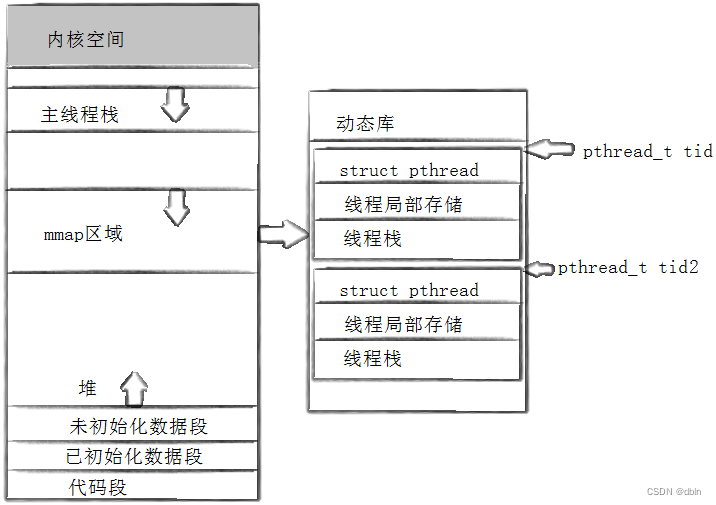
所以,线程ID本质就是进程地址空间共享区上对应的struct pthread的虚拟地址。
七、线程局部存储:__thread
假设有一个全局变量:g_val。我们知道,各个线程是共享全局变量的。不同的线程可以对同一个全局变量进行操作。那么如果我们想让每个线程都拥有属于自己的g_val,那么我们可以加上关键字:__thread。这种现象就叫做线程局部存储。
相关文章:
Linux之线程控制
目录 一、POSIX线程库 二、线程的创建 三、线程等待 四、线程终止 五、分离线程 六、线程ID:pthread_t 1、获取线程ID 2、pthread_t 七、线程局部存储:__thread 一、POSIX线程库 由于Linux下的线程并没有独立特有的结构,所以Linux并…...
Python实现线性查找算法
Python实现线性查找算法 以下是使用 Python 实现线性查找算法的示例代码: def linear_search(arr, target):"""线性查找算法:param arr: 要搜索的数组:param target: 目标值:return: 如果找到目标值,返回其索引;否则返回 -1…...
总结Redis的原理
一、为什么要使用Redis 缓解数据库访问压力mysql读请求进行磁盘I/O速度慢,给数据库加Redis缓存(参考CPU缓存),将数据缓存在内存中,省略了I/O操作 二、Redis数据管理 2.1 redis数据的删除 定时删除惰性删除内存淘汰…...
计算机设计大赛 疲劳驾驶检测系统 python
文章目录 0 前言1 课题背景2 Dlib人脸识别2.1 简介2.2 Dlib优点2.3 相关代码2.4 人脸数据库2.5 人脸录入加识别效果 3 疲劳检测算法3.1 眼睛检测算法3.2 打哈欠检测算法3.3 点头检测算法 4 PyQt54.1 简介4.2相关界面代码 5 最后 0 前言 🔥 优质竞赛项目系列&#x…...

什么是智慧公厕?智慧公厕的应用价值有哪些?
在现代社会,城市的发展与人民生活质量息息相关。作为城市基础设施中的重要一环,公共厕所的建设及管理一直备受关注。智慧公厕作为一种公共厕所使用、运行、管理的综合应用解决方案,正逐渐在智慧城市的建设中崭露头角。那么,智慧公…...
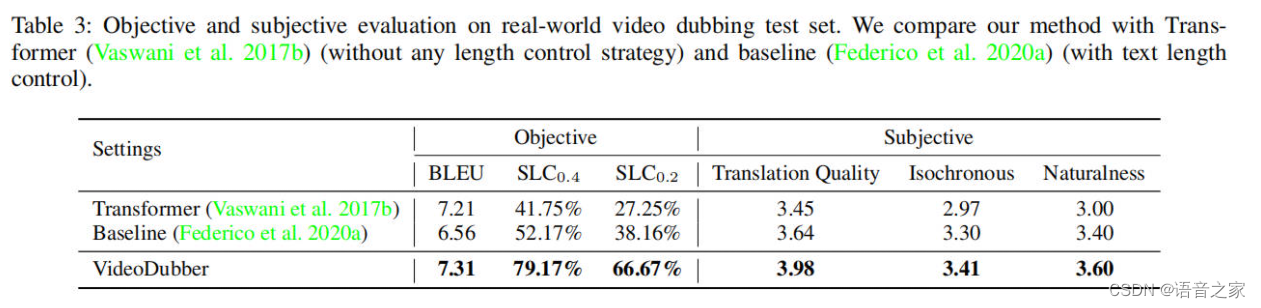
VideoDubber时长可控的视频配音方法
本次分享由中国人民大学、微软亚洲研究院联合投稿于AAAI 2023的一篇专门为视频配音任务定制的机器翻译的工作《VideoDubber: Machine Translation with Speech-Aware Length Control for Video Dubbing》。这个工作将电影或电视节目中的原始语音翻译成目标语言。 论文地址&…...

中科数安|公司办公终端、电脑文件数据 \ 资料防泄密系统
#中科数安# 中科数安是一家专注于信息安全技术与产品研发的高新技术企业,其提供的公司办公终端、电脑文件数据及资料防泄密系统(也称为终端数据防泄漏系统或简称DLP系统)主要服务于企业对内部敏感信息的安全管理需求。 www.weaem.com 该系统…...
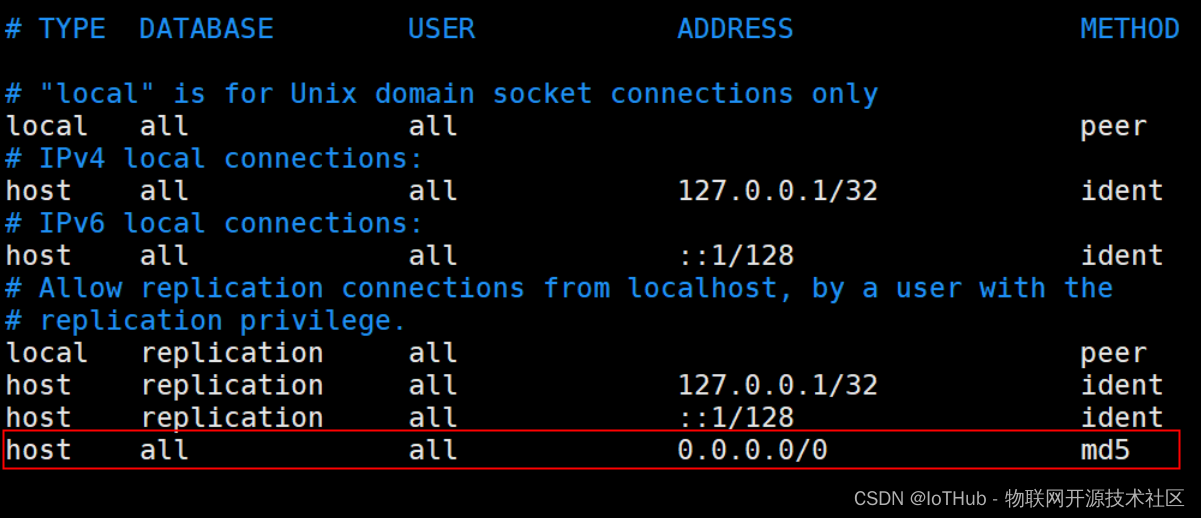
PostgreSQL 安装部署
文章目录 一、PostgreSQL部署方式1.Yum方式部署2.RPM方式部署3.源码方式部署4.二进制方式部署5.Docker方式部署 二、PostgreSQL部署1.Yum方式部署1.1.部署数据库1.2.连接数据库 2.RPM方式部署2.1.部署数据库2.2.连接数据库 3.源码方式部署3.1.准备工作3.2.编译安装3.3.配置数据…...
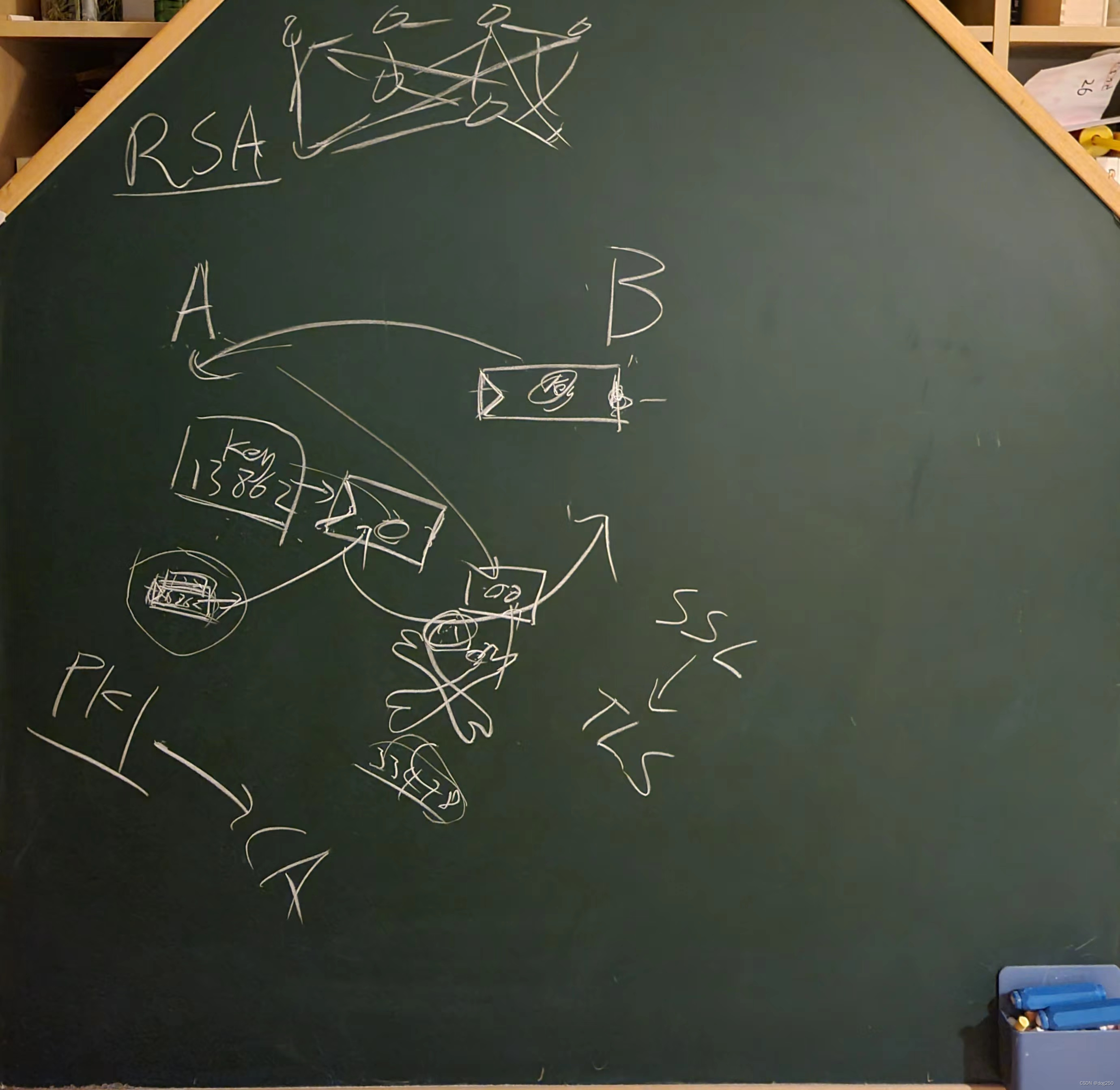
《互联网的世界》第五讲-信任和安全(第一趴:物理世界的非对称加密装置)
信任和安全的话题过于庞大,涉及很多数学知识,直接涉及 “正事” 反而不利于理解问题的本质,因此需要先讲一个前置作为 part 1。 part 1 主要描述物理世界的信任和安全,千万不要觉得数字世界是脱离物理世界的另一天堂,…...
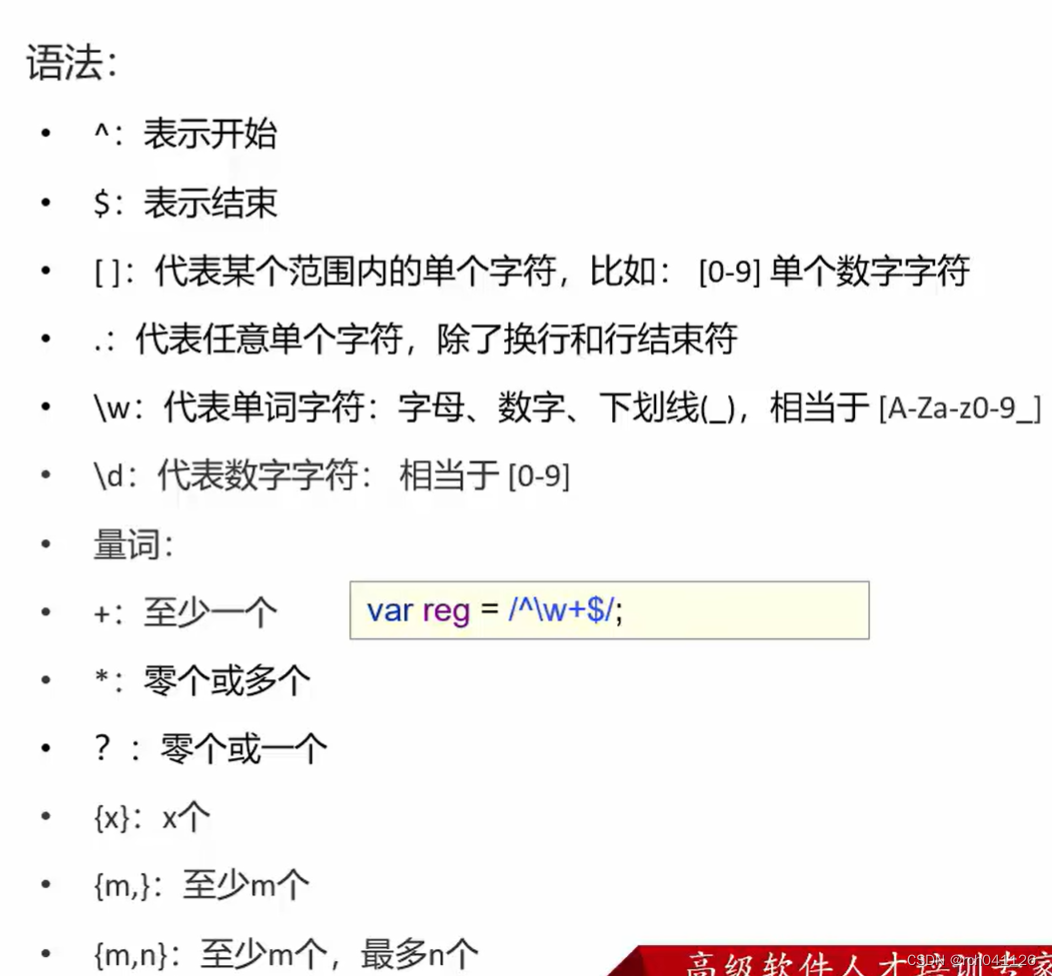
JavaScript使用
文章目录 一、JavaScript简介二、JavaScript引入方式1、内部脚本2、外部脚本 三、JavaScript基础语法1、书写语法&输出语句2、变量&数据类型3、运算符4、流程控制语句&函数 四、JavaScript对象1、Array2、String3、自定义对象 五、BOM1、Window2、History3、Locati…...
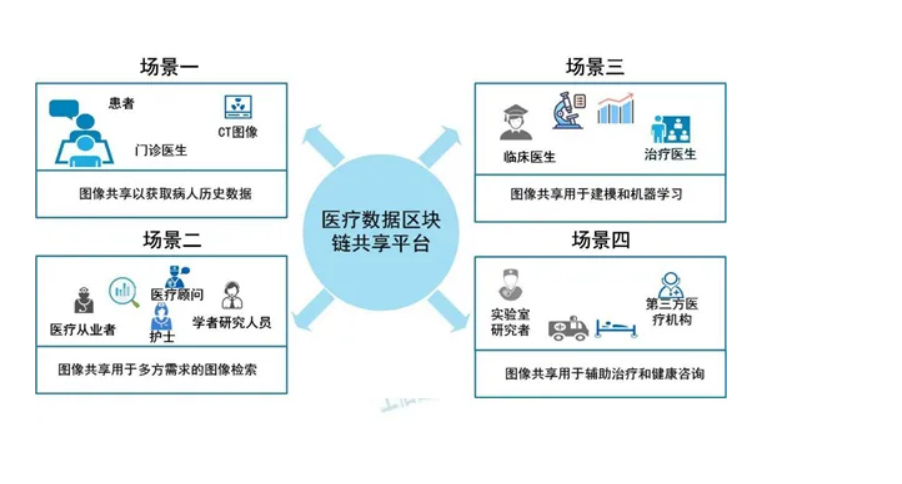
区块链和人工智能的关系以及经典案例
目录 1.区块链与人工智能的关系 2.应用案例:基于区块链的医疗数据共享平台 2.1背景 2.2方案 2.3优势 2.4挑战 区块链技术和人工智能(AI)是两种不同的技术,但它们之间存在着互补关系。区块链技术提供了一种安全、透明、去中心…...
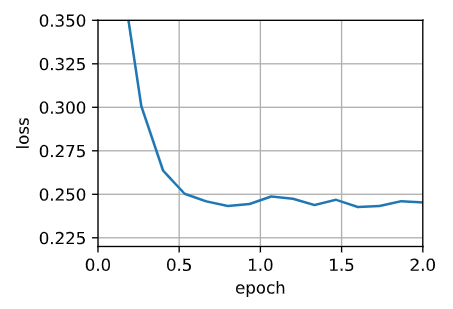
【深度学习笔记】优化算法——Adam算法
Adam算法 🏷sec_adam 本章我们已经学习了许多有效优化的技术。 在本节讨论之前,我们先详细回顾一下这些技术: 在 :numref:sec_sgd中,我们学习了:随机梯度下降在解决优化问题时比梯度下降更有效。在 :numref:sec_min…...
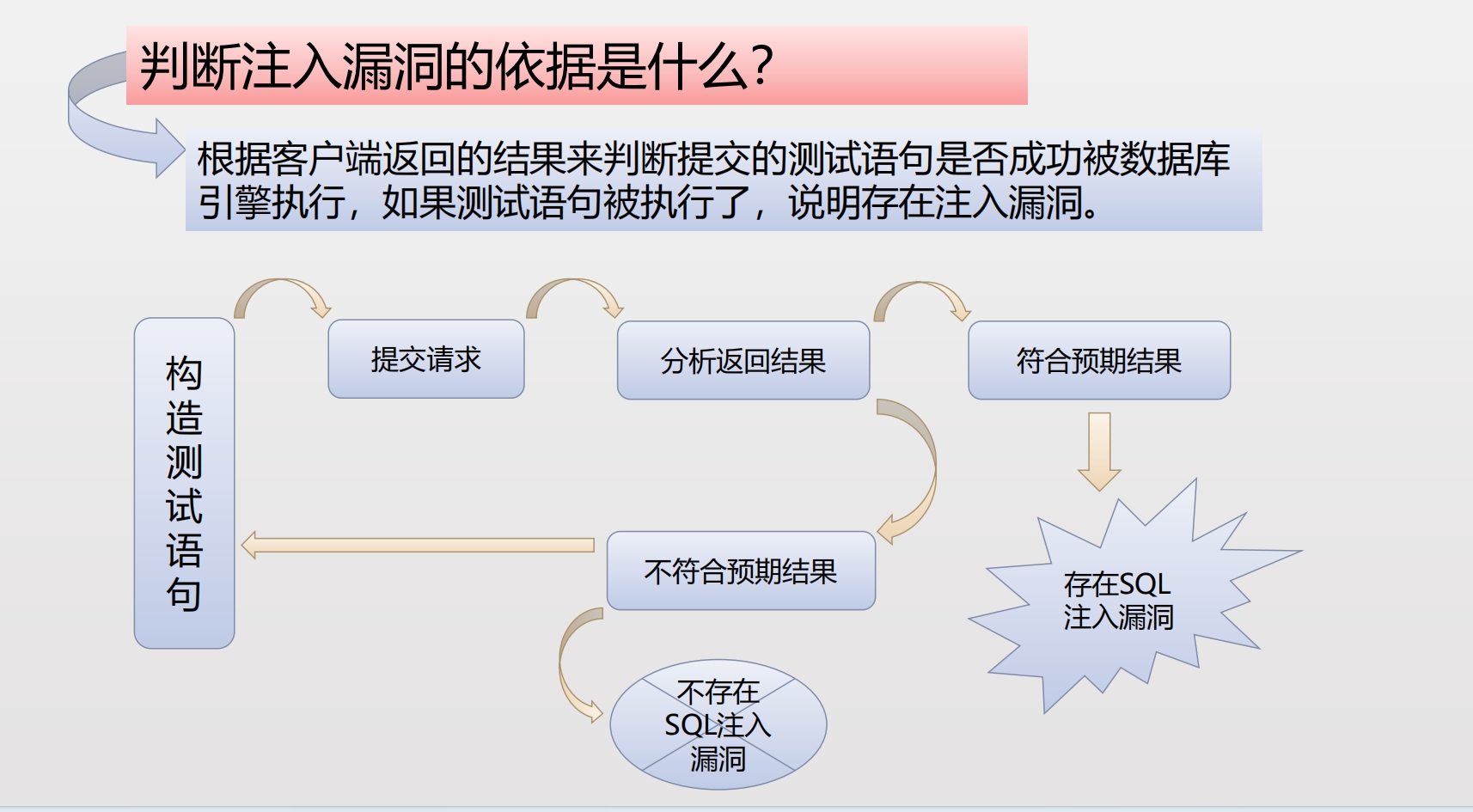
sql注入
注入的介绍 将不受信任的数据作为命令或查询的一部分发送到解析器时,会产生诸如SQL注入、NoSQL注入、OS 注入和LDAP注入的注入缺陷。攻击者的恶意数据可以诱使解析器在没有适当授权的情况下执行非预期命令或访问数据。 注入能导致 数据丢失 、 破坏 或 泄露 给无授…...
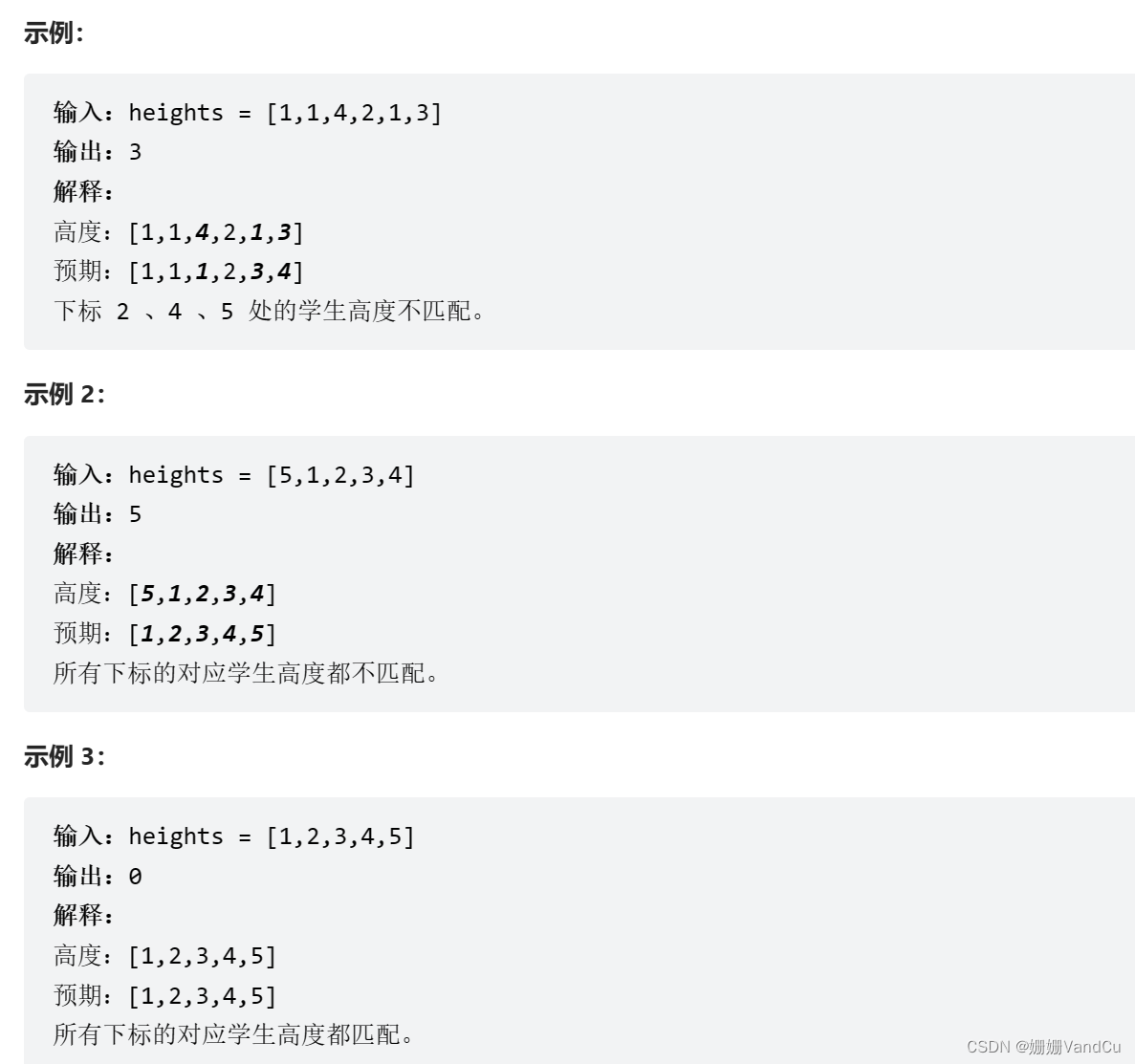
Leetcode : 1137. 高度检查器
学校打算为全体学生拍一张年度纪念照。根据要求,学生需要按照 非递减 的高度顺序排成一行。 排序后的高度情况用整数数组 expected 表示,其中 expected[i] 是预计排在这一行中第 i 位的学生的高度(下标从 0 开始)。 给你一个整数…...
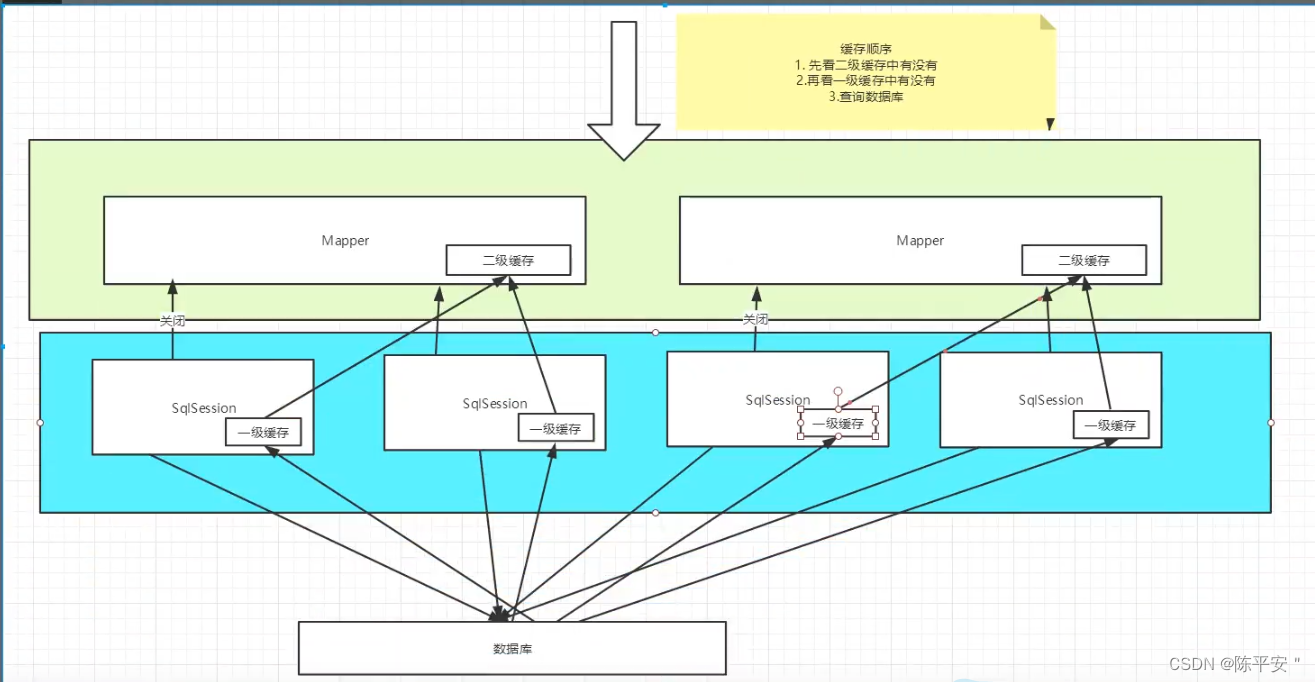
Mybatis从入门到CRUD到分页到日志到Lombok到动态SQL再到缓存
Mybatis 入门 1.导入maven依赖 <dependency><groupId>org.mybatis</groupId><artifactId>mybatis</artifactId><version>x.x.x</version> </dependency>2.配置核心文件 <?xml version"1.0" encoding"U…...
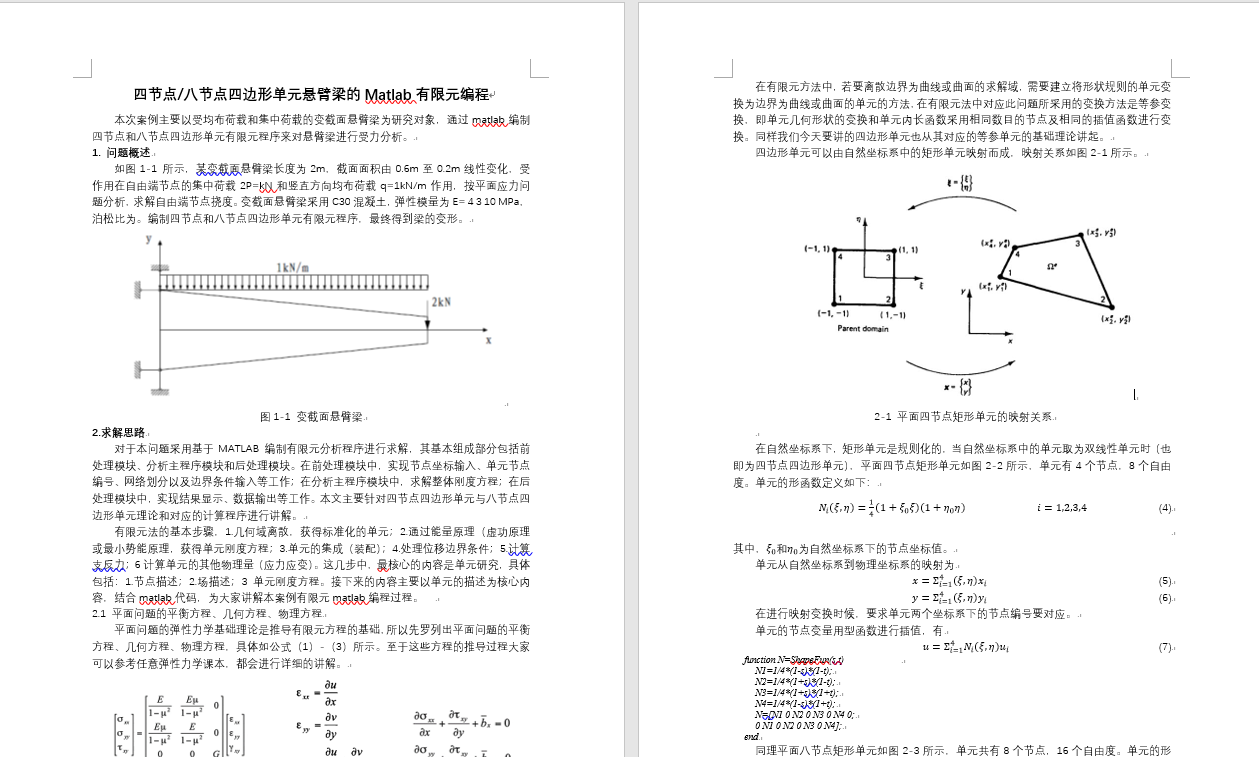
四节点/八节点四边形单元悬臂梁Matlab有限元编程 | 平面单元 | Matlab源码 | 理论文本
专栏导读 作者简介:工学博士,高级工程师,专注于工业软件算法研究本文已收录于专栏:《有限元编程从入门到精通》本专栏旨在提供 1.以案例的形式讲解各类有限元问题的程序实现,并提供所有案例完整源码;2.单元…...

机器视觉学习(一)—— 认识OpenCV、安装OpenCV
目录 一、认识OpenCV 二、通过pip工具安装OpenCV 三、PyCharm安装OpenCV 一、认识OpenCV OpenCV(Open Source Computer Vision Library,开源计算机视觉库)是一个跨平台的计算机视觉库,最初由威尔斯理工学院的Gary Bradski于199…...

web3 DePIN赛道之OORT
文章目录 什么是DePIN什么是oort背景:去中心化云计算场景团队OORT AIOORT StorageOORT Compute 参考 什么是DePIN DePIN是Decentralized Physical Infrastructure Networks的简称,中文意思就是去中心化的网络硬件基础设施,是利用区块链技术和代币奖励来调动分散在世…...

QString 与 字符编码 QTextCodec
为了理解编码,我们要先区分 文件中字符编码 和 程序运行时字符编码 的区别。 文件中字符编码 顾名思义 就是 文字保存在文件中的采用的字符编码方式,可以在IDE中看到程序运行时字符编码,是编译器读取从源文件中读取到字符串后再按要求做的一次…...
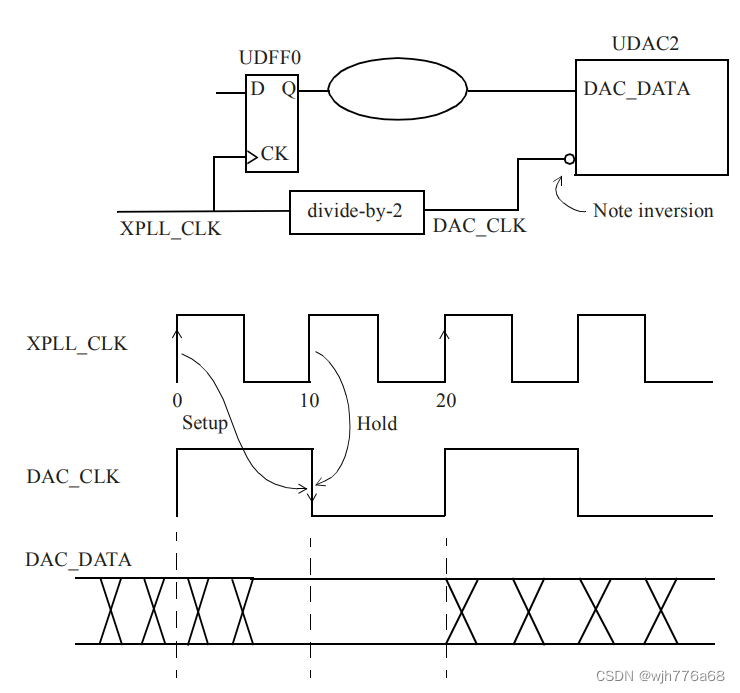
【STA】SRAM / DDR SDRAM 接口时序约束学习记录
1. SRAM接口 相比于DDR SDRAM,SRAM接口数据与控制信号共享同一时钟。在用户逻辑(这里记作DUA(Design Under Analysis))将数据写到SRAM中去的写周期中,数据和地址从DUA传送到SRAM中,并都在有效时…...

ESP8266 OTA升级实战:基于巴法云的极简实现方案
1. ESP8266 OTA升级入门:为什么选择巴法云? 每次给ESP8266设备更新固件都要插USB线?太麻烦了!OTA(Over-The-Air)无线升级技术能让你像手机更新APP一样轻松升级设备固件。而巴法云平台的出现,把原…...

StructBERT-中文-large部署指南:开源镜像免配置运行详解
StructBERT-中文-large部署指南:开源镜像免配置运行详解 1. 快速了解StructBERT文本相似度模型 StructBERT中文文本相似度模型是一个专门用于中文文本相似度计算的高性能模型。这个模型基于structbert-large-chinese预训练模型,经过大规模中文相似度数…...

别再被推着走了:你不是被动的沙,而是塑造自己的海
《元能力系统:重塑你的内在架构》 第五模块:【进化篇】—— 面向未来的生命架构 (21/21) 从沙到海:生命架构师的觉醒 说句实在话,写这篇结语的时候,我坐在书桌前发了好一会儿呆 。 窗外有风,楼下有人在遛狗,远处有孩子的笑声 。都是平常的日子。但这几个月,咱们一起走…...

WLAN部署实战:从AP上线到CAPWAP隧道建立的完整解析
1. WLAN组网基础:为什么需要AP与AC协作? 想象一下你走进一家咖啡馆,手机自动连上了WiFi。这个看似简单的动作背后,其实是一套复杂的无线局域网(WLAN)系统在运作。现代企业级WLAN通常采用AC(无线…...

开源Windows系统优化工具:3分钟让你的电脑运行速度提升51%
开源Windows系统优化工具:3分钟让你的电脑运行速度提升51% 【免费下载链接】Win11Debloat A simple, lightweight PowerShell script that allows you to remove pre-installed apps, disable telemetry, as well as perform various other changes to declutter an…...

统信UOS与麒麟Kylin OS下WeekToDo的高效任务管理指南
1. 为什么选择WeekToDo管理任务 在国产操作系统统信UOS和麒麟Kylin OS上,找到一款既轻量又高效的任务管理工具并不容易。WeekToDo恰好填补了这个空白,它就像你桌面上的一张便利贴,但比便利贴智能得多。我用了三个月后,工作效率提升…...

终极指南:如何让Mac原生支持MKV等视频格式的Finder预览和缩略图
终极指南:如何让Mac原生支持MKV等视频格式的Finder预览和缩略图 【免费下载链接】QuickLookVideo This package allows macOS Finder to display thumbnails, static QuickLook previews, cover art and metadata for most types of video files. 项目地址: https…...

SystemVerilog里static和automatic到底咋用?一个例子讲透,别再搞混了
SystemVerilog中static与automatic的实战指南:从误区到精通 引言 在数字芯片设计和验证领域,SystemVerilog作为行业标准语言,其static和automatic关键字的正确理解直接关系到代码质量与功能正确性。许多初学者在使用这两个关键字时常常陷入困…...

IRISMAN:PS3游戏备份管理的终极解决方案
IRISMAN:PS3游戏备份管理的终极解决方案 【免费下载链接】IRISMAN All-in-one backup manager for PlayStation3. Fork of Iris Manager. 项目地址: https://gitcode.com/gh_mirrors/ir/IRISMAN 你是否曾因PS3游戏存档丢失而心痛?是否在管理海量游…...

5步搞定Windows 11安装失败:MediaCreationTool.bat终极指南
5步搞定Windows 11安装失败:MediaCreationTool.bat终极指南 【免费下载链接】MediaCreationTool.bat Universal MCT wrapper script for all Windows 10/11 versions from 1507 to 21H2! 项目地址: https://gitcode.com/gh_mirrors/me/MediaCreationTool.bat …...