
Android主副屏显示-Android13
Android主副屏显示-Android13
- 1、DisplayDeviceInfo屏幕信息
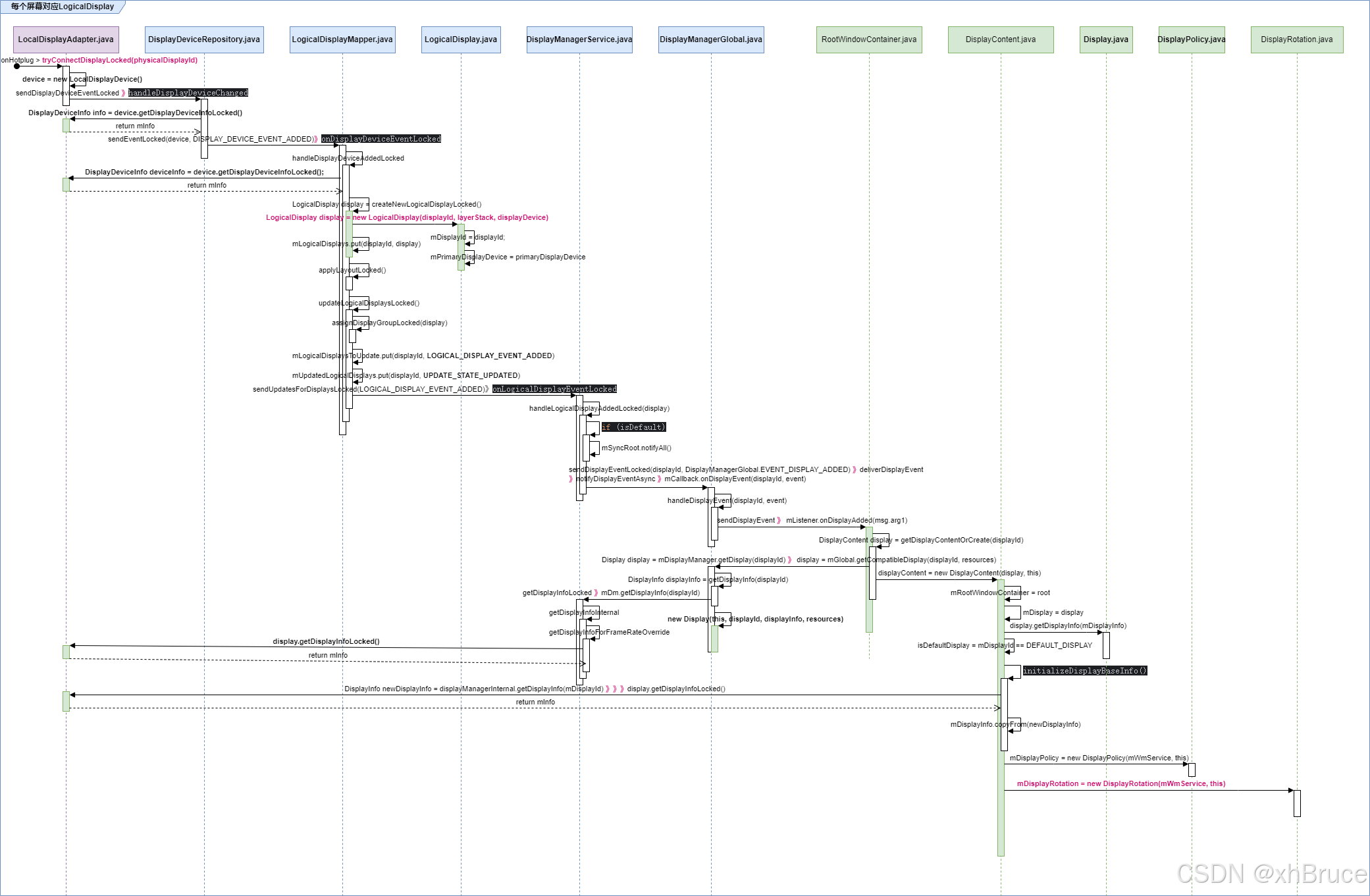
- 2、每个屏幕对应LogicalDisplay
- 2.1 LogicalDisplay添加对应DisplayContent
- 2.2 configureDisplayLocked刷新
DisplayManagerService启动及主屏添加-Android13
1、DisplayDeviceInfo屏幕信息
DisplayManagerService启动及主屏添加-Android13 中监听获取,在
LocalDisplayAdapter.java#tryConnectDisplayLocked获取DisplayDevice信息,在DisplayDeviceRepository.java#handleDisplayDeviceAdded获取DisplayDeviceInfo( 即 DisplayDevice.getDisplayDeviceInfoLocked())
命令查看屏幕信息:
$ dumpsys SurfaceFlinger --display-id
# Example output.
Display 21691504607621632 (HWC display 0): port=0 pnpId=SHP displayName="LQ123P1JX32"
Display 9834494747159041 (HWC display 2): port=1 pnpId=HWP displayName="HP Z24i"
Display 1886279400700944 (HWC display 1): port=2 pnpId=AUS displayName="ASUS MB16AP"
mInfo.width = mActiveSfDisplayMode.width:屏幕宽mInfo.height = mActiveSfDisplayMode.height:屏幕高mInfo.densityDpi = getLogicalDensity():屏幕DensitymInfo.xDpi = mActiveSfDisplayMode.xDpi:显示器在X方向上的DPI物理密度mInfo.yDpi = mActiveSfDisplayMode.yDpi:显示器在Y方向上的DPI物理密度。mInfo.installOrientation = mStaticDisplayInfo.installOrientation:显示面板的安装方向相对于其自然方向。mInfo.type = Display.TYPE_INTERNAL 或 Display.TYPE_EXTERNAL:内置屏幕<string name="display_manager_built_in_display_name">Built-in Screen</string>、HDMI 屏幕<string name="display_manager_hdmi_display_name">HDMI Screen</string>public int rotation = Surface.ROTATION_0:显示旋转方向
添加 “内置屏幕”
1080 x 2400density 420, 420.0 x 420.0 dpirotation 0type INTERNALinstallOrientation 009-14 16:10:38.304 607 650 I DisplayDeviceRepository: Display device added: DisplayDeviceInfo{"内置屏幕": uniqueId="local:4619827259835644672", 1080 x 2400, modeId 1, renderFrameRate 60.000004, defaultModeId 1, supportedModes [{id=1, width=1080, height=2400, fps=60.000004, alternativeRefreshRates=[], supportedHdrTypes=[]}], colorMode 0, supportedColorModes [0], hdrCapabilities HdrCapabilities{mSupportedHdrTypes=[], mMaxLuminance=500.0, mMaxAverageLuminance=500.0, mMinLuminance=0.0}, allmSupported false, gameContentTypeSupported false, density 420, 420.0 x 420.0 dpi, appVsyncOff 1000000, presDeadline 16666666, touch INTERNAL, rotation 0, type INTERNAL, address {port=0, model=0x401cec6a7a2b7b}, deviceProductInfo DeviceProductInfo{name=EMU_display_0, manufacturerPnpId=GGL, productId=1, modelYear=null, manufactureDate=ManufactureDate{week=27, year=2006}, connectionToSinkType=0}, state UNKNOWN, committedState UNKNOWN, frameRateOverride , brightnessMinimum 0.0, brightnessMaximum 1.0, brightnessDefault 0.39763778, hdrSdrRatio NaN, FLAG_ALLOWED_TO_BE_DEFAULT_DISPLAY, FLAG_ROTATES_WITH_CONTENT, FLAG_SECURE, FLAG_SUPPORTS_PROTECTED_BUFFERS, FLAG_TRUSTED, installOrientation 0, displayShape DisplayShape{ spec=-1893857183 displayWidth=1080 displayHeight=2400 physicalPixelDisplaySizeRatio=1.0 rotation=0 offsetX=0 offsetY=0 scale=1.0}} 09-14 16:10:38.307 607 650 I LogicalDisplayMapper: Applying layout: [{dispId: 0(ON), displayGroupName: , addr: {port=0, model=0x401cec6a7a2b7b}, mThermalBrightnessThrottlingMapId: null, mRefreshRateZoneId: null, mLeadDisplayId: -1, mThermalRefreshRateThrottlingMapId: null}], Previous layout: null 09-14 16:10:38.317 607 650 I LogicalDisplayMapper: Setting new display group 0 for display 0, from previous group: null 09-14 16:10:38.320 607 650 I LogicalDisplayMapper: Adding new display: 0: DisplayInfo{"内置屏幕", displayId 0, displayGroupId 0, FLAG_SECURE, FLAG_SUPPORTS_PROTECTED_BUFFERS, FLAG_TRUSTED, real 1080 x 2400, largest app 1080 x 2400, smallest app 1080 x 2400, appVsyncOff 1000000, presDeadline 16666666, mode 160.000004, defaultMode 1, modes [{id=1, width=1080, height=2400, fps=60.000004, alternativeRefreshRates=[], supportedHdrTypes=[]}], hdrCapabilities HdrCapabilities{mSupportedHdrTypes=[], mMaxLuminance=500.0, mMaxAverageLuminance=500.0, mMinLuminance=0.0}, userDisabledHdrTypes [], minimalPostProcessingSupported false, rotation 0, state UNKNOWN, committedState UNKNOWN, type INTERNAL, uniqueId "local:4619827259835644672", app 1080 x 2400, density 420 (420.0 x 420.0) dpi, layerStack 0, colorMode 0, supportedColorModes [0], address {port=0, model=0x401cec6a7a2b7b}, deviceProductInfo DeviceProductInfo{name=EMU_display_0, manufacturerPnpId=GGL, productId=1, modelYear=null, manufactureDate=ManufactureDate{week=27, year=2006}, connectionToSinkType=0}, removeMode 0, refreshRateOverride 0.0, brightnessMinimum 0.0, brightnessMaximum 1.0, brightnessDefault 0.39763778, installOrientation ROTATION_0, layoutLimitedRefreshRate null, hdrSdrRatio not_available, thermalRefreshRateThrottling {}, thermalBrightnessThrottlingDataId default} 09-14 16:10:49.174 607 650 I DisplayDeviceRepository: Display device changed state: "内置屏幕", ON 09-14 16:10:49.185 607 650 I DisplayDeviceRepository: Display device changed state: "内置屏幕", ON 09-14 16:10:50.814 607 650 I DisplayDeviceRepository: Display device added: DisplayDeviceInfo{"叠加视图 #1": uniqueId="overlay:1", 1920 x 1080, modeId 2, renderFrameRate 60.000004, defaultModeId 2, supportedModes [{id=2, width=1920, height=1080, fps=60.000004, alternativeRefreshRates=[], supportedHdrTypes=[]}], colorMode 0, supportedColorModes [0], hdrCapabilities null, allmSupported false, gameContentTypeSupported false, density 320, 320.0 x 320.0 dpi, appVsyncOff 0, presDeadline 33333332, touch VIRTUAL, rotation 0, type OVERLAY, deviceProductInfo null, state ON, committedState UNKNOWN, frameRateOverride , brightnessMinimum 0.0, brightnessMaximum 0.0, brightnessDefault 0.0, hdrSdrRatio NaN, FLAG_SECURE, FLAG_PRESENTATION, FLAG_TRUSTED, installOrientation 0, displayShape DisplayShape{ spec=729782573 displayWidth=1920 displayHeight=1080 physicalPixelDisplaySizeRatio=1.0 rotation=0 offsetX=0 offsetY=0 scale=1.0}} 09-14 16:10:50.820 607 650 I LogicalDisplayMapper: Applying layout: [{dispId: 0(ON), displayGroupName: , addr: {port=0, model=0x401cec6a7a2b7b}, mThermalBrightnessThrottlingMapId: null, mRefreshRateZoneId: null, mLeadDisplayId: -1, mThermalRefreshRateThrottlingMapId: null}], Previous layout: [{dispId: 0(ON), displayGroupName: , addr: {port=0, model=0x401cec6a7a2b7b}, mThermalBrightnessThrottlingMapId: null, mRefreshRateZoneId: null, mLeadDisplayId: -1, mThermalRefreshRateThrottlingMapId: null}] 09-14 16:10:50.821 607 650 I LogicalDisplayMapper: Setting new display group 0 for display 2, from previous group: null 09-14 16:10:50.825 607 650 I LogicalDisplayMapper: Adding new display: 2: DisplayInfo{"叠加视图 #1", displayId 2, displayGroupId 0, FLAG_SECURE, FLAG_PRESENTATION, FLAG_TRUSTED, real 1920 x 1080, largest app 1920 x 1080, smallest app 1920 x 1080, appVsyncOff 0, presDeadline 33333332, mode 260.000004, defaultMode 2, modes [{id=2, width=1920, height=1080, fps=60.000004, alternativeRefreshRates=[], supportedHdrTypes=[]}], hdrCapabilities null, userDisabledHdrTypes [], minimalPostProcessingSupported false, rotation 0, state ON, committedState UNKNOWN, type OVERLAY, uniqueId "overlay:1", app 1920 x 1080, density 320 (320.0 x 320.0) dpi, layerStack 2, colorMode 0, supportedColorModes [0], deviceProductInfo null, removeMode 0, refreshRateOverride 0.0, brightnessMinimum 0.0, brightnessMaximum 0.0, brightnessDefault 0.0, installOrientation ROTATION_0, layoutLimitedRefreshRate null, hdrSdrRatio not_available, thermalRefreshRateThrottling {}, thermalBrightnessThrottlingDataId default} 09-14 16:10:58.994 607 650 I DisplayDeviceRepository: Display device changed: DisplayDeviceInfo{"内置屏幕": uniqueId="local:4619827259835644672", 1080 x 2400, modeId 1, renderFrameRate 60.000004, defaultModeId 1, supportedModes [{id=1, width=1080, height=2400, fps=60.000004, alternativeRefreshRates=[], supportedHdrTypes=[]}], colorMode 0, supportedColorModes [0], hdrCapabilities HdrCapabilities{mSupportedHdrTypes=[], mMaxLuminance=500.0, mMaxAverageLuminance=500.0, mMinLuminance=0.0}, allmSupported false, gameContentTypeSupported false, density 420, 420.0 x 420.0 dpi, appVsyncOff 1000000, presDeadline 16666666, cutout DisplayCutout{insets=Rect(0, 132 - 0, 0) waterfall=Insets{left=0, top=0, right=0, bottom=0} boundingRect={Bounds=[Rect(0, 0 - 0, 0), Rect(479, 0 - 601, 132), Rect(0, 0 - 0, 0), Rect(0, 0 - 0, 0)]} cutoutPathParserInfo={CutoutPathParserInfo{displayWidth=1080 displayHeight=2400 physicalDisplayWidth=1080 physicalDisplayHeight=2400 density={2.625} cutoutSpec={m 576,65.75 a 36.25,36.25 0 0 0 -72.5,0 36.25,36.25 0 0 0 72.5,0 z @left} rotation={0} scale={1.0} physicalPixelDisplaySizeRatio={1.0}}}}, touch INTERNAL, rotation 0, type INTERNAL, address {port=0, model=0x401cec6a7a2b7b}, deviceProductInfo DeviceProductInfo{name=EMU_display_0, manufacturerPnpId=GGL, productId=1, modelYear=null, manufactureDate=ManufactureDate{week=27, year=2006}, connectionToSinkType=0}, state ON, committedState ON, frameRateOverride , brightnessMinimum 0.0, brightnessMaximum 1.0, brightnessDefault 0.39763778, hdrSdrRatio NaN, roundedCorners RoundedCorners{[RoundedCorner{position=TopLeft, radius=104, center=Point(104, 104)}, RoundedCorner{position=TopRight, radius=104, center=Point(976, 104)}, RoundedCorner{position=BottomRight, radius=102, center=Point(978, 2298)}, RoundedCorner{position=BottomLeft, radius=102, center=Point(102, 2298)}]}, FLAG_ALLOWED_TO_BE_DEFAULT_DISPLAY, FLAG_ROTATES_WITH_CONTENT, FLAG_SECURE, FLAG_SUPPORTS_PROTECTED_BUFFERS, FLAG_TRUSTED, installOrientation 0, displayShape DisplayS ... 09-14 16:10:59.203 607 650 I DisplayDeviceRepository: Display device changed: DisplayDeviceInfo{"叠加视图 #1": uniqueId="overlay:1", 1920 x 1080, modeId 2, renderFrameRate 60.000004, defaultModeId 2, supportedModes [{id=2, width=1920, height=1080, fps=60.000004, alternativeRefreshRates=[], supportedHdrTypes=[]}], colorMode 0, supportedColorModes [0], hdrCapabilities null, allmSupported false, gameContentTypeSupported false, density 320, 320.0 x 320.0 dpi, appVsyncOff 0, presDeadline 33333332, touch VIRTUAL, rotation 0, type OVERLAY, deviceProductInfo null, state ON, committedState UNKNOWN, frameRateOverride , brightnessMinimum 0.0, brightnessMaximum 0.0, brightnessDefault 0.0, hdrSdrRatio NaN, FLAG_SECURE, FLAG_PRESENTATION, FLAG_TRUSTED, installOrientation 0, displayShape DisplayShape{ spec=729782573 displayWidth=1920 displayHeight=1080 physicalPixelDisplaySizeRatio=1.0 rotation=0 offsetX=0 offsetY=0 scale=1.0}} 09-14 16:10:59.210 607 650 I DisplayDeviceRepository: Display device changed: DisplayDeviceInfo{"叠加视图 #1": uniqueId="overlay:1", 1920 x 1080, modeId 2, renderFrameRate 60.000004, defaultModeId 2, supportedModes [{id=2, width=1920, height=1080, fps=60.000004, alternativeRefreshRates=[], supportedHdrTypes=[]}], colorMode 0, supportedColorModes [0], hdrCapabilities null, allmSupported false, gameContentTypeSupported false, density 320, 320.0 x 320.0 dpi, appVsyncOff 0, presDeadline 33333332, touch VIRTUAL, rotation 0, type OVERLAY, deviceProductInfo null, state ON, committedState UNKNOWN, frameRateOverride , brightnessMinimum 0.0, brightnessMaximum 0.0, brightnessDefault 0.0, hdrSdrRatio NaN, FLAG_SECURE, FLAG_PRESENTATION, FLAG_TRUSTED, installOrientation 0, displayShape DisplayShape{ spec=729782573 displayWidth=1920 displayHeight=1080 physicalPixelDisplaySizeRatio=1.0 rotation=0 offsetX=0 offsetY=0 scale=1.0}} 09-14 16:10:44.078 607 650 I DisplayDeviceRepository: Display device changed: DisplayDeviceInfo{"叠加视图 #1": uniqueId="overlay:1", 1920 x 1080, modeId 2, renderFrameRate 60.000004, defaultModeId 2, supportedModes [{id=2, width=1920, height=1080, fps=60.000004, alternativeRefreshRates=[], supportedHdrTypes=[]}], colorMode 0, supportedColorModes [0], hdrCapabilities null, allmSupported false, gameContentTypeSupported false, density 320, 320.0 x 320.0 dpi, appVsyncOff 0, presDeadline 33333332, touch VIRTUAL, rotation 0, type OVERLAY, deviceProductInfo null, state ON, committedState UNKNOWN, frameRateOverride , brightnessMinimum 0.0, brightnessMaximum 0.0, brightnessDefault 0.0, hdrSdrRatio NaN, FLAG_SECURE, FLAG_PRESENTATION, FLAG_TRUSTED, installOrientation 0, displayShape DisplayShape{ spec=729782573 displayWidth=1920 displayHeight=1080 physicalPixelDisplaySizeRatio=1.0 rotation=0 offsetX=0 offsetY=0 scale=1.0}} 09-14 16:10:44.343 607 650 I LogicalDisplayMapper: Requesting Transition to state: 0, from state=-1, interactive=true, mBootCompleted=true 09-14 16:10:44.343 607 650 I LogicalDisplayMapper: Applying layout: [{dispId: 0(ON), displayGroupName: , addr: {port=0, model=0x401cec6a7a2b7b}, mThermalBrightnessThrottlingMapId: null, mRefreshRateZoneId: null, mLeadDisplayId: -1, mThermalRefreshRateThrottlingMapId: null}], Previous layout: [{dispId: 0(ON), displayGroupName: , addr: {port=0, model=0x401cec6a7a2b7b}, mThermalBrightnessThrottlingMapId: null, mRefreshRateZoneId: null, mLeadDisplayId: -1, mThermalRefreshRateThrottlingMapId: null}] 09-14 16:10:48.835 607 650 I DisplayDeviceRepository: Display device changed: DisplayDeviceInfo{"内置屏幕": uniqueId="local:4619827259835644672", 1080 x 2400, modeId 1, renderFrameRate 60.000004, defaultModeId 1, supportedModes [{id=1, width=1080, height=2400, fps=60.000004, alternativeRefreshRates=[], supportedHdrTypes=[]}], colorMode 0, supportedColorModes [0], hdrCapabilities HdrCapabilities{mSupportedHdrTypes=[], mMaxLuminance=500.0, mMaxAverageLuminance=500.0, mMinLuminance=0.0}, allmSupported false, gameContentTypeSupported false, density 420, 420.0 x 420.0 dpi, appVsyncOff 1000000, presDeadline 16666666, cutout DisplayCutout{insets=Rect(0, 132 - 0, 0) waterfall=Insets{left=0, top=0, right=0, bottom=0} boundingRect={Bounds=[Rect(0, 0 - 0, 0), Rect(479, 0 - 601, 132), Rect(0, 0 - 0, 0), Rect(0, 0 - 0, 0)]} cutoutPathParserInfo={CutoutPathParserInfo{displayWidth=1080 displayHeight=2400 physicalDisplayWidth=1080 physicalDisplayHeight=2400 density={2.625} cutoutSpec={m 576,65.75 a 36.25,36.25 0 0 0 -72.5,0 36.25,36.25 0 0 0 72.5,0 z @left} rotation={0} scale={1.0} physicalPixelDisplaySizeRatio={1.0}}}}, touch INTERNAL, rotation 0, type INTERNAL, address {port=0, model=0x401cec6a7a2b7b}, deviceProductInfo DeviceProductInfo{name=EMU_display_0, manufacturerPnpId=GGL, productId=1, modelYear=null, manufactureDate=ManufactureDate{week=27, year=2006}, connectionToSinkType=0}, state ON, committedState ON, frameRateOverride , brightnessMinimum 0.0, brightnessMaximum 1.0, brightnessDefault 0.39763778, hdrSdrRatio NaN, roundedCorners RoundedCorners{[RoundedCorner{position=TopLeft, radius=104, center=Point(104, 104)}, RoundedCorner{position=TopRight, radius=104, center=Point(976, 104)}, RoundedCorner{position=BottomRight, radius=102, center=Point(978, 2298)}, RoundedCorner{position=BottomLeft, radius=102, center=Point(102, 2298)}]}, FLAG_ALLOWED_TO_BE_DEFAULT_DISPLAY, FLAG_ROTATES_WITH_CONTENT, FLAG_SECURE, FLAG_SUPPORTS_PROTECTED_BUFFERS, FLAG_TRUSTED, installOrientation 0, displayShape DisplayS ... 09-14 16:11:13.939 607 650 I DisplayDeviceRepository: Display device changed: DisplayDeviceInfo{"叠加视图 #1": uniqueId="overlay:1", 1920 x 1080, modeId 2, renderFrameRate 60.000004, defaultModeId 2, supportedModes [{id=2, width=1920, height=1080, fps=60.000004, alternativeRefreshRates=[], supportedHdrTypes=[]}], colorMode 0, supportedColorModes [0], hdrCapabilities null, allmSupported false, gameContentTypeSupported false, density 320, 320.0 x 320.0 dpi, appVsyncOff 0, presDeadline 33333332, touch VIRTUAL, rotation 0, type OVERLAY, deviceProductInfo null, state ON, committedState UNKNOWN, frameRateOverride , brightnessMinimum 0.0, brightnessMaximum 0.0, brightnessDefault 0.0, hdrSdrRatio NaN, FLAG_SECURE, FLAG_PRESENTATION, FLAG_TRUSTED, installOrientation 0, displayShape DisplayShape{ spec=729782573 displayWidth=1920 displayHeight=1080 physicalPixelDisplaySizeRatio=1.0 rotation=0 offsetX=0 offsetY=0 scale=1.0}} 09-14 16:11:24.379 607 650 I DisplayDeviceRepository: Display device changed state: "内置屏幕", OFF 09-14 16:11:24.390 607 650 I DisplayDeviceRepository: Display device changed state: "内置屏幕", OFF 09-14 16:11:24.425 607 650 I DisplayDeviceRepository: Display device changed state: "叠加视图 #1", OFF 09-14 16:11:24.478 607 650 I DisplayDeviceRepository: Display device changed: DisplayDeviceInfo{"叠加视图 #1": uniqueId="overlay:1", 1920 x 1080, modeId 2, renderFrameRate 60.000004, defaultModeId 2, supportedModes [{id=2, width=1920, height=1080, fps=60.000004, alternativeRefreshRates=[], supportedHdrTypes=[]}], colorMode 0, supportedColorModes [0], hdrCapabilities null, allmSupported false, gameContentTypeSupported false, density 320, 320.0 x 320.0 dpi, appVsyncOff 0, presDeadline 33333332, touch VIRTUAL, rotation 0, type OVERLAY, deviceProductInfo null, state OFF, committedState UNKNOWN, frameRateOverride , brightnessMinimum 0.0, brightnessMaximum 0.0, brightnessDefault 0.0, hdrSdrRatio NaN, FLAG_SECURE, FLAG_PRESENTATION, FLAG_TRUSTED, installOrientation 0, displayShape DisplayShape{ spec=729782573 displayWidth=1920 displayHeight=1080 physicalPixelDisplaySizeRatio=1.0 rotation=0 offsetX=0 offsetY=0 scale=1.0}} 09-14 16:11:27.676 607 650 I DisplayDeviceRepository: Display device changed state: "内置屏幕", ON 09-14 16:11:27.688 607 650 I DisplayDeviceRepository: Display device changed state: "内置屏幕", ON 09-14 16:11:27.777 607 650 I DisplayDeviceRepository: Display device changed state: "叠加视图 #1", ON 09-14 16:11:27.829 607 650 I DisplayDeviceRepository: Display device changed: DisplayDeviceInfo{"叠加视图 #1": uniqueId="overlay:1", 1920 x 1080, modeId 2, renderFrameRate 60.000004, defaultModeId 2, supportedModes [{id=2, width=1920, height=1080, fps=60.000004, alternativeRefreshRates=[], supportedHdrTypes=[]}], colorMode 0, supportedColorModes [0], hdrCapabilities null, allmSupported false, gameContentTypeSupported false, density 320, 320.0 x 320.0 dpi, appVsyncOff 0, presDeadline 33333332, touch VIRTUAL, rotation 0, type OVERLAY, deviceProductInfo null, state ON, committedState UNKNOWN, frameRateOverride , brightnessMinimum 0.0, brightnessMaximum 0.0, brightnessDefault 0.0, hdrSdrRatio NaN, FLAG_SECURE, FLAG_PRESENTATION, FLAG_TRUSTED, installOrientation 0, displayShape DisplayShape{ spec=729782573 displayWidth=1920 displayHeight=1080 physicalPixelDisplaySizeRatio=1.0 rotation=0 offsetX=0 offsetY=0 scale=1.0}} 09-14 16:14:42.174 607 650 I DisplayDeviceRepository: Display device removed: DisplayDeviceInfo{"叠加视图 #1": uniqueId="overlay:1", 1920 x 1080, modeId 2, renderFrameRate 60.000004, defaultModeId 2, supportedModes [{id=2, width=1920, height=1080, fps=60.000004, alternativeRefreshRates=[], supportedHdrTypes=[]}], colorMode 0, supportedColorModes [0], hdrCapabilities null, allmSupported false, gameContentTypeSupported false, density 320, 320.0 x 320.0 dpi, appVsyncOff 0, presDeadline 33333332, touch VIRTUAL, rotation 0, type OVERLAY, deviceProductInfo null, state ON, committedState UNKNOWN, frameRateOverride , brightnessMinimum 0.0, brightnessMaximum 0.0, brightnessDefault 0.0, hdrSdrRatio NaN, FLAG_SECURE, FLAG_PRESENTATION, FLAG_TRUSTED, installOrientation 0, displayShape DisplayShape{ spec=729782573 displayWidth=1920 displayHeight=1080 physicalPixelDisplaySizeRatio=1.0 rotation=0 offsetX=0 offsetY=0 scale=1.0}} 09-14 16:14:42.191 607 650 I LogicalDisplayMapper: Removing display: 2
frameworks/base/services/core/java/com/android/server/display/DisplayDeviceRepository.java
public DisplayDeviceInfo getDisplayDeviceInfoLocked() {if (mInfo == null) {mInfo = new DisplayDeviceInfo();mInfo.width = mActiveSfDisplayMode.width;mInfo.height = mActiveSfDisplayMode.height;mInfo.modeId = mActiveModeId;mInfo.defaultModeId = getPreferredModeId();mInfo.supportedModes = getDisplayModes(mSupportedModes);mInfo.colorMode = mActiveColorMode;mInfo.allmSupported = mAllmSupported;mInfo.gameContentTypeSupported = mGameContentTypeSupported;mInfo.supportedColorModes =new int[mSupportedColorModes.size()];for (int i = 0; i < mSupportedColorModes.size(); i++) {mInfo.supportedColorModes[i] = mSupportedColorModes.get(i);}mInfo.hdrCapabilities = mHdrCapabilities;mInfo.appVsyncOffsetNanos = mActiveSfDisplayMode.appVsyncOffsetNanos;mInfo.presentationDeadlineNanos = mActiveSfDisplayMode.presentationDeadlineNanos;mInfo.state = mState;mInfo.uniqueId = getUniqueId();final DisplayAddress.Physical physicalAddress =DisplayAddress.fromPhysicalDisplayId(mPhysicalDisplayId);mInfo.address = physicalAddress;mInfo.densityDpi = getLogicalDensity();mInfo.xDpi = mActiveSfDisplayMode.xDpi;mInfo.yDpi = mActiveSfDisplayMode.yDpi;mInfo.deviceProductInfo = mStaticDisplayInfo.deviceProductInfo;// Assume that all built-in displays that have secure output (eg. HDCP) also// support compositing from gralloc protected buffers.if (mStaticDisplayInfo.secure) {mInfo.flags = DisplayDeviceInfo.FLAG_SECURE| DisplayDeviceInfo.FLAG_SUPPORTS_PROTECTED_BUFFERS;}final Resources res = getOverlayContext().getResources();mInfo.flags |= DisplayDeviceInfo.FLAG_ALLOWED_TO_BE_DEFAULT_DISPLAY;if (mIsFirstDisplay) {if (res.getBoolean(com.android.internal.R.bool.config_mainBuiltInDisplayIsRound)|| (Build.IS_EMULATOR&& SystemProperties.getBoolean(PROPERTY_EMULATOR_CIRCULAR, false))) {mInfo.flags |= DisplayDeviceInfo.FLAG_ROUND;}} else {if (!res.getBoolean(com.android.internal.R.bool.config_localDisplaysMirrorContent)) {mInfo.flags |= DisplayDeviceInfo.FLAG_OWN_CONTENT_ONLY;}if (isDisplayPrivate(physicalAddress)) {mInfo.flags |= DisplayDeviceInfo.FLAG_PRIVATE;}}if (DisplayCutout.getMaskBuiltInDisplayCutout(res, mInfo.uniqueId)) {mInfo.flags |= DisplayDeviceInfo.FLAG_MASK_DISPLAY_CUTOUT;}final Display.Mode maxDisplayMode =DisplayUtils.getMaximumResolutionDisplayMode(mInfo.supportedModes);final int maxWidth =maxDisplayMode == null ? mInfo.width : maxDisplayMode.getPhysicalWidth();final int maxHeight =maxDisplayMode == null ? mInfo.height : maxDisplayMode.getPhysicalHeight();mInfo.displayCutout = DisplayCutout.fromResourcesRectApproximation(res,mInfo.uniqueId, maxWidth, maxHeight, mInfo.width, mInfo.height);mInfo.roundedCorners = RoundedCorners.fromResources(res, mInfo.uniqueId, maxWidth, maxHeight, mInfo.width, mInfo.height);mInfo.installOrientation = mStaticDisplayInfo.installOrientation;if (mStaticDisplayInfo.isInternal) {mInfo.type = Display.TYPE_INTERNAL;mInfo.touch = DisplayDeviceInfo.TOUCH_INTERNAL;mInfo.flags |= DisplayDeviceInfo.FLAG_ROTATES_WITH_CONTENT;mInfo.name = res.getString(com.android.internal.R.string.display_manager_built_in_display_name);} else {mInfo.type = Display.TYPE_EXTERNAL;mInfo.touch = DisplayDeviceInfo.TOUCH_EXTERNAL;mInfo.flags |= DisplayDeviceInfo.FLAG_PRESENTATION;mInfo.name = getContext().getResources().getString(com.android.internal.R.string.display_manager_hdmi_display_name);}mInfo.frameRateOverrides = mFrameRateOverrides;// The display is trusted since it is created by system.mInfo.flags |= DisplayDeviceInfo.FLAG_TRUSTED;mInfo.brightnessMinimum = PowerManager.BRIGHTNESS_MIN;mInfo.brightnessMaximum = PowerManager.BRIGHTNESS_MAX;mInfo.brightnessDefault = getDisplayDeviceConfig().getBrightnessDefault();}return mInfo;
}

frameworks/base/services/core/java/com/android/server/display/DisplayDeviceInfo.java
public String toString() {StringBuilder sb = new StringBuilder();sb.append("DisplayDeviceInfo{\"");sb.append(name).append("\": uniqueId=\"").append(uniqueId).append("\", ");sb.append(width).append(" x ").append(height);sb.append(", modeId ").append(modeId);sb.append(", defaultModeId ").append(defaultModeId);sb.append(", supportedModes ").append(Arrays.toString(supportedModes));sb.append(", colorMode ").append(colorMode);sb.append(", supportedColorModes ").append(Arrays.toString(supportedColorModes));sb.append(", hdrCapabilities ").append(hdrCapabilities);sb.append(", allmSupported ").append(allmSupported);sb.append(", gameContentTypeSupported ").append(gameContentTypeSupported);sb.append(", density ").append(densityDpi);sb.append(", ").append(xDpi).append(" x ").append(yDpi).append(" dpi");sb.append(", appVsyncOff ").append(appVsyncOffsetNanos);sb.append(", presDeadline ").append(presentationDeadlineNanos);if (displayCutout != null) {sb.append(", cutout ").append(displayCutout);}sb.append(", touch ").append(touchToString(touch));sb.append(", rotation ").append(rotation);sb.append(", type ").append(Display.typeToString(type));if (address != null) {sb.append(", address ").append(address);}sb.append(", deviceProductInfo ").append(deviceProductInfo);sb.append(", state ").append(Display.stateToString(state));if (ownerUid != 0 || ownerPackageName != null) {sb.append(", owner ").append(ownerPackageName);sb.append(" (uid ").append(ownerUid).append(")");}sb.append(", frameRateOverride ");for (DisplayEventReceiver.FrameRateOverride frameRateOverride : frameRateOverrides) {sb.append(frameRateOverride).append(" ");}sb.append(", brightnessMinimum ").append(brightnessMinimum);sb.append(", brightnessMaximum ").append(brightnessMaximum);sb.append(", brightnessDefault ").append(brightnessDefault);if (roundedCorners != null) {sb.append(", roundedCorners ").append(roundedCorners);}sb.append(flagsToString(flags));sb.append(", installOrientation ").append(installOrientation);sb.append("}");return sb.toString();
}
2、每个屏幕对应LogicalDisplay
frameworks/base/services/core/java/com/android/server/wm/RootWindowContainer.java
frameworks/base/services/core/java/com/android/server/wm/DisplayContent.java
frameworks/base/services/core/java/com/android/server/display/LogicalDisplay.java
RootWindowContainer.java#onDisplayAdded
DisplayContent.java#updateDisplayAndOrientation
DisplayManagerService.java#setDisplayInfoOverrideFromWindowManager
LogicalDisplay.java#setDisplayInfoOverrideFromWindowManagerLocked
2.1 LogicalDisplay添加对应DisplayContent
2.2 configureDisplayLocked刷新
RootWindowContainer.java#applySurfaceChangesTransaction
DisplayManagerService.java#performTraversalLocked
DisplayManagerService.java#configureDisplayLocked
LogicalDisplay.java#configureDisplayLocked
主屏:1080x2160
mDisplayId=0; orientation=0; physWidth=1080; physHeight=2160; rotated=false [ displayDeviceInfo.rotation=0; displayDeviceInfo.width=1080; displayDeviceInfo.height=2160; displayInfo.rotation=0; displayInfo.logicalWidth=1080; displayInfo.logicalHeight=2160 ]
mDisplayId=0; mTempDisplayRect=Rect(0, 0 - 1080, 2160); mTempLayerStackRect=Rect(0, 0 - 1080, 2160); orientation=0mDisplayId=0; orientation=1; physWidth=2160; physHeight=1080; rotated=true [ displayDeviceInfo.rotation=0; displayDeviceInfo.width=1080; displayDeviceInfo.height=2160; displayInfo.rotation=1; displayInfo.logicalWidth=2160; displayInfo.logicalHeight=1080 ]
mDisplayId=0; mTempDisplayRect=Rect(0, 0 - 2160, 1080); mTempLayerStackRect=Rect(0, 0 - 2160, 1080); orientation=1
副屏:1920x1080 (
修改处理?)mDisplayId=2; orientation=0; physWidth=1920; physHeight=1080 [ displayDeviceInfo.rotation=0; displayDeviceInfo.width=1920; displayDeviceInfo.height=1080; displayInfo.rotation=0; displayInfo.logicalWidth=1920; displayInfo.logicalHeight=1080 ] mDisplayId=2; mTempDisplayRect=Rect(0, 0 - 1920, 1080); mTempLayerStackRect=Rect(0, 0 - 1920, 1080); orientation=0mDisplayId=2; orientation=3; physWidth=1080; physHeight=1920; rotated=true [ displayDeviceInfo.rotation=3; displayDeviceInfo.width=1920; displayDeviceInfo.height=1080; displayInfo.rotation=0; displayInfo.logicalWidth=1920; displayInfo.logicalHeight=1080 ] mDisplayId=2; mTempDisplayRect=Rect(0, 0 - 1080, 1920); mTempLayerStackRect=Rect(0, 0 - 1080, 1920); orientation=3
相关文章:
Android主副屏显示-Android13
Android主副屏显示-Android13 1、DisplayDeviceInfo屏幕信息2、每个屏幕对应LogicalDisplay2.1 LogicalDisplay添加对应DisplayContent2.2 configureDisplayLocked刷新 DisplayManagerService启动及主屏添加-Android13 1、DisplayDeviceInfo屏幕信息 DisplayManagerService启动…...

什么是 SMB 服务器以及它如何工作?
在本文中,您将了解 SMB 服务器以及它们如何促进网络文件共享。 我们将介绍它们的基本功能、主要特性以及如何安全地设置它们。无论您是新手还是需要复习,本指南都将帮助您更好地了解 SMB 服务器。 什么是 SMB 服务器? SMB(服务器…...

【python计算机视觉编程——10.OpenCV】
python计算机视觉编程——10.OpenCV 10.OpenCV10.2 OpenCV基础知识10.2.1 读取和写入图像10.2.2 颜色空间10.2.3 显示图像及结果 10.3 处理视频10.3.1 视频输入10.3.2 将视频读取到NumPy数组中 10.4 跟踪10.4.1 光流10.4.2 Lucas-Kanade算法使用跟踪器使用发生器 10.5 更多示例…...

医学数据分析实训 项目二 数据预处理预备知识(数据标准化处理,数据离差标准化处理,数据二值化处理,独热编码处理,数据PCA降维处理)
文章目录 数据预处理预备知识任务一 数据标准化处理1. 数据准备2. 数据标准化 任务二 数据离差标准化处理任务三 数据二值化处理任务五 独热编码处理对数据进行“离散化处理”(装箱)将已经装箱的数据进行OneHotEncoder独热编码 任务六 数据PCA降维处理1.…...

MySQL查询执行(四):查一行也很慢
假设存在表t,这个表有两个字段id和c,并且我在里面插入了10万行记录。 -- 创建表t CREATE TABLE t (id int(11) NOT NULL,c int(11) DEFAULT NULL,PRIMARY KEY (id) ) ENGINEInnoDB;-- 通过存储过程向t写入10w行数据 delimiter ;; create procedure idat…...

【Obsidian】当笔记接入AI,Copilot插件推荐
当笔记接入AI,Copilot插件推荐 自己的知识库笔记如果增加AI功能会怎样?AI的回答完全基于你自己的知识库余料,是不是很有趣。在插件库中有Copilot插件这款插件,可以实现这个梦想。 一、什么是Copilot? 我们知道githu…...

Spring Cloud集成Gateaway
Spring Cloud Gateway 是一个基于 Spring 生态的网关框架,用于构建微服务架构中的API网关。它可以对请求进行路由、过滤、限流等操作,是Spring Cloud微服务体系中常用的组件之一。下面介绍 Spring Cloud Gateway 的核心概念、应用场景以及简单的示例。 …...
如何准备技术面试?
大家好,我是老三,好久没更新了,翻出之前的一篇旧稿,是一篇总纲性质的文章——如何准备一场技术面试。这篇文章原本的开头是写给金三银四的,转眼就“金九银十”了,每一年都是最差的一年,又是未来…...
Kafka原理剖析之「Topic创建」
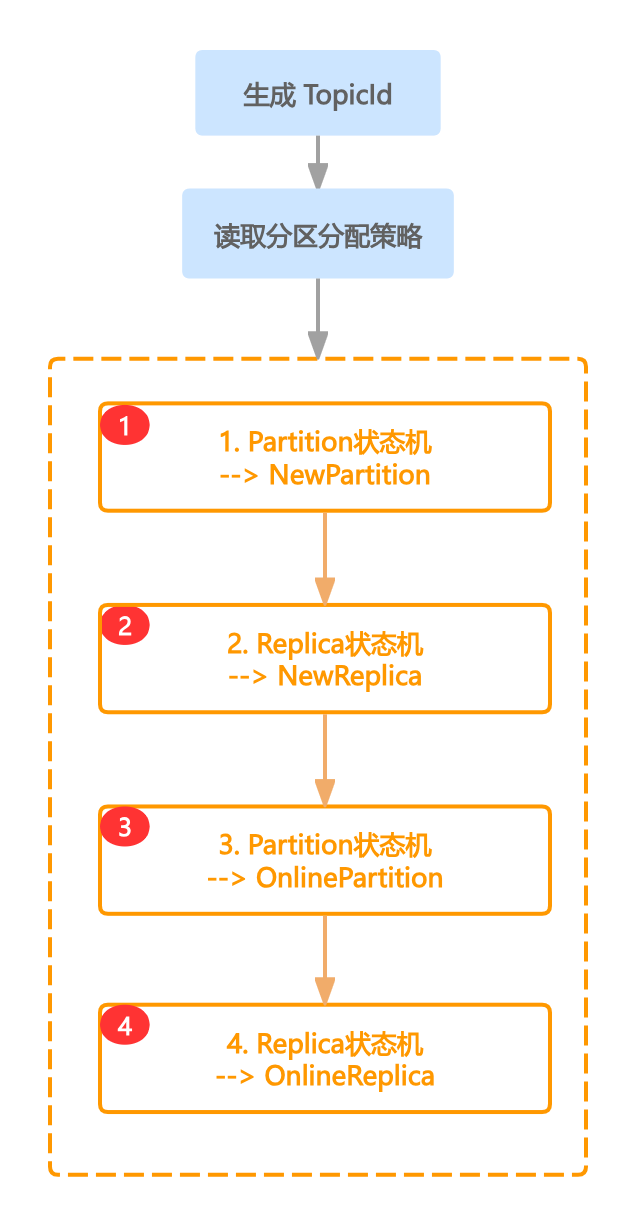
一、前言 Kafka提供了高性能的读写,而这些读写操作均是操作在Topic上的,Topic的创建就尤为关键,其中涉及分区分配策略、状态流转等,而Topic的新建语句非常简单 bash kafka-topics.sh \ --bootstrap-server localhost:9092 \ // …...

Java 高级学习路线概要~
前言:恭喜你已经掌握了 Java 的基础知识!现在,让我们踏上 Java 高级学习之旅,探索更强大的编程技巧和技术。学习前记得不要忘了巩固和加强基础的学习哦,高级学习也是建立在基础的学习之上。 1. 集合框架进阶 Map 接口…...

浏览器插件快速开启/关闭IDM接管下载
假设你已经为浏览器安装了IDM扩展,那么按下图的点击顺序,可以快速开启或关闭IDM的下载接管,而不必在IDM软件的设置->选项中,临时作调整。...

初识c++:入门基础
打字不易,留个赞再走吧~~ 目录 一.第一个c程序二.命名空间 namespace三.C输⼊&输出四.缺省参数 C兼容C语⾔绝⼤多数的语法,所以C语⾔实现的hello world依旧可以运⾏,C中需要把定义⽂件 代码后缀改为.cpp 一.第一个c程序 做好准备我们来写…...

Java Exception 异常相关总结
1.简介 在Java中,当代码运行有问题时会抛出异常,主要分为两类: 1.可以通过try...catch来捕获解决的,不影响后续执行的RuntimeException。 2.不可以通过代码解决的Exception。 为了提高代码的健壮性,我们会选择去捕…...
HighCharts图表自动化简介
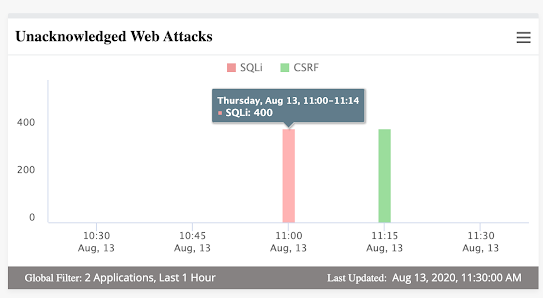
什么是分析数据? 在任何应用程序中捕获并以图形或图表形式显示的分析数据是任何产品或系统的关键部分,因为它提供了对实时数据的洞察。 验证此类分析数据非常重要,因为不准确的数据可能会在报告中产生问题,并可能影响应用程序/系统的其他相关领域。 什么是HighChart? …...
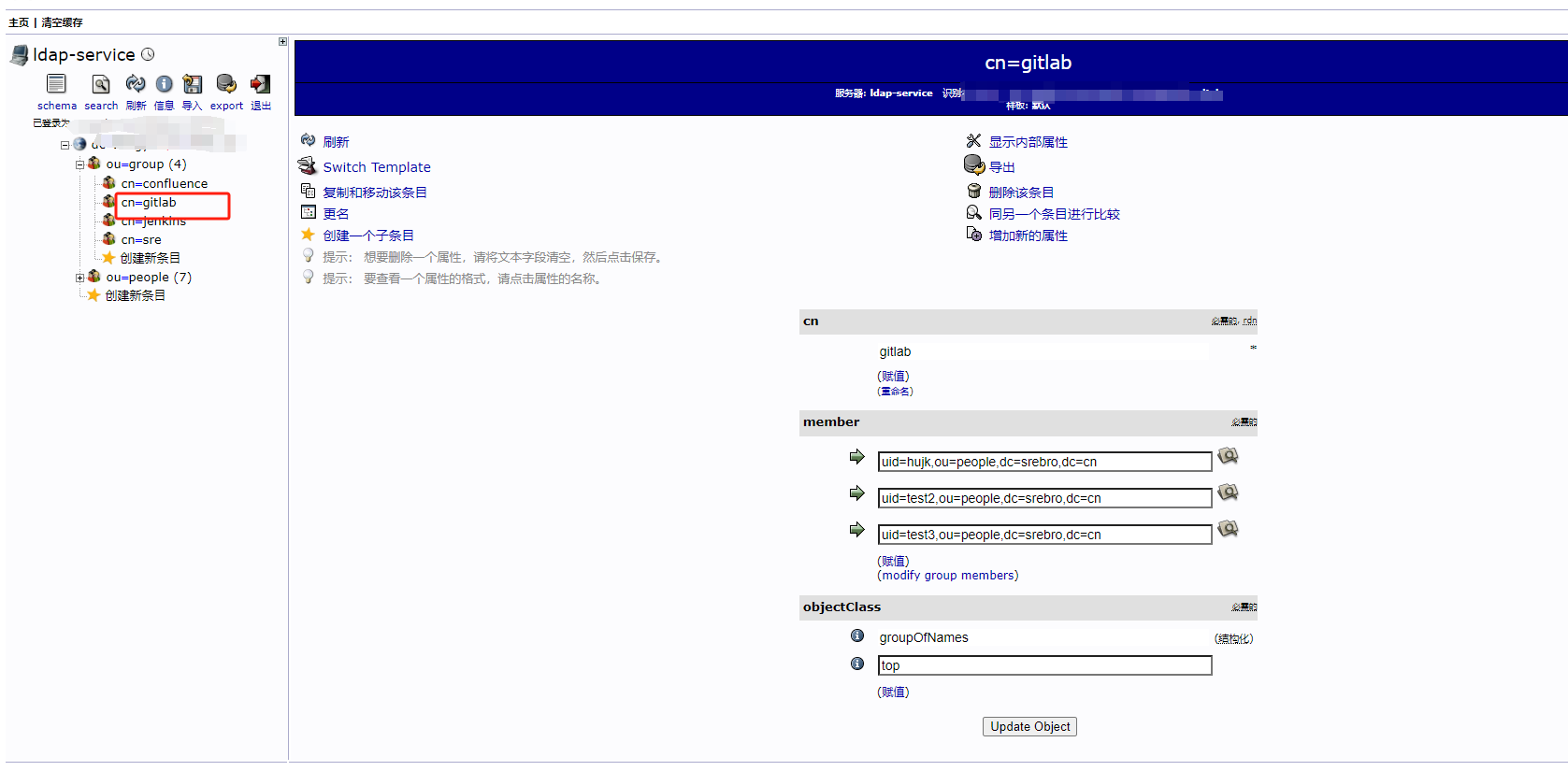
使用LDAP登录GitLab
使用LDAP登录GitLab gitlab.rb 配置如下 gitlab_rails[ldap_enabled] true #gitlab_rails[prevent_ldap_sign_in] false###! **remember to close this block with EOS below** gitlab_rails[ldap_servers] YAML.load <<-EOSmain:label: LDAPhost: 172.16.10.180port:…...

【2024】前端学习笔记5-表单标签使用
表单是网页提供的一种交互式操作手段,主要用于采集用户输入的信息。 学习笔记 1.表单框架:form标签1.1.action属性:目标指向1.2.method属性:提交方式1.3.id属性:唯一标识1.4.placeholder属性:提示文字2.input标签2.1.text类型:基本文本输入2.2.password类型:密码输入2.…...
)
数据结构--二叉树(C语言实现,超详细!!!)
文章目录 二叉树的概念代码实现二叉树的定义创建一棵树并初始化组装二叉树前序遍历中序遍历后序遍历计算树的结点个数求二叉树第K层的结点个数求二叉树高度查找X所在的结点查找指定节点在不在完整代码 二叉树的概念 二叉树(Binary Tree)是数据结构中一种…...

【将字符串变为空的编辑距离】
题目描述 求由s串变成t串的编辑距离 在s串的开头/末尾添加一个字符,花费p 在s串的开头/末尾添加一个s串的子串,花费q 每次作都是基于当前的s串 s串初始为空 分析 等价于将一个字符串变为空串的过程 第一层按照长度遍历(如果按照下标i,j遍…...

卡特兰数的推理
卡特兰数(Catalan number),又称卡塔兰数、明安图数,是组合数学中一种常出现于各种计数问题中的数列。它以比利时数学家欧仁查理卡特兰的名字命名,但值得注意的是,这一数列的首次发现可以追溯到1730年&#…...

高精度治具加工的重要性和优势
在现代工业制造中,高精度治具加工扮演着举足轻重的角色。它不仅关乎产品制造的精度与质量,还直接影响到生产效率和成本控制。因此,时利和将深入探讨高精度治具加工的重要性和优势,对于提升工业制造水平具有重要意义。 高精度治具加…...

深度集成AI的VSCode扩展:从代码生成到调试的全流程实战指南
1. 项目概述:一个为VSCode注入AI灵魂的扩展如果你和我一样,每天有超过8小时的时间是在Visual Studio Code(VSCode)里度过的,那么你一定对提升编码效率有着近乎偏执的追求。从代码补全、语法高亮到调试、版本控制&#…...

如何在Mac上完美读写NTFS硬盘:Free NTFS for Mac终极指南
如何在Mac上完美读写NTFS硬盘:Free NTFS for Mac终极指南 【免费下载链接】Free-NTFS-for-Mac Nigate: An open-source NTFS utility for Mac. It supports all Mac models (Intel and Apple Silicon), providing full read-write access, mounting, and management…...

终极FGO自动化助手:告别枯燥刷本,每天节省3小时游戏时间
终极FGO自动化助手:告别枯燥刷本,每天节省3小时游戏时间 【免费下载链接】FGA Auto-battle app for F/GO Android 项目地址: https://gitcode.com/gh_mirrors/fg/FGA Fate/Grand Automata(简称FGA)是一款专为Fate/Grand Or…...

碧蓝航线自动化脚本:让游戏管理变得轻松高效
碧蓝航线自动化脚本:让游戏管理变得轻松高效 【免费下载链接】AzurLaneAutoScript Azur Lane bot (CN/EN/JP/TW) 碧蓝航线脚本 | 无缝委托科研,全自动大世界 项目地址: https://gitcode.com/gh_mirrors/az/AzurLaneAutoScript 你是否厌倦了每天重…...

【仿真学习框架】HoloMotion 从入门到精通:全身人形控制 Foundation Model 完全指南
HoloMotion 从入门到精通:全身人形控制 Foundation Model 完全指南 目标读者:具身智能研究者、人形机器人开发者、RL/机器人学习工程师 目录 第1章 HoloMotion 全景概览 1.1 什么是 HoloMotion 1.2 技术定位:"小脑"基座模型 1.3 4-Any 愿景与路线图 1.4 核心能力矩…...

Argo Workflows:Kubernetes原生工作流引擎从入门到生产实践
1. 项目概述:一个开源的容器化工作流引擎如果你在云原生、数据科学或者自动化运维领域摸爬滚打过一阵子,大概率听说过 Argo。它不是某个游戏里的角色,而是一个在 Kubernetes 生态中,用来编排和运行复杂工作流的强大引擎。简单来说…...

React轻量级代码编辑器组件:基于Textarea的语法高亮方案
1. 项目概述:一个为React开发者量身打造的代码编辑器组件 如果你在React项目中需要嵌入一个代码编辑器,并且希望它轻量、美观、开箱即用,那么 uiwjs/react-textarea-code-editor 这个组件库很可能就是你一直在寻找的解决方案。它不是一个像…...

树莓派5驱动128x128 LED矩阵:打造复古PICO-8游戏艺术墙
1. 项目概述与核心思路我一直对复古游戏和像素艺术情有独钟,也一直想在家里弄一个既有科技感又能玩的装饰品。最近,我把树莓派5、四块64x64的RGB LED矩阵面板和PICO-8幻想游戏机捣鼓到了一起,成功在墙上挂起了一个128x128像素的“游戏艺术墙”…...

React Native聊天UI组件库集成指南:从Sendbird UIKit入门到高级定制
1. 项目概述:一个开箱即用的React Native聊天UI组件库如果你正在用React Native开发一个需要集成聊天功能的App,并且希望这个聊天界面看起来专业、交互流畅,同时你又不想从零开始造轮子,那么你很可能已经听说过或者正在寻找一个合…...

智能合约如何重塑AI服务信任:去中心化执行与验证架构解析
1. 项目概述:当AI技能遇上智能合约最近在探索AI与区块链结合的前沿领域时,我遇到了一个非常有意思的项目:saralobo/skill-ai-execution-contract。这个名字乍一看有点复杂,但拆解开来,核心就是“技能”、“AI执行”和“…...