
MongoDB聚合管道数组操作
数组表达式运算符判断数组中是否包含元素( i n ) 并获取元素索引 ( in)并获取元素索引( in)并获取元素索引(indexOfArray)
一、初始化成员数据
db.persons.insertMany([{ "_id" : "1001", "name" : "张三", "fruits" : [ "apple", "orange" ] },{ "_id" : "1002", "name" : "李四", "fruits" : [ "banana", "apple" ] },{ "_id" : "1003", "name" : "王五", "fruits" : [ "banana", "apple", "orange" ] },{ "_id" : "1004", "name" : "赵六", "fruits" : [ ] },{ "_id" : "1005", "name" : "田七" },
])
二、包含元素($in)
语法:{ $in: [ , ] }
判断数组中是否包含某个元素
expression:代表的是元素
array expression:代表的是数组
例子:判断成员是否喜欢苹果
db.persons.aggregate([{$project: {"name": 1,"favoriteApple": {$in: [ "apple", "$fruits" ]}}}
])
聚合查询的结果如下:
{"ok" : 0,"errmsg" : "$in requires an array as a second argument, found: missing","code" : 40081,"codeName" : "Location40081"
}
发现报错了,原因是在编号为1005的成员中不存在fruits字段导致的。
这里我们需要**使用 i s A r r a y 断言数组操作进行聚合查询 < / f o n t > ∗ ∗ < f o n t s t y l e = " c o l o r : r g b ( 77 , 77 , 77 ) ; " > ,如果您对 isArray断言数组操作进行聚合查询</font>**<font style="color:rgb(77, 77, 77);">,如果您对 isArray断言数组操作进行聚合查询</font>∗∗<fontstyle="color:rgb(77,77,77);">,如果您对isArray断言数组操作不太了解,可以参考:https://blog.csdn.net/m1729339749/article/details/130162535
下面我们使用$isArray断言数组操作改进聚合查询:
db.persons.aggregate([{$project: {"name": 1,"favoriteApple": {$cond: {if: { $isArray: "$fruits" }, then: { $in: [ "apple", "$fruits" ] }, else: false}}}}
])
聚合查询的结果如下:
{ "_id" : "1001", "name" : "张三", "favoriteApple" : true }
{ "_id" : "1002", "name" : "李四", "favoriteApple" : true }
{ "_id" : "1003", "name" : "王五", "favoriteApple" : true }
{ "_id" : "1004", "name" : "赵六", "favoriteApple" : false }
{ "_id" : "1005", "name" : "田七", "favoriteApple" : false }
三、获取元素索引($indexOfArray)
语法:{ $indexOfArray: [ , , , ] }
查询元素在数组中的索引位置
array expression:代表的是数组
search expression:代表的是待搜索的元素
start:可选,搜索的起始位置
end:可选,搜索的结束位置
搜索的范围是 [start, end) 即前开后闭
例子1:搜索水果apple的索引
db.persons.aggregate([{$project: {"name": 1,"indexApple": {$indexOfArray: [ "$fruits", "apple" ]}}}
])
聚合查询的结果如下:
{ "_id" : "1001", "name" : "张三", "indexApple" : 0 }
{ "_id" : "1002", "name" : "李四", "indexApple" : 1 }
{ "_id" : "1003", "name" : "王五", "indexApple" : 1 }
{ "_id" : "1004", "name" : "赵六", "indexApple" : -1 }
{ "_id" : "1005", "name" : "田七", "indexApple" : null }
未查找到元素,返回-1
数组字段不存在,返回null
例子2:搜索水果apple的索引,起始位置(0)结束位置(1)
db.persons.aggregate([{$project: {"name": 1,"indexApple": {$indexOfArray: [ "$fruits", "apple", 0 ,1 ]}}}
])
聚合查询的结果如下:
{ "_id" : "1001", "name" : "张三", "indexApple" : 0 }
{ "_id" : "1002", "name" : "李四", "indexApple" : -1 }
{ "_id" : "1003", "name" : "王五", "indexApple" : -1 }
{ "_id" : "1004", "name" : "赵六", "indexApple" : -1 }
{ "_id" : "1005", "name" : "田七", "indexApple" : null }
与例子1中聚合查询的结果比较我们会发现:
编号为1002,1003的成员数据中没有检索到元素,说明检索的范围不包含结束位置对应的索引。
start,end检索的范围是[start, end),包含起始位置对应的索引,不包含结束位置对应的索引
数组表达式运算符截取数组($slice)
数组表达式运算符主要用于文档中数组的操作,本篇我们主要介绍数组表达式运算符中用于截取数组的操作,下面我们进行详细介绍:
一、语法
{ $slice: [ , ] }
或者 { $slice: [ , , ] }
获取数组中指定范围内的元素组成一个新的数组
:代表的是数组
:代表的是起始位置索引(包含此位置的元素)
:代表的是获取N个元素
二、准备工作
初始化成员数据
db.persons.insertMany([{ "_id" : "1001", "name" : "张三", "fruits" : [ "apple", "pineapple", "orange" ] },{ "_id" : "1002", "name" : "李四", "fruits" : [ "banana", "apple", "pineapple" ] },{ "_id" : "1003", "name" : "王五", "fruits" : [ "banana", "apple", "orange", "watermelon" ] },{ "_id" : "1004", "name" : "赵六", "fruits" : [ ] },{ "_id" : "1005", "name" : "田七" },
])
三、示例
例子1:找到每个人最喜欢吃的前两个水果
db.persons.aggregate([{$project: {"name": 1,"favoriteFruits": { $slice: [ "$fruits", 2 ] }}}
])
聚合查询的结果如下:
{ "_id" : "1001", "name" : "张三", "favoriteFruits" : [ "apple", "pineapple" ] }
{ "_id" : "1002", "name" : "李四", "favoriteFruits" : [ "banana", "apple" ] }
{ "_id" : "1003", "name" : "王五", "favoriteFruits" : [ "banana", "apple" ] }
{ "_id" : "1004", "name" : "赵六", "favoriteFruits" : [ ] }
{ "_id" : "1005", "name" : "田七", "favoriteFruits" : null }
例子2:找到每个人最喜欢吃的最后两个水果
db.persons.aggregate([{$project: {"name": 1,"favoriteFruits": { $slice: [ "$fruits", -2 ] }}}
])
聚合查询的结果如下:
{ "_id" : "1001", "name" : "张三", "favoriteFruits" : [ "pineapple", "orange" ] }
{ "_id" : "1002", "name" : "李四", "favoriteFruits" : [ "apple", "pineapple" ] }
{ "_id" : "1003", "name" : "王五", "favoriteFruits" : [ "orange", "watermelon" ] }
{ "_id" : "1004", "name" : "赵六", "favoriteFruits" : [ ] }
{ "_id" : "1005", "name" : "田七", "favoriteFruits" : null }
(1)****字段未定义时,结果为null;
(2)未找到元素,结果为[ ]
(3){ $slice: [ , ] } 语法中 n为正数,代表的是从前往后取N个元素,n为负数,代表的是从后往前取N个元素
例子3:找到每个人最喜欢吃的第二个水果
db.persons.aggregate([{$project: {"name": 1,"favoriteFruits": { $slice: [ "$fruits", 1, 1 ] }}}
])
聚合查询的结果如下:
{ "_id" : "1001", "name" : "张三", "favoriteFruits" : [ "pineapple" ] }
{ "_id" : "1002", "name" : "李四", "favoriteFruits" : [ "apple" ] }
{ "_id" : "1003", "name" : "王五", "favoriteFruits" : [ "apple" ] }
{ "_id" : "1004", "name" : "赵六", "favoriteFruits" : [ ] }
{ "_id" : "1005", "name" : "田七", "favoriteFruits" : null }
例子4:假如position为负数,会如何处理
db.persons.aggregate([{$project: {"name": 1,"favoriteFruits": { $slice: [ "$fruits", -2, 1 ] }}}
])
聚合查询的结果如下:
{ "_id" : "1001", "name" : "张三", "favoriteFruits" : [ "pineapple" ] }
{ "_id" : "1002", "name" : "李四", "favoriteFruits" : [ "apple" ] }
{ "_id" : "1003", "name" : "王五", "favoriteFruits" : [ "orange" ] }
{ "_id" : "1004", "name" : "赵六", "favoriteFruits" : [ ] }
{ "_id" : "1005", "name" : "田七", "favoriteFruits" : null }
例子5:假如position = -10,会如何处理
db.persons.aggregate([{$project: {"name": 1,"favoriteFruits": { $slice: [ "$fruits", -10, 1 ] }}}
])
聚合查询的结果如下:
{ "_id" : "1001", "name" : "张三", "favoriteFruits" : [ "apple" ] }
{ "_id" : "1002", "name" : "李四", "favoriteFruits" : [ "banana" ] }
{ "_id" : "1003", "name" : "王五", "favoriteFruits" : [ "banana" ] }
{ "_id" : "1004", "name" : "赵六", "favoriteFruits" : [ ] }
{ "_id" : "1005", "name" : "田七", "favoriteFruits" : null }
如果position为负数,则从后往前确定起始位置,当向前移动的位置超过了数组长度,则起始位置为0;然后再从前往后获取N个元素组成新的数组。
数组表达式运算符过滤数组($filter)
数组表达式运算符主要用于文档中数组的操作,本篇我们主要介绍数组表达式运算符中用于过滤数组的操作,下面我们进行详细介绍:
一、语法
{$filter:{input: <array>,cond: <expression>,as: <string>,limit: <number expression>}
}
其中,
input:代表的是数组
cond:代表的是条件
as:可选,定义的变量,用于接收数组中的当前元素,如果未定义在cond表达式中可以使用$$this获取数组中的当前元素
limit:可选,限制数组中元素的个数
二、准备工作
初始化零食数据
db.goods.insertMany([{ "_id" : 1, "name" : "薯片", "types" : [ { "size" : "S", "quantity" : 10, "price" : 8 },{ "size" : "L", "quantity" : 8, "price" : 12 } ]},{ "_id" : 2, "name" : "牛肉干", "types" : [ { "size" : "L", "quantity" : 5, "price" : 30} ]},{ "_id" : 3, "name" : "可口可乐", "types" : [ { "size" : "S", "quantity" : 10, "price" : 3 }, { "size" : "L", "quantity" : 6, "price" : 10 } ]},{ "_id" : 4, "name" : "旺仔牛奶", "types" : [ { "size" : "L", "quantity" : 10, "price" : 5 } ]}
])
三、示例
例子1:只查看型号为L的型号信息
db.goods.aggregate([{$project: {types: {$filter: {input: "$types",cond: { $eq: [ "$$this.size", "L" ] }}}}}
])
等效于:
db.goods.aggregate([{$project: {types: {$filter: {input: "$types",as: "type",cond: { $eq: [ "$$type.size", "L" ] }}}}}
])
聚合查询的结果如下:
{ "_id" : 1, "types" : [ { "size" : "L", "quantity" : 8, "price" : 12 } ] }
{ "_id" : 2, "types" : [ { "size" : "L", "quantity" : 5, "price" : 30 } ] }
{ "_id" : 3, "types" : [ { "size" : "L", "quantity" : 6, "price" : 10 } ] }
{ "_id" : 4, "types" : [ { "size" : "L", "quantity" : 10, "price" : 5 } ] }
as用于定义一个存储数组中当前元素的变量,使用变量时前面需要加上 “$$”;
如果不使用as定义变量,也可以使用 $$this 访问数组中的当前元素
例子2:对超过5元的型号进行查询
db.goods.aggregate([{$project: {types: {$filter: {input: "$types",as: "type",cond: { $gt: [ "$$type.price", 5 ] }}}}}
])
聚合查询的结果如下:
{ "_id" : 1, "types" : [ { "size" : "S", "quantity" : 10, "price" : 8 }, { "size" : "L", "quantity" : 8, "price" : 12 } ] }
{ "_id" : 2, "types" : [ { "size" : "L", "quantity" : 5, "price" : 30 } ] }
{ "_id" : 3, "types" : [ { "size" : "L", "quantity" : 6, "price" : 10 } ] }
{ "_id" : 4, "types" : [ ] }
多个查询条件
cond: {$and: [{ $gte: ['$$item.timestamp_start', fromTimestamp] },{ $lt: ['$$item.timestamp_start', toTimestamp] }]
}
数组表达式运算符( a r r a y E l e m A t , arrayElemAt, arrayElemAt,first,$last)
数组表达式运算符主要用于文档中数组的操作,本篇我们主要介绍数组表达式运算符中用于获取数组元素的操作,下面我们进行详细介绍:
一、准备工作
初始化成员数据
db.persons.insertMany([{ "_id" : "1001", "name" : "张三", "fruits" : [ "apple", "orange" ] },{ "_id" : "1002", "name" : "李四", "fruits" : [ "banana", "apple" ] },{ "_id" : "1003", "name" : "王五", "fruits" : [ "banana", "apple", "orange" ] },{ "_id" : "1004", "name" : "赵六", "fruits" : [ ] },{ "_id" : "1005", "name" : "田七" },
])
二、获取数组中指定元素($arrayElemAt)
语法:{ $arrayElemAt: [ , ] }
获取数组中指定索引位置的元素
:代表的是数组
:代表的是索引,索引为正数代表的是从前往后查找元素、为负数代表的是从后往前查找元素
数组的索引从0开始,最大值为数组的长度-1
例子1:找到每个人最喜欢吃的第一个水果
db.persons.aggregate([{$project: {"name": 1,"firstFruit": { $arrayElemAt: [ "$fruits", 0 ] }}}
])
聚合查询的结果如下:
{ "_id" : "1001", "name" : "张三", "firstFruit" : "apple" }
{ "_id" : "1002", "name" : "李四", "firstFruit" : "banana" }
{ "_id" : "1003", "name" : "王五", "firstFruit" : "banana" }
{ "_id" : "1004", "name" : "赵六" }
{ "_id" : "1005", "name" : "田七", "firstFruit" : null }
字段未定义时,结果为null,
索引超过数组边界则不返回结果。
例子2:找到每个人最喜欢吃的最后一个水果
db.persons.aggregate([{$project: {"name": 1,"lastFruit": { $arrayElemAt: [ "$fruits", -1 ] }}}
])
聚合查询的结果如下:
{ "_id" : "1001", "name" : "张三", "lastFruit" : "orange" }
{ "_id" : "1002", "name" : "李四", "lastFruit" : "apple" }
{ "_id" : "1003", "name" : "王五", "lastFruit" : "orange" }
{ "_id" : "1004", "name" : "赵六" }
{ "_id" : "1005", "name" : "田七", "lastFruit" : null }
索引为负数代表的是从后往前查找元素
三、获取数组中第一个元素($first)
语法:{ $first: }
获取数组中第一个元素
例子:找到每个人最喜欢吃的第一个水果
db.persons.aggregate([{$project: {"name": 1,"firstFruit": { $first: "$fruits" }}}
])
等效于:
db.persons.aggregate([{$project: {"name": 1,"firstFruit": { $arrayElemAt: [ "$fruits", 0 ] }}}
])
聚合查询的结果如下:
{ "_id" : "1001", "name" : "张三", "firstFruit" : "apple" }
{ "_id" : "1002", "name" : "李四", "firstFruit" : "banana" }
{ "_id" : "1003", "name" : "王五", "firstFruit" : "banana" }
{ "_id" : "1004", "name" : "赵六" }
{ "_id" : "1005", "name" : "田七", "firstFruit" : null }
四、获取数组中最后一个元素($last)
语法:{ $last: }
获取数组中最后一个元素
例子:找到每个人最喜欢吃的最后一个水果
db.persons.aggregate([{$project: {"name": 1,"lastFruit": { $last: "$fruits" }}}
])
等效于:
db.persons.aggregate([{$project: {"name": 1,"lastFruit": { $arrayElemAt: [ "$fruits", -1 ] }}}
])
聚合查询的结果如下:
{ "_id" : "1001", "name" : "张三", "lastFruit" : "orange" }
{ "_id" : "1002", "name" : "李四", "lastFruit" : "apple" }
{ "_id" : "1003", "name" : "王五", "lastFruit" : "orange" }
{ "_id" : "1004", "name" : "赵六" }
{ "_id" : "1005", "name" : "田七", "lastFruit" : null }
相关文章:

MongoDB聚合管道数组操作
数组表达式运算符判断数组中是否包含元素( i n ) 并获取元素索引 ( in)并获取元素索引( in)并获取元素索引(indexOfArray) 一、初始化成员数据 db.persons.insertMany([{ "_id" : "1001", "name" : "张三", "fruits" : [ …...

大数据如何助力干部选拔的公正性
随着社会的发展和进步,干部选拔成为组织管理中至关重要的一环。传统的选拔方式可能存在主观性、不公平性以及效率低下等问题。大数据技术的应用,为干部选拔提供了更加全面、精准、客观的信息支持,显著提升选拔工作的科学性和公正性。以下是大…...

Python_爬虫2_爬虫引发的问题
目录 爬虫引发的问题 网络爬虫的尺寸 网络爬虫引发的问题 网络爬虫的限制 Robots协议 Robots协议的遵守方式 Robots的使用 对Robots协议的理解 爬虫引发的问题 网络爬虫的尺寸 爬取网页,玩转网页: 小规模,数据量小,爬取…...

shell编程之编程基础
目录 为什么学习和使用Shell编程Shell是什么shell起源查看当前系统支持的shell查看当前系统默认shellShell 概念 Shell 程序设计语言Shell 也是一种脚本语言用途 如何学好shell熟练掌握shell编程基础知识建议 Shell脚本的基本元素基本元素构成:Shell脚本中的注释和风…...
24.11.15 Vue3
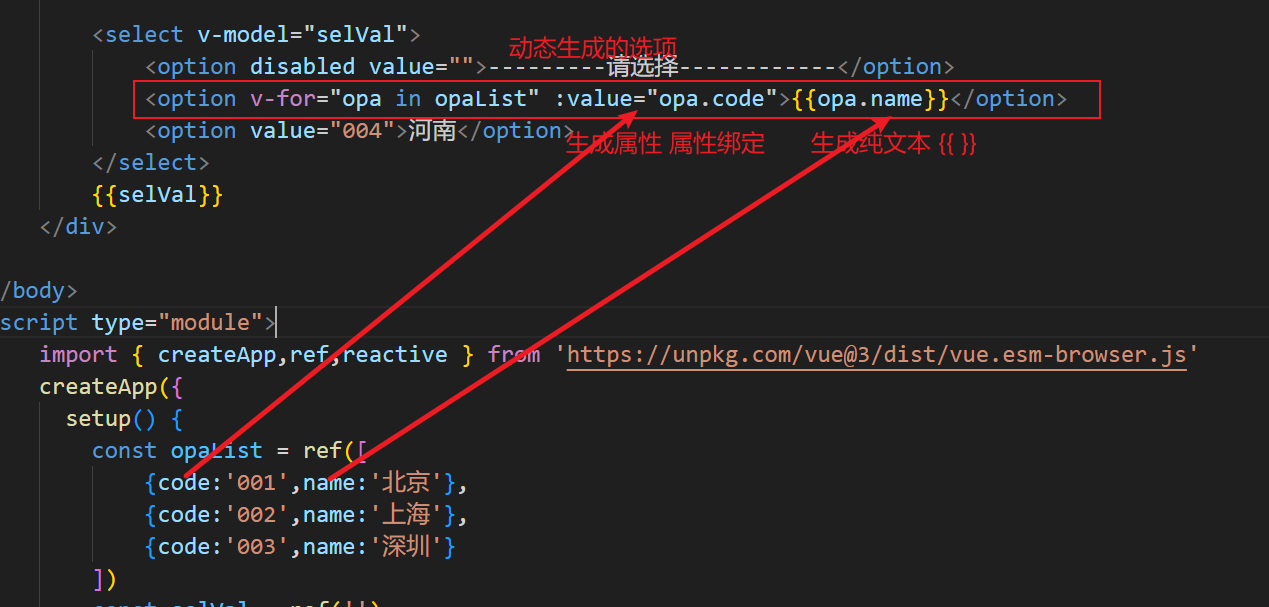
let newJson new Proxy(myJson,{get(target,prop){console.log(在读取${prop}属性);return target[prop];},set(target,prop,val){console.log(在设置${prop}属性值为${val});if(prop"name"){document.getElementById("myTitle").innerHTML val;}if(prop…...
图形几何之美系列:法向量计算之轮廓有向面积辅助法
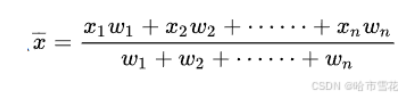
“ 垂直于平面的直线所表示的向量为该平面的法向量,可以通过法向量识别平面正反面。法向量是轮廓或面的重要特征,求轮廓法向是一种基础的几何工具算法,在图形几何、图像处理等领域具有广泛的应用。” 图形几何之美系列:三维实体结…...

CPU的性能指标总结(学习笔记)
CPU 性能指标 我们先来回顾下,描述 CPU 的性能指标都有哪些。 首先,最容易想到的应该是 CPU 使用率,这也是实际环境中最常见的一个性能指标。 用户 CPU 使用率,包括用户态 CPU 使用率(user)和低优先级用…...

Cadence安装
记录一下安装过程,方便以后安装使用Cadence。 去吴川斌的博客下载安装包,吴川斌博客: https://www.mr-wu.cn/cadence-orcad-allegro-resource-downloads/ 下载阿狸狗破戒大师 我这边下载的是版本V3.2.6,同样在吴川斌的博客下载安装…...

【网络】子网掩码
> 作者:დ旧言~ > 座右铭:松树千年终是朽,槿花一日自为荣。 > 目标:了解什么是子网掩码,并且能熟练掌握子网掩码的相关计算。 > 毒鸡汤:有些事情,总是不明白,所以我不会…...

Android Osmdroid + 天地图 (二)
Osmdroid 天地图 (二) 前言正文一、定位监听二、改变地图中心三、添加Marker四、地图点击五、其他配置① 缩放控件② Marker更换图标③ 添加比例尺④ 添加指南针⑤ 添加经纬度网格线⑥ 启用旋转手势⑦ 添加小地图 六、源码 前言 上一篇中我们显示了地图…...
使用大语言模型创建 Graph 数据
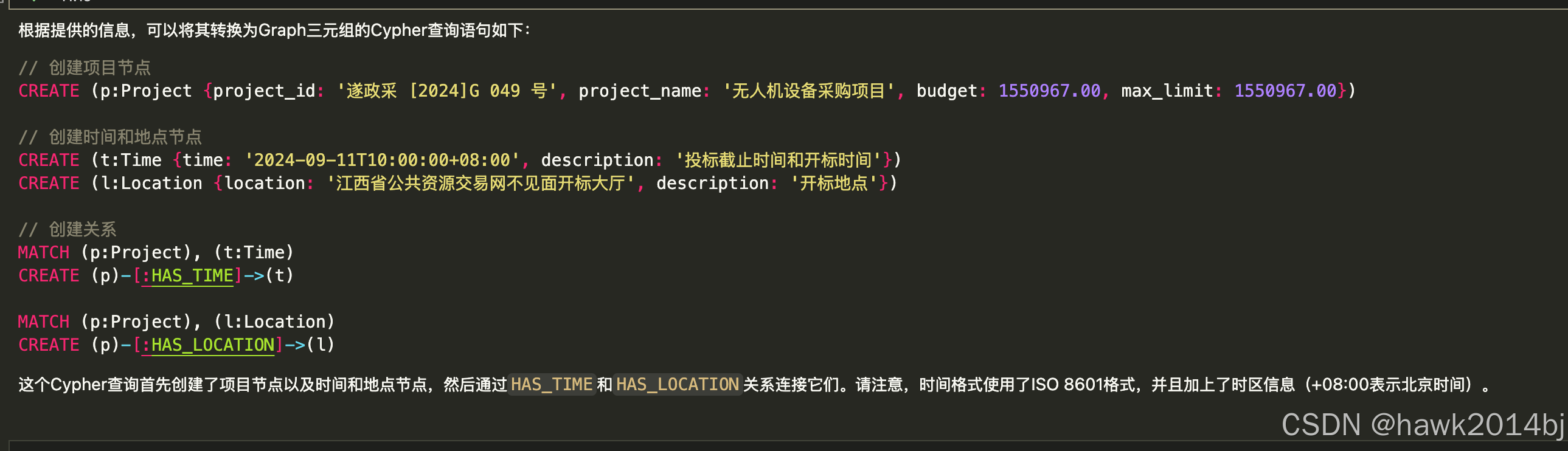
Neo4j 是开源的 Graph 数据库,Graph 数据通过三元组进行表示,两个顶点一条边,从语意上可以理解为:主语、谓语和宾语。GraphDB 能够通过图来表达复杂的结构,非常适合存储知识型数据,本文将通过大语言实现图数…...
Java poi 模板导出Word 带图片
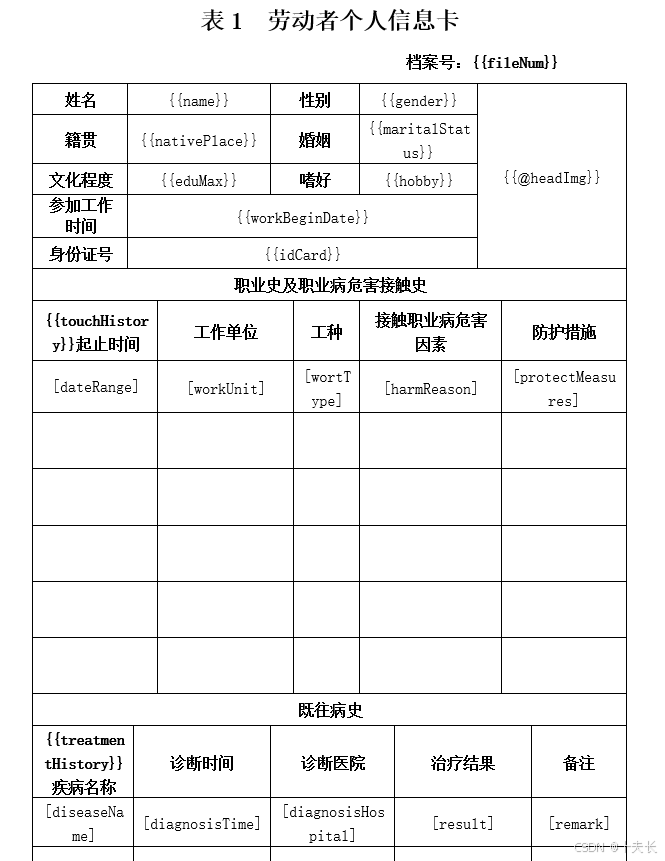
Java poi 模板导出Word 带图片 重点!!! 官方文档:https://deepoove.com/poi-tl/#_maven 最终效果 模板 其实内容都在官方文档里写的非常明白了 我这里只是抛砖引玉。 Maven依赖 <poi.version>4.1.2</poi.version>…...

SpringCloud-使用FFmpeg对视频压缩处理
在现代的视频处理系统中,压缩视频以减小存储空间、加快传输速度是一项非常重要的任务。FFmpeg作为一个强大的开源工具,广泛应用于音视频的处理,包括视频的压缩和格式转换等。本文将通过Java代码示例,向您展示如何使用FFmpeg进行视…...
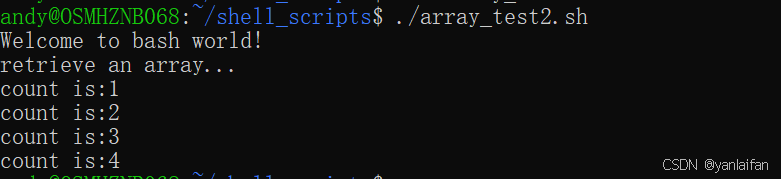
shell bash---类似数组类型
0 Preface/Foreword C/C,Python,Java等编程语言,都含有数组类型,那么shell脚本是不是也有类似的语法呢? 1 类似数组类型 1.1 ()类似数组类型 #! /bin/bashecho "Welcome to bash world!" anim…...
)
IIoT(Industrial Internet of Things,工业物联网)
IIoT(Industrial Internet of Things,工业物联网) 是指物联网技术在工业领域的应用。它将工业设备、传感器、控制系统、数据采集设备等通过互联网或局域网连接起来,实现设备的互联互通和智能化管理。IIoT的目标是提高工业生产效率…...
)
【C++】引用(reference)
引用是对一个变量或者对象取的别名 定义:真名的数据类型& 别名 真名; 既然是对一个变量或者对象取别名,那就得先有变量或对象,不能凭空取一个别名。也就是定义引用必须初始化。 对引用的操作和对引用对应的变量的操作是完全等价的引用…...
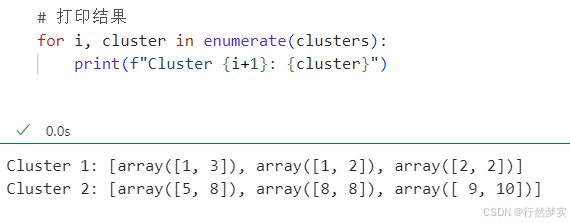
学习日记_20241115_聚类方法(层次聚类)
前言 提醒: 文章内容为方便作者自己后日复习与查阅而进行的书写与发布,其中引用内容都会使用链接表明出处(如有侵权问题,请及时联系)。 其中内容多为一次书写,缺少检查与订正,如有问题或其他拓展…...

安卓开发怎么获取返回上一级activity事件
在Android开发中,要获取返回上一级Activity的事件,通常是通过点击设备上的返回按钮或者在代码中调用finish()方法时触发的。为了处理这个事件,你可以在当前Activity中重写onBackPressed()方法。 以下是一个简单的例子: Override…...

神经网络与Transformer详解
一、模型就是一个数学公式 模型可以描述为:给定一组输入数据,经过一系列数学公式计算后,输出n个概率,分别代表该用户对话属于某分类的概率。 图中 a, b 就是模型的参数,a决定斜率,b决定截距。 二、神经网络的公式结构 举例:MNIST包含了70,000张手写数字的图像,其中…...

C语言之MakeFile
Makefile 的引入是为解决多文件项目中手动编译繁琐易错、缺乏自动化构建、项目管理维护困难以及跨平台构建不便等问题,实现自动化、规范化的项目构建与管理 MakeFile 简单的来说,MakeFile就是编写编译命令的文件 文件编写格式 目标:依赖文件列表 <Tab>命令列表…...

STM32H7网络延迟问题分析与解决方案
1. 问题现象与背景分析最近在将STM32H7系列设备的DFP(Device Family Pack)从v2.2.0升级到v2.3.0版本后,不少开发者反馈网络数据传输出现了明显的延迟问题。通过简单的ping测试可以直观观察到,使用v2.3.0版本的往返时间(RTT)相比v2…...

如何从零开始MemLabs:完整的环境搭建与工具配置教程
如何从零开始MemLabs:完整的环境搭建与工具配置教程 【免费下载链接】MemLabs Educational, CTF-styled labs for individuals interested in Memory Forensics 项目地址: https://gitcode.com/gh_mirrors/me/MemLabs MemLabs是一套面向内存取证初学者的CTF风…...
并优化代码)
别再为OpenMV串口传图卡顿发愁了!手把手教你选对硬件(STM32 SWD vs TTL)并优化代码
OpenMV串口传图性能优化实战:从硬件选型到代码调优 当你在实验室调试OpenMV串口传图项目时,是否经历过这样的场景:图像传输像老式拨号上网一样缓慢,帧率低得让人怀疑人生,调试界面卡成PPT?这背后往往隐藏着…...

从失败案例看全球化内容服务的合规架构与自动化风控实践
1. 项目概述与背景解析最近在和一些做全球化内容分发或者跨国协作项目的朋友交流时,大家普遍会提到一个词:“内容合规性审查”。这听起来像是一个法务或者运营的术语,但对我们这些搞技术、做开发的人来说,它背后其实是一整套复杂的…...
附Matlab代码)
基于瞬态三角哈里斯鹰算法TTHHO实现多无人机协同集群避障路径规划(目标函数:最低成本:路径、高度、威胁、转角)附Matlab代码
✅作者简介:热爱科研的Matlab仿真开发者,擅长毕业设计辅导、数学建模、数据处理、程序设计科研仿真。 🍎完整代码获取 定制创新 论文复现点击:Matlab科研工作室 👇 关注我领取海量matlab电子书和数学建模资料 &…...

设计师核心能力框架:从思维策略到工程落地的系统化成长路径
1. 项目概述:一个设计师的“内功”修炼场如果你是一名设计师,或者对设计工作感兴趣,那么你一定有过这样的时刻:面对一个设计任务,脑子里有无数想法,但打开软件却不知从何下手;或者看到别人的优秀…...

AMD Ryzen处理器终极调试指南:SMU Debug Tool实战技巧与完整解决方案
AMD Ryzen处理器终极调试指南:SMU Debug Tool实战技巧与完整解决方案 【免费下载链接】SMUDebugTool A dedicated tool to help write/read various parameters of Ryzen-based systems, such as manual overclock, SMU, PCI, CPUID, MSR and Power Table. 项目地…...

STM32 FSMC/FMC接口详解:地址映射、时序配置与实战优化
1. 项目概述:深入理解STM32的FSMC/FMC接口在嵌入式开发中,尤其是涉及大屏显示、高速数据采集或复杂外部设备交互的项目里,我们常常会遇到一个绕不开的“硬骨头”——如何让STM32单片机高效、稳定地与外部并行存储器或设备通信。这时ÿ…...

如何通过DriverStore Explorer解决Windows驱动管理的三大核心难题
如何通过DriverStore Explorer解决Windows驱动管理的三大核心难题 【免费下载链接】DriverStoreExplorer Driver Store Explorer 项目地址: https://gitcode.com/gh_mirrors/dr/DriverStoreExplorer 作为一名系统管理员或技术爱好者,你是否曾面临这样的困境&…...

B站视频下载终极指南:5步轻松掌握BilibiliDown完整教程
B站视频下载终极指南:5步轻松掌握BilibiliDown完整教程 【免费下载链接】BilibiliDown (GUI-多平台支持) B站 哔哩哔哩 视频下载器。支持稍后再看、收藏夹、UP主视频批量下载|Bilibili Video Downloader 😳 项目地址: https://gitcode.com/gh_mirrors/…...