
Python Pyside6 加Sqlite3 写一个 通用 进销存 系统 初型
图:


说明:
进销存管理系统说明文档
功能模块
1. 首页
- 显示关键业务数据
-
- 商品总数
- 供应商总数
- 本月采购金额
- 本月销售金额
- 显示预警信息
-
- 库存不足预警
- 待付款采购单
- 待收款销售单
2. 商品管理
- 商品信息维护
-
- 商品编码(唯一标识)
- 商品名称
- 规格型号
- 单位
- 分类
- 进货价
- 销售价
- 库存数量
- 预警数量
- 支持批量导入导出
- 支持搜索和筛选
3. 供应商管理
- 供应商信息维护
-
- 供应商名称(唯一标识)
- 联系人
- 联系电话
- 地址
- 账期
- 支持批量导入导出
- 支持搜索和筛选
4. 客户管理
- 客户信息维护
-
- 客户名称(唯一标识)
- 联系人
- 联系电话
- 地址
- 电子邮箱
- 备注信息
- 基本操作
-
- 新建客户:添加新的客户信息
- 编辑客户:修改现有客户信息
- 删除客户:删除未使用的客户(已有销售订单的客户不能删除)
- 搜索客户:按名称、联系人、电话等信息搜索
- 数据导入导出
-
- 支持从Excel导入客户数据
- 支持导出客户数据到Excel
- 导入时自动处理重复数据
- 数据验证
-
- 客户名称不能重复
- 删除前检查销售订单关联
- 导入数据格式验证
5. 采购管理
- 采购单管理
-
- 新建采购单
- 编辑采购单
- 删除采购单
- 查看采购历史
- 采购单信息
-
- 采购单号(自动生成)
- 供应商
- 采购日期
- 付款状态
- 入库状态
- 商品明细
-
-
- 商品
- 数量
- 单价
- 金额
-
- 支持搜索和筛选
6. 销售管理
- 销售单管理
-
- 新建销售单
- 编辑销售单
- 删除销售单
- 查看销售历史
- 销售单信息
-
- 销售单号(自动生成)
- 客户信息
- 销售日期
- 收款状态
- 出库状态
- 商品明细
-
-
- 商品
- 数量
- 单价
- 金额
-
- 支持搜索和筛选
7. 库存管理
- 库存状态查看
-
- 商品名称
- 当前库存
- 预警库存
- 库存状态
- 库存调整
-
- 手动入库
- 手动出库
- 调整原因记录
- 变动历史查询
-
- 调整时间
- 调整类型
- 调整数量
- 调整原因
- 支持搜索和筛选
8. 系统备份
- 数据备份功能
-
- 创建备份:将当前数据库导出为备份文件
- 自动生成包含时间戳的文件名
- 可选择备份文件保存位置
- 数据恢复功能
-
- 从备份文件恢复数据
- 恢复前自动创建当前数据的备份
- 支持确认提示,防止误操作
- 使用建议
-
- 定期创建数据备份
- 将备份文件保存在不同的存储设备上
- 重要操作前先创建备份
- 系统升级前创建备份
财务管理
财务管理模块提供了全面的财务操作和分析功能,包括收付款管理、财务统计、应收应付对账等功能。
收付款记录
- 新建收款:记录客户的付款信息
-
- 选择关联销售单号
- 输入收款金额
- 选择支付方式(现金/银行转账/支付宝/微信)
- 添加备注信息
- 新建付款:记录向供应商的付款信息
-
- 选择关联采购单号
- 输入付款金额
- 选择支付方式
- 添加备注信息
- 搜索功能:支持按关键字搜索收付款记录
财务统计
- 时间范围选择:
-
- 本月
- 上月
- 最近7天
- 最近30天
- 全部
- 统计指标:
-
- 总收入
- 总支出
- 净收入
应收对账
- 客户应收账款管理:
-
- 按客户查看应收账款
- 时间筛选(全部/本月/上月/本年/上年)
- 显示销售总额、已收金额、应收金额
- 详细的销售订单列表(含收款状态)
- 导出功能:
-
- 导出Excel格式的对账单
- 支持打印对账单(含打印预览)
应付对账
- 供应商应付账款管理:
-
- 按供应商查看应付账款
- 时间筛选(全部/本月/上月/本年/上年)
- 显示采购总额、已付金额、应付金额
- 详细的采购订单列表(含付款状态)
- 导出功能:
-
- 导出Excel格式的对账单
- 支持打印对账单(含打印预览)
使用说明
- 收付款操作:
-
- 点击"新建收款"或"新建付款"按钮
- 选择关联单号,系统会自动填充相关金额
- 填写实际收付款金额和支付方式
- 可添加备注信息
- 确认保存
- 财务统计:
-
- 选择要查看的时间范围
- 系统自动计算并显示收入、支出和净收入
- 应收对账:
-
- 选择客户和时间范围
- 查看应收账款汇总和明细
- 可导出Excel或打印对账单
- 应付对账:
-
- 选择供应商和时间范围
- 查看应付账款汇总和明细
- 可导出Excel或打印对账单
使用说明
1. 系统初始化
- 首次使用请先维护基础数据:
-
- 添加商品信息
- 添加供应商信息
- 添加客户信息
- 设置商品库存预警值
2. 日常操作
- 采购入库
-
- 新建采购单
- 选择供应商
- 添加商品明细
- 设置入库状态
- 销售出库
-
- 新建销售单
- 选择客户
- 添加商品明细
- 设置出库状态
- 库存管理
-
- 定期盘点库存
- 及时处理库存预警
- 系统维护
-
- 及时备份数据
- 定期检查系统运行状态
3. 数据备份
- 定期备份
-
- 进入"系统备份"页面
- 点击"创建备份"按钮
- 选择备份文件保存位置
- 确认备份成功
- 数据恢复
-
- 进入"系统备份"页面
- 点击"恢复备份"按钮
- 选择要恢复的备份文件
- 确认恢复操作
- 等待恢复完成
注意事项
- 数据安全
-
- 定期备份数据库
- 将备份文件保存在安全的位置
- 定期检查备份文件的完整性
- 重要操作前先创建备份
- 定期备份数据库
- 妥善保管系统账号密码
- 操作规范
-
- 严格按照操作流程执行
- 认真核对数据后再保存
- 异常处理
-
- 遇到问题及时记录
- 系统故障及时报修
代码:
主窗口 main.py
import sys
from PySide6.QtWidgets import (QApplication, QMainWindow, QWidget, QVBoxLayout,QHBoxLayout, QTabWidget, QPushButton, QLabel)
from PySide6.QtCore import Qt
from database import Database
from products import ProductsTab
from dashboard import DashboardTab
from suppliers import SuppliersTab
from customers import CustomersTab
from purchase import PurchaseTab
from sales import SalesTab
from inventory import InventoryTab
from finance import FinanceTab
from backup import BackupWidgetclass MainWindow(QMainWindow):def __init__(self, db):super().__init__()self.db = dbself.init_ui()def init_ui(self):self.setWindowTitle('进销存管理系统')self.resize(1200, 800)# Create tab widgettab_widget = QTabWidget()tab_widget.addTab(ProductsTab(self.db), '商品管理')tab_widget.addTab(SuppliersTab(self.db), '供应商管理')tab_widget.addTab(CustomersTab(self.db), '客户管理')tab_widget.addTab(PurchaseTab(self.db), '采购管理')tab_widget.addTab(SalesTab(self.db), '销售管理')tab_widget.addTab(InventoryTab(self.db), '库存管理')tab_widget.addTab(FinanceTab(self.db), '财务管理')tab_widget.addTab(BackupWidget('inventory.db'), '系统备份')self.setCentralWidget(tab_widget)def main():app = QApplication(sys.argv)db = Database() # Create database instancewindow = MainWindow(db) # Pass database instance to MainWindowwindow.show()sys.exit(app.exec())if __name__ == '__main__':main() 
商品管理 products.py
from PySide6.QtWidgets import (QWidget, QVBoxLayout, QHBoxLayout, QPushButton,QLabel, QLineEdit, QTableWidget, QTableWidgetItem,QMessageBox, QHeaderView, QFileDialog, QDialog,QFormLayout, QDoubleSpinBox, QSpinBox)
from PySide6.QtCore import Qt
import openpyxl
from datetime import datetime
import osclass ProductEditDialog(QDialog):def __init__(self, product=None, parent=None):super().__init__(parent)self.product = productself.init_ui()def init_ui(self):self.setWindowTitle('编辑商品' if self.product else '新增商品')layout = QFormLayout(self)# Create input fieldsself.code = QLineEdit(self.product[0] if self.product else '')self.name = QLineEdit(self.product[1] if self.product else '')self.specification = QLineEdit(self.product[2] if self.product else '')self.unit = QLineEdit(self.product[3] if self.product else '')self.category = QLineEdit(self.product[4] if self.product else '')self.cost_price = QDoubleSpinBox()self.cost_price.setMaximum(999999.99)self.cost_price.setDecimals(2)if self.product:self.cost_price.setValue(float(self.product[5]))self.selling_price = QDoubleSpinBox()self.selling_price.setMaximum(999999.99)self.selling_price.setDecimals(2)if self.product:self.selling_price.setValue(float(self.product[6]))self.stock_quantity = QSpinBox()self.stock_quantity.setMaximum(999999)if self.product:self.stock_quantity.setValue(int(self.product[7]))self.warning_quantity = QSpinBox()self.warning_quantity.setMaximum(999999)if self.product:self.warning_quantity.setValue(int(self.product[8]))# Add fields to layoutlayout.addRow('商品编码:', self.code)layout.addRow('商品名称:', self.name)layout.addRow('规格型号:', self.specification)layout.addRow('单位:', self.unit)layout.addRow('分类:', self.category)layout.addRow('成本价:', self.cost_price)layout.addRow('销售价:', self.selling_price)layout.addRow('库存数量:', self.stock_quantity)layout.addRow('库存预警值:', self.warning_quantity)# Add buttonsbuttons_layout = QHBoxLayout()save_btn = QPushButton('保存')save_btn.clicked.connect(self.accept)cancel_btn = QPushButton('取消')cancel_btn.clicked.connect(self.reject)buttons_layout.addWidget(save_btn)buttons_layout.addWidget(cancel_btn)layout.addRow(buttons_layout)def get_data(self):return [self.code.text(),self.name.text(),self.specification.text(),self.unit.text(),self.category.text(),str(self.cost_price.value()),str(self.selling_price.value()),str(self.stock_quantity.value()),str(self.warning_quantity.value())]class ProductsTab(QWidget):def __init__(self, db):super().__init__()self.db = dbself.init_ui()self.load_products()self.editing = Falsedef init_ui(self):layout = QVBoxLayout(self)# Create top toolbartoolbar = QHBoxLayout()# Add product buttonself.add_btn = QPushButton('添加商品')self.add_btn.clicked.connect(self.add_product)toolbar.addWidget(self.add_btn)# Edit product buttonself.edit_btn = QPushButton('编辑商品')self.edit_btn.clicked.connect(self.edit_product)toolbar.addWidget(self.edit_btn)# Delete product buttonself.delete_btn = QPushButton('删除商品')self.delete_btn.clicked.connect(self.delete_product)toolbar.addWidget(self.delete_btn)# Export buttonself.export_btn = QPushButton('导出Excel')self.export_btn.clicked.connect(self.export_to_excel)toolbar.addWidget(self.export_btn)# Import buttonself.import_btn = QPushButton('导入Excel')self.import_btn.clicked.connect(self.import_from_excel)toolbar.addWidget(self.import_btn)# Search boxself.search_input = QLineEdit()self.search_input.setPlaceholderText('搜索商品...')self.search_input.textChanged.connect(self.search_products)toolbar.addWidget(self.search_input)toolbar.addStretch()layout.addLayout(toolbar)# Create tableself.table = QTableWidget()self.table.setColumnCount(9)self.table.setHorizontalHeaderLabels(['商品编码', '商品名称', '规格型号', '单位', '分类','成本价', '销售价', '库存数量', '库存预警值'])header = self.table.horizontalHeader()header.setSectionResizeMode(QHeaderView.Stretch)# Enable selection of entire rowsself.table.setSelectionBehavior(QTableWidget.SelectRows)self.table.setSelectionMode(QTableWidget.SingleSelection)layout.addWidget(self.table)def export_to_excel(self):try:# Create a new workbook and select the active sheetwb = openpyxl.Workbook()ws = wb.activews.title = "商品列表"# Write headersheaders = ['商品编码', '商品名称', '规格型号', '单位', '分类','成本价', '销售价', '库存数量', '库存预警值']for col, header in enumerate(headers, 1):ws.cell(row=1, column=col, value=header)# Write datafor row in range(self.table.rowCount()):for col in range(self.table.columnCount()):item = self.table.item(row, col)value = item.text() if item else ''ws.cell(row=row+2, column=col+1, value=value)# Get save file namefile_name = f"商品列表_{datetime.now().strftime('%Y%m%d_%H%M%S')}.xlsx"file_path, _ = QFileDialog.getSaveFileName(self, "导出Excel", file_name, "Excel Files (*.xlsx)")if file_path:wb.save(file_path)QMessageBox.information(self, "成功", "导出成功!")except Exception as e:QMessageBox.warning(self, "错误", f"导出失败: {str(e)}")def import_from_excel(self):try:# Get file namefile_path, _ = QFileDialog.getOpenFileName(self, "选择Excel文件", "", "Excel Files (*.xlsx)")if not file_path:return# Load workbookwb = openpyxl.load_workbook(file_path)ws = wb.active# Get all rowsrows = list(ws.rows)if len(rows) < 2: # Check if file has data (header + at least one row)QMessageBox.warning(self, "错误", "Excel文件为空或格式不正确")return# Verify headersexpected_headers = ['商品编码', '商品名称', '规格型号', '单位', '分类','成本价', '销售价', '库存数量', '库存预警值']headers = [cell.value for cell in rows[0]]if headers != expected_headers:QMessageBox.warning(self, "错误", "Excel文件格式不正确,请使用导出的模板")return# Begin transactionconn = self.db.connect()cursor = conn.cursor()try:# Process each rowfor row in rows[1:]: # Skip header rowvalues = [cell.value for cell in row]# Convert numeric valuesvalues[5] = float(values[5]) if values[5] else 0 # cost_pricevalues[6] = float(values[6]) if values[6] else 0 # selling_pricevalues[7] = int(values[7]) if values[7] else 0 # stock_quantityvalues[8] = int(values[8]) if values[8] else 0 # warning_quantity# Insert or update productquery = '''INSERT OR REPLACE INTO products (code, name, specification, unit, category,cost_price, selling_price, stock_quantity, warning_quantity)VALUES (?, ?, ?, ?, ?, ?, ?, ?, ?)'''cursor.execute(query, values)conn.commit()QMessageBox.information(self, "成功", "导入成功!")self.load_products() # Refresh tableexcept Exception as e:conn.rollback()raise eexcept Exception as e:QMessageBox.warning(self, "错误", f"导入失败: {str(e)}")def load_products(self):self.table.setRowCount(0)query = '''SELECT code, name, specification, unit, category,cost_price, selling_price, stock_quantity, warning_quantityFROM products'''products = self.db.fetch_query(query)for row, product in enumerate(products):self.table.insertRow(row)for col, value in enumerate(product):item = QTableWidgetItem(str(value) if value is not None else '')self.table.setItem(row, col, item)def add_product(self):dialog = ProductEditDialog(parent=self)if dialog.exec_():values = dialog.get_data()try:# Check if product code existscursor = self.db.connect().cursor()cursor.execute("SELECT code FROM products WHERE code = ?", (values[0],))if cursor.fetchone():QMessageBox.warning(self, "错误", f"商品编码 '{values[0]}' 已存在")return# Insert new productquery = '''INSERT INTO products (code, name, specification, unit, category,cost_price, selling_price, stock_quantity, warning_quantity)VALUES (?, ?, ?, ?, ?, ?, ?, ?, ?)'''self.db.execute_query(query, tuple(values))self.load_products()except Exception as e:QMessageBox.warning(self, '错误', f'保存失败: {str(e)}')def edit_product(self):current_row = self.table.currentRow()if current_row < 0:QMessageBox.warning(self, "提示", "请先选择要编辑的商品")return# Get current product datavalues = []for col in range(self.table.columnCount()):item = self.table.item(current_row, col)values.append(item.text() if item else '')dialog = ProductEditDialog(values, self)if dialog.exec_():new_values = dialog.get_data()try:# Check if new code exists (if code was changed)if new_values[0] != values[0]:cursor = self.db.connect().cursor()cursor.execute("SELECT code FROM products WHERE code = ?", (new_values[0],))if cursor.fetchone():QMessageBox.warning(self, "错误", f"商品编码 '{new_values[0]}' 已存在")return# Update productquery = '''UPDATE products SET code = ?, name = ?, specification = ?, unit = ?, category = ?, cost_price = ?, selling_price = ?,stock_quantity = ?, warning_quantity = ?WHERE code = ?'''self.db.execute_query(query, tuple(new_values + [values[0]]))self.load_products()except Exception as e:QMessageBox.warning(self, '错误', f'保存失败: {str(e)}')def delete_product(self):current_row = self.table.currentRow()if current_row < 0:QMessageBox.warning(self, "提示", "请先选择要删除的商品")returnproduct_code = self.table.item(current_row, 0).text()product_name = self.table.item(current_row, 1).text()reply = QMessageBox.question(self, '确认删除',f'确定要删除商品 "{product_name}" 吗?',QMessageBox.Yes | QMessageBox.No)if reply == QMessageBox.Yes:try:# Check if product is referenced in other tablescursor = self.db.connect().cursor()# Check purchase orderscursor.execute("""SELECT COUNT(*) FROM purchase_order_details podJOIN products p ON pod.product_id = p.idWHERE p.code = ?""", (product_code,))if cursor.fetchone()[0] > 0:QMessageBox.warning(self, "错误", "该商品已存在采购记录,无法删除")return# Check sales orderscursor.execute("""SELECT COUNT(*) FROM sales_order_details sodJOIN products p ON sod.product_id = p.idWHERE p.code = ?""", (product_code,))if cursor.fetchone()[0] > 0:QMessageBox.warning(self, "错误", "该商品已存在销售记录,无法删除")return# Check inventory recordscursor.execute("""SELECT COUNT(*) FROM inventory_records irJOIN products p ON ir.product_id = p.idWHERE p.code = ?""", (product_code,))if cursor.fetchone()[0] > 0:QMessageBox.warning(self, "错误", "该商品已存在库存记录,无法删除")return# Delete the productself.db.execute_query("DELETE FROM products WHERE code = ?", (product_code,))self.load_products()QMessageBox.information(self, "成功", "商品已删除")except Exception as e:QMessageBox.warning(self, '错误', f'删除失败: {str(e)}')def search_products(self):search_text = self.search_input.text().lower()for row in range(self.table.rowCount()):match = Falsefor col in range(self.table.columnCount()):item = self.table.item(row, col)if item and search_text in item.text().lower():match = Truebreakself.table.setRowHidden(row, not match)def on_item_changed(self, item):row = item.row()try:# Get all values from the rowvalues = []for col in range(self.table.columnCount()):cell_item = self.table.item(row, col)values.append(cell_item.text() if cell_item else '')# Update or insert into databasequery = '''INSERT OR REPLACE INTO products (code, name, specification, unit, category,cost_price, selling_price, stock_quantity, warning_quantity)VALUES (?, ?, ?, ?, ?, ?, ?, ?, ?)'''# Convert numeric valuesvalues[5] = float(values[5]) if values[5] else 0 # cost_pricevalues[6] = float(values[6]) if values[6] else 0 # selling_pricevalues[7] = int(values[7]) if values[7] else 0 # stock_quantityvalues[8] = int(values[8]) if values[8] else 0 # warning_quantityself.db.execute_query(query, tuple(values))except Exception as e:QMessageBox.warning(self, '错误', f'保存失败: {str(e)}')self.load_products() # Reload to revert changes 
供应商管理 suppliers.py
from PySide6.QtWidgets import (QWidget, QVBoxLayout, QHBoxLayout, QPushButton,QLabel, QLineEdit, QTableWidget, QTableWidgetItem,QMessageBox, QHeaderView, QFileDialog, QDialog,QFormLayout)
from PySide6.QtCore import Qt
import openpyxl
from datetime import datetimeclass SupplierEditDialog(QDialog):def __init__(self, supplier=None, parent=None):super().__init__(parent)self.supplier = supplierself.init_ui()def init_ui(self):self.setWindowTitle('编辑供应商' if self.supplier else '新增供应商')layout = QFormLayout(self)# Create input fieldsself.name = QLineEdit(self.supplier[0] if self.supplier else '')self.contact_person = QLineEdit(self.supplier[1] if self.supplier else '')self.phone = QLineEdit(self.supplier[2] if self.supplier else '')self.address = QLineEdit(self.supplier[3] if self.supplier else '')self.payment_terms = QLineEdit(self.supplier[4] if self.supplier else '')# Add fields to layoutlayout.addRow('供应商名称:', self.name)layout.addRow('联系人:', self.contact_person)layout.addRow('联系电话:', self.phone)layout.addRow('地址:', self.address)layout.addRow('账期:', self.payment_terms)# Add buttonsbuttons_layout = QHBoxLayout()save_btn = QPushButton('保存')save_btn.clicked.connect(self.accept)cancel_btn = QPushButton('取消')cancel_btn.clicked.connect(self.reject)buttons_layout.addWidget(save_btn)buttons_layout.addWidget(cancel_btn)layout.addRow(buttons_layout)def get_data(self):return [self.name.text(),self.contact_person.text(),self.phone.text(),self.address.text(),self.payment_terms.text()]class SuppliersTab(QWidget):def __init__(self, db):super().__init__()self.db = dbself.init_ui()self.load_suppliers()self.editing = Falsedef init_ui(self):layout = QVBoxLayout(self)# Create toolbartoolbar = QHBoxLayout()# Add supplier buttonself.add_btn = QPushButton('新建供应商')self.add_btn.clicked.connect(self.add_supplier)toolbar.addWidget(self.add_btn)# Edit supplier buttonself.edit_btn = QPushButton('编辑供应商')self.edit_btn.clicked.connect(self.edit_supplier)toolbar.addWidget(self.edit_btn)# Delete supplier buttonself.delete_btn = QPushButton('删除供应商')self.delete_btn.clicked.connect(self.delete_supplier)toolbar.addWidget(self.delete_btn)# Import/Export buttonsself.import_btn = QPushButton('导入')self.import_btn.clicked.connect(self.import_from_excel)toolbar.addWidget(self.import_btn)self.export_btn = QPushButton('导出')self.export_btn.clicked.connect(self.export_to_excel)toolbar.addWidget(self.export_btn)# Search boxself.search_input = QLineEdit()self.search_input.setPlaceholderText('搜索供应商...')self.search_input.textChanged.connect(self.search_suppliers)toolbar.addWidget(self.search_input)toolbar.addStretch()layout.addLayout(toolbar)# Create tableself.table = QTableWidget()self.table.setColumnCount(5)self.table.setHorizontalHeaderLabels(['供应商名称', '联系人', '联系电话', '地址', '账期'])header = self.table.horizontalHeader()header.setSectionResizeMode(QHeaderView.Stretch)# Enable selection of entire rowsself.table.setSelectionBehavior(QTableWidget.SelectRows)self.table.setSelectionMode(QTableWidget.SingleSelection)layout.addWidget(self.table)def add_supplier(self):dialog = SupplierEditDialog(parent=self)if dialog.exec_():values = dialog.get_data()try:# Check if supplier name existscursor = self.db.connect().cursor()cursor.execute("SELECT name FROM suppliers WHERE name = ?", (values[0],))if cursor.fetchone():QMessageBox.warning(self, "错误", f"供应商 '{values[0]}' 已存在")return# Insert new supplierquery = '''INSERT INTO suppliers (name, contact_person, phone, address, payment_terms)VALUES (?, ?, ?, ?, ?)'''self.db.execute_query(query, tuple(values))self.load_suppliers()except Exception as e:QMessageBox.warning(self, '错误', f'保存失败: {str(e)}')def edit_supplier(self):current_row = self.table.currentRow()if current_row < 0:QMessageBox.warning(self, "提示", "请先选择要编辑的供应商")return# Get current supplier datavalues = []for col in range(self.table.columnCount()):item = self.table.item(current_row, col)values.append(item.text() if item else '')dialog = SupplierEditDialog(values, self)if dialog.exec_():new_values = dialog.get_data()try:# Check if new name exists (if name was changed)if new_values[0] != values[0]:cursor = self.db.connect().cursor()cursor.execute("SELECT name FROM suppliers WHERE name = ?", (new_values[0],))if cursor.fetchone():QMessageBox.warning(self, "错误", f"供应商 '{new_values[0]}' 已存在")return# Update supplierquery = '''UPDATE suppliers SET name = ?, contact_person = ?, phone = ?, address = ?, payment_terms = ?WHERE name = ?'''self.db.execute_query(query, tuple(new_values + [values[0]]))self.load_suppliers()except Exception as e:QMessageBox.warning(self, '错误', f'保存失败: {str(e)}')def delete_supplier(self):current_row = self.table.currentRow()if current_row < 0:QMessageBox.warning(self, "提示", "请先选择要删除的供应商")returnsupplier_name = self.table.item(current_row, 0).text()reply = QMessageBox.question(self, '确认删除',f'确定要删除供应商 "{supplier_name}" 吗?',QMessageBox.Yes | QMessageBox.No)if reply == QMessageBox.Yes:try:# Check if supplier is referenced in purchase orderscursor = self.db.connect().cursor()cursor.execute("""SELECT COUNT(*) FROM purchase_orders poJOIN suppliers s ON po.supplier_id = s.idWHERE s.name = ?""", (supplier_name,))if cursor.fetchone()[0] > 0:QMessageBox.warning(self, "错误", "该供应商已有采购记录,无法删除")return# Delete the supplierself.db.execute_query("DELETE FROM suppliers WHERE name = ?", (supplier_name,))self.load_suppliers()QMessageBox.information(self, "成功", "供应商已删除")except Exception as e:QMessageBox.warning(self, '错误', f'删除失败: {str(e)}')def export_to_excel(self):try:# Create a new workbook and select the active sheetwb = openpyxl.Workbook()ws = wb.activews.title = "供应商列表"# Write headersheaders = ['供应商名称', '联系人', '联系电话', '地址', '账期']for col, header in enumerate(headers, 1):ws.cell(row=1, column=col, value=header)# Write datafor row in range(self.table.rowCount()):for col in range(self.table.columnCount()):item = self.table.item(row, col)value = item.text() if item else ''ws.cell(row=row+2, column=col+1, value=value)# Get save file namefile_name = f"供应商列表_{datetime.now().strftime('%Y%m%d_%H%M%S')}.xlsx"file_path, _ = QFileDialog.getSaveFileName(self, "导出Excel", file_name, "Excel Files (*.xlsx)")if file_path:wb.save(file_path)QMessageBox.information(self, "成功", "导出成功!")except Exception as e:QMessageBox.warning(self, "错误", f"导出失败: {str(e)}")def import_from_excel(self):try:# Get file namefile_path, _ = QFileDialog.getOpenFileName(self, "选择Excel文件", "", "Excel Files (*.xlsx)")if not file_path:return# Load workbookwb = openpyxl.load_workbook(file_path)ws = wb.active# Get all rowsrows = list(ws.rows)if len(rows) < 2:  # Check if file has data (header + at least one row)QMessageBox.warning(self, "错误", "Excel文件为空或格式不正确")return# Verify headersexpected_headers = ['供应商名称', '联系人', '联系电话', '地址', '账期']headers = [cell.value for cell in rows[0]]if headers != expected_headers:QMessageBox.warning(self, "错误", "Excel文件格式不正确,请使用导出的模板")return# Begin transactionconn = self.db.connect()cursor = conn.cursor()try:# Process each rowduplicates = []new_suppliers = []for row in rows[1:]:  # Skip header rowvalues = [cell.value if cell.value is not None else '' for cell in row]supplier_name = values[0]# Check if supplier existscursor.execute("SELECT name FROM suppliers WHERE name = ?", (supplier_name,))if cursor.fetchone():duplicates.append(values)else:new_suppliers.append(values)# Handle duplicatesif duplicates:duplicate_names = "\n".join(d[0] for d in duplicates)reply = QMessageBox.question(self, "发现重复供应商",f"以下供应商已存在:\n{duplicate_names}\n\n是否更新这些供应商的信息?",QMessageBox.Yes | QMessageBox.No)if reply == QMessageBox.Yes:# Update existing suppliersfor values in duplicates:query = '''UPDATE suppliers SET contact_person = ?, phone = ?, address = ?, payment_terms = ?WHERE name = ?'''cursor.execute(query, (values[1], values[2], values[3], values[4], values[0]))# Insert new suppliersfor values in new_suppliers:query = '''INSERT INTO suppliers (name, contact_person, phone, address, payment_terms)VALUES (?, ?, ?, ?, ?)'''cursor.execute(query, values)conn.commit()# Show summarymsg = f"导入完成!\n新增供应商:{len(new_suppliers)}个"if duplicates:if reply == QMessageBox.Yes:msg += f"\n更新供应商:{len(duplicates)}个"else:msg += f"\n跳过重复供应商:{len(duplicates)}个"QMessageBox.information(self, "成功", msg)self.load_suppliers()  # Refresh tableexcept Exception as e:conn.rollback()raise eexcept Exception as e:QMessageBox.warning(self, "错误", f"导入失败: {str(e)}")def load_suppliers(self):self.editing = True  # Prevent triggering item change eventsself.table.setRowCount(0)query = '''SELECT name, contact_person, phone, address, payment_termsFROM suppliers'''suppliers = self.db.fetch_query(query)for row, supplier in enumerate(suppliers):self.table.insertRow(row)for col, value in enumerate(supplier):item = QTableWidgetItem(str(value) if value is not None else '')self.table.setItem(row, col, item)self.editing = False  # Re-enable item change eventsdef search_suppliers(self):search_text = self.search_input.text().lower()for row in range(self.table.rowCount()):# Only search in the supplier name column (column 0)item = self.table.item(row, 0)  # Get supplier name cellmatch = item and search_text in item.text().lower()self.table.setRowHidden(row, not match)
客户管理 customers.py
from PySide6.QtWidgets import (QWidget, QVBoxLayout, QHBoxLayout, QPushButton,QLabel, QLineEdit, QTableWidget, QTableWidgetItem,QMessageBox, QHeaderView, QFileDialog, QDialog,QFormLayout)
from PySide6.QtCore import Qt
import openpyxl
from datetime import datetimeclass SupplierEditDialog(QDialog):def __init__(self, supplier=None, parent=None):super().__init__(parent)self.supplier = supplierself.init_ui()def init_ui(self):self.setWindowTitle('编辑供应商' if self.supplier else '新增供应商')layout = QFormLayout(self)# Create input fieldsself.name = QLineEdit(self.supplier[0] if self.supplier else '')self.contact_person = QLineEdit(self.supplier[1] if self.supplier else '')self.phone = QLineEdit(self.supplier[2] if self.supplier else '')self.address = QLineEdit(self.supplier[3] if self.supplier else '')self.payment_terms = QLineEdit(self.supplier[4] if self.supplier else '')# Add fields to layoutlayout.addRow('供应商名称:', self.name)layout.addRow('联系人:', self.contact_person)layout.addRow('联系电话:', self.phone)layout.addRow('地址:', self.address)layout.addRow('账期:', self.payment_terms)# Add buttonsbuttons_layout = QHBoxLayout()save_btn = QPushButton('保存')save_btn.clicked.connect(self.accept)cancel_btn = QPushButton('取消')cancel_btn.clicked.connect(self.reject)buttons_layout.addWidget(save_btn)buttons_layout.addWidget(cancel_btn)layout.addRow(buttons_layout)def get_data(self):return [self.name.text(),self.contact_person.text(),self.phone.text(),self.address.text(),self.payment_terms.text()]class SuppliersTab(QWidget):def __init__(self, db):super().__init__()self.db = dbself.init_ui()self.load_suppliers()self.editing = Falsedef init_ui(self):layout = QVBoxLayout(self)# Create toolbartoolbar = QHBoxLayout()# Add supplier buttonself.add_btn = QPushButton('新建供应商')self.add_btn.clicked.connect(self.add_supplier)toolbar.addWidget(self.add_btn)# Edit supplier buttonself.edit_btn = QPushButton('编辑供应商')self.edit_btn.clicked.connect(self.edit_supplier)toolbar.addWidget(self.edit_btn)# Delete supplier buttonself.delete_btn = QPushButton('删除供应商')self.delete_btn.clicked.connect(self.delete_supplier)toolbar.addWidget(self.delete_btn)# Import/Export buttonsself.import_btn = QPushButton('导入')self.import_btn.clicked.connect(self.import_from_excel)toolbar.addWidget(self.import_btn)self.export_btn = QPushButton('导出')self.export_btn.clicked.connect(self.export_to_excel)
相关文章:
Python Pyside6 加Sqlite3 写一个 通用 进销存 系统 初型
图: 说明: 进销存管理系统说明文档 功能模块 1. 首页 显示关键业务数据商品总数供应商总数本月采购金额本月销售金额显示预警信息库存不足预警待付款采购单待收款销售单2. 商品管理 商品信息维护商品编码(唯一标识)商品名称规格型号单位分类进货价销售价库存数量预警…...
office 学习
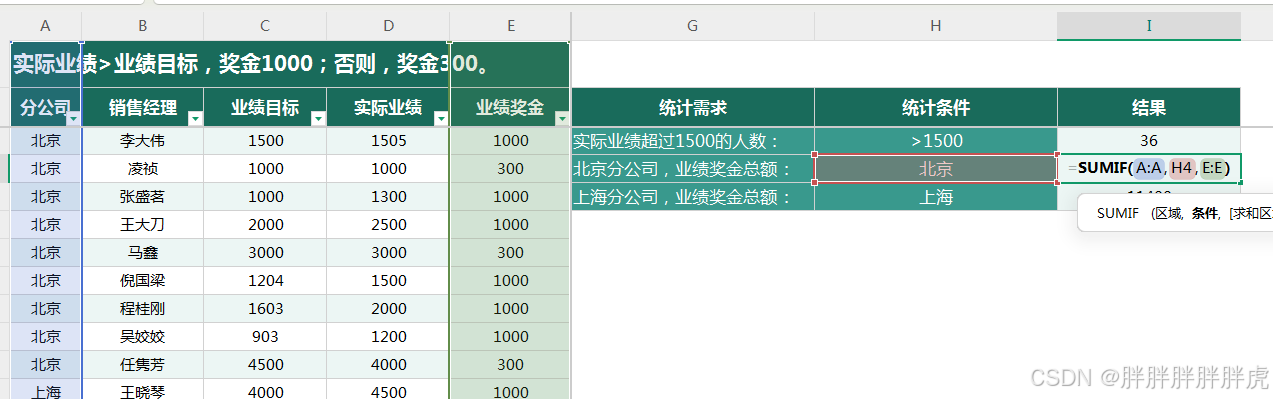
Excel 视图 切片 通过视图进行数据分析 条形格式 函数 countif sumif sumifs 多条件 countifs 多条件...

【三维分割】Gaga:通过3D感知的 Memory Bank 分组任意高斯
文章目录 摘要一、引言二、主要方法2.1 3D-aware Memory Bank2.2 三维分割的渲染与下游应用 三、实验消融实验应用: Scene Manipulation 地址:https://www.gaga.gallery 标题:Gaga: Group Any Gaussians via 3D-aware Memory Bank 来源:加利福…...

期权懂|明日股指期货交割日该如何操作?
锦鲤三三每日分享期权知识,帮助期权新手及时有效地掌握即市趋势与新资讯! 明日股指期货交割日该如何操作? 一、需要确认股指期货交割日: 查查看明日是否为交割日,别忘了关注交易所公告,以免错过。 二、需要…...

大牙的2024年创作总结
文章目录 一、自动驾驶通讯协议的学习心得二、PyTorch框架应用的心得体会三、大规模语言模型(LLM)的研究心得四、神经网络架构与实战经验五、我的年度文章六、未来展望与个人成长 引言 2024年是我个人在深度学习和自动驾驶领域不断探索、实践并取得显著…...

AI软件栈:中间表示
概念 编译器通常可以分为前端、优化器和后端三个部分中间表示属于变异过程中表达源程序的方法,作为单独的表示语言。将不同的前端语言(例如C、python、Java等)描述转换为中间表示。优化器对中间表示进行转换和优化,输出新的中间表示。后端将优化后的中间表示转换为特定硬件…...

【PowerQuery专栏】PowerQuery的M语言函数Access数据库访问
Access是相对比较小型的文件型数据库,PowerQuery 进行Access数据库解析非常简单,直接使用Access.Database的函数可以实现数据库访问,函数包含如下参数,函数结果为Table表类型。 Access.Database(参数1 as binary,参数2 as record) as Table 参数1为数据库,数据类型为二进…...

C# OpenCvSharp 部署文档矫正,包括文档扭曲/模糊/阴影等情况
目录 说明 效果 模型 项目 代码 下载 参考 C# OpenCvSharp 部署文档矫正,包括文档扭曲/模糊/阴影等情况 说明 地址:https://github.com/RapidAI/RapidUnDistort 修正文档扭曲/模糊/阴影等情况,使用onnx模型简单轻量部署,…...

go读取excel游戏配置
1.背景 游戏服务器,配置数据一般采用csv/excel来作为载体,这种方式,策划同学配置方便,服务器解析也方便。在jforgame框架里,我们使用以下的excel配置格式。 然后可以非常方便的进行数据检索,例如ÿ…...

特殊类设计
[本节目标] 掌握常见特殊类的设计方式 1.请设计一个类,不能被拷贝 拷贝只会放生在两个场景中:拷贝构造函数以及赋值运算符重载,因此想要让一个类禁止拷贝,只需让该类不能调用拷贝构造函数以及赋值运算符重载即可。 C98 将拷贝构…...

图像去雾数据集的下载和预处理操作
前言 目前,因为要做对比实验,收集了一下去雾数据集,并且建立了一个数据集的预处理工程。 这是以前我写的一个小仓库,我决定还是把它用起来,下面将展示下载的路径和数据处理的方法。 下面的代码均可以在此找到。Auo…...
【LeetCode】--- MySQL刷题集合
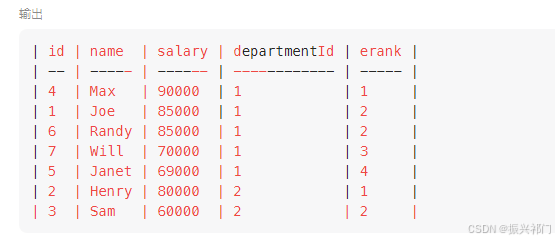
1.组合两个表(外连接) select p.firstName,p.lastName,a.city,a.state from Person p left join Address a on p.personId a.personId; 以左边表为基准,去连接右边的表。取两表的交集和左表的全集 2.第二高的薪水 (子查询、if…...

基于Python的多元医疗知识图谱构建与应用研究(上)
一、引言 1.1 研究背景与意义 在当今数智化时代,医疗数据呈爆发式增长,如何高效管理和利用这些数据,成为提升医疗服务质量的关键。传统医疗数据管理方式存在数据孤岛、信息整合困难等问题,难以满足现代医疗对精准诊断和个性化治疗的需求。知识图谱作为一种知识表示和管理…...

小哆啦解题记:如何计算除自身以外数组的乘积
小哆啦开始力扣每日一题的第十二天 https://leetcode.cn/problems/product-of-array-except-self/description/ 《小哆啦解题记:如何计算除自身以外数组的乘积》 在一个清晨的阳光下,小哆啦坐在书桌前,思索着一道困扰已久的题目:…...

渐进式图片的实现原理
渐进式图片(Progressive JPEG)的实现原理与传统的基线 JPEG(Baseline JPEG)不同。它通过改变图片的编码和加载方式,使得图片在加载时能够逐步显示从模糊到清晰的图像。 1. 传统基线 JPEG 的加载方式 在传统的基线 JP…...
)
SQL刷题快速入门(三)
其他章节: SQL刷题快速入门(一) SQL刷题快速入门(二) 承接前两个章节,本系列第三章节主要讲SQL中where和having的作用和区别、 GROUP BY和ORDER BY作用和区别、表与表之间的连接操作(重点&…...

mybatis(19/134)
大致了解了一下工具类,自己手敲了一边,java的封装还是真的省去了很多麻烦,封装成一个工具类就可以不用写很多重复的步骤,一个工厂对应一个数据库一个environment就好了。 mybatis中调用sql中的delete占位符里面需要有字符…...

sqlmap 自动注入 -01
1: 先看一下sqlmap 的help: 在kali-linux 系统里面,可以sqlmap -h看一下: Target: At least one of these options has to be provided to define the target(s) -u URL, --urlURL Target URL (e.g. "Salesforce Platform for Application Development | Sa…...

3.8.Trie树
Trie树 Trie 树,又称字典树或前缀树,是一种用于高效存储和检索字符串数据的数据结构,以下是关于它的详细介绍: 定义与原理 定义:Trie 树是一种树形结构,每个节点可以包含多个子节点,用于存储…...

day 21
进程、线程、协程的区别 进程:操作系统分配资源的最小单位,其中可以包含一个或者多个线程,进程之间是独立的,可以通过进程间通信机制(管道,消息队列,共享内存,信号量,信…...
)
毕业设计 yolov11骨折检测医疗辅助系统(源码+论文)
文章目录 0 前言1 项目运行效果2 课题背景2.1 研究背景2.2 国内外研究现状2.3 研究意义 3 设计框架(骨折检测系统设计框架说明)3.1. 系统架构图3.2. 技术选型3.2.1 核心组件3.2.2 辅助工具 3.3. 核心模块设计3.3.1 YOLO模型训练模块训练流程图关键伪代码…...

1688运营培训/询盘成本从500元降到63.9!1688运营培训还原1688真实玩法
1688运营培训/询盘成本从500元降到63.9!1688运营培训还原1688真实玩法500块钱一个询盘,你敢信?做1688运营培训这么多年,这个数字我都觉得离谱。前阵子遇到一个老板,一上来就开始吐槽1688,说1688就是个垃圾平…...

告别枯燥理论!用Unity脚本生命周期与预制体玩转一个“会变身的敌人”
用Unity打造会变身的敌人:脚本生命周期与预制体的实战应用在游戏开发中,敌人AI的行为设计往往是新手开发者最感兴趣也最容易感到困惑的部分。Unity的脚本生命周期和预制体系统为这类需求提供了强大支持,但教科书式的讲解常常让学习者陷入枯燥…...

LoRa物联网与动态基线算法在养殖体温监测中的实战应用
1. 项目概述:为什么我们需要一个智能体温监测系统?在规模化养殖场里干了十几年,我见过太多因为体温异常没被及时发现而导致的损失。一头育肥猪突然不吃食,等饲养员第二天巡栏发现时,可能已经高烧好几天,继发…...

Autodesk Fusion 360在Linux上的技术实现与性能优化深度解析
Autodesk Fusion 360在Linux上的技术实现与性能优化深度解析 【免费下载链接】Autodesk-Fusion-360-for-Linux This is a project, where I give you a way to use Autodesk Fusion 360 on Linux! 项目地址: https://gitcode.com/gh_mirrors/au/Autodesk-Fusion-360-for-Linu…...

Go开发者必备:circuitbreaker API全解析与最佳实践指南 [特殊字符]
Go开发者必备:circuitbreaker API全解析与最佳实践指南 🚀 【免费下载链接】circuitbreaker Circuit Breakers in Go 项目地址: https://gitcode.com/gh_mirrors/circ/circuitbreaker 作为一名Go开发者,你是否经常遇到远程服务调用失败…...

Unlock-Music:浏览器中一键解锁加密音乐文件的完整指南
Unlock-Music:浏览器中一键解锁加密音乐文件的完整指南 【免费下载链接】unlock-music 在浏览器中解锁加密的音乐文件。原仓库: 1. https://github.com/unlock-music/unlock-music ;2. https://git.unlock-music.dev/um/web 项目地址: http…...

如何利用开源工具Unlock-Music解决音乐平台加密格式兼容问题
如何利用开源工具Unlock-Music解决音乐平台加密格式兼容问题 【免费下载链接】unlock-music 在浏览器中解锁加密的音乐文件。原仓库: 1. https://github.com/unlock-music/unlock-music ;2. https://git.unlock-music.dev/um/web 项目地址: https://gi…...

告别依赖冲突:在Debian12上为特定项目搭建Python2.7.18独立运行环境
告别依赖冲突:在Debian12上为特定项目搭建Python2.7.18独立运行环境 当现代Linux系统已全面拥抱Python3的时代,突然需要维护一个仅支持Python2.7的遗留项目,这种场景对开发者而言无异于一场噩梦。本文将带你用工程化的思维,在Deb…...

国产大模型新王登基?Qwen3.7-Max全球第五、编程Agent登顶,千问APP免费体验全攻略
AI前线观察 | 2026.05.25 就在刚刚过去的阿里云峰会上,通义千问甩出了一张“王炸”。万亿参数MoE架构的旗舰模型Qwen3.7-Max正式接入千问APP、PC端及网页端。这不仅仅是一次版本更新,更是国产大模型在权威第三方榜单中首次稳居全球前五、国产第一的里程碑…...