
.NET SixLabors.ImageSharp v1.0 图像实用程序控制台示例

使用 C# 控制台应用程序示例在 Windows、Linux 和 MacOS 机器上处理图像,包括创建散点图和直方图,以及根据需要旋转图像以便正确显示。
这个小型实用程序库需要将 NuGet SixLabors.ImageSharp包(版本 1.0.4)添加到.NET Core 3.1/ .NET 6 / .NET 8项目中。它与Windows、Linux和 MacOS兼容。
这已针对ImageSharp v3.0.1 进行了重新设计。
它可以根据百万像素数或长度乘以宽度来调整图像大小,并根据需要保留纵横比。
它根据EXIF数据旋转/翻转图像。这是为了适应移动设备。
它还创建散点图和直方图。
using SixLabors.ImageSharp;
using SixLabors.ImageSharp.Metadata.Profiles.Exif;
using SixLabors.ImageSharp.Processing;
using SixLabors.ImageSharp.PixelFormats;
using SixLabors.ImageSharp.Formats.Png;
using System.IO;
using System;
using SixLabors.ImageSharp.Formats.Jpeg;
namespace ImageUtil
{
public class GetSize
{
public GetSize(Stream stream)
{
using (Image iOriginal = Image.Load(stream))
{
stream.Position = 0;
Width = iOriginal.Width;
Height = iOriginal.Height;
}
}
/// <summary>
/// The width of the image specified in the class constructor's Stream parameter
/// </summary>
public int Width { get; }
/// <summary>
/// The height of the image specified in the class constructor's Stream parameter
/// </summary>
public int Height { get; }
}
public static class Resize
{
/// <summary>
/// Resize and save an image to a Stream specifying its new width and height
/// </summary>
public static void SaveImage(Stream imageStream, int newWidth, int newHeight, bool preserveImageRatio, Stream saveToStream, int jpegQuality = 100)
{
using (Image iOriginal = Image.Load(imageStream))
{
imageStream.Position = 0;
if (preserveImageRatio)
{
float percentWidth = newWidth / (float)iOriginal.Width;
float percentHeight = newHeight / (float)iOriginal.Height;
float percent = percentHeight < percentWidth ? percentHeight : percentWidth;
newWidth = (int)Math.Round(iOriginal.Width * percent, 0);
newHeight = (int)Math.Round(iOriginal.Height * percent, 0);
}
resize(imageStream, iOriginal, newWidth, newHeight, saveToStream, jpegQuality);
}
}
/// <summary>
/// Resize and save an image to a Stream specifying the number of pixels to resize to
/// </summary>
public static void SaveImage(Stream imageStream, int newNumberOfPixels, Stream saveToStream, int jpegQuality = 100)
{
using (Image iOriginal = Image.Load(imageStream))
{
imageStream.Position = 0;
double ratio = Math.Sqrt(newNumberOfPixels / (double)(iOriginal.Width * iOriginal.Height));
resize(imageStream, iOriginal, (int)Math.Round(iOriginal.Width * ratio, 0), (int)Math.Round(iOriginal.Height * ratio, 0), saveToStream, jpegQuality);
}
}
private static void resize(Stream origSource, Image image, int newWidth, int newHeight, Stream saveTo, int jpegQuality)
{
image.Mutate(x => x.Resize(newWidth, newHeight));
transformImage(image); // NOTE: transform image AFTER resizing it!!!
var format = Image.DetectFormat(origSource);
if (format.Name.ToLower() == "jpeg")
{
var encoder = new JpegEncoder();
encoder.Quality = jpegQuality;
image.SaveAsJpeg(saveTo, encoder);
}
else
image.Save(saveTo, format);
}
private static void transformImage(Image image)
{
IExifValue exifOrientation = image.Metadata?.ExifProfile?.GetValue(ExifTag.Orientation);
if (exifOrientation == null)
return;
RotateMode rotateMode;
FlipMode flipMode;
setRotateFlipMode(exifOrientation, out rotateMode, out flipMode);
image.Mutate(x => x.RotateFlip(rotateMode, flipMode));
image.Metadata.ExifProfile.SetValue(ExifTag.Orientation, (ushort)1);
}
private static void setRotateFlipMode(IExifValue exifOrientation, out RotateMode rotateMode, out FlipMode flipMode)
{
var orientation = (ushort)exifOrientation.GetValue();
switch (orientation)
{
case 2:
rotateMode = RotateMode.None;
flipMode = FlipMode.Horizontal;
break;
case 3:
rotateMode = RotateMode.Rotate180;
flipMode = FlipMode.None;
break;
case 4:
rotateMode = RotateMode.Rotate180;
flipMode = FlipMode.Horizontal;
break;
case 5:
rotateMode = RotateMode.Rotate90;
flipMode = FlipMode.Horizontal;
break;
case 6:
rotateMode = RotateMode.Rotate90;
flipMode = FlipMode.None;
break;
case 7:
rotateMode = RotateMode.Rotate90;
flipMode = FlipMode.Vertical;
break;
case 8:
rotateMode = RotateMode.Rotate270;
flipMode = FlipMode.None;
break;
default:
rotateMode = RotateMode.None;
flipMode = FlipMode.None;
break;
}
}
}
/* CREATE A SCATTER PLOT JPEG/PNG IMAGE */
public static class ScatterPlot
{
static readonly Rgba32 WHITE = new Rgba32(255, 255, 255);
static readonly Rgba32 BLACK = new Rgba32(0, 0, 0);
static readonly Rgba32 RED = new Rgba32(255, 0, 0);
static readonly Rgba32 BLUE = new Rgba32(0, 0, 255);
static readonly Rgba32 GREEN = new Rgba32(0, 192, 0);
static readonly Rgba32 PURPLE = new Rgba32(128, 0, 128);
static readonly Rgba32 ORANGE = new Rgba32(255, 164, 0);
static readonly Rgba32 YELLOW = new Rgba32(255, 225, 0);
static readonly Rgba32 MAGENTA = new Rgba32(255, 0, 255);
static readonly Rgba32 AQUA = new Rgba32(0, 225, 255);
static readonly Rgba32 BLUEJEAN = new Rgba32(0, 128, 255);
static readonly Rgba32 BROWN = new Rgba32(150, 75, 50);
static readonly Rgba32 CHARTREUSE = new Rgba32(223, 255, 0);
static readonly Rgba32 DODGERBLUE = new Rgba32(30, 144, 255);
static readonly Rgba32 NAVY = new Rgba32(0, 0, 128);
static readonly Rgba32 DARKRED = new Rgba32(139, 0, 0);
static readonly Rgba32[] colors = new Rgba32[] { WHITE, BLACK, RED, BLUE, GREEN, PURPLE, ORANGE, YELLOW, MAGENTA, AQUA, BLUEJEAN, BROWN, DODGERBLUE, CHARTREUSE, NAVY, DARKRED };
public static void CreateJPEG(Stream stream, ScatterPlotColors backgroundColor, IEnumerable<PlotPoint> points, int width, int height, int pointSize, int jpegQuality = 100)
{
using (var bmp = new Image<Rgba32>(width / pointSize + 6, height / pointSize + 6, colors[(int)backgroundColor]))
create(stream, width, height, bmp, points, pointSize, new JpegEncoder() { Quality = jpegQuality });
}
public static void CreateJPEG(string filename, ScatterPlotColors backgroundColor, IEnumerable<PlotPoint> points, int width, int height, int pointSize, int jpegQuality = 100)
{
using (var stream = File.Create(filename))
CreateJPEG(stream, backgroundColor, points, width, height, pointSize, jpegQuality);
}
public static void CreatePNG(Stream stream, IEnumerable<PlotPoint> points, int width, int height, int pointSize)
{
using (var bmp = new Image<Rgba32>(width / pointSize + 6, height / pointSize + 6))
create(stream, width, height, bmp, points, pointSize, new PngEncoder());
}
public static void CreatePNG(string filename, IEnumerable<PlotPoint> points, int width, int height, int pointSize)
{
using (var stream = File.Create(filename))
CreatePNG(stream, points, width, height, pointSize);
}
private static double normalize(float min, float max, float value)
{
double x = max - min;
if(x == 0)
return 0;
return (value - min) / x;
}
private static void create(Stream stream, int width, int height, Image<Rgba32> bmp, IEnumerable<PlotPoint> points, int pointSize, SixLabors.ImageSharp.Formats.IImageEncoder imageEncoder)
{
float xMax = float.MinValue, xMin = float.MaxValue, yMax = float.MinValue, yMin = float.MaxValue;
foreach (var pt in points)
{
xMax = Math.Max(pt.x, xMax);
xMin = Math.Min(pt.x, xMin);
yMax = Math.Max(pt.y, yMax);
yMin = Math.Min(pt.y, yMin);
}
float xDelta = Math.Max(1, xMax - xMin), yDelta = Math.Max(1, yMax - yMin);
int w = width / pointSize;
int h = height / pointSize;
foreach (var pt in points)
{
int x = (int)(w * normalize(xMin, xMax, pt.x));
int y = (int)(h * normalize(yMin, yMax, pt.y));
bmp[x + 3, y + 3] = colors[((int)pt.color) % colors.Length];
}
bmp.Mutate(x => x.Flip(FlipMode.Vertical));
bmp.Mutate(x => x.Resize(width, height));
bmp.Save(stream, imageEncoder);
}
}
public class PlotPoint
{
public ScatterPlotColors color { get; }
public float x { get; }
public float y { get; }
public PlotPoint(float x, float y, ScatterPlotColors color)
{
this.x = x;
this.y = y;
this.color = color;
}
}
public enum ScatterPlotColors
{
WHITE,
BLACK,
RED,
BLUE,
GREEN,
PURPLE,
ORANGE,
YELLOW,
MAGENTA,
AQUA,
BLUEJEAN,
BROWN,
CHARTREUSE,
DODGERBLUE,
NAVY,
DARKRED
}
/* CREATE A PNG HISTOGRAM OF AN IMAGE */
public static class Histogram
{
/// <summary>
/// Create a histogram from the data in a stream
/// </summary>
public static MemoryStream CreatePNG(Stream stream, int width, int height, LRGB lrgb, byte alphaChannel = 128, bool clipBlackAndWhite = true, byte luminanceShade = 255)
{
using (var bmp = Image<Rgb24>.Load(stream))
{
return create(bmp, width, height, lrgb, alphaChannel, clipBlackAndWhite, luminanceShade);
}
}
/// <summary>
/// Create a histogram from the data in a file
/// </summary>
public static MemoryStream CreatePNG(string filename, int width, int height, LRGB lrgb, byte alphaChannel = 128, bool clipBlackAndWhite = true, byte luminanceShade = 255)
{
using (var bmp = Image<Rgb24>.Load(filename))
{
return create(bmp, width, height, lrgb, alphaChannel, clipBlackAndWhite, luminanceShade);
}
}
private static MemoryStream create(Image bmp, int width, int height, LRGB lrgb, byte alpha, bool clip, byte shade)
{
ulong[] lumin = new ulong[256];
ulong[] red = new ulong[256];
ulong[] green = new ulong[256];
ulong[] blue = new ulong[256];
var bred = (lrgb & LRGB.RED) != 0;
var bgreen = (lrgb & LRGB.GREEN) != 0;
var bblue = (lrgb & LRGB.BLUE) != 0;
var blumin = (lrgb == LRGB.LUMINANCE);
int w = bmp.Width;
int h = bmp.Height;
var bmp2 = bmp.CloneAs<Rgb24>();
for (int y = 0; y < h; y++)
{
Span<Rgb24> pixelRow = bmp2.GetPixelRowSpan(y);
for (int x = 0; x < w; x++)
{
var c = pixelRow[x];
lumin[(int)Math.Round((c.R + c.G + c.B) / 3.0)]++;
red[c.R]++;
green[c.G]++;
blue[c.B]++;
}
}
ulong max = 0;
int a = (clip ? 1 : 0), b = (clip ? 255 : 256);
for (int i = a; i < b; i++)
{
if (!blumin)
{
if (bred)
if (max < red[i])
max = red[i];
if (bgreen)
if (max < green[i])
max = green[i];
if (bblue)
if (max < blue[i])
max = blue[i];
}
else if (max < lumin[i])
max = lumin[i];
}
double HEIGHTFACTOR = 256.0 / max;
if (blumin)
{
using (var bmplum = new Image<Rgba32>(256, 256))
{
var penlum = new VerticalPen(new Rgba32(shade, shade, shade, alpha));
for (int i = 0; i < 256; i++)
penlum.Draw(bmplum, i, (int)(lumin[i] * HEIGHTFACTOR));
bmplum.Mutate(x => x.Resize(width, height));
MemoryStream ms = new MemoryStream();
bmplum.Save(ms, new PngEncoder());
return ms;
}
}
else
{
using (var bmppre = new Image<Rgba32>(256, 256))
{
Image<Rgba32>? bmpred = null, bmpgreen = null, bmpblue = null;
VerticalPen? penred = null, pengreen = null, penblue = null;
if (bred)
{
bmpred = new Image<Rgba32>(256, 256);
penred = new VerticalPen(new Rgba32(255, 0, 0, alpha));
}
if (bgreen)
{
bmpgreen = new Image<Rgba32>(256, 256);
pengreen = new VerticalPen(new Rgba32(0, 255, 0, alpha));
}
if (bblue)
{
bmpblue = new Image<Rgba32>(256, 256);
penblue = new VerticalPen(new Rgba32(0, 0, 255, alpha));
}
for (int i = 0; i < 256; i++)
{
if (bred)
penred.Draw(bmpred, i, (int)(red[i] * HEIGHTFACTOR));
if (bgreen)
pengreen.Draw(bmpgreen, i, (int)(green[i] * HEIGHTFACTOR));
if (bblue)
penblue.Draw(bmpblue, i, (int)(blue[i] * HEIGHTFACTOR));
}
if (bred)
{
bmppre.Mutate(x => x.DrawImage(bmpred, 1));
bmpred.Dispose();
}
if (bgreen)
{
bmppre.Mutate(x => x.DrawImage(bmpgreen, 1));
bmpgreen.Dispose();
}
if (bblue)
{
bmppre.Mutate(x => x.DrawImage(bmpblue, 1));
bmpblue.Dispose();
}
bmppre.Mutate(x => x.Resize(width, height));
MemoryStream ms = new MemoryStream();
bmppre.Save(ms, new PngEncoder());
return ms;
}
}
}
internal class VerticalPen
{
private readonly Rgba32 color;
public VerticalPen(Rgba32 color)
{
this.color = color;
}
public void Draw(Image<Rgba32> bmp, int row, int height)
{
if (height <= bmp.Height)
for (int y = height - 1; y >= 0; y--)
bmp[row, bmp.Height - 1 - y] = color;
}
}
public enum LRGB
{
LUMINANCE = 0,
RED = 1,
GREEN = 2,
BLUE = 4,
REDBLUE = 1 | 4,
REDGREEN = 1 | 2,
BLUEGREEN = 2 | 4,
REDGREENBLUE = 1 | 2 | 4
}
}
}
示例用法
另请参阅:Web 应用程序示例
namespace ConsoleApp1
{
class Program
{
static void Main(string[] args)
{
if(args.Length > 0)
{
using (var openfs = System.IO.File.OpenRead(args[0]))
{
// NOTE: GET IMAGE SIZE
var size = new ImageUtil.GetSize(openfs);
System.Console.WriteLine("IMAGE SIZE: " + size.Width + " x " + size.Height);
if (args.Length > 1)
{
if (System.IO.File.Exists(args[1]))
System.IO.File.Delete(args[1]);
using (var savefs = System.IO.File.OpenWrite(args[1]))
{
System.Console.WriteLine("RESIZING IMAGE TO 10K PIXEL THUMBNAIL");
// NOTE: RESIZE IMAGE TO 10K PIXELS; THIS WILL ALSO FLIP AND ROTATE IMAGE AS NEEDED
ImageUtil.Resize.SaveImage(openfs, 10000, savefs);
}
}
}
System.Console.WriteLine("CREATING LUMINANCE HISTOGRAM: histogram.png");
// NOTE: CREATE HISTOGRAM WHICH IS RETURNED AS A MEMORY STREAM OF A PORTABLE NETWORK GRAPHICS (PNG) IMAGE FILE
using (var histogram = ImageUtil.Histogram.CreatePNG(args[0], 300, 150, ImageUtil.Histogram.LRGB.LUMINANCE, 128))
{
if (System.IO.File.Exists("histogram.png"))
System.IO.File.Delete("histogram.png");
System.IO.File.WriteAllBytes("histogram.png", histogram.ToArray());
}
}
else
System.Console.WriteLine("argument one is path to image, argument two [optional] is path to resized image");
}
}
}
如果您喜欢此文章,请收藏、点赞、评论,谢谢,祝您快乐每一天。
相关文章:
.NET SixLabors.ImageSharp v1.0 图像实用程序控制台示例
使用 C# 控制台应用程序示例在 Windows、Linux 和 MacOS 机器上处理图像,包括创建散点图和直方图,以及根据需要旋转图像以便正确显示。 这个小型实用程序库需要将 NuGet SixLabors.ImageSharp包(版本 1.0.4)添加到.NET Core 3.1/ …...

EasyExcel提取excel文档
目录 一、前言二、提取excel文档2.1、所有sheet----获取得到headerList和总行数2.2、所有sheet----获取合并单元格信息2.3、读取某个sheet的每行数据一、前言 EasyExcel 是阿里巴巴开源的一个高性能 Excel 读写库,相比于 Apache POI 和 JXL,它有明显的优势,特别是在处理大数…...

第十五届蓝桥杯嵌入式省赛真题(满分)
第十五届蓝桥杯嵌入式省赛真题 目录 第十五届蓝桥杯嵌入式省赛真题 一、题目 二、分析 1、配置 2、变量定义 3、LCD显示模块 4、按键模块 5、数据分析和处理模块 1、频率突变 2、频率超限 3、数据处理 三、评价结果 一、题目 二、分析 1、配置 首先是配置cubemx…...

ASP.NET Core Web应用(.NET9.0)读取数据库表记录并显示到页面
1.创建ASP.NET Core Web应用 选择.NET9.0框架 安装SqlClient依赖包 2.实现数据库记录读取: 引用数据库操作类命名空间 创建查询记录结构类 查询数据并返回数据集合 3.前端遍历数据并动态生成表格显示 生成结果:...

【Sceneform-EQR】实现3D场景背景颜色的定制化(背景融合的方式、Filament材质定制)
写在前面的话 Sceneform-EQR是基于(filament)扩展的一个用于安卓端的渲染引擎。故本文内容对Sceneform-EQR与Filament都适用。 需求场景 在使用Filament加载三维场景的过程中,一个3D场景对应加载一个背景纹理。而这样的话,即便…...

LeetCode1706
LeetCode1706 目录 LeetCode1706题目描述示例题目理解问题描述 示例分析思路分析问题核心 代码段代码逐行讲解1. 获取网格的列数2. 初始化结果数组3. 遍历每个球4. 逐行模拟下落过程5. 检查是否卡住6. 记录结果7. 返回结果数组 复杂度分析时间复杂度空间复杂度 总结的知识点1. …...
)
2517. 礼盒的最大甜蜜度(Maximum Tastiness of Candy Box)
2517. 礼盒的最大甜蜜度(Maximum Tastiness of Candy Box) 问题描述 给定一个正整数数组 price,其中 price[i] 表示第 i 类糖果的价格,另给定一个正整数 k。商店将 k 类不同糖果组合成礼盒出售。礼盒的甜蜜度是礼盒中任意两种糖…...

Golang 的字符编码与 regexp
前言 最近在使用 Golang 的 regexp 对网络流量做正则匹配时,发现有些情况无法正确进行匹配,找到资料发现 regexp 内部以 UTF-8 编码的方式来处理正则表达式,而网络流量是字节序列,由其中的非 UTF-8 字符造成的问题。 我们这里从 G…...
利用ollama 与deepseek r1大模型搭建本地知识库
1.安装运行ollama ollama下载 https://ollama.com/download/windows 验证ollama是否安装成功 ollama --version 访问ollama本地地址: http://localhost:11434/ 出现如下界面 ollama运行模型 ollama run llama3.2 ollama常用操作命令 启动 Ollama 服务…...

Java短信验证功能简单使用
注册登录阿里云官网:https://www.aliyun.com/ 搜索短信服务 自己一步步申请就可以了 开发文档: https://next.api.aliyun.com/api-tools/sdk/Dysmsapi?version2017-05-25&languagejava-tea&tabprimer-doc 1.引入依赖 <dependency>…...

CAS单点登录(第7版)21.可接受的使用政策
如有疑问,请看视频:CAS单点登录(第7版) 可接受的使用政策 概述 可接受的使用政策 CAS 也称为使用条款或 EULA,它允许用户在继续应用程序之前接受使用策略。此功能的生产级部署需要修改流,以便通过外部存…...
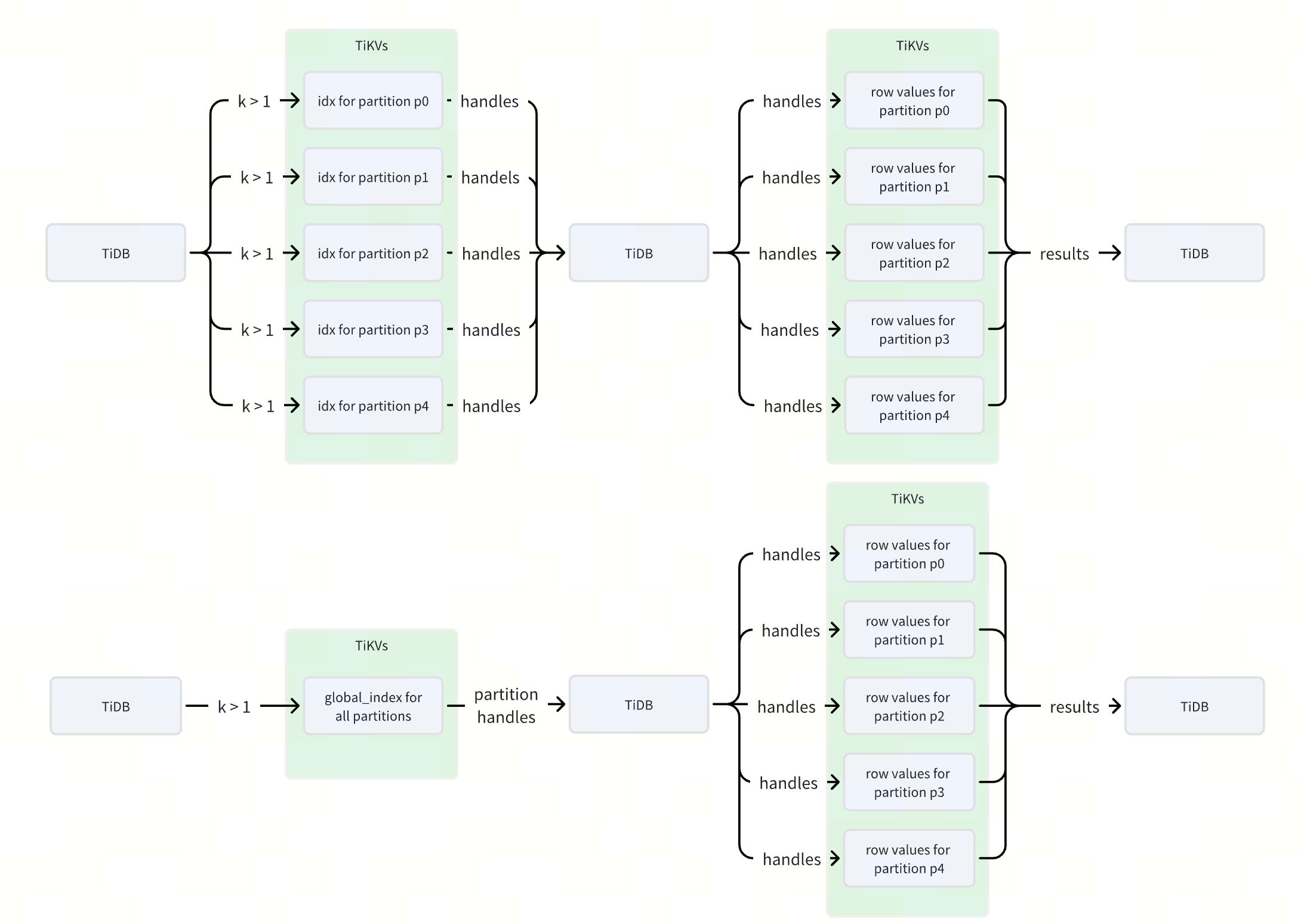
53倍性能提升!TiDB 全局索引如何优化分区表查询?
作者: Defined2014 原文来源: https://tidb.net/blog/7077577f 什么是 TiDB 全局索引 在 TiDB 中,全局索引是一种定义在分区表上的索引类型,它允许索引分区与表分区之间建立一对多的映射关系,即一个索引分区可以对…...

Pythong 解决Pycharm 运行太慢
Pythong 解决Pycharm 运行太慢 官方给Pycharm自身占用的最大内存设低估了限制,我的Pycharm刚开始默认是256mb。 首先找到自己的Pycharm安装目录 根据合适自己的改 保存,重启Pycharm...
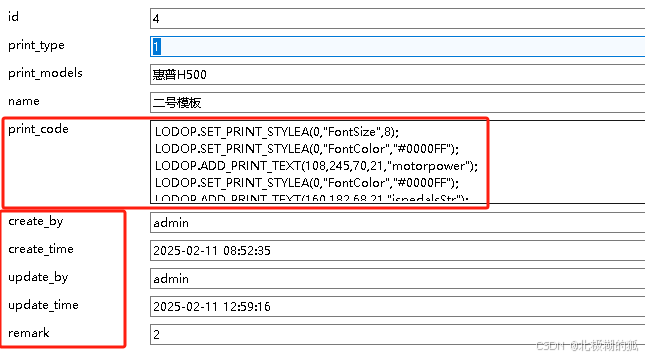
库里存储的数据有大量回车时,该如何进行存取
如图,打印模板存了很多坐标性的字段数据: 大量带换行的文本数据存到库里之后取出,前端需要做非空、合法校验, 然后在循环中,使用eval 函数接收每一句字符串,去执行这句 JavaScript 代码。 let arrStr tem…...

【devops】Github Actions Secrets | 如何在Github中设置CI的Secret供CI的yaml使用
一、Github Actions 1、ci.yml name: CIon: [ push ]jobs:build:runs-on: ubuntu-lateststeps:- name: Checkout codeuses: actions/checkoutv3- name: Set up Gouses: actions/setup-gov4with:go-version: 1.23.0- name: Cache Go modulesuses: actions/cachev3with:path: |…...

体验 DeepSeek-R1:解密 1.5B、7B、8B 版本的强大性能与应用
文章目录 🍋引言🍋DeepSeek 模型简介🍋版本更新:1.5B、7B、8B 的区别与特点🍋模型评估🍋体验 DeepSeek 的过程🍋总结 🍋引言 随着大规模语言模型的持续发展,许多模型在性…...

一文说清楚什么是Token以及项目中使用Token延伸的问题
首先可以参考我的往期文章,我这里说清楚了Cookie,Seesion,Token以及JWT是什么 其实Token你就可以理解成这是一个认证令牌就好了 详细分清Session,Cookie和Token之间的区别,以及JWT是什么东西_还分不清 cookie、sessi…...

大模型-Tool call、检索增强
大模型 Tool call 心知天气:https://www.seniverse.com/ 例子:调用天气接口 API from openai import OpenAI import requests import json """ ##### 天气接口 API 密钥获取:https://www.free-api.com/doc/558 ##### &quo…...

【算法】【区间和】acwing算法基础 802. 区间和 【有点复杂,但思路简单】
题目 假定有一个无限长的数轴,数轴上每个坐标上的数都是 0。 现在,我们首先进行 n 次操作,每次操作将某一位置 x 上的数加 c。 接下来,进行 m 次询问,每个询问包含两个整数 l 和 r,你需要求出在区间 [l,r] …...

Ubuntu22.04通过Docker部署Jeecgboot
程序发布环境包括docker、mysql、redis、maven、nodejs、npm等。 一、安装docker 1、用如下命令卸载旧Docker: for pkg in docker.io docker-doc docker-compose docker-compose-v2 podman-docker containerd runc; do sudo apt-get remove $pkg; done 2、安装APT环境依赖包…...
)
2026 AI大会日程倒计时启动:3月锁定名额,6月关闭注册,8月关闭论文投稿(附各大会DDL对照表)
更多请点击: https://intelliparadigm.com 第一章:2026年AI技术大会时间地点汇总 全球人工智能领域正加速迈向规模化落地阶段,2026年将成为关键转折年份。各大权威机构与产业联盟已陆续公布年度旗舰会议日程,覆盖前沿研究、工程实…...
)
告别NeRF的漫长等待:用3DGS+SAM实现毫秒级3D物体分割(附SAGA开源代码解读)
告别NeRF的漫长等待:用3DGSSAM实现毫秒级3D物体分割(附SAGA开源代码解读) 在3D视觉领域,实时交互式分割一直是个棘手的问题。想象一下,当你需要从复杂的3D场景中快速提取某个特定物体时,传统基于NeRF的方法…...

5分钟彻底改造VLC播放器:5款惊艳皮肤让你的影音体验焕然一新
5分钟彻底改造VLC播放器:5款惊艳皮肤让你的影音体验焕然一新 【免费下载链接】VeLoCity-Skin-for-VLC Castom skin for VLC Player 项目地址: https://gitcode.com/gh_mirrors/ve/VeLoCity-Skin-for-VLC 还在忍受VLC播放器那个单调乏味的默认界面吗ÿ…...

伏昔尼布VORANIGO从多大剂量开始吃,肝功能不好了还能按原量继续吃吗?
伏昔尼布(VORANIGO)作为治疗IDH突变复发或进展性低级别胶质瘤的重要药物,其初始剂量的选择与肝功能异常时的剂量调整策略,对于确保治疗的安全性和有效性至关重要。本文将详细阐述伏昔尼布的初始剂量选择,以及肝功能不好…...

5步快速上手yuzu模拟器:从安装到流畅运行Switch游戏全攻略
5步快速上手yuzu模拟器:从安装到流畅运行Switch游戏全攻略 【免费下载链接】yuzu 任天堂 Switch 模拟器 项目地址: https://gitcode.com/GitHub_Trending/yu/yuzu yuzu是一款开源的任天堂Switch模拟器,让你能在PC上畅玩Switch平台的经典游戏。无论…...
)
告别本地开发:用code-server在云服务器上搭建你的专属Web版VSCode(保姆级教程)
云端开发革命:用code-server构建高性能远程编程环境 坐在咖啡馆里,用iPad Pro流畅地调试一个百万行代码的机器学习项目;在出差的高铁上,用Chromebook继续昨晚未完成的微服务架构改造——这听起来像是科幻场景,但借助co…...
)
告别官方手册!i.MX6ULL SD卡启动盘制作保姆级教程(含dd命令详解与分区避坑)
i.MX6ULL SD卡启动盘制作实战指南:从原理到避坑全解析 引言 第一次拿到i.MX6ULL开发板时,很多开发者都会面临一个看似简单却暗藏玄机的任务——制作SD卡启动盘。官方文档虽然提供了步骤,但往往缺乏对底层原理的解释,导致新手在遇到…...

import_3dm:5个关键步骤解决Blender与Rhino间的数据鸿沟
import_3dm:5个关键步骤解决Blender与Rhino间的数据鸿沟 【免费下载链接】import_3dm Blender importer script for Rhinoceros 3D files 项目地址: https://gitcode.com/gh_mirrors/im/import_3dm 你是否曾经花费数小时在Rhino中精心设计的模型,…...

别再死记硬背五层需求了!用马斯洛理论设计产品,这3个实战案例让你秒懂
产品设计的底层密码:用马斯洛需求理论打造用户无法拒绝的体验 深夜两点,某社交App的产品经理盯着用户留存曲线发愁——明明新增功能增加了30%,次日留存率却下降了5个百分点。这场景你是否熟悉?当我们沉迷于功能堆砌和界面美化时&a…...
)
密钥管理体制PKI和KMI(二)
从信任机器到权力结构:密钥管理体制PKI与KMI的多维解构 引言:一个关于信任的认知迷局 假设你有一个装满绝密文件的保险柜。一种思路是,你给每个有权访问的人一把物理钥匙,由中央保安室统一登记、分发、收回——丢了钥匙立即注销。另一种思路是,你给每个人发一个不可伪造…...