
自然语言处理从入门到应用——LangChain:模型(Models)-[大型语言模型(LLMs):缓存LLM的调用结果]
分类目录:《自然语言处理从入门到应用》总目录
from langchain.llms import OpenAI
在内存中缓存
import langchain
from langchain.cache import InMemoryCachelangchain.llm_cache = InMemoryCache()# To make the caching really obvious, lets use a slower model.
llm = OpenAI(model_name="text-davinci-002", n=2, best_of=2)
计算第一次执行时间:
%%time
# The first time, it is not yet in cache, so it should take longer
llm("Tell me a joke")
日志输出:
CPU times: user 35.9 ms, sys: 28.6 ms, total: 64.6 ms Wall time: 4.83 s
输出:
"\n\nWhy couldn't the bicycle stand up by itself? It was...two tired!"
计算第二次执行时间:
%%time
# The second time it is, so it goes faster
llm("Tell me a joke")
日志输出:
CPU times: user 238 µs, sys: 143 µs, total: 381 µs Wall time: 1.76 ms
输出:
'\n\nWhy did the chicken cross the road?\n\nTo get to the other side.'
SQLite 缓存
!rm .langchain.db
# 我们可以用 SQLite 缓存做同样的事情
from langchain.cache import SQLiteCache
langchain.llm_cache = SQLiteCache(database_path=".langchain.db")
计算第一次执行时间:
%%time
# The first time, it is not yet in cache, so it should take longer
llm("Tell me a joke")
日志输出:
CPU times: user 17 ms, sys: 9.76 ms, total: 26.7 ms Wall time: 825 ms
输出:
'\n\nWhy did the chicken cross the road?\n\nTo get to the other side.'
计算第二次执行时间:
%%time
# The second time it is, so it goes faster
llm("Tell me a joke")
日志输出:
CPU times: user 2.46 ms, sys: 1.23 ms, total: 3.7 ms Wall time: 2.67 ms
输出:
'\n\nWhy did the chicken cross the road?\n\nTo get to the other side.'
Redis缓存
我们还可以使用Redis缓存提示信息和做同样的事情:
# (确保您的本地 Redis 实例在运行此示例之前先运行)
from redis import Redis
from langchain.cache import RedisCachelangchain.llm_cache = RedisCache(redis_=Redis())
计算第一次执行时间:
%%time
# The first time, it is not yet in cache, so it should take longer
llm("Tell me a joke")
日志输出:
CPU times: user 6.88 ms, sys: 8.75 ms, total: 15.6 ms Wall time: 1.04 s
输出:
'\n\nWhy did the chicken cross the road?\n\nTo get to the other side!'
计算第二次执行时间:
%%time
# The second time it is, so it goes faster
llm("Tell me a joke")
日志输出:
CPU times: user 1.59 ms, sys: 610 µs, total: 2.2 ms Wall time: 5.58 ms
输出:
'\n\nWhy did the chicken cross the road?\n\nTo get to the other side!'
Semantic语义缓存
我们还使用Redis缓存提示和响应,并根据语义相似性评估命中率:
from langchain.embeddings import OpenAIEmbeddings
from langchain.cache import RedisSemanticCachelangchain.llm_cache = RedisSemanticCache(redis_url="redis://localhost:6379",embedding=OpenAIEmbeddings()
)
计算第一次执行时间:
%%time
# The first time, it is not yet in cache, so it should take longer
llm("Tell me a joke")
日志输出:
CPU times: user 351 ms, sys: 156 ms, total: 507 ms Wall time: 3.37 s
输出:
"\n\nWhy don't scientists trust atoms?\nBecause they make up everything."
计算第二次执行时间:
%%time
# The second time, while not a direct hit, the question is semantically similar to the original question,
# so it uses the cached result!
llm("Tell me one joke")
日志输出:
CPU times: user 6.25 ms, sys: 2.72 ms, total: 8.97 ms Wall time: 262 ms
输出:
"\n\nWhy don't scientists trust atoms?\nBecause they make up everything."
GPTCache
我们可以使用GPTCache进行精确匹配缓存或基于语义相似性缓存结果,我们先举一个精确匹配的例子:
from gptcache import Cache
from gptcache.manager.factory import manager_factory
from gptcache.processor.pre import get_prompt
from langchain.cache import GPTCache
import hashlibdef get_hashed_name(name):return hashlib.sha256(name.encode()).hexdigest()def init_gptcache(cache_obj: Cache, llm: str):hashed_llm = get_hashed_name(llm)cache_obj.init(pre_embedding_func=get_prompt,data_manager=manager_factory(manager="map", data_dir=f"map_cache_{hashed_llm}"),)langchain.llm_cache = GPTCache(init_gptcache)
计算第一次执行时间:
%%time
# The first time, it is not yet in cache, so it should take longer
llm("Tell me a joke")
日志输出:
CPU times: user 21.5 ms, sys: 21.3 ms, total: 42.8 ms Wall time: 6.2 s
输出:
'\n\nWhy did the chicken cross the road?\n\nTo get to the other side!'
计算第二次执行时间:
%%time
# The second time it is, so it goes faster
llm("Tell me a joke")
日志输出:
CPU times: user 571 µs, sys: 43 µs, total: 614 µs Wall time: 635 µs
输出:
'\n\nWhy did the chicken cross the road?\n\nTo get to the other side!'
现在让我们举一个相似度缓存的例子。
from gptcache import Cache
from gptcache.adapter.api import init_similar_cache
from langchain.cache import GPTCache
import hashlibdef get_hashed_name(name):return hashlib.sha256(name.encode()).hexdigest()def init_gptcache(cache_obj: Cache, llm: str):hashed_llm = get_hashed_name(llm)init_similar_cache(cache_obj=cache_obj, data_dir=f"similar_cache_{hashed_llm}")langchain.llm_cache = GPTCache(init_gptcache)
计算第一次执行时间:
%%time
# The first time, it is not yet in cache, so it should take longer
llm("Tell me a joke")
日志输出:
CPU times: user 1.42 s, sys: 279 ms, total: 1.7 s Wall time: 8.44 s
输出:
'\n\nWhy did the chicken cross the road?\n\nTo get to the other side.'
计算第二次执行时间:
%%time
# 这是一个完全匹配,所以它在缓存中找到它
llm("Tell me a joke")
日志输出:
CPU times: user 866 ms, sys: 20 ms, total: 886 ms Wall time: 226 ms
输出:
'\n\nWhy did the chicken cross the road?\n\nTo get to the other side.'
计算第三次执行时间:
%%time
# 这不是完全匹配,但在语义上是在距离之内,所以它命中了!
llm("Tell me joke")
日志输出:
CPU times: user 853 ms, sys: 14.8 ms, total: 868 ms Wall time: 224 ms
输出:
'\n\nWhy did the chicken cross the road?\n\nTo get to the other side.'
SQLAlchemy Cache
我们可以使用 SQLAlchemyCache来缓存SQLAlchemy支持的任何 SQL 数据库:
# from langchain.cache import SQLAlchemyCache
# from sqlalchemy import create_engine# engine = create_engine("postgresql://postgres:postgres@localhost:5432/postgres")
# langchain.llm_cache = SQLAlchemyCache(engine)
Custom SQLAlchemy Schemas
我们可以定义自己的声明性SQLAlchemyCache子类,以自定义用于缓存的模式。例如,为了支持在Postgres中进行高速全文提示索引,我们可以使用:
from sqlalchemy import Column, Integer, String, Computed, Index, Sequence
from sqlalchemy import create_engine
from sqlalchemy.ext.declarative import declarative_base
from sqlalchemy_utils import TSVectorType
from langchain.cache import SQLAlchemyCacheBase = declarative_base()class FulltextLLMCache(Base):  # type: ignore"""Postgres table for fulltext-indexed LLM Cache"""__tablename__ = "llm_cache_fulltext"id = Column(Integer, Sequence('cache_id'), primary_key=True)prompt = Column(String, nullable=False)llm = Column(String, nullable=False)idx = Column(Integer)response = Column(String)prompt_tsv = Column(TSVectorType(), Computed("to_tsvector('english', llm || ' ' || prompt)", persisted=True))__table_args__ = (Index("idx_fulltext_prompt_tsv", prompt_tsv, postgresql_using="gin"),)engine = create_engine("postgresql://postgres:postgres@localhost:5432/postgres")
langchain.llm_cache = SQLAlchemyCache(engine, FulltextLLMCache)
可选缓存(Optional Caching)
我们也可以选择关闭特定LLM的缓存。在下面的示例中,即使启用了全局缓存,我们也将其关闭了一个特定的LLM:
llm = OpenAI(model_name="text-davinci-002", n=2, best_of=2, cache=False)
计算第一次执行时间:
%%time
llm("Tell me a joke")
日志输出:
CPU times: user 5.8 ms, sys: 2.71 ms, total: 8.51 ms Wall time: 745 ms
输出:
'\n\nWhy did the chicken cross the road?\n\nTo get to the other side!'
计算第二次执行时间:
%%time
llm("Tell me a joke")
日志输出:
CPU times: user 4.91 ms, sys: 2.64 ms, total: 7.55 ms Wall time: 623 ms
输出:
'\n\nTwo guys stole a calendar. They got six months each.'
链式可选缓存(Optional Caching in Chains)
我们还可以关闭链中特定节点的缓存。需要注意的是,某些接口通常更容易先构建链,然后再编辑 LLM。作为示例,我们将加载一个汇总器map-reduce链。我们将缓存映射步骤的结果,但不会冻结合并步骤的结果:
llm = OpenAI(model_name="text-davinci-002")
no_cache_llm = OpenAI(model_name="text-davinci-002", cache=False)
from langchain.text_splitter import CharacterTextSplitter
from langchain.chains.mapreduce import MapReduceChaintext_splitter = CharacterTextSplitter()
with open('../../../state_of_the_union.txt') as f:state_of_the_union = f.read()
texts = text_splitter.split_text(state_of_the_union)
from langchain.docstore.document import Document
docs = [Document(page_content=t) for t in texts[:3]]
from langchain.chains.summarize import load_summarize_chain
chain = load_summarize_chain(llm, chain_type="map_reduce", reduce_llm=no_cache_llm)
计算第一次执行时间:
%%time
chain.run(docs)
日志输出:
CPU times: user 452 ms, sys: 60.3 ms, total: 512 ms Wall time: 5.09 s
输出:
'\n\nPresident Biden is discussing the American Rescue Plan and the Bipartisan Infrastructure Law, which will create jobs and help Americans. He also talks about his vision for America, which includes investing in education and infrastructure. In response to Russian aggression in Ukraine, the United States is joining with European allies to impose sanctions and isolate Russia. American forces are being mobilized to protect NATO countries in the event that Putin decides to keep moving west. The Ukrainians are bravely fighting back, but the next few weeks will be hard for them. Putin will pay a high price for his actions in the long run. Americans should not be alarmed, as the United States is taking action to protect its interests and allies.'
当我们再次运行它时,我们会发现它的运行速度大大加快,但最终的答案却不同。这是由于在映射步骤进行缓存,但在归约步骤没有进行缓存所致计算第二次执行时间:
%%time
chain.run(docs)
日志输出:
CPU times: user 11.5 ms, sys: 4.33 ms, total: 15.8 ms Wall time: 1.04 s
输出:
'\n\nPresident Biden is discussing the American Rescue Plan and the Bipartisan Infrastructure Law, which will create jobs and help Americans. He also talks about his vision for America, which includes investing in education and infrastructure.'
最后我们需要记得执行:
!rm .langchain.db sqlite.db
参考文献:
[1] LangChain 🦜️🔗 中文网,跟着LangChain一起学LLM/GPT开发:https://www.langchain.com.cn/
[2] LangChain中文网 - LangChain 是一个用于开发由语言模型驱动的应用程序的框架:http://www.cnlangchain.com/
相关文章:
-[大型语言模型(LLMs):缓存LLM的调用结果])
自然语言处理从入门到应用——LangChain:模型(Models)-[大型语言模型(LLMs):缓存LLM的调用结果]
分类目录:《自然语言处理从入门到应用》总目录 from langchain.llms import OpenAI在内存中缓存 import langchain from langchain.cache import InMemoryCachelangchain.llm_cache InMemoryCache()# To make the caching really obvious, lets use a slower mode…...

Python 算法基础篇之图的遍历算法:深度优先搜索和广度优先搜索
Python 算法基础篇之图的遍历算法:深度优先搜索和广度优先搜索 引言 1. 图的遍历概述2. 深度优先搜索( DFS )2.1 DFS 的实现2.2 DFS 的应用场景 3. 广度优先搜索( BFS )3.1 BFS 的实现3.2 BFS 的应用场景 4. 示例与实例…...

文本缩略 文本超出显示省略号 控制超出省略的行数
文本缩略 .abb{//超出一行省略overflow:hidden; white-space:nowrap; text-overflow:ellipsis; }超出2行省略 .abb2{display: -webkit-box !important;-webkit-box-orient: vertical;//超出2行省略-webkit-line-clamp:2;overflow: hidden; }控制超出省略的行数 .txt-over{/*控…...
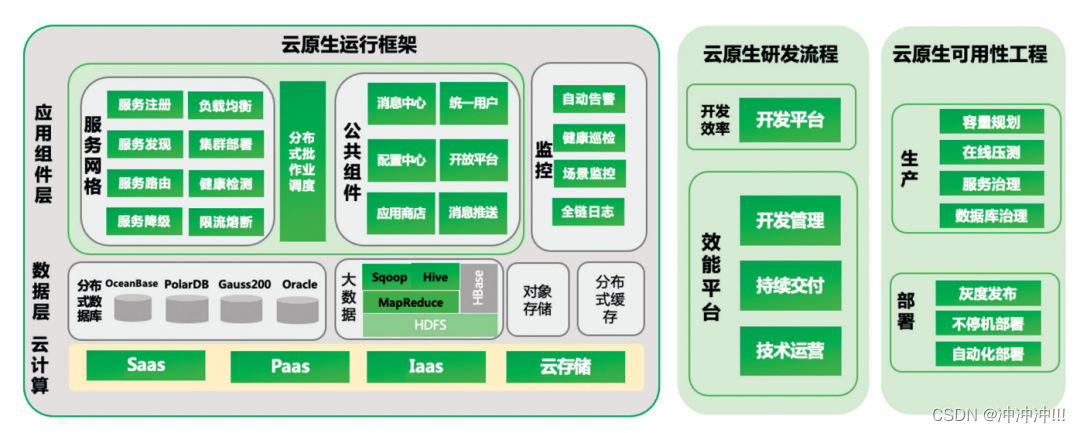
云原生架构
1. 何为云原生? 很多IT业内小伙伴会经常听到这个名词,那么什么是云原生呢?云原生是在云计算环境中构建、部署和管理现代应用程序的软件方法。 当今时代,众多企业希望构建高度可扩展、灵活且有弹性的应用程序,以便能够快…...

Java 生成随机数据
文章目录 1. Java-faker依赖demo 2. common-random依赖demo 1. Java-faker 依赖 <dependency><groupId>com.github.javafaker</groupId><artifactId>javafaker</artifactId><version>1.0.2</version> </dependency>https://…...

基于OpenCV的红绿灯识别
基于OpenCV的红绿灯识别 技术背景 为了实现轻舟航天机器人实现红绿灯的识别,决定采用传统算法OpenCV视觉技术。 技术介绍 航天机器人的红绿灯识别主要基于传统计算机视觉技术,利用OpenCV算法对视频流进行处理,以获取红绿灯的状态信息。具…...

JavaScript快速入门:ComPDFKit PDF SDK 快速构建 Web端 PDF阅读器
JavaScript快速入门:ComPDFKit PDF SDK 快速构建 Web端 PDF阅读器 在当今丰富的网络环境中,处理 PDF 文档已成为企业和开发人员的必需品。ComPDFKit 是一款支持 Web 平台并且功能强大的 PDF SDK,开发人员可以利用它创建 PDF 查看器和编辑器&…...

Flutter 网络请求
在Flutter 中常见的网络请求方式有三种:HttpClient、http库、dio库; 本文简单介绍 使用dio库使用。 选择dio库的原因: dio是一个强大的Dart Http请求库,支持Restful API、FormData、拦截器、请求取消、Cookie管理、文件上传/下载…...

吃透《西瓜书》第三章 线性模型:多元线性回归
🍉 吃瓜系列 教材:《机器学习》 周志华著 🕒时间:2023/7/26 目录 一、多元线性回归 1 向量化 1.1.1 向量化 1.1.2 使用最小二乘法构建损失函数 1.1.3 去除求和符号,改成向量点乘的形式 1.1.4 数学原理 2 求解…...
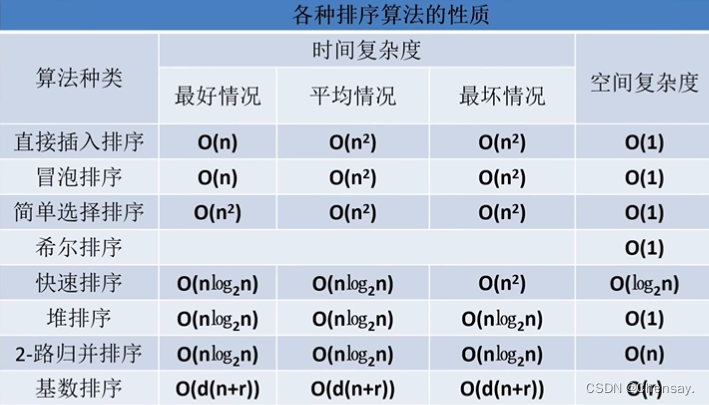
数据结构【排序】
第七章 排序 一、排序 1.定义:将无序的数排好序 ; 2.稳定性: Kᵢ和Kⱼ中,Kᵢ优先于Kⱼ那么在排序后的记录中仍然保持Kᵢ优先; 3.评价标准:执行时间和所需的辅助空间,其次是算法的稳定性…...

探索APP开发的新趋势:人工智能和大数据的力量
随着5G技术的不断发展,人工智能和大数据将会更加广泛的应用于我们生活和工作中,作为 APP开发公司,应该及时的对新技术进行研发,进而更好的为用户服务。目前 APP开发已经不是传统的软件开发了,而是向移动互联网转型&…...

超越传统:深入比较Bootstrap、Foundation、Bulma、Tailwind CSS和Semantic UI的顶级CSS框架!
探索流行的CSS框架:Bootstrap vs Foundation vs Bulma vs Tailwind CSS vs Semantic UI 在Web开发中,选择适合项目需求的CSS框架可以极大地简化界面设计和响应式布局的工作。本文将详细介绍一些流行的CSS框架,并提供代码示例和比较ÿ…...
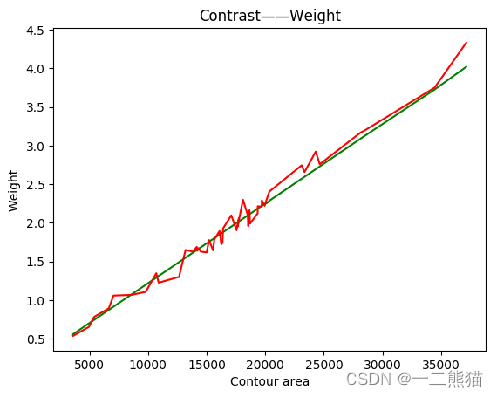
基于深度学习淡水鱼体重智能识别模型研究
工作原理为:首先对大众淡水鱼图片进行数据清洗并做标签分类,之后基于残差网络ResNet50模型进行有监督的分类识别训练,获取识别模型。其次通过搭建回归模型设计出体重模型,对每一类淡水鱼分别拟合出对应的回归方程,将获…...
--linux安装nginx)
Nginx专题(1)--linux安装nginx
ngixn安装 安装依赖包 yum install gcc yum install pcre-devel yum install zlib zlib-devel yum install openssl openssl-devel 安装nginx 下载nginx的tar包 登录http://nginx.org/en/download.html,下载nginx的Stable version版本,并解压 #执行c…...

系统集成中级计算汇总
基本计算: EV 挣值 (实际完成的工作量) AC 实际发生的花费 PV 计划花费(预算) CV 成本 SV 进度 CV 和 SV 的计算 都是通过EV 减去另一个值 CV EV-AC SV EV-PV 成本 chengben C 开头 所以CV 是成本 CV 中有个C 所以用到的是 AC ,另外一个则是剩余的PV CV SV 计算…...

json.stringify的高级用法,和for of的原理
** /* for of 是用来循环可迭代属性的,如何判断是否是可迭代属性,数据原型链上有个Symbol.iterator说明这个数据是可迭代数据 Symbol.iterator是一个函数,调用此函数,会返回一个对象,对象的内部有一个next函数,调用next函数会返回一个对象这个对象内部有value和done值…...
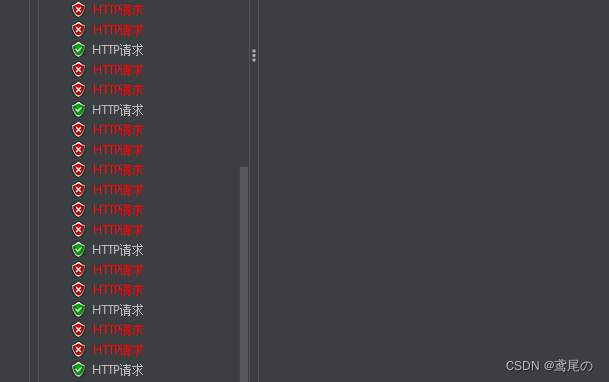
SpringCloudAlibaba微服务实战系列(三)Sentinel1.8.0+流控
SpringCloudAlibaba–Sentinel Sentinel被称为分布式系统的流量防卫兵,是阿里开源流量框架,从服务限流、降级、熔断等多个纬度保护服务。Sentinel同时提供了简洁易用的控制台,可以看到接入应用的秒级数据,并可以在控制台设置一些…...

mybatis - no getter for property,以及@JsonIgnore
There is no getter for property named user_full_name in class com.book.erp.entity.user.QueryUser Mybatis 配置错误,XML配置文件有Java对象以及数据库字段,配置时需要小心 user_full_name是数据库字段,不需要有get 和 set方法…...

云原生周刊:K8s v1.28 中的结构化身份验证配置
开源项目推荐 KubeLinter KubeLinter 是一种静态分析工具,用于检查 Kubernetes YAML 文件和 Helm 图表,以确保其中表示的应用程序遵循最佳实践。 DB Operator DB Operator 减轻了为 Kubernetes 中运行的应用程序管理 PostgreSQL 和 MySQL 实例的痛苦…...

支持向量机概述
支持向量机在深度学习技术出现之前,使用高斯核的支持向量机在很多分类问题上取得了很好的结果,支持向量机不仅用于分类,还可以用于回归问题。它具有泛化性能好,适合小样本和高维特征的优点。 1. SVM引入 1.1支持向量机分类 支持向量机的基本模型是定义在特征空间上的间隔…...

ISO/SAE 21434:2021 逐条审核判定表
A 章节号|B 条款|C 要求内容|D 符合性|E 证据 / 说明|F:不符合整改项符合性选项:符合 / 部分符合 / 不符合 / 不适用章节号条款审核要求内容符合性证据 / 备注整改项44.1建立网络安全生命周…...

3分钟快速上手BewlyBewly:打造你的专属B站美化体验
3分钟快速上手BewlyBewly:打造你的专属B站美化体验 【免费下载链接】BewlyBewly Just make a few small changes to your Bilibili homepage. (English | 简体中文 | 正體中文 | 廣東話) 项目地址: https://gitcode.com/gh_mirrors/be/BewlyBewly 你是否厌倦…...

郭老师-最高级的活法:不渡无缘之人
最高级的活法 ——不干涉他人的因果“说教只会引来仇恨, 疼痛才是最好的老师。”🌿 真正的慈悲, 不是拉人上岸, 而是—— 允许他沉下去,再自己浮起来。⚖️ 一、四大悲哀:强行渡人,反被拖下水行…...

Qwen3.5-9B-AWQ-4bit实战教程:用‘概括最重要信息’提示词压缩冗余输出
Qwen3.5-9B-AWQ-4bit实战教程:用"概括最重要信息"提示词压缩冗余输出 1. 认识Qwen3.5-9B-AWQ-4bit模型 Qwen3.5-9B-AWQ-4bit是一个强大的多模态AI模型,它能同时理解图片和文字。想象一下,你给这个AI看一张照片,然后问…...

SVN分支管理避坑指南:为什么你的Merge two different trees总会删文件?
SVN分支合并的底层逻辑与实战避坑指南 当你面对SVN分支合并时是否经常遇到文件神秘消失的情况?特别是使用TortoiseSVN的"Merge two different trees"功能时,那些本应保留的文件为何总是不翼而飞?本文将深入解析SVN合并的底层机制&a…...

智能视频PPT提取:从动态内容到静态文档的高效转化方案
智能视频PPT提取:从动态内容到静态文档的高效转化方案 【免费下载链接】extract-video-ppt extract the ppt in the video 项目地址: https://gitcode.com/gh_mirrors/ex/extract-video-ppt 场景痛点:视频内容提取的三大核心挑战 如何从90分钟的…...

港科资讯|郑光廷教授出席国际科技组织发展与全球科技治理论坛 分享协作实践
2026年3 月 28 日,国际科技组织发展与全球科技治理论坛在北京中关村国际创新中心成功举办。香港科技大学副校长(研究及发展)郑光廷教授受邀出席并发表主题演讲,香港科大内地办(北京)主任袁冶老师一同参会,与中外嘉宾交…...

RWKV7-1.5B-g1a参数调优教程:temperature=0.1稳输出 vs 0.8活生成,效果差异实测
RWKV7-1.5B-g1a参数调优教程:temperature0.1稳输出 vs 0.8活生成,效果差异实测 1. 模型简介 rwkv7-1.5B-g1a是基于RWKV-7架构的多语言文本生成模型,特别适合以下场景: 基础问答文案续写简短总结轻量中文对话 这个1.5B参数的版…...

ms-swift多模态训练:图文视频语音混合训练,速度提升100%+
ms-swift多模态训练:图文视频语音混合训练,速度提升100% 1. 多模态训练的新选择 在AI模型开发领域,多模态训练一直是个技术难题。传统方法需要分别处理文本、图像、视频和语音数据,然后手动对齐不同模态的特征表示,整…...

企业级母婴商城系统管理系统源码|SpringBoot+Vue+MyBatis架构+MySQL数据库【完整版】
摘要 随着互联网技术的快速发展和电子商务的普及,母婴用品市场呈现出蓬勃发展的态势。年轻父母对于母婴产品的需求日益多样化,传统的线下零售模式已无法满足其便捷、高效、个性化的购物需求。因此,构建一个功能完善、安全可靠的企业级母婴商城…...