
【sgUpload】自定义上传组件,支持上传文件夹及其子文件夹文件、批量上传,批量上传会有右下角上传托盘出现,支持本地上传图片转换为Base64image
特性:
- 支持批量上传文件、文件夹
- 可自定义headers
- 可自定义过滤上传格式
- 可自定义上传API接口
- 支持drag属性开启可拖拽上传文件、文件夹
sgUpload源码
<template><div :class="$options.name" :dragenter="isDragenter"><!-- 上传按钮_________________________________________________________ --><!-- 上传文件 --><el-upload ref="uploadFile" :show-file-list="false" :headers="headers" :accept="accept.toString()":action="actionUrl" :before-upload="beforeUpload" :on-success="uploadSuccess" :on-error="uploadError"></el-upload><!-- 上传文件夹 --><el-upload ref="uploadFolder" :show-file-list="false" :headers="headers" :action="actionUrl":before-upload="beforeUpload" :on-success="uploadSuccess" :on-error="uploadError" :on-exceed="exceed" multiple:drag="drag === '' || drag"></el-upload><!-- _________________________________________________________ --><!-- 上传托盘(右下角) --><sgUploadTray v-model="showUploadTray" :data="uploadList" @stopUpload="stopUpload"@dragStart="disabledRectSelect = true" @dragEnd="disabledRectSelect = false"v-if="!(hideUploadTray === '' || hideUploadTray)" /></div>
</template>
<script>
import sgUploadTray from "@/vue/components/admin/sgUploadTray";
export default {name: 'sgUpload',components: { sgUploadTray },data() {return {// 上传----------------------------------------headers: { kkToken: localStorage.token, }, //获取token(注意仔细看后端接受token的字段名是不是叫做“token”)accept: `.${['png', 'jpg', 'jpeg', 'bmp', 'gif', 'svg'].join(',.')}`,//默认只支持图片格式上传actionUrl: `${this.$d.API_ROOT_URL}/customer/importCustomerData`,dur: 100,percent: 100,uploadList: [],showUploadTray: false,uploadFileBtn: null,//上传文件uploadFolderBtn: null,//上传文件夹isDragenter: false,//是否拖入leaveEvents: ['mouseenter','mouseover','mousemove','mouseout','blur','visibilitychange',],dragAreaDom: null,//拖拽放入区域// ----------------------------------------}},props: ["data", //上传可选参数"hideUploadTray",//不显示上传托盘"drag",//是否支持拖拽上传],watch: {data: {handler(d) {if (d) {d.headers && (this.headers = d.headers);d.accept && (this.accept = d.accept);d.actionUrl && (this.actionUrl = d.actionUrl);}}, deep: true, immediate: true,},drag: {handler(d) {if (d === '' || d) {this.addEvents();} else {this.removeEvents();}}, deep: true, immediate: true,},},mounted() {this.$nextTick(() => {this.uploadFileBtn = this.$refs.uploadFile.$children[0].$refs.input;this.uploadFolderBtn = this.$refs.uploadFolder.$children[0].$refs.input;this.uploadFolderBtn && (this.uploadFolderBtn.webkitdirectory = true);//让el-upload支持上传文件夹this.dragAreaDom = this.$refs.uploadFolder.$el.querySelector(`.el-upload-dragger`);this.dragAreaDom && this.dragAreaDom.addEventListener('drop', this.drop);})},destroyed() {this.removeEvents();},methods: {// 循环获取拖拽过来的file----------------------------------------getDragFiles(e) {let array = [], accept = this.accept, beforeUpload = this.beforeUpload;return new Promise(resolve => {// 循环拖拽的文件夹let items = [].slice.call(e.dataTransfer.items);items.forEach((v, i) => {const webkitGetAsEntry = v.webkitGetAsEntry();eval(webkitGetAsEntry.isDirectory ? 'setfolder' : 'setfile')(webkitGetAsEntry, i === items.length - 1, webkitGetAsEntry.fullPath);});// 处理文件夹function setfolder(webkitGetAsEntry, loopOver, path) {webkitGetAsEntry.createReader().readEntries(entries => (entries.forEach((item, ind) => (item.isFile ? setfile(item, loopOver && ind == entries.length - 1, path) : setfolder(item, loopOver, path)))));}// 处理文件function setfile(webkitGetAsEntry, loopOver, path) {webkitGetAsEntry.file(file => {let isFile = accept === '*' ? true : accept.includes(file.name.toLocaleLowerCase().split(".").pop());// 只获允许的格式if (isFile) {file = new File([file], webkitGetAsEntry.fullPath.replace(`${path}/`, ''), { type: file.type });beforeUpload(file);array.push(file);}});loopOver && resolve(array);// 如果loopOver为true则抛出数据}})},// ----------------------------------------addEvents(d) {this.removeEvents();addEventListener('dragenter', this.dragenter);this.leaveEvents.forEach(v => addEventListener(v, this.leave));this.dragAreaDom && this.dragAreaDom.addEventListener('drop', this.drop);},removeEvents(d) {removeEventListener('dragenter', this.dragenter);this.leaveEvents.forEach(v => removeEventListener(v, this.leave));this.dragAreaDom && this.dragAreaDom.removeEventListener('drop', this.drop);},dragenter(d) {this.isDragenter = true;},leave(d) {this.isDragenter = false;},drop(d) {this.getDragFiles(d).then(files => { });},// 上传按钮触发----------------------------------------triggerUploadFile(d) {this.uploadFileBtn && this.uploadFileBtn.click();},triggerUploadFolder(d) {this.uploadFolderBtn && this.uploadFolderBtn.click();},// 上传文件----------------------------------------------------------------showFakeLoading(file) {file.raw && (file = file.raw);file = this.uploadList.find(v => v.uid == file.uid);clearInterval(file.interval);file.percent = 0;file.interval = setInterval(() => {file.percent++;file.percent >= 99 && this.hideFakeLoading(file);}, this.dur);},hideFakeLoading(file, { type, tip, color } = {}) {file.raw && (file = file.raw);file = this.uploadList.find(v => v.uid == file.uid);clearInterval(file.interval);switch (type) {case 'error':file.percent = 0;break;case 'success':default:file.percent = 100;}type && (file.type = type);tip && (file.tip = tip);color && (file.color = color);},exceed(file, fileList) {this.$message.error("上传文件数量太大,分散上传吧!");},stopUpload(d) {this.$refs.uploadFolder.abort();//console.log(`取消上传`, d);},//文件上传之前beforeUpload(file) {this.uploadList.unshift({interval: false,uid: file.uid,percent: 0,//加载进度name: file.name,size: file.size,type: file.type,webkitRelativePath: file.webkitRelativePath,type: '',tip: '',color: '',});this.showUploadTray = true;// 判断是不是特定的格式________________________let isFile = this.accept === '*' ? true : this.accept.includes(file.name.toLocaleLowerCase().split(".").pop());const maxSize = 50; //限制大小const isAllowSize = file.size / 1024 / 1024 <= maxSize;isFile || this.$message.error("上传文件只能是" + this.accept + "格式");isAllowSize || this.$message.error("上传文件大小不能超过" + maxSize + "MB");let allowUpload = isFile && isAllowSize;allowUpload ? this.showFakeLoading(file) : this.hideFakeLoading(file, { type: 'error', tip: "上传失败", color: "red" });allowUpload && this.$g.file2Base64Image(file, d => this.$emit(`resultBase64Image`, d));return allowUpload; //若返回false则停止上传},//上传成功uploadSuccess(response, file, fileList) {if (response.data && response.data.key) {// 下载失败原因的描述文件this.$d.customer_downloadImportCustomerExcel({ key: response.data.key }, {s: (d) => {this.$emit(`error`, response, file);this.hideFakeLoading(file, { type: 'error', tip: "上传失败", color: "red" });this.$g.downloadFile(d, `${file.name}-上传失败原因`, '.xls');this.$message.error(`${file.name}-上传失败,请查看失败原因`);// this.initList();//刷新列表//console.log('上传失败', response, file, fileList);}});} else if (response.success) {this.$emit(`success`, response, file);// 上传成功了this.hideFakeLoading(file, { type: 'success', tip: "上传成功", color: "green" });this.$message.success(`“${file.name}上传成功`);// this.initList();//刷新列表//console.log('上传成功', response, file, fileList);} else {this.$emit(`error`, response, file);// 其他失败原因this.hideFakeLoading(file, { type: 'error', tip: "上传失败", color: "red" });// this.$message.error(response.msg);//console.log('上传失败', response, file, fileList);}},//上传失败uploadError(err, file, fileList) {this.$emit(`error`, err, file);this.hideFakeLoading(file, { type: 'error', tip: "上传失败", color: "red" });this.$message.error("上传失败");//console.log('上传失败', err, file, fileList);},// ----------------------------------------emit(d) {this.$emit(`input`, d);},}
};
</script>
<style lang="scss">
.sgUpload {width: 0;height: 0;.el-upload-dragger {position: absolute;width: 100%;height: 100%;left: 0;top: 0;z-index: 999999;display: none;background-color: #ffffff99;&::after {content: "可拖拽文件到该区域上传";position: absolute;width: 100%;height: 100%;display: flex;justify-content: center;align-items: center;color: #743a72;font-size: 18px;font-weight: bold;}}&[dragenter] .el-upload-dragger {display: block;border-color: #743a72;&.is-dragover {background-color: #743a7222;&::after {content: "松掉鼠标上传文件";}}}
}
</style>
应用
<el-button
type="text"
icon="el-icon-upload"
@click="$refs.sgUpload.triggerUploadFile">
批量导入
</el-button><!-- 上传组件 -->
<sgUpload ref="sgUpload" :data="{ accept: '.xls,.xlsx',actionUrl,
}"
@success="(d,f)=>{}"
@error="(d,f)=>{}"
/>…import sgUpload from "@/vue/components/sgUpload";components: {sgUpload,
},原始思想来源el-upload实现上传文件夹(批量上传文件),支持按钮式触发click()唤起上传弹窗(有助于少写一些el-upload节点,做到写一个el-upload组件多处使用)_你挚爱的强哥的博客-CSDN博客/让el-upload支持上传文件夹。【sgUploadTray】上传托盘自定义组件,可实时查看上传列表进度_你挚爱的强哥的博客-CSDN博客。【sgUploadTray】上传托盘自定义组件,可实时查看上传列表进度。el-upload实现上传文件夹(批量上传文件):关键代码在于。sgUploadTray组件在这里。https://blog.csdn.net/qq_37860634/article/details/131721594
相关文章:
【sgUpload】自定义上传组件,支持上传文件夹及其子文件夹文件、批量上传,批量上传会有右下角上传托盘出现,支持本地上传图片转换为Base64image
特性: 支持批量上传文件、文件夹可自定义headers可自定义过滤上传格式可自定义上传API接口支持drag属性开启可拖拽上传文件、文件夹 sgUpload源码 <template><div :class"$options.name" :dragenter"isDragenter"><!-- 上传按钮…...

Kafka 实时处理Stream与Batch的对比分析
Kafka 实时处理Stream与Batch的对比分析 一、简介1. Kafka的定义和特点2. Kafka实时处理基础架构 二、Stream和Batch1. Stream和Batch的区别2. 对比Stream和Batch的优缺点Stream的优缺点Batch的优缺点 三、使用场景1. 使用场景对比Batch使用场景Stream使用场景 2. 如何选择Stre…...

Andriod开发性能优化实践
文章目录 内存优化布局优化网络优化图片优化内存泄露绘制优化 内存优化 在Android开发中,有一些实践可以帮助进行内存优化,以减少应用程序的内存占用和提高性能。以下是一些常见的内存优化实践: 使用合适的数据结构和集合:选择合…...

linux环境安装mysql数据库
一:查看是否自带mariadb数据库 命令:rpm -qa | grep mariadb 如果自带数据库则卸载掉重新安装 命令:yum remove mariadb-connector-c-3.1.11-2.el8_3.x86_64 二:将压缩文件上传到/user/local/mysql文件夹 或者直接下载 命令&a…...
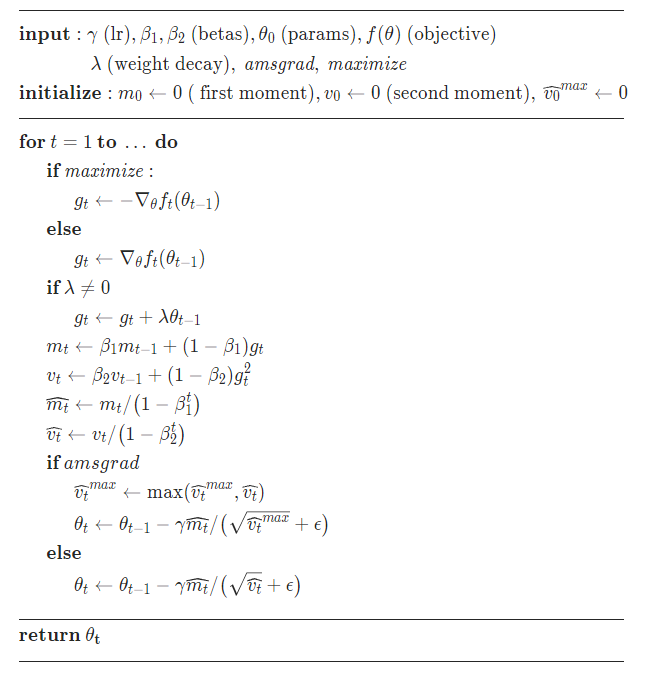
【深度学习中常见的优化器总结】SGD+Adagrad+RMSprop+Adam优化算法总结及代码实现
文章目录 一、SGD,随机梯度下降1.1、算法详解1)MBSGD(Mini-batch Stochastic Gradient Descent)2)动量法:momentum3)NAG(Nesterov accelerated gradient)4)权重衰减项(we…...

山东大学软件学院考试回忆——大二上
文章目录 学习科目整体回忆上课考试回忆Web技术大学物理概率与统计计算机组织与结构离散数学(2)数据结构(双语) 学习科目 Web技术大学物理概率与统计计算机组织与结构离散数学(2)(双语…...

【Express.js】异常分类和日志分级
异常分类和日志分级 第一章已经介绍过全局的异常处理了,但之前的做法过于简单,一股脑的捕获并返回。这一节我们将对异常进行细致的分类,并且日志也做标准化的分级。 准备工作 一个基础的 evp-express 项目 NodeJS Error 先了解一下 Node…...
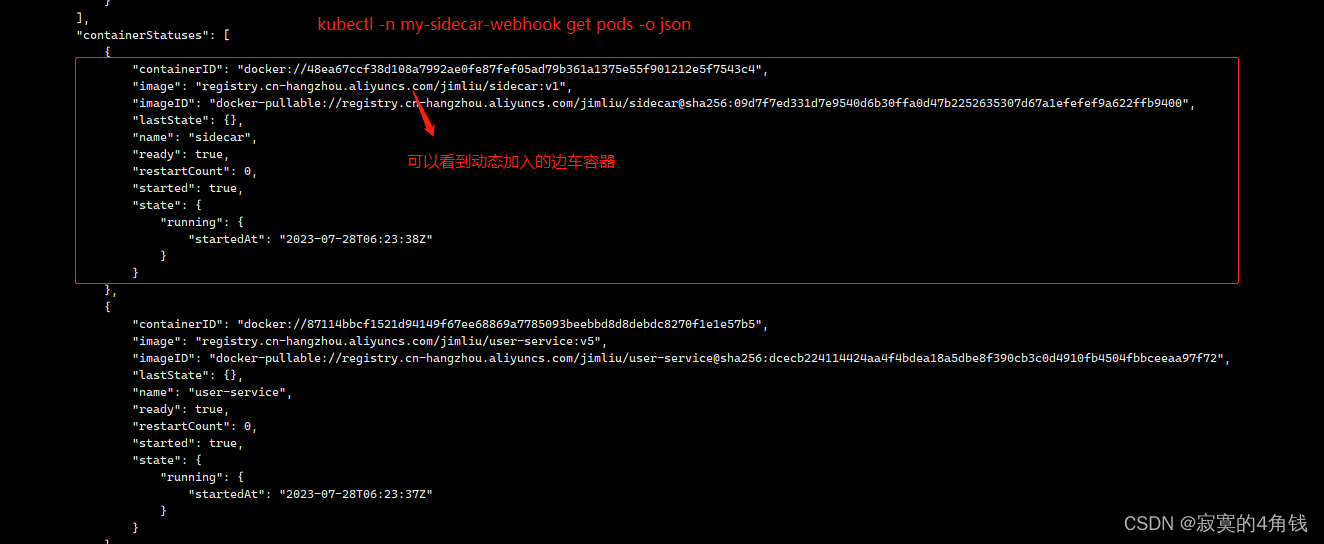
k8s webhook实例,java springboot程序实现 对Pod创建请求添加边车容器 ,模拟istio实现日志文件清理
k8s webhook实例,java springboot程序实现 对Pod创建请求添加边车容器 ,模拟istio实现日志文件清理 大纲 背景与原理实现流程开发部署my-docker-demo-sp-user服务模拟业务项目开发部署my-sidecar服务模拟边车程序开发部署服务my-docker-demo-k8s-opera…...

关于electron的问题汇总
1. electron-builder打包慢出错的问题 由于网络原因,在进行builder打包时,可能会等很长时间,直到最后还是以失败告终。 如果是第一次进行builder打包,会去下载winCodeSign、nsis、nsis-resources,往往都是第一个就卡住…...
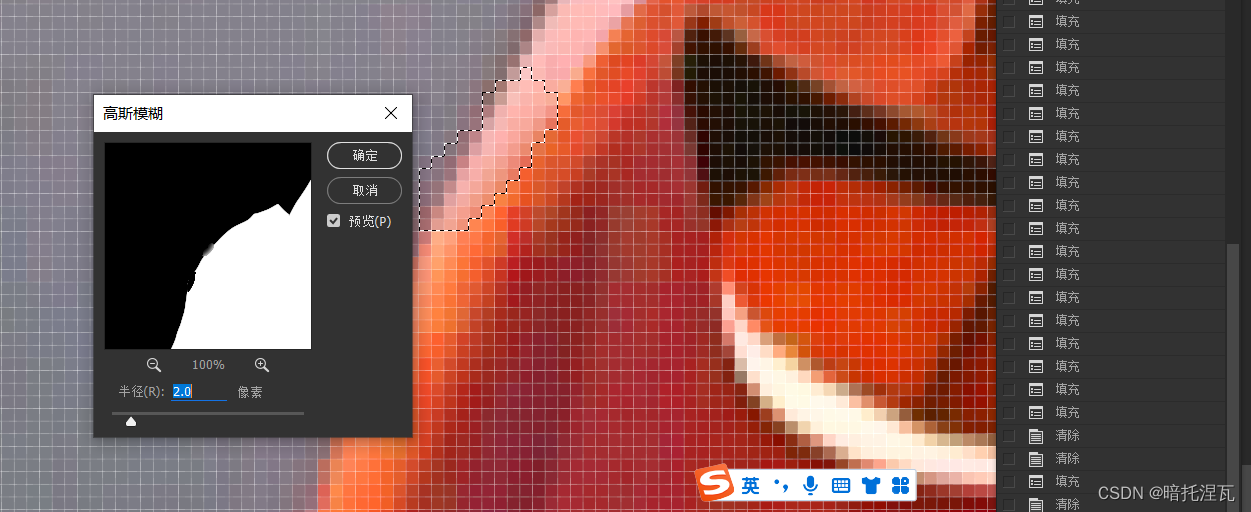
ps 给衣服换色
可以通过色相饱和度来改变颜色 但如果要加强对比 可以通过色阶或曲线来调整 针对整体 调整图层-色相/饱和度 着色 给整个画面上色 选区-遮罩-取出来 然后调整图层-色相/饱和度也可以 或者以有图层-色相饱和度后 选区 按ctrli使其遮罩 同时按alt鼠标左键单机 ctrli反相…...

AI人工智能未来在哪里?2023年新兴产业人工智能有哪些就业前景?
AI人工智能未来在哪里?2023年新兴产业人工智能有哪些就业前景? 随着科技的不断发展,人工智能技术也在不断地进步。在数字化时代,人工智能技术已经渗透到了我们生活的各个方面。2023年为止中国产业80%已经实现半自动化,…...
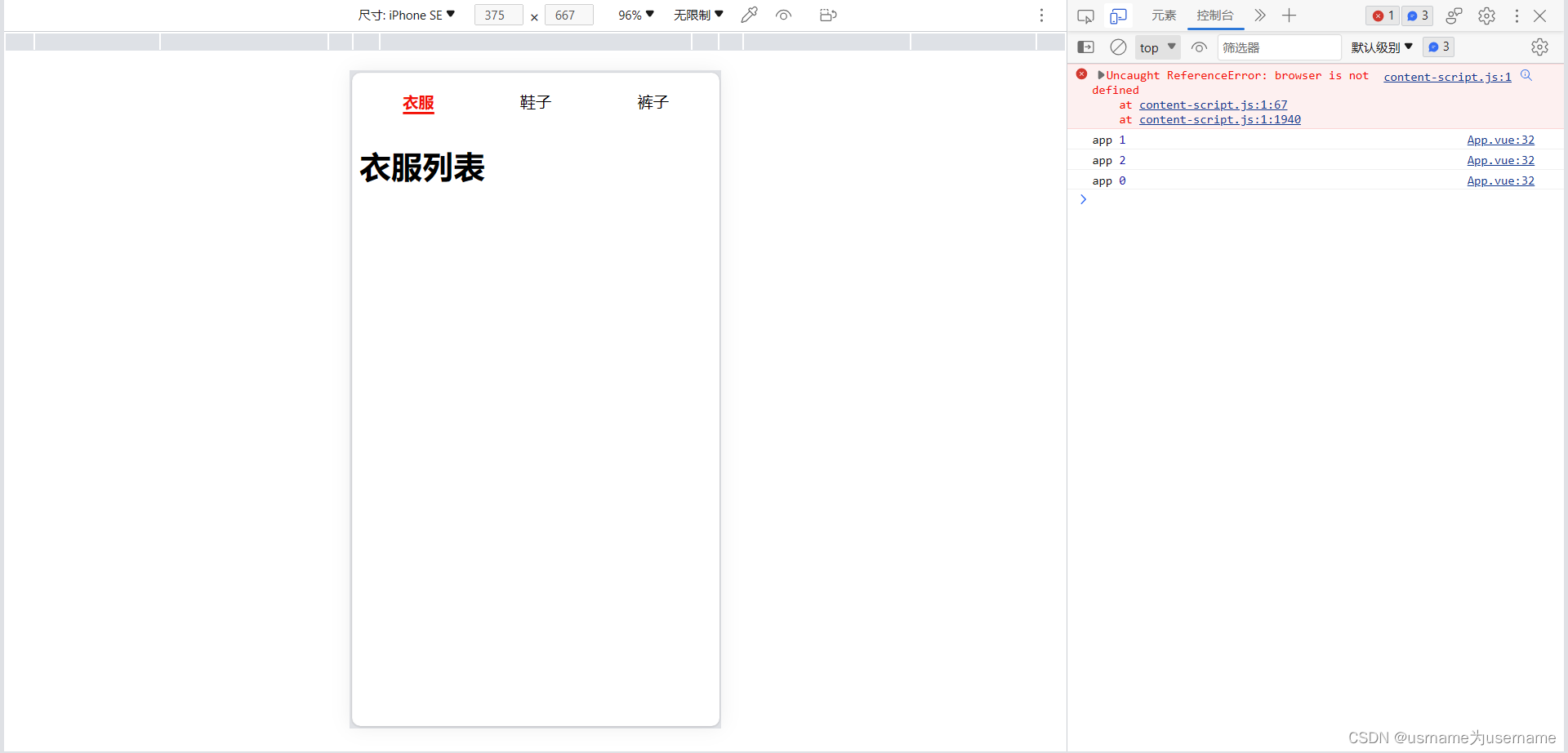
组件间通信案例练习
1.实现父传子 App.vue <template><div class"app"><tab-control :titles["衣服","鞋子","裤子"]></tab-control><tab-control :titles["流行","最新","优选","数码&q…...

【matlab】机器人工具箱快速上手-正运动学仿真(代码直接复制可用)
安装好机器人工具箱,代码复制可用,按需修改参数 1.建模 %%%%%%%%SCARA机器人仿真模型 l[0.457 0.325]; L(1) Link(d,0,a,l(1),alpha,0,standard,qlim,[-130 130]*pi/180);%连杆1 L(2)Link(d,0,a,l(2),alpha,pi,standard,qlim,[-145 145]*pi/180);%连杆…...
论文解读|PF-Net:用于 3D 点云补全的点分形网络
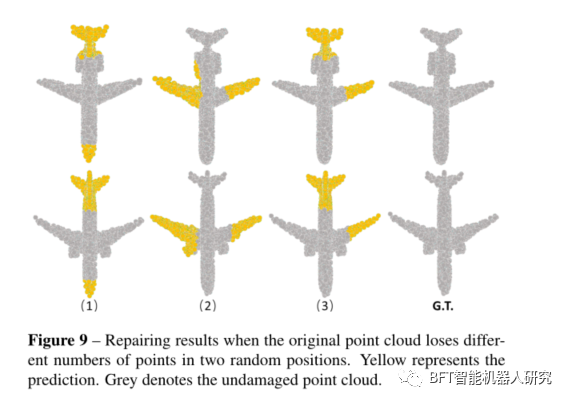
原创 | 文 BFT机器人 01 背景 从激光雷达等设备中获取的点云往往有所缺失(反光、遮挡等),这给点云的后续处理带来了一定的困难,也凸显出点云补全作为点云预处理方法的重要性。 点云补全(Point Cloud Completion&#x…...
网络安全(零基础)自学
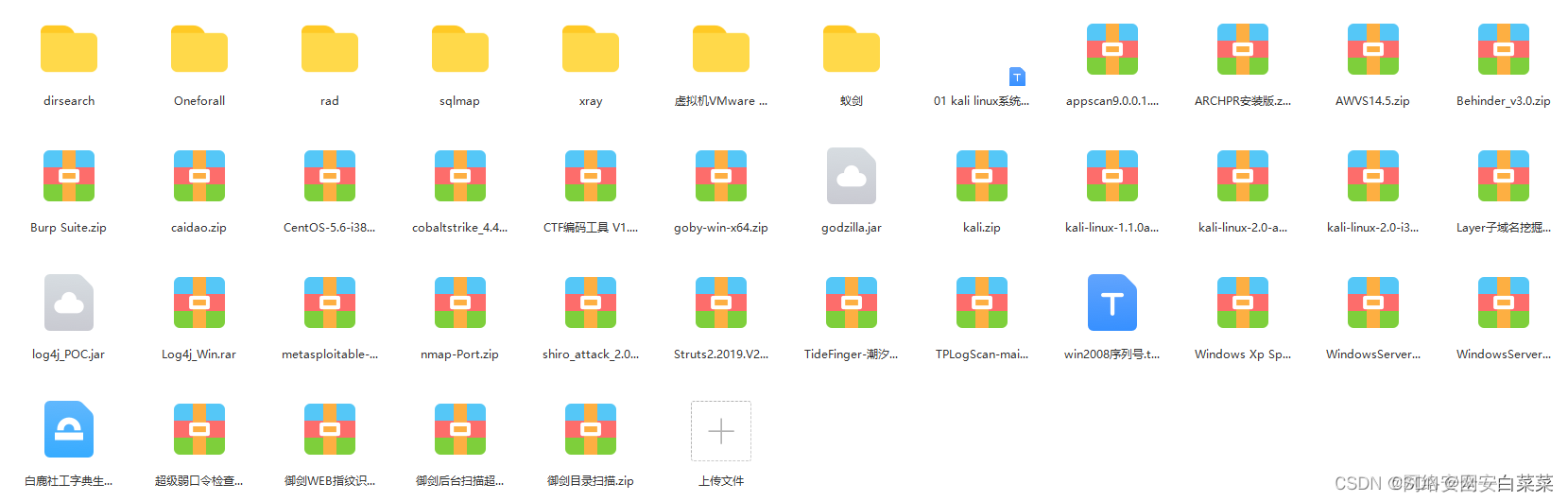
一、网络安全基础知识 1.计算机基础知识 了解了计算机的硬件、软件、操作系统和网络结构等基础知识,可以帮助您更好地理解网络安全的概念和技术。 2.网络基础知识 了解了网络的结构、协议、服务和安全问题,可以帮助您更好地解决网络安全的原理和技术…...

Spring Security 身份验证的基本类/架构
目录 1、SecurityContextHolder 核心类 2、SecurityContext 接口 3、Authentication 用户认证信息接口 4、GrantedAuthority 拥有权限接口 5、AuthenticationManager 身份认证管理器接口 6、ProviderManager 身份认证管理器的实现 7、AuthenticationProvider 特定类型的…...
市值超300亿美金,SaaS独角兽Veeva如何讲好中国故事?
“全球前50的药企,有47家正在使用Veeva。” 提到Veeva Systems(以下简称“Veeva”),可能很多人并不熟悉。但是生命科学业内人士都知道,Veeva是全球头部的行业SaaS服务商。以“为生命科学行业构建行业云”为使命&#x…...
编译内联导致内存泄漏的问题定位修复
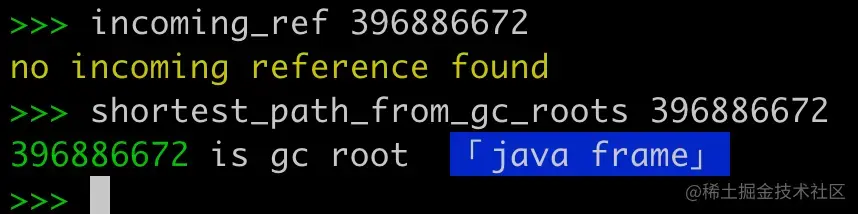
作者:0x264 问题 线上长时间存在一个跟异步 inflate 相关的量级较大的内存泄漏,如下所示: 第一次分析 从内存泄漏粗略看有几个信息: 被泄漏的Activity有很多,所以可能跟某个具体业务的关系不大引用链特别短…...

基于WebSocket实现的后台服务
基于WebSocket实现的后台服务,用于接收客户端的心跳消息,并根据心跳消息来维护客户端连接。 具体实现中,服务启动后会创建一个HttpListener对象,用于监听客户端的WebSocket连接请求。当客户端连接成功后,服务会为每个…...
Go语言中的结构体详解
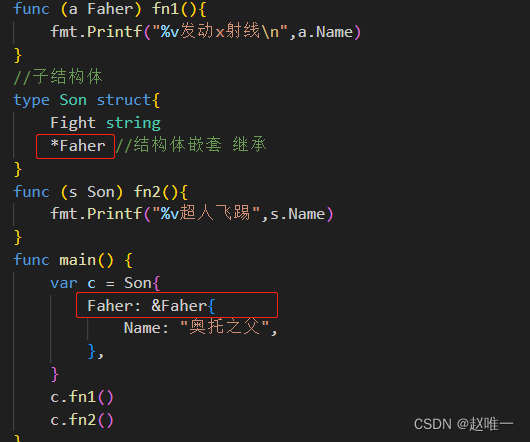
关于 Golang 结构体 Golang 中没有“类”的概念,Golang 中的结构体和其他语言中的类有点相似。和其他面向对 象语言中的类相比,Golang 中的结构体具有更高的扩展性和灵活性。 Golang 中的基础数据类型可以表示一些事物的基本属性,但是当我们…...

IDM开源工具免费使用指南:从安装到高级配置的完整实践
IDM开源工具免费使用指南:从安装到高级配置的完整实践 【免费下载链接】IDM-Activation-Script IDM Activation & Trail Reset Script 项目地址: https://gitcode.com/gh_mirrors/id/IDM-Activation-Script Internet Download Manager(IDM&am…...

Beyond Compare 5 本地密钥生成实用方案:告别试用限制的完整指南
Beyond Compare 5 本地密钥生成实用方案:告别试用限制的完整指南 【免费下载链接】BCompare_Keygen Keygen for BCompare 5 项目地址: https://gitcode.com/gh_mirrors/bc/BCompare_Keygen Beyond Compare 5 作为一款专业的文件对比工具,在试用期…...

HC-SR501人体红外传感器:从参数解析到树莓派实战应用
1. HC-SR501人体红外传感器核心参数解析 第一次接触HC-SR501时,我被它简单的三针脚设计迷惑了——这么小的模块真能检测人体移动?实测后发现这简直是智能家居项目的"火眼金睛"。让我们拆解它的关键参数,你会发现每个调节旋钮背后都…...
)
Syncthing中继服务器搭建全攻略:解决公共服务器速度慢的问题(附详细配置步骤)
Syncthing中继服务器搭建实战:突破公共服务器速度瓶颈 周末团队协作时,Syncthing公共中继服务器的龟速让人抓狂——跨国传输一个设计稿居然要两小时。这促使我探索自建中继服务器的方案,实测将同步速度提升8倍。本文将分享从服务器选型到客户…...

dockerc故障排除终极指南:10个常见错误和解决方案清单
dockerc故障排除终极指南:10个常见错误和解决方案清单 【免费下载链接】dockerc container image to single executable compiler 项目地址: https://gitcode.com/gh_mirrors/do/dockerc dockerc作为一款container image to single executable compiler工具&…...

Qwen3-8B镜像站新手教程:如何选择模型并进行首次提问
Qwen3-8B镜像站新手教程:如何选择模型并进行首次提问 1. 认识Qwen3-8B:你的智能AI助手 Qwen3-8B是Qwen系列最新一代大型语言模型,拥有80亿参数,在推理能力、指令执行和多语言支持方面表现出色。这个模型特别适合个人开发者和小型…...

异构计算与边缘协同:基于 ARM/X86 的企业级 AI 视频中台架构设计
引言:算力碎片化时代的“异构”挑战 在 AI 落地安防的深水区,架构师面临的最大挑战不再是算法模型的精度,而是算力底座的碎片化。项目现场往往呈现出复杂的“万国牌”局面:总部机房可能部署着 NVIDIA A100 的 x86 服务器用于离线训…...

从播放卡顿到流媒体优化:深入MP4的stbl盒子,理解视频流畅播放的关键
从播放卡顿到流媒体优化:深入MP4的stbl盒子,理解视频流畅播放的关键 当你在深夜调试一个在线视频播放器,发现用户总是抱怨卡顿和拖拽不准时,是否曾思考过问题可能隐藏在MP4文件最核心的stbl盒子中?作为流媒体开发者&am…...

如何免费构建个人游戏串流服务器:Sunshine开源方案完整指南
如何免费构建个人游戏串流服务器:Sunshine开源方案完整指南 【免费下载链接】Sunshine Self-hosted game stream host for Moonlight. 项目地址: https://gitcode.com/GitHub_Trending/su/Sunshine Sunshine是一款开源的自托管游戏串流服务器,让您…...

March7thAssistant:崩坏:星穹铁道企业级自动化解决方案
March7thAssistant:崩坏:星穹铁道企业级自动化解决方案 【免费下载链接】March7thAssistant 崩坏:星穹铁道全自动 三月七小助手 项目地址: https://gitcode.com/gh_mirrors/ma/March7thAssistant 【核心价值定位】游戏工作室效率倍增引…...